MBP7-2 - Baby monitor MOTOROLA - Free user manual and instructions
Find the device manual for free MBP7-2 MOTOROLA in PDF.


| Product Type | Video Baby Monitor |
| Brand | Motorola |
| Model | MBP7-2 |
| Category | Baby Monitor |
| Screen Size | 2.8-inch LCD |
| Video Resolution | QVGA (320x240) |
| Night Vision | Infrared LEDs up to 15 feet |
| Audio | Two-way talk-back |
| Temperature Sensor | Yes, with alert |
| Lullabies | 5 pre-installed lullabies |
| Range | Up to 1000 feet (open air) |
| Power Supply | AC adapter (5V DC, 1A) for parent unit and camera |
| Battery Life (Parent Unit) | Up to 5 hours (rechargeable) |
| Camera Dimensions | 3.1 x 3.7 x 4.9 inches |
| Parent Unit Dimensions | 5.1 x 3.0 x 1.5 inches |
| Weight (Camera) | 6.7 oz (190 g) |
| Weight (Parent Unit) | 7.4 oz (210 g) |
| Cleaning | Wipe with a dry, soft cloth; do not use liquids |
| Safety | Keep cords out of reach of baby; use only provided adapters |
| Spare Parts & Repairability | Contact Motorola support; battery and adapters available |
Frequently Asked Questions - MBP7-2 MOTOROLA
User questions about MBP7-2 MOTOROLA
0 question about this device. Answer the ones you know or ask your own.
Ask a new question about this device
Download the instructions for your Baby monitor in PDF format for free! Find your manual MBP7-2 - MOTOROLA and take your electronic device back in hand. On this page are published all the documents necessary for the use of your device. MBP7-2 by MOTOROLA.
USER MANUAL MBP7-2 MOTOROLA
natural_image
Illustration of a smart speaker with sound waves and control buttons (no text or symbols)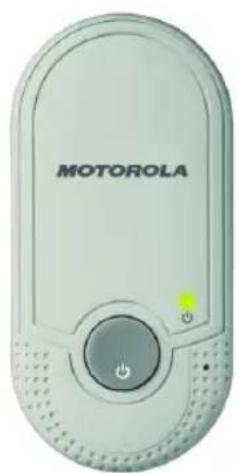
natural_image
Front view of a motorola device with control buttons and indicator lights (no readable text or symbols beyond branding)
MOTOROLA
User's Guide
MBP7, MBP7/2
Baby Monitor
The features described in this User's Guide are subject to modifications without prior notice.
Welcome...
to your new Motorola Baby Monitor!
Thank you for purchasing the MBP7, MBP7/2. Now you can monitor the sound of your baby from another room.
Please retain your original dated sales receipt for your records. For warranty service of your Motorola product, you will need to provide a copy of your dated sales receipt to confirm warranty status. Registration is not required for warranty coverage.
For product-related questions, please call:
US and Canada 1-888-331-3383
On the Web: www.motorola.com
This User's Guide provides you with all the information you need to get the most from your product.
Before you can use the Baby Monitor, please read the Safety Instructions on page 6 prior to installation.
Got everything?
MBP7:
- 1 x Parent unit
- 1 x Baby unit
MBP7/2:
- 2 x Parent units
- 1 x Baby unit
Overview of your Parent unit
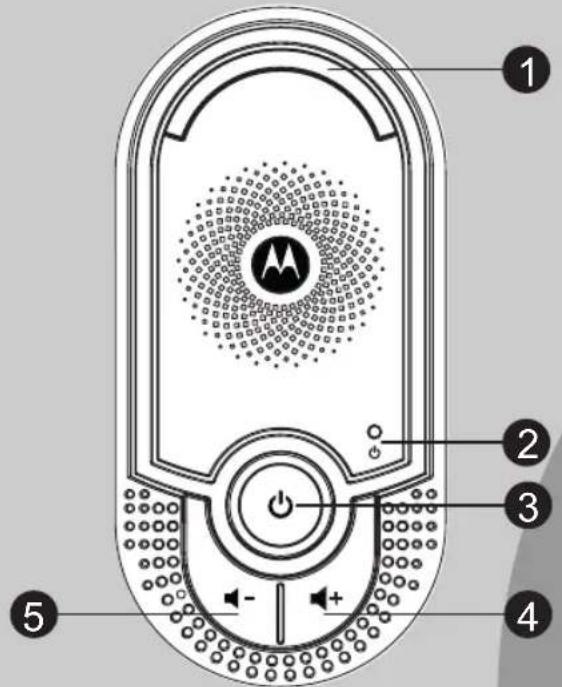
1 Sound Level Indicators
1 GREEN and 1 RED LEDs indicate the audio level being picked up by the microphone of the baby unit. The more LEDs that light up, the louder the sound. If no LED lights up, the sound level in the baby's room is below the threshold for the parent unit.
2 Link Indicator
On when the parent unit is powered on and linked to the baby unit.
Flashes when the parent unit is out of range of the baby unit.
3 P o ♦ e r
Press and hold to power on/off the parent unit.
4 Volume + ▶+
Press to increase the speaker volume.
5 V o l -m e -
Press to decrease the speaker volume.
Overview of your Baby unit
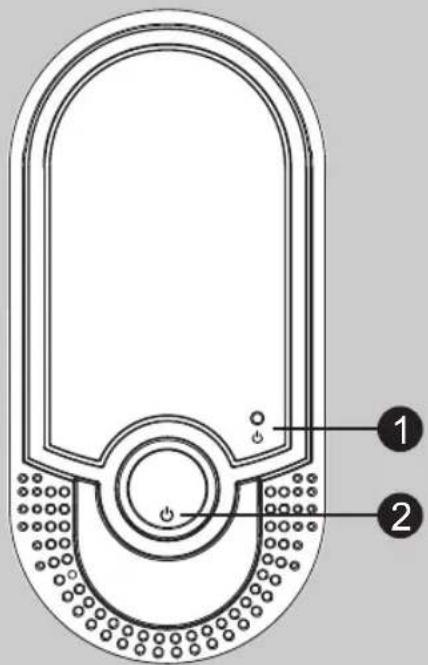
1 Power Indicator
On when the baby unit is switched on.
2 P o e r
Press and hold to power on/off the baby unit.
Important guidelines for installing your Baby Monitor
• To use your baby unit and parent unit together, you must be able to establish a radio link between them, and the range will be affected by environmental conditions.
- Any large metal object, like a refrigerator, a mirror, a filing cabinet, metallic doors or reinforced concrete, between the baby and parent unit may block the radio signal.
- The signal strength may also be reduced by other solid structures, like walls, or by radio or electrical equipment, such as TVs, computers, cordless or mobile phones, fluorescent lights or dimmer switches.
- Use of other wireless products, such as wireless networks, Bluetooth systems or microwave ovens may cause interference with this product, so keep the baby monitor away from these types of products, or turn them off if they appear to be causing interference.
- If the signal is poor, try moving the parent and/or the baby unit to different positions in the rooms.
- It is recommended to place the baby unit about 3 feet from the Crib to ensure sound can be received and heard.
- It is essential to ensure sufficient clear space around the baby unit.
- SAFETY INSTRUCTIONS ......6
- GETTING STARTED....7
- USING YOUR BABY MONITOR....7
3.1 Power on/off the parent unit....7
3.2 Power on/off the baby unit 7
3.3 Adjust speaker volume......8
-
DISPOSAL OF THE DEVICE (ENVIRONMENT)......8
-
CLEANING....9
- TROUBLESHOOTING .....9
- GENERAL INFORMATION......10
- TECHNICAL SPECIFICATIONS......14

MOTOROLA
1. SAFETY INSTRUCTIONS

Presence of un-insulated “dangerous voltage” within the product’s enclosure that may be of sufficient magnitude to constitute a risk of electric shock to persons.

WARNING:
Presence of important operating and maintenance (servicing) instructions in the literature accompanying the appliance.
This baby monitor is compliant with all relevant standards regarding electromagnetic fields and is, when handled as described in the User's Guide, safe to use. Therefore, always read the instructions in this User's Guide carefully before using the device.
- The socket outlet shall be installed near the equipment and shall be easily accessible.
- Determine a location for the baby monitor that will provide the best audio reception of your baby in his crib.
- NEVER place the baby monitor within the crib.
- Adult assembly is required. Keep small parts away from children when assembling.
-
This product is not a toy. Do not allow children to play with it.
-
This baby monitor is not a substitute for responsible adult supervision.
- Keep this User's Guide for future reference.
- Do not cover the baby monitor with a towel or blanket.
- Test this monitor and all its functions so that you are familiar with it prior to actual use.
- Do not use the baby monitor near water.
- Do not install the baby monitor near a heat source.
CAUTION
In order to reduce the risk of fire or electrical shock, do not expose the device to water or humidity. Never disassemble the device. Opening the casing is dangerous and will invalidate the warranty.
The electrical plug is used to disconnect the device and it should remain readily operable during use. In order to disconnect the apparatus from power completely, the outlet plug should be disconnected from the electrical outlet completely.
2. GETTING STARTED
Baby monitor power supply
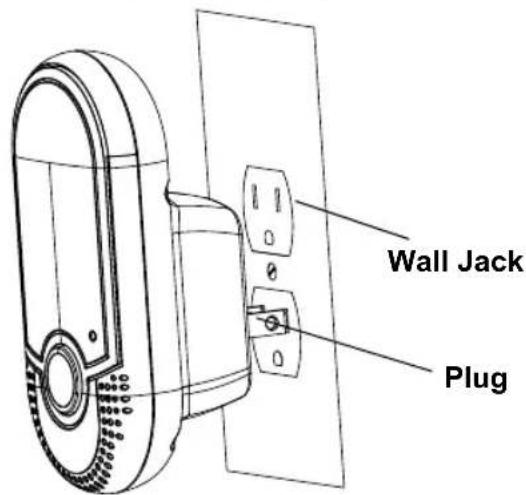
- Choose a proper location with easy access to a power outlet.
- Plug the baby unit into the power outlet in your baby's room. Ensure sufficient clearance is given for it to detect sound and place it not more than 3 feet away from the baby's crib.
- Plug in the parent unit where you want to monitor your baby.
3. USING YOUR BABY MONITOR
Please read these instructions carefully, and be aware that this baby monitor is only intended as an aid. It is not a substitute for responsible parental supervision.
3.1 Power on/off the parent unit
- When the parent unit is off, press and hold ⏻ until the Link Indicator is on. The parent unit is now powered on and will search for and link itself to the baby unit.
- When the parent unit is on, press and hold ⏻ until the Link Indicator turns off. The parent unit is now powered off.
3.2 Power on/off the baby unit
When the baby unit is off, press and hold ⏻ until the Power Indicator is on. The baby unit is now powered on.
When the baby unit is on, press and hold ⏻ until the Power Indicator turns off. The baby unit is now powered off.
NOTE
Do not place the parent and baby units too close together or you may hear a high pitched noise. This is audio feedback, not a defect in the unit. The units are designed to be operated at some distance apart, e.g. in separate rooms.

MOTOROLA
3.3 Adjust speaker volume
There are 6 volume levels on the parent unit, including volume off.
Press + to increase or - to decrease the volume of the parent unit respectively. The sound level LEDs will light up while adjusting the volume, to indicate the set level from 0 (off), 1 (quiet) to 5 (loud).
4. DISPOSAL OF THE DEVICE (ENVIRONMENT)
At the end of the product lifecycle, you should not dispose of this product with normal household waste. Take this product to a collection point for the recycling of electrical and electronic equipment. The symbol on the product, User's Guide and/or box indicates this.
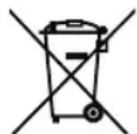
Some of the product materials can be re-used if you take them to a recycling point. By reusing some parts or raw materials from used products you make an important contribution to the protection of the environment.
Please contact your local authorities in case you need more information on the collection points in your area.
5. CLEANING
Clean your MBP7, MBP7/2 with a slightly damp cloth or with an anti-static cloth. Never use cleaning agents or abrasive solvents.
Cleaning and care
- Do not clean any part of the product with thinners or other solvents and chemicals - this may cause permanent damage to the product which is not covered by the warranty.
- Keep your MBP7, MBP7/2 away from hot, humid areas or strong sunlight, and don't let it get wet.
- Every effort has been made to ensure high standards of reliability for your MBP7, MBP7/2. However, if something does go wrong, please do not try to repair it yourself - contact Customer Service for assistance.
6. TROUBLESHOOTING
Link light on the parent unit does not come on
- Check whether the parent unit is powered on.
Link light on the parent unit flashes
- The parent unit and the baby unit may be out of range with each other. Reduce the distance between the units, but not closer than 5 feet.
- The baby unit may be switched off. Press and hold the ⏻ key on the baby unit to switch on the baby unit.
The parent unit beeps
- This indicates a lost connection with the baby unit. Reduce the distance between the parent unit and the baby unit, but not closer than 5 feet.
- The baby unit may be switched off. Press and hold the ⏻ key on the baby unit to switch on the baby unit.

MOTOROLA
Cannot hear sound or baby cry from the parent unit
- The volume level in the parent unit may be set too low. Increase the volume level of the parent unit. Refer to section 3.3 for volume level settings.
- The parent unit and the baby unit may be out of range with each other. Reduce the distance between the units, but not closer than 5 feet.
The baby monitor system produces a high-pitched noise
- The parent unit and the baby unit are too close to each other. Make sure the parent unit and baby unit are at least 5 feet away from each other.
- The speaker volume of the parent unit maybe set too high. Decrease the volume of the parent unit.
7. GENERAL INFORMATION
If your product is not working properly...
- Read this User's Guide.
- Visit our website: www.motorola.com
- Contact Customer Service at: US and Canada 1-888-331-3383
Consumer Products and Accessories Limited Warranty ("Warranty")
Thank you for purchasing this Motorola branded product manufactured under license by Binatone Electronics International LTD ("BINATONE")
What Does this Warranty Cover?
Subject to the exclusions contained below, BINATONE warrants that this Motorola branded product ("Product") or certified accessory ("Accessory") sold for use with this product that it manufactured to be free from defects in materials and workmanship under normal consumer usage for the period outlined below. This Warranty is your exclusive warranty and is not transferable.
Who is covered?
This Warranty extends only to the first consumer purchaser, and is not transferable.
What will BINATONE do?
BINATONE or its authorized distributor at its option and within a commercially reasonable time, will at no charge repair or replace any Products or Accessories that does not conform to this Warranty. We may use functionally equivalent reconditioned/ refurbished/ pre-owned or new Products, Accessories or parts.
What Other Limitations Are There?
ANY IMPLIED WARRANTIES, INCLUDING WITHOUT LIMITATION THE IMPLIED WARRANTIES OF MERCHANTABILITY AND FITNESS FOR A PARTICULAR PURPOSE, SHALL BE LIMITED TO THE DURATION OF THIS LIMITED WARRANTY, OTHERWISE THE REPAIR OR REPLACEMENT PROVIDED UNDER THIS EXPRESS LIMITED WARRANTY IS THE EXCLUSIVE REMEDY OF THE CONSUMER, AND IS PROVIDED IN LIEU OF ALL OTHER WARRANTIES, EXPRESS OR IMPLIED. IN NO EVENT SHALL MOTOROLA OR BINATONE BE LIABLE, WHETHER IN CONTRACT OR TORT (INCLUDING NEGLIGENCE) FOR DAMAGES IN EXCESS OF THE PURCHASE PRICE OF THE PRODUCT OR ACCESSORY, OR FOR ANY INDIRECT, INCIDENTAL, SPECIAL OR CONSEQUENTIAL DAMAGES OF ANY KIND, OR LOSS OF REVENUE OR PROFITS, LOSS OF BUSINESS, LOSS OF INFORMATION OR OTHER
FINANCIAL LOSS ARISING OUT OF OR IN CONNECTION WITH THE ABILITY OR INABILITY TO USE THE PRODUCTS OR ACCESSORIES TO THE FULL EXTENT THESE DAMAGES MAY BE DISCLAIMED BY LAW.
Some jurisdictions do not allow the limitation or exclusion of incidental or consequential damages, or limitation on the length of an implied warranty, so the above limitations or exclusions may not apply to you. This Warranty gives you specific legal rights, and you may also have other rights that vary from one jurisdiction to another.
| Products Covered Length of Coverage | |
| Consumer Products | One (1) year from the date of the products original purchase by the first consumer purchaser of the product. |
| Consumer Accessories | Ninety (90) days from the date of the accessories original purchase by the first consumer purchaser of the product. |
| Consumer Products and Accessories that are Repaired or Replaced | The balance of the original warranty or for ninety (90) days from the date returned to the consumer, whichever is longer. |

MOTOROLA
Exclusions
Normal Wear and Tear. Periodic maintenance, repair and replacement of parts due to normal wear and tear are excluded from coverage.
Batteries. Only batteries whose fully charged capacity falls below 80% of their rated capacity and batteries that leak are covered by this Warranty.
Abuse & Misuse. Defects or damage that result from: (a) improper operation, storage, misuse or abuse, accident or neglect, such as physical damage (cracks, scratches, etc.) to the surface of the product resulting from misuse; (b) contact with liquid, water, rain, extreme humidity or heavy perspiration, sand, dirt or the like, extreme heat, or food; (c) use of the Products or Accessories for commercial purposes or subjecting the Product or Accessory to abnormal usage or conditions; or (d) other acts which are not the fault of MOTOROLA or BINATONE, are excluded from coverage.
Use of Non-Motorola branded Products and
Accessories. Defects or damage that result from the use of Non-Motorola branded or certified Products or Accessories or other peripheral equipment are excluded from coverage.
Unauthorized Service or Modification. Defects or damages resulting from service, testing, adjustment, installation, maintenance, alteration, or modification in any way by someone other than MOTOROLA, BINATONE or its authorized service centers, are excluded from coverage.
Altered Products. Products or Accessories with (a) serial numbers or date tags that have been removed, altered or obliterated; (b) broken seals or that show evidence of tampering; (c) mismatched board serial numbers; or (d) nonconforming or non-Motorola branded housings, or parts, are excluded from coverage.
Communication Services. Defects, damages, or the failure of Products or Accessories due to any communication service or signal you may subscribe to or use with the Products or Accessories is excluded from coverage.
How to Obtain Warranty Service or Other Information?
To obtain service or information, please call:
US and Canada 1-888-331-3383
You will receive instructions on how to ship the Products or Accessories at your expense and risk, to a BINATONE Authorized Repair Center. To obtain service, you must
include: (a) the Product or Accessory; (b) the original proof of purchase (receipt) which includes the date, place and seller of the Product; (c) if a warranty card was included in your box, a completed warranty card showing the serial number of the Product; (d) a written description of the problem; and, most importantly; (e) your address and telephone number.
These terms and conditions constitute the complete warranty agreement between you and BINATONE regarding the Products or Accessories purchased by you, and supersede any prior agreement or representations, including representations made in any literature publications or promotional materials issued by BINATONE or representations made by any agent employee or staff of BINATONE, that may have been made in connection with the said purchase.
FCC, ACTA and Industry Canada (IC) Regulations
Warning: Changes or modifications to this equipment not expressly approved by the party responsible for compliance could void the user's authority to operate the equipment.
NOTE: This equipment has been tested and found to comply with the limits for a Class B digital device, pursuant to Part 15 of the FCC Rules. These limits are
designed to provide reasonable protection against harmful interference in a residential installation. This equipment generates, uses and can radiate radio frequency energy and, if not installed and used in accordance with the instructions, may cause harmful interference to radio communications.
However, there is no guarantee that interference will not occur in a particular installation. If this equipment does cause harmful interference to radio or television reception, which can be determined by turning the equipment off and on, the user is encouraged to try to correct the interference by one or more of the following measures:
- Reorient or relocate the receiving antenna.
- Increase the separation between the equipment and receiver.
- Connect the equipment into an outlet on a circuit different from that to which the receiver is connected.
- Consult the dealer or an experienced radio/TV technician for help.
This device complies with part 15 of the FCC Rules. Operation is subject to the following two conditions: (1) This device may not cause harmful interference, and (2) this device must accept any interference received, including interference that may cause undesired operation.

MOTOROLA
This device complies with Industry Canada licence-exempt RSS standard(s). Operation is subject to the following two conditions: (1) this device may not cause interference, and (2) this device must accept any interference, including interference that may cause undesired operation of the device.
This Class B digital apparatus complies with Canadian ICES-003
Caution: To maintain the compliance with the FCC's RF exposure guideline, place the baby unit at least 20 cm from nearby persons.
- TECHNICAL SPECIFICATIONS
| RF frequency band 1921.536 MHz - 1928.448 MHz | |
| Channels 5 | |
| Operating temperature | 5°C - 45°C |
| Baby unit voltage (AC voltage, 50/60Hz) | 100 - 120V |
| Baby unit voltage (Adapter output) | 6V DC, 450mA |
| Parent unit voltage (AC voltage, 50/60Hz) | 100 - 120V |
| Parent unit voltage (Adapter output) | 6V DC, 450mA |

MOTOROLA
Manufactured, distributed or sold by Binatone Electronics International LTD., official licensee for this product. MOTOROLA and the Stylized M Logo are trademarks or registered trademarks of Motorola Trademark Holdings, LLC. and are used under license. All other trademarks are the property of their respective owners.
© 2012 Motorola Mobility LLC. All rights reserved.

Version 1.0
Printed in China