
EASE34 - Baby monitor MOTOROLA - Free user manual and instructions
Find the device manual for free EASE34 MOTOROLA in PDF.


| Product Type | Baby Monitor |
| Brand | Motorola |
| Model | EASE34 |
| Frequency Band | 2.4 GHz (FHSS) |
| Range (Line of Sight) | Up to 300 meters |
| Parent Unit Display | 2.4-inch Color LCD |
| Camera Resolution | 720p (HD) |
| Night Vision | Yes (infrared LEDs) |
| Two-Way Talk | Yes |
| Temperature Sensor | Yes (baby unit) |
| Vibration Mode | Yes (parent unit) |
| Sound Activation (VOX) | Yes |
| Lullabies | Built-in |
| Power Source (Parent Unit) | Rechargeable Li-ion battery (1000 mAh) + AC adapter |
| Power Source (Baby Unit) | AC adapter only (battery backup optional) |
| Battery Life (Parent Unit) | Up to 6 hours (continuous use) |
| Dimensions (Parent Unit) | 120 x 70 x 25 mm |
| Dimensions (Baby Unit) | 90 x 75 x 80 mm |
| Weight (Parent Unit) | 150 g |
| Weight (Baby Unit) | 200 g |
| Cleaning Instructions | Wipe with a soft, dry cloth. Do not use liquids or solvents. |
| Security | Digital encryption (FHSS) to prevent eavesdropping |
| Spare Parts Availability | Rechargeable battery and AC adapter available separately |
Frequently Asked Questions - EASE34 MOTOROLA
User questions about EASE34 MOTOROLA
0 question about this device. Answer the ones you know or ask your own.
Ask a new question about this device
Download the instructions for your Baby monitor in PDF format for free! Find your manual EASE34 - MOTOROLA and take your electronic device back in hand. On this page are published all the documents necessary for the use of your device. EASE34 by MOTOROLA.
USER MANUAL EASE34 MOTOROLA
(1) explanation of all features and instructions, please for download from www.motoroplastre.com).
- Setting up your Digital Video Baby Monitor
A. Connecting the Power Supply for the Baby Unit

- Insert the DC plug of the power adapter into the DC socket on the back of the Baby Unit. - Connect the other end of the power adapter to a suitable power socket. - The baby unit turns on and the power indicator lights in Blue colour. NOTE Only use the supplied power adapter
(DCSV/60Gn4).
WARNING:
STRANGULATION HAZARD. Children have STRANGLED in cords. Keep this cord out of the reach of children (more than 1 metre away). Never use extension cords with AC Adapters. Only use the AC Adapters provided.
B. Connecting the Power Supply of the Parent Unit.
A rechargeable battery (Lithium ion battery 1200mAh) inside the Parent Unit allows you to move it without losing the link and picture from the Baby Unit. We recommend charging the for at least 16 hours before first use, and when the Parent Unit indicates the battery is low.
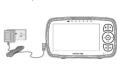
Connect the small plug of the power adapter to the parent unit and the other end to the power socket. Only use the enclosed adapter (5VDC/600mA). Press and hold the button to turn the Parent unit on, the Parent unit and Baby unit are automatically linked and ready to use.
NOTE
When the Baby and Parent Units are both turned on and within range, the Parent Unit should show a color image from the Baby Unit camera, but if the room is dark, the image will be in black and white, with an ⚙ icon showing, due to the infra-red illumination by the Baby Unit.
C. Desktop Stand of the Parent Unit
• The parent unit comes with a desktop stand attached to the back of the parent unit.
• To place the parent unit on a desk, simply pull out the stand, as shown.

NOTE
Place the parare unit on a flat, when surface.
2. Basic operation of the keys
| Parent unit | ||
| ON/OFF button | Press and hold to switch the Parent Unit ON/OFF. | |
| UF/DOWN buttons | Press to select brightness level of Parent UnitPress to adjust menu setting when menu is active. | |
| LEFT/GRIGHT buttons | Press to adjust volume levelPress to access menu options when menu is active. | |
| FNDU button | Press to open menu options or exit the menu. | |
| OK button | Press to confirm a selection. | |
| VIDEO button | Press to turn the LCD screen ON/OFF. | |
| TALK button | Press and hold to talk to your baby. | |
| RESET button | Press and hold with a small pin to reset the unit. | |
| Baby Unit | ||
| RAIR button | Press and hold to pair with the Parent Unit. | |

motorola
MODELLE: EASE34,
[Non-Text]
......
[Non-Text]
......
[Non-Text]
[Non-Text]
[Non-Text]
[Non-Text]
00 00 00 00 00 00 00 00 00 00 00 00 00 00 00 00 00 00 00 00 00 00 00
00 00 00 00 00 00 00 00 00 00 00 00 00 00 00 00 00 00 00 00 00 00 00
00 00 00 00 00 00 00 00 00 00 00 00 00 00 00 00 00 00 00 00 00 00 00
00 00 00 00 00 00 00 00 00 00 00 00 00 00 00 00 00 00 00 00 00 00 00
00 00 00 00 00 00 00 00 00 00 00 00 00 00 00 00 00 00 00 00 00 00 00
00 00 00 00 00 00 00 00 00 00 00 00 00 00 00 00 00 00 00 00 00 00 00
00 00 00 00 00 00 00 00 00 00 00 00 00 00 00 00 00 00 00 00 00 00 00
00 00 00 00 00 00 00 00 00 00 00 00 00 00 00 00 00 00 00 00 00 00 00
00 00 00 00 00 00 00 00 00 00 00 00 00 00 00 00 00 00 00 00 00 00 00
000 000 000 000 000 000 000 000 000 000 000 000 000 000 000 000 000 000
000 000 000 000 000 000 000 000 000 000 000 000 000 000 000 000 000 000
000 000 000 000 000 000 000 000 000 000 000 000 000 000 000 000 000 000
000 000 000 000 000 000 000 000 000 000 000 000 000 000 000 000 000 000
......
......
......
......
......
3. General Information
If your product is not working properly, read this Quick Start Guide or the User's Guide of one of the models listed on page 1.
Contact Customer Service:
+491605 938 802 in Europe Email: motorcycles-mbp@tdm.dk
Consumer Products and Accessories Limited Warranty ("Warranty")
Thank you for purchasing this Motorola branded prod (Binatone Electronics International LTD ("BINATONE")
What Does this Warranty Cover? Subject to the exclusions contained below: SINATONE warrants that this Motorola branded
product ("Product") or certified accessory ("Accessory") sold for use with this product that it may be featured to be free from, delete in metropolitan and independence under normal assumptions.
manufactured to be free from defects in materials and workmanship under normal consumer usage for the period outlined below. This Warranty is your exclusive warranty and is not
THIS WARRANTY GIVES YOU SPECIFIC LEGAL RIGHTS, AND YOU MAY HAVE OTHER RIGHTS THAT HADY BY STATE, PROVINCE OF COUNTRY, FOR CONSUMES WHO ARE COVERED.
THAT VARY BY STATE, PROVINCE OR COUNTRY. FOR CONSUMERS WHO ARE COVERED BY CONSUMER PROTECTION LAWS OR REGULATIONS IN THEIR COUNTRY OF PURCHASE
OR, IF DIFFERENT, THEIR COUNTRY OF RESIDENCE, THE BENEFITS CONFERRED BY THIS LIMITED WARRANTY ARE IN ADDITION TO ALL RIGHTS AND REMEDIES CONVEYED BY SUCH
CONSUMER PROTECTION LAWS AND REGULATIONS. FOR A FULL UNDERSTANDING OF YOUR RIGHTS YOU SHOULD CONSULT THE LAWS OR YOUR COUNTRY, REFERENCE OR STATE
TOUR RIGHT'S TOO SHOULD CONSOFT THE LAWS OF YOUR COUNTRY, PROVINCE OR STATE. Who is covered? The will be a fact that the future is a decision of this
This warranty extends only to 'What will FINATONE do?'
BINATONE or its authorized distributor at its option and within a commercially real will at no share again as services any products as accessories that do not conform
Will at No charge repair or replace any Products or Accessories that do not conform to this Warranty. We may use functionally equivalent reconditioned/ refurbished/pre-owned or new
Products, Accessories or parts
Binabone Electronics International
The Ground Truth image displays a single, solid horizontal line. According to Rule 2 (UNDERSCORE & LINE RULES), this is a stylistic or background line, not a placeholder underscore. Therefore, the OCR result must ignore it and output nothing or only meaningful text. The provided OCR content is "____", which consists of four underscores. This is an incorrect interpretation of the line as a placeholder, violating the rule that stylistic lines must be ignored. The OCR has hallucinated underscores where none should exist based on the GT's visual context. Hence, the OCR result is inconsistent with the Ground Truth.
Binatone Electronics International LTD ("BIN
What Other Limitations Are There?
ANY IMPIED WARRANTIES, INCLUDING WITHOUT LIMITATION THE IMPIED WARRANTIES OF MERCHANTABILITY AND FITNESS FOR A PARTICULAR PURPOSE. SHALL BE LIMITED TO
THE DURATION OF THIS LIMITED WARRANTY, OTHERWISE THE REPAIR OR REPLACEMENT
PROVIDED ORDER THIS EXPRESS LIMITED WARRANTY IS THE EXCLUSIVE REMEDY OF THE CONSUMER, AND IS PROVIDED IN LIEU OF ALL OTHER WARRANTIES, EXPRESS OR IMPLI
IN NO EVENT SHALL MOTOROLA OR BINATONE BE LIABLE, WHETHER IN CONTRACT OR TORT (INCLUDING NOUSINESS) FOR DAMAGES IN EXCESS OR THE PURCHASE PRICE.
TORT INCLUDING INDICENDANCE FOR DAMAGES IN ACCESS OF THE PUBLISH PRICE OF THE PRODUCT OR ACCESSORY, OR FOR ANY INDIRECT, INCIDENTAL, SPECIAL OR
CONSEQUENTIAL DAMAGES OF ANY KIND, OR LOSS OF REVENUE OR PROFITS, LOSS OF BUSINESS, LOSS OF INFORMATION OR OTHER FINANCIAL, LOSS ARISING OUT OF OR IN
CONNECTION WITH THE ABILITY OR INABILITY TO USE THE PRODUCTS OR ACCESSORIES
TO THE FULL EXTENT THESE DAMAGES MAY BE DISCLAIMED BY LAW. Some jurisdictions do not allow the limitation or exclusion of incidental or consequential
damages, or limitation on the length of an implied warranty, so the above limitations or much ways may not apply to you. This Warranty gives you specifically legal rights, and you may
excursions may not apply to you. This warranty gives you specific legal rights, and you may also have other rights that vary from one jurisdiction to another.
Products Covered Length of Coverage
Consumer Products Two (2) years from the date of the products original
-
Consumer Accessories Ninety (90) days from the date of the accessories original purchase by the first consumer purchaser of the product
Consumer Products and Consumer Products and Consumer Products and Consumer Products and Consumer Products and Consumer Products and Consumer Products and Consumer Products and Consumer Products and Consumer Products and Consumer Products and Consumer Products and Consumer Products and Consumer Products and Consumer Products and Consumer Products and Consumer Products and Consumer Products and Consumer Products and Consumer Products and Consumer Products and Consumer Products and Consumer Products and Consumer Products and Consumer Products and Consumer Products and Consumer Products and Consumer Products and Consumer Products and Consumer Products and Consumer Products and Consumer Products and Consumer Products and Consumer Products and ConsumerProducts of the products of the products of the products of the products of the products of the products of the products of the products of the products of the products of the products of the products of the products of the products of the products of the products of the products of the products of the products of the products of the products of the products of the products of the products of the products of the products of the products of the products of the products of the products of the products of the products of the products of the products, respectively. The balance of the original warranty or for Ninety (50)
Accessories that are Repaired or days from the date returned to the consumer, whichever is
Replaced longer.
Exclusions
Normal Wear and Tear. Periodic Maintenance, Repair and Replacement of parts due to normal Wear and tear are excluded from coverage.
(No text)
Abuse & Misuse. Defects or damage that result from: (a) improper operation, storage, misuse or loss, assist on agent, such as physical damage (storage, switches, etc.) to the outcome of
to the product resulting from misuse; (b) contact with liquid, water, rain, extreme humidity or heavy
pensation, sand, dirt or the like, extreme heat, or food; (c) use of the Products or Accessories for commercial purposes or subjecting the Product or Accessory to abnormal usage or conditions; or
(d) other acts which are not the fault of MOTOROLA or BINATONE, are excluded from coverage. Use of MonoMotorola branded Products and Accessories. Defects or storage that result from the
Use of Non-Malaria-branded Products and Accessories; Directs or damage that result from the use of Non-Malaria branded or certified Products or Accessories or other peripheral equipment.
are excluded from coverage. Unauthorized Service or Modification. Defects or damages resulting from service, testing,
adjustment, installation, maintenance, alteration, or modification in any way by someone other than MOTOROL 4. BINATONE, or its authorized service centers, are excluded from coverage.
Altered Products, Products or Accessories with (a) serial numbers or date tags that have
been removed, listened or deliberated; (b) broken tears of that show evidence or tampering; (c) mismatched board serial numbers; or (d) nonconforming or non-Motorola branded housings, or
parts, are excluded from coverage. Communicating Services. Defects, damage, or the failure of Products or Accessories due to any
Central Subtotal Service Services, Maintenance, or the Retail of Products or Accessories due to long communication service or signal you may subscribe to or use with the Products or Accessories is
excluded from coverage. How to Obtain Warranty Service or Other Information?
To obtain service or information, please call: +40005 078 002 in Europe
Email: motorcycle.mbpl@tdm.de
You will receive instructions on how to ship
to a MINATION: Authorized Repair Center. To obtain service, you must include: (a) the Product or Accessory; (b) the original proof of
purchase (receipt) which includes the date, place and seller of the Product; (c) if a warranty card was included in your box, a completed warranty card showing the serial number of the Product.
(d) a written description of the problem; and, most importantly; (e) your address and telephone
number.