
FlexTT5 - Remote trigger POCKETWIZARD - Free user manual and instructions
Find the device manual for free FlexTT5 POCKETWIZARD in PDF.


| Product Type | Remote Trigger (Transceiver) |
| Brand | PocketWizard |
| Model | FlexTT5 |
| Category | Wireless Flash Trigger |
| Compatibility | Nikon CLS/i-TTL cameras and Speedlights |
| Wireless Technology | ControlTL (2.4 GHz) |
| Channels | User-configurable (up to 20 via Utility) |
| Battery Type | 2 x AA (IEC:LR6) |
| Battery Life | Approximately 60 hours (standby) |
| Trigger Delay | 0 seconds (faster than a wire with compatible cameras) |
| Maximum FPS | Up to 12 fps (varies with camera) |
| Operating Temperature | -15°C to 50°C (5°F to 120°F) |
| Storage Temperature | -30°C to 85°C (-22°F to 185°F) |
| Warranty | 2-year limited manufacturer's warranty |
| Mounting | Nikon-style hot shoe with locking ring, 1/4-20 mount on bottom |
| Antenna | Adjustable antenna |
| Ports | Mini-USB (configuration), P1 (remote camera trigger), P2 (remote flash trigger) |
| LED Indicator | Status LED (green/amber/red for battery level) |
| Zone Switch | 3-position (A, B, C) for group assignment |
| Firmware Upgradeable | Yes via PocketWizard Utility |
| Included Accessories | Radio unit only (Lanyard not included) |
Frequently Asked Questions - FlexTT5 POCKETWIZARD
User questions about FlexTT5 POCKETWIZARD
0 question about this device. Answer the ones you know or ask your own.
Ask a new question about this device
Download the instructions for your Remote trigger in PDF format for free! Find your manual FlexTT5 - POCKETWIZARD and take your electronic device back in hand. On this page are published all the documents necessary for the use of your device. FlexTT5 by POCKETWIZARD.
USER MANUAL FlexTT5 POCKETWIZARD
This PocketWizard radio runs on powerful software called ControlTL®. It is pre-set with default settings allowing you to use it right away or it can be configured to your specific needs using the PocketWizard Utility which can be downloaded at:

www.PocketWizard.com/support/downloads.
- UPDATE FIRMWARE: Using the Utility, update all your PocketWizard ControlTL radios to the latest firmware for best functionality.
- Please read Quick Guide thoroughly before operating.
- Visit wiki.PocketWizard.com for complete operating information.
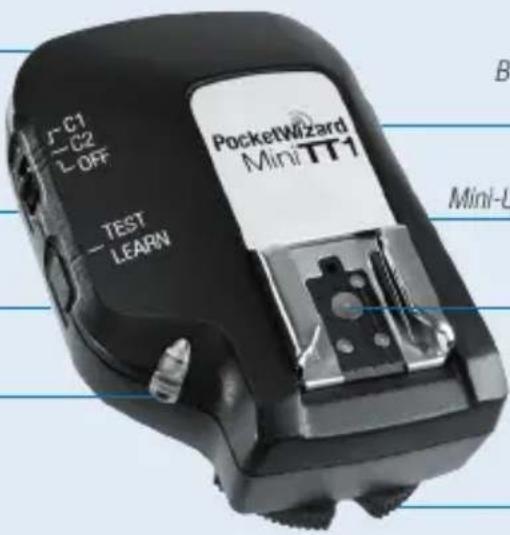
MiniTT1® Transmitter
Internal Antenna
Configuration/Channel ^1
Configuration/Channel 2
Power Off
TEST/LEARN Button
Status LED
text_image
J-C1 C2 L-OFF TEST LEARN PocketWizard MiniTT1 Mini-UBattery Compartment
(on bottom)
Mini-USB Connector (on side)
Nikon-style Hot Shoe
Locking Ring
READ ME FIRST:
- All equipment should be turned OFF when connecting.
• Power on from the top down: flash, then radio, then camera. - If operation is erratic, check batteries first. We recommend using high capacity rechargeable batteries in your Speedlight(s).
- Use the latest firmware for your camera and review all manuals.
- A FlexTT5 may be used as a transmitter instead of the MiniTT1.
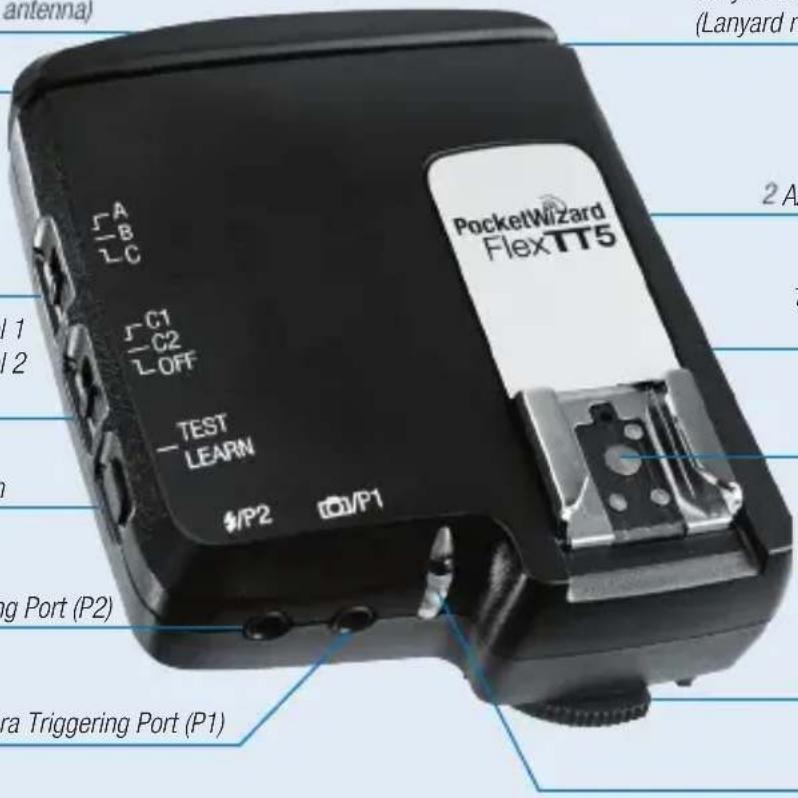
FlexTT5® Transceiver
Mini-USB Connector (behind antenna)
Adjustable Antenna
Zone Switch
Configuration/Channel 1 Configuration/Channel 2 Power Off
TEST/LEARN Button
Remote Flash Triggering Port (P2)
Remote Camera Triggering Port (P1)
text_image
antenna) (Lanyard m 2 A PocketWizard FlexTT5 1 2 TEST LEARN #/P2 ☐/P1 ng Port (P2) ra Triggering Port (P1)Lanyard Loop
(Lanyard not included)
Batteries
2 AA [IEC:LR6]
1/4-20 Mount
(on bottom)
Nikon-style Hot Shoe
Locking Ring
Status LED
- You need a FlexTT5 for each remote Speedlight.
- Set all radios to the same channel.
• Take first shot at 1/125 so system can properly calibrate timing. - Turning VR mode ON or OFF requires a calibration shot.
- For most basic functions, operation is identical to Nikon's CLS / i-TTL system.
Getting Started
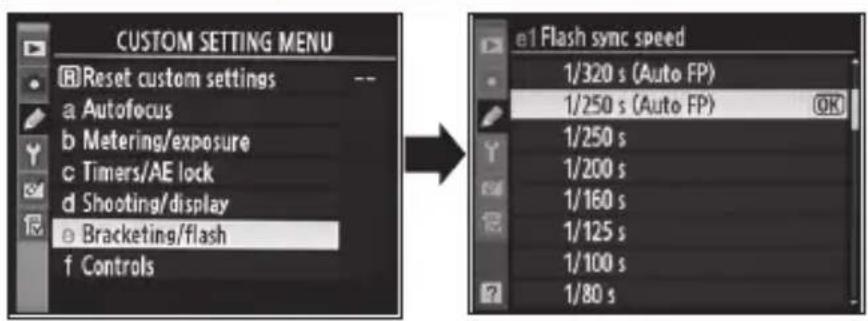
Nikon Camera and Flash Settings
Camera Settings
text_image
CUSTOM SETTING MENU Reset custom settings a Autofocus b Metering/exposure c Timers/AE lock d Shooting/display e Bracketing/flash f Controls e1 Flash sync speed 1/320 s (Auto FP) 1/250 s (Auto FP) 1/250 s 1/200 s 1/160 s 1/125 s 1/100 s 1/80 sSet Custom Setting “e1 Flash sync speed” to “1/250 s (Auto FP)” to enable smooth transitions from standard flash to FP flash mode. Do not use 1/320 s (Auto FP).
VR Lenses: Switching the VR mode of lenses ON or OFF while the MiniTT1 and FlexTT5 are being used may require a "test shot" at 1/125 to recalibrate the system.
Nikon modes not currently supported:
- Mirror Up Mode
- Exposure Delay Mode
- Repeater / RPT Mode
- Flash control using the camera's menus
For more operational information, please go to:
wiki.PocketWizard.com
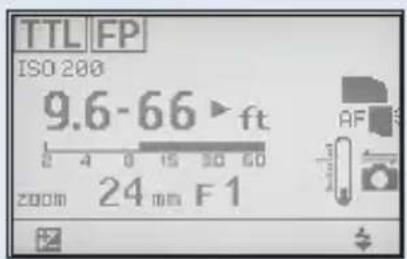
Flash Settings
text_image
TTL FP ISO 200 9.6-66 ft 24 mm F1- Remote flashes must be set to standard TTL and not REMOTE or MASTER.
- The display on remote flashes attached to FlexTT5 radios will not change with camera setting changes.
- SB900: "Illumination Pattern" must be set at "Standard".
See Nikon Manual. - On-camera flash must be set to MASTER to trigger or control remote flashes.
CLS / i-TTL
Basic Wireless CLS / i-TTL
No flash on camera
- Slide MiniTT1 ^® Transmitter or FlexTT5 ^® Transceiver onto camera.
- Slide Speedlight onto remote FlexTT5 Transceiver. Set the Speedlight for standard i-TTL mode (not REMOTE or MASTER). Repeat for each remote Speedlight. All remote i-TTL Speedlights will be treated as one zone of light.
Note: You need a receiving FlexTT5 for each remote Speedlight. - Make sure all your PocketWizard ^® radios are on the same channel and take pictures normally.
This mode is like using Nikon's Commander Mode/Function with the following settings:
- Remote Groups A, B, and C set to TTL
- Flash Output Level Compensation for all groups set to 0.0 Ev
- MASTER or built-in flash set to - - (flash cancelled)
CLS / i-TTL
Advanced Wireless CLS / i-TTL
Flash on camera
- Slide MiniTT1 ^® Transmitter or FlexTT5 ^® Transceiver onto camera.
- Slide Nikon SB-800 or SB-900 Speedlight onto camera mounted MiniTT1 or FlexTT5 radio. Set Speedlight for MASTER = ON. Use controls on MASTER Speedlight to set remote groups/zones. Nikon SU-800 Wireless Speedlight Commander may also be used. Camera menus can not be used.
- Slide Speedlight onto remote FlexTT5 Transceiver. Set Speedlight for standard i-TTL mode (not REMOTE or MASTER). Repeat for each remote Speedlight.
Note: You need a receiving FlexTT5 for each remote Speedlight. - Set Zone Switch (A, B, C) on remote FlexTT5 to zone selection made on-camera MASTER flash. All remote i-TTL Speedlights on the same group/zone will be treated as one zone of light.
- Adjust flash output level compensation using the controls on MASTER Speedlight.
- Make sure all your PocketWizard ^® radios are on the same channel and take pictures normally.
IMPORTANT: You must be in normal i-TTL mode for remotes to operate properly. Never set Nikon Speedlights positioned on remote FlexTT5 radios to REMOTE = ON. This will cause improper operation. Always use Zone Switch (A, B, C) on remote FlexTT5 to set group / zone. PocketWizard channel is used instead of Nikon channel.
ISO, aperture, flash exposure compensation (FEC), and other settings will work with exposure normally via the PocketWizard ControlTL ^® system.
Note: Changes to camera ISO, lens zoom, etc, will not appear on remote flash LCD.
Manual Flash
Studio Flash, etc.
Remote flash with or without CLS / i-TTL flash on camera
- Slide MiniTT1® Transmitter or FlexTT5® Transceiver onto camera.
- If desired, slide Nikon SB800 or SB900 Speedlight onto camera-mounted MiniTT1 or FlexTT5 radio and set it to MASTER mode.
- Attach ControlTL or standard PocketWizard ^® radio to studio flash.
- Make sure all your PocketWizard radios are on the same channel and take pictures normally. Note: Manual remote flashes are not calculated as part of the i-TTL exposure. For proper exposure, adjust your camera's exposure settings, or adjust the power level directly on your remote flash.
Use PocketWizard Utility to engage HyperSync ^™ and explore faster than X-sync shutter speeds. Visit PocketWizard.com/support/downloads for more information.
Learn about the AC3 ZoneController, PowerTracking, and controlling your Speedlights and select studio flashes by reading the extended documentation found at:
wiki.PocketWizard.com
PocketWizard Accessories
- AC3 ZoneController for Nikon • Motor Drive cables for Remote Camera Triggering
- AC9 AlienBees Adapter for Nikon
- Sync cables for studio flash triggering using the
- PowerST4 for Elinchrom RX P2 Remote Flash Triggering Port
- PowerMC2 for Einstein™E640 For more accessories, visit PocketWizard.com.
Other Functions
Status LED
Normal “waiting for trigger” operation = short blink every 2 seconds
Normal short blink color indicates battery level:
Green Good battery
Amber Warning – battery low
Red Very low battery – change immediately
Steady red LED in sync with TEST indicates normal transmission.
(Hold for 10 seconds to teach – see Learn Mode)
Short red blink in sync with trigger indicates normal reception.
Rapid red blinking when not triggering or half-pressing camera indicates error condition.
Power off the unit, reset all connections, and power back on.
RESET
RESET A / CHANNEL RESET:
To reset to channels programmed in the PocketWizard Utility, hold TEST on power up. LED blinks green twice to indicate reset. Release TEST. Advanced features set via PocketWizard Utility will be retained.
RESET B / FACTORY DEFAULTS:
To reset all advanced features and channels to FACTORY DEFAULTS, hold TEST on power up for longer than 10 seconds. When LED blinks green 4 times, release.
- All settings may be configured using the PocketWizard Utility available from PocketWizard.com. See the online extended documentation at wiki.PocketWizard.com or the help text in the Utility for detailed descriptions of these settings.
Advanced Functions
The following advanced features are available using the MiniTT1® and FlexTT5®:
Learn Mode
Channels can be changed via PocketWizard Utility (recommended) or taught from any PocketWizard transmitter using Learn Mode. Learn Mode is not required for normal operation of the radios. Radios are pre-set to channels 1 & 2.
Learn Mode allows you to change channels in a ControlTL® radio when you are away from your computer by using any PocketWizard® transmitter to teach a new channel. This allows you to change to a different channel or frequency when shooting at an event and you don't have access to the PocketWizard Utility. This feature can be used if you want to share Speedlights with another photographer, or if you find that someone is on your channel and you want to switch to a different channel.
Learn more about this feature at wiki.PocketWizard.com & download Learn Mode field guide.
Auto-Relay Mode
Easily trigger a remote camera in sync with distant remote flashes with Auto-Relay Mode. Put a camera where you can't be and have remote TTL or non-TTL lighting at the same time.
To see videos, images and more technical information on Auto-Relay Mode and other advanced features, visit wiki.PocketWizard.com.
Compatibility
Nikon cameras and Speedlights compatible with PocketWizard ControlTL® radios:
The MiniTT1 / FlexTT5 is compatible with most modern Nikon CLS / i-TTL cameras and Speedlights. Visit wiki.PocketWizard.com for compatibility information. Some Nikon flash system features may not be available or may be implemented via firmware updates. CLS / i-TTL is for DSLRs only and is not for D-TTL or film TTL. As new Nikon cameras and flashes are released, compatibility will be implemented via firmware updates.
Nikon cameras not compatible with PocketWizard ControlTL:
D1, D1x, D1h, D2h, D2hs, D2xs, D100, D70, D70s, all Coolpix and film-based cameras Note: MiniTT1 and FlexTT5 can be used in Basic Trigger Mode as a standard trigger with any camera.
Nikon Speedlights not compatible with PocketWizard ControlTL:
SB-80DX, SB-50DX, SB-28DX, SB-28, SB-26, etc.
Note: These flashes can be used if they are set to Manual on the Speedlight.
PocketWizard Wiki – http://wiki.PocketWizard.com
The PocketWizard Wiki on-line instruction manual includes images, how-to videos and clear explanations of all PocketWizard products. As new MiniTT1 and FlexTT5 features and accessories become available, you will find updated operational information here.
Specifications
Specifications
Trigger Delay: 0 seconds – “faster than a wire” when using compatible Nikon cameras.
Note: Approximately 900 microseconds delay if using Basic Trigger Mode.
Batteries:
FlexTT5 ^® - 2 x AA (IEC:LR6) (60 hours)
MiniTT1 ^® - CR2450 or CR2354:
- Approximately 30 hours of camera awake time, varies with camera and Speedlight models.
- Low temperature operation and used batteries will have reduced battery life. Always use fresh batteries when working in the cold.
- Basic Trigger Mode consumes the battery more quickly and is not recommended when using the MiniTT1 on a Nikon camera.
Maximum FPS: Up to 12 (varies with camera; i-TTL usage reduces FPS)
Operating Temperature: Above -15°C (5°F) and below 50°C (120°F) for FlexTT5
Above -12^ C ( 10^ F) and below 50^ C ( 120^ F) for MiniTT1
- Low temperature affects coin cell performance. Always use fresh batteries in cold temperatures.
Storage Temperature (without battery): Above -30^ C ( -22^ F) and below 85^ C ( 185^ F)
PocketWizard.com
Warranty
This PocketWizard® product is covered under a two-year limited manufacturer's warranty. For warranty details, and to register your product, please go to PocketWizard.com/support or contact your local PocketWizard Distributor. Distributor contact information can also be found at PocketWizard.com. To receive a copy of the two-year limited manufacturer's warranty on this PocketWizard product, e-mail us at warranty@lpadesign.com or write to us at LPA Design, 21 Gregory Drive, Suite 140, South Burlington, VT 05403, United States of America, Attn: Warranty.
Frequency
IMPORTANT: US FCC/Canada frequency radios are NOT compatible with CE frequency radios and vice versa. For more information on frequency, please go to:
PocketWizard.com/wheretobuy/frequency
Information in this Quick Guide is subject to change. For current operating documentation, features, specifications and compatibility, visit wiki.PocketWizard.com.
© 2011 LPA Design. All rights reserved. Product features and specifications are subject to change without notice. PocketWizard, ControlTL, MiniTT1, FlexTT5, PowerST4, AC3, AC9, HyperSync, Plus II and MultiMAX are either trademarks or registered trademarks of LPA Design. All other trademarks contained herein are the property of their respective owners.
Patents: www.pwpatents.com
LPF612 v3.1
PocketWizard®
MAKE IT POSSIBLE™