
S6005UK - Steam cleaner SHARK - Free user manual and instructions
Find the device manual for free S6005UK SHARK in PDF.


| Product Type | Steam Cleaner |
| Brand | Shark |
| Model | S6005UK |
| Dimensions (L x W x H) | Approx. 30 x 20 x 25 cm |
| Weight | 2.5 kg |
| Power Consumption | 1500 W |
| Power Supply | 220-240 V, 50-60 Hz |
| Water Tank Capacity | 400 ml |
| Heat-Up Time | ~20 seconds |
| Steam Output | Adjustable steam flow |
| Functions | Continuous steam, steam burst, variable steam control |
| Suitable Surfaces | Sealed hardwood, tile, laminate, marble, glass, countertops |
| Accessories Included | Microfiber pad (2x), measuring cup, scrub brush, squeegee tool |
| Safety Features | Auto shut-off, safety lock for steam trigger |
| Maintenance | Descale as needed; wash pads after each use |
| Cable Length | 6 m |
| Warranty | 2 years |
Frequently Asked Questions - S6005UK SHARK
User questions about S6005UK SHARK
0 question about this device. Answer the ones you know or ask your own.
Ask a new question about this device
Download the instructions for your Steam cleaner in PDF format for free! Find your manual S6005UK - SHARK and take your electronic device back in hand. On this page are published all the documents necessary for the use of your device. S6005UK by SHARK.
USER MANUAL S6005UK SHARK
FLOOR AND HANDHELD STEAM CLEANER
QUICK START GUIDE
WHAT'S INSIDE
A Steam Mop Handle
B Steam Mop Body
C Removable Handheld Steamer
D Intelli-Mop™ Head
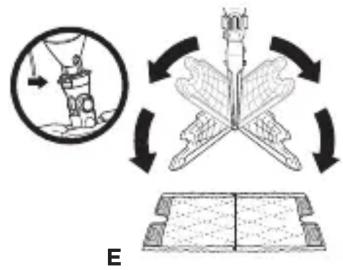
E Dirt Grip™ Pad (x2)
F Filling Flask
G AccessoryHose
H Garment Steamer (Certain Models Only)
Small Above-Floor Pocket Tool and Pad (Certain Models Only)
J Steam Blast Scrubbing (Certain Models Only)
K CopperBrush (Certain Models Only)
L Nylon Brush
(Certain Models Only)
M CarpetGlider (Certain Models Only)
N SteamCrevicetool (Certain Models Only)
ASSEMB LY
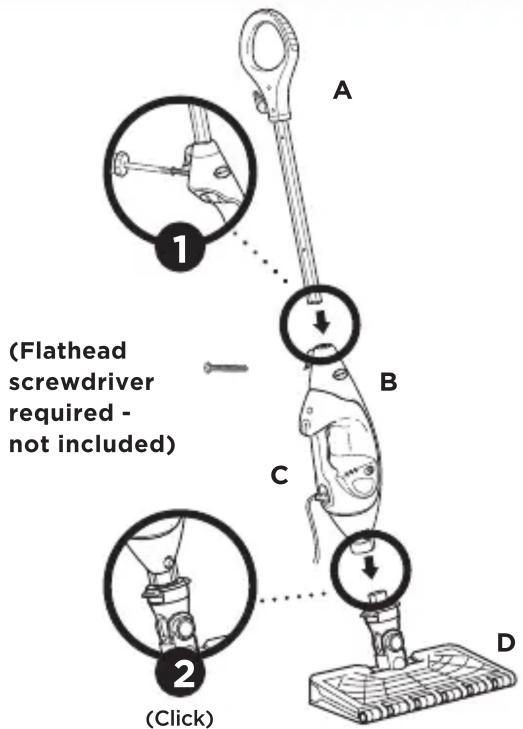
1 Screw the mop handle into the Steam Mop body (screwdriver not included).
2Slide the Intelli-Mop™ Head connector into the Steam Mop body. Push until you hear it click securely into place.
FILLING THE WATER TANK
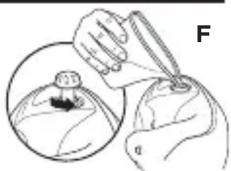
1 Open the water tank cap.
2 Use the filling flask to pour water into the tank. Do not overfill. Replace the cap on the water tank.
natural_image
Illustration of a hand holding a pen over a bottle, with a magnified inset showing the same object (no text or symbols present)KLIK N' FLIP® MOP HEAD TECHNOLOGY
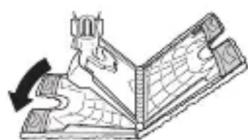
1 Lift the mop straight up by the handle until the Mop Head is hanging straight down. Center the Mop Head above the pad. Press the release button on the back of the mop body, and both sides of the mop head will drop open.
natural_image
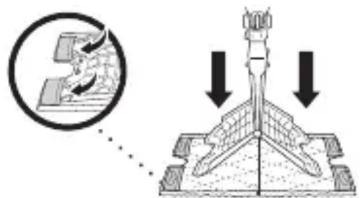
Diagram showing a ship navigating with a circular inset, and a mechanical assembly with rotating arrows (no text or symbols)2 Slip the mop head's 4 corner tabs into the 4 corner pockets of the Dirt Grip™ Pad.
natural_image
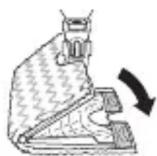
Diagram showing a mechanical assembly with downward arrows indicating force or motion (no text or symbols present)3 Gently press the Mop Head to the floor on one side of the pad, and that side will click into place.
4 Flip the other side of the head over onto the floor to click into place.
REMOVING THE PAD
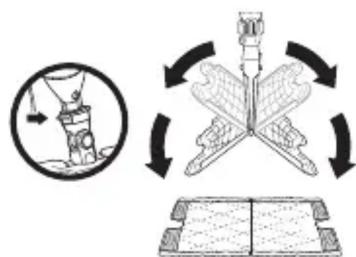
Lift the mop straight up by the handle until the Mop Head is hanging straight down. Press the pad release button, and both sides of the head will drop open, releasing the pad.
natural_image
Illustration showing a hand holding a bottle, a butterfly wing with wings, and an open book with arrows indicating rotation (no text or symbols)CAUTION: It is recommended that you allow the pads to cool off before removing them from the mophead or accessories to avoid possible scalding injury.
STEAM BLASTER™ TECHNOLOGY
When you need an extra burst of steam to clean tough, dried messes and stuck-on stains, use the Steam Blaster.
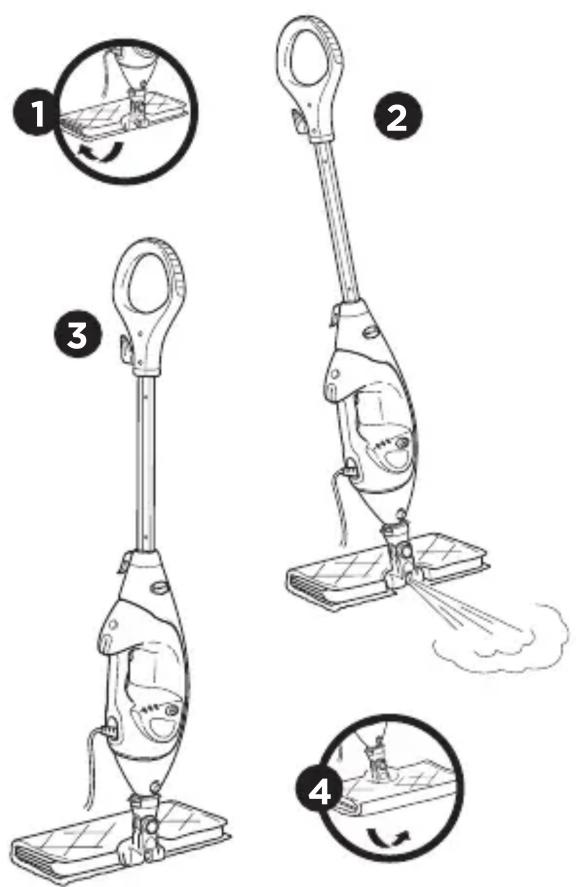
1 Flip the Mop Head over so that it is behind the mop body.
2 Tilt the mop handle back. This will cause the Steam Blaster to emit a concentrated blast of steam onto the floor.
3To stop the Steam Blaster™ spray, simply tilt the mop handle forward.
4 Flip the Mop Head back into its original position and continue cleaning.
CLEANING
1Plug the power cord into electrical socket. The STEAM CONTROL button will flash blue.
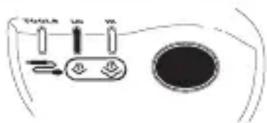
2 Press the STEAM CONTROL button to select your steam setting: once for LO, twice for HI, and three times to place the unit in STANDBY MODE.
INTELLIGENT STEAM CONTROL®
| SETTING IDEAL FOR THESE SEALED SURFACES | RECOMMENDED USAGE | |
| Tools | Laminate Hardwood Marble | Light cleaning and dusting Loosening and lifting light dirt. |
| LO | Hardwood Marble Tile Stone | Cleaning most sealed surfaces and large areas. Basic everyday cleaning. Removing spots and smaller messes. Cleaning moderate and heavy-traffic areas. |
| HI | Hardwood Marble Tile Stone | Deep cleaning and cleaning hard-to-clean surfaces. Tough cleaning and removing stuck-on messes and stains. Deep cleaning heavy-traffic areas. Cutting through heavy dirt and grime. |
ABOVE-FLOOR CLEANING
Remove the Handheld Steamer by pressing the release button and removing it from the cradle.
Snap the desired accessory into the main nozzle of the Handheld Steamer. Squeeze the steam trigger to activate steam.
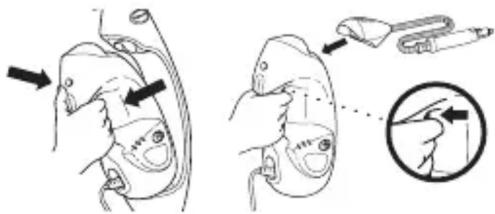
Once finished with handheld steaming, press the STEAM CONTROL button until the light flashes blue to put the unit in STANDBY MODE. Leave to cool down for 2 to 3 minutes before removing mop head, pads, or handheld accessories and storing.
(Note: Tools mode is only available when using the Handheld Steamer. When the Handheld Steamer is removed from the cradle, it will automatically go into Tools mode.)
ABOVE-FLOOR CLEANING ACCESSORIES
| ACCESSORIES USE HOW TO ATTACH | ||
| G ACCESSORY HOSE | For spot cleaning and direct steaming. | Slide Accessory Hose onto the Handheld Steamer. |
| I SMALL ABOVE FLOOR POCKET TOOL AND PAD (CERTAIN MODELS ON LY) | Ideal for small, uneven surfaces. The pointed tip is great for edges and corners. | Slide the pad onto the Small Above-Floor Pocket Tool so it fits snugly.Attach the elastic band and slide the locking toggle to tighten.Connect the tool to the Accessory Hose by pushing firmly until it clicksinto place, then attach the Accessory Hose onto the Handheld Steamer. |
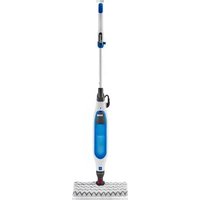
Brand : SHARK
Model : S6005UK
Category : Steam cleaner