
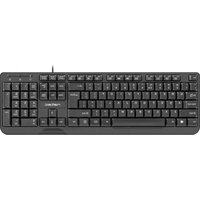
THOR 300 TKL - Keyboard Natec - Free user manual and instructions
Find the device manual for free THOR 300 TKL Natec in PDF.


Pick your language and provide your email: we'll send you a specifically translated version.
| Product Type | Tenkeyless Keyboard |
| Dimensions (L x W x H) | Approximately 360 x 140 x 40 mm |
| Weight | Approximately 800 g |
| Power Supply | USB Bus Powered (5V, 100mA max) |
| Interface | USB 2.0 |
| Cable Length | Approximately 1.8 m braided cable |
| Key Switch Type | Membrane |
| Backlight | RGB LED per key |
| Backlight Modes | Multiple preset effects (e.g., breathing, wave, reactive) |
| Number of Keys | 87 (TKL layout) |
| Key Life | Up to 10 million keystrokes |
| Anti-Ghosting | 26-key rollover (N-key rollover via USB) |
| Operating System Compatibility | Windows, macOS, Linux |
| Software Support | No dedicated software (hardware-controlled) |
| Maintenance & Cleaning | Disconnect USB, wipe with a soft dry cloth; do not use liquids |
| Safety Precautions | Keep away from liquids and extreme temperatures; do not disassemble |
| Spare Parts & Repairability | Not user-serviceable; contact authorized service center |
| Certifications | CE, FCC, RoHS |
Frequently Asked Questions - THOR 300 TKL Natec
How do I clean my Natec THOR 300 TKL keyboard?
Disconnect the keyboard from your computer. Wipe the surface with a soft, dry cloth. For stubborn dirt, lightly dampen the cloth with water (do not use chemicals). Let it dry completely before reconnecting.
Is the THOR 300 TKL keyboard mechanical?
No, it uses membrane switches for a quiet and responsive typing experience.
How do I change the backlight color/mode?
Use the FN key in combination with specific function keys (e.g., FN + Insert, Home, Page Up, etc.) to cycle through preset RGB modes and colors. Refer to the manual for exact key combinations.
Does the keyboard support N-key rollover?
Yes, it supports 26-key rollover via USB, allowing multiple simultaneous key presses without ghosting.
Can I use this keyboard with a Mac?
Yes, it works with macOS. However, some function keys may have different behaviors; you can swap the Alt and Windows keys via the FN + W key combination to switch to Mac layout.
What is the cable length?
The keyboard comes with a 1.8 meter braided USB cable for durability and flexibility.
How do I reset the keyboard to factory settings?
Press and hold both FN + ESC keys for about 5 seconds. The backlight will flash, indicating a reset.
Does the keyboard have dedicated media keys?
No dedicated media keys, but you can use FN key combinations (e.g., FN + F1-F12) to control volume, playback, etc.
Is the keyboard spill-resistant?
It is not officially spill-resistant. Avoid exposing the keyboard to liquids. If liquid spills, immediately disconnect and dry it upside down.
What is the warranty period for Natec THOR 300 TKL?
Standard warranty is 2 years from the date of purchase. Keep your receipt for service.
User questions about THOR 300 TKL Natec
0 question about this device. Answer the ones you know or ask your own.
Ask a new question about this device
No questions yet. Be the first to ask one.
Download the instructions for your Keyboard in PDF format for free! Find your manual THOR 300 TKL - Natec and take your electronic device back in hand. On this page are published all the documents necessary for the use of your device. THOR 300 TKL by Natec.
USER MANUAL THOR 300 TKL Natec



Manual assistant
Powered by Anthropic
Waiting for your message
Product information
Brand : Natec
Model : THOR 300 TKL
Category : Keyboard