
ES-GFD9144W3 - Washing machine SHARP - Free user manual and instructions
Find the device manual for free ES-GFD9144W3 SHARP in PDF.


| Product Type | Freestanding Washing Machine |
| Brand | Sharp |
| Model | ES-GFD9144W3 |
| Dimensions (Height x Width x Depth) | 845 x 597 x 582 mm |
| Maximum Dry Laundry Capacity | 9 kg |
| Maximum Spin Speed | 1400 rpm |
| Operating Voltage / Frequency | 220-240 V~ / 50 Hz |
| Total Power Consumption | 2200 W |
| Total Current | 10 A |
| Water Pressure (min-max) | 0.1 - 1.0 MPa |
| Number of Programs | 15 |
| Programs Included | Cotton, Eco 20°, Synthetics, Curtain, Wool, Silk, Duvet, Rinse, Spin, Drain, Drum Clean, Allergy Safe, Rapid 12 min, Daily 60° 60', Sportswear, Blouses/Shirts, Night Wash |
| Additional Functions | Pre-wash, Extra Rinse, Anti-Allergic, Easy Ironing, Eco Time, Delay Timer, Memory |
| Child Lock | Yes |
| Detergent Drawer Compartments | Pre-wash, Main wash, Softener |
| Water Inlet System | Single or double (cold/hot) depending on specification |
| Pump Filter Maintenance | Clean every 2 months |
| Water Inlet Filter Maintenance | Clean periodically |
| Energy Efficiency Class (from energy label) | Refer to energy label on product |
| Noise Level | Refer to technical sheet |
| Safety Features | Emergency door opening, child lock, overheating protection, flood prevention |
Frequently Asked Questions - ES-GFD9144W3 SHARP
User questions about ES-GFD9144W3 SHARP
0 question about this device. Answer the ones you know or ask your own.
Ask a new question about this device
Download the instructions for your Washing machine in PDF format for free! Find your manual ES-GFD9144W3 - SHARP and take your electronic device back in hand. On this page are published all the documents necessary for the use of your device. ES-GFD9144W3 by SHARP.
USER MANUAL ES-GFD9144W3 SHARP
Laundry
Washing Machine
ES-GFD9144W3-EE
CONTENTS
CHAPTER-1: BEFORE USING THE APPLIANCE
Safety warnings 3
CHAPTER-2: OVERVIEW OF YOUR DEVICE
Technical Specifications 8
General Appearance
CHAPTER-3: INSTALLATION
Removing transportation safety screws
Adjusting Adjustable Stays
Electrical connection
Water inlet hose connection
Water discharge connection
CHAPTER 4: INTRODUCTION OF CONTROL PANEL
Detergent drawer..... Programme knob.....
Digital display
CHAPTER 5: PRELIMINARY PREPARATION FOR LAUNDERING
Separating laundries
Adding detergent into machine
Operating your machine Auxiliary functions Start / Pause Cancelling programme Finishing programme Child lock
CHAPTER 7: PROGRAM TABLE CHAPTER 8: MAINTENANCE AND CLEANING OF YOUR MACHINE
Warning Water inlet filters Pump filter Detergent drawer
Liquid Detergent Apparatus Flush stopper Body Drum
CHAPTER 10: TROUBLESHOOTING
CHAPTER 11: AUTOMATIC FAULT WARNINGS AND WHAT TO BE DONE Disposal of your old machine
Dear Customer,
Our goal is to offer you high quality products that exceed your expectations. Your appliance is produced in modern facilities and is carefully, particularly tested for quality.
This manual is prepared in order to help you use your appliance, which has been manufactured using the most recent technology with confidence and maximum efficiency.
Before using your appliance, carefully read this guide, which includes basic information for safe installation, maintenance, and use. Please contact your nearest Authorized Service center for the installation of your product.
The operating instructions apply to several models. Differences may therefore occur.
CHAPTER -1: BEFORE USING THE APPLIANCE
SAFETY WARNINGS
| Operating voltage / frequency: |
| (V/Hz) (220-240) V~/50Hz; |
| Total current (A): 10 |
| Water pressure (Mpa) |
| Maximum: 1 Mpa / Minimum : 0.1 Mpa |
| Total power (W) : 2200 |
| Maximum dry laundry capacity (kg): 9 |
Do not install your machine on a carpet or such grounds that would prevent the ventilation of its base.
The appliance is not intended for use by people (including children) with reduced physical, sensory, or mental capabilities, or lack of experience and knowledge, unless they have been given supervision or instruction concerning use of the appliance by a person responsible for their safety.
Children should be supervised to ensure that they do not play with the appliance.
Call the nearest authorized service for a replacement if the power cord malfunctions.
Use only the new water inlet hose coming with your machine while making water inlet connections of your machine. Never use old, used, or damaged water inlet hoses.
This appliance can be used by children aged from 8 years and above and persons with reduced physical, sensory, or mental capabilities or lack of experience and knowledge if they have been given supervision or instruction concerning use of the appliance in a safe way and understand the hazards involved.
Children shall not play with the appliance.
Cleaning and user maintenance shall not be made by children without supervision.
Note: For a softcopy of this user manual, please contact the following address: "washingmachine@standardtest.info". In your e-mail, please provide the model name and serial number (20 digits) which you can find on the appliance door.
You must read these warnings. You can thus protect yourself and your loved ones against fatal injuries and risks.
CHAPTER -1: BEFORE USING THE APPLIANCE
Danger of getting burnt!

Do not touch the discharge hose and water during discharging, as the appliance may reach high temperatures when running.
DEATH RISK DUE TO ELECTRICAL CURRENT!
- Do not use multiple receptacles or extension cords.
- Do not plug in damaged plug sockets.
- Never pull the cable when unplugging – always grip the plug itself.
- Do not plug in or unplug the plug from the receptacle with wet hands to prevent electrocution!
- Never touch the machine with wet hands or feet.
- Call the nearest authorized service for a replacement if the power cord malfunctions.

Flooding risk!
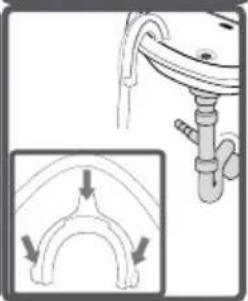
- Check whether the water runs fast or not before placing the discharge hose on the sink. Take necessary measures to prevent the slipping of your hose.
- The backfiring force of a hose that is not placed appropriately can displace the hose. Prevent the stopper inside your sink from blocking the sink hole.

Danger of Fire!
- Do not keep inflammable liquids near your machine.
- The sulphur content of paint removers might cause corrosion. For this reason, never use paint-removing materials in your machine.
- Never use products that contain solvent material (like washing gas) in your machine.
- Remove all objects from the pockets of your laundry (needles, paperclips, lighters, matches, etc.) before placing them in your machine.
Fire and explosion risk may occur.

Fall and injury hazard!
- Do not climb on your machine. The upper table of your machine may break and you might get injured.
- Tidy the hose, cable, and packaging of your machine during installation. You might trip over and fall.
- Do not turn your machine upside down or on its side.
- Do not lift your machine by holding it from protruding parts (detergent
CHAPTER -1: BEFORE USING THE APPLIANCE
drawer, door). These parts might break and cause you to get injured.
There is a risk of tripping and injury if materials like hoses and cables are not properly stored after your machine is installed.

The machine must be carried by 2 people or more.
Child safety!
- Do not leave children unattended near the machine. Children might lock themselves inside the machine, and death risk might occur.
- Door glass and surface might be extremely hot while your machine operates. Thus, especially touching the machine might damage the skin of children.
- Keep packaging material away from children.
- Poisoning might occur if the detergent and maintenance materials are consumed, and eyes or the skin might be irritated if they come into contact with the skin. Keep the cleaning materials away from the reach of children.
GENERAL WARNINGS
- The necessary ambient temperature for your machine's ideal operation is 15 - 25°C.
- Frozen hoses can tear and explode. In regions where temperature is below zero, ambient temperature might endanger the safe operation of electronic card.
- Please ensure that the clothes you will place in your machine do not contain any foreign substances (nail, needle, coins, lighter, matches, clip etc.) in their pockets. These foreign substances can damage your machine.
- Before starting to use your machine, you may call the nearest authorized service and request free-of-charge help for installation, operation and use of your machine.
- It is recommended to perform the first washing operation in 90° Cotton programme and without laundry by inserting 1/2 scale of detergent in 2nd compartment of the detergent drawer.
- As detergent or softener exposed to air for a long time may cause residues, put your detergent or softener in the detergent drawer at the beginning of every washing.
- It is advised that you unplug your machine and close the water inlet tap if you will not use your machine for a long time. Also, leaving the door of your machine will prevent the formation of bad odors due to humidity.
- Some water might be left in your machine after the trials and tests
CHAPTER -1: BEFORE USING THE APPLIANCE
conducted due to Quality Control procedures. This will not damage your machine.
- Remember that packaging materials of your machine may be dangerous for children.
- Keep the packaging materials in a place where children cannot reach or dispose of them appropriately.
- Use pre-wash programs only for very dirty laundry.
- Never open the detergent drawer when the appliance is running.
- In case of any breakdown, unplug the appliance first and then turn off the tap. Do not attempt to repair it yourself; always contact authorized service for advice.
- The amount of laundry you put in your washing machine should not exceed the maximum amount indicated.
- Never force the door open when the machine is running.
- Washing floury clothes in your machine damages it. Do not wash floury clothes in your machine.
- Please adhere to the detergent/fabric conditioner manufacturers' instructions for the use of fabric conditioner or similar products in your machine.
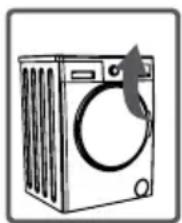
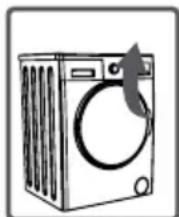
- Set up your machine in a place where its door can be completely opened. Door emergency opening function
The machine is running, during a power cut, or when the program is not yet complete. If the machine is powered off, the door will remain locked.
To open the door:
1- Turn off the machine. Unplug it from the mains socket.
2- To drain the waste water, follow the instructions given in the 'Cleaning the Pump Filter' section on page 18.
3- Pull down the emergency opening mechanism with the help of a tool and open the door at the same time.
4- After closing the door again, if the door remains locked, use the emergency opening handle to open the door. Emergency
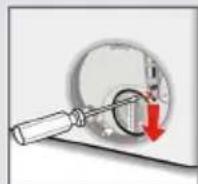
opening handle must be reused to open the door again without power.
(Do not set up your machine in places where its door cannot be fully opened.)
- Set up your machine in locations that are well-ventilated and have constant air circulation.
- Definitely read the user's manual.
CHAPTER 1: BEFORE USING THE APPLIANCE
- Your machine is designed for domestic use. Commercial use will void your warranty.
- Keep your pets away from your machine.
- Please check the packaging of your machine before installation, and inspect the outer surface after the package is opened. Do not operate damaged machines or machines with opened packaging.
- Have your machine installed only by authorized service. Any interference with your machine by anyone other than authorized service personnel will void your warranty.
- This appliance is not intended for use by persons (including children) with reduced physical, sensory, or mental capabilities, or lack of experience and knowledge, unless they have been given supervision or instruction concerning use of the appliance by a person responsible for their safety. Children should be supervised to ensure that they do not play with the appliance.
- Use your machine only for laundry that has been specified as suitable for washing by the manufacturer.
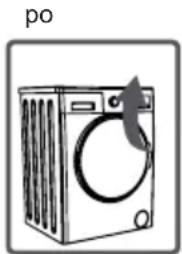
- Before operating the washing machine, remove the 4 transportation screws and rubber spacers from the back of the machine. If the screws are not removed, it may cause heavy vibration, noise, and product malfunction, voiding the guarantee.
- Your machine is not covered under warranty for faults caused by any kind of external factors (pesticides, fire, etc.).
- Please do not throw away this user manual; keep it for future reference. You or someone else might need it in the future.
REMOVAL OF PACKAGING MATERIALS
Packaging materials protect your machine from any damage that might occur during transportation. Packaging materials are environmentally friendly as they are recyclable.
Recycling material provides both raw material savings and decreases waste production.
CHAPTER 2: OVERVIEW OF YOUR DEVICE TECHNICAL
| Operating voltage / frequency (V/Hz) (220-240) V~/50Hz | |
| Total current (A) 10 | |
| Water pressure (Mpa) Maximum: 1 Mpa / | Minimum : 0.1 Mpa |
| Total power (W) 2200 | |
| Maximum dry laundry capacity (kg) 9 | |
| Spinning revolution (rev / min) 1400 | |
| Programme number 15 | |
| Dimensions (Height x Width x Depth) (mm) 845 x 597 x 582 | |
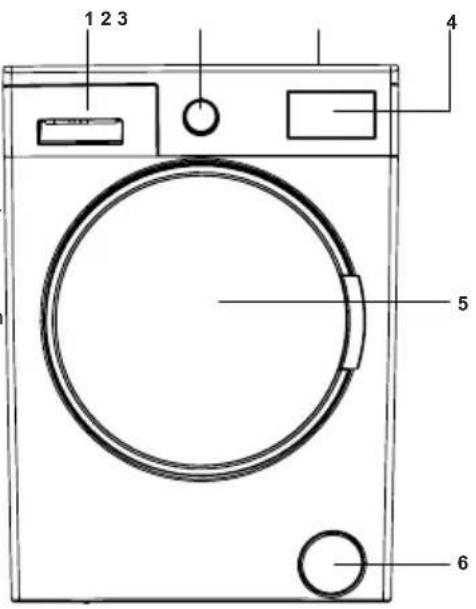
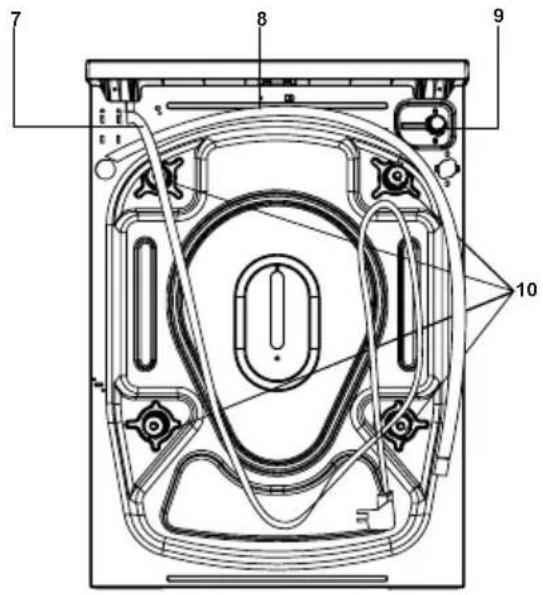
CHAPTER 2: OVERVIEW OF YOUR DEVICE GENERAL APPEARANCE
- Detergent drawer
- Programme knob
- Upper Tray
- Electronic display
- Container
- Cover of pump filter
- Power Cable
- Discharging Hose
- Water Inlet Valve
- Transportation Safety
CHAPTER 3: INSTALLATION
REMOVING TRANSPORTATION SAFETY SCREWS
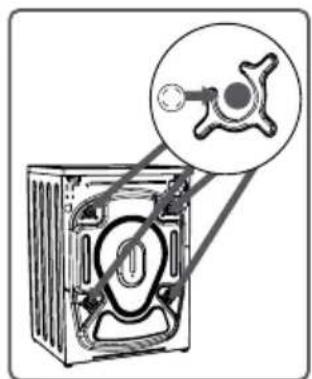
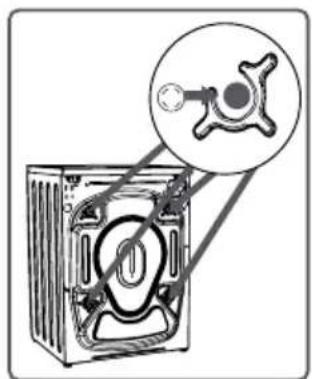
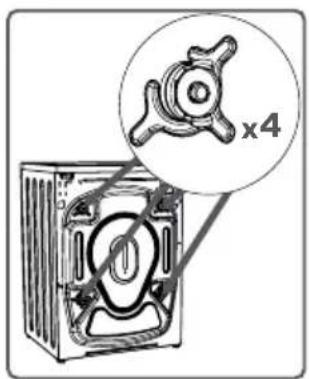
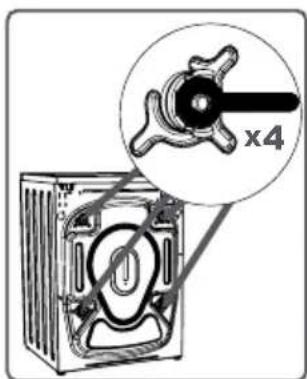
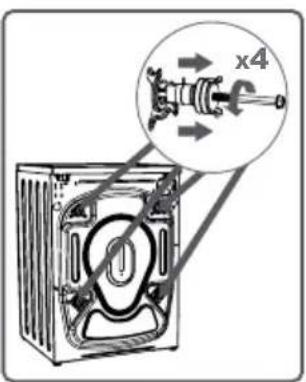
Before operating the washing machine, remove the 4 transportation screws and rubber spacers from the back of the machine. If the screws are not removed, it may cause heavy vibration, noise and product malfunction, (voiding the guarantee). For this reason, transportation safety screws shall be loosened by being rotated in counterclockwise using an appropriate wrench.
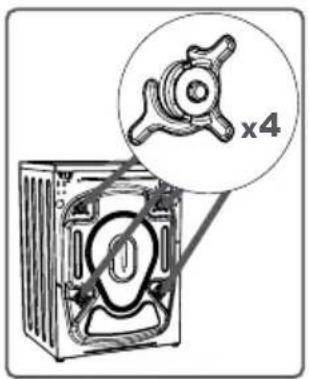
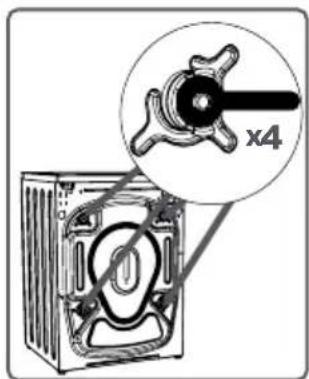
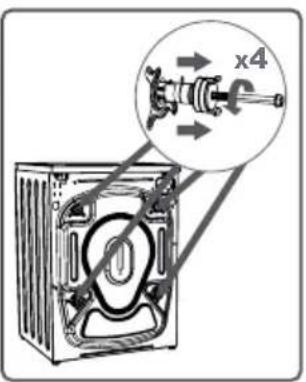
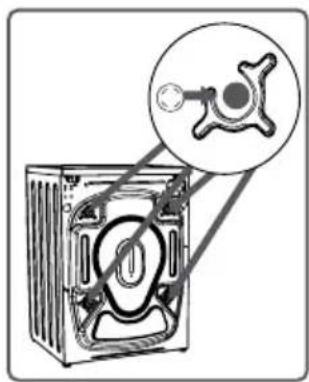
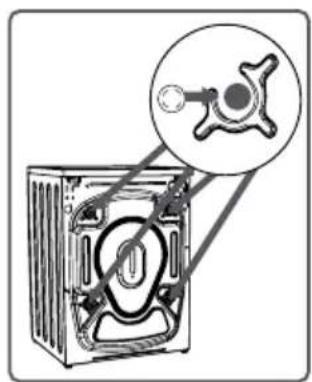
Before operating the washing machine, remove the 4 transportation screws and rubber spacers from the back of the machine. If the screws are not removed, it may cause heavy vibration, noise and product malfunction, (voiding the guarantee). For this reason, transportation safety screws shall be loosened by being rotated in counterclockwise using an appropriate wrench. Transportation screws shall be removed by pulling out. Fit the plastic transportation screw taps delivered in accessories bag to the places where transportation screws have been removed. The transportation safety screws should be stored to be used in case of transportation.
NOTE: You should absolutely remove the transportation screws of your machine before the first usage. Faults occurring in the machines operated with transportation screw fitted shall be out of scope of warranty.
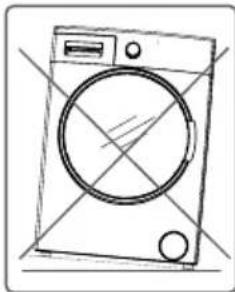
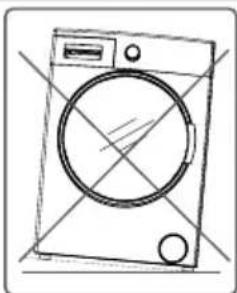
- Do not install your machine on a carpet or such grounds that would prevent the ventilation of its base.
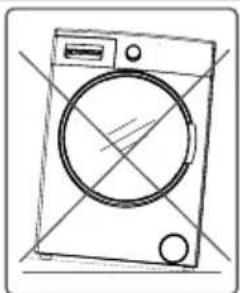
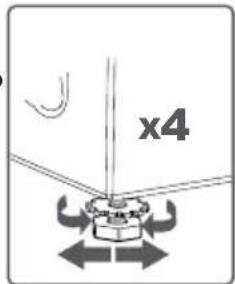
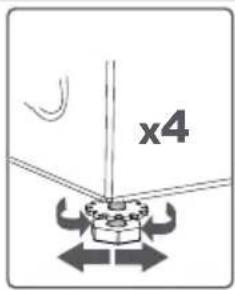
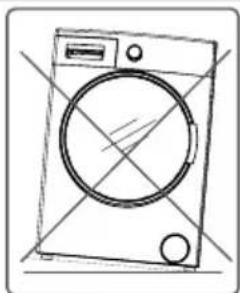
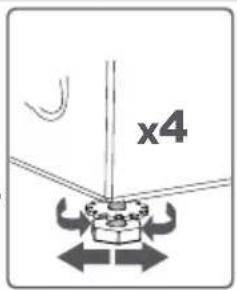
- To ensure silent and vibration-free operation of your machine, it should be deployed on a non-sliding and firm ground. • You can adjust the balance of your machine through the stays.
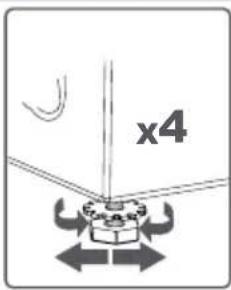
- Loosen the plastic adjustment nut.
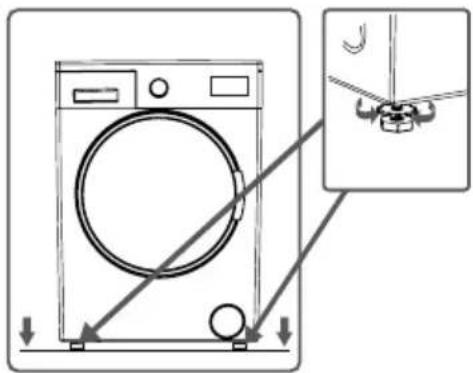
CHAPTER -3: INSTALLATION
- Adjust the stays upward and downward by rotating them. • After maintaining the balance, compress the plastic adjustment nut upward again.
- Never put cardboard, wood or suchlike materials under your machine if you are intending to stabilize the distortions on the ground.
- When cleaning the ground, on which your machine rests, be careful not to disorder stays stabilization.
ELECTRICAL CONNECTION
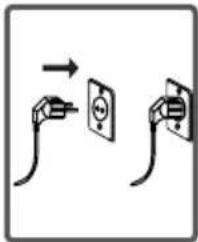
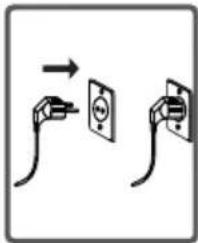
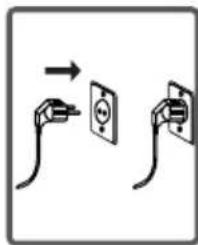
- Your washing machine is set to 220-240V and 50Hz.
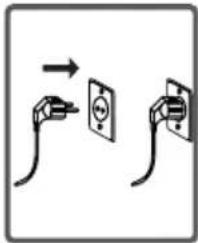
- The mains cord of your washing machine is equipped with a specific earthed plug. This plug should always be inserted to a earthed socket of 10 amps. The current value of the fuse should be 10 amps. Fuse current value of the power line connected to this plug should also be 10 amperes. If you don't have such a receptacle and fuse confirming with this, please have it done by a qualified electrician.
- We do not take the responsibility of the damages that occur due to ungrounded usage. NOTE: Operating your machine under low voltage will cause the life cycle of your machine to be reduced and its performance to be restricted.
WATER INLET HOSE / WATER DISCHARGE CONNECTION
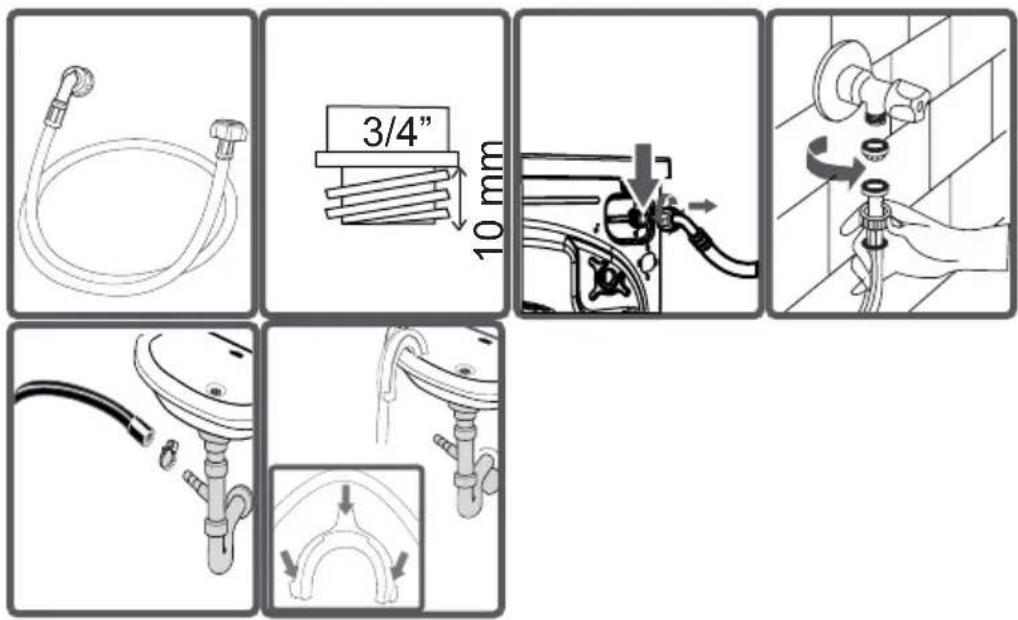
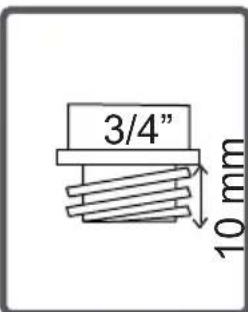
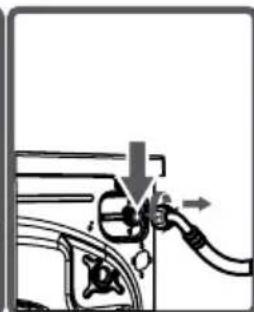
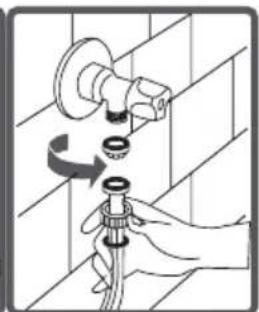
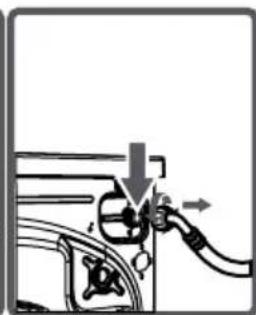
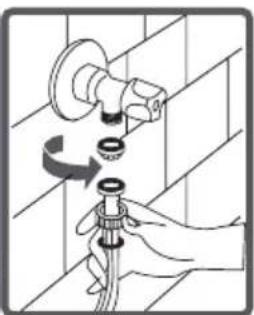
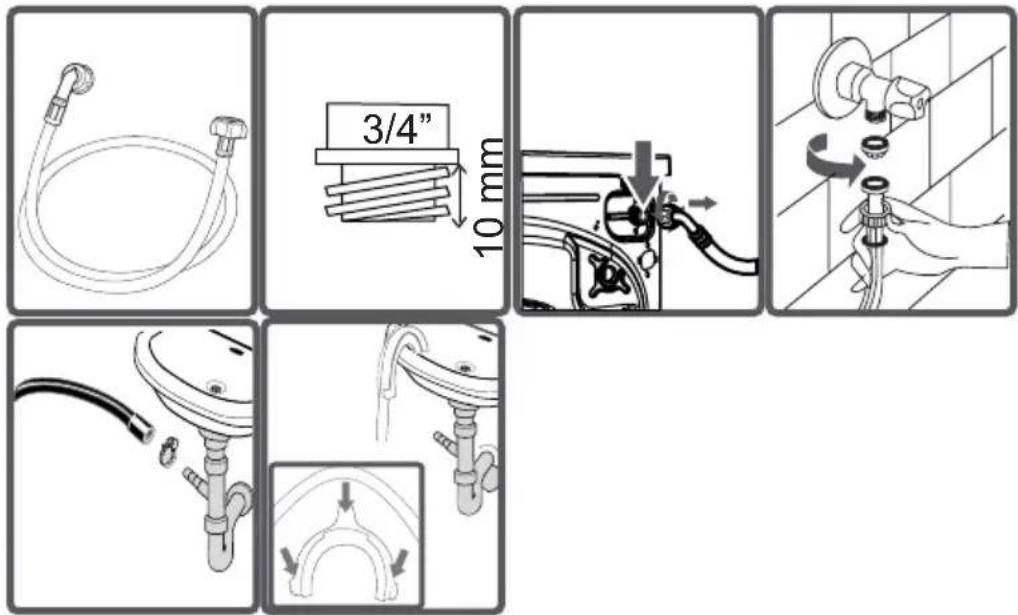
- Your machine may have either a single inlet (cold) or double water inlets (cold/hot) based on its specifications. The white-capped hose should be connected to the cold water inlet, and the red-capped hose to the hot water inlet (applicable for machines with double water inlets). To eliminate water leakages at points of contact, 1 or 2 nuts are provided in the hose package (applicable for machines with double water inlets). Fit these nuts to the ends of the new water inlet hoses on the side of the faucet.
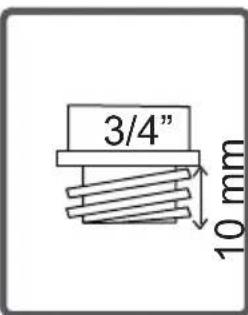
- Mount the new water inlet hoses to a 3/4" threaded faucet.
- Connect the white-elbow end of the water inlet hoses to the white-filtered water inlet valve on the rear side of the machine, and the red-elbow end to the red-filtered one (applicable for machines with double water inlets).
- Tighten the plastic parts of the junctions using your hand. In uncertain conditions, have the connection work done by a qualified plumber.
- A water flow with a pressure of 0.1-1 MPa will allow your machine to operate more efficiently. (0.1 MPa pressure means that more than 8 liters of water will flow through a fully-tapped faucet per minute.)
- Ensure that the points of contact do not leak by tapping the faucet completely after making the connections.
- Ensure that the new water inlet hoses are not bent, broken, crushed, or resized.
- If your machine has double hot water inlets, the temperature of the hot water inlet should be a maximum of 70°C. Note: Use only the new water inlet hose that comes with your machine when making water inlet hose connections. Never use old, used, or damaged water inlet hoses.
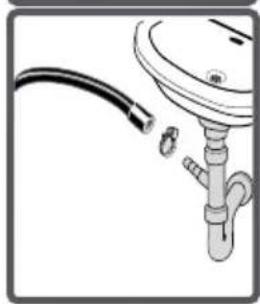
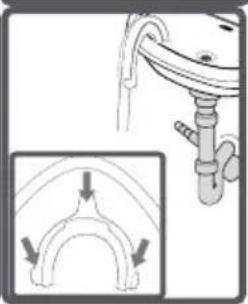
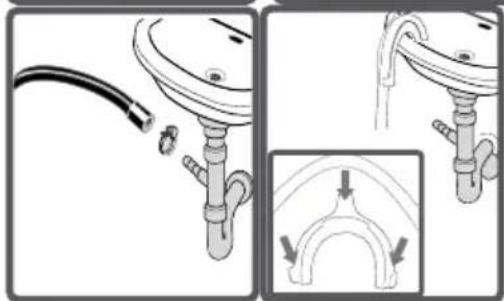
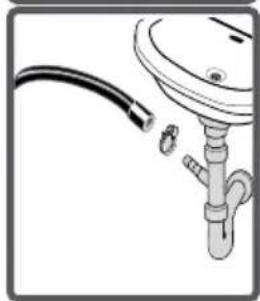
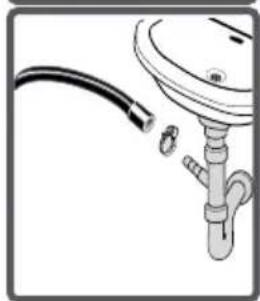
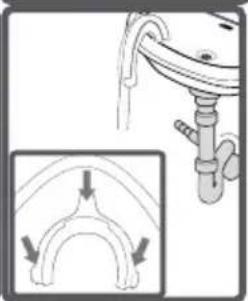
- The end of the water discharge hose can be fitted to a specific apparatus directly attached to the dirty water discharge hole or outlet joint of the basin elbow.
- Never attempt to extend the water discharge hose by jointing.
- Do not put the discharging hose of your machine in a vessel, bucket, or sink. Make sure that the water discharge hose does not bend, buckle, get crushed, or be extended. Please note: The water drain hose should be mounted at a height of minimum 60 cm, maximum 100 cm from the ground.
CHAPTER 4: INTRODUCTION OF CONTROL PANEL SECTIONS
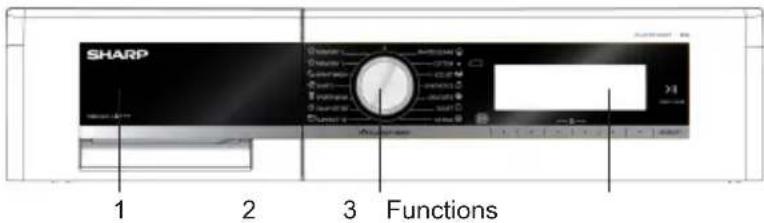
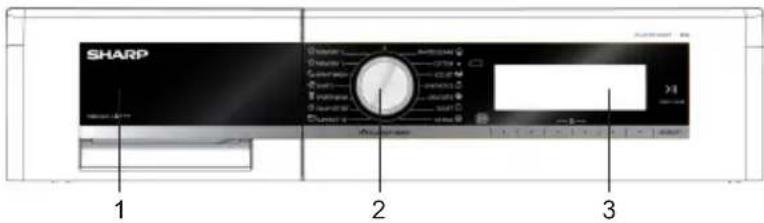
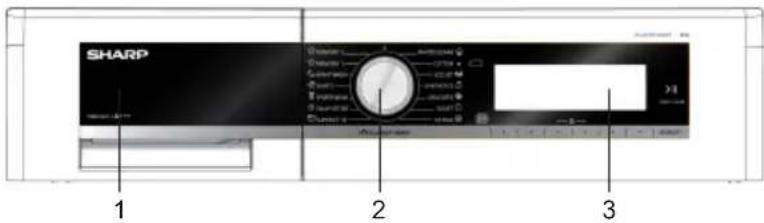
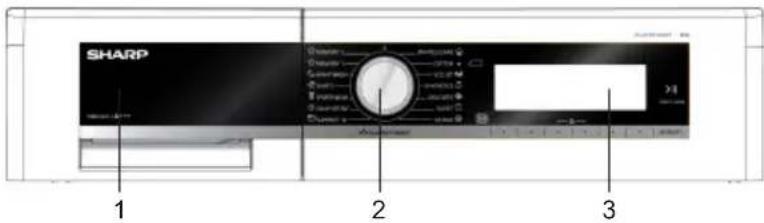
1- Detergent drawer, 2- Programme knob, 3- Electronic display and additional
DETERGENT DRAWER
You can use the liquid level determination plate when you want to wash your laundry with liquid detergent. You can use your liquid detergents in all programs without prewashing. Place the liquid detergent apparatus in the second compartment (which is available inside the machine) of the detergent drawer (*) and set the detergent amount. (Use the recommended amount of liquid detergent by detergent producers). Do not exceed the MAX level. Use only for liquid detergent, do not use this apparatus for powder detergent, and take it out.
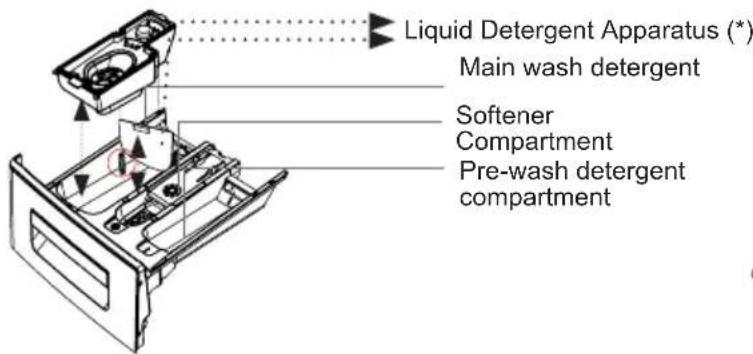
Main wash detergent compartment: In this compartment, only materials like detergent (liquid or powder), lime preventer and such can be used. You can find the liquid detergent apparatus inside your machine at first installation. (*)
Fabric conditioner, starch, detergent compartment: You can use softener for your laundry recommended amount and type by the producer is recommended). Sometimes the fabric conditioners you use for your laundry mar remain in this compartment. The reason for this is that the conditioner is not viscous. To prevent this situation, more viscous liquid softeners are recommended to be used or the softener could be thinned and then used.
Pre-wash detergent compartment: This compartment must only be used when the pre-wash feature is selected. Pre-wash feature is recommended for very dirty laundry. (*) Machinery specifications may vary depending on the product purchased.
PROGRAM KNOB
- You can select the programme you want to wash your laundry in through progra mme knob.
- You may set the programme selection operation by rotating the programme knob in both directions.
- Ensure that the programme knob is exactly on the programme you want to select.
- You can turn on and off the appliance pressing the on / off button found above the programme knob.
ELECTRONIC DISPLAY
- Info Screen
- Adjustment and additional control buttons
- Start/Stand-by button
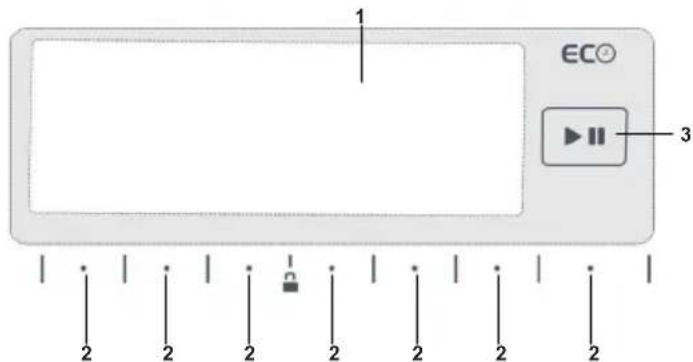
1- Info Screen: In this screen, you can see the features of the washing programs you selected and also have information about machine's status. 2- Adjustment and additional control buttons: The buttons on your machine are touch-sensitive. You may just touch them to make a selection. 3- Start/Stand-by button: You can start your machine and take it to stand-by with this button.
CHAPTER -5: PRELIMINARY PREPARATION FOR LAUNDERING
SEPARATING LAUNDRIES
- Your laundry has product labels on them that specify their specifications. Wash or dry your laundry according to the specifications on the product label.
- Separate your laundry according to their types (cotton, synthetic, sensitive, wool, etc.), their temperatures (cold, 30°C, 40°C, 60°C, 90°C), and degree of contamination (slightly stained, stained, highly stained).
- Never wash your coloured and white laundry together.
- Wash your coloured laundry separately in the first wash as they may bleed.
- Ensure that there are no metallic materials on your laundry or in the pockets; if so, remove them. WARNING: Faults that will emerge in case of penetration of foreign substances into your machine are not included within the scope of warranty.
- Zip up and button up your laundry.
- Remove the metallic or plastic hooks of tulle curtains or curtains or place them in a washing net or bag and then close it.
- Turn inside out textiles such as pants, knitwear, t-shirts, and sweatshirts.
- Wash socks, handkerchiefs, and similar small items in a washing net.
- Open the door of your machine.
- Spread your laundry in your machine.
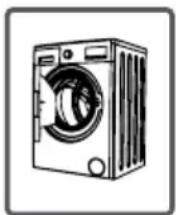
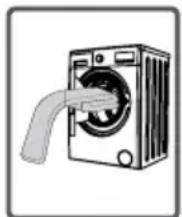
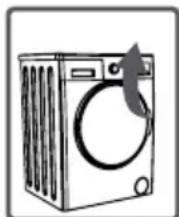
NOTE: Maximum loading capacity may vary based on the laundry type you will wash, degree of contamination, and the programme you have chosen. Do not exceed the maximum dry loading capacity indicated in the programme table for washing programmes. You can take the following table of weights as an example. • Put each item of laundry separately.
- Ensure that no laundry is stuck between the cover and bellow seal when closing the door of your machine. Push the door of your machine until you hear the locking sound to close it.
- Close the door of your machine properly, otherwise your machine will not start the washing operation.
| LAUNDRY TYPE WEIGHT (gr) | |
| Towel | 200 |
| Linen | 500 |
| Bathrobe | 1200 |
| Quilt cover | 700 |
| Pillow slip | 200 |
| Underwear | 100 |
| Tablecloth | 250 |
ADDING DETERGENT INTO MACHINE
The amount of detergent you will put in your machine will depend on the following criteria:
- Your detergent utilization will be based on the degree of contamination of your laundries. Do not prewash your less stained laundries and put your slight amount of detergent in the 2nd compartment of the detergent drawer.
- For your much stained laundries, select a programme including prewashing, and put 1/4 of the detergent you will put in the detergent drawer in the 1st compartment of the detergent drawer while putting the remaining 3/4 of it into 2nd compartment.
- Use detergents produced for automatic washing machine in your machine. The amount of detergent you will use for your laundries is printed on the detergent package.
- The higher the degree of hardness of the water the more detergent you will use.
• The amount of the detergent you will use will increase as the amount of your laundries increase.
- Put the softener in the softener compartment in the detergent drawer. Do not exceed the MAX level. Otherwise, softener will flow into washing water through flushing.
- Softeners with high density are required to be thinned to a degree before being put in the drawer. Because high-density softener will clog the flush and avoid the flow of the softener.
- You can use your liquid detergents in all programs without prewashing. For this, fit liquid detergent level plate in the accessories bag or the liquid detergent apparatus (*) into 2nd compartment of the detergent drawer and set the amount of liquid detergent according to the levels on this plate. Remember to detach the liquid detergent plate. (*) Machinery specifications may vary depending on the product purchased.
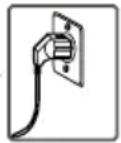
- Plug your machine in.
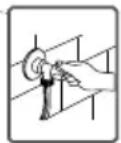
- Open the water faucet.
- Open the machine door.
- Spread your laundries in your machine.
- Push the door of your machine until hearing the locking sound to close it.
- Selecting programme
- Select the convenient programme for your laundries on the programme table.
AUXILIARY FUNCTIONS
Before starting the program, you can optionally select an auxiliary function.
- Press the button of the auxiliary function you would like to select.
Additional functions may not be active depending on the program you selected or the amount of load you put in your machine.
The reasons for not activating:
- It is not compatible with an additional function you have selected previously. - If an additional function does not become active when you want to select it while the machine is running, the washing interval that the additional function you want to use would not be completed. - You can see the program table on pages 81-91 for the additional functions used in programs. - Touch the symbol button to go into the auxiliary function indicator.
1- PRE-WASH AUXILIARY FUNCTION
You can expose your very dirty laundries to a prewashing operation prior to the main washing by using this additional function. When using this function, you should put detergent in the front washing compartment of the detergent drawer.
- Touch the L symbol button to activate the pre-wash additional function.
Note: When you want to use the pre-wash auxiliary function, if the □ symbol is not displayed on the screen, the washing program you selected does not use this feature.
2- EXTRA RINSE FUNCTION
You can make additional rinse or rinses to your laundry by using this additional function. Your machine offers you 3 different rinsing options for this auxiliary function.
: One additional rinse is made at the end of washing.
: Two additional rinses are made at the end of washing.
Three additional rinses are made at the end of washing.
* If you want to make more than one rinse, touch the button with the ⏻ symbol until you see the number of rinses you wish.
Note: When you want to use the extra rinsing auxiliary function, if the ⚠ symbol is not displayed on the screen, the washing program you selected does not use this feature.
3- ANTI-ALLERGIC AUXILIARY FUNCTION
You can make additional rinse operations on your laundry by using this additional function. Your machine will make all rinsing steps with hot water (it is recommended for laundry worn on sensitive skin, baby clothes, underwear).
* To activate the anti-allergic auxiliary function, touch the button with the L symbol until you see the symbol on the screen.
+A
Note: If the 📄 symbol is not displayed on the screen when you want to select the anti-allergic additional function, it means that the washing program you selected does not use this feature.
4- EASY IRONING AUXILIARY FUNCTION
You can enable your laundries to be taken out less wrinkled as the washing operation is completed by employing this auxiliary function.
* Touch the △ symbol button to activate the easy ironing additional function.
Note: If the symbol is not displayed on the screen when you want to select the easy ironing additional function,
it means that the washing program you selected does not use this feature.
ECONOMIC TIME INTERVAL
ECO
- If you want to activate the Eco Time function, touch the button with the TIME symbol.
ECO
- You will see the symbol activated on the screen.
- The Eco Time feature will be constantly displayed on the screen until it is shut off. To shut it off, the Eco Time additional function button must be pressed. • If you want to run a program while the Eco Time feature is active, touch the
button with the ▶ symbol. The starting time of the program will be automatically delayed for it to run during the economic time interval. The program's "starting time" and the program duration will be shown on the display at certain intervals.
- If you don't want to run the program you have selected during the Eco Time hours, touch the 🎨 button again. "Eco Time cancelled" text will be displayed on the screen. • Your machine will return to the main screen of the program you have selected in 3 seconds. To start the program, run the program you selected by touching
- By using this function, you can make your machine start the washing operation delayed from 10 minutes to 23 hours 50 minutes, or you can set it according to the hour you want it to end.
- To activate this additional function, touch the button with the symbol.
- The current time shall be displayed on the screen for a short duration.
- The screen that shows the current time will automatically turn into the screen that displays the time delay / program end time.
- On this screen you can use the buttons with the ⟨ ⟩ symbols to delay the washing time, or make the washing operation end at a certain hour.
With this feature in your machine, you can record the washing program settings you have used before by touching a single button, without consuming your time into 2 different memory options. So you can wash your laundry without having to make these settings again. Select the settings you want stored in the memory programs and touch the memory record button. When you touch the memory button, "Save as memory" question will be displayed on the screen. If you want to make changes on the washing programs again before recording, you can go into the program menu by touching the X symbol button. When you make the changes you want, you can touch the memory button again. The question of "Save as memory?" question will be displayed on the screen. You can record by touching 1(Memory 1) or 2 (Memory 2) Memory option buttons A screen display like the one above will be displayed when the record is completed and your machine will automatically return to the main screen of the washing program you have made the settings for. To wash, you can have your laundry washed by pressing start/stand-by button or select other programs. If you want to use these programs you have recorded, you can turn the program knob as shown in the Picture below and make your selection by moving on the memory steps. • When you want to change the settings you recorded in memory programs; navigate over the 1 (Memory 1) or 2 (Memory 2) program or while over any program, set the program combination you will select and press the (MEMORY) button. You will be asked to record by touching 1(Memory 1), 2 (Memory 2) memory option buttons. If you are recording 1(Memory 1), 2(Memory 2) on a program you haven't taken into memory before, a screen like the one below will be displayed. Complete the selection by using the memory button you want. If you are going to memory on the program you have memory before; you will be asked whether you want to change your previous record or not. If you accept, touch the √ symbol button. Another image will be displayed on the screen for you to approve your selection. You can approve your selection by pressing the √ button.
START/STAND-BY BUTTON
- You can start the program you have selected by touching the Start/Stand-by button
- When you turn your machine on, the program you have selected will be activated. Throughout the washing operations the washing step screens as the examples below will be displayed.
STOPPING PROGRAM / ADDING LAUNDRY / CANCELLING PROGRAM
- You can pause or restart the program you have selected with the ▶ button. You can use this function when you want to add laundry to your machine.
* Touch the ▶ symbol button for this. • If the □ symbol is displayed o t
- If the symbol is displayed on the screen your machine has passed the laundry adding step.
If you want to cancel any program running:
- Switch the program button to the STOP position.
- Your machine will stop the washing operation and the program will be cancelled.
- To discharge the water accumulated in the machine, switch the program knob to any program.
- Your machine will perform the necessary discharge operation and cancel the program.
- You can run your machine by selecting a new program.
PROGRAM END
Your machine will stop by itself as soon as the program you have selected finishes.
You can open the machine's door and remove the laundry.
- Leave the door of your machine open to allow the inner part of your machine to dry after removing your laundry.
- Switch the program knob to the STOP position.
- Unplug your machine.
- Turn the water faucet off.
To avoid program flow from being affected if function buttons are pressed or the program knob is turned when performing a washing operation in your machine, a child lock is available.
The child lock engages after both of the buttons next to the symbol are pressed for more than 3 seconds.
The following warning text will be displayed after the key lock is activated.
The following text will be displayed if any buttons are pressed while the child lock is engaged.
If the child lock is engaged while any program is running and the program knob is switched to the STOP position and another program is selected, the program previously selected continues from where it left off.
To disengage the child lock, you will need to press the buttons for more than 3 seconds. The following warning text will be displayed after the child lock disengages.
Note: The child lock cannot lock the pump cover and detergent drawer of your machine.
SELECTING SUB-PROGRAMS
SYNTHETICS
When you select the synthetics program from the program knob, you will see two sub-program options.
1-Synthetics
2-Curtain
- You can make the sub-program selections by pressing the buttons with the symbols.
- You can activate the program you want to select by touching the button with the → symbol.
- After the activation is completed, the electronic display will return to the main screen of the program you have selected automatically. You can select the other features you want to select on this screen and run the machine by pressing the Start/Stand-by button.
WOOL
When you select the wool program from the program knob, you will see two sub-program options.
1-Wool
2-Silk
- You can make the sub-program selections by pressing the buttons with the symbols.
- You can activate the program you want to select by touching the button of the → symbol.
- After the activation is completed, the electronic display will return to the main screen of the program you have selected automatically. You can select the other features you want to select on this screen and run the machine by pressing the Start/Stand-by button.
EXTRAS
When you select the extras program from the program knob, you will see 4 sub-program options.
1-Rinse
2-Spin
3-Drain
4-Drum clean
- You can make the sub-program selections by pressing the buttons of symbols.
- You can activate the program you want to select by touching the button of the → symbol.
- After the activation is completed, the electronic display will return to the main screen of the program you have selected automatically. You can select the other features you want to select on this screen and run the machine by pressing the Start/Stand-by button.
CHAPTER-7: PROGRAM TABLE
| Program name | Washing temperature (°C) | Maximum dry laundry amount (kg) | Detergent | Prog. duration (Min.) | Laundry type / Descriptions |
| COTTON *90°-30°-70°-60°-50°-40°-30°-* | 9 2 190 | Very dirty, cotton and flax textiles. (Underwear, bedsheet, tablecloth, (towel maximum 4,5 kg), quilt cover rtc.) | |||
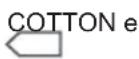 | 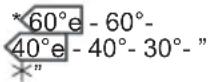 | 9 2 240 | Dirty, cotton and flax textiles. (Underwear, bedsheet, tablecloth, (towel maximum 4,5 kg), quilt cover rtc.) | ||
| ECO 20° | *20°-* | 4,5 2 103 | Little dirty, sweaty, cotton and flax textiles. (Underwear, bedsheet, tablecloth, (towel maximum 2 kg.) bedcloth, etc.) | ||
SYNTHETICS  | 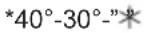 | 3,5 2 89 | Very dirty or synthetic-mixed textiles. (Nylon stockings, shirts, blouses, trousers with synthetic content etc.) | ||
CURTAIN  | 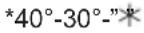 | 2,5 1&2 131 | Please wash only curtains in this program. | ||
| WOOL | *30°-* | 2,5 2 52 | Woolen laundries with machine wash labels. | ||
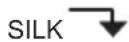 |  | 2,5 2 102 | Laundry recommended for hand wash or sensitive laundry. | ||
| DUVET | *40°-30°-* | - 2 104 | You can wash fiber quilts that have machine washable label with this program. (max.2.5 kg) | ||
 |  | 9 2 30 | f you want to additionally rinse your laundries upon completion of washing operation, you may use this program for any kind of laundries. | ||
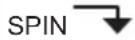 |  | 9 - 17 | When you want to make an additional spinning to your laundry after the washing step, you can use this programme for all kinds of laundry. | ||
 |  | 9 - 3 | It makes the water inside the machine to be discharged. | ||
 CLEAN CLEAN | *"80°" - - 89 | It is washing drum cleaning programme. It must be used without laundry.. |
| ALLERGY SAFE | *60-50-40-30°-*” | 4,5 2 220 | Baby clothes | ||
| RAPID 12 MIN. | *30°-"*" | 2 2 12 | You can wash your slightly stained, cotton, coloured and flax textile within only 12 minutes. | ||
| DAILY 60° 60' | *60°-50°-40°-30°-"*" | 4 2 60 | You can wash your dirty cotton, colour and flax textiles at 60°C in 60 minutes. | ||
| SPORTS WEAR | *30°-"*" | 3,5 2 81 | Sportswear | ||
| BLOUSES/ SHIRTS | *60-50-40-30°-*” | 4 2 111 | Dirt, cotton, synthetics and synthetic mix shirts and blouses can be washed together. | ||
| NIGHT WASH | *90°-80°-70°-60°-50°-40°-30°-"*" | 9 2 180 | Very dirty, cotton and flax textiles. (Underwear, linen, tablecloth, (towel maximum 4.5 kg), bedclothes, etc.) |
NOTE: Night washing programme is a programme that will wash your laundry silently without any wringing stage during the washing. When your machine nears the end of the washing operation, it goes into sleep mode and can keep your laundry for a maximum of 10 hours without discharging the water inside. If the programme waiting duration exceeds 10 hours, your machine will automatically perform water discharge and wringing operations. Starting from the time your machine goes into this waiting operation, you can cancel this operation and resume the washing programme from where it is left. What you have to do is only to touch the Start / Standby button again. (In sleep mode, the remaining time is not calculated on the display, the remaining time on the display is the duration valid only for discharge and wringing operation. NOTE: PROGRAM DURATION MIGHT CHANGE ACCORDING TO THE AMOUNT OF LAUNDRY, TAP WATER, AMBIENT TEMPERATURE AND SELECTED ADDITIONAL FUNCTIONS.
*60°e - 40°e Energy label declaration programmes. (*Black parts are factory preset)
(→) Synthetic and curtain programs are programs with sub-options; you can see the sub-programs chapter to make a selection. (→) Wool and Silk programs are programs with sub-options; you can see the sub-programs chapter to make a selection. (→) Rinse, Spin, Drain, Drum clean programs are programs with sub-options; you can see the sub-programs chapter to make a selection.
CHAPTER -8: MAINTENANCE AND CLEANING OF YOUR MACHINE
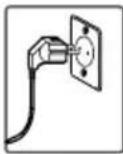
Unplug your machine before starting the maintenance and cleaning of your machine.
Turn the tap water off before starting the maintenance and cleaning of your machine.
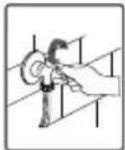
CAUTION: Your machine's parts might be damaged if cleaners with solvent agents are used. Do not use cleaning materials with solvent agents.
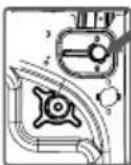
WATER INLET FILTERS
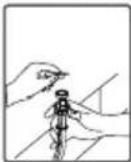
Filters to avoid dirt and foreign substances in the water from penetrating into the machine are available both on the side of the faucet and on the ends of water valves along the water inlet hose of your machine. If your machine cannot intake sufficient amount of water despite the water faucet being open, these filters should be cleaned. (It is recommended that you clean your pump filter once in 2 months.)
- Detach the water inlet hoses.
- Remove the filters on water inlet valves using pliers and then clean them with a brush in water.
- Disassemble the filters on the faucet side of water inlet hoses manually and clean them.
- Having the filters cleaned, you can fit them in the same way reversely.
CAUTION:
Filters of water inlet valves may be clogged due to contaminated water faucet or lack of necessary maintenance, or valves may be broken down, causing water leaking into your machine continuously. The breakdowns that may arise due to these reasons are out of the scope of warranty.
PUMP FILTER
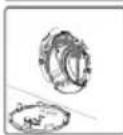
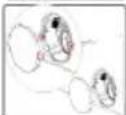
A filter system which avoids threads remaining from your laundries and tiny materials from entering into the pump during water discharging operation carried out by your machine after completing washing, so prolonging the lifecycle of your pump, is available. It is recommended that you clean your pump filter once in 2 months. To clean the pump filter:
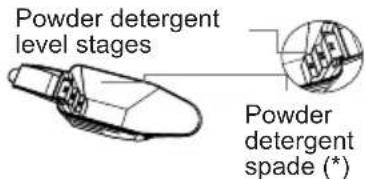
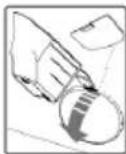
- To open the pump cover, you can use the powder detergent spade (*) or the liquid detergent level plate that comes with your machine.
- Fit the end of the plastic part into the gap of the pump cover and push it back. This will open the cover.
- Before opening the filter cover, place a container in front of it to prevent any remaining water in the machine from spilling onto the floor.
- Loosen the filter cover by turning it counterclockwise, then drain the water.
Note: You may need to empty the water collection container several times, depending on the amount of water in the machine.
- Clean any foreign materials from the filter using a brush. After cleaning, replace the filter cover and tighten it by turning it clockwise.
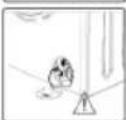
- When closing the pump cover, ensure that the parts on the inner side of the cover align with the holes on the front panel.
- You can reattach the pump cover by following the reverse order of removal.
WARNING!

The water in the pump may be hot; wait until it cools down.
(*) Machine specifications may vary depending on the product purchased.
DETERGENT DRAWER
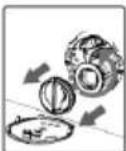
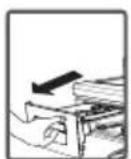
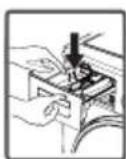
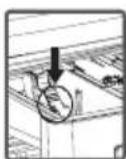
Over time, your detergents may leave residue in the detergent drawer and its housing. To clean this residue, disassemble the detergent drawer periodically. It is recommended to clean the detergent drawer every 2 months. To remove the detergent drawer:
Pull the detergent drawer out to the end.
CHAPTER -9: FLUSH STOPPER / BODY / DRUM
Keep pulling by pressing on the section shown below in the detergent drawer and continue pulling, then
remove the detergent drawer.
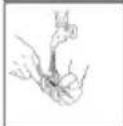
Flush it using a brush.
Collect residues in the housing of the detergent drawer without dropping them inside the machine. Assemble the detergent drawer after drying it with a towel or dry cloth.
Do not wash the detergent drawer in a dishwasher.
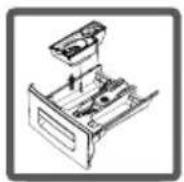
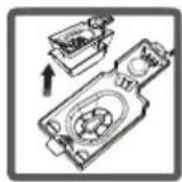
Liquid Detergent Apparatus (*)
Remove the liquid detergent level apparatus for cleaning and maintenance as shown in the picture, and clean detergent residues thoroughly. Put the apparatus back in its place. Make sure no residues are left inside.
(*) Machine specifications may vary depending on the product purchased.
FLUSH STOPPER
Flush stopper
Disassemble the detergent drawer. Disassemble the flush stopper and clean the softener residues completely. Refit the flush stopper after cleaning it. Check that it has settled properly.
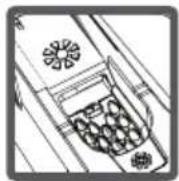
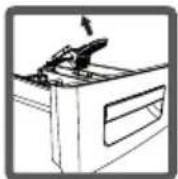
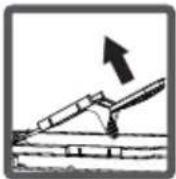
Body
Clean the outer body of your machine with warm water and a non-flammable cleaning agent that will not abrade the body of your machine. After rinsing with some water, dry it with a soft, dry cloth.
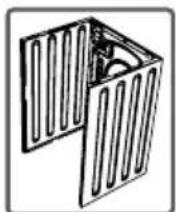
Drum
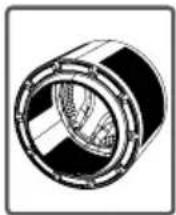
Do not leave metallic objects such as needles, paper clips, coins, etc. in your machine. These objects lead to the formation of rust stains in the drum. To clean such rust stains, use a non-chlorine cleaning agent and follow the manufacturer's instructions. Never use wire wool or similar hard objects for cleaning rust stains.
CHAPTER 10: TROUBLESHOOTING
All repairing operations required for your machine should be carried out by our authorized service. If your machine requires a repair or if you cannot remove the fault with the help of the information provided below:
• Unplug your machine. - Turn the water faucet off.
| FAULT POSSIBLE CAUSE TROUBLESHOOTING | ||
| Your machine does not start. | It is not plugged. Plug it. | |
| Fuse blown. Replace the fuses. | ||
| Electricity cut-off. Check mains power. | ||
| Start/pause button not pressed. Press on Start/Pause button | ||
| Programme dial ‘stop’ position. Switch the programme button to the desired position. | ||
| The machine door is not completely closed. | Close the machine door. | |
| Your machine does not intake water. | Water tap is turned off. Turn your faucet on. | |
| Turn your faucet Check water inlet hose and untwist. | ||
| Water inlet hose clogged. Clean water inlet hose filters. (*) | ||
| Valve inlet filter clogged. Clean the valve inlet filters. (*) | ||
| The machine door not completely closed. | Close the machine door. | |
(*) See the chapter regarding maintenance and cleaning of your machine.
| FAULT POSSIBLE CAUSE TROUBLESHOOTING | ||
| Your machine does not discharge water. | Discharging hose clogged or twisted. | Check the discharging hose, then either clean or untwist. |
| Pump filter clogged. Clean the pump filter. (*) | filter. (*) | |
| Laundry settled in the machine unevenly. | Spread your laundry in the machine evenly. | |
| Your machine vibrates. | The feet of your machine have not been adjusted. | Adjust the feet on your machine. (**) |
| Safety stays fitted for transportation not disassembled. | Disassemble the safety stays of your machine. (**) | |
| Less amount of laundry in the appliance. | This will not block operation of your machine. | |
| Your machine is overloaded with laundry or laundry settled unevenly. | Do not put in laundry more than the amount recommended and settle the laundry in the machine evenly. | |
| Your machine rests on a hard surface. | Prevent your machine from resting on hard surfaces. | |
(*) See the chapter regarding maintenance and cleaning of your machine. (**) See the chapter regarding installation of your machine.
CHAPTER 10: TROUBLESHOOTING
| FAULT POSSIBLE CAUSE TROUBLESHOOTING | ||
| Excessive foam is formed in the detergent drawer. | Excessive amount of detergent used. | Press on Start/Pause button To eliminate foam formation, mix a spoon of softener with half litres of water, and pour the mixture in the detergent drawer. After 5-10 minutes, press on Start/Pause button again. In your next washing operation, Adjust the detergent dose accordingly. |
| Wrong detergent used. | Use detergents produced only for automatic washing machines in your machine. | |
| Unsatisfactory washing result. | The contamination degree of your laundries does not match the programme you have chosen. | Select the programme appropriate for the contamination degree of your laundries. (See programme table) |
| Amount of detergent used insufficient. | Adjust the amount of detergent based on the amount and contamination degree of your laundries. | |
| Laundries in excess of maximum capacity put in your machine. | Load your machine with laundries, amount of which will not exceed maximum laundry capacity. | |
| Water being hard. (Contaminated, lime water etc.) | Adjust the amount of detergent based on the instruction of detergent manufacturer. | |
| Laundries distributed in your machine non-homogenously. | Spread your laundries in the machine properly and homogeneously. | |
| As soon as the machine is loaded with water, water discharges. | The end of water discharging hose is too low for the machine. | Set the water discharging hose on appropriate height. (**) |
| No water appears in the drum during washing. | No fault. Water is in the unseen part of the drum. | - |
| Laundries have detergent residues on them. | Non-dissolving particles of some detergents may stick to your laundries as white spots. | Perform an extra rinsing by setting your machine to “Rinsing” programme, or clean the spots using a brush after your laundries dry. |
| Grey spots appear on the laundries. | The reason for such spots may be oil, cream or ointment. | Apply the maximum amount of detergent instructed by the detergent manufacturer in the next washing operation. |
| Spinning operation is not performed or runs late. | No fault. Unbalanced load control system has been activated. | Unbalanced load control system will try to spread your laundries homogeneously. Wringling operation will begin after your laundry is spread. Place the laundry in the machine in a balanced fashion the next time. |
(**) See the chapter regarding installation of your machine.
CHAPTER 11: AUTOMATIC FAULT WARNINGS AND WHAT TO BE DONE
| ERROR CODE | POSSIBLE FAULT WHAT TO DO | |
| Check the door | The door of your machine is left open. | Close the machine door.If your machine persists to indicate fault, turn off your machine, unplug it and contact the nearest authorised service company immediately. |
| Check water inlet. | Water cut-off or low mains water pressure. | - Water tap may be closed. Check.- Mains water may be cut-off. Check.- If there is no water, turn off the appliance pressing the on / off button found above the programme knob. - If there is water again, you can turn on the appliance pressing the on / off button and operate your appliance selecting a programme using the programme knob.- Mains water pressure may be low.Check.- Water inlet hose may be twisted.Check.- Water inlet hose may be clogged.- Clean water inlet hose and valve inlet filters.(*)If the problem persists, unplug your machine, turn off your tap and contact the nearest authorised service company. |
| UNPLUG THE MACHINE | The pump is faulty or pump filter is clogged or electrical connection of the pump is faulty. | Clean the pump(**)filter.If the problem persists, contact the nearest authorised service company. |
| CHECK THE FILTER. | The pump is faulty or pump filter is clogged or electrical connection of the pump is faulty. | - Pump filter may be clogged.- Clean the pump filter. (**)- Drain hose may be clogged or twisted.- Check the Drain hose.- If the problem persists, contact the nearest authorised service company. |
| Turn off the tap. | Your machine has excessive amount of water. | Your machine will drain water by itself.Pursuant to draining operation, turn off your machine and unplug it. Turn off your faucet and contact the nearest authorised service company. |
| Voltage is high/ Voltage low | Mains voltage is high or low. | There might be a fluctuation on the energy fed to your machine,check if the socket you have your machine plugged into is grounded. Have an electrician measure the amount of voltage coming to your house. If there is no problem in the electricity, unplug your machine and inform the nearest service company. |
DISPOSAL OF YOUR OLD MACHINE
This symbol on the product or package implies that the product should not be treated as domestic waste. Instead, it should be delivered to applicable waste collection places recycling electrical and electronic equipment. You will contribute to avoid potential negative results regarding environment and human health, which will arise due to wrong waste procedure for the product by ensuring that this product is annihilated properly. Recycling materials will help natural resources be preserved. For more detailed information regarding recycling of this product, please contact local municipality, domestic waste annihilation service or the shop you have purchased the product.
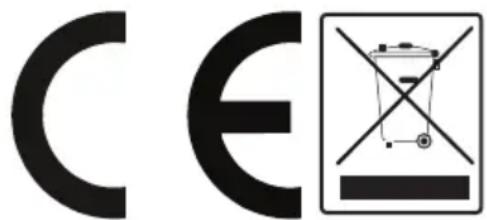
TABLE OF CONTENTS
CHAPTER 1: BEFORE USING THE APPLIANCE ..... 24
SAFETY WARNINGS 24
CONNECTING THE WATER INLET HOSE
CHAPTER 4: DESCRIPTION OF THE CONTROL PANEL
(**) See the chapter regarding installation of your machine.
CHAPTER 11: AUTOMATIC ERROR MESSAGES AND THEIR HANDLING
CHAPTER 3: INSTALLATION
REMOVING THE TRANSPORT BOLTS
CHAPTER 3: INSTALLATION
• Adjust the feet by turning them. - Once the balance is achieved, retighten the plastic adjustment nut upward. - Never place cardboard, wood, or similar materials under the washing machine to compensate for unevenness. - When cleaning the surface on which your washing machine stands, be careful to maintain the balance of the feet.
ELECTRICAL CONNECTIONS
• Your washing machine operates at 220-240 V and 50 Hz.
CHAPTER 4: INTRODUCTION TO THE CONTROL PANEL
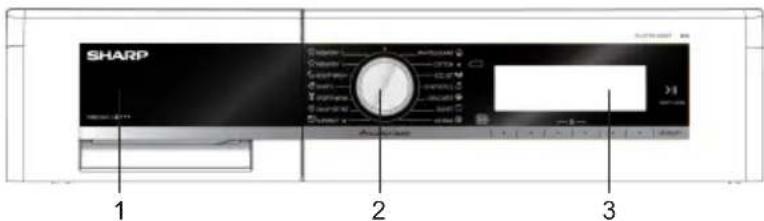
1-Detergent drawer 2-Program dial 3-Electronic display and additional functions
DETERGENT DRAWER
NOTE: The maximum laundry capacity depends on the type of laundry, the degree of soiling, and the selected program. The dry laundry capacity must not exceed the value indicated in the program table for the washing programs.
• You can find examples in the following table. - Insert each piece of laundry separately. - Ensure that no laundry is stuck between the cover and bellow seal when closing the door of your machine. Push the door of your machine until you hear the locking sound to close it. - Close the door of your machine properly, otherwise your machine will not start the washing operation.
| VRSTA PERILA TEŽA (gr) | |
| Brisača | 200 |
| Laneno platno | 500 |
| Kopalni plašč | 1200 |
| Prešita odeja | 700 |
| Blazina | 200 |
| Spodnje perilo | 100 |
| Namizni prt | 250 |
FOR MEMORY RECORDING (MEMORY)
Chapter 3 - Installation
unsettle the detergent drawer.
- Adjust the stays upward and downward by rotating them. • After maintaining the balance, compress the plastic adjustment nut upward again.
- Never put cardboard, wood or suchlike materials under your machine if you are intending to stabilize the distortions on the ground.
- When cleaning the ground, on which your machine rests, be careful not to disorder stays stabilization.
Water connection / Water connection
Do not install your machine on a carpet or such grounds that would prevent the ventilation of its base.
CHAPTER -3: INSTALLATION
REMOVING TRANSPORT BOLTS
Before operating the washing machine, remove the 4 transport bolts and rubber spacers from the rear of the washing machine. If the bolts are not removed, it may cause excessive vibration, noise, and product failure (which voids the warranty for the washing machine). The transport bolts are removed by turning them counterclockwise with an appropriate wrench.
CHAPTER -3: INSTALLATION
- Adjust the foot by turning it.
- After balancing the washing machine, retighten the plastic adjustment nut.
- Do not place cardboard, wooden boards, or similar materials under the feet to level the washing machine.
- When cleaning the surface on which your washing machine is placed, be careful not to disturb its balance.
ELECTRICAL CONNECTION
- Your washing machine is set to operate at 220-240V and 50Hz.
- The washing machine is connected to the electrical installation via a plug and a properly installed wall socket with grounding and a 10 A fuse. The electrical installation must be designed to withstand the required current.
- If you do not have such a socket and fuse that match this description, have a qualified electrician install them.
- The manufacturer disclaims all liability for injuries and damages caused by using the appliance without grounding or by not following these instructions for use.
NOTE: Operating your washing machine at a lower voltage may reduce the machine's performance and shorten its service life.
WATER INLET HOSE CONNECTION / WATER DRAIN HOSE CONNECTION
- If your machine has double hot water inlets, the temperature of hot water inlet should be maximum 70°C.
Note: When installing the water inlet connection to your washing machine, use only the new water inlet hose supplied with your washing machine. Never use old, used, or damaged water inlet hoses.
- The end of the drain hose can be connected directly to a wall drain outlet or to the drain connection on the sink trap.
- Do not extend the drain hose with additional hoses.
- Do not place the drain hose in a container, bucket, or sink.
- Make sure the drain hose is not bent, tangled, damaged, or stretched. Please remember:
- The drain hose must be installed at a height of at least 60 cm and at most 100 cm from the floor.
1-Detergent drawer 2-Programmer knob 3-Electronic display and additional
functions
DETERGENT DRAWER
You can use liquid detergent in all programs without prewash. To use liquid detergent, place the partition plate in the second compartment of the detergent drawer and pour the detergent up to the level indicated on the plate. Do not exceed MAX, and use the insert only for liquid detergent; remove the plate when using powder detergent.
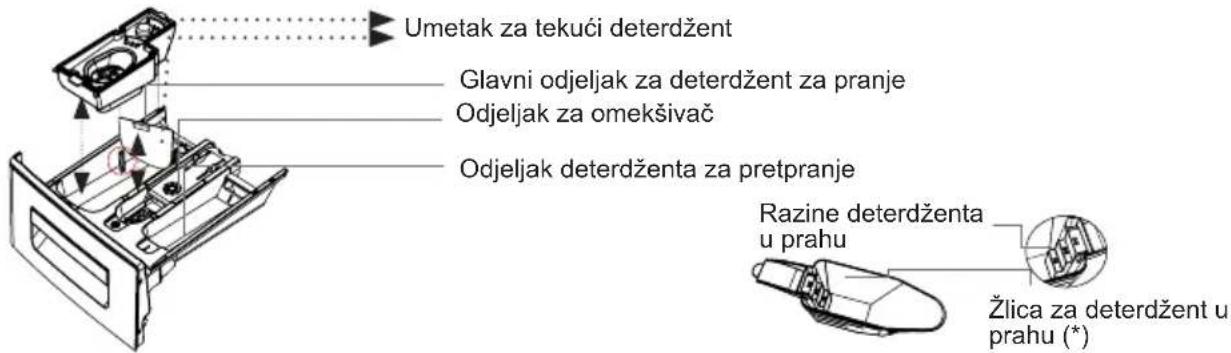
Main wash detergent compartment: "Only agents such as detergent (liquid or powder), descaling agent, and similar can be used in this compartment. You can find the liquid detergent insert in your washing machine during initial installation. (*)
LUKU-3: INSTALLING THE APPLIANCE
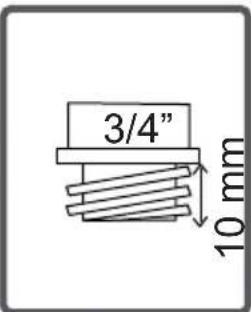
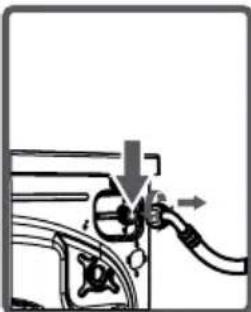
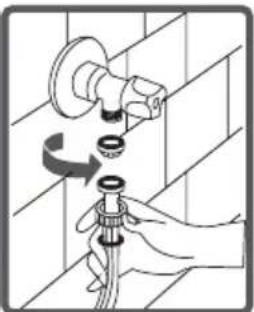
(*) See the chapter regarding maintenance and cleaning of your machine.
www.sharphomeappliances.com
Or contact us:


YouTube
- LAUNDRY
- CONTENTS
- CHAPTER-1: BEFORE USING THE APPLIANCE
- CHAPTER-2: OVERVIEW OF YOUR DEVICE
- CHAPTER-3: INSTALLATION
- CHAPTER 4: INTRODUCTION OF CONTROL PANEL
- CHAPTER 5: PRELIMINARY PREPARATION FOR LAUNDERING
- CHAPTER -1: BEFORE USING THE APPLIANCE
- SAFETY WARNINGS
- DANGER OF GETTING BURNT
- DEATH RISK DUE TO ELECTRICAL CURRENT
- FLOODING RISK
- DANGER OF FIRE
- FALL AND INJURY HAZARD
- CHILD SAFETY
- GENERAL WARNINGS
- CHAPTER 1: BEFORE USING THE APPLIANCE
- REMOVAL OF PACKAGING MATERIALS
- CHAPTER 2: OVERVIEW OF YOUR DEVICE GENERAL APPEARANCE
- CHAPTER 3: INSTALLATION
- REMOVING TRANSPORTATION SAFETY SCREWS
- CHAPTER -3: INSTALLATION
- ELECTRICAL CONNECTION
- WATER INLET HOSE / WATER DISCHARGE CONNECTION
- CHAPTER 4: INTRODUCTION OF CONTROL PANEL SECTIONS
- DETERGENT DRAWER
- PROGRAM KNOB
- ELECTRONIC DISPLAY
- CHAPTER -5: PRELIMINARY PREPARATION FOR LAUNDERING
- SEPARATING LAUNDRIES
- ADDING DETERGENT INTO MACHINE
- AUXILIARY FUNCTIONS
- PRE-WASH AUXILIARY FUNCTION
- EXTRA RINSE FUNCTION
- ANTI-ALLERGIC AUXILIARY FUNCTION
- EASY IRONING AUXILIARY FUNCTION
- ECONOMIC TIME INTERVAL
- START/STAND-BY BUTTON
- STOPPING PROGRAM / ADDING LAUNDRY / CANCELLING PROGRAM
- PROGRAM END
- SELECTING SUB-PROGRAMS
- SYNTHETICS
- WOOL
- EXTRAS
- CHAPTER -8: MAINTENANCE AND CLEANING OF YOUR MACHINE
- WATER INLET FILTERS
- CAUTION
- PUMP FILTER
- WARNING
- CHAPTER -9: FLUSH STOPPER / BODY / DRUM
- LIQUID DETERGENT APPARATUS (*)
- FLUSH STOPPER
- BODY
- DRUM
- CHAPTER 10: TROUBLESHOOTING
- DISPOSAL OF YOUR OLD MACHINE
- TABLE OF CONTENTS
- CONNECTING THE WATER INLET HOSE
- CHAPTER 4: DESCRIPTION OF THE CONTROL PANEL
- CHAPTER 11: AUTOMATIC ERROR MESSAGES AND THEIR HANDLING
- REMOVING THE TRANSPORT BOLTS
- ELECTRICAL CONNECTIONS
- CHAPTER 4: INTRODUCTION TO THE CONTROL PANEL
- FOR MEMORY RECORDING (MEMORY)
- CHAPTER 3 - INSTALLATION
- WATER CONNECTION / WATER CONNECTION
- REMOVING TRANSPORT BOLTS
- WATER INLET HOSE CONNECTION / WATER DRAIN HOSE CONNECTION
- LUKU-3: INSTALLING THE APPLIANCE
Brand : SHARP
Model : ES-GFD9144W3
Category : Washing machine