
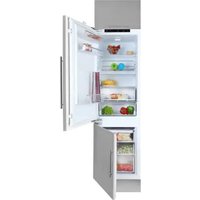
TGF 390 NF - Freezer TEKA - Free user manual and instructions
Find the device manual for free TGF 390 NF TEKA in PDF.


| Product Type | Upright Freezer |
| Brand | Teka |
| Model | TGF 390 NF |
| Capacity | Approximately 390 liters |
| Refrigerant | R600a (flammable) |
| Climate Class | Not specified (typical for temperate climates) |
| Energy Efficiency Class | Not specified |
| Temperature Range | -16°C to -24°C (adjustable) |
| Control Type | Electronic display with touch keys |
| Quick Freeze Mode | Yes, adjustable from 6 to 48 hours |
| Defrosting | Automatic (forced defrost available via key combination) |
| Door Reversal | Yes, user-reversible |
| Door Alarm | Yes, after 120 seconds open |
| High Temperature Alarm | Yes, above -8°C for 6 hours |
| Failure Code Display | Yes (E2, E5, E6, E7, E9, EC) |
| Interior Light | Yes, LED |
| Drawers | Multiple refrigerating drawers |
| Ice Maker | Included (ice tray and collection box) |
| Folding Top Cover | Yes |
| Leveling Legs | Adjustable front legs |
| Cleaning | Neutral detergent, avoid abrasive chemicals |
| Power Supply | AC, standard household socket (10A) |
| Safety Features | Child safety, grounding required, flammable warning |
Frequently Asked Questions - TGF 390 NF TEKA
User questions about TGF 390 NF TEKA
0 question about this device. Answer the ones you know or ask your own.
Ask a new question about this device
Download the instructions for your Freezer in PDF format for free! Find your manual TGF 390 NF - TEKA and take your electronic device back in hand. On this page are published all the documents necessary for the use of your device. TGF 390 NF by TEKA.
USER MANUAL TGF 390 NF TEKA
INSTRUCTION MANUAL
UPRIGHT FREEZER
TGF 390 NF INOX
Please read this manual carefully before using the appliance.
Thank you for purchasing our product.
Attention:
- Please read and understand the safety instructions before use. Keep this manual for future reference. Please note that this manual may be updated without prior notice due to product improvements.
Warning
- WARNING: Keep ventilation openings, in the appliance enclosure or in the built-in structure, clear of obstruction.
- WARNING: Do not use mechanical devices or other means to accelerate the defrosting process, other than those recommended by the manufacturer.
- WARNING: Do not damage the refrigerant circuit.
- WARNING: Do not use electrical appliances inside the food storage compartments of the appliance, unless they are of the type recommended by the manufacturer.
- The appliance must be unplugged after use and before performing user maintenance.
- This appliance is not intended for use by persons (including children) with reduced physical, sensory or mental capabilities, or lack of experience and knowledge, unless they have been given supervision or instruction concerning use of the appliance by a person responsible for their safety.
- Children should be supervised to ensure that they do not play with the appliance.
- If the supply cord is damaged, it must be replaced by the manufacturer, its service agent or similarly qualified persons in order to avoid a hazard.
- Please dispose of the refrigerator-freezer according to local regulations, as it uses flammable blowing gas and refrigerant.
- Disconnect the power supply before replacing the lamp.
- Please follow local regulations regarding disposal of the appliance due to its flammable refrigerant and blowing gas. Before scrapping the appliance, remove the doors to prevent children from being trapped.
Names of the components
We apologize if some features and accessories of the refrigerator you purchased do not match the illustrations; please refer to the packing list included with the refrigerator.
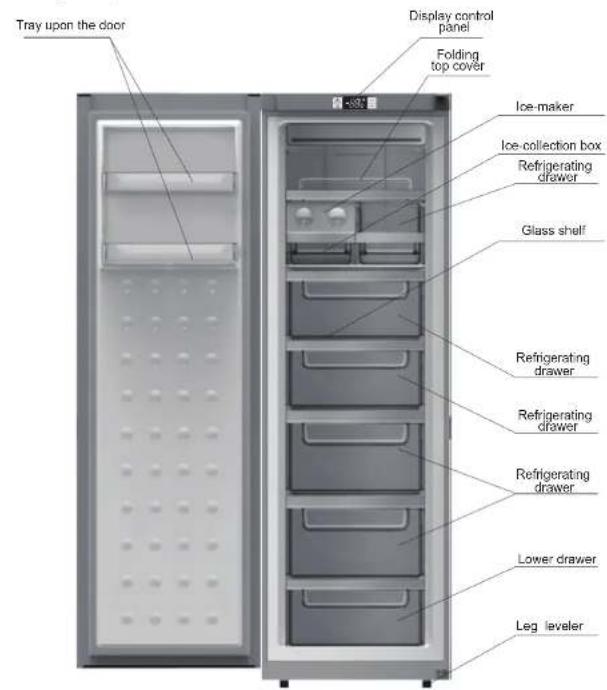
Note: Remove the folding top cover, tray on the door, ice maker, ice collection box, and refrigerating drawer as shown in the graphics to gain more space; this will not affect the normal functions of the product.
Preparation before use
Warning
- Do not use mechanical devices or other means to accelerate defrosting, except those recommended by the manufacturer. Do not use electrical appliances inside the food storage compartment, except those of the type recommended by the manufacturer. The refrigerator uses R600a refrigerant and cyclopentane foaming material, both of which are flammable. Obsolete refrigerators should be kept away from fire, and incineration is prohibited.
New refrigerator
- Remove all packing materials before use, including the bottom seating washer, foam pads, and gummed paper inside.
- Use a warm, wet cleaning cloth to wipe the refrigerator's interior and exterior (add a little detergent to the warm water and use clean water to rinse). Prepare a dedicated grounding outlet with both polarities. Do not share a multi-purpose socket with other electrical appliances.
- Connect the earth wire. The socket's earth electrode must be equipped with a reliable grounding wire.
Transportation and placement of the refrigerator
Transportation
- Do not invert, traverse, press, or shake the refrigerator. When moving the refrigerator, the angle of inclination shall not be larger than 45°.
- When moving, do not apply excessive pressure to the door or top cover, otherwise deformation will occur.
- Slightly tilt the refrigerator backward (less than 20°) to roll it a short distance on the rear casters.
Placement
- Place the refrigerator in a ventilated area, away from heat sources and direct sunlight. To avoid rust or reduced insulation, do not place it in a damp or wet location.
- The top space for the refrigerator shall not be less than 30 cm. The distance from the sides shall not be less than 10 cm. The distance from the wall shall not exceed 75 mm, providing convenience for opening and closing the door and dispersing heat.
- Place the refrigerator on a flat and solid floor (if it is not stable, you can adjust the leveling legs).
Attention
Make sure the power cord is not pinched by the refrigerator or other items. Before connecting the power cord, make sure the voltage range of the refrigerator matches that of the power supply.
Correct application of the refrigerator
Ensure that the refrigerator is placed correctly and stably. Be aware of all safety matters that require attention.
1. Connect the electricity
After connecting electricity, it will enter into ex-factory state.
2. Put food into the refrigerator
Suggestion: after working a time, the refrigerator will arrive store temperature or after the first stop of the compressor, put food into it, which is beneficial to retain freshness.
Note: if the set temperature is altered or new food is put in, temperature inside the box will achieve the balance after a time, which is determined by the temperature alteration degree, temperature of ambient environment, opening frequency, quantity of the food inside and so on.
- Generally, temperature inside refrigerating chamber is below -18°C. Food needing long-term storage shall be put in refrigerating chamber.
- Quick-frozen food shall be put into the refrigerating chamber as soon as possible before defreezing.
- Hot food should be put into refrigerating chamber after it cools down to room temperature.
- Fruit and vegetable should not be put into refrigerating chamber. In order to avoid freezing and rupture, glass container with liquid should not be put into the refrigerating chamber.
- Quick-frozen food should be stored by category. Food in the same kind should be put into together. Thus, energy conservation can be realized by reducing opening frequency.
Refrigerating chamber's drawer
It is for food needing freezing. A block of meat should be put into the drawer after being sliced for convenience. When take out the food, pull our the drawer at first, then horizontally push the tray above the drawer inward, and then take out the food under the drawer,
Note: close the drawer, after using the refrigerating chamber.
Function introduction
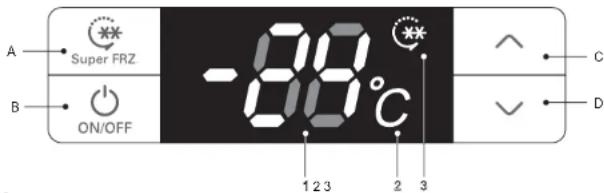
1. Keys
A. Super FRZ: quick-frozen pattern B. ON/OFF: start up or shut down the system C. ∧: increase temperature of the refrigerating box / regulate quick-frozen time D. √: decrease temperature of the refrigerating box / regulate quick-frozen time
2. Names of functions of display screen
1. Temperature region digitron 2. Temperature (°C) icon 3. Quick-frozen icon
3. Display control
● Power on for the first time: all shines for three seconds with ringing of start bell. Defaulting temperature of the refrigerating box is -18°C.
● Normal operation display: Temperature display region: when there is a failure, it will show failure codes by turn at a priority order; without failure, it will show the set temperature.
● Display control:
- Under the normal pattern, it will not shine any more after thirty seconds without opening and key operation;
- When the door is under open state, the display will shine all the time and it will stop shining thirty seconds after the door is closed.
- When a failure happens and it is within "Failure Code", the screen will shine for one time and stop to shine after thirty seconds (if the buzzer has been ringing for a long time, press any key to cancel the failure bell);
4. User Mode operation
- Start-up and shutdown
Under start-up mode, press and hold ON/OFF key (B key) for three seconds, the start bell will ring and the system will be shut down immediately;
Under shut down mode, press and hold ON/OFF key (B key) for three seconds, the start bell will ring and the system will be started immediately.
Press ON/OFF key for three seconds to shut down the system and the display screen will not show any more. Except ON/OFF key (B key), other keys will stop responding, and compressor, defrosting heater, door lamp and other loads will be shut down immediately: Press ON/OFF key for three seconds to start up the system. Before starting, if the system is at Quick-Frozen Mode, the display screen will show -24°C and Quick-frozen icon was lighted, or otherwise the display screen will show the temperature inside refrigerating chamber (set at the last time) and all loads will run the mode having been set before shutdown.
Function introduction
All following functions must be worked under start state.
● Quick-Frozen Mode entry
When the system is at non Quick-Frozen Mode, press and hold Super FRZ key (A key) for three seconds to start the Quick-Frozen Mode, and quick-frozen icon will be lit up, and the display screen will show the defaulting quick-frozen time (6 hours). Press temperature regulation keys (C key) or √(D key) to change quick-frozen time. A change needs 6 hours. Adjustment range is between 6 hours to 48 hours. If you do not press any key in five seconds and the setting will take effect automatically and show "-24°C": within five seconds, you can press Super FRZ key(A key) manually for affirmation and it will show "-24°C". Then, the refrigerator will work under Quick-Frozen Mode.
Note: The freezing capacity marked in rating label is the test result of quick-freeze mode
(mentioned above) setting in 48 hours
- Exit from Quick-Frozen Mode
After quick-froze mode takes effect and when it arrives the set quick-frozen time, press and hold Super FRZ (A key) for three seconds or change the set temperature by pressing certain keys to exit from Quick-Frozen Mode, and then the quick-frozen icon will not shine any more. After withdrawing from the Quick-Frozen Mode, it will run at the mode having been set before. Note: if it is shut down or has a power failure when the Quick-Frozen Mode is under operation, it will continue to run under the Quick-Frozen Mode after recovery.
- Set the temperature of the refrigerating chamber
Press temperature regulation keys A (C key) and V (D key) to set the temperature and the set temperature will shine. The setting range is between 16°C to 24°C (non-periodic temperature regulation); it will exit from setting state in five seconds and the setting will take effect. (within five seconds after finishing the setting, press A key or B key to affirm the set state manually and make the setting valid.)
5. Illuminating lamp control
When open refrigerating box's door, refrigerating box's illuminating lamp will shine. When close refrigerating box's door, refrigerating box's illuminating lamp will not shine any more.
6. Door-opening hint and door-opening alarming control
If refrigerator chamber door has been open for 120 seconds, it will ring warning bell, and the bell will ring per 2 seconds till the door is closed. Press any key to cancel the door-opening warning.
7. Power-interruption memory and initial power-up state
- When a power interruption occurs, the refrigerator can memorize the operating mode and state before the interruption automatically; when power is restored, it will recover to the state before the interruption and run the mode that was set before the interruption.
- Initial power-up state: the set temperature of the refrigerating chamber is -18°C.
- Memory: includes the set temperature of the refrigerating box, cumulative working hours of
Function introduction
8. High temperature warning of the refrigerating chamber
When the temperature of the refrigerating chamber has been above -8°C for six hours, a high temperature warning will sound. The buzzer will ring ten times per second, then ten times every thirty minutes, and the temperature display region will show failure code (E9); the ringing will stop when the temperature of the refrigerating chamber is below -12°C. Press any key to cancel the warning buzzer (if it does not buzz after thirty minutes). However, the failure code display state is not canceled until the failure is resolved.
- Failure hint
| Failure code | Hint | Failure code | Hint |
| E2 | Temperature sensor failure of refrigerating box | E6 | Communication failure |
| E5 | Refrigerating defrosting sensor failure | E9 | High temperature warning of the refrigerating chamber |
| E7 | Ambient temperature sensor failure | EC | EEPROM circuit failure |
Note: when there is a failure, the system will display all machine failure codes in turn. The warning will be automatically canceled or can be canceled by pressing any key. When a failure occurs, it is a priority to show the failure code until failure recovery; otherwise, the set temperature and quick-frozen icon cannot be displayed. If a failure has been displayed all the time and automatic recovery fails, please contact the After-sales Department or professional maintenance personnel.
10. Force defrosting
Press and hold the "temperature regulation" keys ∧ and ∨ for three seconds to enter Force Defrosting Mode. The high position of the LED temperature region always shows "3" with no display in the low position. When entering Force Defrosting Mode, the compressor and fan will stop immediately. When the defrosting heater is forced to start and under Force Defrosting Mode or the exiting conditions are satisfied, press and hold the "temperature regulation" keys ∧ and ∨ for three seconds to exit Force Defrosting Mode.
Matters needing attention
Do not arbitrarily dismantle or repair. Choose repair shops designated by the manufacturer to replace accessories.
Use a standard professional three-hole power socket (above 10A). Socket grounding must be good.
To avoid fire, do not use combustible solvents near the refrigerator.
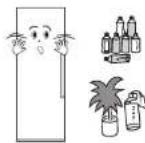
To avoid damage, fire, and other accidents, do not put anything combustible, explosive, volatile, or strongly corrosive into the refrigerator. To avoid freezing, rupture, and other losses, do not put bottles with fluids or sealed containers into the refrigerating box.
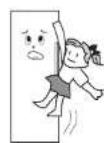
To prevent accidental injury from a child being trapped inside or the refrigerator falling over, do not allow children to enter or climb on the refrigerator.
Do not place heavy items on top of the refrigerator, as they may fall and cause injury.
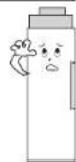
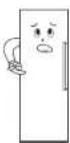
Do not overload the refrigerator with too much food.
Do not leave the doors and drawers open for extended periods or open them frequently, as this will reduce the efficiency of the appliance and increase its operating load.
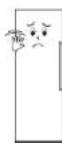
If the refrigerator is not operating normally or is damaged, unplug it and contact your local service center.
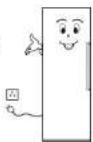
Do not splash water on the top or back of the refrigerator, as this may reduce its insulation effectiveness.
Attention:
This product is a household refrigerator. According to national standards, household refrigerators are intended only for storing food and must not be used for other purposes, such as storing blood, drugs, biological products, etc.
Refrigerator maintenance
Cleaning
Fingerprints are easily left on the exterior. Wipe them off with a dry towel. Periodically clean the dust from the back and underneath the refrigerator.
The interior of the refrigerator should be cleaned frequently to prevent odors. After unplugging the appliance, use a soft cloth and a neutral detergent to clean it, then wipe with clean water.
Do not use the following products to clean the interior of the refrigerator: ● Alkaline or mildly alkaline detergents (may cause the inner liner and plastic components to crack)
● Soap powder, benzene, amyl acetate, alcohol, etc. (may damage plastic components)
- If cooking oil or seasonings spill on the external surface of the refrigerator, clean them immediately (may cause plastic components to crack).
Lamps and replacement
If the illuminating lamp fails, please contact a professional for home service.
Halt
Non-use for a long time: Please unplug the power to avoid electric shock or fire due to power line aging; clean up the refrigerator interior; open the door for a while and close it after the interior becomes completely dry.
Power failure: ... Reduce the number of door openings as much as possible; it is better not to put fresh food in it.
Discard: ... When discarding an unused refrigerator, the door seal must be removed so that children cannot get trapped inside.
Door Right-Left Change
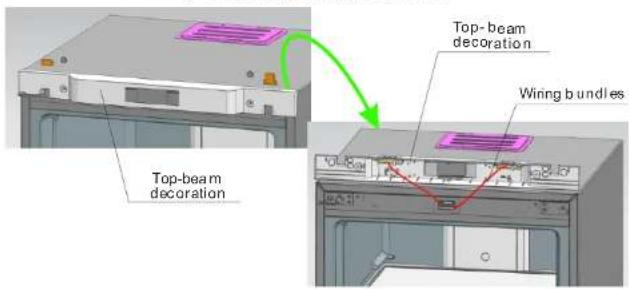
- Remove the two nut caps and two hinge cover plates from the top beam (open the door toward the right).
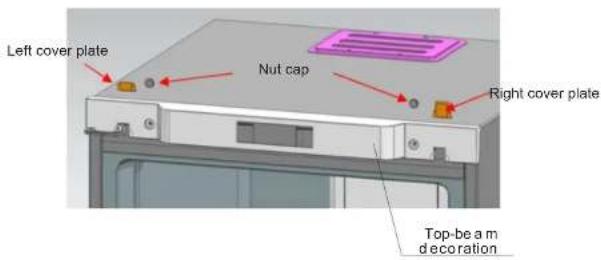
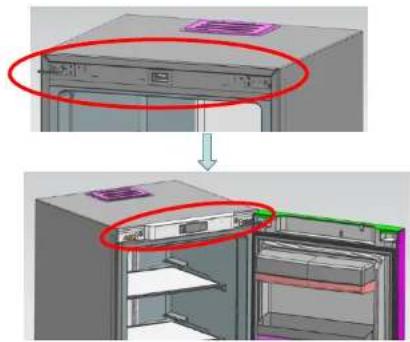
- Remove decorating components from the top beam.
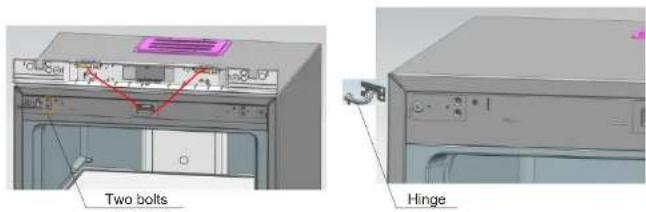
- Remove the two bolts fixed with hinges, pull the hinges out from one side, and dismantle the door at the same time. Finally, take the hinges out from the door.
Door Right-Left Change
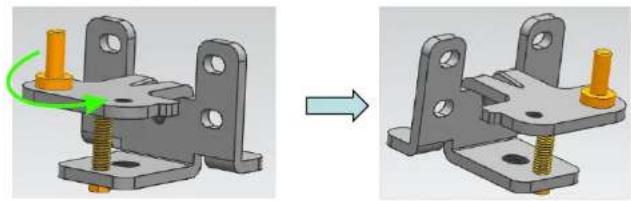
4. Reassemble the lower hinge axis: dismantle the original hinge axis and assemble it at the graphic position.
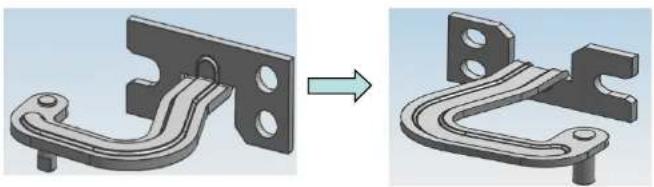
5. Reassemble the upper hinge axis: dismantle the hinge axis and assemble it by rotating it from the other end of the screw hole.
- Install the upper hinge fixed leg (on the left) at the right side.
Door Right-Left Change
7. Install the lower hinge at the right side of the refrigerator.
- First, install the upper hinges into the corresponding axle holes on the right (above the door). Then place the door onto the lower hinges, press the upper hinges into the hinge fixing legs, and finally secure the upper hinges.
- Install the top-beam decoration, nut caps, and hinge cover plates.
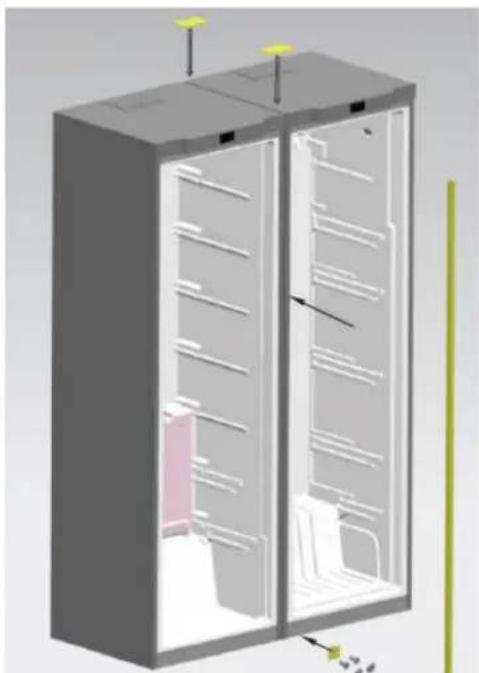
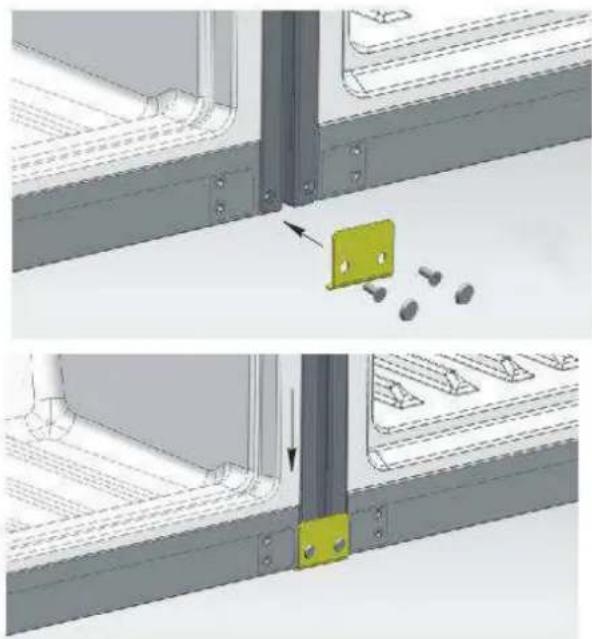
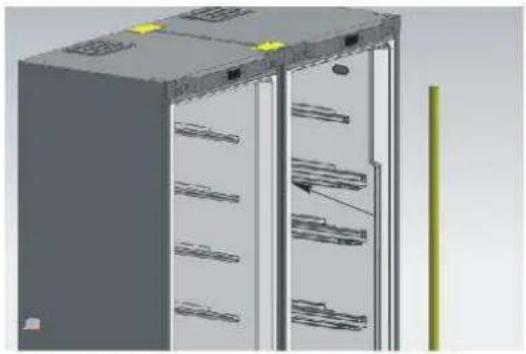
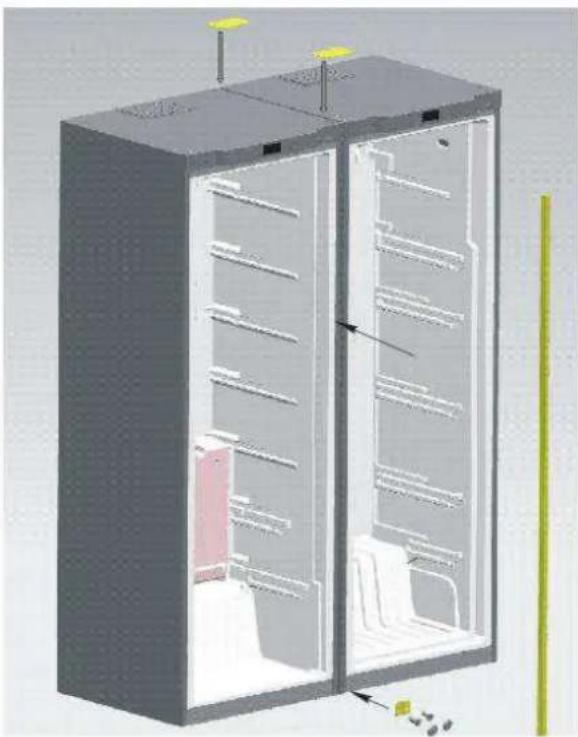
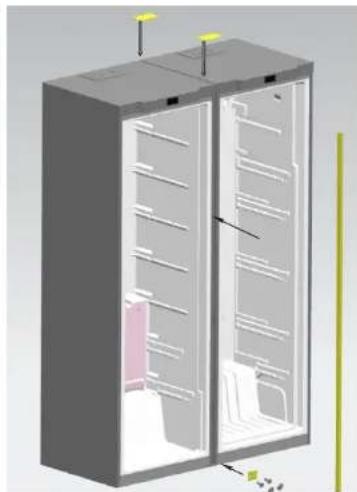
CONNECTING GUIDE FOR REFRIGERATOR AND FREEZER CABINETS
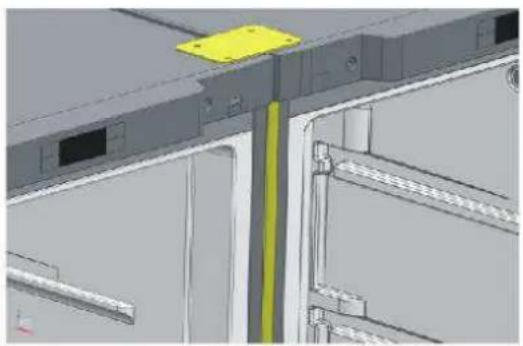
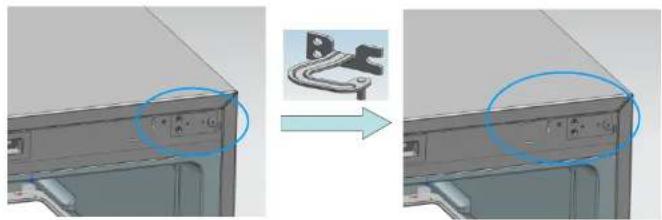
Step 1: Place the two cabinets together with only a 10 mm gap. Fix the connecting hinge to the position shown in the picture.
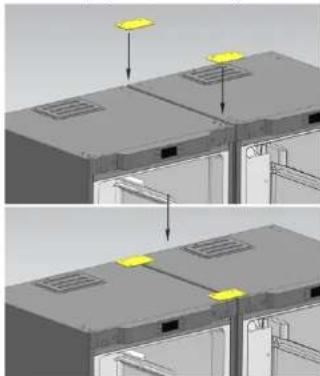
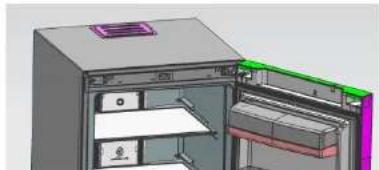
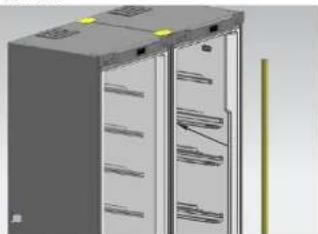
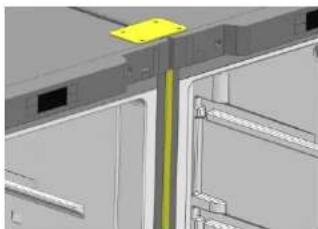
Step 3: Place the box inside the gap between the two cabinets. The connecting step is finished.
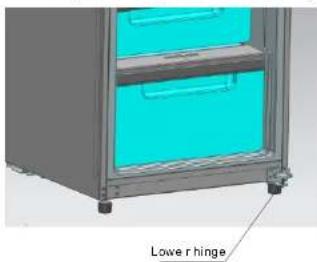
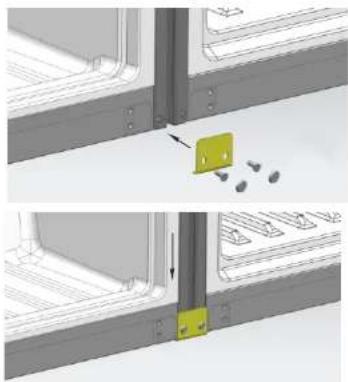
Step 2: Fit the lower connecting hinge at the bottom of the two cabinets.
Troubleshooting
Before overhaul, please read the following content carefully.
| Phenomenon | Possible reasons and matters needing check |
| Inoperation | Not charged with electricity or loose pluggingExcessively low voltage |
| Poor refrigeration | High temperature regulationToo much foodHot foodFrequent door operation (open and close)Incomplete door closingHeat source nearby |
| High noises | Uneven floor and unsteady placementRight placement of accessories |
| Foreign odor | Unsealed wrapping of odorous foodSour foodUncleanliness interior |
If the situation still exists after checking all the above matters, please contact our company's After-sales Department. The damaged power cord must be replaced by maintenance personnel appointed by our company for safety.
Non-failure phenomenon
Within the capillary tubes, refrigerant fluid flows very fast, sometimes carrying a few air bubbles, which might cause irregular noises at the entrance. If the refrigerator is in quick-refrigeration state, opening the refrigerating chamber will produce the sound of wind, which is the sound of the high-speed rotation of the fan.
When air humidity is relatively high, areas around the door may become damp. You can clean them with a dry cloth.
Correct Disposal of this product
Correct Disposal of this product
This marking indicates that this product should not be disposed with other household wastes throughout the EU. To prevent possible harm to the environment or human health from uncontrolled waste disposal, recycle it responsibly to promote the sustainable reuse of material resources. To return your used device, please use the return and collection systems or contact the retailer where the product was purchased. They can take this product for environmentally safe recycling.


- INSTRUCTION MANUAL
- UPRIGHT FREEZER
- PLEASE READ THIS MANUAL CAREFULLY BEFORE USING THE APPLIANCE
- ATTENTION
- WARNING
- NAMES OF THE COMPONENTS
- PREPARATION BEFORE USE
- NEW REFRIGERATOR
- TRANSPORTATION AND PLACEMENT OF THE REFRIGERATOR
- TRANSPORTATION
- PLACEMENT
- CORRECT APPLICATION OF THE REFRIGERATOR
- ENSURE THAT THE REFRIGERATOR IS PLACED CORRECTLY AND STABLY. BE AWARE OF ALL SAFETY MATTERS THAT REQUIRE ATTENTION
- CONNECT THE ELECTRICITY
- PUT FOOD INTO THE REFRIGERATOR
- REFRIGERATING CHAMBER'S DRAWER
- FUNCTION INTRODUCTION
- KEYS
- NAMES OF FUNCTIONS OF DISPLAY SCREEN
- DISPLAY CONTROL
- USER MODE OPERATION
- ALL FOLLOWING FUNCTIONS MUST BE WORKED UNDER START STATE
- ● QUICK-FROZEN MODE ENTRY
- EXIT FROM QUICK-FROZEN MODE
- SET THE TEMPERATURE OF THE REFRIGERATING CHAMBER
- ILLUMINATING LAMP CONTROL
- DOOR-OPENING HINT AND DOOR-OPENING ALARMING CONTROL
- POWER-INTERRUPTION MEMORY AND INITIAL POWER-UP STATE
- HIGH TEMPERATURE WARNING OF THE REFRIGERATING CHAMBER
- FORCE DEFROSTING
- MATTERS NEEDING ATTENTION
- REFRIGERATOR MAINTENANCE
- CLEANING
- LAMPS AND REPLACEMENT
- HALT
- DOOR RIGHT-LEFT CHANGE
- CONNECTING GUIDE FOR REFRIGERATOR AND FREEZER CABINETS
- TROUBLESHOOTING
- NON-FAILURE PHENOMENON
- CORRECT DISPOSAL OF THIS PRODUCT
Brand : TEKA
Model : TGF 390 NF
Category : Freezer