
CNS-SW51BB - Smartwatch Canyon - Free user manual and instructions
Find the device manual for free CNS-SW51BB Canyon in PDF.


| Product Type | Smartwatch |
| Model | CNS-SW51BB |
| Brand | Canyon |
| Style | Military style |
| Water Resistance | IP68 (up to 1.5m for 30 minutes) |
| Compatibility | iOS and Android OS |
| Power Source | CR2450 550mAh cell battery (replaceable) |
| Battery Life | Up to several months (typical use) |
| Display | LED backlight |
| Connectivity | Bluetooth |
| Strap Material | Irremovable TPU (two parts) |
| Package Contents | Smartwatch, TPU strap (2 parts), CR2450 battery, user manual |
| Weight | Approx. 50g (with battery) |
| Key Functions | Time display, notifications, step counting, Bluetooth connectivity, stopwatch, backlight |
| Maintenance | Replace CR2450 battery when needed |
| Safety | Avoid immersion beyond 1.5m, avoid heat and direct sunlight, avoid drops from over 3m |
| Warranty | Standard warranty from Canyon (check sales receipt) |
| Manufacturer | Asbisc Enterprises PLC, Cyprus |
Frequently Asked Questions - CNS-SW51BB Canyon
User questions about CNS-SW51BB Canyon
0 question about this device. Answer the ones you know or ask your own.
Ask a new question about this device
Download the instructions for your Smartwatch in PDF format for free! Find your manual CNS-SW51BB - Canyon and take your electronic device back in hand. On this page are published all the documents necessary for the use of your device. CNS-SW51BB by Canyon.
USER MANUAL CNS-SW51BB Canyon
Military style smartwatch
CNS-SW51BB
Quick Guide v 1.0
EN
Military style smartwatch
• IP68 waterproof
- Compatibility with iOS and Android OS
• Energy-efficient, 550 mAh cell battery CR2450
- Backlight
Complete set included into the package
- Smartwatch
- Irremovable TPU strap (2 parts)
- Battery CR2450
- User manual 1pcs
Usage
Turning on and off: press "Mode" and "Start" buttons simultaneously and hold them for 3 seconds.
Connecting to a smartphone: turn the smartwatch on, activate bluetooth on your smartphone, download and install Canyon Smart Watch application Canyon Fit by scanning the QR code below, open Canyon Fit app->press" Setup"->"Pair device"->"Start"-> choose your watch from pair device list -> press "ADD DEVICE" and you will see Device successfully connected. Use the application to apply needed
Power on/off
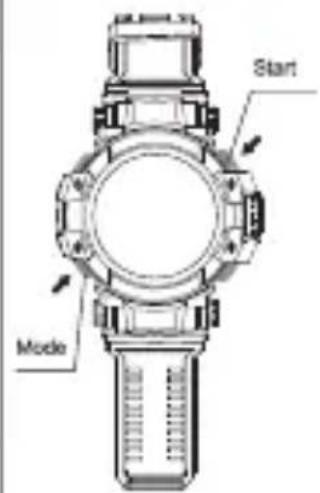
Bluetooth on/off

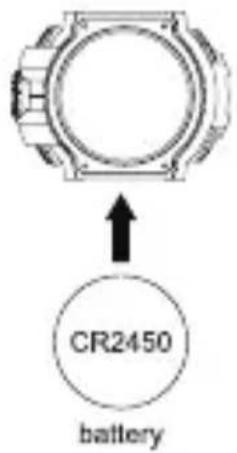
Change battery
settings, fill in your body parameters, select apps that you want to receive notifications from, etc.
Battery replacement: unscrew the 4 cogs that hold the lid on the backside of the watch body. Replace the battery that is located under the lid. Don't lose gummy pad between lid and battery. After replacing the battery, screw the lid back to the watch body. It is advisable to change batteries in specialized service centres.
Turning Bluetooth: press and hold "Light" for 3 sec.
Scan this QR code to download and install the application Canyon Fit:

Troubleshooting
| Problem Solution | Solution |
| Your smartwatch doesn't turn on or suddenly turns off while performing actions such as turning on the lighting. | Replace CR2450 550 mAh cell battery |
| Your smartwatch isn't detected by a smartphone | Make sure that Bluetooth, GPS (high accuracy) are active on your smartphone |
| Your smartwatch is detected by a smartphone, but fails to connect | Turn the smartwatch off and then turn it back on |
If the actions from above-mentioned list do not help, please contact support service at Canyon web-site: http://canyon.eu/ask-your-question/

Safety Instructions
Read and follow all instructions before usage of this device.
- Protect the device from excessive amount of water: this smartwatch can be immersed into water for up to a maximum depth of 1.5m underwater for up to thirty minutes. It's forbidden to use it for diving.
- Protect the device from heat: do not install heating
devices near it, and do not expose to direct sunlight during hot season for a long time.
- Protect the device from smashing: even though the watch has protective body, avoid dropping the device from over 3m to hard surfaces and sharp objects.
- Battery saving: turn off bluetooth on the smartwatch while not using it actively. It helps to save up to 50% of battery charge.
Warranty liabilities
Warranty period starts from the date of the device's purchase from the Seller, authorized by Canyon. The date of purchase is indicated in your sales receipt or a waybill. During warranty period, a repair, replacement or refund of payment for goods are performed on discretion.
Manufacturer: Asbisc Enterprises PLC, 43, Diamond Court, Kolonakiou Str, 4303, Limassol, Cyprus, Agios Athanasios, http://canyon.eu/
BG
http://canyon.eu/ask-your-question/

Řešení problémů
Hibaelháritás
http://canyon.eu/ask-your-question/

Depanare
Producator: Asbisc Enterprises PLC, 43, Diamond Court, Kolonakiou Str, 4303, Limassol, Cyprus, Agios Athanasios, http://canyon.eu/
http://canyon.eu/ask-your-question/

Riešenie problémov
All other products names and trademarks are property of their respective owners
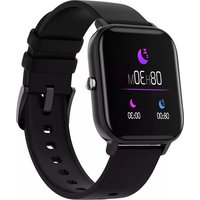
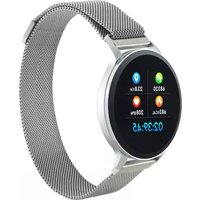
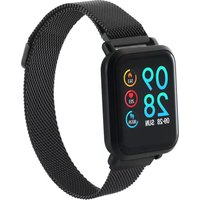

Brand : Canyon
Model : CNS-SW51BB
Category : Smartwatch