50226 - Security Camera Qoltec - Free user manual and instructions
Find the device manual for free 50226 Qoltec in PDF.


| Product Type | Security Camera |
| Brand | Qoltec |
| Model | 50226 |
| Power Input | Micro USB (5V) via AC adapter |
| Night Vision | Infrared, automatic activation in low light |
| Motion Detection | Yes, records photos and event log |
| Audio | Built-in microphone and speaker for two-way talk |
| Storage | Micro SD card slot (card not included) |
| Connectivity | WiFi (2.4 GHz) |
| Mobile App | SIPC (iOS and Android) |
| Reset Button | Yes, at back of camera (press 5 seconds) |
| Supported Connections | Multiple cameras on same WiFi |
| Included Accessories | Camera, Micro USB cable, stand, screws, wall plugs |
| Cleaning Instructions | Wipe with dry cloth only |
| Safety Warnings | Do not expose to rain or moisture; do not dismantle; recycle properly |
| Repair | Contact authorized specialist; do not attempt self-repair |
Frequently Asked Questions - 50226 Qoltec
User questions about 50226 Qoltec
0 question about this device. Answer the ones you know or ask your own.
Ask a new question about this device
Download the instructions for your Security Camera in PDF format for free! Find your manual 50226 - Qoltec and take your electronic device back in hand. On this page are published all the documents necessary for the use of your device. 50226 by Qoltec.
USER MANUAL 50226 Qoltec
It is recommended to read this user manual carefully and keep it for the future reference.
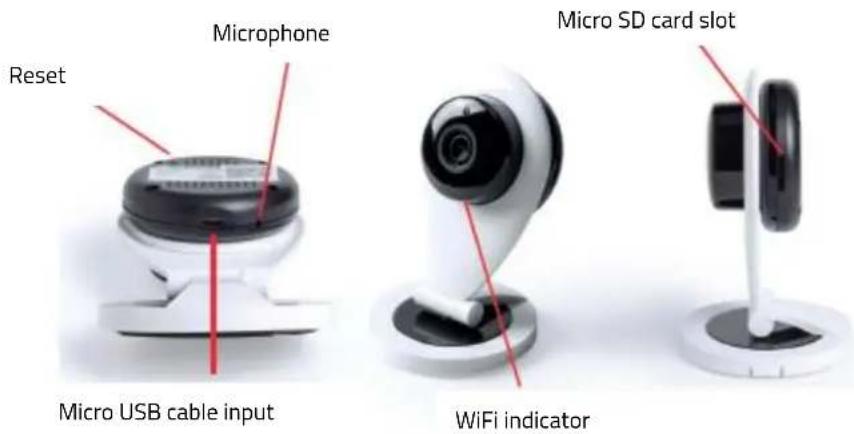
Product Overview:
text_image
Microphone Reset Micro USB cable input Micro SD card slot WiFi indicatorAccessories Included:
- Smart camera
- Micro USB charging cable
- User manual
- Stand
- Screws
- Wall Plugs
User Guide:
Installation
- Connect Micro USB cable to your camera and the USB to the power source or AC adapter.
- Place the camera on a flat surface or screw the stand to a desired place.
Download App "SIPC":
App available for Android and iOS. You can download it from App Store or Google Play.
Add device (iOS and some Android):
- Open WiFi setting on your phone and select camera to connect. Camera ID name appears on the label at the back of the camera.
- To ensure a fast connection, connect your camera to your home network. On the APP press "Setting" and access "WiFi settings" to select your network. Type in the WiFi code of the network you want to pair. After a few seconds both devices will be paired successfully and ready to use.
Add device (Android):
- Make sure camera is turned on and your device is connected to the WiFi network you want to pair with the camera.
- After downloading app access the application directly, press "+Add a device" and select "Smart link". Follow the app instructions which will guide you to a successful connection.
- Check the camera WiFi indicator is flashing blue and press "NEXT". Then type in the Network WiFi code which is connected to your phone.
- Activate your phone volume and bring your phone closer to the camera. Press "NEXT. On the following screen, press "Click to send". Your phone will make a sound and press "NEXT" again.
- Wait for approximately one minute to end the setup. If successful connection fails, press "Reset" button at the back of the camera for 5 seconds until you hear a sound. Camera will restore to initial setup. Repeat the connection process from the beginning.
Functions:
Camera is provided with infrared function, this is automatically activated under low light and dark conditions. Also supports motion detection and when activated records activity by means of photos and events log on the App.
More than one camera connection at the same time with your device using the same WiFi network's supported. While watching real time video you can hold a conversation as the camera is provided with microphone and speaker.
Easily explore different setting options on the main interface and secondary screen.
Warnings:
- Do not expose this product to the rain or damp conditions.
- Prevent this item from falling as it could cause serious damage.
- Do not dismantle, repair or modify this product by yourself, contact and authorized specialist.
- In order to avoid any risk, do not dispose of this product inappropriately.
- Clean the camera with a dry cloth.
- Do not place this item near sources of heat or expose to direct sunlight.
- Do not insert any metal object into this device as there is a risk of causing a short circuit in the unit.
At the end of the devices electrical life, it should be recycled separately from your household waste. There are adequate means to dispose of this material for proper recycling. For more information, contact your local authorities.