Powerbank Micro Pro 20.000 - Power bank XLayer - Free user manual and instructions
Find the device manual for free Powerbank Micro Pro 20.000 XLayer in PDF.


User questions about Powerbank Micro Pro 20.000 XLayer
0 question about this device. Answer the ones you know or ask your own.
Ask a new question about this device
Download the instructions for your Power bank in PDF format for free! Find your manual Powerbank Micro Pro 20.000 - XLayer and take your electronic device back in hand. On this page are published all the documents necessary for the use of your device. Powerbank Micro Pro 20.000 by XLayer.
USER MANUAL Powerbank Micro Pro 20.000 XLayer
natural_image
Line drawing of a rectangular electronic device with a digital display showing '100' (no text or symbols on the device itself)text_image
Diagram of a device front panel with numbered labels pointing to the screen and display screen, alongside two cylindrical devices.(1) Micro-USB-Input: 5V/2.0A
(2) Typ C-Input: 5V/2.0A
(3) USB-Output 1:5V/2.1A
(4) USB-Output 2: 5V/1.0A
(5) Power On/Off Button
(6) Numerische Ladestandsanzeige
LED Anzeigen
natural_image
Pure diagram of a vertical rectangular device with internal slots and a handle, no text or symbols present.text_image
CE NO. 400% NO. ← ←natural_image
Line drawing of a rectangular electronic device with a digital display showing '100' (no text or symbols on the device itself)Thank you for purchasing the XLayer Powerbank Micro Pro 20.000 mAh. This powerbank can be widely used for all kinds of electronic devices such as iPhone, iPad or other smartphones.
Contents
1 Powerbank, 1 USB to Type C cable, 1 User Guide
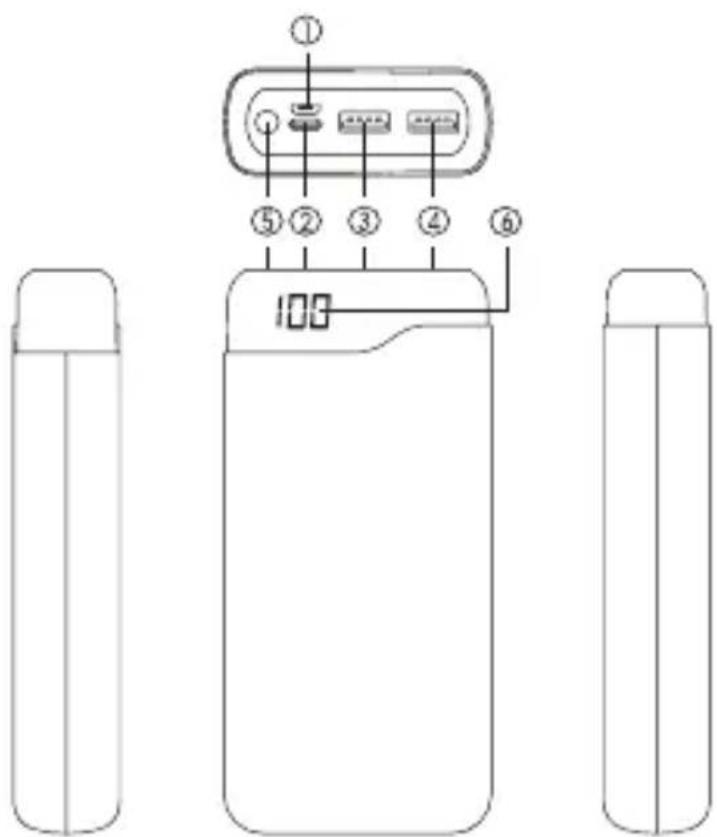
text_image
Diagram of a device front panel with numbered labels pointing to the screen and display screen, alongside two cylindrical devices.(1) Micro-USB Input: 5V/2.0A
(2) Type C Input: 5V/2.0A
(3) USB Output 1:5V/2.1A
(4) USB Output 2: 5V/1.0A
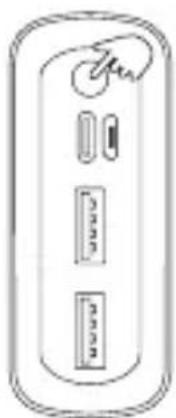
(5) Power On/Off Button
(6) Numeric Capacity Display
LED Indicator
Press the Power On/Off Button to check the remaining capacity. The capacity will be displayed in percentage. It is recommended to recharge the powerbank when less than 10% power is remaining.
natural_image
Simple line drawing of a rectangular device with three internal compartments and a handle (no text or symbols)Product Specification
| Battery type: | Lithium Polymer |
| Capacity: | 74 Wh (3.7V/20.000 mAh) |
| Type C Input: | 5V/2.0A |
| Micro-USB Input: | 5V/2.0A |
| USB Output 01: | 5V/2.1A |
| USB Output 02: | 5V/1.0A |
| Size: | 143 x 68 x 27 mm |
| Weight: | 425 g |
Compatibility
The Powerbank is compatible with all smartphones, tablets and all other USB-enabled devices with a 5V charging input. To charge your devices with the Powerbank, plug the charging cable into the USB output. The included cable can be used with all mobile devices that have a USB-C input. For other devices, please use the cable supplied by the manufacturer. When charging is finished, remove the charging cable from the mobile device. After a few seconds, the Powerbank will be automatically deactivated.
How to charge the powerbank
We recommend to fully charge the Powerbank before each use. To charge the Powerbank, please use one of the following two options:
1. Charging with a power adapter with USB or Type C port:
Connect the powerbank to power updater USB port with the supplied USB to Type C cable directly.
Or connect the powerbank to power adapter USB port with a USB to Micro-USB cable (not included).
The powerbank can also be charged with the Type C port. Connect the powerbank to power adapter Type C port with a Type C to Type C cable (not included).
2. Charging with a free Type C port on your computer:
Connect the powerbank to a free USB port on a computer with the supplied USB to Type C cable directly.
Or connect the powerbank with the Micro USB port, with a USB to Micro-USB cable (not included), with a computer.
The powerbank can also be charged with the Type C port. Connect the powerbank to a free Type C port on a computer with a Type C to Type C cable (not included).
Safety Notice
• Before using the Powerbank for the first time, fully charge it once.
- Use the device for charging only with the supplied cable.
• To ensure a long battery life during irregular use, charge the device once every three months.
- Do not charge unattended. There is a risk of overheating and fire in the event of a short circuit or mechanical damage.
- Never immerse the product in water or other liquids.
- Handle the product with care. Impacts, shocks or falling from a low height can damage the product.
• If liquid is leaking, do not continue to use the product.
- A remodeling or modification of the product affects product safety. Caution: Risk of injury!
- Never open the device without authorization. Never carry out any repairs yourself!
- Modifications and mistakes reserved.
text_image
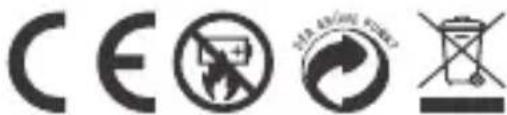
CE NO RECOCONOMICSThis electrical device does not belong in the garbage. For proper disposal, please contact the public collection in your community.
Please note: we don't accept liability for any damages on connected devices. Please check compatibility of our product with the manufacturer of your device before use.
XLayer GmbH herewith explains that the device XLayer Powerbank Micro Pro 20.000 mAh is in accordance with all relevant requirements and guidelines. The declaration of conformity can be found under the following address or simply contact us under service@xlayer.de.