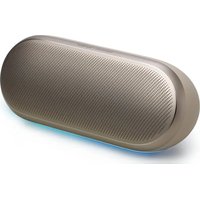
Luna 2 - Docking station HARMAN KARDON - Free user manual and instructions
Find the device manual for free Luna 2 HARMAN KARDON in PDF.


| Product Type | Docking station / portable speaker |
| Brand | Harman Kardon |
| Model | Luna 2 |
| Dimensions (W x H x D) | 216 mm x 84 mm x 81 mm |
| Weight | 738 g |
| Power supply | USB-C 5 V / 3 A (recommended charger 5 V DC, 2.5 W - 15 W) |
| Battery | 7.2 V / 3300 mAh (Li-ion) |
| Bluetooth version | 5.4 |
| Bluetooth profiles | A2DP V1.4, AVRCP 1.6 |
| Bluetooth transmitter power | ≤ 15 dBm |
| Speakers | Woofer 62 mm x 82 mm (25 W RMS) + Tweeter 20 mm (15 W RMS) |
| Frequency response | 58 Hz - 20 kHz (-6 dB) |
| Signal-to-noise ratio | > 80 dB |
| Waterproof rating | IP67 (water and dust) |
| Associated app | Harman Kardon One (setup and updates) |
| Main features | Bluetooth pairing (up to 2 devices), AirTouch stereo pairing, customizable lighting, multi-speaker connection |
| Connectivity | USB-C (charging and service), USB audio playback reserved for US version |
| Supported audio formats | MP3 |
| Power consumption (standby) | ≤ 0.5 W |
| Power consumption (network standby) | ≤ 2.0 W |
| Maximum operating temperature | 40 °C |
| Box contents | Luna 2 speaker, USB-C cable, documentation |
| Care and cleaning | Rinse with fresh water after exposure to salt or chlorinated water; do not charge if wet; dry completely before charging |
| Safety | Do not expose to liquids without disconnecting the cable; do not charge in humid environment; use a compliant adapter (5 V, 2.5 - 15 W) |
Frequently Asked Questions - Luna 2 HARMAN KARDON
User questions about Luna 2 HARMAN KARDON
0 question about this device. Answer the ones you know or ask your own.
Ask a new question about this device
Download the instructions for your Docking station in PDF format for free! Find your manual Luna 2 - HARMAN KARDON and take your electronic device back in hand. On this page are published all the documents necessary for the use of your device. Luna 2 by HARMAN KARDON.
USER MANUAL Luna 2 HARMAN KARDON
Use the Harman Kardon One app for speaker configuration and software upgrade.
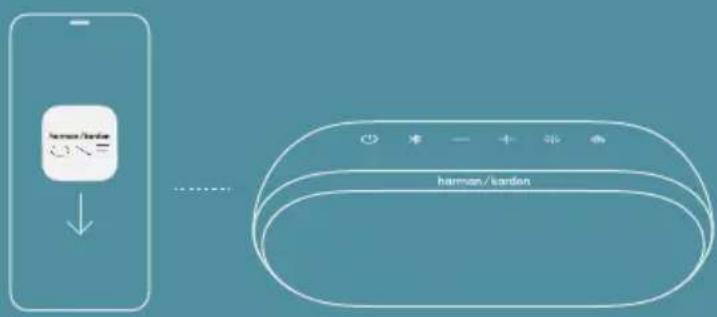

Harman Kardon One

GET IT ON Google Play

Download on the App Store

BLUETOOTH PAIRING
* Maximum 2 devices
1.*
-
SETTINGS Bluetooth
-
DEVICES Luna 2 Connected
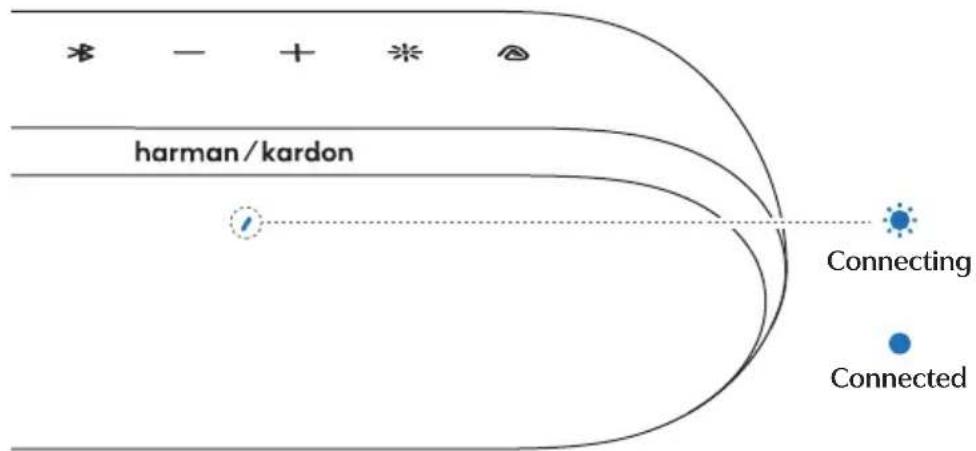
flowchart
graph TD
    A["harman/kardon"] --> B["Connecting"]
    B --> C["Connected"]
AIRTOUCH STEREO PAIRING
* If stereo paired via the app, the speakers reconnect automatically.
TO PAIR
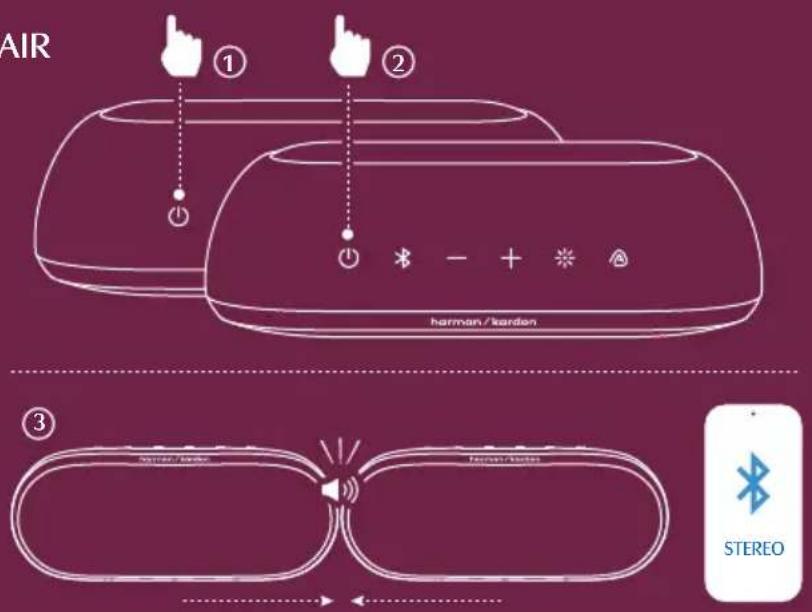
(((88))
AIRTOUCH STEREO PAIRING
TO UNPAIR
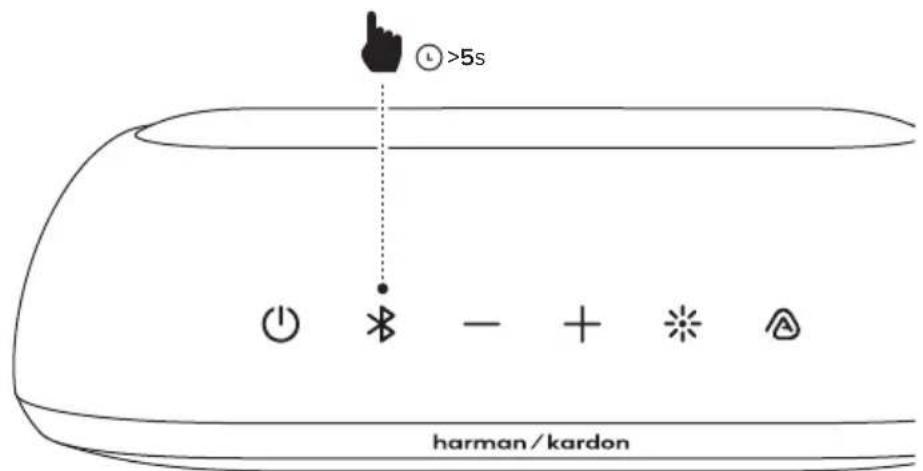
^* + ⚠ (TO ACTIVATE / DEACTIVATE) ⓟ >5s

LIGHTING
* More lighting personalization options available in the Harman Kardon One app
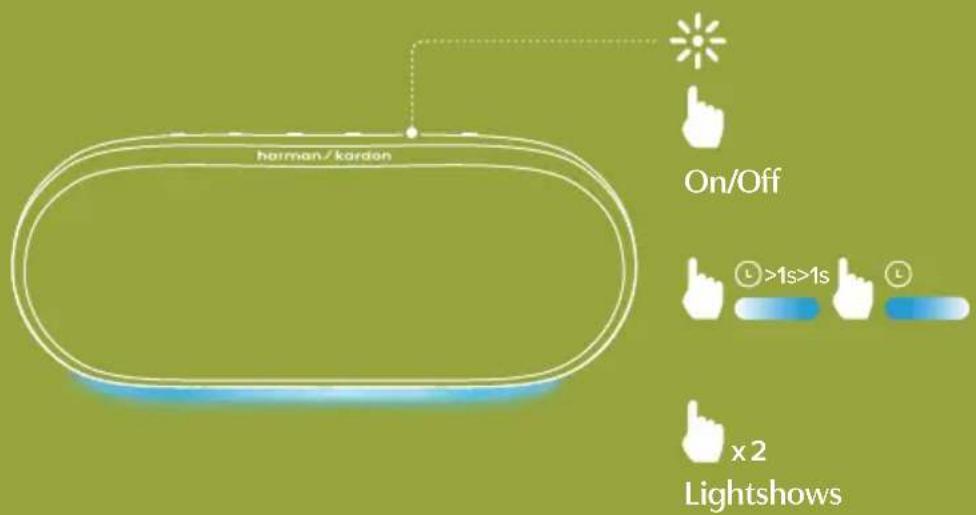

MULTI-SPEAKER
CONNECTION
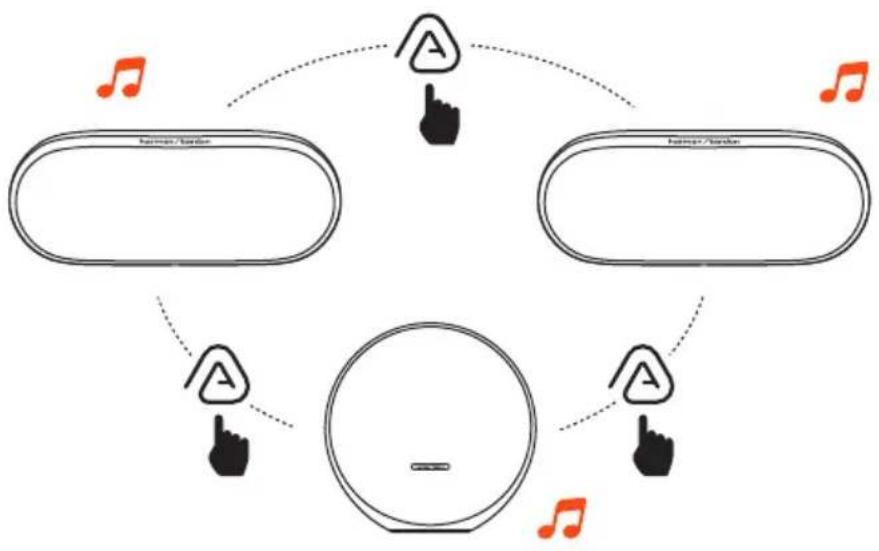
flowchart
graph TD
    A[" laborator "] --> B[" A "]
    C[" audio "] --> D[" A "]
    E[" center "] --> F[" A "]
    G[" Note "] --> H[" A "]
    I[" Note "] --> J[" A "]
    K[" Note "] --> L[" A "]
    M[" Note "] --> N[" A "]
    O[" Note "] --> P[" A "]
    Q[" Note "] --> R[" A "]
    S[" Note "] --> T[" A "]
    U[" Note "] --> V[" A "]
    W[" Note "] --> X[" A "]
    Y[" Note "] --> Z[" A "]
    AA[" Note "] --> AB[" A "]
    AC[" Note "] --> AD[" A "]
    AE[" Note "] --> AF[" A "]
    AG[" Note "] --> AH[" A "]
    AI[" Note "] --> AJ[" A "]
    AK[" Note "] --> AL[" A "]
    AM[" Note "] --> AN[" A "]
    AO[" Note "] --> AP[" A "]
    AQ[" Note "] --> AR[" A "]
    AS[" Note "] --> AT[" A "]
    AU[" Note "] --> AV[" A "]
    AW[" Note "] --> AX[" A "]
    AY[" Laborator "] --> AZ[" A "]
    BA[" Audio "] --> BB[" A "]
    BC[" Center "] --> BD[" A "]
    BE[" Note "] --> BF[" A "]
    BG[" Note "] --> BH[" A "]
    BI[" A "] --> BJ[" A "]
    BK[" A "] --> BL[" A "]
    BM[" A "] --> BN[" A "]
    BO[" A "] --> BP[" A "]
    BQ[" Note "] --> BR[" A "]
    BS[" Note "] --> BT[" A "]
    BU[" A "] --> BV[" A "]
    BW[" Note "] --> BX[" A "]
    BY[" Note "] --> BZ[" A "]
    CA[" Note "] --> CB[" A "]
    CC[" A "] --> CD[" A "]
    CE[" Note "] --> CF[" A "]
    CG[" Note "] --> CH[" A "]
    CI[" A "] --> CJ[" A "]
    CK[" Note "] --> CL[" A "]
    CM[" Note "] --> CN[" A "]
    CO[" Note "] --> CP[" A "]
    CS[" Note "] --> CY[" A "]
    CZ[" Note "] --> CE
    DA[" Note "] --> DB[" A "]
    DC[" Note "] --> DB
    DB --> CE
    DB --> CB
    DB --> CK
    DB --> CA
    DB --> CO
    DB --> CA
    DB --> CB
    DB --> CX
    DB --> CY
    DB --> CA
    DB --> CB
    DB --> CX
    DB --> CY
    DB --> CA
    DB --> CB
    DB --> CX
    DB --> CY
    DB --> CA
    DB --> CB
    DB --> CX
    DB --> CY
    DB --> CA
    DB --> CB
    DB --> CX
    DB --> CY
    DB --> CA
    DB --> CB
    DB --> CX
    DB --> CA
    DB --> CB
    DB --> CX
    DB --> CY
    DB --> CA
    DB --> CB
    DB --> CX
    DB --> CY
    DB --> CA
    DB --> CB
    DB --> CX

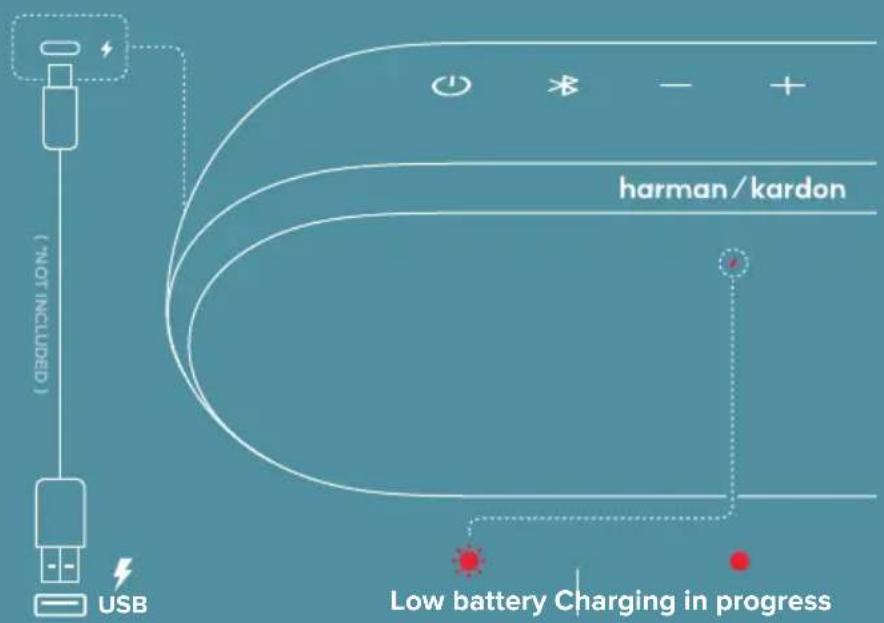
CHARGING
If the speaker will not be used for a long period of time, please recharge the battery at least once every 3 months. Battery life will vary due to usage patterns and environmental conditions.
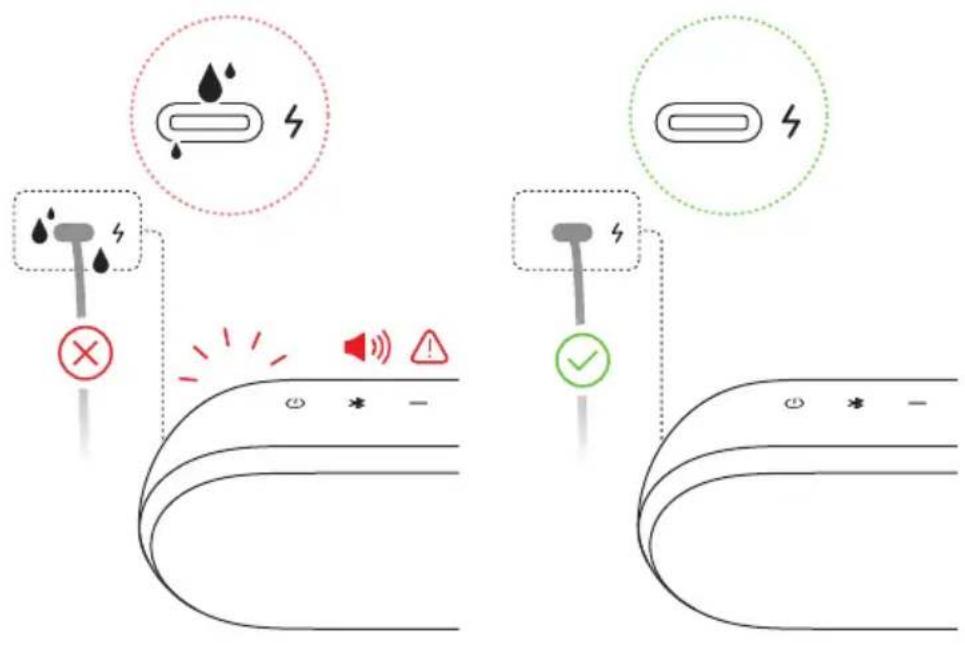
IP67 WATERPROOF & DUSTPROOF
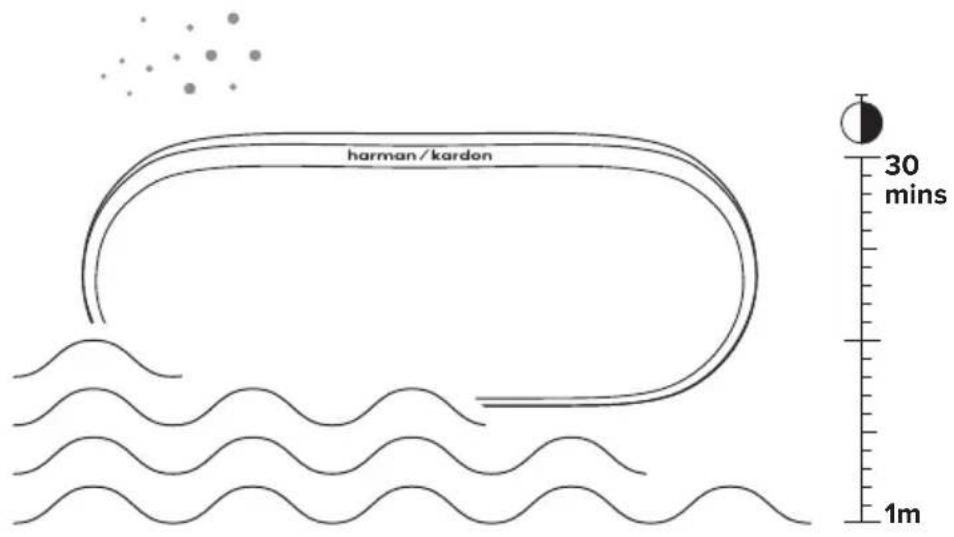

WARNING!
With USB-C charging protection, a reminder sound will alert you to unplug the cable if the connector detects water, salt, or any other chemicals. Charge your speaker after it is completely dry and clean.
TECH SPEC
• Transducer: 62 mm x 82 mm woofer, 20 mm tweeter
• Rated output power: 1 x 25 W RMS (woofer) + 1 x 15 W RMS (tweeter)
• Power supply: USB 5 V / 3 A
• Frequency response: 58 Hz – 20 kHz (-6 dB)
• Signal-to-noise ratio: > 80 dB
• Battery: 7.2 V / 3300 mAh
- USB port: Type C
• USB rating: 5 V / 0.5 A (maximum)
• Supporting file formats: MP3
• USB specification: For other versions, USB is for Service only.
- Bluetooth® version:
- Bluetooth® profile:
- Bluetooth® transmitter frequency range:
- Bluetooth ^2 transmitter power:
- Bluetooth® transmitter modulation:
• Product dimensions (W x H x D):
- Product weight:
• Packaging dimensions (W x H x D):
- Packaging weight:
• Maximum operation temperature:
Audio playback is for US version only.
5.4
A2DP V1.4, ACRCP 1.6
2.400 - 2.4835 GHz
≤ 15 dBm
230mm × 128mm × 93mm/9.05" × 5.04" × 3.66"
The source image contains no legible text or symbols. It is a stylized, non-textual graphic with no discernible characters or punctuation. Therefore, no OCR output can be generated.
IP67 axooqng qquqng qh##
உளில்தேவை
మురీంటి:ఎపర్య
USB-C 30:0000
• Transducer- 62 mm x 82 mm 20 mm
• 1 x 25 W RMS (0.00) + 1 x 15 W RMS (0.00)
• utiliciosวะตุ้งค์ - USB 5 V / 3 A
• Ωδεδ: ωρδω- 58 Hz - 20 kHz (-6 dB)
• grades: grades: 1.16 grades / 2.55 grades
- amplitude: 10 and 10 are the sum of the square root of the square root of the square root of the square root of the square root of the square root of the square root of the square root of the square root of the square root of the square root of the square root of the square root of the square root of the square root of the square root of the square root of the square root of the square root of the square root of the square root of the square root of the square root of the square root of the square root of the square
AR
Do not expose the LUNA 2 to liquids without removing cable connection. Do not expose LUNA 2 to water while charging. It may result in permanent damage to the speaker or power source.
Chemicals, salt or "foreign particles" in your pool or the ocean can damage the waterproof seals or harm the connector surface over time if not rinsed off after use. After a liquid spill or rinse, do not charge your speaker until it's completely dry and clean. Charging when wet might damage your speaker.
When using an external adaptor, the output voltage/current of the external adaptor should not exceed 5V/3A.
The product complies with Commission Regulation (EU) 2023/826 ecodesign requirements for off mode, standby mode, and networked standby energy consumption of electrical and electronic household and office equipment.
- Information on power consumption
- Off mode: N/A
• Standby mode: ≤ 0.5 W
• Networked standby mode: ≤ 2.0 W
- Networked standby mode if all wired ports are connected and all wireless ports are activated: ≤2.0 W
- The period of time after which the power management function switches the equipment automatically into:
| OIT N/A N/A | ||
| Standby mode | When all input signal connections are deactivated | Switched to standby mode after 10 minutes of inactivity |
| Networked standby mode | When wireless network connection is activated | Switched to networked standby mode after 10 minutes of inactivity |
- Recommended external adaptor information:
• Power adaptor with rating output: 5.0 V DC, 2.5 W – 15.0 W
• Energy efficiency rating: Level VI or complies with corresponding regional or national laws and regulations.
FR
The power delivered by the charger must be between min 2.5 Watts required by the radio equipment, and max 15 Watts in order to achieve the maximum charging speed.
DO NOT ATTEMPT TO OPEN, SERVICE, OR DISASSEMBLE THE BATTERY I DO NOT SHORT CIRCUIT I MAY EXPLODE IF DISPOSED OF IN FIRE I RISK OF EXPLOSION IF BATTERY IS REPLACED BY AN INCORRECT TYPE I DISPOSE OR RECYCLE USED BATTERIES ACCORDING TO THE INSTRUCTIONS
This device meets the FCC and ISED radiation exposure requirements set forth for an uncontrolled environment. The requirements set a SAR limit of 1.6 W/kg averaged over one gram of tissue. The highest SAR value reported under this standard during product certification for use when properly worn on the body. To maintain compliance with FCC and ISED RF exposure requirements, use accessories that maintain a separation distance of 0mm between the user's body and the devices. The use of belt clips, holsters and similar accessories shall not contain metal parts in its assembly. Use of accessories that do not meet these requirements may not comply with FCC and ISED RF exposure requirements and should be avoided.
Android and Google Play are trademarks of Google LLC.

The Bluetooth® word mark and logos are registered trademarks owned by Bluetooth SIG, Inc. The Auracast™ word mark and logos are trademarks owned by Bluetooth SIG, Inc. Any use of such marks by HARMAN International Industries, Incorporated is under license. Other trademarks and trade names are those of their respective owners.

Brand : HARMAN KARDON
Model : Luna 2
Category : Docking station