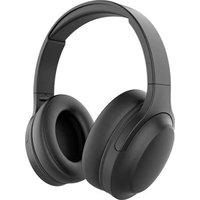
Free Motion V2 - Earphones EDENWOOD - Free user manual and instructions
Find the device manual for free Free Motion V2 EDENWOOD in PDF.


| Product Type | Bluetooth Over-Ear Headphones |
| Model | Free Motion V2 (ref. 973886) |
| Brand | Edenwood (distributed by Electro Dépôt) |
| Speaker Diameter | 40 mm |
| Impedance | 32 Ω |
| Speaker Sensitivity | 90 ± 3 dB |
| Frequency Response (Speakers) | 20 Hz – 20 kHz |
| Microphone | Omnidirectional, sensitivity -45 ± 3 dB, response 50 Hz – 15 kHz |
| Wireless Connectivity | Bluetooth 5.0 (max power 5.09 dBm, frequency 2.402 – 2.480 GHz) |
| Wired Connectivity | 3.5 mm jack (1.2 m cable included) |
| Power Supply | Rechargeable battery via USB (5 V == 0.5 A), charging time approx. 2 h |
| Battery Life | Not specified in the manual, full charge in 2 h |
| Controls | Power On/Off, Volume +/-, Play/Pause, Track Navigation, Voice Assistant, Call Management |
| LED Indicators | Red (charging), blue (connected), red/blue flashing (pairing) |
| Compatibility | Android, iOS, Windows (and any Bluetooth or 3.5 mm jack device) |
| Headband Adjustment | Height-adjustable size |
| Intended Use | Domestic only (music listening, calls, gaming) |
| Cleaning and Maintenance | Soft, slightly damp cloth, no liquid inside, no abrasive detergents |
| Storage | Cool, dry, dust-free place, out of reach of children. Use original packaging for extended storage. |
| Warranty | 2 years against manufacturing defects (upon presentation of receipt) |
Frequently Asked Questions - Free Motion V2 EDENWOOD
User questions about Free Motion V2 EDENWOOD
0 question about this device. Answer the ones you know or ask your own.
Ask a new question about this device
Download the instructions for your Earphones in PDF format for free! Find your manual Free Motion V2 - EDENWOOD and take your electronic device back in hand. On this page are published all the documents necessary for the use of your device. Free Motion V2 by EDENWOOD.
USER MANUAL Free Motion V2 EDENWOOD
natural_image
Diagram showing a cable with connector and its close-up view of the front panel (no text or symbols)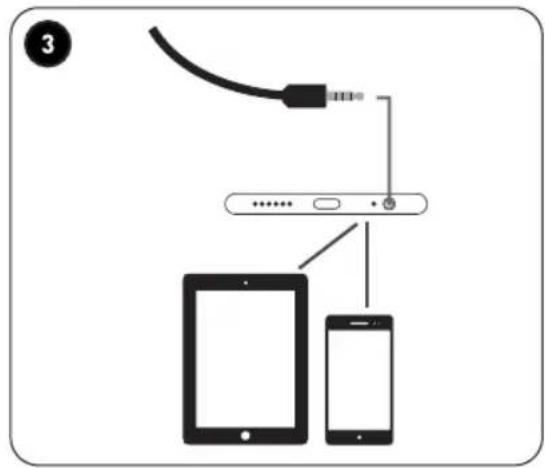
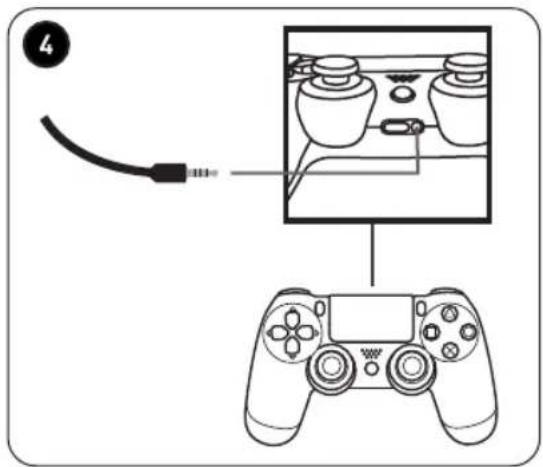
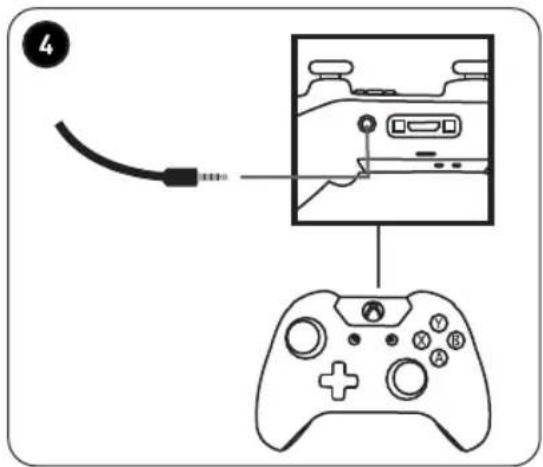
natural_image
Line drawing of a pair of headphones with bidirectional arrows indicating head movement (no text or symbols)Merci !
Thank you for choosing this EDENWOOD product. EDENWOOD products are chosen, tested, and recommended by ELECTRO DEPOT, so you can be sure you are getting a top-quality, easy-to-use product that won't let you down.
We're confident your new device will be a pleasure to use every day!
Welcome to ELECTRO DEPOT.
Table of Contents
| A Product overview | PartsProduct overviewIntended useSpecificationsDeclaration of conformity |
| B Product usage | Before using the productOperationConnectionsOperation with BluetoothAdjust the head bandHeadphones volume warning |
| C Cleaning and maintenance | Cleaning and maintenanceTroubleshootingStorage |
Parts
A Adjustable head band
B Earpiece with cushion
Cushioned earpiece with control keys, LED and connection slots
① Charging indicator LED
② + Volume or audio control key (in Bluetooth® mode)
③ Power on/off key
④ — Volume or audio control key (in Bluetooth mode)
⑤ USB charging slot
6 3.5mm line in jack
D USB charging cable
E 1.2 metre jack cable with 3.5mm plugs
Product overview
- Unpack and remove all labels from the unit. Please check that all the product's parts are included and intact. If the unit is damaged or faulty, do not use it and take it to your retailer or after-sales service centre.
- Keep all packaging out of the reach of children. There is a risk of accidents if children play with packaging materials.
Intended use
- This product is for domestic use only. It has not been designed for industrial or professional use.
- Any other use may damage the product or cause injury.
Specifications
Model: 973886
Protection class: Class III
Rating: Input: 5V 0.5A
Company name or registered trademark, business registration number and manufacturer's address:

ELECTRO DEPOT /R.C.S, 433 744 539 1 route de vendeville, 59155 Faches Thumesnil, FRANCE
Speakers
Speaker diameter: 40mm
Impedance: 32 Ohms
Sensitivity: 90±3dB
Frequency range: 20Hz to 20kHz
Compatibility: Android, IOS, Windows
Microphone
Microphone size: 4.0 x 1.5mm
Sensitivity: -45±3dB
Frequency range: 50Hz to 15kHz
Directivity: Omni-directional
Cable
Plug type: 3.5mm jack plug
Cable length: 1.2m
Bluetooth
Maximum power transmitted via BT:
5.09dBm
BT frequency:
2.402GHz - 2.480GHz
A
Product overview
Compatibility disclaimer
Wireless performance is dependent on your device's Bluetooth wireless technology.
Please check with the manufacturer. ELECTRO DÉPÔT cannot be held responsible for any data loss or leaks resulting from the use of these devices.
Declaration of conformity
In this document, ELECTRO DÉPÔT declares that this unit complies with the essential requirements and other relevant provisions of Directive 2014/53/EU. The declaration of conformity can be viewed on the following website: http://www.electrodepot.fr/sav/notices/
Before using the product
Charge the headphones
-
Insert the small end of the USB cable into the headphones and the other end into a computer, laptop or compatible adapter.
-
The red LED illuminates when charging. It turns off when charging completes. Remove the USB cable from the power source and the headphones.
Operation
Power on and off
- Press and hold ⏻ until you hear a prompt tone. The LED indicator turns blue and then flashes red and blue rapidly.
- Press and hold until you hear a prompt tone. The LED indicator turns red and then turns off.
Connections
Bluetooth connection
Pair your headphones to a Bluetooth device:
- After power on the headphones, press and hold until the LED indicator flashes red and blue, and your hear a prompt tone. The headphones is in pairing mode.
- Make sure the Bluetooth function is enabled on your smartphone, tablet, computer or music device. Keep the headphones and the device within one metre of each others during the pairing process.
- The headphones appears as "FREE MOTION" in the list of available Bluetooth devices. Select it and connect.
- When the headphones is paired to the device, you will hear a prompt tone and the LED indicator flashes blue slowly.

NOTE: Your headphones will automatically attempt to re-connect to the device when turns on, and you will hear a prompt tone.
Jack connection
Connect the headphones to devices using the jack cable:
The headphones comes with a 3.5mm jack cable for connecting with other devices.

IMPORTANT: When a device is connected to the headphones using the jack cable, the controls on the headphones will not work with the connected device.
B
Product usage
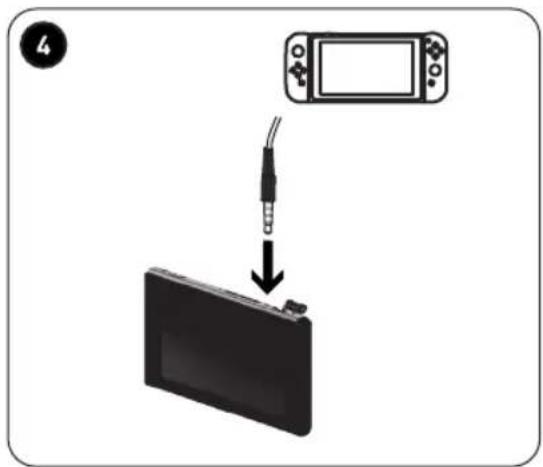
1 PC – connect the transfer cable (not provided) to the 3.5mm jack (provided).
2 Laptop/notebook
3 Smartphone/tablet
4 Video game controllers and consoles
Operation with Bluetooth
Adjusting volume:
- Repeatedly press on the headphones to increase the volume.
- Repeatedly press on the headphones to decrease the volume.

Note: Headphones volume controls only work in Bluetooth mode.
Listening to audio:
- Press to play or pause audio.
- Long press to play the next track.
- Long press to play the previous track.
- Long press for one second to access the voice assistant on your connected device.
Receiving calls:
- Press to answer an incoming call.
- Press to end or cancel a call.
- Press and hold for 2 seconds to reject an incoming call.

Note: When on a call, the LED indicator flashes blue once every 5 seconds.
Adjust the head band
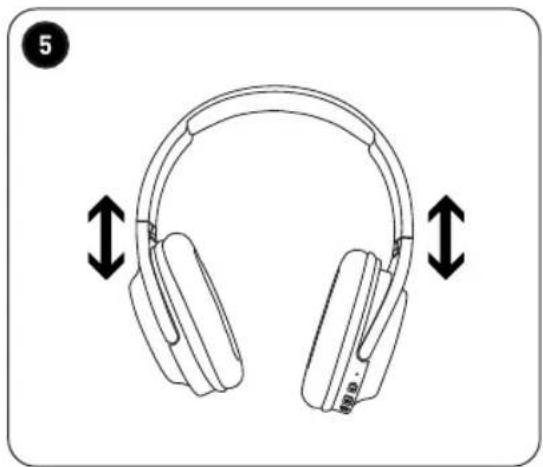
5 To adjust the size of the head band, push the earpieces upwards or pull them downwards.
B
Product usage
Headphones volume warning
- To prevent possible hearing damage, do not listen at high volume levels for long periods. If you hear no sound during playback, do not turn the volume up as the music may suddenly begin at a high volume.
- Excessive sound pressure from earpieces and headphones can cause hearing loss.
- To avoid damaging your ears, adjust the volume to the lowest safe level before playing, and turn up to the desired level.
Cleaning and maintenance
WARNING!
- Always unplug the unit from the electronic device before cleaning.
-
Never immerse the unit, cable or plug in water or any other liquid.
-
Regularly clean your unit and keep it dust free to reduce the need for repairs and ensure product longevity.
- Clean the unit with a slightly damp, soft cloth. Make sure that no liquid enters the inside of the unit.
- When cleaning the unit, never use abrasive detergents, metal brushes, scouring or metal foams, or sharp utensils.
Troubleshooting
Problem What to do
| No power • | Headphones have run out of power. Recharge the headphones for approximately 2 hours to fully charge using the USB cable. |
| Cannot search for the Bluetooth headphones | • Disconnect the Bluetooth device and reconnect.• If the problem persists, reset the headphones(while in power-off status, press and hold the power button for 10 seconds until your headphones powers off again). Then, try to connect again. |
| Interrupted connection | • The battery level may be low. Recharge the battery for approximately 2 hours to fully charge using the USB cable.• The connected device and the headphones may be too far apart, and therefore out of the Bluetooth range. Re-position the device or move the device and the headphones closer to each others.• The Bluetooth signal between the device and the headphones may be blocked by an obstacle. Re-position the device or move the device and the headphones closer to each others. |
| No sound when making or answering a call | • Check the devices' connection or turn the volume up on the device or headphones. |
C
Cleaning and maintenance
Problem What to do
| No sound when playing music | Check the devices' connection or turn the volume up on the device or headphones. |
| No sound when using the 3.5mm audio cable | Turn the volume on the connected device or the headphones up.Check and ensure the jack plugs are correctly inserted.Check and ensure the 3.5mm audio cable is not damaged. |
Unable to charge • Check and ensure the charging cable is connected and that it is not damaged.
Storage
• Always unplug the unit from the electronic device before storage.
- Store the unit in a fresh, dry and dust-free place, out of the reach of children and pets.
- Please retain the packaging and use it to store your unit when it is not in use for an extended period of time.
Bedankt!
This product is guaranteed against faults caused by defects in manufacturing or the materials used for a period of two years, starting from the date of purchase.* This warranty does not cover defects or damage caused by failure to install the device correctly, incorrect use of the product, or excessive wear and tear.
*proof of purchase required.
GARANTIEVOORWAARDEN
NL
- Merci !
- Parts
- Product overview
- Intended use
- Specifications
- Speakers
- Microphone
- Cable
- Bluetooth
- A
- Compatibility disclaimer
- Declaration of conformity
- Before using the product
- Charge the headphones
- Operation
- Power on and off
- Connections
- Bluetooth connection
- Jack connection
- B
- Product usage
- Operation with Bluetooth
- Adjusting volume:
- Listening to audio:
- Receiving calls:
- Adjust the head band
- Headphones volume warning
- Cleaning and maintenance
- WARNING!
- Troubleshooting
- C
- Storage
- Bedankt!
- GARANTIEVOORWAARDEN
- NL
Brand : EDENWOOD
Model : Free Motion V2
Category : Earphones