Elite CU7004 - Vacuum Cleaner KENMORE - Free user manual and instructions
Find the device manual for free Elite CU7004 KENMORE in PDF.


| Product Type | Cordless Stick Vacuum |
| Brand | Kenmore |
| Model | Elite CU7004 |
| Filtration Technology | AllergenSeal™ (captures 99.97% of particles as small as 0.3 microns) |
| Battery Type | Lithium-ion (Li-ion) |
| Battery Voltage | 18 V |
| Charge Time | 4 to 5 hours |
| Recommended Charger | Xiamen XDROID XZ2700-1000G1 |
| Compatible Battery | LB1024 |
| Cleaning Modes | Carpet and Bare Floor |
| Power Levels | ECO, NORMAL, BOOST |
| Lift-Up Function | Yes, main body detachable for portable use |
| Roller Brush | Hair Eliminator® anti-tangle |
| Headlight | Yes, on the power brush |
| Included Filters | Foam filter, felt filter, HEPA exhaust filter |
| Included Accessories | Wand, flexible hose, 3-in-1 tool, furniture brush, charging base, adapter |
| Weight | Approximately 3 kg |
| Warranty | 2 years |
| Phone Support (US) | 1-877-531-7321 |
| Phone Support (Canada) | 1-844-608-3081 |
| Usage | Household use only |
Frequently Asked Questions - Elite CU7004 KENMORE
User questions about Elite CU7004 KENMORE
0 question about this device. Answer the ones you know or ask your own.
Ask a new question about this device
Download the instructions for your Vacuum Cleaner in PDF format for free! Find your manual Elite CU7004 - KENMORE and take your electronic device back in hand. On this page are published all the documents necessary for the use of your device. Elite CU7004 by KENMORE.
USER MANUAL Elite CU7004 KENMORE
Cordless Upright Vacuum with Hair Eliminator® Brushroll
Aspiradora vertical inalámbrico con cepillo giratorio Hair Eliminator®
Vacuum Cleaner Help Line
8:00am-5:00pm EST, M-F
De 8 AM a 5 PM, de lunes a Viernes
Before Using Your New Vacuum Cleaner ....2
Packing List....2
Important Safety Instructions....3-6
Vacuum Cleaner Warranty....7
Parts and Features....8-11
Assembly Instructions....12-14
Operating Instructions....15-21
Performance/Safety Features 21-22
Vacuum Maintenance and Care 23-30
Troubleshooting 31-33
Requesting Assistance Or Service .... Back Cover
BEFORE USING YOUR NEW VACUUM CLEANER
Read this Use & Care Guide. It will help you assemble and operate your new Kenmore vacuum cleaner in the safest and most effective way.
For more information about vacuum cleaner care and operation, call the Vacuum Cleaner Help Line at 1-877-531-7321 (US) / 1-844-608-3081 (CA). You will need the complete model and serial numbers when requesting information.
Your vacuum cleaner's model and serial numbers are located on the Model and Serial Number Plate. Use the space below to record the model number and serial number of your new Kenmore vacuum cleaner.
Model No.
Serial No. ____
Date of Purchase ____
Keep this book and your sales check (receipt) in a safe place for future reference.
PACKING LIST
Your KENMORE CORDLESS UPRIGHT VACUUM CLEANER is packaged with the following parts and components included separately in the carton:
1 Cordless Upright Vacuum (with Motorized Nozzle)
1 Handle
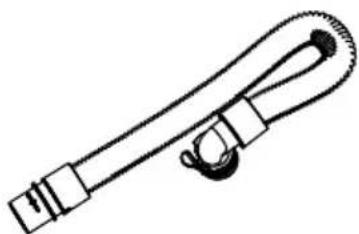
1 Flexible Hose
13-in-1 Combination Tool
1 Upholstery Tool
1 Battery Pack
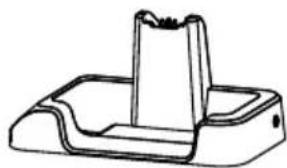
1 Charging Base
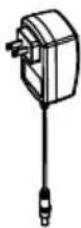
1 Charging Adapter
1 Use & Care Guide
IMPORTANT SAFETY INSTRUCTIONS
READ ALL INSTRUCTIONS IN THIS GUIDE BEFORE ASSEMBLING OR USING YOUR VACUUM CLEANER.

WARNING!
Your safety is important to us. When using an electrical product, basic precautions should always be followed to avoid electric shock, fire, and/or serious injury, including the following:
- Use your vacuum cleaner only as described in this Use & Care Guide. Use only with manufacturer's recommended attachments.
- Fully assemble or install the vacuum prior to use.
- Do not use or charge outdoors or on wet surfaces.
- Do not allow to be used as a toy. Close attention is necessary when used by or near children. Not intended for use by children age 12 and under. To avoid injury or damage, keep children away from product, and do not allow children to place fingers or other objects into any openings.
- Do not handle the battery pack and charger, including charger plug, and charger terminals with wet hands.
- Do not use charger with a damaged cord or plug. If the vacuum cleaner, charger or battery pack is not working as it should, has been dropped, damaged, left outdoors, or dropped in water, immediately discontinue use and call 1-877-531-7321 (US) / 1-844-608-3081 (CA) for assistance.
- Do not pull or carry charger by cord, use cord as a handle, close
a door on cord, or pull cord around sharp edges or corners. Do not run vacuum cleaner over cord. Keep cord away from heated surfaces.
- Do not unplug charger by pulling on cord. To unplug charger, grasp the plug, not the cord.
- Do not put any objects into openings. Do not use with any opening blocked; keep free of dust, lint, hair, and anything that may reduce air flow.
- Keep hair, loose clothing, fingers, and all parts of body away from openings and moving parts.
- Use extra care when cleaning on stairs.
- Do not put on chairs, tables, etc. Keep the vacuum on the floor.
- Do not use to pick up flammable or combustible liquids, such as gasoline, or use in areas where they may be present.
- Do not pick up anything that is burning or smoking, such as cigarettes, matches, or hot ashes.
- Do not use vacuum cleaner without dust cup and/or filters in place.
IMPORTANT SAFETY INSTRUCTIONS
- Keep the vacuum moving over the carpet surface at all times to avoid damaging the carpet fibers.
- Do not use in an enclosed space where vapors are present from paint, paint thinner, moth-proofing substances, flammable dust or other explosive or toxic materials.
- Do not pick up hard or sharp objects such as glass, nails, screws or coins that could damage the vacuum cleaner.
- To avoid excessive heat and damage to unit or batteries, do not operate the vacuum while charging.
- Put the vacuum cleaner away after use to prevent tripping accidents.
- Prevent unintentional starting. Ensure the switch is in the off-position before picking up or carrying the appliance.
- Do not attempt to charge the appliance with the switch in the on position.
- Disconnect the battery pack before making any adjustments, changing accessories or storing product. Such preventative measures reduce the risk of starting the product accidentally.
- Recharge only with the charger specified by the manufacturer. A charger that is suitable for one type of battery pack may create a risk of fire when used with another battery pack.
- For use only with XIAMEN
XDROID XZ2700-1000G1 charger.
- Use appliances only with specifically designated battery packs. Use of any other battery packs may create a risk of injury and fire.
- For use only with LB1024 battery pack.
- When battery pack is not in use, keep it away from other metal objects, like paper clips, coins, keys, nails, screws or other small metal objects, that can make a connection from one terminal to another. Shorting the battery terminals together may cause burns or a fire.
- Under abusive conditions, liquid may be ejected from the battery; avoid contact. If contact accidentally occurs, flush affected area with water. If liquid contacts eyes, seek medical help.
- Liquid ejected from the battery may cause irritation or burns.
- Do not use a battery pack or appliance that is damaged or modified. Damaged or modified batteries may exhibit unpredictable behavior resulting in fire, explosion or risk of injury.
- Do not immerse the vacuum cleaner, charging adapter or battery packs in water or other liquids.
• Always turn the vacuum off before connecting or disconnecting the main body to or from the vacuum.
• Always clean the dust cup and
IMPORTANT SAFETY INSTRUCTIONS
filters after vacuuming carpet cleaners or freshener, powders, and fine dust. These products clog the filters, reduce airflow and can cause damage to the vacuum cleaner. Failure to clean the dust cup and filters could cause permanent damage to the vacuum cleaner.
- Store the cordless vacuum indoors. Put the vacuum away after use to prevent accidents.
- Store charger indoors in a cool, dry area, not exposed to weather to avoid electrical shock and/or damage to the vacuum cleaner.
- Do not expose a battery pack or appliance to fire or excessive temperature. Exposure to fire or temperature above 130°C (265°F) may cause explosion.
- Follow all charging instructions and do not charge the battery pack or appliance outside of the temperature range specified in the instructions. Charging improperly or at temperatures outside of the specified range may damage the battery and increase the risk of fire.
- While there is no shock hazard from electrical terminals located on the vacuum, a burn could result from metal objects being inserted into the terminal areas. Vacuum cleaner terminals should always be kept free of objects.
• Changes or modifications to this unit not expressly approved by the party responsible for
compliance could void the user's authority to operate the equipment.
- You are responsible for making sure that your vacuum cleaner is not used by anyone unable to operate it properly.
- Have servicing performed by a qualified repair person using only identical replacement parts. This will ensure that the safety of the product is maintained.
- Do not modify or attempt to repair the appliance or the battery pack (as applicable) except as indicated in the instructions for use and care.
- This appliance is designed for household use only!

WARNING
To reduce the risk of electric shock - Do not use outdoors or on wet surfaces.
Product Disposal
This product contains a Lithium-ion battery pack formulated from environmentally sensitive materials. This product must be disposed of properly with due care for the environment. Do not dispose of product with household garbage. Consult your local waste authority for information regarding available recycling or disposal options.
IMPORTANT SAFETY INSTRUCTIONS

Li-ion
RECYCLE OR DISPOSE OF IN ACCORDANCE WITH FEDERAL AND LOCAL REGULATIONS.

WARNING
Any changes or modifications to this unit not expressly approved by the party responsible for compliance could void the user's authority to operate the equipment.
NOTE: This equipment has been tested and found to comply with the limits for a Class B digital device, pursuant to part 15 of the FCC Rules. These limits are designed to provide reasonable protection against harmful interference in a residential installation. This equipment generates, uses and can radiate radio frequency energy and, if not installed and used in accordance with the instructions, may cause
harmful interference to radio communications. However, there is no guarantee that interference will not occur in a particular installation. If this equipment does cause harmful interference to radio or television reception, which can be determined by turning the equipment off and on, the user is encouraged to try to correct the interference by one or more of the following measures:
- Reorient or relocate the receiving antenna.
- Increase the separation between the equipment and receiver.
- Connect the equipment into an outlet on a circuit different from that to which the receiver is connected.
- Consult the dealer or an experienced radio / TV technician for help.
SAVE THESE INSTRUCTIONS
Proper assembly and safe use of your vacuum cleaner are your responsibilities. Your vacuum cleaner is intended for Household Use. Read this Use & Care Guide carefully for important use and safety information. This guide contains safety statements under warning and caution symbols.
AllergenSeal™ system lets you know that this vacuum traps 99.97% of dust and particles down to 0.3 microns inside your vacuum, keeping them out of the air you breathe.
VACUUM CLEANER WARRANTY
LIMITED WARRANTY
FOR TWO YEARS from the date of sale (or, for deliveries in the State of California, two years from the date of delivery), this product is warranted against defects in material or workmanship.
WITH PROOF OF SALE a defective product will be replaced free of charge.
The Kenmore brand is used under license. Direct all claims for warranty service to: 1-877-531-7321 (US) / 1-844-608-3081 (CA).
This warranty does not cover filters or belts, which are expendable parts that can wear out from normal use within the warranty period.
This warranty is void if this product is ever used for anything other than private household purposes. This warranty gives you specific legal rights, and you may also have other rights which vary from state to state.
Cleva North America, Inc., Greenville SC 29607
PARTS AND FEATURES
It is important to know your vacuum cleaner's parts and features to ensure its proper and safe use. Review these before using your vacuum cleaner.
REPLACEMENT PARTS
| Item Part No. (US) Part No. (CA) | ||
| Foam Filter 561116101 561116101 | ||
| Felt Filter 561116102 561116102 | ||
| HEPA Media Exhaust Filter | 561116103 561116103 | |
| Handle 561132104 561132104 | ||
| Flexible Hose 561129102 561129102 | ||
| 3-in-1 Combination Tool | 561116106 561116106 | |
| Upholstery Tool 561055176 561055176 | ||
| Battery Pack | 561116109 561116109 | |
| Charging Base | 561129104 | 561129104 |
| Charging Adapter | 561116111 | 561116111 |
To order a replacement part, call 1-877-531-7321 (US) / 1-844-608-3081 (CA).
PARTS AND FEATURES
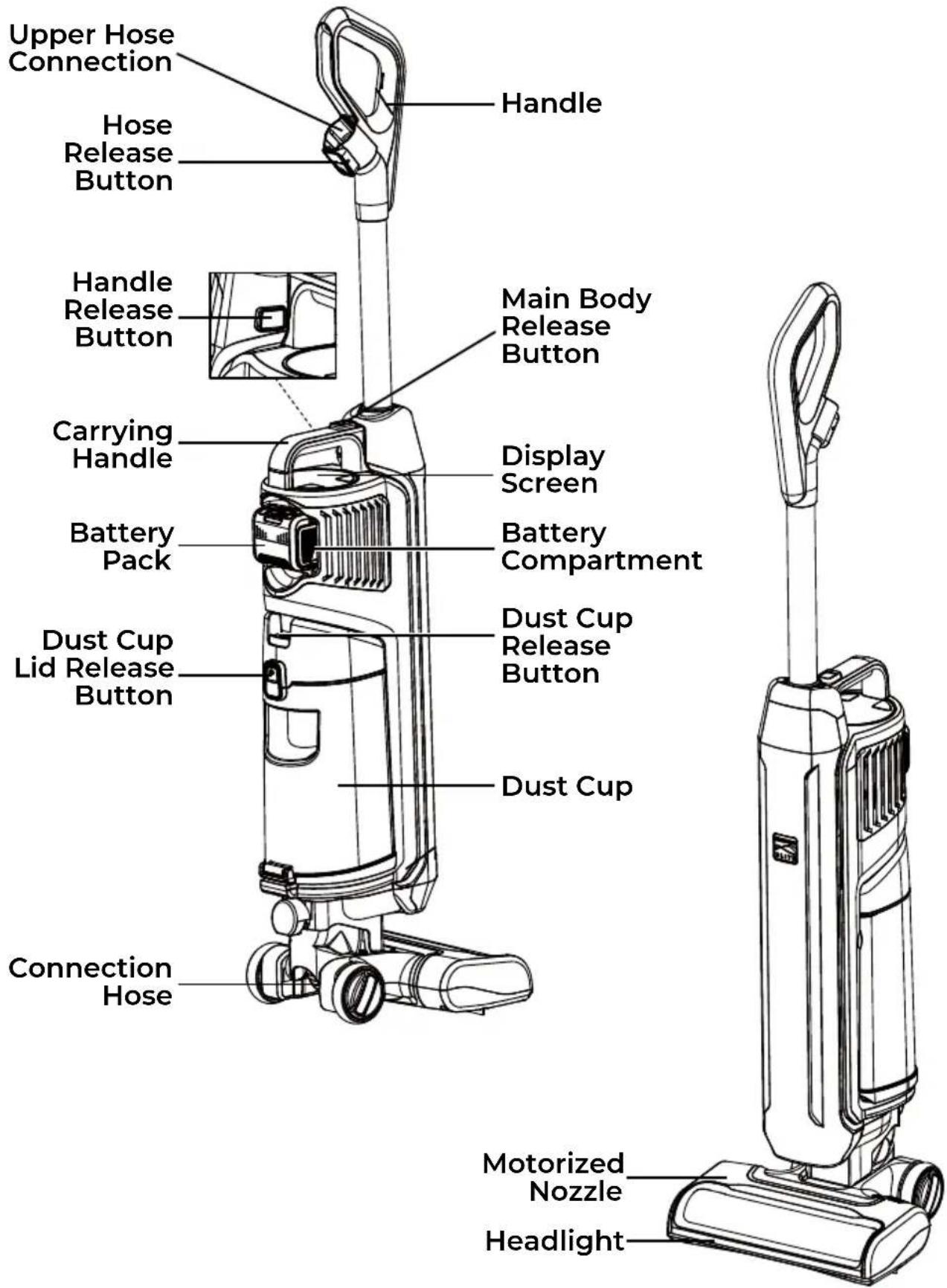
PARTS AND FEATURES

Handle
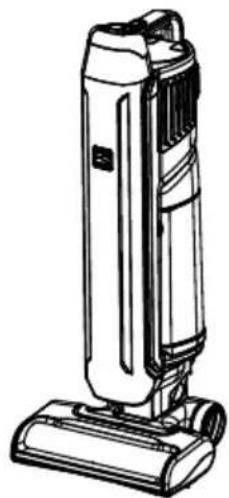
natural_image
Line drawing of a vacuum cleaner (no text or symbols present)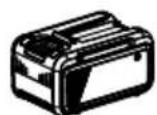
Battery Pack
natural_image
Technical line drawing of a mechanical component with a flanged top and base (no text or symbols)Charging BaseMain Boc
Charging Adapter
natural_image
Simple line drawing of a coiled cable or strap with connectors (no text or symbols)Flexible Hose (Stored inside the Main Body)
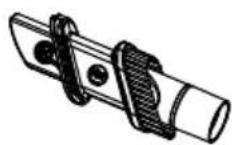
3-in-1 Combination Tool (Stored inside the Main Body)
natural_image
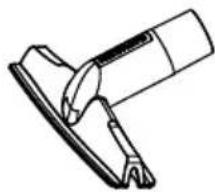
Line drawing of a mechanical tool or clamp (no text or symbols)Upholstery Tool
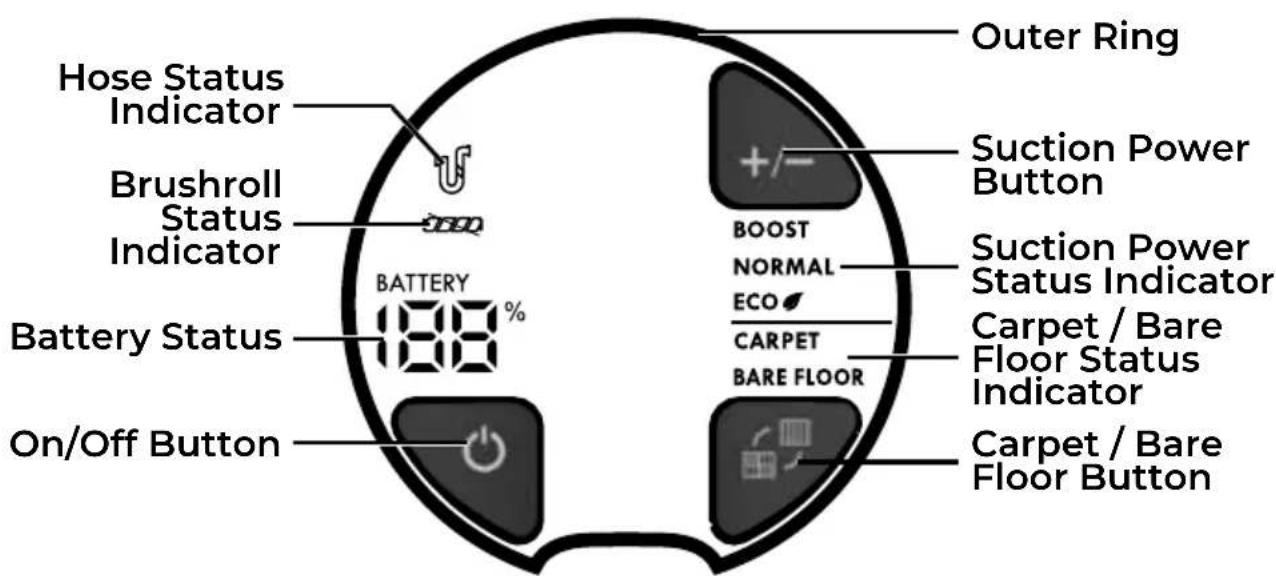
DISPLAY SCREEN
PARTS AND FEATURES
CHARGING BASE


Please pay special attention to these hazard alert boxes, and follow any instructions given. WARNING statements alert you to such hazards as fire, electric shock, burns and personal injury. CAUTION statements alert you to such hazards as personal injury and/or property damage.
ASSEMBLY INSTRUCTIONS
Before assembling the vacuum cleaner, check the PACKING LIST (Page 2). Use this list to verify that you have received all the components of your new Kenmore Cordless Upright Vacuum Cleaner.
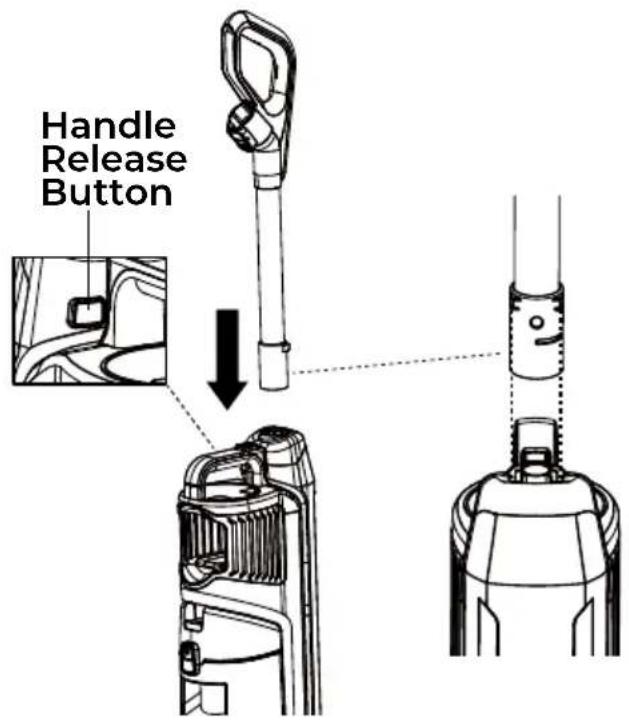
- Insert the handle into the main body until you hear a 'click'.
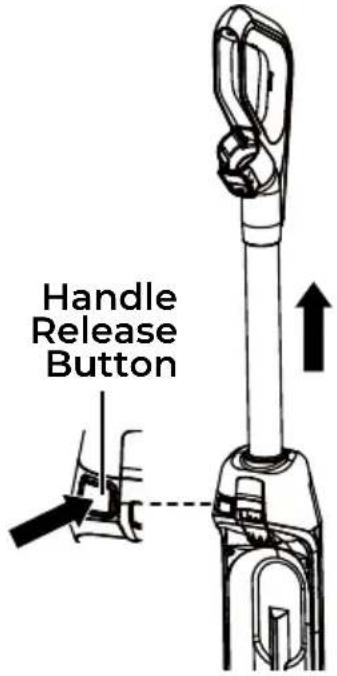
To remove: Press handle release button and pull up on handle.
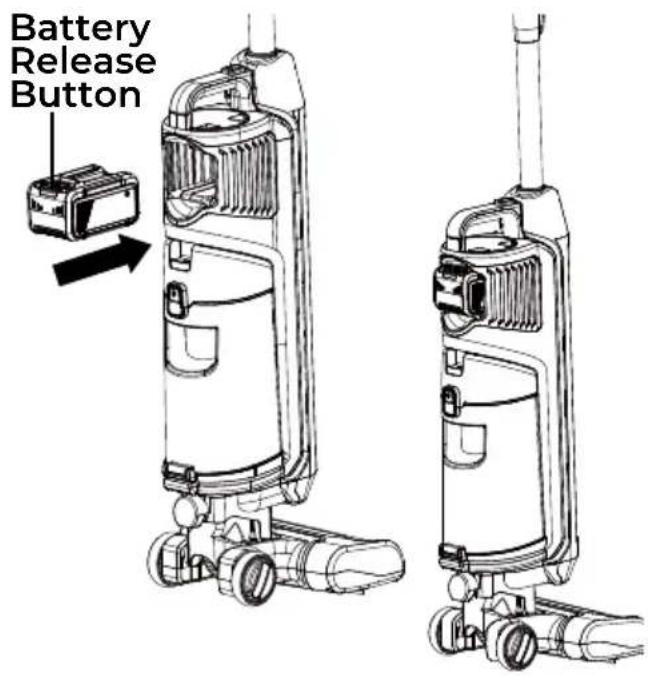
- Insert the battery pack into the battery compartment until you hear a 'click'. Make sure the battery pack firmly snaps into place.
To remove: Press battery release button on the battery pack, grasp the battery pack firmly and pull it out of battery compartment.
CHARGING
NOTE: Please fully charge before first use.
OPTION 1 – The battery pack can be charged through the charging adapter.
OPTION 2 – The battery pack can be charged while installed in the vacuum cleaner by using the charging adapter with the charging base.

WARNING
Use only with the charger recommended by the manufacturer.
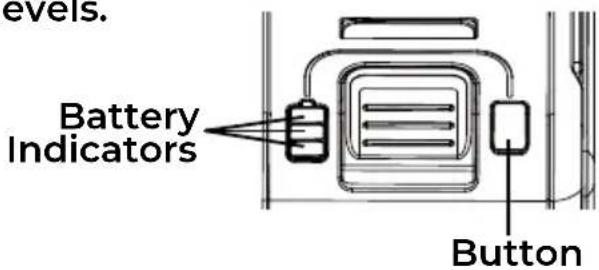
BATTERY INDICATORS
There are 3 indicator LEDs on the battery. Press the button, the LEDs will show you the charge levels.
OPTION 1 - CHARGING THE BATTERY PACK SEPARATELY
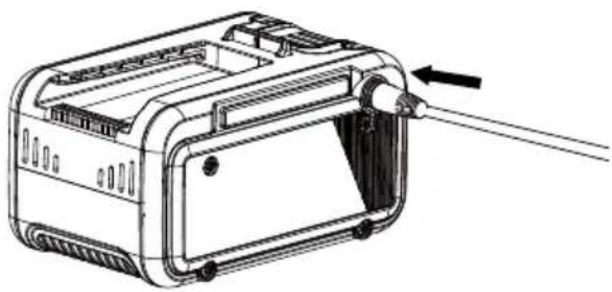
- Insert the charging adapter into the charging port on the battery pack.
natural_image
Technical line drawing of a device with internal components and an arrow indicating direction (no text or symbols)- Plug the charging adapter into a wall outlet.
- The battery pack will begin to charge. The battery indicator LEDs on the battery pack will flash continuously.
- When the battery is fully charged, all three indicator LEDs light up continuously, and will turn off after 10 minutes.
- Once the charging is completed, remove the battery from the charging adapter. Unplug the adapter from the outlet.
OPTION 2 – CHARGING THE BATTERY PACK WHILE INSTALLED IN THE VACUUM CLEANER

WARNING
Before placing onto the charging base for charging, make sure the vacuum cleaner is turned off.
- Insert the charging adapter into the charging port on the side of the charging base.
- Ensure that the battery pack is correctly inserted into the battery compartment on the vacuum.
- Place the vacuum cleaner onto the charging base. Ensure that the charging pins on the charging base are correctly connected with the vacuum.
CHARGING
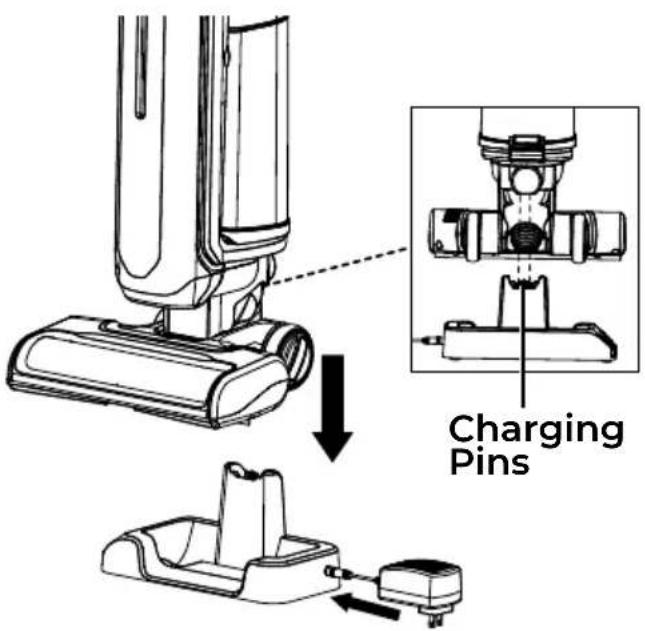
- Plug the charging adapter into a wall outlet.
- The vacuum cleaner will begin to charge. The battery status on the display screen will light up to indicate the battery power and the outer ring will pulse green.
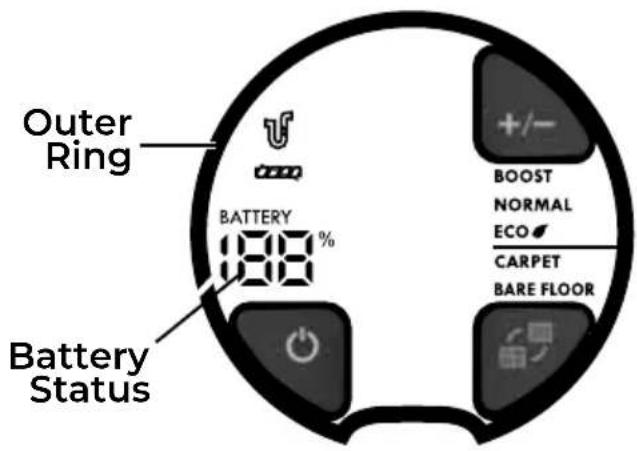
- When the vacuum is fully charged, the battery status will indicate 100%. The outer ring will show a continuous blue light. The display screen will turn off after 3 minutes.
NOTE: Make sure the vacuum cleaner is fully charged before using for the first time. It may take up to 4-5 hours to charge completely if fully discharged.
NOTE: If the battery status and the outer ring on the display screen do not light up when charging, ensure that:
• The charging adapter is plugged into the power supply properly.
• The electrical supply at the outlet is powered on.
• The charging adapter is fully inserted into the charging port.
NOTE: Never charge the vacuum cleaner in temperatures above 104°F (40°C) or below 39.2°F (4°C). It is normal for the charger to become warm when charging.
OPERATING INSTRUCTIONS
CAUTION
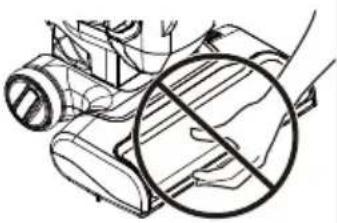
Moving parts! To reduce the risk of personal injury, DO NOT touch the brushroll when vacuum is on. Contacting the brushroll while it is rotating can cut, bruise or cause other injuries. Disconnect electrical supply before servicing or cleaning the vacuum cleaner. Use caution when operating near children or pets.
natural_image
Diagram of a device with a circular symbol and directional arrows, no readable text or symbols presentWhen any abnormality/failure occurs, stop using the product immediately and disconnect the battery pack.
CAUTION
- Use extra care when cleaning on stairs. To avoid personal injury or damage, and to prevent the vacuum cleaner from falling, always place the vacuum at bottom of stairs or on floor. Do not place on stairs or furniture, as it may result in injury or damage.
- Do not use for grooming a pet.
NOTE: Make sure the vacuum cleaner is completely assembled and dust cup is empty before using. Do not operate vacuum cleaner without filters in place.
Make sure the battery pack is fully charged and firmly installed into place.
- Press the On/Off button. The display screen will illuminate when ON.
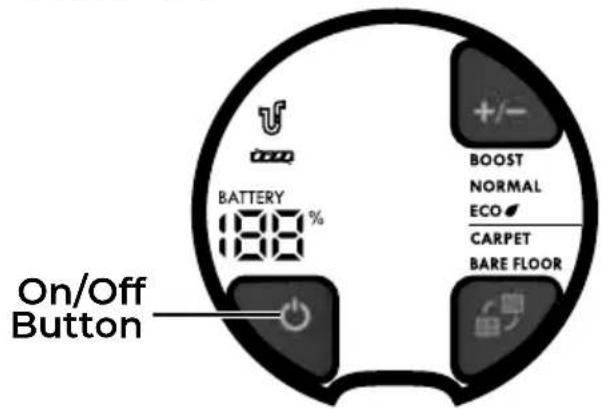
- The vacuum starts in BARE FLOOR mode with NORMAL suction power by default for first use.
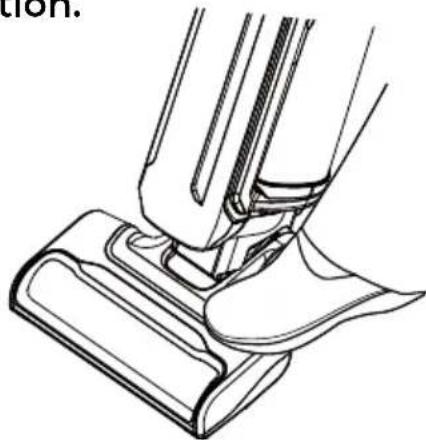
- Release the handle by placing a foot on the nozzle and pulling back to change handle position.
natural_image
Technical line drawing of a mechanical assembly or repair process (no text or symbols)- Operate the vacuum cleaner by tilting the handle back towards you and with the nozzle flush with the floor surface.
-
To change mode, press carpet / bare floor button. CARPET or BARE FLOOR will illuminate to indicate the mode:
-
CARPET mode: for deep cleaning on carpets with high suction. The brushroll rotates when the vacuum cleaner is in the CARPET mode.
- BARE FLOOR mode: for all floor types and preserves runtime. The brushroll rotates slowly when the vacuum cleaner is in the BARE FLOOR mode.
- To change suction power, press suction power button. ECO, NORMAL or BOOST will illuminate to indicate the suction power.
NOTE: This vacuum cleaner is able to remember its previous operation mode and suction power. When the vacuum is turned on again, it will start in the previous operation mode and suction power.
- When vacuuming, the battery status indicates the battery level. When the battery status is lower than 10% and the outer ring flashes red, it is suggested to recharge the vacuum cleaner. See charging instructions in CHARGING (page 13-14).
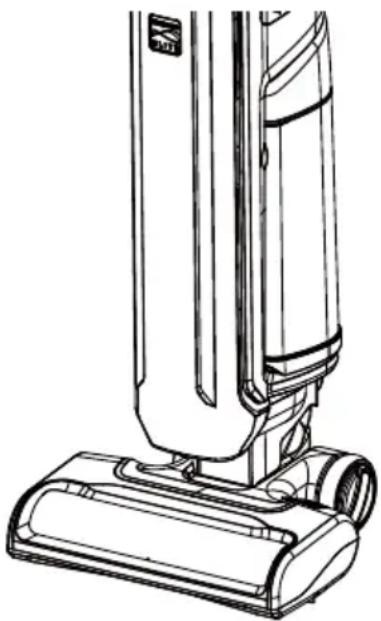
- Once you have completed vacuuming, press the On/Off button. Return the handle to the fully upright position by
pushing the handle forward until the vacuum body is locked in place. Disconnect the battery pack from the vacuum cleaner.
NOTE: Brushroll does not rotate in either mode when handle is in fully upright position.
natural_image
Line drawing of a vacuum cleaner with attached base (no text or symbols)CAUTION
Do not allow the vacuum cleaner to remain in one spot for any length of time when the brushroll is turning. Damage to floor may occur.
CAUTION
Select the right mode when using this vacuum cleaner. Incorrect setting may damage floor.
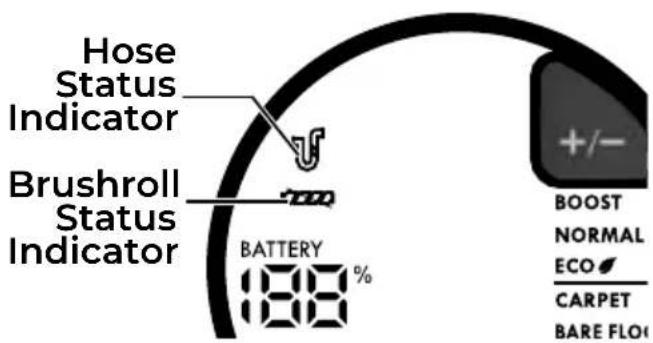
When there is a jam in the brushroll, the brushroll status indicator will flash red.
When there is a jam in the air path, or the foam and felt filters are too dirty, the hose status indicator will flash red.
| Indicators | Status |
| Brushroll Status Indicator, Red flashing | There is a jam in the brushroll area. Turn off the vacuum and disconnect the battery pack. Remove any blockages in the nozzle. |
| Hose Status Indicator, Red flashing | There is a jam inside the air path, or the foam and felt filters are too dirty. Turn off the vacuum and disconnect the battery pack. Remove any blockages in the connection hose area, especially under the transparent cover (page 29). Check and remove any blockages in the flexible hose. Clean the foam and felt filters, and the HEPA media exhaust filter, if necessary. |
LIFT-UP MODE
-
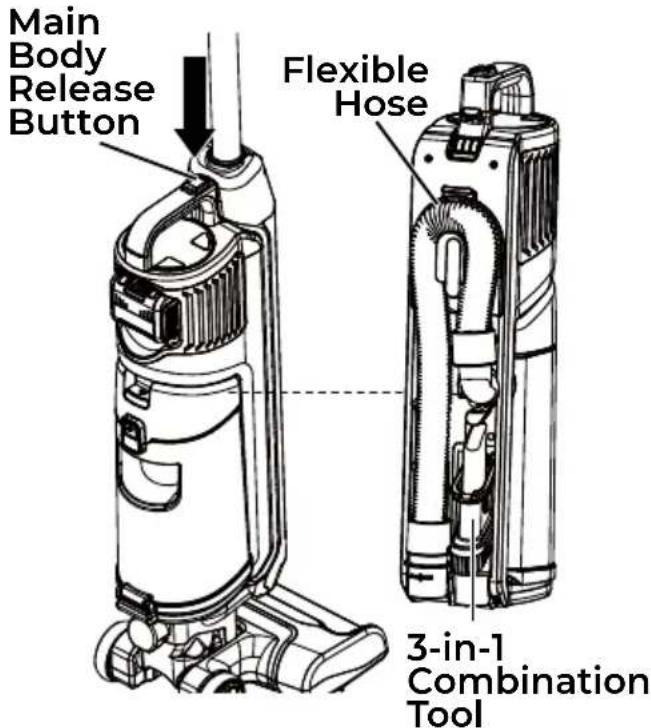
Place the vacuum cleaner in the upright locked position.
-
Press the main body release button to detach and raise the vacuum main body from the motorized nozzle for portable carry. The flexible hose and 3-in-1 combination tool are stored inside the main body.
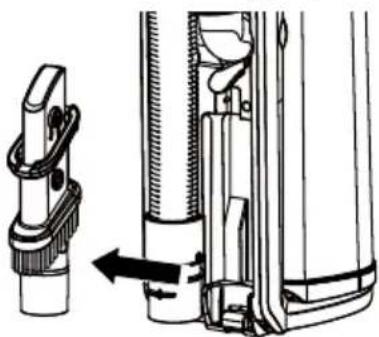
- Remove the 3-in-1 combination tool from the storage position.
To re-install the combination tool, insert the bottom of the tool onto the storage tab, and then press the combination tool into the storage position.
natural_image
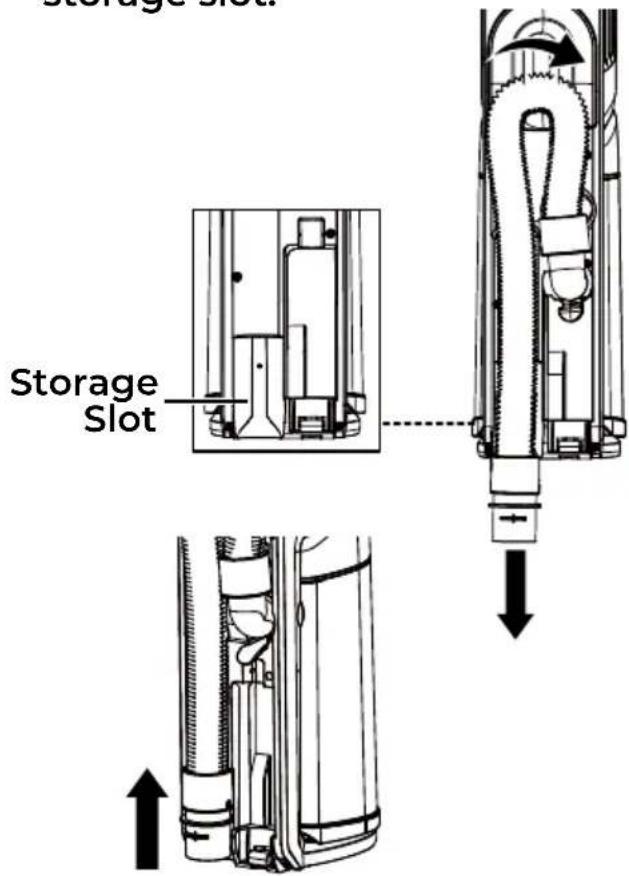
Technical line drawing of a mechanical assembly with a clamp and directional arrow (no text or symbols)- Pull downward on the open end of the flexible hose from its storage slot to release the open end from the main body.
To re-install, make sure the open end of the flexible hose is properly hooked onto the storage slot.
- Press the handle release button and lift up the handle.
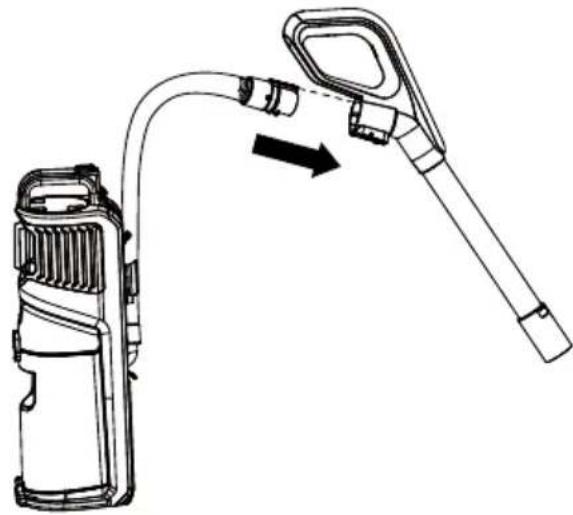
- Insert the hose end into the upper hose connection as shown until you hear a 'click'.
natural_image
Technical line drawing of a handheld device with a curved cable and lever, showing motion direction (no text or symbols)- Choose the desired attachment and insert it into the handle.
NOTE: The attachment also can insert directly into the hose if needed.
- Press the On/Off button to turn on the vacuum cleaner.
- Once you have completed vacuuming, press the On/Off button. Disconnect the battery pack from the vacuum cleaner.
IMPORTANT: Make sure to reinstall the hose end into the original storage slot before using the vacuum in upright mode.
- Reinstall the main body into the vacuum cleaner until a click is heard.
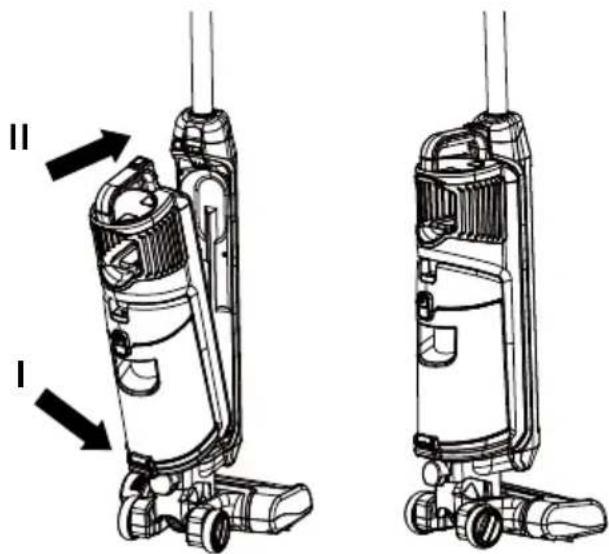
CAUTION
When using attachments, be careful not to over extend the flexible hose when reaching. Trying to reach beyond the hose stretch capability could cause the vacuum cleaner to tip over.
CAUTION
DO NOT pull the vacuum cleaner around the room by the hose. Misuse could result in property damage or personal injury.
ATTACHMENTS
All included attachment tools can be inserted into either the handle or the flexible hose.
3-IN-1 COMBINATION TOOL
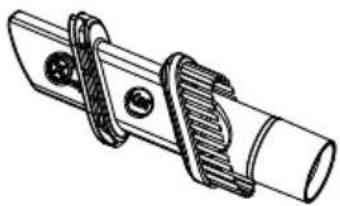
The 3-in-1 combination tool can be attached to the end of the handle and the hose. Insert the tool into the open end of the handle or hose.
Use the 3-in-1 combination tool in crevice tool mode for cleaning in tight spaces such as furniture, between cushions, and stairs. See ATTACHMENT USE TABLE (page 21).
natural_image
Technical line drawing of a mechanical clamp or bracket assembly (no text or symbols)Set the combination tool in upholstery brush mode by pressing the release button and sliding the upholstery brush to the end of the combination tool. Use in upholstery brush mode for cleaning fabric surfaces such as fabric sofa. See ATTACHMENT USE TABLE (page 21).
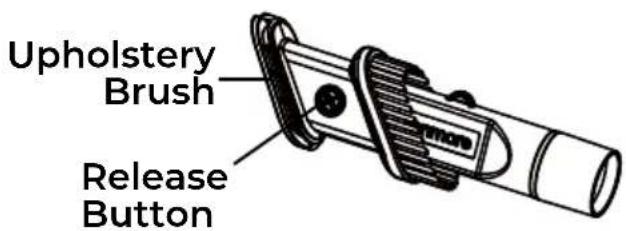
Press the release button to remove the brush tool. Set the combination tool in dusting brush mode as shown. Use in dusting brush mode for cleaning loose surfaces such as drapes. See ATTACHMENT USE TABLE (page 21).
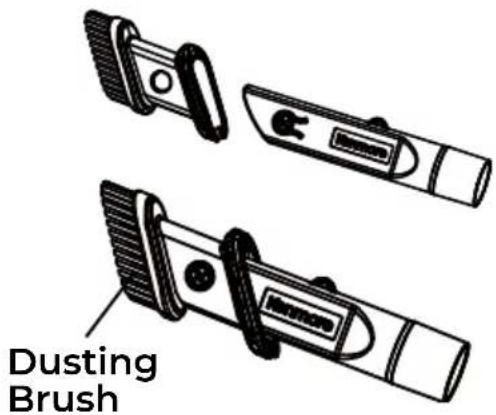
To return the combination tool to crevice tool mode, press the release button and slide the brush tool down the combination tool.
UPHOLSTERY TOOL
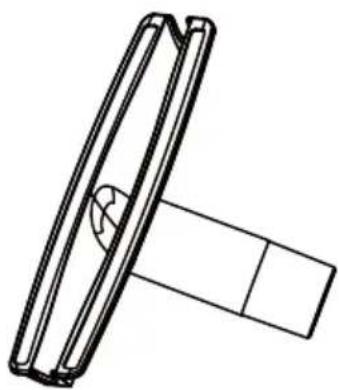
The upholstery tool can be attached to the end of the handle and the hose. Insert the tool into the open end of the handle or hose.
Use the upholstery tool for cleaning fabric surfaces such as upholstered furniture and bedsheets. See ATTACHMENT USE TABLE (page 21).
natural_image
Technical line drawing of a mechanical component with a flanged top and base (no text or symbols)ATTACHMENT USE TABLE
| CLEANING AREA √ = Applicable | |||||||
| ATTACHMENT | Furniture* | Between Cushions* Carpet Bare | Drapes* | Stairs | Baseboards | ||
| CREVICE TOOL |  | √ | √ | √ | √ | √ | |
| DUSTING BRUSH |  | √ | √ | √ | √ | √ | |
| UPHOLSTERY BRUSH |  | √ | √ | ||||
| UPHOLSTERY TOOL |  | √ | √ | ||||
*Always clean attachments before using on fabrics.
PERFORMANCE/SAFETY FEATURES
THERMAL PROTECTOR
This vacuum cleaner has a thermal protector which automatically trips to protect the vacuum cleaner suction motor. If a clog prevents normal airflow to the motor, the thermal protector turns the motor off automatically. This allows the motor to cool in order to prevent possible damage to the vacuum cleaner.
To reset thermal protector: Turn the vacuum cleaner off and disconnect the battery pack to allow the vacuum cleaner to cool and the thermal protectors to reset.
CAUTION
Always return the vacuum cleaner to the upright position before using the hose and attachments. Failure to do so may result in overheating of the brushroll motor and can cause the thermal protectors to trip.
Check for and remove clogs, and empty dust cup if necessary. Also check and clean any clogged filters. Wait approximately 50 minutes before restarting vacuum cleaner.
PERFORMANCE/SAFETY FEATURES
Hair Eliminator® Brushroll
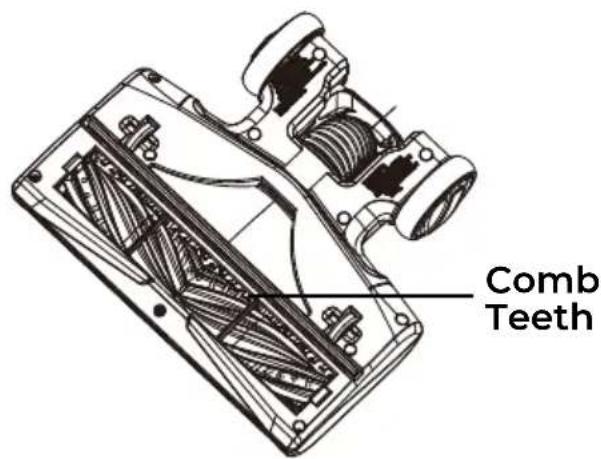
For best performance, the motorized nozzle is equipped with a hair eliminator® brushroll, which prevents build-up of hair, string and other debris on the brushroll. To remove any hair wrapped around the brushroll, simply continue vacuuming, allowing the brushroll to automatically remove the hair wrap and send it to the dust cup.
CAUTION
Moving parts! To reduce the risk of personal injury, DO NOT touch the brushroll when vacuum is on. Contacting the brushroll while it is rotating can cut, bruise or cause other injuries.
BRUSHROLL RESET
To prevent motor damage from jams, the brushroll features built-in overload protection. If the brushroll encounters a blockage, it will slow down or stop completely. In such cases, the overload protector automatically shuts off the brushroll motor (indicated by a red light on the display) while the vacuum cleaner itself continues suction.
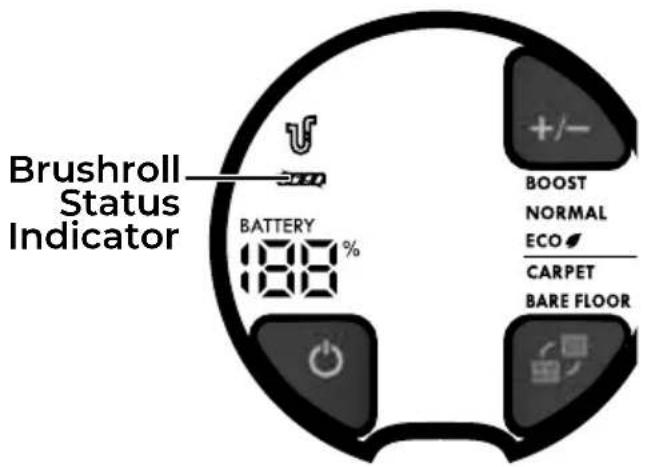
To correct problem: Turn off and disconnect the battery pack. Remove the obstructions, then reinstall the battery pack and turn on the vacuum cleaner again. The brushroll status indicator on the display screen will be off.
If the problem persists, contact the vacuum cleaner help line for assistance.
VACUUM MAINTENANCE AND CARE
Always follow all safety precautions when performing maintenance to the vacuum cleaner.

WARNING
Electrical Shock and Personal Injury Hazard
Disconnect the battery pack before servicing or cleaning the vacuum cleaner. Failure to do so could result in electrical shock or personal injury from vacuum cleaner suddenly starting.

WARNING
The motorized nozzle is equipped with sharp comb teeth inside. DO NOT touch comb teeth when servicing or cleaning the vacuum, which may cause personal injury.
CLEANING EXTERIOR AND ATTACHMENTS
- Turn off and disconnect the battery pack from the vacuum cleaner. DO NOT drip water on vacuum cleaner.
- To clean exterior, or to reduce static electricity and dust build-up, wipe outer surface with a clean, soft cloth that has been dipped in a solution of mild liquid detergent and water, then wrung dry. Wipe dry after cleaning.
NOTE: Wash attachments in warm soapy water, rinse and air dry. Do not clean in dishwasher.

CAUTION
Do not use attachments if they are wet. Attachments used in dirty areas, such as under a refrigerator, should not be used on other surfaces until they are washed. They could leave marks.
PROLONGED VACUUM CLEANER STORAGE
-
Disconnect the battery pack from the vacuum cleaner before prolonged storage.
-
Store the vacuum cleaner in a dry, indoor area, on the floor with the handle locked in the upright position.
EMPTYING DUST CUP
WARNING
Disconnect the battery pack before performing any service on vacuum cleaner.
NOTE: For best performance, empty dust cup after every use. Never operate vacuum cleaner without dust cup and filters in place.
- Press the dust cup release button to remove the dust cup from the main body.
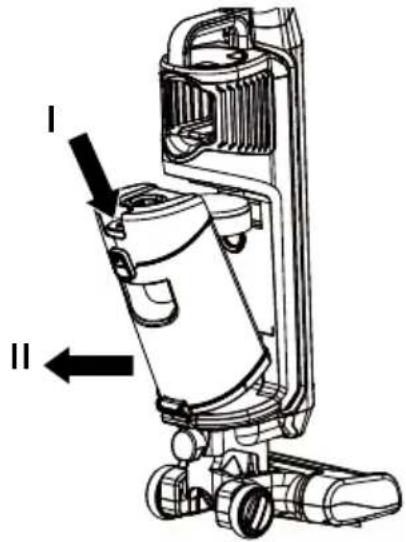
- Remove any clogs that might be located in the suction port.
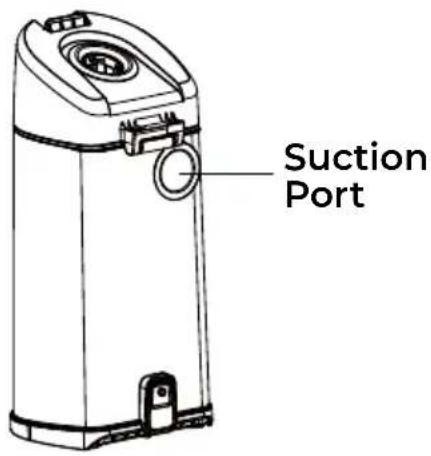
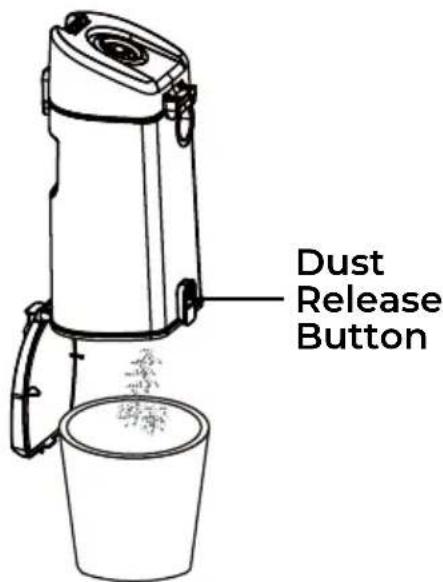
- Position dust cup over a waste receptacle. Press down on the dust release button to open dust cup lid and allow contents to drop into waste receptacle.
-
Shake the dust cup to release any debris that might hang in the pre-filter.
-
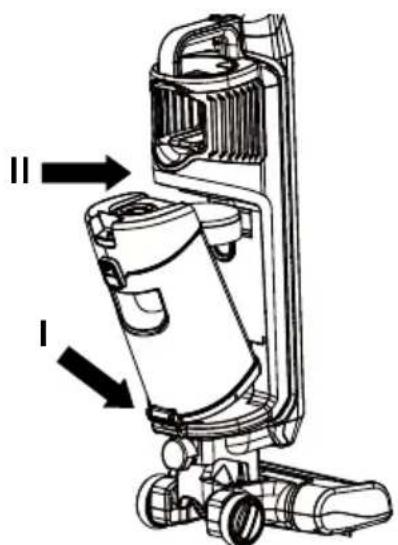
Reinstall and insert the dust cup into the slots on the bottom of the main body, then press the dust cup back into the locked slot until you hear it click into place.
natural_image
Technical line drawing of a vacuum cleaner with labeled parts (I and II), showing internal components and mounting base (no text or symbols beyond labels)PRE-FILTER CLEANING
The pre-filter is located inside the dust cup. Clean the pre-filter as needed to optimize suction power.
- Remove the dust cup as outlined in EMPTYING DUST CUP (page 24).
NOTE: Make sure dust cup is free of debris before opening.
- Press the dust cup lid release button, and open the lid.
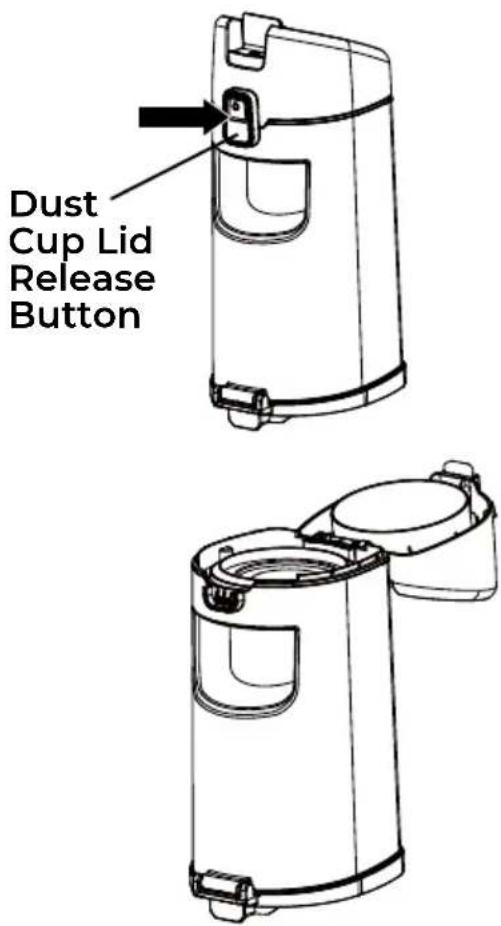
- Lift up the pre-filter from the dust cup. Clean pre-filter by gently tapping over a waste receptacle. Tap on several sides to ensure best cleaning.
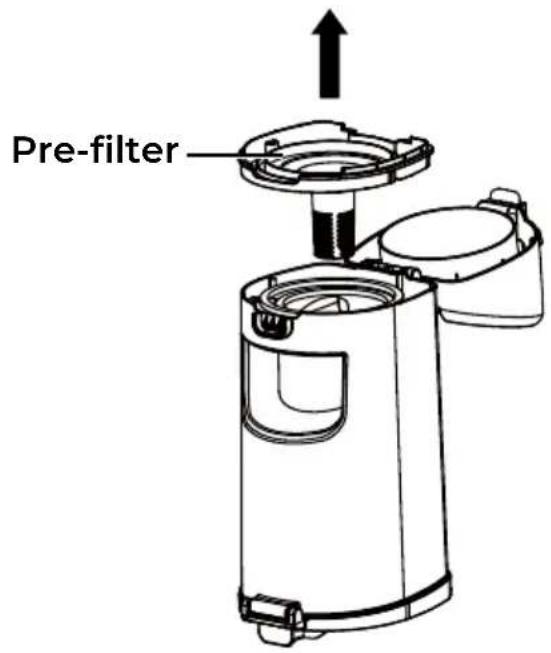
- Reinstall the dust cup into the main body. See installation instructions in EMPTYING DUST CUP (page 24).
FOAM AND FELT FILTERS CLEANING
IMPORTANT: Clean filters every month. Foam filters may appear dirty after use - this is normal.
It is recommended to clean the foam and felt filters with cold water every month.
NOTE: When the cleaning of filters no longer restores vacuum cleaner suction to full power, or the filters are worn or broken, replace the filters. To purchase filters, call 1-877-531-7321 (US) / 1-844-608-3081 (CA).
Regularly clean and replace the filters to keep the vacuum's suction power optimal.
- Remove the dust cup as outlined in EMPTYING DUST CUP (page 24).
- Open the dust cup lid. Remove the foam and felt filters from the lid.
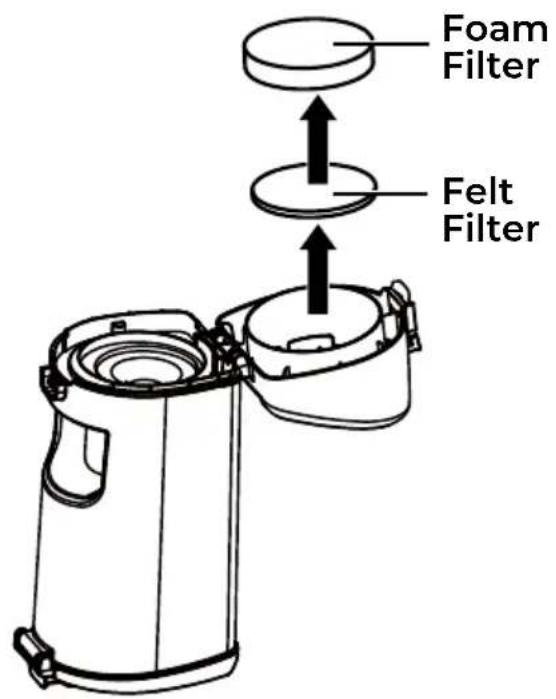
- Wash with cold water only, DO NOT use detergent or soap. Squeeze by hand and allow to air dry. Allow all filters to dry 24 hours before putting back into vacuum cleaner.
NOTE: DO NOT operate without foam and felt filters installed.
DO NOT wash in the dishwasher.
DO NOT install foam and felt filters if damp.
- Replace foam and felt filters into the dust cup lid.
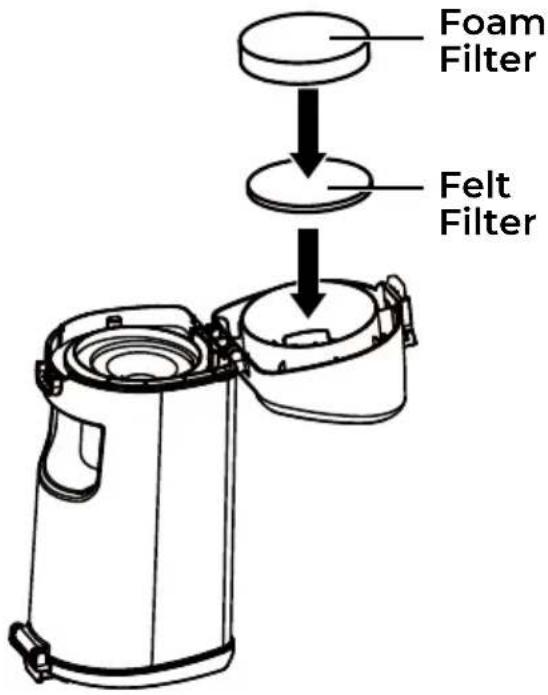
- Reinstall the dust cup. See EMPTYING DUST CUP (page 24).
HEPA MEDIA EXHAUST FILTER CLEANING
IMPORTANT: Clean the filter every month. Do not operate without the filter!
It is recommended to clean the HEPA media exhaust filter with cold water every month.
NOTE: When the cleaning of the filter no longer restores vacuum cleaner suction to full power, or the filter is worn or broken, replace the exhaust filter. To purchase the exhaust filter, call 1-877-531-7321 (US) / 1-844-608-3081 (CA).
- Remove the vacuum main body as outlined in LIFT-UP MODE (page 17).
- Remove the open end of the flexible hose from the main body to show the exhaust filter cover.
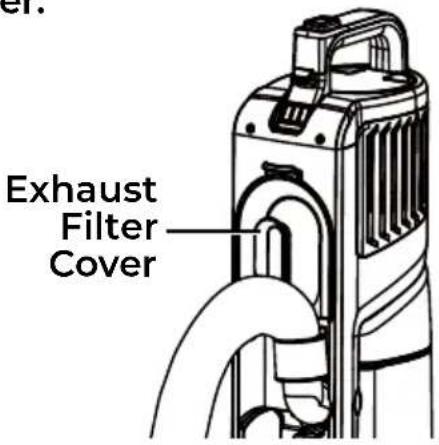
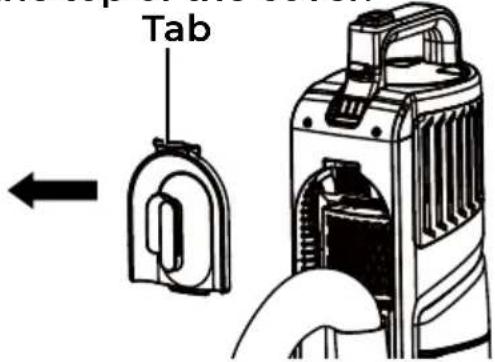
- Remove the exhaust filter cover by pressing the tab at the top of the cover.
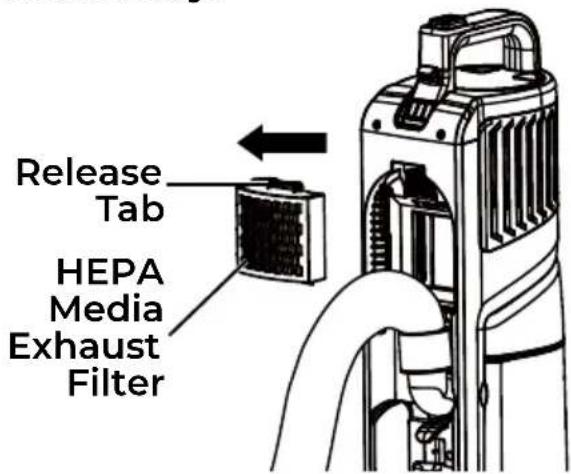
- Press the release tab and remove the HEPA media exhaust filter from vacuum main body.
- Wash with cold water only. DO NOT use detergent or soap. Allow to air dry for 24 hours before putting back into vacuum cleaner.
NOTE: DO NOT operate without exhaust filter installed.
DO NOT wash in the dishwasher.
DO NOT install the filter if damp.
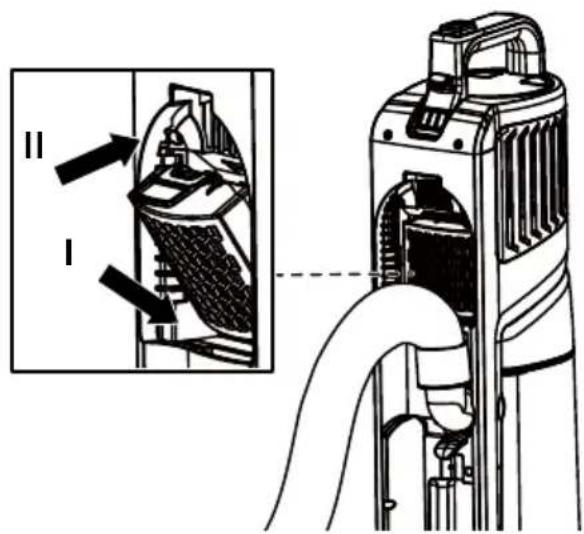
- Reinstall the HEPA media exhaust filter into the vacuum main body until a click is heard.
HEPA MEDIA EXHAUST FILTER CLEANING
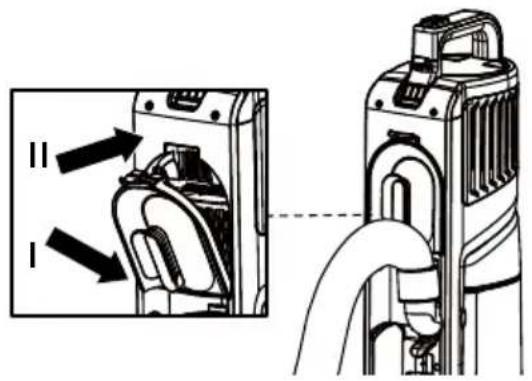
- Reinstall the exhaust filter cover into the vacuum main body until a click is heard.
natural_image
Diagram showing a device with internal components connected to a vacuum cleaner (no text or symbols present)NOTE: Make sure the exhaust filter cover is properly installed.
REMOVING CLOGS
WARNING
Disconnect the battery pack before removing clogs. Failure to do so could result in electrical shock or personal injury.
CHECKING FLEXIBLE HOSE FOR CLOGS
When there is a jam in the air path, the hose status indicator on the display screen will flash red. Check the hose for clogs.
- Remove the vacuum main body as outlined in LIFT-UP MODE (page 17).
- Remove the open end of the flexible hose from the main body.
- Remove the locking end of the hose from the main body by pressing the hose release latch.
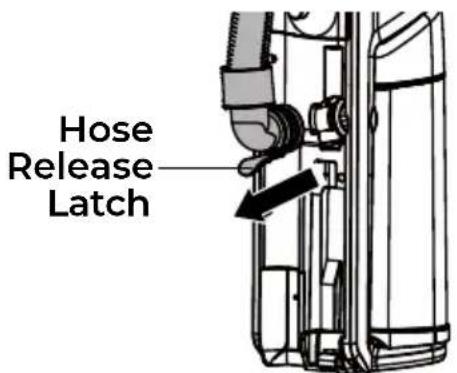
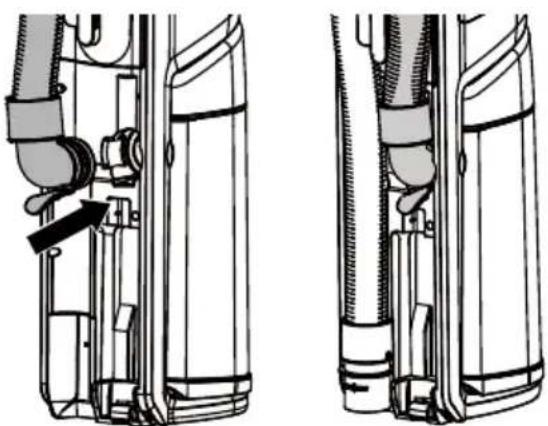
- Check and remove any clogs in the flexible hose.
- Reinstall the locking end of the hose to the vacuum cleaner until a click is heard. Reinstall the open end of the hose to its original storage slot.
natural_image
Technical line drawing of two mechanical components with no visible text or symbolsREMOVING CLOGS
CHECKING CONNECTION HOSE FOR CLOGS
- Remove the vacuum main body as outlined in LIFT-UP MODE (page 17).
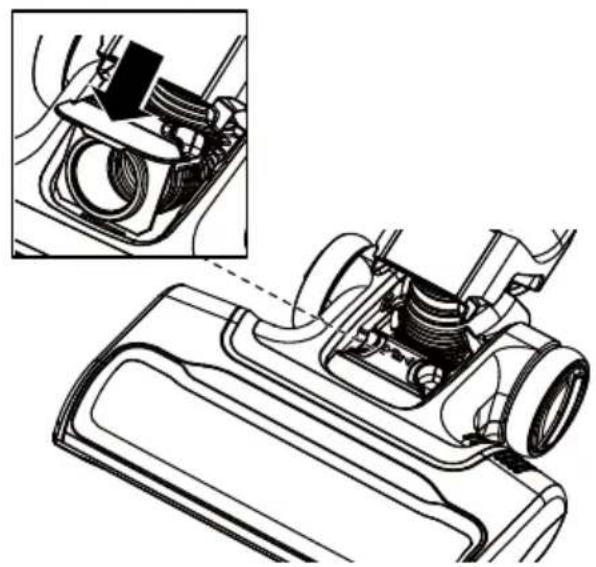
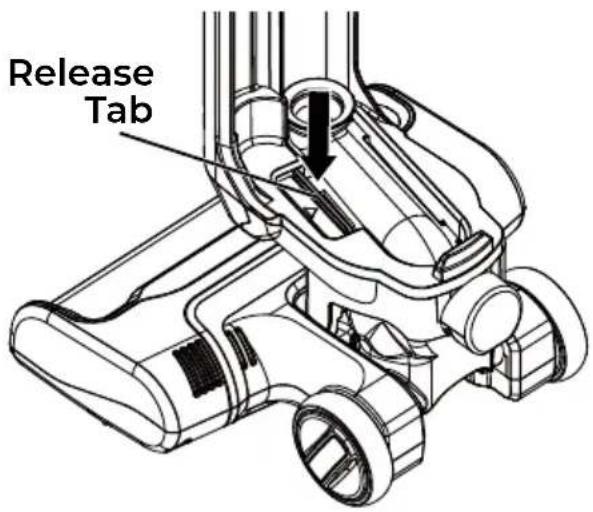
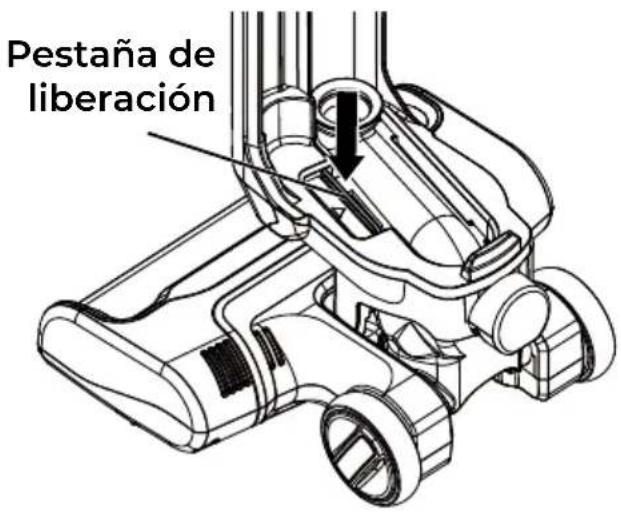
- The transparent cover over the connection hose allows you to check clogs easily. Remove it by pressing the release tab and pulling it out.
NOTE: Remove any blockage here when the clogging appears under the transparent cover.
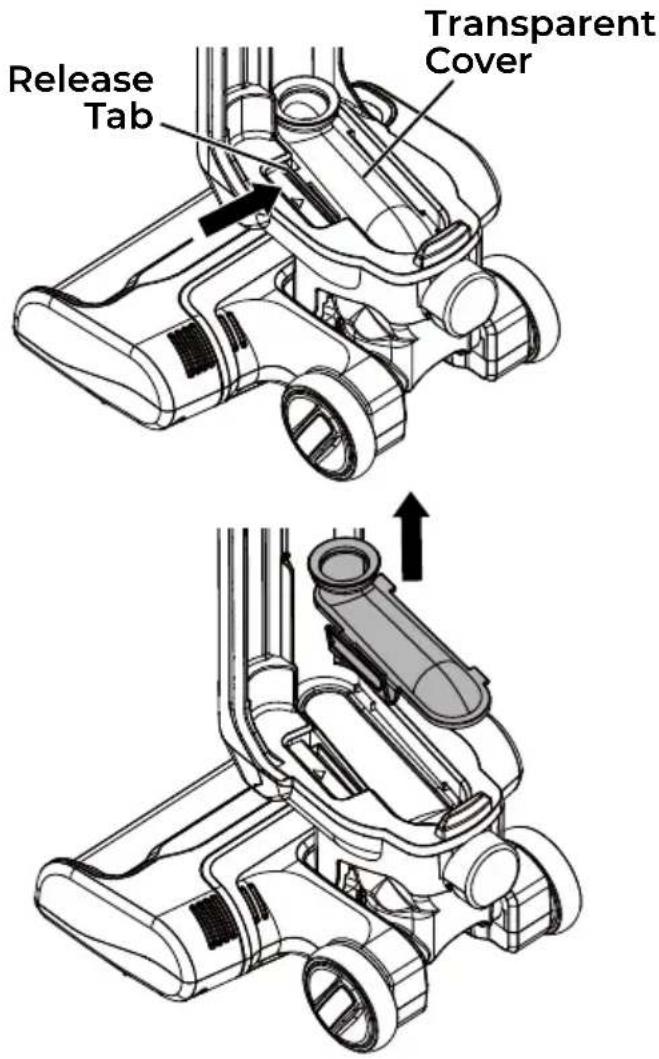
-
Release the handle of the vacuum.
-
Squeeze both the locking latches to release the end of the connection hose.
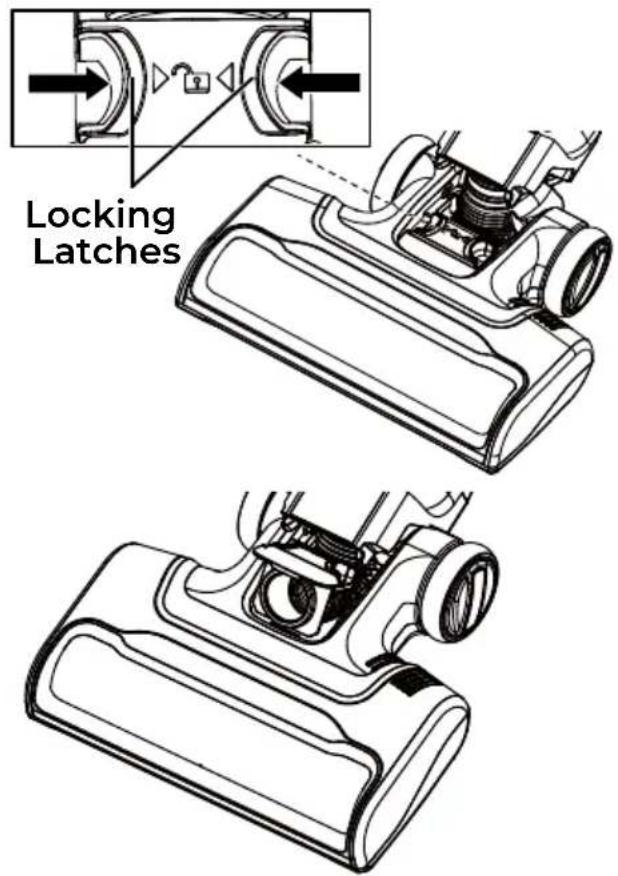
- Check and remove any clogs in the connection hose.
- Replace the end of the connection hose by pressing it down until a click is heard.
natural_image
Technical line drawing of a mechanical component with an inset showing a close-up view of a housing assembly (no text or symbols present)REMOVING CLOGS
- Return the handle to the fully upright position.
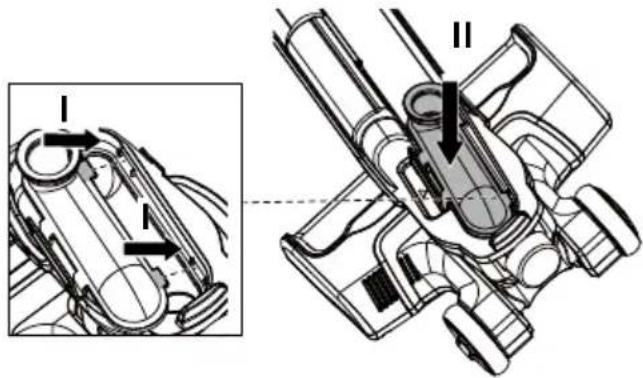
- Reinstall the transparent cover. First align the two small tabs on the cover with the position slots as shown. Then press down on the transparent cover until a click is heard. Press on the release tab area to ensure it is secured properly. A click should be heard.
TROUBLESHOOTING
Review this table to find do-it-yourself solutions for minor performance problems. Any service needed, other than maintenance described in this Use & Care Guide, should be performed by a qualified service agent.
WARNING
Disconnect the battery pack before performing maintenance to the vacuum cleaner. Failure to do so could result in electrical shock or personal injury.
| PROBLEM | POSSIBLE CAUSE SOLUTION | |
| Vacuum cleaner won't run. | Battery may be depleted. | Charge the hard floor cleaner as instructed on page 13-14. |
| Wrong charger being used. | Be sure to use only the charging base or charging adapter supplied with your product. | |
| Vacuum main body is not installed properly. | Remove the vacuum main body and reattach ensuring that it is securely in place. | |
| The vacuum is overheated. | Turn the vacuum cleaner off and let the vacuum cool down for 50 minutes. | |
| The motor is damaged. | Call 1-877-531-7321 (US) / 1-844-608-3081 (CA) for assistance. | |
| Poor job of dirt pick-up. | Dust cup is not installed correctly. | Check dust cup for correct installation and ensure it is snapped firmly in place. |
| Full or clogged dust cup. Empty | the dust cup (page 24). | |
| There is a clog in the flexible hose or connection hose of the vacuum cleaner. | Check and remove all clogs. Follow instructions on page 28-30. | |
| The hose or attachments are not installed correctly. | Check the hose and attachments for correct installation and ensure they are snapped firmly in place. | |
| The foam filter, felt filter or HEPA media exhaust filter needs to be cleaned or replaced. | Clean or replace the foam filter, felt filter or HEPA media exhaust filter. Follow the foam filter, felt filter, or HEPA media exhaust filter cleaning instructions on page 26 or 27-28. | |
| The flexible hose is worn. | Replace the hose assembly. To purchase parts, call 1-877-531-7321 (US) / 1-844-608-3081 (CA). | |
TROUBLESHOOTING
| Poor job of dirt pick-up. | The connection hose is worn. | Call 1-877-531-7321 (US) / 1-844-608-3081 (CA) for assistance. |
| The brushroll is worn. | ||
| Dust escapes from the vacuum. | Dust cup is not installed correctly. | Position dust cup correctly and snap firmly in place. |
| HEPA media exhaust filter is installed incorrectly. | Check exhaust filter for correct installation. Follow instructions on page 27-28. | |
| Foam filter, felt filter or HEPA media exhaust filter is worn or broken. | Check and replace the foam filter, felt filter or the HEPA media exhaust filter. To purchase parts, call 1-877-531-7321 (US) / 1-844-608-3081 (CA). | |
| Brushroll does not turn. | Handle is in fully upright position. | Move handle from the fully upright position. |
| Brushroll is jammed. | Remove obstruction. Follow instructions on page 22. | |
| Brushroll is not installed correctly. | Call 1-877-531-7321 (US) / 1-844-608-3081 (CA) for assistance. | |
| The belt is not routed correctly. | ||
| The belt is worn or broken. | ||
| Fault in PCB section of the motorized nozzle. | ||
| Overheat protector of the motorized nozzle is activated. | Wait for the motorized nozzle to cool down, and then restart. | |
| Airflow restricted with attachments in use; sound changes. | Exhaust filter cover is installed incorrectly. | Position exhaust filter cover correctly and snap firmly into place. Follow instructions on page 28. |
| Air path is blocked. | Check for and remove any clogs and clean the air path. Follow instructions on page 28-30. | |
| Attachments in use restrict air flow. | Check attachments for fuzz, lint, pet hair or other debris. |
TROUBLESHOOTING
| Vacuum turns off on its own. | Battery may be depleted. | Charge the battery as instructed on page 13-14. |
| Thermal protector is activated. | Turn the vacuum cleaner off and disconnect the battery pack. Check the air path and dust cup. Allow the vacuum cleaner to cool for a minimum of 50 minutes. Reinstall the battery pack and turn it on. | |
| The motor is damaged. | Call 1-877-531-7321 (US) / 1-844-608-3081 (CA) for assistance. | |
| Brushroll status indicator on the display screen emits red. | There is a jam in the brushroll area. | Turn off and disconnect the battery pack. Remove any blockages in the brushroll. See page 22. |
| The brushroll is worn or broken. | Call 1-877-531-7321 (US) / 1-844-608-3081 (CA) for assistance. | |
| The vacuum will not charge. | Charging adapter is not inserted into the charging port on the charging base firmly. | Be sure the charging adapter is fully inserted into the charging port on the charging base, and is properly plugged into the wall outlet. |
| Debris accumulated on the metal charging contacts on the vacuum main body and the vacuum. | Be sure no debris is accumulated on the metal charging contacts on the vacuum and main body. | |
| Vacuum main body is not installed properly. | Remove the vacuum main body and reattach ensuring that it is securely in place. | |
| The charging status on display screen is damaged. | Call customer service for assistance. | |
| No power at electrical outlet. | Check circuit breakers. Replace the charging adapter. | |
| The charging adapter is damaged. | Replace the charging adapter. Call 1-877-531-7321 (US) / 1-844-608-3081 (CA) for assistance. | |
| The battery is damaged. | Replace the battery pack. Call 1-877-531-7321 (US) / 1-844-608-3081 (CA) for assistance. |
TABLA DE CONTENIDOS
Cleva North America, Inc., Greenville SC 29607
PIEZAS Y CARACTERÍSTICAS
natural_image
Technical line drawing of a device with a handle and internal components (no text or symbols)natural_image
Diagram of a camera with a circular prohibition symbol overlay (no text or symbols present)USO DE SU ASPIRADORA VERTICAL INALÁMBRICA
ADVERTENCIA
natural_image
Technical line drawing of a mechanical component or tool interacting with a base (no text or symbols visible)USO DE SU ASPIRADORA VERTICAL INALÁMBRICA
natural_image
Line drawing of a vacuum cleaner with attached device (no text or symbols)PRECAUCIÓN
natural_image
Technical line drawing of a handheld device with a curved arm and connector (no text or symbols)natural_image
Technical line drawing of two vacuum cleaner units (labeled I and II) with no visible text or symbolsPRECAUCIÓN
natural_image
Technical line drawing of a mechanical clamp or bracket assembly (no text or symbols)natural_image
Simple line drawing of a mechanical component with a handle and base (no text or symbols)TABLA DE USO DE ACCESORIOS
| ÁREA DE LIMPIEZA √ = Aplicable | |||||||
| ACCESORIO | Mueble* | Entre cojines* | Cortinas* | Escaleras | Rodapiés | ||
| Alfombra | Liso | ||||||
| HERRAMIENTA PARA HENDIDURAS |  | √ | √ | √ | √ | √ | |
| CEPILLO PARA DESEMPOLVAR |  | √ | √ | √ | √ | √ | |
| CEPILLO PARA TAPICES |  | √ | √ | ||||
| HERRAMIENTA PARA TAPIZADOS |  | √ | √ | ||||
natural_image
Technical line drawing of a vacuum cleaner with labeled components (no text or symbols present)LIMPIEZA DEL PREFILTRO
natural_image
Line drawing of a portable kitchen appliance with lid and side arm (no text or symbols)natural_image
Technical line drawing of a mechanical assembly with no visible text or symbolsnatural_image
Technical line drawing of a mechanical assembly with no visible text or symbolsCÓMO QUITAR OBSTRUCCIONES
natural_image
Technical line drawing of a mechanical device with an inset showing a close-up of a component (no text or symbols present)CÓMO QUITAR OBSTRUCCIONES
Cleva North America, Inc., Greenville SC 29607
PIÈCES ET FONCTIONNALITÉS
natural_image
Line drawing of a vacuum cleaner with attached base (no text or symbols)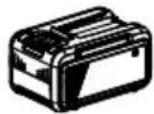
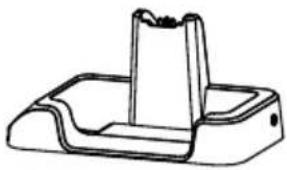
Bloc-batterie (X2)
natural_image
Technical line drawing of a mechanical component with a flanged top and rectangular base (no text or symbols)Base de chargementCorps |
natural_image
Simple line drawing of a flexible cable with a loop and clasp (no text or symbols)natural_image
Line drawing of a mechanical clamp or clip assembly (no text or symbols)Brosse À Meubles
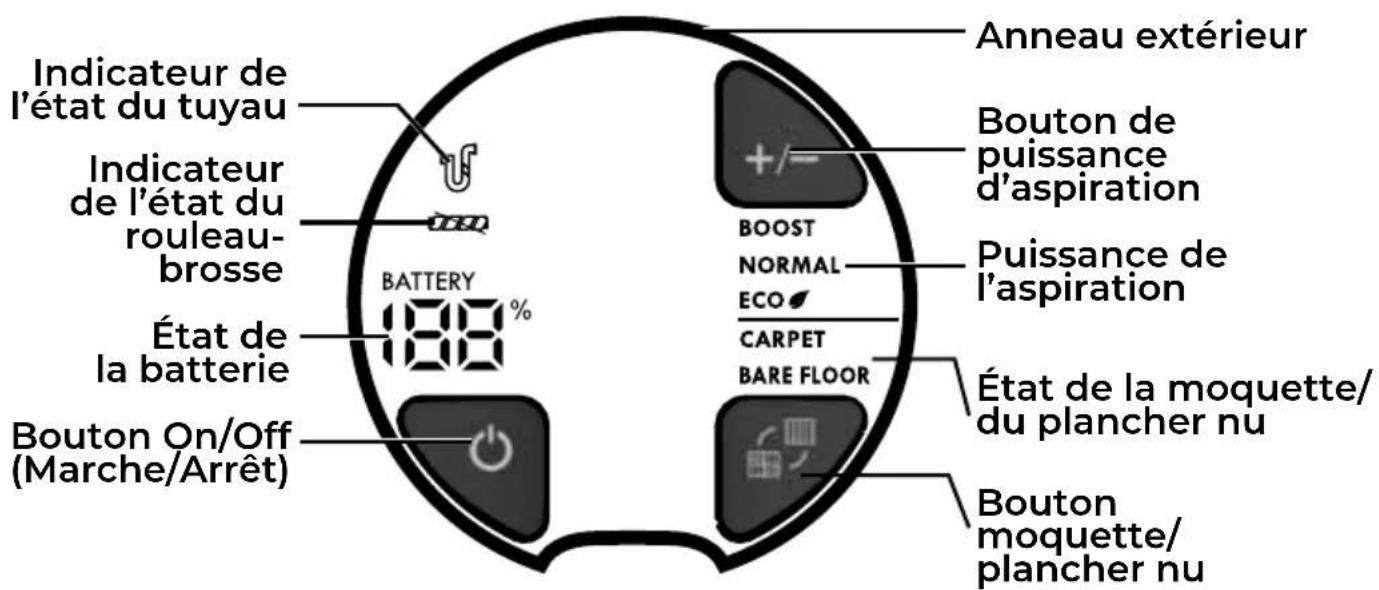
ÉCRAN D'AFFICHAGE
natural_image
Technical line drawing of a device with a handle and internal components, no text or symbols presentnatural_image
Diagram of a mechanical device with a circular symbol overlay (no text or labels)UTILISATION DE VOTRE ASPIRATEUR VERTICAL SANS FIL
⚠ AVERTISSEMENT
natural_image
Line drawing of a mechanical component with a base and clamped parts (no text or symbols)natural_image
Line drawing of a vacuum cleaner's upper body and base (no text or symbols)ATTENTION
natural_image
Technical line drawing of a handheld device with a curved handle and arrow indicating motion (no text or symbols)natural_image
Technical line drawing of two vacuum cleaner units (labeled I and II), showing internal components and mounting brackets (no text or symbols beyond labels)ATTENTION
natural_image
Technical line drawing of a mechanical clamp or connector assembly (no text or symbols)natural_image
Technical line drawing of a mechanical device with no visible text or symbolsnatural_image
Simple line drawing of a mechanical component with a central shaft and two curved arms (no text or symbols)TABLEAU D'UTILISATION DES ACCESSOIRES
| ZONE DE NETTOYAGE √ = Applicable | |||||||
| ACCESSOIRE | Meubles* | Entre les coussins* | Rideaux* | Escaliers | Plinthes | ||
| Moquette | Nu | ||||||
| SUCEUR PLAT | 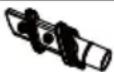 | √ | √ | √ | √ | √ | |
| BROSSE À ÉPOUSSETER | 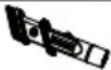 | √ | √ | √ | √ | √ | |
| BROSSE À MEUBLES |  | √ | √ | ||||
| BROSSE À MEUBLES |  | √ | √ | ||||
natural_image
Technical line drawing of a mechanical assembly with internal components (no text or symbols)Dents de peigne
ATTENTION
NETTOYAGE DU PRÉ-FILTRE
ÉLIMINATION DES OBSTRUCTIONS
⚠ AVERTISSEMENT
natural_image
Technical line drawing of a mechanical assembly with no visible text or symbols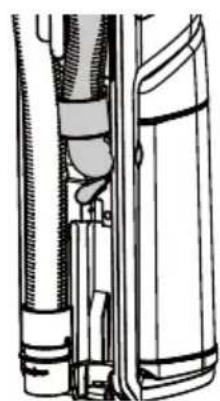
natural_image
Technical line drawing of a mechanical assembly with no visible text or symbolsVÉRIFICATION DE LA PRÉSENCE D'OBSTRUCTIONS DANS LE TUYAU DE RACCORDEMENT
natural_image
Technical line drawing of a car head assembly with inset detail (no text or symbols)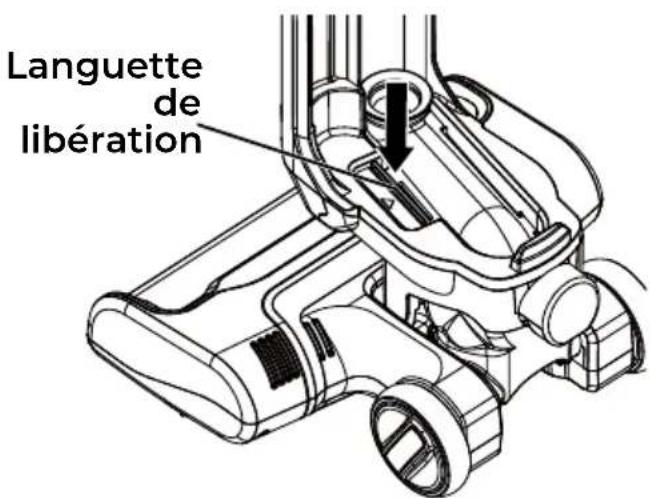
- Cordless Upright Vacuum with Hair Eliminator® Brushroll
- Aspiradora vertical inalámbrico con cepillo giratorio Hair Eliminator®
- BEFORE USING YOUR NEW VACUUM CLEANER
- PACKING LIST
- IMPORTANT SAFETY INSTRUCTIONS
- WARNING!
- WARNING
- Product Disposal
- SAVE THESE INSTRUCTIONS
- VACUUM CLEANER WARRANTY
- LIMITED WARRANTY
- PARTS AND FEATURES
- DISPLAY SCREEN
- CHARGING BASE
- ASSEMBLY INSTRUCTIONS
- CHARGING
- BATTERY INDICATORS
- OPTION 1 - CHARGING THE BATTERY PACK SEPARATELY
- OPERATING INSTRUCTIONS
- CAUTION
- LIFT-UP MODE
- ATTACHMENTS
- 3-IN-1 COMBINATION TOOL
- UPHOLSTERY TOOL
- ATTACHMENT USE TABLE
- PERFORMANCE/SAFETY FEATURES
- THERMAL PROTECTOR
- Hair Eliminator® Brushroll
- BRUSHROLL RESET
- VACUUM MAINTENANCE AND CARE
- CLEANING EXTERIOR AND ATTACHMENTS
- PROLONGED VACUUM CLEANER STORAGE
- EMPTYING DUST CUP
- PRE-FILTER CLEANING
- FOAM AND FELT FILTERS CLEANING
- HEPA MEDIA EXHAUST FILTER CLEANING
- IMPORTANT: Clean the filter every month. Do not operate without the filter!
- REMOVING CLOGS
- CHECKING FLEXIBLE HOSE FOR CLOGS
- CHECKING CONNECTION HOSE FOR CLOGS
- TROUBLESHOOTING
- TABLA DE CONTENIDOS
- PIEZAS Y CARACTERÍSTICAS
- USO DE SU ASPIRADORA VERTICAL INALÁMBRICA
- ADVERTENCIA
- PRECAUCIÓN
- LIMPIEZA DEL PREFILTRO
- CÓMO QUITAR OBSTRUCCIONES
- PIÈCES ET FONCTIONNALITÉS
- ÉCRAN D'AFFICHAGE
- UTILISATION DE VOTRE ASPIRATEUR VERTICAL SANS FIL
- ⚠ AVERTISSEMENT
- ATTENTION
- NETTOYAGE DU PRÉ-FILTRE
- ÉLIMINATION DES OBSTRUCTIONS
- VÉRIFICATION DE LA PRÉSENCE D'OBSTRUCTIONS DANS LE TUYAU DE RACCORDEMENT
Brand : KENMORE
Model : Elite CU7004
Category : Vacuum Cleaner