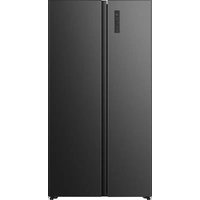
RL3K370SEWE1 - Fridge HISENSE - Free user manual and instructions
Find the device manual for free RL3K370SEWE1 HISENSE in PDF.


User questions about RL3K370SEWE1 HISENSE
0 question about this device. Answer the ones you know or ask your own.
Ask a new question about this device
Download the instructions for your Fridge in PDF format for free! Find your manual RL3K370SEWE1 - HISENSE and take your electronic device back in hand. On this page are published all the documents necessary for the use of your device. RL3K370SEWE1 by HISENSE.
USER MANUAL RL3K370SEWE1 HISENSE
text_image
QR code image containing encoded data, no visible human-readable textBefore operating this unit, please read this manual thoroughly, and retain for future reference.
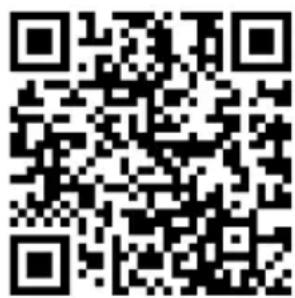
This is a short version of the User's Manual. For more information, please scan the QR code above to view the full version of the manual.
NOTE:
- Please adjust your mobile or tablet device to portrait mode during the browsing of electronic manuals to achieve the best viewing experience.
- To ensure a smooth experience with the download feature of the electronic manuals, we recommend using Google Chrome, Microsoft Edge, or the Safari browser.
EN
English
SAFETY AND WARNING INFORMATION
Before using the appliance for the first time
Before connecting the appliance to the power mains, please read carefully the instructions for use which describe the appliance and its correct and safe use. The instructions apply to several appliance types/models; thus, settings or equipment may be described herein which is not available in your appliance. We recommend saving this instruction manual for future reference and attach it to the appliance if it is sold in the future.
Check for any damage or irregularities on your appliance. If you find your appliance is damaged, notify the retailer from which you have purchased the appliance.
Before connecting the appliance to the power mains, let the appliance rest in a vertical position for a minimum of 2 hours. This will reduce the possibility of operation faults due to the effect of transport on the cooling system.
Important safety instructions
text_image
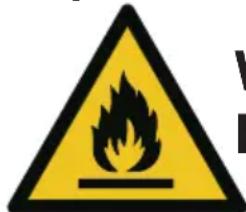
Warning sign with flame symbol and partial text 'V' and 'R' visibleWARNING
Risk of fire/flammable materials
The appliance must be connected to the power mains and grounded in compliance with the effective standards and regulations.
WARNING! Do not locate multiple portable socket-outlets or portable power supplies at the rear of the appliance.
Before cleaning the appliance, unplug it from the power mains (unplug the power cord from the wall outlet).
⚠ WARNING! If the supply cord is damaged, it must be replaced by the manufacturer, its service agent or similarly qualified persons in order to avoid a hazard.
⚠ WARNING! When positioning the appliance, ensure the supply cord is not trapped or damaged.
⚠ WARNING! The LED light must not be replaced by the user! If the LED light is damaged, contact the customer helpline for assistance.
SAFETY AND WARNING INFORMATION
WARNING! Do not use electrical appliances inside the food storage compartments of the appliance, unless they are of the type recommended by the manufacturer.
WARNING! Do not use mechanical devices or other means to accelerate the defrosting process, other than those recommended by the manufacturer.
⚠ WARNING! To avoid any hazard resulting from poor stability of the appliance, make sure it is installed as instructed.
Freeze burn hazard
To avoid freeze burn, never put frozen food in your mouth and do not touch frozen food.
Safety of children and vulnerable persons
The appliance is not intended for use by persons (including children) with reduced physical, sensory or mental capabilities, or lack of experience and knowledge, unless they have been given supervision or instruction concerning use of the appliance by a person responsible for their safety.
Children should be supervised to ensure that they do not play with the appliance.
Cleaning and user maintenance shall not be made by children without supervision.
Remove the packaging intended to protect the appliance or particular parts during transport and keep it outside the reach of children. It presents danger of injury or suffocation.
When removing a used appliance, disconnect the power cord, remove the door, and leave the shelves in the appliance. This will prevent children from locking themselves in the appliance.
For European markets only
This appliance can be used by children aged from 8 years and above and persons with reduced physical, sensory or mental capabilities or lack of experience and knowledge if they have been given supervision or instruction concerning use of the appliance in a safe way and understand the hazards involved.
Children shall not play with the appliance.
SAFETY AND WARNING INFORMATION
Cleaning and user maintenance shall not be made by children without supervision.
Children aged from 3 to 8 years are allowed to load and unload refrigerating appliances.
Warning regarding the refrigerant
The appliance contains a small amount of an environmentally friendly yet flammable gas R600a. Make sure that no parts of the cooling system are damaged. A gas leak is not hazardous to the environment, but it could cause eye injury or fire.
In case of a gas leak, ventilate the room thoroughly, disconnect the appliance from the power mains, and call a service technician.
Important information on the use of appliance
WARNING! This appliance is intended to be used in
household and similar applications such as:
- staff kitchen areas in shops, offices and other working environments;
- farm houses and by clients in hotels, motels and other residential type environments;
• bed and breakfast type environments;
• catering and similar non-retail applications.

WARNING! Keep ventilation openings, in the appliance enclosure or in the built-in structure, clear of obstruction.
The appliance may not be used outdoors and it may not be exposed to rain. Do not store explosive substances such as aerosol cans with a flammable propellant in this appliance.
If the appliance will be out of use for an extended period of time, switch it off using the relevant button, and unplug it from the power mains. Empty the appliance, defrost it, clean it, and leave the door ajar.
In case of an error or power supply failure, do not open the freezer compartment unless the freezer has not operated for over 16 hours. After this period, use the frozen food or provide sufficient cooling (e.g. a replacement appliance).
Technical information on the appliance
Rating plate can be found in the appliance interior. It indicates data on voltage, gross and net volume, type and amount of refrigerant, and information on the climate classes.
SAFETY AND WARNING INFORMATION
If the language on the rating plate is not the language of your choice or the language of your country, replace it with the one supplied.

WARNING! Do not damage the refrigerant circuit.
INSTALLING YOUR NEW APPLIANCE
- Stand your appliance in a dry and well ventilated place. Keep the appliance out of direct sunlight, rain or frost.
- The diagram shows the temperature range of each climate class. The climate class of this appliance is specified on the rating plate. Use beyond this range may result in poor performance.
| Climate class | Ambient temperature |
| SN | +10°C to +32°C |
| N | +16°C to +32°C |
| ST | +16°C to +38°C |
| T | +16°C to +43°C |
- Sufficient clear space should be available around the appliance to facilitate ventilation and heat dissipation.
- Suggested space is indicated in the figure.
• Product size(mm): 595*600*1856
In the non-built-in status
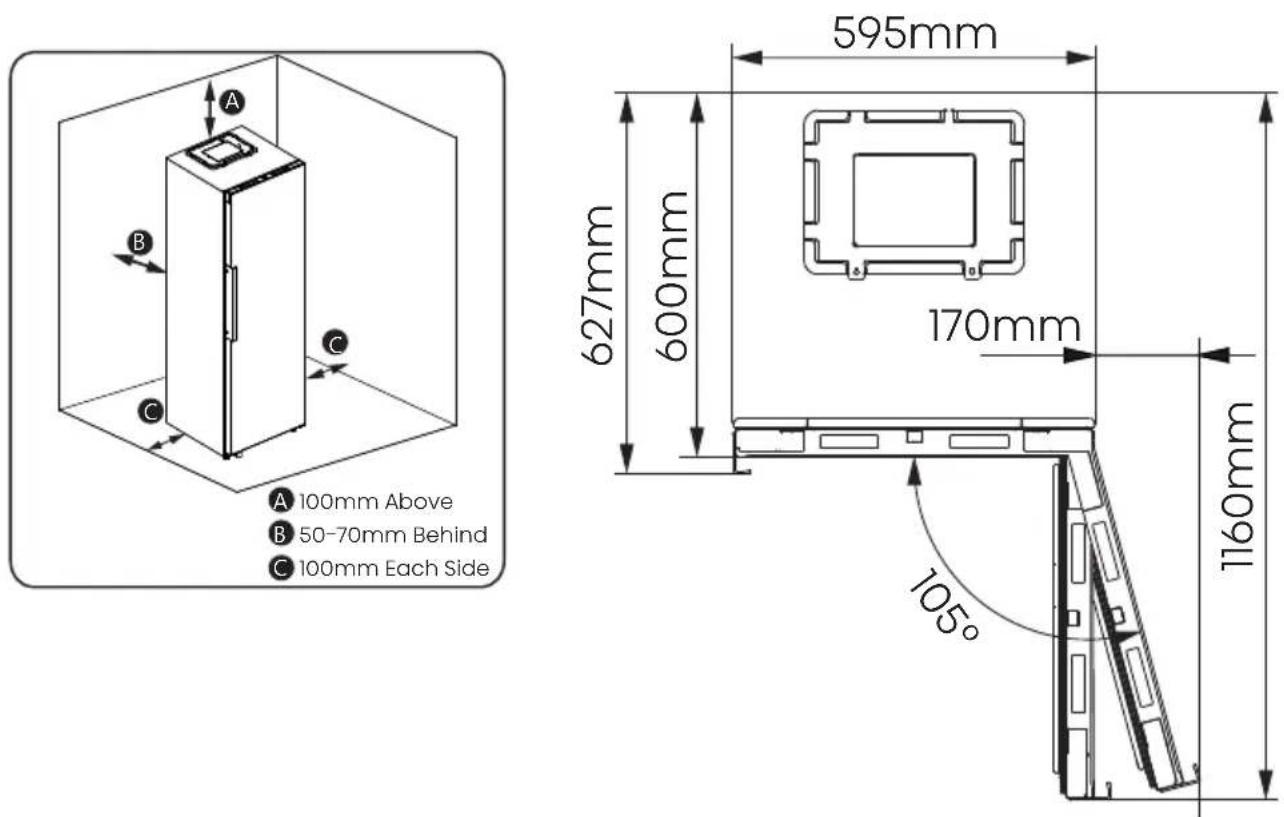
text_image
A B C 100mm Above B 50-70mm Behind C 100mm Each Side 595mm 627mm 600mm 170mm 1160mm 105°INSTALLING YOUR NEW APPLIANCE
In the built-in status
Reserve a gap of more than 2.5mm on the left and right side, and more than 5mm on the top side.
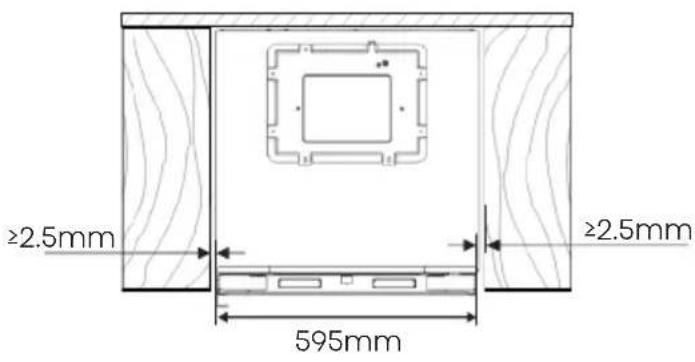
text_image
≥2.5mm ≥2.5mm 595mmDoor closing status for refrigerator in the built-in status
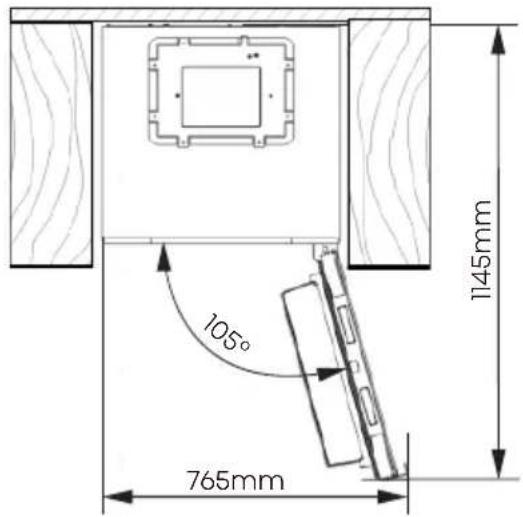
text_image
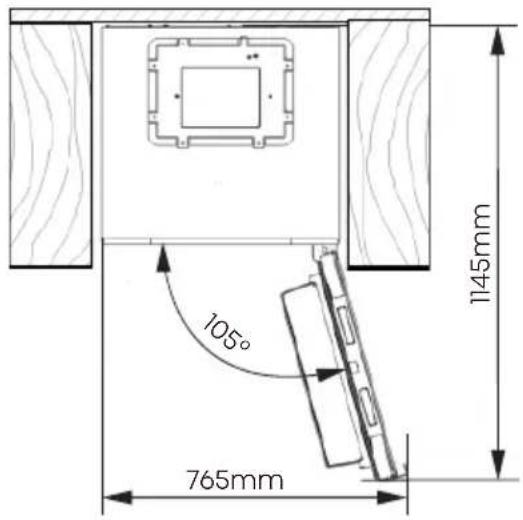
105° 765mm 1145mmThe total space required for the refrigerator to fully open the door in the built-in status
Leveling of appliance (if needed):
• The figure is for reference only.
- The appliance is fitted with adjustable feet that can be used to level the appliance.
• To allow the doors to self-close, tilt the top backwards by turning the adjustable feet.
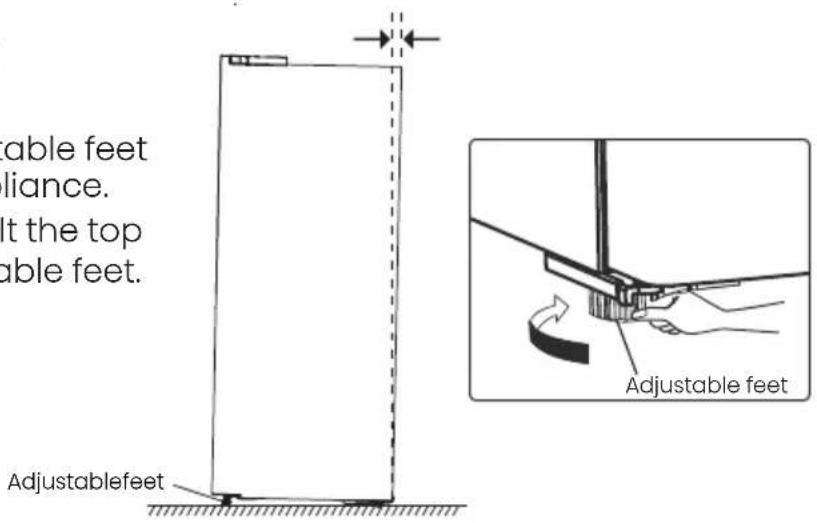
text_image
able feet liance. lt the top able feet. Adjustablefeet Adjustable feet
WARNING
- For proper installation, this refrigerator must be placed on a level surface of hard material that is the same height as the rest of the flooring. This surface should be strong enough to support a fully loaded refrigerator.
- The rollers should be only used for forward or backward movement. Moving the refrigerator sideways may damage your floor and the rollers.
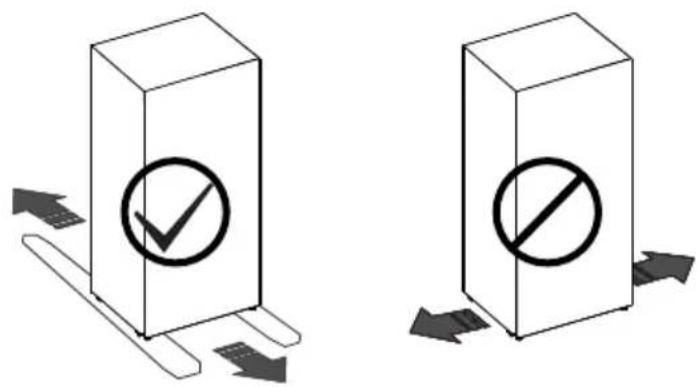
text_image
Diagram showing two 3D blocks with checkmark and prohibition symbols, each with directional arrows indicating movement or flow.DESCRIPTION OF THE APPLIANCE
- Appliance interior equipment may change according to the appliance model.
-
The diagram may slightly differ from the appliance you purchased, please get more information in the E-manual.
-
Electronic control *
- Wine racks
- 0°C Fresh Box
- Vegetable drawer cover
- Vegetable drawers
- Upper door racks
- Shelf
- Lower door racks
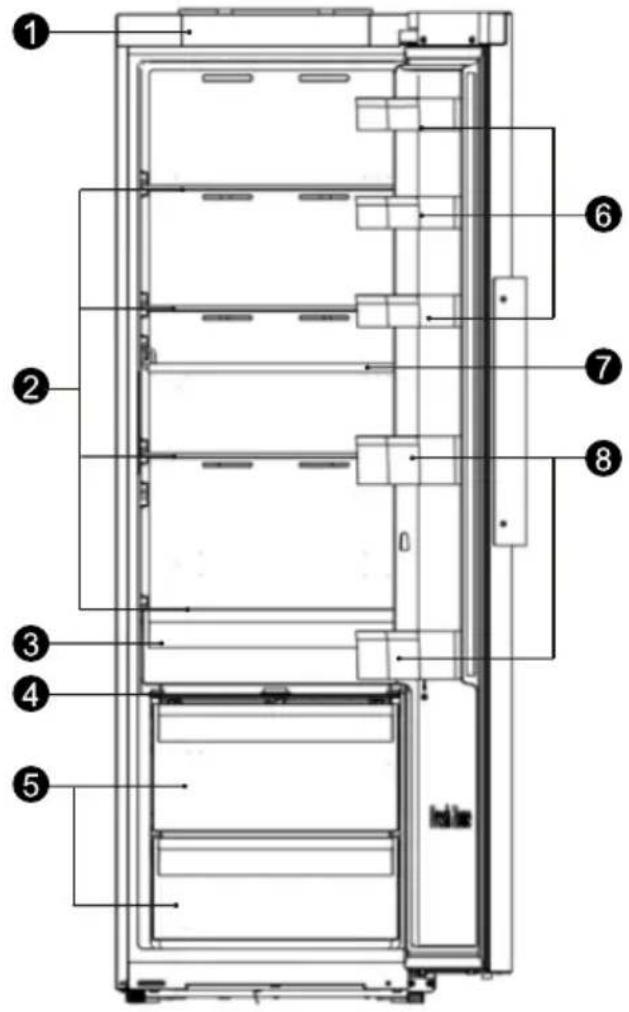
text_image
Technical diagram of a refrigerator interior with numbered components for identification* : If the model has a control panel on the fridge door, the electronic control is replaced with a decorative cover.
CONTROL PANEL
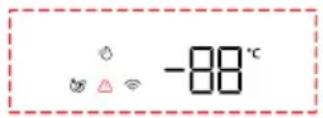
Use your appliance according to the following control regulations, your appliance has the corresponding functions and models as the display panels showed in the pictures below. When the appliance is powered on for the first time, the backlighting of the icons on display panel starts working. If no button have been pressed and the doors are closed, the backlighting will turn off after one minute.
NOTE: The control panel may differ by model, so choose according to your appliance. Please refer to the E-manual for more information.

Power
Date

Super Cool

Temp.

Ico

Alarm

Wi-Fi
3000
TYPE 1: Electronic Control(located at the top of appliance)

Power
3sec
Power
Press and hold "Power" button for 3 seconds to turn the standby function on or off. When the standby function is on, the display panel will show "--".

Eco
Press the “Eco” 🎨 button to turn on the energy saving function, the “💡” icon will be illuminated. The temperature of fridge is automatically switched to 6°C and the temperature of freezer is automatically switched to -17°C. Press the “Temp” button or “Eco” 🔊 button to turn off the energy saving function and the refrigerator temperature setting will revert back to the previous setting.

Super Cool
Super Cool
Press the “Super Cool” button to activate this function. The “ ” icon will be illuminated and the fridge temperature indicator will display 2°C. Super cool will automatically turn off after 6 hours or you can turn it off by pressing the “Super Cool” button or left “Temp” button, and the fridge temperature setting will revert back to the previous setting.

Fridge Compartment
Temperature
Press the left "Temp" button repeatedly to cycle through the available temperature settings from 8°C to 2°C.

High temperature alarm
If the temperature inside the appliance is too high, an alarm will sound to alert you and the “⚠️” icon will illuminated.
Switching off the alarm: If you want to switch off the acoustic alarm, briefly press the Alarm “⚠️” button. The “⚠️” icon will remain illuminated until the actual temperature in the appliance drops below the alarm level.
Switching off the alarm:
If you want to switch off the acoustic alarm, briefly press the "Alarm" button. The "⚠️" icon will remain illuminated until the actual temperature in the appliance drops below the alarm level.
When the appliance reaches an adequate temperature, then the “⚠️” icon will extinguished, high temperature alarm cleared. If you have not cancelled the high temperature alarm, the “⚠️” icon will remain illuminated, and the buzzer will sound three times per minute. After more than 10 minutes, the alarm will stop.
Door Open Alarm
If the door was opened for longer than 1 minute, an alarm will sound to alert you. Press any button to cancel the door alarm, which makes the buzzer sound stop. Also the door alarm can be stopped by closing the door.
CONTROL PANEL
Demo mode
In this mode, indicated by "OF", the appliance is operating but it stops making cool air. To switch on or off demo mode by pressing and holding "Power" and "Wi-Fi" buttons at the same time for 3 seconds and the buzzer beeps 3 times.
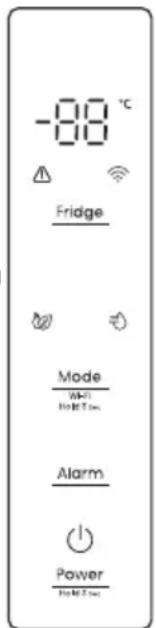
TYPE 2: Electronic Control (located on the fridge door)
text_image
-88 °C Fridge Mode Wi-Fi WiFi 2 sec Alarm Power WiFi 2 sec
Power
Press and hold "Power" button for 3 seconds to turn the standby function on or off. When the standby function is on, the display panel will show "--".
Fridge Compartment Temperature
Press the "Fridge" button repeatedly to cycle through the available temperature settings from 8°C to 2°C. Recommended Temperature Settings: 4°C.

Eco
Press the "Mode" button to turn on the energy saving function, the "💡" icon will be illuminated. The temperature of fridge is automatically switched to 6°C.
Press the "Fridge" button until the corresponding mode icon turns off and the refrigerator temperature setting will revert back to the previous setting.

Super Cool
Press the "Mode" button to turn on the Super Cool function. The "💡" icon will be illuminated and the fridge temperature is set to 2°C. Super cool will automatically turn off after about 6 hours or you can turn it off by pressing the "Fridge" button until the corresponding mode icon turns off, and the refrigerator temperature setting will revert back to the previous setting.
High temperature alarm
If the temperature inside the appliance is too high, an alarm will sound to alert you and the “⚠️” icon will illuminated.
Switch off the alarm: If you want to switch off the acoustic alarm, briefly press the "Alarm" button. The "⚠️" icon will remain illuminated until the actual temperature in the appliance drops below the alarm level.
Door Open Alarm
If the door was opened for longer than 1 minute, an alarm will sound to alert you. Press any button to cancel the door alarm, which makes the buzzer sound stop. Also the door alarm can be stopped by closing the door.
Demo mode
In this mode, indicated by "OF", the appliance is operating but it stops making cool air. To switch on or off demo mode by pressing and holding "Power" and "Fridge" buttons at the same time for 3 seconds and the buzzer beeps 3 times.
CONTROL PANEL
Wi-Fi
ConnectLife app
ConnectLife is a smart home app that allows you to communicate with your smart appliances by using a smartphone or tablet.
Installation
- Open the Apple App Store (IOS) or the Google Play Store (Android) on your smartphone.
- Search for the "ConnectLife" app. You will see an app with the following icon:

natural_image
Simple black square icon with a white C-shaped toggle switch symbol (no text or numbers)- Download and install the ConnectLife app provided by ConnectLife, LLC.
Alternatively, you can scan the following QR code with your smartphone or tablet to find the ConnectLife app:
text_image
QR code image containing encoded data, no visible human-readable textNOTE:
- The distance between your appliance and the Wi-Fi router can impact the performance. If they are too far apart, pairing your appliance might fail or take longer.
- The appliance supports 2.4 GHz Wi-Fi networks only. The Wi-Fi network SSID must be visible.
Connecting your refrigerator
After installing the ConnectLife app, sign in or create an account and follow these steps:
-
Ensure the appliance is powered on and the display panel is active. You'll know it's ready when the panel lights up.
-
Press and hold the "Wi-Fi"(type 1) or "Mode"(type 2) button for 3 seconds until you hear a beep and see the " lights" light flashing after it constantly on for a few seconds.
-
Ensure Bluetooth is enabled on your phone and open the ConnectLife app. Look for the pop-up indicating that a new appliance has been found. Tap the button on the pop-up and follow the instructions to proceed.
-
If a pop-up doesn't appear, tap the button called "Add appliance" or "+" in the app.
-
Locate "Refrigerator" in the device list and select it.
-
Follow the instructions in the app connect your refrigerator. Once the setup is complete, your refrigerator will appear on your home screen.
TYPE 1:
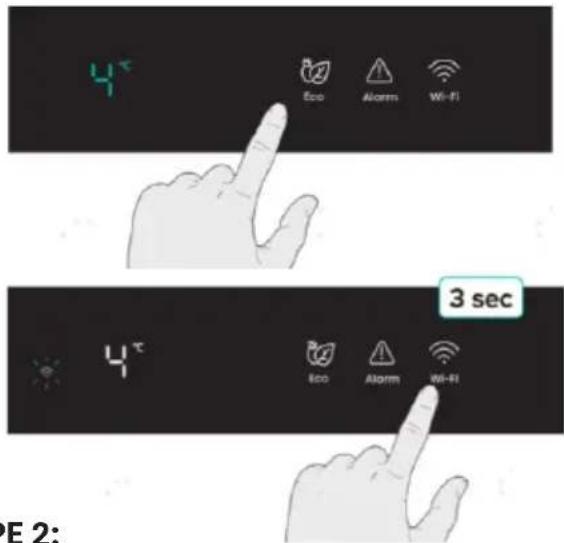
text_image
4° Eco Alarm Wi-Fi 3 sec 4° Eco Alarm Wi-Fi E 2:TYPE 2:
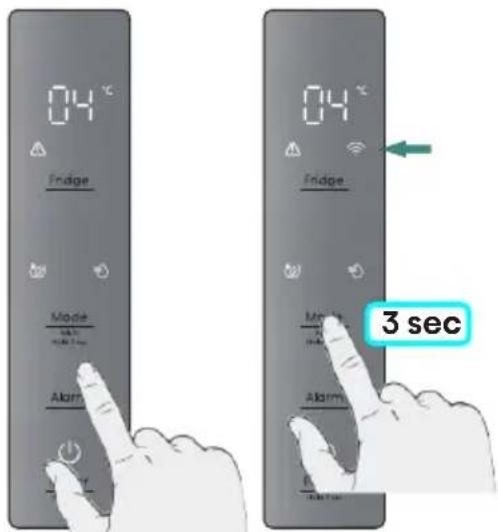
text_image
04°C Fridge Mode Alarm 3 secUSING THE APPLIANCE
0°C Fresh Box
In this drawer you can get a lower temperature to store fish, meat and other erodible food temporarily.
NOTE: Due to the environment temperature and setting temperature both influence the temperature of 0^ box (drawer), the actual temperature may change in a certain range. The temperature of this drawer may lower than zero, so it is normal that liquid in this drawer was frozen.
Crisper and humidity control
You can rotate the knob on the crisper cover to keep different humidity in the crisper. Turn the knob to the left, it will keep a higher humidity which can storage vegetable and fruit long and fresh, to the right will be lower humidity. It is for controlling the humidity of the crisper and avoiding the vegetable losing moisture.
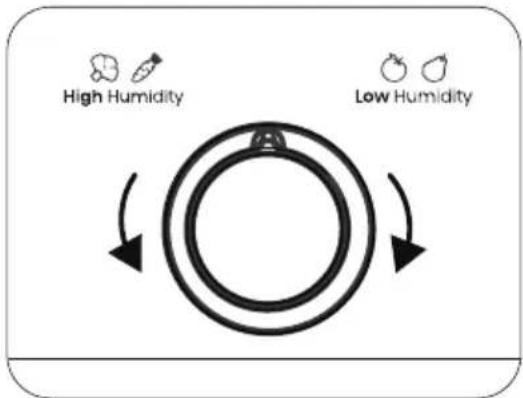
flowchart
graph TD
    A["High Humidity"] --> B((Circular Process))
    B --> C["Low Humidity"]
    C --> B
    style A fill:#f9f,stroke:#333
    style B fill:#ccf,stroke:#333
CLEANING AND CARE
- For hygiene, clean the appliance (exterior and interior accessories) regularly at least every two months.
- Ensure the appliance is completely dry before switching back on and plugging back into the mains socket.
- Wipe the inside of the appliance with a weak solution of bicarbonate of soda, and then rinse with warm water using a wrung-out sponge or cloth.
• Take care to keep door seals clean. Sticky food and drinks can cause seals to stick to the cabinet. Wash the seals with a mild detergent and warm water. Rinse and dry them thoroughly after cleaning.
• This product contains a light source of energy efficiency class G. - For more cleaning details, please refer to the E-manual.
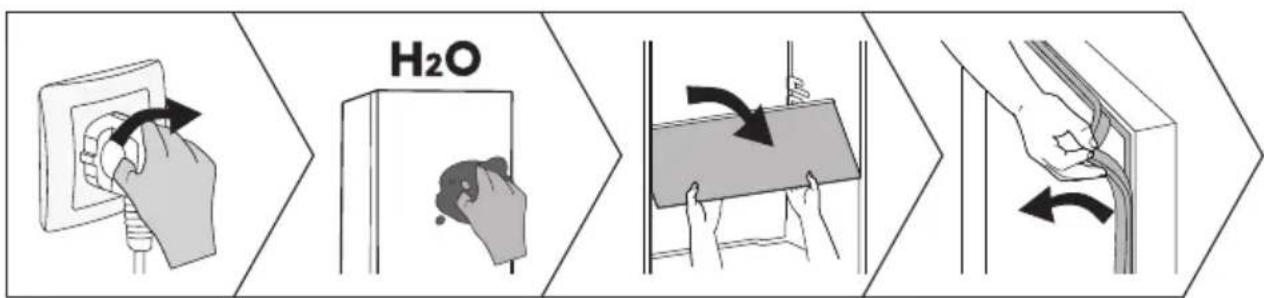
flowchart
graph LR
    A["Hand placing water in a power outlet"] --> B["Hand pressing down"]
    B --> C["H2O (pH) drops back"]
    C --> D["Hand holding a container with liquid"]
    D --> E["Hand exiting the tube with liquid"]
    E --> F["Hand holding a tube with liquid"]
HELPFUL HINTS AND TIPS
Energy saving tips
We recommend that you follow the tips to save energy.
- Try to avoid keeping the door open for long periods.
- Ensure the appliance is away from any sources of heat.
- Don't set the temperature colder than necessary.
- Don't store warm food or evaporating liquid in the appliance.
Switching off your appliance
If the appliance needs to be switched off for an extended period, the following steps should be taken prevent mould on the appliance.
- Remove all food.
- Remove the power plug from the mains socket.
- Clean and dry the interior thoroughly.
- Ensure that all the doors are wedged open slightly to allow air to circulate.
- Please refer to the E-manual for more information.
TROUBLESHOOTING
- If you experience a problem with your appliance or are concerned that the appliance is not functioning correctly, you can carry out the following easy checks before calling for service.
- NOTE: You can find more relevant information in the E-manual.

WARNING
Don't try to repair the appliance yourself. If the problem persists after you have made the checks mentioned below, contact a qualified electrician, authorized service engineer or the shop where you purchased the product.

DANGER
Risk of child entrapment. Before you throw away your old refrigerator or freezer:
• Take off the doors.
- Leave the shelves in place so that children may not easily climb inside.
| Problem | Possible cause & Solution |
| Appliance is not working correctly | Check whether the power cord is plugged into the power outlet properly. |
| The ambient temperature is too low. Try setting the chamber temperature to a colder level to solve this problem. |
TROUBLESHOOTING
| Problem | Possible cause & Solution |
| A layer of frost occurs in the compartment | Check that the air outlets are not blocked by food and ensure food is placed within the appliance to allow sufficient ventilation. Ensure that the door can be fully closed. |
| Temperature inside is too warm | You may have left the doors open too long or too frequently; or the doors are kept open by some obstacle; or the appliance is located with insufficient clearance at the sides, back and top. |
| Unable to connect appliance to Wi-Fi network | The Wi-Fi password was entered incorrectly, or the network could not be found.For specific network configuration operations, please refer to the electronic manual. |
DISPOSAL OF THE APPLIANCE
It is prohibited to dispose of this appliance as household waste.
Packaging materials
Packaging materials with the recycle symbol are recyclable. Dispose of the packaging into a suitable waste collection container to recycle it.
Before disposal of the appliance
- Pull out the mains plug from the mains socket.
- Cut off the power cord and discard with the mains plug.

WARNING
Refrigerators contain refrigerant and gases in the insulation. Refrigerant and gases must be disposed of professionally as they may cause eye injuries or ignition. Ensure that tubing of the refrigerant circuit is not damage prior to proper disposal.
| Correct Disposal of this product | |
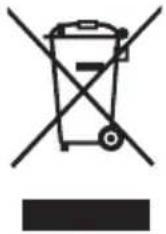 | This marking indicates that this product should no be disposed with other household wastes throughout the EU. To prevent possible harm to the environment or human health from uncontrolled waste disposal, recycle it responsibly to promote the sustainable reuse of material resources. To return your used device, please use the return and collection systems or contact the retailer where the product was purchased. They can take this product for environmental safe recycling. |
SUGGESTION OF USING THE APPLIANCE
To avoid contamination of food, please respect the following instructions:
- Opening the door for long periods can cause a significant increase of the temperature in the compartments of the appliance.
- Clean regularly surfaces that can come in contact with food and accessible drainage systems.
- Clean water tanks if they have not been used for 48h; flush the water system connected to a water supply if water has not been drawn for 5 days.(Special for models with water tanks)
- Store raw meat and fish in suitable containers in the refrigerator, so that it is not in contact with or drip onto other food.
- Two-star frozen-food compartments are suitable for storing pre-frozen food, storing or making ice-cream and making ice cubes.
• One-, two- and three-star compartments are not suitable for the freezing of fresh food. - If the refrigerating appliance is left empty for long periods, switch off, defrost, clean, dry, and leave the door open to prevent mould developing within the appliance.
- NOTE: The information below is for reference only, as functions may vary by models. Please get more details in the E-manual.
| Order | Compartments type | Target storage temp.[°C] | Appropriate food | Storage life |
| 1 | Fridge | +2~+8 | Eggs, cooked food, packaged food, fruits and vegetables, dairy products, cakes, drinks and other foods which are not suitable for freezing | / |
| 2 | Four-star | ≤-18 | Seafood, freshwater aquatic products and meats | ≤3 months |
| 3 | Three-star | ≤-18 | ||
| 4 | Two-star | ≤-12 | ≤2 months | |
| 5 | One-star | ≤-6 | ≤1 month | |
| 6 | Zero-star | -6~0 | Fresh pork, beef, fish, chicken, some packaged processed foods, etc. Partially packed/wrapped up encapsulated processed foods (non-freezable foods) | ≤3 days |
| 7 | Chill | -3~+3 | Seafood, pork, beef, chicken, freshwater aquatic products, etc. | 2~7 days |
| 8 | Fresh Food | 0~+4 | Fresh pork, beef, fish, chicken, cooked food, etc. | ≤3 days |
| 9 | Wine | +5~+20 | Red wine, white wine, sparkling wine, etc. | / |
Declaration of conformity
The company declares that the device with the function Connectlife complies with the essential requirements and other relevant provisions of Directive 2014/53/EU. The detailed Declaration of Conformity can be found at the web address https://auid.connectlife.io on the page of your device among the additional documents.
Hisense
life reimagined
text_image
QR code image containing encoded data, no visible human-readable textMANUEL D'UTILISATION DE L'UTILISATEUR
text_image
Warning sign with flame symbol and partial text 'A' and 'R' visibleAVERTISSEMENT
natural_image
Isometric illustration of a rectangular box with a checkmark inside, surrounded by directional arrows (no text or symbols)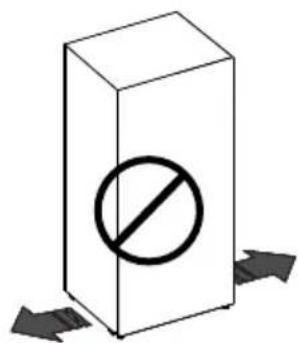
text_image
Diagram showing a prohibition symbol inside a rectangular box with arrows indicating direction or flowDESCRIPTION DE L'APPAREIL
text_image
Technical diagram of a refrigerator interior with numbered components for identificationnatural_image
Simple black square icon with a white C-shaped toggle switch symbol (no text or numbers)text_image
QR code image containing encoded data, no visible human-readable textREMARQUE :
text_image
Warning symbol with exclamation mark and thermometer icon above a black rectangle
text_image
OKtext_image
QR code image containing encoded data, no visible human-readable textBEDIENUNGSANLEITUNG
text_image
Warning sign depicting a flame symbol in yellow and black, indicating hazard or cautionWARNUNG
text_image
≥2,5mm ≥2,5mm 595mmtext_image
105° 765mm 1145mmtext_image
Diagram showing two 3D blocks with checkmark and prohibition symbols, each with directional arrows indicating movement or flow.text_image
Technical diagram of a refrigerator interior with numbered components for identificationnatural_image
Simple black square icon with a white toggle switch symbol (no text or numbers)text_image
QR code image containing encoded data, no visible human-readable textHINWEIS:
flowchart
graph TD
    A["High Humidity"] --> B((Circular Process))
    B --> C["Low Humidity"]
    C --> A
flowchart
graph LR
    A["Hand placing water in a power outlet"] --> B["H2O"]
    B --> C["Hand holding a clean water surface"]
    C --> D["Water absorption with arrows indicating direction"]
    D --> E["Hand opening a pipe into a column"]
    E --> F["Hand adjusting the surface with arrows"]
text_image
QR code image containing encoded data, no visible human-readable textMANUALE OPERATIVO PER L'UTENTE
text_image
Warning sign depicting a flame symbol in yellow and black on white backgroundtext_image
≥2,5mm ≥2,5mm 595mmtext_image
105° 765mm 1145mmtext_image
Diagram showing two 3D blocks with checkmark and prohibition symbols, each with directional arrows indicating movement or status.DESCRIZIONE DELL'APPARECCHIO
text_image
Technical diagram of a refrigerator with numbered components for identificationtext_image
-88 °C Fridge Mode Wi-Fi Hot T sec Alarm Power Hot T sec
Alimentazione
natural_image
Simple black square icon with a white C-shaped button symbol (no text or numbers)- Scaricare e installare l'app ConnectLife fornita da ConnectLife, LLC.
text_image
QR code image containing encoded data, no visible human-readable textNOTA:
flowchart
graph TD
    A["High Humidity"] --> B((Circular Process))
    B --> C["Low Humidity"]
    C --> A
flowchart
graph LR
    A["Hand placing water inlet into outlet"] --> B["Hand pressing down"]
    B --> C["H2O (pH gradient)"]
    C --> D["Hand holding a container with liquid"]
    D --> E["Hand adjusting a tube with liquid"]
    E --> F["Hand removing the tube with liquid"]
text_image
QR code image containing encoded data, no visible human-readable texttext_image
≥2,5mm ≥2,5mm 595mmtext_image
105° 765mm 1145mmnatural_image
Isometric illustration of a rectangular box with a checkmark inside, surrounded by directional arrows (no text or symbols)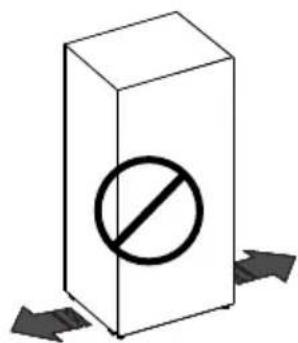
text_image
Diagram showing a prohibition symbol inside a rectangular box with arrows indicating direction or flowtext_image
Technical diagram of a refrigerator with numbered components for identificationnatural_image
Simple black square icon with a white toggle switch symbol (no text or numbers)text_image
QR code image containing encoded data, no visible human-readable textNOTA:
flowchart
graph LR
    A["Hand placing water inlet into outlet"] --> B["Hand pressing down"]
    B --> C["H2O (pH) drops back"]
    C --> D["Hand holding a container with liquid"]
    D --> E["Hand exiting the outlet"]
    E --> F["Hand removing liquid into wall"]
text_image
QR code image containing encoded data, no visible human-readable texttext_image
≥2,5mm ≥2,5mm 595mmEstado de fecho da porta para o frigorífico no estado incorporado
text_image
105° 765mm 1145mmnatural_image
Simple 3D diagram of a rectangular box with a checkmark inside, surrounded by directional arrows (no text or symbols)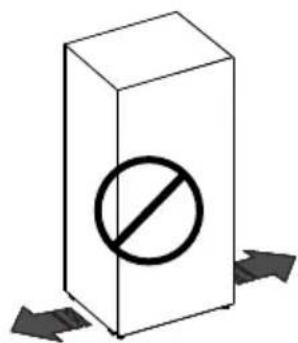
text_image
Diagram showing a prohibition symbol inside a rectangular box with arrows indicating direction or flowtext_image
Technical diagram of a refrigerator interior with numbered components for identificationnatural_image
Simple black square icon with a white C-shaped button symbol (no text or numbers)- Descarregue e instale a app ConnectLife fornecida pela ConnectLife, LLC.
text_image
QR code image containing encoded data, no visible human-readable textNOTA:
text_image
QR code image containing encoded data, no visible human-readable textGEBRUIKERHANDLEIDING
VEILIGHEIDS-EN WAARSCHUWINGSINFORMATIE
text_image
Warning sign depicting a flame symbol with black smoke, commonly used in safety or hazard prevention.WAARSCHUWING
Brandgevaar/brandbare materialen
VEILIGHEIDS-EN WAARSCHUWINGSINFORMATIE
VEILIGHEIDS-EN WAARSCHUWINGSINFORMATIE
VEILIGHEIDS-EN WAARSCHUWINGSINFORMATIE
text_image
≥2,5mm ≥2,5mm 595mmtext_image
105° 765mm 1145mmnatural_image
Simple 3D diagram of a rectangular box with a checkmark inside, surrounded by directional arrows (no text or symbols)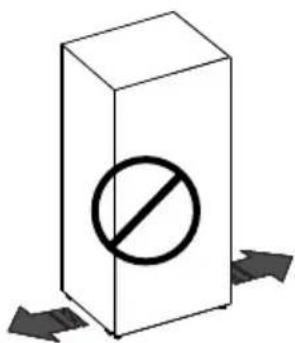
text_image
Diagram showing a prohibition symbol inside a rectangular box with arrows indicating direction or flow, commonly used in safety or hazard prevention.BESCHRIJVING VAN HET APPARAAT
text_image
Technical diagram of a refrigerator with numbered components for identificationnatural_image
Simple black square icon with a white C-shaped toggle switch symbol (no text or numbers)- Download en installeer de ConnectLife app van ConnectLife, LLC.
text_image
QR code image containing encoded data, no visible human-readable textOPMERKING:
flowchart
graph LR
    A["Hand placing water into electrical outlet"] --> B["Hand applying gas to a wall"]
    B --> C["Hand holding a bottle with liquid"]
    C --> D["Hand adjusting a glass tube with H2O solution"]
    D --> E["Hand opening a pipe with liquid"]
    E --> F["Hand removing a pipe with liquid"]