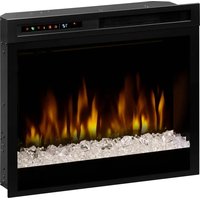
XHD28G - Electric fireplace DIMPLEX - Free user manual and instructions
Find the device manual for free XHD28G DIMPLEX in PDF.


| Product type | Electric fireplace |
| Brand | Dimplex |
| Model | XHD28G |
| Supply voltage | 120 V, 60 Hz |
| Rated current | 12.5 A |
| Heating power | 1500 W (at 0°C), 1350 W (at 25°C) |
| Dimensions (W × H × D) | 695 mm × 597 mm × 191 mm |
| Weight | 14.5 kg |
| Installation type | Recessed (must be installed in an opening) |
| Heating type | Convection, with fan |
| Control | Front touch panel and infrared remote control |
| Flame effect | Yes, adjustable (F1, F2, F3) with color themes (t1, t2, t3, etc.) |
| Thermostat | Yes, adjustable from 17°C to 26°C |
| Timer | Yes, from 0.5 h to 8 h in 0.5 h steps |
| Safety | Automatic shutdown in case of overheating, resettable thermal cut-off switch |
| Lighting | LED |
| Power cord | With ground plug, do not use an extension cord |
| Maintenance | Dust with a damp cloth; replace remote control battery (3V lithium battery) |
| Warranty | 1 year (parts and labor); bulbs not covered |
| Certifications | cULus |
| Operating temperature | -20°C to 40°C |
| Required clearance under unit | At least 12 mm for air circulation |
Frequently Asked Questions - XHD28G DIMPLEX
User questions about XHD28G DIMPLEX
0 question about this device. Answer the ones you know or ask your own.
Ask a new question about this device
Download the instructions for your Electric fireplace in PDF format for free! Find your manual XHD28G - DIMPLEX and take your electronic device back in hand. On this page are published all the documents necessary for the use of your device. XHD28G by DIMPLEX.
USER MANUAL XHD28G DIMPLEX
natural_image
Black-and-white photo of a firewood appliance with visible flames and smoke, no text or symbols present.Models XHD28L & 6909970259
XHD28G & 6909970559
XHD26L & 6909850259
XHD26G & 6909850559
XHD23L & 6909940259
XHD23G & 6909940559
IMPORTANT SAFETY INFORMATION: Read this manual before attempting to install or use the Dimplex Electric Fireplace. Always comply with the warnings and safety instructions contained in this manual to prevent personal injury or property damage.
To view the full line of Dimplex products, visit www.dimplex.com
i Welcome ....3
IMPORTANT INSTRUCTIONS......4
Specifications 6
Installation....7
Operation....9
Maintenance....13
Technical Support....13
Electrical 14
√ Warranty....15
Conventions used in this manual:
! NOTE: Procedures and techniques considered important enough to emphasize.
CAUTION: Procedures and techniques which, if not carefully followed, will result in damage to the equipment.
WARNING: Procedures and techniques which, if not carefully followed, will expose the user to the risk of fire, serious injury, or death.
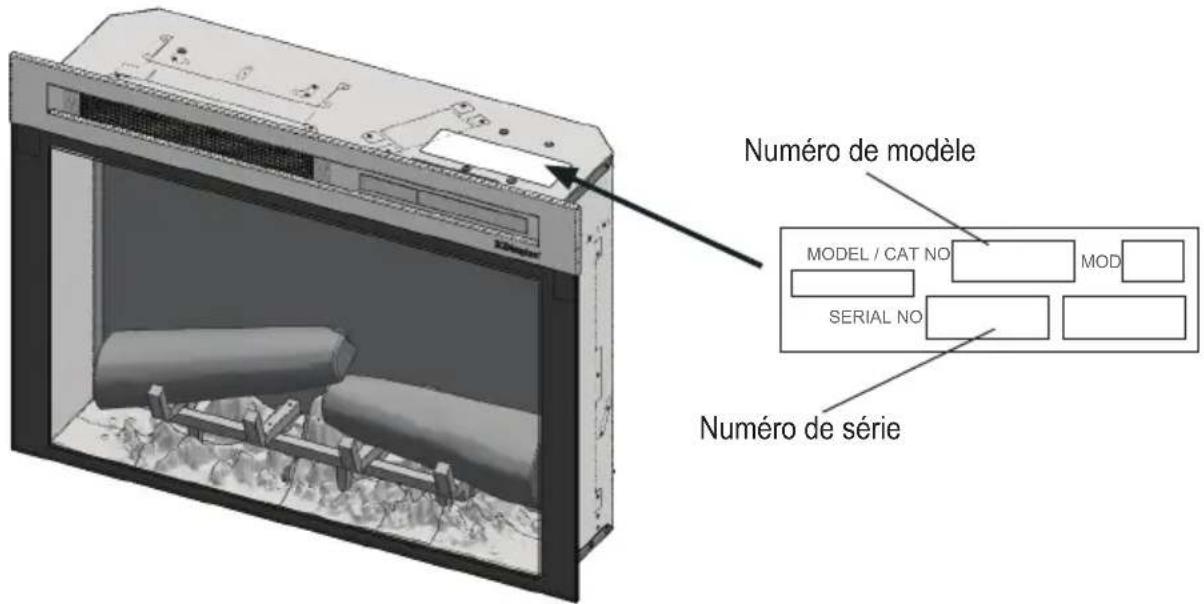
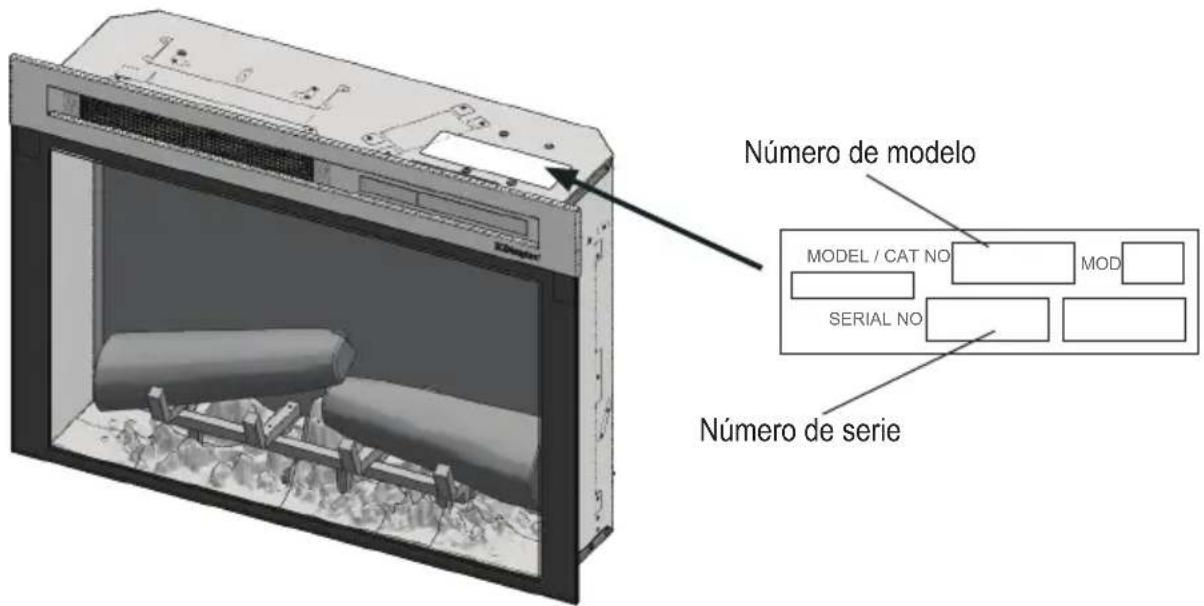
Thank you for purchasing a Dimplex Electric Fireplace. Please use our convenient online registration page to record your model and serial numbers for future reference at:
www.dimplex.com/register
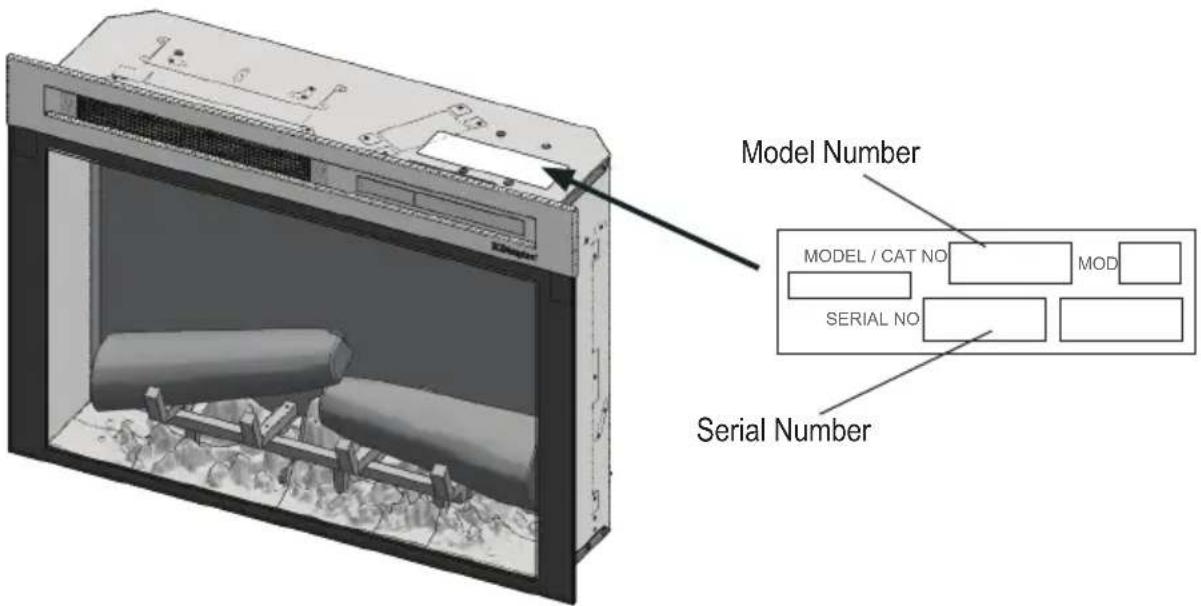
CAUTION: Read all instructions and warnings carefully before starting installation. Failure to follow these instructions may result in a possible electric shock or fire hazard and will void the warranty.

NO NEED TO RETURN TO THE STORE
Questions with operation or assembly? Require Parts Information? Product Under Manufacturer's Warranty?
Contact us at: www.dimplex.com/customer_support
For Troubleshooting and Technical Support


Toll-Free 1-888-DIMPLEX (1-888-346-7539)
Monday to Friday 8:00 a.m. to 4:30 p.m. EST
In order to better serve you, please have your model and serial numbers ready or register your product online before calling (see above).

IMPORTANT INSTRUCTIONS
Basic Precautions
When using any electrical appliance, basic precautions should always be followed to reduce the risk of fire, electric shock, and injury to persons. These precautions include:
① Read all instructions before using the electric fireplace.
② Extreme caution is necessary when the firebox is used by or near children or invalids and whenever the firebox is left operating and unattended.
③ Always turn off the fireplace when it is not in use.
④ Do not operate the fireplace with a damaged power cord or plug or after the fireplace malfunctions, has been dropped, or damaged in any manner. Contact Dimplex Technical Service at 1-888-346-7539.
⑤ Do not use this firebox outdoors.
⑥ This fireplace is not intended for use in bathrooms, laundry areas, or similar indoor locations. Never locate the fireplace where it may fall into a bathtub or other water container.
⑦ Do not run power cord under carpeting. Do not cover cord with throw rugs, runners, or similar coverings. Do not route cord under furniture or appliances. Arrange cord away from traffic area and where it will not be tripped over.
⑧ To disconnect the fireplace, turn the controls to OFF and remove the power cord plug from the outlet.
⑨ Connect the power cord to a properly grounded outlet only.
⑩ Do not insert or allow foreign objects to enter any ventilation or exhaust opening as this may cause an electric shock or fire, or damage the firebox. To prevent a possible fire, do not block air intakes or exhaust in any manner. Do not use the fireplace on soft surfaces, like a bed, where openings may become blocked.
⑪ All electrical heaters have hot and arcing or sparking parts inside. Do not use it in areas where gasoline, paint, or flammable liquids are used or stored.
⑫ Use this fireplace only as described in this manual. Any other use not recommended by the manufacturer may cause fire, electric shock, or injury to persons.
⑬ Always plug the fireplace directly into a wall outlet/receptacle. Never use the fireplace with an extension cord or relocatable power tap (outlet/power strip).
⑭ Do not burn wood or other materials in this fireplace.
⑮ When transporting or storing the fireplace, keep it in a dry place, free from excessive vibration, and store to avoid damage.
SAVE THESE INSTRUCTIONS

IMPORTANT INSTRUCTIONS
NOTE: Changes or modifications not expressly approved by the party responsible for compliance could void user's authority to operate the equipment.
Special Precautions
CAUTION: Do not open the unit. There is a risk of electric shock. There are no user-serviceable parts inside.
CAUTION: Always use a qualified technician or service agency to repair the built-in electric fi replace.
WARNING: Remote control contains a small battery. Keep away from children. If swallowed, seek medical attention immediately.
WARNING: Do not install battery backwards, charge, put in fi re or mix with used or other battery types as it may explode or leak causing injury.
DANGER: High temperatures may be generated under certain abnormal conditions. Do not partially or fully cover or obstruct the front of the fi replace.
FCC Compliance
CAUTION: This unit has been tested and found to comply with the limits for Class B digital device, pursuant to part 15 of the FCC Rules. These limits are designed to provide reasonable protection against harmful interference in a residential installation. This unit generates, uses and can radiate radio frequency energy and, if not installed and used in accordance with the instructions, may cause harmful interference to radio or television reception, which can be determined by turning the unit OFF and ON, the user is encouraged to try to correct the interference by one or more of the following measures:
- Reorient or relocate the receiving antenna.
- Increase the separation between the unit and the receiver.
- Connect the unit into an outlet on a circuit different from that to which the receiver is connected.
- Consult the dealer or an experienced radio/TV technician for help.
This unit complies with Part 15 of the FCC Rules. Operation is subject to the following two conditions: (1) This unit may not cause harmful interference, and (2) this unit must accept any interference received, including interference that may cause undesired operation.
FCC CAUTION: Any changes or modifications not expressly approved by the party responsible for compliance could void the user's authority to operate this equipment.
SA1965A
CAUTION
RISK OF ELECTRIC SHOCK
DO NOT OPEN
NO USER-SERVICEABLE PARTS INSIDE

The Dimplex Electric Fireplace offers an alternative to a wood or gas fireplace. It can give your existing fireplace new life or transform a cabinet or media center of your own into a stunning focal point.
Specifications
Electrical
Volts: 120 V, 60 Hz
Amps: 12.5 A
Watts: 1500 W @ 0 °C
1350 W @ 25 °C
Wiring: Plug-In
Bulb Type: LED
Approvals

certified to meet UL Standards
NOTE: A 15 Amp, 120 Volt circuit is required. A dedicated circuit is preferred, but not essential in all cases. A dedicated circuit will be required if, after installation, the circuit breaker trips or the fuse blows on a regular basis when the heater is operating. Additional appliances on the same circuit may exceed the current rating of the circuit breaker.

WARNING: Electrical outlet wiring must comply with local building codes and other applicable regulations to reduce the risk of fire, electric shock, or injury to persons.
Dimensions:
Model XHD28
Width: 27-3/8" (695 mm)
Height: 23-1/4" (597 mm)
Depth: 7-1/2" (191 mm)
Model XHD26
Width: 26" (660 mm)
Height: 18-7/8" (479 mm)
Depth: 7-1/2" (191 mm)
Model XHD23
Width: 23" (584 mm)
Height: 20-1/2" (520 mm)
Depth: 7-1/2" (191 mm)
Weight:
Model XHD 28: 32 lbs (14.5 kg)
Model XHD 26: 25 lbs (11.3 kg)
Model XHD 23: 23 lbs (10.4 kg)
Operating Temperature Range:
-4° to 104°F (-20° to 40°C)
Placement
- The Dimplex Electric Fireplace does not require any special venting. Make sure there is clearance for air circulation beneath the unit and at least 1/2" behind it.
CAUTION: Do not install the fireplace directly on carpet or similar surfaces which may restrict air flow.
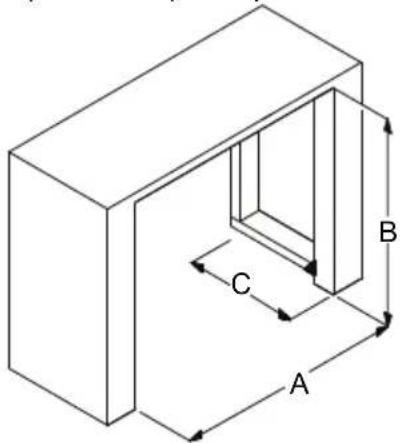
- Install the unit in an opening with the following minimum dimensions:
Model XHD28
A 27" (686 mm) wide
B 31-1/8" (587 mm) high
C 8" (203 mm) deep
Model XHD26
A 24-3/8" (619 mm) wide
B 18-1/2" (470 mm) high
C 8" (203 mm) deep
Model XHD23
A 21-1/2" (548 mm) wide
B 20" (508 mm) high
C 8" (203 mm) deep
natural_image
Isometric line drawing of a rectangular box with internal vertical structure and labeled dimensions A, B, C (no text or symbols beyond labels)- If installing the unit in an existing fireplace opening, seal all drafts and vents with a non-fibrous insulation material to prevent any chimney debris from falling onto the unit. Do not install into an existing fireplace opening that is prone to dampness.
Mounting
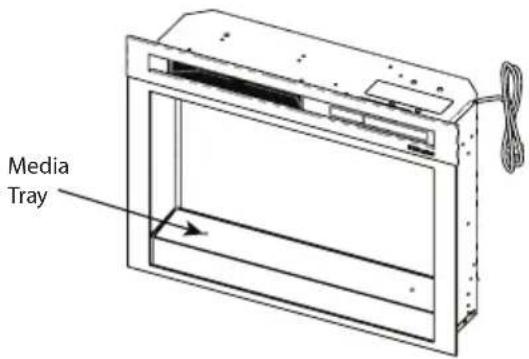
- If applicable, carefully pour and evenly distribute the supplied media in the media tray of the firebox.
2a. If installing into a Dimplex mantel, align the front of the firebox (without front glass installed) with the front face of the mantel. Install provided screws into the front holes on the inside faces of the firebox. The screw will line up with a hole in the mantel, securing it in place.
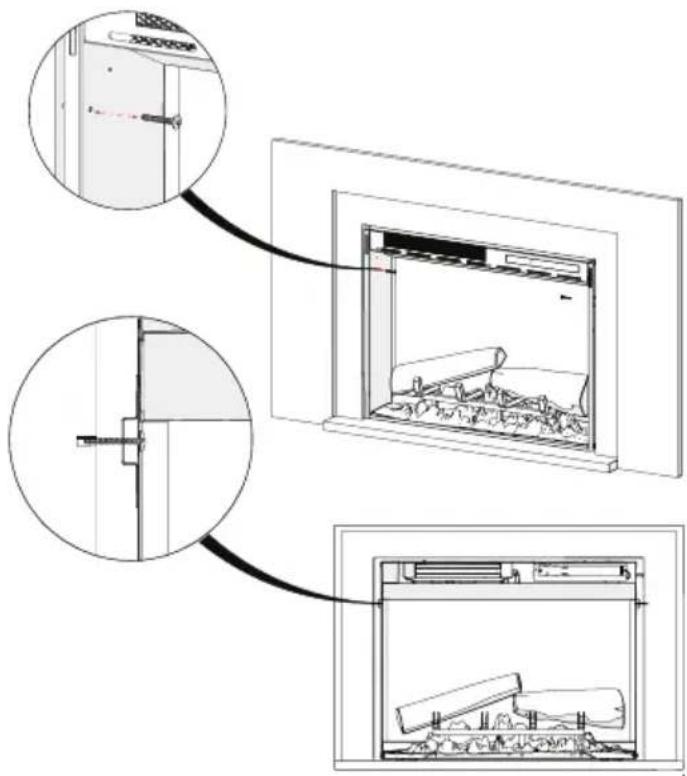
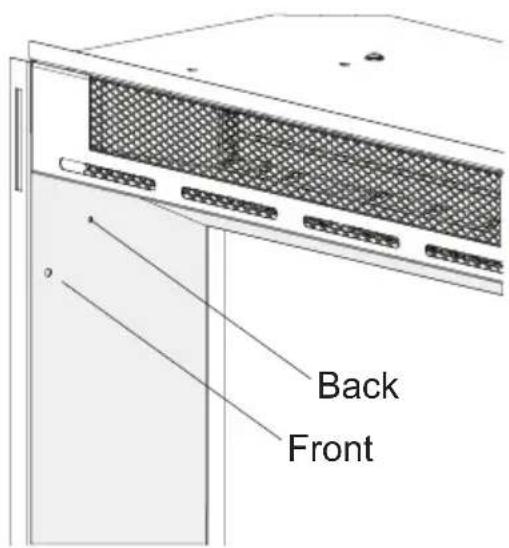
2b. If installing into a custom mantel, or into an existing opening, secure the firebox by inserting an appropriate screw through either the front hole, or back hole on the inside face of the firebox, depending on which location is more appropriate for the installation.
Grounding Instructions
This product must be grounded. If it should malfunction or break down, grounding provides a path of least resistance for electric current to reduce the risk of electric shock. This product is equipped with a cord having an equipment-grounding conductor and a grounding plug.
The plug must be plugged into an appropriate outlet that is properly installed and grounded in accordance with all local codes and ordinances.
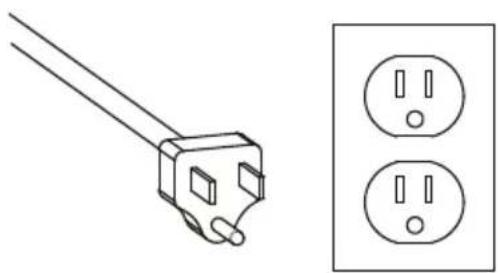
This product is for use on a 120V circuit and has a grounding plug that looks like the plug in the following figure. Make sure that the product is connected to an outlet having the same con figuration as the plug. No adapter should be used with this product.
natural_image
Line drawing of a plug and two separate electrical outlets (no text or symbols)DANGER: Improper connection of the equipment-grounding conductor can result in a risk of electric shock. Check with a qualified electrician or serviceman if you are in doubt as to whether the product is properly grounded. Do not modify the plug provided with the product – if it will not fit the outlet, have a proper outlet installed by a qualified electrician.
Touch Panel and Remote Controls
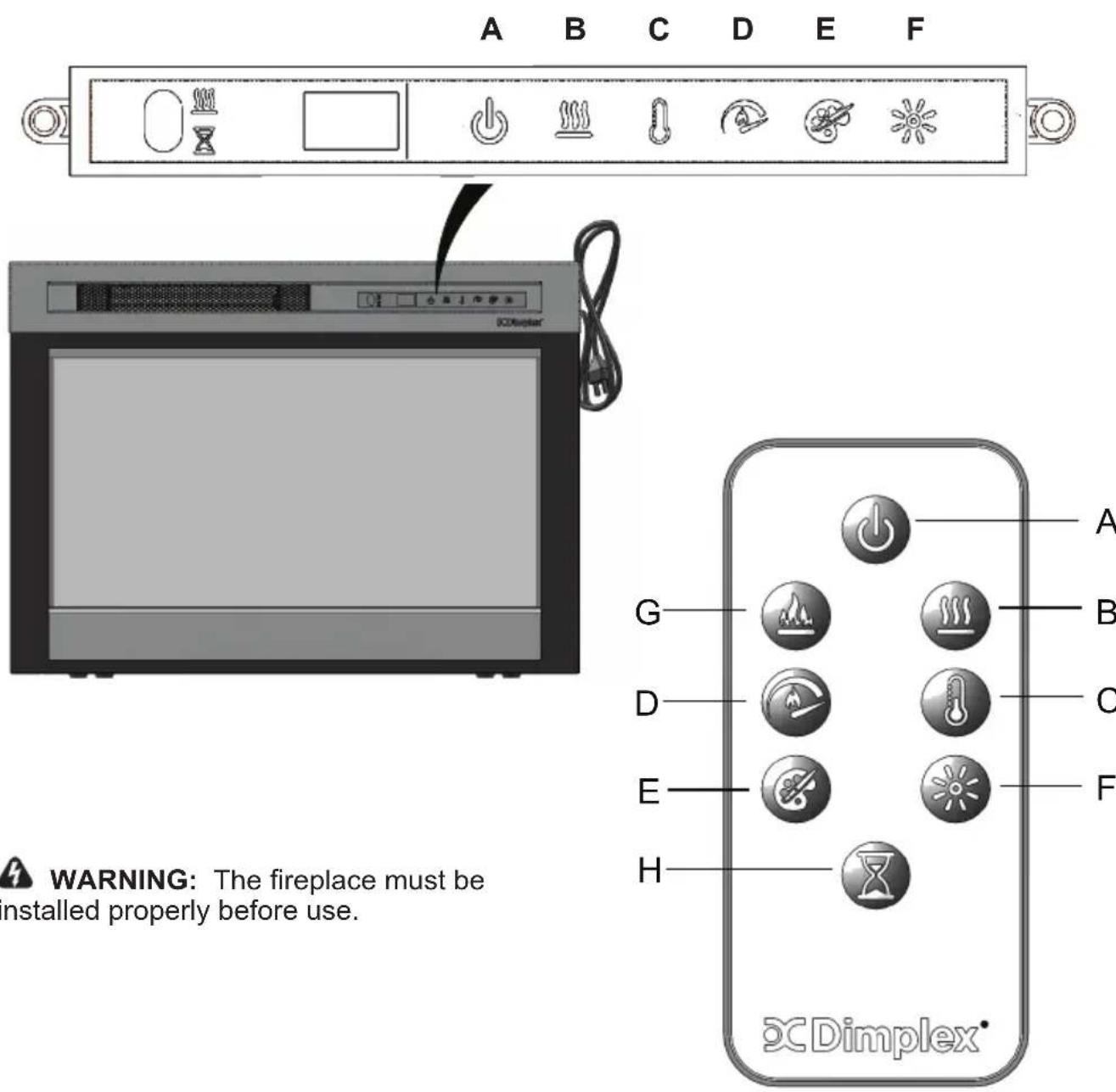
The manual controls for the Dimplex Electric Fireplace are located on the front panel. When not activated, the icons are not visible. Touch the control panel to the right side of the white line to activate the icons. The selected setting displays on the left side of the panel.
A multi-function IR (infrared) remote control also is provided. The remote control has a range of approximately 30 ft (9 m). To operate correctly, the remote control must be pointed toward the front of the in electric fireplace.
| Icon Function Description | |||
| A |  | Power Press to turn unit Off or On.·Unit OffPress to turn everything Off. Press again to turn unit On with previous settings.·Unit OnPress to turn unit On with previous settings.- If the flame effect was On, the flame will turn on and the previous heat setting will be activated (On or Off). Display will show current heater temperature setting and after 2 sec displays the room temperature.- [remote only] If the flame effect was Off, the previous heat setting will be activated (On or Off).- [panel only] If the flame effect was Off, the flame will turn on and the previous heat setting will be activated (On or Off) | |
| B |  | Heat·Heat On | Press to turn heat On (indicated by 1 short beep). Display will show current heater temperature setting and after 2 sec displays room temperature. Use the Temp icon to change the heater temperature setting.·Heat OffPress to turn heat Off (indicated by 1 short beep).NOTE: After the heater is switched off, the fan will continue on for 60 seconds before turning off. |
| C |  | Temp Press multiple times to raise the heater temperature in 1^ ( 1^ ) increments. Display will show current temperature. Temperature range is 62^-78^ ( 17^-26^ ).This feature is active whenever the heat is enabled. | |
| Icon F | Function Description | ||
| Disable Heat Press | the Heat and Temp buttons on the unit at the same time and hold for 2 second to disable the heater. Press and hold again for 2 seconds to enable the heater.When the heater is disabled, "--" will display when Temp button is pressed. The remainder of the unit's controls will operate in the same fashion. | ||
| °C / °F Temp The | display can show the temperature reading in either °C or °F. To change the display, press and hold the Temp and Flame Speeds buttons on the unit. | ||
| D |  | Flame Speed Press | multiple times to toggle through flame speeds (minimum, medium, maximum). Display will show current speed number (F1, F2, F3 respectively). |
| E |  | Color Themes Press | multiple times to change the media and flame base colors. This feature is active only when the flame effect is On. Display will show theme (t0, t1, t2, etc.)XHD28L, XHD26L or XHD23L (Log Unit) themes:Theme t0 - no flameTheme t1 - Natural (flame base off)Theme t2 - Red Highlights (flame base red/orange flickering)Theme t3 - Blue Highlights (flame base blue flickering).XHD28G, XHD26G or XHD23G (Media Unit) themes:Theme t0 - Midnight ModeTheme t1 - Media WhiteTheme t2 - Media red/orange flickeringTheme t3 - Media blue flickering.Theme t4 - Media PurpleTheme t5 - Media GreenTheme to - Prism Mode (To choose a custom color, press Brightness icon. Press again to return to Prism Mode.) |
| Icon Function Description | |||
| F |  | Brightness Press to change the flame and logs brightness. Display will show b3, b1, b2 respectively. • High • Low • Medium | |
| G |  | Flame Press to turn the flame effect On. Press again to turn the flame effect Off. | |
| H |  | Timer Press multiple times to change the sleep timer by 0.5 hr from 0.5 hr to 8 hr before turning off. Press again, the remaining time on the timer displays. | |
Resetting the Temperature Cutout Switch
Should the heater overheat, an automatic cutout will turn the heater off. It will not come back on without being reset.
To reset the cutout switch, unplug the unit and wait 5 minutes before plugging it back in.

CAUTION: If you need to continuously
reset the heater, unplug the unit and call Technical Support at 1-888-346-7539

Maintenance

Technical Support
General
Inspect the electric firebox regularly, depending upon conditions, and at a minimum yearly intervals. Remove dust and clean with damp cloth as required.

CAUTION: Except for installation cleaning described in this manual, an orized service representative should form any other servicing.

WARNING: Disconnect power by lugging the power power and allow ter to cool before attempting any ntenance or cleaning to reduce the risk re, electric shock, or injury.
Battery Replacement
To replace the battery:
- Push the release tab toward the center and slide the battery cover open.
- Install 3V Lithium battery in the battery holder. The positive (+) side of the battery faces up.
- Close the battery cover.
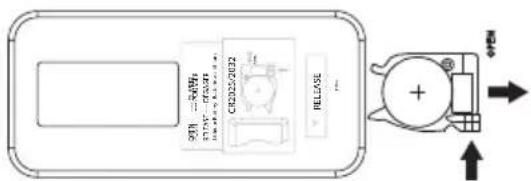

Battery must be recycled or disposed of properly. Check with your Local Authority or Retailer for recycling advice in your area.
Support Services
Technical and troubleshooting support, as well as a list of replacement parts can be found on:
www.dimplex.com/customer_support.
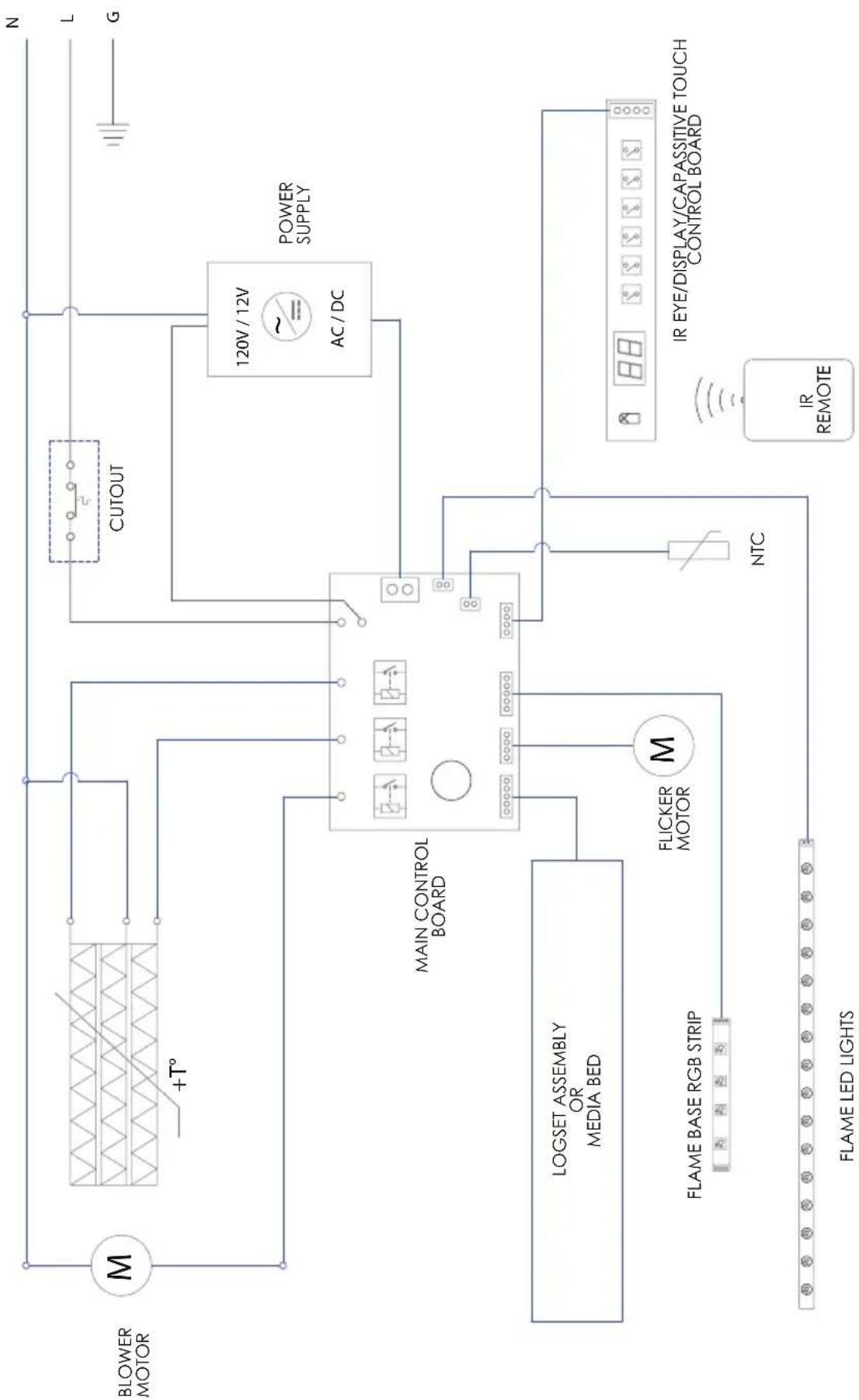
flowchart
graph TD
    A["BLower MOTOR"] --> B["M"]
    B --> C["+T°"]
    C --> D["MAIN CONTROL BOARD"]
    D --> E["FLICKER MOTOR M"]
    E --> F["LOGSET ASSEMBLY OR MEDIA BED"]
    F --> G["FLAME BASE RGB STRIP"]
    G --> H["FLAME LED LIGHTS"]
    H --> I["NTC"]
    I --> J["IR EYE/DISPLAY/CAPASSITIVE TOUCH CONTROL BOARD"]
    J --> K["POWER SUPPLY"]
    K --> L["CUTOUT"]
    L --> M["AC/DC 120V/12V"]
    M --> N["N"]
    M --> O["L"]
    M --> P["G"]
One Year Limited Warranty
Products to which this limited warranty applies
This limited warranty applies to your newly purchased Dimplex electric compact fireplace. This limited warranty applies only to purchases made in any province of Canada except for Yukon Territory, Nunavut, or Northwest Territories or in any of the 50 States of the USA (and the District of Columbia) except for Hawaii and Alaska. This limited warranty applies to the original purchaser of the product only and is not transferable.
Products excluded from this limited warranty
Light bulbs are not covered by this limited warranty and are the sole responsibility of the owner/purchaser. Products purchased in Yukon Territory, Nunavut, Northwest Territories, Hawaii, or Alaska are not covered by this limited warranty. Products purchased in these States, provinces, or territories are sold AS IS without warranty or condition of any kind (including, without limitation, any implied warranties or conditions of merchantability or fitness for a particular purpose) and the entire risk of as to the quality and performance of the products is with the purchaser, and in the event of a defect the purchaser assumes the entire cost of all necessary servicing or repair.
What this limited warranty covers and for how long
Products covered by this limited warranty have been tested and inspected prior to shipment and, subject to the provisions of this warranty, Dimplex warrants such products to be free from defects in material and workmanship for a period of 12 months from the date of the first purchase of such product.
The limited 12 month warranty period also applies to any implied warranties that may exist under applicable law. Some jurisdictions do not allow limitations on how long an implied warranty lasts, so the above limitation may not apply to the purchaser.
What this limited warranty does not cover
This limited warranty does not apply to products that have been repaired (except by Dimplex or its authorized service representatives) or otherwise altered. This limited warranty does further not apply to defects resulting from misuse, abuse, accident, neglect, incorrect installation, improper maintenance or handling, or operation with an incorrect power source.
What you must do to get service under this limited warranty
Defects must be brought to the attention of Dimplex Technical Service by contacting Dimplex at 1-888-346-7539, or 1367 Industrial Road, Cambridge Ontario, Canada N3H 4W3. Please have proof of purchase, catalogue/model and serial numbers available when calling. Limited warranty service requires a proof of purchase of the product.
What Dimplex will do in the event of a defect
In the event a product or part covered by this limited warranty is proven to be defective in material or workmanship during the 12 month limited warranty period you have the following rights:
- Dimplex will in its sole discretion either repair or replace such defective product or part without charge. If Dimplex is unable to repair or replace such product or part, or if repair or replacement is not commercially practicable or cannot be timely made, Dimplex may, in lieu of repair or replacement, choose to refund the purchase price for such product or part.
- Limited warranty service will be performed solely by dealers or service agents of Dimplex authorized to provide limited warranty services.
- The purchaser is responsible for removal and transportation of such product or part (and any repaired or replacement product or part) to and from the authorized dealer's or service agent's place of business.
- This limited warranty does not entitle the purchaser to on-site or in-home services. On-site or in-home services may be performed at the purchaser's specific request and expense at Dimplex's then-current rates for such services.
- Dimplex will not be responsible for, and the limited warranty services shall not include, any expense incurred for installation or removal of the product or part (or any replacement product or part) or any labour or transportation costs. Such costs shall be the purchaser's responsibility.
How State and Provincial law apply
This limited warranty gives you specific legal rights, and you may also have other rights which vary from jurisdiction to jurisdiction. The provisions of the United Nations Convention on Contracts for the Sale of Goods shall not apply to this limited warranty or the sale of products covered by this limited warranty.
What Dimplex and its dealers and service agents are also not responsible for:
IN NO EVENT WILL DIMPLEX, OR ITS DIRECTORS, OFFICERS, OR AGENTS, BE LIABLE TO THE PURCHASER OR ANY THIRD PARTY, WHETHER IN CONTRACT, IN TORT, OR ON ANY OTHER BASIS, FOR ANY INDIRECT, SPECIAL, PUNITIVE, EXEMPLARY, CONSEQUENTIAL, OR INCIDENTAL LOSS, COST, OR DAMAGE ARISING OUT OF OR IN CONNECTION WITH THE SALE, MAINTENANCE, USE, OR INABILITY TO USE THE PRODUCT,
EVEN IF DIMPLEX OR ITS DIRECTORS, OFFICERS, OR AGENTS HAVE BEEN ADVISED OF THE POSSIBILITY OF SUCH LOSSES, COSTS OR DAMAGES, OR IF SUCH LOSSES, COSTS, OR DAMAGES ARE FORESEEABLE. IN NO EVENT WILL DIMPLEX, OR ITS OFFICERS, DIRECTORS, OR AGENTS BE LIABLE FOR ANY DIRECT LOSSES, COSTS, OR DAMAGES THAT EXCEED THE PURCHASE PRICE OF THE PRODUCT. SOME JURISDICTIONS DO NOT ALLOW THE EXCLUSION OR LIMITATION OF INCIDENTAL OR CONSEQUENTIAL DAMAGES, SO THE ABOVE LIMITATION OR EXCLUSION MAY NOT APPLY TO THE PURCHASER.
Dimplex®
Dimplex North America Limited
1367 Industrial Road
Cambridge ON
Canada N3H 4W3
© 2018 Dimplex North America Limited
Dimplex®
natural_image
Black-and-white photo of a portable stove burner with visible flames and smoke (no text or symbols)! INSTRUCTIONS IMPORTANTES......4
Spécifications 6
Installation....7
Utilisation....9
Maintenance....13
Support technique....13
Électricité ....14
√ Garantie....15
www.dimplex.com/register
natural_image
Isometric line drawing of a rectangular box with internal compartments and labeled dimensions A, B, C (no text or symbols beyond labels)natural_image
Simple line drawing of a plug and two separate electrical socket (no text or symbols)www.dimplex.com/customer_support
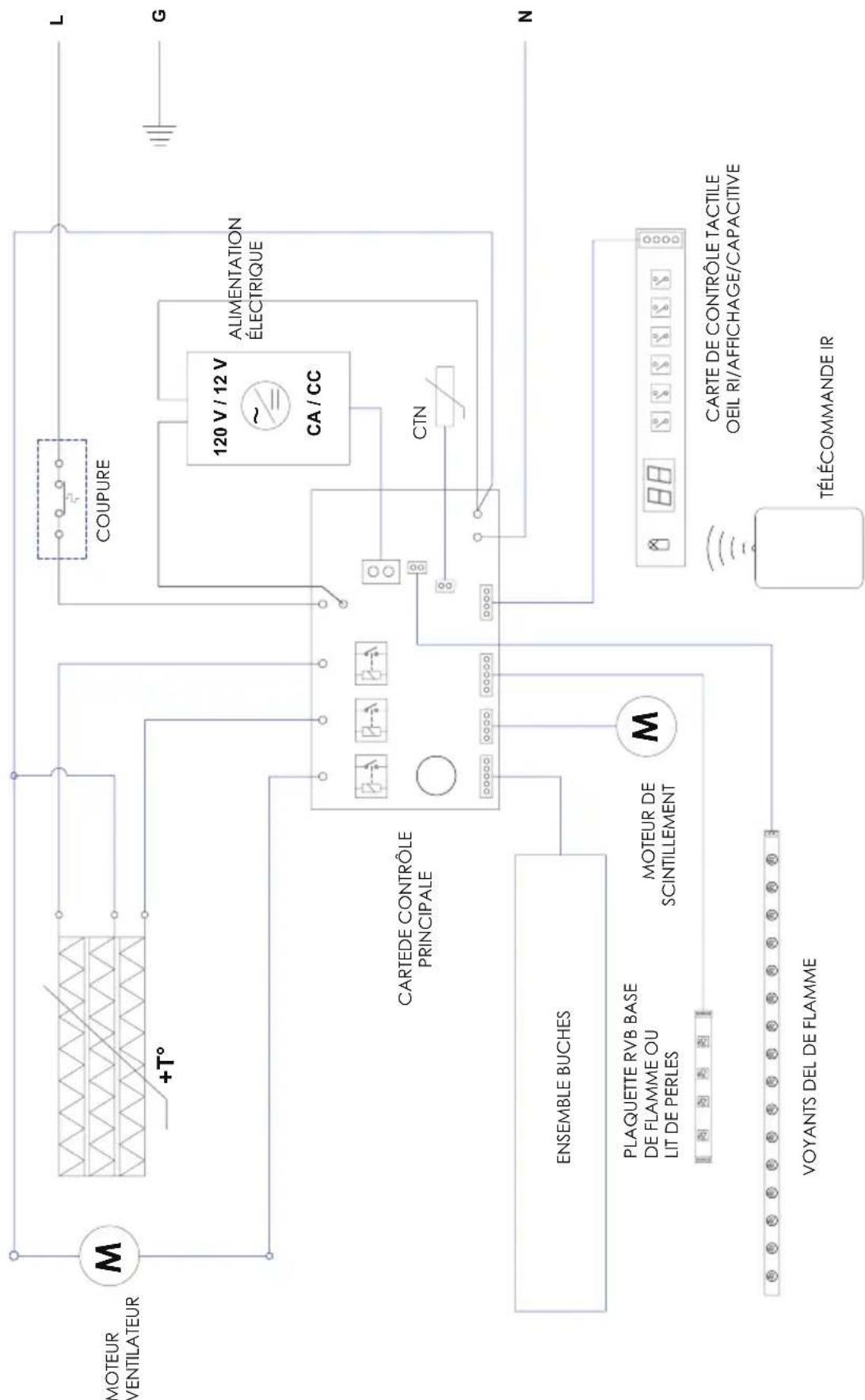
flowchart
graph TD
    A["MOTEUR VENTILATEUR"] --> B["+T°"]
    B --> C["CARTEDE CONTRÔLE PRINCIPALE"]
    C --> D["ENSEMBLE BUCHES"]
    D --> E["PLAQUETTE RVB BASE DE FLAMME OU LIT DE PERLES"]
    E --> F["VOYANTS DEL DE FLAMME"]
    F --> G["MOTEUR DE SCINTILLEMENT"]
    G --> H["COUPURE"]
    H --> I["120 V / 12 V ~ CA / CC"]
    I --> J["ALIMENTATION ÉLECTRIQUE"]
    J --> K["CTN"]
    K --> L["TÉLÉCOMMANDE IR"]
    M["L"] --> N["N"]
    O["G"] --> P["N"]
    Q["88"] --> R["88"]
    S["88"] --> T["88"]
    U["88"] --> V["88"]
Dimplex North America Limited
1367 Industrial Road
Cambridge ON
Canada N3H 4W3
© 2018 Dimplex North America Limited
Dimplex®
natural_image
Black and white photo of a firewood appliance with visible flames and smoke, no text or symbols present.Modelos XHD28L y 6909970259
XHD28G y 6909970559
XHD26L y 6909850259
XHD26G y 6909850559
XHD23L y 6909940259
XHD23G y 6909940559
www.dimplex.com/register
Certifi caciones: cULus certified to meet UL Standards
Modelo XHD 23: 23 lbs (10.4 kg)
natural_image
Isometric line drawing of a rectangular box with internal compartments and labeled dimensions A, B, C (no text or symbols beyond labels)natural_image
Line drawing of a plug and two separate electrical socket (no text or symbols)www.dimplex.com/customer_support.
Dimplex North America Limited
1367 Industrial Road
Cambridge ON
Canada N3H 4W3
© 2018 Dimplex North America Limited

- NO NEED TO RETURN TO THE STORE
- IMPORTANT INSTRUCTIONS
- Basic Precautions
- SAVE THESE INSTRUCTIONS
- Special Precautions
- FCC Compliance
- Specifications
- Placement
- Mounting
- Grounding Instructions
- Touch Panel and Remote Controls
- Resetting the Temperature Cutout Switch
- Maintenance
- Technical Support
- General
- Battery Replacement
- To replace the battery:
- Support Services
- One Year Limited Warranty
- How State and Provincial law apply
- Dimplex®
Brand : DIMPLEX
Model : XHD28G
Category : Electric fireplace