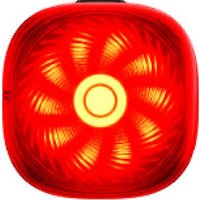
TL50 - Bike light iGPSport - Free user manual and instructions
Find the device manual for free TL50 iGPSport in PDF.


| Product Type | Rear bike light |
| Brand | iGPSport |
| Model | TL50 |
| Dimensions | 40 x 40 x 18 mm (excluding mount) |
| Weight | Approx. 23 g |
| Maximum Brightness | 50 lumens |
| Side Visibility Angle | 280° |
| Visibility Distance | Up to 1.2 km |
| Battery Life | 4 to 26 hours depending on mode |
| Battery Capacity | 460 mAh |
| Charging Type | USB Type-C |
| Charging Time | Approx. 1.5 h |
| Waterproof Rating | IPX7 |
| Lighting Modes | High steady (12 lm, 4h), Low steady (3 lm, 12h), Day flash (26h), Night flash (14h), Light wheel (12h) |
| Special Functions | Smart memory, Auto standby/wake, Sync with computer, Ambient light detection, Brake detection, Front/rear synchronization, Hazard alert, Custom mode |
| Connectivity | Bluetooth (compatible with iGPSport computers and app) |
| Cleaning and Maintenance | Wipe with a soft dry cloth. Protect the charging port with the cap. |
| Safety | Do not direct into eyes, turn off when in pockets/bags, keep out of reach of children |
| Spare Parts and Repairability | Not specified: contact manufacturer |
Frequently Asked Questions - TL50 iGPSport
User questions about TL50 iGPSport
0 question about this device. Answer the ones you know or ask your own.
Ask a new question about this device
Download the instructions for your Bike light in PDF format for free! Find your manual TL50 - iGPSport and take your electronic device back in hand. On this page are published all the documents necessary for the use of your device. TL50 by iGPSport.
USER MANUAL TL50 iGPSport
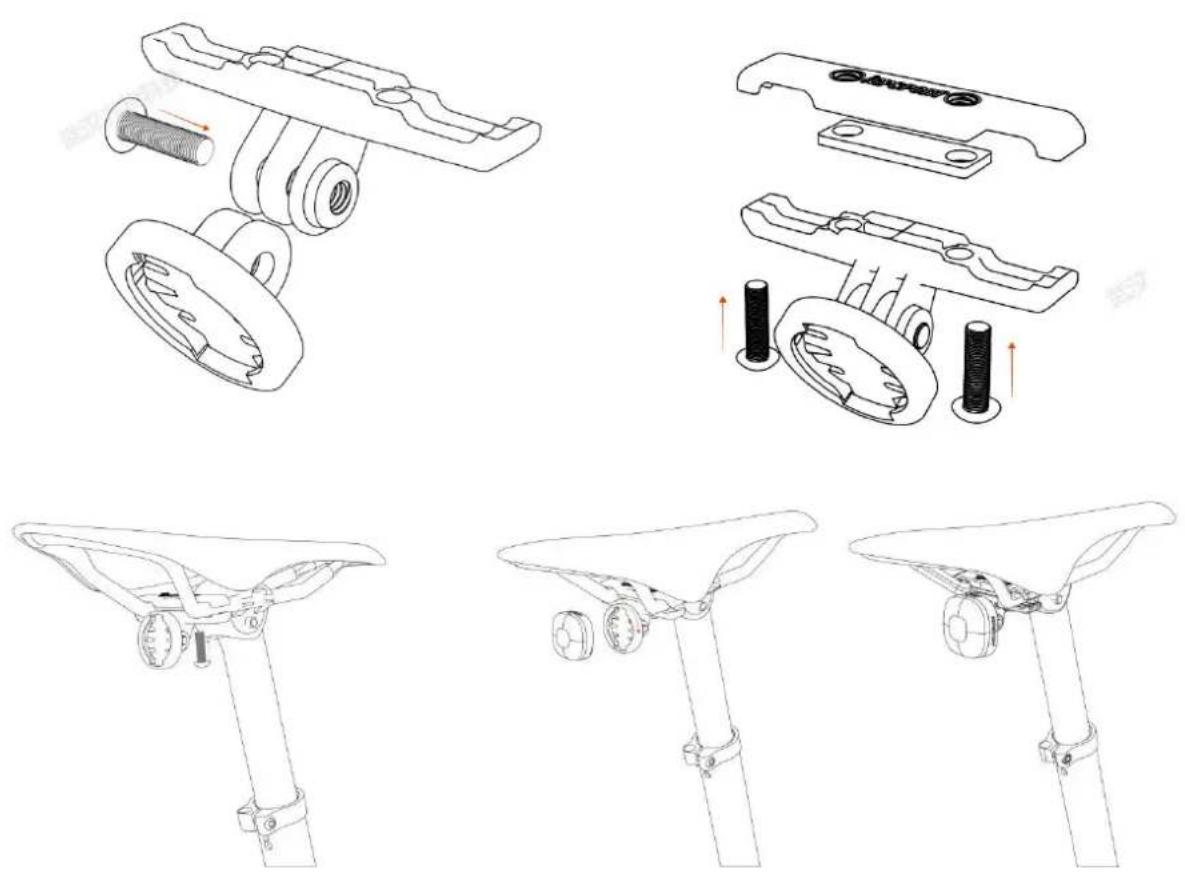
HOW TO INSTALL
安装图示
PRODUCT PARAMETERS
产品参数
| 模式名称Mode | 亮度 (lm)Brightness (lm) | 续航 (h)Battery Life (h) |
| 高常亮High Brightness Steady | 12 | 4 |
| 低常亮Low Brightness Steady | 3 | 12 |
| 日间闪烁Day Flash | 5/0/5/0/50/0 | 26 |
| 夜间闪烁Night Flash | 5/1 | 14 |
| 光轮模式Light Wheel Mode | 3 | 12 |
Note: The above parameters are tested in the iGPSPORT laboratory at a temperature of 23 ± 2°C and humidity of 30%-60%. Actual performance may vary slightly depending on the usage environment.
*When the battery level is below 20%, the function of battery life protection with custom brightness be automatically activated, and can be manually disabled in the app.
OPERATING INSTRUCTIONS
Power on/off: Press the button for 1.5 seconds to power on/off.
Restore the default settings: Press the button for 5 seconds when it is powered off. The bike light will flash rapidly three times, indicating a successful reset. Please note that resetting will clear all personal settings and data, so please operate with caution.
Light mode switching: Press the button to switch light modes after turning it on. Modes can also be adjusted via the iGPSPORT bike computer or APP.
Smart memory: The light automatically remembers the last used mode and will default to that mode the next time it is turned on.
CONNECT TO THE BIKE COMPUTER
After turning on the device, enter the System Menu >> Sensor >> Add Sensor >>Light >> Search Bluetooth Sensor.
CONNECT TO APP
After turning on the device, tap Device >> Add Device >> Light Products in the iGPSPORT APP search and connect.
SPECIFICATIONS
| Device Size | 40*40*18mm (excluding the mount and fixed base) |
| Device Weight | About 23g |
| Max Brightness | 50lm |
| Lateral Visibility Angle | 280° |
| Visible Distance | 1.2km at most |
| Battery Life | About 4-26h |
| Charging Method | TYPE-C |
| Charging Time | About 1.5h |
| Battery Capacity | 460mAh |
| Waterproof | IPX7 |
DEVICE STATUS LED
| Status | LED Activity |
| Charging Complete | Solid green |
| Charging | Green breathing light |
| Battery Level >20% | Green light on for 3s, then off. |
| 10% < Battery Level ≤20% | Solid red |
| 1% < Battery Level ≤10% | Red flashing quickly |
| Firmware Update | Green flashing quickly |
| Reset Default Settings | Green flashes quickly three times |
SPECIAL FEATURES
| Auto Sleep/Wake-up | After stationary for 120s (can be modified in the iGPSPORT app) is state, it will automatically enter sleep mode, with the main light turn will be awakened when it detects motion or a button is pressed, and the light mode before entering sleep mode. |
| Power On/Off Sync with Bike Computer | When connected, the device automatically turns on and off with the computer. |
| Smart Light Sensing | When connected to the bike computer, the light automatically turns adjusts its brightness according to the light sensor value received from computer. |
| Brake Sensing | When the light detects a braking condition, it automatically enters by mode to warn vehicles approaching from behind. (You can adjust the for braking in the APP.) |
| Synchronized Front & Tail Lights | Once the front light is connected to the taillight, they support synch control. When the front light is turned off, the taillight will automat when the front light is turned on, the taillight will turn on simultan |
| Hazard Warning Flash | When connected to the bike computer, if the speed drops to 0, the automatically enter hazard flash mode to alert vehicles behind. This temporary stops. |
| Custom Mode | The parameters such as brightness and lighting mode for the Custom be edited in the iGPSPORT APP. |
CHARGING INSTRUCTIONS
Please follow the steps below to charge the light:
- Turn off the light, remove the weather cap and insert the charging cable into the USB Type-C
- After charging is finished, please disconnect the charging cable and securely close the weather ca maintain the waterproof performance and normal use of the bike light.
Note:
* From completely depleted to full charge, it takes approximately 1.5 hours .
* As the battery will slowly self-discharge over time, it is recommended to recharge the light ever months if not in use for a long time to prevent battery damage.
WARNING
- When placing this light in enclosed and flammable environments such as pockets or backpacks, please turn it off to prevent accidental activation and potential hazards.
- Please do not illuminate this light directly into the eyes to prevent eye injury.
- The waterproof rating of the device is IPX7, which makes it suitable for use in rainy days. But please do not put it in water for a long time and tightly close the weather cap while using.
- Please place this light in a location inaccessible to children to prevent their use.
ESPECIFICACIONES DE RENDIMIENTO
Please scan the QR code to download iGPSPORT APP and enjoy more functions.


Brand : iGPSport
Model : TL50
Category : Bike light