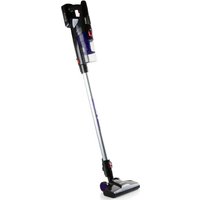
DO225SV - Vacuum Cleaner DOMO - Free user manual and instructions
Find the device manual for free DO225SV DOMO in PDF.


| Product type | Cordless stick vacuum cleaner |
| Brand | DOMO |
| Model | DO225SV |
| Power supply | Built-in rechargeable battery, mains adapter |
| Input voltage | 100-240 V ~ 50/60 Hz (adapter) |
| Battery type | Lithium-ion (estimated) |
| Runtime | Approx. 20-30 minutes (estimated) |
| Charging time | 24 hours for the first charge, then approx. 4-5 hours |
| Dustbin capacity | 0.5 liter (estimated) |
| Filter | Washable HEPA filter and coarse filter |
| Brush type | Motorized rotary floor brush |
| Included accessories | Crevice tool, small dusting brush, wall mount |
| Weight | Approx. 2.5 kg |
| Functions | ECO mode, speed control, battery indicator |
| Safety | Automatic shut-off if brush is blocked, overheat protection |
| Maintenance | Dustbin and filters washable with water; removable and cleanable rotary brush |
| Spare parts | Available online at www.domo-elektro.be |
| Warranty | 2 years (device), 6 months (accessories) |
| Usage | Indoor only, domestic use |
Frequently Asked Questions - DO225SV DOMO
User questions about DO225SV DOMO
0 question about this device. Answer the ones you know or ask your own.
Ask a new question about this device
Download the instructions for your Vacuum Cleaner in PDF format for free! Find your manual DO225SV - DOMO and take your electronic device back in hand. On this page are published all the documents necessary for the use of your device. DO225SV by DOMO.
USER MANUAL DO225SV DOMO
natural_image
Exterior view of a black and silver vacuum cleaner with blue LED indicator light (no text or symbols)DO225SV
| Handleiding Steelstofzuiger | |
| Mode d'emploi Aspirateur-balai | |
| Gebrauchsanleitung Handstaubsauger | |
| Instruction booklet Stick vacuum cleaner | |
| Manual de instrucciones Aspirador escoba | |
| Istruzioni per l'uso Scopa elettrica | |
| Návod k použití Tyčový vysavač 2v1 | |
| Návod na použitie Tyčový vysávač 2v1 |

natural_image
Two black-and-white icons: a triangular warning triangle with an exclamation mark and an open book (no text or symbols)natural_image
Hand holding a black handheld device with a metallic rod, against a white background (no text or symbols visible)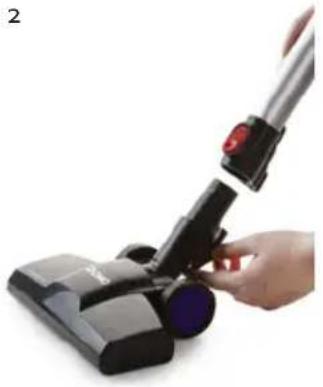
natural_image
Hand holding a black RV brush with a red handle, no visible text or symbols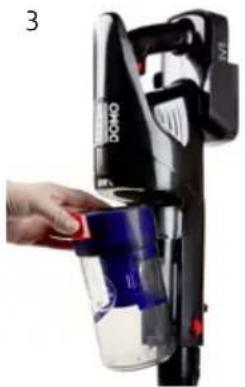
natural_image
Hand placing a red object into a black OMO-branded vacuum cleaner (no visible text or symbols)OPLADEN
natural_image
Close-up of a hand holding a black device labeled '185V' with an arrow pointing to it, no visible text or symbols on the device itself.MUURBEVESTIGING
natural_image
Product photo of a black VACER handbag with attached plastic housing and a small inset showing part number 324 (no text or symbols on the device itself)GEBRUIK
natural_image
Close-up of a black brush tip and bulb with labeled parts (no text or symbols on the tool itself)REINIGING EN ONDERHOUD
HET TOESTEL PROPER MAKEN
natural_image
Hand inserting a blue liquid into a black device (no text or symbols visible)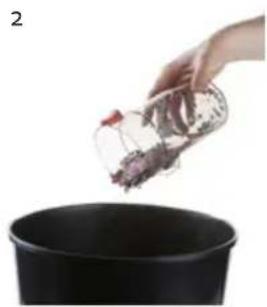
natural_image
Hand pouring chopped red and white granular substance from a glass container into a black pot (no text or symbols visible)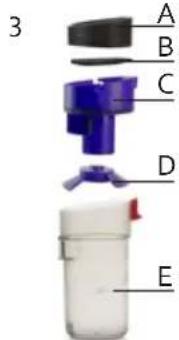
natural_image
Close-up of a black handheld device with a hand holding it, showing a magnified inset of its internal components (no text or symbols visible)natural_image
Hand holding a black vacuum cleaner with blue filter, no visible text or symbols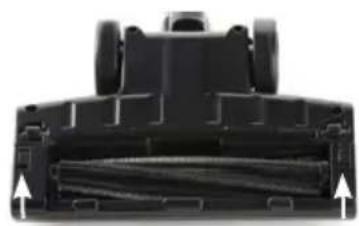
natural_image
Close-up of a black mechanical component with visible internal structure and two upward-pointing arrows indicating direction (no text or symbols)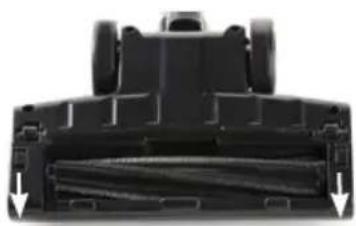
natural_image
Close-up of a black mechanical component with visible internal structure and two downward arrows indicating features (no text or symbols)PROBLEEM EN OPLOSSING
natural_image
Recycling symbol icon with three chasing arrows forming a triangle (no text or labels)natural_image
Symbol of a trash bin crossed out by two diagonal lines, representing no waste or discharge (no text or numbers present)AVANT LA PREMIÈRE UTILISATION
natural_image
Hand holding a black handheld device with a metallic rod, against a white background (no text or symbols visible)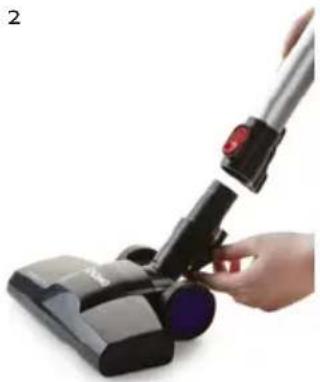
natural_image
Hand holding a black RV brush applying material to a black plastic component (no text or symbols visible)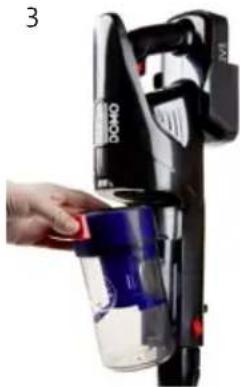
natural_image
Hand placing a red object into a black DQO device with blue liquid, no visible text or symbolsCHARGE
natural_image
Close-up of a hand holding a black BAG device with an arrow pointing to it (no visible text or symbols)SUPPORT MURAL
natural_image
Close-up of a black vacuum cleaner with labeled parts (1 and 2), no text or symbols present.natural_image
Hand pouring liquid into a black industrial machine (no visible text or symbols)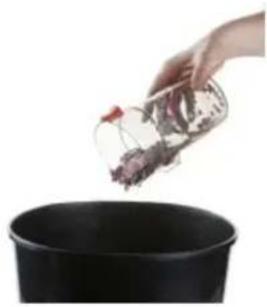
natural_image
Hand pouring a small container into a black pot (no text or symbols visible)3
natural_image
Close-up of a black handheld device with a magnified inset showing internal components (no text or symbols visible)natural_image
Hand holding a black vacuum cleaner with red handle, no visible text or symbols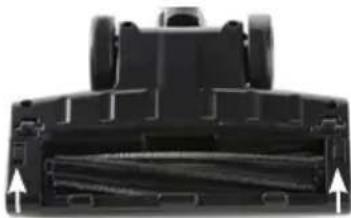
natural_image
Top-down view of a black mechanical component with visible internal structure and two upward-pointing arrows indicating features (no text or symbols)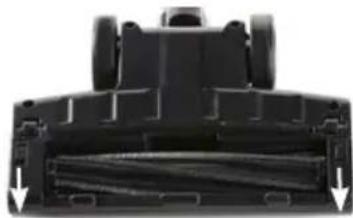
natural_image
Close-up of a black mechanical component with internal channels and arrows indicating movement (no text or symbols)natural_image
Recycling symbol icon with three chasing arrows forming a triangle (no text or labels)natural_image
Symbol of a trash bin crossed with two crossed lines, representing no waste or discharge (no text or numbers present)BATTERIE NON AMOVIBLE
natural_image
Hand holding a black handheld device with a white handle, against a plain white background (no text or symbols visible)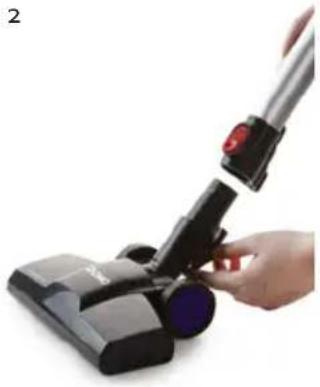
natural_image
Hand holding a black RV brush applying material to a black cylindrical device (no text or symbols visible)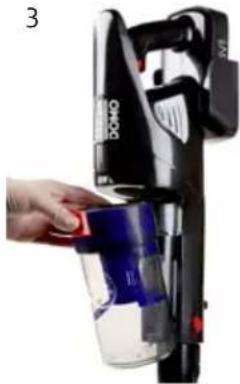
natural_image
Hand placing a red object into a black Dono-branded vacuum cleaner (no visible text or symbols)AUFLADEN
natural_image
Close-up of a hand holding a black electrical shaver with a label showing '60mm' and an arrow pointing to it (no other text or symbols visible)WANDBEFESTIGUNG
natural_image
Product photo of a black and white hover cleaner with blue internal components, shown with a close-up of its side panel (no visible text or symbols)GEBRAUCH
natural_image
Close-up of a black vacuum cleaner with labeled parts (1 and 2), no text or symbols present.natural_image
Hand pouring liquid into a black industrial machine (no visible text or symbols)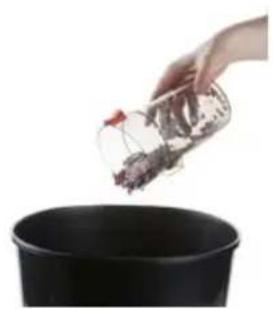
natural_image
Hand pouring a container into a black pot (no text or symbols visible)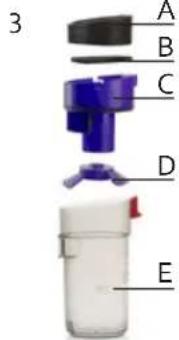
natural_image
Hand holding a black handheld device with an inset close-up of its internal components (no visible text or symbols)natural_image
Hand holding a black vacuum cleaner with blue handle, no visible text or symbols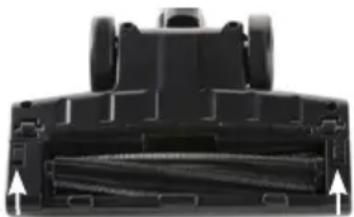
natural_image
Top-down view of a black mechanical component with two upward arrows indicating features (no text or symbols visible)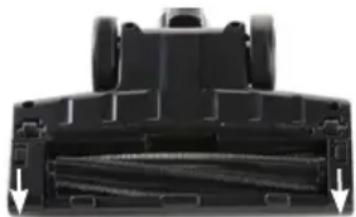
natural_image
Close-up of a black mechanical component with visible internal structure and two downward arrows indicating features (no text or symbols)natural_image
Recycling symbol icon (three chasing arrows) inside a rounded square frame, no text or labels present.natural_image
Symbol of a trash bin crossed out by two diagonal lines (no text or numbers present)NICHT HERAUSNEHMBARE BATTERIE
All of our products are always submitted to a strict quality control before they are sold to you.
Should you nevertheless experience problems with your device, we sincerely regret this. In that case, we kindly request you to contact our customer service.
Our staff will gladly assist you.

+32 14 21 71 91

info@linea2000.be
Monday – Thursday: 8.30 – 12.00 and 13.00 – 17.00
Friday: 8.30 - 12.00 and 13.00 - 16.30
This appliance has a two year warranty period. During this period the manufacturer is responsible for any failures that are the direct result of construction failure. When these failures occur the appliance will be repaired or replaced if necessary. The warranty will not be valid when the damage to the appliance is caused by wrong use, not following the instructions or repairs executed by a third party. The guarantee is issued with the original till receipt. All parts, which are subject to wear, are excluded from the warranty. If your device breaks down within the 2-year warranty period, you can return the device together with your receipt to the shop where you purchased it.
The guarantee on accessories and components that are liable to wear-and-tear is only 6 months.
The guarantee and responsibility of the supplier and manufacturer lapse automatically in the following cases:
- If the instructions in this manual have not been followed.
· In case of incorrect connection, e.g., electrical voltage that is too high.
· In case of incorrect, rough or abnormal use. - In case of insufficient or incorrect maintenance.
· In case of repairs or alterations to the device by the consumer or non-authorised third parties. - If the customer used parts or accessories that are not recommended or provided by the supplier / manufacturer.
SAFETY INSTRUCTIONS
When using electrical appliances, basic safety precautions should always be taken, including the following:
- Read all instructions carefully. Keep this manual for future reference.
- Make sure all packaging materials and promotional stickers have been removed before using the appliance for the first time. Make sure children cannot play with the packaging materials.
· This appliance is intended to be used in household and similar applications such as:
· staff kitchen areas in shops, offices and other working environments;
· farm houses;
- by clients in hotels, motels and other residential type environments;
- bed and breakfast type environments.
· Children should be supervised to ensure that they do not play with the appliance.
- This appliance can be used by children aged from 16 years and above and persons with reduced physical, sensory or mental capabilities or lack of experience and knowledge if they have been given
supervision or instruction concerning use of the appliance in a safe way and understand the hazards involved. Children shall not play with the appliance. Cleaning and user maintenance shall not be made by children unless they are older than 16 and supervised.
- Keep the appliance and its cord out of reach of children younger than 16 years.
- Attention: This appliance cannot be used with an external timer or a separate remote control.
- Read all instructions before use.
- Before use, check if the voltage stated on the appliance corresponds with the voltage of the power net at your home.
- Do not let the cord hang on a hot surface or on the edge of a table or counter top.
- Never use the appliance when the cord or plug is damaged, after malfunction or when the appliance itself is damaged. In that case, take the appliance to the nearest qualified service center for check-up and repair.
- Close supervision is necessary when the appliance is used near or by children.
- The use of accessories that are not recommended or sold by the manufacturer can cause fire, electrical shock or injuries.
- Unplug the appliance when it is not in use, before assembling or disassembling any parts and before cleaning the appliance. Put all buttons and knobs into the 'off' position and unplug the appliance by grasping the plug. Never unplug by pulling the cord.
· Do not leave a working appliance unattended.
- Never place this appliance near a gas stove or electrical stove or in a place where it may come into contact with a warm appliance.
- Do not use the appliance outdoors.
- Only use the appliance for its intended use.
· Always use the appliance on a steady, dry and level surface.
- Only use the appliance for domestic use. The manufacturer can not be held responsible for accidents that result from improper use of the appliance or not following the instructions described in this manual.
· All repairs should be carried out by the manufacturer or its aftersales service.
· Never immerse the appliance, the cord or the plug in water or any other liquid.
- Make sure that children do not touch the cord or appliance.
- Keep the cord away from sharp edges and hot parts or other heat sources.
· Before use, remove all packaging materials and any promotional stickers.
- Do not use the vacuum cleaner to vacuum up detergents, liquids, needles, matches and other similar liquids, sharp objects or flammable objects.
- Do not use the vacuum cleaner to vacuum up cement, powder and other small particles. Also avoid vacuuming up large objects. The vacuum cleaner could be clogged, the motor could overheat or other damage may occur.
- Make sure that the air intake or the floor suction opening do not become blocked.
· Make sure that the machine does not come into contact with liquids. - First charge a new battery up completely.
- Pull the plug from the outlet when the vacuum cleaner is fully charged.
- This product contains a rechargeable battery. Batteries should be recycled. Do not drill into the battery or expose it to high temperatures; the battery could explode.
- Under extreme circumstances, there could be leakage of the battery. If the liquid from the battery comes into contact with the skin, wash it off immediately with water and soap or neutralize it with a mild acid such as lemon juice or vinegar. If the liquid comes into contact with the eyes, rinse them liberally with water for at least 10 minutes and contact a doctor.
- Do not place foreign objects in the openings of your machine. Do not use the machine if an opening is blocked. Keep the machine free from dust, dirt, hair or anything that could reduce the air supply.
- Remove large and sharp objects from the floor to prevent damage to the plastic components, the brushes and the motor.
- Keep hair, loose clothing, fingers and other body parts away from openings and moving parts.
· Never use the appliance without a filters. This will damage the motor and render it unusable.
SAVE THESE INSTRUCTIONS FOR FUTURE REFERENCE
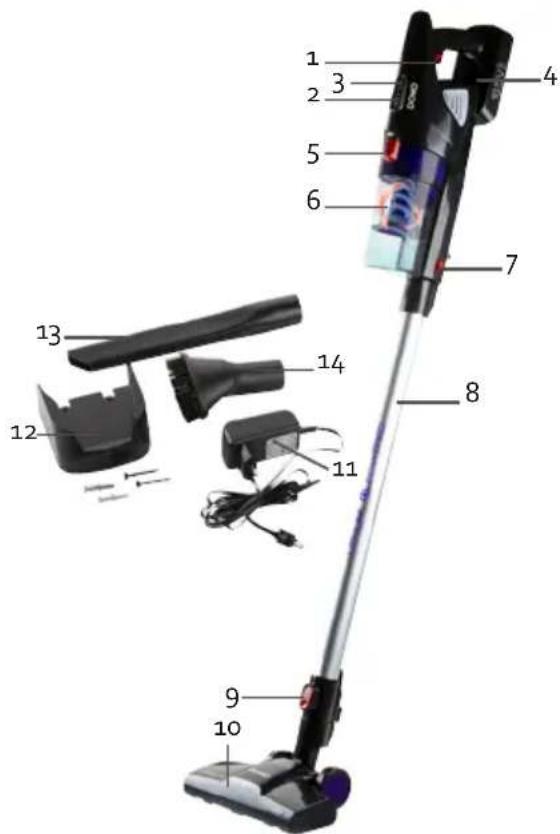
PARTS
-
On/off button with speed control
-
Battery charge indicator
-
ECO mode indicator
-
Motor compartment
-
Unlock button for dust reservoir
-
Dust reservoir
-
Tube release button
-
Tube
-
Release button floor nozzle
-
Floor nozzle with rotating floor brush
-
Adapter
-
Wall fixing (screws and plugs included)
-
Crevice vacuum cleaner
-
Dust brush
BEFORE THE FIRST USE
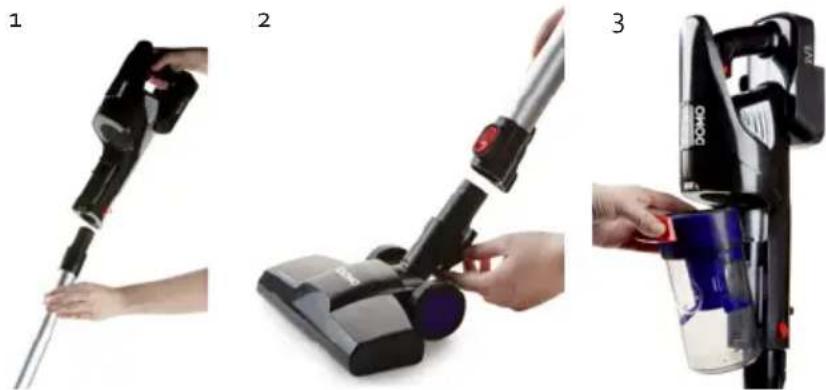
To set up the machine properly, please follow the steps below:
- Place the motor compartment on the shaft via the opening provided.
- Make sure the floor nozzle is clicked into the stick vacuum cleaner.
- Click the dust reservoir into the stick vacuum cleaner.
CHARGING
- Connect the adaptor to the upright vacuum cleaner via the connection provided on the appliance handle in order to charge the vacuum cleaner.
· The battery charge indicator indicates when the appliance has been fully charged.
· The machine cannot be started during charging. - Prior to first use, charge the machine for 24 hours in order to be able to utilize the full capacity of the battery.
natural_image
Close-up of a hand holding a black 85V air conditioner cover, with no visible text or symbols on the device itself.WALL MOUNT
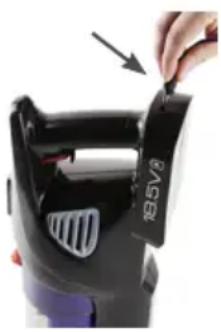
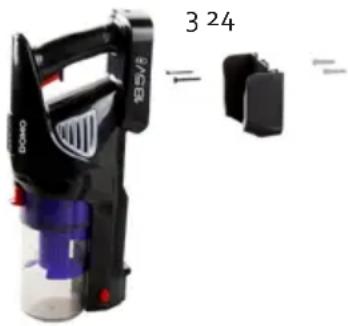
Please follow below instructions to fix the wall mount:
- Drill 2 holes in the wall corresponding to the attachment points of the wall mount.
- Insert the supplied plugs into the wall.
- Fix the wall mount using the supplied screws.
- To store the device, simply hang it on the wall mount.
natural_image
Product photo of a black VASER handbag with blue internal components and red buttons, next to a small black device labeled '3 24' (no readable text beyond label)USE
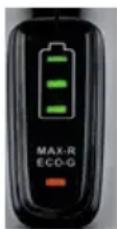
- Press the on/off button to turn the appliance on. The battery indicator light is green and indicates the battery level. If the battery is almost empty, the indicator light will flash on and off. The ECO mode indicator is red to indicate that the appliance is operating at maximum speed. Press the on/off button a second time to reduce the speed. The ECO mode indicator will now light up green. Press the on/off button again to turn the appliance off.
- When you switch on the machine, the rotating floor brush at the bottom of the floor nozzle will begin to turn. This will cause the dirt in the opening to be shifted and thereby vacuumed up.
- The machine is equipped with a safety which will ensure that the machine shuts itself off if, for example, objects which are too large are sucked up, or if fingers become tangled in the floor brush. This is for personal safety and to protect the motor. To reverse the floor brush, press the on/off button once more.
- For the best results, clean the dust reservoir and the filters after each use. This is better for the suction power and the life span of the machine. Make sure that the dust in the dust reservoir does not exceed the maximum level.
ACCESOIRES
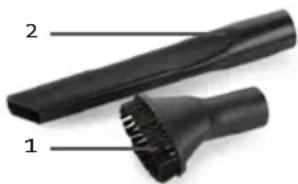
You can use the following accessories on the hand-held vacuum cleaner (by removing the shaft) or secure them on the shaft:
- Dust brush: for furniture, bookshelves, curtains and hard to clean surfaces.
- Crevice vacuum cleaner: for crevices, corners, stairs, keyboards,...
natural_image
Close-up of a black brush tip with labeled parts (1 and 2), no text or symbols present.CLEANING AND MAINTENANCE
CLEANING THE MACHINE
Clean the machine with a slightly moist soft cloth. Dry the machine off well. Never submerge the machine in water!
CLEANING THE DUST RESERVOIR AND FILTER
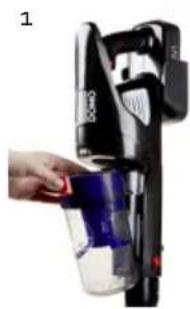
- Press the dust container release button to release the dust container from the appliance.
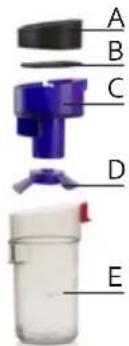
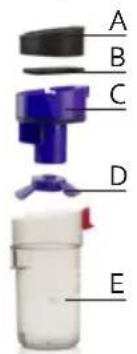
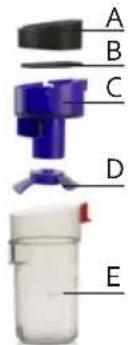
- Then remove the filter holder from the dust container (E) and empty the dust container.
- Detach the HEPA filter (A) from the filter holder (C). There is a removable coarse filter (B) under the HEPA filter. You can also detach the bottom part (D) of the filter holder for more precise cleaning.
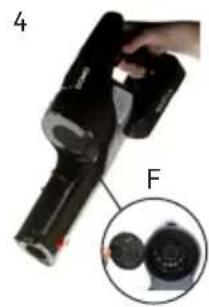
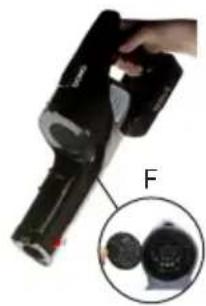
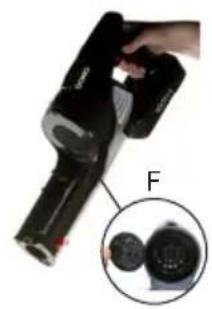
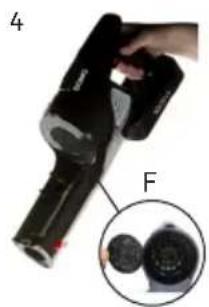
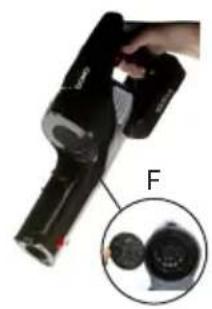
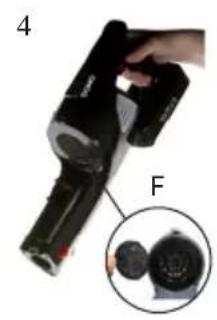
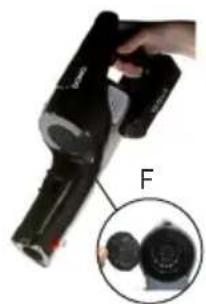
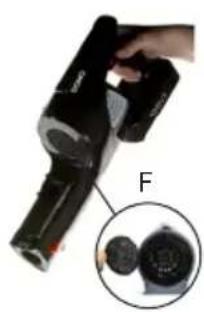
- Remove the motor filter (F) from the motor section.
- Clean all the parts (A, B, C, D, E and F) under running water. Allow all the parts to dry completely before reassembling and making use of the device again.
natural_image
Hand inserting a blue liquid into a black vacuum cleaner (no text or symbols visible)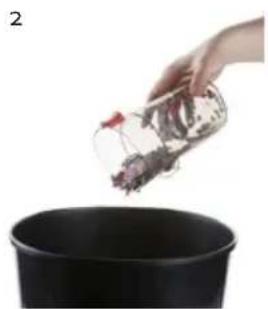
natural_image
Hand pouring a container into a black pot (no text or symbols visible)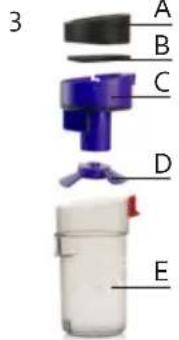
natural_image
Close-up of a handheld device with labeled parts F, showing internal components (no text or symbols on the device itself)We advise replacing the filters regularly to ensure an optimal operation of the machine. Dirty filters will reduce the suction power drastically. After every cleaning, clean the dust reservoir and the filters to extend the life span of your machine.
CLEANING THE FLOOR BRUSH
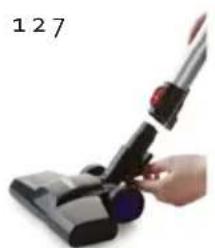
- Remove the floor nozzle from the upright vacuum cleaner. Press the release button at the back of the floor nozzle and remove it from the machine.
- Slide the clips on both sides of the floor brush upwards to release them.
- Remove the rotating floor brush from the floor nozzle.
- Remove hairs and other dirt that have wrapped around the floor brush. If you do not clean the floor brush regularly, it will become damaged and your machine will become unusable.
- The rotating floor brush may be rinsed off under running water. Make sure that it is completely dry before using it.
- Place the floor brush back into the floor nozzle when it is clean.
- Return the clips on both sides of the floor brush to their position and slide the clips downwards to secure the floor brush again.
natural_image
Hand holding a black vacuum cleaner with blue filter, no visible text or symbols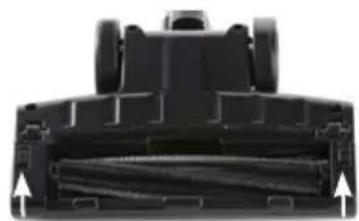
natural_image
Top-down view of a black robotic vacuum cleaner head showing internal blades and mounting features (no text or symbols visible)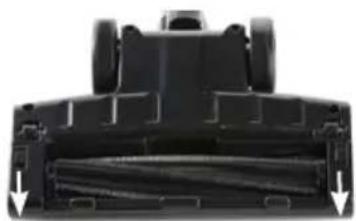
natural_image
Top-down view of a black robotic vacuum cleaner head with visible internal components and directional arrows indicating motion (no text or symbols)- Push the nozzle back onto the stick. The machine is now again ready for use.
Stuck hairs can damage the machine or your floor. Always remove the hairs stuck on the brushes.
PROBLEM AND SOLUTION
| Problem Solution | |
| The battery charge indicator will flash on and off. | · The battery is empty. Charge the machine. |
| The machine does not start up. · The battery is empty. Charge the machine. | |
| The machine does not vacuum. · The filters are dirty/the dust reservoir is full.· The floor nozzle is clogged/the floor brush is blocked.· Clean the machine as described in this manual. | |
| The running time of the machine is shorter and shorter. | · The machine is not sufficiently charged. Charge the machine fully and try again.· The battery is broken or old. Contact the after sales service.· Stuck hairs. Remove the hairs stuck on the brushes. |
ENVIRONMENTAL GUIDELINES
natural_image
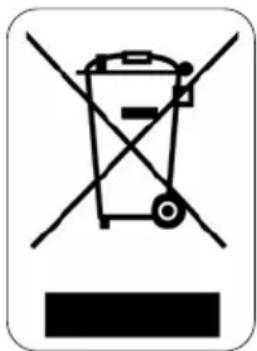
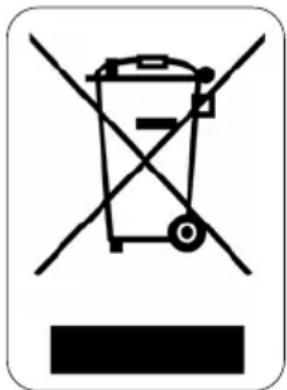
Symbol of a trash bin crossed out by two diagonal lines, with no text or numbers present.This symbol on the product or on its packaging indicates that this product may not be treated as household waste. Instead it must be brought to the applicable collection point for recycling of electrical and electronic equipment. By ensuring this product is disposed of correctly, you will help prevent potential negative consequences for the environment and human health, which could otherwise be caused by inappropriate waste handling of this product. For more detailed information about recycling of this product, please contact your local city office, your household waste disposal service or the shop where you purchased the product.
natural_image
Recycling symbol icon with three chasing arrows forming a triangle (no text or labels)The packaging is recyclable. Please treat the packaging ecologically.
natural_image
Symbol of a trash bin crossed out by two diagonal lines, representing no waste or discharge (no text or numbers present)NON-REMOVABLE BATTERY
The appliance is battery-operated, and the battery must not be disposed of with household waste, even after use. You can take the appliance to a collection point for discarded electrical appliances (Recupel) in your neighbourhood (container park, specialist shop, etc.). Batteries contain substances that are dangerous to human health and to the environment.
GARANTIA
natural_image
Three-step photo sequence showing a hand holding a vacuum cleaner, then applying liquid to a device (no text or symbols visible)CARGA
natural_image
Close-up of a hand holding a black air conditioner cover with an arrow pointing to it (no visible text or symbols)SOPORTE MURAL
natural_image
Product photo of a black RAGEL handbag with blue internal components, shown alongside an inset image showing part number 3 and quantity 24 (no text or symbols on the device itself)USO
natural_image
Close-up of a black vacuum cleaner with labeled parts (1 and 2), no text or symbols present.LIMPIEZAY MANTENIMIENTO
LIMPIAR EL APARATO DE POLVO
natural_image
Hand inserting a blue liquid into a black device labeled '124' (no text or symbols on device)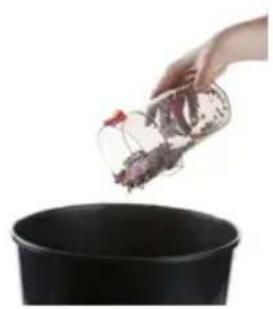
natural_image
Hand pouring chopped ingredients into a black pot (no text or symbols visible)3
natural_image
Close-up of a black handheld device with a hand holding it, showing a close-up inset of its internal components (no text or symbols visible)natural_image
Hand holding a black vacuum cleaner with blue filter, no visible text or symbols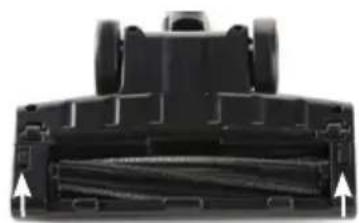
natural_image
Close-up of a black robotic vacuum cleaner's head and side panel, showing internal blades and mounting features (no text or symbols visible)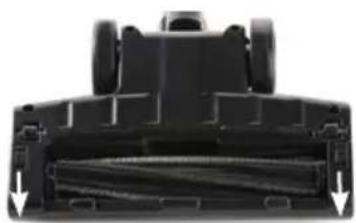
natural_image
Close-up of a black mechanical component with visible internal structure and two downward arrows indicating flow or movement (no text or symbols)natural_image
Symbol of a trash bin crossed with no visible text or numbers, enclosed in a rounded square (no text or numbers present)natural_image
Recycling symbol icon with three chasing arrows forming a triangle (no text or labels)natural_image
Symbol of a trash bin crossed out by two crossed lines, enclosed in a rounded square (no text or numbers present)BATERÍA NO EXTRAÍBLE
PRIMA DELL'USO
natural_image
Hand holding a black handheld device with a metal rod, against a white background (no text or symbols visible)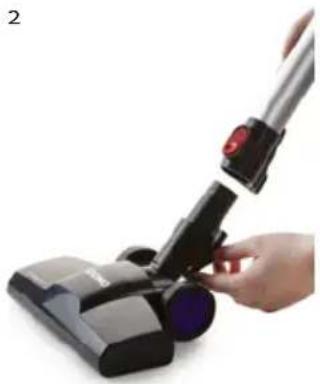
natural_image
Hand holding a black vacuum cleaner with a red handle, no visible text or symbols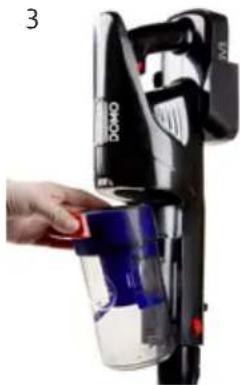
natural_image
Hand placing a red object into a black vacuum cleaner with blue liquid (no visible text or symbols)CARICARE
natural_image
Close-up of a hand holding a black BAGS air conditioner with a label, no visible text or symbols on the device itself.SOSTEGNO A PARETE
natural_image
Product photo of a black and blue DACA spray gun with attached plastic housing (no visible text or symbols)UTILIZZO
natural_image
Close-up of a black vacuum cleaner with labeled parts (1 and 2), no text or symbols present.natural_image
Hand inserting a blue liquid into a black device (no text or symbols visible)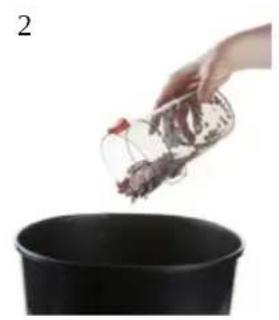
natural_image
Hand pouring dried herbs into a black pot (no text or symbols visible)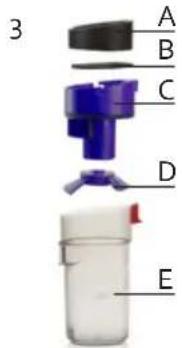
natural_image
Close-up of a black handheld device with a hand holding it, showing internal components (no text or symbols visible)natural_image
Hand holding a black vacuum cleaner with red handle, no visible text or symbols on the device itself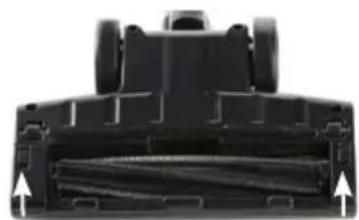
natural_image
Top-down view of a black mechanical component with two wheels and internal channels (no text or symbols visible)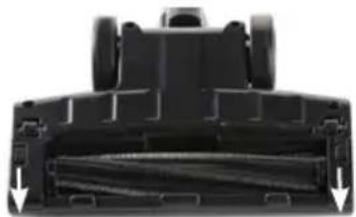
natural_image
Top-down view of a black robotic vehicle's internal compartment with arrows indicating movement or force (no text or symbols visible)natural_image
Symbol of a trash bin crossed out by two diagonal lines, with no text or numbers present.
natural_image
Recycling symbol icon (three chasing arrows) inside a rounded square frame, no text or labels present.
natural_image
Symbol of a trash bin crossed out by two crossed lines, representing no waste or discharge (no text or labels)PŘED PRVNÍM POUŽITÍM
natural_image
Hand holding a black handheld device with a metallic rod, against a plain white background (no text or symbols visible)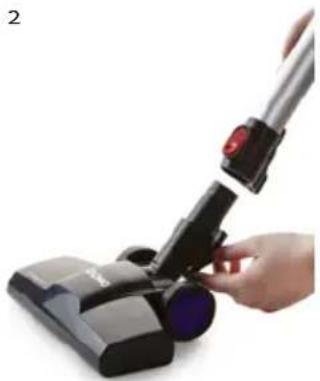
natural_image
Hand holding a black RV brush with a red handle, no visible text or symbols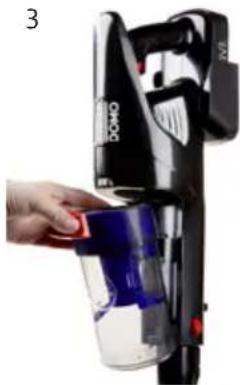
natural_image
Hand placing a blue liquid into a black vacuum cleaner (no visible text or symbols)NABÍJENÍ
natural_image
Close-up of a hand holding a black device with a label, showing internal components and a pointing arrow (no readable text or symbols)DRŽÁK NA STĚNU
natural_image
Product photo of a black VACER handbag with blue internal components and red buttons, shown alongside an inset image showing part number 324 (no text or symbols on the device itself)POUŽITÍ
natural_image
Close-up of a black brush and lever with labeled parts (no text or symbols on the brush itself)ČIŠTĚNÍ A ÚDRŽBA
ČIŠTĚNÍ PŘÍSTROJE
natural_image
Hand holding a blue spray bottle next to a black industrial machine (no visible text or symbols)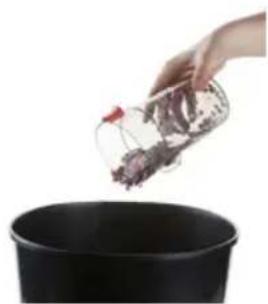
natural_image
Hand pouring a small container into a black pot (no text or symbols visible)3
natural_image
Close-up of a black handheld device with a magnified inset showing internal components (no text or symbols visible)natural_image
Hand holding a black vacuum cleaner with red handle, no visible text or symbols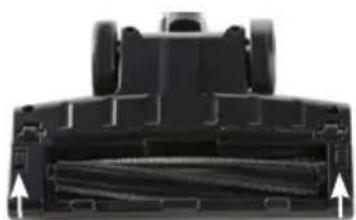
natural_image
Close-up of a black mechanical component with internal channels and mounting holes (no visible text or symbols)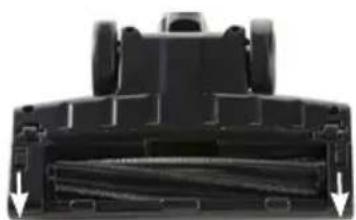
natural_image
Close-up of a black mechanical component with internal channels and arrows indicating direction (no text or symbols)OHLED NA ŽÍVOTNÍ PROSTŘEDÍ
natural_image
Recycling symbol icon with three chasing arrows forming a triangle (no text or labels)natural_image
Symbol of a trash bin crossed out by two diagonal lines, representing no waste or discharge (no text or numbers present)PEVNĚ ZABUDOVANÉ BATERIE
PRED PRVÝM POUŽITÍM
natural_image
Hand holding a black handheld device with a white handle, against a plain white background (no text or symbols visible)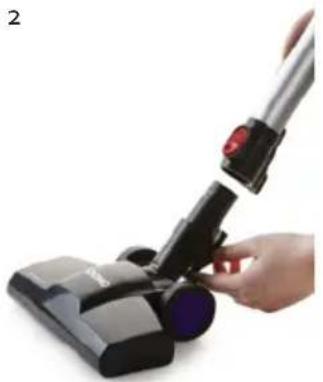
natural_image
Hand holding a black vacuum cleaner with a red handle, no visible text or symbols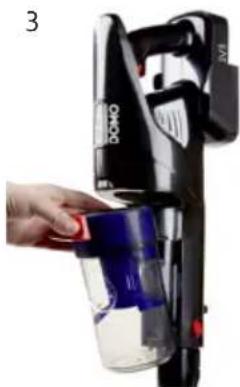
natural_image
Hand holding a black Domo-branded vacuum cleaner with blue liquid, no visible text or symbols on the device itselfNABÍJANIE
natural_image
Close-up of a hand holding a black device labeled 'M850' with an arrow pointing to it (no readable text or symbols beyond label)DRŽIAK NA STENU
natural_image
Product photo of a black and white handheld device with blue internal components, shown alongside an inset image showing part number 324 (no text or symbols on device body)POUŽITIE
natural_image
Close-up of a black vacuum cleaner with labeled parts (1 and 2), no text or symbols present.ČISTENIE A ÚDRŽBA
ČISTENIE PRÍSTROJA
natural_image
Hand holding a blue spray bottle next to a black industrial machine (no visible text or symbols)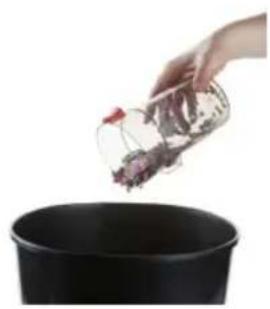
natural_image
Hand pouring chopped ingredients into a black container (no text or symbols visible)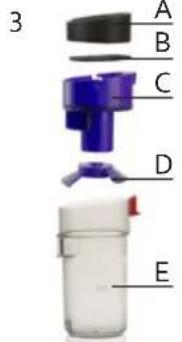
natural_image
Close-up of a handheld device with a magnified inset showing two circular components (no text or symbols visible)natural_image
Hand holding a black vacuum cleaner with blue filter, no visible text or symbols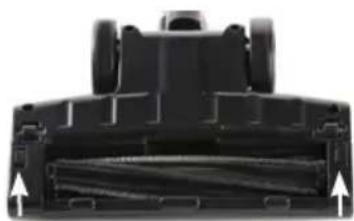
natural_image
Top-down view of a black mechanical component with two arrows pointing to internal channels (no text or symbols visible)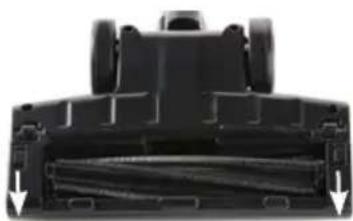
natural_image
Close-up of a black mechanical component with visible internal structure and two downward arrows indicating features (no text or symbols)natural_image
Symbol of a trash bin with crossed lines indicating no waste, and a solid black rectangle below (no text or labels)natural_image
Recycling symbol icon with three chasing arrows forming a triangle (no text or labels)natural_image
Symbol of a trash bin crossed with no text or numbers, representing waste sorting or disposal (no text present)PEVNE ZABUDOVANÉ BATÉRIE

- OPLADEN
- MUURBEVESTIGING
- GEBRUIK
- REINIGING EN ONDERHOUD
- HET TOESTEL PROPER MAKEN
- AVANT LA PREMIÈRE UTILISATION
- CHARGE
- SUPPORT MURAL
- BATTERIE NON AMOVIBLE
- AUFLADEN
- WANDBEFESTIGUNG
- GEBRAUCH
- NICHT HERAUSNEHMBARE BATTERIE
- SAFETY INSTRUCTIONS
- PARTS
- BEFORE THE FIRST USE
- CHARGING
- WALL MOUNT
- USE
- ACCESOIRES
- CLEANING AND MAINTENANCE
- CLEANING THE MACHINE
- CLEANING THE DUST RESERVOIR AND FILTER
- CLEANING THE FLOOR BRUSH
- ENVIRONMENTAL GUIDELINES
- NON-REMOVABLE BATTERY
- GARANTIA
- CARGA
- SOPORTE MURAL
- USO
- LIMPIEZAY MANTENIMIENTO
- LIMPIAR EL APARATO DE POLVO
- BATERÍA NO EXTRAÍBLE
- PRIMA DELL'USO
- CARICARE
- SOSTEGNO A PARETE
- UTILIZZO
- PŘED PRVNÍM POUŽITÍM
- NABÍJENÍ
- DRŽÁK NA STĚNU
- POUŽITÍ
- ČIŠTĚNÍ A ÚDRŽBA
- ČIŠTĚNÍ PŘÍSTROJE
- OHLED NA ŽÍVOTNÍ PROSTŘEDÍ
- PEVNĚ ZABUDOVANÉ BATERIE
- PRED PRVÝM POUŽITÍM
- NABÍJANIE
- DRŽIAK NA STENU
- POUŽITIE
- ČISTENIE A ÚDRŽBA
- ČISTENIE PRÍSTROJA
- PEVNE ZABUDOVANÉ BATÉRIE
Brand : DOMO
Model : DO225SV
Category : Vacuum Cleaner