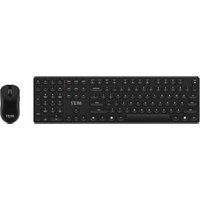
USER MANUAL Forge K210 MSI
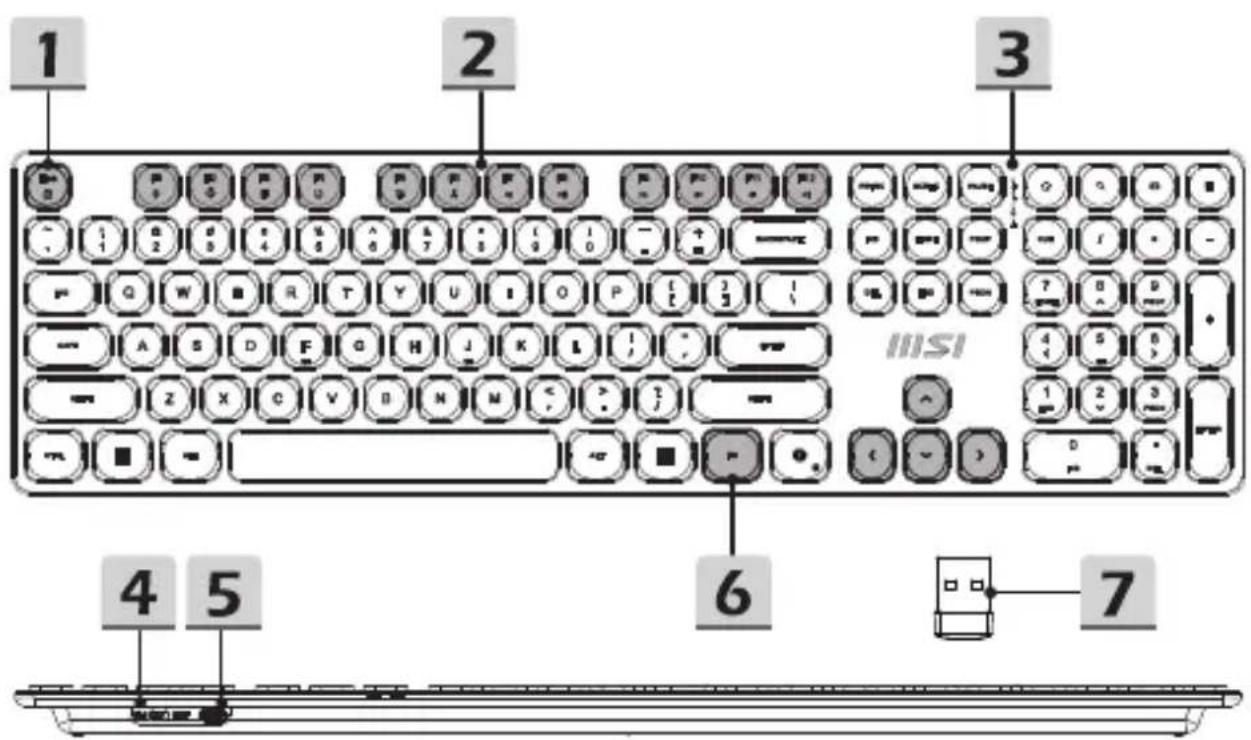
4 Switch On/Off 5 USB-C Charging Port 6 FN Key 7 Wireless USB Dongle
Auto Sleep Mode
The keyboard enters sleep mode after 5 minutes of inactivity. Press any key to wake it up.
Charging Indicator
The keyboard's red LED remains on while it is charging. When it is fully charged, the LED turns off.
FN Combination Functions
| Shortcut Key Function | |
| FN + F1 Decrease Screen Brightness | |
| FN + F2 Increase Screen Brightness | |
| FN + F3 Select All | |
| FN + F4 Copy | |
| FN + F5 Paste | |
| FN + F6 Cut | |
| FN + F7 Previous Track | |
| FN + F8 Play/ Pause | |
| FN + F9 Next Track | |
| FN + F10 Mute | |
| FN + F11 Volume Down | |
| FN + F12 Volume Up | |
| FN + ESC FN Lock | |
For more information, please visit the MSI official website.
FCC Compliance Statement
This device complies with Part 15 of the FCC Rules. Operation is subject to the following two conditions:
This device may not cause harmful interference. - This device must accept any interference received, including interference that may cause undesired operation.
This equipment has been tested and found to comply with the limits for a class B digital device, pursuant to part 15 of the FCC Rules. These limits are designed to provide reasonable protection against harmful interference in a residential installation.
This equipment generates, uses and can radiate radio frequency energy and, if not installed and used in accordance with the instructions, may cause harmful interference to radio communications. However, there is no guarantee that interference will not occur in a particular installation. If this equipment does cause harmful interference to radio or television reception, which can be determined by turning the equipment off and on, the user is encouraged to try to correct the interference by one or more of the following measures:
Reorient or relocate the receiving antenna.
- Increase the separation between the equipment and receiver.
- Connect the equipment into an outlet on a circuit different from that to which the receiver is connected.
- Consult the dealer or an experienced radio/TV technician for help.
CAUTION:
Any changes or modifications not expressly approved by the grantee of this device could void the user's authority to operate the equipment. Where shielded interface cables have been provided with the product or specified additional components or accessories elsewhere defined to be used with the installation of the product, they must be used in order to ensure compliance with FCC regulations.
Services web address: www.msi.com
RF Exposure Statements
The device has been evaluated to meet general RF exposure requirement. The device can be used in portable exposure condition without restriction.
I4L-MS-8ZAC
CE RED Compliance Statement
Hereby, msi Inc. declares that the radio equipment type MS-8ZAC is in compliance with Directive 2014/53/EU. The full text of the EU Declaration of conformity is available at the following internet address: https://www.msi.com
UKCA Compliance Statement
Hereby, msi Inc. declares that the radio equipment type MS-8ZAC is in compliance with the essential requirements and other relevant provisions of the Radio Equipment Regulations 2017. The full text of the UK Declaration of Conformity may be found at the following internet address: https://www.msi.com

ISED Compliance Statement
This device contains licence-exempt transmitter(s)/receiver(s) that comply with Innovation, Science and Economic Development Canada's licence-exempt RSS(s). Operation is subject to the following two conditions: (1) This device may not cause interference. (2) This device must accept any interference, including interference that may cause undesired operation of the device.
The device has been evaluated to meet general RF exposure requirements. The device can be used in portable exposure conditions without restriction.
This Class B digital apparatus complies with Canadian ICES-003.
1. Replacement of a battery with an incorrect type that can defeat a safeguard (for example, in the case of some lithium battery types); 2. Disposal of a battery into fire or a hot oven, or mechanically crushing or cutting a battery, which can result in an explosion; 3. Leaving a battery in an extremely high temperature surrounding environment that can result in an explosion or the leakage of flammable liquid or gas; 4. Subjecting a battery to extremely low air pressure that may result in an explosion or the leakage of flammable liquid or gas; 5. High or low extreme temperatures that a battery can be subjected to during use, storage, or transportation; and 6. Low air pressure at high altitude.
Warning
Complying with the REACH (Registration, Evaluation, Authorisation, and Restriction of Chemicals) regulatory framework, we published the chemical substances in our products at the MSI REACH website at https://csr.msi.com/global/Product-Chemical-Management.
Safety & Warning Instructions
Read the safety instructions carefully and thoroughly. All cautions and warnings on the equipment or user's manual should be noted.
- Do not leave the product in an unconditioned environment with a storage temperature above 60°C (140°F) or below 0°C (32°F), which may damage the product.
- Use this product in environments with ambient temperatures between 0°C (32°F) and 40°C (104°F).
- Refer to the rating label on the bottom of your product and ensure your power source complies with this rating.
- DO NOT place on uneven or unstable work surfaces. Seek servicing if the casing has been damaged.
- DO NOT place or drop objects on top and do not shove any foreign objects into the product. DO NOT expose to or use near liquids, rain, or moisture.
- DO NOT cover the vents on the product to prevent the system from getting overheated.
Battery Statement
- Replacement of a battery with an incorrect type that can defeat a safeguard (for example, in the case of some lithium battery types):
- Disposal of a battery into fire or a hot oven, or mechanically crushing or cutting of a battery, that can result in an explosion:
- Leaving a battery in an extremely high temperature surrounding environment that can result in an explosion or the leakage of flammable liquid or gas;
- A battery subjected to extremely low air pressure that may result in an explosion or the leakage of flammable liquid or gas.
Declaration of the Presence Condition of Restricted Substances Marking
Declaration of the Presence Condition of the Restricted Substances Marking
| 設備名稱:無線淨化型號(型式):MS-8ZBGEquipment name Type designation (Type) |
| 單元 Unit | 限用物質及其化學符號Restricted substances and its chemical symbols |
| 鉛Lead(Pb) | 汞Mercury(Hg) | 镉Cadmium(Cd) | 六價铬Hexavalent chromium(Cr2+) | 多溴聯苯Polybrominated biphenyls (PBB) | 多溴二苯醚Polybrominated diphenyl ethers (PEDE) |
| 印刷電路及電子組件 | ○ | ○ | ○ | ○ | ○ | ○ |
| 外殼 | ○ | ○ | ○ | ○ | ○ | ○ |
| 接收器及配件 | ○ | ○ | ○ | ○ | ○ | ○ |
| 線材 | ○ | ○ | ○ | ○ | ○ | ○ |
| 備考1. “超出0.1 wt %”及“超出0.01 wt %”係指限用物質之百分比含量超出百分比含量基準值。Note 1: “Exceeding 0.1 wt %” and “exceeding 0.01 wt %” indicate that the percentage content of the restricted substance exceeds the reference percentage value of presence condition。備考2. “○”係指該項限用物質之百分比含量未超出百分比含量基準值。Note 2: “○” indicates that the percentage content of the restricted substance does not exceed the percentage of reference value of presence。備考3. “-”係指該項限用物質為排除項目。Note 3: The “-” indicates that the restricted substance corresponds to the exemption. |
Names and contents of toxic and hazardous substances or elements in the product