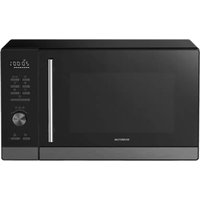
MN327CB - Microwave Oven INVENTUM - Free user manual and instructions
Find the device manual for free MN327CB INVENTUM in PDF.


| Product type | Microwave oven with grill and hot air |
| Brand | INVENTUM |
| Model | MN327CB |
| Microwave power | 1000 W (adjustable: 100, 800, 500, 300, 100 W) |
| Hot air temperature | 150 °C to 240 °C |
| Display | Digital |
| Clock | 24 hours |
| Cooking timer | Up to 95 minutes |
| Preset programs | 10 (A1 to A10) |
| Defrost | By weight (100-2000 g) or by time |
| Grill function | Yes (with combined modes) |
| Hot air function | Yes, with or without preheating |
| Rotisserie | Yes (with forks) |
| Child lock | Yes |
| Turntable | Yes |
| Included accessories | Turntable, ring, rotisserie with forks |
| Standby consumption | 0.8 W |
| Time to standby mode | 20 minutes |
| Warranty | 5 years (domestic use in the Netherlands) |
| Power supply | 230 V, 50 Hz (grounded plug) |
Frequently Asked Questions - MN327CB INVENTUM
User questions about MN327CB INVENTUM
0 question about this device. Answer the ones you know or ask your own.
Ask a new question about this device
Download the instructions for your Microwave Oven in PDF format for free! Find your manual MN327CB - INVENTUM and take your electronic device back in hand. On this page are published all the documents necessary for the use of your device. MN327CB by INVENTUM.
USER MANUAL MN327CB INVENTUM
natural_image
Black Invertum microwave oven with digital display and control panel (no visible text or symbols on main body)- safety instructions page 16
- product description page 20
- bringing into use page 21
- setting the clock page 21
- setting the cooking timer page 21
- cooking in the microwave oven page 22
- grilling or combination cooking page 22
- hot air with preheating mode page 23
- hot air without preheating page 23
-
cooking with multiple modes page 23
-
rotisserie page 23
- quick start page 24
- preprogrammed menus page 24
- defrosting page 25
- setting a favourite cooking programme page 25
- child lock page 25
- extras page 26
- cleaning & maintenance page 26
- problems & solutions page 26
General service and warranty conditions page 53
Deutsch
natural_image
Simple oval-shaped wire or cable with a small protrusion at the end (no text or symbols)8
natural_image
Close-up of a circular, textured object with faint marks, possibly a petri dish or container (no visible text or symbols)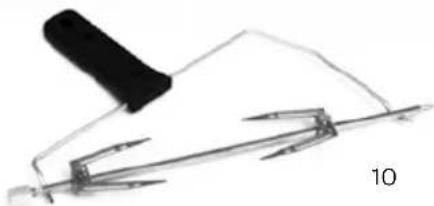
natural_image
Simple line drawing of a pen and ruler with a handle, no text or symbols present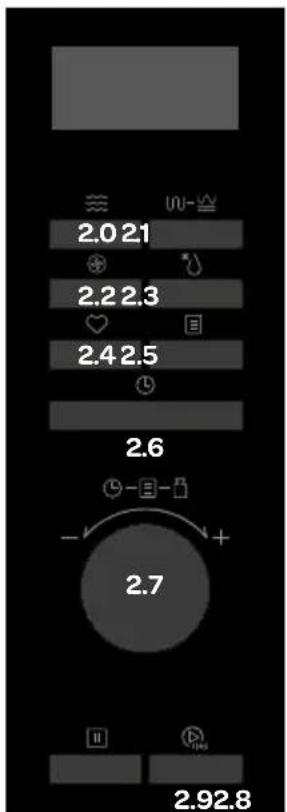
1 safety instructions
- Please read these instructions before operating the appliance and retain for future use.
- The appliance is intended solely for domestic use within the home. Do not use corrosive chemicals or vapors in this appliance. This microwave oven is especially designed to heat. It is not designed for industrial or laboratory use.
- Do not attempt to operate this oven with the door open since this can result in harmful exposure to microwave energy. It is important not to break or tamper with the safety interlocks.
- Do not place any object between the door of the microwave oven. Don't allow soil or cleaner residue to accumulate on the sealing surfaces.
- Warning: If the door or door seal are damaged, the microwave oven must not be operated until it has been repaired by a competent person.
- Warning: Liquids and other foods must not be heated in sealed containers since they are liable to explode.
- Warning: It is hazardous for anyone other than a competent person to carry out any service or repairs that involve the removal of the cover which gives protection against exposure to microwave oven energy.
- An electrical appliance is not a toy, and should therefore always be placed outside the reach of children. Children are not always able to understand potential risks. Teach children a responsible handling of electrical appliances.
- This appliance shall not be used by children from 0 to 8 years. This appliance can be used by children over the age of 8 and above if they are continuously supervised. This can be used by people with reduced physical, sensory or mental capabilities or lack of experience or knowledge, if they have been given supervision or instruction concerning use of the appliance in a safe way and understand the hazards involved. Keep the appliance and its cord out of reach of children aged less than 8 years.
- Cleaning and maintenance shall not be made by children.
• Children must not play with the appliance. - Only use utensils suitable for use in microwave ovens.
-
Never use the microwave oven when empty.
-
The microwave oven should be cleaned regularly and any food deposits should be removed.
- When heating food in plastic or paper containers, keep an eye on the microwave oven due to the possibility of ignition.
- When you see smoke, switch off and unplug the microwave oven. Keep the door closed in order to stifle any flames.
- Do not overcook the food.
- Do not use the microwave oven cavity for storage purposes. Do not store items, such as bread, cookies, etc. inside.
- Remove metal wire twisties and metal handles from paper or plastic containers/bags before placing them in the microwave oven.
- Install or locate this microwave oven only in accordance with the installation instructions.
- Eggs in the shell and whole hard-boiled eggs should not be heated in the microwave oven since they may burst, even after the microwave oven is shut off.
- Always carry out regular checks of the appliance and the power cord to ensure no damage is evident. Should there be any signs that the appliance or the power cord is damaged in the slightest degree, the entire appliance should be returned to the Customer Service Department. For your own safety, only use the accessories and spare parts from the manufacturer which are suitable for the appliance.
- Only use and store the appliance indoors.
- Do not use the microwave oven near water, in a wet basement/garage or near a swimming pool.
- Attention! Avoid touching hot surfaces, especially the outside of the appliance when the appliance is in use.
- Do not cover any vents of the microwave oven.
- Do not let the cord hang over the edge of the table or counter and keep it away from the heated surface.
- Failure to maintain the microwave oven clean could lead to deterioration of the surface that could adversely affect the life of the appliance and possible result in a hazardous situation.
- The contents of feeding bottles and baby food jars shall be stirred or shakes and the temperature checked before consumption, in order to avoid burns.
-
Attention: heating of beverages in the microwave oven can result in delayed eruptive boiling. Therefore always place a plastic or ceramic spoon in the cup. Be careful when handling the container.
-
The appliance is not intended to be operated by means of an external timer or separate remote-control system.
• Always use the appliance on a secure, dry, level surface. - Before plugging into a socket, check that the voltage in your home corresponds with the voltage printed on the bottom of the appliance.
- Never leave the appliance unattended when in use.
- For your own safety, only use the accessories and spare parts from the manufacturer which are suitable for the appliance.
- Never unplug it from the socket by pulling on the cable.
- Always ensure that your hands are dry before handling the plug, switch or power cord.
- Should you decide not to use the appliance anymore, make it inoperative by cutting the power cord after removing the plug from the socket. We also recommend making all potentially dangerous parts of the appliance harmless, particularly for children who might be tempted to play with it.
- Before moving the appliance, make sure it is switched of. Use both hands when moving the appliance.
- Never immerse any part of the main body, lid, power cord and plug in water or any other liquid to protect against electrical hazards.
- If the appliance is used for other purposes than intended, or is it not handled in accordance with the instruction manual, the full responsibility for any consequences will rest with the user. Any damages to the product or other things are not covered by the warranty.
- This appliance is intended to be used in household and similar applications such as:
- staff kitchen areas;
- in shops, offices and other working environments;
- farm houses;
- by clients in hotels, motels and other residential type environments;
- bed and breakfast type environments.
- The microwave oven is intended for heating food and beverages. Drying of food or clothing and heating of warming pads, slippers, sponges, damp cloth and similar may lead to risk of injury, ignition or fire.
- Never use a pressure cleaner or steam cleaner to clean the microwave oven.
- Be careful with the following materials if they can be used in the microwave oven:
- aluminium foil yes*
- paper yes**
- cling film yes
- aluminium tray no
- microwave dishes yes
- heatproof plastic yes
- unglazed pottery no
- metal cooking utensils no
- ovenproof glass and ceramics yes
- normal glass yes
- metallic twists no
- plate with metallic decoration no
- mercury thermometer no
- closed jar no***
- bottle with narrow neck no
- roasting bags yes
* By covering thinner parts of foods (such as chicken legs), you prevent them from cooking too quickly.
** Use undecorated kitchen paper to cover food and to absorb grease.
*** Remove the lid and make sure the jar is not heated too long. The jar may break.
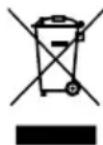
This product is labelled with this crossed out wheel bin symbol in accordance with European Directive 2012/19/EC to indicate that it must not be disposed of with your other household waste. Due to the presence of hazardous substances, mixtures or components, electrical and electronic devices that are not subject to selective sorting are potentially dangerous to the environment and human health. Please check your local city office or waste disposal service for the return and recycling of this product.
2
product description
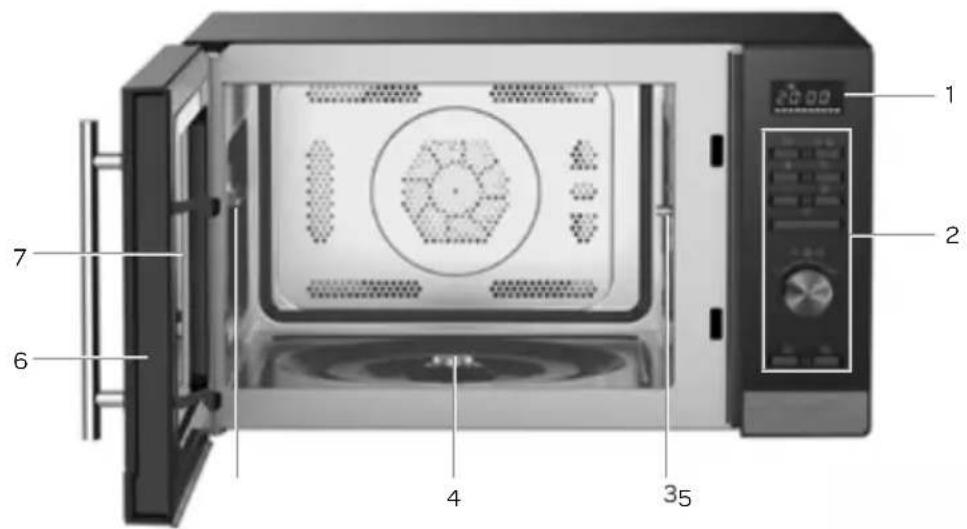
- Display
- Control panel
- Drive sleeve
- Lug for rotating platter
- Support for rotisserie
- Door with handle and safety hooks
- Window
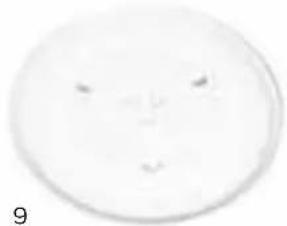
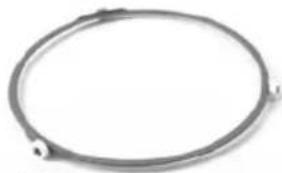
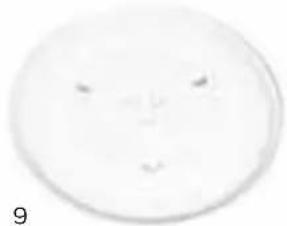
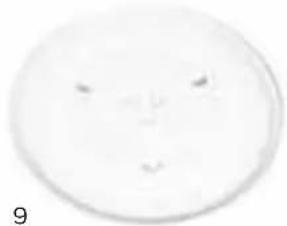
- Ring for rotating platform
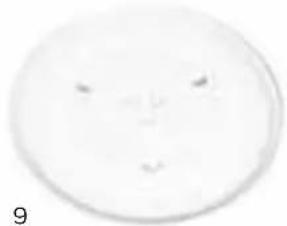
- Rotating platform
- Rotisserie with clamps
natural_image
Simple oval-shaped wire or cable with a small protrusion at the end (no text or symbols)8
natural_image
Close-up of a circular, textured object with faint marks, possibly a petri dish or container (no visible text or symbols)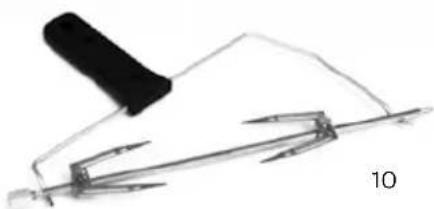
natural_image
Simple line drawing of a tool with a handle and pen, no text or symbols present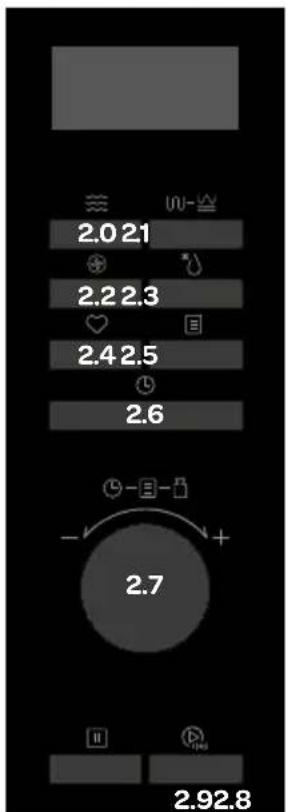
2.0 Button for microwave mode
2.1 Button for grill and combination
2.2 Button for hot air mode
2.3 Button for defrost mode
2.4 Favourites button
2.5 Menu button
2.6 Button for the clock/timer
2.7 Setting button or selecting from a menu
2.8 STOP button and reset button
2.9 START/+ 30 SEC button
3 using the appliance for the first time
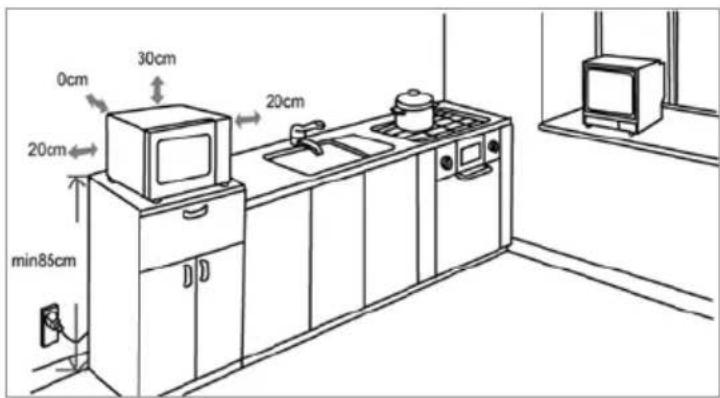
Before using the appliance for the first time, proceed as follows: carefully unpack the microwave and remove all packaging material. Keep the packaging (plastic bags and cardboard) out of reach of children. After unpacking the appliance, carefully check it for external damage that may have occurred during transport. Place the appliance on a sturdy, flat surface and make sure there is enough space all around for sufficient ventilation.
The minimum installation height is 85 cm. The back side of the appliance must be placed against a wall. There should be a free space of 30 cm on the top side and a minimum of 20 cm between the microwave and any adjacent walls. Do not remove the adjustable feet of the microwave. Do not cover the ventilation holes.
Use of the microwave could cause interference of your television or radio signal. Therefore, do not place the microwave near such equipment. Do not place the microwave near heat sources such as heating or cooker.
Clean the microwave and accessories with a slightly damp cloth. The machine is now ready for use. It is possible that the microwave smells "new" when used for the first time, this is entirely normal, will do no harm and the smell will disappear automatically.
Check that the voltage corresponds with what is stated on the information plate and insert the plug in the socket.
Attention! The white plate on the right side in the microwave ensures the distribution of microwaves within the microwave. This should never be removed.
4 setting the clock
When inserting the plug of the combi-microwave oven in the socket, 0:00 appears on the display and you will hear a beep sound.
- Press the button twice ^L . The display shows 00:00.
• Turn 📋 to set the correct hour - 0-23 (24 hour clock). - Press the button once more, the minutes start to flash.
• Turn 📋 to set the correct minutes - 0-59. - Press the button once more to confirm the correct time.
Extra:
- If the ⏻ button is not pressed within 5 minutes while setting the clock, the display will return to the previous entry.
- If the clock is not set, it will not function. The display will remain on 0:00.
- Repeat steps 1 to 5 to reset the clock.
5 setting the kitchen timer
- Press the button once. The display shows 00:00.
• Turn to set the number of minutes. The maximum time is 95 minutes. - Press the button to confirm the setting. The timer starts counting down.
- When the set time has expired, five beeps sound and the display returns to the current time.
6 preparing food in the microwave
- Press the button and P100 is shown on the display. Repeatedly press the button to change the wattage or use the rotary knob - P100-P80-P50-P30-P10.
- Press the ▶ button to confirm the wattage setting.
- Turn 📋 to set the correct preparation time. The preparation time can be set from 0:05 to 95:00.
- Press the ▶ button to confirm the preparation time and start the microwave.
| Microwave power Application | |
| P10 = 100 Watts Softening | butter or ice cream |
| P30 = 300 Watts Soup, | mash pot or defrosting |
| P50 = 500 Watts Mash pot, | fish |
| P80 = 800 Watts Rice, | fish, chicken, minced meat |
| P100 = 1000 Watts Heating, | milk, boiling water, vegetables, heating drinks |
The steps for setting the time are as follows:
0-1 minute : 5 seconds
1-5 minutes : 10 seconds
5-10 minutes : 30 seconds
10-30 minutes : 1 minute
30-95 minutes : 5 minutes
7 grilling or combined preparation
- Press the ⏚– Sw button and G-1 is shown on the display. Repeatedly press the ⏚– Sw button to change the programme or do this by means of the rotary knob – G-1, C-1, C-2, C-3 of C-4.
- Press the ▶ button to confirm the program setting.
- Turn 📋 to set the correct preparation time. The preparation time can be set from 0:05 to 95:00.
- Press the ▶ button once more to start the programme.
Extra: If the grill is set to 10 minutes, for example, two beeps sound halfway the grilling time to indicate that the dish must be turned over.
Close the door after turning the dish and press the 📋 button to continue grilling the dish.
| Grill and combination modes | |||
| Display | Microwave ≈≈ | Grill ∪ | Hot air ⚙️ |
| G-1 | ● | ||
| C-1 | ● | ● | |
| C-2 | ● | ● | |
| C-3 | ● | ● | |
| C-4 | ● | ● | ● |
8 hot air with preheating mode
Preparing food with hot air is the same as with a traditional oven. The microwave is not used. Before placing the dish in the oven, we recommend preheating the oven.
- Press the button and 150^ is shown on the display.
- Repeatedly press the button to change the hot air temperature or use the rotary knob.

The temperature can be set from 150 to 240^ .
- Press the button to confirm the temperature.
- Press ▶ once more to start preheating. When the set temperature has been reached, two beeps sound to remind you to place the dish in the oven. The set temperature flashes.
- Place the dish in the oven, close the door and set the required time with the rotary knob 📄. The maximum is 95 minutes.
- Press the ▶ button to start baking.
Extra:
- No baking time can be set until the set preheating temperature has been reached. Once the oven has been preheated, open the door to set the baking time.
- If no time has been set after five minutes, the oven will stop the preheating process. The beep signal sounds five times and the display goes back to the clock.
9 hot air without preheating
- Press the button and 150^ is shown on the display.
- Repeatedly press the button to change the temperature or use the rotary knob.
The temperature can be set from 150 to 240°C.
- Press the button to confirm the temperature.
- Use the rotary knob to set the required baking time. The maximum is 95 minutes.
- Press the button to start baking.
10 preparing food with several modes
With the combi-microwave oven, a maximum of two modes can be used at the same time. If one of the modes is defrost, it will have to be set first. One beep will sound after each step and before the following step starts
Example: if you want to defrost food for 5 minutes and then heat it with 80% microwave power for 7 minutes, you must observe the following steps:
- Press the * button twice and d-2 is shown on the display.
- Use to the rotary knob to set the defrost time to 5 minutes.
- Press once and use the rotary knob to set the microwave power to 80% - P80.
- Press the button to confirm the setting.
- Use to the rotary knob to set the heating time to 7 minutes.
- Press the button to start the cooking process.
11 rotisserie
Remove the clamp on the end of the rotisserie. Skewer the meat or poultry off the rounded end of the rotisserie. Make sure that the meat is in the middle of the rotisserie and prick the clamps firmly into the meat. You can slide the clamps over the rotisserie by loosening and tightening the screws.
First place the straight end on the drive sleeve right in the oven.
Then place the rounded end of the rotisserie on the support left.
natural_image
Simple line drawing of a tool with a handle and base, no text or symbols presentCaution: use oven gloves to remove the food from the hot oven.
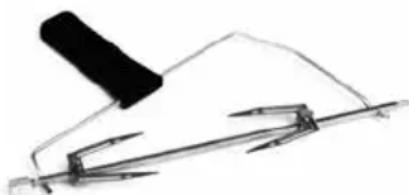
Take the rotisserie out of the oven using the grip supplied and place it on a plate.
Carefully remove the clamp on the rounded end of the rotisserie. Note: the rotisserie and the clamps are hot. Slide the meat or poultry off the rotisserie.
Please note: just like the rotating platter, the roasting spit mechanism turns continuously while the appliance is active. Install the roasting spit and select the correct programme.
Warning: never use the rotisserie only in microwave oven mode.
12 quick start
- Press the 📋 button to heat up quickly at full power (1000W) for 30 seconds. When the same button is pressed repeatedly, the time is extended by 30 seconds each time. The maximum is 95 minutes.
or
- Turn the 📄 button to the left to directly set the required heating time and press the 📋 button to use the microwave at full power (1000W).
- When using the microwave, grill, defrosting or combination modes, press the button to extend the preparation time by 30 seconds. When the same button is pressed repeatedly, the time is extended by 30 seconds each time.
Extra:
- This mode does not work during defrosting by weight or while using a pre-programmed menu.
13 preprogrammed menus
- Turn the button to the right to select the correct menu and A1, A2, A3..... A10 is shown on the display.
- Press the button to confirm the correct menu.
- Use the rotary knob to select the correct weight from the menu and the display shows g.
- Press the button to start the menu.
Extra:
- Do not immediately place the cake in the oven when selecting the A-9 - cake menu. The oven must first be preheated to 180 °C. After a number of minutes, two beeps will sound to indicate that the cake can be placed in the oven. After the cake has been placed in the oven, press the 📋 button once more to start baking the cake. The time will count down and the cake will be baked beautifully.
- When preparing chicken with menu A-10, the beep signal will sound twice. This is normal. In order to get a good result during grilling, you must turn over the chicken. Close the door and press the button once more to continue with the grilling process. If you do not take any action, the oven will continue to grill normally.
Overview of preprogrammed menus
| Menu ☐ | Weight (g) Display Used position | ||
| A1PIZZA | 200 g 200 | C-4300 g 300 | |
| 400 g 400 | |||
| A2POTATOES | 1 (approx. 230 g) 1 | P1002 (approx. 460 g) 2 | |
| 3 (approx. 690 g) 3 | |||
| A3MEAT | 150 g 150 | C-2 | |
| 300 g 300 | |||
| 450 g | 450 | ||
| 600 g 600 | |||
| A4FISH | 150 g 150 | P80 | |
| 250 g | 250 | ||
| 350 g | 350 | ||
| 450 g | 450 | ||
| 650 g | 650 | ||
| A5VEGETABLES | 150 g 150 | P100 | |
| 350 g | 350 | ||
| 500 g 500 | |||
| A6DRINKS | 1 (240g) | 1 | P100 |
| 2 (480g) 2 | |||
| 3 (720g) | 3 | ||
| A7PASTA | 50 g (with 450 ml of water) 50 | P80100 g (with 800 ml of water) 100 | |
| 150 g (with 1200 ml of water) 150 | |||
| A8POPCORN | 50 g 50 | P100 | |
| 100 g 100 | |||
| A9 CAKE 475 g 475 HOT AIR WITH PREHEATING AT 180°C | |||
| A10CHICKEN | 500 g 500 | C-4 | |
| 750 g 750 | |||
| 1000 g 1000 | |||
| 1200 g 1200 | |||
14 defrosting
- Press the * button once to defrost on the basis of weight. The display shows d-1.
- Use the rotary knob to select the weight of the food to be defrosted. The weight must be between 100 and 2000 grammes.
-
Press the ▶ button to start defrosting.
-
Press the * button twice to defrost on the basis of time. The display shows d-2.
- Use the rotary knob to set the required defrosting time. The maximum time is 95 minutes.
- Press the ▶ button to start defrosting.
15 setting a favourite cooking programme
With this combi-microwave oven a favourite cooking programme can be set by setting a mode, power and time. For example, favourite cooking programme: microwave oven, 800 Watts, 3 minutes.
First set the cooking programme then press the ♥ button to save the favourite cooking programme.
Example:
- Press the button and P100 is shown on the display. Repeatedly press the button to change the wattage or use the rotary knob - P100-P80-P50-P30-P10.
- Press the ▶ button to confirm the wattage setting.
- Turn 📋 to set the correct preparation time. The preparation time can be set from 0:05 to 95:00.
- Press the button to set the cooking programme.
When a favourite cooking programme has been set press the ♥ button to start the favourite cooking programme.
Extra:
The favourite cooking programme cannot be set in combination with pre-heating mode.
16 child lock
The combi-microwave oven is provided with a child-proof lock. It is used to block all operating controls and prevents your child from accidentally switching on the appliance.
Activating the child lock:
To put the combi-microwave child lock on, press the button for 3 seconds. A long beep sounds and is shown on the display. The display shows the current time if it has been set or 0:00.
Cancelling the child lock:
To cancel the child lock, you must press the ☐ button for 3 seconds. A long beep sounds. The ☐ character disappears from the display.
17 extras
- When using the combi-microwave oven you can press the button to show the current time for 3 seconds.
- When using one of the combi-microwave modes, you can see the selected mode by pressing the accompanying mode button ≈, ∩-∞, ⚙. The power or temperature is shown in the display for 2-3 seconds.
- The beep signal sounds once each time you turn the knob during a new setting.
- (D) must be pressed again, when the door of the combi-microwave oven has been opened during preparation.
- When a programme has been set, but is not started within five minutes, the setting will disappear and the display will show the current time (if set).
- The beep signal only sounds when you properly press the buttons. If you do not press the buttons properly, the signal will not sound and the mode will not be activated.
- The beep signal sounds five times to indicate that the preparation time has ended.
18 cleaning and maintenance
Just before cleaning your combi-microwave oven, switch off the appliance, remove the plug from the wall socket and allow the appliance to cool down fully.
Interior
Clean the interior of the appliance after each use. Use a damp cloth. For thorough cleaning, use warm water with washing-up liquid or a stainless steel cleaner and thoroughly wipe the interior dry with a cloth.
Accessories
Loose accessories such as the rotating platform, the ring for the rotating platform and the grille must be cleaned with warm water and washing-up liquid. These accessories may also be cleaned in the dishwasher. Properly dry everything before using it again.
Exterior
Clean the exterior of the appliance with a damp cloth or sponge. If necessary, you can clean the exterior of the appliance by means of a mild washing-up liquid. Also properly clean the door and door rubber.
19 problems & solutions
First check the following before submitting the combi-microwave for repair.
| Problem Solution | |
| The combi-microwave oven does not work Is the plug inserted in the socket?Is the fuse in the meter cupboard defective? | |
| The combi-microwave does not heat up Is the door properly closed? Open the door and close it again properly. | |
| The rotating platform makes noise Clean the ring for the rotating platter and the bottom of the combi-microwave oven. | |
| The food is not properly defrosted Were power and time set correctly? Did you stir the food during defrosting or turn it over? | |
Energy consumption
Product information about energy consumption and the maximum time until energy saving mode is reached.
Standby mode 0.8 W
The maximum time that the microwave oven needs to automatically switch over to the
associated energy-saving position or state. 20 minutes
natural_image
Simple oval-shaped wire or cable with a small protrusion at the end (no text or symbols)8
natural_image
Close-up of a circular, textured object with faint marks, possibly a petri dish or container (no visible text or symbols)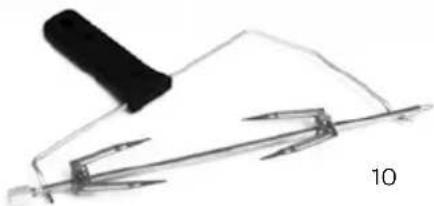
natural_image
Simple line drawing of a pen and ruler with a handle, no text or symbols present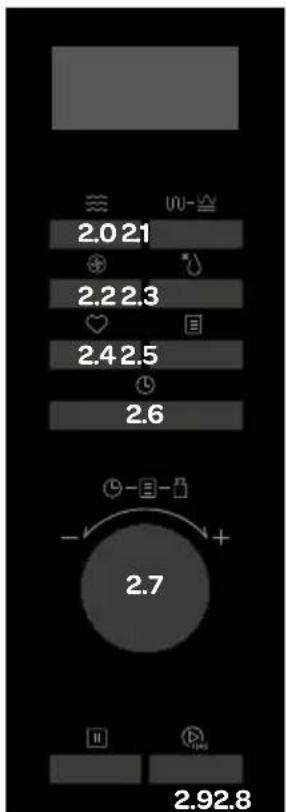
natural_image
Simple line drawing of a tool with a handle and pen, no text or symbols presentnatural_image
Simple oval-shaped wire or cable with a small protrusion at the end (no text or symbols)8
natural_image
Close-up of a circular, textured object with faint marks, possibly a petri dish or container (no visible text or symbols)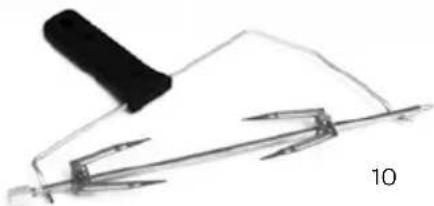
natural_image
Simple line drawing of a pen or tool with a black handle and a separate ruler, no text or symbols present.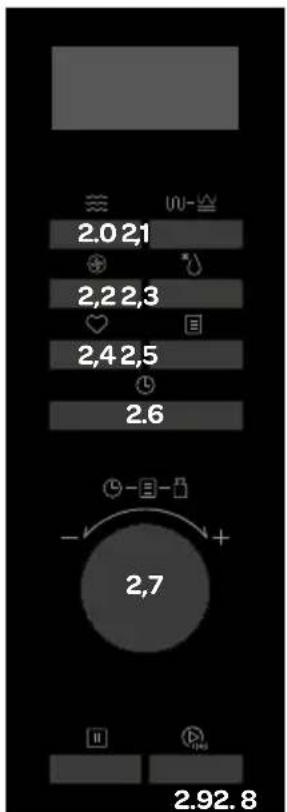
natural_image
Simple line drawing of a tool or plunger with a handle, no text or symbols presentGeneral terms and conditions of service and warranty
5-year Inventum warranty!
- Customers enjoy a 5-year full manufacturer's warranty on all Inventum products.
- Within this period, a defective product or part, which makes normal functioning of the product or part impossible, will always be repaired free of charge or, if repair is not possible and/or does not provide a solution, replaced (by the same or equivalent product). The assessment of this lies with Inventum.
- In order to make a claim under the 5-year Inventum warranty you must, within two months after discovering the fault or defect, either return the product to the shop where you bought it, or contact the Inventum customer service department by using the form at www.inventum.eu/service.
- The warranty period starts from the date stated on the product's original sales receipt.
- To invoke the warranty, you must always send a copy of the original proof of purchase with the service request and present the original proof of purchase to the service technician.
- The 5-year warranty applies only to normal domestic use of Inventum products within the Netherlands.
Warranty exclusions
- The 5-year Inventum guarantee does not apply in case of: normal wear and tear, consumables, improper use, insufficient or incorrect maintenance, incorrect and/or inexpert assembly and installation of the appliance, repairs by unauthorised third parties, business or commercial use, missing serial number, damage caused by an external cause. This enumeration is not exhaustive.
- B-choice products and products that have been built-in in a showroom are not covered by the 5-year Inventum warranty. All optical damage such as dents, scratches and slight traces of use are excluded from any warranty.
Reporting malfunctions on Inventum products
- Faults or defects on Inventum products can be reported by using the service request form on the website www.inventum.eu/service or through the seller of the product.
- A copy of the original proof of purchase must be included with the request.
- Inventum's service department determines whether the product will be repaired or replaced, based on the request and the sales receipt.
Important to know
- Products sent without prior notification will not be accepted. Further to the notification you will be informed by Inventum whether a warranty applies and whether you must return the product.
- The replacement or repair of a defective product, or a part thereof, does not lead to an extension of the original warranty period.
- Products eligible for replacement or repair must be emptied and clean.
For a detailed explanation of the warranty conditions and items excluded from them, please visit Inventum's website www.inventum.eu/algemene-voorwaarden
These general warranty and service conditions apply to Inventum brand products purchased after 27 April 2022 and intended for use within the Netherlands.
For Inventum products used outside the Netherlands, but within a EU Member State, the warranty rules of that country apply. Inventum provides warranty and service by a white goods technician only in the Netherlands.
As a consumer, you are entitled by law to a properly working product. Does the product break down sooner than you might expect? This means that the product is not in conformity. In that case, the law offers you, the buyer, with a number of legal remedies for your protection. This legal protection is not affected by the above commercial warranty given by Inventum on Inventum products used within the Netherlands.
Modifications and errors reserved
facebook.com/inventum1908
pinterest.com/inventum1908
youtube.com/inventum1908
instagram.com/inventum1908




- Deutsch
- safety instructions
- 2
- product description
- using the appliance for the first time
- setting the clock
- Extra:
- setting the kitchen timer
- preparing food in the microwave
- grilling or combined preparation
- hot air with preheating mode
- hot air without preheating
- preparing food with several modes
- rotisserie
- Caution: use oven gloves to remove the food from the hot oven.
- quick start
- preprogrammed menus
- defrosting
- setting a favourite cooking programme
- Example:
- child lock
- Activating the child lock:
- Cancelling the child lock:
- extras
- cleaning and maintenance
- Interior
- Accessories
- Exterior
- problems & solutions
- Energy consumption
- General terms and conditions of service and warranty
- 5-year Inventum warranty!
- Warranty exclusions
- Reporting malfunctions on Inventum products
- Important to know
Brand : INVENTUM
Model : MN327CB
Category : Microwave Oven