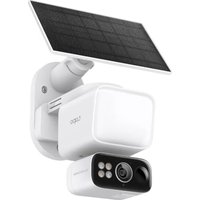
USER MANUAL Tapo C615F TP-LINK
Visit www.tapo.com/support
for technical support, user guides, warranty, and more information
© 2025 TP-Link
Quick Start Guide
Solar-Powered Security Camera
7100001757 REV1.1.0
CONTENTS
1 / English
Get the Tapo app from the App Store or Google Play, and log in.
2 SET UP CAMERA
Press and hold the power button on your camera for about 3 seconds to turn it on.
Tap the ⊕ button in the app and select your camera model. Follow app instructions to complete setup.
Português Brasil
1 DOWNLOAD APP
Download the Tapo app from the App Store or Google Play, and log in.
2 CONFIGURATION
2 SETUP
Press and hold the power button on the camera for about 3 seconds to turn it on.
Tap the ⭕ button in the app and select the camera model. Follow the app instructions to complete the setup.
1 DOWNLOAD THE APP
2 SETUP
2 SETTINGS
2 SETUP
2 CAMERA SETTINGS
2 SET UP THE CAMERA
2 CAMERA CONFIGURATION
2 SET UP THE CAMERA
2 CAMERA SETUP
To turn on the camera, press and hold the power button for about 3 seconds.
Press the ⊕ button in the app and select your camera model. Follow the app instructions and complete the setup.
Slovak
1 DOWNLOAD THE APP
2 SET UP THE CAMERA
2 CAMERA SETUP
2 SET UP THE CAMERA
2 SET UP THE CAMERA
2 SET UP THE CAMERA
2 SET UP THE CAMERA
TP-Link hereby declares that the battery camera is in compliance with the essential requirements and other relevant provisions of directives 2014/53/EU, 2009/125/EC, 2011/65/EU and (EU)2015/863.
The original EU Declaration of Conformity may be found at https://www.tapo.com/support/ce/.
TP-Link hereby declares that the battery camera is in compliance with the essential requirements and other relevant provisions of the Radio Equipment Regulations 2017.
The original UK Declaration of Conformity may be found at https://www.tapo.com/support/ukca/.
For Solar Panel:
TP-Link hereby declares that the solar panel is in compliance with the essential requirements and other relevant provisions of directives 2014/30/EU, 2014/35/EU, 2011/65/EU and (EU)2015/863.
The original EU declaration of conformity may be found at https://www.tapo.com/support/ce/.
TP-Link hereby declares that the solar panel is in compliance with the essential requirements and other relevant provisions of the Electromagnetic Compatibility Regulations 2016 and Electrical Equipment (Safety) Regulations 2016.
The original UK declaration of conformity may be found at https://www.tapo.com/support/ukca/.
For Camera:
- Do not attempt to disassemble, repair, or modify the device. If you need service, please contact us.
- Do not use damaged charger or USB cable to charge the device.
- Do not use any other chargers than those recommended.
- Do not use the device where wireless devices are not allowed.
- Keep the device away from fire or hot environments. DO NOT immerse in water or any other liquid.
- Adapter shall be easily accessible.
- This equipment can be powered only by equipment that complies with Power Source Class 2 (PS2) or Limited Power Source (LPS) as defined in the standard IEC 62368-1.
- Operating Temperature: -20°C to 45°C
- The light source of this luminaire is not replaceable; when the light source reaches its end of life, the whole luminaire shall be replaced. (Only for floodlight cameras)
- Weight of the floodlight camera (solar panel excluded): 680 g (23.99 oz). (Only for floodlight cameras)
- Maximum projected area of the floodlight: 14739.6 mm² (22.85 sq in). (Only for floodlight cameras)
- This product contains a light source of energy efficiency class E. (Only for floodlight cameras)
Non-replaceable light source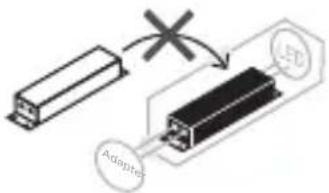
Non-replaceable control gear
CAUTION!
Avoid replacing a battery with an incorrect type that can defeat a safeguard. Avoid disposing of a battery into fire or a hot oven, or mechanically crushing or cutting a battery, which can result in an explosion. Do not leave a battery in an extremely high temperature surrounding environment, which can result in an explosion or the leakage of flammable liquid or gas. Do not subject a battery to extremely low air pressure, which may result in an explosion or the leakage of flammable liquid or gas.
For Solar Panel
- Keep the device away from fire or hot environments. DO NOT immerse in water or any other liquid.
- Do not attempt to disassemble, repair, or modify the device. If you need service, please contact us.
- Avoid scratching and hitting the surface of the solar panel during use.
- Avoid contact with highly corrosive substances during use.
- The suitable temperature for Tapo Solar Panel and accessories is -20°C to 45°C. The working temperature range for battery charging should be maintained at 0°C to 45°C.
- Make sure the USB connector is fully plugged into your Tapo device.
- Make sure you follow the user manual to install the solar panel correctly. Make sure the waterproof gasket and other accessories can protect the connectors on your Tapo device. The mounting height should not be higher than 2 meters. Please read and follow the above safety information when operating the device. We cannot guarantee that no accidents or damage will occur due to improper use of the device. Please use this product with care and operate at your own risk.
Non-replaceable control equipment
CAUTION!
LED non-replaceable. Control unit non-replaceable.
Caution
Non-replaceable control device
Caution!
Non-replaceable controller
CAUTION!
Non-replaceable control drive
WARNING!
Non-replaceable light source
Non-replaceable control device
Warning!