
GZB88096 - Power tool accessory Vevor - Free user manual and instructions
Find the device manual for free GZB88096 Vevor in PDF.
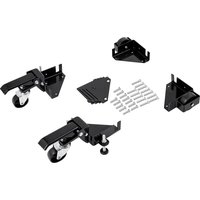


| Product type | Mobile base for power tool |
| Brand | Vevor |
| Model | GZB88096 |
| Material | Q235 Steel |
| Minimum dimensions (L x W) | 9.5 x 9.5 inches (24.1 x 24.1 cm) |
| Maximum load capacity | 400 lb (181 kg) |
| Intended use | Moving heavy power tools |
| Leveling system | Adjustable levelers for stability |
| Locking system | Floor and foot locks |
| Required safety | Wear safety glasses and gloves |
| Usage precautions | Do not overload, do not use on stairs |
| Stability test | Recommended in high and low position before use |
| Installation | Power tools required |
| Maintenance | Avoid prolonged exposure to sunlight |
| Pre-use inspection | Check for wear, cracks, and accessories |
| Technical support | www.vevor.com/support |
| Manufacturer | Shanghaimuxinmuyeyouxiangongsi |
| Importer (United States) | Sanven Technology Ltd. |
| Importer (Australia) | SIHAO PTY LTD |
| CE Representative | E-CrossStu GmbH |
| UK Representative | YH CONSULTING LIMITED |
| Manual available in | FR, DE, EN, IT, NL, PL, SV |
Frequently Asked Questions - GZB88096 Vevor
User questions about GZB88096 Vevor
0 question about this device. Answer the ones you know or ask your own.
Ask a new question about this device
Download the instructions for your Power tool accessory in PDF format for free! Find your manual GZB88096 - Vevor and take your electronic device back in hand. On this page are published all the documents necessary for the use of your device. GZB88096 by Vevor.
USER MANUAL GZB88096 Vevor
Technical Support and E-Warranty Certificate
www.vevor.com/support
MOBILE BASE
MODEL: GZB88096
We continue to be committed to provide you with tools at competitive prices. "Save Half", "Half Price" or any other similar expressions used by us only represent savings you might benefit from buying certain tools with us compared to top brands and does not necessarily mean to cover all categories of tools offered. We kindly remind you to verify carefully when placing an order with us that you are actually saving half in comparison with the top major brands.
MODEL: GZB88096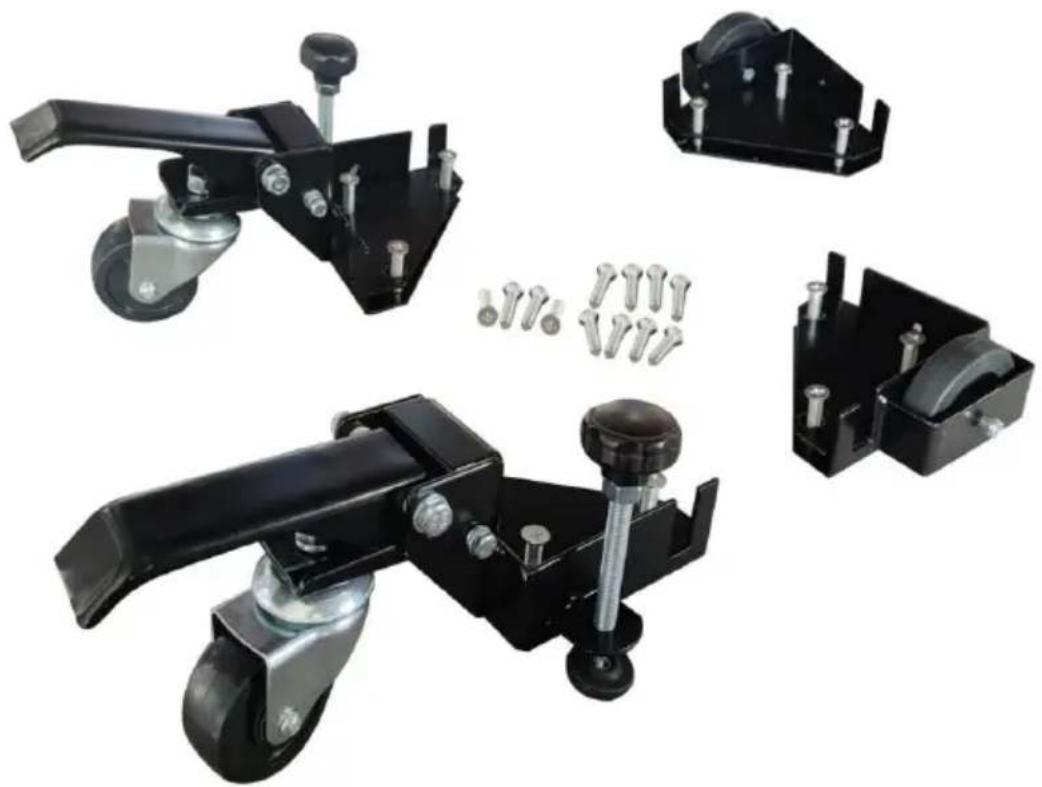
Photo for reference
NEED HELP? CONTACT US!
Have product questions? Need technical support? Please feel free to contact us:
Technical Support and E-Warranty Certificate www.vevor.com/support
This is the original instruction. Please read all manual instructions carefully before operating. VEVOR reserves the right to interpret the user manual. The appearance of the product shall be subject to the product you received. Please forgive us that we won't inform you of any technology or software updates on our product.
SAFETY INSTRUCTIONS

WARNING: Read and understand this manual before assembling, installing, operating, or servicing this product.
Failure to follow these warnings and instructions can cause
death, personal injury or damage to valuable property.
- While assembling and using this product, keep the work area clean and well-lighted, and keep spectators and children out of the work area.
- Wear ANSI-approved safety goggles and heavy-duty work gloves during use.

Warning: Be sure to wear eye protectors when using this product.

Warning: Be sure to wear gloves when using this product.
- Please do not put it near flammable materials.
- It is forbidden to carry people under any condition.
- This product cannot be used to go up or down stairs.
- Overload is strictly prohibited.
- Don't move too fast when passing pothole areas.
- Electric tools are required for installation. Please pay attention to safe operation.
SAVE THESE INSTRUCTIONS
MODEL AND PARAMETERS
Material: Q235
Product size: Minimum 9.5x9.5 inches
Load capacity: 400 lbs max.
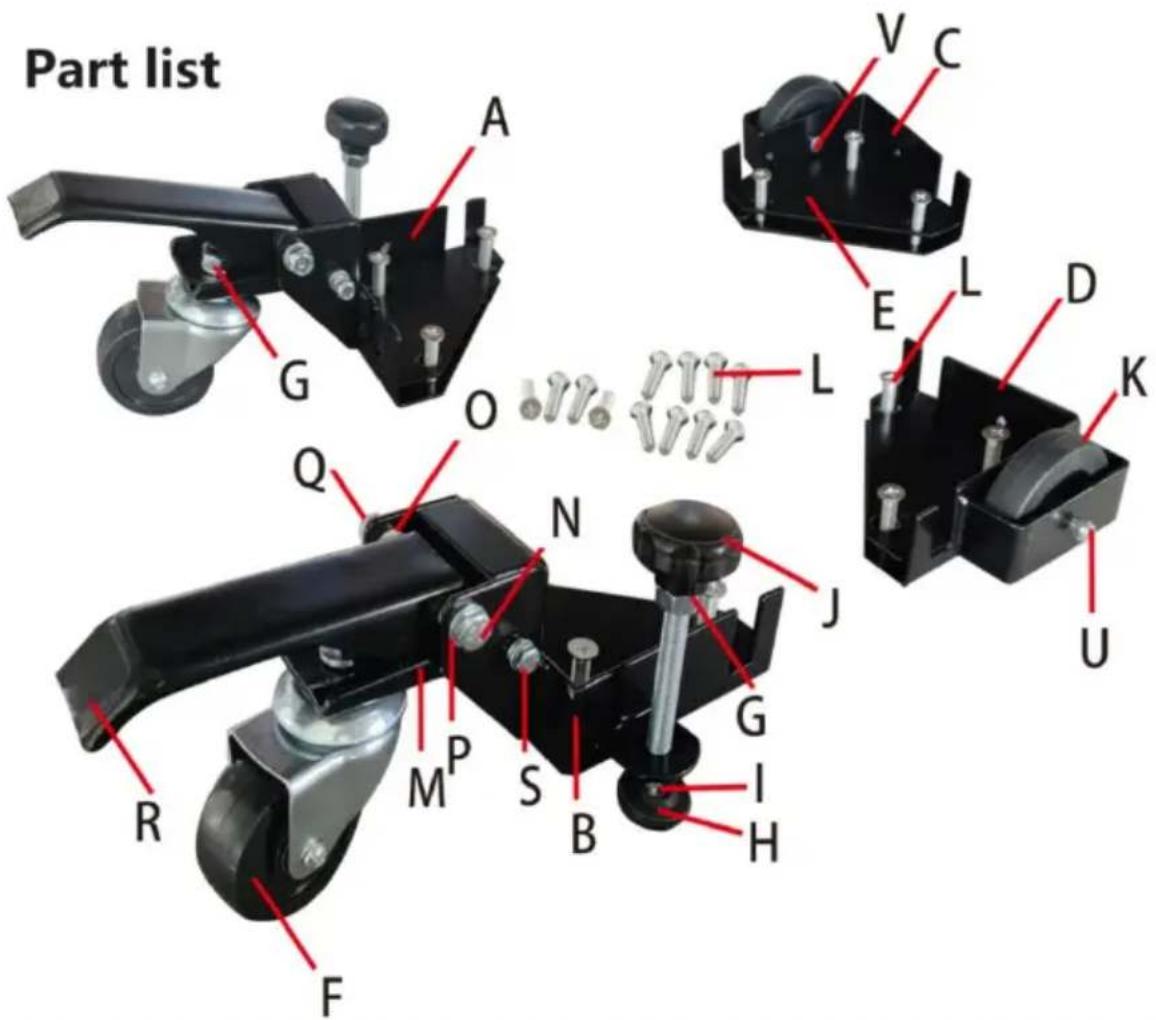
| Parts List | |||||
| S/N | Description | Qty | S/N | Description | Qty |
| A | CORNER, L.H. W/CASTER BRACKET | 1 | L | M8-30 MACHINE SCREW | 12 |
| B | CORNER, R.H. W/CASTER BRACKET | 1 | L | M8-40 MACHINE SCREW | 12 |
| C | CORNER, L.H. W/WHEEL HOUSING | 1 | M | SWIVEL PLATE | 2 |
| D | CORNER, R.H. W/WHEEL HOUSING | 1 | N | 8x75 Carriage Bolt | 2 |
| E | BOLT PLATE | 4 | O | NYLON Foot LEVER BUSHING | 4 |
| F | 3" SWIVEL CASTER WHEEL | 2 | P | M8 LOCK WASHER | 2 |
| G | M10 NUTS, FLANGED/SERRATED | 4 | Q | M-8 NUT SELF-LOCKING | 2 |
| ROUND FEET | 2 | FOOT LEVER | 2 | ||
| M10 JAM NUT | 2 | 6 x 75 CARRIAGE BOLT | 2 | ||
| LONG POLE HANDLE | 2 | M6 NYLON WHEELBUSHING | 4 | ||
| 3" WHEEL | 2 | M6 NUT, SELF-LOCKING | 4 | ||
| 6x 47-10 MACHINESCREW, AXLE | 2 | ||||
Safety Instructions for Mobile Bases
- Be careful when moving to limit any finger pinch points.
- Place base on a level surface and adjust levelers before placing the machine in position. This should keep the machine from rocking, while testing it for stability. 3.3 Test the stability in both the up (on the casters) and the down positions.
Exercise caution when testing the stability of top-heavy machines (drill presses, band saws, etc.).
- Unplug any power tool before moving or repositioning your tool.
- Always test your set-up for stability and safety after repositioning.
- Care should be taken when planning the orientation of the machine onto the Universal Mobile Base. Transferring the weight off of the levelers to the casters may result in the machine tilting 1/2" toward the fixed wheels. When positioning top-heavy tools such as a drill press or bandsaw, take advantage of the center of gravity, and position so that it will remain stable while on casters.
- Never use your machine without engaging the floor locks and foot locks. Lower the machine onto the non-skid levelers before operating.
- When moving, always push the base, not the machine.
ASSEMBLY Instructions
- Unpack and identify all components and hardware. Make sure there are no missing parts and that there is no shipping damage.
Note: Read instructions thoroughly before proceeding.
- Assemble the front corners:
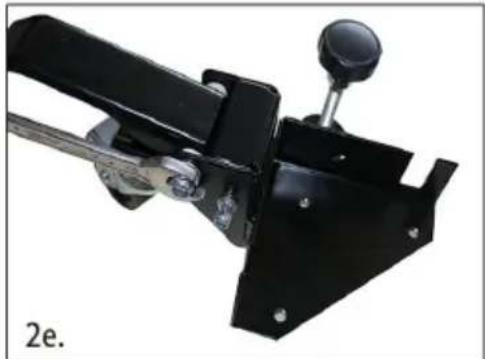
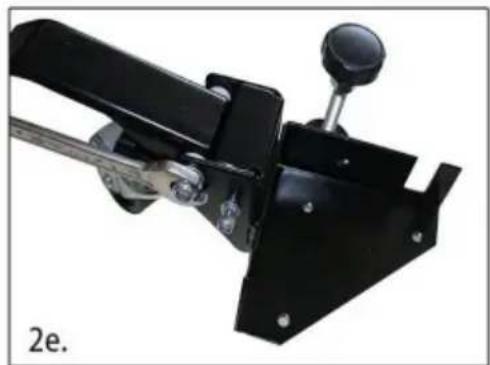
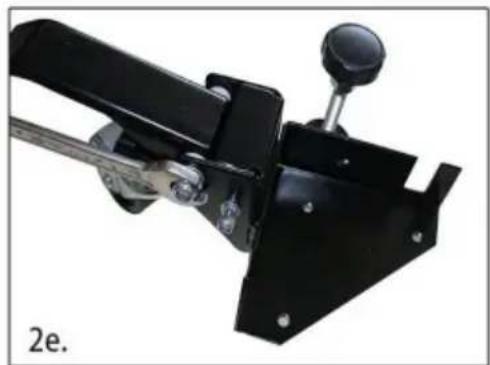
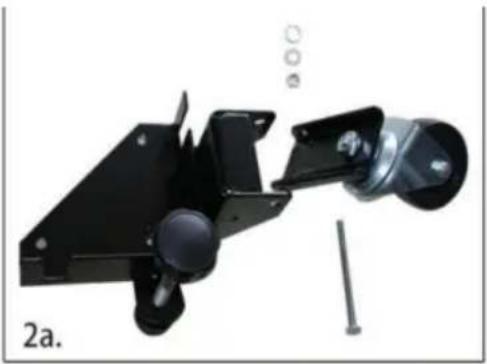
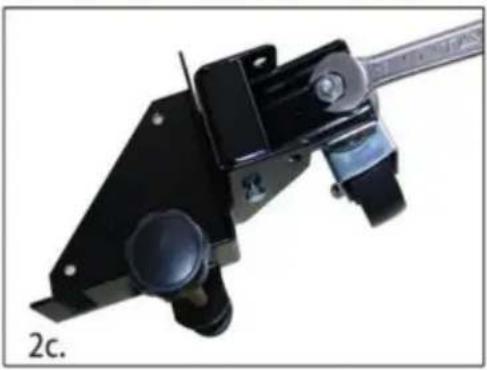
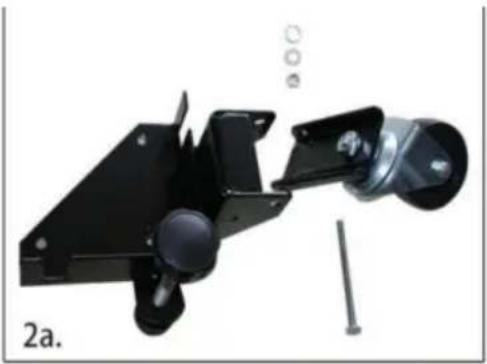
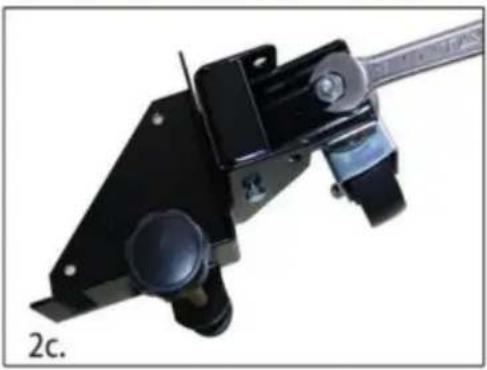
a. Thread the rubber glide foot into the bracket, then thread the jam nut onto the top. b. Attach the wheel to the swivel plate. c. Install the swivel plate using the M8-75 carriage bolt, lock washer, and nut. Tighten. d. Install the foot lever using the M8-75 carriage bolt, nylon washers, lock washer, and nut.
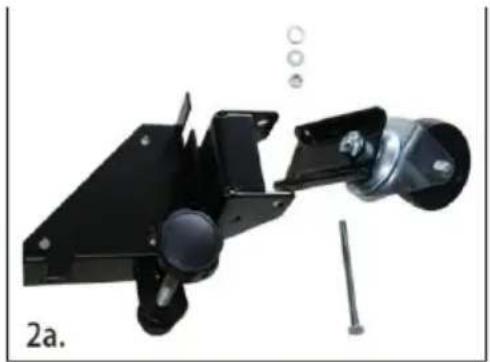
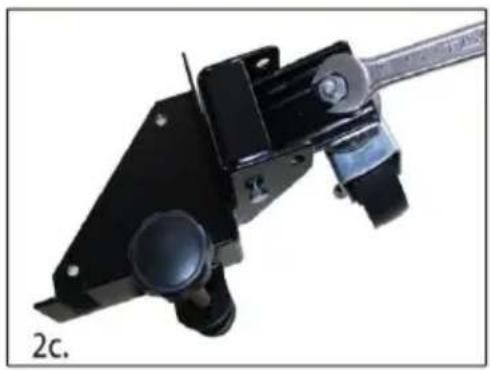
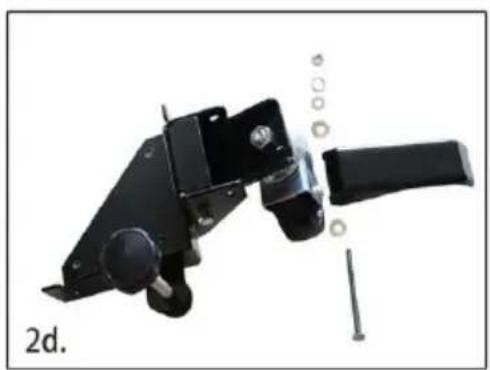
2.
e. Repeat this process for the other swivel bracket.
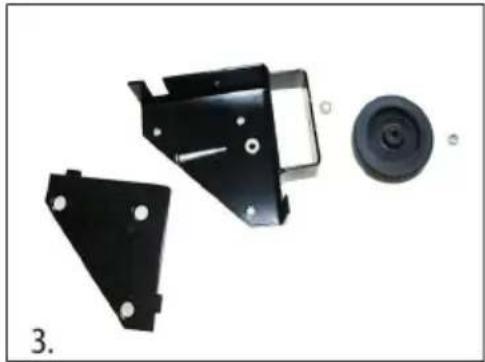
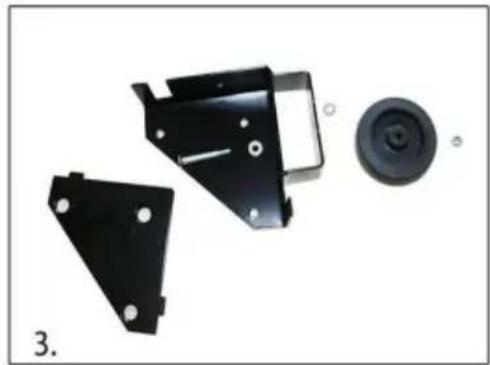
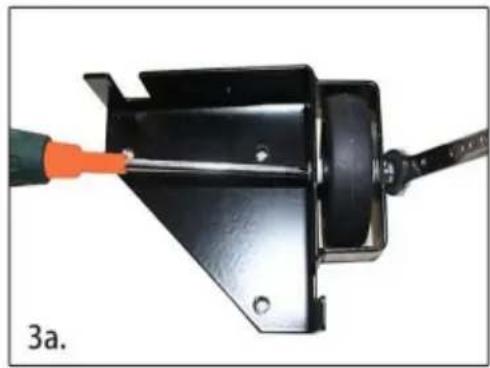
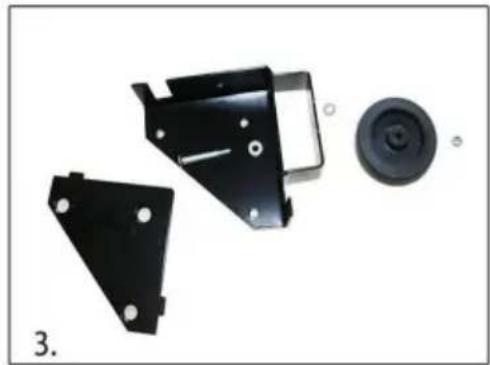
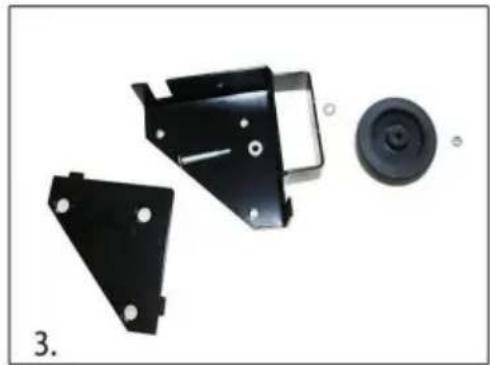
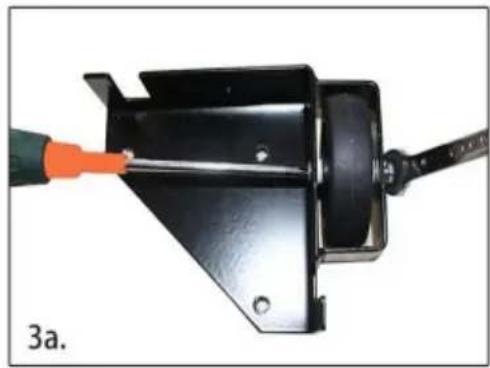
- Assemble the back corners. To the right are the components you will need: a. Install the back wheel using the M6×47-10 axle bolt, nylon wheel bushing, and M6 lock nut.
- Carefully measure the footprint of your machine (or whatever you are mobilizing) and add about 1" to the dimension. (1" allows clearance for the fasteners).
- Review the assembly examples shown below to help you determine the fixed wheel, caster, and leveler placement. As these are examples only, you must determine what best suits your particular machine's requirements for stability.
Tighten all hardware securely.
Assembly Examples
Be sure to follow Safety and Assembly Instructions. Keep in mind the actual operation of your machine and the effect it has on overall stability.
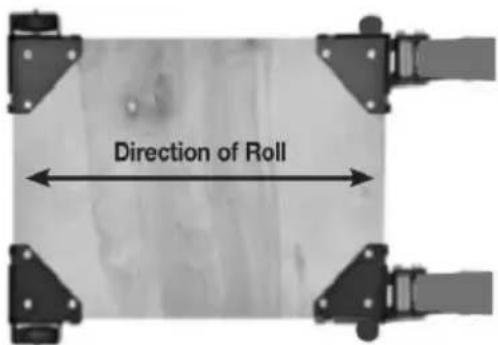
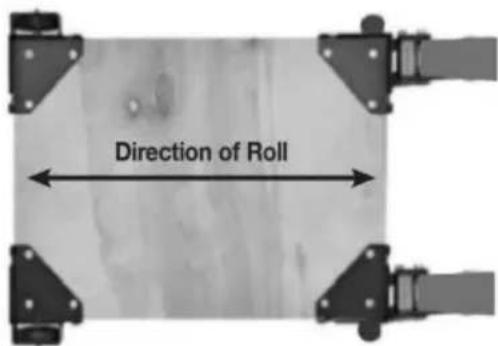
A long, narrow base, such as on a jointer, would benefit from this arrangement. Most machines may be arranged to the convenience of the user.
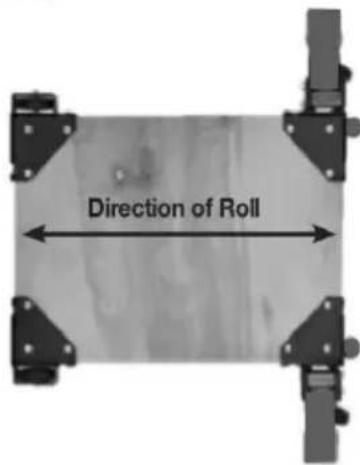
A short, narrow base, such as found on a drill press or bandsaw, may benefit from this arrangement. Due to swivel rotation, the base may sit out of level. Rotate the swivel wheel away from the base to correct.
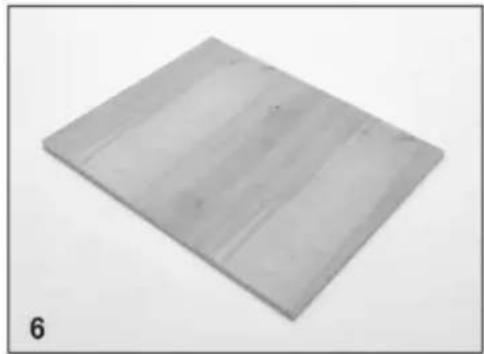
- Cut the plywood you are using down to size.
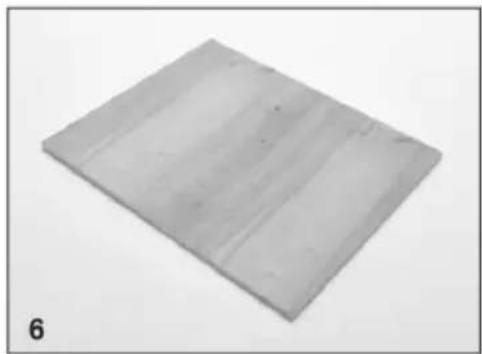
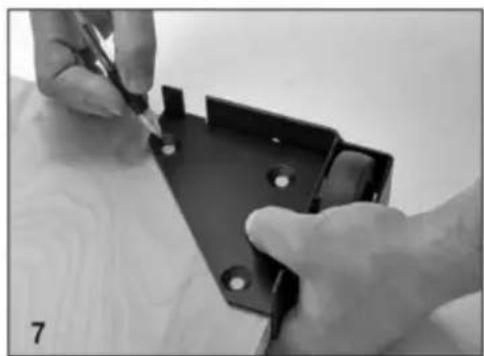
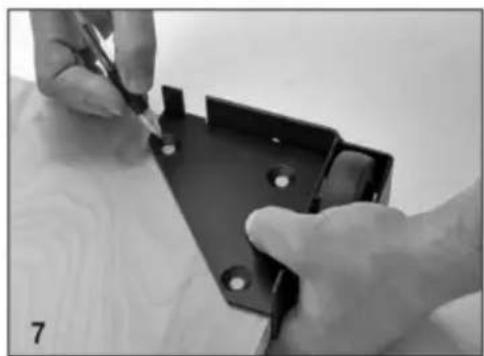
- You will now need to attach the corners to the plywood. Begin by marking the holes using the corner plates as your template.
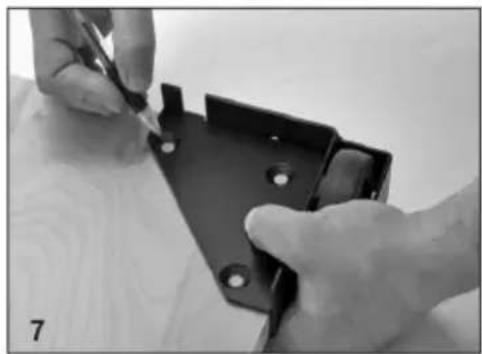
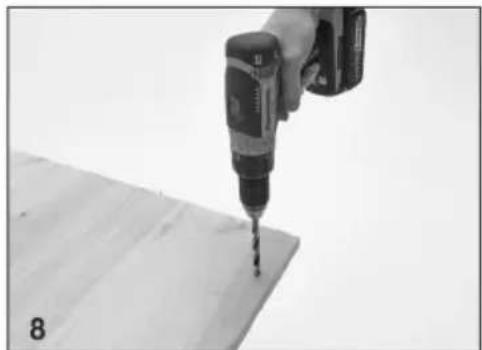
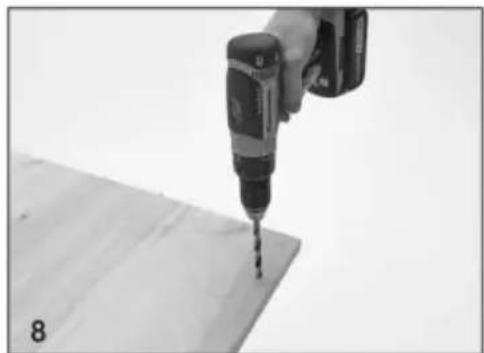
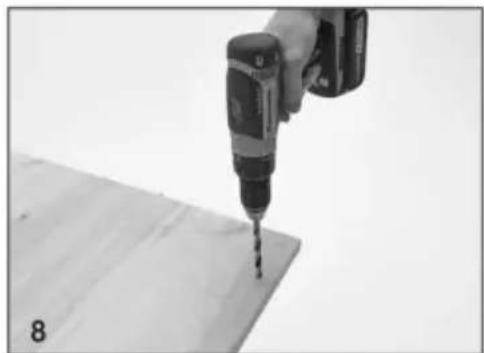
- Drill the holes using a 1/2" drill bit. It is a good idea to check that the holes are lined up to the plate before drilling each hole.
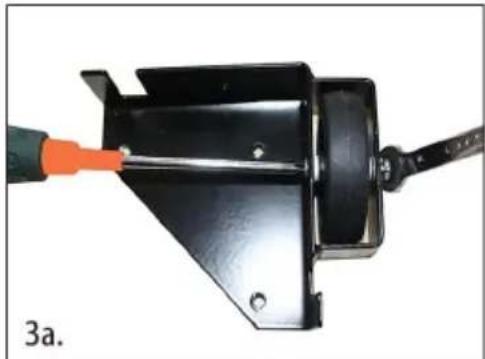
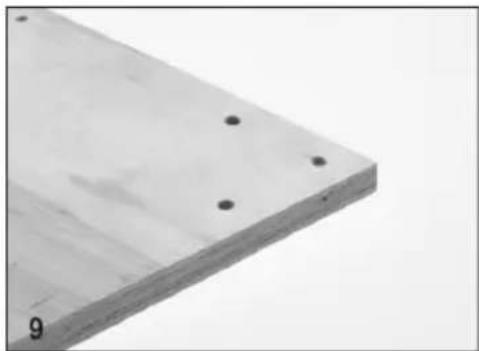
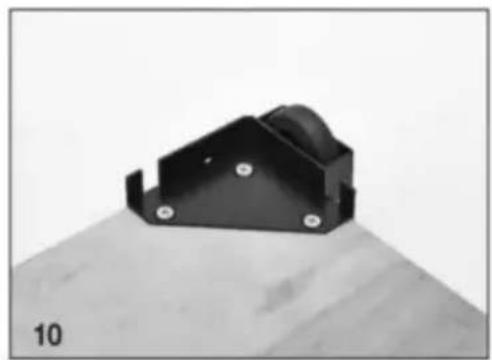
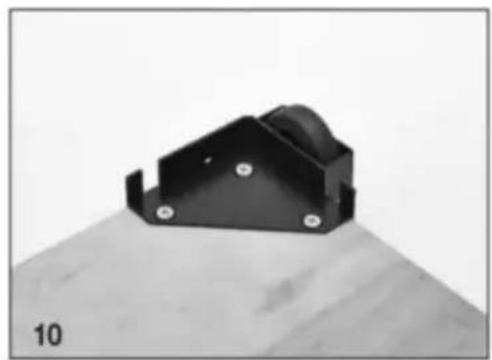
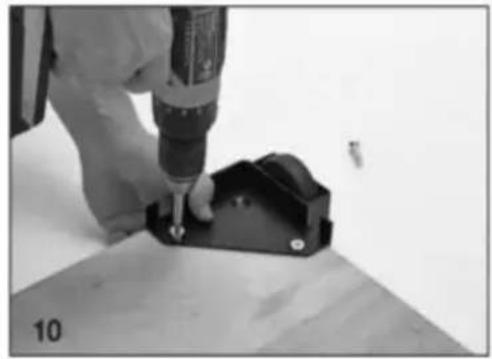
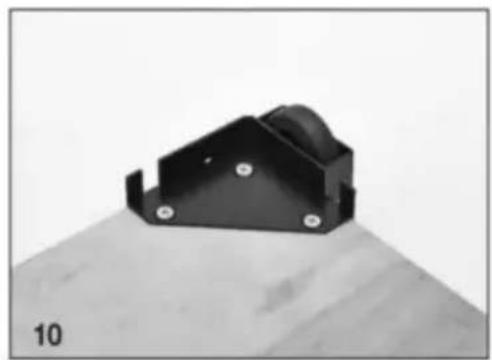
- Each corner should now look like this.
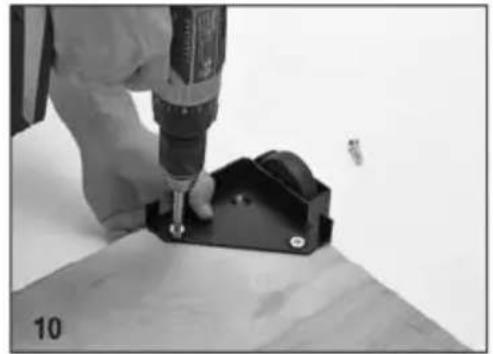
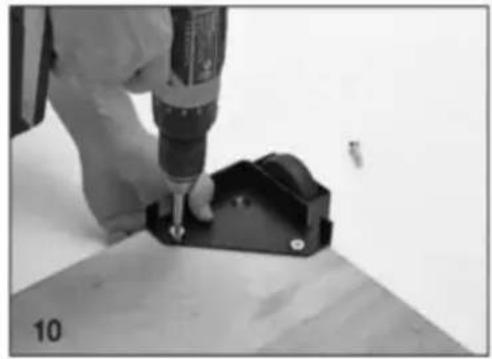
- Attach the corners in the correct positions using the Phillips screwdriver. Do not tighten the bolts until all three machine screws are partially threaded into the bottom plate.
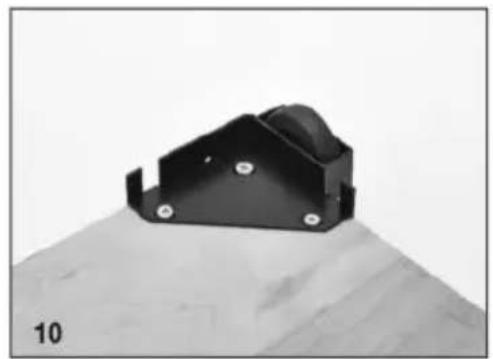
- Congratulations! You have successfully completed assembly of the GZB88096 mobile base.
MAINTENANCE
- Avoid prolonged exposure to the sun to prevent aging.
- Inspect accessories for wear, cracks, and other damage before use. Replace defective accessories immediately.
Manufacturer: Shanghai Muxin Muye Youxian Gongsi
Address: Shuangcheng Road 803, Nong 11, Hao 1602A-1609 Shi, Baoshan District, Shanghai 200000 CN.
Imported to AUS: SIHAO PTY LTD, 1 ROKEVA STREET, EASTWOOD NSW 2122 Australia
Imported to USA: Sanven Technology Ltd., Suite 250, 9166 Anaheim Place, Rancho Cucamonga, CA 91730
| EC | REP |
E-CrossStu GmbH
Mainzer Landstr. 69, 60329 Frankfurt am Main
| UK | REP |
YH CONSULTING LIMITED.
C/O YH Consulting Limited, Office 147, Centurion House
London Road, Staines-upon-Thames, Surrey, TW18 4
VEVOR®
TOUGH TOOLS, HALF PRICE
Technical Support and E-Warranty Certificate www.vevor.com/support
VEVOR®
TOUGH TOOLS, HALF PRICE
| Liste des pièces | |||||
| Description du numéro de série | Qté | S/N | Description | Qté | |
| COIN, GAUCHE AVEC ROULETTE SUPPORT | 1 | VIS | MÉCANIQUE M8-30 12 | ||
| COIN DROIT AVEC ROULETTES SUPPORT | 1 | VIS | MÉCANIQUE M8-40 12 | ||
| COIN, LH AVEC ROUE LOGEMENT | 1 | PLAQUE PIVOTANTE | 2 | ||
| COIN DROIT AVEC ROUE LOGEMENT | 1 | boulon | de carrosserie 8x75 | 2 | |
| PLAQUE DE BOULON | 4 | LEVIER À PIED EN NYLON BAGUE | 4 | ||
| ROULETTES PIVOTANTES DE 3" | RONDELLE DE BLOCAGE 2 M8 | 2 | |||
| ÉCROUS M10, BRIDE/DENTELÉ | 4 | ECROU M-8 AUTOBLOQUANT | 2 | ||
| PIEDS RONDS | 2 | LEVIER AU PIED | 2 | |
| CONTRE-ÉCROU M10 | BOULON | DE CHARIOT 2 6 x 75 | 2 | |
| POIGNÉE LONGUE | 2 | ROUE EN NYLON M6BAGUE | 4 | |
| ROUE 3" | 2 | ÉCROU M6 AUTOBLOQUANT | 4 | |
| 6x 47-10 MACHINESVIS D'AXE | 2 | |||
- Unpack and identify all components and hardware. Make sure there are no missing parts and that there is no shipping damage.
Note: Read instructions thoroughly before proceeding.
- Assemble the front corners:
a. Thread the rubber glide foot into the bracket, then thread the jam nut onto the top. b. Attach the wheel to the swivel plate. c. Install the swivel plate using the M8-75 carriage bolt, lock washer, and nut. Tighten. d. Install the foot lever using the M8-75 carriage bolt, nylon washers, lock washer, and nut.
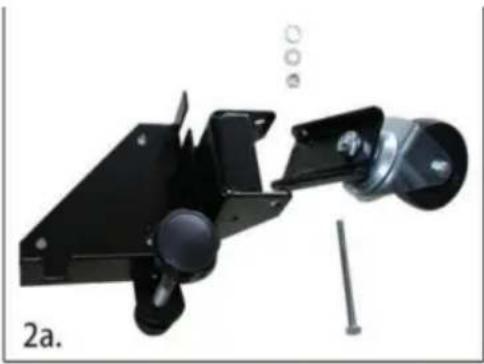
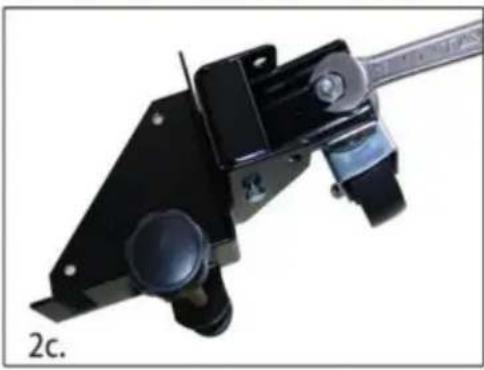
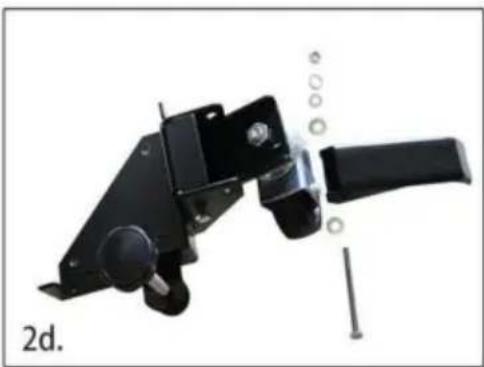
2.
e. Repeat this process for the other swivel bracket.
- Assemble the back corners. To the right are the components you will need:
a. Install the back wheel using the M6×47-10 axle bolt, nylon wheel bushing, and M6 lock nut.
- Carefully measure the footprint of your machine (or whatever you are mobilizing) and add about 1" to the dimension. (1" allows clearance for the fasteners).
- Review the assembly examples shown below to help you determine the fixed wheel, caster, and leveler placement. As these are examples only, you must determine what best suits your particular machine's requirements for stability.
Tighten all hardware securely.
Assembly Examples
Be sure to follow Safety and Assembly Instructions. Keep in mind the actual operation of your machine and the effect it has on overall stability.
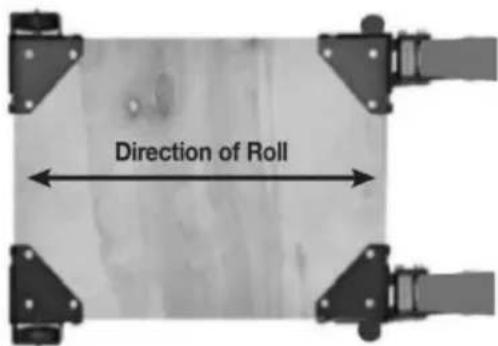
A long, narrow base, such as on a jointer, would benefit from this arrangement. Most machines may be arranged to the convenience of the user.
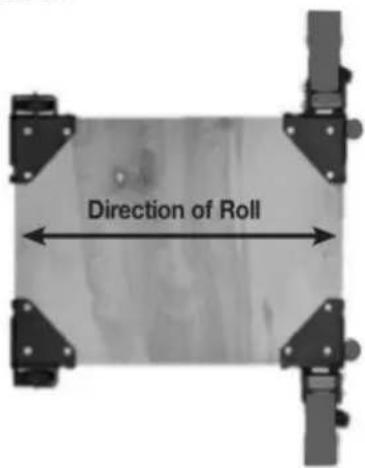
A short, narrow base, such as found on a drill press or bandsaw, may benefit from this arrangement. Due to swivel rotation, base may sit out of level. Rotate swivel wheel away from base to correct.
- Cut the plywood you are using down to size.
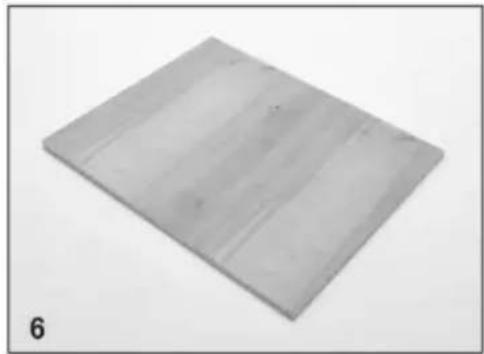
- You will now need to attach the corners to the plywood, begin by marking the holes using the corner plates as your template.
- Drill the holes using a 1/2" drill bit, it is a good idea to check that the holes are lined up to the plate before drilling each hole.
- Each corner should now look like this.
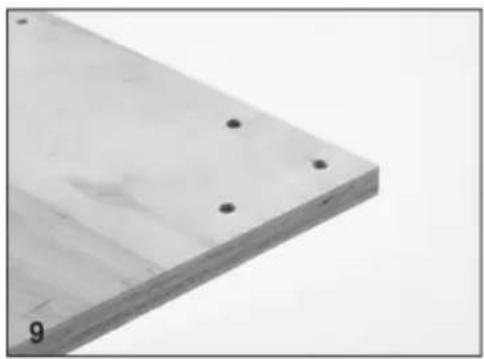
- Attach the corners in the correct positions using the Philips screwdriver, do not tighten the bolts until all three machine screws are partially threaded into the bottom plate.
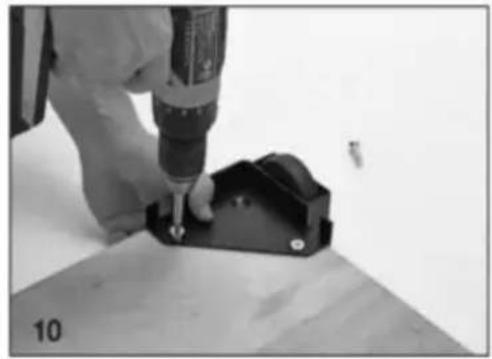
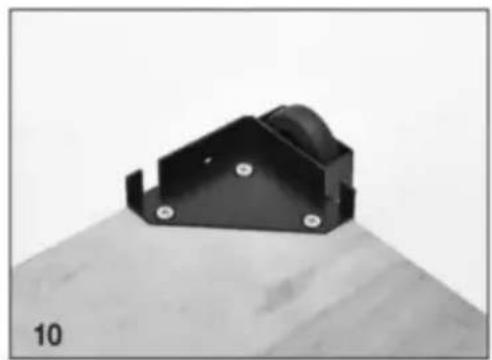
- Congratulations! You have successfully completed assembly of the GZB88096 mobile base.
Maintenance
C/O YH Consulting Limited Bureau 147, Centurion House, London Road, Staines-upon-Thames, Surrey, TW18 4AX
VEVOR®
TOUGH TOOLS, HALF PRICE
MOBILE BASE
MODEL: GZB88096
Photo for reference
- Unpack and identify all components and hardware. Make sure there are no missing parts and that there is no shipping damage.
Note: Read instructions thoroughly before proceeding.
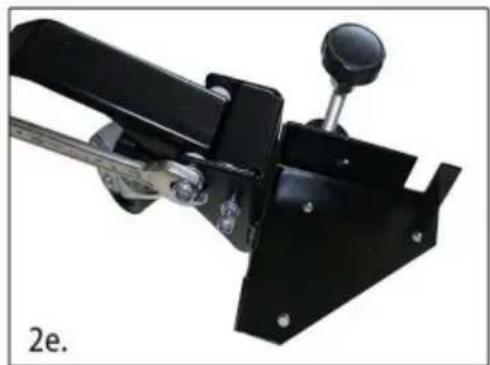
- Assemble the front corners:
a. Thread the rubber glide foot into the bracket, then thread the jam nut onto the top. b. Attach the wheel to the swivel plate. c. Install the swivel plate using the M8-75 carriage bolt, lock washer, and nut. Tighten. d. Install the foot lever using the M8-75 carriage bolt, nylon washers, lock washer, and nut.
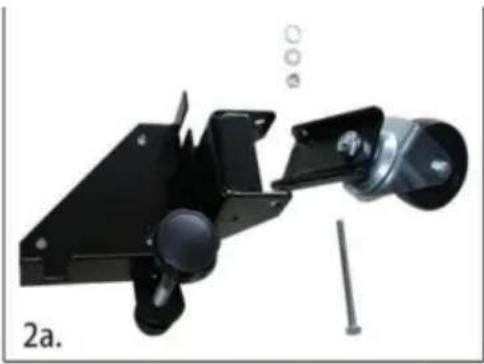
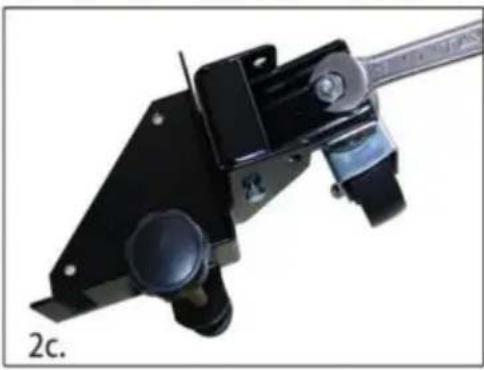
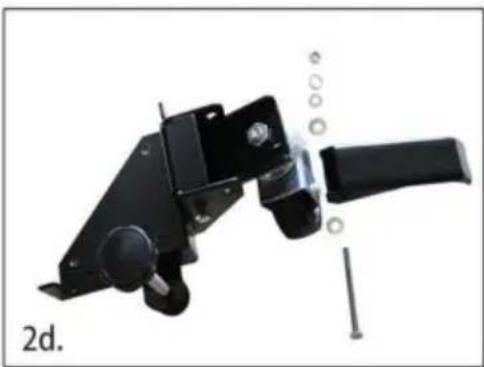
2.
e. Repeat this process for the other swivel bracket.
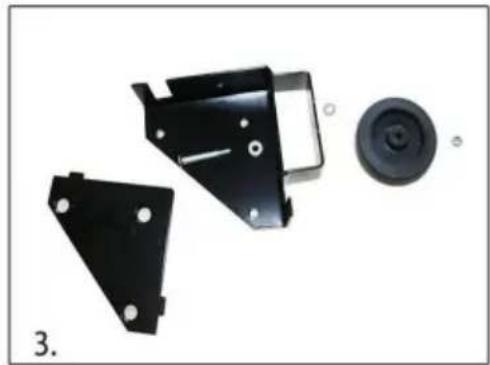
- Assemble the back corners. To the right are the components you will need:
a. Install the back wheel using the M6×47-10 axle bolt, nylon wheel bushing, and M6 lock nut.
- Carefully measure the footprint of your machine (or whatever you are mobilizing) and add about 1" to the dimension. (1" allows clearance for the fasteners).
- Review the assembly examples shown below to help you determine the fixed wheel, caster, and leveler placement. As these are examples only, you must determine what best suits your particular machine's requirements for stability.
Tighten all hardware securely.
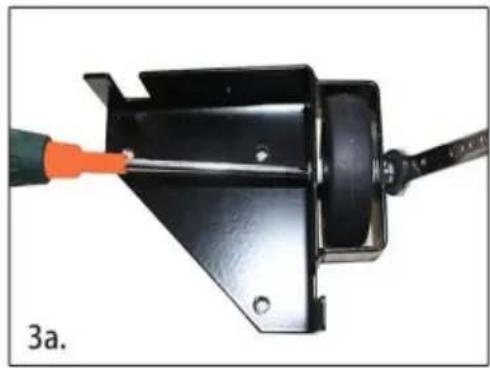
Assembly Examples
Be sure to follow Safety and Assembly Instructions. Keep in mind the actual operation of your machine and the effect it has on overall stability.
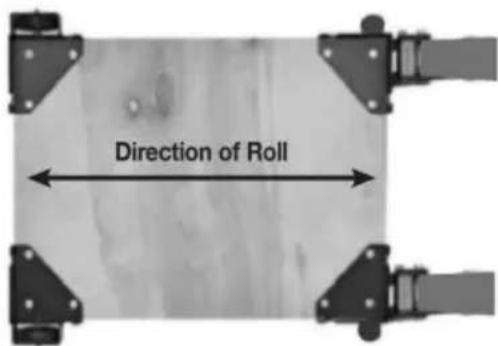
A long, narrow base, such as on a jointer, would benefit from this arrangement. Most machines may be arranged to the convenience of the user.
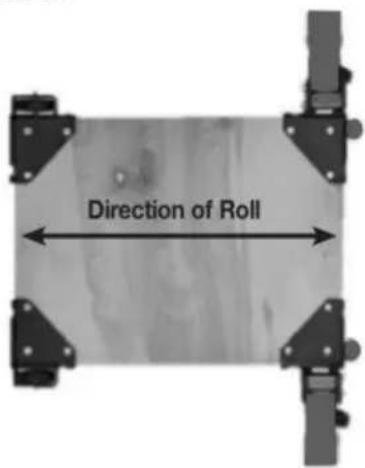
A short, narrow base, such as found on a drill press or bandsaw, may benefit from this arrangement. Due to swivel rotation, base may sit out of level. Rotate swivel wheel away from base to correct.
- Cut the plywood you are using down to size.
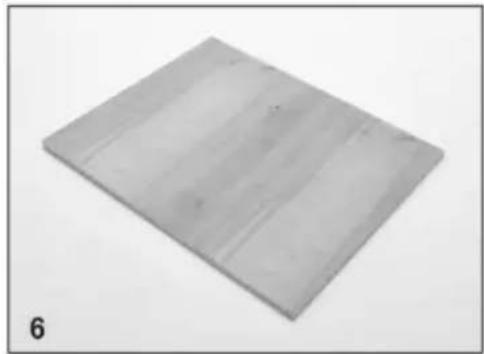
- You will now need to attach the corners to the plywood, begin by marking the holes using the corner plates as your template.
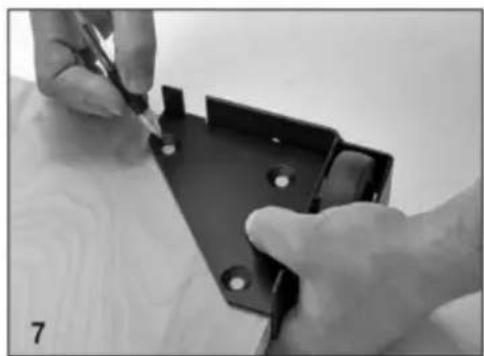
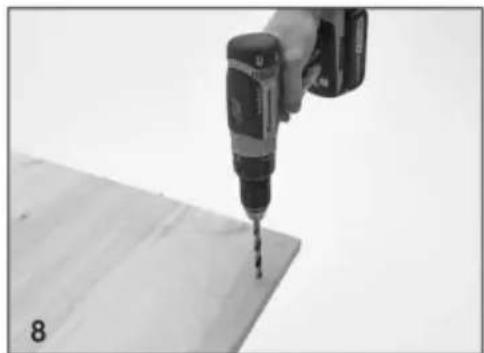
- Drill the holes using a 1/2" drill bit, it is a good idea to check that the holes are lined up to the plate before drilling each hole.
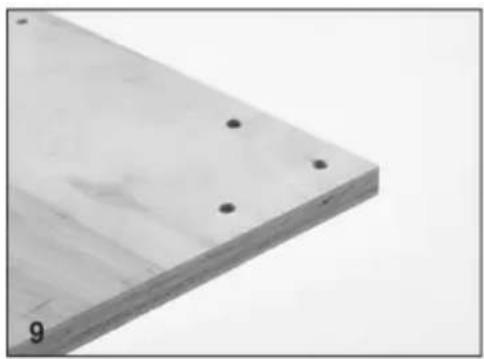
- Each corner should now look like this.
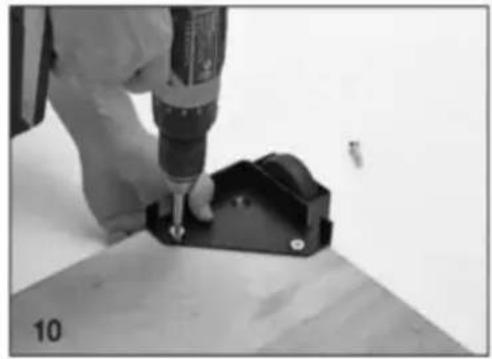
- Attach the corners in the correct positions using the Philips screwdriver, do not tighten the bolts until all three machine screws are partially threaded into the bottom plate.
- Congratulations! You have successfully completed assembly of the GZB88096 mobile base.
VEVOR®
TOUGH TOOLS, HALF PRICE
electronics www.vevor.com/support
MOBILE BASE
MODEL: GZB88096
| Elenco delle parti | |||||
| Descrizione S/N | Qtà | S/N | Descrizione | Qtà | |
| ÿ | ANGOLO SINISTRO CON RUOTA STAFFA | 1 y | VITE | A MACCHINA M8-30 12 | |
| ÿ | ANGOLO DESTRO CON RUOTA STAFFA | 1 y | VITE | A MACCHINA M8-40 12 | |
| ÿ | ANGOLO SX CON RUOTA ALLOGGIO | 1 y | PIASTRA GIREVOLE | 2 | |
| ÿ | ANGOLO DESTRO CON RUOTA ALLOGGIO | 1 y | Bullone di trasporto 8x75 | 2 | |
| ÿ PIA STRA BULLONE | 4 y | LEVA A PEDALE IN NYLON BOCCOLA | 4 | ||
| ÿ RUOTA GIREVOLE DA 3 " | 2 y | RONDELLA DI SICUREZZA M8 | 2 | ||
| ÿ | DADI M10, FLANGIATO/SEGHETTATO | 4 y | DADO M-8 AUTOBLOCCANTE | 2 | |
| ÿ PIEDI ROTONDO | 2ÿ | LEVA | A PIEDE | 2 | |
| ÿ DADO CONTRASTO M10 | 2ÿ | 6 x 75 | BULLONE TRASPORTO | 2 | |
| ÿ MANICO A PALO LUNGO | 2ÿ | RUOTA IN NYLON M6BOCCOLA | 4 | ||
| ÿ RUOTA DA 3". | 2ÿ | DADO M6, AUTOBLOCCANTE | 4 | ||
| ÿ | 6x MACCHINA 47-10VITE ASSE | 2 | |||
- Unpack and identify all components and hardware. Make sure there are no missing parts and that there is no shipping damage.
Note: Read instructions thoroughly before proceeding.
- Assemble the front corners:
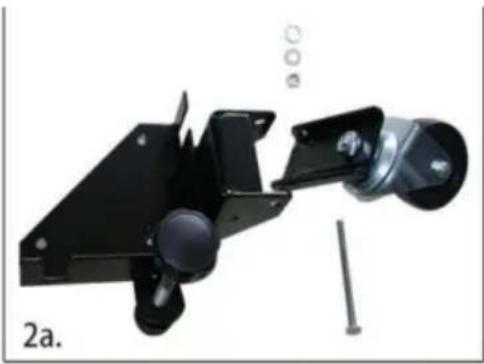
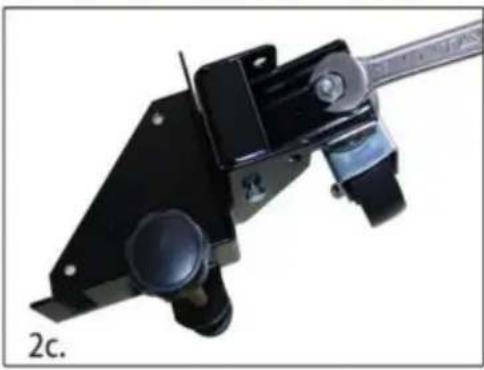
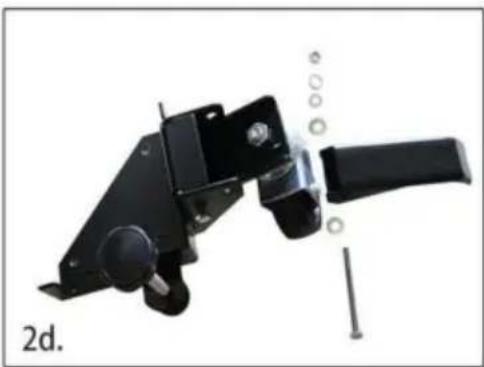
a. Thread the rubber glide foot into the bracket, then thread the jam nut onto the top. b. Attach the wheel to the swivel plate. c. Install the swivel plate using the M8-75 carriage bolt, lock washer, and nut. Tighten. d. Install the foot lever using the M8-75 carriage bolt, nylon washers, lock washer, and nut.
2.
e. Repeat this process for the other swivel bracket.
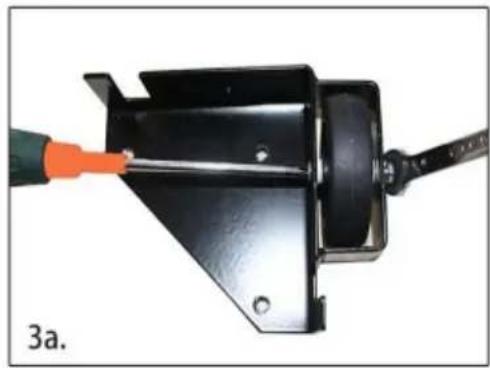
- Assemble the back corners. To the right are the components you will need: a. Install the back wheel using the M6×47-10 axle bolt, nylon wheel bushing, and M6 lock nut.
- Carefully measure the footprint of your machine (or whatever you are mobilizing) and add about 1" to the dimension. (1" allows clearance for the fasteners).
- Review the assembly examples shown below to help you determine the fixed wheel, caster, and leveler placement. As these are examples only, you must determine what best suits your particular machine's requirements for stability.
Tighten all hardware securely.
Assembly Examples
Be sure to follow Safety and Assembly Instructions. Keep in mind the actual operation of your machine and the effect it has on overall stability.

A long, narrow base, such as on a jointer, would benefit from this arrangement. Most machines may be arranged to the convenience of the user.
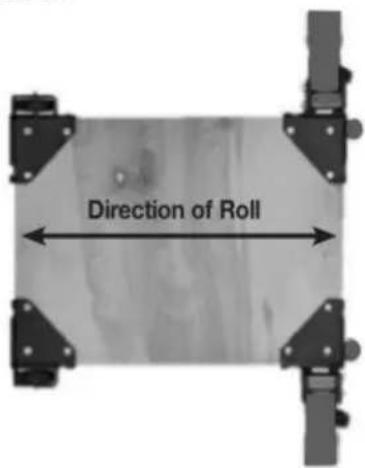
A short, narrow base, such as found on a drill press or bandsaw, may benefit from this arrangement. Due to swivel rotation, base may sit out of level. Rotate swivel wheel away from base to correct.
- Cut the plywood you are using down to size.
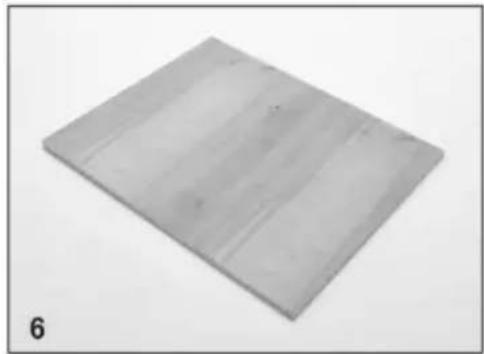
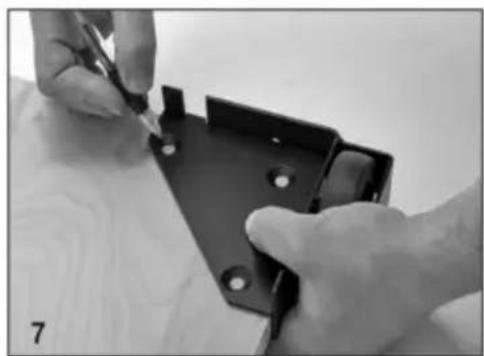
- You will now need to attach the corners to the plywood, begin by marking the holes using the corner plates as your template.
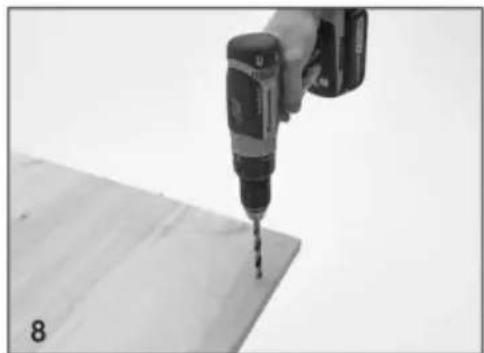
- Drill the holes using a 1/2" drill bit, it is a good idea to check that the holes are lined up to the plate before drilling each hole.
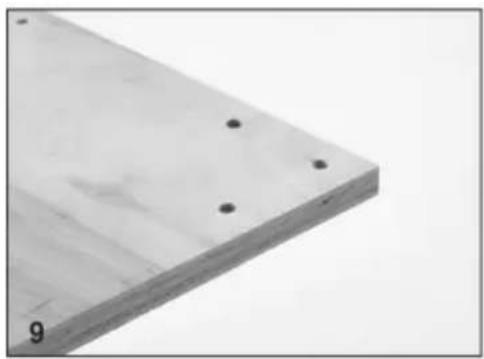
- Each corner should now look like this.
- Attach the corners in the correct positions using the Philips screwdriver, do not tighten the bolts until all three machine screws are partially threaded into the bottom plate.
- Congratulations! You have successfully completed assembly of the GZB88096 mobile base.
Maintenance
Imported in AUS: SIHAO PTY LTD, 1 ROKEVA STREETEASTWOOD NSW 2122 Australia
C/O YH Consulting Limited Office 147, Centurion House, London Road, Staines-upon-Thames, Surrey, TW18 4AX
VEVOR®
TOUGH TOOLS, HALF PRICE
- Unpack and identify all components and hardware. Make sure there are no missing parts and that there is no shipping damage.
Note: Read instructions thoroughly before proceeding.
- Assemble the front corners:
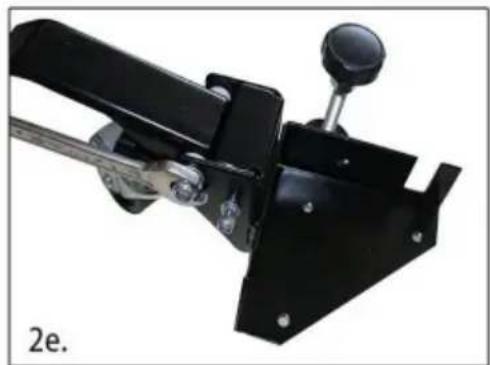
a. Thread the rubber glide foot into the bracket, then thread the jam nut onto the top. b. Attach the wheel to the swivel plate. c. Install the swivel plate using the M8-75 carriage bolt, lock washer, and nut. Tighten. d. Install the foot lever using the M8-75 carriage bolt, nylon washers, lock washer, and nut.
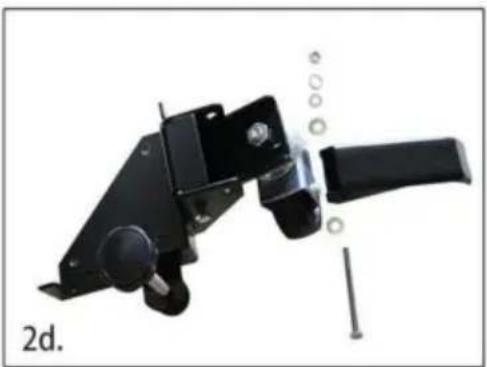
2.
e. Repeat this process for the other swivel bracket.
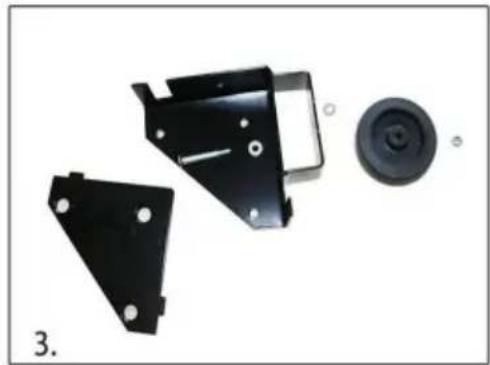
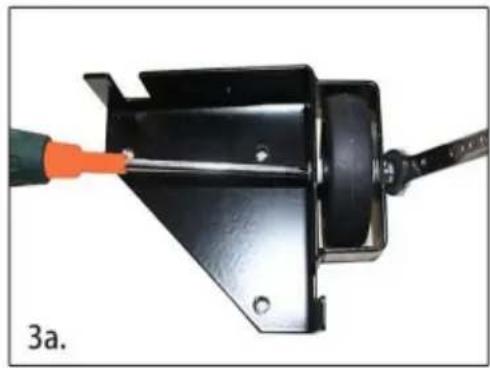
- Assemble the back corners. To the right are the components you will need:
a. Install the back wheel using the M6×47-10 axle bolt, nylon wheel bushing, and M6 lock nut.
- Carefully measure the footprint of your machine (or whatever you are mobilizing) and add about 1" to the dimension. (1" allows clearance for the fasteners).
- Review the assembly examples shown below to help you determine the fixed wheel, caster and leveler placement. As these are examples only, you must determine what best suits your particular machine's requirements for stability.
Tighten all hardware securely.
Assembly Examples
Be sure to follow Safety and Assembly Instructions. Keep in mind the actual operation of your machine and the effect it has on overall stability.
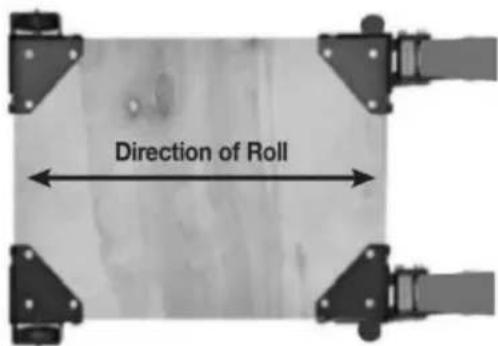
A long, narrow base, such as on a jointer, would benefit from this arrangement. Most machines may be arranged to the convenience of the user.
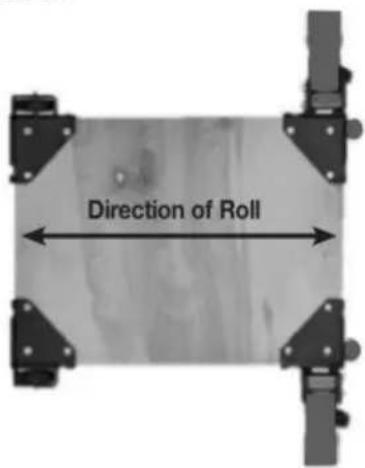
A short, narrow base, such as found on a drill press or bandsaw, may benefit from this arrangement. Due to swivel rotation, base may sit out of level. Rotate swivel wheel away from base to correct.
- Cut the plywood you are using down to size.
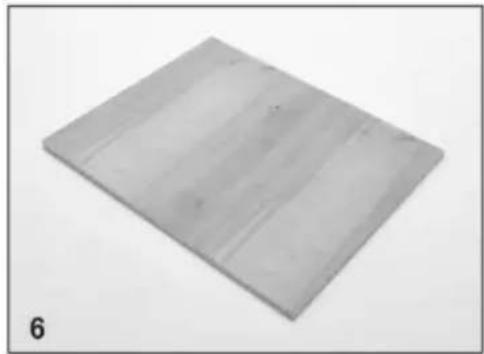
- You will now need to attach the corners to the plywood, begin by marking the holes using the corner plates as your template.
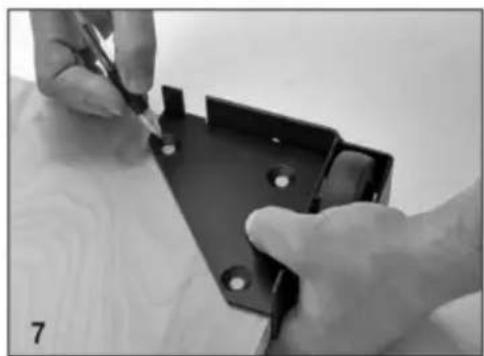
- Drill the holes using a 1/2" drill bit, it is a good idea to check that the holes are lined up to the plate before drilling each hole.
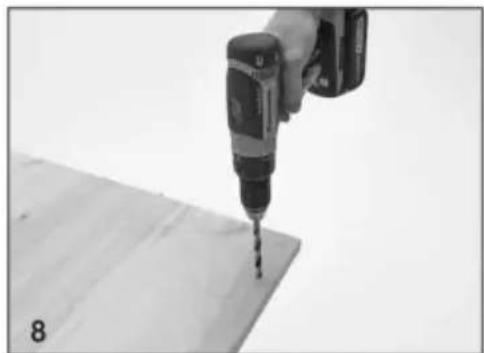
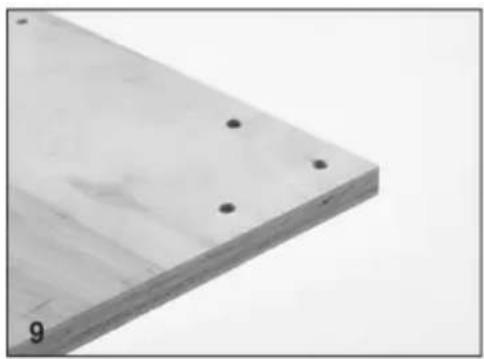
- Each corner should now look like this.
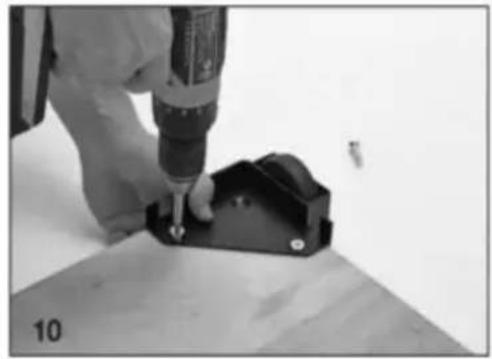
- Attach the corners in the correct positions using the Philips screwdriver, do not tighten the bolts until all three machine screws are partially threaded into the bottom plate.
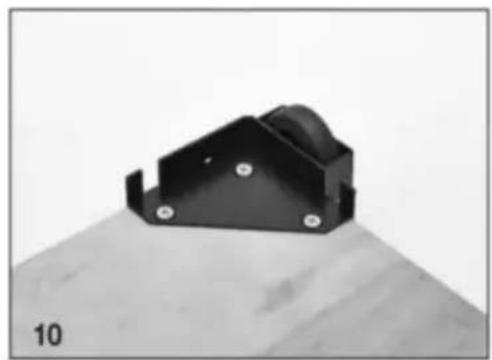
- Congratulations! You have successfully completed assembly of the GZB88096 mobile base.
MAINTENANCE
Imported to AUS: SIHAO PTY LTD, 1 ROKEVA STREETEASTWOOD NSW 2122 Australia
Imported to USA: Sanven Technology Ltd., Suite 250, 9166 Anaheim Place, Rancho Cucamonga, CA 91730

E-CrossStu GmbH
C/O YH Consulting Limited Office 147, Centurion House, London Road, Staines upon Thames, Surrey, TW18 4AX
VEVOR®
TOUGH TOOLS, HALF PRICE
| Lista części | |||||
| Opis | S/N | Ilość | S/N | Opis | Ilość |
| NAROŻNIK, LEWY Z KÓŁKAMI NAWIAS | 1 | ŚRUBA | MASZYNOWA M8-30 12 | ||
| NAROŻNIK, PRAWY Z KÓŁKAMI NAWIAS | 1 | ŚRUBA | MASZYNOWA M8-40 12 | ||
| NAROŻNIK, LEWY Z KOŁEM MIESZKANIA | 1 | PŁYTA | OBROTOWA | 2 | |
| NAROŻNIK, PRAWY Z KOŁEM MIESZKANIA | Śruba nośna 1 8x75 | 2 | |||
| PŁYTA ŚRUBOWA | 4 | NYLONOWA DŻWIGNIA NOŻNA TULEJA | 4 | ||
| 3-CALOWE KOŁO OBROTOWE | PODKŁADKA BEZPIECZEŃSTWA 2 M8 | 2 | |||
| NAKRĘTKI M10, KOŁNIERZOWE/ZĄBKOWANE | 4 | NAKRĘTKA M-8 SAMOBLOKUJĄCA | 2 | ||
| OKRAGŁE STOPKI | 2 | DŻWIGNIA NOŻNA | 2 |
| NAKRĘTKA ZABEZPIECZAJĄCA M10 | ŚRUBA PODSTAWOWA 2 6 x 75 | 2 | |
| DŁUGI UCHWYT TYPU | 2 | NYLONOWE KOŁO M6TULEJA | |
| 3-calowe KOŁO | 2 | NAKRĘTKA M6, SAMOBLOKUJĄCA | 4 |
| MASZYNA 6x 47-10ŚRUBA, OSI | |||
- Unpack and identify all components and hardware. Make sure there are no missing parts and that there is no shipping damage.
Note: Read instructions thoroughly before proceeding.
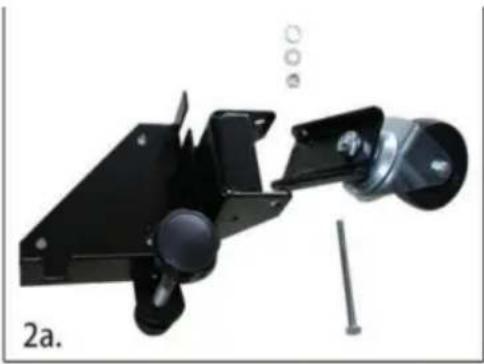
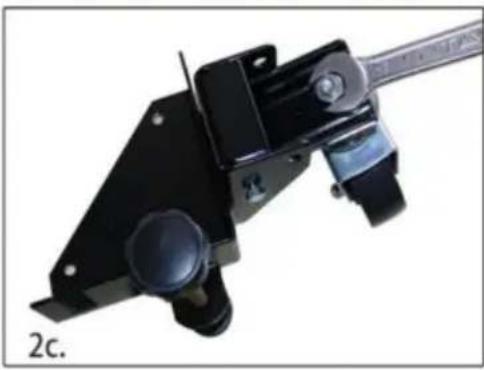
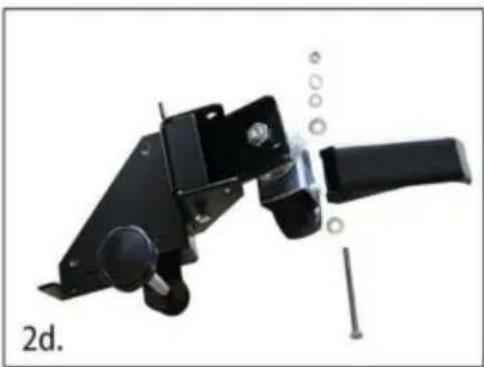
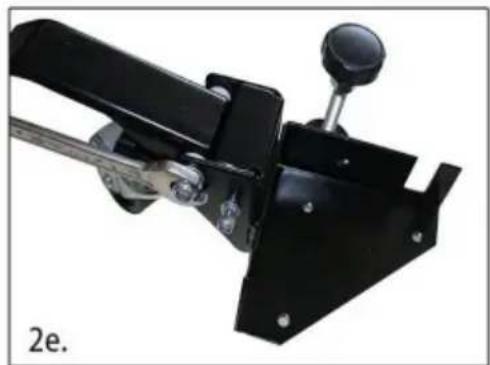
- Assemble the front corners:
a. Thread the rubber glide foot into the bracket, then thread the jam nut onto the top. b. Attach the wheel to the swivel plate. c. Install the swivel plate using the M8-75 carriage bolt, lock washer, and nut. Tighten. d. Install the foot lever using the M8-75 carriage bolt, nylon washers, lock washer, and nut.
2.
e. Repeat this process for the other swivel bracket.
- Assemble the back corners. To the right are the components you will need:
a. Install the back wheel using the M6×47-10 axle bolt, nylon wheel bushing, and M6 lock nut.
- Carefully measure the footprint of your machine (or whatever you are mobilizing) and add about 1" to the dimension. (1" allows clearance for the fasteners).
- Review the assembly examples shown below to help you determine the fixed wheel, caster, and leveler placement. As these are examples only, you must determine what best suits your particular machine's requirements for stability.
Tighten all hardware securely.
Assembly Examples
Be sure to follow Safety and Assembly Instructions. Keep in mind the actual operation of your machine and the effect it has on overall stability.
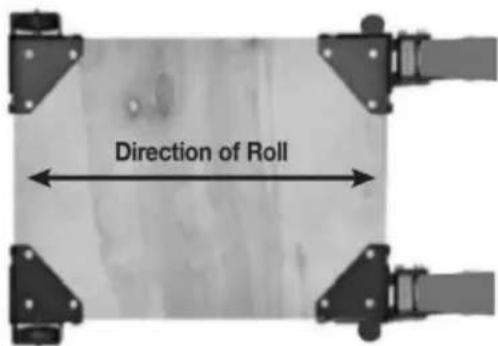
A long, narrow base, such as on a jointer, would benefit from this arrangement. Most machines may be arranged to the convenience of the user.
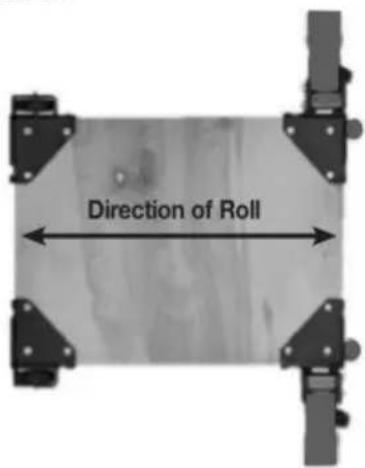
A short, narrow base, such as found on a drill press or bandsaw, may benefit from this arrangement. Due to swivel rotation, base may sit out of level. Rotate swivel wheel away from base to correct.
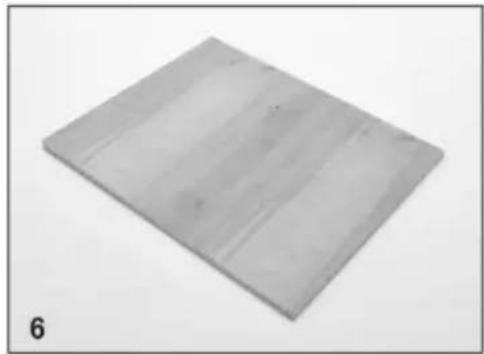
- Cut the plywood you are using down to size.
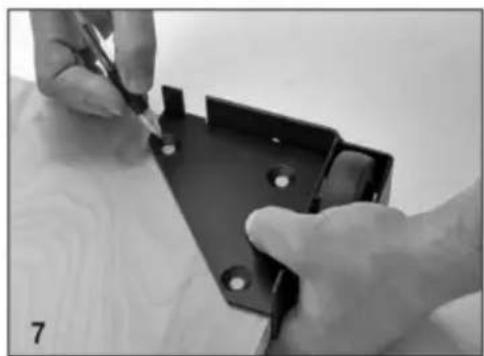
- You will now need to attach the corners to the plywood, begin by marking the holes using the corner plates as your template.
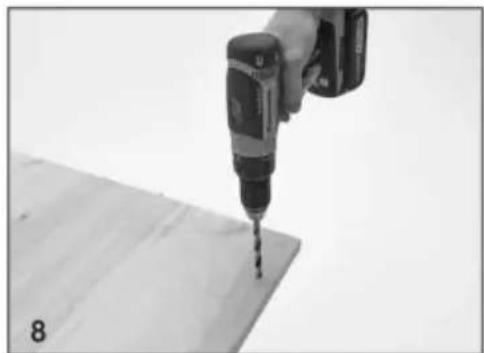
- Drill the holes using a 1/2" drill bit, it is a good idea to check that the holes are lined up to the plate before drilling each hole.
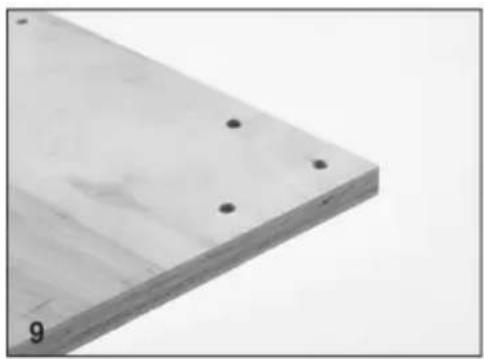
- Each corner should now look like this.
- Attach the corners in the correct positions using the Philips screwdriver, do not tighten the bolts until all three machine screws are partially threaded into the bottom plate.
- Congratulations! You have successfully completed assembly of the GZB88096 mobile base.
MAINTENANCE
Import to AUS: SIHAO PTY LTD, 1 ROKEVA STREETEASTWOOD NSW 2122 Australia
Import to USA: Sanven Technology Ltd., Suite 250, 9166 Anaheim Place, Rancho Cucamonga, CA 91730
| REPREZENT KE |
E-CrossStu GmbH
Mainzer Landstr.69, 60329 Frankfurt am Main.
C/O YH Consulting Limited Office 147, Centurion House, London Road, Staines-upon-Thames, Surrey, TW18 4AX
VEVOR®
TOUGH TOOLS, HALF PRICE
www.vevor.com/support
VEVOR®
TOUGH TOOLS, HALF PRICE
www.vevor.com/support
MOBILE BASE
MODEL: GZB88096
Photo for reference
NEED HELP? CONTACT US!
| Onderdelenlijst | |||||
| S/N-beschrijving | Aantal S/N | Beschrijving | Aantal | ||
| ÿ | HOEK, LH MET ZWENKWIEL BEUGEL | 1ÿ | M8-30 | MACHINESCHROEF 12 | |
| ÿ | HOEK, RECHTS MET ZWENKWIEL BEUGEL | 1ÿ | M8-40 | MACHINESCHROEF 12 | |
| ÿ | HOEK, LINKS MET WIEL HUISVESTING | 1ÿ | DRAAIPLAAT | 2 | |
| ÿ | HOEK, RECHTS MET WIEL HUISVESTING | 1ÿ | 8x75 | slotbout | 2 |
| ÿ BOUTPLAAT | 4ÿ | NYLON VoetHENDEL BUS | 4 | ||
| ÿ 3" | ZWENKWIEL | 2ÿ | M8 | BORGRING | 2 |
| ÿ | M10 MOEREN, GEFLENSD/GEKARTELD | 4ÿ | M-8 | MOER ZELFBORGEND | 2 |
| ÿ RONDE VOETEN | 2ÿ | VOETHENDEL | 2 |
| ÿ M10 VASTMOER | 2ÿ | 6 x 75 DRAAGBOUT | 2 |
| ÿ LANGE STEELHENDEL | 2ÿ | M6 NYLON WIELBUS | |
| ÿ 3" WIEL | 2ÿ | M6 MOER, ZELFBORGEND | 4 |
| ÿ | 6x 47-10-MACHINESCHROEF, AS |
- Unpack and identify all components and hardware. Make sure there are no missing parts and that there is no shipping damage.
Note: Read instructions thoroughly before proceeding.
- Assemble the front corners:
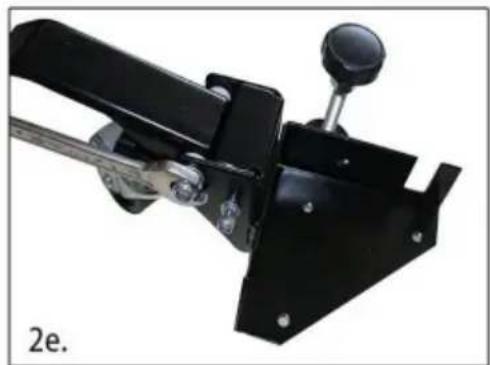
a. Thread the rubber glide foot into the bracket, then thread the jam nut onto the top. b. Attach the wheel to the swivel plate. c. Install the swivel plate using the M8-75 carriage bolt, lock washer, and nut. Tighten. d. Install the foot lever using the M8-75 carriage bolt, nylon washers, lock washer, and nut.
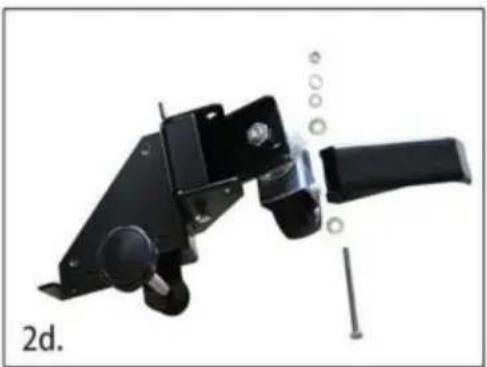
2.
e. Repeat this process for the other swivel bracket.
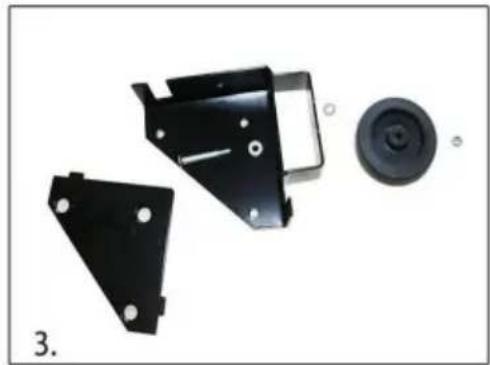
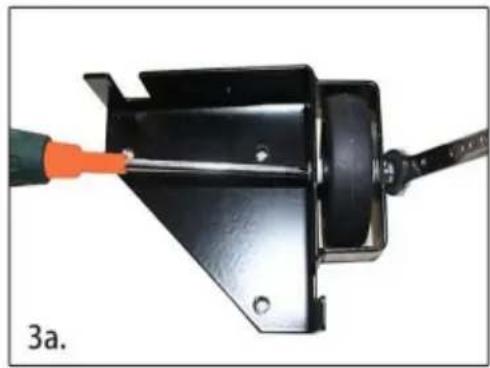
- Assemble the back corners. To the right are the components you will need:
a. Install the back wheel using the M6×47-10 axle bolt, nylon wheel bushing, and M6 lock nut.
- Carefully measure the footprint of your machine (or whatever you are mobilizing) and add about 1" to the dimension. (1" allows clearance for the fasteners).
- Review the assembly examples shown below to help you determine the fixed wheel, caster, and leveler placement. As these are examples only, you must determine what best suits your particular machine's requirements for stability.
Tighten all hardware securely.
Assembly Examples
Be sure to follow Safety and Assembly Instructions. Keep in mind the actual operation of your machine and the effect it has on overall stability.
A long, narrow base, such as on a jointer, would benefit from this arrangement. Most machines may be arranged to the convenience of the user.

A short, narrow base, such as found on a drill press or bandsaw, may benefit from this arrangement. Due to swivel rotation, the base may sit out of level. Rotate the swivel wheel away from the base to correct.
- Cut the plywood you are using down to size.
- You will now need to attach the corners to the plywood. Begin by marking the holes using the corner plates as your template.
- Drill the holes using a 1/2" drill bit. It is a good idea to check that the holes are lined up to the plate before drilling each hole.
- Each corner should now look like this.
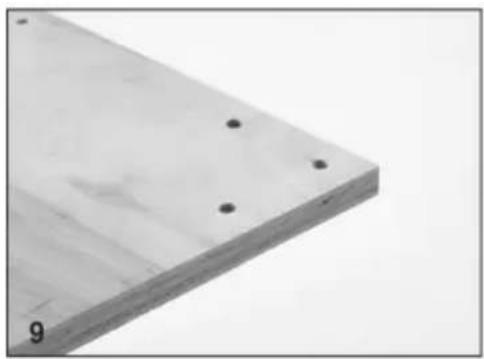
- Attach the corners in the correct positions using the Philips screwdriver. Do not tighten the bolts until all three machine screws are partially threaded into the bottom plate.
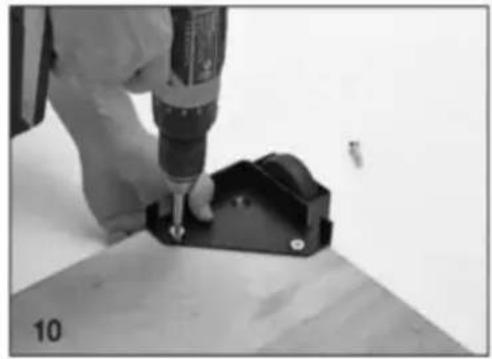
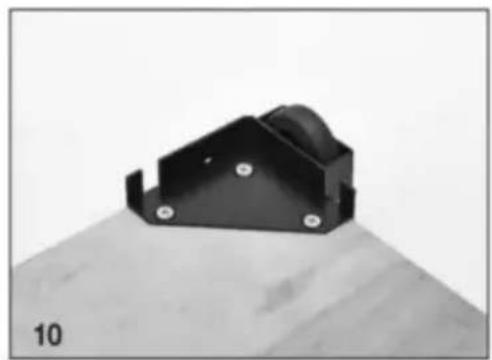
- Congratulations! You have successfully completed assembly of the GZB88096 mobile base.
MAINTENANCE
C/O YH Consulting Limited, Office 147, Centurion House, London Road, Staines-upon-Thames, Surrey, TW18 4AX
VEVOR®
TOUGH TOOLS, HALF PRICE
Technical support and e-warranty certificate www.vevor.com/support
VEVOR®
TOUGH TOOLS, HALF PRICE
www.vevor.com/support
MOBILE BASE
MODEL: GZB88096
Photo for reference
NEED HELP? CONTACT US!
| Delarlista | |||||
| S/N | Beskrivning | Antal | S/N | Beskrivning | Antal |
| ÿ | HÖRN, VÄNSTER M/HJUL KONSOL | 1ÿ | M8-30 | MASKINSKRUV 12 | |
| ÿ | HÖRN, RH M/HJUL KONSOL | 1ÿ | M8-40 | MASKINSKRUV 12 | |
| ÿ | HÖRN, LH M/HJUL HUS | 1ÿ | SLUTPLATTA | 2 | |
| ÿ | HÖRN, HÖGER M/HJUL HUS | 1ÿ | 8x75 vagnsbult | 2 | |
| ÿ BULTPLATA | 4ÿ | NYLON FotspakBUSHING | 4 | ||
| ÿ 3" VÄNGLIGT HJUL | 2ÿ | M8 LÅBRICKA | 2 | ||
| ÿ | M10 NÖTTER, FLÄNSAD/TANDIG | 4ÿ | M-8 MUTTER SJÄLVLÅSANDE | 2 | |
| ÿ RUNDA FÖTTER | 2ÿ | FOTSPAK | 2 | ||
| ÿ M10 SLUTMUTTER | 2ÿ | 6 x 75 | BOLTEN | 2 | |
| ÿ LÅNGT STÅP HANDTAG | 2ÿ | M6 NYLON HJUL BUSHING | 4 | ||
| ÿ 3" HJUL | 2ÿ | M6 MUTTER, SJÄLVLÅSANDE | 4 | ||
| ÿ | 6x 47-10 MASKIN SKRUV, AXEL | 2 | |||
- Unpack and identify all components and hardware. Make sure there are no missing parts and that there is no shipping damage.
Note: Read instructions thoroughly before proceeding.
- Assemble the front corners:
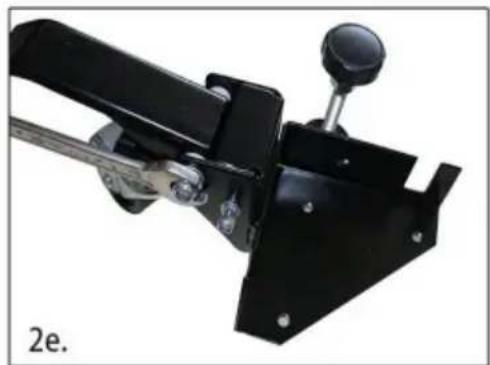
a. Thread the rubber glide foot into the bracket, then thread the jam nut onto the top. b. Attach the wheel to the swivel plate. c. Install the swivel plate using the M8-75 carriage bolt, lock washer, and nut. Tighten. d. Install the foot lever using the M8-75 carriage bolt, nylon washers, lock washer, and nut.
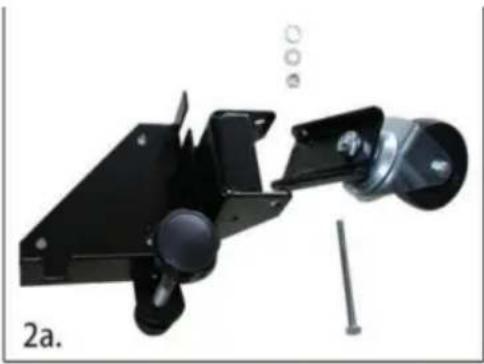
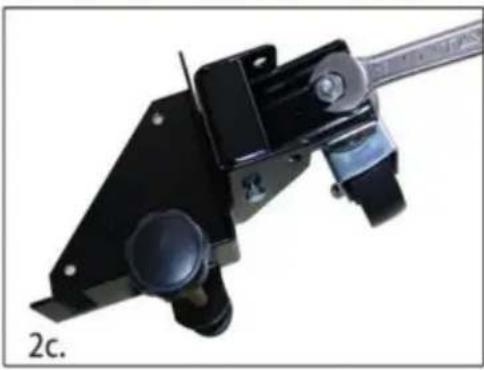
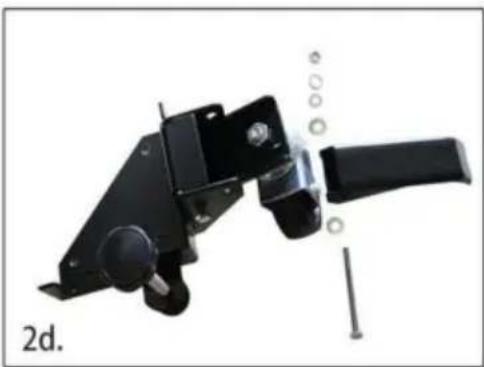
2.
e. Repeat this process for the other swivel bracket.
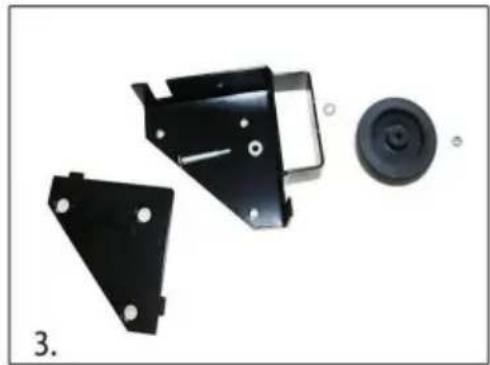
- Assemble the back corners. To the right are the components you will need:
a. Install the back wheel using the M6×47-10 axle bolt, nylon wheel bushing, and M6 lock nut.
- Carefully measure the footprint of your machine (or whatever you are mobilizing) and add about 1" to the dimension. (1" allows clearance for the fasteners).
- Review the assembly examples shown below to help you determine the fixed wheel, caster, and leveler placement. As these are examples only, you must determine what best suits your particular machine's requirements for stability.
Tighten all hardware securely.
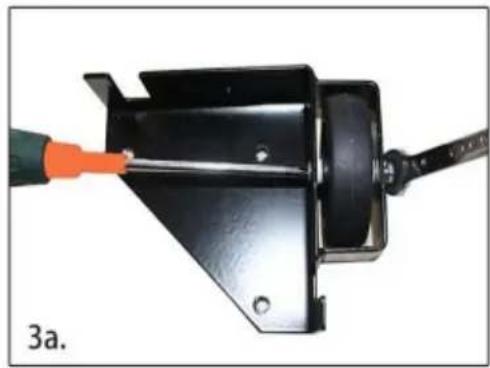
Assembly Examples
Be sure to follow Safety and Assembly Instructions. Keep in mind the actual operation of your machine and the effect it has on overall stability.
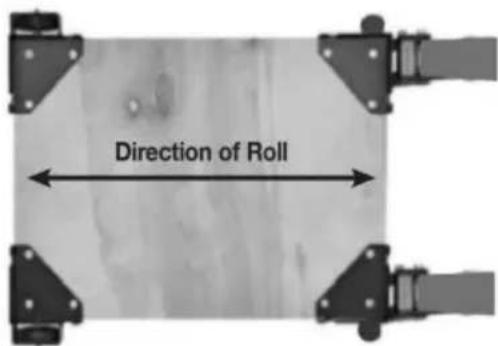
A long, narrow base, such as on a jointer, would benefit from this arrangement. Most machines may be arranged to the convenience of the user.
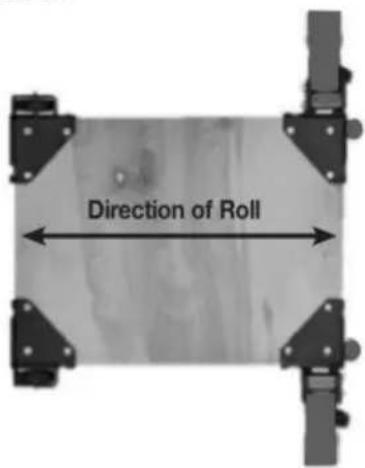
A short, narrow base, such as found on a drill press or bandsaw, may benefit from this arrangement. Due to swivel rotation, base may sit out of level. Rotate swivel wheel away from base to correct.
- Cut the plywood you are using down to size.
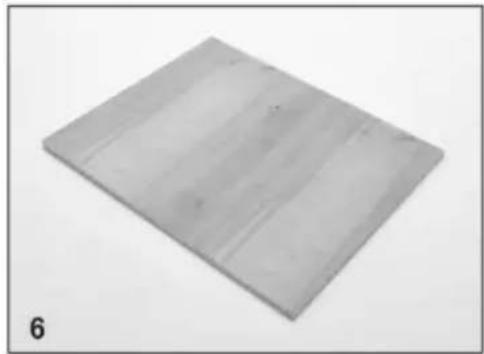
- You will now need to attach the corners to the plywood, begin by marking the holes using the corner plates as your template.
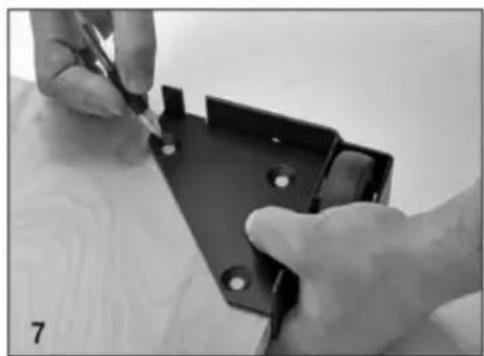
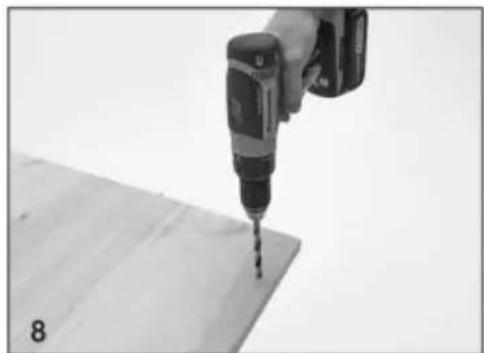
- Drill the holes using a 1/2" drill bit, it is a good idea to check that the holes are lined up to the plate before drilling each hole.
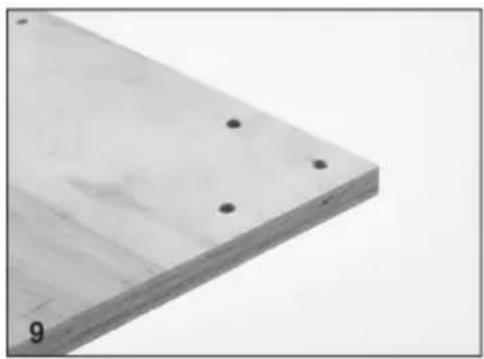
- Each corner should now look like this.
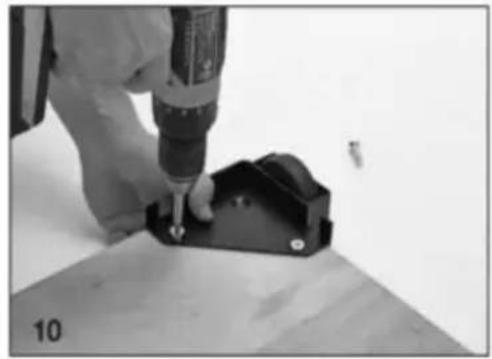
- Attach the corners in the correct positions using the Philips screwdriver, do not tighten the bolts until all three machine screws are partially threaded into the bottom plate.
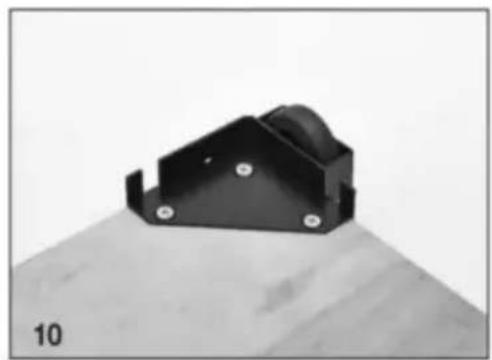
- Congratulations! You have successfully completed assembly of the GZB88096 mobile base.
Maintenance
C/O YH Consulting Limited Office 147, Centurion House, London Road, Staines-upon-Thames, Surrey, TW18 4AX
VEVOR®
TOUGH TOOLS, HALF PRICE



Brand : Vevor
Model : GZB88096
Category : Power tool accessory