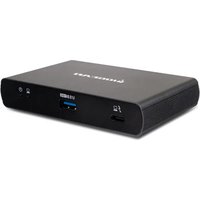
Quantum GTD4MHTAA - Computer Docking Station IOGEAR - Free user manual and instructions
Find the device manual for free Quantum GTD4MHTAA IOGEAR in PDF.


| Product type | Thunderbolt 4 Docking Station |
| Brand | IOGEAR |
| Model | Quantum GTD4MHTAA |
| Host connectivity | 1 Thunderbolt 4 port (86 W charging) |
| Downstream ports | 3 Thunderbolt 4 ports, 1 USB-A 10 Gbps port |
| Maximum video output (single) | Up to 7680 x 4320 @ 30 Hz |
| Maximum video output (dual) | Up to 4096 x 2160 @ 60 Hz per display in extended mode |
| Power supply | External AC adapter, input 100-240 V AC |
| Host charging power | 86 W |
| Supported operating systems | Windows 10/11, macOS 10.13 and later |
| Dimensions (approx.) | 200 x 75 x 25 mm |
| Weight (approx.) | 500 g |
| Package contents | Docking station, 0.8 m Thunderbolt 4 cable, AC adapter, quick start guide, warranty card |
| Warranty | 1-year limited warranty |
| Care and cleaning | Clean with a dry cloth. Do not use liquids or abrasives. |
| Safety instructions | Use only the provided adapter. Do not open the device. Avoid exposure to moisture. |
| Spare parts and repairability | Contact IOGEAR technical support. No user-serviceable parts. |
Frequently Asked Questions - Quantum GTD4MHTAA IOGEAR
User questions about Quantum GTD4MHTAA IOGEAR
0 question about this device. Answer the ones you know or ask your own.
Ask a new question about this device
Download the instructions for your Computer Docking Station in PDF format for free! Find your manual Quantum GTD4MHTAA - IOGEAR and take your electronic device back in hand. On this page are published all the documents necessary for the use of your device. Quantum GTD4MHTAA by IOGEAR.
USER MANUAL Quantum GTD4MHTAA IOGEAR
Host device requirements:
- Thunderbolt 4 host required for max bandwidth (40Gbps)
OS requirements:
- Windows® 10,11
- macOS® 10.13+
USB Type-C and USB-C are registered trademarks of USB Implementers Forum. Thunderbolt™ and the Thunderbolt™ logo are trademarks of Intel Corporation in the U.S. and/or other countries. Windows is either a registered trademark or trademark of Microsoft Corporation in the United States and/or other countries. macOS is trademarks of Apple Inc., registered in the U.S. and other countries. All other trademarks are the properties of their respective owners. Reproduction in whole or in part without permission is prohibited.
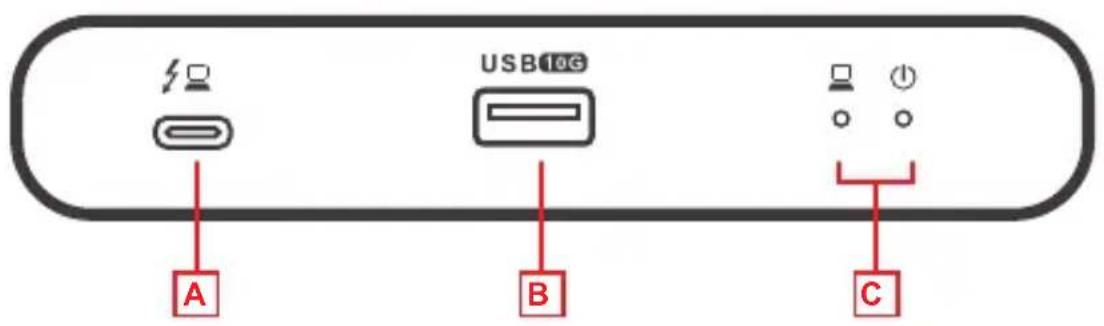
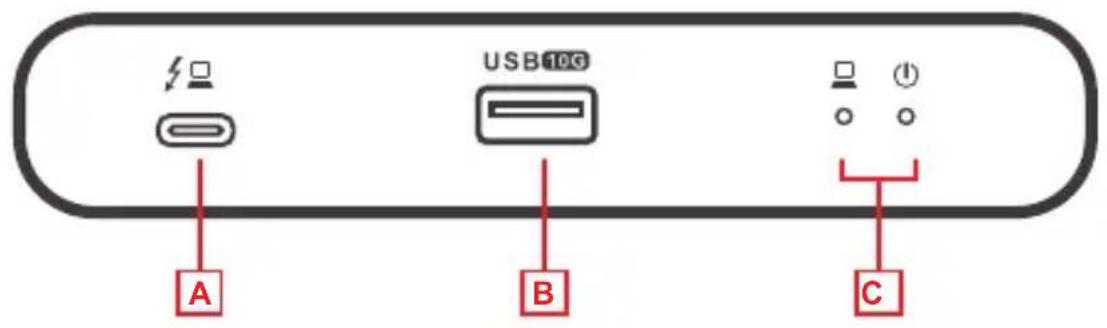
Front
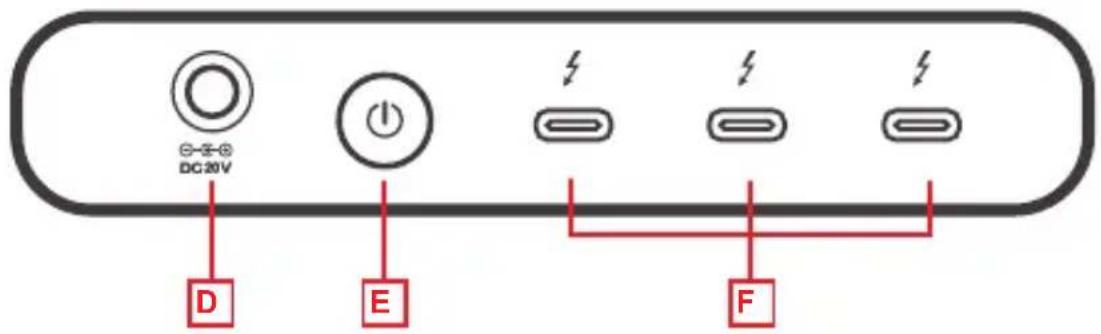
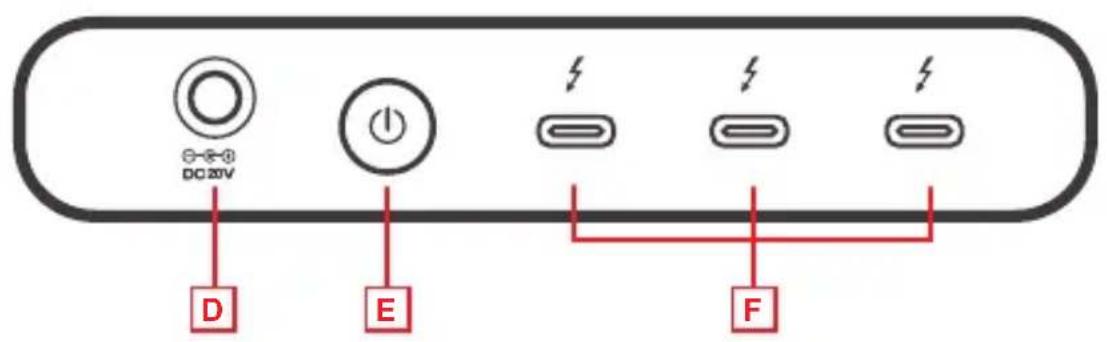
Back
A. Thunderbolt 4 Host Port
B. USB-A 10 Gbps for peripherals and storage devices
C. Link and Power LED indicator
D. DC Jack for power adapter
E. Power Button
F. 3 x Thunderbolt 4 ports for Monitors, and other Thunderbolt or USB-C ^® devices
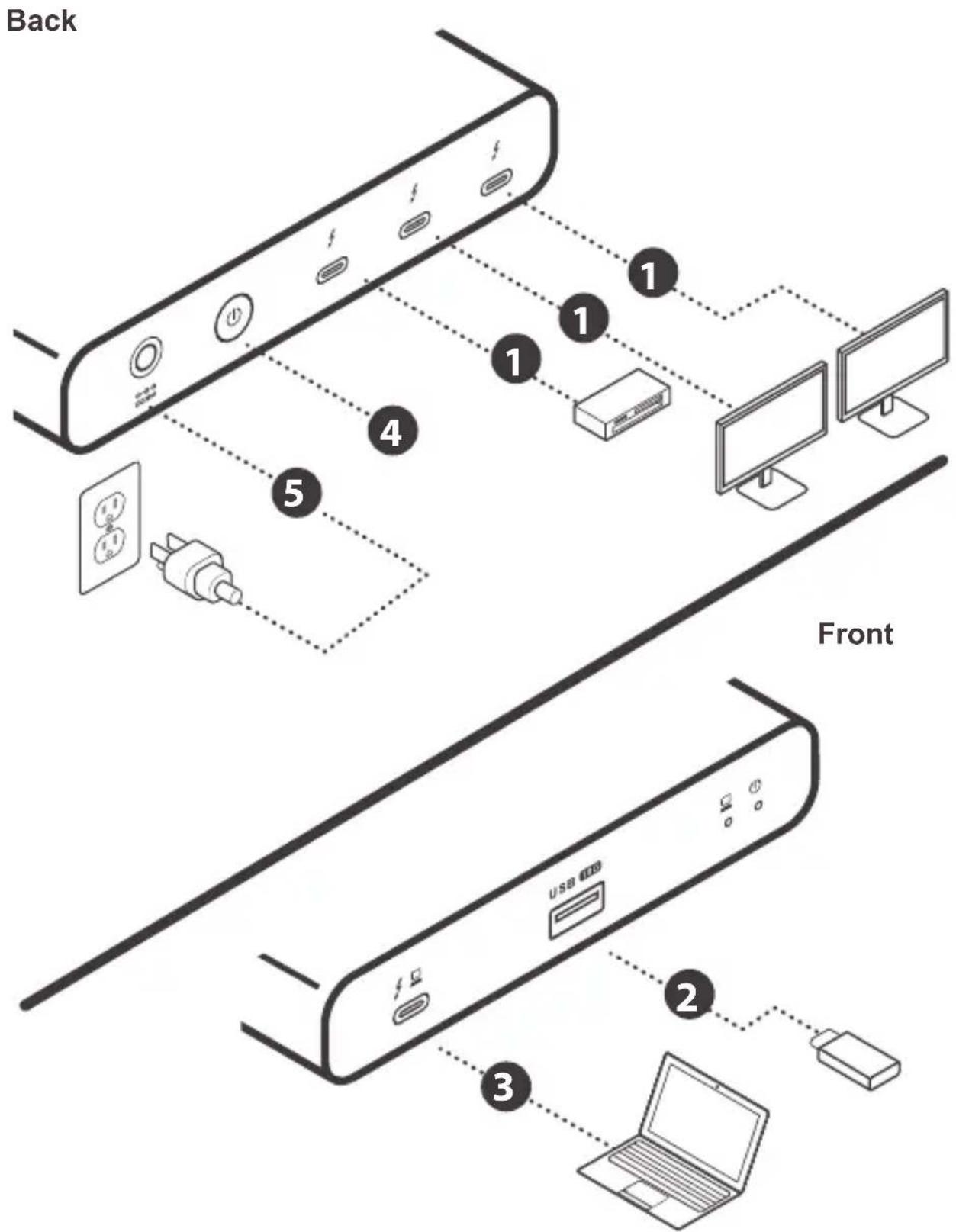
Hardware Installation
Please follow steps below to ensure the optimal performance:
Step 1
Connect up to 3 Thunderbolt 4 or USB-C devices to the Thunderbolt 4 downstream ports.
- Up to two displays can be connected at a time
Step 2
Connect a USB-A peripheral device
Step3
Connect a Thunderbolt host computer (86W)
Step 4
Connect the power supply to power port
Step 5
Turn on power by pressing Power button
| Single Video Output | |
| Operating System Display 1 | |
| Windows | up to 7680 x 4320@30Hz |
| macOS X | up to 7680 x 4320@30Hz |
| Dual Video Output Mode | |||
| Operating System Display 1 | Display 2 | Mode | |
| Windows | up to 4096 x 2160@60Hz | up to 4096 x 2160@60Hz | Extend |
| macOS X | up to 4096 x 2160@60Hz | up to 4096 x 2160@60Hz | Extend |
Limited Warranty
Warranty Information
This product carries a 1 Year Limited Warranty. For the terms and conditions of this warranty, please go to https://www.iogear.com/support/warranty
Register online at https://www.iogear.com/register
Important Product Information Product Model ____ Serial Number ____
Contact
WE'RE HERE TO HELP YOU! NEED ASSISTANCE SETTING UP THIS PRODUCT?
Make sure you:
- Visit www.iogear.com for more product information
- Visit www.iogear.com/support for live help and product support
IOGEAR
iogear.custhelp.com
support@iogear.com
www.iogear.com
Compliance Information
Federal Communication Commission Interference Statement
This equipment has been tested and found to comply with the limits for a Class B digital service, pursuant to Part 15 of the FCC rules. These limits are designed to provide reasonable protection against harmful interference in a residential installation. Any changes or modifications made to this equipment may void the user's authority to operate this equipment. This equipment generates, uses, and can radiate radio frequency energy. If not installed and used in accordance with the instructions, may cause harmful interference to radio communications.
However, there is no guarantee that interference will not occur in a particular installation. If this equipment does cause harmful interference to radio or television reception, which can be determined by turning the equipment off and on, the user is encouraged to try to correct the interference by one or more of the following measures:
- Reorient or relocate the receiving antenna
- Increase the separation between the equipment and receiver
- Connect the equipment into an outlet on a circuit different from that to which the receiver is connected
- Consult the dealer or an experienced radio/TV technician for help
FCC Caution: Any changes or modifications not expressly approved by the party responsible for compliance could void the user's authority to operate this equipment.
This device complies with Part 15 of the FCC Rules. Operation is subject to the following two conditions:
(1) this device may not cause harmful interference, and
(2) this device must accept any interference received, including interference that may cause undesired operation.
CE Statement:
This device has been tested and found to comply with the following European Union directives: Electromagnetic Capability (2004/108/EC), Low Voltage (2006/95/EC) and R&TTED (1999/5/EC).
USB Type-C and USB-C are registered trademarks of USB Implementers Forum. Thunderbolt™ and the Thunderbolt™ logo are trademarks of Intel Corporation in the U.S. and/or other countries. Windows is either a registered trademark or trademark of Microsoft Corporation in the United States and/or other countries. macOS is trademarks of Apple Inc., registered in the U.S. and other countries. All other trademarks are the properties of their respective owners. Reproduction in whole or in part without permission is prohibited.
L'aperçu du produit
Vue avant
Vue arrière
https://iogear.custhelp.com
support@iogear.com
www.iogear.com
Information de conformité
- Front
- Back
- Hardware Installation
- Please follow steps below to ensure the optimal performance:
- Step 1
- Step 2
- Step3
- Step 4
- Step 5
- Limited Warranty
- Warranty Information
- Contact
- WE'RE HERE TO HELP YOU! NEED ASSISTANCE SETTING UP THIS PRODUCT?
- Make sure you:
- IOGEAR
- Compliance Information
- Federal Communication Commission Interference Statement
- CE Statement:
- L'aperçu du produit
- Vue avant
- Vue arrière
- Information de conformité
Brand : IOGEAR
Model : Quantum GTD4MHTAA
Category : Computer Docking Station