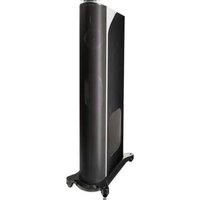
T44 - Speaker GoldenEar - Free user manual and instructions
Find the device manual for free T44 GoldenEar in PDF.


| Product type | Acoustic loudspeaker with built-in amplified subwoofer |
| Brand | GoldenEar |
| Model | T44 |
| Dimensions (W x D x H) | 19.1 cm x 37.6 cm x 105.8 cm (with base, without spikes) |
| Weight | 21.8 kg |
| Power supply | AC 120 V 60 Hz or AC 240 V 50 Hz, 1000 W max |
| Frequency response | 32 Hz to 25 kHz typical (-6 dB at 32 Hz) |
| Sensitivity | 89 dB (1 W/1 m, at 4 Ω) |
| Nominal impedance | 4 Ω |
| Recommended amplifier power | 20 to 400 W/channel |
| Built-in subwoofer amplification | 1000 W peak / 500 W RMS, DSP-controlled |
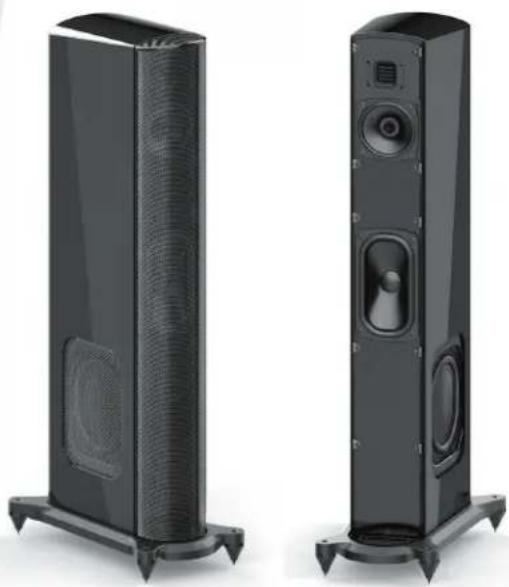
| Drivers | Folded ribbon AMT tweeter, 4.5" Cast-Basket midrange/woofer, 5"x9" subwoofer, two 7"x10" passive radiators |
| Connectivity | 5-way binding posts (amplified) + LFE RCA input |
| Main features | Bi-wiring possible, automatic standby, subwoofer level adjustment, protection circuit |
| Maintenance and cleaning | Unplug before cleaning; use a soft damp cloth; do not use liquid or aerosol products |
| Safety | Do not open (risk of electric shock); do not expose to water or moisture; ensure adequate ventilation; use on a stable surface |
| Spare parts and repairability | Only use parts recommended by the manufacturer; have any repairs done by qualified personnel |
| Warranty | 5 years (speakers and cabinets) / 3 years (electronic components) for the original purchaser |
| Included accessories | 4 steel spikes, 4 rubber caps, 1 hook wrench, 1 hex key |
| Break-in | 40 to 60 hours of operation to achieve optimal performance |
Frequently Asked Questions - T44 GoldenEar
User questions about T44 GoldenEar
0 question about this device. Answer the ones you know or ask your own.
Ask a new question about this device
Download the instructions for your Speaker in PDF format for free! Find your manual T44 - GoldenEar and take your electronic device back in hand. On this page are published all the documents necessary for the use of your device. T44 by GoldenEar.
USER MANUAL T44 GoldenEar
natural_image
Two black outdoor speakers with perforated bases, shown from different angles (no text or symbols visible)T44
Loudspeaker System With Built-In High-Powered SuperSubwoofer
Owner's Manual
T44 Owner's Manual
Congratulations
Congratulations and thank you for purchasing GoldenEar's™ T44 speakers. You are about to hear the spectacular difference these very special speakers (which include a built-in powered subwoofer system) will make in your music and/or home theater system.
Our engineers' many years of experience in developing loudspeakers has led to this extraordinary product. In order to ensure that you experience maximum performance, please take a moment to fully read this owner's manual and familiarize yourself with the unique installation and set-up procedures for your T44 speakers.
Please visit our website at www.GoldenEar.com for more information on the technology behind your new speaker system. If you have additional questions, contact your Authorized GoldenEar™ Dealer or visit the Q&A page in the Tech Support section of our website.
Safety Precautions
READ THIS SECTION CAREFULLY BEFORE PROCEEDING!
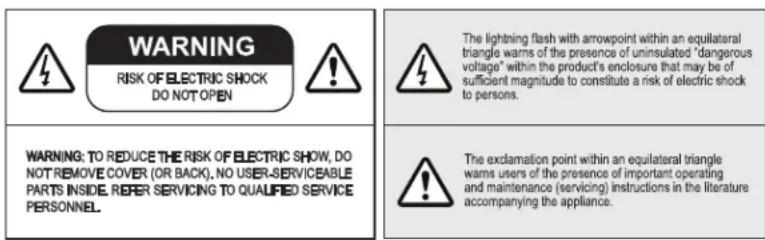
WARNING: TO REDUCE THE RISK OF ELECTRIC SHOCK, DO NOT REMOVE COVER (OR BACK). NO USER-SERVICEABLE PARTS INSIDE. REFER SERVICING TO QUALIFIED SERVICE PERSONNEL.
WARNING: TO REDUCE THE RISK OF FIRE OR ELECTRIC SHOCK, DO NOT EXPOSE THIS APPARATUS TO RAIN OR MOISTURE, AND OBJECTS FILLED WITH LIQUIDS, SUCH AS VASES, SHOULD NOT BE PLACED ON THIS APPARATUS.
CAUTION: TO PREVENT ELECTRIC SHOCK, MATCH WIDE BLADE OF PLUG TO WIDE SLOT, FULLY INSERT.
CAUTION: TO PREVENT ELECTRIC SHOCK HAZARD, DO NOT CONNECT TO MAINS POWER SUPPLY WHILE GRILLE IS REMOVED.
WARNING: UNIT MAY BECOME HOT. ALWAYS PROVIDE ADEQUATE VENTILATION TO ALLOW FOR COOLING. DO NOT PLACE NEAR A HEAT SOURCE, OR IN SPACES THAT CAN RESTRICT VENTILATION.
RECYCLING AND REUSE GUIDELINES FOR EUROPE
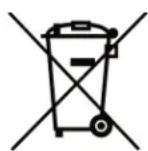
In accordance with the European Union WEEE (Waste Electrical and Electronic Equipment) directive effective August 13, 2005, we would like to notify you that this product may contain regulated materials which, upon disposal, according to the WEEE directive, require special reuse and recycling processing. For this reason GoldenEar (manufacturers of GoldenEar speakers) has arranged with our distributors in European Union member nations to collect and recycle this product at no cost to you. To find your local distributor please contact the dealer from whom you purchased this product or go to our website at www.goldenear.com.
Please note that the product only falls under the WEEE directive. When disposing of packaging and other shipping material we encourage you to recycle through the normal channels.
Important Safety Instructions
- Read Instructions – All the safety and operating instructions should be read before the product is operated.
- Retain Instructions – The safety and operating instructions should be retained for future reference.
-
Heed Warnings – All warnings on the product and in the operating instructions should be adhered to.
-
Follow Instructions – All operating and use instructions should be followed.
-
Cleaning – Unplug this product from the wall outlet before cleaning. Do not use liquid cleaners or aerosol cleaners. Use a damp, soft cloth for cleaning the gloss black surfaces. Use a lint brush or vacuum with soft brush attachment for grilles.
- Water and Moisture – Do not use this product near water—for example, near a bath tub, wash bowl, kitchen sink, or laundry tub; in a wet basement; or near a swimming pool; and the like.
- Accessories – Do not place this product on an unstable cart, stand, tripod, bracket or table. The product may fall, causing serious injury to a child or adult and serious damage to the product. Use only with a cart, stand, tripod, bracket or table recommended by the manufacturer, or sold with the product. Any mounting of the product should follow manufacturer's instructions and should use a mounting accessory recommended by the manufacturer.
- Ventilation – Slots and openings in the cabinet are provided for ventilation and to ensure reliable operation of the product and to protect it from overheating, and these openings must not be blocked or covered. The openings should never be blocked by placing the product on a bed, sofa, rug, or other similar surface. This product should not be placed in a built-in installation such as a bookcase or rack unless proper ventilation is provided or the manufacturer's instructions have been adhered to.
- Power Sources – This product should be operated only from the type of power source indicated on the marking label. If you are not sure of the type of power supply to your home, consult your product dealer or local power company. For products intended to operate from battery power, or other sources, refer to the operating instructions.
- Grounding and Polarization – This product may be equipped with a polarized alternating-current line plug (a plug having one blade wider than the other). This plug will fit into the power outlet only one way. This is a safety feature. If you are unable to insert the plug fully into the outlet, try reversing the plug. If the plug should still fail to fit, contact your electrician to replace your obsolete outlet. Do not defeat the safety purpose of the polarized plug.
- Power-Cord Protection – Power supply cords should be routed so that they are not likely to be walked on or pinched by items placed upon or against them, paying particular attention to cords at plugs, convenience receptacles, and the point where they exit from the product.
- Lightning – For added protection for this product during a lightning storm, or when it is left unattended and unused for long periods of time, unplug it from the wall outlet. This will prevent damage to the product due to lightning and powerline surges.
- Overloading - Do not overload wall outlets, extension cords, or integral convenience receptacles as this can result in a risk of fire or electric shock.
- Object and Liquid Entry – Never push objects of any kind into this product through openings as they may touch dangerous voltage points or short-out parts that could result in a fire or electric shock. Do not expose this apparatus to dripping or splashing, and ensure that no objects filled with water, such as vases, are placed on the apparatus.
- Servicing – Do not attempt to service this product yourself as opening or removing covers may expose you to dangerous voltage or other hazards. Refer all servicing to qualified service personnel.
- Damage Requiring Service – Unplug this product from wall outlet and refer servicing to qualified personnel under the following conditions:
a. When power supply cord or plug is damaged;
b. If liquid has been spilled, or objects have fallen into product;
c. If the product has been exposed to rain or water;
d. If the product does not operate normally by following the operating instructions.
Adjust only those controls that are covered by the operating instructions as an improper adjustment of other controls may result in damage and will require extensive work
b y a qualified technician to restore the product to its normal operation;
e. If the product has been dropped or damaged in any way;
f. If the product exhibits a distinct change in performance.
- Replacement Parts – When replacement parts are required, be sure the technician has used replacement parts specified by the manufacturer or have the same characteristics as the original part. Unauthorized substitutions may result in fire, electric shock, or other hazards
- Safety Check – Upon completion of any service or repairs to this product, ask the service technician to perform safety checks to determine that the product is in proper operating condition.
- Wall or Ceiling Mounting – The product should be mounted to a wall or ceiling only as recommended by the manufacturer.
- Heat - The product should be situated away from heat sources such as radiators, heat registers, stoves, or other products (including amplifiers) that produce heat.
T44 Owner's Manual
SAFETY PRECAUTIONS SPECIFIC TO T44 SPEAKER
The cautionary marking label is located on back of speaker.
POWER SUPPLY
- The power disconnect device is located on the back of the speaker.
- The disconnect device is the power cord, detachable at either the speaker or the wall. The mains plug shall remain readily accessible/operable.
- The power cord must be disconnected from the speaker before servicing.
Unpacking Your T44 Loudspeakers
Please Inspect for Shipping Damage
Each loudspeaker leaves our plant in perfect condition. Any visible or concealed damage most likely occurred in handling after it left our plant and should be reported at once to your GoldenEar Dealer and/or the delivery company that delivered your loudspeaker. Please unpack your system carefully.
Save all cartons and packing materials in case you move or need to ship your system. Record the serial number found on the back of the T44 loudspeaker here:
(Serial Number)
Please go to http://www.goldenear.com/support/registrationandwarranty and use the serial number(s) above to complete your warranty registration.
UNBOXING
PLEASE NOTE: DO NOT ATTEMPT TO REMOVE THE T44 GRILLES.
THEY REQUIRE A SPECIAL REMOVAL PROCEDURE AND SHOULD ONLY BE REMOVED FOR SERVICING.
When removing the speaker from the box, NEVER pull the speaker out by the front of the speaker as this is likely to damage or dislodge the grille assembly. With the speaker carton laying down with end cap arrows facing up, cut the tape around the three sides of the front flap. Open the front flaps, and then (with two people) lift and stand the carton up. Then carefully slide the speaker out of the carton following the Quick Start Guide diagrams; if you cannot locate the printed QSG, please to go: www.goldenear.com and download.
Please note, if the grille has popped off and is standing away from the cabinet at some point, DO NOT try to push it back as you can damage the grille. Seek assistance from your dealer for proper removal and reinstall.
We do not recommend the removal of the grilles except for servicing by authorized personnel.
Instructions to Install Spikes/Rubber Tips On Speaker Bases
The T44 ships with the foot cones and locking nuts pre-installed into the speaker bases.
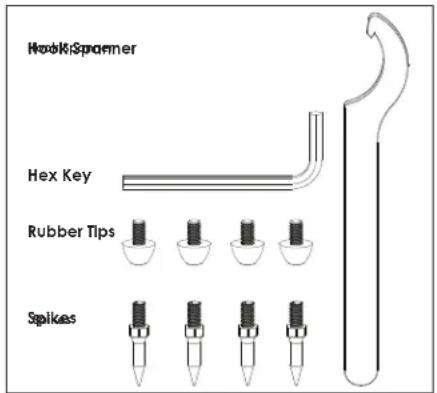
Parts included:
4x Steel Spikes
4x Rubber Tips
1x Hook Spanner
1x Hex Key
Choosing Spikes or Rubber Tips
Using spikes provides much greater stability when placing your T44 loudspeakers on carpeting. But using spikes on wooden floors, or other floors susceptible to scratching, can cause damage to the floor. Use the rubber tips instead of spikes to protect these types of surfaces. GoldenEar is specifically not responsible for damage which may result from the use of spikes.
NOTE: If you are using spikes it minimizes the potential for carpet/rug damage to wait to install spikes until after room placement is optimized and connections to equipment are complete as outlined on pages 7-10 of this user manual.
For safety and installation ease, two people are recommended.
PLEASE READ THIS PAGE THOROUGHLY BEFORE PROCEEDING.
Installing the spikes or rubber tips
1a. With the speaker standing upright, have one person tilt the speaker to the side on its base by touching only the cabinet. Do not touch the grille to do this.
1b. Person two can now either screw in spikes or attach rubber tips to the bottom of two accessible feet. Tilt the speaker in the opposite direction and install the two additional rubber tips or spikes on the remaining two feet. Repeat on other speaker.
2. With the rubber tips or spikes now installed, two people can lift the speaker upright and lower it to the desired location. If you are using spikes on a carpeted surface, push down on the top of the speaker to force the spikes through the carpet to make contact with the floor beneath.
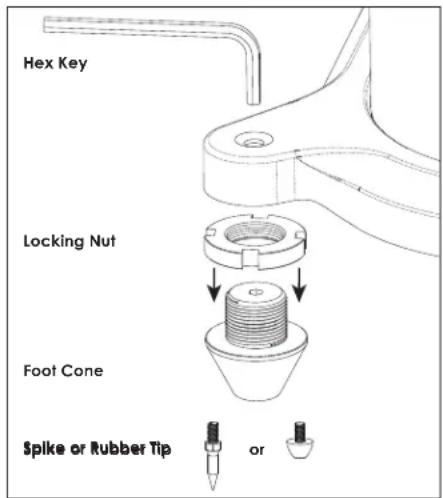
3. Once you have positioned the speakers, wiggle them to see if they are stable and level. To achieve the best level and stability, adjust the height of the feet using the supplied hex key inserted through the foot access holes in the top of the base, and then tighten the locking nut against the bottom of the base (see diagram).
Reinstalling Foot Cones and Locking Nuts
The foot cones and locking nuts are pre-installed in the speaker base, but if disassembled they can be reinstalled as follows. Two people are required.
1a. First tighten the threaded locking nuts onto each foot cone (x 4 per speaker, see diagram at right).
1b. With the speaker standing upright, have one person tilt the speaker to the side on its base by touching only the cabinet. Do not use the grille to do this. Person two can now screw the assembled feet (with locking nuts in place) into two of the threaded foot holes in the bottom of the base. Tilt the speaker in the opposite direction. Install the two additional assembled feet into the other two threaded holes in the bottom of the base. Repeat on other speaker.
GoldenEar T44 Manual
Preventing Speaker Damage
GoldenEar T44 speakers are efficient and can be driven to loud listening levels with moderate amplifier power. They are also able to handle the output of very powerful amplifiers. To prevent damage to your speakers, please read the following guidelines before hooking them up.
Amplifier Distortion: The #1 Threat to Your New Speakers
Amplifier distortion is the principal cause of speaker damage. When listening at loud levels your amplifier may run out of clean power. It will then begin to produce speaker-damaging distorted power. This will damage any brand of speaker very quickly! More powerful amplifiers are actually safer — For example: A 40 Watt/channel amplifier will have substantial distortion above 40 Watts. If driven to 50 watts, this amplifier will deliver speaker-damaging distorted power! But a 100 Watt/channel amplifier will have very low distortion below 100 watts. Therefore, when the speaker requires 50 Watts, this more powerful amplifier will deliver clean power and speaker damage is less likely to occur. (See your GoldenEar dealer for amplifier recommendations.)
Volume Setting
Do not be fooled by the Volume setting of your receiver/preamplifier. It only adjusts listening level — it is not a "power-output" dial. The amount of amplifier power actually used at a given Volume setting depends solely on the nature of the source material you are listening to (at a given Volume setting a quiet section of music will use less amplifier power than a loud section). With typical material, the rated output power of many receivers/amplifiers is often reached when the Volume is set to around -10dB, or between the "11" and "1 o'clock" settings with an analog control (with bass/treble and loudness controls not used — otherwise rated power may be reached at even lower Volume settings). Remember, all amplifiers produce distortion when operated beyond their rated output power. The resulting distortion will damage all speakers! If you listen at loud levels, be careful to listen for the point of audible distortion — if the speakers begin to sound distressed, turn the Volume down or your speakers and/or amplifier(s) will be damaged! This type of damage constitutes abuse and is not covered by the warranty. If louder volumes are desired, consider a more powerful amplifier.
There is Actually a Limit!
Even with these safer, more powerful amplifiers, there is a point at which you could have more power than the speaker can handle. At that point you will overpower the speaker and damage it. At loud levels do not increase bass/treble controls from zero and ensure that all loudness/contour/bass EQ buttons are off (otherwise rated output power will be reached at even lower volume control settings).
The Right Amount of Power
A power-range rating is given in the specifications as a guide to indicate the approximate minimum and maximum power input of your GoldenEar T44 speakers. Amplifiers that meet or even exceed the speaker's power-range rating are recommended as their greater power reserves provide better sound. But always use the speakers within their power-range rating to prevent damage — that is, keep listening levels below the point of obvious audible distortion.
Speaker Placement
GoldenEar T44 speakers are designed to allow flexible placement while providing a very large window of sound throughout your listening room. Please remember that although the following recommendations are usually valid, all rooms and listening sets-ups are somewhat unique, so do not be afraid to experiment with the speakers. Remember, whatever sounds best to you is correct.
Room Acoustics
GoldenEar T44 speakers are designed to provide exceptional sound in a wide variety of domestic settings. It is important to note however that listening room construction, dimensions and furnishings all play a part in the quality of sound you will ultimately achieve from your new speakers. The listening room will impose its own character on the performance capabilities of the speaker system. Regarding the room, please note that:
- Mid and high frequencies are affected by the amount of soft furnishings in your room — curtains, carpets, sofas, wall coverings, etc. An excess of such items can result in a somewhat dull sound. The same room without any soft furnishings can produce an overall bright sound. The typical quantity of soft furnishings found in most living environments provides the right acoustic characteristics to allow the speakers to sound balanced.
- Concrete floors and walls tend to aggravate low-frequency standing wave problems and are less preferred.
- Rooms where height, width and length are similar should be avoided as they can exhibit significant low-frequency standing wave problems. This may result in reduced clarity. If no other room is possible, experiment with speaker placement to minimize acoustic problems.
The extra care you take in correctly positioning the speakers will result in greater listening enjoyment. So, keep the following guidelines in mind when deciding on the best speaker placement (see page 8.)
Speaker Break-in
Your new T44 loudspeaker system should sound good right out of the box; however, an extended break-in period of 40-60 hours or more of normal playing time is required to reach full performance capability. Break-in allows the driver suspensions to work-in and crossover components to "heal," resulting in fuller and tighter bass, a more open "blossoming" midrange and smoother high-frequency reproduction.
Positioning T44 as Left/Right Fronts
flowchart
graph TD
    A["Object 1"] <--> B["Object 2"]
    C["X"] --> D["X"]
    E["X"] --> F["X"]
    G["Person at bottom"] --> H["Left"]
    I["Left"] --> J["Right"]
To ensure the best performance possible, observe the following placement guidelines.
Accurate Timbre: For the most accurate and natural timbre, speakers' high-frequency drivers should be at approximately ear level.
Balanced Bass: Placing speakers in corners will over-emphasize bass and reduce overall clarity. If possible, position speakers 8 in (20 cm) or more from the wall behind the speaker and as much as possible from either side wall. This will ensure better bass performance and optimal midrange clarity. If you can't, don't worry; just use the subwoofer level control on the back of the speaker to adjust for optimum sound in your room.
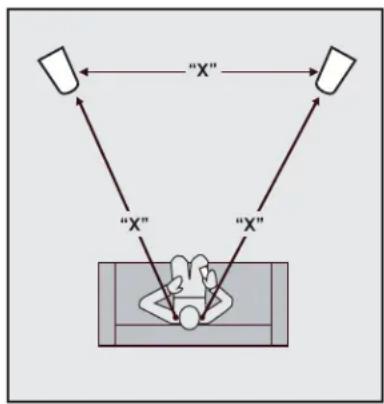
Best Imaging: Measure the distance from the main listening area to the left front speaker (we'll call this distance "X"). For optimal imaging and largest soundstage, place speakers "X" distance apart from each other
and no less than 3/4 of that distance — 3/4 of "X" = from the speakers to the listening position. To further optimize imaging, turn speakers inward so they point toward the listening position with their axes crossing just behind it.
Positioning T44 as Surrounds
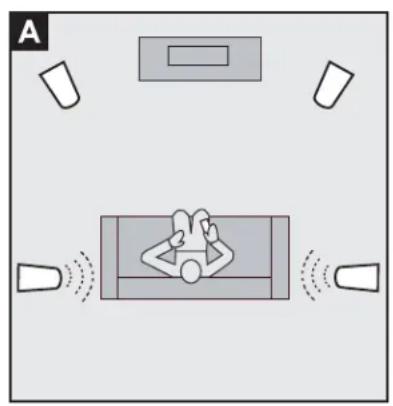
When used as surround speakers, T44 speakers may be located on the side or behind the listeners. When used on the sides, take care never to locate the speakers forward of the listeners (A). If the speakers are placed along the rear wall as surrounds, it is suggested that they be positioned fairly wide apart if possible. For instance, if there is a couch in the center of the rear wall on which the listeners will sit, try to position the speakers wider apart than the couch (B).
natural_image
Top-down diagram of a person in a room with sound waves and equipment, no text or symbols present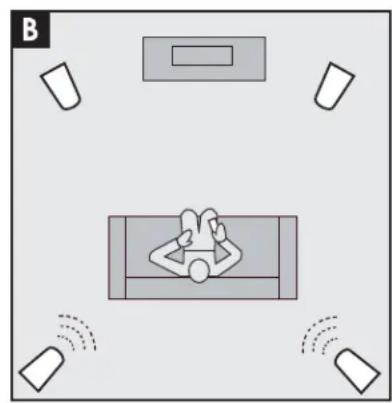
natural_image
Top-down diagram of a person relaxing in a car with sound waves, surrounded by other objects (no text or symbols)Speaker Connection
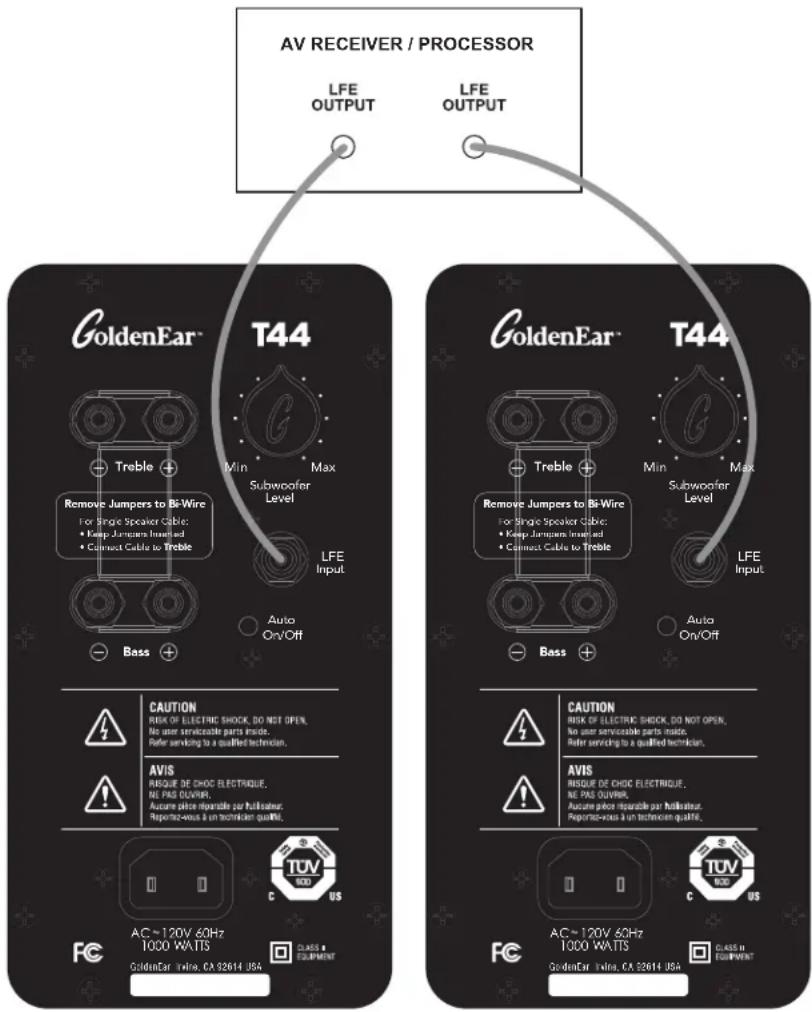
T44 speakers have a set of speaker-level 5-way binding posts and, in addition, each speaker has a line-level LFE (Low-Frequency Effects) input. The LFE input can be used with AV Receivers and Processors to separately feed the discrete LFE channel (the ".1" signal in a 5.1- or 7.1-channel surround system) into each T44's subwoofer. Unlike a conventional system in which the powered subwoofer is driven only by a discrete LFE or subwoofer signal, the T44 speakers' powered subwoofer is also driven by low frequencies from the speaker-level inputs from left/right channels. Using the LFE input with this connection method allows independent adjustment of the LFE channel volume level for movie playback (or any source with a ".1" channel) from an AV receiver/processor.
If the T44 speakers are main left/right speakers, connect the left main/front channel red(+) terminal of the receiver or amplifier to the red(+) terminal of the left loudspeaker and the left main/front channel black(-) terminal of the receiver or amplifier to the black(-) terminal of the left loudspeaker. Connect the right channel main/front channel red(+) terminal of the amplifier or receiver to the red(+) terminal of the right loudspeaker and the black(-) terminal of the right main/front channel of the receiver or amplifier to the black(-) terminal of the right loudspeaker. It is essential that both speakers be connected in the same way ("in phase") to its own channel of the amplifier. If a great lack of bass is experienced, it is likely that one speaker is out of phase (+ and - reversed) with the other.
If using the T44 speaker as surround speakers, connect the left surround red(+) terminal of the receiver or amplifier to the red(+) terminal of the left surround speaker and the left surround black(-) terminal of the receiver or amplifier to the black(-) terminal of the left surround speaker. Connect the right surround red(+) terminal of the amplifier or receiver to the red(+) terminal of the right surround loudspeaker and the black(-) terminal of the right surround channel of the receiver or amplifier to the black(-) terminal of the right surround loudspeaker. Again, it is essential that both speakers be connected in the same way ("in phase") to its own channel of the amplifier.
Connecting Speaker Cables Only
Illustration 1 shows the simplest setup, which is to connect the T44s with a pair of Full-Range, equal-length speaker cables. T44s are bi-wire capable, and ship with special "jumpers" joining the TREBLE or FULL RANGE and BASS inputs that must remain place in this configuration. These short jumpers should remain in place even if connecting bare wire or spades to the speaker-level inputs. But if they fall out contact your dealer, or simply replace them by running them through the hole in the center of the binding posts and curling them around the posts to secure them in place while connecting speaker cables.
If using an AV receiver or processor, simply set the receiver or processor's speaker setup menu to indicate "Large" for left and right main speakers and "No" for subwoofer (note that some receivers/processor setup menus might use "Full-Band" or "Full-Range" instead of "Large."). The bass management system will then send all low frequencies (including the LFE ".1" channel) into the left and right channels and it will be reproduced by the subwoofers in your T44s, giving you all the benefits of their two built-in subwoofers. (The speakers have a special circuit that takes the signal from the speaker level input and converts it to a low-level signal which then drives the subwoofer power amp.)
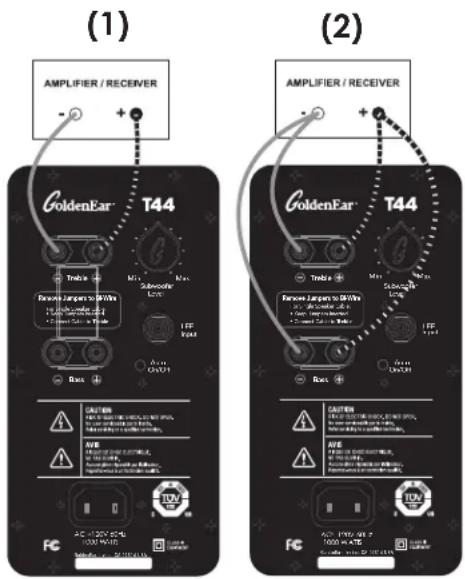
Illustration 2 is for connecting two discrete equal-length speaker cables to each speaker in a bi-wire configuration (follow same bass management instructions as above on your AV receiver or processor). This requires the removal of the two bi-wire jumpers referenced above. Simply open the positive and negative speaker-level inputs and remove the jumpers. Please store for future use if needed again.
Whenever possible, this is the preferred connection from your AV receiver or power amplifier(s) to your T44. When bi-wiring, the current modulation of delicate high-frequency audio signals is virtually eliminated from the isolated midrange/treble cable. This and other audio distortions can be greatly minimized when using a bi-wire speaker connection with your T44.
Connecting the LFE Input
*Using the LFE Input is always in addition to connecting speaker cables, it is never a replacement for connecting speaker cables.
With surround sound playback you also have the option to use the line-level LFE input in addition to speaker cables. Many AV receivers and processors have two LFE outputs, one for each T44. However, for receivers or processors with only one LFE output, simply use a "Y" connector (available from your dealer) out of the Sub/LFE output to feed two line-level cables from the Y connector to each T44.
Now set the receiver or processor's bass management system for "Large" left and right front speakers and also select "Yes" for subwoofer. This will send only the .1 LFE signal via the line-level cables to the T44's LFE input. This configuration allows the AV receiver/processor to set the LFE channel volume level independently for movie playback (or any source with a ".1" channel). PLEASE NOTE: Some AV receivers/processors have a setting called "Double Bass", "Super Bass" or "Bass+." This option sends both LFE and bass above a specified crossover frequency to the LFE channel. We recommend avoiding this configuration as it will likely cause the speakers to sound bloated and bass heavy.
If You are Using a Source Component's Multi-Channel Analog Outputs
Because of the nature of their bass management systems, when using the multi-channel analog output from a Blu-Ray, SACD or DVD-Audio player (or any other setup that requires using 6-8 channel analog interconnects), the particular connection method chosen for your T44 speakers will determine the settings in the player's speaker setup menu. If you are using the multi-channel analog outputs from one of these players, access the player's setup menu and set all channels using T44 speakers to "Large" and:
- If you used the connection method outlined in the "Connecting Speaker Cables Only" section, set the player's speaker setup menu to indicate "No" for subwoofer.
- If you used the connection method outlined in the "Connecting the LFE Input" section, set the player's speaker setup menu to indicate "Yes" for subwoofer.
Setting Bass and Treble Controls on Receiver or Amplifier
Normally we recommend that you set the "Bass" and "Treble" controls on flat (or off, or 0 dB). Same applies for a graphic equalizer; we recommend that you leave it flat (or off). This will give you the most accurate and natural sound. If you want more bass, raise the subwoofer's "Level" control on your T44 speaker, keeping in mind that even a little turn of the knob can make a big difference in the sound. The reason for this recommendation is that we have discovered what is often thought to be improper sounding speakers is, in fact, a problem caused by the use of tone controls. When in doubt, leave them out (flat); this almost always results in the best possible and most natural sounding system performance.
Powering Up the Active Subwoofer Section
Each of your T44 speakers contains a built-in powered subwoofer section as well as an electronic crossover. Each T44 speaker must be plugged into an electrical socket of the appropriate voltage (as indicated on the back of your unit) using the plug on the end of the electrical cord which you have attached to the back of the speaker. The T44 speaker has a special auto on/off circuit which automatically turns the powered subwoofer section on when a signal is fed to the loudspeaker and therefore does not require an on-off switch.
When the T44 is first plugged in, the LED will flash for 30 secs while the speaker conducts a self-test, initializing the software and hardware. After 30 sec, if there is no audio signal, the LED will turn off and the subwoofer will go into standby mode drawing a low amount of power while waiting for an audio signal. The LED on the back panel will light up when a signal is sensed and the amplifier will turn on. After you stop listening, it may take up to an hour for the amplifier to actually turn off. In some instances, because of RF-Noise present in your area, the LEDs may not turn off. However, this is nothing to be concerned about as the amplifiers draw almost no power when they are idling. Please note: It is normal to hear a slight pop from the speaker when the amp powers up.
NOTE: To prevent accidental damage to the subwoofers built into your T44 speakers from overdriving the system, the subwoofers feature an internal overload protection circuit, which will turn the subwoofers off or down when overdriven or overheated and will then resume normal operation after a few minutes.
Adjusting the Subwoofer Level Control
Your T44 speakers have a Subwoofer Level control which allows you to perfectly tune the output of the powered low-frequency subwoofer section to match your room, and your own personal taste. We suggest beginning with the level control set at the 12 o'clock position. Please note there is no adjustment of the crossover points or phase because these have already been designed and engineered into the speaker for the best possible overall system response — a major performance benefit of having the "built-in" subwoofer.
VERY IMPORTANT: Setting Channel Levels and Bass Management Systems
Multi-channel surround sound systems have a critical channel balancing procedure for setting the level for all speakers which must be followed if the system is to perform properly. Many problems relating to the overall sound of the system can be clearly traced back to improper system balance. Also note that multi-channel surround sound systems have bass management systems (systems which direct the bass to the various channels) which vary from unit to unit. This bass management system must also be properly adjusted. Many problems relating to the overall sound of the system can be traced back to improper bass management.
Bass Management Settings
On your receiver or A/V processor's Speaker Setup Menu, set Left and Right main speakers to "Large" and set Subwoofer to "Yes" or "No" depending on whether you are using the additional LFE input (as discussed in Speaker Connection section). If you are using the T44 speakers for surround speakers, set the surround channels of your receiver/processor's bass management system to "Large" also.
Setting Channel Levels
On your AV receiver or processor's Speaker Level Calibration Menu, set each speaker (channel) in the system to the same volume level. While you can get reasonable results doing this by ear, it is best to use an inexpensive Sound Pressure Level (SPL) meter to get better channel-to-channel balance. Some new receivers and processors have Auto Set Up functions that use a supplied microphone to set levels automatically.
Adjusting Low-Frequency Balance When Using LFE Input
When using the LFE input we suggest adjusting the Subwoofer Level on the T44s to sound balanced when listening to music, and using the LFE or subwoofer level control in the AV receiver/processor to raise or lower the bass/LFE level for movie/surround sound effects as desired. Normally the Subwoofer Level of the left speaker will be set the same as the right speaker. However, these Levels can also be set differently on the two speakers to vary the response of left and right speakers separately to compensate for variations such as asymmetrical positioning of the speakers in your room (i.e., when one speaker is closer to a side wall or corner, etc.) if this is how they best fit in your room. This is a unique and useful feature of the T44 design which allows much greater flexibility in loudspeaker placement, as well as additional ability to optimize what could otherwise be a difficult placement situation.
Complete Home Theater Systems
We strongly suggest using a matching GoldenEar center channel and rear/surround speakers to complete your GoldenEar home theater system. T44 speakers can be used as rear or side surround speakers, with exceptional results for both music and movies.
Using Your T44 Speaker with an Additional Subwoofer
Although the T44's built-in subwoofers deliver superb low frequency response and are all that are required for amazing performance, bass is sort of like horsepower and some listeners (and some very large rooms) may demand even more output and want to add additional powered subwoofers to the system. For those who choose to do so, we strongly suggest one or more GoldenEar SuperSub™ subwoofers in order to achieve perfect matching with the T44s and the highest level of performance and quality possible. This should be connected with an additional RCA line-level cable connected to the LFE output of the AV receiver or processor. (An AV receiver or processor's bass management system may have multiple setup options for integrating the subwoofer — consult the AV receiver/processor's manual and your GoldenEar dealer to select the best setup option.)
A typical setup would have only the additional outboard sub(s) connected to the LFE output of the AV receiver/processor, still setting as Left and Right Main as "Large" and Sub as "Yes," thus directing the LFE bass only to the outboard sub(s). Another interesting option is to run the AV receiver's/processor's LFE-out into both the T44 Towers as well as your additional subwoofer(s), splitting the LFE-out(s) as necessary to achieve three (or more) sources of low-frequency energy in the room. This provides, in effect, 3 (or more) LFE subwoofers, which can be quite impactful, as well as providing smoother bass response throughout the listening room. To get the LFE level balanced properly between the additional subwoofer(s) and the T44s, the key is to take full advantage of the additional subwoofer's capabilities while keeping the LFE energy sent to the T44s appropriate. Normally, the additional subwoofer(s) will play louder than the T44s on an LFE signal, using the additional sub's level control(s) to achieve this.
Troubleshooting
If you experience any difficulties with your T44 speakers, try the suggestions described below. If you are still having problems, please consult your GoldenEar Authorized Dealer for assistance.
- Make sure all your system interconnects and power cords are solidly in place.
- Should you experience any level of ground hum or noise, try plugging the power cord into the same circuit as your amplifier.
- The system is provided with sophisticated internal protection circuitry. If for some reason the protection circuitry is tripped, please turn down your system's volume and wait five minutes before trying the system again. If the amplifier should overheat, the system will turn off until the amplifier cools down and resets.
- Check to be sure that your power cord has not been damaged.
- Check that no foreign objects or liquid has entered the speaker.
- If you cannot get the powered subwoofer to turn on or if no sound comes out and you are sure the system is set up properly, please bring the loudspeaker to your GoldenEar Authorized Dealer for assistance. Please make sure you call first.
Technical Assistance
It is our pleasure to offer assistance if you have any questions regarding your T44 speakers or their set-up. Please contact your nearest GoldenEar dealer or contact us directly at (949) 800-1800.
Service
Service and warranty work on your GoldenEar loudspeakers will normally be performed by your local GoldenEar dealer. If, however, you wish to return the speaker to us, please contact us first, describing the problem and requesting authorization as well as the location of the nearest factory service center. Please note that the address given in this booklet is the address of our office only. Under no circumstances should loudspeakers be shipped to our offices or returned without contacting us first and obtaining return authorization.
The Quest Group dba
GoldenEar™
2621 White Road
Irvine, CA 92614 USA
Phone: 949-800-1800
Specifications
T44
Driver Complement: One Reference High-Velocity Folded Ribbon AMT Tweeter One 4.5" High-Definition Cast-Basket Mid/Bass Driver One 5" x 9" Long-Throw Quadratic Subwoofer Two 7" x 10" Quadratic Planar Back-Wave-Driven Radiators
Passive Radiator
Surface Area: 53.36in ^2 (344.3cm ^2 )
Efficiency: 89dB 1W/1M @ 4Ω (2.83V/1M)
Frequency Response: 32Hz–25kHz typical (-6dB on axis @ 32Hz, anechoic bass response)
Nominal Impedance: 4Ω
Rec. Amplification: 20 - 400 watt/channel
Built-In Subwoofer
Power Amplifier: 1000W peak/500W RMS, DSP-Controlled (50-ohm load – 5 seconds sustained 55Hz sinusoidal signal) Note: Not tested to FTC standard (8-ohm load – 5 minutes sustained 1kHz sinusoidal signal)
Speaker Dimensions: 7 12 " (19.1 cm) W x 14 ^3/4 " (37.6 cm) D x 41 ^5/8 " (105.8 cm) H (height is with base and feet installed, no spikes)
Base: 11 ^13/_16 " (30 cm) W x 17% (44.12 cm) D
Weight: 48lbs (21.8kg)
Power Requirements/
Consumption: Low Voltage Version — AC \~ 120 V – 60 Hz, 1000 WATTS High Voltage Version — AC \~ 240 V – 50 Hz, 1000 WATTS (Approved for NA (TUV) and the CE market.)
GoldenEar™
Limited Warranty
5-YEARS FOR DRIVERS AND CABINETS, 3-YEARS FOR ELECTRONIC COMPONENTS
GoldenEar™ warrants to the original retail purchaser only that this GoldenEar Loudspeaker Product (the "Product") will be free from defects in materials and workmanship for a period of five (5) years covering the drivers and cabinets, and three (3) years for the electronic components from the date of the original purchase from a GoldenEar Authorized Dealer. However, this warranty will automatically terminate prior to the expiration of five (5) years for the drivers and cabinets and three (3) years for the electronic components if the original retail purchaser sells or otherwise transfers the Product to any other party. The original retail purchaser shall hereinafter be referred to as "you." Defective Products must be shipped, together with proof of date of purchase, prepaid insured to the Authorized Dealer from whom you purchased the Product, or to the nearest factory service center. Product(s) must be shipped in the original shipping container or its equivalent; in any case the risk of loss or damage in transit is to be borne by you. If, upon examination at the Factory or a GoldenEar Authorized Dealer, it is determined that the unit was defective in materials or workmanship at any time during this Warranty period, GoldenEar or the GoldenEar Authorized Dealer will, at its option, repair or replace this Product at no additional charge, except as set forth below. All replaced parts and Product(s) become the property of GoldenEar. Product(s) replaced or repaired under this Warranty will be returned to you, within a reasonable time, freight collect.
This Warranty does not include service or parts to repair damage caused by accident, misuse, abuse, negligence, inadequate packing or shipping procedures, commercial use, voltage in excess of the rated maximum of the unit, cosmetic appearance of cabinetry not directly attributable to defects in materials or workmanship, or service, or repair or modification of the Product which has not been authorized by GoldenEar. GoldenEar makes no Warranty with respect to its Products purchased from dealers or outlets other than GoldenEar Authorized Dealers. This Warranty is in lieu of all other expressed Warranties. If this Product is defective in material or workmanship as warranted above, your sole remedy shall be repair or replacement as provided above. In no event will GoldenEar be liable to you for any incidental or consequential damages arising out of the use or inability to use the Product, even if GoldenEar or a GoldenEar Authorized Dealer has been advised of the possibility of such damages, or for any claim by any other party. Some states do not allow the exclusion or limitation of consequential damages, so the above limitation may not apply to you.
All implied warranties on the Product are limited to the duration of this expressed Warranty. Some states do not allow limitation on how long an implied Warranty lasts, so the above limitations may not apply to you. This Warranty gives you specific legal rights, and you also may have other rights which vary from state to state.
CE UK CA
This product complies with the essential requirements of the EMC directive 89/336/EEC
Visit us at www.goldenear.com
Copyright © 2024 GoldenEar. All rights reserved.
Reproduction in whole or in part without our express permission is prohibited.
GoldenEar™
natural_image
Two black outdoor speakers with ventilation grilles and speaker stands, shown from different angles (no text or symbols visible)T44
natural_image
Top-down diagram of a person inside a vehicle with sound waves, no text or symbols present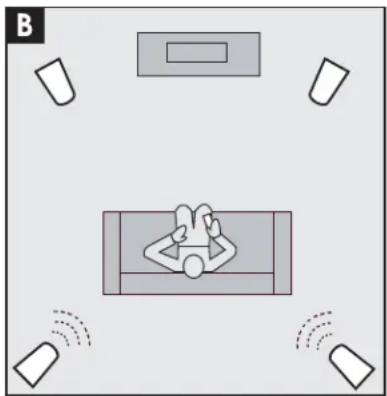
natural_image
Top-down diagram of a car with visible sound waves and location markers (no text or symbols)Assistance technique
Visitez www.goldenear.com
- T44 Owner's Manual
- Congratulations
- Safety Precautions
- READ THIS SECTION CAREFULLY BEFORE PROCEEDING!
- RECYCLING AND REUSE GUIDELINES FOR EUROPE
- Important Safety Instructions
- SAFETY PRECAUTIONS SPECIFIC TO T44 SPEAKER
- POWER SUPPLY
- Unpacking Your T44 Loudspeakers
- Please Inspect for Shipping Damage
- UNBOXING
- PLEASE NOTE: DO NOT ATTEMPT TO REMOVE THE T44 GRILLES.
- Instructions to Install Spikes/Rubber Tips On Speaker Bases
- Parts included:
- Choosing Spikes or Rubber Tips
- For safety and installation ease, two people are recommended.
- PLEASE READ THIS PAGE THOROUGHLY BEFORE PROCEEDING.
- Installing the spikes or rubber tips
- Reinstalling Foot Cones and Locking Nuts
- Preventing Speaker Damage
- Amplifier Distortion: The #1 Threat to Your New Speakers
- Volume Setting
- There is Actually a Limit!
- The Right Amount of Power
- Speaker Placement
- Room Acoustics
- Speaker Break-in
- Positioning T44 as Left/Right Fronts
- Positioning T44 as Surrounds
- Speaker Connection
- Connecting Speaker Cables Only
- Connecting the LFE Input
- If You are Using a Source Component's Multi-Channel Analog Outputs
- Setting Bass and Treble Controls on Receiver or Amplifier
- Powering Up the Active Subwoofer Section
- Adjusting the Subwoofer Level Control
- VERY IMPORTANT: Setting Channel Levels and Bass Management Systems
- Bass Management Settings
- Setting Channel Levels
- Adjusting Low-Frequency Balance When Using LFE Input
- Complete Home Theater Systems
- Using Your T44 Speaker with an Additional Subwoofer
- Troubleshooting
- Technical Assistance
- Service
- Specifications
- T44
- GoldenEar™
- Limited Warranty
- 5-YEARS FOR DRIVERS AND CABINETS, 3-YEARS FOR ELECTRONIC COMPONENTS
- Visit us at www.goldenear.com
- Assistance technique
- Visitez www.goldenear.com
Brand : GoldenEar
Model : T44
Category : Speaker