
X-Rally 2.0 - Remote control toy Overmax - Free user manual and instructions
Find the device manual for free X-Rally 2.0 Overmax in PDF.


| Brand | Overmax |
| Model | X-Rally 2.0 |
| Product type | Remote-controlled toy (RC car) |
| Vehicle power source | Rechargeable battery included |
| Controller power source | 2 AA 1.5 V batteries (not included) |
| Charging time | Approximately 2 hours (LED indicator) |
| Battery life | Approximately 15 to 20 minutes |
| Main functions | Forward, reverse, left/right steering, steering trim adjustment |
| Remote control range | Approximately 20 to 30 meters |
| Maximum speed | Approximately 5 to 8 km/h |
| Recommended age | Over 8 years old |
| Dimensions | Approximately 25 x 15 x 10 cm (estimated) |
| Weight | Approximately 500 g (estimated) |
| Material | Plastic, electronic components |
| Standards and certifications | Compliant with European directives, WEEE 2012/19/EU |
| Maintenance and cleaning | Clean with a damp cloth, avoid chemical products |
| Safety | Do not use near water, do not modify, adult supervision for charging |
| Repairability and spare parts | Repair only by an authorized service; no spare parts specified |
| Warranty | Standard (refer to seller) |
Frequently Asked Questions - X-Rally 2.0 Overmax
User questions about X-Rally 2.0 Overmax
0 question about this device. Answer the ones you know or ask your own.
Ask a new question about this device
Download the instructions for your Remote control toy in PDF format for free! Find your manual X-Rally 2.0 - Overmax and take your electronic device back in hand. On this page are published all the documents necessary for the use of your device. X-Rally 2.0 by Overmax.
USER MANUAL X-Rally 2.0 Overmax
natural_image
Black and yellow electric vehicle with 'X RALLY 20' branding, showing two large tires and front suspension (no text or symbols on the vehicle itself)CE
EN: The product complies with requirements of EU directives.
Pursuant to the Directive 2012/19/EU, this product is subject to selective collection. The product must not be disposed of along with domestic waste as it may pose a threat to the environment and human health. The worn-out product must be handed over to the electrics and electronics recycling center.
natural_image
Technical line drawing of a mechanical component with internal ports and a directional arrow (no text or symbols)natural_image
Technical line drawing of a mechanical component with internal ports and an arrow indicating direction (no text or symbols)PL
ŁADOWANIE BATERII SAMOCHODU
natural_image
Top-down schematic of a vehicle chassis showing front, rear, and side views with no text or symbolsnatural_image
Top-down schematic of a vehicle's internal components and wiring, showing steering wheel, battery pack, and wiring connector (no text labels)SPOSÓB UŻYTKOWANIA
natural_image
Diagram showing a robotic device and a tractor with directional arrows indicating motion (no text or symbols)natural_image
Technical line drawing of a robotic device and a tractor, showing rotational motion with arrows indicating movement (no text or symbols)PL
REGULACJA SKREȚU
natural_image
Technical diagram of a vehicle chassis with labeled components and directional arrows indicating motion (no text or symbols present)CZYSZCZENIE I KONSERWACJA
Thank you for placing trust in us and choosing Overmax.
Thanks to the use of high-quality materials and modern solutions, we provide you with a product perfect for everyday use. We are convinced that the product will satisfy your requirements as it has been designed with utmost care. Before you start using the product, please read this manual carefully.
Should you have any remarks or questions concerning the product, please do not hesitate to contact us:
Please read this manual before you start using the product to see all its functions and use them in accordance with intended use.
- Do not repair or modify the device. Only an authorized service technician is allowed to perform these operations.
- Do not switch the device on if you have noticed any damage.
- Do not use the device when it acts up, has been dropped or immersed in water, overheats extensively, is discolored or deformed, and when other atypical circumstances occur. Contact the manufacturer's authorized service center.
- Never leave the charging battery unattended.
- The device is intended for children aged above 8. Do not let younger children play with it.
- Use the device away from sources of heat, high temperatures, hot surfaces, direct sunlight, source of ignition, naked flame, oils and sharp edges.
EN
- Do not use the device in inflammable, explosive or toxic atmosphere.
- Do not use chemicals to clean the device.
- After every use, switch the device off and disconnect the battery.
- Do not immerse the entire device in water or other liquids. Do not use the device near water.
- Before you start cleaning or moving the device, switch it off.
- Do not use the device for other purposes than designed.
- Keep the device away from sharp items.
- Do not place other items on the device when you use it.
- Use the device on flat and hard surfaces only. Avoid going on sand, grass or other surfaces which may lead to damage.
- To charge a battery, use a supplied charging cord only.
- After every charging, disconnect the USB cable from the USB port.
- Pay attention to battery polarization in the device and controller.
- In the device use the supplied battery only, in the controller two batteries AA 1,5V are used (they are not supplied). In the controller do not use storage batteries.
- After the use, do not touch a car engine because it may be extremely hot.
- Transformer, power supply, or battery charger used with the electric toy shall be regularly examined for damage to the supply cord, plug, enclosure or other parts, and in the event of such damage, it shall not be used until the damage has been repaired.
- The toy must not be connected to more power sources than recommended.
- Recharge the batteries only under adult supervision.
- Batteries must be removed from the toy before charging.
- Do not use different types of batteries or new and used batteries.
- Remove exhausted batteries from the toy.
- Power terminals should not be short-circuited.
- Non-rechargeable batteries should not be recharged.
DEVICE OUTLINE
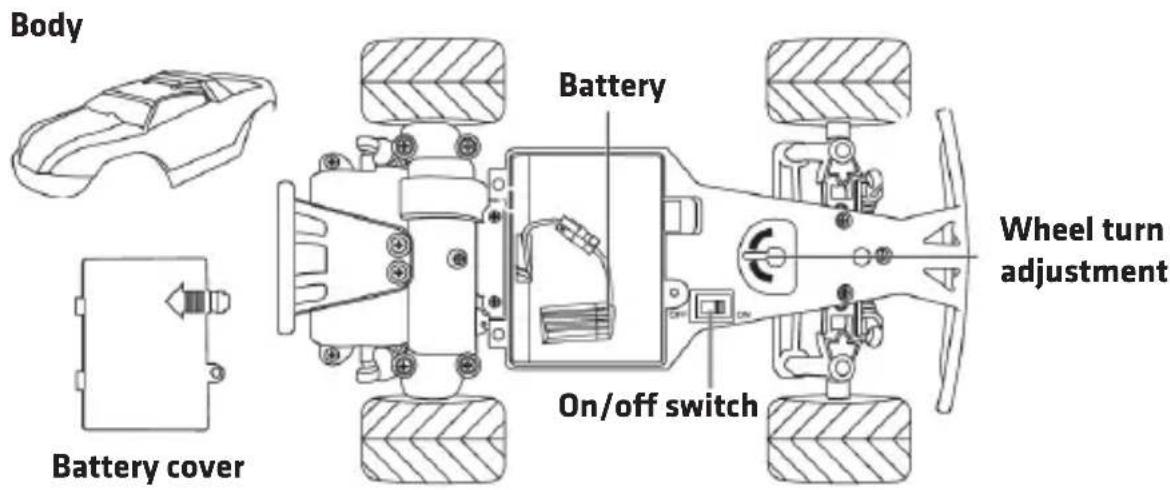
EN
CONTROLLER OUTLINE
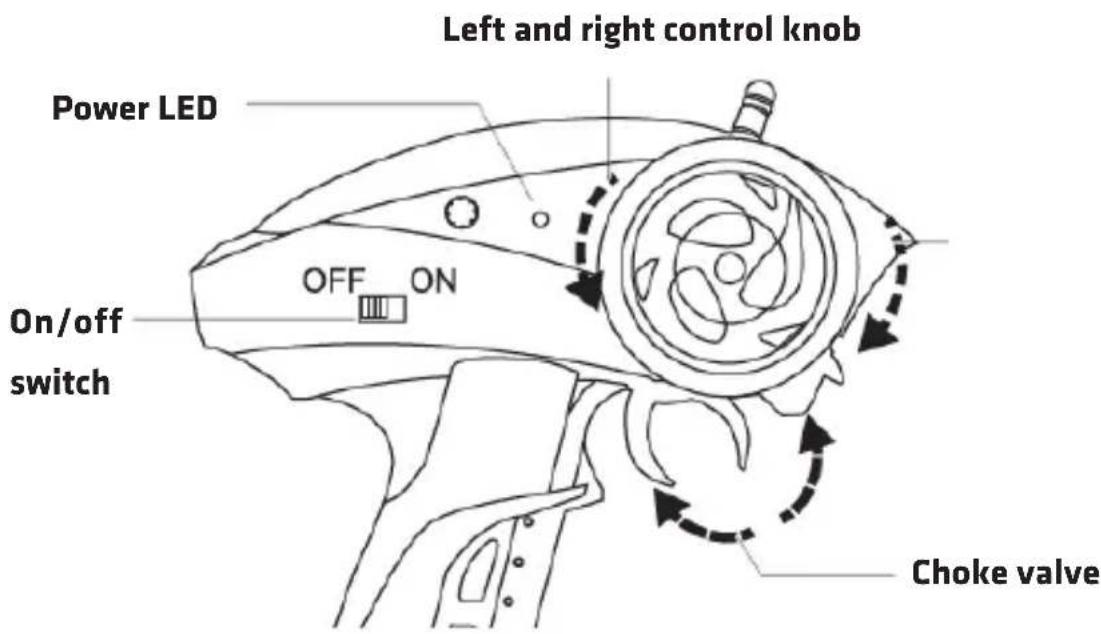
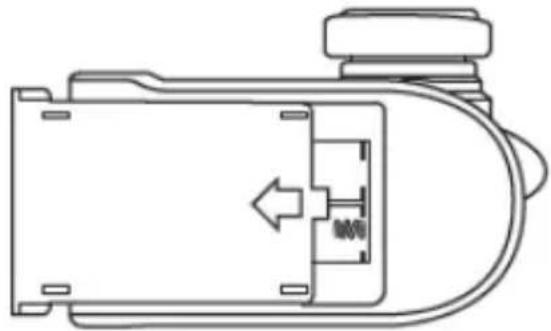
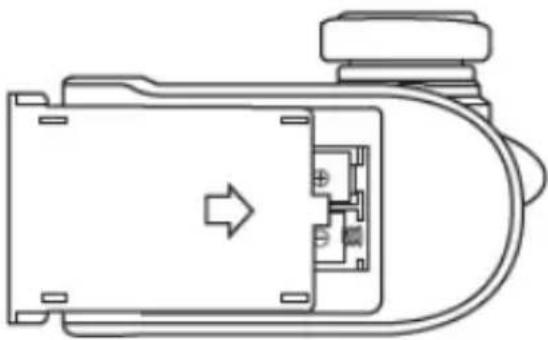
HOW TO ASSEMBLE BATTERY IN THE CONTROLLER
EN
- Loosen the screw of the battery cover with a screwdriver. Remove battery cover.
natural_image
Technical line drawing of a mechanical component with no visible text or symbols- Insert two batteries AA 1,5 V. Pay special attention to battery terminals.
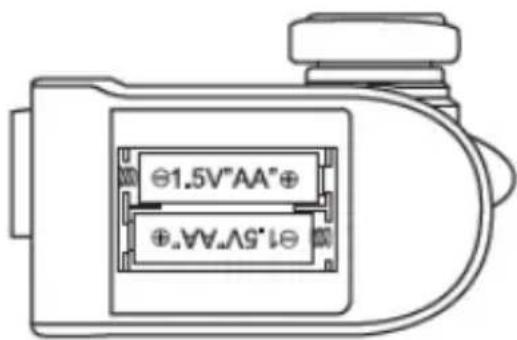
- Put the cover back on. Tighten the screw with a screwdriver.
natural_image
Technical line drawing of a mechanical component with internal ports and an arrow indicating direction (no text or symbols)HOW TO CHARGE CAR BATTERY
-
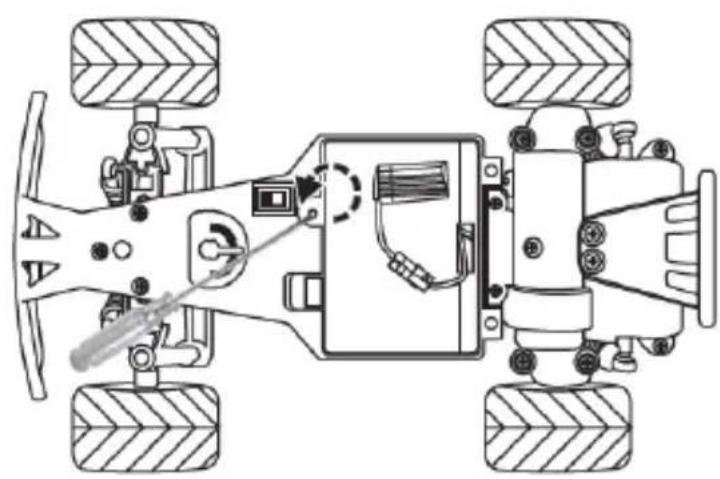
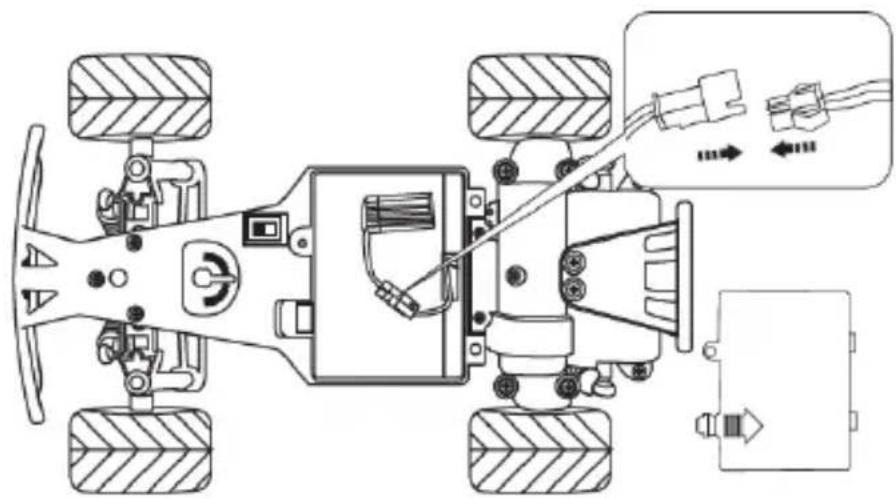
Connect the charger to a USB port on your computer or to a USB power adapter. Then connect the battery to the charger. During charging the LED lights up. When the battery is charged, the LED will turn off.
-
Unscrew the camping screw from the car battery cover and remove it.
natural_image
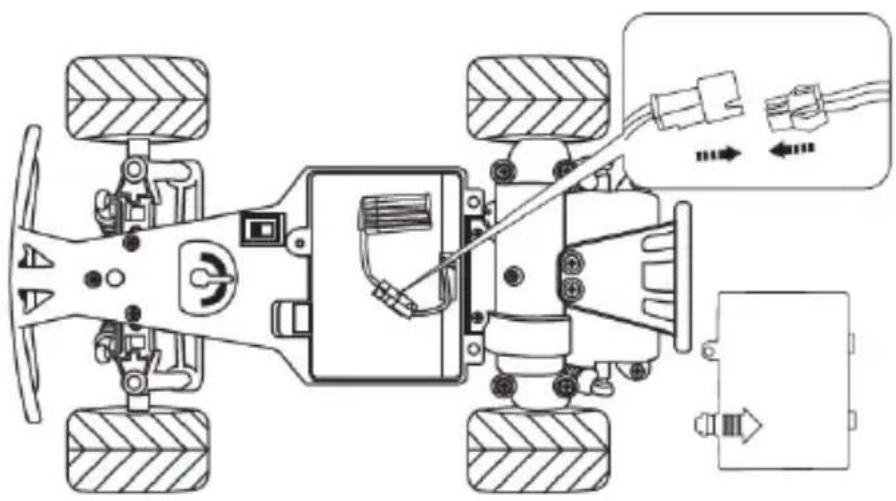
Top-down schematic of a vehicle chassis showing front wheel, rear wheels, and internal components (no text or labels)- Connect the battery, close the cover and screw it back on.
natural_image
Top-down schematic of a vehicle's internal components and wiring, showing steering wheel, battery pack, and electrical connections (no text labels)HOW TO USE
-
Set the car switch into ON.
-
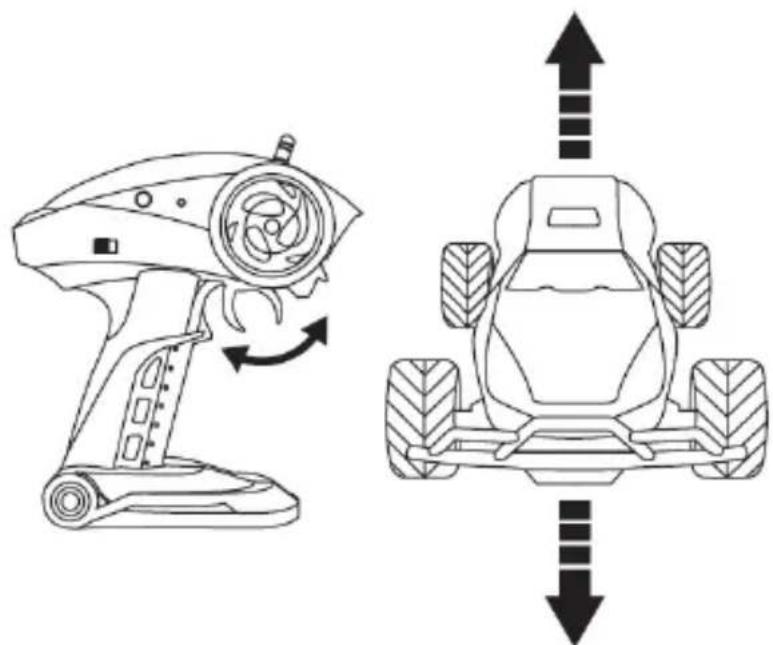
Slide the controller switch into ON. Power LED will start flashing. Wait about 15 seconds until the controller has connected with the car. LED will go on continuously.
-
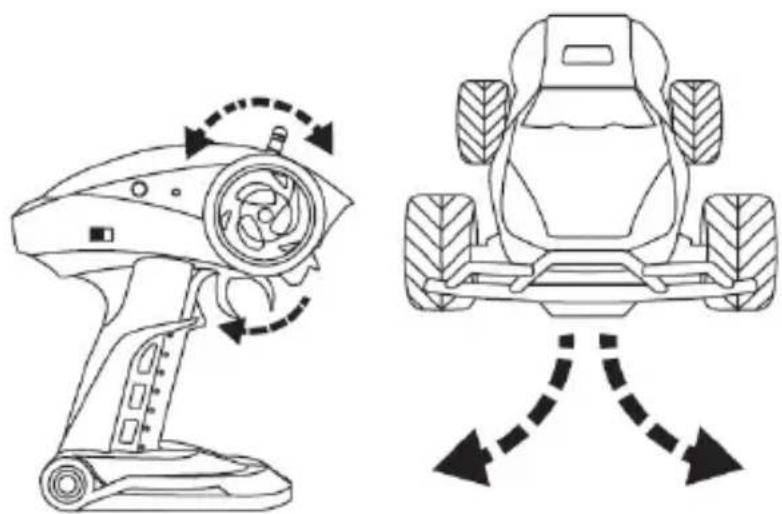
To go forward, move the choke valve to the back. The stronger the movement, the higher the speed of the car. Move the choke valve to the front, to stop and reverse.
natural_image
Diagram showing a robotic device and a tractor with directional arrows indicating motion (no text or symbols)- Turn the knob left or right to make the car turn.
natural_image
Technical line drawing of a robotic device with rotational control and vehicle chassis (no text or symbols)EN
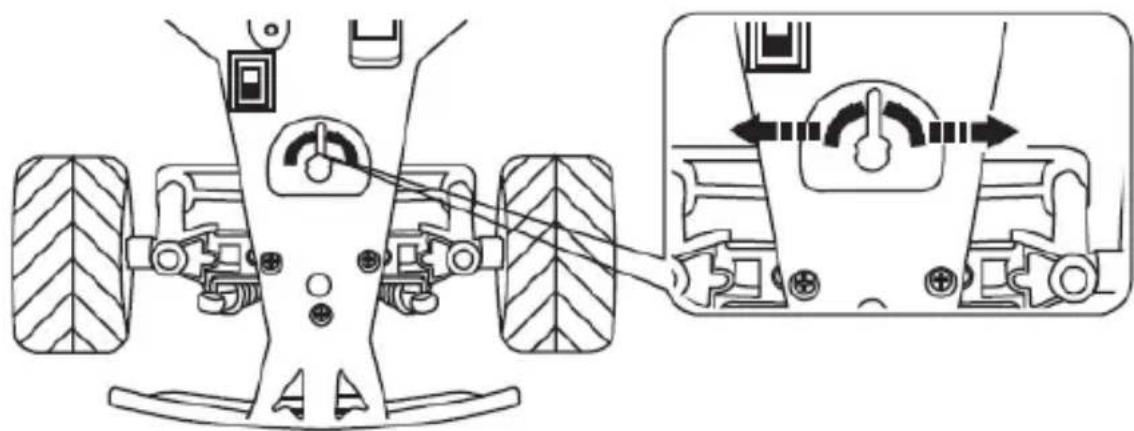
TURN ADJUSTMENT
If you have noticed that the car turns aside instead of going straight, you can adapt the turn with adjustment.
EN
natural_image
Technical diagram of a vehicle chassis showing front and side views with no visible text or symbolsCLEANING AND MAINTENANCE
-
Before you start cleaning, switch the device off and disconnect the battery.
-
Clean the car and controller with wet cloth.
-
Do not use chemicals to clean the device.
-
After every use, remove sand and dust from the car.
The pictures are for reference only. The real design of the products may differ from the pictures presented.
EINLEITUNG
natural_image
Technical line drawing of a mechanical component with no visible text or symbolsnatural_image
Technical line drawing of a mechanical component with internal ports and an arrow indicating direction (no text or symbols)DE
LADUNG DER BATTERIEN VOM AUTO
natural_image
Top-down schematic of a vehicle chassis showing front, rear, and side views with no text or symbolsnatural_image
Top-down schematic of a vehicle chassis with labeled components and wiring connections (no text or symbols)DE
GEBRAUCHSWEISE
natural_image
Diagram showing a robotic device and a tractor with directional arrows indicating motion (no text or symbols)natural_image
Technical line drawing of a robotic device and a tractor, showing rotational motion with arrows indicating movement (no text or symbols)natural_image
Technical diagram of a vehicle chassis with labeled components and directional arrows indicating motion (no text or symbols present)natural_image
Technical line drawing of a mechanical component with no visible text or symbolsnatural_image
Technical line drawing of a mechanical component with internal ports and an arrow indicating direction (no text or symbols)natural_image
Top-down schematic of a vehicle chassis showing front wheel, rear wheels, and internal components (no text or labels)natural_image
Top-down schematic of a vehicle's internal components and wiring diagram (no text or labels)IT
MODALITÁ D'USO
natural_image
Diagram showing a robotic device and a tractor with directional arrows indicating movement or force (no text or symbols present)natural_image
Technical line drawing of a robotic device and a tractor, showing rotational motion with arrows indicating movement (no text or symbols)natural_image
Technical diagram of a vehicle chassis with labeled components and directional arrows indicating motion (no text or symbols present)IT
natural_image
Technical line drawing of a mechanical component with no visible text or symbolsFR
natural_image
Technical line drawing of a mechanical component with internal ports and an arrow indicating direction (no text or symbols)RECHARGE DE LA PILE DU VÉHICULE
natural_image
Top-down schematic of a vehicle's front view showing suspension components and wiring (no text or labels)natural_image
Top-down schematic of a vehicle's internal components and wiring, showing steering wheel, battery pack, and electrical connections (no text labels)MODE D'UTILISATION
natural_image
Diagram showing a robotic device and a tractor with directional arrows indicating motion (no text or symbols)natural_image
Technical line drawing of a robotic device and a tractor, showing rotational motion with arrows indicating movement (no text or symbols)RÉGLAGE DU BRAQUAGE
natural_image
Technical diagram of a vehicle chassis with wheels and control panel, showing mechanical assembly and adjustment (no text or symbols)NETTOYAGE ET ENTRETIEN
natural_image
Technical line drawing of a mechanical component with no visible text or symbolsnatural_image
Technical line drawing of a mechanical component with internal ports and an arrow indicating direction (no text or symbols)ES
CARGA DE LAS PILAS DEL COCHE
natural_image
Top-down schematic of a vehicle chassis showing front wheel, rear wheels, and internal components (no text or labels)ES
natural_image
Top-down schematic of a vehicle's internal components and wiring diagram (no text or labels)UTILIZACIÓN
natural_image
Diagram showing a robotic device and a tractor with directional arrows indicating movement or force (no text or symbols present)natural_image
Technical line drawing of a robotic device and a tractor, showing rotational motion with arrows indicating movement (no text or symbols)natural_image
Technical diagram of a vehicle chassis with wheels and control panel, showing mechanical assembly and adjustment (no text or symbols)ES
LIMPIEZA Y MANTENIMIENTO
natural_image
Technical line drawing of a mechanical component with no visible text or symbolsnatural_image
Technical line drawing of a mechanical component with internal ports and an arrow indicating direction (no text or symbols)NL
HET OPLADEN VAN DE AUTOACCU
natural_image
Top-down schematic of a vehicle chassis showing front wheel, rear wheels, and internal components (no text or labels)natural_image
Top-down schematic of a vehicle chassis with labeled components and wiring connections (no text or symbols)NL
HET GEBRUIK
natural_image
Diagram showing a robotic device and a tractor with directional arrows indicating motion (no text or symbols)natural_image
Technical line drawing of a robotic device and a tractor, showing rotational motion with arrows indicating movement (no text or symbols)NL
STUURCONTROLE
natural_image
Technical diagram of a vehicle chassis with wheels and control panel, showing mechanical assembly and adjustment (no text or symbols)NL
REINIGING EN ONDERHOUD
natural_image
Technical line drawing of a mechanical component with no visible text or symbolsnatural_image
Technical line drawing of a mechanical component with internal ports and an arrow indicating direction (no text or symbols)natural_image
Top-down schematic of a vehicle chassis showing front wheel, rear wheels, and internal components (no text or labels)UK
natural_image
Top-down schematic of a vehicle chassis with labeled components and wiring connections (no text or symbols)СПОСІБ ВИКОРИСТАННЯ
natural_image
Diagram showing a robotic device and a tractor with directional arrows indicating movement or force (no text or symbols present)natural_image
Technical line drawing of a robotic device with rotational control and vehicle chassis (no text or symbols)UK
natural_image
Technical diagram of a vehicle chassis with wheels and control buttons, showing mechanical assembly and adjustment (no text or symbols)natural_image
Technical line drawing of a mechanical component with internal ports and a directional arrow (no text or symbols)natural_image
Technical line drawing of a mechanical component with no visible text or symbolsLT
AUTOMOBILIO BATERIJOS IKROVIMAS
natural_image
Top-down schematic of a vehicle chassis showing front, rear, and side views with no text or symbolsLT
natural_image
Top-down schematic of a vehicle chassis with labeled components and wiring connections (no text or symbols)NAUDOJIMO BÜDAS
natural_image
Diagram showing a robotic device and a tractor with directional arrows indicating movement or force (no text or symbols)natural_image
Technical line drawing of a robotic device and a tractor, showing rotational motion with arrows indicating movement (no text or symbols)LT
POSÜKIO REGULIAVIMAS
natural_image
Technical diagram of a vehicle chassis with labeled components and directional arrows indicating motion (no text or symbols present)VALYMAS IR PRIEŽIŪRA
natural_image
Technical line drawing of a mechanical component with no visible text or symbolsnatural_image
Technical line drawing of a mechanical component with internal ports and an arrow indicating direction (no text or symbols)HR
PUNJENJE BATERIJA VOZILA
natural_image
Top-down schematic of a vehicle chassis showing front wheel, rear wheels, and internal components (no text or labels)- Spoji bateriju, poklopi poklopac i ponovo zavijaj.
natural_image
Top-down schematic of a vehicle's internal components and wiring, showing steering wheel, battery pack, and electrical connections (no text labels)HR
NAČIN KORIŠTENJA
natural_image
Diagram showing a robotic device and a tractor with directional arrows indicating motion (no text or symbols)natural_image
Technical line drawing of a robotic device and a tractor, showing rotational motion with arrows indicating movement (no text or symbols)HR
PODEŠAVANJE SKRETANJA
natural_image
Technical diagram of a vehicle chassis with wheels and control panel, showing mechanical assembly and adjustment (no text or symbols)ČIŠĆENJE I ODRŽAVANJE
- Prije čišćenja isključi uređaj i odspoji bateriju.
- Čisti vozilo i daljinski upravljač vlažnom kripicom.
- Ne koristi kemijska sredstva za čišćenje uređaja.
- Nakon svakog korištenja očisti vozilo od pijeska i prašine.
HR
Slike imaju ilustrativni karakter, stvarni izgled proizvoda može se razlikovati od prikazanog na slikama.
OVERMAX
You • unlimited

- CE
- PL
- ŁADOWANIE BATERII SAMOCHODU
- SPOSÓB UŻYTKOWANIA
- REGULACJA SKREȚU
- CZYSZCZENIE I KONSERWACJA
- EN
- DEVICE OUTLINE
- CONTROLLER OUTLINE
- HOW TO ASSEMBLE BATTERY IN THE CONTROLLER
- HOW TO CHARGE CAR BATTERY
- HOW TO USE
- TURN ADJUSTMENT
- CLEANING AND MAINTENANCE
- EINLEITUNG
- LADUNG DER BATTERIEN VOM AUTO
- DE
- GEBRAUCHSWEISE
- MODALITÁ D'USO
- RECHARGE DE LA PILE DU VÉHICULE
- MODE D'UTILISATION
- RÉGLAGE DU BRAQUAGE
- NETTOYAGE ET ENTRETIEN
- ES
- CARGA DE LAS PILAS DEL COCHE
- UTILIZACIÓN
- LIMPIEZA Y MANTENIMIENTO
- HET OPLADEN VAN DE AUTOACCU
- HET GEBRUIK
- STUURCONTROLE
- NL
- REINIGING EN ONDERHOUD
- СПОСІБ ВИКОРИСТАННЯ
- AUTOMOBILIO BATERIJOS IKROVIMAS
- NAUDOJIMO BÜDAS
- POSÜKIO REGULIAVIMAS
- VALYMAS IR PRIEŽIŪRA
- PUNJENJE BATERIJA VOZILA
- NAČIN KORIŠTENJA
- PODEŠAVANJE SKRETANJA
- ČIŠĆENJE I ODRŽAVANJE
- OVERMAX
Brand : Overmax
Model : X-Rally 2.0
Category : Remote control toy