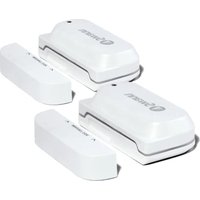
SWIFI-WDOORPK2 - Security alarm SWANN - Free user manual and instructions
Find the device manual for free SWIFI-WDOORPK2 SWANN in PDF.


| Product Type | Security Alarm - Wireless Contact Sensor |
| Brand | Swann |
| Model | SWIFI-WDOORPK2 |
| Power Source | 2 AAA batteries (included) |
| Connectivity | Wi-Fi 2.4 GHz |
| Required App | Swann Security (iOS/Android) |
| Compatibility | iOS and Android (latest versions) |
| Detection Range | 10 mm (3/8 in) between sensor and magnet |
| Sensor Dimensions | Approximately 5 x 2 x 2 cm (estimated) |
| Sensor Weight | Approximately 30 g (with batteries, estimated) |
| Main Functions | Open/close detection, push notifications, modes (Home, Away, Night) |
| Maintenance and Cleaning | Clean surface with an alcohol wipe before mounting |
| Security | Mounting with screws or double-sided adhesive, screw protection |
| Spare Parts and Repairability | Replaceable AAA batteries, double-sided adhesive tape included |
| General Information | Manual available in PDF at notice-facile.com |
Frequently Asked Questions - SWIFI-WDOORPK2 SWANN
User questions about SWIFI-WDOORPK2 SWANN
0 question about this device. Answer the ones you know or ask your own.
Ask a new question about this device
Download the instructions for your Security alarm in PDF format for free! Find your manual SWIFI-WDOORPK2 - SWANN and take your electronic device back in hand. On this page are published all the documents necessary for the use of your device. SWIFI-WDOORPK2 by SWANN.
USER MANUAL SWIFI-WDOORPK2 SWANN
Window/Door Alert Sensor
Sensor de alerta de ventana/puerta Capteur d'alerte de fenêtre/porte Sensore di allarme finestra/porta Fenster/Tür-Warnsensor
EN Quick Start Guide
IT Guida rapida
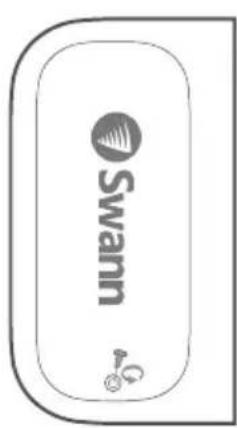
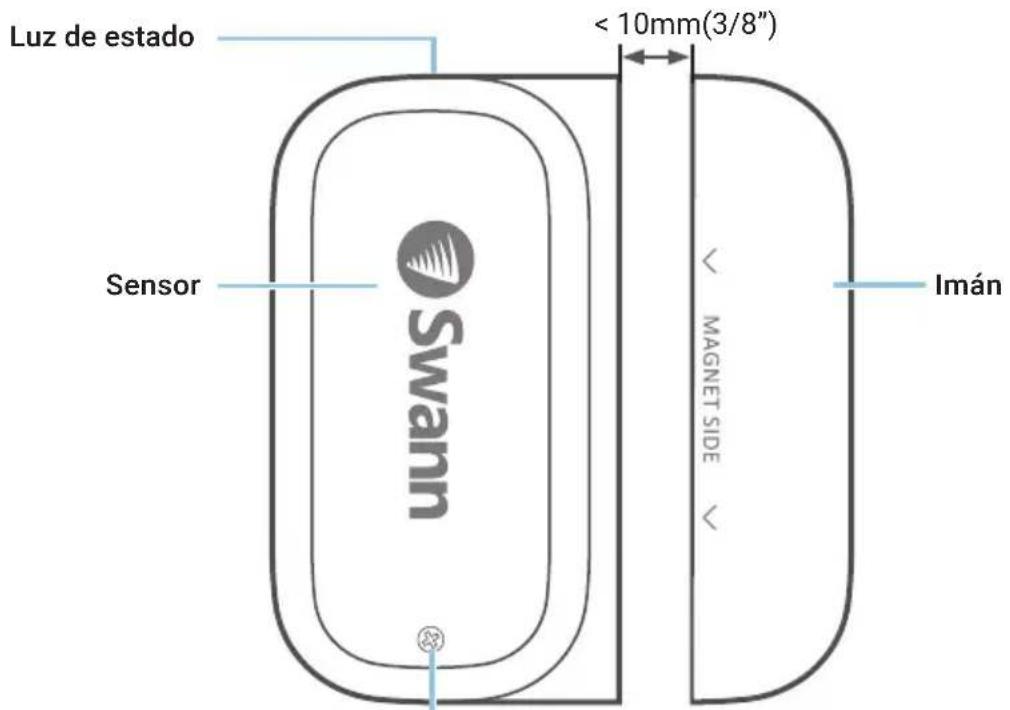
Cover screw
Remove to access battery compartment and QR code (located under cover)
BATTERY INSTALLATION
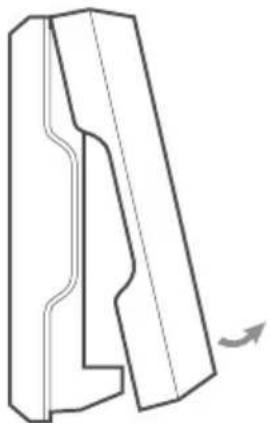
1 Unscrew the sensor cover with the supplied screwdriver and lift it off.
2 Insert the supplied two AAA batteries into the battery compartment according to the polarity markings (+ and -) shown. Pairing mode will automatically activate on the sensor for 3 minutes when batteries are inserted. The sensor status light will blink blue slowly during pairing mode. If you have downloaded the Swann Security app on your mobile device (see page 4), you can proceed to the pairing process (see page 5).
Note: Pairing mode on the sensor can be activated at any time by re-inserting the batteries.
3 After you have paired the sensor, replace the cover and screw it firmly in place.
4 Should you need to replace the batteries in the future, there is no need to re-pair the sensor. Simply wait for pairing mode to timeout (3 minutes), after which the sensor will automatically reconnect to the previously configured Wi-Fi network.
natural_image
Pure technical line drawing of a mechanical part with no text or symbols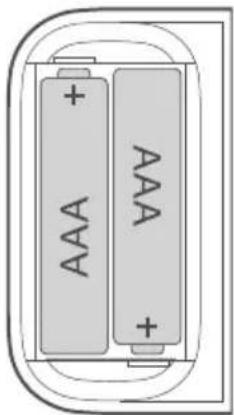
natural_image
Diagram of two batteries with 'AAA' labels, enclosed in a rounded rectangular frame (no text or symbols beyond battery markings)DOWNLOAD THE SWANN SECURITY APP
1 Download the latest version of the Swann Security app from the Apple App Store® or Google Play™ Store on your iOS or Android device. Simply search for "Swann Security".
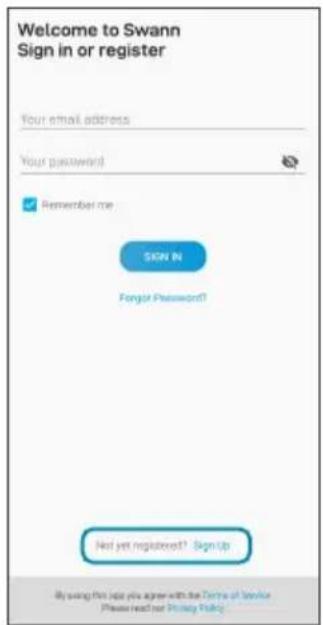
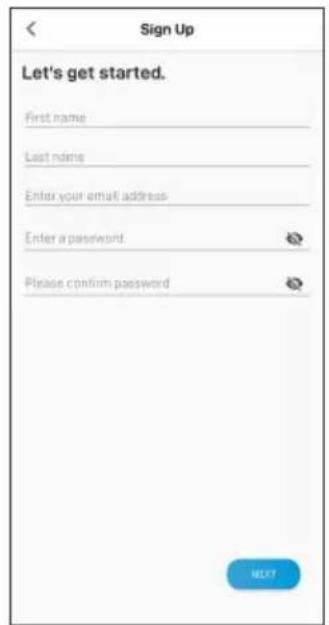
2 Open the app and create your Swann Security account by tapping "Not yet registered? Sign Up" at the bottom of the screen. Then, activate your Swann Security account by confirming the verification email that is sent to the registered email address.
SET UP THE SENSOR
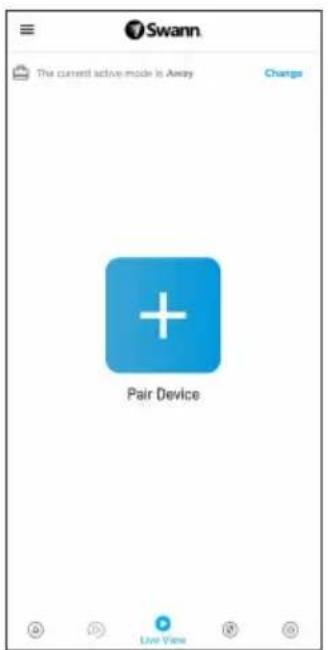
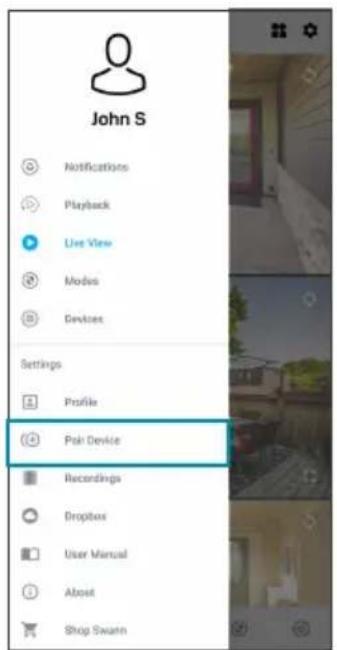
Open the Swann Security app and tap the Pair Device button on the screen. If you have already paired a device, tap the menu icon ≡ in the top left and select "Pair Device". The app will now guide you through the pairing process and set up your sensor.
Before you begin, have the sensor with you and be close to your router. Please note that the sensor can connect to a 2.4GHz Wi-Fi network only.

MOUNTING THE SENSOR
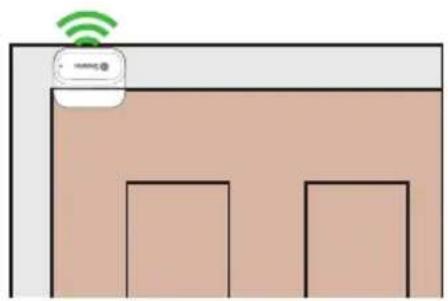
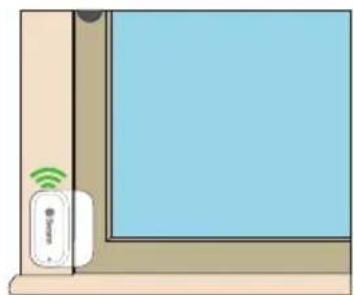
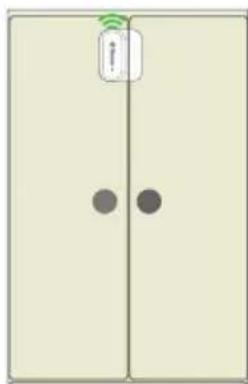
Take the time to choose a location and properly check the orientation of the sensor and the magnet. The sensor and magnet should ideally be positioned in a way that when the window or door is closed, they are aligned side by side, less than 10mm (3/8") apart. See Mounting Examples on the next page.
Also, make sure the sensor location has strong, reliable Wi-Fi reception available so you can get timely alerts. As a general rule, the nearer your sensor is to your Wi-Fi router, the better the wireless connection quality. You can expand the Wi-Fi coverage of your current network by installing a Wi-Fi range extender.
1 For reliable bonding, clean the surface where the sensor and magnet will be mounted with an alcohol/cleaning wipe, and let dry.
2 Fit the sensor and the magnet with appropriate double-sided tapes.
3 Select a location on the window/door. Attach the sensor to the window/door frame and the magnet to the window/door. Make sure the sensor cover will be accessible in the final position (in case of battery replacement/re-pairing).
4 Press firmly onto surface for 60 seconds each to secure.
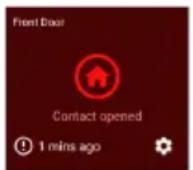
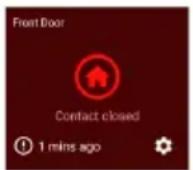
5 To test the sensor, simply open the window/door. The app will send you a push notification, for example, "Contact sensor has been opened on Front Door". Close the window/door. The app will send you another notification, for example, "Contact sensor has been closed on Front Door". The sensor tile will also automatically update its status in the app, as shown on the right. Note: You can use the Modes feature in the app to configure whether or not to receive "Opened" and "Closed" push notifications when the sensor is in Home, Away or Night mode.
HELP AND RESOURCES
Mounting Examples
Door installation
natural_image
Simple diagram showing a room with two windows and a Wi-Fi icon above (no text or symbols)Window installation
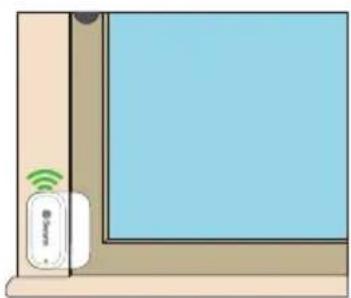
natural_image
Illustration of a wall-mounted smart home with a Wi-Fi symbol and a remote control unit (no text or labels)Cabinet installation
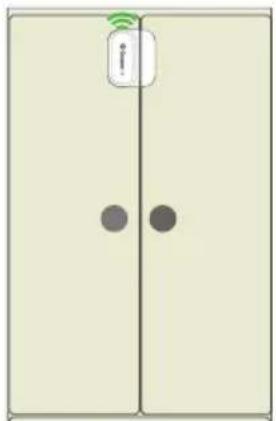
natural_image
Simple diagram of a door with two circular buttons and a Wi-Fi icon on top (no text or symbols)Status Light Guide
The status light on the sensor tells you what is happening with the device connection. When the sensor is functioning normally, the status light will be off (unless it is out of battery/unpaired).
Slow Blinking Blue Pairing mode
Solid Blue (5 seconds) Change in Open/Closed state. Connecting to Wi-Fi.
Sensor Battery Level
You can check the battery level of the sensor in the app: Devices tab > Sensor > Battery %
Swann Security App Manual
Access the Swann Security app manual (Menu ≡>User Manual) at any time to learn more about navigating through the various screens and functions in the app.
GENERALIDADES
natural_image
Pure technical line drawing of a mechanical part with no text or symbols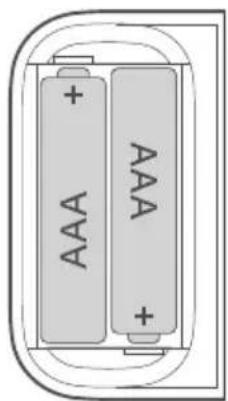
natural_image
Diagram of two batteries with labeled power supply (no text or symbols beyond 'AAA' and 'VW')natural_image
Simple diagram showing a room with two windows and a Wi-Fi icon above (no text or symbols)natural_image
Illustration of a wall-mounted smart device with Wi-Fi signal and a remote control unit (no text or symbols)natural_image
Simple diagram of a door with two circular buttons and a Wi-Fi icon on top (no text or symbols)natural_image
Pure technical line drawing of a mechanical component without any text, numbers, or symbols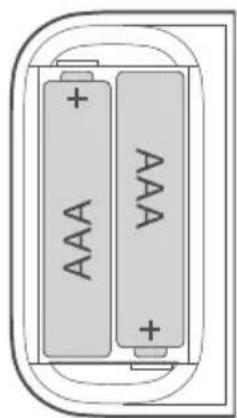
natural_image
Diagram of two batteries with labeled 'AAA' and '+' indicators, enclosed in a rounded rectangular frame (no text or symbols beyond the label)TÉLÉCHARGEZ L'APPLICATION SWANN SECURITY
AIDE ET RESSOURCES
Exemples de montage
natural_image
Simple diagram showing a room with two windows and a Wi-Fi icon above (no text or symbols)natural_image
Illustration of a wall-mounted device with Wi-Fi signal icon and label (no text or symbols on device)natural_image
Simple diagram of a door with two circular buttons and a hanging device (no text or symbols)natural_image
Pure mechanical part diagram without any text, numbers, or symbols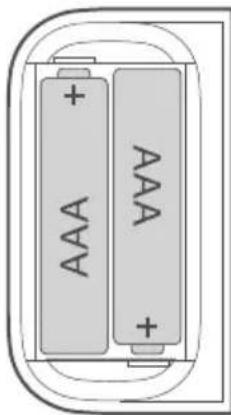
natural_image
Diagram of two batteries with labeled power and charge indicators, enclosed in a rounded rectangular frame (no text or symbols beyond basic markings)DOWNLOAD DELL'APPLICAZIONE SWANN SECURITY
natural_image
Simple diagram showing a room with two windows and a Wi-Fi icon above (no text or symbols)natural_image
Illustration of a wall-mounted smart home with wireless signal icons (no text or symbols)natural_image
Simple diagram of a door with two doors, one containing a Wi-Fi signal icon and the other showing a black dot (no text or symbols)natural_image
Simple diagram showing a room with two windows and a Wi-Fi icon above (no text or symbols)Fensterinstallation
natural_image
Illustration of a wall-mounted smart device with Wi-Fi signal icon and 'Smart' label (no text or symbols on device)Schrankinstallation
natural_image
Simple diagram of a door with two dark circles and a Wi-Fi symbol on top (no text or labels)We're here to help! Visit our Support Center at support.swann.com You can also email us at any time via: tech@swann.com
FCC STATEMENT
This equipment has been tested and found to comply with the limits for Class B digital device, pursuant to part 15 of the FCC Rules. These limits are designed to provide reasonable protection against harmful interference in a residential installation. This equipment generates, uses and can radiate radio frequency energy and, if not installed and used in accordance with the instructions, may cause harmful interference to radio communications. However, there is no guarantee that interference will not occur in a particular installation. If this equipment does cause harmful interference to radio or television reception, which can be determined by turning the equipment off and on, the user is encouraged to try to correct the interference by one or more of the following measures: Reorient or relocate the receiving antenna • Increase the separation between the equipment and the receiver • Connect the equipment into an outlet on a circuit different from that to which the receiver is connected • Consult the dealer or an experienced radio/TV technician for help.
This device complies with Part 15 of the FCC Rules. Operation is subject to the following two conditions: (1) this device may not cause harmful interference, and (2) this device must accept any interference received, including interference that may cause undesired operation.
FCC RF Radiation Exposure Statement Caution: To maintain compliance with the FCC's RF exposure guidelines, place the product at least 20cm from nearby persons.
WARNING: Modifications not approved by the party responsible for compliance could void user's authority to operate the equipment.
CE DECLARATION OF CONFORMITY
Hereby, Swann Communications, declares that this product is in compliance with the essential requirements and other relevant provisions of Directive 2014/53/EU. The full test of the EU declaration of conformity is available at the following internet address: www.swann.com/uk/compliance
RECYCLING
This product bears the selective sorting symbol for Waste electrical and electronic equipment (WEEE). This means that this product must be handled pursuant to European directive 2012/19/EU in order to be recycled or dismantled to minimize its impact on the environment. User has the choice to give his product to a competent recycling organization or to the retailer when he buys a new electrical or electronic equipment.
BATTERY SAFETY INFORMATION Replace batteries at the same time. Do not mix new and old batteries or battery types (for example, alkaline and lithium batteries). Keep batteries out of reach of children. Dispose of used batteries promptly in accordance with local regulations. | INFORMACIÓN DE SEGURIDAD DE LA BATERÍA Sustituya las baterías al mismo tiempo. No mezcle baterías nuevas y usadas ni tipos de baterías (por ejemplo, baterías alcalinas y de litio). Mantenga las baterías fuera del alcance de los niños. Deseche las baterías usadas correctamente de acuerdo con las reglamentaciones locales. | INFORMATIONS SUR LA SÉCURITÉ DE LA PILE Remplacez les piles en même temps. Ne mélangez pas des piles ou types de piles neuves et anciennes (par exemple, des piles alcalines et au lithium). Gardez les piles hors de portée des enfants. Débarrassez-vous rapidement des piles usagées conformément aux réglementations locales. | INFORMAZIONI DI SICUREZZA DELLA BATTERIA Sostituire contemporaneamente le batterie. Non usare insieme batterie nuove e vecchie o batteri di diverso tipo (ad esempio, batterie alcaline e al litio). Tenere le batterie fuori dalla portata dei bambini. Smaltire correttamente le batterie usate nel rispetto delle norme locali. | SICHERHEITSHINWEISE ZU BATTERIEN Ersetzen Sie die Batterien gleichzeitig. Mischen Sie niemals neue und alte Batterien oder Batterietypen (z.B. Alkali- und Lithiumbatterien). Batterien von Kindern fernhalten. Entsorgen Sie verbrauchte Batterien sofort gemäß den örtlichen Bestimmungen.

Swann.
© Swann Communications 2021

Model: SWIFI-WDOOR
QSGSWIFIWDOORVER15L
- Window/Door Alert Sensor
- Sensor de alerta de ventana/puerta Capteur d'alerte de fenêtre/porte Sensore di allarme finestra/porta Fenster/Tür-Warnsensor
- BATTERY INSTALLATION
- DOWNLOAD THE SWANN SECURITY APP
- SET UP THE SENSOR
- MOUNTING THE SENSOR
- HELP AND RESOURCES
- Mounting Examples
- Status Light Guide
- Sensor Battery Level
- Swann Security App Manual
- GENERALIDADES
- TÉLÉCHARGEZ L'APPLICATION SWANN SECURITY
- AIDE ET RESSOURCES
- Exemples de montage
- DOWNLOAD DELL'APPLICAZIONE SWANN SECURITY
- FCC STATEMENT
- CE DECLARATION OF CONFORMITY
- RECYCLING
Brand : SWANN
Model : SWIFI-WDOORPK2
Category : Security alarm