
OCEALED32220B2 - Remote control OCEANIC - Free user manual and instructions
Find the device manual for free OCEALED32220B2 OCEANIC in PDF.


| Product type | 32-inch LED TV |
| Brand | Oceanic |
| Model | OCEALED32220B2 |
| Screen size (diagonal) | 80 cm / 31.5 inches |
| Resolution | 1366 x 768 pixels |
| Aspect ratio | 16:9 |
| Sound power | 2 x 8 W |
| Tuner | DVB-T / DVB-C |
| Connectivity | HDMI (x3), VGA, USB (x2), AV, YPbPr, CI, Coaxial, Headphone |
| Power supply | AC 100-240 V, 50/60 Hz |
| Power consumption (max) | 60 W |
| Power consumption (standby) | Less than 0.5 W |
| Net weight | 3.7 kg |
| Dimensions (W x D x H) | 732 x 191 x 480 mm |
| Operating temperature | 0 °C to 35 °C |
| Recording functions | USB recording, Timeshift |
| USB media player | Video: .mp4, .avi, .mkv, .ts, .vob, .dat, .mpg; Audio: .mp3; Photo: .jpg |
| Safety standard | CE, Class II |
| Annual energy consumption | 45 kWh (estimated) |
| Included accessories | Remote control, user manual, stands |
Frequently Asked Questions - OCEALED32220B2 OCEANIC
User questions about OCEALED32220B2 OCEANIC
0 question about this device. Answer the ones you know or ask your own.
Ask a new question about this device
Download the instructions for your Remote control in PDF format for free! Find your manual OCEALED32220B2 - OCEANIC and take your electronic device back in hand. On this page are published all the documents necessary for the use of your device. OCEALED32220B2 by OCEANIC.
USER MANUAL OCEALED32220B2 OCEANIC
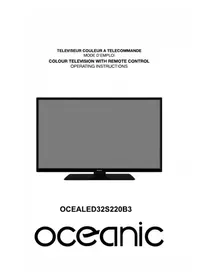
OCEALED32220B2
oceanic
AVERTISSEMENTS ET CONSEILS DE SECURITE IMPORTANTS
- EN (translated from the original)

1.1 Antenne
2.1 Mode image
3.1 Mode son
5.5 Mode Hôtel
6.1 Langue

Cause possible :

Cause possible :

Cause possible :
Cause possible :
Cause possible :
EXCLUSIONS DE GARANTIE
IMPORTANT WARNINGS AND SAFETY ADVICE
We encourage you to read this user guide carefully and completely before installing and using your device.
It is important that this user guide is kept with the device for any new consultation. If this unit is to be transferred to another person, make sure that the user guide follows the unit so that the new user can be informed of the operation of the unit. In this user guide, the following symbols are used:
 | Important information about your personal safety and how to avoid damage to the device |
 | General information and advice |
 | Environmental information |
 | Fire hazard |
 | Risk of electric shock |
 | This symbol indicates Class II |
Important safety instructions – please read carefully and keep for future reference

To reduce the risk of fire or electric shock, do not expose this product to water, rain or moisture. To prevent the risk of electric shock, do not remove the cover or back of this product. In case of product failure, only qualified personnel can repair. There are no user-serviceable parts inside.
CAUTION !
Dangerous tension inside the product! Do not open. Risk of electric shock! No parts can be repaired by the end-user. Only qualified personnel can repair and maintain this product.
If the electric cord is damaged, it must be replaced by the manufacturer or qualified after-sales personnel in order to avoid any danger.
The product must be installed in accordance with local laws.
Damaged batteries must be properly disposed. In order to protect the environment, please dispose the batteries properly, in accordance with local laws (information is available at your reseller).
Remote control batteries (not included) shall not be exposed to excessive heat (e.g. from sun or fire).
Where to install the product
- Place the product on a straight, rigid and stable place. Do not place the product on a carpet.
- Do not place the product on top of another that may cause overheating (for example, a receiver or amplifier).
- Do not place anything underneath the product (for example, CDs or magazines).
Proper ventilation
- Place the product in a sufficiently-aerated place to avoid overheating. Allow at least
10cm spacing at the back and top of the product, and 5cm spacing on both sides to prevent overheating.
- Do not place items such as newspapers, tablecloth, curtains, in front of the ventilating openings.
Do not expose the product to high temperatures, moisture, water and dust.
- The apparatus shall not be exposed to dripping or splashing. No object filled with liquids, such as vases, shall be placed on the apparatus.
- Do not place other items close to this product that may damage it (for example, objects containing water or lightened candles).
- No naked flame sources, such as lighted candles, should be placed on the apparatus.
Electric supply
- Please unplug the product in case of prolonged non-use.
- If the supply cable is damaged, it must be replaced by the manufacturer or qualified after-sales personnel to avoid any danger.
- This appliance is to be used on temperate climate. Don't use the apparatus in tropical climates
- This product must be connected to an electrical supply 100-240V \~ 50/60Hz.
- The mains plug is used as the disconnect device, so the disconnect device shall remain readily operable
WARNING
Never place a television set in an unstable location. A television set may fall, causing serious personal injury or death. Many injuries, particularly to children, can be avoided by taking simple precautions such as:
- Using cabinets or stands recommended by the manufacturer of the television set.
- Only using furniture that can safely support the television set.
-
Ensuring the television set is not overhanging the edge of the supporting furniture.
-
Not placing the television set on tall furniture (for example, cupboards or bookcases) without anchoring both the furniture and the television set to a suitable support.
- Not placing the television set on cloth or other materials that may be located between the television set and supporting furniture.
- Educating children about the dangers of climbing on furniture to reach the television set or its controls.
- In case this television set is to be relocated to a different location, please keep in mind and apply the above safety instructions.
Information about the meaning of the conformity marking
CE
The CE marking indicates that the product meets the main requirements of the European Directives 2014/35/EU (Low Voltage), 2014/30/EU (Electromagnetic Compatibility), 2011/65/EU (Restriction of the use of certain hazardous substances in electronic equipment), 2014/53/EU (Radio equipment).
Technical Specification:
Name: Television Product
Net Weight: 3.7Kg
Operation Temperature: 0°C\~35°C
TV Reception System: DVB-T/C
| —— | This symbol indicates DC Voltage (for USB only). |
 | This symbol indicates AC Voltage. |
 | This symbol indicates “Indoor use only”. |
Auto Standby
In order to save energy, the electricity consumption of this product has been reduced in both operation mode and standby mode. Furthermore, if no operation is carried out for four consecutive hours, the unit will automatically enter standby mode. Simply press the Standby button on the remote control to switch the unit back to operation mode.
Product Introduction
Congratulations! You have chosen the latest generation high definition television. Endowed with high display quality and light weight, it is power-saving and radiationless with high sensitivity television reception. The new generation television will bring you safe & comfortable brand new visual experience. Thank you for purchasing and using our products!
Accessories
User manual x1
Remote control x1
SUMMARY
Important warnings and safety advice....1
Control Panel....9
Connecting Cables....10
Remote Control....13
Base Installation....15
Wall Mounting Instructions....16
First Time Installation....17
-
Channel....18
-
Picture....20
-
Sound....21
-
Time....22
-
Lock....23
-
Setup....24
-
Recording....27
-
Media Player....31
Troubleshooting....32
Cleaning instruction....34
Technical data sheet....35
Disposal of the device....38
Warranty....39
This user guide is available in the following languages:
- FR (original version)
- EN (translated from the original)
Any other translation would be a translation of the original version.
This user guide, any modifications or any new version, is available on our website.
CONTROL PANEL
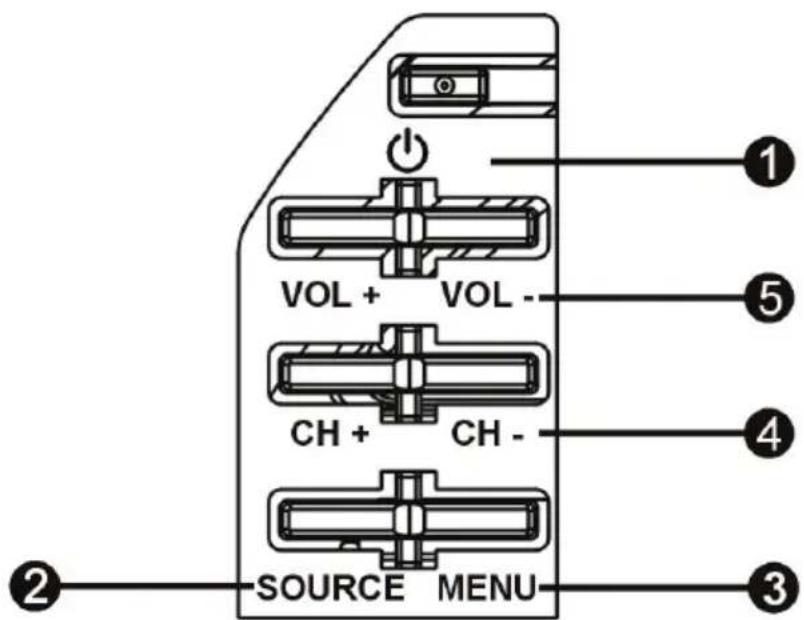
- Standby button: To turn the TV ON/OFF.
- Source button : To select the input source.
- Menu button: To enter menu setting page.
- CH+/- button: To select next/previous channel or move up/down.
- VOL +/- button : To increase/decrease the volume level or move left/right.
CONNECTING CABLES
Connecting to power source
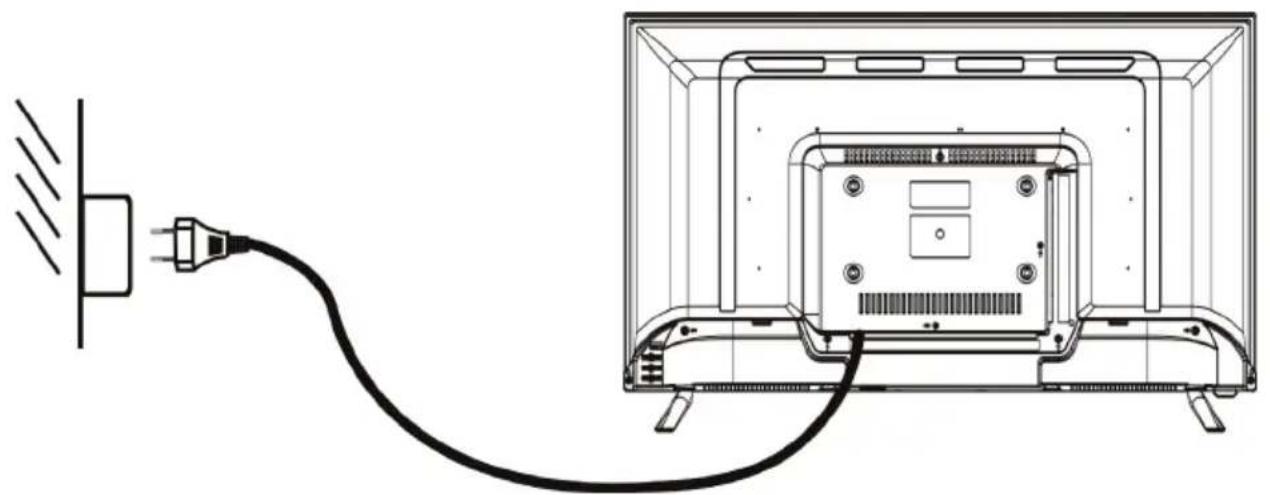
- The television is in standby state when no images arise and the red indicating lamp shines.
- Press the standby button again on the remote control for the television the indicating lamp becomes green.
Connecting external antenna to the unit

We recommend you use a 75Ω antenna cable so as to eliminate the disturbance caused by impedance mismatching. The antenna cable shall not be bundled together with the power cord.
Directly insert the 75Ω antenna cable plug into the antenna socket when applying cable television.
Note: The antenna should be checked periodically. If clear image is not available, shut down the power and then carefully check the antenna.
Connecting Cables
This TV has digital multimedia performance and can be connected to multiple external devices. The following diagram presents the connections to other video and audio.
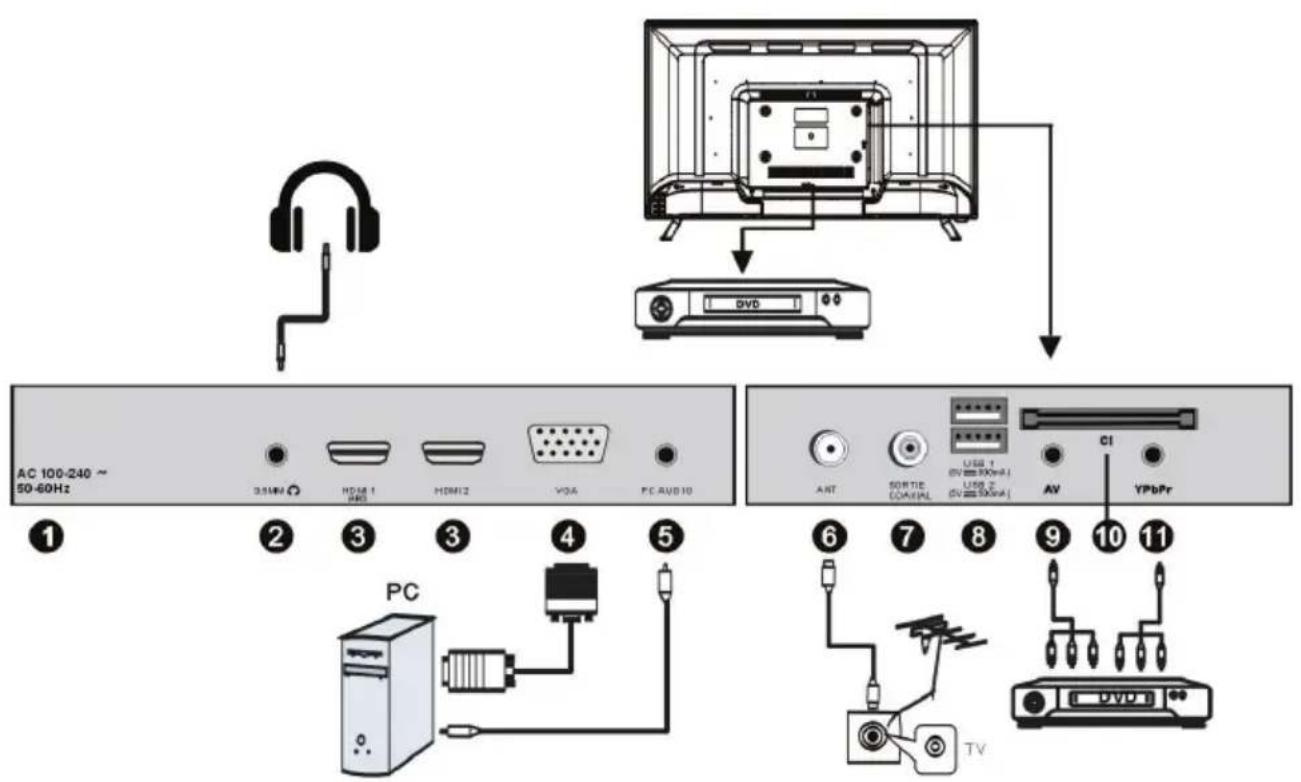
- AC IN
- EARPHONE OUTPUT
- HDMI IN
High-definition multimedia interface (Note: compatible video signal 480P/576P/720P/1080i/1080P). ARC is in HDMI 1 only.
4. VGA IN
Connect with the D-sub 15 pin signal cable to your computer.
-
PC AUDIO IN : PC audio input.
-
ANT IN : Connect to external aerial.
-
COAXIAL output : Digital TV sound output.
8. USB IN
Access multi-media files stored in the USB device.
(Note: compatible format includes: *.dat, *.vob, *.ts, *.mpg, *.avi, *.mkv, and *.mp4 for video, *.jpg for photo, *.mp3 for music.)
9. AV INPUT
Connect to the left/right RCA video out connection of any video resource.
-
CI SLOT : Insert a CI (common interface) card.
-
YPbPr IN : Component input terminal.
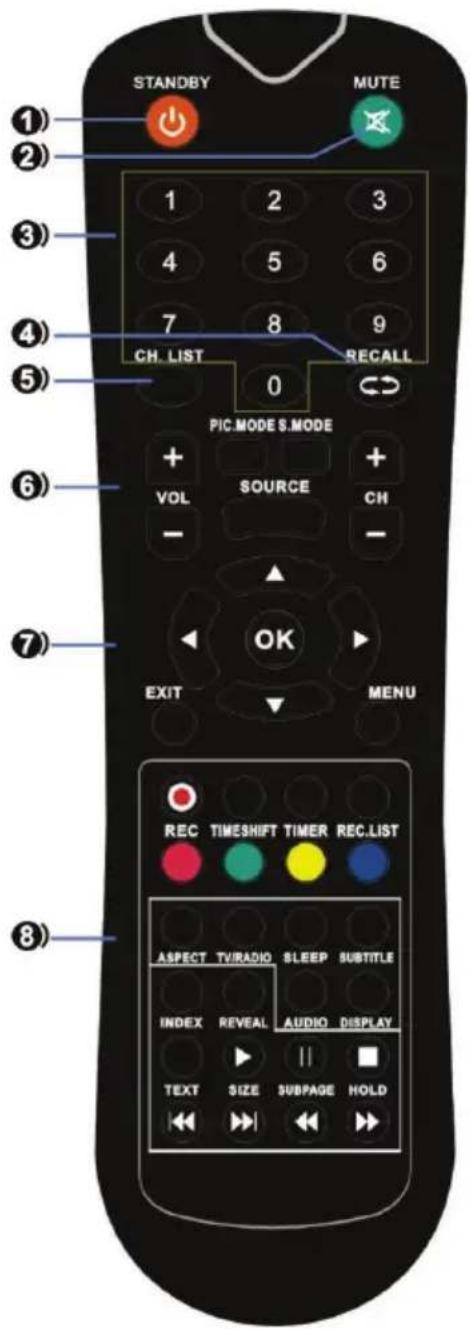
REMOTE CONTROL
1.STANDBY: Switch the set between ON and STANDBY.
2. MUTE: Switch the sound on or off.
3.0\~9: Figures 0-9 are used to directly input channel number.
4.RECALL: Return to the channel selected last time
5.CH.LIST : Press to show the channel list program.
6. VOL +/- : Increase/decrease the sound level.
PIC.MODE: Select the different picture mode directly.
S.MODE: Select the different sound mode directly.
SOURCE : Display the source list of input signal.
CH +/- : Select a program.
- ▲/▼/◄/► : Navigation buttons
OK : Confirm selection.
EXIT : Return to TV viewing from any menu.
MENU : Select a menu.
- REC: Start recording of the current digital channel.
TIMESHIFT: Press the TIMESHIFT button when you want to pause; press the button again to resume playback of the TV program.
TIMER: Enter the setup menu of time recorder.
REC.LIST: Display the list of recorded programs.
Available in the following modes: teletext, DTV and TV.
ASPECT : Select available format.
TV/RADIO : Switch the unit between TV and
Radio.(Digital radio is not available in countries such as France.)
SLEEP : Sleep time setting.
SUBTITLE : Recall your preferred subtitle in digital mode.
INDEX: Ask for the list of main TV letter broadcast page number.
REVEAL: Display the characters hidden.
AUDIO: Press AUDIO to change audio mode.
DISPLAY: Display the system state information on set by active user.
TEXT: Display the teletext on screen.
SIZE: Change the size of current page.
SUBPAGE: Display the current subpage.
HOLD: Hold the current page and present again.
▶: Play
II : Pause
■ : Stop
◀ / ▶ : Fast reverse / forward.
◀ / ▶ : Skip to previous / next track or chapter.
Notes:
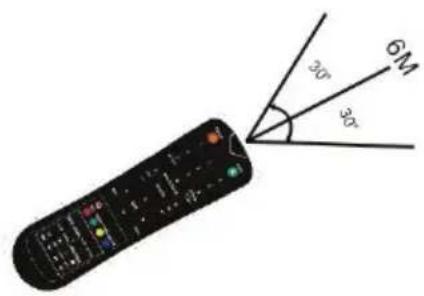
The remote control shall be applied in effective reception scope of the television. Make the remote control point towards the infrared receiver of the television and ensure that there are no obstacles. Its normal operation distance will be shortened in direct sunlight or lamplight. Be careful to use the remote control. avoid falling off or being trampled or splashed with liquids.
Battery replacement
1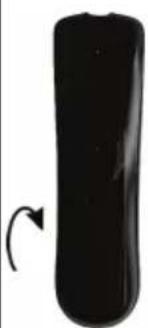 | Open the battery cover on the remote control. | 2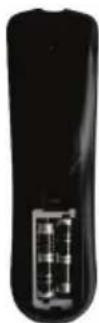 | 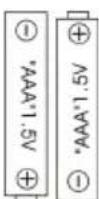 Insert two AAA size batteries making sure to match the positive and negative icons of battery and battery compartment. Insert two AAA size batteries making sure to match the positive and negative icons of battery and battery compartment. |
3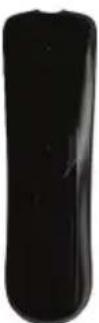 | Then close the battery cover. | Notes:- Please take out the batteries and place in a shady, cool and dry place if you will not use the remote control for long time.- Please tread damaged or leaking batteries with care. Please wash your hands with soap after contact with battery chemicals.- Do not randomly dispose of used batteries. Please refer to local authorities for recycling or waste treatment systems.Note: The batteries are not included. | |
BASE INSTALLATION
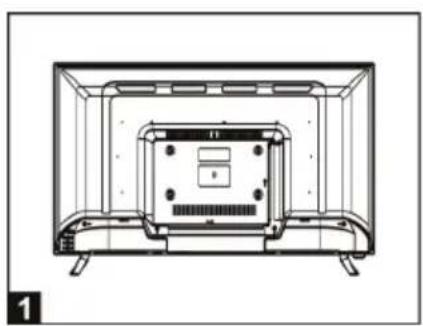
- Mounting of the stand
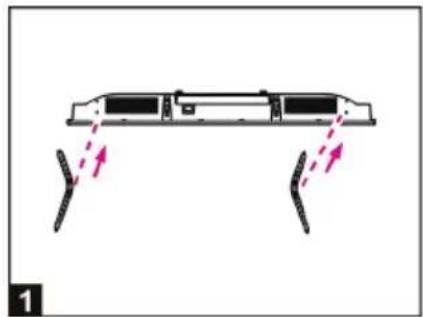
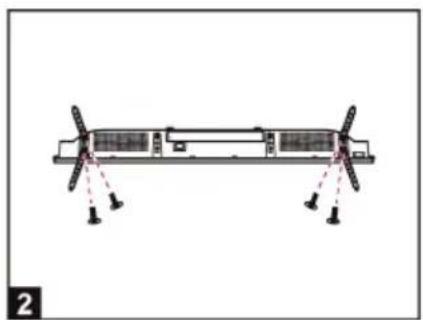
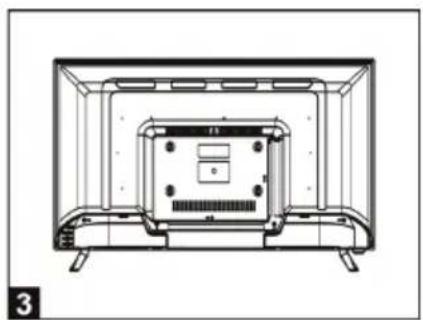
- Align the screw holes on stand and TV bottom (Figure 1)
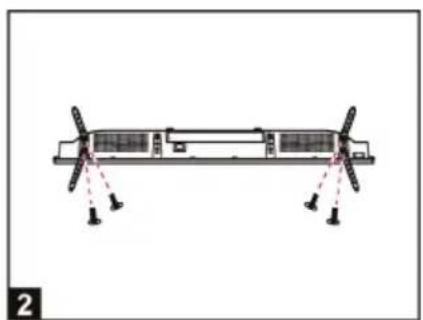
- Fix the stand and the screen with 4pcs provided screws. (Figure 2)
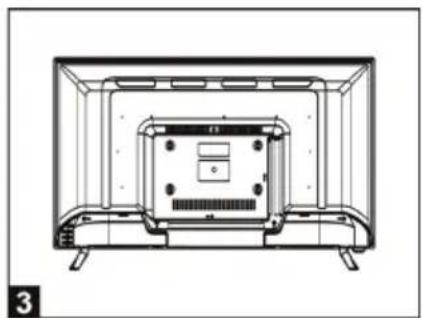
- The rendering after installed. (Figure 3)
• Disassembly of the stand
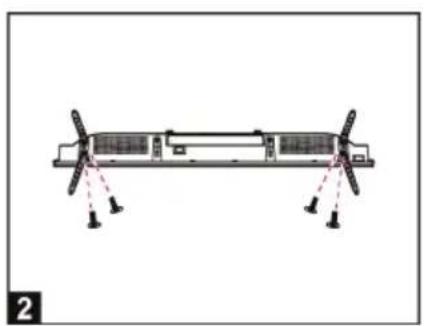
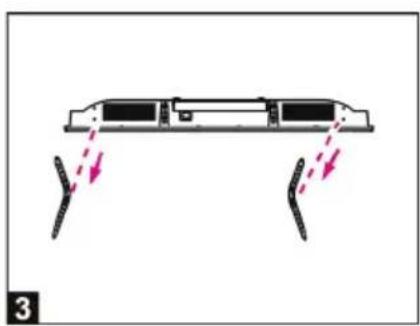
- Place the machine flat on a desktop (Caution: put a foam cushion under the machine to avoid it from scratching.)
- Loose the screws between the machine and stand (Figure 2).
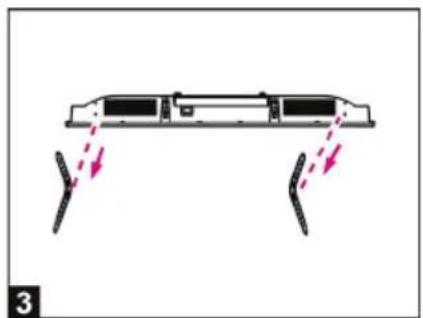
- Remove the 2 stands from the machine (Figure 3).
WALL MOUNTING INSTRUCTIONS
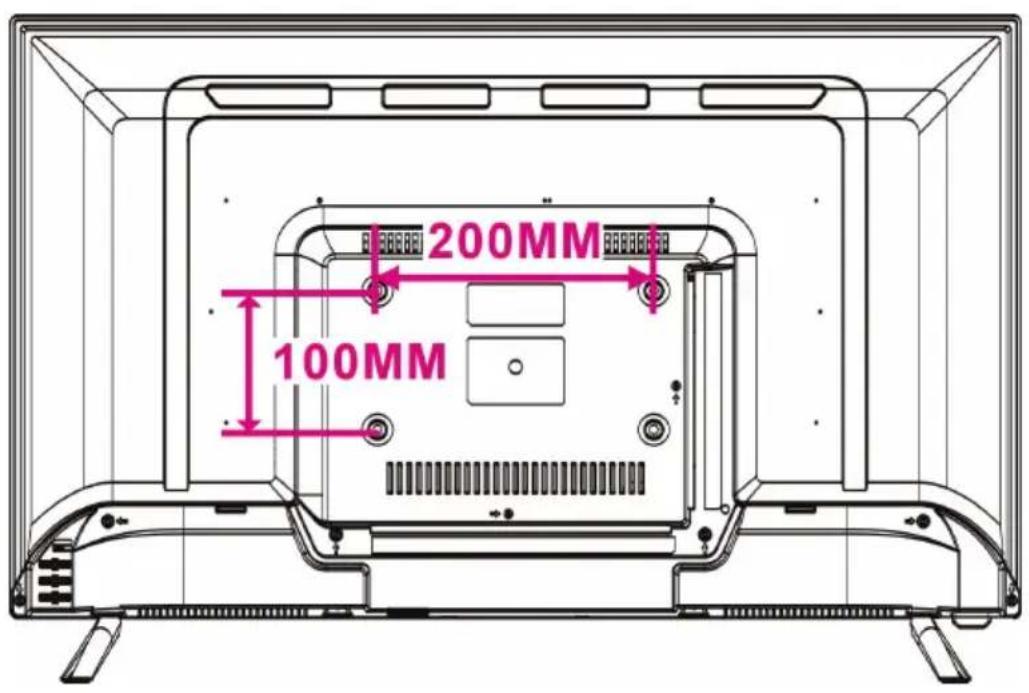
- Use standard M6*10mm screws (4 pieces, not included) to mount this TV. Using different screws as specified will damage the wall mounting support and will be outside the scope of product guarantee.
- Contact a professional technician for assistance when wall mounting your TV.
- Do not wall mount the TV while TV is turned on.
- Refer to the instruction of your wall mounting bracket.
FIRST TIME INSTALLATION
- Connect to power source and turn on this TV, welcome page will display on the screen.
- Press LEFT/RIGHT/UP/DOWN navigation buttons on remote control to select an option.
- Press OK button on remote control to confirm selection.
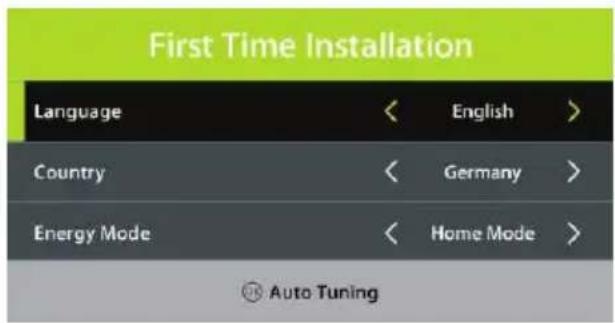
Language: select the on-screen menu language.
Country: select your country.
Energy Mode: select Home or Store mode.
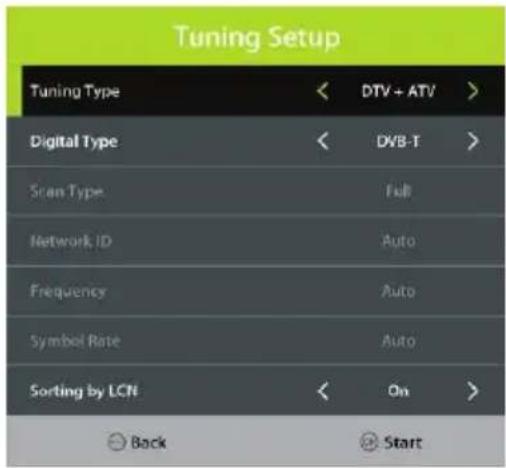
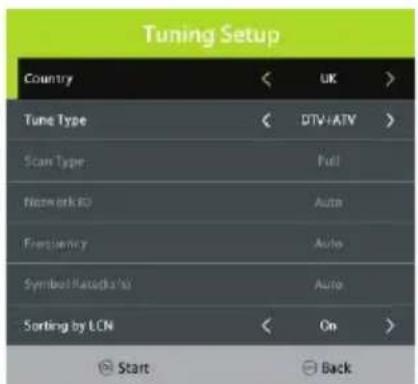
Tuning Setup
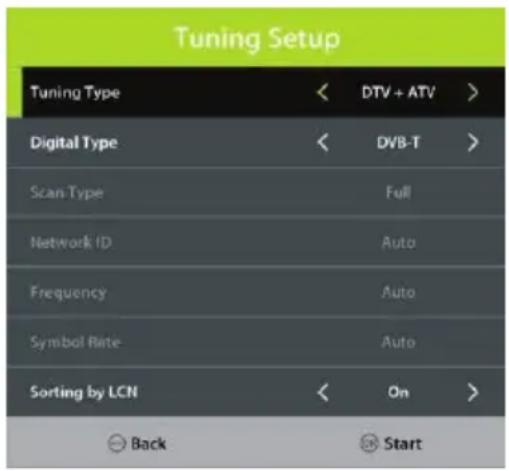
- If above selections are finished, press OK button to call out Tuning Setup.
- Select preferred Tune Type and Digital Type using navigation buttons and press OK button to start auto tuning.
Note: Items following Digital Type are adjustable only when Digital Type is DVB-C / Satellite and these items vary for different digital type.
DTV MODE
- Press SOURCE button on the remote control to select DTV input source.
1. CHANNEL
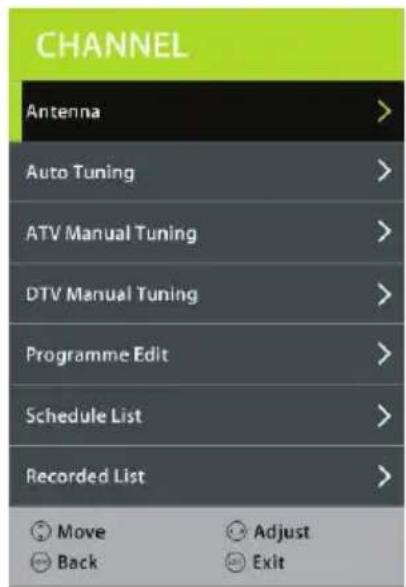
1.1 Antenna
- Press OK or RIGHT navigation button to enter it.
- Use navigation buttons to select DVB-T or DVB-C.
1.2 Auto Tuning
- Press the OK or RIGHT navigation button.
- Use the navigation buttons to set the Country, Tune Type and LCN.
Note: Scan type and following items are adjustable only when "Antenna" is DVB-C.
- Then press OK to start program tuning.
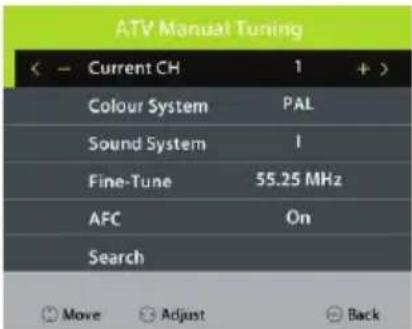
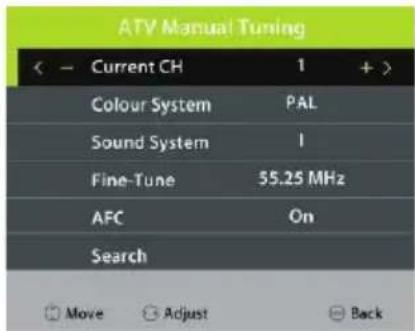
1.3 ATV Manual Tuning
- Press the OK or RIGHT navigation button.
Current CH: select current channel.
Color System: select available color system.
Sound System: select available sound system.
Fine Tune: fine tune the frequency.
AFC: turn on/off Automatic Frequency Control.
Search: search available programs.
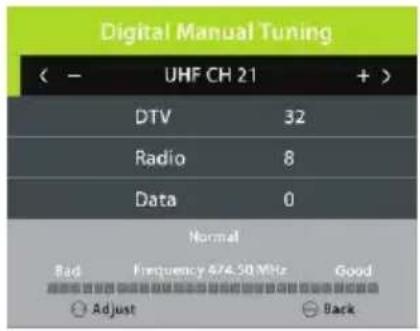
1.4 DTV Manual Tuning
- Press the OK or RIGHT navigation button.
- Use the LEFT/RIGHT navigation button to select the channel. Then press the OK button to start searching.
Note: Menu and operations here will vary for DVB-T and DVB-C.
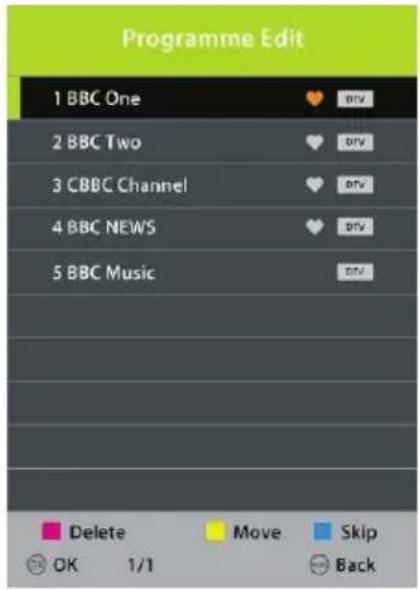
1.5 Programme Edit
- Press the OK or RIGHT navigation button.
- Press the UP/DOWN navigation button to highlight a desired channel.
- Press the RED button on the remote control to delete a highlighted channel.
- Press the YELLOW button on the remote control to enter MOVE mode. Then use the UP/DOWN navigation button to select a preferred position and press the YELLOW button again to move it.
- Press the BLUE button on the remote control to skip a highlighted channel.
1.6 Schedule List
- Press the UP or DOWN navigation button to select this item, and press the OK or RIGHT button to enter it. If any programs were scheduled through the Add menu (press the YELLOW button on the remote control). The below menu will appear.
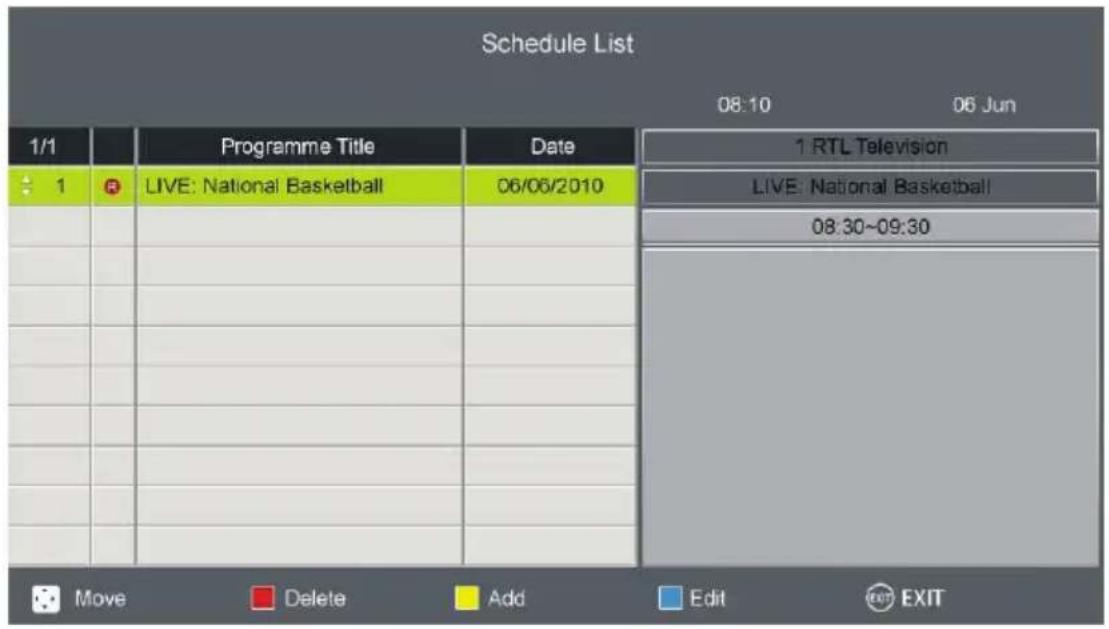
- Press the LEFT/RIGHT navigation button to switch between Schedule List and Recorded List.
- Press the RED button to delete the highlighted option.
- Press the YELLOW button to enter the Add menu page.
- Press the BLUE button to enter the Edit menu page.
1.7 Recorded List
Previously recorded programs should appear on this list.
- Use the navigation buttons to select a program.
- Press the OK button to play the highlighted program.
- Press the ■ button to stop playing.
1.8 Signal information (works under available TV signals)
This item is used to display signal details, for example: channel number and strength.
1.9 CI information (works under available TV signals)
When an available CAM (Conditional Access Module) card is connected to the CI slot, users can view related information or manage the CAM card.
2. PICTURE
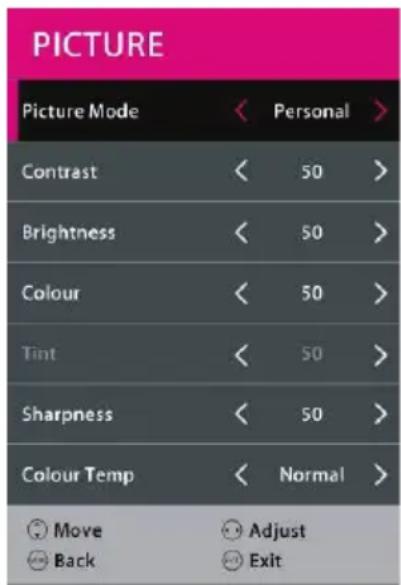
2.1 Picture Mode
- Press the UP/DOWN/LEFT/RIGHT navigation buttons to select an option.
Picture Mode: available options: Standard, Mild, Personal, Dynamic.
Contrast / Brightness / Colour / Tint / Sharpness: adjustable value: 0-100.
NOTE: Contrast, Brightness, Colour and Sharpness are adjustable only when Picture Mode is "Personal". Tint is adjustable only for NTSC system.
2.2 Colour Temp
This item is used to adjust the optimum color temperature for suitable viewing. Available options: Normal, Warm, Cold.
2.3 Noise Reduction
Available options: Off, Low, Medium, High
2.4 SCREEN (for PC/VGA mode only)
2.5 Dynamic CR
Turn on/off dynamic contrast ratio.
3. SOUND
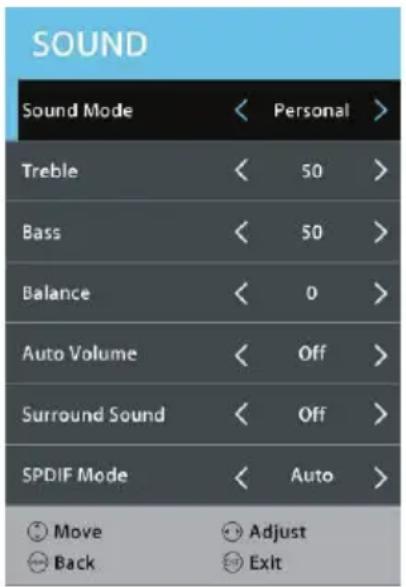
3.1 Sound Mode
- Press the UP/DOWN/LEFT/RIGHT navigation buttons to select an option.
Sound Mode: available options: Standard, Music, Movie, Sports, Personal.
Treble / Bass: adjustable value: 0-100.
NOTE: Treble and Bass are adjustable only when Sound Mode is "Personal".
3.2 Balance
This item is used to adjust the audio output between left and right speaker from -50 to 50.
3.3 Auto Volume
This item is used to set Auto Volume ON or OFF.
3.4 Surround Sound
This item is used to select desired mode of Surround sound.
3.5 SPDIF Mode
Available options: Auto, PCM, Off.
3.6 AD Switch
This item is used to set AD Switch ON or OFF. For Visually Impaired users, this function enables a user to know a certain scene or action through the narration, instead of seeing it.
NOTE: AD Switch function works only when you are viewing programs that contain related narration information.
4. TIME
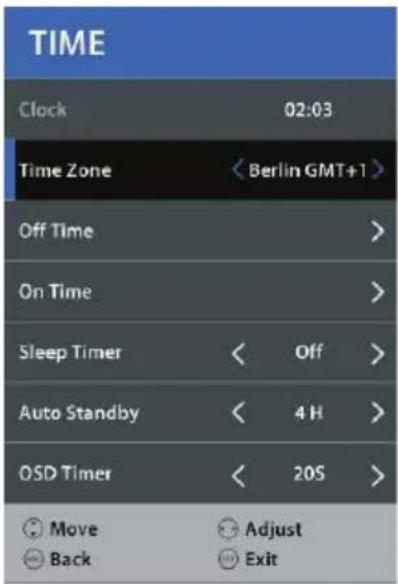
4.1 Clock
It displays the current system time when an available channel was saved.
4.2 Time Zone
This item is used to select a desired time zone.
4.3 Off Time
Off Time: available options: Off / Once / Every Day / Mon\~Fri / Mon\~Sat / Sat\~Sun / Sun.
Hour / Minute: use navigation buttons to adjust the Hour / Minute when the Off Time is not "Off".
4.4 On Time
On Time: available options: Off / Once / Every Day / Mon\~Fri / Mon\~Sat / Sat\~Sun / Sun.
Hour / Minute / Source / Channel / Volume: use navigation buttons to adjust these items when the Off Time is not "Off".
4.5 Sleep Timer
This item is used to set the automatic sleep time.
This item is used to select a desired Auto Sleep (standby) duration when no operations are done through the remote control.
Available options: Off, 3/4/5 hours.
4.7 OSD Timer
This item is used to select a desired OSD menu duration.
Available options: Off, 5/10/15/20/25/30/35 seconds.
5. LOCK
- Press RIGHT navigation button and input the factory default password "0000" using number buttons on remote control.
- Press UP/DOWN navigation button to select preferred item.
NOTE: If you forget the password, please use the universal password "8899".
5.1 System Lock
This item is used to turn on/off Lock System.
5.2 Set Password
- Input the old password using number buttons on remote control and then input your private password twice to finish it.
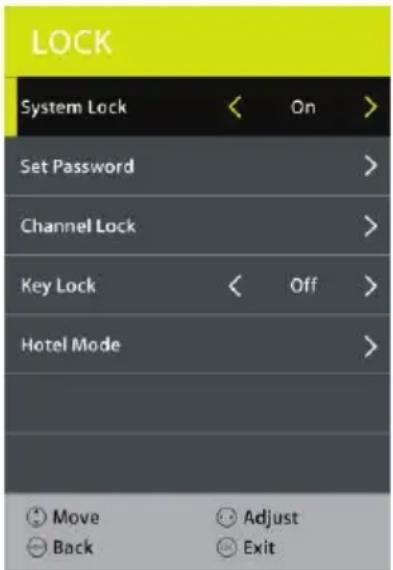
5.3 Channel Lock
- Press OK or RIGHT navigation button to enter it.
- Press UP/DOWN navigation button to select the channel which you want to lock.
- Press GREEN button repeatedly to lock/unlock the highlighted channel.
5.4 Key Lock
This item is used to lock/unlock TV buttons.
Available options: On, Off.
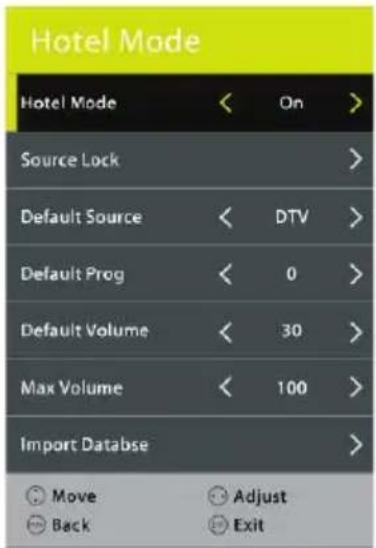
5.5 Hotel Model
- Press RIGHT navigation button to enter it.
- Press UP/DOWN navigation button to move the cursor.
- Press LEFT/RIGHT navigation button to select an option.
Hotel Mode: turn on/off Hotel Mode.
Source Lock: turn on/off the lock of available sources.
Default Source: set the default source.
Default Prog: set the default digital program.
Default Volume: set the default volume level.
Max Volume: set the maximum volume level.
Export DataBase: export database to USB device.
Import DataBas: import database from USB device.
Clear Lock: Clear above settings.
6. SETUP
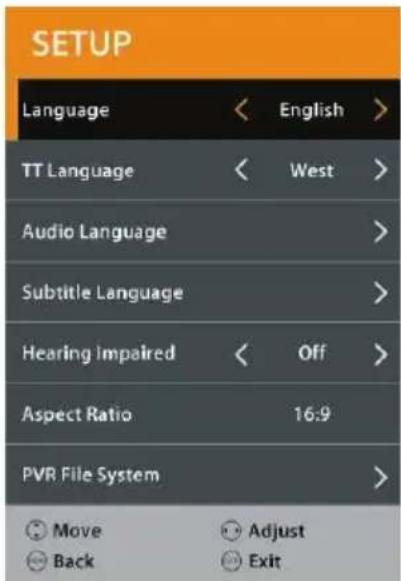
6.1 Language
This item is used to select the default on-screen display language.
6.2 TT Language
This item is used to select the default teletext language.
6.3 Audio Language
- Press the RIGHT navigation button.
- Then you can select the desired primary audio language and secondary audio language.
6.4 Subtitle Language
- Press the RIGHT navigation button.
- Then you can select the preferred primary subtitle language and secondary subtitle language.
6.5 Hearing Impaired
This item is used to turn on/off the Hearing Impaired function. For Hearing Impaired users, this function provides captions to supplement the audio.
NOTE: Hearing Impaired function works only when you are viewing programs that contain related caption information.
6.6 Aspect Ratio
This item is used to adjust the video size.
Available options: Auto, 4:3, 16:9, Zoom1, Zoom2.
NOTE: The available video size may be different for different input sources.
6.7 PVR File System
- Press the RIGHT navigation button.
- Press the UP/DOWN navigation button to select a desired option, and then press the LEFT/RIGHT navigation button to adjust the selected option.
- Press the OK button to enter the submenu or confirm the setting.
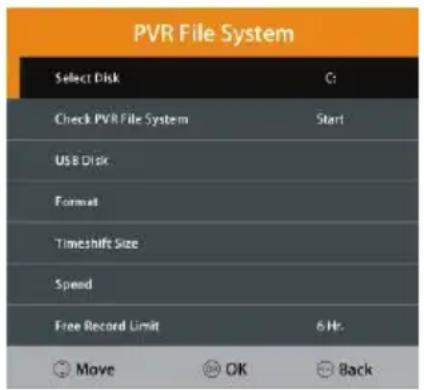
In this part, you can select a desired disk, check the
PVR File System, format your USB memory device and set a desired Free Record Limit time.
6.8 Blue Screen
This item is used to turn on/off Blue Screen. The screen background will turn blue at very weak or no signal condition if Blue Screen is ON.
6.9 First Time Installation
This item is used to recall the First Time installation menu.
6.10 Energy Mode
This item is used to select Home or Store mode.
6.11 Reset
This item is used to recall factory default settings.
6.12 Software Update (USB)
This item is used to update software through the USB memory device.
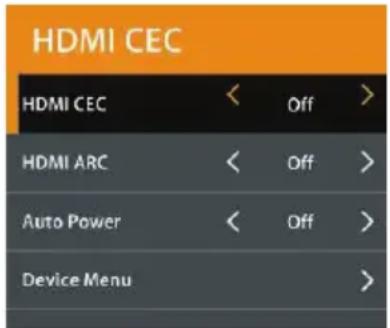
6.13 HDMI CEC
- Press the RIGHT navigation button.
To use the HDMI CEC function:
- Make sure the HDMI device (Amplifier, etc.) is connected correctly.
- Press the SOURCE button on the unit or remote control to select the HDMI input source.
HDMI CEC: turn on/off HDMI CEC.
HDMI ARC: turn on/off ARC function.
Auto Power: turn on/off Auto Power function.
Device Menu: display the setup menu of other device connected.
ATV AND OTHER MODES
- Press SOURCE button on the remote control to select desired input source.
- For other menus, please refer to the operations of DTV mode.
7. Recording
With this product, you can easily record your favorite DVB-T programs on your USB stick. This unit has 2 recording modes: immediate recording and scheduled recording (for use in case of absence).
Recording a program by using a USB
This unit allows you to record your favorite DVB-T programs in a simple and friendly way. You just need a USB key and insert it into the unit. The recording will be made on the key and you can view the recordings later from this unit or any other compatible multimedia devices.
Notes: Do not remove your USB stick while playback is in progress, otherwise the content of your USB drive could be damaged. Press the STOP button to stop playback and them remove your USB stick.
Preparation for the first recording
When using a USB stick with this unit for the first time, you should first format it using this unit. Formatting your USB stick directly on the receiver improves compatibility of the device with the unit. More particularly, FAT file system will be converted into FAT 32. This helps improve recording quality and fluidity. Caution: formatting will deletes all the files on the USB device! You should create a backup of all the files you want to keep beforehand.
How to access "Format Disk"?
Press the "MENU" button on the remote control to enter the OSD menu, then press navigation button to select the "Setup >> PVR File System >> Format". Then press OK button on the remote control to format your USB stick.
Immediate recording
Insert a compatible USB device which has been previously formatted. Wait for about 5 seconds until the device is recognized. Simply press the REC button on the remote control in order to start immediate recording. Please note this function allows recording of DVB-T channels only, other sources such as analog TV will not be recorded.
Timer (Scheduled recording)
Simply press TIMER button on the remote control to enter.
View recorded programs
You can simply press REC.LIST button on the remote control to view the recorded programs.
Notes on recording and USB functions
- If you want to record a film or a long program, use a memory stick of larger capacity (eg. 16GB). If you want to save several films, opt for external hard drives of large capacity.
- The loading time of the USB device is too long: When you insert a USB support, the loading time can sometimes be a minute or more. This depends on the size of your support, the number of files on it and, above all, the complexity of its directories. You can reduce loading time by avoiding the use of multiple sub-directories in your USB disk. Avoid such multiple-subdirectories like “Directory/Subdirectory/
Sub-subdirectory/....” and store files in a single simple directory.
- USB Device Recognition Problems
4) After connecting your USB device to the unit, you may need to turn the device on before it can be detected by the receiver.
5) This unit does not support direct USB connection with computer. It is necessary for you to transfer your data/files on a USB stick or MP3 player. If you are using an external hard drive to be connected via USB, you must connect the hard drive simultaneously with a power source and with the unit.
6) If you are using a portable video player with hard drive, you must make sure that the internal battery is fully charged. Verify that the file system of your USB device is properly formatted in FAT 32. USB media formatted in NTFS is not compatible with this unit. The USB device used may not be fully compatible with USB 2.0. In this case, try a different USB stick in order to identify the problem.
- Recording Quality
If your recording is shaky or choppy – The data stream to be recorded is very important. Certain USB sticks, even some new USB 2.0 ones, do not allow sufficient data transfer rate. If this happens, try with a newer USB device or with an external hard drive. With external hard drives, data transfer rate is sufficiently high and this problem should be solved.
Time Shift Function
This TV presents a function called “Time Shift” which allows recording of TV program onto a digital storage medium (e.g. USB stick or external hard disc, not supplied). You may then watch the program at a later time that is more convenient to you. Want to put the television on pause? It is now possible with the “Time Shift” function, which records the TV program during your phone call or your coffee break. With “Time Shift”, you will not miss anything anymore! Notes: This function is only available in DVB-T mode.
How to use the service Timeshift
- Insert a USB key into USB port before you activate Timeshift function.
-
Press the button Timeshift once to start recording. The broadcasting TV program is stop and the image is frozen on screen. During this time, the TV program is being recorded and you can take a break.
-
Press the ■ button to exit recording.
Note on use of the Timeshift function:
- Please make sure the Timeshift mode is set ON in record setting menu.
- The Time Shift function requires a high data transfer rate between the USB device and the unit. Indeed, a recording and a (deferred) playback simultaneously take place on the USB device. Certain USB sticks, even some new USB 2.0 devices, may lead to shaky image or choppy sound. If you encounter this problem, it is necessary to change the USB device. External hard drives, self-powered by mains, provide the highest transfer rates and allow you to use the Time Shift function optimally. In case of recording quality problems or playback problems such as choppy or blocked image, you may also try to format your USB device.
8. Media Player
Before operating MEDIA menu, plug in USB device. Press the SOURCE button on remote control to open SOURCE list. Then press UP navigation button to select USB (or Media) and press OK button to enter it.
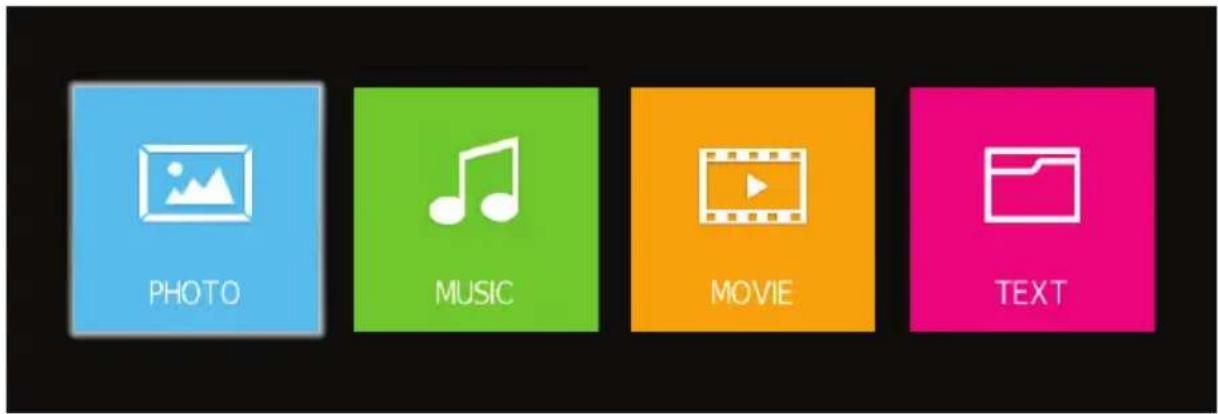
Press ◀/▶ ▲/▼ button to highlight your preferred submenu: Photo, Music, Movie and Text, press OK button to confirm.
Remote operations when playing multimedia files:
- Press ▶ button on remote control to start or pause the playback.
- Press ■ button on remote control to stop playing.
- Press ← button on remote control to move fast backward.
- Press ▶ button on remote control to move fast forward.
- Press 📄 button on remote control to play previous file.
- Press ▶ button on remote control to play next file.
TROUBLESHOOTING
No image and voice

Possible causes:
- Power cord, antenna or input devices are not connected;
- The TV set is not powered on.
- Check Power cord, antenna and input devices;
- Press Power key on the remote control;
- Press Power key on the set to power it off for 5 seconds and then re-power it on.
Solutions:
No voice

Possible causes:
- The volume is too low; Muted or cancelled;
- Incorrect sound system.
Solutions:
- Press Volume key to turn up the volume;
- Press Mute key to cancel Mute mode.
- Well connect connection to the background sound;
- Change the sound system in the menu.
Snows and noises


Possible causes:
- The cable is damaged or gets loose;
- Incorrect channel preset;
- Improper antenna positioning.
Solutions:
- Check whether the connection of the antenna cable, DVD and the cables is correct;
- Reset channels or fine tune the channel;
- Adjust the direction of the antenna.
Achromatic colour

Possible causes:
- Incorrect Colour system settings; Low chroma level setting;
- Improper antenna positioning.
Solutions:
- Change the colour system into the local system in the menu;
- Increase chroma level;
- Adjust the direction of the antenna.
Remote control has no response
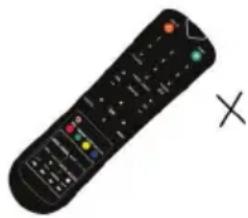
Possible causes:
- Battery runs up;
- Incorrect battery loading;
Solutions:
- Check the battery electricity or replace the battery;
- Check if the poles of the battery are correct.
Note: To properly watch CANAL+ using this product, carry out DVB-T channel search when CANAL+ is unscrambled, from 12:30 p.m. to 1:30 p.m. and from 7:00 p.m. to 8:30 p.m.
Important Notice
The display of this television is made up of a large number of colour. Although it has at least 99.999% of effective pixels, some black dots or bright spots (red, green or blue) may appear constantly on the screen. This is a characteristic of the screen (according to industrial standards), and is not a defect. Sometimes, the screen may include an unlit pixel, which will be seen as a blue, red, green or black dot. This does not affect the functioning of the product and should be considered normal.
CLEANING INSTRUCTION
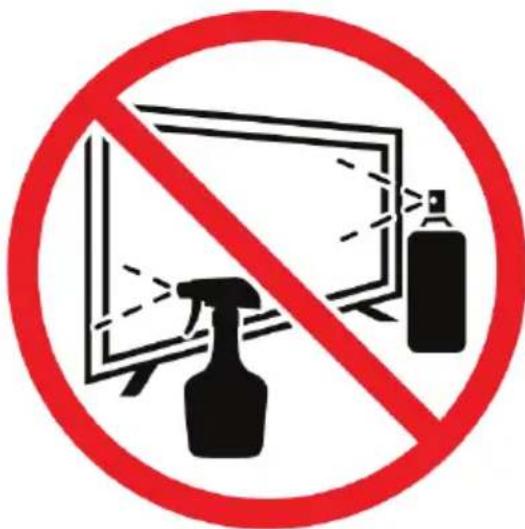
- Before cleaning this product, press STANDBY button to turn it to the standby mode and wait for a few minutes to disconnect the power plug.
- Wipe this product with a dry, soft cloth. Do not spray water directly onto the TV, but apply a small amount of water on the corner of the cloth and wipe as gently as possible. Never use cleaning fluids, wax, or chemicals.
- Never use alcohol, benzene, thinner, cleaning fluid or other chemicals. And do not use compressed air to remove dust.
- If the surface is extremely dirty, wipe it with a cloth which has been dipped in a weak soap-water solution and wrung out thoroughly, and then wipe again with a dry cloth.
- Before you plug in the TV back, let the screen dry completely.
Note on Defective Pixels
Your product has been manufactured with great care. Nevertheless, it is possible that some pixels remain constantly on or unlit. Please refer to the table below about the tolerance level for defective pixels on this product.
| Screen Size Resolution | No. of Bright or Dark Sub-Pixels (Color Pixels) | No. of Bright or Dark Pixels (White or Black) | Continuous Line | |
| 32 1366x768 5 2 0 | ||||
Product sheet relating to energy
Sheet of household television according to EU directive 1062/2010
| Trade mark | OCEANIC |
| Model no. | OCEALED32220B2 |
| Energy efficiency class | A+ |
| Visible screen diagonal | 80cm / 31.5 inches |
| On mode power consumption | 31 W |
| Annual energy consumption | 45 kWh |
| Power consumption in off mode | -- |
| Standby power consumption | < 0.5W |
| Screen resolution (pixel) | 1366*768 |
Note:
- Energy efficiency class: A+++ (most efficient) to D (lease efficient)
- Annual energy consumption in kWh per year, based on the power consumption of the television operating 4 hours per day for 365 days. The actual energy consumption will depend on how the television is used.
The above value has been measured in accordance with standards
under specified operating conditions. Result may vary according to operation time, contrast, brightness, operating mode....etc.
Technical data sheet
Sheet of household television according to EU directive 1062/2010
| Trade Mark | OCEANIC |
| Reference | OCEALED32220B2 |
| Model | DVB-PM1320162HCA |
| Viewing angle | Typical: 176(H) \ 176(V) |
| Resolution | 1366*768 |
| Display Colour | 16.7M |
| Contrast | 2000:1 (typical) |
| Ratio | 16:9 |
| Lift time | 30,000 hours |
| Tuner | DVB-T/C |
| TV power supply | AC 100-240V, 50/60Hz |
| Consumption | Max.60W |
| Dimensions | 732(W)×191(D)×480(H) |
| Weight | 3.7kg |
| Socle | 2pcs, removable |
| Operating temperature | 0°C et 35°C |
| Remote control power supply | AAA*2pcs |
| USB port power supply | 5V,500mA |
| Hotel mode | yes |
| Loud speaker | 2*8W |
| Input | RF, HDMI*3, mini CVBS/YPbPr, VGA, PC audio, CI, USB*2 |
| Output | Earphone out, Coaxial out |
| Wireless connectivity | N/A |
| USB function | *.dat, *.vob, *.ts, *.mpg, *.avi, *.mkv, and *.mp4 for video, *.jpg for photo, *.mp3 for music |
| Reading formats | Vidéo: .mp4 |
| Musique: .mp3 | |
| Multimedia via USB | Photos: .jpg |
| Texte: .txt | |
| Processor: | N/A |
| RAM: | N/A |
| Operating system (for smart TV only): | N/A |
| Internal memory | N/A |

ENERG
енергия · ενεργεια


oceanic
OCEALED32220B2
A+++
A++
A+
A
B
C
D
ENERGIA · ЕНЕРГИЯ
ENEPΓEIA · ENERGIJA
ENERGY·ENERGIE
ENERGI
31
Watt
45
kWh/annum
80
cm

31.5
inch
2010/1062 - 2020
DISPOSAL OF THE DEVICE
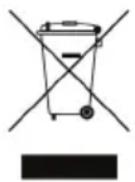
- This logo set on the product means that the recycling of this apparatus comes within the framework of the directive 2012/19/EU of July 4, 2012 concerning the waste on electrical and electronic equipment (WEEE).
- The presence of dangerous substances in the electrical and electronic equipments can have potential consequences on the environment and human health in the cycle of reprocessing this product.
- Therefore, at the end of its lifetime, this product shall not be disposed with other non-recycled waste.
- As the end user, your role is of prime importance in the cycles of re-using, recycling, and other forms of valorization of this electrical and electronic equipment. Local authorities and resellers have set special procedures for the purpose of collecting and recycling this product.
- You have the obligation to use the selective waste collection systems put in place by your local authorities.
WARRANTY
WARRANTY EXCLUSIONS:
The warranty does not cover the worn-out parts of the product, or the problems or damages resulting from:
(1) Surface deterioration due to normal wear and tear of the product;
(2) Defects or deterioration due to contact with food or liquids and corrosion caused by rust or the presence of insects;
(3) Any incident relating to abuse, misuse, alteration, or unauthorized disassembly or repair;
(4) Improper maintenance, improper use of the product, or incorrect voltage connection;
(5) Any use of accessories that are not supplied or approved by the manufacturer.

The warranty will be void if the nameplate and/or serial number of the product is removed.
Oceanic – 120-126 Quai de Bacalan – CS 11584 – 33000 Bordeaux Imported by SCHNEIDER CONSUMER GROUP
12, rue Jules Ferry, 93110 Rosny-sous-Bois, FRANCE
DECLARATION UE DE CONFORMITE
CE
DANS LE CADRE DE L'APPLICATION DES DIRECTIVES:
IEC 62321-5:2013 ; IEC 62321-6 :2015, IEC 62321-7-1 :2015 ;
IEC 62321-7-2 :2017 ; IEC 62321-8 :2017
- OCEANIC
- AVERTISSEMENTS ET CONSEILS DE SECURITE IMPORTANTS
- 1.1 ANTENNE
- 2.1 MODE IMAGE
- 3.1 MODE SON
- 5.5 MODE HÔTEL
- 6.1 LANGUE
- EXCLUSIONS DE GARANTIE
- IMPORTANT WARNINGS AND SAFETY ADVICE
- IMPORTANT SAFETY INSTRUCTIONS – PLEASE READ CAREFULLY AND KEEP FOR FUTURE REFERENCE
- CAUTION
- WHERE TO INSTALL THE PRODUCT
- PROPER VENTILATION
- DO NOT EXPOSE THE PRODUCT TO HIGH TEMPERATURES, MOISTURE, WATER AND DUST
- ELECTRIC SUPPLY
- WARNING
- INFORMATION ABOUT THE MEANING OF THE CONFORMITY MARKING
- CE
- TECHNICAL SPECIFICATION
- AUTO STANDBY
- PRODUCT INTRODUCTION
- ACCESSORIES
- SUMMARY
- CONTROL PANEL
- CONNECTING CABLES
- CONNECTING TO POWER SOURCE
- CONNECTING EXTERNAL ANTENNA TO THE UNIT
- VGA IN
- USB IN
- AV INPUT
- REMOTE CONTROL
- NOTES
- BATTERY REPLACEMENT
- BASE INSTALLATION
- MOUNTING OF THE STAND
- DISASSEMBLY OF THE STAND
- WALL MOUNTING INSTRUCTIONS
- FIRST TIME INSTALLATION
- TUNING SETUP
- DTV MODE
- CHANNEL
- 1.1 ANTENNA
- 1.2 AUTO TUNING
- 1.3 ATV MANUAL TUNING
- 1.4 DTV MANUAL TUNING
- 1.5 PROGRAMME EDIT
- 1.6 SCHEDULE LIST
- 1.7 RECORDED LIST
- 1.8 SIGNAL INFORMATION (WORKS UNDER AVAILABLE TV SIGNALS)
- 1.9 CI INFORMATION (WORKS UNDER AVAILABLE TV SIGNALS)
- PICTURE
- 2.1 PICTURE MODE
- 2.2 COLOUR TEMP
- 2.3 NOISE REDUCTION
- 2.4 SCREEN (FOR PC/VGA MODE ONLY)
- 2.5 DYNAMIC CR
- SOUND
- 3.1 SOUND MODE
- 3.2 BALANCE
- 3.3 AUTO VOLUME
- 3.4 SURROUND SOUND
- 3.5 SPDIF MODE
- 3.6 AD SWITCH
- TIME
- 4.1 CLOCK
- 4.2 TIME ZONE
- 4.3 OFF TIME
- 4.4 ON TIME
- 4.5 SLEEP TIMER
- 4.7 OSD TIMER
- LOCK
- 5.1 SYSTEM LOCK
- 5.2 SET PASSWORD
- 5.3 CHANNEL LOCK
- 5.4 KEY LOCK
- 5.5 HOTEL MODEL
- SETUP
- 6.1 LANGUAGE
- 6.2 TT LANGUAGE
- 6.3 AUDIO LANGUAGE
- 6.4 SUBTITLE LANGUAGE
- 6.5 HEARING IMPAIRED
- 6.6 ASPECT RATIO
- 6.7 PVR FILE SYSTEM
- 6.8 BLUE SCREEN
- 6.9 FIRST TIME INSTALLATION
- 6.10 ENERGY MODE
- 6.11 RESET
- 6.12 SOFTWARE UPDATE (USB)
- 6.13 HDMI CEC
- TO USE THE HDMI CEC FUNCTION
- ATV AND OTHER MODES
- RECORDING
- RECORDING A PROGRAM BY USING A USB
- PREPARATION FOR THE FIRST RECORDING
- HOW TO ACCESS "FORMAT DISK
- IMMEDIATE RECORDING
- TIMER (SCHEDULED RECORDING)
- VIEW RECORDED PROGRAMS
- NOTES ON RECORDING AND USB FUNCTIONS
- USB DEVICE RECOGNITION PROBLEMS
- RECORDING QUALITY
- TIME SHIFT FUNCTION
- HOW TO USE THE SERVICE TIMESHIFT
- NOTE ON USE OF THE TIMESHIFT FUNCTION
- MEDIA PLAYER
- REMOTE OPERATIONS WHEN PLAYING MULTIMEDIA FILES
- TROUBLESHOOTING
- NO IMAGE AND VOICE
- POSSIBLE CAUSES
- SOLUTIONS
- NO VOICE
- SNOWS AND NOISES
- ACHROMATIC COLOUR
- REMOTE CONTROL HAS NO RESPONSE
- IMPORTANT NOTICE
- CLEANING INSTRUCTION
- NOTE ON DEFECTIVE PIXELS
- PRODUCT SHEET RELATING TO ENERGY
- NOTE
- TECHNICAL DATA SHEET
- DISPOSAL OF THE DEVICE
- WARRANTY
- WARRANTY EXCLUSIONS
- DECLARATION UE DE CONFORMITE
- DANS LE CADRE DE L'APPLICATION DES DIRECTIVES
Brand : OCEANIC
Model : OCEALED32220B2
Category : Remote control