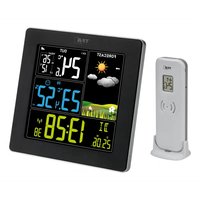
Sun 2 35.1174 - Weather Station TFA - Free user manual and instructions
Find the device manual for free Sun 2 35.1174 TFA in PDF.


Pick your language and provide your email: we'll send you a specifically translated version.
| Product Type | Wireless Weather Station |
| Brand | TFA |
| Model | Sun 2 35.1174 |
| Housing Dimensions | 120 x 80 x 20 mm |
| Weight | 200 g |
| Power Supply | 2 AAA batteries (1.5 V) |
| Outdoor Sensor | Wireless, range 30 m |
| Display | LCD with backlight |
| Indoor Temperature | Range: 0°C to +50°C |
| Outdoor Temperature | Range: -30°C to +70°C |
| Indoor Humidity | Range: 20% to 95% |
| Outdoor Humidity | Range: 20% to 95% |
| Clock Functions | Clock, date, alarm |
| Weather Forecast | Icons for 5 days |
| Value Memory | Min/Max for temperature and humidity |
| Cleaning | Soft dry cloth |
| Maintenance | Change batteries every year |
| Safety | Do not expose to water or shocks |
| Spare Parts | Contact manufacturer |
| Repairability | Not repairable by user |
Frequently Asked Questions - Sun 2 35.1174 TFA
How do I set the time on the TFA Sun 2 35.1174 weather station?
Press the SET button for 3 seconds to enter setting mode. Use the + and - buttons to adjust values. Confirm with SET.
Why is the outdoor temperature not displayed?
Check that the outdoor sensor is on and within 30 m of the station. Replace the sensor batteries if necessary. Reset the device by removing batteries for 10 seconds.
How do I pair a new outdoor sensor?
Insert batteries into the new sensor. On the station, press and hold the CH button for 3 seconds until the icon flashes. The signal establishes automatically.
What do the weather forecast icons mean?
The icons indicate the expected weather: sunny, cloudy, rain or snow. Reliability is about 70% over 12 hours.
How do I display the min/max values?
Press MEM once to view maximum values, a second time for minimum values. Press for 3 seconds to clear them.
What should I do if the display is faint or flickering?
Replace the station batteries (2 AAA batteries). If the problem persists, check the contacts and clean them with a dry cloth.
Can the weather station be wall-mounted?
Yes, a groove on the back allows hanging on a nail or screw. Use the included stand for table placement.
How do I activate or deactivate the alarm?
Press ALARM to display the alarm time. Press again to activate/deactivate. The icon shows when it is active.
What is the sound level of the alarm?
The alarm emits a beep of about 80 dB. To stop it, press any button except SNOOZE which repeats it after 5 minutes.
Where can I find the full manual?
Download the PDF manual for free at notice-facile.com by entering the reference Sun 2 35.1174. A translated version can be sent by email on request.
User questions about Sun 2 35.1174 TFA
0 question about this device. Answer the ones you know or ask your own.
Ask a new question about this device
No questions yet. Be the first to ask one.
Download the instructions for your Weather Station in PDF format for free! Find your manual Sun 2 35.1174 - TFA and take your electronic device back in hand. On this page are published all the documents necessary for the use of your device. Sun 2 35.1174 by TFA.
USER MANUAL Sun 2 35.1174 TFA


Manual assistant
Powered by Anthropic
Waiting for your message
Product information
Brand : TFA
Model : Sun 2 35.1174
Category : Weather Station