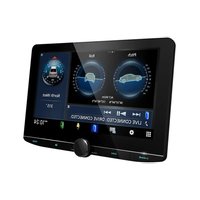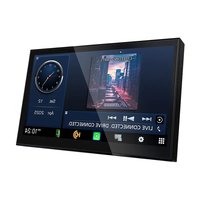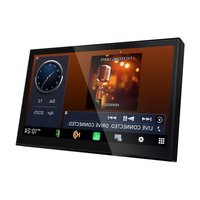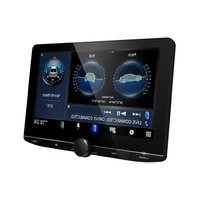
DMX1038S - Car stereo KENWOOD - Free user manual and instructions
Find the device manual for free DMX1038S KENWOOD in PDF.


User questions about DMX1038S KENWOOD
0 question about this device. Answer the ones you know or ask your own.
Ask a new question about this device
Download the instructions for your Car stereo in PDF format for free! Find your manual DMX1038S - KENWOOD and take your electronic device back in hand. On this page are published all the documents necessary for the use of your device. DMX1038S by KENWOOD.
USER MANUAL DMX1038S KENWOOD
The software embedded in this product comprises a number of independent software components, each of which is copyrighted by JVCKENWOOD Corporation or by a third party. This product uses software components that are based on an End-User License Agreement (hereinafter called "EULA") stipulated by JVCKENWOOD Corporation and by third parties. The EULA dictates the availability of the source codes of free-software components as a prerequisite to distributing them in executable form under the terms of the GNU General Public License or the Lesser General Public License (hereinafter called "GPL/LGPL"). To get information about the software components that are subject to the terms of the GPL/LGPL, please visit the following Website: Website URL https://www2.jvckenwood.com/gpl/
Queries concerning the contents of the source code or the like will not be accepted.
Please note that software components based on a EULA that is not subject to the terms of the GPL/LGPL or those that have been developed or created by JVCKENWOOD Corporation will be excluded from the scope of source code disclosure.
Because licenses to use software components distributed under the GPL/LGPL are offered to the customers for free of charge, no warranty is granted to the customers, whether explicitly or implicitly, to the extent of the applicable laws. Unless otherwise stipulated by the applicable laws or agreed upon in writing, the copyright holders or those who are entitled to modify and redistribute the software components are not held responsible for any and all damages resulting from their use or from inability to use them. For more information about the terms of use of the software components, required items of compliance and so on, please refer to the GPL/LGPL.
Customers wishing themselves to use a software component that is subject to the GPL/LGPL embedded in this product are encouraged to read the terms of the corresponding license before use. Because each individual license is prescribed by a third party other than JVCKENWOOD Corporation, the original (English) of the license is presented.
EULA
■ Software License Agreement
JVCKENWOOD Corporation (hereinafter called "Licensor") holds either the copyright to the embedded software or the right to sublicense it. This agreement establishes the conditions under which the customer uses this "Licensed Software."
The customer shall agree to the terms of this license agreement before proceeding to use Licensed Software.
This agreement is deemed to have taken effect when the customer (hereinafter called "User") has used a product implementation of Licensed Software.
The Licensed Software may contain software Licensor has been licensed to use by third parties directly or indirectly. Some third parties may have terms of use prescribed for their customers, apart from this Software License Agreement. This agreement does not apply to such software. Be sure to consult “Important Notice on Software” as presented separately.
Article 1 (General)
Licensor grants to User a non-exclusive, non-assignable right of use Licensed Software within the country where the User purchases the Product (hereinafter the "Country") (except for the exception provided for in Paragraph 1, Article 3).
Article 2 (Right of Use)
- The rise of use granted under this agreement is the right to use Licensed Software in this product.
- User may not duplicate, copy, modify, add to, translate or otherwise alter, or loan licensed Software and the associated literature in whole or in part.
- Use of Licensed Software is limited to a private extent, and Licensed Software may not be distributed, licensed or sublicensed for any purposes whatsoever, including commercial use.
- User shall use Licensed Software as per the instruction manual or instructions given in the help file and may not use or duplicate data in violations of the regulations of the Copyright Law or other governing laws by using Licensed Software in whole or in part.
Article 3 (Terms of License)
- In assigning this product, User may not retain the original copy of the embedded Licensed Software (including associated literature, updates and upgrades) and any duplicates and associated literature with regard to the license to use Licensed Software. User may transfer Licensed Software only to the condition of binding the assignee to abide by the terms of this Software License Agreement.
- User may not reverse-engineer, disassemble, decompile or otherwise analyze the source code of Licensed Software.
Article 4 (Rights to Licensed Software)
All rights to Licensed Software and the associated literature, including copyrights, shall reside with Licensor or the original right holder who has granted the Right of Use and right to sublicense to Licensor (hereinafter referred to as "Original Right Holder"), and User does not have any rights other than Right of Use granted hereunder with regard to Licensed Software and the associated literature.
Article 5 (Exemption Granted to Licensor)
- Licensor and Original Right Holder do not assume any responsibility for damages caused to User or third parties resulting from the exercise by User of the license granted hereunder, unless otherwise provided by any law to the contrary.
- Licensor does not warrant Licensed Software to be merchantable, compatible and fit for specific purposes.
Article 6 (Responsibility for Third Parties)
If disputes over the infringement of third parties' intellectual property rights, such as copyrights and patent rights, arise out of the use of Licensed Software by User, User shall resolve these disputes at User's own expenses while keep Licensor and Original Right Holder harmless.
Article 7 (Secrecy Obligation)
User shall keep confidential Licensed Software provided hereunder, information contained in the associated literature or the like and those provisions of this agreement not yet in public knowledge and may not disclose or leak these to third parties without prior written consent from Licensor.
Article 8 (Cancellation of the Agreement)
Licensor reserves the right to cancel this agreement forthwith and claim compensation from User for the damages caused by such cancellation when User:
(1) Breaches any of the provisions of this agreement, or
(2) Has received a petition for seizure, provisional seizure, provisional disposition or any other kind of compulsory execution.
Article 9 (Destruction of Licensed Software)
If this agreement is terminated under the provision of the foregoing paragraph, User shall destroy Licensed Software, along with all associated literature and its duplicates, within two (2) weeks from the date of termination.
Article 10 (Copyright Protection)
- Copyrights and all other intellectual property rights relating to Licensed Software shall reside with Licensor and Original Right Holder and in no circumstances with User.
- User shall abide by the laws relating to copyrights and intellectual property rights in using Licensed Software.
Article 11 (Export Control)
- Licensed Software and the associated literature or the like may not be exported to places outside the Country (including transmission outside the Country over the Internet or the like).
- User agrees that Licensed Software is subject to export controls imposed by the Country and the United States of America.
- User agrees to comply with all the international and domestic laws that apply to this software (U.S. Export Administration Regulations and regulations established by the U.S., the Country and their governmental agencies regarding usage by end users and export destinations).
Article 12 (Miscellaneous)
- Even if this agreement is invalidated in part by law, all other provisions shall remain in effect.
- Licensor and User shall consult each other in good faith to resolve any matters not provided for in this agreement or questions arising from the interpretation of this agreement.
- Licensor and User agree that this agreement is governed by the law of Japan and that all disputes involving claims and obligations that may arise out of this agreement will be settled by arbitration at the Tokyo District Court as the court of first instance.
Table des matières
Configuration audio....102
natural_image
Simple line drawing of a blank white rectangle with a thin black border (no text or symbols)1

2
natural_image
Simple line drawing of a hand cursor clicking a button (no text or symbols)text_image
Screen Adjustment Display OFF Camera SETUP Audio USBDAX800XR/DAX8000S
text_image
Device List Screen Acquisition Display OFF Camera ATT APPSREMARQUE
text_image
Initial SETUP Finish Language Clock Display & Button Camera Maestro SETUP Vehicle Features[Language]
[System Configuration]
text_image
Initial SETUP Finish Language Clock Display & Button Camera Maestro SETUP Vehicle FeaturesREMARQUE
text_image
System Configuration Fiber Optic Output OFF X'over Network 2way Built-In Amplifier ON Installation Orientation Horizontal[Fiber Optic Output] (DMX1058XR/DAX1050XR/DAX800XR uniquement)
[Built-In Amplifier]
[Installation Orientation]
text_image
© HOME CAMtext_image
CAM MINI ELECTtext_image
Device List Screen Adjustment Display OFF Camera ATT APPS HOME AV OFF VOICEtext_image
Diagram showing bidirectional arrows pointing to a button with a speech bubble, indicating a messaging or feedback process.The image contains no text or mathematical content. It displays a simple graphic with two overlapping squares, one solid green and one outlined white. There is no OCR-able text content to extract.
text_image
both Audio iPhone V-IN STANDBY Circle Info Satellite Radio oid Auto TEL![KENWOOD DMX1038S - [Installation Orientation] - 1](/content/2026/04/726641/images/1db9d35a2256f860fa4f51f79beb15c2b1c37323210ca0e47d23dcf5c3f83d6e.jpg)
text_image
Media Player Bluetooth 36 Climate Parking Radio Apple Ctext_image
Category List 1 2 3 4 5 6![KENWOOD DMX1038S - [Installation Orientation] - 2](/content/2026/04/726641/images/aa11d7e8f7cc80cd40b28a2b94cbd8359e95811a0a9eaac4f6584468d3bd3c1c.jpg)
text_image
SiriusXM Artist Notification File Henderson is playing on SiriusXM Hits 1. LISTEN NOW MANAGE1
text_image
Home team Away team Game in Progress 1st QTR LISTEN NOW MANAGE1
Apple CarPlay is connected
REMARQUE
text_image
1 0:37 arrival 0:21 hrs 401 ms Start on McDawen St Not Playing Portfolio work 11 TRACK001 Apt.001 2 3
text_image
Device List Screen Adjustment Display OFF Camera ATT APPSREMARQUE
text_image
Central Express Way Then You got to listen Michael Evans 23 min: 9.4 min: 12:58 PM1 Barre de navigation ^1
text_image
Central Express Way Then 23 ms 9.4 mi 12:16 PM You got to listen Michael Evans USB MACD01 19:00 2 31 Barre de navigation ^*1
text_image
Device List Screen Adjustment Display OFF Camera ATT APPSnatural_image
Diagram of a USB connector with internal ports and cable connection (no text or symbols)2 DMX1058XR/DMX1038S/DAX1050XR
text_image
USB Song Title Song Title Song Title Song Title Song Title Song Title Song Title Song Title Song Title Song Title Song Title Song Title Song Title Song Title Song Title Song Title Song Title Song Title Song Title Song Title Song Title Song Title Song Title Song Title Song Title Song Title Song Title Song Title Song Title Song Title Song Title Song Title Song Title Song Title1 CODEC
natural_image
Scenic coastal landscape with green foliage and distant ocean under cloudy sky (no text or symbols)text_image
Category List May Radiotext_image
Category List Link Search Folder ListREMARQUE
text_image
Category List Artists Albums Songs Genrestext_image
iPhone Song Title Song Title Song Title Song Title Song Title Song Title Song Title Song Title Song Title Artist Name Album Name 10:00text_image
Category List May Radiotext_image
Category List Link SearchREMARQUE
text_image
Category List Play A-Z Top Up Radio Playlists Artists Albums Songs Podcaststext_image
Link Search Artists Albums Genres Composerstext_image
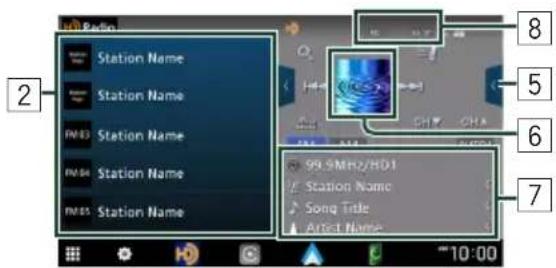
1 2 FM 03 FM 04 FM 05 10:00 FF: AM 99% MHz HD1 Stop Name Song Title Artist Name 5 4 3Ouvrir le tiroir
text_image
Station Name Station Name Station Name Station Name Station Name 99.9MHz/HD1 Station Name Song Title Artist Name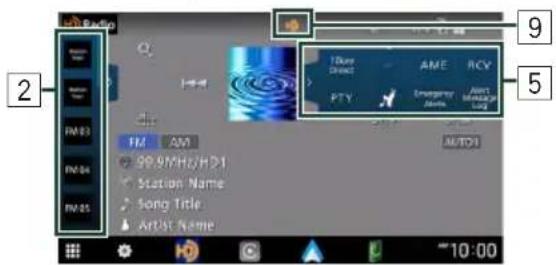
text_image
10:00 2 FM83 FM84 FM85 FM AM 99.9MHz/HD1 Station Name Song Title Artist Name 100 MHz AME RCV PTY Emergency Audio MOTOR1 9 5text_image
Radio® The HD Radio receiver enables HD2/HD3 Bookmark Digital Sound Program Info Artist Experience Emergency AlertsHD2/HD3
text_image
FM 03 FM AM 99.9MHz/HD! Station Name Song Title Artist Name CH▼ CHA AUTO1text_image
Are you sure you want to start Auto Memory? Yes Notext_image
Radio Station Name Station Name Station Name Station Name Station Name Station Name Station Name FM 03 FM FM 04 FM 05 99.8 Sta Song Artis
Recherche directe
text_image
10key Direct PTV AME RCV Emergency Alerts Alert Message Log AUTO1 AM 10:00 AM 10:00text_image
Channel List Song Info Change Song Title 1 Song Title 2 Song Title 3 Song Title 4 Song Title 5 Song Title 6REMARQUE
text_image
PTY Search FM 99.9MHz Search News Information Sports Talktext_image
Touchez . CH AUTO1 AM 10:00 100% 100% T.4 UKeyy Direct AME RCV PTY Emergency Alerts Alert Message Log UTS AUTO1 AM 10:00text_image
Bookmarks Delete List Delete ✓ AI □ AI Song Title / Artist Name / Album Nam ✓ ✓ Song Title / Artist Name / Album Nam ✓ ✓ Song Title / Artist Name / Album Nam ✓ ✓ Song Title / Artist Name / Album Nam □ ✓ Song Title / Artist Name / Album Nam □ ✓ Song Title / Artist Name / Album Nam □ ✓
[√ All]
Activating subscription
text_image
SiriusXM What is your location? Live in the US Live in Canada OK 5:58text_image
SiriusXM Enjoy ad-free music plus the widest variety of entertainment including sports, news, and comedy. CONTINUE Subscription required to access service. Use of the service is subject to our Customer Agreement & Privacy Policy at siriusxm.com/agreements. We collect & use personal data to tailor your experience. Some features/content require a wireless Internet connection. Data rates may apply.Ceci termine l'approbation.
REMARQUE
text_image
Good morning! Some women need to give your day starting off right. RAW COMEDY Ch 98 Stand-up from today's up and coming Comedy Willie's ROAD OUTC Ch 61 Classic Country from the 40s, 70s. Country Happy COUNTRY Ch 1200 Feel good country hits PartyREMARQUE
text_image
SETUP Audio Connection & AV Display & Button User Interface Camera System WiFi No Connection 360L IP Connection ON Bluetooth ON Device List Device NameREMARQUE
text_image
Wi-Fi No Connection 360L IP Connection Bluetooth ON Device List Device Nametext_image
Wi-Fi Delete 7025H_AP SPW_X11_Be0099 TP-Link_E060text_image
SETUP Audio Connection & AV Display & Button User Interface Camera System WiFi SSID Name 360L IP Connection ON Bluetooth ON Device List Device Name● Sports Play-by-Play (canaux sportifs)
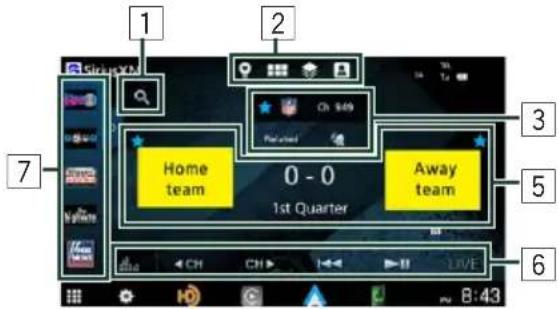
text_image
1 2 3 Home team 0 - 0 1st Quarter Away team 5 6 7 8:43Ouvrir le tiroir
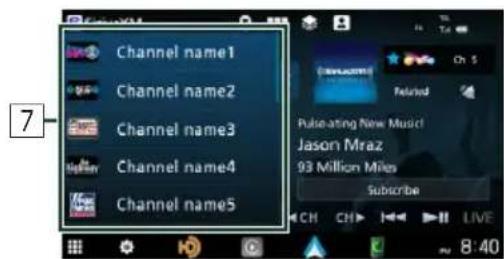
text_image
Channel name1 Channel name2 Channel name3 Channel name4 Channel name5 Pulse-ating New Music! Jason Mraz 93 Million Miles Subscribe 8:401 Recherche
text_image
SiriusXM Channel name1 Channel name2 Channel name3 Channel name4 Channel name5 Home team Away team 0 - 0 1st Quarter CH CH LIVE 8:58flowchart
graph TD
    A["1 Channel Logo\nCh 176"] --> B["2 Home Team\nAway Team"]
    B --> C["What would you like to add to your pensets?"]
    C --> D["CANCEL"]
text_image
Home team Away team What would you like to add to your presets? CANCELtext_image
Linear Tuner Ch 5 It's your pop on the Puts Ch 6 90p pop's pop is nice hits 70p 7 Ch 7 70p pop hits Ch 8 80p pop hits CATEGORIES < CH CH > DIRECT TUNEtext_image
Linear Tuner Ch 8 80s pop hits Ch 9 80s pop hits Ch 10 Pop hits from the 2000s Ch 11 Pop hits from the 2010s Music Sports News TalkRecherche directe
text_image
Linear Tuner Ch 5 It's your pop on The Puzur Ch 6 You're you's pop & pop hits 70s pop hits Ch 7 70s pop hits Ch 8 80s pop hits Cultures: Cullies / Culture Experiences CATEGORIES < CH CH > DIRECT TUNEtext_image
Direct Tune 101 1 2 3 4 5 6 7 8 9 0 101 Father's Day March 2011 Will Money before it dad < CH < H >1 Logo du canal
text_image
SiriusXM #WeekendCountdow @SpyderHarrison #WeekendCountdown Subscribetext_image
For You Good afternoon! Let's going your die going down RAW COMEDY Ch 90 Stand up from today's up and coming Comedy WILLIE'S ROADHOTER Ch 61 Classic Country from the 60s, 70% Country Hoppy COUNTRY Ch 1205 Feelgood country hits PartyREMARQUE
text_image
SiriusXM #WeekendCountdow @SpyderHarrison #WeekendCountdown Subscribetext_image
Categories / Music Music Sports News Talk the Pulse Ch 5 It's your pop on The Pulse Pop 70s on 7 Ch 7 20s pop hits Pop Business Exclusive PopOnglet CHANNEL/PODCASTS
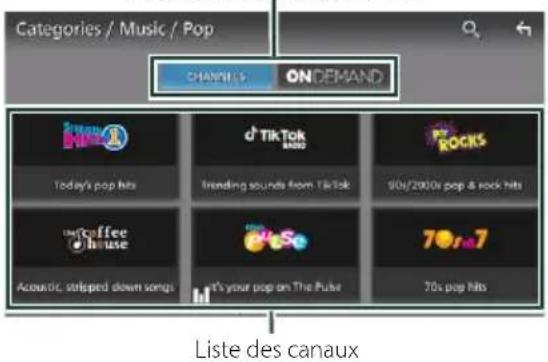
text_image
Categories / Music / Pop CHANNELS ON DEMAND Today's pop hits d TikTok 100/2000x pop & rock hits Innding sounds from TikTok 90s/2000x pop & rock hits Unstcoffee house Acoustic, stripped down songs It's your pop on The Pulse 70s pop hits Liste des canauxREMARQUE
text_image
SiriusXM #WeekendCountdow @SpyderHarrison #WeekendCountdown Subscribetext_image
My Collection / SiriusXM Favorites FAVORITIES ARTIST STATION HISTORY ADD EDIT SEC Play-by-Play 961 Willie Nelson Rados POTUS POPEN Willie Nelson Fts. Snoop Dongg. Jenny DMX HOWARD STERN INTERVIEWSFAVORIS SXM
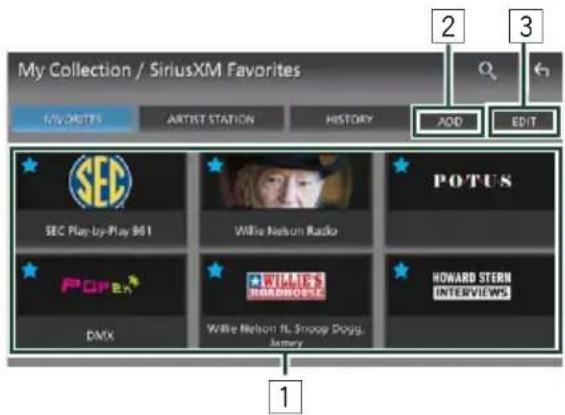
text_image
My Collection / SiriusXM Favorites 1/VIRKUTS ARTIST STATION HISTORY ADD EDIT SEC Play-up-Play 961 Willie Nelson Radio POTUS POPE WILIES HORARD STERN INTERVIEWS DMX Willie Nelson FL Snoop Dogg. Jeamy 1text_image
Search SiriusXM Listening... Se actor create for this name3 Commencez à parler.
text_image
Results for Giant ALL All Channels Artists Podcasts Ch 923 Live hometown play-play coverage of the New York Giants NT1 Play-Play Ch 803 Live hometown play-play coverage of the San Francisco Giants M.B Play-Play Ch 0 They Might Be Giants 3text_image
SiriusXM #WeekendCountdow @SpyderHarrison #WeekendCountdown Subscribe Ch 2 Related LIVE 8:38text_image
Join More Like PopRocks RELATED CONTENT AVAILABLE SHOWS LITHIUM Ch 34 90s alternative & grudge rock Rock Ch 0 Rollin' pop hits from the 2000s The 2000s Decade Ch 0 90s & 2000s boy bands The 90s DecadeCONTENU ASSOCIÉ
text_image
Angel With A Shongun The Cab Set Artist / Song Notification? Tap the song and/or artist to get a notification every time the song/artist airs on SiriusXM. DONE MANAGEtext_image
Angel With A Shougun The Cab Set Artist / Song Notification? Tap the song and/or artist to get a notification every time the song/artist aims on SiriusXM. DONE MANAGEREMARQUE
text_image
SiriusXM Home team 0 - 0 1st Quarter Away team LIVE 8:43text_image
Home team Away team Set Team Notification? Top a team to get a notification every first the team aims on SiriusXM. DONE MANAGEtext_image
Home team Away team Set Team Notification? Tap a team to get a notification every time the team runs on SimulKM DONE MANAGEREMARQUE
text_image
SiriusXM Home team 0 - 0 1st Quarter Away team LIVE 8:43text_image
Listeners, Account & Settings Subscription No Subsobscription The Free Listening period is available for a limited time only MANAGE ACCOUNT Connect your SiriusXM Listener Profile Sync your Favorites, history, and settings across all SiriusXM connected devices and vehicles. LOG IN/SET UP Listener Setting Manage your Listener settings MANAGEtext_image
Call SiriusXM to Subscribe You can call 1855200693 Radio ID: 2CVS064M. CALL SIRIUSXM NOT NOWAPPELER SIRIUSXM
text_image
Listeners, Account & Settings Subscription No Subscription The Price Listening period is available for a limited time only. Connect your SiriusXM Listener Profile Sync your Favorites, history, and settings across all SiriusXM connected devices and vehicles. Listener Setting Manage your listener settings MANAGE ACCOUNT LOG IN/SET UP MANAGEtext_image
Log In or Get Started Log In Log in using social media or a listener profile enabled. Set Up Listener Profile Please change the name and password to access your website. Please check other promotional articles and drives. LOG IN GET STARTEDtext_image
Log In Enter Username / Email Address Enter A # 1text_image
Log In Enter password Password Policy Enter A # 1REMARQUE
text_image
Welcome, Listener name You can change your Listener profile name to further personalize your SiniXM experience. CONTINUE CHANGE NAMEREMARQUE
text_image
Log In Enter Username / Email Address Enter A # 1text_image
We Don't Recognize That Email or Password Please try again or call SiriusXM at 1455-2966393 for further assistance. TRY AGAIN CALLtext_image
Password Policy Password must be 6-70 characters and cannot cost in all numbers. Password must have common words or letters. They must also have at least one character from all that of the following: Up to reach this: 4 Lowercase: 10000 Number: 90 Special (or less): 1, 2, 3, 4, 5, 6, 7, 8, 9, 10, 11, 12, 13, 14, 15, 16, 17, 18, 19, 20, 21, 22, 23, 24, 25, 26, 27, 28, 29, 30, 31, 32, 33, 34, 35, 36, 37, 38, 39, 40, 41, 42, 43, 44, 45, 46, 47, 48, 49, 50, 51, 52, 53, 54, 55, 56, 57, 58, 59, 60, 61, 62, 63, 64, 65, 66, 67, 68, 69, 70, 71, 72, 73, 74, 75, 76, 77, 78, 79, 80, 81, 82, 83, 84, 85, 86, 87, 88, 89, 90text_image
Listener / Manage Free and hard to sign out of a Listener from the service. Listener name Add Listenertext_image
Log In or Get Started Log In Log In or Log In or Get Started Set Up Listener Profile Please change in Username and Password for you, but your listener should be on your connected audio and audio. Log In GET STARTEDtext_image
Listener / Manage Create the next session of a Music Player in this service Bill Add Listener Listener nametext_image
Listeners, Account & Settings Subscription No Subscriptions Inactive MANAGE ACCOUNT MANAGE Listener Profile Bill MANAGE Listener Setting Manage your Listener settings MANAGEREMARQUE
text_image
Listeners, Account & Settings Subscription No Subscriptions The free Listening period is available for a limited time only. MANAGE ACCOUNT Connect your SiriusXM Userer Profile: Sync your Favorites, history, and settings across all SiriusXM connected devices and vehicles. LOG IN/SET UP Listener Setting Manage your listener settings MANAGEflowchart
graph TD
    A["1: Edit Listener\nPersonalize your listener profile awater and name\nCHANGE AVATAR\nEDIT NAME"] --> B["2: Notifications\nOFF ON\nAllow notifications for SmartXM\nMANAGE"]
    B --> C["3: Tune Start\nOFF ON\nStart songs at the beginning when you tune to a music channel"]
    C --> D["4: Listen Settings\nStart Up Recommendations\nOFF ON\nGet recommendations on start up and easily explore new content."]
    D --> E["5: Reset History\nListening History and Recommendations for this profile will be next.\nRESET HISTORY"]
text_image
Listener Setting Edit Listener/ Personalize your listener profile avatar and name CHANGE AVATAR EDIT NAME Notifications OFF ON Allow notifications for ShinXM MANAGE Tune Start OFF ON Start songs at the beginning when you tune to a music cherriesCHANGER L'AVATAR
text_image
Listener Setting Edit Listener Personalize your listener profile avatar and name CHANGE AVATAR EDIT NAME Notifications OFF ON Allow notifications for ShaoMM. MANAGE Time Start OFF ON Start songs at the beginning when you have to a music channels.text_image
Manage Notifications Artists & Songs OFF ON Know when your favorite artist or songs are playing on any channel. Sports OFF ON Get notifications for start of games. ARTISTS & SONGS TEAMSARTISTES & THÈMES MUSICAUX
text_image
Artist. & Song Notifications Presented for all an automotive orders Beat Plesley Colin Hays Knewella Beat This Summer Little Rock Dust in The WindÉQUIPES
text_image
Team Notifications Tap to enable/serve notifications. Press and hold a file to delete. Team1 New York Team2 Los Angeles Team3 Arizona Team4 Chicago Team5 Arizona Add Teamtext_image
Add Team Tap to select a sports league. National Football League National Basketball Association College Football Major League Baseball National Hockey League College Basketball Add Team / National Football League Tap to add a team to your notifications. Team1 Team3 Team5 Arizona Baltimore Carolina Team2 Team4 Team6 Atlanta Buffalo Chicago
text_image
Listeners, Account & Settings System Settings Manage your location data. MANAGE Help & Support For help go to: CA: sinuismc.ca/help US: sinuismc.com/help CONTACT SINUIXM SINUIXM LEGAL YOUR PRIVACY CHICKEStext_image
System Settings Location Data OFF Off Allow my vehicle to wind location data to S###RMM for service improvements and other uses stated at shtml.com/nutise Radio ID 20153014M Version SAM_V2.48.1text_image
Listeners, Account & Settings System Settings Manage your location data. Help & Support For help go to: CAC: sinusxim.cay.help US: sinusxim.com/help CONTACT SIRIUSXM SIRIUSXM LEGAL YOUR PRIVACY CHOICES 1 2 3 MANAGE1 Contacter SiriusXM
text_image
Contact SiriusXM For support, please contact SiriusXM Customer CAPP at: 1695-295-6993 sinusxm.com/help When calling Customer Care, please provide your RADIO ID? 2CVGDE4M CALL SiriusXM2 Informations juridiques de SiriusXM
text_image
SinusXM Legal You can provide your customer agreement. Privacy Policy and other stockholders of this company's legal service.text_image
Your Privacy Choices Your system care/psychoses to manage my own use and purchase of your personal information as well as risks on the use of emails/personal information, however applicable.text_image
Connection & AV Bluetooth ON Display & Button Device List User Interface Camera System Device Name DMX*** PIN Code Device Address 00:11:22:33:44:555 Touchez [Device List].
6 Touchez + 📄.
text_image
Device List + Please open Bluetooth settings on your phone and select the device name below. "DMX*** CancelREMARQUE
text_image
Are you sure you want to add this Bluetooth device ? Passkey 012345 Device Name Yes No Device Name 5 012345 OKtext_image
Adding this Bluetooth device. PIN Code 0000 Device Name Yes Notext_image
Please Select a profile. TEL(HFP)1 TEL(HFP)2 Audio(A2DP)/App(SFP) Close[TEL (HFP) 1], [TEL (HFP) 2]
text_image
Connection & AV Bluetooth DN Display & Button Device List User Interface Camera System Device Name DMX*** PIN Code Device Address 00:11:22:33:44:55text_image
Change PIN Code Enter PIN Code: 1 2 3 4 5 6 7 8 9 0 SET4 Touchez [SET].
text_image
Music List Song Title Song Title Song Title Song Title Song Title Song Title Song TitleLa lecture commence.
REMARQUE
text_image
Device Name 1 Device Name 2 Person Name 1 Person Name 2 Person Name 3 Q W E R T Y U I O P A S D F G H J K L Z X C V B N M Space P 65 A # 1 Xtext_image
Speech Quality Adjust Microphone Level 0 Echo Cancel Level 0 Nose Reduction Level 0 Time Alignment 0 Close[Microphone Level]
[Noise Reduction Level]
text_image
Edit Preset Dial General Home Mobile phone Office Other 0123456789 No Preset No Preset Delete all[Delete all]
text_image
Edit Preset Dial Edit Preset Number Add number from phonebook Add number direct Delete Close Delete all[Add number from phonebook]
text_image
Connection & AV Display & Button User Interface Camera System SETUP Audio Bluetooth ON Device List Device Name DMX*** PIN Code Device Address 00:11:22:33:44:55text_image
TEL SETUP OK Bluetooth HF/Audio Front All Auto Response OFF Auto Pairing ON OFF Sort Order First Last[Bluetooth HF/Audio]
text_image
Screen Adjustment Display OFF Camera SETUP Audio USB DAX800XR/DAX8000S Device List Screen Adjustment Display OFF Camera ATT APPStext_image
Left Rear Front Dash Cam 1 3 2 4text_image
Connection & AV Display & Button User Interface Camera System SETUP Audio Camera Assignment Settings Rear Camera Interruption ON Rear Camera Message Always display Rear Camera Settings Parking Guidelines ON[Camera Assignment Settings]
[Rear Camera Interruption]
[Rear Camera Settings] \*
[Parking Guidelines]
[Front Camera Interruption]\*
text_image
FRONT VIEW CAMERA / DASH CAM Please select the position of the mirror/ camera camera. 1 Right 2 Name 3 Maser ON OFF Enter4 Touchez [Enter].
text_image
Initializetext_image
A C D B Initializetext_image
Wireless Mirroring SiriusXM Bluetooth Audio iPhone Media Player Bluetooth Stream Detector Gauges Climate Parking Assist Radio Apple CarPlay Android Auto TELtext_image
Pitch and Roll Pitch D Roll 1 2 4 8 5 6 ~10:001 Affichage du pas
text_image
Pitch and Roll Pitch D Roll 0° ALT 0m 50°0'0" W0°0'0" 10:00text_image
SETUP Connection & AV Display & Button User Interface Camera System Bluetooth ON Device List Device Name DMX*** PIN Code Device Address 00:11:22:33:44:55 Audiotext_image
Screen Adjustment Display OFF Camera SETUP Audio USB DAX800XR/DAX8000S Device List Screen Adjustment Display OFF Camera ATT APPStext_image
Connection & AV Display & Button User Interface Camera System SETUP Audio Bluetooth ON Device List Device Name DMX*** PIN Code Device Address 00:11:22:33:44:55[Bluetooth]
[360L IP Connection ^*1 ]
[Wireless Mirroring SSID]
[Android Auto Auto Launch]
[Incoming Call Volume (Ring)]
[In Call Volume (Talking)]
[Speech Quality Adjust]
[Reset Android Auto Wireless Connection]
[Built-In Amplifier]
text_image
Connection & AV Display & Button User Interface Camera System SETUP Audio Dimmer SYNC OSD Clock ON Button Illumination Color Wallpaper Customize Clock Icon Selection Viewing Angle[Dimmer]
[Wallpaper Customize]
[Clock Icon Selection]
[Screen transition effect]
text_image
Clock Icon Selectiontext_image
Connection & AV Display & Button User Interface Camera System SETUP Audio Source Setup - Remote Control Beep ON Photo Frame Scroll ON Parking Assist Display Dyn. Parking Assist position Right Android Auto Screen Size Switching OFF[Source Setup - Remote Control]
[Parking Assist Position ^2 ]
text_image
Connection & AV Display & Button User Interface Camera System DEMO ON System Information Open Source Licenses Initialize Maestro SETUP Vehicle Features[DEMO]
[System Information]
text_image
Speaker / X-Over EQ / SW Level Position / DTA Fader / Balance Volume Offset Sound Effect Audio Memory Car Type OFF Speaker 6 1/2 inch Location Lower Door Area Tweeter Medium Front Rear Subwoofer Audio HDF FREQ Through Slope -12 dB/Oct Gen DelB TW Gen DelBtext_image
Speaker / XPower EQ / SW Level Position / DTA Fader / Balance Volume Offset Sound Effect Audio Memory Speaker 6 1/2 inch Location Lower Door Area Tweeter Medium Foot Rear Subwoofer Audio HF FREQ Through Slope -12 dB/Oct Gain D&R TW Gain D&R[Speaker]
text_image
Speaker / X'over EQ / SW Level Position / DTA Fader / Balance Volume Offset Sound Effect Audio Memory SETUP Audio ① High Pass Band Pass ② Low Pass Speaker Medium[Speaker]
text_image
SETUP Audio Speaker / Xover EQ / 5W Level Position / DTA Faster / Balance Volume Offset Sound Effect Audio Memory USB ALL SRC Memory Initialize Pops Easy Top40 Jazz Powerful Rock Flat Bass Boost User1 User2 User3 User4![KENWOOD DMX1038S - [Speaker] - 1](/content/2026/04/726641/images/c11e30f90e46c610b81e317f024f3ea4f1d6e93050f409029ebc5e8dd0c125ed.jpg)
text_image
Preset Storage User1 User2 User3 User4 Close4 Touchez [Position/DTA].
![KENWOOD DMX1038S - [Speaker] - 2](/content/2026/04/726641/images/cebcdacc2ca1fa282e09476ce601bb2f525db0c6e4912954cb735ed96e8b63cc.jpg)
text_image
SETUP Audio Speaker / XNER EQ / SW Position / STA Balance Volume Offset Sound Effect Audio Memory Listening Position Front Focus Front L Front R Front All All Adjusttext_image
SETUP Audio Listening Position Front Focus Speaker / Xover EQ / S/n Level Position / DTA Fader / Balance Volume Offset Sound Effect Audio Memory Front L Front R Front All All Adjusttext_image
SETUP Audio Speaker / Xover EQ / SW Level Position / DTA Factor / Balance Volume Offset Sound Effect Audio Memory Listening Position Front Focus Front L Front All Priority L All Priority L Front R Front All Priority R All Priority R AdjustREMARQUE
text_image
Front Focus Adjust Delay Level 0.00ms 0.00ms 0.00ms 0.00ms 3.12ms 3.12ms Initialize Sound Image LR(Front) Sound Image LR(Rear) Size of the Virtual Sound Field Subwoofer Delay[Sound Image LR (Front)]
[Size of the Virtual Sound Field]
text_image
Speaker / Cover EQ / SW Level Position / DTA Fisher / Balance Volume Offset Sound Effect Audio Memory SETUP Audio Centertext_image
SETUP Audio Speaker / Xover Bass Boost Supreme OFF 1 2 3 OFF ON EQ / SW Level Loudness Sound Realizer Position / DTA OFF Low High OFF 1 2 3 Faster / Balance Volume Offset Drive Equalizer Stage EQ OFF ON OFF Low Middle High Sound Effect Space Enhancer Parometric EQ Audio Memory OFF Small Medium Large OFF ON[Bass Boost]
line
| Frequency [Hz] | Amplitude [dB] | | -------------- | -------------- | | 0 | 0 | | 1 | 1 | | 2 | 1 | | 3 | 1 | | 4 | 1 | | 5 | 1 | | 6 | 1 | | 7 | 1 | | 8 | 1 | | 9 | 1 | | 10 | 1 | | 11 | 1 | | 12 | 1 | | 13 | 1 | | 14 | 1 | | 15 | 1 | | 16 | 1 | | 17 | 1 | | 18 | 1 | | 19 | 1 | | 20 | 1 | | 21 | 1 | | 22 | 1 | | 23 | 1 | | 24 | 1 | | 25 | 1 | | 26 | 1 | | 27 | 1 | | 28 | 1 | | 29 | 1 | | 30 | 1 | | 31 | 1 | | 32 | 1 | | 33 | 1 | | 34 | 1 | | 35 | 1 | | 36 | 1 | | 37 | 1 | | 38 | 1 | | 39 | 1 | | 40 | 1 | | 41 | 1 | | 42 | 1 | | 43 | 1 | | 44 | 1 | | 45 | 1 | | 46 | 1 | | 47 | 1 | | 48 | 1 | | 49 | 1 | | 50 | 1 | | Note: The frequency values are not explicitly provided in the code, so they are represented as '0' in the original data frame. The actual data points (e.g., [dB] at [Hz] = [Hz]) are not shown in the image. There is no label for the data series. The output is estimated based on the given code.line
| Frequency (Hz) | Value (dB) | | -------------- | ---------- | | 0 | 0 | | 1 | 0 | | 2 | 0 | | 3 | 0 | | 4 | 0 | | 5 | 0 | | 6 | 0 | | 7 | 0 | | 8 | 0 | | 9 | 0 | | 10 | 0 | | 11 | 0 | | 12 | 0 | | 13 | 0 | | 14 | 0 | | 15 | 0 | | 16 | 0 | | 17 | 0 | | 18 | 0 | | 19 | 0 | | 20 | 0 | | 21 | 0 | | 22 | 0 | | 23 | 0 | | 24 | 0 | | 25 | 0 | | 26 | 0 | | 27 | 0 | | 28 | 0 | | 29 | 0 | | 30 | 0 | | 31 | 0 | | 32 | 0 | | 33 | 0 | | 34 | 0 | | 35 | 0 | | 36 | 0 | | 37 | 0 | | 38 | 0 | | 39 | 0 | | 40 | 0 | | 41 | 0 | | 42 | 0 | | 43 | 0 | | 44 | 0 | | 45 | 0 | | 46 | 0 | | 47 | 0 | | 48 | 0 | | 49 | 0 | | 50 | 0 | | Note: The frequency values are not explicitly provided in the code, so they are represented as 'bc' in the chart.- Filtre de crête
line
| Frequency (Hz) | Value (dB) | | -------------- | ---------- | | 0 | 0 | | 1 | Peak | | 2 | 0 | | 3 | 0 | | 4 | 0 | | 5 | 0 | | 6 | 0 | | 7 | 0 | | 8 | 0 | | 9 | 0 | | 10 | 0 | | 11 | 0 | | 12 | 0 | | 13 | 0 | | 14 | 0 | | 15 | 0 | | 16 | 0 | | 17 | 0 | | 18 | 0 | | 19 | 0 | | 20 | 0 | | 21 | 0 | | 22 | 0 | | 23 | 0 | | 24 | 0 | | 25 | 0 | | 26 | 0 | | 27 | 0 | | 28 | 0 | | 29 | 0 | | 30 | 0 | | 31 | 0 | | 32 | 0 | | 33 | 0 | | 34 | 0 | | 35 | 0 | | 36 | 0 | | 37 | 0 | | 38 | 0 | | 39 | 0 | | 40 | 0 | | 41 | 0 | | 42 | 0 | | 43 | 0 | | 44 | 0 | | 45 | 0 | | 46 | 0 | | 47 | 0 | | 48 | 0 | | 49 | 0 | | 50 | 0 | | Note: The frequency values are not explicitly provided in the code, so they are represented as 'fC' in the chart.- Filtre passe-bas
[Audio SETUP Memory]
[Audio SETUP Recall]
natural_image
Line drawing of a remote control device with buttons and a scroll (no text or symbols)natural_image
Technical line drawing of a battery pack with internal components and an external casing (no text or symbols)text_image
OFF AUDIO FING/SEC TCI/SEC MND HOLD/THE R1.05 AUDIO/WEET/SEC 700M ▶ 100 ▲ LNTLR AUD- TVD- TV. AV FIA+1 ORB LW AUD- DVD- TV.Mode AUD
text_image
1 SRC MODE FNC/PBC TOP MENU MENU DVD SETUP RETURN AUDIO SUBTITLE ANGLE ZOOM 3 ▶ II ■ 2 4 ENTER 5 9 AM FM OPEN VOL 10 ▶ ▶ ▶ ▶ 11 1 2 ABC 3 DEF 2 ZONE 21 ◀ II ▶ 4 GHI 5 JKL 6 MNO R VOL 22 7 PQRS 8 TLV 9 WXYZ CLEAR 0 DIRECT ATT 23 KENWOODflowchart
graph TD
    A[" "] --> B[" "]
    B --> C[" "]
    C --> D[" "]
    D --> E[" "]
    style A fill:#fff,stroke:#000
    style B fill:#fff,stroke:#000
    style C fill:#fff,stroke:#000
    style D fill:#fff,stroke:#000
Unité d'antenne Bluetooth/Wi-Fi
DAX1050XR/DAX800XR/DAX8000S
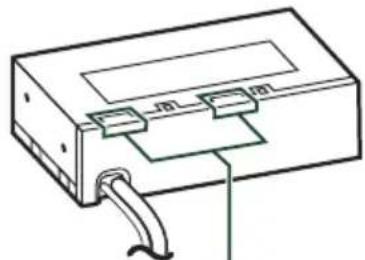
natural_image
Line drawing of a rectangular electronic component with a coiled cable and two connectors (no text or symbols)Unité d'antenne Bluetooth/Wi-Fi
text_image
Diagram showing a device labeled with parts 6 and 7, alongside a person using a power switch in a car.REMARQUE
text_image
Diagram showing car interior cable connector and cable insertion steps with labeled parts and directional arrowstext_image
[F] ±5° 0° - 40° ±5°Installé verticalement
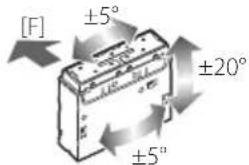
text_image
[F] ±5° ±20° ±5°text_image
Technical diagram showing a connector assembly with labeled parts and numbered annotationPosition gauche
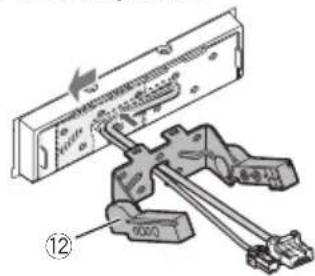
text_image
Technical diagram showing a mechanical assembly with labeled components and directional arrows indicating movement or force.Position droite
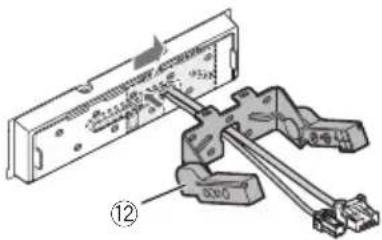
text_image
Technical diagram showing a mechanical assembly with labeled components and directional arrow indicating flow or movement.3
text_image
Guides Guidestext_image
Technical diagram of a device interior with numbered components, likely for assembly or maintenance instructions.REMARQUE
text_image
Technical diagram of a device with labeled components, showing internal wiring and numbered parts 10.: 8,0 pouces de large (diagonale)
: 176,64 mm (L) × 99,36 mm (H)
6-15/16 x 3-15/16 (pouces)
Système d'affichage
: Panneau LCD
Système de lecture
Section interface USB
Type de connecteur
: Type C
Norme USB
Dimensions (L × H × P)
- Châssis
DMX1058XR/DMX1038S
: 178 × 50 × 158 mm
7 × 2 × 6 - 1/4 pouces
DAX1050XR/DAX800XR/DAX8000S
: 178 × 50 × 105 mm
7 × 2 × 4 - 1 / 8 mm
• Moniteur
DMX1058XR/DMX1038S/DAX1050XR
: 262 × 181 × 52 mm
10-5/16 × 7-1/8 × 2-1/16 pouces
DAX800XR/DAX8000S
: 190 × 120 × 28 mm
7-1/2 × 4-3/4 × 1-1/8 pouces
Poids
DMX1058XR/DMX1038S
: 2,5 kg (5,6 lbs)
DAX1050XR
: 2,1 kg (4,5 lbs)
DAX800XR/DAX8000S
: 1,4 kg (3,1 lbs)
- Châssis
DMX1058XR/DMX1038S
: 1,3 kg (2,9 lbs)
DAX1050XR/DAX800XR/DAX8000S
: 0,8 kg (1,8 lbs)
• Moniteur
DMX1058XR/DMX1038S/DAX1050XR
: 1,1 kg (2,4 lbs)
DAX800XR/DAX8000S
: 0,6 kg (1,3 lbs)
REMARQUE
- Windows Media is a registered trademark or trademark of Microsoft Corporation in the United States and/or other countries. This product is protected by certain intellectual property rights of Microsoft. Use or distribution of such technology outside of this product is prohibited without a license from Microsoft.
- This software is based in part on the work of the independent JPEG Group.
- Use of the Made for Apple badge means that an accessory has been designed to connect specifically to the Apple product(s) identified in the badge, and has been certified by the developer to meet Apple performance standards. Apple is not responsible for the operation of this device or its compliance with safety and regulatory standards. Please note that the use of this accessory with an Apple product may affect wireless performance.
-
Apple, Apple CarPlay, Apple Music, iPhone, Lightning, and Siri are trademarks of Apple Inc., registered in the U.S. and other countries and regions.
-
Use of the Apple CarPlay logo means that a vehicle user interface meets Apple performance standards. Apple is not responsible for the operation of this vehicle or its compliance with safety and regulatory standards. Please note that the use of this product with iPhone, iPod, or iPad may affect wireless performance.
- App Store is a service mark of Apple Inc., registered in the U.S. and other countries.
- IOS is a trademark or registered trademark of Cisco in the U.S. and other countries and is used under license.
- SiriusXM and all related marks and logos are trademarks of Sirius XM Radio, Inc. All rights reserved.
- HD Radio™ Technology manufactured under license from iBiquity Digital Corporation, a subsidiary of Xperi Inc., U.S. and Foreign Patents. For patents see https://xperi.com/hd-radio-patents/. Xperi, HD Radio, HD, and 'ARC' logos and their respective logos are trademarks or registered trademarks of Xperi Inc. and its subsidiaries in the United States and other countries.
- Google, Android, Android Auto, Google Play and other marks are trademarks of Google LLC. Wireless use of Android Auto requires a compatible Android 11.0+ phone and compatible active data plan. Check g.co/androidauto/requirements for compatibility.
- Wi-Fi ^ is a registered trademark of Wi-Fi Alliance ^ .
- The Wi-Fi CERTIFIED™ Logo is a certification mark of Wi-Fi Alliance®.
- USB Type-C® and USB-C® are registered trademarks of USB Implementers Forum.
- The terms HDMI and HDMI High-Definition Multimedia Interface, and the HDMI Logo are trademarks or registered trademarks of HDMI Licensing Administrator, Inc. in the United States and other countries.
- This product includes FontAvenue® fonts licenced by NEC Corporation. FontAvenue is a registered trademark of NEC Corporation.
- This product includes "Ubiquitous QuickBoot™" technology developed by Ubiquitous AI Corporation. Ubiquitous QuickBoot™ is a trademark of Ubiquitous AI Corporation.

FontAvenue
Annexes
Copyright© 2025 Ubiquitous AI Corporation All rights reserved.

- THIS PRODUCT IS LICENSED UNDER THE AVC PATENT PORTFOLIO LICENSE FOR THE PERSONAL USE OF A CONSUMER OR OTHER USES IN WHICH IT DOES NOT RECEIVE REMUNERATION TO (j)ENCODE VIDEO IN COMPLIANCE WITH THE AVC STANDARD ("AVC VIDEO") AND/OR (jj)DECODE AVC VIDEO THAT WAS ENCODED BY A CONSUMER ENGAGED IN A PERSONAL ACTIVITY AND/OR WAS OBTAINED FROM A VIDEO PROVIDER LICENSED TO PROVIDE AVC VIDEO. NO LICENSE IS GRANTED OR SHALL BE IMPLIED FOR ANY OTHER USE. ADDITIONAL INFORMATION MAY BE OBTAINED FROM MPEG LA, L.L.C. SEE HTTP://WWW.MPEGLA.COM
- THIS PRODUCT IS LICENSED UNDER THE VC-1 PATENT PORTFOLIO LICENSE FOR THE PERSONAL AND NON-COMMERCIAL USE OF A CONSUMER TO (i) ENCODE VIDEO IN COMPLIANCE WITH THE VC-1 STANDARD ("VC-1 VIDEO") AND/OR (ii) DECODE VC-1 VIDEO THAT WAS ENCODED BY A CONSUMER ENGAGED IN A PERSONAL AND NON-COMMERCIAL ACTIVITY AND/OR WAS OBTAINED FROM A VIDEO PROVIDER LICENSED TO PROVIDE VC-1 VIDEO. NO LICENSE IS GRANTED OR SHALL BE IMPLIED FOR ANY OTHER USE. ADDITIONAL INFORMATION MAY BE OBTAINED FROM MPEG LA, L.L.C. SEE HTTP://WWW.MPEGLA.COM
- libFLAC
Copyright (C) 2000-2009 Josh Coalson Copyright (C) 2011-2013 Xiph.Org Foundation
Redistribution and use in source and binary forms, with or without modification, are permitted provided that the following conditions are met:
– Redistributions of source code must retain the above copyright notice, this list of conditions and the following disclaimer.
- Redistributions in binary form must reproduce the above copyright notice, this list of conditions and the following disclaimer in the documentation and/or other materials provided with the distribution.
- Neither the name of the Xiph.org Foundation nor the names of its contributors may be used to endorse or promote products derived from this software without specific prior written permission.
THIS SOFTWARE IS PROVIDED BY THE COPYRIGHT HOLDERS AND CONTRIBUTORS ``AS IS'' AND ANY EXPRESS OR IMPLIED WARRANTIES, INCLUDING, BUT NOT LIMITED TO, THE IMPLIED WARRANTIES OF MERCHANTABILITY AND FITNESS FOR A PARTICULAR PURPOSE ARE DISCLAIMED. IN NO EVENT SHALL THE FOUNDATION OR CONTRIBUTORS BE LIABLE FOR ANY DIRECT, INDIRECT, INCIDENTAL, SPECIAL, EXEMPLARY, OR CONSEQUENTIAL DAMAGES (INCLUDING, BUT NOT LIMITED TO, PROCUREMENT OF SUBSTITUTE GOODS OR SERVICES; LOSS OF USE, DATA, OR PROFITS; OR BUSINESS INTERRUPTION) HOWEVER CAUSED AND ON ANY THEORY OF LIABILITY, WHETHER IN CONTRACT, STRICT LIABILITY, OR TORT (INCLUDING NEGLIGENCE OR OTHERWISE) ARISING IN ANY WAY OUT OF THE USE OF THIS SOFTWARE, EVEN IF ADVISED OF THE POSSIBILITY OF SUCH DAMAGE.
- libvorbis
Copyright (c) 2002-2008 Xiph.org Foundation Redistribution and use in source and binary forms, with or without modification, are permitted provided that the following conditions are met:
– Redistributions of source code must retain the above copyright notice, this list of conditions and the following disclaimer.
- Redistributions in binary form must reproduce the above copyright notice, this list of conditions and the following disclaimer in the documentation and/or other materials provided with the distribution.
- Neither the name of the Xiph.org Foundation nor the names of its contributors may be used to endorse or promote products derived from this software without specific prior written permission.
THIS SOFTWARE IS PROVIDED BY THE COPYRIGHT HOLDERS AND CONTRIBUTORS ``AS IS'' AND ANY EXPRESS OR IMPLIED WARRANTIES, INCLUDING, BUT NOT LIMITED TO, THE IMPLIED WARRANTIES OF MERCHANTABILITY AND FITNESS FOR A PARTICULAR PURPOSE ARE DISCLAIMED. IN NO EVENT SHALL THE FOUNDATION OR CONTRIBUTORS BE LIABLE FOR ANY DIRECT, INDIRECT, INCIDENTAL, SPECIAL, EXEMPLARY, OR CONSEQUENTIAL DAMAGES (INCLUDING, BUT NOT LIMITED TO, PROCUREMENT OF SUBSTITUTE GOODS OR SERVICES; LOSS OF USE, DATA, OR PROFITS; OR BUSINESS INTERRUPTION) HOWEVER CAUSED AND ON ANY THEORY OF LIABILITY, WHETHER IN CONTRACT, STRICT LIABILITY, OR TORT (INCLUDING NEGLIGENCE OR OTHERWISE) ARISING IN ANY WAY OUT OF THE USE OF THIS SOFTWARE, EVEN IF ADVISED OF THE POSSIBILITY OF SUCH DAMAGE.
• libogg
Copyright (c) 2002, Xiph.org Foundation Redistribution and use in source and binary forms, with or without modification, are permitted provided that the following conditions are met:
– Redistributions of source code must retain the above copyright notice, this list of conditions and the following disclaimer.
- Redistributions in binary form must reproduce the above copyright notice, this list of conditions and the following disclaimer in the documentation and/or other materials provided with the distribution.
- Neither the name of the Xiph.org Foundation nor the names of its contributors may be used to endorse or promote products derived from this software without specific prior written permission.
THIS SOFTWARE IS PROVIDED BY THE COPYRIGHT HOLDERS AND CONTRIBUTORS ``AS IS'' AND ANY EXPRESS OR IMPLIED WARRANTIES, INCLUDING, BUT NOT LIMITED TO, THE IMPLIED WARRANTIES OF MERCHANTABILITY AND FITNESS FOR A PARTICULAR PURPOSE ARE DISCLAIMED. IN NO EVENT SHALL THE FOUNDATION OR CONTRIBUTORS BE LIABLE FOR ANY DIRECT, INDIRECT, INCIDENTAL, SPECIAL, EXEMPLARY, OR CONSEQUENTIAL DAMAGES (INCLUDING, BUT NOT LIMITED TO, PROCUREMENT OF SUBSTITUTE GOODS OR SERVICES; LOSS OF USE, DATA, OR PROFITS; OR BUSINESS INTERRUPTION) HOWEVER CAUSED AND ON ANY THEORY OF LIABILITY, WHETHER IN CONTRACT, STRICT LIABILITY, OR TORT (INCLUDING NEGLIGENCE OR OTHERWISE) ARISING IN ANY WAY OUT OF THE USE OF THIS SOFTWARE, EVEN IF ADVISED OF THE POSSIBILITY OF SUCH DAMAGE.
Annexes

Hi-Res Audio logo and Hi-Res Audio Wireless logo are used under license from Japan Audio Society.


Bluetooth®

CERTIFIED

Radio
This HD Radio receiver enables
HD2/HD3
Bookmark
Digital Sound
Program Info
Artist Experience
Emergency Alerts