
Gaming Mouse Lite - Computer Mouse Xiaomi - Free user manual and instructions
Find the device manual for free Gaming Mouse Lite Xiaomi in PDF.
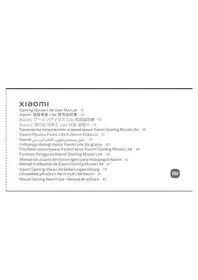


| Product type | Wired gaming mouse |
| Brand | Xiaomi |
| Model | YXSB0IYM |
| Dimensions (L × W × H) | 125 × 63 × 39 mm |
| Net weight (without cable) | Approximately 72 g |
| Power supply | 5 V = 150 mA via USB port |
| Connectivity | Wired USB |
| Compatible operating systems | Windows 10 or later, macOS 10.13 or later |
| Number of buttons | 6 (left, right, center+wheel, forward, backward, FN, DPI switch) |
| Resolution (DPI) | 5 adjustable levels: 400, 800, 1600, 3200, 6200 DPI |
| Lighting | RGB light strip with multiple modes (diffuse, colorful and breathing, single color) |
| Materials | PC, ABS, metals |
| Operating temperature | 0°C to 40°C |
| Package contents | Mouse, replacement mouse feet kit, user manual, warranty |
| Care and cleaning | Clean with a slightly damp soft cloth. Replace the mouse feet if they are very worn, do not stack new feet on old ones. |
| Safety | Complies with European directives. Do not dispose of with household waste. Recycle via a WEEE collection point. |
| Spare parts | Replacement mouse feet included. No other spare parts provided. |
| Repairability | Not user repairable. Contact customer service in case of issues. |
| Manufacturer | Beijing Yueme Technology Co., Ltd. |
| Made in | China |
Frequently Asked Questions - Gaming Mouse Lite Xiaomi
User questions about Gaming Mouse Lite Xiaomi
0 question about this device. Answer the ones you know or ask your own.
Ask a new question about this device
Download the instructions for your Computer Mouse in PDF format for free! Find your manual Gaming Mouse Lite - Xiaomi and take your electronic device back in hand. On this page are published all the documents necessary for the use of your device. Gaming Mouse Lite by Xiaomi.
USER MANUAL Gaming Mouse Lite Xiaomi
Read this manual carefully before use, and retain it for future reference.
Xiaomi Gaming Mouse Lite is a lightweight wired gaming mouse with five DPI (dots per inch) levels and the RGB flowing light effect.
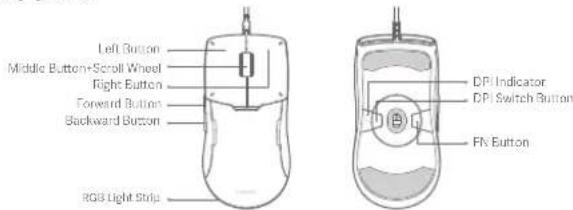
Note: Illustrations of product and accessories in the user manual are for reference purposes only. Actual product and functions may vary due to product enhancements.
0102
Package Contents
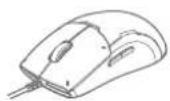
Xiaomi Gaming Mouse Lite
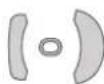
Spare Mouse Skate Kit
User Manual

Warranty Notice
Note: Replace the mouse skates if severely worn. Do not directly attach the new ones to the original ones.
How to Use
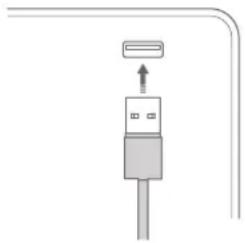
- Remove the cable tie, and plug the USB connector into a computer. Then the computer will automatically detect the USB device and install the driver for the mouse.
- After the installation is successful, the system prompts that the current device is available, and the mouse can be used normally.
Changing DPI
This mouse has five DPI levels. Press the DPI switch button on the bottom of the mouse to cycle through DPI levels, and the DPI indicator will change its color accordingly.
Note: The mouse defaults to level 2 when being turned on for the first time. The next time it is turned on, the level will be the last used one.
Button Combinations
Combinations Lighting Effects
Level DPI Indicator Color
| 1 | 400 DPI | Red |
| 2 | 800 DPI | Purple |
| 3 | 1600 DPI | Blue |
| 4 | 3200 DPI | Green |
| 5 | 6200 DPI | Yellow |
| FN + Scrolling up the wheel | Change among the flowing light mode, the colorful & breathing light mode, and the single color mode. |
| FN + Scrolling down the wheel | Change the light flowing directions in the flowing light mode: From left to right, from right to left, and from the middle to both sides.Change the light color in the single color mode: Red, orange, yellow, green, cyan, blue, and purple. |
| FN + Left Button | Change the light brightness levels: High, low, and disabled. |
| FN + Right Button | Change the light strip's breathing frequencies: Fast, medium, and low. |
Regulatory Compliance Information
EU Declaration of Conformity

We, Beijing Yueme Technology Co., Ltd, hereby declare that this equipment is in compliance with the applicable Directives and European Norms, and amendments. The full text of the EU declaration of conformity is available at the following internet address: http://www.mi.com/global/service/support/declaration.html
WEEE Disposal and Recycling Information

All products bearing this symbol are waste electrical and electronic equipment (WEEE as in directive 2012/19/EU) which should not be mixed with unsorted household waste. Instead, you should protect human health and the environment by handing over your waste equipment to a designated collection point for the recycling of waste electrical and electronic equipment, appointed by the government or local authorities. Correct disposal and recycling will help prevent potential negative consequences to the environment and human health. Please contact the installer or local authorities for more information about the location as well as terms and conditions of such collection points.
05 06
Specifications
Name: Xiaomi Gaming Mouse Lite
Model: YXSB01YM
Connectivity: USB connection
Compatible with: Windows 10 or above
macOS 10.13 or above
Rated Input: 5 V\~150 mA
Materials: PC, ABS, metals, and others
Net Weight: Approx. 72 g (excluding the cable)
Item Dimensions: 125 × 63 × 39 mm
Operating Temperature: 0°C to 40°C
Manufactured for: Xiaomi Communications Co., Ltd.
Manufactured by: Beijing Yueme Technology Co., Ltd.
(a Mi Ecosystem company)
Address: Room C608, Building No. B-2, Zhongguancun Dongsheng Science and Technology Park · Phase I, No. 66,
Xixiaokou Road, Haidian District, Beijing, China
For further information, please go to www.ml.com
Made in China
User Manual Version: V1.0
產品介紹
DPI の設定
DPI 변경
의뢰업체: Xiaomi Communications Co., Ltd.
제조자: Beijing Yueme Technology Co., Ltd.
(Mi 생태계 기업)
주소: Room C608, Building No. B-2, Zhongguancun Dongsheng Science and Technology Park · Phase I, No. 66, Xixiaokou Road, Haidian District, Beijing, China
Адрес: Room C608, Building No. B-2, Zhongguancun Dongshang Science and Technology Park · Phase I, No. 66, Xixiaokou Road, Haidian District, Beijing, China
Adres: Room C608, Building No. B-2, Zhongguancun Dongsheng Science and Technology Park · Phase I, No. 66, Xixiaokou Road, Haidian District, Beijing, China
ما طريقة استخدام
- Responding the situation, it seems to be an important problem in the world's history of the world's progress.
Beijing Yueme Technology Co., Ltd.
Room C608, Building No. B-2, Zhongguancun Dongsheng Science and Technology Park · Phase I, No. 66.
Xixiaokou Road, Haidian District, Beijing, China
Zmiana DPI
Producent: Beijing Yueme Technology Co., Ltd.
Adres: Room C608, Building No. B-2, Zhongguancun Dongsheng Science and Technology Park · Phase I, No. 66.
Xixiaokou Road, Haidian District, Beijing, China
Адреса: Room C608, Building No. B-2, Zhongguancun Dongsheng Science and Technology Park · Phase I, No. 66, Xixiaokou Road, Haidian District, Beijing, China
Mengubah DPI
Alamat: Room C608, Building No. B-2, Zhongguancun Dongsheng Science and Technology Park · Phase I, No. 66, Xixiaokou Road, Haidian District, Beijing, China
Cambiar DPI
Dirección: Room C608, Building No. B-2, Zhongguancun Dongsheng Science and Technology Park - Phase I, No. 66, Xixiaokou Road, Haidian District, Beijing, China
Modification du DPI
Adresse: Room C608, Building No. B-2, Zhongguancun Dongsheng Science and Technology Park · Phase I, No. 66,
Xixiaokou Road, Haidian District, Beijing, China
Ändern der DPI
Adresse: Room C608, Building No. B-2, Zhongguancun Dongsheng Science and Technology Park - Phase I, No. 66,
Xixiaokou Road, Haidian District, Beijing, China
Změna DPI
Adresa: Room C608, Building No. B-2, Zhongguancun Dongsheng Science and Technology Park - Phase I, No. 66,
Xixiaokou Road, Haidian District, Beijing, China
Adresă: Room C608, Building No. B-2, Zhongguancun Dongsheng Science and Technology Park - Phase I, No. 66,
Xixiaokou Road, Haidian District, Beijing, China
Xiaomi Technology Netherlands B.V.
Prinses Beatrixlaan 582, 2595BM, The Hague, The Netherlands
contact@support.mi.com
Brand : Xiaomi
Model : Gaming Mouse Lite
Category : Computer Mouse