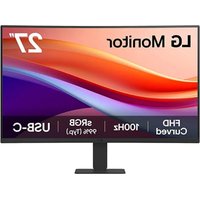
27U421A - Monitor LG - Free user manual and instructions
Find the device manual for free 27U421A LG in PDF.


User questions about 27U421A LG
0 question about this device. Answer the ones you know or ask your own.
Ask a new question about this device
Download the instructions for your Monitor in PDF format for free! Find your manual 27U421A - LG and take your electronic device back in hand. On this page are published all the documents necessary for the use of your device. 27U421A by LG.
USER MANUAL 27U421A LG
text_image
Diagram illustrating a manual press operation with labeled steps and a prohibition symbol for handling a device.MISES EN GARDE
text_image
Diagram of a desktop computer setup with labeled monitor and wall-mounted screen, showing directional arrows for orientation.A: 100 mm (3,9 po)
MISES EN GARDE
natural_image
Illustration of a computer monitor connected to cable, with two magnified insets showing cable and ring components (no text or symbols)REMARQUE
natural_image
Illustration of a computer monitor and a power button device with labeled point A (no text or symbols on the devices themselves)natural_image
Illustration of a hand using a tool to lift a cylindrical object, with a green circle highlighting the part (no text or symbols present)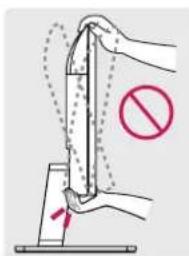
text_image
Diagram showing a hand holding a tool with a prohibition symbol, indicating no movement or force in the process.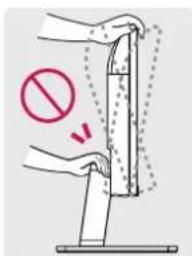
text_image
Diagram showing a hand using a tool to stop a barrier, with a red prohibition symbol indicating no barrier.CARACTÉRISTIQUES DU PRODUIT
Adaptateur c.a./c.c.
24U421A
• ModMeADS-45FSQ-19 19040EPCU-1 ADS-45FSQ-19 19040EPG-1 ADS-45SQ-19-3 19040E
Fabricant : Shenzhen HONOR Electronic Co., Ltd
Fabricant : JAMA Technology (HongKong) Co., Ltd
Fabricant : JAMA Technology (HongKong) Co., Ltd
Fabricant : JAMA Technology (HongKong) Co., Ltd
Poids (kg/lb) (sans emballage)
24U421A
USB Type-C ^® and USB-C ^® are registered trademarks of USB Implementers Forum. USB 2.0 Type-C ^™ is a trademark of USB Implementers Forum.
North Building, Englewood
Cliffs, NJ 07632
Courriel lg.environmental@lge.com
IMPORTANT PRECAUTIONS
Please read these safety precautions carefully before using the product. All precautions and safety information applies to LCD and OLED models.

WARNING
Failure to follow those warnings may result in death, serious injury or damage to the product or other property.
Precautions to the AC Adapter and Electrical Power

WARNING
- If water or any foreign substance goes inside the product (TV, monitor, power cord, or AC adapter), disconnect the power cord immediately and contact the service center.
Otherwise, this may cause a fire or electric shock due to damage to the product. - Do not touch the power plug or AC adapter with wet hands. If the pins of the plug are wet or dusty, wipe and dry them before use.
Otherwise, this may cause a fire or electric shock.
- Make sure to completely insert the power cord into the AC adapter.
» If loosely connected, the poor connection may cause a fire or electric shock.
- Be sure to use power cords and AC adapters provided or approved by LG Electronics, Inc.
» The use of non-approved products may cause a fire or electric shock.
- When unplugging the power cord, always pull it by the plug. Do not bend the power cord with excessive force.
» The power line can be damaged, which may cause electric shock or fire.
- Be careful not to step or place heavy objects (electronic appliances, clothing, etc.) on the power cord or AC adapter. Be careful not to damage the power cord or AC adapter with sharp objects.
» Damaged power cords may cause a fire or electric shock.
- Never disassemble, repair or modify the power cord or AC adapter.
» This may cause a fire or electric shock.
- Use only the power cord supplied with the unit or another manufacturer's authorized cord.
» Failure to do so may result in fire or electrical shock or damage to the product.
- Use only a properly grounded plug and receptacle.
» If you do not you may be electrocuted or injured. Or the product might be damaged.
- Do not use a damaged or loose plug.
» This may cause electrical shock or fire.
- Operate the display only from a power source(i.e. voltage) indicated in the product specification.
» Otherwise the product can be damaged, fire can occur or you may be electrocuted. If you are not sure what type of power supply you have, consult a certified electrician.
- In the presence of thunder and lightning, never touch the power cord and signal cable because it can be very dangerous.
» It can cause electric shock.
- Do not connect several extension cords, electrical appliances or electrical heaters to a single outlet. Use a power bar with a grounding terminal designed for exclusive use with the computer.
» A fire can break out due to overheating.
- Do not touch the power plug with wet hands. Additionally, if the cord pin is wet or covered with dust, dry the power plug completely or wipe dust off before plugging in the cord.
» You may be electrocuted due to excess moisture.
- If you don't intend to use the product for a long time, unplug the power cable from the product.
» Covering dust can cause a fire, or insulation deterioration can cause electric leakage, electric shock or fire.
- Insert the power plug firm so it cannot come loose.
» A loose connection can cause fire.
- Do not insert metal or other conductive materials into the product openings. Additionally, do not touch the power cable right after plugging into the wall input terminal.
» You may be electrocuted. - The AC Plug is the disconnecting device. It should be easily accessible in case of emergency.
- Please make sure the device is installed near the wall outlet to which it is connected and that the outlet is easily accessible.
- Be sure to keep the outlet, AC adapter, and pins of the power plug clean from dust and etc.
» This may cause a fire. - Do not unplug the power cord while the product is in use.
» Electrical shock can damage the product. - As long as this unit is connected to the AC wall outlet, it is not disconnected from the AC power source even if the unit is turned off.
Precautions in installing the Product

WARNING
- Keep away from heat sources like heaters or open flames.
» Electrical shock, fire, malfunction or deformation may occur.
- Keep the packing anti-moisture material or vinyl packing out of the reach of children.
» Anti-moisture material is harmful if swallowed. If swallowed by mistake, force the patient to vomit and visit the nearest hospital. Additionally, vinyl packing can cause suffocation. Keep it out of the reach of children.
- Do not put heavy objects on the product on sit upon it.
» If the product collapses or is dropped, you may be injured. Children must pay particular attention.
- Do not leave the power or signal cable where someone can trip over it.
» The passerby can falter, which can cause electrical shock, fire, product breakdown or injury.
• Install the product in a neat and dry place. Do not use near water.
» Dust or moisture can cause electrical shock, fire or product damage.
- Do not add accessories that have not been designed for this display.
- If you smell smoke or other odors or hear a strange sound from the product unplug the power cord and contact LG Customer Service.
» If you continue to use without taking proper measures, electrical shock or fire can occur.
- If you dropped the product or the case is broken, turn off the product and unplug the power cord.
» If you continue to use without taking proper measures, electrical shock or fire can occur. Contact LG Customer Service.
- Do not drop an object on or apply impact to the product. Do not throw any toys or objects at the product.
» It can cause injury to humans, problems to the product and damage the display.
- Keep out of reach of children and do not place toys near the product.
- Make sure the product ventilation hole is not blocked. Install the product more than 10cm from the wall.
» If you install the product too close to the wall, it may be deformed or fire can break out due to internal heat build-up.
- Do not cover the product with cloth or other material (eg. plastic) while plugged in.
» The product can be deformed or fire can break out due to internal overheating.
- Place the product on a flat and stable surface that is large enough to support the product.
» If the product is dropped, you may be injured or the product may be broken.
• Install the product where no Electromagnetic Interference occurs.
- Keep the product away from direct sunlight.
» The product can be damaged.
- Do not place the product on the floor.
» Small Children and others may trip over it.
- Do not install this product on a wall if it could be exposed to oil or oil mist.
» This may damage the product and cause it to fall.
- For displays with glossy bezels the user should consider the placement of the display as the bezel may cause disturbing reflections from surrounding light and bright surfaces.
Precautions in Moving the Product

WARNING
• Make sure to turn off the product.
» You may be electrocuted or the product can be damaged.
- Make sure to remove all cables before moving the product.
» You may be electrocuted or the product can be damaged.
- When lifting or moving the product, do not hold it upside down while holding only the stand.
» This may cause the product to fall resulting in damage or injury.
- Do not shock the product when moving it.
» You may be electrocuted or the product can be damaged.
- Make sure the panel faces forward and hold it with both hands to move.
» If you drop the product, the damaged product can cause electric shock or fire.
- Do not place the product face down.
» This may damage the TFT-LCD screen.
Precautions in Using/Cleaning the Product

WARNING
- Do not attempt to disassemble, repair or modify the product yourself.
» Fire or electric shock can occur.
» Contact LG Customer Service for repair.
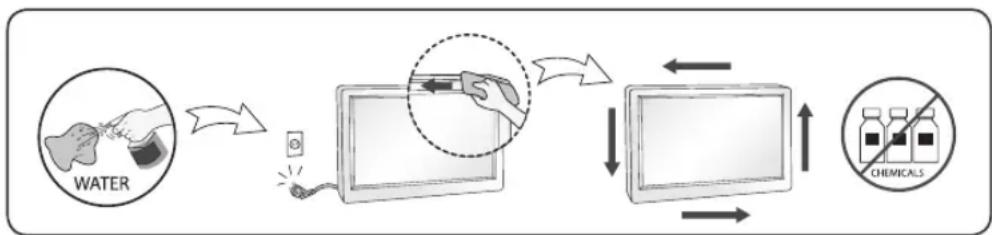
- When cleaning the product, unplug the power cord and scrub gently with a soft cloth to prevent scratching. Do not clean with a wet cloth or spray water or other liquids directly onto the product. An electric shock may occur. (Do not use chemicals such as benzene, paint thinners or alcohol)
- Keep the product away from water.
» Fire or electric shock accident can occur.
- Avoid high temperatures and humidity.
- Do not put or store flammable substances near the product.
» There is a danger of explosion or fire.
- Keep the product clean at all times.
• Take a comfortable and natural position when working with the product.
• Take a regular break when working with the product for a long time.
- Do not press on the panel with a hand or sharp object such as nail, pencil or pen, or make a scratch on it.
- Keep proper distance from the product and rest from time-to-time.
» Your vision may be impaired if you look at the product too closely or for too long.
- Set the appropriate resolution by referring to the User's Guide.
- Keep small accessories out of the reach of children.
- Displaying a still image for long time on the monitor may leave persistent image or stain on the monitor screen. To avoid this problem, use a screen saver and power off when this product is not used. Persistent image or stain caused by long time usage are not covered by the warranty on this product.
- Do not use products using high voltage around the Monitor. (ex. Electrical Swatter)
» Monitor may have malfunction as its electrical shock.
- Spray water onto a soft cloth 2 to 4 times, and use it to clean the front frame; wipe in one direction only. Too much moisture may cause staining.
flowchart
graph LR
    A["WATER"] --> B["Water"]
    B --> C["Power Source"]
    C --> D["Computer Screen"]
    D --> E["Chemicals"]
    E --> F["Computer Screen"]
    F --> G["Computer Screen"]
    G --> H["Chemicals"]
PRÉCAUTIONS IMPORTANTES
flowchart
graph LR
    A["EAU"] --> B["Injection"]
    B --> C["Chimeric Injection"]
    C --> D["Chimeric Injection"]
    D --> E["Chimeric Injection"]
    E --> F["Chimeric Injection"]
    F --> G["Chimeric Injection"]
    G --> H["Chimeric Injection"]
    H --> I["Chimeric Injection"]
    I --> J["Chimeric Injection"]
ENGLISH
DDC (Display Data Channel)
DDC is a communication channel over which the monitor automatically informs the host system (PC) about its capabilities.
DDC protocol
① DDC1/DDC2B
An uni-directional communication channel.
② DDC 2AB/DDC2B+/DDC2Bi
A bi-directional communication channel.
Note
- PC must support DDC functions to do this.
E-DDC (Enhanced DDC)
A protocol based on I²C and used on a bidirectional data channel between the display and host. This protocol accesses devices at I²C address of A0/A1 as well as the address 60. The 60 address is used as a segment register to allow larger amounts of data to be retrieved than is possible using DDC2B protocols. The protocol is compatible with DDC2B protocols.
DEUTSCH
DDC (Display Data Channel)
② DDC 2AB/DDC2B+/DDC2Bi
② DDC 2AB/DDC2B+/DDC2Bi
② DDC 2AB/DDC2B+/DDC2Bi
② DDC 2AB/DDC2B+/DDC2Bi
② DDC 2AB/DDC2B+/DDC2Bi
양방향 통신 채널.
주
② DDC 2AB/DDC2B+/DDC2Bi
双方向通信チャンネル。
注
② DDC 2AB/DDC2B+/DDC2Bi
Energy Saving Design
This program is designed to have computer equipment manufacturers build circuitry into their products to reduce power consumption when it is not in operation.
When this monitor is used with a PC on which a screen blanking software complying with the VESA Display Power Management Signalling (DPMS) Protocol is installed, it can conserve significant energy by reducing power consumption when it is not in operation.
There are 2 signal lines, 3 modes of operation.
: On Mode, Sleep Mode, Off Mode.
| Mode Definition | |
| On mode | The normal operation.When the monitor is on mode, being connected to a power source, it displays an image. |
| Sleep Mode | The reduced power state returns to on mode when the user moves the mouse or presses a key on the keyboard. |
| Off Mode | The lowest power consumption state returns to on mode when the user pushes a power switch. |
Note
- The energy saving Design monitors only work while connected to the computers that have energy saving features.
Programa de economia de energia
Mode activé (On), mode de veille (Sleep), mode désactivé (Off).
Unplug the monitor from the wall outlet and refer servicing to qualified service personnel when :
- The power cord or plug is damaged or frayed.
• Liquid has been spilled into the monitor. - The monitor has been exposed to rain or water.
- The monitor does not operate normally following the operating instructions. Adjust only those controls that are covered in the operating instructions. An improper adjustment of other controls may result in damage and often requires extensive work by a qualified technician to restore the monitor to normal operation.
- The monitor has been dropped or the cabinet has been damaged.
- The monitor exhibits a distinct change in performance.
- Snapping or popping from the monitor is continuous or frequent while the monitor is operating. It is normal for some monitors to make occasional sounds when being turned on or off, or when changing video modes.
Do not attempt to service the monitor yourself, as opening or removing covers may expose you to dangerous voltage or other hazards. Refer all servicing to qualified service personnel.