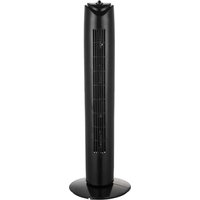
F-32TBK - Fan Brentwood - Free user manual and instructions
Find the device manual for free F-32TBK Brentwood in PDF.


| Brand | Brentwood |
| Model | F-32TBK |
| Product Type | Standing Fan with Oscillation and Timer |
| Power Supply | 120 V ~ 60 Hz |
| Safety Fuse | 2.5 A, 125 V (replaceable) |
| Speeds | 3 speeds (Low, Medium, High) |
| Timer | Up to 120 minutes, auto shut-off, continuous mode |
| Oscillation | Yes, controlled by the same speed dial |
| Assembly Required | Yes (base and body) |
| Use | Indoor, household use only |
| Cleaning | Damp cloth, avoid water in motor |
| Safety | Polarized plug, overload protection, cut-off switch |
| Power Cord | Short (reduces tangling risk) |
| Weight | Approximately 3 kg (estimated) |
| Dimensions (approx.) | Height: 120 cm, grill diameter: 40 cm (estimated) |
| Warranty | See warranty policy (page 5 of manual) |
| Repairability | User-replaceable fuse; other repairs by a professional |
| Included Accessories | Base, screws, base nut, instruction manual |
Frequently Asked Questions - F-32TBK Brentwood
User questions about F-32TBK Brentwood
0 question about this device. Answer the ones you know or ask your own.
Ask a new question about this device
Download the instructions for your Fan in PDF format for free! Find your manual F-32TBK - Brentwood and take your electronic device back in hand. On this page are published all the documents necessary for the use of your device. F-32TBK by Brentwood.
USER MANUAL F-32TBK Brentwood
© 2024 Brentwood Appliances, Inc.
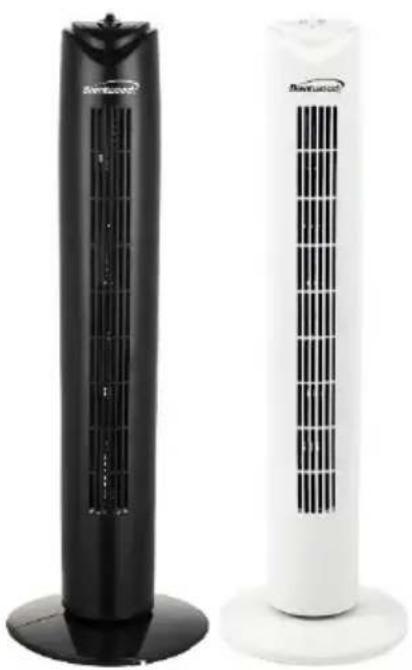
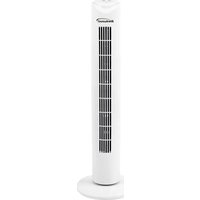
32-INCH TOWER FAN
VENTILADOR DE TORRE DE 81 CM
VENTILATEUR DE TOUR DE 81 CM
ITEM NO:
F-32TBK (Black) & F-32TW (White)
natural_image
Two outdoor air conditioners with black and white designs, no visible text or symbols on the surfaces.Operating and Safety Instructions
FOR INDOOR HOUSEHOLD USE ONLY
When using this or any other electrical product, always follow these basic safety precautions, especially when children are present.
READ ALL INSTRUCTIONS BEFORE USE.
WARNING: To reduce the risk of fire, electric shock, serious personal injury, and property damage, please note the following:
- Store the fan out of reach of children and supervise its use by minors.
- Do not use the fan for anything other than its intended purpose.
- If the fan malfunctions, do not attempt to repair it yourself. Refer to the Warranty Policy on Page 5 for guidance.
- Do not use attachments not recommended or sold by the manufacturer.
- Regularly inspect the cord and plug for damage. Do not use the fan if any part is damaged.
- Keep the power cord away from hot surfaces and sharp edges to prevent damage.
- Ensure that the voltage of the power supply matches the specifications of the fan. Use a suitable outlet.
- Do not plug the fan into an overloaded outlet to prevent tripping breakers or electrical fires.
- Position the fan on a stable, flat surface to prevent tipping.
- Ensure the fan is not obstructed by furniture or other objects.
- Ensure that air vents are not blocked to maintain optimal performance.
- Do not place the fan in direct sunlight for extended periods, as it may cause overheating or damage to the fan.
- Keep the fan away from water and damp areas to prevent electric shock.
- Keep the fan away from heating appliances or open flames to prevent fire hazards.
- During the first use, you may notice a slight odor or small amount of smoke upon heating; this is normal. It is a result of a chemical reaction in the heating element and will quickly dissipate.
- Do not insert fingers, pencils, or other objects into the fan's grille while it is operating.
- Do not leave the fan running for extended periods when unattended.
- If you notice any unusual sounds or smells, turn off the fan immediately and unplug it.
- When not in use for an extended period, unplug the fan and store it in a dry, cool place.
- Check the fan for dust buildup and clean it regularly to ensure efficient operation.
• Turn off and unplug the fan before cleaning or performing maintenance.
SPECIAL INSTRUCTIONS: A short power supply cord is provided to reduce the risk of becoming entangled in or tripping over a longer cord. Using an extension cord with the product is not recommended. However, if one must be used:
- The marked electrical rating of the extension cord must be at least as great as that of the product.
- Arrange the extension cord so that it does not drape over the countertop or tabletop where it can be tripped over or pulled.
WARNING: The product is equipped with a polarized plug (one blade is wider than the other) to reduce the risk of electrical shock, which is a safety feature. The plug is designed to fit into a polarized outlet in only one direction. If you are unable to insert the plug into the outlet, try reversing it. If the plug still does not fit, contact a qualified electrician. Never use the plug with an extension cord unless you can fully insert the plug into the extension cord. Do not alter the plug or attempt to bypass its safety features.
OVERLOAD PROTECTION FUSE
This product is equipped with overload protection (a fuse). If the fuse blows, it indicates an overload or short-circuit. If this happens, unplug the product from the electrical outlet and follow the instructions below to replace the fuse (refer to the product markings for the correct fuse rating). If the replacement fuse blows as well, this suggests a possible short circuit, and the product should be discarded.
IMPORTANT: Do not replace the plug, as it contains safety devices (fuse, AFCI, LSDI) that should not be tampered with. If the plug is damaged, the product should be discarded.
-
Grasp the plug and remove it from the electrical outlet. Never pull on the cord to unplug it.
-
Use a small flat screwdriver or similar tool to open the fuse access cover on the plug. Slide or pry it open carefully.
-
Remove the blown fuse by gently prying it out from one end or by turning the fuse holder over.
-
Replace the blown fuse with a 2.5 Amp, 125 Volt fuse. Gently insert the new fuse into the slot, ensuring both ends are securely in place. Do not press on the glass tube.
NOTE: Do not use excessive force when replacing the fuse to avoid damaging the fuse or the plug.
- Close the fuse access cover until it is flush with the plug face.
NOTE: If you have difficulty closing the access cover, check to ensure the fuse is fully inserted.
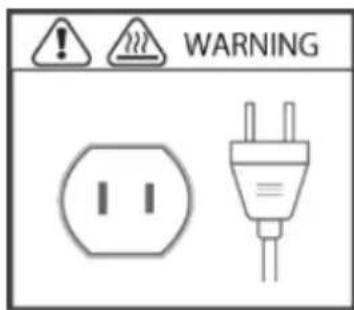
FOR HOUSEHOLD USE ONLY! PLEASE READ INSTRUCTIONS BEFORE USE & SAVE FOR FUTURE REFERENCE.
ASSEMBLING THE FAN
- Connect the 2 parts of the base plate together and secure them with 2 screws.
- Place the power cord through the hole of the base plate.
- Connect the body of the fan and the base plate together and secure it with the base nut.
- Fasten the power cord to the clip under the base plate to prevent it from moving.
CONTROLLING THE SPEED WITHOUT OSCILLATION
The speed without oscillation is controlled by the lower dial located at the top of the fan. To turn on the fan without oscillation, rotate the speed control dial to the right: OFF, 1 = Low, 2 = Medium, 3 = High.
CONTROLLING THE SPEED WITH OSCILLATION
The speed with oscillation is also controlled by the lower dial located at the top of the fan. To turn on the fan with oscillation, rotate the speed control dial to the left: OFF, 1 = Low, 2 = Medium, 3 = High.
The timer is controlled by the upper dial located at the top of the fan. It can be set for up to 120 minutes and will automatically turn off. To keep the fan running continuously, rotate the timer dial to "ON".
CLEANING AND MAINTENANCE
TIP: Clean the fan regularly to prevent dust accumulation and maintain optimal performance. It is recommended to clean it every few weeks, especially during heavy usage.
- Before cleaning, ensure the fan is turned off and unplugged from the electrical outlet to prevent any risk of electric shock.
- Use a damp cloth to wipe down the fan. WARNING: Avoid getting water into the motor housing.
- For hard-to-reach areas, use a soft brush or vacuum attachment to remove dust buildup.
- After cleaning, plug the fan back in and turn it on to ensure it operates correctly.
ONE YEAR LIMITED WARRANTY
Write down the following information about your product to better help you obtain assistance or service if you ever need it.
CUSTOMER RECORD
Date of Purchase: ____ Store/Dealer: ____
Model/Item No: ____
THIS WARRANTY APPLIES TO PRODUCTS PURCHASED AND USED IN THE CONTINENTAL U.S. AND CANADA ONLY. This is the only express warranty for this product and is in lieu of any other warranty or condition. This product is warranted to be free from defects in material and workmanship for a period of one (1) year from the date of original purchase. During this period, your exclusive remedy is repair or replacement of this product, at our option. However, you are responsible for all costs associated with returning the product to us and for the return of a product or component under this warranty to you. If the product or component is no longer available, we will replace it with a similar one of equal or greater value. This warranty does not cover glass, filters, wear from normal use, use not in conformity with the printed directions, or damage to the product resulting from accident, alteration, abuse, or misuse. THIS WARRANTY EXTENDS ONLY TO THE ORIGINAL CONSUMER PURCHASER. KEEP THE ORIGINAL SALES RECEIPT, AS PROOF OF PURCHASE IS REQUIRED TO MAKE A WARRANTY CLAIM. This warranty is void if the product is used for other than single-family household use or subjected to any voltage and waveform other than what is specified on the rating label (e.g., 120V\~60Hz). We exclude all claims for special, incidental, and consequential damages caused by breach of express or implied warranty. All liability is limited to the amount of the purchase price. Every implied warranty, including any statutory warranty or condition of merchantability or fitness for a particular purpose, is disclaimed except to the extent prohibited by law, in which case such warranty or condition is limited to the duration of this written warranty. This warranty gives you specific legal rights. You may have other legal rights that vary depending on where you live. Some states do not allow limitations on implied warranties or special, incidental, or consequential damages, so the foregoing limitations may not apply to you. To make a warranty claim, do not return this product to the store.
TO OBTAIN WARRANTY SERVICE AND/OR TROUBLESHOOTING INFORMATION:
Call Customer Service at 1-888-903-0060 in the U.S.
Monday through Friday: 9:00am – 5:00pm PST.
U.S. Customers Please Email: warranty@brentwoodus.com
Canadian Customers Please Email: canada.warranty@brentwoodus.com
Go Online at www.brentwoodus.com
PRECAUCIONES IMPORTANTES

© 2024 Brentwood Appliances, Inc.
Brand : Brentwood
Model : F-32TBK
Category : Fan