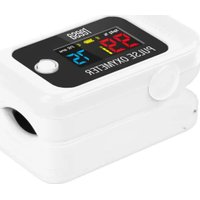
TSA8071 - Heart Rate Monitor Teesa - Free user manual and instructions
Find the device manual for free TSA8071 Teesa in PDF.


User questions about TSA8071 Teesa
0 question about this device. Answer the ones you know or ask your own.
Ask a new question about this device
Download the instructions for your Heart Rate Monitor in PDF format for free! Find your manual TSA8071 - Teesa and take your electronic device back in hand. On this page are published all the documents necessary for the use of your device. TSA8071 by Teesa.
USER MANUAL TSA8071 Teesa
POPIS DISPLEJE
Unit 104, 1st Floor, 7th Building, No.1188 Lianhang Road, Minhang District,
Shanghai, China 201112
ANZEIGEBESCHREIBUNG
Unit 104, 1st Floor, 7th Building, No.1188 Lianhang Road, Minhang District,
Shanghai, China 201112
Thank you for purchasing TEESA appliance. Please read this operation instruction carefully before use, and keep it for future reference. Producer does not take responsibility for damage caused by inappropriate handling and use of the product.
SAFETY INSTRUCTIONS
- Before using the device, make sure, that it is not mechanically damaged.
- Measurements are for information purpose only. This cannot be used as basis for diagnosis or treatment.
- Do not use the device in MR or CT environment.
- The device is intended for adults only.
- The device does not have an alarm for exceeding measurement time. Long period of measurement may be harmful for user.
- Do not modify the device.
- Do not try to repair the device. If case of damage or malfunction, contact authorized seed point.
- Clean this device after each use. To clean the device, do not use high pressure or abras agents.
- Keep the case of the device clean and do not submerge it in water.
- The device is shock-sensitive. Avoid exposing the device to falls and shakes.
- To power the device, use only alkaline AAA batteries. Do not mix old and new batteries.
- Radio distortions may affect measurements and accuracy.
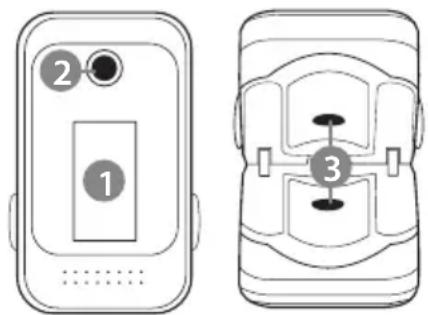
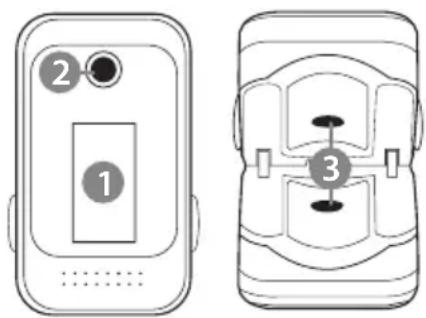
PRODUCT DESCRIPTION
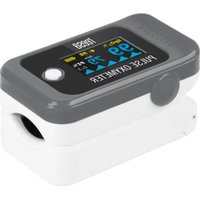
- Display
- ON button
- Sensor
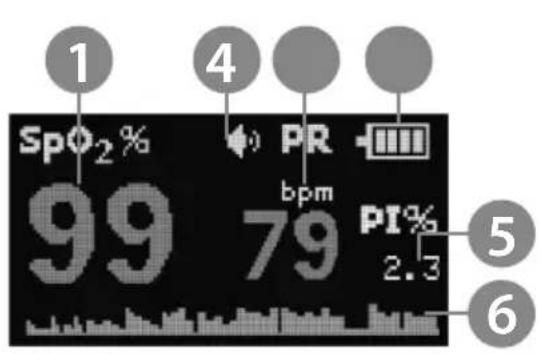
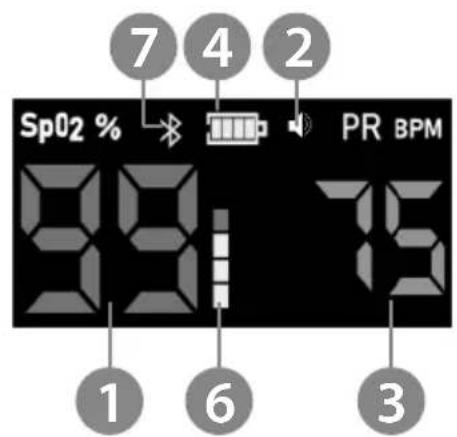
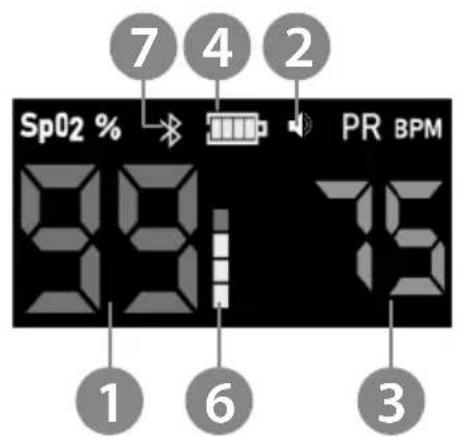
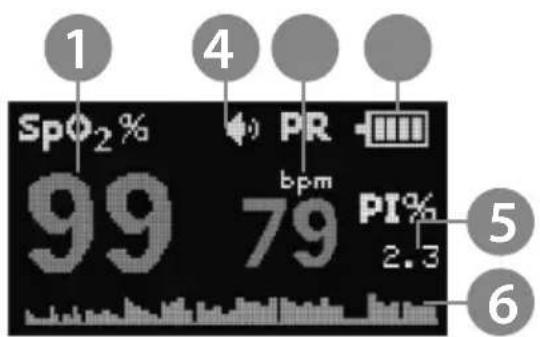
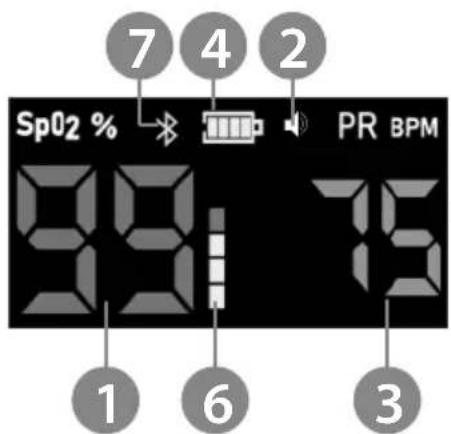
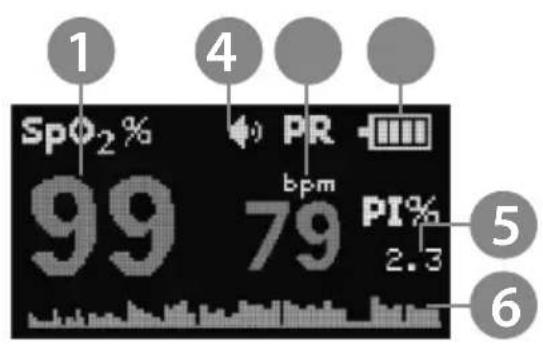
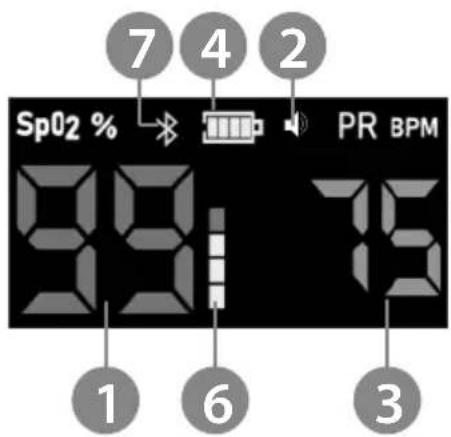
DISPLAY DESCRIPTION
- SpO2 reading
- Sound indicator
- Pulse reading
- Battery level
- Perfusion index reading*
- Pulse indicator
- Bluetooth indicator (TSA8071 model only)
*TSA8071 - Perfusion index reading available in the app
TSA8070 TSA8071
OPERATION
Battery installation
- Turn around the device, with the display facing down.
- Push the battery compartment cover marked with the arrow.
- Slide the battery compartment cover to the side.
- Slide the batteries with correct polarization.
- Close the battery compartment cover.
Taking measurements
- Slide a finger (index or middle) to the device from the side. Slide your finger all the wa that it rests on the sensor.
- Place your hand on flat surface.
- Press the turn on button. After a while, the measurement will start.
• To change the orientation of the screen, press the turn on button again.
• To turn off the sounds, press the turn on button twice. - After finished measurements, take your finger out of the device. The device will shut down after 8 seconds from taking out a finger from the device.
Note:
- Do not take measurements if the temperature of the user exceeds 41° C .
• The factor that can affect measurements negatively are: nail polish, nail extenders, lotions,
• To ensure that the measurements are accurate, do not move your finger placed in the de - If the device turns off while measuring, replace the batteries.
• Measurements may be conducted every 10-15 minutes.
CONNECTING WITH THE APP (model TSA8071 only)
1. Android:
- Download and install OxyCare app from the Play Store.
- Turn on the Bluetooth and localization.
- Open the OxyCare app. If the app asks, grant it access.
- Place the device on a finger and turn it on.
- Press the loupe symbol and select BerryMed.
- The app will connect with the device. Measurements will be displayed in the app.
2. iOS:
- Download and install Oxicare app from the App Store.
- Turn on the Bluetooth.
- Open the Oxicare app. If the app asks, grant it access.
- Place the device on a finger and turn it on.
- Press the Bluetooth symbol and select BerryMed.
- The app will connect with the device. Measurements will be displayed in the app.
CLEANING AND DISINFECTING
- Do not submerge the device in water.
- Disinfect the device after every change of the user.
- Clean the case with soft, slightly damp cloth, without any abrasive agents.
- Disinfect the area around the sensor with a cloth, dampened with alcohol-based agent.
• After cleaning and disinfecting, wait until the device is fully dry.
SPECIFICATION
• Non invasive measurement
• Screen type: OLED (TSA8070) ; LCD (TSA8071)
- Sensor: red light
- SpO2 measurement:
• Range: 35 \~ 100%
- Accuracy: ± 2% (80%\~100%); ± 3% (70%\~79%)
- Pulse measurement:
• Range: 25\~250 bpm
• Accuracy: ± 2 bpm
• Perfusion index measurement
• Range: 0.5% \~ 20%
• Accuracy: 0.1%
- Bluetooth conectivity with app (TSA8071 only)
• Power: 2x AAA
• Dimensions: 56 x 32 x 30 mm
• Working temperature: 5°C \~ 40°C
- Storing temperature: -10°C 50°C
• Working humidity: 15% \~ 80%
• Storing humidity: 10% \~ 90%
PRODUCER
Shanghai Berry Electronic Tech Co., Ltd.
Unit 104, 1st Floor, 7th Building, No.1188 Lianhang Road, Minhang District, Shanghai, China 201112
Lechpol Electronics Sp. z o.o. Sp.k. hereby declares that oxymeter TSA8071 / TSA8070 is consistent with directive 2014/53/UE.
Full text of the EU Declaration of Conformity is available at following Internet address: www.lechpol.eu.
English
Correct Disposal of This Product
(Waste Electrical & Electronic Equipment)


(Applicable in the European Union and other European countries with separate collection systems) This marking shown on the product or its literature, indicates that it should not be disposed with other household wastes at the end of its working life. To prevent possible hand to the environment or human health from uncontrolled waste disposal, please separate this from other types of wastes and recycle it responsibly to promote the sustainable reuse of material resources. Household users should contact either the retailer where they purchased this product, or their local government office, for details of where and how they can take the item for environmentally safe recycling. Business users should contact their supplier and check the terms and conditions of the purchase contract. This product should not be mixed with other commercial wastes for disposal.
Made in China for LECHPOL ELECTRONICS Sp. z o.o. Sp.k., ul. Garwolińska 1, 08-400 Miętne.
DESCRIPTION DE L'ÉCRAN D'AFFICHAGE
Unit 104, 1st Floor, 7th Building, No.1188 Lianhang Road, Minhang District,
Shanghai, China 201112
France
ΠΕΡΙΓΡΑΦΗ ΟΘΟΝΗΣ
TSA8070 TSA8071
ΛΕΙΤΟΥΡΓΙΑ
Unit 104, 1st Floor, 7th Building, No.1188 Lianhang Road, Minhang District,
Shanghai, China 201112
Ελληνικά
KIJELZÖ LEÍRÁSA
Unit 104, 1st Floor, 7th Building, No.1188 Lianhang Road, Minhang District, Shanghai, China 201112
BESCHRIJVING VAN HET APPARAAT
- Display
- Aan-knop
- Sensor
NL
BESCHRIJVING VAN DE DISPLAY
Unit 104, 1st Floor, 7th Building, No.1188 Lianhang Road, Minhang District, Shanghai, China 201112
Netherlands
PL
OPIS WYŚWIETLACZA
TSA8070 TSA8071
Unit 104, 1st Floor, 7th Building, No.1188 Lianhang Road, Minhang District, Shanghai, China 201112
DESCRIEREA AFIŞATULUI
TSA8070 TSA8071
Unit 104, 1st Floor, 7th Building, No.1188 Lianhang Road, Minhang District,
Shanghai, China 201112
Romania
Reciclarea corecta a acestui produs
(reziduuri provenind din aparatura electrica si electronica)


POPIS DISPLEJA
Unit 104, 1st Floor, 7th Building, No.1188 Lianhang Road, Minhang District,
Shanghai, China 201112
Slovensko



- POPIS DISPLEJE
- ANZEIGEBESCHREIBUNG
- SAFETY INSTRUCTIONS
- PRODUCT DESCRIPTION
- DISPLAY DESCRIPTION
- OPERATION
- BATTERY INSTALLATION
- TAKING MEASUREMENTS
- NOTE
- CONNECTING WITH THE APP (MODEL TSA8071 ONLY)
- ANDROID
- IOS
- CLEANING AND DISINFECTING
- SPECIFICATION
- PRODUCER
- ENGLISH
- DESCRIPTION DE L'ÉCRAN D'AFFICHAGE
- FRANCE
- ΠΕΡΙΓΡΑΦΗ ΟΘΟΝΗΣ
- ΛΕΙΤΟΥΡΓΙΑ
- ΕΛΛΗΝΙΚΆ
- KIJELZÖ LEÍRÁSA
- BESCHRIJVING VAN HET APPARAAT
- BESCHRIJVING VAN DE DISPLAY
- NETHERLANDS
- OPIS WYŚWIETLACZA
- DESCRIEREA AFIŞATULUI
- ROMANIA
- POPIS DISPLEJA
- SLOVENSKO
Brand : Teesa
Model : TSA8071
Category : Heart Rate Monitor