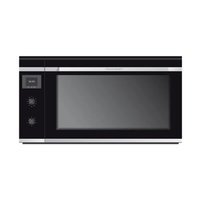
B9330.0S - Oven Küppersbusch - Free user manual and instructions
Find the device manual for free B9330.0S Küppersbusch in PDF.


| Product type | Built-in oven |
| Brand | Küppersbusch |
| Model | B9330.0S |
| Net weight | 44.5 kg |
| Control type | Touch control |
| Clock | Electronic with programming (alarm, duration, end of cooking) |
| Cooking functions | Conventional, Conventional with fan, Grill, MaxiGrill, Grill and lower heating element, Lower heating element, Pizza, Turbo, Defrost |
| Cleaning function | Ökoclean (steam cleaning) |
| Child safety | Yes (clock lock) |
| Supplied accessories | Grid, baking tray, roasting pan, pizza stone, chrome supports/telescopic guides |
| Interior lighting | Yes (lamp) |
| Number of cavities | 1 |
| Energy efficiency index | 98.9 |
| Door type | Metal hinge |
| Cavity material | Ökoclean enamel |
| Grill heating element | Fold-down |
Frequently Asked Questions - B9330.0S Küppersbusch
User questions about B9330.0S Küppersbusch
0 question about this device. Answer the ones you know or ask your own.
Ask a new question about this device
Download the instructions for your Oven in PDF format for free! Find your manual B9330.0S - Küppersbusch and take your electronic device back in hand. On this page are published all the documents necessary for the use of your device. B9330.0S by Küppersbusch.
USER MANUAL B9330.0S Küppersbusch
natural_image
Simple line drawing of a oven with two handles and a blank front panel (no text or symbols)
B9330.0S
Please read the this instructions carefully before installation of the appliance and before starting to use it. Please, store these instructions carefully. These instructions can contain descriptions of oven components and/or functions which your device does not have.
Before using your oven for the first time, please carefully read the installation and maintenance instructions that come with it.
Depending on the model, the accessories included in your oven may vary from those shown in the pictures.
ESPAÑOL

Backofenfunktionen

'EIS
AU SSCHALTEN DES HERDS

NORMAL
natural_image
Illustration of a hand using a tool to interact with a grid-like device (no text or symbols visible)
ACHTUNG
natural_image
Close-up of a hand holding a white cup inside a microwave oven (no text or symbols visible)Description of the oven
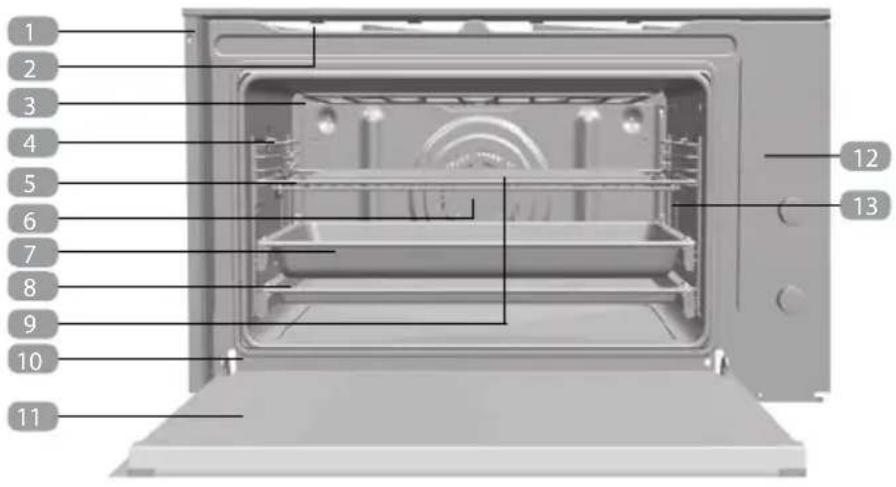
1 Fixing to Unit
2 Air Outlet
3 Fold-down Grill element
4 Chromed Support/Telescopic Guide
5 Grid
6 Fan
7 Roasting Tray
8 Cake tray
9 Pizza stone
10 Hinge
11 Door
12 Control Panel
13 Light
Control panel
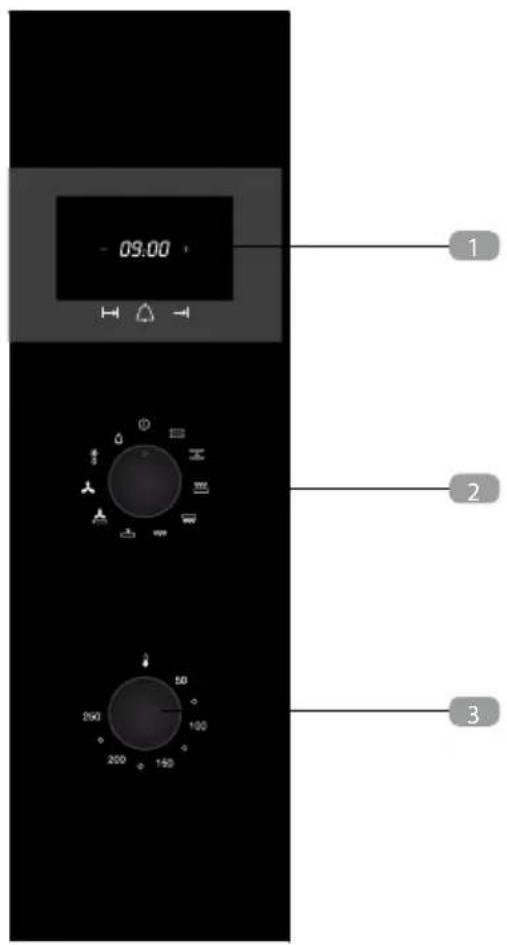
1 Electronic clock
2 Function selector
3 Temperature selector
Function selector symbols
B9330.0S Model

Oven functions

RMATION
For a description of how to use each of the features, see the cooking guide that comes with your oven.

SWITCH OFF OVEN

CONVENTIONAL
It is used for sponges and cakes where the heat received must be uniform to achieve a spongy texture.

CONVENTIONAL WITH FAN
Appropriate for roasts and cakes. The fan spreads the heat uniformly inside the oven.

GRILL AND LOWER ELEMENT
Special for roasts. It can be used for any piece, whatever its size.

M AXIGRILL
Allows greater surfaces to be prepared, than with the grill, together with higher power reducing the time required for browning of the food.

GRILL
For preparing dishes with superficial roasting. It allows the outer layer to be browned without affecting the inside of the food. Ideal for flat food, such as steaks, ribs, fish, toast.

CAUTION
While using the Grill or MaxiGrill, the door must be kept closed.

LOWER ELEMENT
Heats only from beneath. Suitable for heating dishes and raising pastry and similar.

PIZZA
Special for cooking pizzas, pastry and fruit cakes.

TURBO
The fan distributes the heat produced by an element located at the rear of the oven. Due to the uniform heat distribution, it allows roasting and baking to take place at two heights at the same time.

DEFROSTING
This function uses a two-level hot air system. LO is for fish, cakes, pastries and bread. HI (higher temperature inside the oven) is for meats in general.

ÖKOCLEAN CLEANING FUNCTION
After using this cleaning cycle, any traces of grease or dirt that were stuck to the walls of the oven can easily be wiped clean with a damp cloth.

NOTE
The light remains on when performing any cooking function, except when cleaning.
Using the Oven

CAUTION
The electronic clock features Touch-Control technology. To operate, simply touch the glass control symbols with your fingertip.
The touch control sensitivity continuously adapts to ambient conditions. Make sure the glass surface of the control panel is clean and free of obstacles when plugging in the oven.
If the clock does not respond correctly when you touch the glass, unplug the oven for a few seconds and then plug it in again. Doing this causes the sensors to adjust automatically so that they will react once more to fingertip control.
ELECTRONIC CLOCK SETTINGS
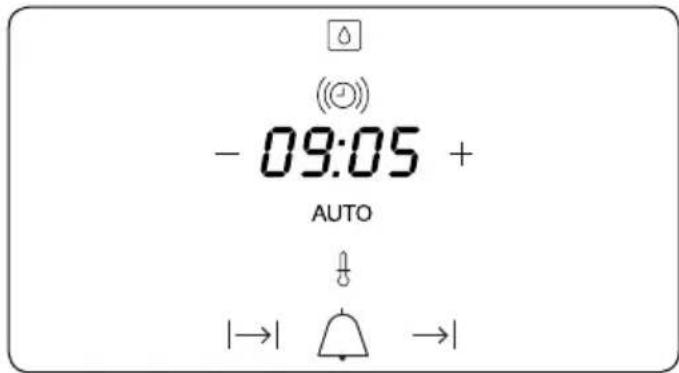
Symbol lights up during the Ökoclean function.
Symbol (②): lights up when the clock timer is selected.
Symbol AUTO: lights up to indicate that the oven is programmed.
Symbol ♂ : indicates that the oven is transmitting heat to the food.
+ / - Sensors : enable you to select a time.
Sensors I→I, and : enable you to pro-gramme the electronic clock functions.
SETTING THE TIME
- When you turn on the oven, you will see the clock flashing 12:00.
- Set the clock by touching the + or - sensor. You will hear 2 beeps confirming that the time has been set.
- To change the time, press the + and - sensors at the same time. The current time will then flash on the screen. Change the time by pressing the + or - sensors. Two beeps will then confirm that the new time has been set.

NOTE
The clock light has a night mode so the display light will dim between 00:00 and 6:00 hours.
MANUAL OPERATION
- After setting the clock, the oven is ready for use. Select a cooking function and temperature.
- During cooking, symbol ♂ will light up to indicate that heat is being transmitted to the food.
- This symbol turns itself off when the selected temperature has been reached.
- Set the controls to ⏻ to turn off the oven.

CAUTION
After cooking, you will notice that the oven cooling system is still on. This is normal and is used to cool the oven down quickly.
Electronic Clock Settings
Timer Alarm: The alarm will go off at the programmed time, even if the oven has finished cooking.
Cooking Time: This function allows you to programme the cooking time, after which the oven will turn off automatically.
Cooking S top Time: This setting allows you to programme the time for cooking to stop, after which the oven will turn off automatically.
Cooking Time and Cooking S top Time: This setting allows you to programme the cooking time and cooking stop time. The oven switches on automatically at the set time and operates for the selected cooking time (Cooking Time). It then switches off automatically at the indicated time (Cooking Stop Time).
Child Safety Function: This function locks the electronic clock, preventing small children from playing with it.
ÖKOCLEAN Cleaning Function: Help with the oven-cleaning function.
PROGRAMMING THE TIMER ALARM
- Touch sensor (①) with your fingertip until symbol (②) starts flashing on the display. The clock will also flash 00:00.
- Select the time after which you want the alarm to sound by pressing the + or - sensor.
- You will hear 2 beeps to confirm that the time has been set. The clock will start counting down from the selected time and symbol (☐) will flash slowly.
- When the time is up, the alarm will go off and symbol (☐) will flash quickly.
- Touch any sensor to stop the alarm. Symbol (①) will switch off.
If you want to change the timer alarm, simply touch sensor (☐) with your fingertip and then press the + or - sensor. You will hear 2 beeps to confirm that the time has been changed. The clock will start counting down from the new time and symbol (☐) will flash slowly.

NOTE
You cannot see the current time on the display when the timer alarm is set.
PROGRAMMING COOKING TIME
- Touch sensor|→| with your fingertip until the AUTO symbol starts to flash and 00:00 appears on the display.
- Select the cooking time by pressing the + or - sensor.
- You will hear 2 beeps, the AUTO symbol will flash slowly and the display will show the time left before the oven switches off automatically.
- Select a cooking function and temperature.
- Once the cooking time is up, the oven will turn off, an alarm will sound and the AUTO symbol will flash quickly.
- Touch any sensor to stop the alarm and to turn off the AUTO symbol. The oven will switch on again.
- Set the controls to Ⓐ to turn off the oven.
You can change the remaining cooking time at any time by touching sensor with your fingertip until the AUTO symbol starts to flash quickly. Now touch the + or - sensor to change the time.

NOTE
You cannot see the current time on the display when the cooking time is set.
PROGRAMMING THE COOKING STOP TIME
- Touch sensor → with your fingertip until the AUTO symbol starts to flash.
- Select the cooking stop time by pressing the + or - sensor.
- You will hear 2 beeps, the display will show the current time and the AUTO symbol will flash slowly to indicate that the oven will switch off automatically.
- Select a cooking function and temperature.
- When the cooking time is up, the oven will turn off, an alarm will sound and the AUTO symbol will flash quickly.
- Touch any sensor to stop the alarm and to turn off the AUTO symbol. The oven will switch on again.
- Set the controls to Ⓐ to turn off the oven.
You can change the stop cooking time at any time by touching sensor →I with your fingertip until the AUTO symbol starts to flash quickly and you see the stop time on the display. Now touch the + or - sensor to change the time.
PROGRAMMING COOKING TIME AND COOKING STOP TIME
- Touch sensor with your fingertip until the AUTO symbol starts to flash and 00:00 appears on the display.
- Select the cooking time by pressing the + or - sensor.
-
You will hear 2 beeps, the display will show the remaining cooking time, and the AUTO symbol will flash slowly.
-
Touch sensor until the AUTO symbol starts to flash quickly. The display will show the current time and the programmed cooking time.
- Select the cooking stop time by pressing the + or - sensor.
- You will hear 2 beeps and the display will show the current time.
- Select a cooking function and temperature.
- The oven will remain off and the AUTO light will be on. The oven is now programmed.
- When it is time to start cooking, the oven will turn on and will operate for the programmed cooking time.
- While cooking, the display will show the cooking time remaining and the AUTO symbol will flash slowly.
- When the cooking time is up, the oven will turn off, an alarm will sound, and the AUTO symbol will flash quickly.
- Touch any sensor to stop the alarm and to turn off the AUTO symbol. The oven will switch on again.
- Set the controls to Ⓐ to turn off the oven.
If you want to change the remaining cooking time while the oven is on, press sensor until the AUTO symbol starts to flash quickly. Now press the + or - sensor to change the time.
CHILD SAFETY FUNCTION
This function can be selected at any time while using the oven.
To activate the function, press the + and - sensors at the same time for several seconds. You will hear a beep and the display will show the word SAFE. The clock is locked.
If the oven is off and you activate the child safety function, it will not work even if a cooking function is selected.
If this function is activated while you are cooking, it will only lock the electronic clock settings.
If a clock sensor is touched while the child safety function is on, the word SAFE will appear on the display. The clock is locked.
To disable the function, press the + and - sensors at the same time for several seconds until you hear a beep.

CAUTION
In the event of a power failure, your electronic clock settings will be erased and 12:00 will flash on the clock display. Reset the clock and programme again.
Ökoclean Cleaning function
With this function, any grease or dirt that is stuck to the walls of the oven can easily be removed through the combined action of steam and the excellent properties of the new Öko-clean enamel.
Thanks to the new Ökoclean technology, the oven does not need to be cleaned with a grease removal product. When the water and dirt are removed, the walls of the oven are clean and grease-free.
HOW TO USE THE OVEN CLEANING CYCLE
Always use the cleaning programme with a cold oven. Running it with a hot oven may have adverse effects.
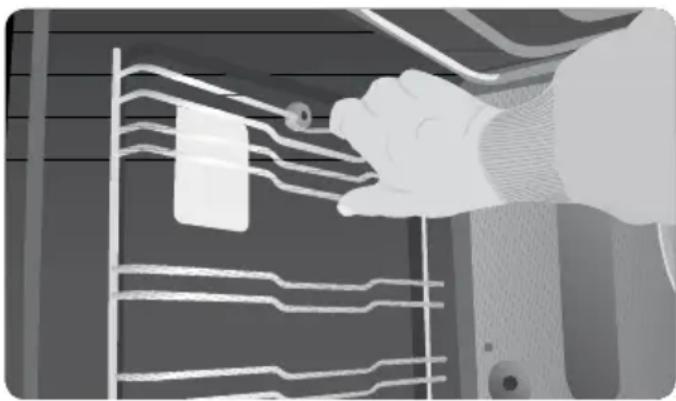
- First remove the trays and all accessories from the oven interior, including the tray supports and telescopic guide rails.
natural_image
Illustration of a hand cleaning or cleaning a wall with visible traces and a small object, no text or symbols present.
CAUTION
Do not clean the oven and tray at the same time using the Ökoclean function as you will not obtain good results. To clean the tray, follow the instructions provided later on.
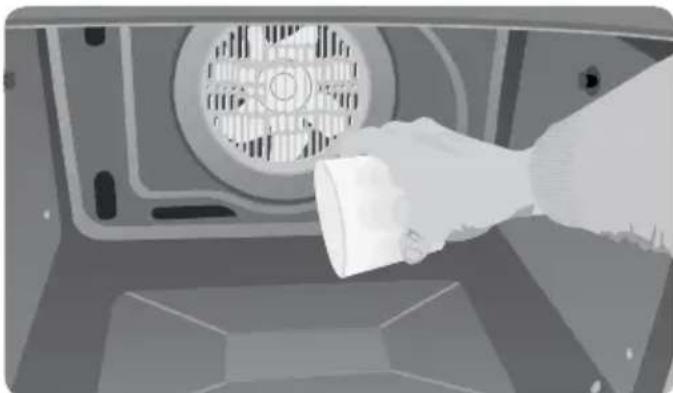
- With the oven cold, pour 300 ml of water into the bottom of the oven cavity.
natural_image
Hand holding a white cup inside a microwave oven (no text or symbols visible)-
Turn the control dial to position
-
You will hear a beep indicating that the Öko-clean cycle has started. Symbol ⏻ will flash slowly and the time remaining to complete the cycle will appear on the display.

IMPO RT ANT
The duration of this cycle cannot be changed. To stop the cycle before it is finished, turn the control dial to position ①.
-
When the cycle is finished, the oven will turn itself off, an alarm will sound and symbol ☐ will flash quickly.
-
Touch any sensor with your fingertip to stop the alarm and to turn off symbol Ⓞ.
-
Turn the control dial to position Ⓐ.
-
Any traces of dirt and excess water can now be removed with a damp cloth.

IMPO RT ANT
Do not open the oven door until the cleaning programme has completely finished as the cooling phase is necessary for it to work properly.
The cleaning programme should be done at a low temperature. When it has finished, any residue can be safely removed with a damp cloth. Cooling times vary depending on the room temperature. Before touching any inside surface of the oven, check that it is cool.
HOW TO USE THE TR AY- CLEANING CYCLE
Ökoclean enamel's excellent properties mean that any traces of cooked food can easily be removed from the trays. If stubborn traces of cooked food remain after normal cleaning, do the following:
-
Place the tray that needs cleaning on the middle shelf support.
-
With the oven cold, slowly pour 300 ml of water into the tray.
-
Select the Ökoclean cleaning function.

IMPO RT ANT
Ökoclean enamel has been designed to be cleaned using the oven's automatic cleaning programme and other cleaning methods can damage it. Anti-limescale products in particular can seriously damage the enamel's properties.
Ökoclean enamelled oven trays should not be cleaned in the dishwasher. If deep cleaning is needed, use a gentle detergent.
Some foods such as tomato, vinegar or salt-cooked roasts, can make the enamel's surface appear to change; this is normal.
Funciones del horno

RMACIÓN
natural_image
Illustration of a hand holding a device with waveform lines, no visible text or symbols
ATENCIÓN
natural_image
Illustration of a hand pouring liquid into a microwave oven (no text or symbols visible)Fonctions du four

RMATION
FONCTIONNEMENT MANUEL
natural_image
Illustration of a hand cleaning or adjusting electronic circuit boards (no text or symbols visible)
MISE EN GARDE
natural_image
Illustration of a hand pouring liquid into a microwave oven (no text or symbols visible)Funções do forno

RMAÇÃO
natural_image
Illustration of a hand adjusting a grid-like structure with no visible text or symbols
ATENÇÃO
natural_image
Hand pouring liquid into a microwave oven (no text or symbols visible)
- ESPAÑOL
- Backofenfunktionen
- 'EIS
- AU SSCHALTEN DES HERDS
- NORMAL
- ACHTUNG
- Description of the oven
- Control panel
- Function selector symbols
- Oven functions
- RMATION
- SWITCH OFF OVEN
- CONVENTIONAL
- CONVENTIONAL WITH FAN
- GRILL AND LOWER ELEMENT
- M AXIGRILL
- GRILL
- CAUTION
- LOWER ELEMENT
- PIZZA
- TURBO
- DEFROSTING
- ÖKOCLEAN CLEANING FUNCTION
- NOTE
- Using the Oven
- SETTING THE TIME
- MANUAL OPERATION
- Electronic Clock Settings
- PROGRAMMING THE TIMER ALARM
- PROGRAMMING COOKING TIME
- PROGRAMMING THE COOKING STOP TIME
- PROGRAMMING COOKING TIME AND COOKING STOP TIME
- CHILD SAFETY FUNCTION
- HOW TO USE THE OVEN CLEANING CYCLE
- IMPO RT ANT
- HOW TO USE THE TR AY- CLEANING CYCLE
- Funciones del horno
- RMACIÓN
- ATENCIÓN
- Fonctions du four
- FONCTIONNEMENT MANUEL
- MISE EN GARDE
- Funções do forno
- RMAÇÃO
- ATENÇÃO
Brand : Küppersbusch
Model : B9330.0S
Category : Oven