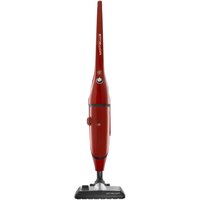
Powerline RH7843 - Vacuum Cleaner ROWENTA - Free user manual and instructions
Find the device manual for free Powerline RH7843 ROWENTA in PDF.


| Product type | Canister vacuum cleaner |
| Brand | Rowenta |
| Model | Powerline RH7843 |
| Filtration system | HEPA filter (ref. RS-RH5024) + Microfilter (ref. ZR0050) |
| Dust bag capacity | Hyperfiltration bag (ref. ZR0050) |
| Bag full indicator | Red indicator light |
| Power adjustment | Electronic speed control (Min position for delicate fabrics, Max for floors) |
| Cord rewinder | Automatic |
| Included accessories | 2-position nozzle (smooth floors/carpets), smooth floor nozzle with removable brush*, upholstery nozzle*, mini turbo brush*, maxi turbo brush*, crevice tool*, extension tube*, carrying strap* |
| Features | On/off button, power control, bag full indicator |
| Maintenance | Change the bag (ref. ZR0050) when full; clean or replace HEPA filter every 6 months; replace microfilter every 5 bags |
| Safety | Compliant with Low Voltage and EMC standards; not recommended for children under 8 without supervision; do not vacuum liquids, hot or hazardous substances |
| Warranty | Valid for domestic use only; void if used improperly |
| Spare parts | Bag (ZR0050), HEPA filter (RS-RH5024), microfilter (ZR0050) |
| Repairability | Repairs exclusively by a Rowenta approved service center |
| General information | Domestic use; height, weight and dimensions not communicated; standard length power cord |
Frequently Asked Questions - Powerline RH7843 ROWENTA
User questions about Powerline RH7843 ROWENTA
0 question about this device. Answer the ones you know or ask your own.
Ask a new question about this device
Download the instructions for your Vacuum Cleaner in PDF format for free! Find your manual Powerline RH7843 - ROWENTA and take your electronic device back in hand. On this page are published all the documents necessary for the use of your device. Powerline RH7843 by ROWENTA.
USER MANUAL Powerline RH7843 ROWENTA
natural_image
Exterior view of a white power vacuum cleaner (POWENTA POWERLINE) with black base and control buttons, no visible text or symbols on the device itself.italiano
DESCRIZIONE 1
GARANZIA 1
CLEANING AND MAINTENANCE 11
ADVICE AND PRECAUTIONS 12
WHAT TO DO IF... 12
español
DESCRIPCIÓN 13
GARANTÍA 13
fig. 1
natural_image
Illustration of hands using a tool to adjust a mechanical component (no text or symbols present)fig. 2
natural_image
Illustration of a person using a vacuum cleaner on tiled floor (no text or symbols)fig. 3
natural_image
Illustration of hands using a tool to adjust a mechanical component (no text or symbols present)fig. 4
natural_image
Simple line drawing of a vehicle on a tiled floor with no text or symbolsfig. 5
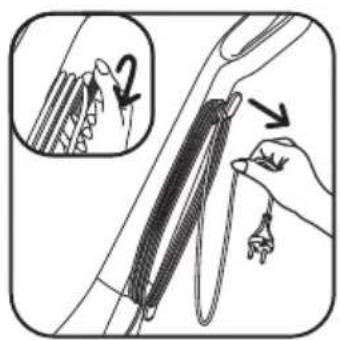
fig. 6
natural_image
Hand holding a plug with a socket, connected to an electrical outlet (no text or symbols visible)fig. 7
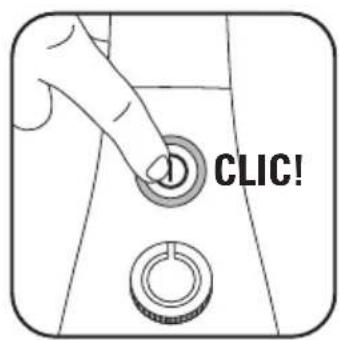
fig. 8
natural_image
Illustration of a hand adjusting a circular component with an arrow indicating rotation (no text or symbols present)fig. 9
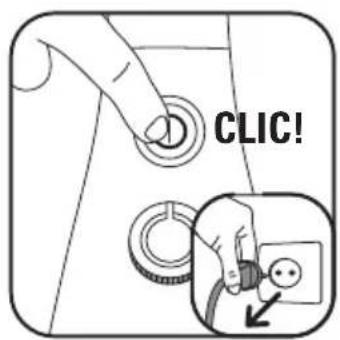
fig. 10
natural_image
Illustration of a hand holding a string with arrows indicating motion (no text or symbols)fig. 11
natural_image
Diagram of a mechanical joint or connector with a hand holding a tool, showing motion direction (no text or symbols)fig. 12
natural_image
Diagram of a hand operating a mechanical component with arrows indicating motion (no text or symbols present)fig. 13
natural_image
Mechanical assembly diagram showing a hand holding a component with an arrow indicating upward motion, and a close-up of a cylindrical component inserted into a container (no text or symbols visible)fig. 14
natural_image
Illustration of a hand pressing down on a mechanical component with a downward arrow (no text or symbols)fig. 15
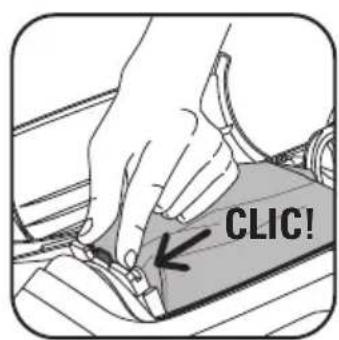
fig. 16
natural_image
Mechanical assembly diagram showing a wheel mounted on a shaft with an arrow indicating motion direction (no text or symbols)fig. 17
natural_image
Diagram of a mechanical component with a highlighted section and arrow indicating direction (no text or symbols)fig. 18
natural_image
Diagram showing two circular components with a directional arrow indicating rotation or movement (no text or symbols present)fig. 19
natural_image
Illustration of a hand cleaning a car interior with a sponge (no text or symbols)fig. 20
DESCRIZIONE

Vista esplosa
1 Handle
2 On/Off button
3 Power variator
4 Air exit grid
5 HEPA* filter cassette (ref. RS-RH5024) or microfilter* (ref. ZR0050)
6 Full bag indicator
7 Door opening button
8 Bag compartment door
9 Bag compartment
Zoom on cord rewind
10 Cord
Zoom on back of product
11 Hooks for transport strap
Accessories\*
12 2-position nozzle (hard flat floors- carpet)
13 Hard flat floors nozzle*
13' Hard flat floors nozzle with removable brush*
a - use on hard flat floors with crevices
b - use on fragile hard flat floors
14 Upholstery nozzle*
15 Mini turbo brush*
16 Maxi turbo brush*
17 Crevice tool*
18 Extension*
19 Hyperfiltration bag (ref. ZR0050)
20 Transport strap*
WARRANTY
- This appliance is for household use only; in the event of inappropriate or non-recommended use, no liability can be accepted and the warranty is cancelled.
- Read the instructions for use carefully before using the appliance for the first time: utilisation not complying with the instructions for use will relieve Rowenta of any liability.
SAFETY ADVICE
For your safety, this appliance complies with applicable standards (Low voltage directions, electromagnetic compatibility, the environment, ...) Read your instructions for use carefully and keep them safe.
1 · Conditions of use
Your vacuum cleaner is an electrical appliance: it must be used under normal conditions of use. Use and store it out of reach of children. Do not allow it to run unsupervised. Do not hold the suction fitting or the end of the hose near the eyes or ears.
Do not use on moist surfaces, or to suck up any liquids, hot substances, ultra-fine substances (plaster, cement, ash...), large or sharp items of waste (glass), harmful products (solvents, descalers...), aggressive products (acids, cleaners ...), inflammable and explosive products (based on petrol or alcohol).
Never place the appliance in water, do not spray water on it and do not store it outside. Do not use it after it has been dropped and does not function normally or has signs of visible damage. In that event do not open it but send it to an authorised Service Centre or contact a Rowenta customer service centre (addresses are on the last page).
This appliance is not designed for use by persons (including children), whose physical, sensory or mental capacities are impaired, or by persons devoid of experience or knowledge, unless they are supervised by a person responsible for their safety, surveillance or have received prior instructions in the use of the appliance. It is necessary to supervise children to ensure that they do not play with the appliance.
This appliance may be used by children aged 8 or over, and by persons lacking
appropriate knowledge and experience or whose physical, sensory or mental capacities are limited, provided that they are supervised, have received instruction in the safe use of the appliance, and are fully aware of the risks involved. Children must not be allowed to play with the appliance. Home cleaning and maintenance of the appliance must not be carried out by children unless they are aged 8 or over and are supervised. Always keep the appliance and power cord out of reach of children under 8 years.

2 · Electrical supply
Ensure that the voltage at which your vacuum cleaner operates is the voltage installed on your premises. Disconnect the appliance by pulling out the plug without pulling the cord: immediately after use, before any change of accessory, every cleaning, servicing or change of filter.
Do not use it if the cord is damaged. The cord winding assembly and the cord of your vacuum cleaner must be replaced by an approved Service Centre because special tools are needed for carrying out any repair in order to avoid danger.
3 · Repairs
Repairs must only be carried out by specialists and using original spare parts. Repairing the appliance oneself may endanger the user and cancels the warranty.
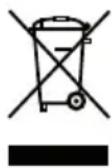
Let us take part in protecting the environment!
① Your appliance contains numerous reusable or recyclable materials.
take it to collection point or in its absence, to an approved service centre for disposal.
BEFORE USE
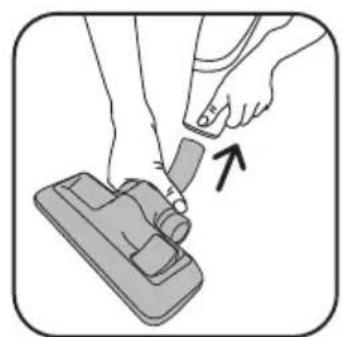
1 • Assemble your vacuum cleaner (fig. 1) - (fig. 2)
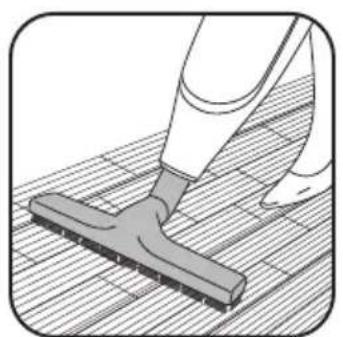
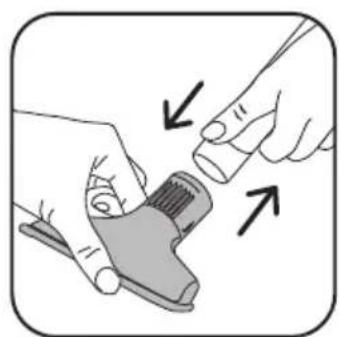
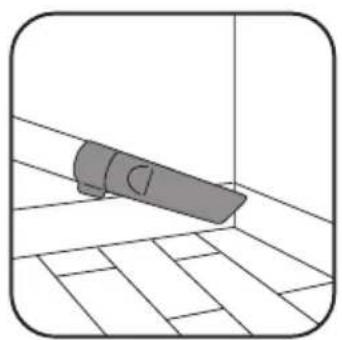
2 • Select the right accessory* (fig. 2) - (fig. 3) - (fig. 4) - (fig. 5)
Fit the appropriate accessory to the end :
- For rugs and carpets : use the 2 position nozzle (12) on carpet position (brush retracted) or turbo brush* (fibres and animal hair).
- For hard flat floors and hard flat floors with crevices (such as tiled floors): use the 2 position nozzle (12) on hard floor position (brush extended) or, for better results, use the hard flat floor nozzle* (13'a*) without the removable brush.
- For fragile hard flat floors, such as parquet, it is recommended to use the hard flat floor nozzle (13*) or (13'b*).
IMPORTANT:
The nozzle for hard flat floor with crevices 13'a* is used to measure performance associated to the energy label. This nozzle allows you to optimize the dust-collection performance of your appliance on hard flat floors with crevices.
VACUUMING
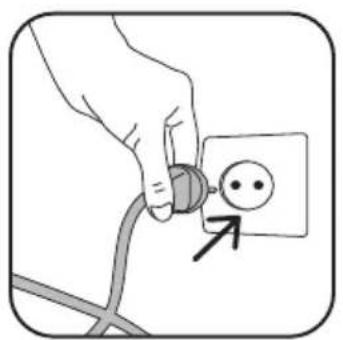
3 • Switch on your vacuum cleaner (fig. 6) - (fig. 7) - (fig. 8)
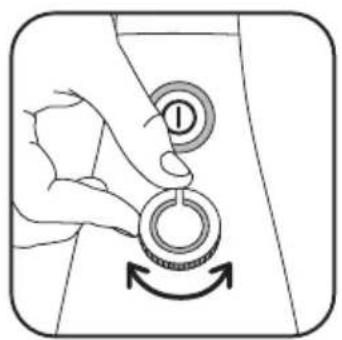
4 · Set the vacuum power (fig. 9)
Max: Floors
Min: Furniture, delicate fabrics...
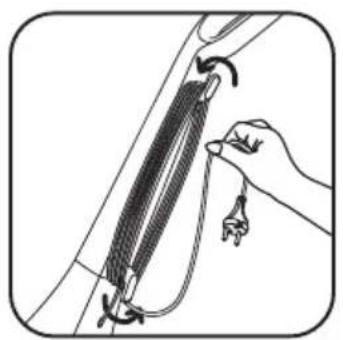
STORAGE (fig. 11)
CLEANING AND MAINTENANCE
The air we breathe contains particles, which may cause allergies; the larvae and waste of mites, moulds, pollen, smoke and animal residues (hair, skin, saliva, urine). The finest particles penetrate into the respirator where they may cause inflammation and completely alter the respiratory function.
HEPA filters (high efficiency particulate air filters, namely high efficiency filters for air-borne particle filters) make it possible to hold back the finest particles. Thanks to the HEPA filter, spent air in the room is cleaner than vacuumed air.
IMPORTANT
Always switch off and disconnect your vacuum cleaner before servicing or cleaning. Check and clean regularly your whole vacuum cleaner and the different filters.
ATTENTION
Never use your vacuum cleaner without the filtration system (microfilter and filter).
1 · Change the bag (ref ZR0050)
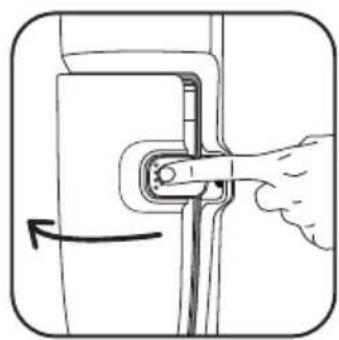
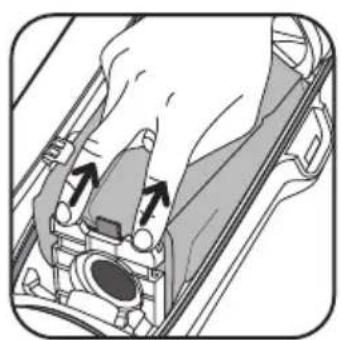
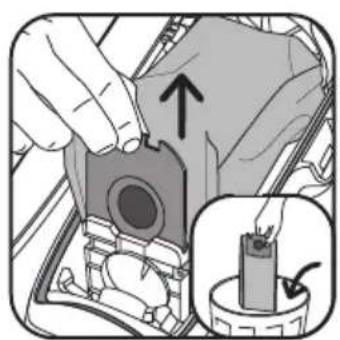
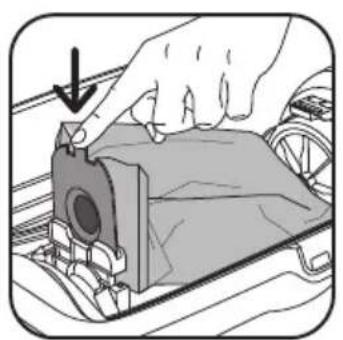
The bag fill indicator (6) tells you that the bag is full or saturated with fine dust. If the power of the vacuum is low with the power set on maximum, replace the bag. (fig. 12) - (fig. 13) - (fig. 14) - (fig. 15) - (fig. 16)
2 · Change the microfilter\* (ref: ZR0050)
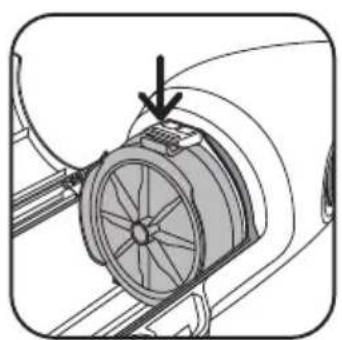
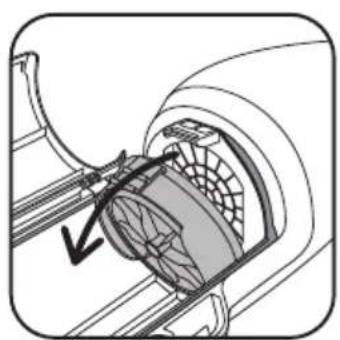
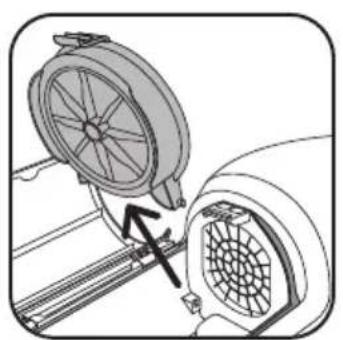
- Remove the microfilter*. (fig. 17) - (fig. 18) - (fig. 19)
- Dispose of the microfilter* into a waste bin replace it with a new microfilter (ref. ZR0050).
Important: Change the microfilter* ZR0050 01 after every 5 changes of the bag.
3 · Change the HEPA filter cassette HEPA\* (ref: RS-RH5024)
- Remove the HEPA filter cassette*. (fig. 17) - (fig. 18) - (fig. 19)
- Dispose of the cassette into a waste bin.
- Lock the new HEPA filter cassette* (ref: RS-RH5024) into its compartment
Important: Replace the HEPA filter cassette RS-RH5024 every six months (depending on frequency of us
4 • Clean the HEPA filter cassette\* (ref: RS-RH5024)
- Remove the HEPA filter cassette*. (fig. 17) - (fig. 18) - (fig. 19)
- Tap the HEPA filter cassette* over a waste bin.
- Reposition the HEPA filter cassette* (ref: RS-RH5024) in its compartment and ensure its correct positioning before re-closing the cover.
Attention! This cleaning is restricted to the HEPA filter cassette * RS-RH5024
5 · Clean your vacuum cleaner
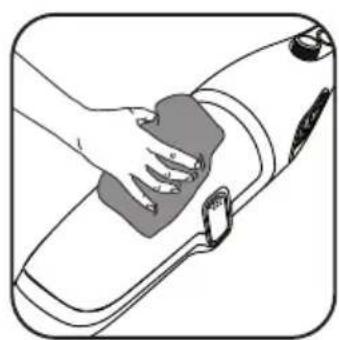
Wipe the body of the appliance and the accessories with a soft damp cloth and then dry. (fig. 20)
ADVICE AND PRECAUTIONS
- Before every cycle of use, the cord must be fully unwound.
- Do not enter corners and do not pass over sharp shards.
- Do not move the vacuum cleaner by pulling the cord, but use the carrying handle.
- Do not lift the appliance by the cord.
- If you are using an extension cable, ensure that it is in perfect condition and matches the power of your vacuum cleaner.
- Do not unplug the appliance by pulling the cord.
- Stop and disconnect your vacuum cleaner after each utilisation cycle.
- Only use dry accessories and original Rowenta bags.
- Verify that all filters are in place.
- Never use without bag and filter.
• In case of difficulty in obtaining bags and filters for the vacuum cleaner, contact Rowenta Consumer Service on 0845 302 1454
WHAT TO DO IF...
IMPORTANT
When your vacuum cleaner is not working as it should be and before any verification, stop it by using the stop/start pushbutton and unplug.
| Your vacuum cleaner will not start or does not suck. | ·The appliance is not receiving current: Check that it is correctly connected.·An accessory or the tube is blocked: Unblock the accessory or the pipe.·The cover is badly closed or cannot be closed: Check the position/or the presence of the bag and re-close the cover. |
| Your vacuum cleaner has less suction power, makes a noise, and whistles. | ·An accessory or the tube is partially blocked: Unblock the accessory or the tube.·The bag is full or saturated with fine dust: Replace the bag.·The micro filter* or the HEPA filter* is saturated: Change the micro filter or clean the HEPA filter if 6 months of use have elapsed, otherwise change it following instructions in the notice.·The power control is in minimum position: Increase the power using the power control (except when cleaning fine fabrics).·The suction fitting is difficult to move: Reduce the power using the power control. |
| The bag fill indicator remains on red. | ·The bag is full: Replace the bag. |
If a problem persists, take your vacuum cleaner to the nearest approved Rowenta Service Centre. See the list of approved Rowenta Service Centres or contact Rowenta Customer Service: 0845 302 1454
DESCRIPCIÓN

Imagen detallada

- italiano
- español
- DESCRIZIONE
- Vista esplosa
- Zoom on cord rewind
- Zoom on back of product
- Accessories\*
- WARRANTY
- SAFETY ADVICE
- · Conditions of use
- · Electrical supply
- · Repairs
- Let us take part in protecting the environment!
- BEFORE USE
- IMPORTANT:
- VACUUMING
- STORAGE (fig. 11)
- CLEANING AND MAINTENANCE
- IMPORTANT
- ATTENTION
- · Change the bag (ref ZR0050)
- · Change the microfilter\* (ref: ZR0050)
- · Change the HEPA filter cassette HEPA\* (ref: RS-RH5024)
- • Clean the HEPA filter cassette\* (ref: RS-RH5024)
- · Clean your vacuum cleaner
- ADVICE AND PRECAUTIONS
- WHAT TO DO IF...
- DESCRIPCIÓN
- Imagen detallada
Brand : ROWENTA
Model : Powerline RH7843
Category : Vacuum Cleaner