11485 - KVM switch DeLOCK - Free user manual and instructions
Find the device manual for free 11485 DeLOCK in PDF.


| Product type | KVM switch |
| Brand | DeLOCK |
| Model | 11485 |
| Dimensions (approx.) | 10 x 6 x 2 cm |
| Weight (approx.) | 100 g |
| Power supply | USB Type-A (5 V) |
| Number of PC ports | 2 (USB-C) |
| Video outputs | 1x DisplayPort, 1x HDMI |
| Integrated USB hub | USB 2.0 |
| Length of supplied USB-C cables | 2 x 80 cm |
| Length of supplied USB-A power cable | 100 cm |
| Switching type | Mechanical button |
| System compatibility | USB-C with DisplayPort Alternate or Thunderbolt 3 |
| System requirements | PC/laptop with free USB-C port |
| Safety instructions | Protect from moisture and direct sunlight |
| Maintenance | Clean with a dry cloth |
| Recycling | Device and accessories recyclable – take to store or recycling center |
| Certifications | CE, FC |
| Package contents | KVM switch, 2 USB-C male-to-male cables, 1 USB-C to USB-A cable, user manual |
Frequently Asked Questions - 11485 DeLOCK
User questions about 11485 DeLOCK
0 question about this device. Answer the ones you know or ask your own.
Ask a new question about this device
Download the instructions for your KVM switch in PDF format for free! Find your manual 11485 - DeLOCK and take your electronic device back in hand. On this page are published all the documents necessary for the use of your device. 11485 by DeLOCK.
USER MANUAL 11485 DeLOCK
USB-C™ KVM Switch to HDMI and DisplayPort with USB 2.0
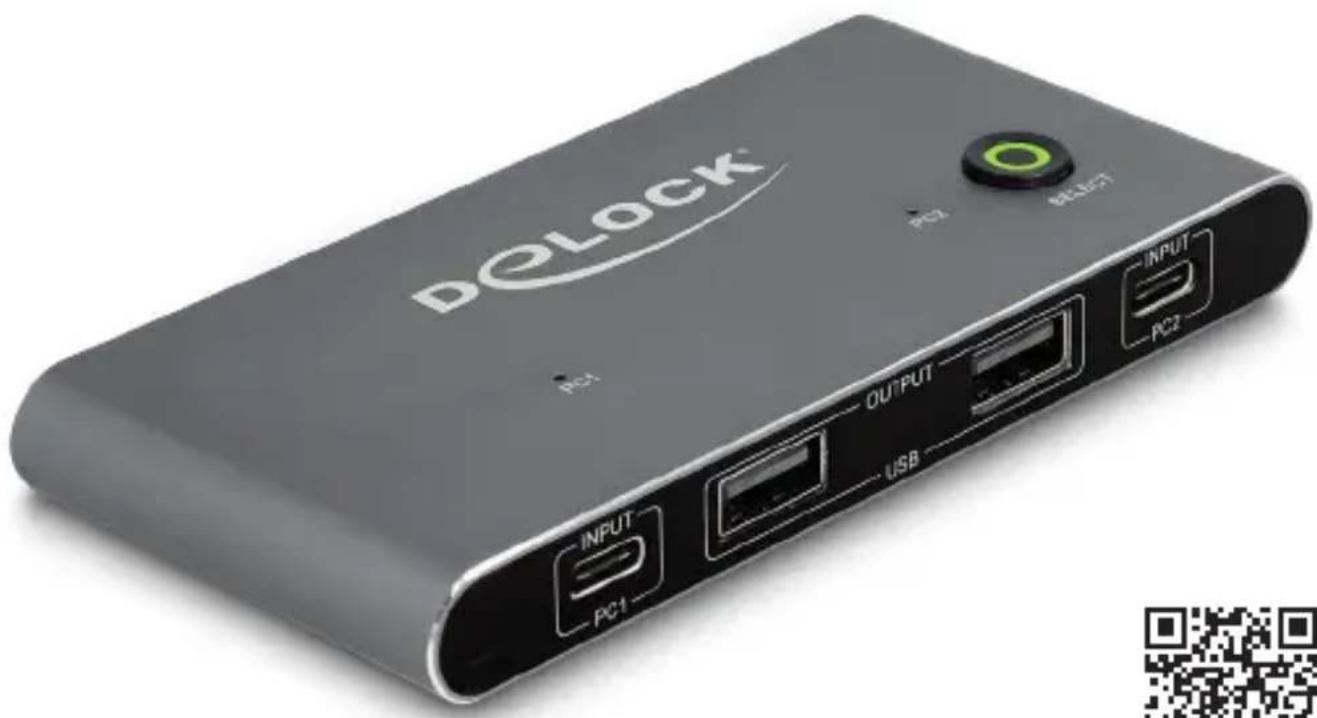
Description
This KVM switch by Delock is a convenient solution for connecting two computers with USB-C™ DP Alt Mode output to one HDMI and one DisplayPort monitor.
Two monitors can be operated simultaneously at the outputs. By using the button you can switch between both computers.
Peripheral devices
Furthermore, three USB 2.0 ports for mouse and keyboard or USB storage can be connected.
Multi-Stream Transport (MST)
The product is a Multi-Stream Transport (MST) hub and supports the extended desktop configuration of DisplayPort. In Windows, the connected monitors are controlled individually, and can be combined into one large display.
Specification
- Connectors:
Input:
2 x USB Type-C™ (DP Alt Mode) female
1 x USB Type-C ^TM female (5 V power supply)
Output:
1 x HDMI-A female
1 x DisplayPort female
3 x USB 2.0 Type-A female
- Switch button
• LED indicator for source
• Maximum resolution (depending on the system and the connected hardware):
1 display: up to 7680 x 4320 @ 30 Hz
2 displays: up to 3840 x 2160 @ 60 Hz
- Functions: Mirrored or Extended (Windows only)
- Metal housing
- Colour: anthracite
• Dimensions (LxWxH): ca. 115 x 54 x 12 mm
System requirements
- PC or laptop with a free USB Type-C™ port and DisplayPort alternate mode or
• PC or laptop with a free Thunderbolt™ 3 port
• Monitor or TV with HDMI connector - HDMI cable
• Monitor or TV with DisplayPort connector - DisplayPort cable
• Power source with a free USB Type-A female port
Package content
• KVM switch with USB
- 2 x Cable USB-C™ male to USB-C™ male, length ca. 80 cm
- Cable USB-C™ male to USB Type-A male, length ca. 100 cm (power supply)
- User manual
Safety instructions
- Protect the product against moisture
- Protect the product against direct sunlight
Hardware Installation
Note: For the installation of the hardware all devices should be turned off.
- Connect the included USB-C™ cable to the switch (PC1 / PC2) and connect this cable to your USB-C™ video source.
- Connect the DisplayPort monitor to the DisplayPort output of the KVM. Optional: Connect the HDMI monitor to the HDMI output of the KVM.
- Plug in the USB power cable to a USB Type-A port or power supply.
- Now connect the cables of the mouse and keyboard to the KVM switch.
- Connect other USB devices to the USB 2.0 Hub if necessary.
- Turn on all connected devices.
Operation
By using the button on the top you can switch between the different video sources.
Support Delock
If you have further questions, please contact our customer support support@delock.de
You can find current product information on our homepage: www.delock.com
Final clause
Information and data contained in this manual are subject to change without notice in advance. Errors and misprints excepted.
Copyright
No part of this user manual may be reproduced, or transmitted for any purpose, regardless in which way or by any means, electronically or mechanically, without explicit written approval of Delock.
Hardwareinstallation
Declaration of conformity
Products with a CE symbol fulfill the EMC directive (2014/30/EU) and RoHS directive (2011/65/EU+2015/863+2017/2102), which were released by the EU-comission.
The declaration of conformity can be downloaded here: https://www.delock.de/produkte/G_11485/merkmale.html
WEEE-notice
The WEEE (Waste Electrical and Electronic Equipment)-directive, which became effective as European law on February 13th 2003, resulted in an all out change in the disposal of disused electro devices. The primarily purpose of this directive is the avoidance of electrical waste (WEEE) and at the same time the support of recycling and other forms of recycling in order to reduce waste. The WEEE-logo on the device and the package indicates that the device should not be disposed in the normal household garbage. You are responsible for taking the disused electrical and electronical devices to a respective collecting point. A separated collection and reasonable recycling of your electrical waste helps handling the natural resources more economical. Furthermore recycling of electrical waste is a contribution to keep the environment and thus also the health of men. Further information about disposal of electrical and electronical waste, recycling and the collection points are available in local organizations, waste management enterprises, in specialized trade and the producer of the device.
- USB-C™ KVM Switch to HDMI and DisplayPort with USB 2.0
- Description
- Peripheral devices
- Multi-Stream Transport (MST)
- Specification
- System requirements
- Package content
- Safety instructions
- Hardware Installation
- Operation
- Support Delock
- Final clause
- Copyright
- Hardwareinstallation
- Declaration of conformity
- WEEE-notice
Brand : DeLOCK
Model : 11485
Category : KVM switch