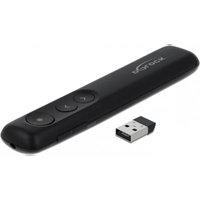
64092 - Wireless pointer DeLOCK - Free user manual and instructions
Find the device manual for free 64092 DeLOCK in PDF.


| Product Type | Wireless pointer (laser presenter) |
| Brand | DeLOCK |
| Model | 64092 |
| Dimensions (L × W × H) | 131 × 25 × 14 mm |
| Weight (with battery) | Approx. 50 g |
| Power supply | 1 AAA battery (included) |
| Connectivity | RF 2.4 GHz, USB nano receiver |
| Range | Up to 30 m |
| Laser | Red laser class 2, 620-670 nm, < 1 mW |
| Keys | Laser pointer, Enter, Tab, Page Up, Page Down |
| Main functions | Laser pointer, slide navigation, full screen control, black screen, link opening |
| Compatible operating system | Windows 7, 8.1, 10 (32/64-bit) |
| System requirements | Available USB Type-A port |
| Material | Plastic |
| Color | Black |
| Care and cleaning | Clean with a soft, dry cloth. Protect from moisture and direct sunlight. |
| Safety | Do not look directly into the laser beam. Do not point at eyes, people, or animals. Avoid reflective surfaces. |
| Spare parts and repairability | AAA battery replaceable. No other detachable parts. For support, contact support@delock.de. |
| General information | Plug & Play, receiver stores in a magnetic compartment. Warranty and support via Delock. |
Frequently Asked Questions - 64092 DeLOCK
User questions about 64092 DeLOCK
0 question about this device. Answer the ones you know or ask your own.
Ask a new question about this device
Download the instructions for your Wireless pointer in PDF format for free! Find your manual 64092 - DeLOCK and take your electronic device back in hand. On this page are published all the documents necessary for the use of your device. 64092 by DeLOCK.
USER MANUAL 64092 DeLOCK
This wireless Delock laser presenter serves as a practical helper for demonstrating presentations. It can easily be connected to a USB port using the included USB nano receiver. During transport, this can be attached to a slightly magnetic slot on the bottom side of the laser presenter.
Specification
- Connector: 1 x USB 2.0 Type-A male
- Compact nano USB receiver
- Magnetic slot for USB receiver
- 1 x On / Off switch
- 4 x buttons: Laser Pointer / Enter / Tab / Page up / Page down
- Functions:
Laser Pointer
Page up / Page down
Select and open Windows window
Select and open weblink
Black screen
Full screen mode
Red laser pointer
Light source: laser class 2 620 - 670 nm, <1 mW
- Bandwidth: 2.4 GHz, operating range up to 30 m
- Dimensions (LxWxH): ca. 131 x 25 x 14 mm
Material: plastic
Colour: black
- Plug & Play
System requirements
- Windows 7/7-64/8.1/8.1-64/10/10-64
PC or laptop with a free USB Type-A port
Package content
- Laser Presenter
- USB receiver
- 1 x AAA battery
- User manual
Safety instructions
- Protect the product against moisture
- Protect the product against direct sunlight
- The device generates visible laser beams.
The device corresponds to laser class 2 according to: EN 60825-1:2015-07 - Ensure that the laser beam is guided in such a way that no persons are in the projection area and that the reflected beam does not reach the occupied zone of persons.
- Do not look into the laser beam and do not point it at persons or animals. Laser radiation can cause injuries to the eye.
- If a laser beam hits the eye, close the eye consciously and move the head out of the beam immediately.
- Do not aim the laser beam at reflective surfaces.
Installation
- Open the battery compartment and insert an AAA battery, as shown in the battery compartment, and close it.
- Switch on the laser presenter.
- Insert the USB dongle in a free USB Type-A female of your computer.
- Now the USB dongle connects to the laser presenter automatically.
- Now you can use the laser presenter.
- During transport the USB dongle can be placed inside a compartment at the bottom of the laser presenter.
Functions:
| Press the laser button to activate the laser. | |
| Keep the button pressed, to present the PowerPoint presentation in a full screen mode. Keep the button pressed again, to close the full screen mode. Short click to display the next page. | |
| Keep the button pressed, to blank out the presentation. A black screen will appear. Short click to display the previous page. | |
| Tab | Short click to choose a Hyperlink. Keep the button pressed, to switch between different Windows windows. |
| Enter | Short click to open a Hyperlink. Keep the button pressed, to close an open Windows window. |
Support Delock
If you have further questions, please contact our customer support support@delock.de
You can find current product information on our homepage: www.delock.com
Final clause
Information and data contained in this manual are subject to change without notice in advance. Errors and misprints excepted.
Copyright
No part of this user manual may be reproduced, or transmitted for any purpose, regardless in which way or by any means, electronically or mechanically, without explicit written approval of Delock.
Kurzbeschreibung
Declaration of conformity
Products with a CE symbol fulfill the RED directive (2014/53/EU) and RoHS directive (2011/65/EU+2015/863), which were released by the EU-comission.
The declaration of conformity can be downloaded here:
http://www.delock.de/service/conformity
WEEE-notice
The WEEE (Waste Electrical and Electronic Equipment)-directive, which became effective as European law on February 13th 2003, resulted in an all out change in the disposal of disused electro devices. The primarily purpose of this directive is the avoidance of electrical waste (WEEE) and at the same time the support of recycling and other forms of recycling in order to reduce waste. The WEEE-logo on the device and the package indicates that the device should not be disposed in the normal household garbage. You are responsible for taking the disused electrical and electronic devices to a respective collecting point. A separated collection and reasonable recycling of your electrical waste helps handling the natural resources more economical. Furthermore recycling of electrical waste is a contribution to keep the environment and thus also the health of men. Further information about disposal of electrical and electronic waste, recycling and the collection points are available in local organizations, waste management enterprises, in specialized trade and the producer of the device.
Battery guideline (2006/66/EC)
The battery is recyclable. Please dispose of it by using the battery container or dealer. Just dispose of the empty battery to guarantee the environmental protection.



Brand : DeLOCK
Model : 64092
Category : Wireless pointer