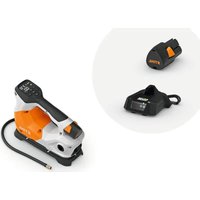
KOA 20 - Compressor STIHL - Free user manual and instructions
Find the device manual for free KOA 20 STIHL in PDF.


| Product type | Battery compressor |
| Brand | STIHL |
| Model | KOA 20.0 |
| Maximum pressure | 10.3 bar |
| Weight (without battery) | 1.5 kg |
| Power supply | STIHL AS lithium-ion battery (10.8 V) |
| Charger | STIHL AL 1 |
| Usage modes | High pressure, blowing and suction |
| Main functions | Inflating tires (bicycle, motorcycle, car), balloons, sports equipment; blowing and suction |
| Pressure adjustment | By + and - keys, units BAR, PSI, KPA |
| Automatic shut-off | Yes, after 5 minutes of inactivity or target pressure reached |
| Integrated light | Yes, work area illumination |
| Operating temperature | -10 °C to +40 °C |
| Recharging temperature | +5 °C to +40 °C |
| Maintenance and cleaning | Clean with a damp cloth; do not use aggressive detergents |
| Safety | Overheating protection, automatic shut-off, battery removal for maintenance |
| Spare parts and repairability | Use STIHL original parts; repair by specialized dealer |
| Included accessories | High-pressure hose, adapters, balloon needle, pressure hose |
| Warranty | Refer to STIHL dealer |
| General information | User manual in French available; use for leisure purposes |
Frequently Asked Questions - KOA 20 STIHL
User questions about KOA 20 STIHL
0 question about this device. Answer the ones you know or ask your own.
Ask a new question about this device
Download the instructions for your Compressor in PDF format for free! Find your manual KOA 20 - STIHL and take your electronic device back in hand. On this page are published all the documents necessary for the use of your device. KOA 20 by STIHL.
USER MANUAL KOA 20 STIHL
natural_image
White and gray STIHL air purifier device with black handle and control panel (no visible text or symbols)2 - 19 Gebrauchsanleitung
19 - 35 Instruction Manual
35 - 53 Notice d'emploi
53 - 71 Istruzioni d'uso
71 - 87 Handleiding
Inhaltsverzeichnis
1 Lampe
natural_image
Line drawing of a handheld device with labeled component '1' (no text or symbols beyond label)natural_image
Diagram of a car charger with an electric plug, showing the cable being inserted into it (no text or symbols present)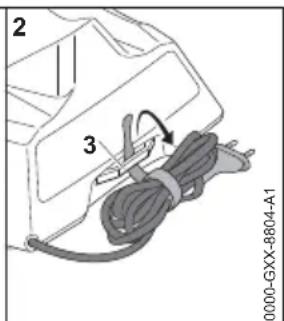
1 Introduction.... 19
2 Guide to Using this Manual....19
3 Overview.... 20
4 Safety Precautions....22
5 Preparing the compressor for operation... 28
6 Charging the Battery, LEDs.... 28
7 Removing and Fitting the Battery......29
8 Switching the compressor on and off.....29
9 Testing the compressor and battery...... 30
10 Working with the compressor....30
11 After Finishing Work....31
12 Transporting....31
13 Storing....32
14 Cleaning....32
15 Maintenance and Repairs.... 32
16 Troubleshooting.... 33
17 Specifications....34
18 Spare Parts and Accessories....35
19 Disposal.... 35
20 Product information....35
21 Addresses.... 35
1 Introduction
Dear Customer,
Thank you for choosing STIHL. We develop and manufacture our quality products to meet our customers' requirements. The products are designed for reliability even under extreme conditions.
STIHL also stands for premium service quality. Our dealers guarantee competent advice and instruction as well as comprehensive service support.
STIHL expressly commit themselves to a sustainable and responsible handling of natural resources. This user manual is intended to help you use your STIHL product safely and in an environmentally friendly manner over a long service life.
We thank you for your confidence in us and hope you will enjoy working with your STIHL product.
Dr. Nikolas Stihl
IMPORTANT! READ BEFORE USING AND KEEP IN A SAFE PLACE FOR REFERENCE.
2 Guide to Using this Manual
2.1 Applicable Documentation
Local safety regulations apply.
English 3 Overview
▶ Read, understand and save the following documents in addition to this instruction manual:
- Safety information for STIHL batteries and products with built in batteries: www.stihl.com/safety-data-sheets
2.2 Warning Notices in Text

DANGER
■ This notice refers to risks which result in serious or fatal injury.
- Serious or fatal injuries can be avoided by taking the precautions mentioned.

WARNING
■ This notice refers to risks which can result in serious or fatal injury.
- Serious or fatal injuries can be avoided by taking the precautions mentioned.
NOTICE
■ This notice refers to risks which can result in damage to property.
▶ Damage to property can be avoided by taking the precautions mentioned.
2.3 Symbols in Text

This symbol refers to a chapter in this instruction manual.
3 Overview
3.1 Compressor
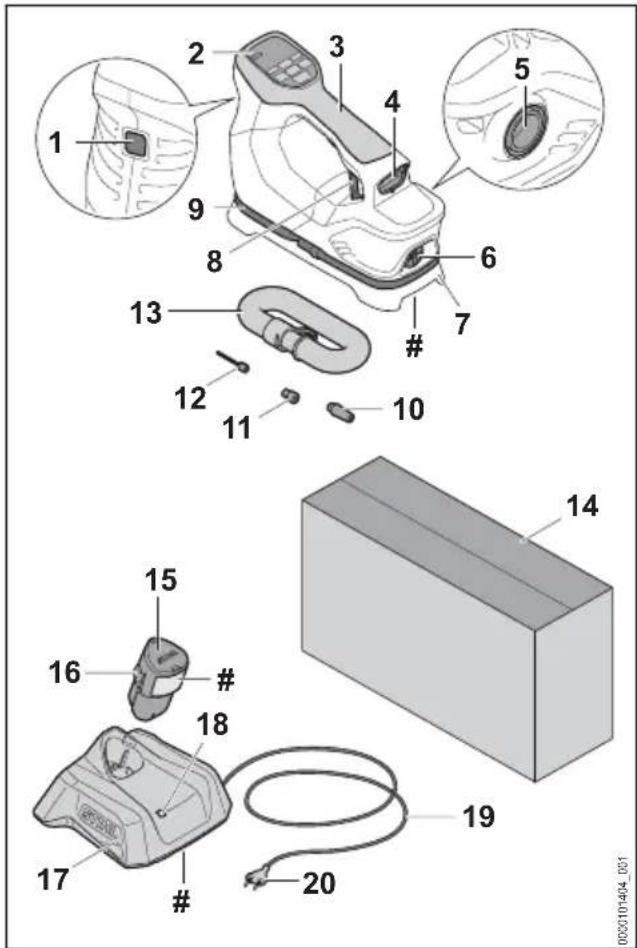
1 Lamp
The lamp lights up the work area.
2 Control Panel
The control panel features pushbuttons and the display.
3 Handle
The handle is for holding and carrying the compressor.
4 Battery compartment
The battery compartment holds the battery.
5 Hose connection for blowing operation
The hose connection serves to pump up a product at low pressure.
6 Hose connection for suction operation
The hose connection serves to pump air out of a product at low pressure.
7 Base
The base is used to put down the compressor.
8 Ring
The ring serves to hang up the compressor.
3 Overview English
9 High-pressure hose
The high-pressure hose connects the compressor to the adapter, the ball needle or the tire valve.
10 Adapter
The adapter connects the high-pressure hose to the valve of toys or sports equipment.
11 Adapter
The adapter connects the high-pressure hose to the valve of bicycle tires.
12 Ball needle
The ball needle connects the high-pressure hose to the valve of balls.
13 Delivery hose
The delivery hose connects the compressor with the product to be pumped up or down.
14 Packaging
The packaging is used for storing and transporting the compressor. In the set (consisting of compressor, battery and charger) the packaging is used for storing and transporting the compressor, the battery and the charger.
15 Battery
The battery supplies power to the compressor.
16 Locking hook
Holds the battery in the battery compartment.
17 Charger
The charger charges the battery.
18 LED
The LED indicates the status of the charger.
19 Connecting cable
The connecting cable connects the charger to the mains plug.
20 Mains plug
The mains plug connects the connecting cable with a socket.
# Rating plate with machine number
3.2 Control Panel
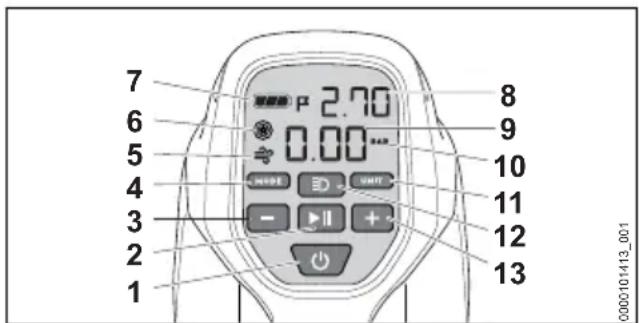
1 Pushbutton ⏻
The pushbutton switches the compressor on and off.
2 Pushbutton ▶II
The pushbutton starts and stops the compressor.
3 Pushbutton -
The pushbutton reduces the target pressure.
4 Pushbutton MODE
The pushbutton is used to switch between high-pressure mode and blowing and suction mode.
5 Display
The display shows the blowing and suction mode.
6 Display
The display shows the high-pressure mode.
7 Display
The display shows the state of charge of the battery.
8 Target pressure display
The display shows the target pressure.
9 Measurement pressure display
The display shows the pressure on the high-pressure hose.
10 Unit display
The display shows the unit (BAR, PSI, KPA).
11 Pushbutton UNIT
The pushbutton is used to set the unit (BAR, PSI, KPA).
12 Pushbutton EID
The pushbutton switches the lamp on and off.
13 Pushbutton +
The pushbutton increases the target pressure.
3.3 Symbols
Meaning of symbols that may be on the compressor, the battery and the charger:
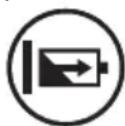
The LED lights up or flashes green. The battery is charging.

The LED flashes red. There is no electrical contact between the battery and the charger or there is a fault in the battery or in the charger.

The information next to the symbol indicates the energy content of the battery according to the cell manufacturer's specifi-
English 4 Safety Precautions
cation. The energy content available in operation is lower.

Operate the electric product in a dry place, indoors only.

Do not dispose of the product with your household waste.

Read and understand the User Manual and keep it in a safe place for reference.
4 Safety Precautions
4.1 Warning Signs
4.1.1 Compressor
Meaning of warning symbols on the compressor:

Observe safety notices and take the necessary precautions.

Read and understand the User Manual and keep it in a safe place for reference.

Wear safety glasses and hearing protection.

Do not touch hot surfaces.
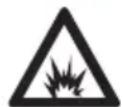
Do not exceed permitted pressure of the product to be pumped up. The product could burst.
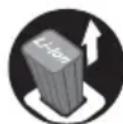
Remove the battery during work interruptions, transport, storage, maintenance or repair.

Protect compressor against rain and dampness.
4.1.2 Battery
Meaning of warning symbols on the battery:

Observe safety notices and take the necessary precautions.

Read and understand the User Manual and keep it in a safe place for reference.

Protect the battery against heat and fire.

Do not immerse the battery in liquids.
4.1.3 Charger
Meanings of the warning signs on the charger:

Observe safety notices and take the necessary precautions.

Read and understand the User Manual and keep it in a safe place for reference.

Protect the charger from rain and dampness.
4.2 Intended Use
The STIHL KOA 20.0 compressor serves to pump up bicycle tires, motorcycle tires, car tires and other inflatable products from the games, sports and leisure sectors.
The compressor must not be used in the rain.
The compressor must not be used for hair drying or for the drying of loose clothing.
The compressor is not suitable for commercial use.
The STIHL AS battery supplies power to the compressor.
The STIHL AL 1 charger recharges the STIHL AS battery.
WARNING
■ Batteries and chargers not explicitly approved by STIHL for the compressor may cause a fire or explosion. Persons may be seriously or fatally injured, and property may be damaged.
▶ Use the compressor with a STIHL AS battery.
▶ Recharge the STIHL AS battery with a STIHL AL 1 charger.
■ Using the compressor, battery or the charger for purposes for which they were not designed may result in serious or fatal injuries and damage to property may occur.
▶ Use the compressor, battery and charger as described in this User Manual.
4.3 Requirements for users
WARNING
■ Users without adequate training or instruction cannot recognize or assess the risks involved in using the compressor, battery and charger. The user or other persons may sustain serious or fatal injuries.

- Read and understand the User Manual and keep it in a safe place for reference.
▶ If the compressor, battery or charger are passed on to another person: Always give them the User Manual.
▶ Make sure that the user meets the following conditions:
- The user is rested.
- The user must be in good physical condition and mental health to operate and work with the compressor, battery and charger. If the user is able to operate the equipment but is physically, hearing, visually or mentally impaired, the user may only work with the equipment under the supervision of or after receiving instruction from a responsible person.
- The user is able to recognize and assess the risks involved in using the compressor, battery and charger.
- The user is an adult or is being trained in an occupation under supervision according to national regulations.
- The user has received instruction from a STIHL authorized dealer or other experienced user before working with the compressor and using the charger for the first time.
- The user is not under the influence of alcohol, medication or drugs.
▶ If you are unsure: Consult a STIHL authorized dealer.
4.4 Clothing and equipment
WARNING
■ Long hair or unsuitable clothing can be pulled into the compressor during operation. This may result in serious injury to the user.
- Tie up and confine long hair above your shoulders so that it cannot be pulled into the compressor.
- Secure loose clothing in such a way that it cannot be sucked in.
- Remove scarves and jewelry.
■ Products can burst while being pumped up. This may result in injury to the user.

▶ Wear close-fitting safety glasses. Suitable safety glasses tested to standard EN 166 or national standards and bearing the corresponding label are available from retailers.
■ Noise is generated during operation. Noise can damage your hearing.
▶ Wear hearing protection.

4.5 Work Area and Surroundings
4.5.1 Compressor
WARNING
■ Bystanders, children and animals cannot recognize or assess the dangers of the compressor and small parts that could be swallowed. This may result in serious injury to bystanders, children and animals and damage to property.
- Keep bystanders, children and animals away from the working area.
▶ Do not leave the compressor unattended.
▶ Make sure that children cannot play with the compressor.
▶ Make sure that the included small parts, such as the adapter or the ball needle, cannot be swallowed.
■ The compressor is not waterproof. If you work in rain or in a damp environment, an electric shock may occur. This can result in injuries to the user and may damage the compressor.

- Do not work in the rain or in a damp environment.
■ The compressor's electrical components can produce sparks. Sparks may cause fires and explosions in highly flammable or explosive environments. Persons may be seriously or fatally injured, and property may be damaged.
- Do not work in a highly flammable or explosive environment.
4.5.2 Battery
WARNING
■ Bystanders, children and animals cannot recognize or assess the dangers of the battery. Bystanders, children and animals may be seriously injured.
- Keep bystanders, children and animals away from the work area.
▶ Do not leave the battery unattended.
English 4 Safety Precautions
- Make sure that children cannot play with the battery.
■ The battery is not protected against all ambient conditions. If the battery is exposed to certain ambient conditions, the battery may catch fire, explode or be irreparably damaged. This may result in serious injury to people and damage to property.

▶ Protect battery from heat and fire.
▶ Do not throw the battery into a fire.
▶ Do not charge, use and store the battery outside of the specified temperature limits, 17.5.

- Do not immerse the battery in liquids.
- Keep battery away from small metal parts.
- Do not expose the battery to high pressure.
- Do not expose the battery to microwaves.
- Protect the battery against chemicals and salts.
4.5.3 Charger
WARNING
■ Bystanders and children are not aware of and cannot assess the dangers of a charger or electric current. Bystanders, children and animals may be seriously or fatally injured.
- Keep bystanders, children and animals away from the work area.
▶ Make sure that children cannot play with the charger.
■ The charger is not waterproof. If you work in rain or in a damp environment, an electric shock may occur. The user may be injured and the charger may be damaged.

- Do not operate it in the rain or in a damp environment.
■ The charger is not protected against all ambient conditions. If the charger is exposed to certain ambient conditions, it may catch fire or explode. This may result in serious injury to people and damage to property.
▶ Operate the charger in an enclosed, dry room.
▶ Do not operate the charger in a flammable environment or in an explosive environment.
- Do not operate the charger on a readily combustible surface.
- Do not use and store the charger outside of the specified temperature limits, 17.5.
■ People may trip over the connecting cable. People may be injured and the charger may be damaged.
- Lay the connecting cable flat on the floor.
4.6 Safe Condition
4.6.1 Compressor
The compressor is in a safe condition if the following requirements are met:
– The compressor is undamaged.
– The high pressure hose is undamaged.
- The compressor is clean and dry.
- The controls function properly and have not been modified.
- Original STIHL accessories designed for this compressor are installed.
- The accessories are correctly installed.
WARNING
■ If not in safe condition, components may no longer operate correctly, and safety devices may be rendered ineffective. Persons may be seriously injured or killed.
▶ Work only with an undamaged compressor.
▶ Work only with an undamaged high-pressure hose.
▶ If the compressor is dirty or wet: Clean the compressor and allow it to dry.
▶ Never attempt to modify the compressor.
▶ If the controls do not function properly: Do not use the compressor.
▶ Install original STIHL accessories designed for this compressor.
- Install accessories as described in this User Manual or in the User Manual for the accessories.
- Never insert objects into the compressor's openings.
▶ Replace worn or damaged warning signs.
▶ If you are unsure: Contact a STIHL authorized dealer.
4.6.2 Battery
The battery is in a safe condition if the following points are observed:
- Battery is undamaged.
- The battery is clean and dry.
- Battery functions properly and has not been modified.
WARNING
■ A battery that is not in a safe condition cannot operate safely. Persons may be seriously injured.
▶ Never work with a damaged battery.
▶ Never attempt to charge a damaged or defective battery.
▶ If the battery is dirty: Clean the battery.
▶ If the battery is wet or damp: Allow the battery to dry, 117.6.
▶ Never attempt to modify the battery.
- Never insert objects in the battery's openings.
▶ Never bridge the battery's contacts with metallic objects (short circuit).
▶ Do not open the battery.
- Replace worn or damaged labels.
■ Fluid may leak from a damaged battery. If that liquid comes into contact with the skin or eyes, the skin or eyes may be irritated.
- Avoid contact with the liquid.
▶ If skin contact occurs: Wash affected areas of skin with plenty of water and soap.
▶ In the event of contact with eyes: Rinse eyes with plenty of water for at least 15 minutes and consult a doctor.
■ A damaged or defective battery may smell unusual, emit smoke or burn. Persons may be seriously or fatally injured, and property may be damaged.
▶ If the battery smells unusual or emits smoke: do not use the battery and keep it away from combustible substances.
▶ If the battery catches fire: Attempt to extinguish the battery with a fire extinguisher or water.
4.6.3 Charger
The charger is in a safe condition if the following points are observed:
– Charger is undamaged.
- Charger is clean and dry.
WARNING
■ If components do not comply with safety requirements, they will no longer function properly and safety devices may be rendered inoperative. This can result in serious or fatal injuries.
▶ Do not use a damaged charger.
▶ If the charger is dirty or wet: Clean the charger and allow it to dry.
▶ Never attempt to modify the charger.
- Never insert objects in the charger's openings.
▶ Never bridge the charger's contacts with metallic objects (short circuit).
▶ Do not open the charger.
4.7 Operation
WARNING
■ Always work within calling distance of others so that you can summon help in an emergency.
▶ Make sure that people are within earshot outside the working area.
■ In certain situations, the user may no longer be able to concentrate on their work. The user may lose control of the compressor and may trip, fall and be seriously injured.
▶ Work calmly and methodically.
▶ If light conditions or visibility is poor: Do not work with the compressor.
▶ Operate the compressor by yourself.
■ The compressor becomes hot during operation. The compressor can overheat under too heavy a load. This may result in serious injury to people and damage to property.
- Switch off compressor after an operating period of 2 battery charges and a break of at least 20 minutes.
■ If the behavior of the compressor changes during operation or feels unusual, it may no longer be in a safe condition. This may result in serious injury to people and damage to property.
- Stop working, remove the battery and contact a STIHL authorized dealer.
■ Compressed air can seriously injure people and animals and cause damage to property.
▶ Do not direct compressed air at your own body, people and animals.
▶ Do not direct compressed air at places that are not fully visible.
4.8 Charging
WARNING
■ A damaged or defective charger may produce an unusual smell or emit smoke during the charging process. This may result in personal injuries and damage to property.
- Disconnect the plug from the wall outlet.
■ The charger can overheat and cause a fire if heat dissipation is inadequate. This can result in serious or fatal injuries and damage to property.
▶ Do not cover the charger.
4.9 Connecting to the power supply
Contact with live components may occur for the following reasons:
- The connecting cable or the extension cord is damaged.
- The mains plug of the connecting cable or extension cord is damaged.
- The socket is not properly installed.
DANGER
■ Contact with live parts may result in electric shock. This may result in serious or fatal injury to the user.
▶ Make sure that the connecting cable, extension cord and their mains plugs are undamaged.
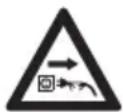
If the connecting cable or the extension cord is damaged:
▶ Do not touch the damaged area.
▶ Disconnect the mains plug from the power supply.
▶ Make sure your hands are dry before touching the connecting cable, extension cord or mains plugs.
- Plug the mains plug of the connecting cable or extension cord into a properly installed, shockproof socket with the correct fuse rating.
▶ Install the charger with a ground fault circuit interrupter (30 mA, 30 ms).
■ A damaged or unsuitable extension cable can result in electric shock. There is a risk of serious or fatal injury.
▶ Use an extension cable with the correct cable cross-section, 17.4.
WARNING
■ Overvoltage can occur in the charger if the line voltage or frequency are incorrect during charging. The charger may be damaged.
▶ Make sure that the mains voltage and the mains frequency of the power supply match the data on the rating plate of the charger.
If the charger is connected to a power strip, electrical components may be overloaded during the charging process. The components may overheat and cause a fire. Persons may be seriously or fatally injured, and property may be damaged.
- Ensure that the technical specifications for the power strip are not exceeded by the information on the rating plate of the charger and of all electrical devices connected to the power strip.
■ An incorrectly routed connecting cable or extension cord may be damaged, and people
may trip over it. People may be injured, and the connecting cable or extension cord may be damaged.
- Route and mark the connecting cable and extension cord so that people will not trip over them.
- Route the connecting cable and extension cord so that they are not under tension or tangled.
- Route the connecting cable and extension cord so that they will not be damaged, kinked or crushed and will not be chafed.
- Protect the connecting cable and extension cord from heat, oil and chemicals.
- Lay the connecting cable and extension cord on a dry surface.
■ The extension cable warms up in operation. If that heat cannot escape, it may cause a fire.
▶ If using a cable reel: completely unroll the cable reel.
■ If wiring and pipes are laid in the wall, they may be damaged if the charger is mounted on the wall. Contact with wiring can result in electric shock. This may result in serious injury to people and damage to property.
▶ Make sure there is no wiring or pipes in the wall at the proposed mounting site.
■ If the charger is not mounted on the wall as described in this User Manual, the charger or the battery may fall or the charger may overheat. This may result in injury to people and damage to property.
▶ Mount the charger on a wall as described in this User Manual.
■ If the charger is mounted on a wall with the battery inserted, the battery may fall out of the charger. This may result in injury to people and damage to property.
▶ Mount the charger on the wall first before inserting the battery.
4.10 Transporting
4.10.1 Compressor
WARNING
■ The compressor may tip over or shift during transport. People may be injured or property may be damaged.
▶ Switch off the compressor.
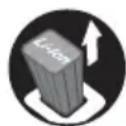
▶ Remove the battery.
▶ Transport the compressor with the packaging supplied.
4 Safety Precautions English
- Secure the packaging so that it cannot move.
4.10.2 Battery
WARNING
■ The battery is not protected against all ambient conditions. The battery may be damaged if it is exposed to certain ambient conditions, and damage to property may occur.
▶ Never transport a damaged battery.
▶ Transport the battery with the packaging.
■ The battery may tip over or shift during transport. People may be injured or property may be damaged.
- Secure the packaging so that it cannot move.
4.10.3 Charger
WARNING
■ The charger can tip over or shift while being transported. Persons may be injured or property may be damaged.
- Disconnect the mains plug from the socket.
▶ Remove the battery.
- Secure the charger with lashing straps, belts or a net to prevent it turning over and moving.
■ The connecting cable must not be used for carrying the charger. The connecting cable and the charger may be damaged.
- Wind up the connecting cable and attach it to the charger.
4.11 Storing
4.11.1 Compressor
WARNING
■ Children are not aware of and cannot assess the dangers of the compressor. Children may be seriously injured.
▶ Switch off the compressor.
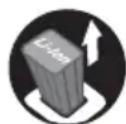
▶ Remove the battery.
- Store the compressor out of the reach of children.
■ Dampness can corrode the electrical contacts on the compressor and metal components. The compressor may be damaged.
▶ Switch off the compressor.
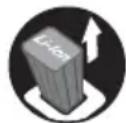
▶ Remove the battery.
- Store the compressor in a clean and dry condition.
4.11.2 Battery
WARNING
■ Children are not aware of and cannot assess the dangers of the battery. Children may be seriously injured.
- Store the battery out of the reach of children.
■ The battery is not protected against all ambient conditions. If the battery is exposed to certain ambient conditions, the battery may be irreparably damaged.
- Store the battery in a clean and dry condition.
- Store the battery in an enclosed space.
- Store the battery separately from the compressor.
▶ If the battery is stored in the charger, disconnect the mains plug and store the battery at a state of charge between 40% and 60%.
- Do not store the battery outside of the specified temperature limits, 7.5.
4.11.3 Charger
WARNING
■ Children are not aware of and cannot assess the dangers of a charger. Children can be seriously injured or killed.
▶ Disconnect the plug from the wall outlet.
- Store the charger out of reach of children.
■ The charger is not protected against all ambient conditions. If the charger is exposed to certain ambient conditions, the charger may be damaged.
▶ Disconnect the plug from the wall outlet.
▶ If the charger is hot: Allow the charger to cool down.
- Store the charger in a clean, dry place.
- Store the charger in an enclosed room.
▶ Do not store the charger outside of the specified temperature limits, 7.5.
■ The connecting cable should not be used for carrying the charger or hanging up the charger. The connecting cable and the charger may be damaged.
- Hold the charger by the housing in a secure grip.
English 5 Preparing the compressor for operation
- Hang the charger on the wall mounting.
4.12 Cleaning, maintenance and repair
WARNING
■ The compressor may start up unintentionally if the battery is left in place during cleaning, maintenance or repair operations. This may result in serious injury to people and damage to property.
▶ Switch off the compressor.
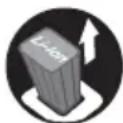
▶ Remove the battery.
■ Harsh cleaning agents, cleaning with a water jet or pointed objects can damage the compressor, the battery and the charger. If the compressor, the battery or the charger is not cleaned correctly, components may no longer function properly or safety devices may be rendered inoperative. People may suffer serious injuries as a result.
- Clean the compressor, battery and charger as described in this User Manual.
■ If the compressor, battery or charger are not serviced or repaired correctly, components may no longer function properly, or safety devices may be rendered inoperative. Persons may be seriously injured or killed.
- Do not attempt to service or repair the compressor, battery or charger.
▶ If the compressor, battery or the charger require servicing or repairs: Contact a STIHL authorized dealer for assistance.
5 Preparing the compressor for operation
5.1 Preparing the compressor for operation
The following steps must be performed before commencing work:
- Ensure that the following components are in a safe condition:
- Compressor and high-pressure hose, 4.6.1.
- Battery, 14.6.2.
- Charger, 4.6.3.
▶ Check the battery, 9.2.
▶ Fully charge the battery, ☐6.2.
▶ Clean compressor, 14.1.
▶ Check the controls, 19.1.
▶ If you cannot carry out these steps: Do not use the compressor and contact a STIHL authorized dealer instead.
6 Charging the Battery, LEDs
6.1 Mounting the charger on a wall
The charger can be mounted on a wall.
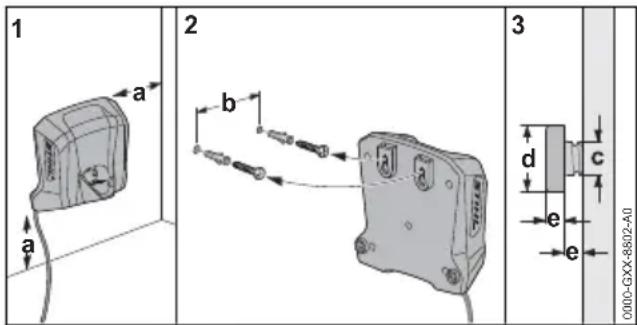
▶ Check the following points when mounting the charger on a wall:
– Use suitable mounting materials.
- The charger is level.
The following dimensions are observed:
- a = at least 100 mm
- b = 54 mm
- c = 4.5 mm
- d = 9 mm
- e = 2.5 mm
6.2 Charging the Battery
The charging time depends on various factors, e.g. the battery temperature or the ambient temperature. For optimum performance, note the recommended temperature ranges, 17.6. The actual charging time may vary from the charging time indicated. The charging time is indicated at www.stihl.com/charging-times.
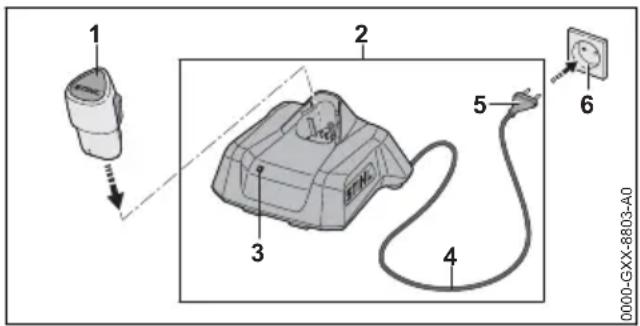
The charging process starts automatically when the mains plug is plugged into a socket and the battery is inserted into the charger. The charger switches off automatically when the battery is fully charged.
The battery and the charger warm up during charging.
7 Removing and Fitting the Battery English
- Insert the mains plug (5) in a convenient wall outlet (6).
The charger (2) runs a self test. The LED (3) glows green for about 1 second and then red for about 1 second.
▶ Fit the connecting cable (4).
▶ Insert the battery (1) in the guides in the charger (2) and press it home as far as stop. The LED (3) glows or flashes green. The battery (1) is being charged.
▶ When the LED (3) stops glowing: The battery (1) is fully charged and can be taken out of the charger (2).
▶ If the charger (2) is no longer being used: Disconnect the mains plug (5) from the socket (6).
6.3 Displaying the state of charge
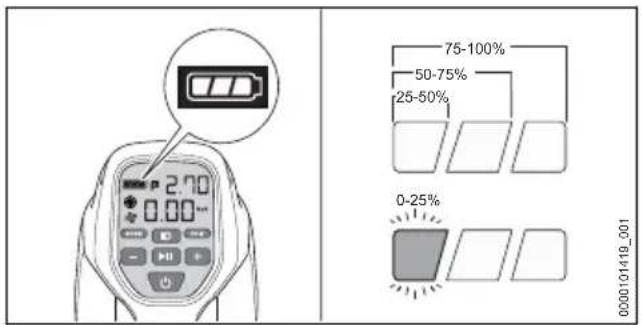
- Insert the battery.
▶ Switch on the compressor.
▶ If the left light bar flashes green: Charge battery.
6.4 LED on Charger
The LED indicates the operating status of the charger or faults. The LED can glow or flash green or red.
If the LED glows or flashes green, the battery is being charged.
▶ If the LED glows or flashes red: Troubleshooting, 16.
There is a malfunction in charger or battery.
7 Removing and Fitting the Battery
7.1 Inserting the Battery
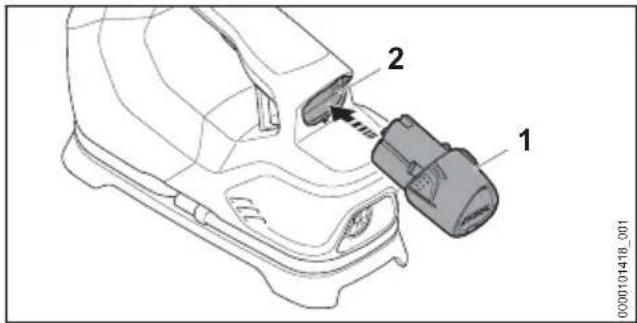
- Push the battery (1) into the battery compartment (2) as far as stop. The battery (1) engages in position with a click.
7.2 Removing the Battery
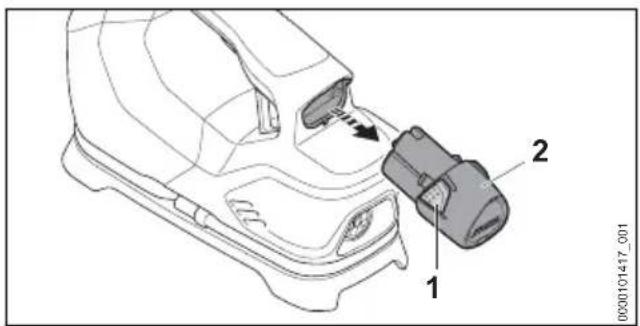
- Depress both locking hooks (1). The battery (2) is now unlocked and can be removed. - If the battery (2) is tilted: Press battery (2) downward slightly.
8 Switching the compressor on and off
8.1 Switching on the compressor
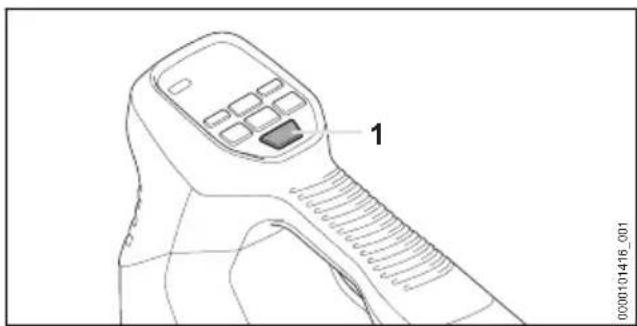
natural_image
Line drawing of a handheld device with labeled component '1' (no text or symbols beyond label)▶ Press the pushbutton (1).
The display on the control panel switches on, and the compressor is ready for use.
NOTICE
In high-pressure mode the compressor calibrates automatically each time it is switched on; in addition:
▶ First ensure that the compressor is switched off.
- Ensure that the high-pressure hose is disconnected from the product to be pumped up.
Press the pushbutton (1). The display on the control panel switches on. The compressor is calibrated and ready for operation.
The compressor switches off automatically if it is not operated for more than 5 minutes.
8.2 Switch off the compressor
▶ Press and hold the pushbutton until the display on the control panel switches off.
The compressor is switched off.
9 Testing the compressor and battery
9.1 Checking the controls
Switch on compressor
▶ Insert the battery.
▶ Press the pushbutton.
The display on the control panel switches on, and the compressor is ready for use.
▶ Press and hold the pushbutton ⏻ until the display on the control panel switches off.
▶ If the display does not switch off: Remove the battery and contact a STIHL authorized dealer.
The compressor is faulty.
9.2 Checking the battery
▶ Insert the battery.
- Press pushbutton until the display on the control panel switches on.
The compressor is operational.
▶ If the display does not switch on and the battery is fully charged: Do not use the compressor and battery and contact a STIHL authorized dealer.
There is an error in the compressor or battery.
10 Working with the compressor
10.1 Operation
The compressor can work in high-pressure operation or in blowing and suction operation.
- Place the compressor with its base on a clean, dry and level surface.
- Set down the compressor so that no sand or dirt can be suctioned in.
▶ Switch on the compressor.
High-pressure operation
▶ Unroll the high-pressure hose of the compressor.
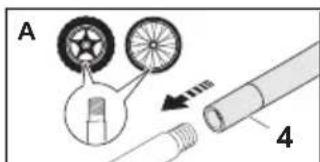
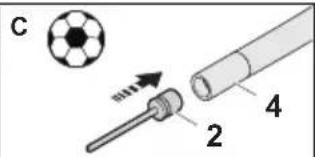
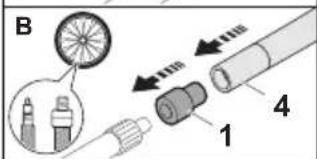
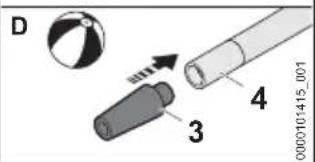
To pump up a tire with valve (A):
- Screw the high-pressure hose (4) directly onto the tire valve.
To pump up a tire with valve (B):
▶ Screw the adapter (1) onto the tire valve.
- Screw high-pressure hose (4) onto the adapter (1).
To pump up a ball (C) or other product (D):
- Insert the ball needle (2) or adapter (3) into the valve of the product to be pumped up.
▶ Screw the ball needle (2) or adapter (3) onto the high-pressure hose (4).
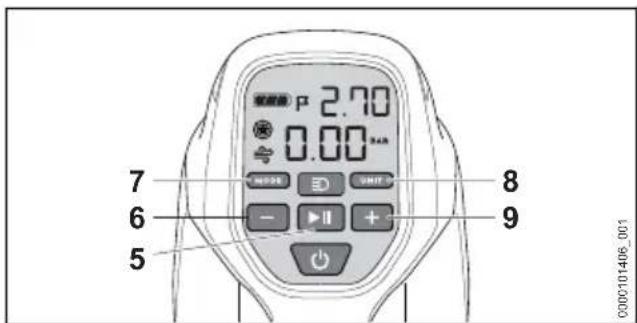
- Press pushbutton MODE (7) and select high-pressure operation * The measured pressure is shown on the display.
▶ Press pushbutton UNIT (8) and select the unit.
11 After Finishing Work English
▶ Set target pressure with pushbuttons - and + (6, 9).
▶ To change the set speed: Hold pushbuttons - and + (6, 9).
▶ Press the pushbutton ▶(5).
The compressor starts and tries to set the target pressure on the product to be pumped up. The compressor switches off upon reaching the target pressure.
NOTICE
■ If no pressure is applied, the compressor automatically switches off after 5 minutes.
▶ Check the product to be pumped up, valves and hose connection for pressures losses.
▶ Switch the compressor on again.
Blowing and suction mode
- Remove pressure hose on the underside of the compressor.
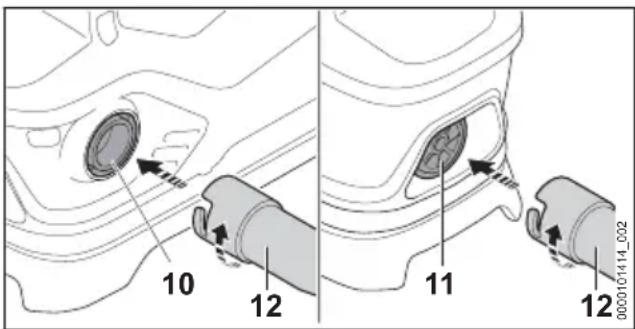
- Insert pressure hose (12) to the hose connection (10) for blowing mode or to the hose connection (11) for suction mode.
- Insert pressure hose (12) into the valve of the product to be pumped up or down.
▶ Press pushbutton MODE (7) and select the blowing or suction mode ≈.
▶ Press pushbutton ▶(5). The compressor starts the blowing and suction mode.
▶ If the desired pressure in the product is reached: Press pushbutton ▶II (5) again. The compressor switches off.
10.2 Switching on the lamp
▶ Switch on the compressor.
▶ Press the pushbutton ≡D
11 After Finishing Work
11.1 After finishing work
- Switch off the compressor and remove the battery.
▶ If the compressor is wet: Allow the compressor to dry.
▶ If the battery is moist or wet: Allow the battery to dry, ☐17.6.
▶ Clean the compressor.
▶ Clean the battery.
▶ If the compressor, battery or charger is hot: Allow the compressor, battery or charger to cool down.
12 Transporting
12.1 Transporting the compressor
- Switch off the compressor and remove the battery.
Carrying the compressor
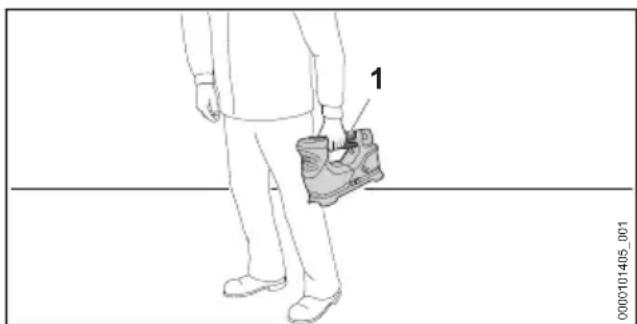
natural_image
Line drawing of a person standing with a shoe labeled '1' attached to the chest (no text or symbols on the shoe itself)- Carry the compressor by the handle (1) with one hand.
Transporting the compressor in a vehicle
▶ Transport the compressor with the packaging supplied.
- Secure the packaging so that it cannot move.
12.2 Transporting the battery
- Switch off the compressor and remove the battery.
▶ Check that the battery is in a safe condition.
▶ Transport the battery with the packaging supplied. - Secure the packaging so that it cannot move.
The battery is subject to the Carriage of Dangerous Goods regulations. The battery is classified as UN 3480 (lithium ion batteries) and has been tested pursuant to UN Manual Tests and Criteria Part III, Subsection 38.3.
The transport regulations can be found at www.stihl.com/safety-data-sheets.
12.3 Transporting the charger
▶ Disconnect the mains plug from the socket.
▶ Remove the battery.
- Wind up the connecting cable and attach it to the charger.
English 13 Storing
▶ Transporting the charger in a vehicle: Secure the charger with lashing straps, belts or a net to prevent it tipping over and shifting.
13 Storing
13.1 Storing the compressor
- Switch off the compressor and remove the battery.
▶ The compressor should be stored so that the following conditions are met: - The compressor cannot tip over or move.
- The compressor is out of the reach of children.
- The compressor is clean and dry.
13.2 Storing the battery
STIHL recommends storing the battery in a state of charge between 40% and 60%.
▶ The battery should be stored in such a way that the following conditions are met:
— The battery is out of the reach of children.
- The battery is clean and dry.
- The battery is in an enclosed space.
- Store the battery separately from the compressor.
- If the battery is stored in the charger, disconnect the mains plug and store the battery at a state of charge between 40% and 60%.
- Do not store the battery outside of the specified temperature limits, 17.5.
NOTICE
■ If the battery is not stored as described in this user manual, the battery may become deeply discharged and irreparably damaged.
▶ Charge a discharged battery before storing it. STIHL recommends storing the battery in a state of charge between 40% and 60%.
- Store the battery separately from the compressor.
13.3 Storing the Charger
▶ Disconnect the mains plug from the power supply.
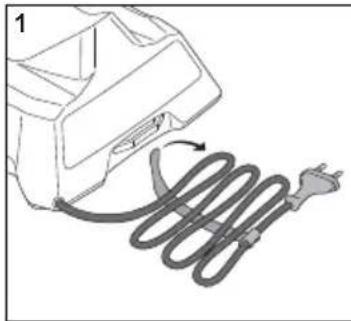
natural_image
Diagram of an electric shock absorber with a coiled wire and plug, no text or symbols present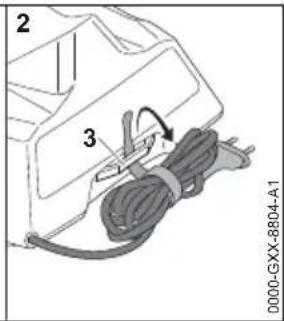
- Wind up the connecting cable and attach it to the charger.
▶ Observe the following points when storing the charger: - Charger is out of the reach of children.
- The charger is clean and dry.
- Charger is in an enclosed space.
- The charger is not suspended from the connecting cable or the holder (3) for the connecting cable.
- Do not store the charger outside of the specified temperature limits, 17.5.
14 Cleaning
14.1 Cleaning the compressor
- Switch off the compressor and remove the battery.
▶ Clean the compressor with a damp cloth. - Remove foreign objects from the battery compartment and clean the battery compartment with a damp cloth.
- Clean the electrical contacts in the battery compartment with a paintbrush or soft brush.
14.2 Cleaning the Battery
▶ Clean the battery with a damp cloth.
14.3 Cleaning the Charger
- Disconnect the mains plug from the power supply.
▶ Clean the charger with a damp cloth. - Clean the charger's electrical contacts with a paintbrush or a soft brush.
15 Maintenance and Repairs
15.1 Repairing the compressor, battery and charger
The compressor, the battery and the charger cannot be repaired by the user.
▶ If the compressor is damaged: Do not use the compressor and contact a STIHL authorized dealer.
▶ If the battery is defective or damaged: Replace the battery.
16 Troubleshooting English
▶ If the charger is defective or damaged: Replace the charger.
the connecting cable replaced by a STIHL servicing dealer.
▶ If the connecting cable has a malfunction or is damaged: Do not use the charger and have
16 Troubleshooting
16.1 Troubleshooting the compressor or battery
| Error Display on the compressor | Cause Remedy | |
| Compressor does not operate after it is switched on, or it suddenly stops working. | 1 Light bar flashes green.(The lamp function may still be available.) | The state of charge of the battery is too low. |
| b-L and 1 light bar flashes green. | The state of charge of the battery is too low or the battery is deeply discharged. | |
| bcL Battery is too cold. | Remove the battery.Allow battery to warm up. | |
| bcH The battery is too warm. | Remove the battery.Wait for the battery to cool down. | |
| A-H The motor current is too high. | Remove the battery and put it back in.Switch on the compressor.If the error continues to be shown: Do not use the compressor and consult a STIHL authorized dealer. | |
| No electrical contact between the compressor and the battery. | Remove the battery.Clean the electrical contacts in the battery compartment.Insert the battery. | |
| The compressor or battery is damp. | Allow the compressor or battery to dry,17.6. | |
| The power output of the compressor is diminished or insufficient. | 1 Light bar flashes green.(The lamp function may still be available.) | The state of charge of the battery is too low. |
| Adapter/ball needle and hose are incorrectly fitted. | Install the adapter/ball needle and hoses as described in this User Manual.Check adapter and hoses for leaks and pressure losses. | |
| Air escapes from the product or attachment parts to be pumped up. | Check product, valves and hose connection to be pumped up for pressures losses. | |
| Compressor run-time is too short. | The battery is not fully charged. | Fully charge the battery. |
| The battery service life has been exceeded. | Replace battery. |
16.2 Troubleshooting the Charger
| Fault LED on Charger | Cause Remedy | |
| Battery not being charged. | One LED glows red. | The battery is too warm or too cold. |
| The LED flashes red. | No electrical contact between charger and battery. | |
| There is a malfunction in the charger. | ||
| There is a fault in the battery. | ||
| The charger does not run a self test. | The LED glows green for about 1 second and then red for about 1 second. | Electrical contact to charger was briefly interrupted. |
17 Specifications
17.1 STIHL KOA 20.0 compressor
- Approved battery: STIHL AS
– Maximum pressure: 10.3 bar
– Weight without battery: 1.5 kg
For runtime, see www.stihl.com/battery-life.
– Battery Technology: Lithium-ion
- Voltage: 10.8 V
– Capacity in Ah: see rating label
– Energy content in Wh: see rating label
– Weight in kg: see rating label
17.3 STIHL AL 1 Charger
– Rated voltage: see rating pate
– Frequency: see rating plate
– Rated power: see rating plate
– Charging current: see rating plate
– Maximum energy content of approved STIHL AS battery: 12.5 Ah
For charging times see www.stihl.com/charging-times.
17.4 Extension Cords
If an extension cord is used, the cross sectional area of its conductors must meet the following minimum requirements – depending on the line voltage and length of the extension cord:
If rated voltage on the rating label is 220V to 240V:
– Cord length up to 20 m: AWG 15 / 1.5 mm ^4
- Cord length 20 m up to 50 m: AWG 13 / 2.5 mm ^2
If rated voltage on the rating label is 100V to 127V:
– Cord length up to 10 m: AWG 14 / 2.0 mm ^2
- Cord length 10 m up to 30 m: AWG 12 / 3.5 mm ^2
17.5 Temperature limits

WARNING
■ The battery is not protected against all ambient conditions. If the battery is exposed to certain environmental conditions, it may catch fire or explode. This may result in serious injury to people and damage to property.
- Do not charge the battery below -20°C or above 50°C.
▶ Do not use the compressor, battery or charger below -20^ or above 50^ . - Do not store the compressor, battery or charger below -20°C or above 70°C.
17.6 Recommended temperature ranges
For optimum performance of the compressor, the battery and the charger, observe the following temperature ranges:
– Charging: 5°C to 40°C
- Use: -10^ to 40^
- Storage: -20°C to +50°C
If the battery is charged, used or stored outside the recommended temperature ranges, performance may be restricted.
If the battery is wet or moist, allow the battery to dry for at least 48 h between 15°C and 50°C and with less than 70% humidity. Higher humidity may extend the drying time.
17.7 REACH
REACH is an EC regulation and stands for the Registration, Evaluation, Authorisation and Restriction of Chemical substances.
For information on compliance with the REACH regulation see www.stihl.com/reach.
18 Spare Parts and Accessories
18.1 Spare parts and accessories
STIHL These symbols indicate original STIHL spare parts and original STIHL accessories.
STIHL recommends the use of original STIHL spare parts and accessories.
Despite ongoing market observation, STIHL is unable to judge the reliability, safety and suitability of other manufacturers' spare parts and accessories; accordingly, STIHL cannot warrant for the use of those parts.
Original STIHL spare parts and original STIHL accessories are available from STIHL dealers.
19 Disposal
19.1 Disposing of compressor, battery and charger
Contact local authorities or a STIHL authorized dealer for information on disposal.
Improper disposal can be harmful to health and pollute the environment.
▶ Take STIHL products including packaging to a suitable collection point for recycling in accordance with local regulations.
- Do not dispose with domestic waste.
20 Product information
20.1 STIHL KOA 20.0 compressor
– Category: Battery compressor
– Manufacturer's brand: STIHL
- Model: KOA 20.0
– Serial identification number: SA06
The technical documents are stored at ANDREAS STIHL AG & Co. KG Produktzulassung.
The year of construction, the country of manufacture and the machine number are shown on the compressor.
21 Addresses
www.stihl.com
Table des matières
1 Lampe
natural_image
Line drawing of a handheld device with labeled component '1' (no text or symbols beyond label)1 Lampada
natural_image
Line drawing of a handheld device with labeled component '1' (no text or symbols beyond label)natural_image
Diagram of an electric vehicle charging plug with a curved wire, no text or symbols present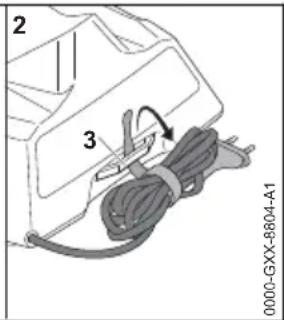
1 Lamp
natural_image
Line drawing of a handheld device with labeled component '1' (no text or symbols beyond label)▶ Druk de druktoets ⏻(1) in.
De compressor is defect.
9.2 Accu controlleren
natural_image
Diagram of an electric vehicle charging plug with a coiled cable, no text or symbols present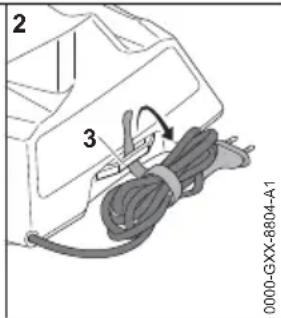
17.1 Compressor STIHL KOA 20.0
20.1 Compressor STIHL KOA 20.0
0458-057-9601-A