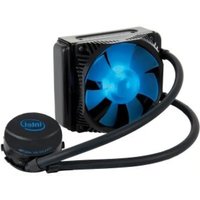
RTS2011LC - Computer cooling system INTEL - Free user manual and instructions
Find the device manual for free RTS2011LC INTEL in PDF.


| Product Type | Processor Cooling System |
| Brand | Intel |
| Model | RTS2011LC |
| Socket Compatibility | LGA 2011 (Socket R) |
| Heatsink Material | Copper base with aluminum fins |
| Number of Heat Pipes | 6 copper heat pipes of 6 mm |
| Heatsink Dimensions (L x W x H) | 150 x 120 x 165 mm |
| Weight | 850 g (with fan) |
| Fan Type | 120 mm Axial Fan |
| Fan Dimensions | 120 x 120 x 25 mm |
| Rotation Speed | 800 – 2000 RPM (PWM) |
| Noise Level | 20 – 35 dB(A) |
| Maximum Airflow | 70 CFM |
| Connector | 4-pin PWM |
| Supply Voltage | 12 V DC |
| Maximum Dissipable Power (TDP) | 150 W |
| Color | Black with black fan |
| Warranty | 3 years (limited) |
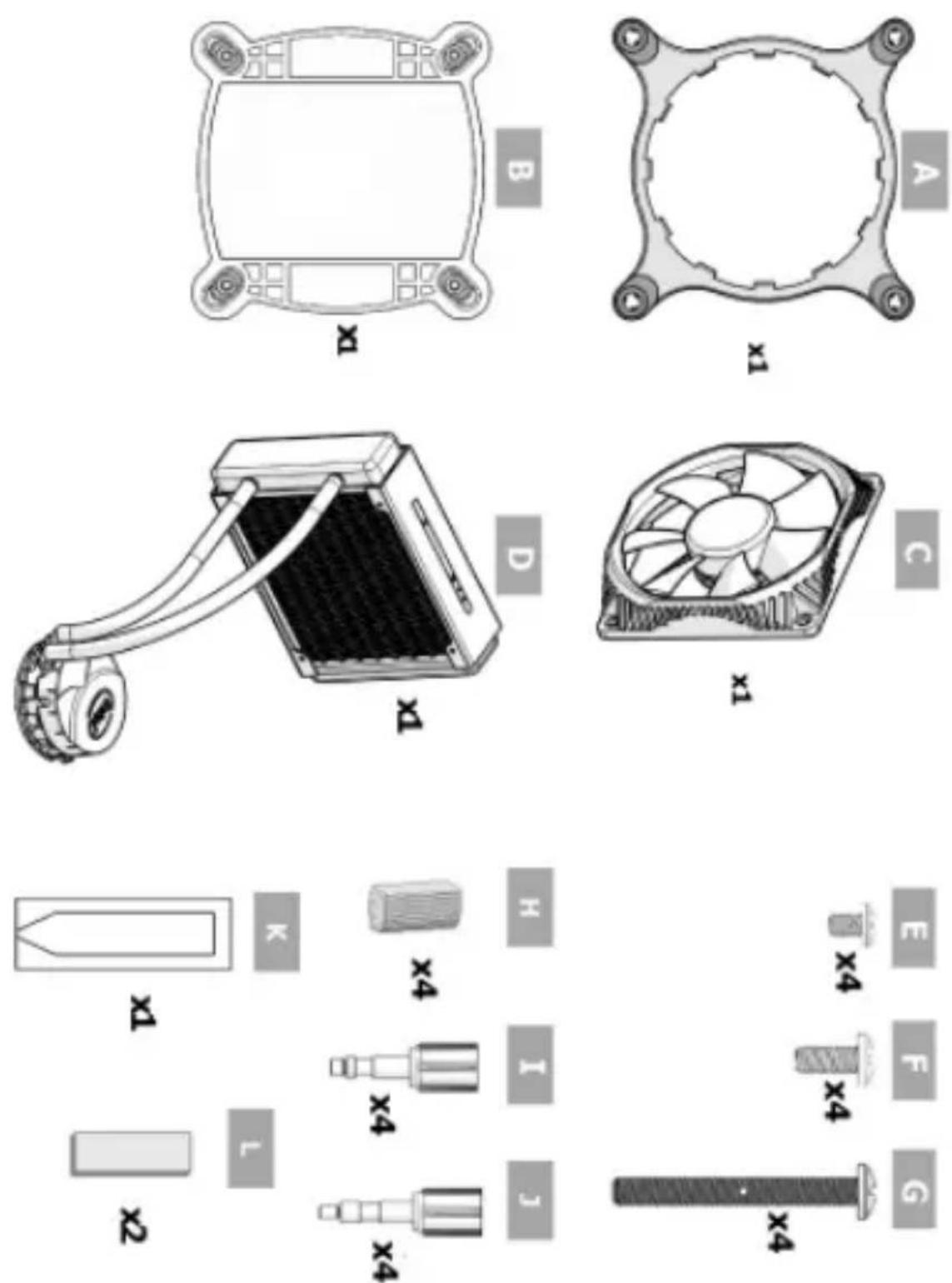
| Package Contents | Heatsink with pre-installed fan, backplate (UBP), thermal paste, mounting kit, manual |
| Installation | Requires a backplate (UBP) under the motherboard; do not fully tighten the screws until all are in place |
Frequently Asked Questions - RTS2011LC INTEL
User questions about RTS2011LC INTEL
0 question about this device. Answer the ones you know or ask your own.
Ask a new question about this device
Download the instructions for your Computer cooling system in PDF format for free! Find your manual RTS2011LC - INTEL and take your electronic device back in hand. On this page are published all the documents necessary for the use of your device. RTS2011LC by INTEL.
USER MANUAL RTS2011LC INTEL
■InstallationInstructions
■ Three Year Limited Warranty
Installation Notes for the Intel® RTS2011LC Liquid Cooling Solution
Before installing the boxed thermal solution and processor, please consider integration issues found in the installation notes available at http://support.intel.com/support/processors. Images in this manual are only intended as representations. The actual component appearance may vary.
IMPORTANT! The processor thermal solution requires a Unified Back Plate (UBP) that is attached under the main board prior to thermal solution mounting. The UBP will be provided with the main board and may be pre-attached. If your system is missing the UBP do not attempt to use the boxed processor thermal solution. Contact your main board manufacturer to get a replacement.
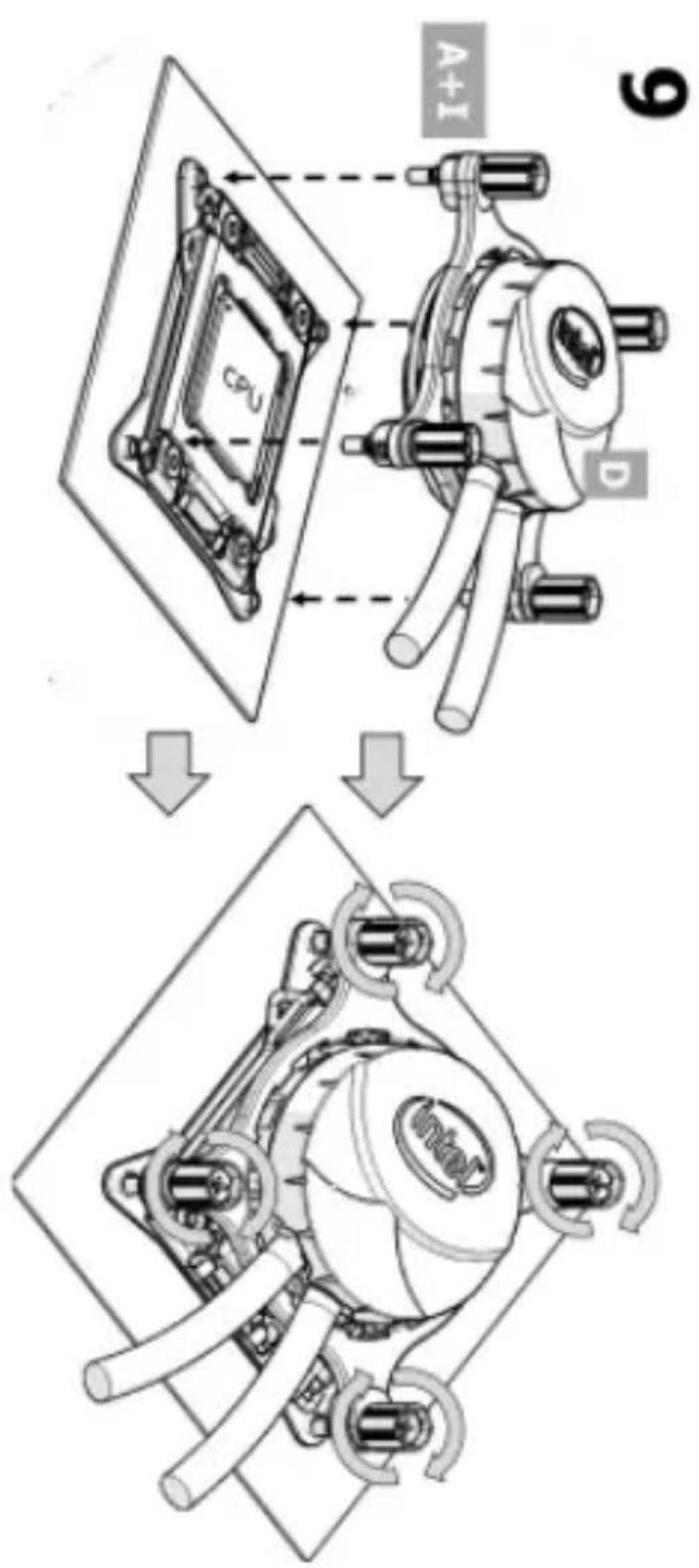
IMPORTANT! Do not fully tighten any heat sink retention screw until all screws are partially engaged.
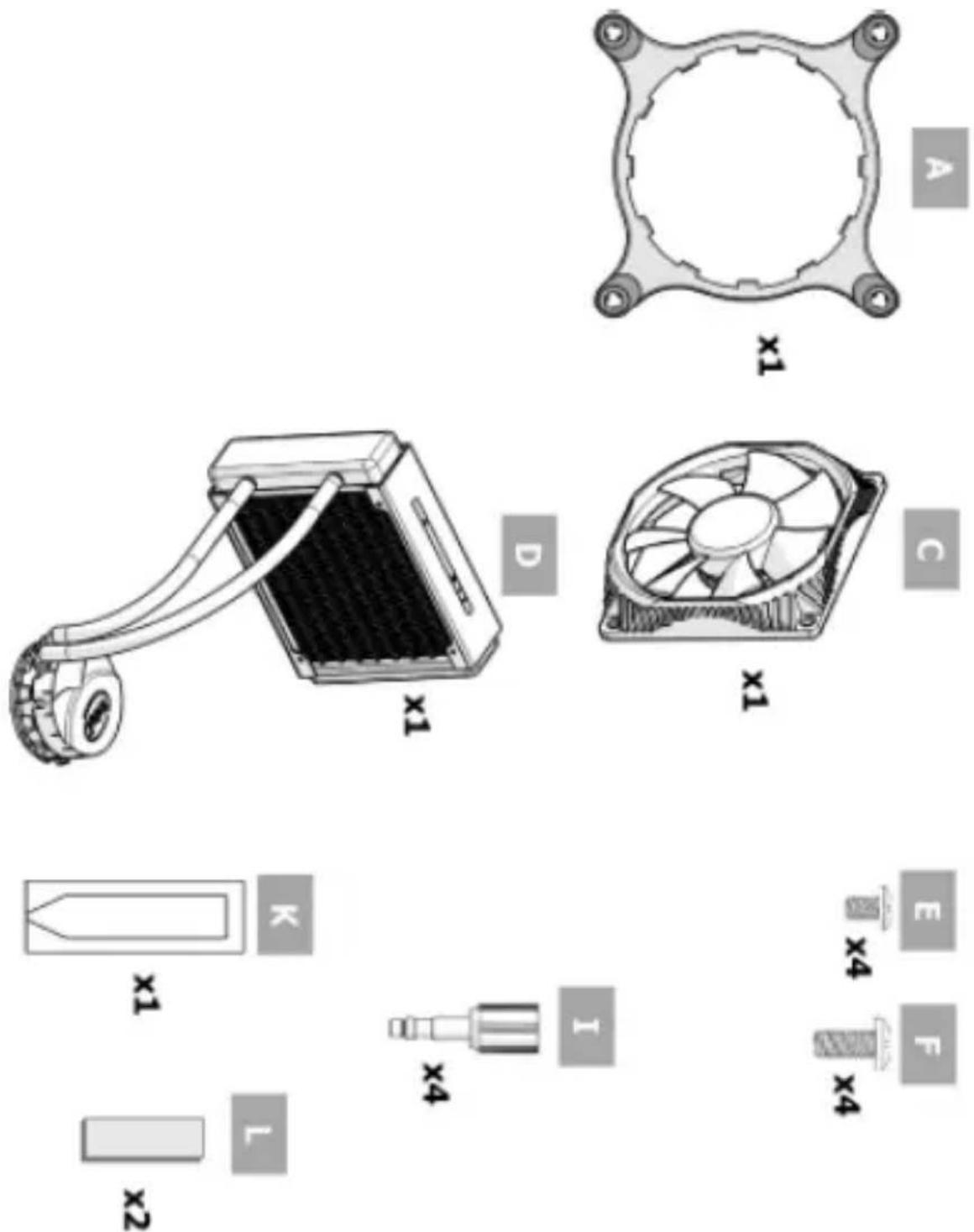
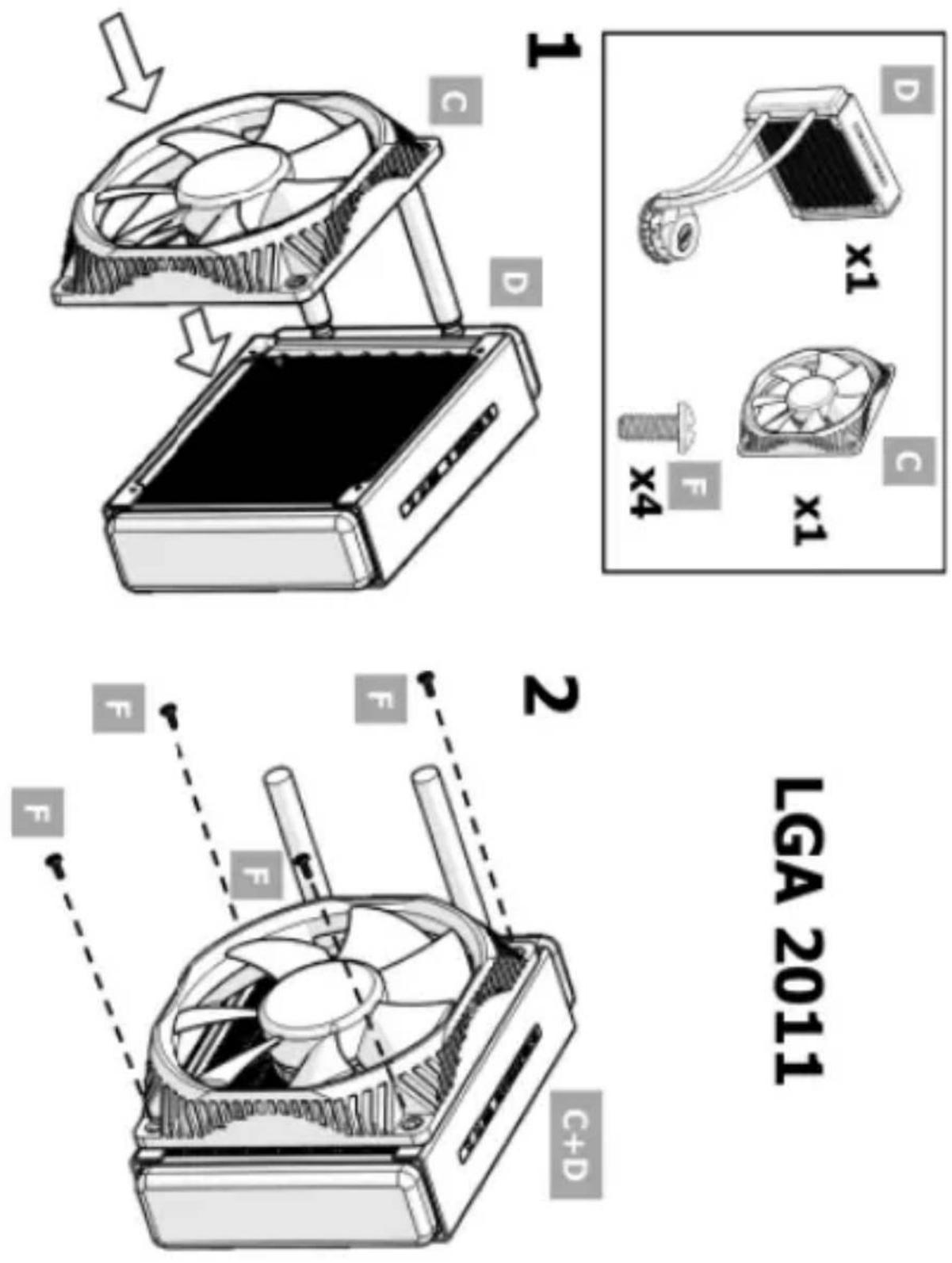
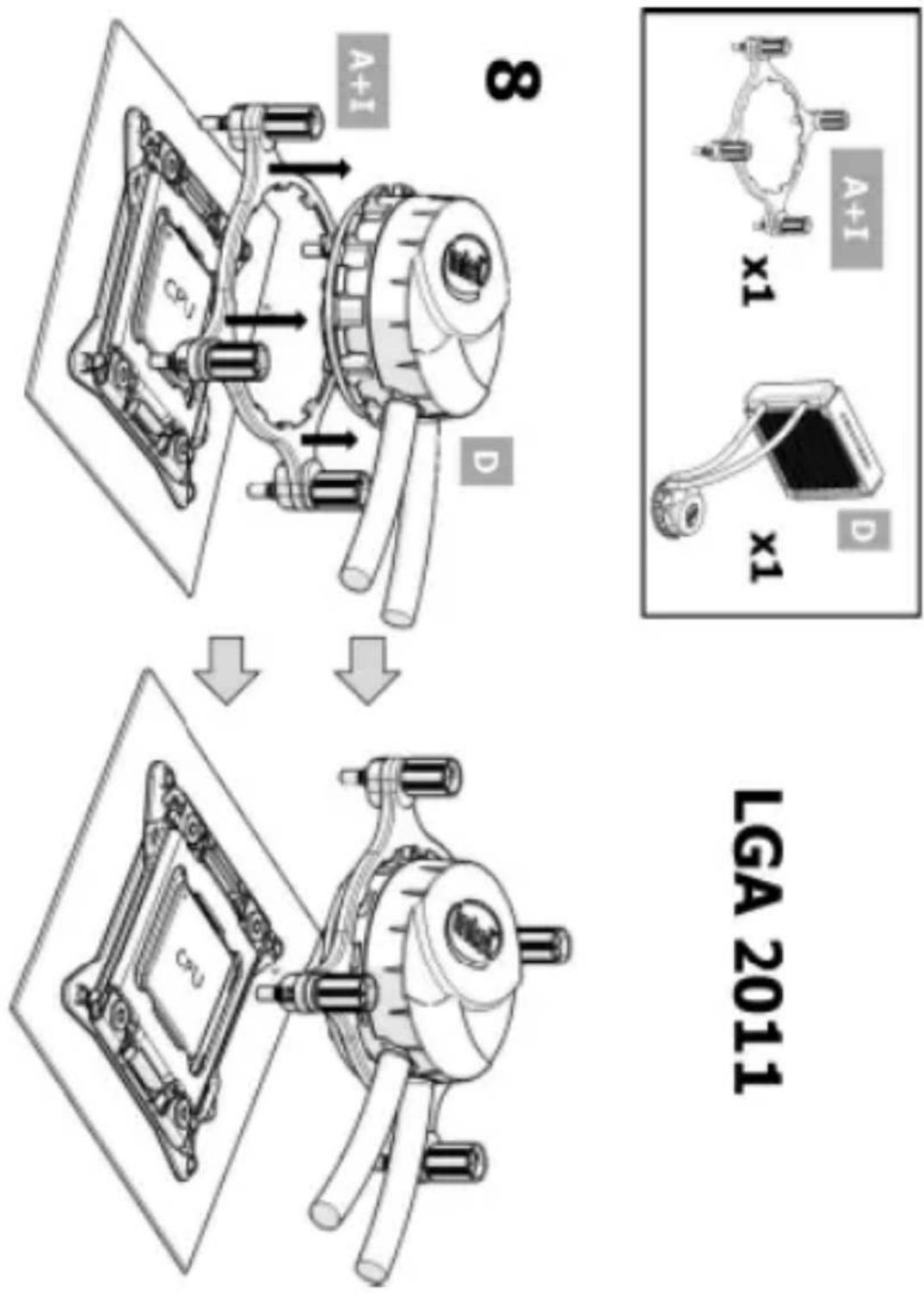
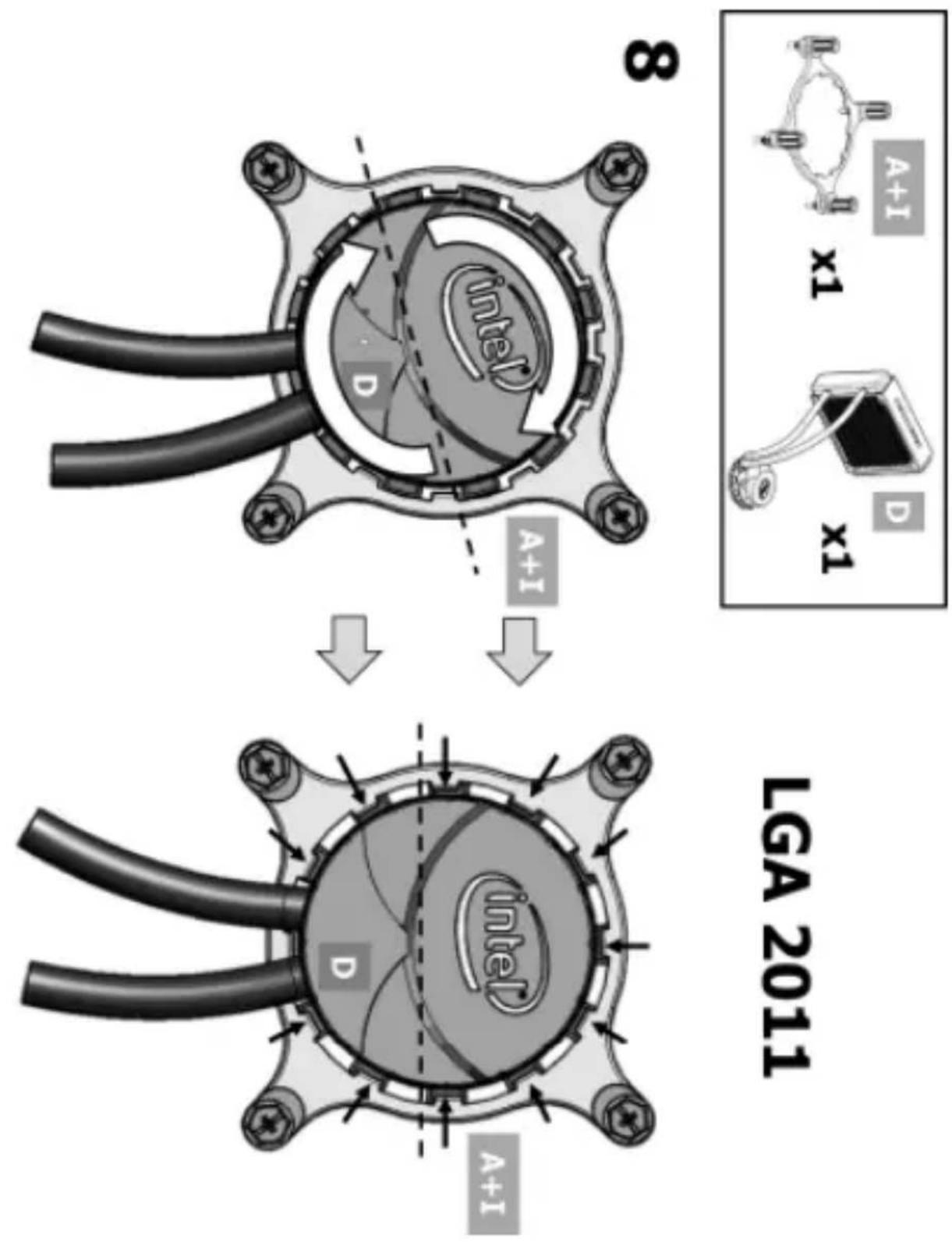
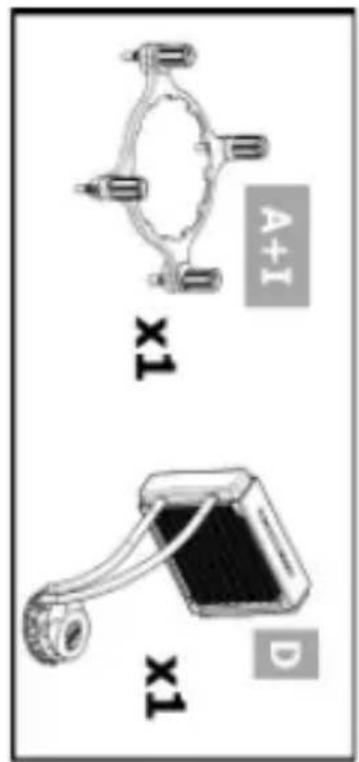
Installation Instructions for the Intel® RTS2011 LC Liquid Cooling Solution
Cooling Requirement Source: Thermal data based on Intel standard methodology using Intel® Core™ Processor base frequency. Margin determined based on actual test results. Results may vary.
NOTE: Installation instructions are not part of the Three Year Limited Warranty.
natural_image
Illustration of a silver video camera with black handle and lens (no text or symbols)http://www.intel.com/support/processors/sb/CS-032999.htm
http://www.intel.com/go/integration
http://www.intel.com/go/integration
LGA 2011
http://www.intel.com/go/integration
http://www.intel.com/go/integration
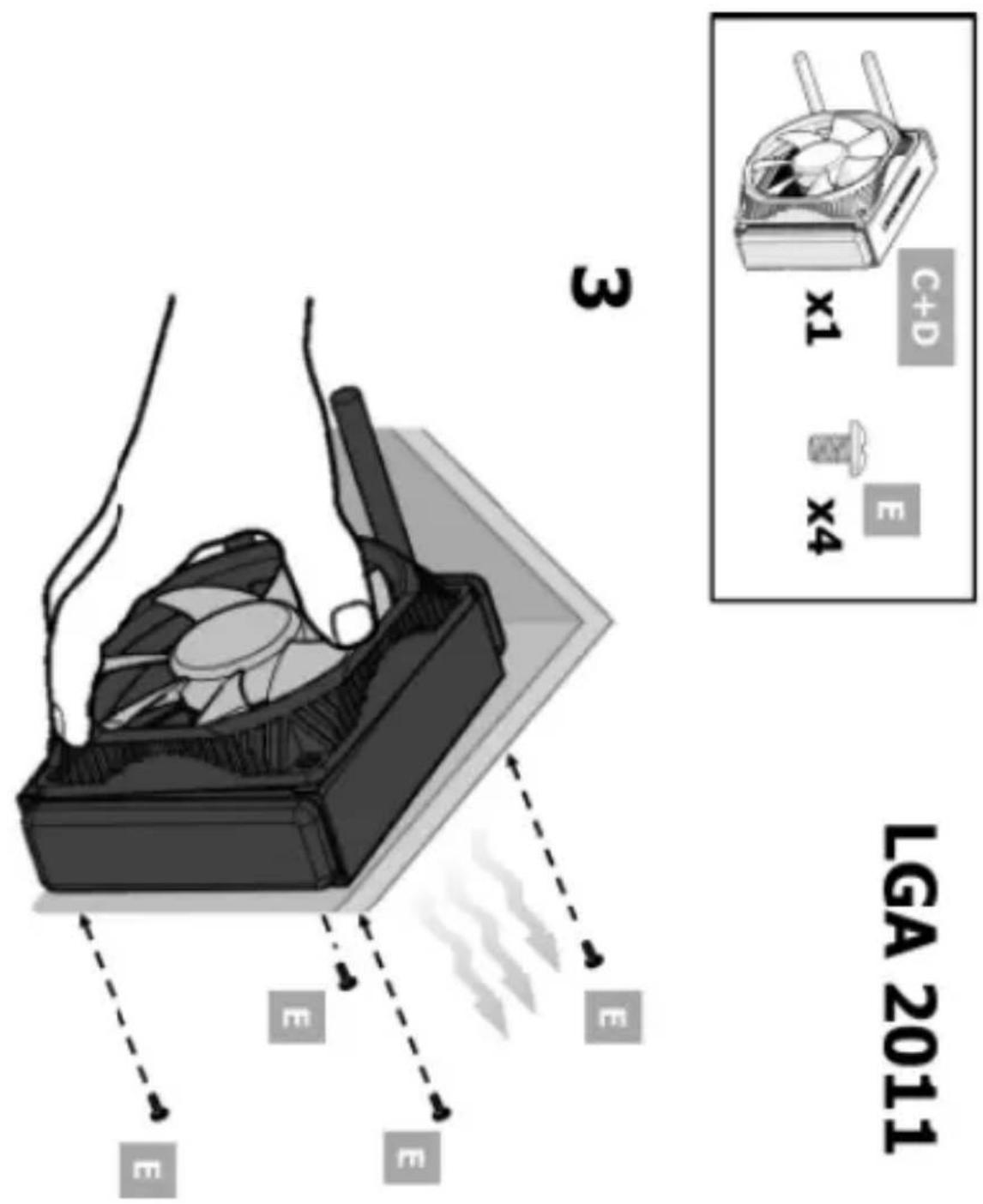
http://www.intel.com/go/integration
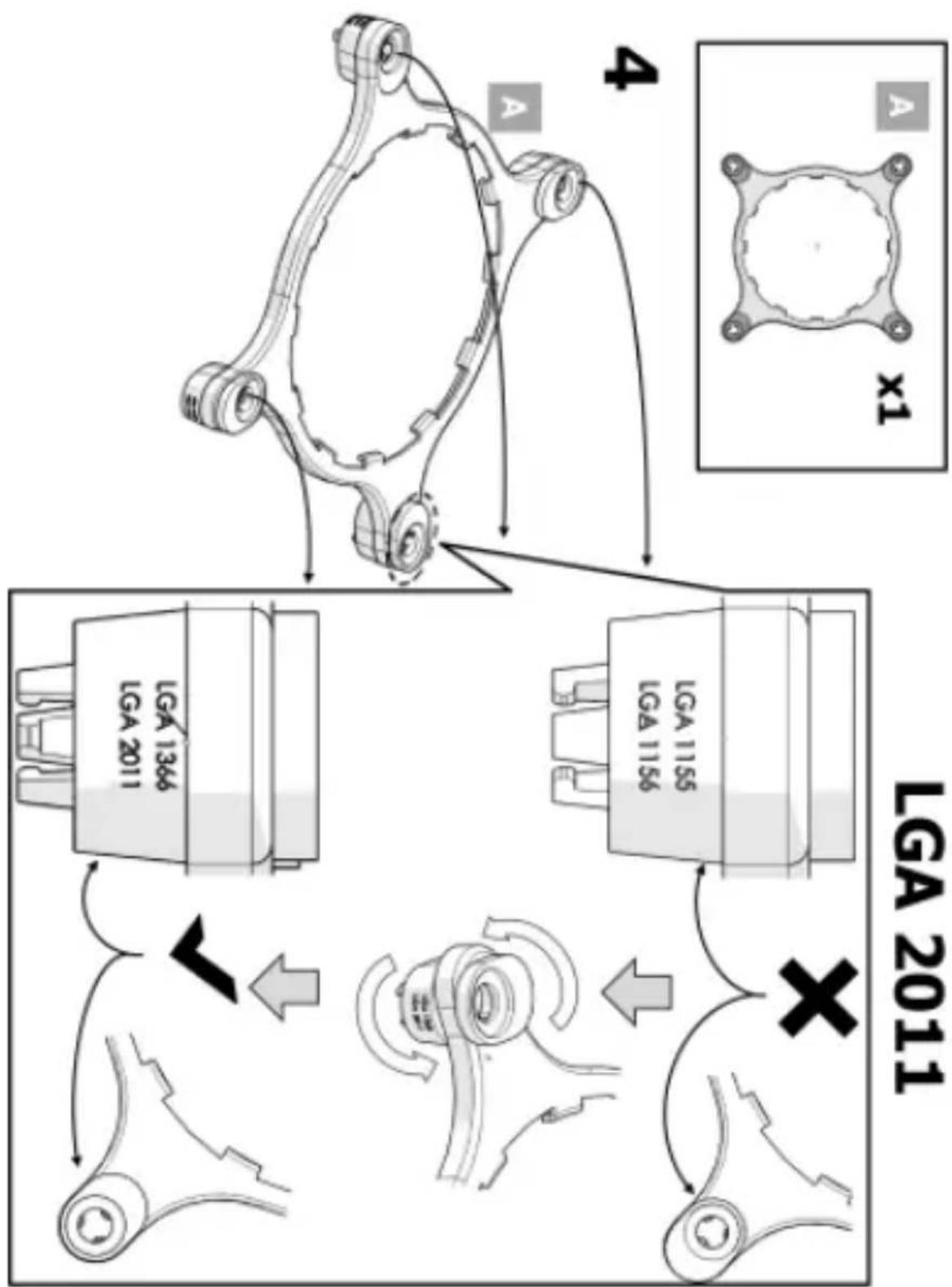
flowchart
graph TD
    A["Top Panel: Vehicle Suspension Structure"] --> B["Bottom Panel: Suspension Components"]
    B --> C["Arrow 4: Safety Support"]
    C --> D["Diagram 1: Comparison of LGA 2011"]
    D --> E["Arrow 5: Safety Control"]
    E --> F["Diagram 2: Comparison of LGA 2011"]
    F --> G["Arrow 6: Safety Security"]
    G --> H["Diagram 3: Comparison of LGA 2011"]
    H --> I["Arrow 7: Safety Security"]
    I --> J["Diagram 4: Comparison of LGA 2011"]
    J --> K["Arrow 8: Safety Security"]
    K --> L["Diagram 5: Comparison of LGA 2011"]
    L --> M["Arrow 9: Safety Security"]
    M --> N["Diagram 6: Comparison of LGA 2011"]
    N --> O["Arrow 10: Safety Security"]
    O --> P["Diagram 7: Comparison of LGA 2011"]
    P --> Q["Arrow 11: Safety Security"]
    Q --> R["Diagram 8: Comparison of LGA 2011"]
    R --> S["Arrow 12: Safety Security"]
    S --> T["Diagram 9: Comparison of LGA 2011"]
    T --> U["Arrow 13: Safety Security"]
    U --> V["Diagram 10: Comparison of LGA 2011"]
http://www.intel.com/go/integration
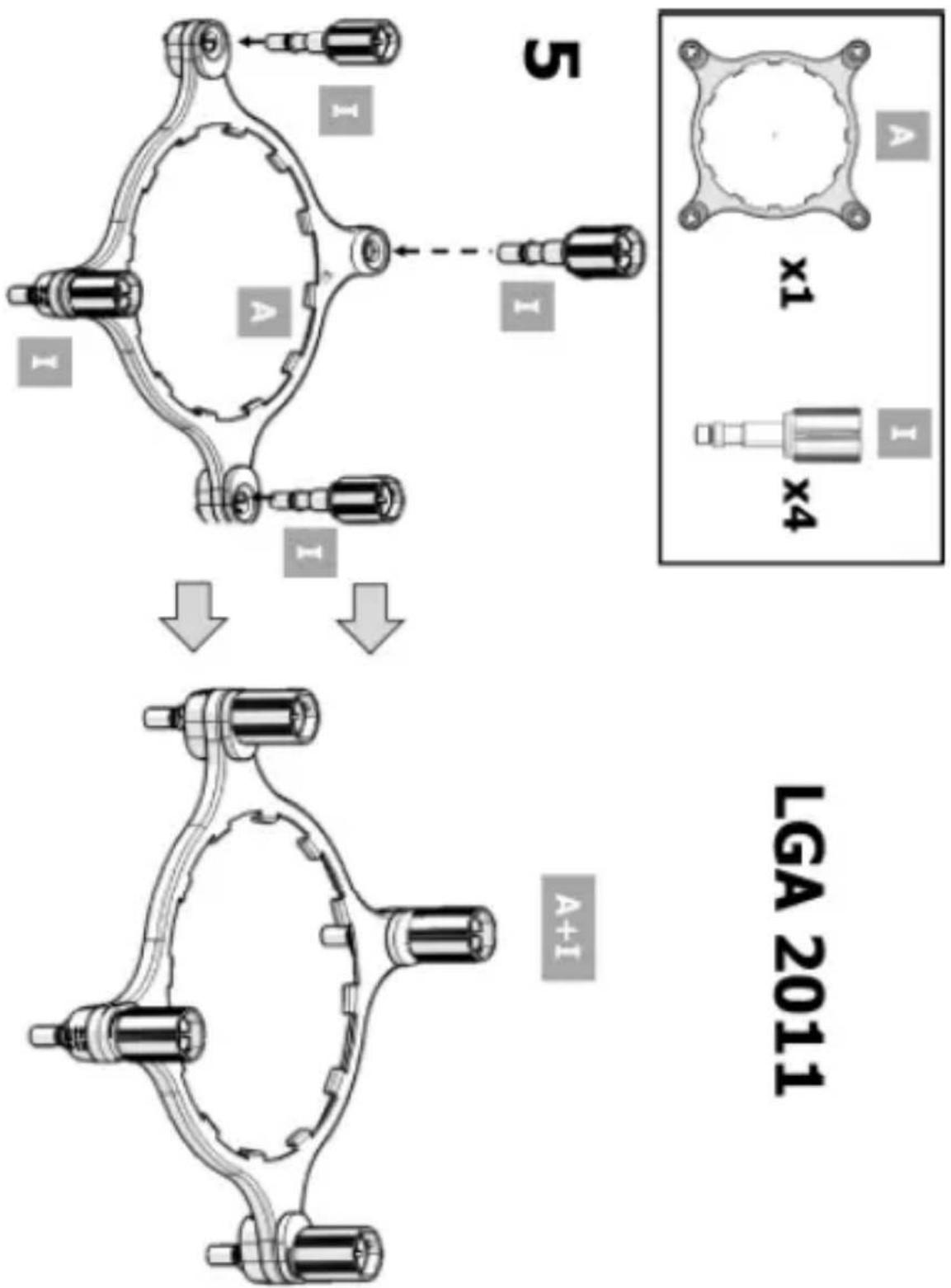
flowchart
graph TD
    A["Component 5"] --> B["Assembly"]
    B --> C["Component 4"]
    style A fill:#f9f,stroke:#333
    style B fill:#ccf,stroke:#333
    style C fill:#cfc,stroke:#333
    subgraph Component 5
        D["Component x1"]
        E["Component x4"]
    end
    subgraph Component 4
        F["Component A+I"]
    end
    D --> G["Final Assembly"]
    E --> G
    F --> G
    style D fill:#fff,stroke:#000
    style E fill:#fff,stroke:#000
    style F fill:#fff,stroke:#000
http://www.intel.com/go/integration
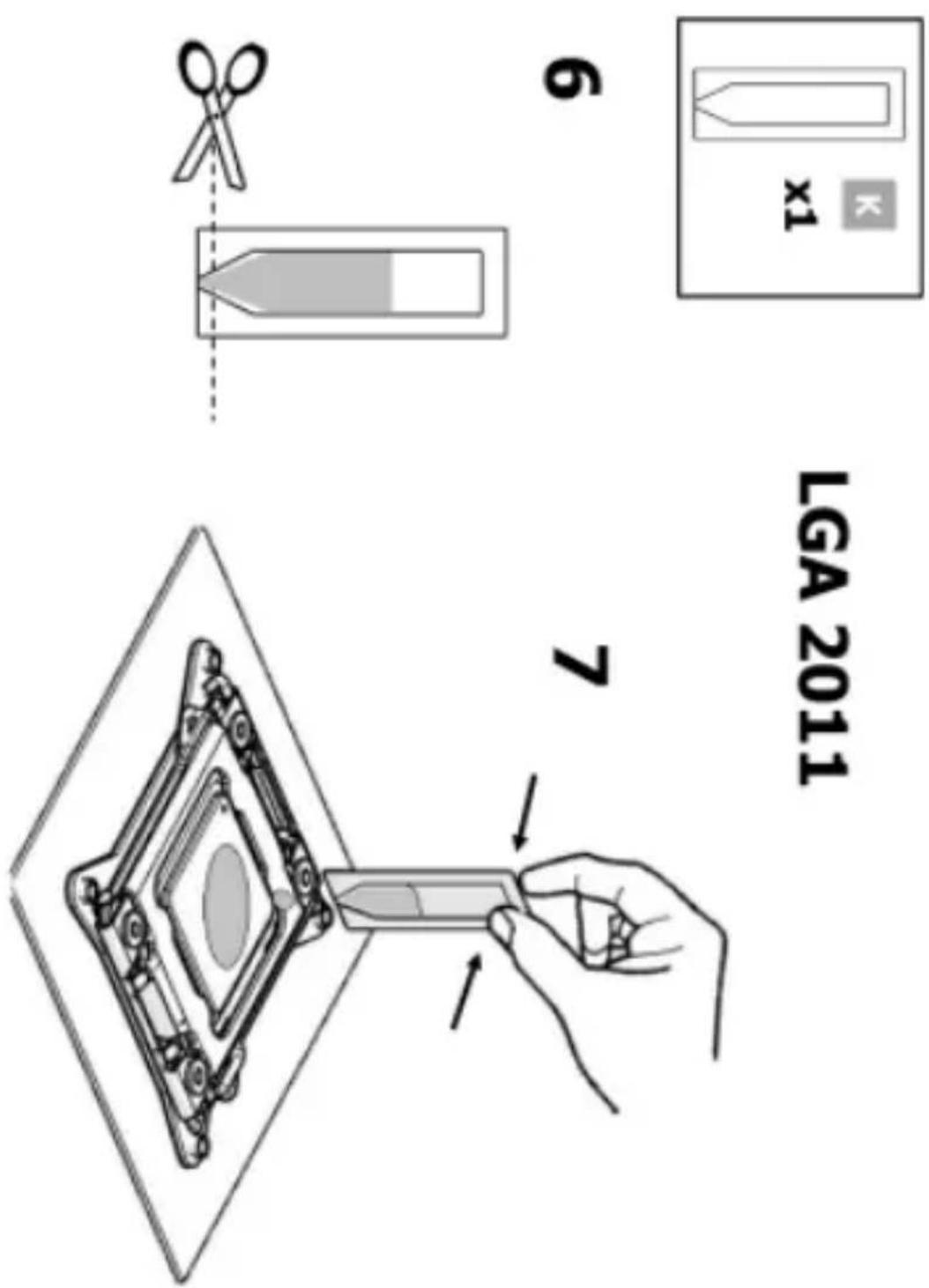
http://www.intel.com/go/integration
http://www.intel.com/go/integration
http://www.intel.com/go/integration
LGA 2011
http://www.intel.com/go/integration
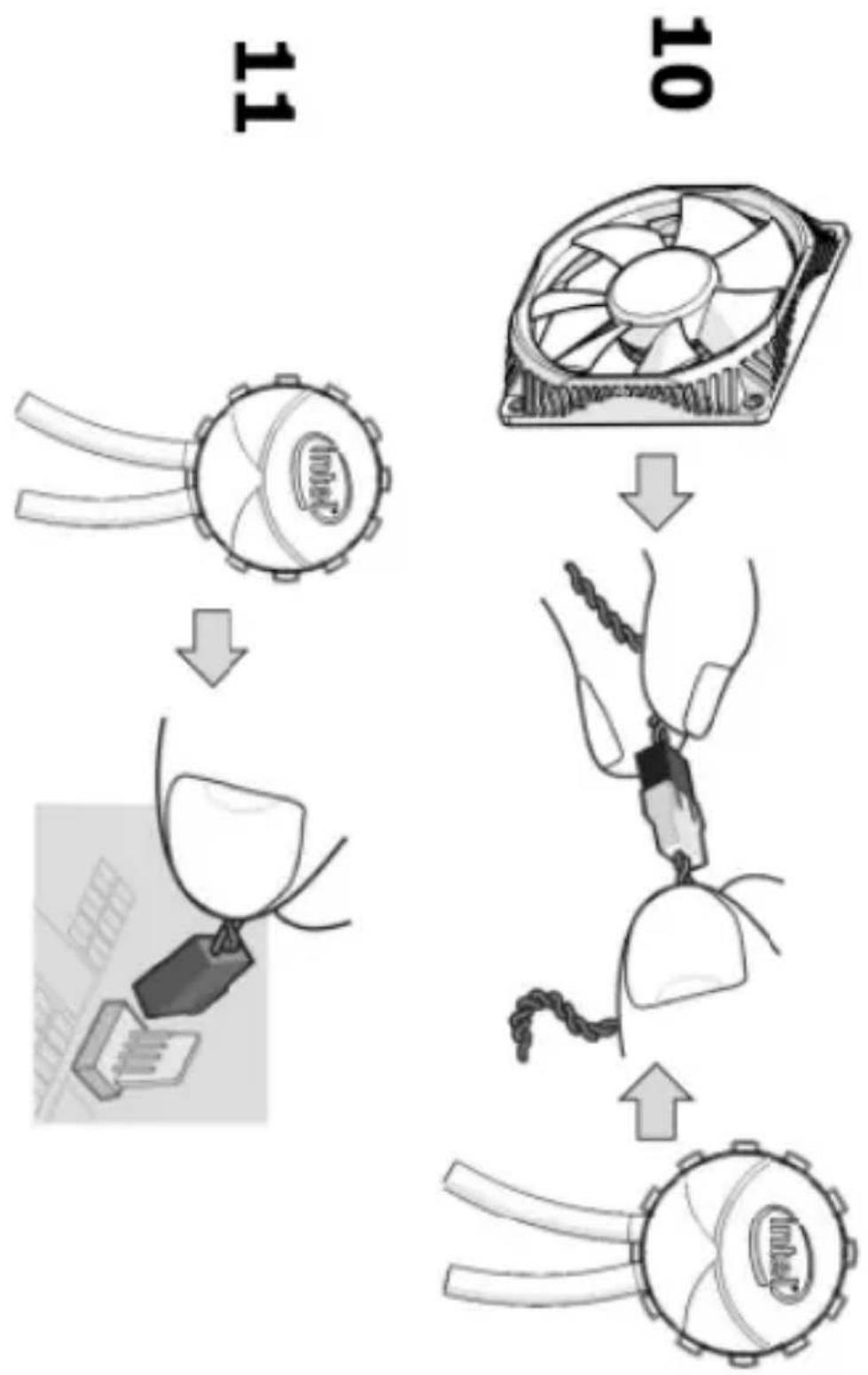
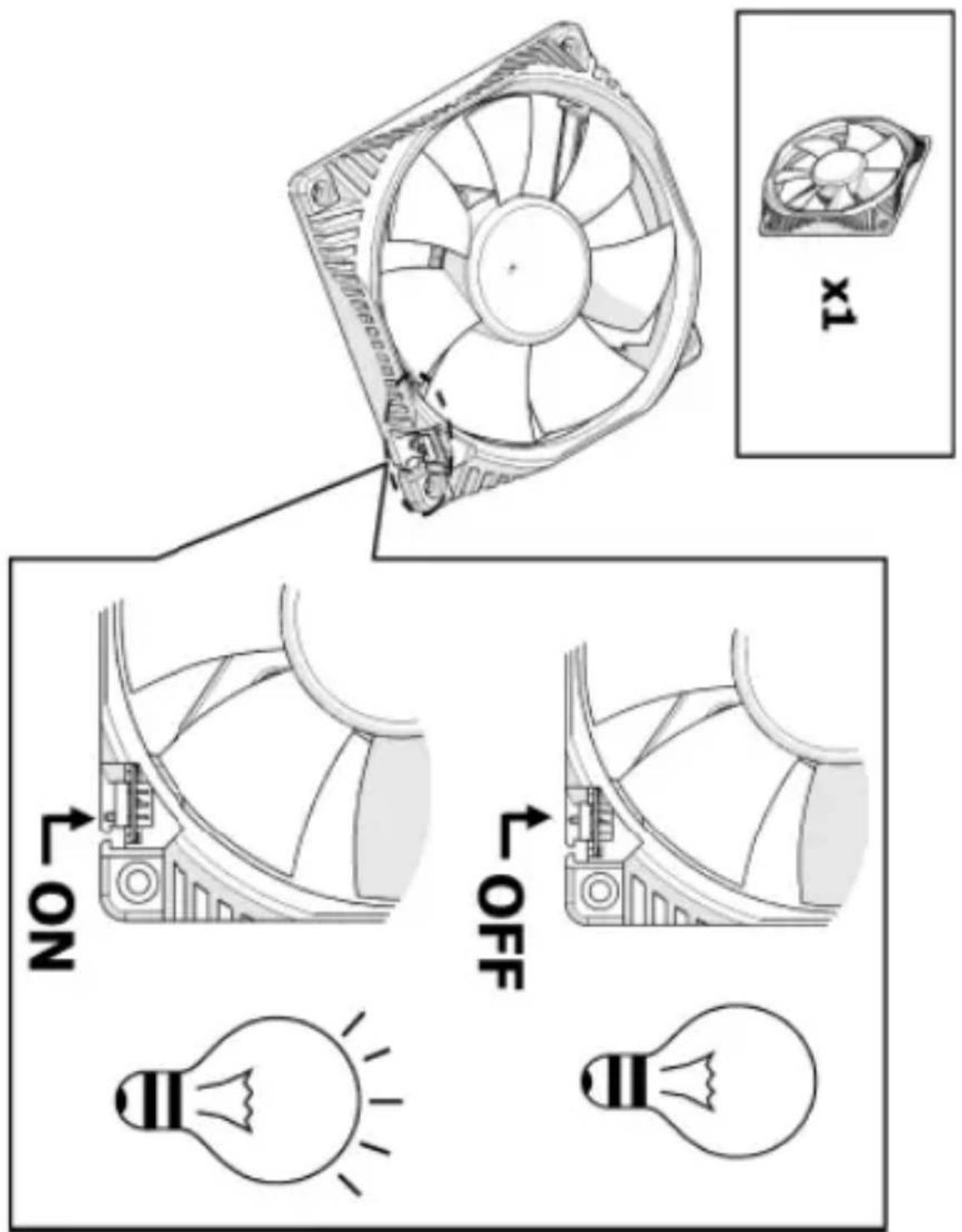
flowchart
graph TD
    A["Device 11"] --> B["Computer fan with CPU"]
    B --> C["Computer fan with fan blade"]
    C --> D["Computer fan with fan blade and cable"]
    D --> E["Computer fan with fan blade and cable"]
    E --> F["Computer fan with fan blade and cable"]
LGA 2011
http://www.intel.com/go/integration
LGA 1155/56, LGA 1366
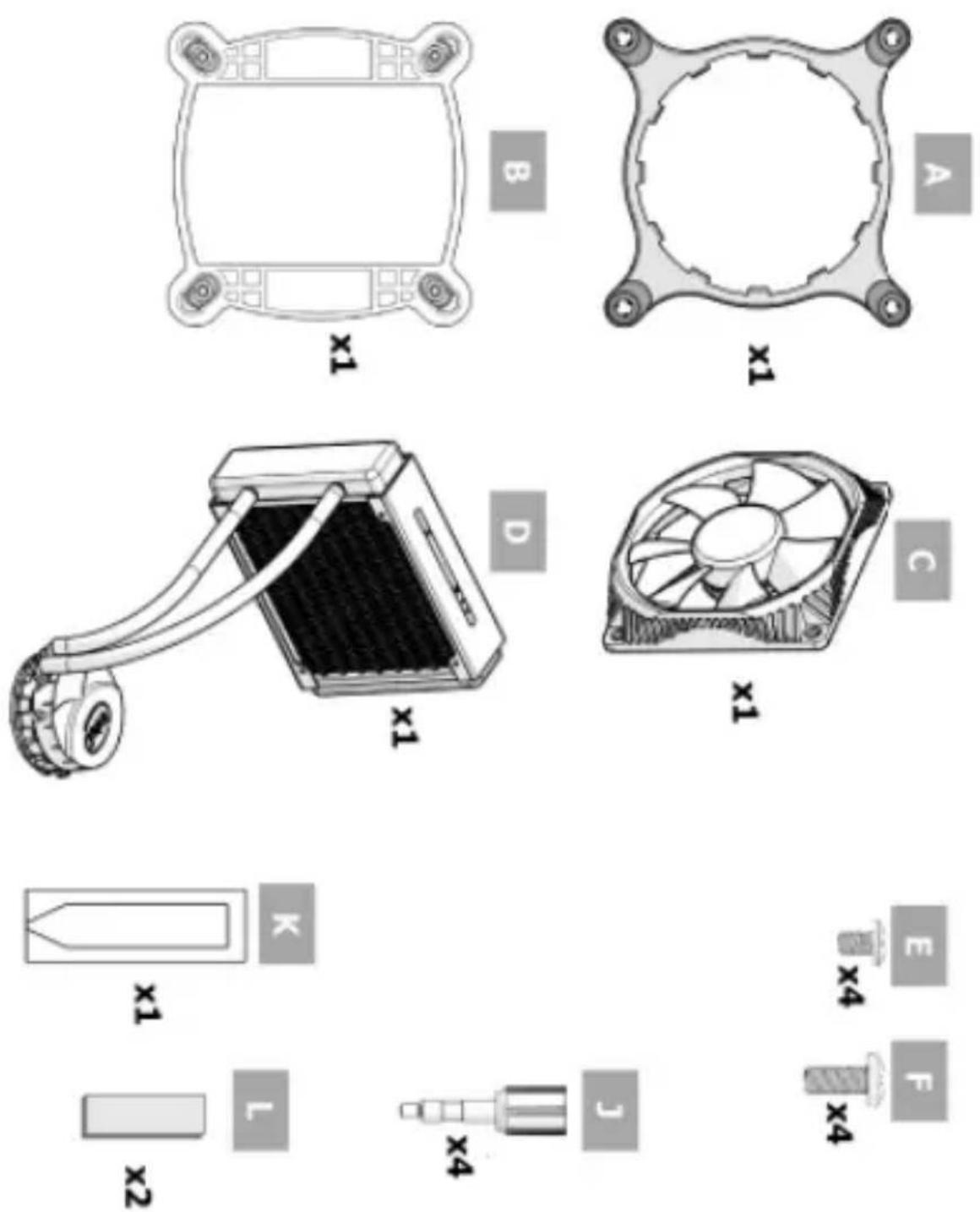
http://www.intel.com/go/integration
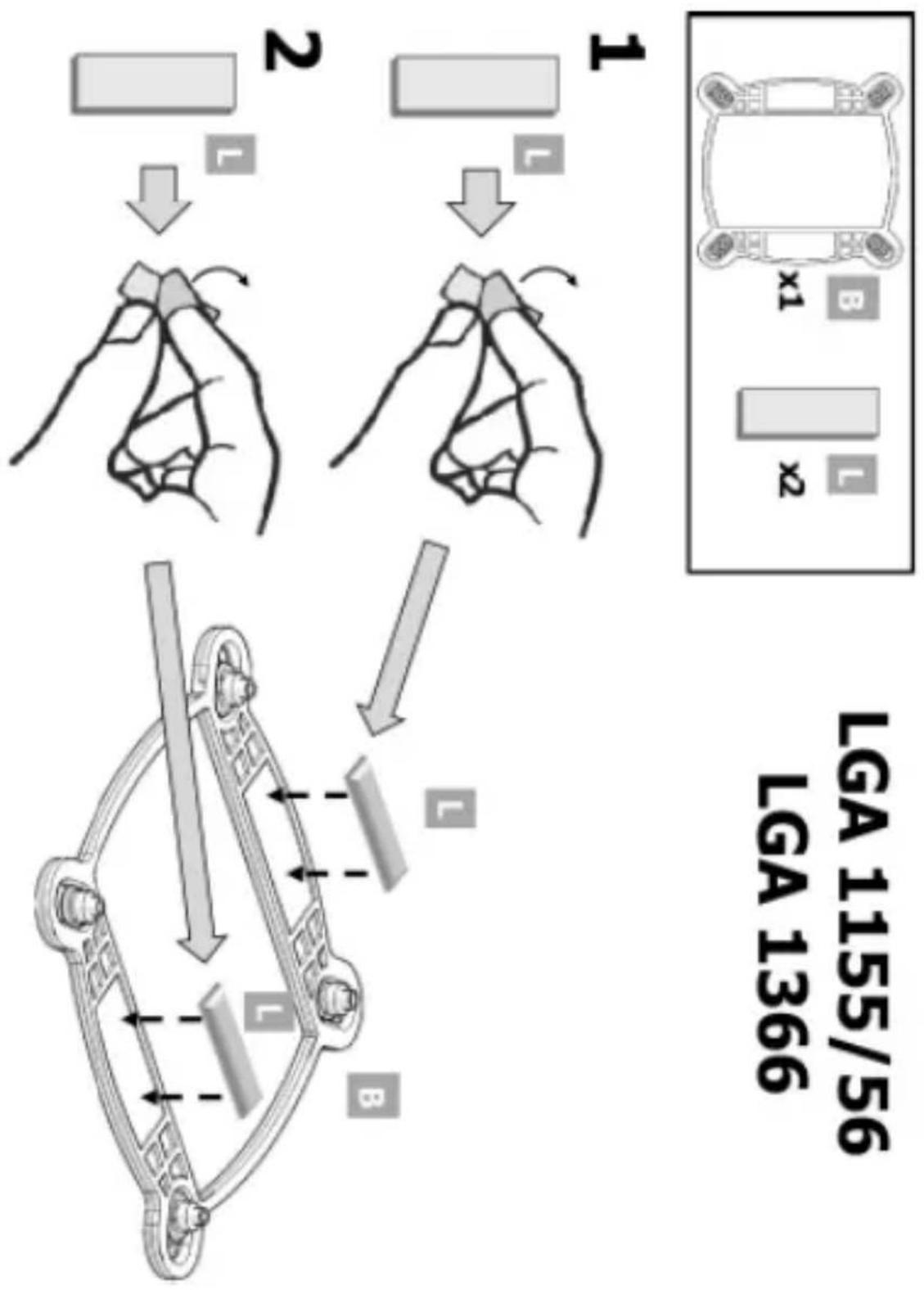
flowchart
graph TD
    A["Step 2: Hand lifting"] --> B["Step 1: Hand lifting"]
    B --> C["Step 3: Hand lifting"]
    C --> D["Step 4: Hand lifting"]
    D --> E["Step 5: Hand lifting"]
    E --> F["Step 6: Hand lifting"]
    F --> G["Step 7: Hand lifting"]
    G --> H["Step 8: Hand lifting"]
    H --> I["Step 9: Hand lifting"]
    I --> J["Step 10: Hand lifting"]
    J --> K["Step 11: Hand lifting"]
    K --> L["Step 12: Hand lifting"]
    L --> M["Step 13: Hand lifting"]
    M --> N["Step 14: Hand lifting"]
    N --> O["Step 15: Hand lifting"]
    O --> P["Step 16: Hand lifting"]
    P --> Q["Step 17: Hand lifting"]
    Q --> R["Step 18: Hand lifting"]
    R --> S["Step 19: Hand lifting"]
    S --> T["Step 20: Hand lifting"]
http://www.intel.com/go/integration

http://www.intel.com/go/integration
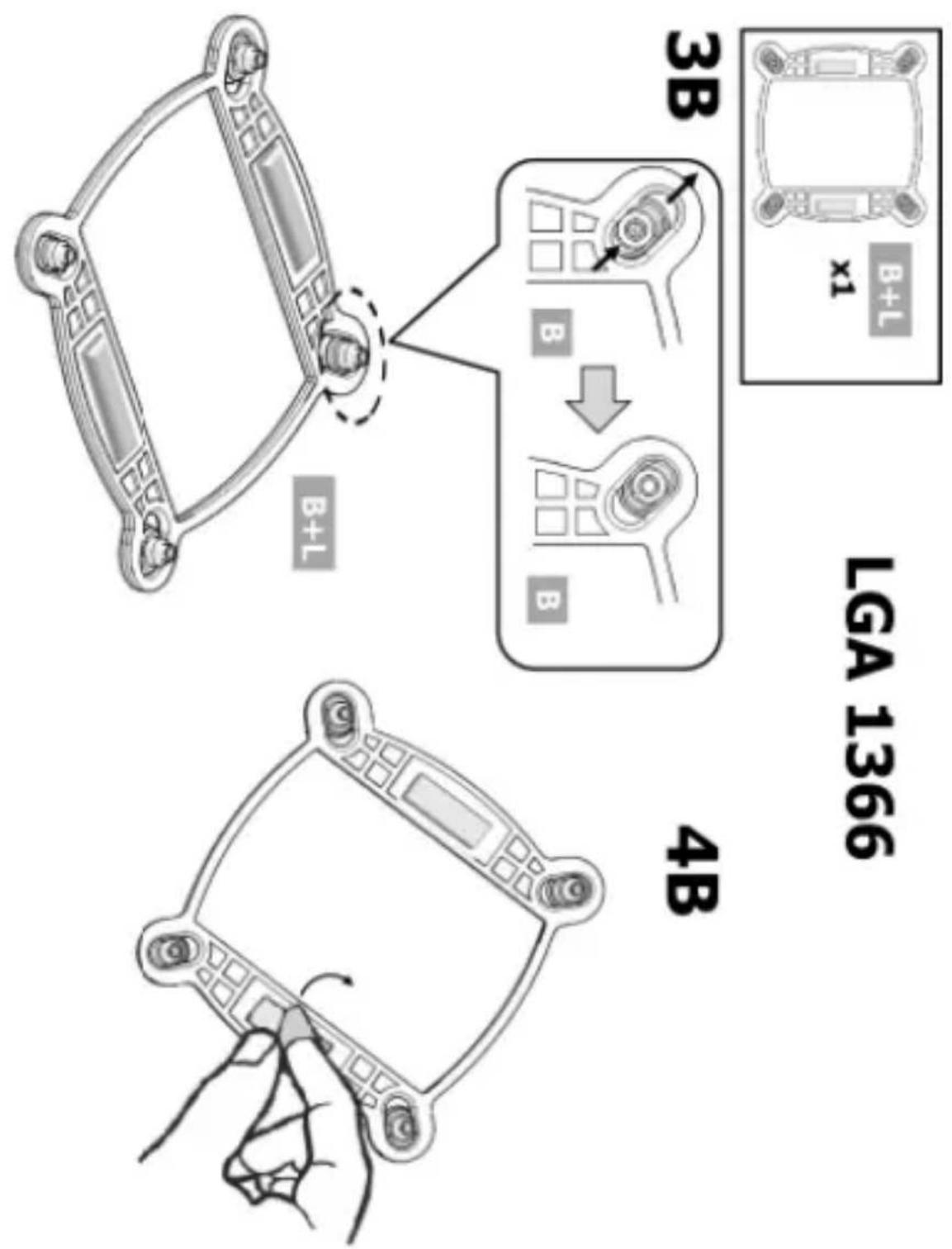
http://www.intel.com/go/integration
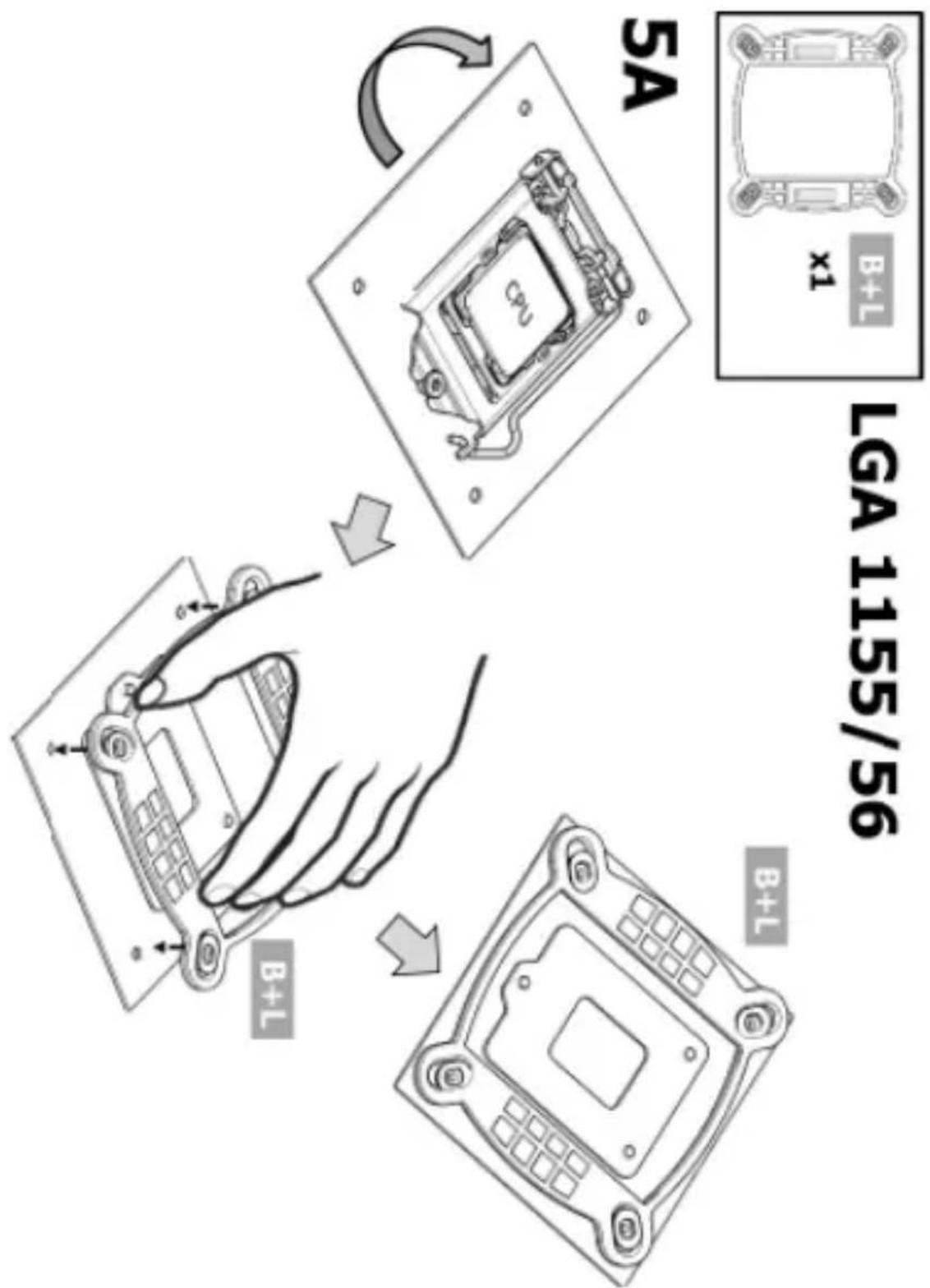
http://www.intel.com/go/integration
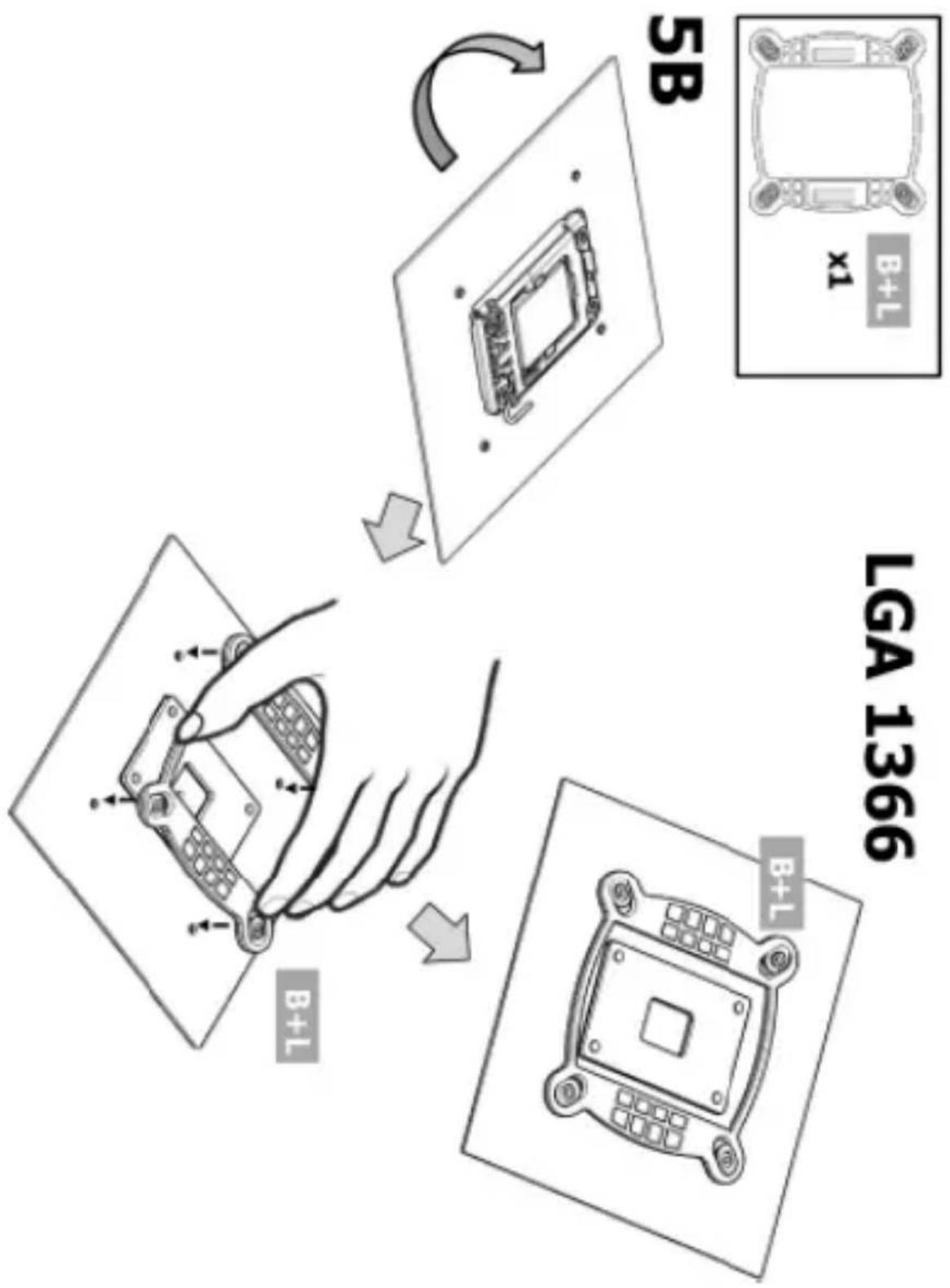
http://www.intel.com/go/integration
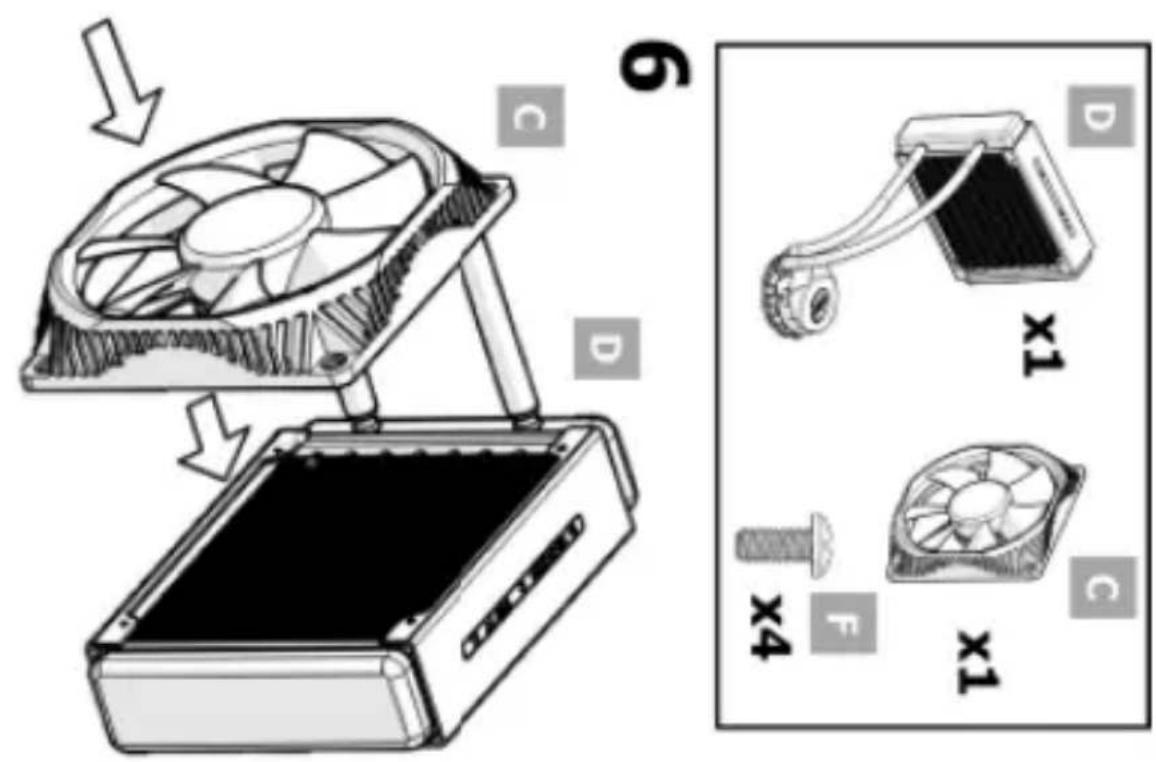
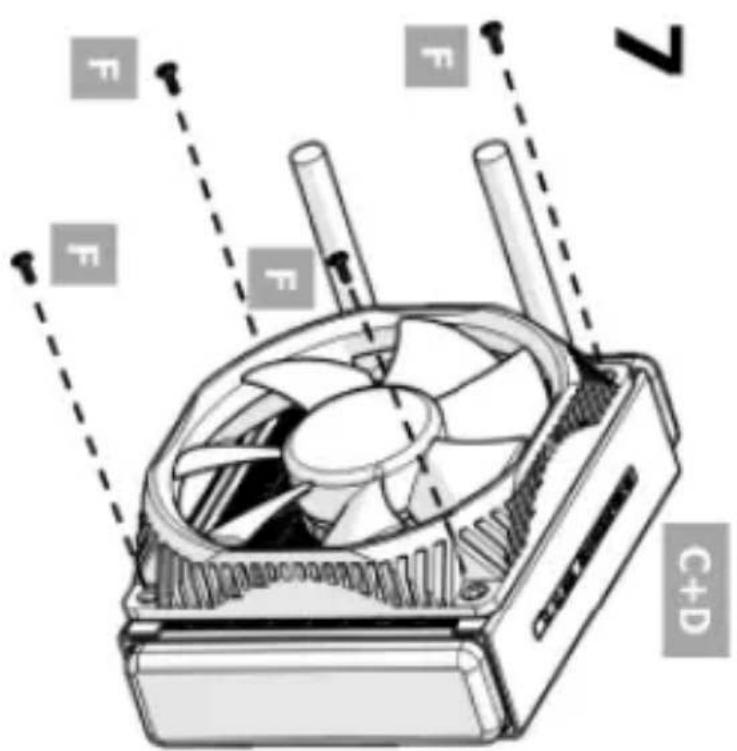
LGA 1155/56 LGA 1366
http://www.intel.com/go/integration
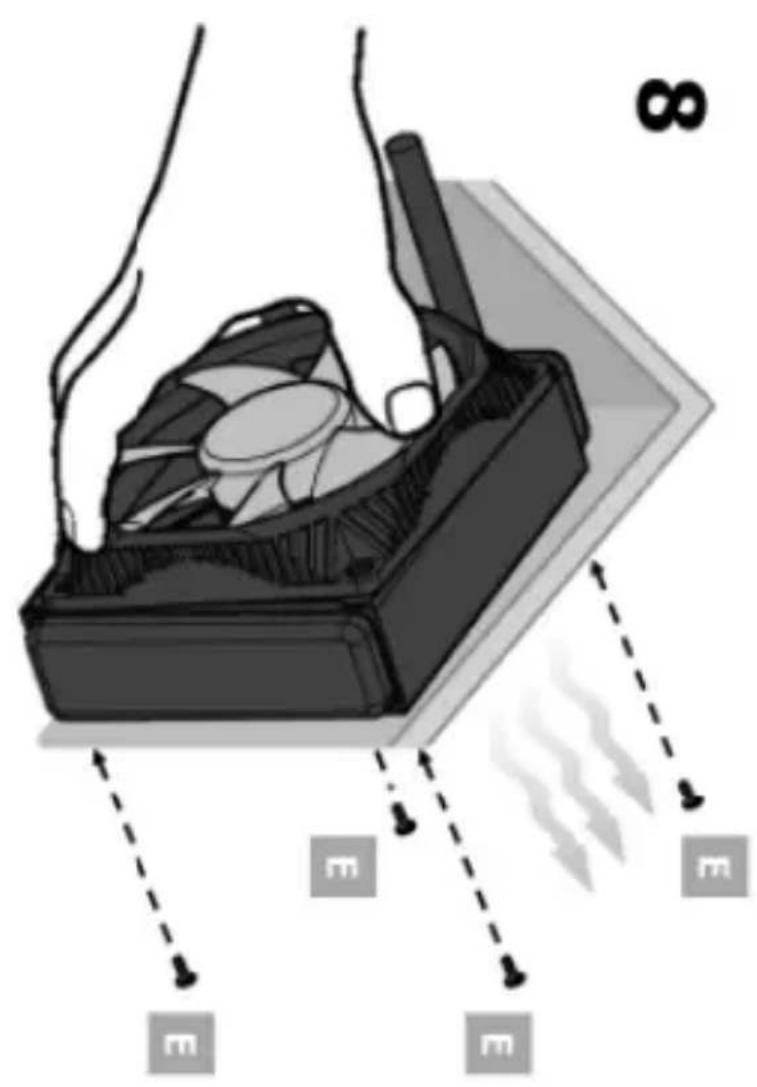
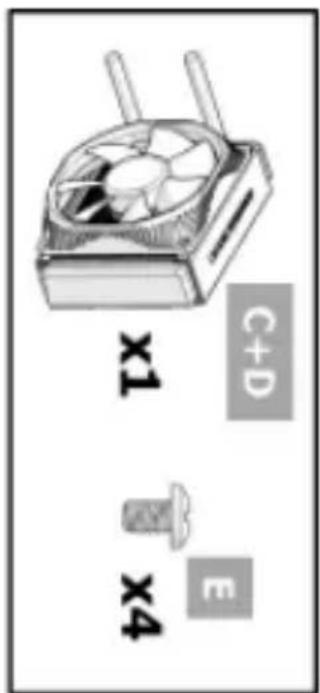
LGA 1355/56 LGA 1366
http://www.intel.com/go/integration
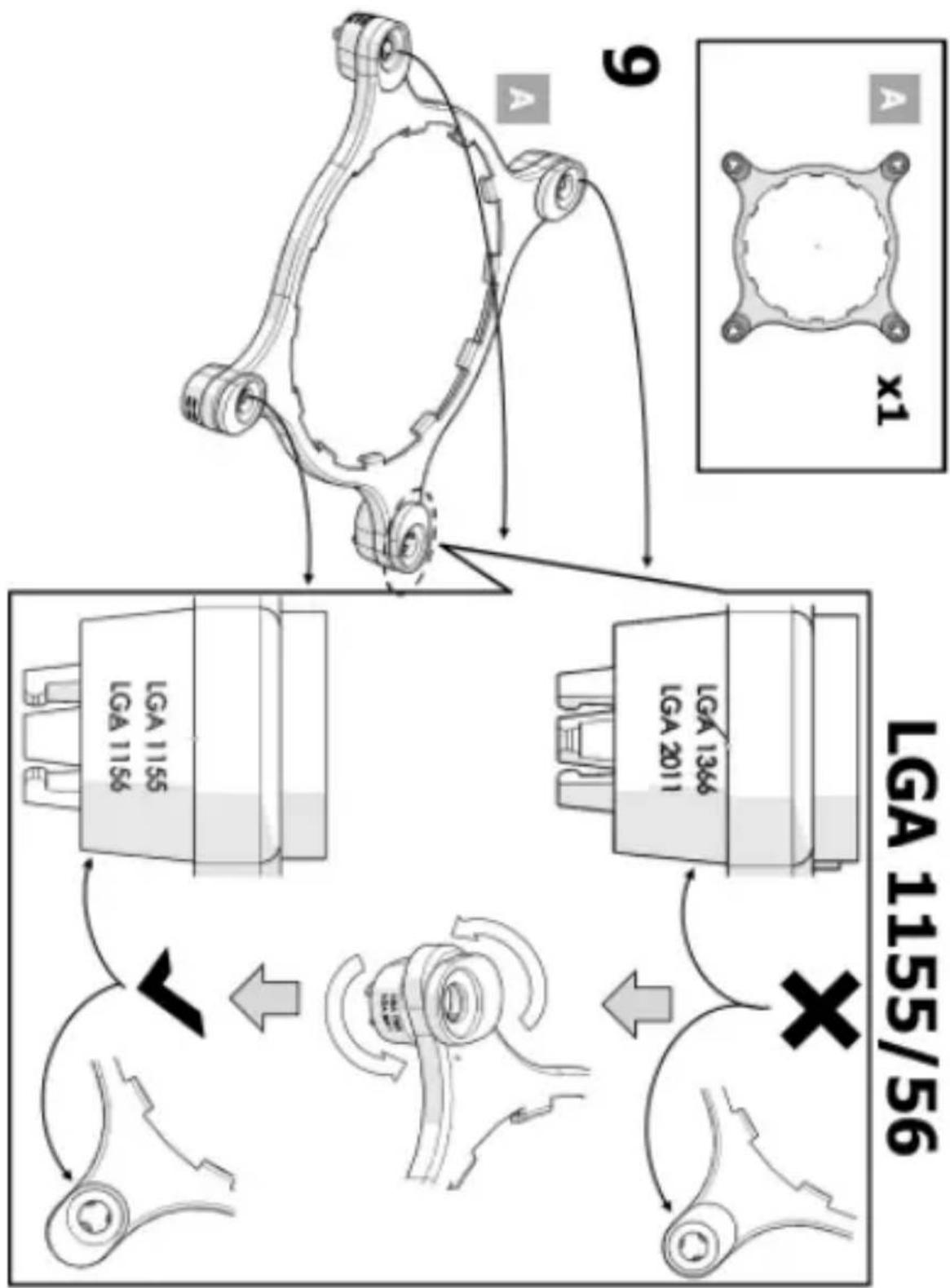
flowchart
graph TD
    A["Vehicle Suspension System"] --> B{Suspended Vehicle}
    B --> C["Carriage"]
    C --> D["Carriage with Suspension"]
    D --> E["Carriage with Suspension"]
    E --> F["Carriage with Suspension"]
    F --> G["Carriage with Suspension"]
    G --> H["Carriage with Suspension"]
    H --> I["Carriage with Suspension"]
    I --> J["Carriage with Suspension"]
    J --> K["Carriage with Suspension"]
    K --> L["Carriage with Suspension"]
    L --> M["Carriage with Suspension"]
    M --> N["Carriage with Suspension"]
    N --> O["Carriage with Suspension"]
    O --> P["Carriage with Suspension"]
    P --> Q["Carriage with Suspension"]
    Q --> R["Carriage with Suspension"]
    R --> S["Carriage with Suspension"]
    S --> T["Carriage with Suspension"]
    T --> U["Carriage with Suspension"]
    U --> V["Carriage with Suspension"]
    V --> W["Carriage with Suspension"]
    W --> X["Carriage with Suspension"]
    X --> Y["Carriage with Suspension"]
    Y --> Z["Carriage with Suspension"]
    Z --> AA["Carriage with Suspension"]
    AA --> AB["Carriage with Suspension"]
    AB --> AC["Carriage with Suspension"]
    AC --> AD["Carriage with Suspension"]
    AD --> AE["Carriage with Suspension"]
    AE --> AF["Carriage with Suspension"]
    AF --> AG["Carriage with Suspension"]
    AG --> AH["Carriage with Suspension"]
    AH --> AI["Carriage with Suspension"]
    AI --> AJ["Carriage with Suspension"]
    AJ --> AK["Carriage with Suspension"]
    AK --> AL["Carriage with Suspension"]
    AL --> AM["Carriage with Suspension"]
    AM --> AN["Carriage with Suspension"]
    AN --> AO["Carriage with Suspension"]
    AO --> AP["Carriage with Suspension"]
    AP --> AQ["Carriage with Suspension"]
    AQ --> AR["Carriage with Suspension"]
    AR --> AS["Carriage with Suspension"]
    AS --> AT["Carriage with Suspension"]
    AT --> AU["Carriage with Suspension"]
    AU --> AV["Carriage with Suspension"]
    AV --> AW["Carriage with Suspension"]
    AW --> AX["Carriage with Suspension"]
    AX --> AY["Carriage with Suspension"]
http://www.intel.com/go/integration
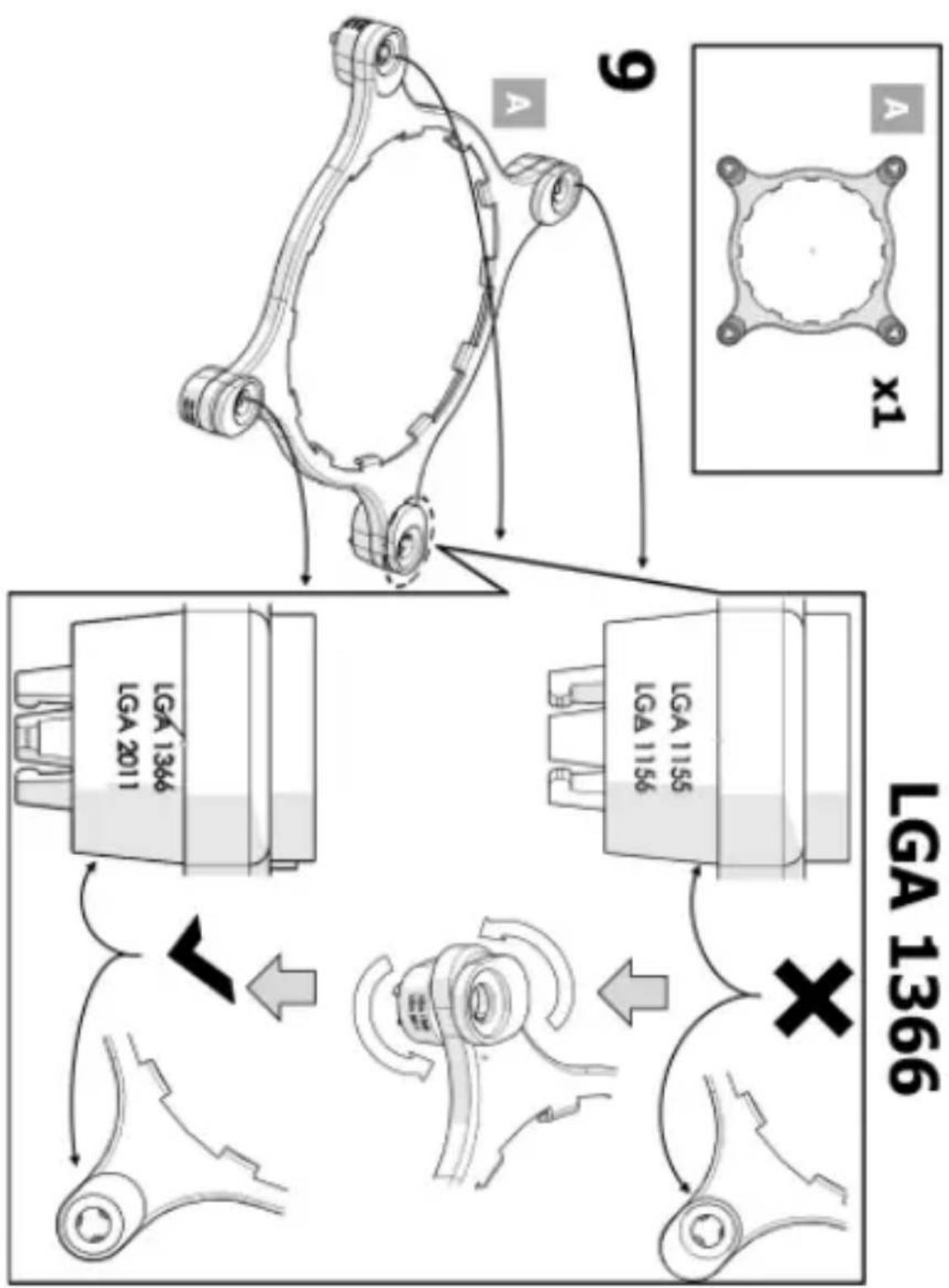
flowchart
graph TD
    A["Vehicle Suspension System"] --> B{Suspended Car}
    B --> C["Car with Suspension"]
    C --> D["Car with Suspension"]
    D --> E["Car with Suspension"]
    E --> F["Car with Suspension"]
    F --> G["Car with Suspension"]
    G --> H["Car with Suspension"]
    H --> I["Car with Suspension"]
    I --> J["Car with Suspension"]
    J --> K["Car with Suspension"]
    K --> L["Car with Suspension"]
    L --> M["Car with Suspension"]
    M --> N["Car with Suspension"]
    N --> O["Car with Suspension"]
    O --> P["Car with Suspension"]
    P --> Q["Car with Suspension"]
    Q --> R["Car with Suspension"]
    R --> S["Car with Suspension"]
    S --> T["Car with Suspension"]
    T --> U["Car with Suspension"]
    U --> V["Car with Suspension"]
    V --> W["Car with Suspension"]
    W --> X["Car with Suspension"]
    X --> Y["Car with Suspension"]
    Y --> Z["Car with Suspension"]
    Z --> AA["Car with Suspension"]
    AA --> AB["Car with Suspension"]
    AB --> AC["Car with Suspension"]
    AC --> AD["Car with Suspension"]
    AD --> AE["Car with Suspension"]
    AE --> AF["Car with Suspension"]
    AF --> AG["Car with Suspension"]
    AG --> AH["Car with Suspension"]
    AH --> AI["Car with Suspension"]
    AI --> AJ["Car with Suspension"]
    AJ --> AK["Car with Suspension"]
    AK --> AL["Car with Suspension"]
    AL --> AM["Car with Suspension"]
    AM --> AN["Car with Suspension"]
    AN --> AO["Car with Suspension"]
    AO --> AP["Car with Suspension"]
    AP --> AQ["Car with Suspension"]
    AQ --> AR["Car with Suspension"]
    AR --> AS["Car with Suspension"]
    AS --> AT["Car with Suspension"]
    AT --> AU["Car with Suspension"]
    AU --> AV["Car with Suspension"]
    AV --> AW["Car with Suspension"]
    AW --> AX["Car with Suspension"]
    AX --> AY["Car with Suspension"]
http://www.intel.com/go/integration
http://www.intel.com/go/integration
http://www.intel.com/go/integration
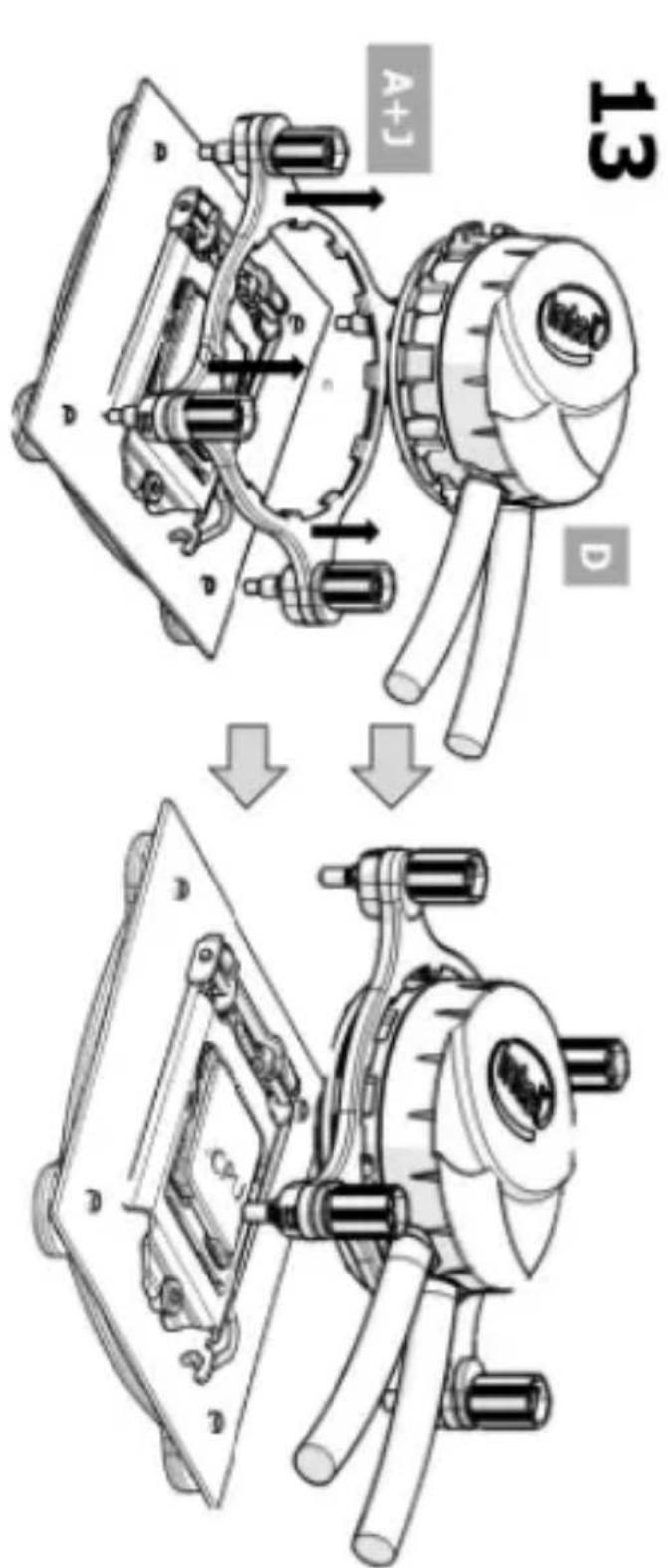
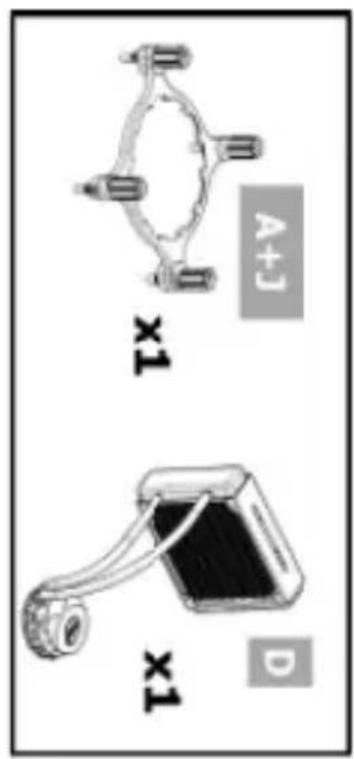
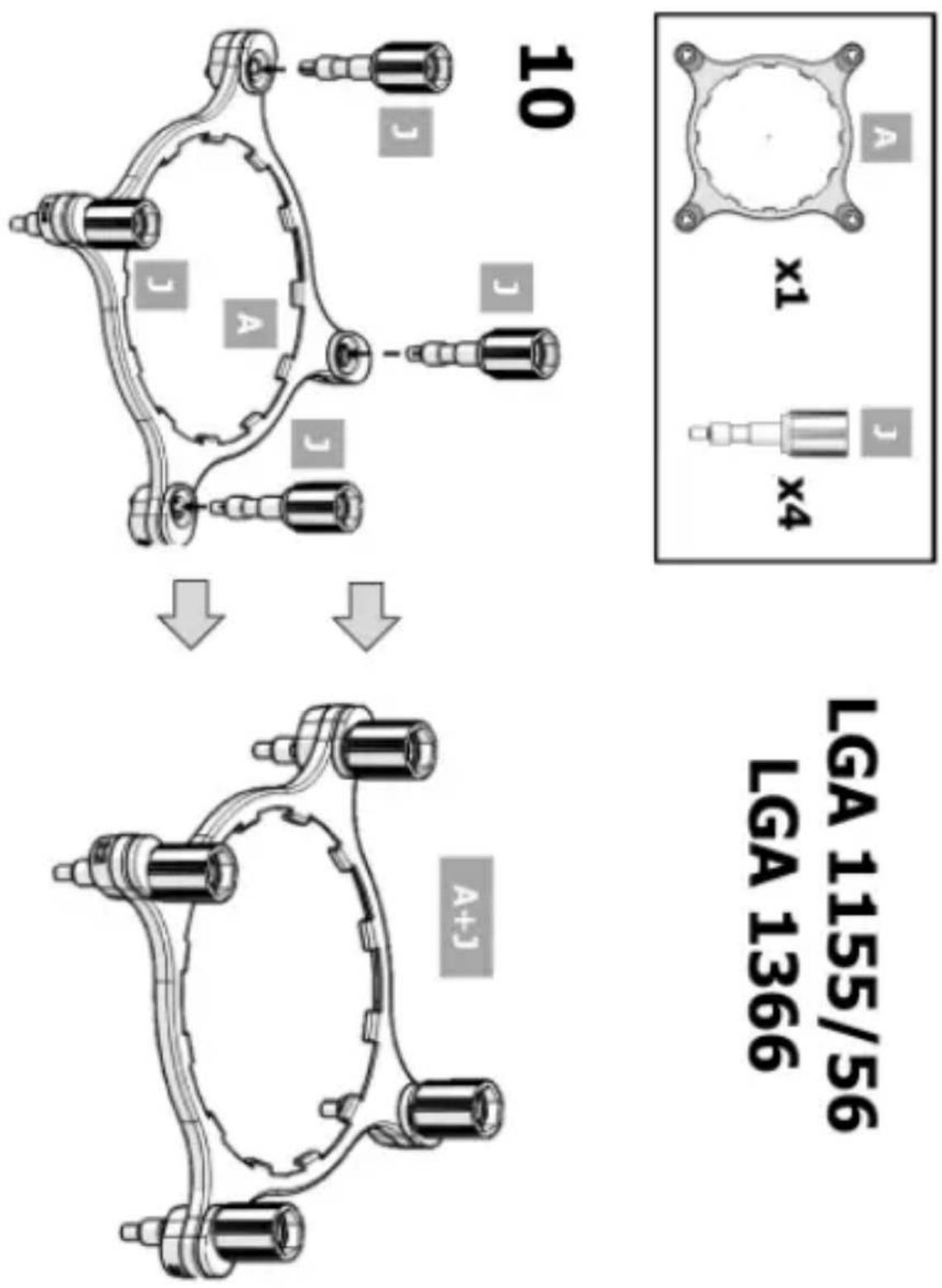
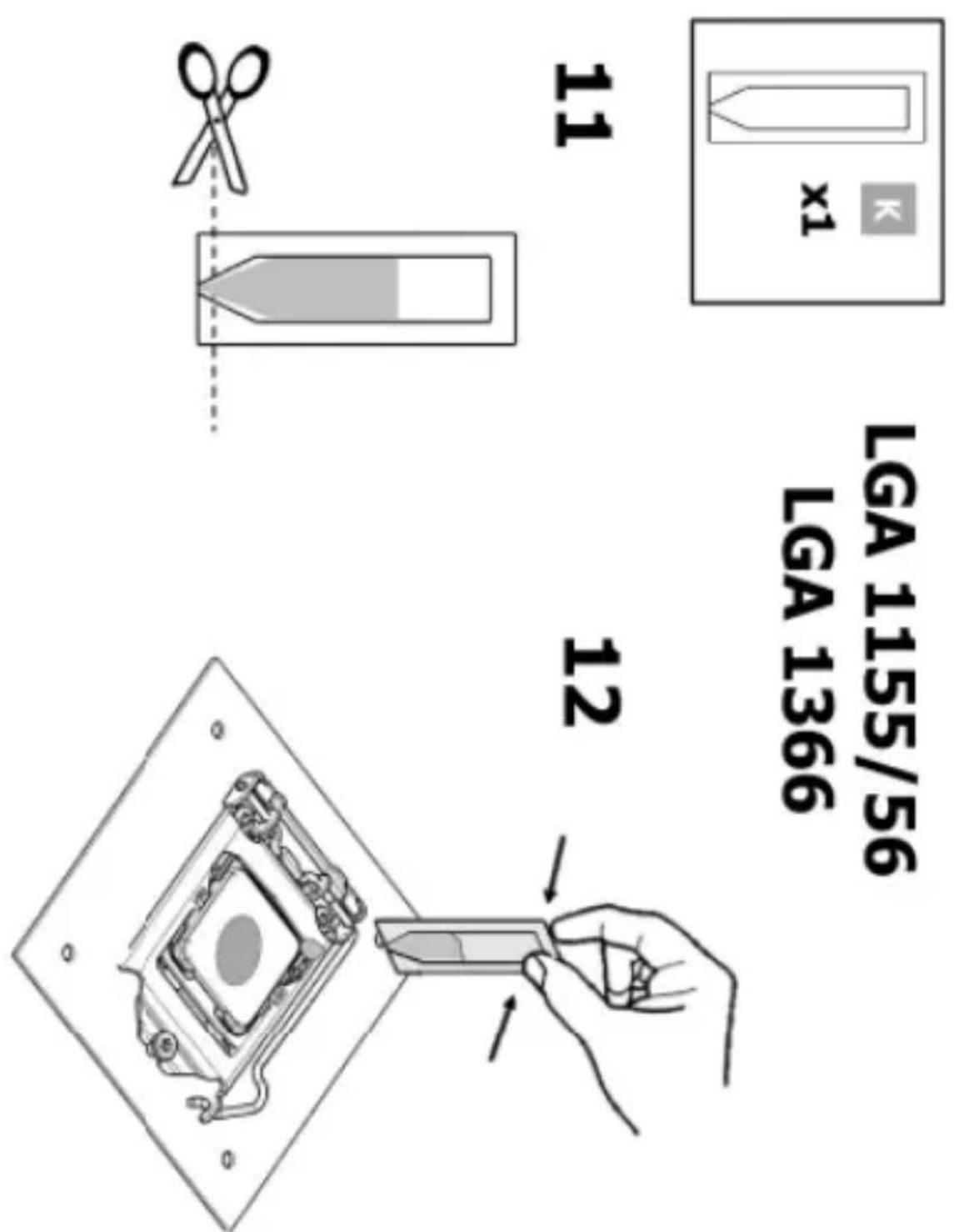
LGA 1155/56 LGA 1366
http://www.intel.com/go/integration
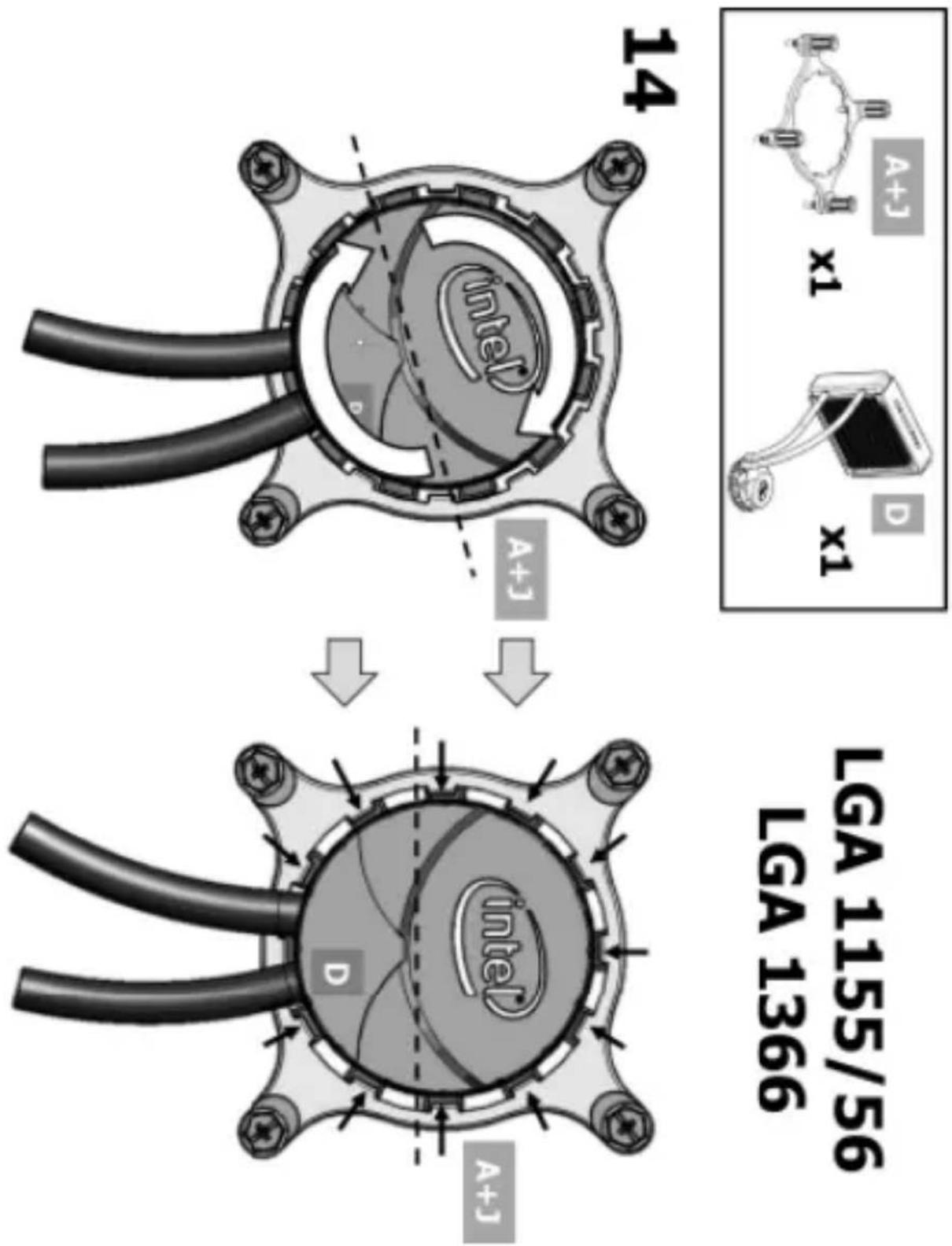
http://www.intel.com/go/integration
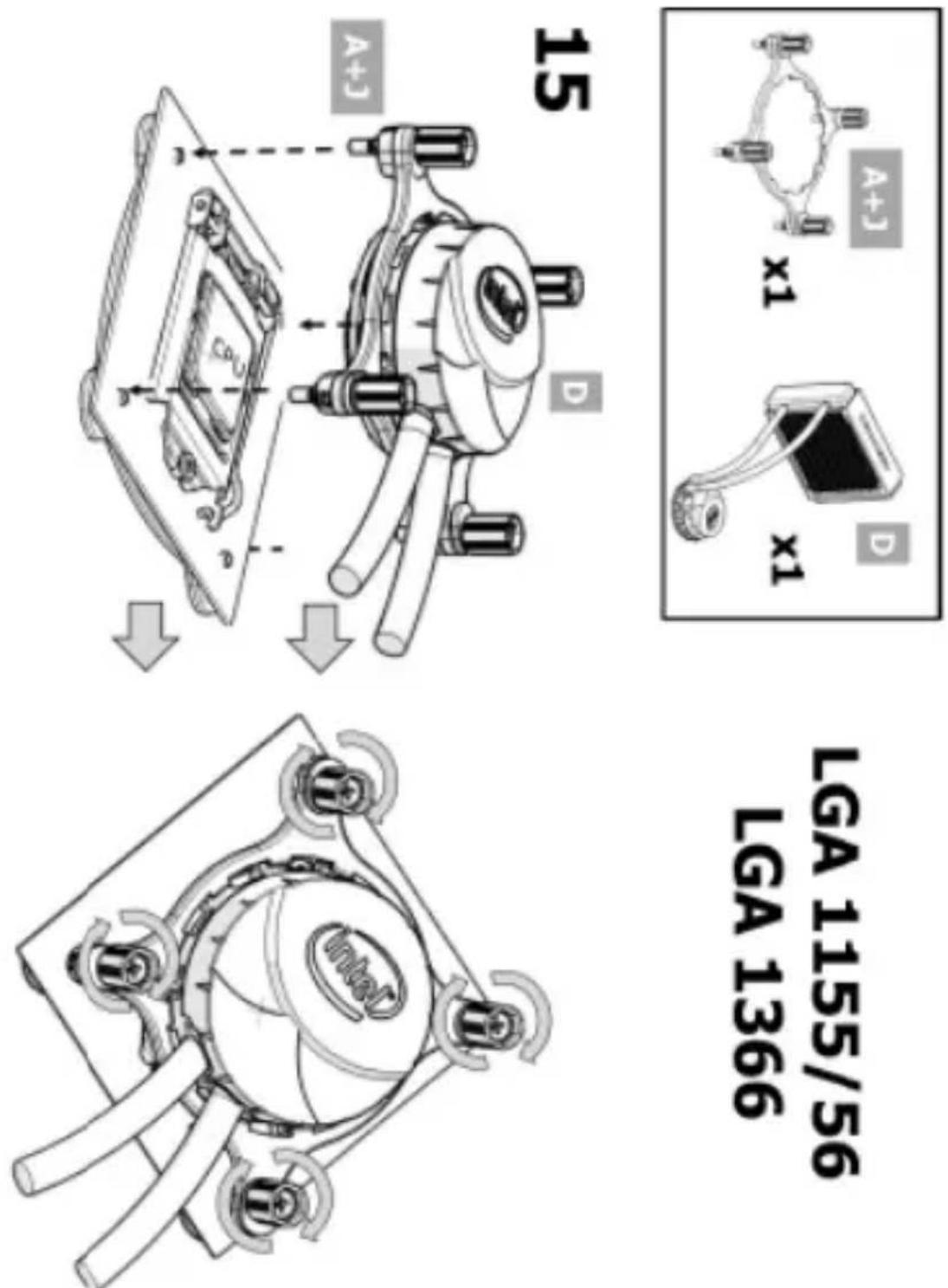
http://www.intel.com/go/integration
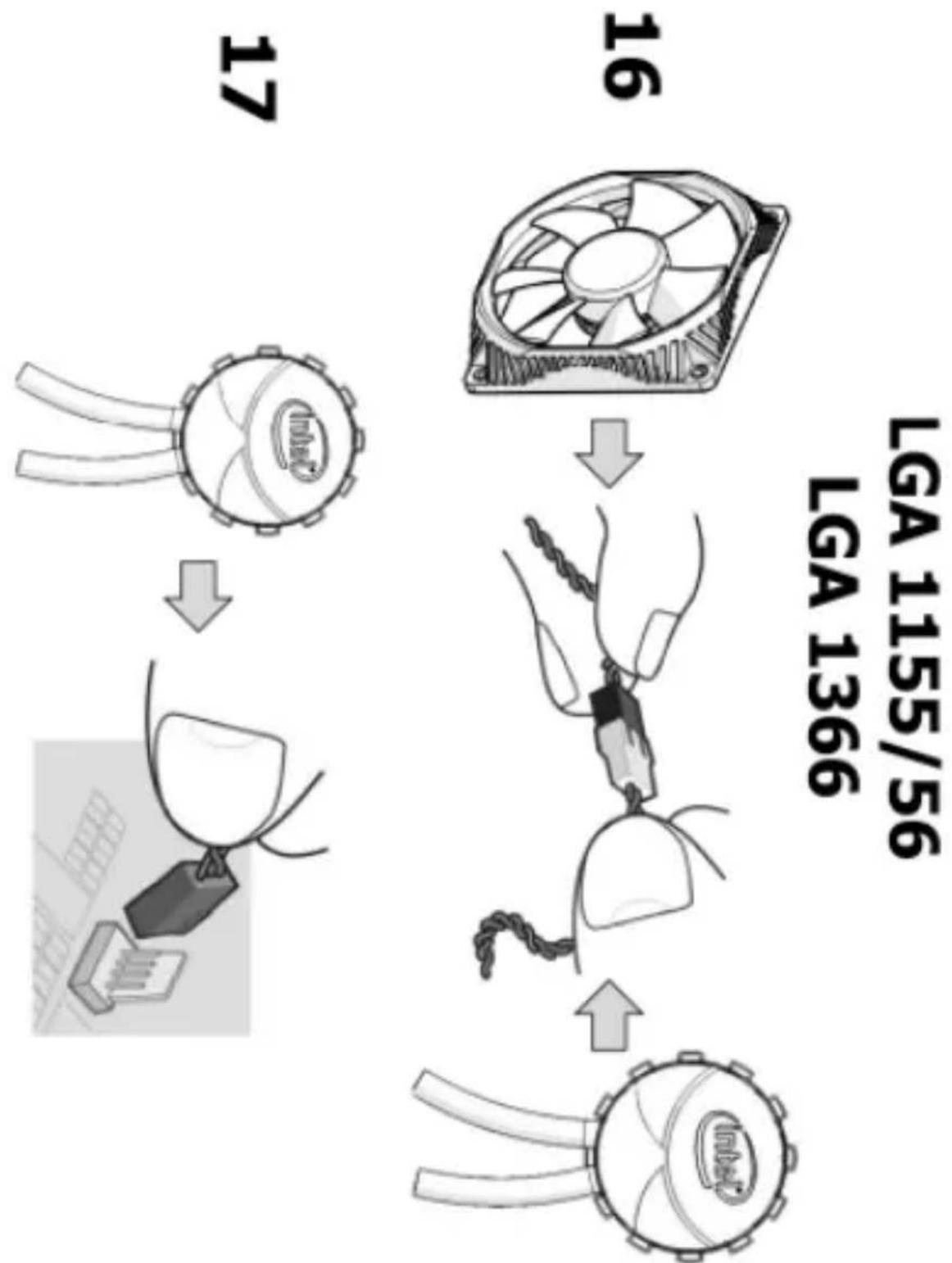
flowchart
graph TD
    A["17"] --> B["16"]
    B --> C["17"]
    C --> D["16"]
    D --> E["16"]
    E --> F["16"]
    F --> G["16"]
    G --> H["16"]
    H --> I["16"]
    I --> J["16"]
    J --> K["16"]
    K --> L["16"]
    L --> M["16"]
    M --> N["16"]
    N --> O["16"]
    O --> P["16"]
    P --> Q["16"]
    Q --> R["16"]
    R --> S["16"]
    S --> T["16"]
    T --> U["16"]
    U --> V["16"]
    V --> W["16"]
    W --> X["16"]
    X --> Y["16"]
    Y --> Z["16"]
http://www.intel.com/go/integration
Fan Configuration B
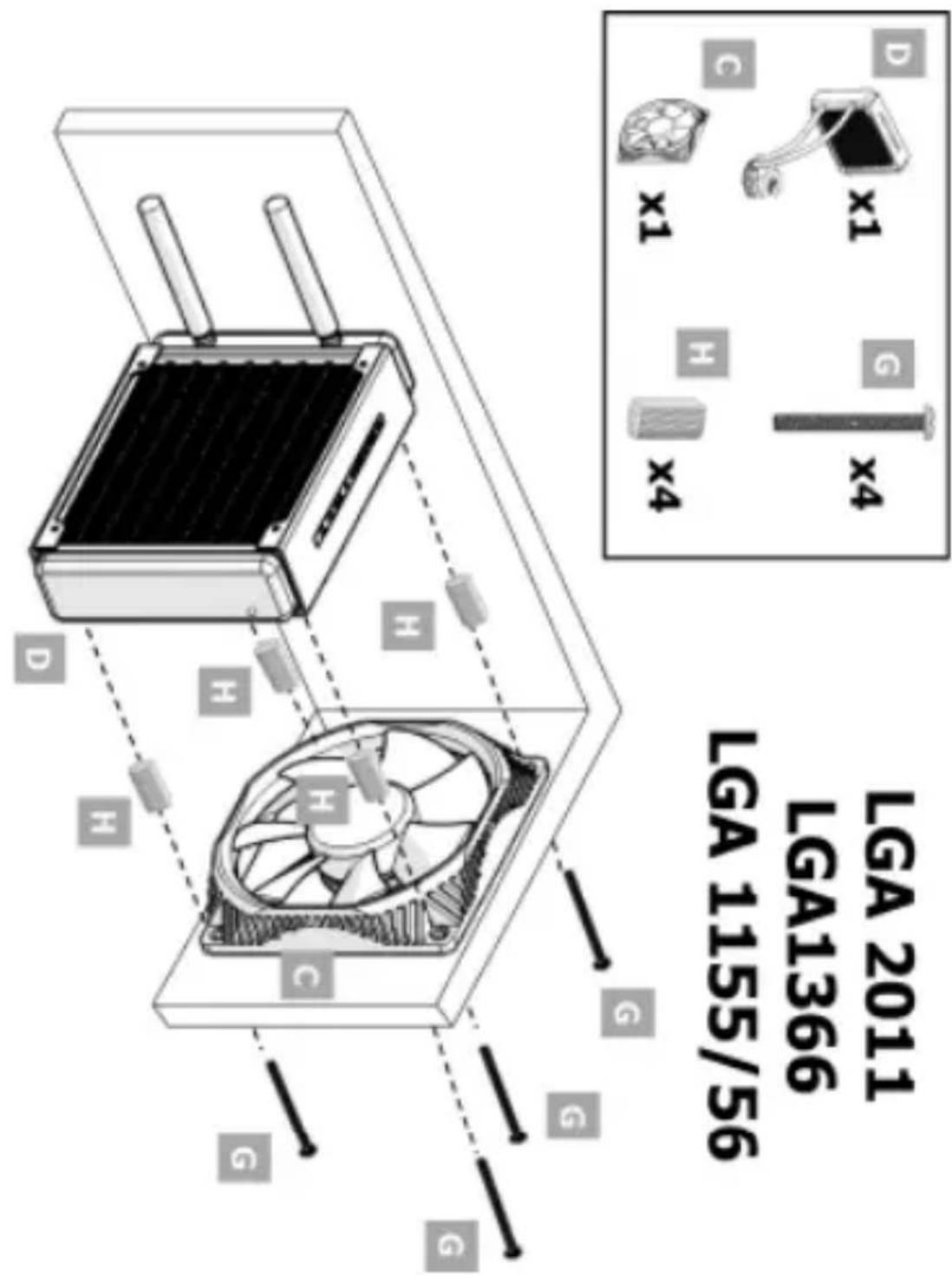
LGA 1155/56
LGA1366
LGA 2011
http://www.intel.com/go/integration
Management Methods on Control of Pollution from Electronic Information Products
(China RoHS declaration)
产品中有毒有害物质的名称及含量
| 部件名称(Parts) | 有毒有害物质或元素 | |||||
| 铅(Pb) | 汞(Hg) | 镉(Cd) | 六价铬(Cr6+) | 多溴联苯(PBB) | 多溴二苯醚(PBDE) | |
| 散热解决方案Thermal Solution | X | O | O | O | O | O |
| ○:表示该有毒有害物质在该部件所有均质材料中的含量均在SJ/T 11363-2006标准规定的限量要求以下。○:Indicates that this hazardous substance contained in all homogeneous materials of this part is below the limit requirement in SJ/T 11363-2006.×:表示该有毒有害物质至少在该部件的某一均质材料中的含量超出SJ/T 11363-2006标准规定的限量要求。×:Indicates that this hazardous substance contained in at least one of the homogeneous materials of this part is above the limit requirement in SJ/T 11363-2006.对销售之日的所售产品,本表显示我公司供应链的电子信息产品可能包含这些物质。注意:在所售产品中可能会也可能不会含有所有所列的部件.This table shows where these substances may be found in the supply chain of our electronic information products, as of the date of sale of the enclosed product. Note that some of the component types listed above may or may not be a part of the enclosed product. | ||||||
LIMITED WARRANTY
If you are a consumer under the Australian Consumer Law, this warranty does not apply to you. Please visit http://www.intel.com/support/processors/sb/CS-009862.htm to view the limited warranty which is applicable to Australian consumers.
Intel warrants to the purchaser of the Product (defined herein as the thermal solution) in its original sealed packaging ("Original Purchaser") and to the purchaser of a computer system built by an Original Purchaser containing the Product ("Original System Customer") as follows: if the Product is properly used and installed, it will be free from defects in material and workmanship, and will substantially conform to Intel's publicly available specifications for a period of three (3) years beginning on the date the Product was purchased in its original sealed packaging in the case of an Original Purchaser, and for a period of three (3) years beginning on the date of purchase of a computer system containing the Product for an Original System Customer. If the Product, which is the subject of this Limited Warranty, fails to conform to the above warranty during the warranty period, Intel, at its option, will:
REPAIR the Product by means of hardware and/or software; OR
REPLACE the Product with another product; OR, if Intel is unable to repair or replace the Product,
REFUND the then-current value of the Product at the time a claim for warranty service is made to Intel under this Limited Warranty.
THIS LIMITED WARRANTY, AND ANY IMPLIED WARRANTIES THAT MAY EXIST UNDER APPLICABLE STATE, NATIONAL, PROVINCIAL OR LOCAL LAW, APPLY ONLY TO YOU AS THE ORIGINAL PURCHASER OF THE PRODUCT OR COMPUTER SYSTEM THAT INCLUDES THE PRODUCT AND LASTS ONLY FOR AS LONG AS YOU CONTINUE TO OWN THE PRODUCT. WARRANTY COVERAGE TERMINATES IF THE ORIGINAL SYSTEM CUSTOMER SELLS OR OTHERWISE TRANSFERS THE COMPUTER SYSTEM WHICH INCLUDES THE PRODUCT.
WARNING: Altering clock frequency and/or voltage may: (i) reduce system stability and useful life of the system and processor; (ii) cause the processor and other system components to fail; (iii) cause reductions in system performance; (iv) cause additional heat or other damage; and (v) affect system data integrity. Intel has not tested, and does not warranty, the operation of the processor beyond its specifications. Intel assumes no responsibility that the processor, including if used with altered clock frequencies and/or voltages, will be fit for any particular purpose.
EXTENT OF LIMITED WARRANTY
Intel does not warrant that the Product will be free from design defects or errors known as "errata." Current characterized errata are available upon request. Further, this Limited
Warranty does NOT cover:
- any costs associated with the repair or replacement of the Product including labor, installation or other costs incurred by you, and in particular, any costs relating to the removal or replacement of any Product that is soldered or otherwise permanently affixed to any printed circuit board; OR
- damage to the Product due to external causes, including accident, problems with electrical power, abnormal electrical, mechanical or environmental conditions, usage not in accordance with product instructions, misuse, neglect, alteration, repair, improper installation, or improper testing; OR
- any Product which has been modified or operated outside of Intel's publicly available specifications or where the original identification markings (trademark or serial number) has been removed, altered or obliterated from the Product.
HOW TO OBTAIN WARRANTY SERVICE
To obtain warranty service for the Product (whether purchased in its original sealed packaging or as part of a computer system), you may contact your original place of purchase in accordance with its instructions or you may contact Intel. To request warranty service from Intel, you must contact the Intel Customer Support ("ICS") center in your region within the warranty period during normal business hours (local time), excluding holidays and return the Product to the designated ICS center. (See back cover for information regarding how to contact ICS in your region.) Please be prepared to provide: (1) your name, mailing address, email address and telephone numbers; (2) proof of purchase; (3) model name and product identification number found on the Product; (4) if applicable, a description of the computer system including the brand and model; and (5) an explanation of the problem. The ICS representative may need additional information from you depending on the nature of the problem.
Upon ICS's verification that the Product is eligible for warranty service, you will be issued a Return Material Authorization ("RMA") number and provided with instructions for returning the Product to the designated ICS center. When you return the Product to the ICS center, you must include the RMA number on the outside of the package. Intel will not accept any returned Product without an RMA number, or that has an invalid RMA number, on the package. You must deliver the returned Product to the designated ICS center in the original or equivalent packaging, with shipping charges pre-paid, and assume the risk of damage or loss during shipment. Freight charges and/or handling fees may apply if the Product for which you are requesting warranty services was not sold via authorized distribution in your country/Region. (For a definition of country/Region, contact the ICS center in your region or go to www.intel.com/support.)
Intel may elect to repair or replace the Product with either a new or reconditioned Product or components, as Intel deems appropriate. The repaired or replaced product will be shipped to you at the expense of Intel within a reasonable period of time after receipt of the returned Product by ICS. The returned Product shall become Intel's property on receipt by ICS. The replacement product is warranted under this written warranty and is subject to the same limitations and exclusions for ninety (90) days or the remainder of the original warranty period, whichever is longer. If Intel replaces the Product, the Limited Warranty period for the replacement Product is not extended.
WARRANTY LIMITATIONS AND EXCLUSIONS
THIS WARRANTY REPLACES ALL OTHER WARRANTIES FOR THE PRODUCT AND INTEL DISCLAIMS ALL OTHER WARRANTIES, EXPRESS OR IMPLIED INCLUDING, WITHOUT LIMITATION, THE IMPLIED WARRANTIES OF MERCHANTABILITY, FITNESS FOR A PARTICULAR PURPOSE, NONINFRINGEMENT, COURSE OF DEALING AND USAGE OF TRADE. Some states (or jurisdictions) do not allow the exclusion of implied warranties so this limitation may not apply to you. ALL EXPRESS AND IMPLIED WARRANTIES ARE LIMITED IN DURATION TO THE LIMITED WARRANTY PERIOD. NO WARRANTIES APPLY AFTER THAT PERIOD. Some states (or jurisdictions) do not allow limitations on how long an implied warranty lasts, so this limitation may not apply to you.
LIMITATIONS OF LIABILITY
INTEL'S RESPONSIBILITY UNDER THIS OR ANY OTHER WARRANTY, IMPLIED OR EXPRESS, IS LIMITED TO REPAIR, REPLACEMENT OR REFUND, AS SET FORTH ABOVE. THESE REMEDIES ARE THE SOLE AND EXCLUSIVE REMEDIES FOR ANY BREACH OF WARRANTY. TO THE MAXIMUM EXTENT PERMITTED BY LAW, INTEL IS NOT RESPONSIBLE FOR ANY DIRECT, SPECIAL, INCIDENTAL, OR CONSEQUENTIAL DAMAGES RESULTING FROM ANY BREACH OF WARRANTY OR UNDER ANY OTHER LEGAL THEORY (INCLUDING, BUT NOT LIMITED TO, LOST PROFITS, DOWNTIME, GOODWILL, DAMAGE TO OR REPLACEMENT OF EQUIPMENT AND PROPERTY, AND ANY COSTS OF RECOVERING, REPROGRAMMING, OR REPRODUCING ANY PROGRAM OR DATA STORED IN OR USED WITH A SYSTEM CONTAINING THE PRODUCT), EVEN IF INTEL HAS BEEN ADVISED OF THE POSSIBILITY OF SUCH DAMAGES. Some states (or jurisdictions) do not allow the exclusion or limitation of incidental or consequential damages, so the above limitations or exclusions may not apply to you.
THIS LIMITED WARRANTY GIVES YOU SPECIFIC LEGAL RIGHTS, AND YOU MAY ALSO HAVE OTHER RIGHTS THAT VARY BY STATE OR JURISDICTION.
ANY AND ALL DISPUTES ARISING UNDER OR RELATED TO THIS LIMITED WARRANTY SHALL BE ADJUDICATED IN THE FOLLOWING FORUMS AND GOVERNED BY THE FOLLOWING LAWS: FOR THE UNITED STATES OF AMERICA, CANADA, NORTH AMERICA AND SOUTH AMERICA, THE FORUM SHALL BE SANTA CLARA, CALIFORNIA, USA AND THE APPLICABLE LAW SHALL BE THAT OF THE STATE OF DELAWARE. FOR THE ASIA PACIFIC REGION (EXCEPT FOR MAINLAND CHINA), THE FORUM SHALL BE SINGAPORE AND THE APPLICABLE LAW SHALL BE THAT OF SINGAPORE. FOR EUROPE AND THE REST OF THE WORLD, THE FORUM SHALL BE LONDON AND THE APPLICABLE LAW SHALL BE THAT OF ENGLAND AND WALES.
IN THE EVENT OF ANY CONFLICT BETWEEN THE ENGLISH LANGUAGE VERSION AND ANY OTHER TRANSLATED VERSION(S) OF THIS LIMITED WARRANTY (WITH THE EXCEPTION OF THE SIMPLIFIED CHINESE VERSION), THE ENGLISH LANGUAGE VERSION SHALL CONTROL.
GARANTIE LIMITÉE
For support, first visit support.intel.com
If you need further help, call:
To obtain warranty service in the US and Canada call 1-800-628-8686
NorthAmerica 916-377-7000
Latin America
Spanish 001-916-377-0114
Portuguese 001-916-377-0180
Europe
Belgium 02-714 3182
Denmark 38-487077
Finland 9-693-79297
France 01-41-91 85 29
Germany 069-9509-6099
Holland 020-487-4562
Italy 02-696-33276
Norway 23-1620-50
Spain 91-377-8166
Sweden 08-445-1251
United Kingdom 0870-607-2439
Japan 0120-868686
Asia-Pacific
Australia 1800-649-931 Philippines 1800-1-651-0117
Hong Kong 852-2 844-4456 Indonesia 803-65-7249
Korea 822-767-2595 Thailand 1800-6310003
Singapore 65-6213-1311 Pakistan 63-2-636-8415
Taiwan 2-2545-1640 Vietnam 63-2-636-8416
China 800-820-1100 India 0006517-2-68303634
Malaysia 1800-80-1390
New Zealand 0800-444-365 From India an IDD-equipped phone is required.

Intel Corporation
Attn: Corporate Quality
2200 Mission College Blvd.
Santa Clara, CA 95054-1549
USA
natural_image
Symbol of a trash bin crossed with two crossed lines and a solid black rectangle below (no text or labels)Intel, the Intel logo, Intel Core and Core Inside are trademarks of Intel Corporation in the U.S. and/or other countries.
*Other names and brands may be claimed as the property of others.
Copyright © 2012 Intel Corporation. All rights reserved.
G33559-004

G33559-004
- Installation Notes for the Intel® RTS2011LC Liquid Cooling Solution
- Installation Instructions for the Intel® RTS2011 LC Liquid Cooling Solution
- LIMITED WARRANTY
- EXTENT OF LIMITED WARRANTY
- HOW TO OBTAIN WARRANTY SERVICE
- WARRANTY LIMITATIONS AND EXCLUSIONS
- LIMITATIONS OF LIABILITY
- GARANTIE LIMITÉE
- For support, first visit support.intel.com
- NorthAmerica 916-377-7000
- Japan 0120-868686
- Asia-Pacific
Brand : INTEL
Model : RTS2011LC
Category : Computer cooling system