ERD6DE18C - Fridge ELECTROLUX - Free user manual and instructions
Find the device manual for free ERD6DE18C ELECTROLUX in PDF.


User questions about ERD6DE18C ELECTROLUX
0 question about this device. Answer the ones you know or ask your own.
Ask a new question about this device
Download the instructions for your Fridge in PDF format for free! Find your manual ERD6DE18C - ELECTROLUX and take your electronic device back in hand. On this page are published all the documents necessary for the use of your device. ERD6DE18C by ELECTROLUX.
USER MANUAL ERD6DE18C ELECTROLUX
natural_image
Diagram of a mechanical or architectural component with horizontal bars and an upward arrow, no text or symbols presentnatural_image
Pure technical line drawing of a mechanical assembly or mounting bracket without any text, numbers, or symbols
natural_image
Line drawing of hands holding a rectangular object with a downward arrow indicating compression or disassembly (no text or symbols)- Inclineu el mòdul cap avall per extreure'l de la nevera.
natural_image
Line drawing of a cabinet or rack unit with a handle and arrow, no text or symbols present4.4 Calaix per a verdures
natural_image
Line drawing of a hand placing a drawer into a cabinet with an upward arrow indicating motion (no text or symbols)natural_image
Technical line drawing of a structural frame with diagonal braces and an arrow indicating direction (no text or symbols)natural_image
Technical line drawing of a structural frame with diagonal braces and directional arrows indicating movement (no text or symbols)natural_image
Simple line drawing of a rectangular object with a base and textured base (no text or symbols)natural_image
Diagram showing a hand holding a tool inside a circular frame, with an arrow indicating rotational motion (no text or symbols present)Welcome to Electrolux! Thank you for choosing our appliance.

Get usage advice, brochures, troubleshooting, service and repair information:
www.electrolux.com/support
Subject to change without notice.
CONTENTS
- SAFETY INFORMATION...... 16
- SAFETY INSTRUCTIONS.... 18
- CONTROL PANEL....20
- DAILY USE....21
- HINTS AND TIPS....23
- CARE AND CLEANING.... 23
- TROUBLESHOOTING....24
- TECHNICAL DATA.... 26
- INFORMATION FOR TEST INSTITUTES.... 27
- ENVIRONMENTAL CONCERNS......27
1. ⚠ SAFETY INFORMATION
Before the installation and use of the appliance, carefully read the supplied instructions. The manufacturer is not responsible for any injuries or damage that are the result of incorrect installation or usage. Always keep the instructions in a safe and accessible location for future reference.
1.1 Children and vulnerable people safety
- This appliance can be used by children aged from 8 years and above and persons with reduced physical, sensory or mental capabilities or lack of experience and knowledge if they have been given supervision or instruction concerning the use of the appliance in a safe way and understand the hazards involved. Children aged from 3 to 8 years and persons with very extensive and complex disabilities are allowed to load and unload the appliance provided that they have been properly instructed. Children of less than 3 years of age should be kept away from the appliance unless continuously supervised.
- Children should be supervised to ensure that they do not play with the appliance.
- Children shall not carry out cleaning and user maintenance of the appliance without supervision.
- Keep all packaging away from children and dispose of it appropriately.
1.2 General Safety
- This appliance is for storing food and beverages only.
- This appliance is designed for single household domestic use in an indoor environment.
- This appliance may be used in, offices, hotel guest rooms, bed & breakfast guest rooms, farm guest houses and other similar accommodation where such use does not exceed (average) domestic usage levels.
- To avoid contamination of food respect the following instructions:
– do not open the door for long periods;
– clean regularly surfaces that can come in contact with food and accessible drainage systems;
- store raw meat and fish in suitable containers in the refrigerator, so that it is not in contact with or drip onto other food.
- WARNING: Keep ventilation openings, in the appliance enclosure or in the built-in structure, clear of obstruction.
- WARNING: Do not use mechanical devices or other means to accelerate the defrosting process, other than those recommended by the manufacturer.
- WARNING: Do not damage the refrigerant circuit.
- WARNING: Do not use electrical appliances inside the food storage compartments of the appliance, unless they are of the type recommended by the manufacturer.
- Do not use water spray and steam to clean the appliance.
- Clean the appliance with a moist soft cloth. Only use neutral detergents. Do not use abrasive products, abrasive cleaning pads, solvents or metal objects.
- When the appliance is empty for long period, switch it off, defrost, clean, dry and leave the door open to prevent mould from developing within the appliance.
- Do not store explosive substances such as aerosol cans with a flammable propellant in this appliance.
- If the supply cord is damaged, it must be replaced by the manufacturer, its Authorised Service Centre or similarly qualified persons in order to avoid a hazard.
2. SAFETY INSTRUCTIONS
2.1 Installation

WARNING!
Only a qualified person must install this appliance.
- Remove all the packaging.
- Do not install or use a damaged appliance.
- Do not use the appliance before installing it in the built-in structure due to safety manner.
- Follow the separate instructions for the appliance installation and door reversing available on our website.
• Always take care when moving the appliance as it is heavy. Always use safety gloves and enclosed footwear. - Make sure the air can circulate around the appliance.
- At first installation or after reversing the door, wait at least 4 hours before connecting the appliance to the power supply. This is to allow the oil to flow back in the compressor.
- Before carrying out any operations on the appliance (e.g. reversing the door), remove the plug from the power socket.
- Do not install the appliance close to radiators or cookers, ovens, or hobs, unless otherwise specified in the installation instructions.
- Do not expose the appliance to the rain.
- Do not install the appliance where there is direct sunlight.
-
Do not install this appliance in areas that are too humid or too cold.
-
When you move the appliance, lift it by the front edge to avoid scratching the floor.
- Protect the floor from scratches when reversing the appliance door.
- The appliance contains a bag of desiccant. This is not a toy. This is not food. Please dispose of it immediately.
2.2 Electrical connection

WARNING!
Risk of fire and electric shock.

WARNING!
When positioning the appliance, ensure the supply cord is not trapped or damaged.

WARNING!
Do not use multi-plug adapters and extension cables.
- Make sure that the parameters on the rating plate are compatible with the electrical ratings of the mains power supply.
• The appliance must be earthed.
• Always use a correctly installed shockproof socket. - If the domestic power supply socket is not earthed, connect the appliance to a separate earth in compliance with current regulations, consulting a qualified electrician.
- Make sure not to cause damage to the electrical components (e.g. mains plug,
mains cable, compressor). Contact the Authorised Service Centre or an electrician to change the electrical components.
- The mains cable must stay below the level of the mains plug.
- Connect the mains plug to the mains socket only at the end of the installation. Make sure that there is access to the mains plug after the installation.
- Do not pull the mains cable to disconnect the appliance. Always pull the mains plug.
2.3 Use

WARNING!
Risk of injury, burns, electric shock or fire.

The appliance contains flammable gas, isobutane (R600a), a natural gas with a high level of environmental compatibility. Be careful not to cause damage to the refrigerant circuit containing isobutane.
- Do not change the specification of this appliance.
- Any use of the built-in product as freestanding is strictly prohibited.
- This appliance is intended to be used at ambient temperature ranging from 10°C to 38°C. The specified temperature range guarantees the correct operations of the appliance.
- Do not put electrical appliances (e.g. ice cream makers) in the appliance unless they are stated applicable by the manufacturer.
- If damage occurs to the refrigerant circuit, make sure that there are no flames and sources of ignition in the room. Ventilate the room.
- Do not let hot items to touch the plastic parts of the appliance.
- Do not store flammable gas and liquid in the appliance.
- Do not put flammable products or items that are wet with flammable products in, near or on the appliance.
- Do not touch the compressor or the condenser. They are hot.
- Do not allow food to come in contact with the inner walls of the appliance compartments.
2.4 Internal lighting

WARNING!
Risk of electric shock.
- This product contains one or more light sources of energy efficiency class F.
- Concerning the lamp(s) inside this product and spare part lamps sold separately: These lamps are intended to withstand extreme physical conditions in household appliances, such as temperature, vibration, humidity, or are intended to signal information about the operational status of the appliance. They are not intended to be used in other applications and are not suitable for household room illumination.
2.5 Care and cleaning

WARNING!
Risk of injury or damage to the appliance.
- Before maintenance, deactivate the appliance and disconnect the mains plug from the mains socket.
- This appliance contains hydrocarbons in the cooling unit. Only a qualified person must do the maintenance and the recharging of the unit.
- Regularly examine the drain of the appliance and if necessary, clean it. If the drain is blocked, defrosted water collects in the bottom of the appliance.
2.6 Service
• To repair the appliance contact the Authorised Service Centre. Use only original spare parts.
- Please note that self-repair or non-professional repair can have safety consequences and might void the guarantee.
- The following spare parts are available for at least 7 years after the model has been discontinued: thermostats, temperature sensors, printed circuit boards, light
sources, door handles, door hinges, trays and baskets. Door gaskets are available for at least 10 years after the model has been discontinued. The duration may be longer in your country. For further information, please visit our website.
- Please note that some of these spare parts are only available to professional repairers, and that not all spare parts are relevant for all models.
2.7 Disposal

WARNING!
Risk of injury or suffocation.
- Disconnect the appliance from the mains supply.
- Cut off the mains cable and discard it.
- Remove the door to prevent children and pets to be closed inside of the appliance.
- The refrigerant circuit and the insulation materials of this appliance are ozone-friendly.
- The insulation foam contains flammable gas. Contact your municipal authority for information on how to discard the appliance correctly.
- Do not cause damage to the part of the cooling unit that is near the heat exchanger.
3. CONTROL PANEL
flowchart
graph TD
    A["1"] --> B["2"]
    B --> C["3"]
    C --> D["4"]
    D --> E["Extra Cool"]
    B --> F["ECO"]
    F --> G["2°"]
    F --> H["4°"]
    F --> I["8°"]
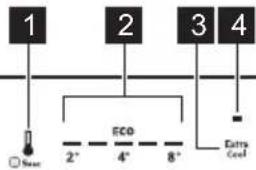
- Fridge compartment button Appliance ON/OFF button
- Appliance temperature indicators
- Extra Cool button
- Extra Cool indicator
3.1 Switching on/off
Switching on
- Insert the plug into the power socket.
- Press and hold the appliance ON/OFF button.
Temperature indicators show the set default temperature.
Switching off
- Press and hold the appliance ON/OFF button. Temperature indicators switch off.
- Disconnect the mains plug from the power socket.
3.2 Temperature regulation
i
It is not possible to set the temperature when the Extra Cool function is on.
Temperature indicators show the set temperature level.
The temperature range may vary between 2^ C and 8^ C (recommended 4^ C).
The ECO indicator lights up when the recommended temperature is set.
i
The set temperature will be reached within 24 h.
After a power failure, the appliance restores the set temperatures.
3.3 Extra Cool function
The Extra Cool function allows you to rapidly cool large amounts of warm food without warming food already stored in the fridge compartment.
To activate the Extra Cool function tap Extra Cool button. The Extra Cool indicator lights up.
i
This function stops after approx. 6 h.
To deactivate the function press the Extra Cool button. The Extra Cool indicator switches off.
3.4 Door open alarm
If the fridge door is left open for approx. 5 min, fridge temperature indicators flash and the sound is on.
4. DAILY USE

CAUTION!
This refrigerating appliance is not suitable for freezing foodstuffs.
4.1 Positioning the door shelves
For easier storage of food, the door shelves can be placed at different heights. Pull the shelf up to reposition.

natural_image
Diagram of a mechanical or architectural component with horizontal bars and an upward arrow, no text or symbols present4.2 Movable shelves
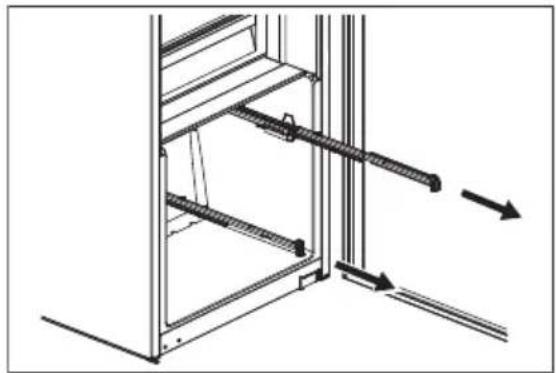
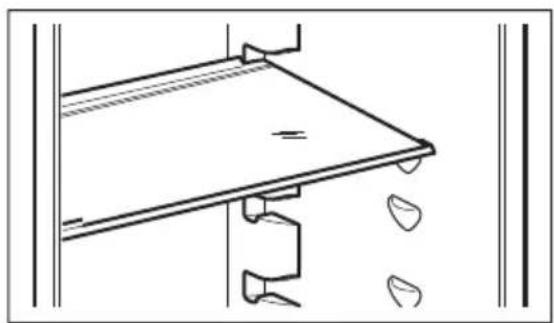
The walls of the fridge are equipped with runners. You can change the position of the shelves.
natural_image
Pure technical line drawing of a mechanical assembly or mounting bracket without any text, numbers, or symbolsPress any button to switch off the sound. The sound switches off after 1 h.
The alarm deactivates after closing the door.

Do not move the glass shelf above the vegetable drawer to ensure correct air circulation.
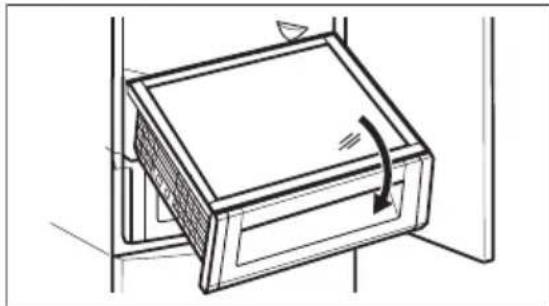
4.3 Removing ExtraZone
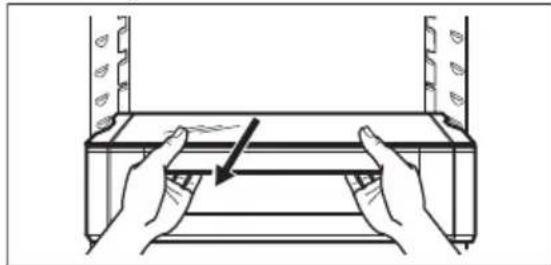
- Hold the drawer together with the glass cover of the ExtraZone and pull them towards yourself.
natural_image
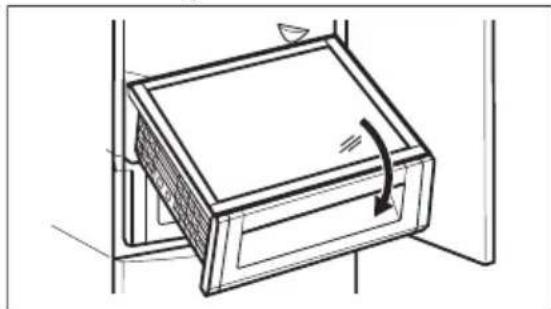
Diagram of hands operating a mechanical assembly with a directional arrow (no text or symbols)- Tilt the module downwards to remove it from the refrigerator.
natural_image
Line drawing of a cabinet or drawer with an arrow indicating direction (no text or symbols)4.4 Vegetable drawer
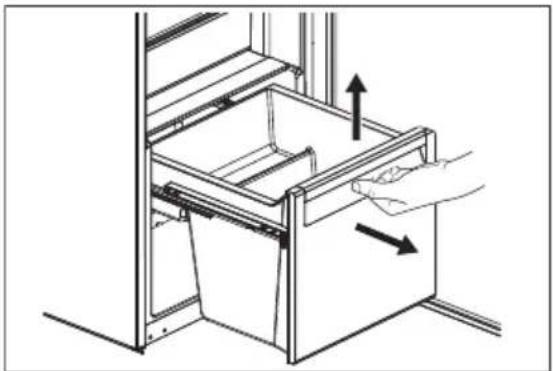
The drawer is suitable for the storage of fruit and vegetables.
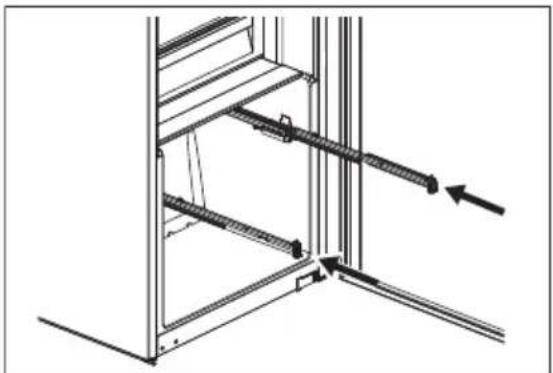
To remove the drawer:
- Pull out the drawer and lift it up.
natural_image
Line drawing of a hand placing an open drawer into a cabinet, with arrows indicating direction (no text or symbols)- Push the rails inside the cabinet.
natural_image
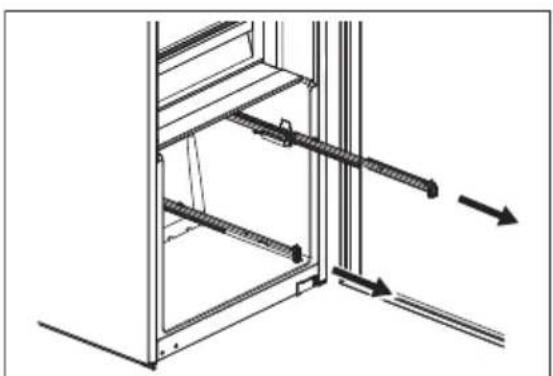
Technical line drawing of a structural frame with diagonal braces and an arrow indicating direction (no text or symbols)To reassemble:
- Pull out the rails.
natural_image
Technical line drawing of a mechanical assembly with no visible text or symbols- Place the rear part of the drawer (1) on the rails.
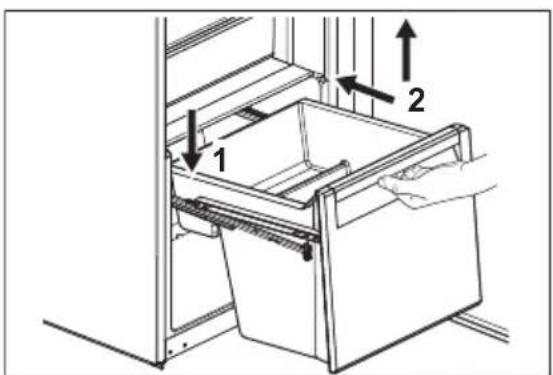
-
Keep the front of the drawer (2) lifted up while pushing the drawer in.
-
Press the front part of the drawer downwards.
- Pull out the drawer again and check if it is placed correctly on both rear and front hooks.
4.5 Temperature indicator
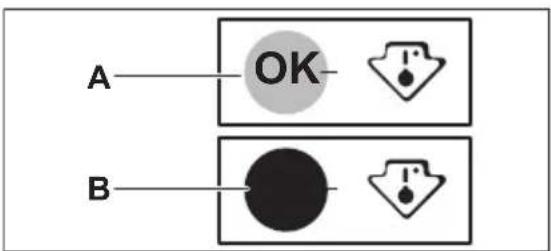
There is a temperature indicator on the side wall of the appliance. The symbol indicates the coldest area in the fridge.
If OK is displayed (A), put fresh food into area indicated by the symbol. If not (B), wait at least 12 h and check again.
If it is still not OK (B), set a colder temperature.
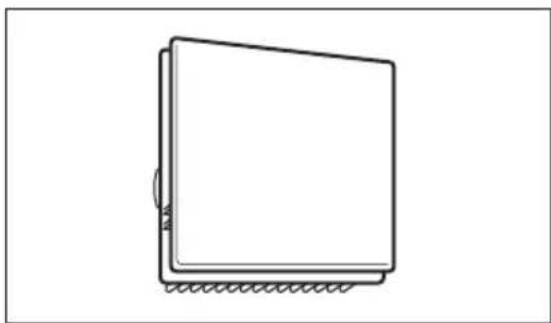
4.6 Fan
The fridge compartment is equipped with a fan that allows for rapid cooling of foods and keeps uniform temperature in the compartment.
natural_image
Simple line drawing of a rectangular object with a textured base and corner edge (no text or symbols)The fan activates automatically when needed.

The fan operates only when the door is closed.

Do not remove the cover of the fan.
5. HINTS AND TIPS
5.1 Hints for energy saving
- The configuration with the drawers in the bottom part of the appliance and shelves evenly distributed ensures the most efficient use of energy. Position of the door bins does not affect energy consumption.
- Do not open the door frequently or leave it open longer than necessary.
- Do not set too high temperature unless it is required by the characteristics of the food.
- If the ambient temperature is high and the temperature control is set to low temperature and the appliance is fully loaded, the compressor may run continuously, causing frost or ice formation on the evaporator. In this case, set the temperature control toward higher temperature to allow automatic defrosting.
- Do not cover the ventilation grilles or holes.
5.2 Hints for food refrigeration
- Fresh food compartment is marked (on the rating plate) with 📐
- Good temperature setting that ensures preservation of fresh food is a temperature less than or equal to +4^ .
• Always use closed containers for liquids and for food, to avoid flavours or odours in the compartment. - To avoid the cross-contamination between cooked and raw food, cover the cooked food and separate it from the raw one.
- Wrap and place meat on the glass shelf above the vegetable drawer.
- Defrost the food inside the fridge.
- Do not insert hot food inside the appliance.
- Clean fruit and vegetables and place in a dedicated drawer (vegetable drawer).
- Do not keep exotic fruits in the fridge.
- Do not keep vegetables like tomatoes, potatoes, onions, and garlic in the fridge.
- Close the bottles before you put them into the fridge.
6. CARE AND CLEANING

WARNING!
Refer to Safety chapters.
6.1 Cleaning the interior
Before first use clean the interior and all accessories with lukewarm water and neutral soap, then dry.

CAUTION!
The accessories and parts of the appliance are not suitable for washing in a dishwasher.

CAUTION!
Clean the control panel with a moist cloth. Do not use any detergents. Wipe the control panel dry with a soft cloth.
6.2 Periodic cleaning
Clean the equipment regularly:
- Clean the inside and accessories with lukewarm water and neutral soap. Rinse and wipe them dry.
- Wipe down the door seals regularly.
6.3 Defrosting of the fridge
Frost is automatically eliminated from the evaporator of the fridge compartment during
normal use. The defrost water drains out through a trough into a special container where it evaporates.
Regularly clean the defrost water drain hole in the middle of the fridge compartment channel.
Use the tube cleaner provided with the appliance.

natural_image
Diagram showing a hand holding a tool inside a circular frame, with an arrow indicating rotation around the handle (no text or symbols present)7. TROUBLESHOOTING

WARNING!
Refer to Safety chapters.
7.1 What to do if...
| Problem Possible cause Solution | ||
| The appliance does not operate. The appliance is switched off. Switch on the appliance. | ||
| The mains plug is not connected to the mains socket correctly. | Connect the mains plug to the mains socket correctly. | |
| There is no voltage in the mains socket. | Connect a different electrical appli-ance to the mains socket. Contact a qualified electrician. | |
| The appliance is noisy. The appliance is not supported properly. | Check if the appliance stands sta-ble. | |
| Acoustic or visual alarm is on. The door is left open. Close the door. | ||
| The compressor operates continually. | Temperature is set incorrectly. Refer to "Control panel" chapter. | |
| Too much food is put in at the same time. | Wait a few hours and then check the temperature again. | |
| The room temperature is too high. Refer to "Installation" chapter. | ||
| Food placed in the appliance is too warm. | Allow food to cool to room tempera-ture before storing. | |
| The door is not closed correctly. Refer to "Closing the door" section. | ||
| The Extra Cool function is switched on. | Refer to "Extra Cool function" section. | |
| The compressor does not start immediately after pressing the "Extra Cool", or after changing the temperature. | The compressor starts after a period of time. | This is normal, no error has occurred. |
| Door is misaligned or interferes with ventilation grill. | The appliance is not levelled. Refer to installation instructions. | |
| Door does not open easily. You attempted to re-open the door immediately after closing. | Wait a few seconds between closing and re-opening of the door. | |
| The lamp does not work. The lamp is in stand-by mode. Close and open the door. | ||
| The lamp is defective. Contact the Authorized Service Centre. | ||
| There is too much frost and ice. The door is not closed correctly. Refer to "Closing the door" section. | ||
| The gasket is deformed or dirty. Refer to "Closing the door" section. | ||
| Food is not wrapped properly. Wrap the food properly. | ||
| Temperature is set incorrectly. Refer to "Control panel" chapter. | ||
| Appliance is fully loaded and is set to the lowest temperature. | Set a higher temperature. Refer to "Control panel" chapter. | |
| Temperature set in the appliance is too low and the ambient temperature is too high. | Set a higher temperature. Refer to "Control panel" chapter. | |
| Water flows on the rear plate of the refrigerator. | During the automatic defrosting process, frost melts on the rear plate. | This is correct. |
| There is too much condensed water inside the fridge. | Door was opened too frequently. Open the door only when necessary. | |
| Door was not closed completely. Make sure the door is closed completely. | ||
| Stored food was not wrapped. Wrap food in suitable packaging before storing it in the appliance. | ||
| This is normal that during summer and autumn more condensation can form due to the increased air and food humidity. Fridge does not produce any moisture. After this period, the humidity in the fridge decreases itself. | In summer and autumn, set the warmer temperature in the refrigerator (approx. 6-7°C). | |
| There are water drops on the glass shelves. | There is too much moisture inside the fridge. | Wipe the glass shelves with a cloth to remove water drops. |
| Water flows inside the fridge. | Food prevents the water from flowing into the water collector. | Make sure that food does not touch the rear plate. |
| The water outlet is clogged. | Clean the water outlet. | |
| Temperature cannot be set. The Extra Cool function is switched on. | Switch off Extra Cool function manually, or wait until it deactivates automatically. Refer to "Extra Cool function" section. | |
| The temperature in the appliance is too low/too high. | The temperature is not set correctly. | Set a higher/lower temperature. |
| The door is not closed correctly. Refer to the "Closing the door" section. | ||
| The food is too hot. Let the food cool down before storage. | age. | |
| Too much food is stored at the same time. | Store less food at the same time. | |
| The door has been opened often. Open the door only if necessary. | ||
| The Extra Cool function is switched on. | Refer to the "Extra Cool function" section. | |
| There is no cold air circulation in the appliance. | Ensure cold air circulation in the appliance. Refer to the "Hints and tips" chapter. | |
| Fifth temperature indicator blinks. Communication problem. Contact the Authorised Service Centre. The cooling system will continue to keep food cold, but temperature adjustment will not be possible. | ||
| First or second temperature indicator blinks. | Temperature sensor problem. Contact the Authorised Service Centre. The cooling system will continue to keep food cold, but temperature adjustment will not be possible. | |

If the problem persists, contact the Authorised Service Centre.
7.2 Replacing the lamp
For replacing the lamp, contact the Authorized Service Centre.
7.3 Closing the door
- Clean the door gaskets.
- To adjust the door, refer to installation instructions.
- To replace the defective door gaskets, contact the Authorized Service Centre.
8. TECHNICAL DATA
The technical information is situated in the rating plate on the internal side of the appliance and on the energy label.
The QR code on the energy label supplied with the appliance provides a web link to the information related to the performance of the
appliance in the EU EPREL database. Keep the energy label for reference together with the user manual and all other documents provided with this appliance.
It is also possible to find the same information in EPREL using the link
https://eprel.ec.europa.eu and the model name and product number that you find on the rating plate of the appliance.
See the link www.theenergylabel.eu for detailed information about the energy label.
9. INFORMATION FOR TEST INSTITUTES
Installation and preparation of the appliance for any EcoDesign verification shall be compliant with EN 62552 (EU). Ventilation requirements, recess dimensions and minimum rear clearances shall be as stated
in this User Manual in "Installation". Please contact the manufacturer for any other further information, including loading plans.
10. ENVIRONMENTAL CONCERNS
Recycle materials with the symbol Put the packaging in relevant containers to recycle it. Help protect the environment and human health by recycling waste of electrical and electronic appliances. Do not dispose of
appliances marked with the symbol ⚡with the household waste. Return the product to your local recycling facility or contact your municipal office.
natural_image
Diagram of a mechanical or structural component with horizontal bars and an upward arrow, no text or symbols present.4.2 Clayettes amovibles
natural_image
Pure technical line drawing of a mechanical assembly or mounting bracket without any text, numbers, or symbolsi
natural_image
Line drawing of hands operating a mechanical device with a downward arrow indicating motion (no text or symbols)natural_image
Line drawing of a cabinet or drawer with a handle, no text or symbols present4.4 Bac à légumes
natural_image
Line drawing of a hand opening a drawer with arrows indicating direction (no text or symbols)natural_image
Technical line drawing of a structural frame with diagonal braces and an arrow indicating direction (no text or symbols)Pour remonter :
natural_image
Technical line drawing of a cabinet or enclosure with horizontal bars and directional arrows indicating movement (no text or symbols)natural_image
Simple line drawing of a rectangular object with a textured base and corner edge (no text or symbols)natural_image
Diagram showing a hand holding a tool inside a circular frame, with an arrow indicating rotation and a small bracket below (no text or symbols)natural_image
Diagram of a mechanical or structural component with horizontal bars and an upward arrow, no text or symbols presentnatural_image
Simple line drawing of a roof structure with a triangular roof and hanging fixtures (no text or symbols)i
4.3 Remover ExtraZone
natural_image
Line drawing of hands operating a mechanical device with a directional arrow (no text or symbols)natural_image
Line drawing of a cabinet or drawer with an arrow indicating direction (no text or symbols)4.4 Gaveta de legumes
natural_image
Line drawing of a hand placing a drawer into a cabinet with arrows indicating direction (no text or symbols)natural_image
Technical line drawing of a door frame with metal railings and a directional arrow indicating movement (no text or symbols)natural_image
Technical line drawing of a cabinet or enclosure with horizontal bars and directional arrows indicating movement (no text or symbols)natural_image
Simple line drawing of a rectangular object with a textured base and corner edge (no text or symbols)natural_image
Diagram showing a hand holding a tool inside a circular frame, with an arrow indicating rotation around the handle (no text or symbols present)6.4 Período de inatividade
natural_image
Diagram of a mechanical or structural component with horizontal bars and an upward arrow, no text or symbols presentnatural_image
Pure technical line drawing of a mechanical component or assembly without any text, numbers, or symbolsi
natural_image
Line drawing of hands operating a mechanical device with a black arrow indicating force or movement (no text or symbols)natural_image
Line drawing of a cabinet or drawer with an arrow indicating rotation, no text or symbols presentnatural_image
Line drawing of a hand placing an open drawer into a cabinet, with arrows indicating direction (no text or symbols)natural_image
Technical line drawing of a structural frame with diagonal braces and an arrow indicating direction (no text or symbols)Para volver a montar:
- Tire de los rieles.