
Magnifica Start ECAM22022B - Coffee machine DELONGHI - Free user manual and instructions
Find the device manual for free Magnifica Start ECAM22022B DELONGHI in PDF.
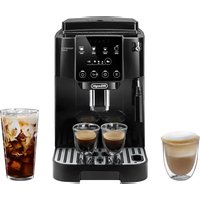


| Product Type | Superautomatic Espresso Machine |
| Brand | DeLonghi |
| Model | Magnifica Start ECAM22022B |
| Power Supply | 120 V ~ 60 Hz, 1250 W |
| Water Tank Capacity | Approximately 1.8 L (not specified, estimated) |
| Bean Hopper | Yes, with lid and grind adjustment knob |
| Pre-ground Coffee Funnel | Yes, with included measuring scoop |
| Beverage System | Espresso, Long Coffee, Cappuccino, Hot Water, 2-cup function |
| Cappuccino Nozzle | Removable cappuccino nozzle with steam/hot water connection |
| Adjustable Coffee Spout Height | Yes, to adapt to cup size |
| Coffee Grinder | Integrated, adjustable (7 settings) |
| Brew Unit | Removable for easy cleaning |
| Coffee Intensity | Adjustable (3 levels) + pre-ground |
| Quantity Programming | Customizable for each beverage |
| Coffee Temperature | Adjustable (low, medium, high) via menu |
| Display and Controls | Control panel with buttons and indicator lights |
| Water Softener Filter | Optional (compatible with De'Longhi filter) |
| Water Hardness | Integrated test with included strip |
| Descaling | Automatic program with indicator light |
| Auto Shut-off | Programmable (15 min, 30 min, 1 h, 3 h) |
| Eco Mode | Yes, can be activated in the menu |
| Automatic Rinse | Yes, on startup and shutdown |
| Drip Tray and Grounds Container | With water level and fill indicators |
| Maintenance | Regular cleaning of brew unit, nozzles, and descaling |
| Safety | Auto shut-off, burn protection, polarized plug |
| Included Accessories | Water hardness test strip, pre-ground coffee scoop, descaling product |
Frequently Asked Questions - Magnifica Start ECAM22022B DELONGHI
User questions about Magnifica Start ECAM22022B DELONGHI
0 question about this device. Answer the ones you know or ask your own.
Ask a new question about this device
Download the instructions for your Coffee machine in PDF format for free! Find your manual Magnifica Start ECAM22022B - DELONGHI and take your electronic device back in hand. On this page are published all the documents necessary for the use of your device. Magnifica Start ECAM22022B by DELONGHI.
USER MANUAL Magnifica Start ECAM22022B DELONGHI
COFFEE MAKER
Instructions for use. Keep these instructions
Visit delonghi.com for a list of service centers
near you.
ELECTRICAL CHARACTERISTICS
120 V~60 Hz 1250 W
COFFEE MAKER
- SAFETY WARNINGS ......6
- GENERAL INFORMATION......6
2.1 Instructions for Use......6
- BEFORE USE......6
3.1 Checking the appliance ....6
3.2 Installing the appliance....6
3.3 Connecting the appliance....6
3.4 Setting up the appliance 6
3.5 Cleaning and maintenance of materials in contact with food....6
3.6 Making cappuccinos and milk-based coffees 7
- INTRODUCTION......7
4.1 Letters in brackets....7
4.2 Troubleshooting and repairs....7
- DESCRIPTION 7
5.1 Description of the appliance - A .....7
5.2 Description of control panel - B......7
5.3 Description of accessories - C* ......8
- SETTING UP THE APPLIANCE 8
- MEASURING WATER HARDNESS ...... 8
- TURNING THE APPLIANCE ON......9
- TURNING THE APPLIANCE OFF ...... 9
- MAKING COFFEE DRINKS 9
10.1 Making coffee using coffee beans .....9
10.2 Making 2 cups of coffee .... 10
10.3 Making coffee using pre-ground coffee 10
10.4 General indications for making coffee-based drinks....10
10.5 Varying the coffee intensity .....10
10.6 Rinsing 11
10.7 Tips for a hotter coffee....11
10.8 Adjusting the coffee grinder......11
10.9 Customizing the quantity in the cup .....11
- MAKING CAPPUCCINO ....11
11.1 What milk to use.... 11
11.2 Making cappuccino ....11
11.3 Clean the steam/hot water spout after use12
- DELIVERING HOT WATER ....12
- WATER SOFTENER FILTER ....12
13.1 Replacing the filter....13
13.2 Removing the filter ....13
- TIPS FOR ENERGY SAVING......13
- SETTINGS MENU ....14
15.1 Reset default values.... 16
- CLEANING THE MACHINE ....17
- CLEANING THE BREWING GROUP ......19
- DESCALING ......19
- EXPLANATION OF LIGHTS......21
- TROUBLESHOOTING ......23
IMPORTANT SAFEGUARDS
When using electrical appliances, basic safety precautions should always be followed, including the following.
- Read all instructions carefully.
- Make sure the voltage of your electrical system corresponds to the voltage shown on the bottom of the machine.
- Do not touch hot surfaces. Use handles or knobs.
- To protect against fire, electrical shock and personal injury, do not immerse cord, plug or appliance in water or other liquid.
- Keep the appliance out of the reach of children and do not leave appliance unattended while in operation.
- Unplug from the outlet when not in use and before cleaning.
- Do not operate with a damaged cord or plug, or after the appliance malfunctions, or has been damaged in any manner. Return the appliance to the nearest authorized service facility for examination, repair or adjustment.
- The use of accessory attachments not recommended by the manufacturer may result in fire, electrical shock, or personal injury.
- Do not use outdoors.
- Make sure the power cord does not hang over the edge of the table or counter-top to avoid getting accidentally caught or entangled.
- Do not place the appliance or its electrical parts on or near electric stoves, cooking surfaces, or gas burners.
- Plug cord into the wall outlet. To disconnect, first turn machine "off", then remove plug from wall outlet.
- Do not use the appliance for other than the intended use. This appliance is to be utilized for domestic use only. The manufacturer declines all responsibility for any damage caused by improper, incorrect, or irresponsible use.
WARNING: To reduce the risk of fire or electric shock, do not remove the cover or the exterior of the unit. Don't attempt to repair or modify the machine, doing so will void the warranty. Repair should be done by authorized service personnel only!
SAVE THESE INSTRUCTIONS
THIS APPLIANCE IS FOR HOUSEHOLD USE ONLY
SHORT CORD INSTRUCTIONS
- A short power cord is provided to reduce risks resulting from becoming entangled in or tripping over a longer cord.
- Longer, detachable power supply cords or extension cords are available and may be used if care is exercised in their use.
- If an extension cord is used, the marked electrical rating should be at least as great as the electrical rating of the appliance. If the appliance is provided with a 3-wire, grounding type cord, the extension should be a GROUNDING TYPE 3-WIRE CORD. The longer cord should be arranged so that it will not drape over the counter-top or table top where it can be pulled on by children or tripped over.
- Your product is equipped with a polarized alternating current line plug (a plug having one blade wider than the other). This plug will fit into the power outlet only one way. This is a safety feature. If you are unable to insert the plug fully into the outlet, try reversing the plug. If the plug should still fail to fit, contact your electrician to replace your obsolete outlet. Do not defeat the safety purpose of the polarized plug.
1. SAFETY WARNINGS
Danger!
This is an electrical appliance and may cause electric shock.
You should therefore follow these safety warnings:
- Never touch the appliance with damp hands or feet.
- Never touch the plug with damp hands.
- Make sure the socket used is freely accessible at all times, enabling the appliance to be unplugged when necessary.
- Unplug directly from the plug only. Never pull the cord as you could damage it.
- To disconnect the appliance completely you must unplug it from the mains socket.
- If the appliance is faulty, do not attempt to repair. Turn it off, unplug from the mains socket and contact Customer Services.
- Before cleaning the appliance, turn it off, unplug from the mains socket and allow to cool.
Important!
Keep all packaging (plastic bags, polystyrene foam) away from children.
CHOKING HAZARD. The appliance might contain small parts. Some of those small parts might be required to get disassembled during cleaning and maintenance operations. Handle with care and keep small parts out of reach of children.
Danger of burns!
This appliance produces hot water and steam may form while it is in operation.
During operation (automatic rinsing, hot beverage delivery, steam delivery, cleaning), avoid contact with splashes of hot water or steam.
When the appliance is in operation, the cup shelf could become very hot.
2. GENERAL INFORMATION
2.1 Instruction for Use
Read all the Instruction for Use carefully before using the appliance. Failure to follow this Instruction for Use may result in burns or damage to the appliance.
The manufacturer is not liable for damage deriving from failure to respect this Instruction for Use.
Please note:
These safety warnings are valid for all De'Longhi coffee machines.
Keep this leaflet together with the instructions accompanying the appliance.
If the appliance is passed to other persons, they must also be provided with this Instruction for Use.
3. BEFORE USE
3.1 Checking the appliance
After removing the packaging, make sure the product is complete and undamaged and that all accessories are present. Do not use the appliance if it is visibly damaged. Contact De'Longhi Customer Services.
3.2 Installing the appliance
When you install the appliance, you should respect the following safety warnings:
- The appliance gives off heat. After positioning the appliance on the worktop, leave a space of at least 1.18 in / 3 cm between the surfaces of the appliance and the side and rear walls and at least 5.9 in / 15 cm above the coffee maker.
- Water penetrating the appliance could cause damage. Do not place the appliance near taps or sinks.
- The appliance could be damaged if the water it contains freezes. Do not install the appliance in a room where the temperature could drop below freezing point.
- Arrange the power cord in such a way that it cannot be damaged by sharp edges or contact with hot surfaces (e.g. electric hot plates).
3.3 Connecting the appliance
Check that the mains power supply voltage corresponds to that indicated on the rating plate on the bottom of the appliance. Connect the appliance to an efficiently earthed and correctly installed socket with a minimum current rating of 13A only. If the power socket does not match the plug on the appliance, have the socket replaced with a suitable type by a qualified professional.
3.4 Setting up the appliance
The first time you use the machine, the water circuit is empty and the appliance could be very noisy. The noise becomes less as the circuit fills.
3.5 Cleaning and maintenance of materials in contact with food
- When used for the first time, or after 3 or 4 days without use, clean the appliance and the removable accessories that come into contact with water, coffee and milk, as indicated in the instructions for use. Check in the instructions which accessories are dishwasher safe.
- If the appliance is not used for more than 3 or 4 days, before making the first beverage, rinse the water circuit as described in this Instruction for Use.
- Be certain to take maximum care when carrying out all cleaning and maintenance operations described in the
instructions for use and/or prompted by the display or warning lights of the appliance itself.
3.6 Making cappuccinos and milk-based coffees
- The machine can be used both with cow's milk and with plant-based beverages.
- Do not use raw milk.
- Use pasteurized or UHT milk, or plant-based beverages kept and stored in accordance with the indications given by the producer.
- The cleaning methods described in the instructions do not guarantee the complete removal of allergens.
- Before dispensing any kind of drink, make certain that the machine has not been operated previously using types of milk, or types of plant-based beverage, containing allergens to which you may be allergic or substances you may be intolerant to.
- In the event that unused milk or plant-based beverage may be left in the carafe, this can be kept in the refrigerator for further use, observing the indications for storage given by the producer of the beverage, and under no circumstances for longer than 2 days. If the milk carafe is not returned to the refrigerator, empty the contents and clean the carafe as described in the instruction manual.
4. INTRODUCTION
Take a few minutes to read these Instructions for Use. This will avoid all risks and damage to the appliance.
The LEDs and indicator lights on the panel will help you interact with the machine and use the various functions correctly:
| Off -- | ||
| Permanently alight | Function available | |
| Blinking | Function underway | |
| Blinking rapidly | User action required |
The same symbols are also used in the Quick Guide provided with the product.
4.1 Letters in brackets
The letters in brackets refer to the description of the appliance on pages 2-3.
4.2 Troubleshooting and repairs
In the event of problems, first try to resolve them by reading the information given in sections "19. Explanation of lights" and "20. Troubleshooting".
If this does not resolve the problem or further information is required, consult the customer services department at the numbers indicated on the website delonghi.com.
If repairs are required, contact De'Longhi customer services only. Addresses can be found on the website delonghi.com.
5. DESCRIPTION
5.1 Description of the appliance - A
A1. Beans container lid A2. Coffee grinder adjustment dial A3. Beans container A4. Pre-ground coffee funnel A5. Brewing group door A6. Removable brewing group A7. Power cord A8. Water tank lid A9. Water tank A10. Coffee grounds container A11. Drip tray A12. Drip tray water level indicator A13. Cup grille A14. Drip tray grille A15. Coffee spouts (adjustable height) A16. Steam/hot water spout A17. Cappuccino maker (removable) A18. Steam/Hot water connection nozzle (removable) A19. Steam/Hot water dial A20. Cup shelf A21. Condensate tray
5.2 Description of control panel - B
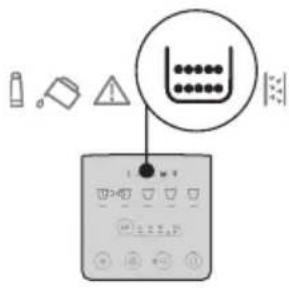
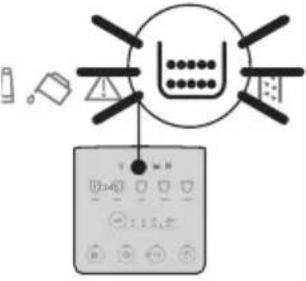
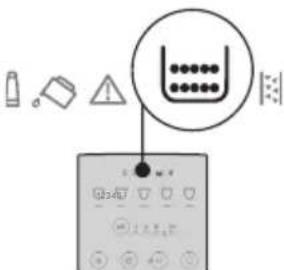
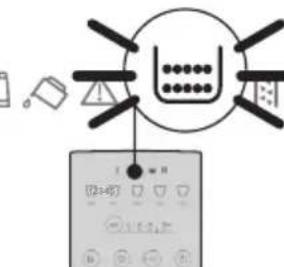
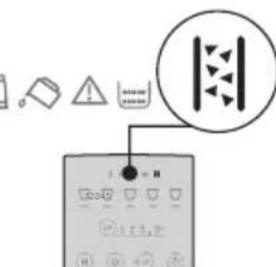
B1. ON/standby button with built-in LED B2. X2 button with built-in LED (if pressed and held for 5 seconds, activates rinsing of the coffee circuit) B3. Settings menu button with built-in LED B4. Descale button with built-in LED B5. Intensity or Pre-ground selection button B6. Intensity selection LED B7. Pre-ground selection LED B8. Different numbers and types of drinks, according to model. B9. Indicator permanently alight: filter must be replaced Indicator flashing: filter replacement in progress B10. Indicator permanently alight: insufficient water in the tank (A9) Indicator flashing: tank not in position
B11. General alarm indicator
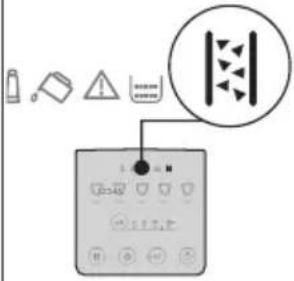
B12. Indicator permanently alight: grounds container (A10) needs emptying
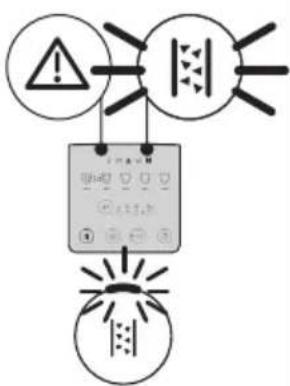
Indicator flashing: grounds container not in position
B13. Indicator permanently alight: machine must be descaled Indicator flashing: descaling in progress
5.3 Description of accessories - C*
(number and type differ according to model)
C1. "Total Hardness Test" indicator paper C2. Pre-ground coffee scoop C3. Descaler
6. SETTING UP THE APPLIANCE

Please note:
- When using the machine for the first time, all removable accessories making contact with water or milk should be rinsed with hot water.
- Possible traces of coffee in the grinder are the result of operating tests performed on the appliance before sale, proof of the meticulous care and attention we invest in our products.
- The first time the machine is used, the water circuit will be empty and the appliance could be very noisy. The noise becomes less as the circuit fills.
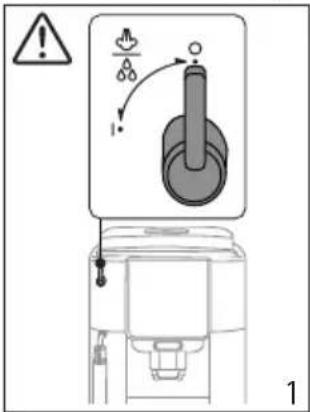
- Make sure that the steam dial (A19) stays in the 0 position until completion of the first start-up cycle (fig. 1).
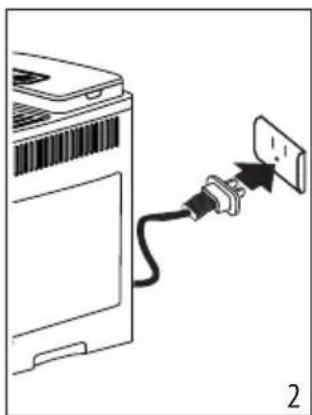
- Connect the appliance to the mains supply (fig. 2).
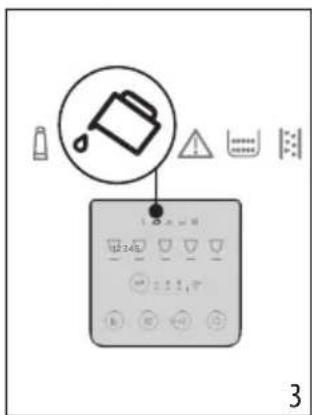
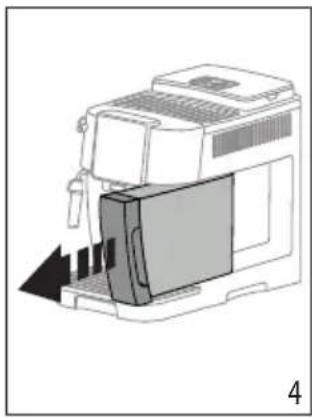
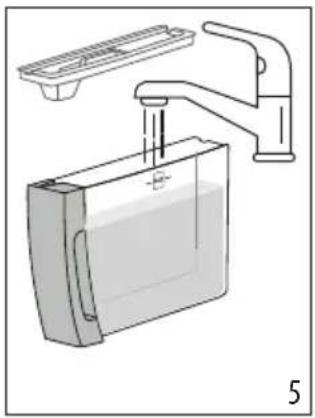
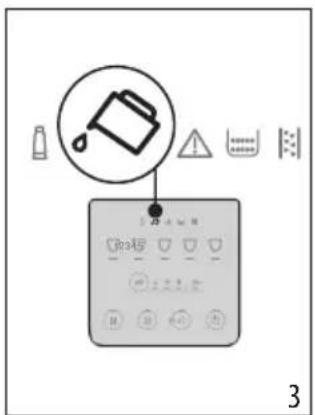
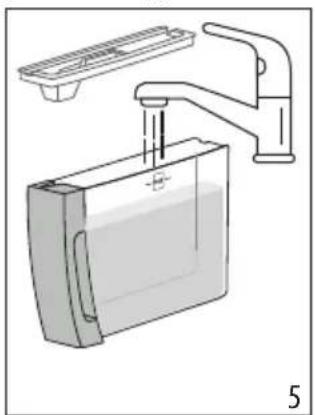
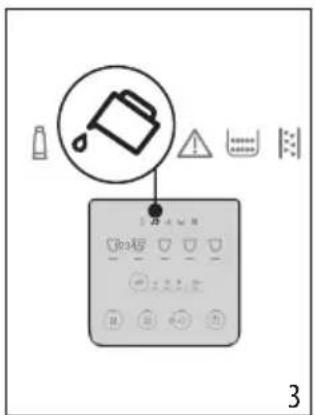
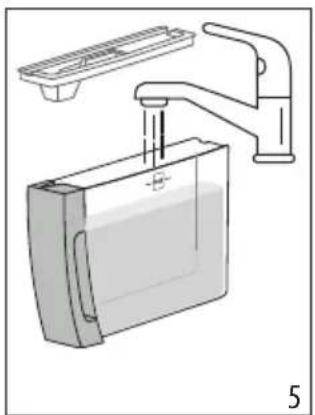
- The indicator (B40) will light up on the control panel (B) (fig. 3): remove the water tank (A9) (fig. 4), fill up to the MAX level with fresh water (fig. 5), then reposition in the appliance.
- The LED (B3) on the control panel will flash rapidly.
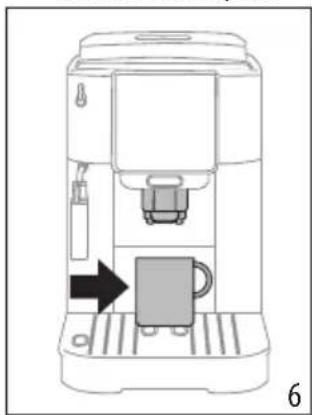
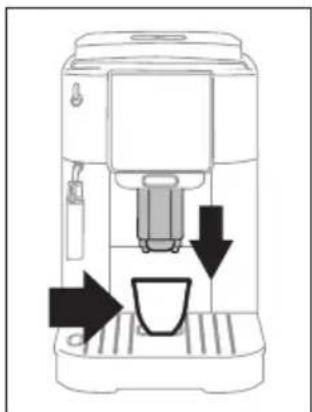
- Position a container under the coffee spout (A15) (fig. 6).
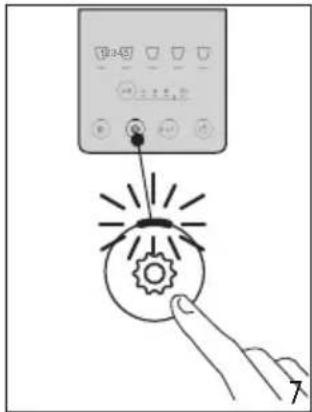
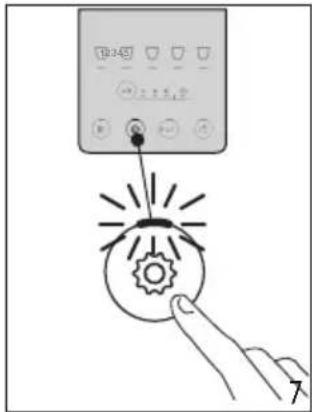
- Press the button (B3) (fig. 7): the internal water circuits start to fill and the appliance will release hot water from the coffee spout.

The machine is now ready for use.
Please note:
- When using the machine for the first time, 4-5 coffees will need to be made before it starts giving satisfactory results.
- When rinsing the steam circuit, it is best to release hot water for a few seconds by turning the steam/hot water dial (A19) to the I position.
7. MEASURING WATER HARDNESS
Setting the water hardness as soon as possible will enable the machine to optimize the frequency of descaling. This means that the descale indicator (B13) will light up as necessary according to the actual hardness of the local water supply. Proceed as follows:
- If a total hardness test indicator paper (C1) is supplied with the model of machine in question, remove it from its wrapper.
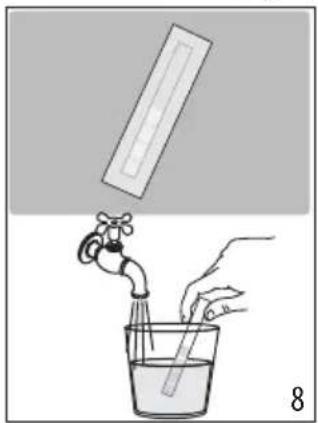
- Immerse the paper completely in a glass of water for about one second (fig. 8).
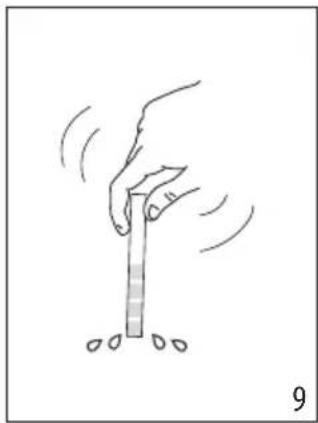
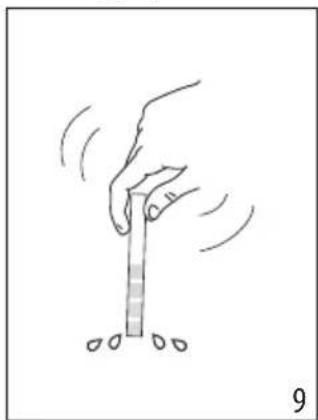
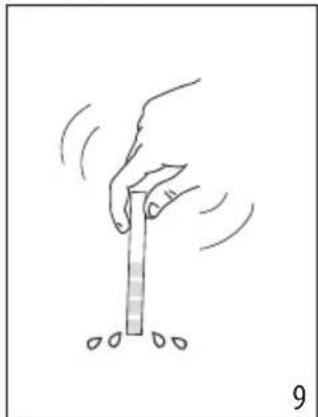
- Remove the paper from the water and shake lightly (fig. 9). After about a minute, 1, 2, 3, or 4 red squares appear, depending on the hardness of the water. Each square corresponds to one level.
| Total Hardness Test Hardness | |
| 1Low | |
| 2Medium | |
| 3Medium/High | |
| 4High |
See instructions in section "15. Settings menu" to set the machine.
8. TURNING THE APPLIANCE ON
Please note:
Make sure that the steam/hot water dial (A19) is closed, in the 0 position (fig. 1).
Danger of scalding!
During the rinse, a little hot water flows from the coffee spouts (A15). Take care to avoid contact with splashes of water. To avoid the need for frequent emptying of the drip tray (A11), place a container under the spouts to collect the rinse water.
- To switch the appliance on, press the button (B1): the Led of button lights up and the drinks indicator Leds flash on the control panel (B) to show that the machine is warming up.
During this step, the machine performs a rinse cycle. Besides heating up the boiler, this also serves to circulate hot water through the internal circuits so they too are brought up to temperature.
The appliance is ready for use when the drinks and intensity LEDs remain permanently alight.
9. TURNING THE APPLIANCE OFF
Whenever the coffee machine is turned off after being used to make coffee, it performs an automatic rinse cycle.
Danger of scalding!
During the rinse, a little hot water flows from the coffee spouts (A15). Take care to avoid contact with splashes of water. To avoid the need for frequent emptying of the drip tray (A11), place a container under the spouts to collect the rinse water.
- To switch the appliance off, press the button (B1); - the drinks indicator LEDs on the control panel will now flash: the appliance performs a rinse cycle, if envisaged, and then switches off (stand-by).
Please note:
If the appliance is not going to be used for some time, unplug it from the mains socket:
- first turn the appliance off by pressing the button; - unplug the power cord from the socket.
10. MAKING COFFEE DRINKS
10.1 Making coffee using coffee beans Important!

Do not use green, caramelized or candied coffee beans as they could stick to the coffee grinder and make it unusable.
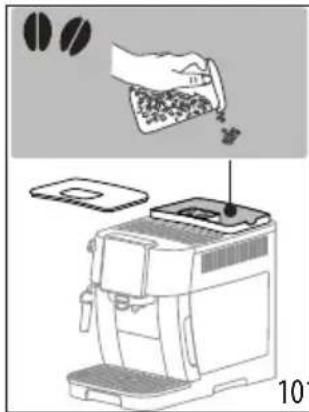
- Fill the container (A3) with coffee beans (fig. 10);
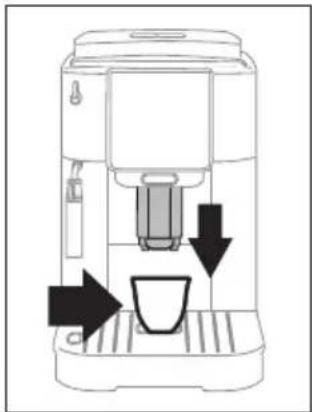
- Place a cup under the coffee spouts (A15) (fig. 11);
- Lower the spouts as near as possible to the cup: this makes a creamier coffee (fig. 11);
- Select the required coffee drink:
| Drink (*) | Default quantity (ml/fl oz) | Programmable quantity (ml/fl oz) |
| Espresso | ≈ 40/1.35 | from ≈ 20/0.68 to ≈ 80/2.70 |
| Coffee | ≈ 180/6.09 | from ≈ 100/3.38 to ≈ 240/8.11 |
| [BTWW]Long | 160/5.41 | from 115/3.89 to 250/8.45 |
 Americano Americano | Espresso: 40/1.35 Water: 110/3.72 | Espresso:from 20/0.68 to 180/6.09 Water:from 50/1.69 to 300/10.14 |
 Doppio + Doppio + | 120/4.06 | from 80/2.70 to 180/6.09 |
(*) Numbers and types of drinks differ according to model.
- Preparation begins and the LED corresponding to the selection flashes on the control panel (B).
10.2 Making 2 cups of coffee


- Place the cups under the coffee spouts (A15);
- Lower the spouts as near as possible to the cups: this makes a creamier coffee;
- Press the ③×2 button (B2): the corresponding LED lights up;
- Press the button (B8); Espresso
- Preparation begins and the LED corresponding to the Espresso button flashes on the control panel (B).
10.3 Making coffee using pre-ground coffee


Important!
- Never add pre-ground coffee when the machine is off or it could spread through the inside of the machine and dirty it. This could damage the machine.
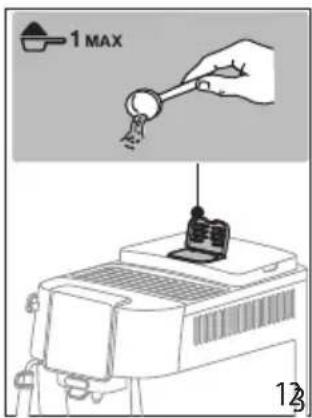
- Never use more than 1 level scoop (C2), as this could soil the inside of the machine or block the funnel (A4).
Please note:
When using pre-ground coffee, only one cup can be made at a time.
- Press the button (B5) repeatedly until the LED lights up (B7).
- Make sure the funnel is not blocked, then add one level scoop of pre-ground coffee (fig. 12).

- Place a cup under the coffee spouts (A15) (fig. 11);
- Select the required drink (B8);
- Preparation begins and the LED corresponding to the selection flashes on the control panel (B).
Important!
- Making Long coffee: halfway through preparation, when the LED (B7) starts flashing, add another level scoop of pre-ground coffee and press the Long button again.
- It is not possible to make a Doppio+ coffee using pre-ground coffee.
10.4 General indications for making coffee-based drinks
- Indicator lights may appear on the control panel (B) during use. Their meaning is given in section "19. Explanation of lights".
- For hotter coffee, see section "10.7 Tips for a hotter coffee".
- If the coffee is delivered a drop at a time, too weak and not creamy enough or too cold, read the tips in section "20. Troubleshooting".
- To customize the drinks according to personal taste, see sections "10.5 Varying the coffee intensity" and "10.9 Customizing the quantity in the cup".
Please note:
In energy saving mode, a few seconds may elapse before the first coffee is delivered as the appliance must heat up again.
10.5 Varying the coffee intensity
- Press the button (B5) repeatedly until the LEDs relative to the desired intensity light up (B6):
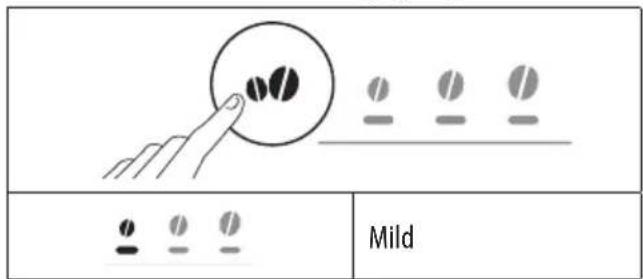
 | Medium |
 | Strong |
- Select the desired coffee drink.
Please note:
- When the next coffee is made, the machine will show the last intensity setting selected.
- In the event of power failure, the machine will revert to the medium default setting.
10.6 Rinsing

Use this function to deliver hot water from the coffee spouts to clean and heat the appliance's internal circuit.
- Place a container of at least 100ml capacity under the coffee spouts (A15) (fig. 6).
- To perform the rinse cycle, simply press the button (B2) and hold for about 5 seconds. The cycle will start and stop automatically (to terminate the cycle sooner, press the same button a second time).
Please note:
- If the appliance is not used for more than 3-4 days, when switched on again, we strongly recommend performing 2/3 rinses before use;
- It is normal for the grounds container (A10) to contain water following a rinse cycle.
10.7 Tips for a hotter coffee
To make a hotter coffee, proceed as follows:
- run a rinse cycle (see section "10.6 Rinsing");
- warm the cups by rinsing them first using the hot water function;
- increase the coffee temperature (see section "15. Settings menu").
10.8 Adjusting the coffee grinder
The coffee grinder does not require any adjustment, at least initially, as it has been factory set to ensure that coffee is prepared correctly.
To make an adjustment while the coffee grinder is in operation, turn the dial (A2) as follows:
| If the coffee is delivered too slowly, or not at all.This adjustment will not take effect until at least 2 cups of coffee have been delivered. | Turn one click towards "7"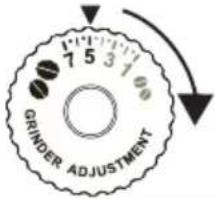 |
| For a fuller bodied creamier coffeeThis adjustment will not take effect until at least 2 cups of coffee have been delivered. | Turn one click towards “1”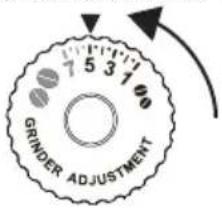 |
Please note:
The adjustment dial must be turned only when the coffee grinder is in operation during the initial step of coffee preparation.
10.9 Customizing the quantity in the cup
- Press the button relative to the drink being programmed and hold for a few seconds: when the Led corresponding to the selection starts flashing rapidly, the machine is in programming mode. Delivery begins;
- Once the cup is filled to the desired level, press the drink button again. Delivery ceases and the quantity is stored in the memory.
Please note:
To cancel the current setting, press a button corresponding to another drink
11. MAKING CAPPUCCINO

11.1 What milk to use
The quality of the froth will vary depending on:
- the temperature of the dairy or vegetable milk used (for best results, always use dairy or vegetable milk straight from the fridge: 5 °C-41°F); • the type of dairy or vegetable milk; • the brand used; • ingredients and nutritional value.
11.2 Making cappuccino
- Fill a container with about 100 ml/3.38 fl oz of milk for each cappuccino to be prepared (13). When choosing the size of the container, bear in mind that the milk doubles or triples in volume.
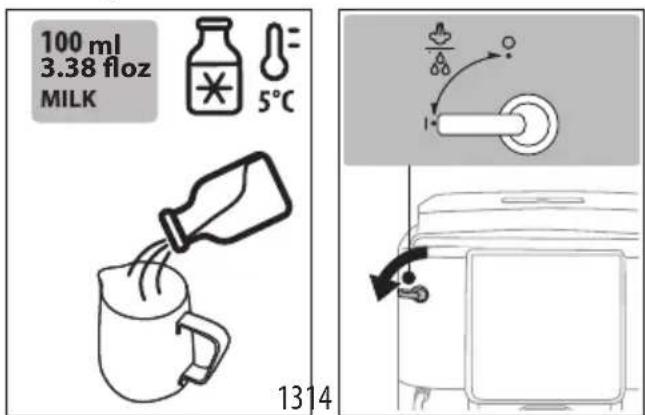
- Immerse the cappuccino maker (A17) in the milk container.
- Press the button: Steam (B8).
- Wait until the Led relative to the Steam button starts flashing rapidly: now turn the steam/hot water dial (A19) to the I position (fig. 14).
- After a few seconds, steam is delivered from the cappuccino maker, giving the milk a creamy frothy appearance and making it more voluminous. For a creamier froth, rotate the container with slow movements in an upward direction.
- Once the froth is as required, shut off the steam by turning the dial to the 0 position.
- Prepare the coffee in a large cup.
- Add the frothed milk to the coffee. The cappuccino is ready. Sweeten to taste and, if desired, sprinkle the froth with a little cocoa powder.
11.3 Clean the steam/hot water spout after use
Clean the steam/hot water spout (A16) every time it is used, to prevent the build-up of milk deposits and prevent it from clogging.
Danger of scalding!
When cleaning the steam/hot water spout, a little hot water will be released. Take care to avoid contact with splashes of water.
- Release a little water by turning the steam/hot water dial (A19) to the I position. Then shut off the flow by returning the dial to the 0 position.
- Wait a few minutes for the spout to cool down. Turn the cappuccino maker (A17) anti-clockwise and pull down to remove (fig. 15).
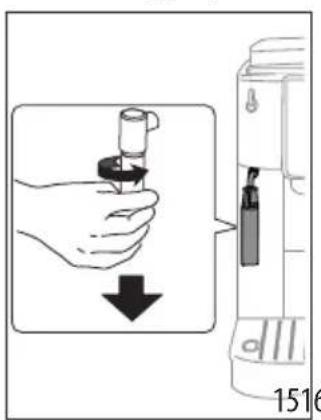

- Pull the nozzle (A18) downwards (fig. 16).
- Make sure the two holes arrowed in fig. 17 are not clogged. If necessary, clean using a toothpick.
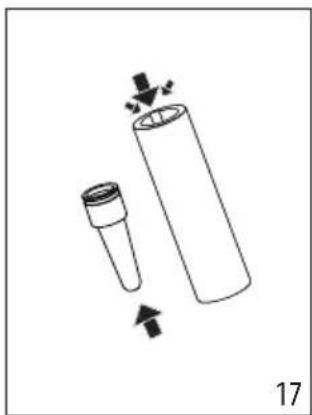
- Reinsert the nozzle and reconnect the cappuccino maker to the nozzle, pushing upwards and turning clockwise until the two engage.
12. DELIVERING HOT WATER
Danger of scalding!
Never leave the machine unattended when hot water is being released. The tube of the steam/hot water spout (A16) heats up when in use.
- Position a container under the steam/hot water spout (as close as possible to avoid splashes).
- Turn the steam/hot water dial (A19) to the I position (fig. 14).
- To shut off the flow of hot water manually, turn the steam/hot water dial to the 0 position.
Please note:
In energy saving mode, a few seconds may elapse before hot water emerges as the appliance must heat up.
13. WATER SOFTENER FILTER
To ensure the performance of the machine remains constant over time, we recommend using a De'Longhi water softener filter.
For more information, visit the delonghi.com website.
WaterFilter EAN: 8004399327252
To use the filter correctly, follow the instructions below.
- Remove the filter from the packaging and turn the date indicator to view the next two months (fig. 18);

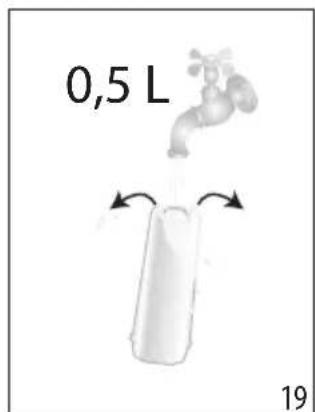
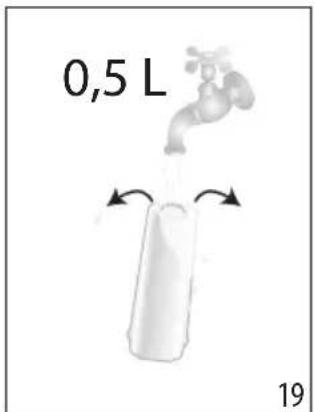
- To activate the filter, run tap water through the hole in the center of the filter until water comes out of the openings at the side for more than a minute (fig. 19);
- Remove the tank from the machine and fill with water; insert the filter in the water tank, immersing it completely for about ten seconds, while tilting it and applying light pressure so that the air bubbles are able to escape (fig. 20);
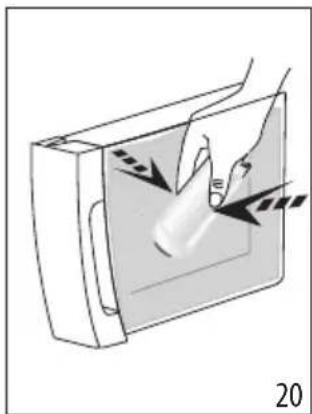
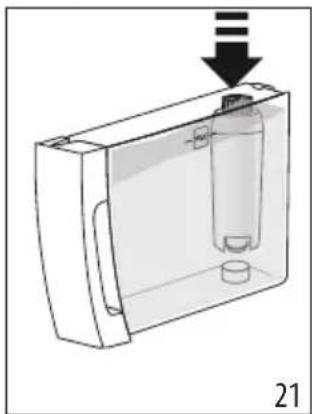
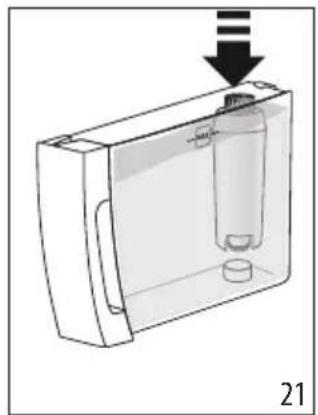
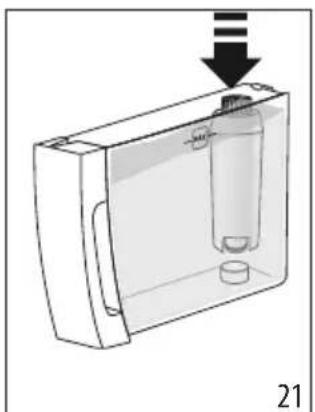
- Insert the filter in the relative housing and press fully home (fig. 21);
- Close the tank with the lid, then reposition the tank in the machine;
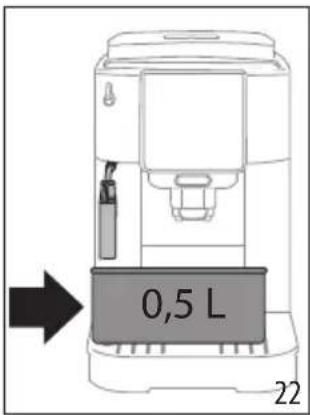
- Place an empty container of at least 0.5 liters capacity under the steam/hot water spout (fig. 22).
- See instructions in section "15. Settings menu" for installation of the filter;
- The Led relative to the Steam button starts flashing rapidly: turn the steam/hot water dial (A19) to the I position (fig. 12);
- The appliance delivers hot water, then stops automatically;
- The Led relative to the Steam button starts flashing rapidly: turn the steam/hot water dial to the 0 position;
- The filter is now active and the machine can be used.
Please note:
If the LED relative to button (B4) flashes rapidly, press the button. This will cause the internal circuits of the machine to start filling up, expelling the air bubbles that have formed and allowing the installation to proceed.
13.1 Replacing the filter
Replace the filter when the indicator (B9) lights up.
- Remove the water tank and the spent filter;
- Follow the operations described in the previous section to activate the filter;
- See instructions in section "15. Settings menu" to set the machine and repeat steps 8 to 11 of the preceding section.
Please note:
After two months (see date indicator) or when the appliance has not been used for 3 weeks, the filter should be replaced even if the message has not yet been displayed.
13.2 Removing the filter
To continue using the appliance without the filter, it must be removed, and the appliance notified of its removal.
- Remove the water tank and the spent filter;
- See instructions in section "15. Settings menu" to set the machine.
Please note:
After two months (see date indicator) or when the appliance has not been used for 3 weeks, the filter should be replaced even if the message has not yet been displayed.
14. TIPS FOR ENERGY SAVING
- Set auto-off to 15 minutes (see "15. Settings menu");
- Enable Energy Saving (see "15. Settings menu"); • Always carry out the descaling cycle when prompted by the machine.
15. SETTINGS MENU
When in the menu, use the active buttons to select the corresponding functions:
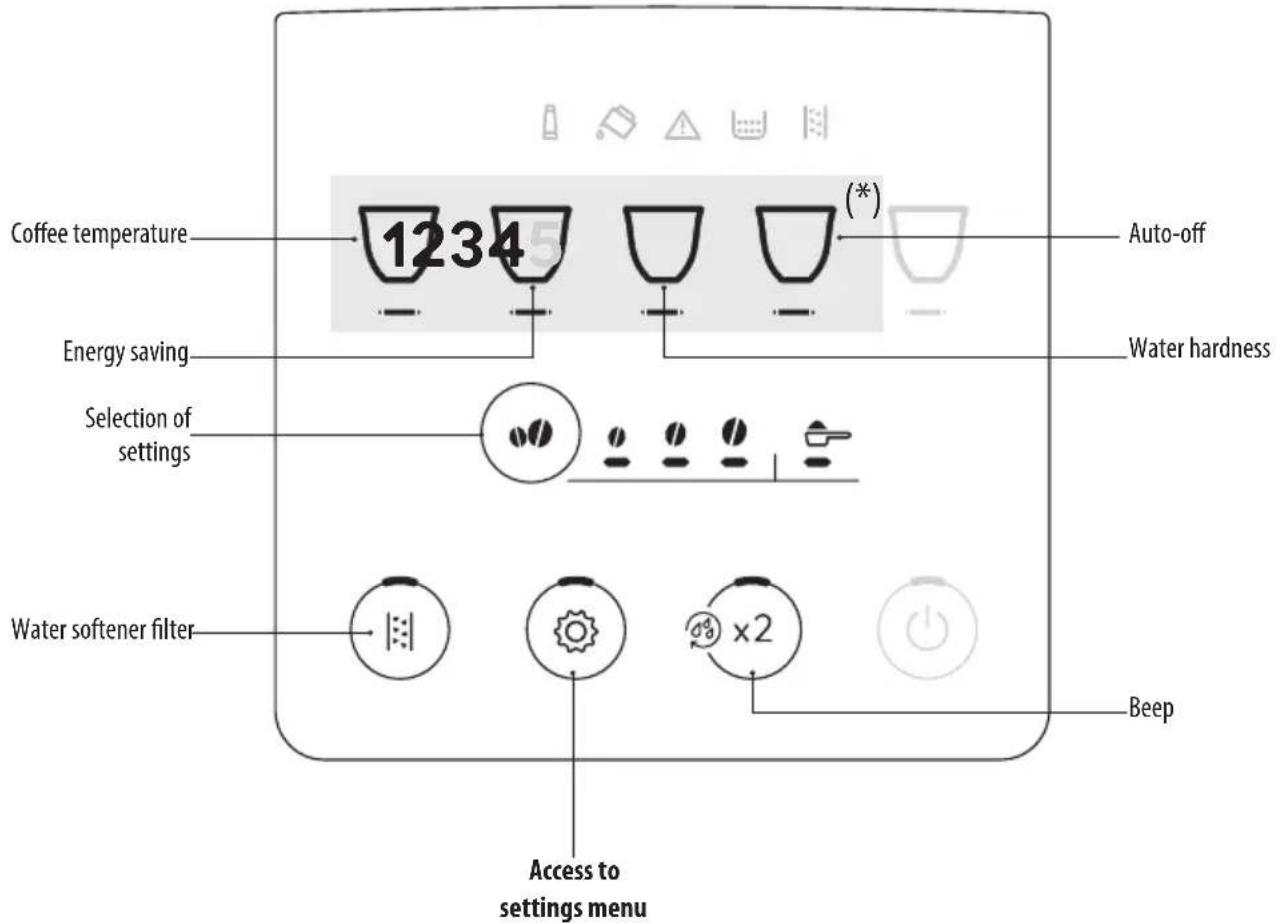
(*) Drinks differ according to model
| 1. Access the menu: | |||
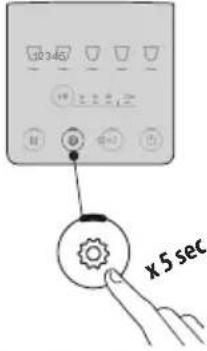 | Press and hold the button for a few seconds:the settings buttons light up.Proceed by pressing the button corresponding to the setting to be adjusted. | ||
| 2. Adjust the machine settings: | |||
Water softener filter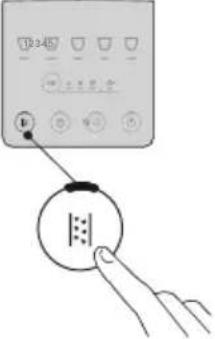 | Press the intensity button repeatedly until the Leds relative to the desired setting light up | FILTER IN PLACE | Confirm selection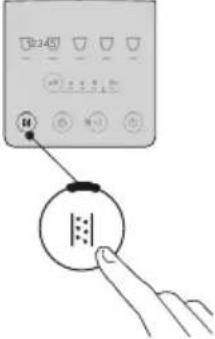 |
| FILTER REMOVED | |||
Beep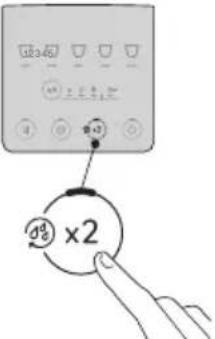 | Press the intensity button repeatedly until the Leds relative to the desired setting light up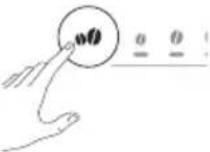 | ON | Confirm selection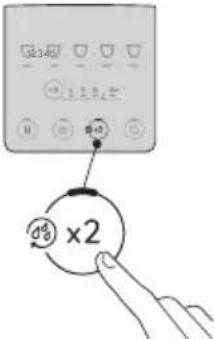 |
| OFF | |||
Coffee temperature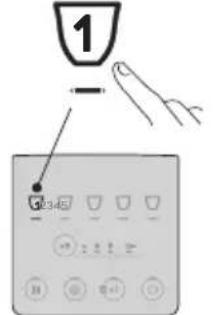 | Press the intensity button repeatedly until the Leds relative to the desired setting light up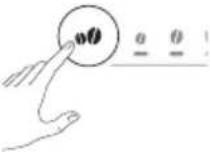 | LOW | Confirm selection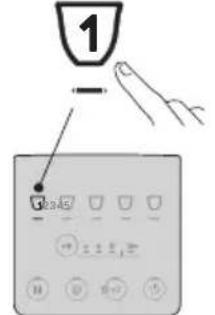 |
| MEDIUM | |||
| HIGH | |||
Energy saving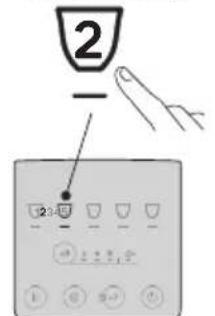 | Press the intensity button repeatedly until the Leds relative to the desired setting light up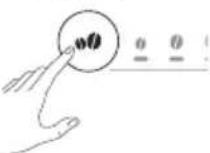 | ON | Confirm selection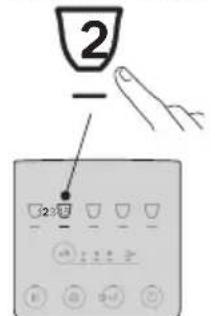 |
| OFF | |||
| → | |||
Water hardness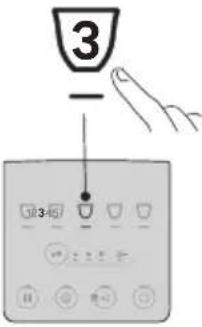 | Press the intensity button repeatedly until the Led corresponding to the required level lights up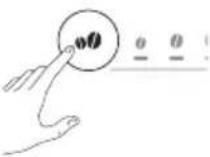 | 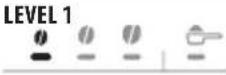 | Confirm selection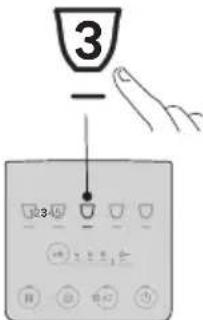 |
| LEVEL 2 | |||
| LEVEL 3 | |||
| LEVEL 4 | |||
Auto-off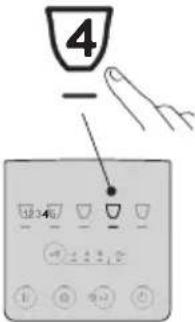 | Press the intensity button repeatedly until the Led corresponding to the required time setting lights up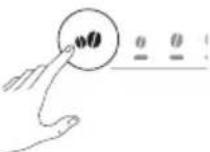 | 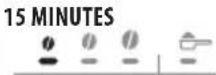 | Confirm selection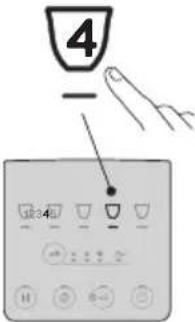 |
| 30 MINUTES | |||
| 1 HOUR | |||
| 3 HOURS | |||
| 3. Exit the menu: | |||
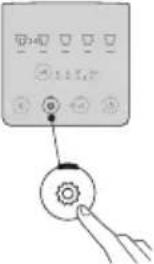 | Press the button:The machine is ready for use again.Please note:The machine exits the settings menu automatically if there is no activity for 30 seconds. | ||
15.1 Reset default values
| Make sure the machine is in stand-by (off, but connected to the mains power supply). | 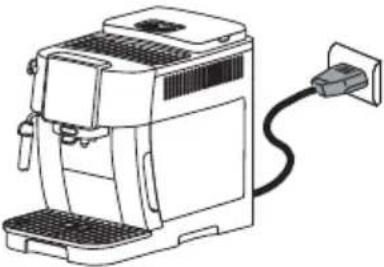 |
| Press the buttons corresponding to drinks 1, 2 and and hold for 5 seconds. All the settings and drink quantities are reset to the default values. |  |
| The machine emits a long beep and all the lights flash to confirm the reset | 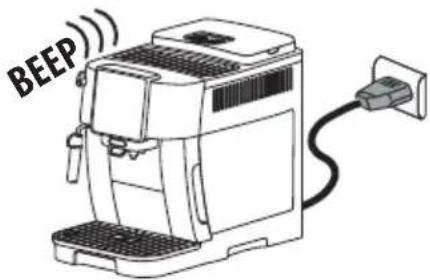 |
16. CLEANING THE MACHINE

Important!
- Do not use solvents, abrasive detergents or alcohol to clean the coffee machine. With De'Longhi superautomatic coffee machines, no chemical products are required for cleaning purposes.
- Do not use metal objects to remove encrustations or coffee deposits as they could scratch metal or plastic surfaces.
| [0015] | 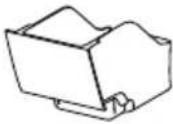 | 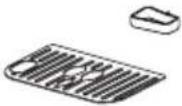 | 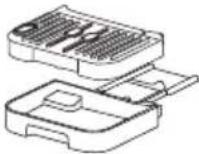 | [BCKS] | ||
 | 122°F50°C | × × | × | √ | √ | |
 | √ √ √ | √ √ | ||||
| Component Frequency Procedure | ||
Grounds container (A10)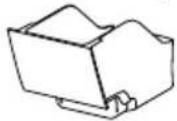 | When the indicator (B12) lights up, the grounds container must be emptied: the machine cannot now make coffee. | Remove the drip tray (A11), empty and clean.Empty the grounds container and clean thoroughly to remove all residues that may have collected on the bottom.Check the condensate tray (A14) (red) and empty if necessary. |
| The appliance cannot be used to make coffee again until the grounds container has been cleaned. Even if not full, the empty grounds container message is displayed 72 hours after the first coffee has been prepared. For the 72 hours to be calculated correctly, the machine must never be disconnected from the mains power supply. | ||
Drip tray components The drip tray is fitted with a float indicator, coloured red (A14), showing the level of water it contains.Before the indicator starts to project from the cup tray (A13), the drip tray must be emptied and cleaned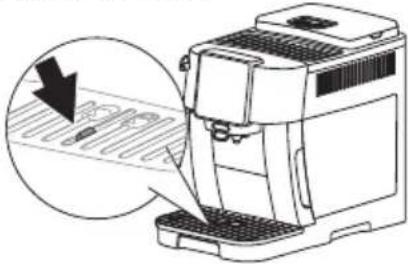 | Remove the drip tray and coffee grounds container;Remove the cup tray and drip tray grille, then empty the drip tray and the grounds container and wash all components;Check the condensate tray, coloured red, and empty if necessary;Put the drip tray complete with grille and grounds container back in the appliance.When removing the drip tray, the grounds container must always be emptied, even if it has not filled up appreciably. | |
Inside of the machine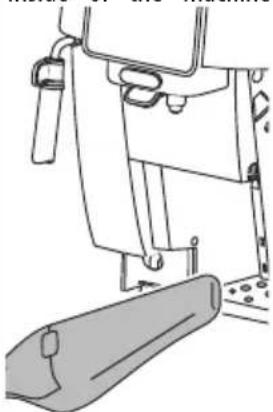 | Check regularly (about once a month) that the inside of the appliance (accessible after removing the drip tray) is not dirty. | Switch the machine off and disconnect from the power supply. Never immerse the machine in water.Remove coffee deposits with a brush and sponge;Remove all residues with a hand vacuum cleaner |
Coffee spouts (A15) Clean the coffee spouts regularly (once a month)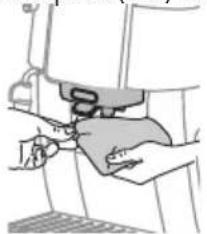 | Clean the coffee spouts regularly with a sponge or cloth;Check that the holes in the coffee spout are not blocked. If necessary, remove coffee deposits with a toothpick. | |
17. CLEANING THE BREWING GROUP
Important!
The brewing group (A6) cannot be removed while the machine is on.
- Press the button (B1) to turn the machine off;
- Remove the water tank (A9);
- Open the brewing group door, positioned on the right hand side (fig. 23);
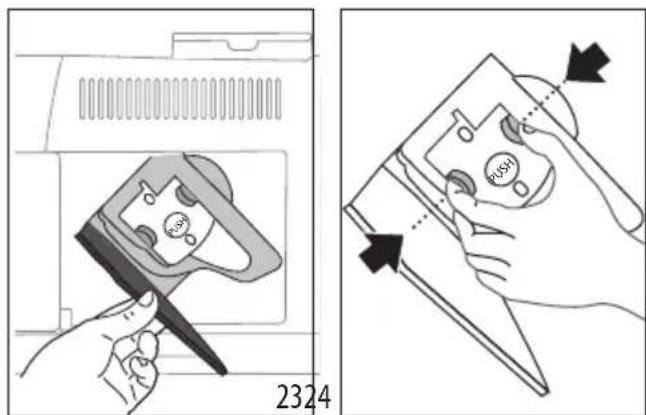
- Press the two colored release buttons inwards (fig. 24), at the same time pulling the brewing group outwards;
- Soak the brewing group in water for about 5 minutes, then rinse under the tap;
Important!
RINSE WITH WATER ONLY
NO DETERGENTS - NO DISHWASHER
- Do not use detergents when cleaning the brewing group, as they could damage it.
- Use the brush to remove any coffee residues left in the brewing group housing, visible through the brewing group door;
- After cleaning, replace the brewing group by sliding it onto the internal support, then push the PUSH symbol fully in until it clicks into place;
Please note:
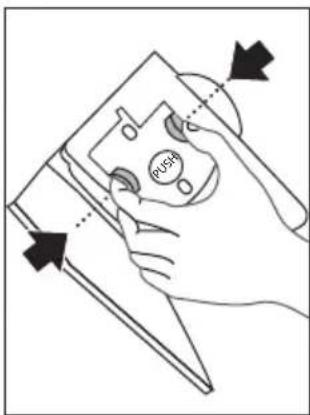
If the brewing group proves difficult to insert, adapt it (before insertion) to the right position by pressing the two levers (fig. 25).
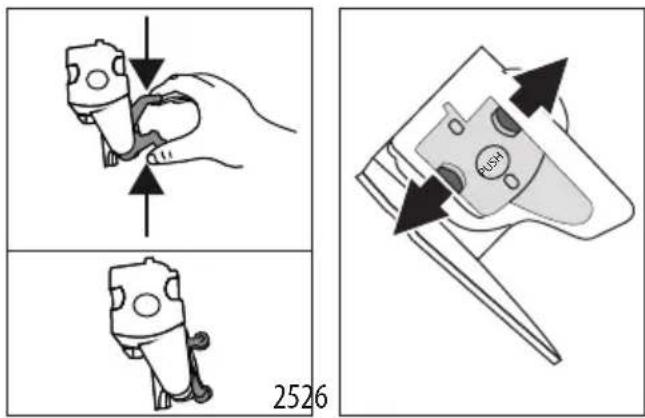
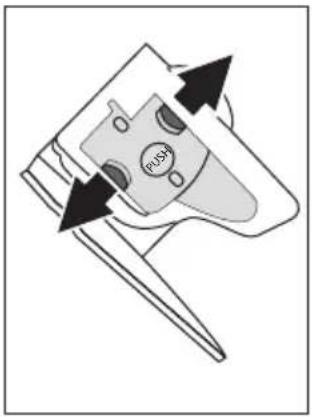
- Once inserted, make sure the two colored buttons have snapped out (fig. 26);
- Close the brewing group door;
- Put the water tank back.
18. DESCALING
- Before use, read the instructions and the labeling on the descaler pack.
- Use De'Longhi descaler only. Using unsuitable descaler and/or performing descaling incorrectly may result in faults not covered by the manufacturer's guarantee.
- Descaler can cause damage to delicate surfaces. If the product is accidentally spilt, dry immediately.
| To descale | |
| Descaler De'Longhi descaler | |
| Container Recommended capacity: 2 l/0.53 us lg | |
| Time ~30min | |
Important:
If the water softener filter is installed, it must be removed before adding the descaler solution. Thereafter, reinstate the filter at the start of step 3.
Descale the machine when the indicator (B13) lights up on the control panel.
Please note:
- Once the descaling cycle has begun, it cannot be interrupted and must be completed with the entire rinse cycle. With this in mind, make sure there is sufficient descaler. Proceed as follows:
| Step 1: Descalingaction |
- Press the button (B4) and hold for at least 5 seconds, until the relative Led starts flashing rapidly. The mild intensity Led lights up to indicate that step 1 of the descale cycle is in progress;
- Empty the drip tray (A11) and the grounds container (A10) and reposition them; empty the water tank completely (A9) and remove the softener filter (if installed);
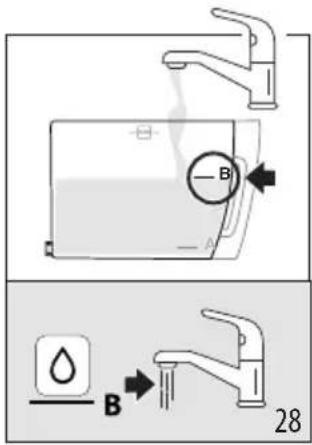
- Pour the descaler into the tank, filling to level A (which corresponds to a 100ml pack) marked on the side (front) of the tank (fig. 27); next, add water (one liter) up to level B (fig. 28); finally, reposition the water tank in the machine;

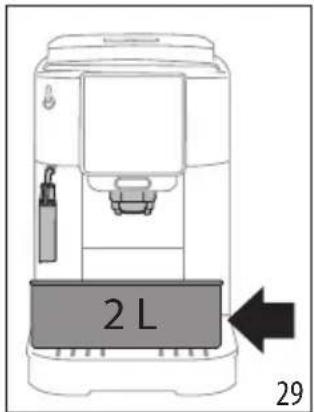
- Position an empty container of at least 2 liters capacity under the coffee spout (A15) and under the cappuccino maker (A17) (fig. 29).
- Press the button to start the descale cycle.
- After a few seconds, the LED relative to the steam/hot water dial (A19) will flash rapidly to indicate that the dial should be turned to the I position (fig. 13).
- For ten minutes or so, the machine alternates automatically between pausing and delivering liquid from the steam/hot water spout and the coffee spout.
When the first step of the descaling cycle has been completed, the low water level indicator (B10) will light up.
| Step 2: First rinse |
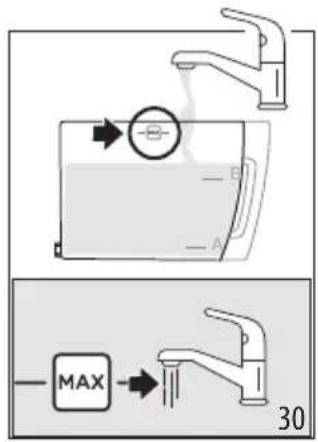
- Empty the container used to collect the descaler solution. Remove and empty the water tank, rinse it under running water, then fill it with fresh water up to the MAX level (fig. 30) and reposition it in the machine; reposition the container under the spouts.
- Press the button (which blinks rapidly) to start the rinse: the medium intensity LED blinks to indicate that step 2 of the descale cycle is in progress.
- The machine proceeds automatically with the rinse: the LED relative to steam blinks rapidly, indicating that the steam/hot water dial (A19) must be turned to the 0 position (fig. 1).
- After ten seconds or so, when the LED relative to steam flashes rapidly, turn the steam/hot water dial to the I position (fig. 14): the rinse fluid will flow from the coffee and steam/hot water spouts.
When the second step of the descaling cycle has been completed, the low water level indicator (B10) will light up.
| Step 3: Second rinse |
- Empty the container used to collect the water from the first rinse. Remove and empty the water tank, then fill it with fresh water up to the MAX level (fig. 30) and reinstate the softener filter, if in use; return the tank to the machine and reposition the container under the spouts.
- Press the button (which blinks rapidly) to start the rinse: the strong intensity LED blinks to indicate that step 3 of the descale cycle is in progress; the rinse fluid will flow from the steam/hot water spout.
| Step 4: Completion of descale procedure |
- When the LED relative to the pre-ground function lights up, the descale cycle has been correctly terminated: the LED relative to steam flashes to indicate that the steam dial must be turned to the 0 position.
- The indicators of the grounds container (B12) and low water level (B10) light up. Empty the grounds container and the drip tray, in which part of the rinse water will have been collected; finally, refill the water tank.
- Reposition all components in the machine. The machine is ready for use.
Please note:
• After descaling, it is normal for the grounds container to contain water. - If the water tank has not been filled to the MAX level after descaling, the appliance prompts for a third rinse to ensure that the descaler solution has been completely eliminated from the machine's internal circuits.
- EXPLANATION OF LIGHTS
| Indicator/Led Meaning | |
| The drink Leds flash The machine is warming up: wait | |
| The Leds for the drinks and the relative settings are permanently alight | The machine is ready for use: select the desired drink and relative options |
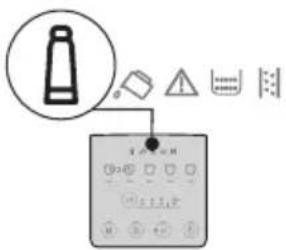 | Replace the filter (see section “13. Water softener filter”). |
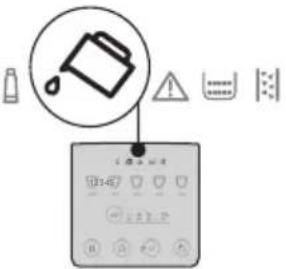 | Insufficient water in the tank (A9): fill the tank. |
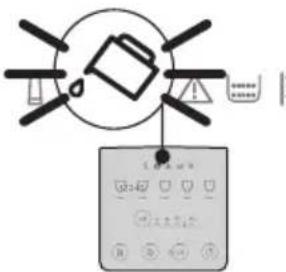 | The water tank (A9) is missing, or is not positioned correctly: insert the tank correctly. |
| → | |
| Indicator/Led Meaning | |
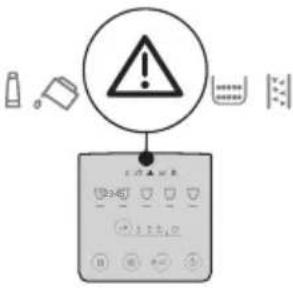 | General alarm: the inside of the machine is very dirty. Clean the machine thoroughly. If the message is still displayed after cleaning, contact De'Longhi Customer Services. |
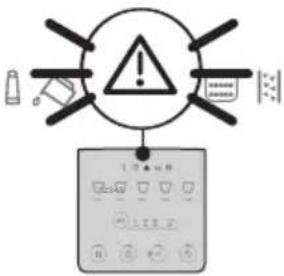 | The brewing group (A6) has not been replaced after cleaning: insert the brewing group as described in section “17. Cleaning the brewing group”roup”. |
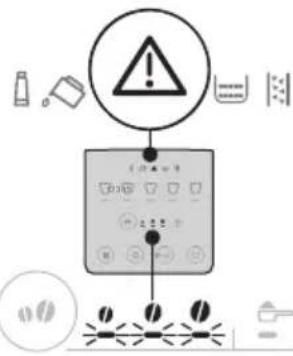 | No coffee beans: fill the beans container (A3), then press any button to reset the alarm. |
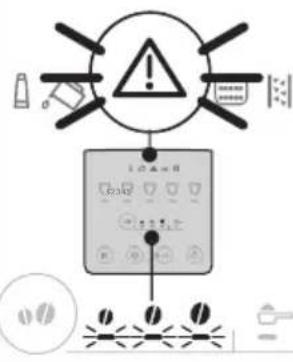 | The beans are too finely ground, so that the coffee is delivered too slowly or not at all. Adjust the coffee grinder (A2) (section “10.8 Adjusting the coffee grinder”). |
| → | |
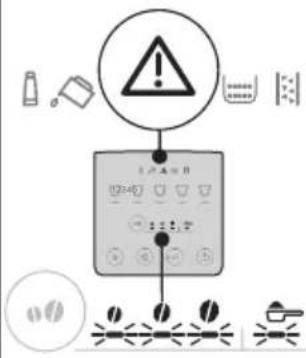 | Too much coffee has been used. Select a milder taste or reduce the quantity of pre-ground coffee. |
| A selection has been made using pre-ground coffee without putting the coffee in the relative funnel (A4). | |
| The coffee is delivered too slowly or a drop at a time.. The coffee is ground too finely. Use coffee for espresso machines. | |
| The water circuit is empty. Press the “Steam” button. | |
| → | |
| Indicator/Led Meaning | |
 | The grounds container needs emptying (A10). |
 | The grounds container (A10) is missing, or not inserted correctly: insert the drip tray complete with grounds con-tainer and press fully home |
 | Descaling needs to be car-ries out (see section “18. Descaling”). |
 | Descaling has been inter-rupted. Complete the cycle, restarting from the step indicated by the intensity selection Leds. |
20. TROUBLESHOOTING
Below is a list of some of the possible malfunctions.
If the problem cannot be resolved as described, contact customer services.
| PROBLEM POSSIBLE CAUSE REMEDY | ||
| The appliance does not come on. It is not plugged into the mains socket. Plug into the mains socket. | ||
| The coffee is not hot. The cups were not preheated. Warm the cups by rinsing them with hot water (Please note: the hot water function can be used). | ||
| PROBLEM POSSIBLE CAUSE REMEDY | ||
| On completion of the descale cycle, the machine calls for a further rinse | During the two rinse cycles, the water tank has not been filled to the MAX level | Restart the descaling procedure from "Step 3: Second rinse". |
| The milk has big bubbles The milk is not | cold enough, or is not semi-skimmed or skimmed. | Use skimmed or semi-skimmed milk at refrigerator temperature (about 5°C). If the result is not as desired, try changing the brand of milk. |
| Cappuccino maker dirty. Remove the components and clean them thoroughly. | ||
| Plant-based milk alternative have been used. | The effect varies widely depending on the nutritional properties of the drinks. | |
| The cup tray on top of the machine is hot A | number of drinks have been prepared in rapid succession | |
| The machine emits noises or small puffs of steam while not in use | The machine is ready for use, or has recently been turned off, and condensate is dripping into the hot vaporiser. | This is part of normal operation. To limit the phenomenon, empty the drip tray. |
| The machine emits puffs of steam from the drip tray and/or there is water on the surface where the machine is positioned. | The drip tray grille has not been replaced after cleaning. | Ensure the grille is repositioned in the drip tray. |
De'Longhi reserves the right to modify the technical specification and styling of its products at any moment, without compromising their functionality and quality.
TABLE OF CONTENTS
- SAFETY WARNINGS .....27
- GENERAL INFORMATION ......27
2.1 Notice....27
- BEFORE USE......27


- COFFEE MAKER
- IMPORTANT SAFEGUARDS
- SAVE THESE INSTRUCTIONS
- SHORT CORD INSTRUCTIONS
- SAFETY WARNINGS
- DANGER
- IMPORTANT
- DANGER OF BURNS
- DURING OPERATION (AUTOMATIC RINSING, HOT BEVERAGE DELIVERY, STEAM DELIVERY, CLEANING), AVOID CONTACT WITH SPLASHES OF HOT WATER OR STEAM
- GENERAL INFORMATION
- INSTRUCTION FOR USE
- PLEASE NOTE
- THESE SAFETY WARNINGS ARE VALID FOR ALL DE'LONGHI COFFEE MACHINES
- KEEP THIS LEAFLET TOGETHER WITH THE INSTRUCTIONS ACCOMPANYING THE APPLIANCE
- BEFORE USE
- CHECKING THE APPLIANCE
- INSTALLING THE APPLIANCE
- CONNECTING THE APPLIANCE
- SETTING UP THE APPLIANCE
- CLEANING AND MAINTENANCE OF MATERIALS IN CONTACT WITH FOOD
- MAKING CAPPUCCINOS AND MILK-BASED COFFEES
- INTRODUCTION
- LETTERS IN BRACKETS
- TROUBLESHOOTING AND REPAIRS
- DESCRIPTION
- DESCRIPTION OF THE APPLIANCE - A
- DESCRIPTION OF CONTROL PANEL - B
- DESCRIPTION OF ACCESSORIES - C
- MEASURING WATER HARDNESS
- TURNING THE APPLIANCE ON
- DANGER OF SCALDING
- TURNING THE APPLIANCE OFF
- MAKING COFFEE DRINKS
- MAKING COFFEE USING COFFEE BEANS IMPORTANT
- MAKING 2 CUPS OF COFFEE
- MAKING COFFEE USING PRE-GROUND COFFEE
- GENERAL INDICATIONS FOR MAKING COFFEE-BASED DRINKS
- VARYING THE COFFEE INTENSITY
- RINSING
- TIPS FOR A HOTTER COFFEE
- ADJUSTING THE COFFEE GRINDER
- CUSTOMIZING THE QUANTITY IN THE CUP
- MAKING CAPPUCCINO
- WHAT MILK TO USE
- CLEAN THE STEAM/HOT WATER SPOUT AFTER USE
- DELIVERING HOT WATER
- WATER SOFTENER FILTER
- WATERFILTER EAN
- REPLACING THE FILTER
- REMOVING THE FILTER
- TIPS FOR ENERGY SAVING
- SETTINGS MENU
- RESET DEFAULT VALUES
- CLEANING THE MACHINE
- CLEANING THE BREWING GROUP
- DESCALING
- TROUBLESHOOTING
- TABLE OF CONTENTS
Brand : DELONGHI
Model : Magnifica Start ECAM22022B
Category : Coffee machine