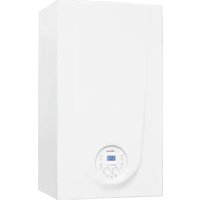
BRAVA ONE OF - Boiler SIME - Free user manual and instructions
Find the device manual for free BRAVA ONE OF SIME in PDF.


| Product type | Wall-hung low temperature boiler |
| Brand | SIME |
| Model | BRAVA ONE OF (Brava One 25 OF) |
| Category | II2H3+ |
| Type | B11BS (open chamber) |
| Power supply | 230 V ~ 50 Hz, 79 W |
| Electrical protection | IPX4D |
| Fuel | G20 (methane) or G30/G31 (LPG) – adaptable |
| Nominal heat input | 25.0 kW |
| Nominal useful output (80-60°C) | 23.0 kW |
| Heating temperature range | 20 - 80 °C |
| DHW temperature range | 10 - 60 °C |
| Max operating pressure | 3 bar |
| Recommended installation pressure (cold) | 1 - 1.2 bar |
| Expansion vessel – capacity / precharge | 8 L / 1 bar |
| NOx class | 3 (< 150 mg/kWh) |
| Main functions | Heating, instant domestic hot water, Summer/Winter modes, antifreeze, pump anti-blocking, flue gas sweeping, modulation, self-diagnosis |
| Maintenance | Annual by professional; external cleaning with damp cloth (water and soap or alcohol) |
| Safety | Safety sensor 100 °C, flue gas thermostat, 3 bar valve, water pressure switch |
| Optional accessories | External sensor, room thermostat, OpenTherm remote control, hydraulic kits, LPG nozzle kit |
Frequently Asked Questions - BRAVA ONE OF SIME
User questions about BRAVA ONE OF SIME
0 question about this device. Answer the ones you know or ask your own.
Ask a new question about this device
Download the instructions for your Boiler in PDF format for free! Find your manual BRAVA ONE OF - SIME and take your electronic device back in hand. On this page are published all the documents necessary for the use of your device. BRAVA ONE OF by SIME.
USER MANUAL BRAVA ONE OF SIME
Low temperature wall mounted boiler
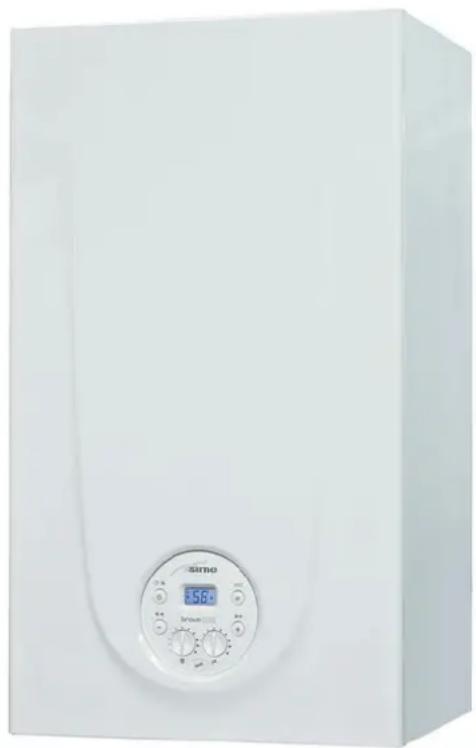
BRAVA ONE OF
MANUEL POUR L'UTILISATION, L'INSTALLATION ET L'ENTRETIEN USER, INSTALLATION AND SERVICING INSTRUCTIONS
FR
EN
Pour consulter la documentation,
To consult the documentation, visit our
website www.sime.it

Fonderie SIME S.p.A.
6328415 - 12/2021 - R1
AVERTISSEMENTS ET RÈGLES DE SÉCURITÉ

AVERTISSEMENTS
1.6 Codes anomalies / pannes
Fig. 11
5.6 Circuit hydraulique principal
![graph TD A["1"] --> B["2"] B --> C["3"] C --> D["4"] D --> E["5"] E --> F["6"] F --> G["7"] G --> H["MUGER"] H --> I["8"] I --> J["9"] J --> K["10"] K --> L["11"] L --> M["12"] M --> N["S"] N --> O["13"] O --> P["14"] P --> Q["15"] Q --> R["16"] R --> S["17"] S --> T["18"] T --> U["19"] style A fill…](/content/2026/04/713106/images/e90dc390790581b2cf7c80d34ac1db95b09f5919c63764c75fcaf183fe88495d.jpg)
LÉGENDE :
Fig. 16
Fig. 17
| Description | Brava One OF |
| 25 | |
| L (mm) 450 | |
| P (mm) 250 | |
| H (mm) 700 | |
| Poids (kg) 26 |
6.3 Déplacement

IL EST INTERDIT
Fig. 20

AVERTISSEMENTS
6.9 Raccordements hydrauliques
Fig. 43
SAFETY WARNINGS AND REGULATIONS

WARNINGS
- After having removed the packaging make sure that the product supplied is integral and complete in all its parts. If this is not the case, please contact the Dealer who sold the appliance.
- The appliance must be used as intended by Sime who is not responsible for any damage caused to persons, animals or things, improper installation, adjustment, maintenance and improper use of the appliance.
- In the event of water leaks, disconnect the appliance from the mains power supply, close the water mains and promptly inform professionally qualified personnel.
- Periodically check that the operating pressure of the water heating system when cold is 1-1.2 bar. If this is not the case, increase the pressure or contact professionally qualified personnel.
- If the appliance is not used for a long period of time, at least one of the following operations must be carried out: -set the main system switch to "OFF"; -close the gas and water valves for the water heating system.
- In order to ensure optimal appliance operations Sime recommends that maintenance and checks are carried out ONCE A YEAR.
- If the power cable is damaged, replace it with a cable ordered as a spare part with the same characteristics (type X). Assembly must be by carried out by a qualified professional.

WARNINGS
- It is recommended that all operators read this manual carefully in order to use the appliance in a safe and rational manner.
- This manual is an integral part of the appliance. It must therefore be kept for future reference and must always accompany the appliance in the event the appliance is transferred or sold to another Owner or User or is installed on another system.
- Installation and maintenance of this appliance must be carried out by a qualified company or by a professionally qualified technician in accordance with the instructions contained in the manual. Once the work is complete, the company or technician will issue a declaration of conformity with national and local technical standards and legislation in force in the country where the appliance will be used.
- Any repairs on the appliance must be carried out solely by professionally qualified personnel, using original spare parts only. Failure to comply with these instructions can jeopardise the appliance's safety and void the warranty with immediate effect.
- Fonderie SIME S.p.A. reserves the right to make improvements to its products at any time without prior notice, without compromising their essential characteristics. The graphic illustrations and/or images in this document may show optional accessories that vary according to the country in which the appliance is used.
RESTRICTIONS

IT IS FORBIDDEN
- To allow children under the age of 8 to use the appliance. The appliance can be used by children no younger than 8 years old, by people with physical or cognitive disabilities, and by people lacking experience or the necessary knowledge, provided that they are supervised or have been instructed on how to use the appliance safely and that they understand the risks associated with it.
- To allow children to play with the appliance.
- To allow unsupervised children to perform user maintenance and cleaning.
-
To use electrical devices or appliances such as switches, electrical appliances etc if you can smell fuel. If this should happen:
-
open the doors and windows to air the room;
- close the gas isolation device;
-promptly call for professional assistance.
- To touch the appliance with bare feet or with any wet part of the body.
- To carry out any technical intervention or cleaning operation before having disconnected the appliance from the mains power by setting the main switch to "OFF", and closing the gas supply.
- To modify the safety or adjustment devices without authorization and instructions from the manufacturer.

IT IS FORBIDDEN
- To block the condensate drain (if present).
- To pull, detach or twist the electrical cables coming out of the appliance even if the appliance is disconnected from the mains power supply.
- To expose the boiler to atmospheric agents. These boilers can also be installed in partially covered areas, as per EN 15502, with a maximum ambient temperature of 60°C and a minimum ambient temperature of -5°C . It is recommended that the boiler is installed below weathered roofs, on the balcony or in a protected niche, to protect it from exposure to weathering agents (rain, hail and snow). The boiler is equipped as standard with an anti-freeze function.
- To block or reduce the size of the ventilation openings of the room where the appliance is installed, if present.
- Remove the mains power and gas supply from the appliance if the external temperature could fall below ZERO (risk of freezing).
- To leave containers with flammable substances in the room where the appliance is installed.
- To dispose of the packaging material irresponsibly as it could be dangerous. Packaging must be disposed of as specified by the legislation in force in the country where the appliance will be used.
Dear Customer,
Thank you for purchasing a Sime Brava One OF boiler, a new-generation low-temperature modulating device possessing technical and performance characteristics capable of satisfying your space heating and instant domestic hot water requirements with the utmost safety and with limited running costs.
RANGE
| MODEL CODE | |
| Brava One 25 OF[G20] | 8112180 |
| Brava One 25 OF[G30/G31] | 8112181 |
COMPLIANCE
Our company declares that Brava One OF boilers comply with the following directives:
- Gas Appliances EU Regulation 2016/426
- Boiler Efficiency Directive 92/42/EEC
- Low Voltage Directive 2014/35/EU
– Electromagnetic Compatibility Directive 2014/30/EU
SYMBOLS

WARNING
To indicate actions which, if not carried out correctly, can result in injury of a general nature or may damage or cause the appliance to malfunction; these actions therefore require particular caution and adequate preparation.

ELECTRICAL HAZARD
To indicate actions which, if not carried out correctly, could lead to injury of an electrical nature; these actions therefore require particular caution and adequate preparation.

IT IS FORBIDDEN
To indicate actions which MUST NOT BE carried out.

CAUTION
To indicate particularly important and useful information.
MANUAL STRUCTURE
This manual is organized as follows.
USER INSTRUCTIONS
TABLE OF CONTENTS 43
DESCRIPTION OF THE APPLIANCE
TABLE OF CONTENTS 49
INSTALLATION AND SERVICING INSTRUCTIONS
TABLE OF CONTENTS 57
USER INSTRUCTIONS
TABLE OF CONTENTS
1 USING THE BOILER BRAVA ONE OF 44
1.1 Control panel 44
1.2 Preliminary checks 45
1.3 Ignition 45
1.4 Adjusting the delivery temperature 45
1.5 Adjusting the domestic hot water temperature ..... 45
1.6 Fault / malfunction codes 46
1.6.1 Maintenance request 46
2 SHUTDOWN 46
2.1 Temporary shutdown....46
2.2 Shutting down for long periods 47
3 MAINTENANCE 47
3.1 Adjustments....47
3.2 External cleaning....47
3.2.1 Cleaning the cladding 47
4 DISPOSAL 47
4.1 Disposal of the equipment 47
1 USING THE BOILER BRAVA ONE OF
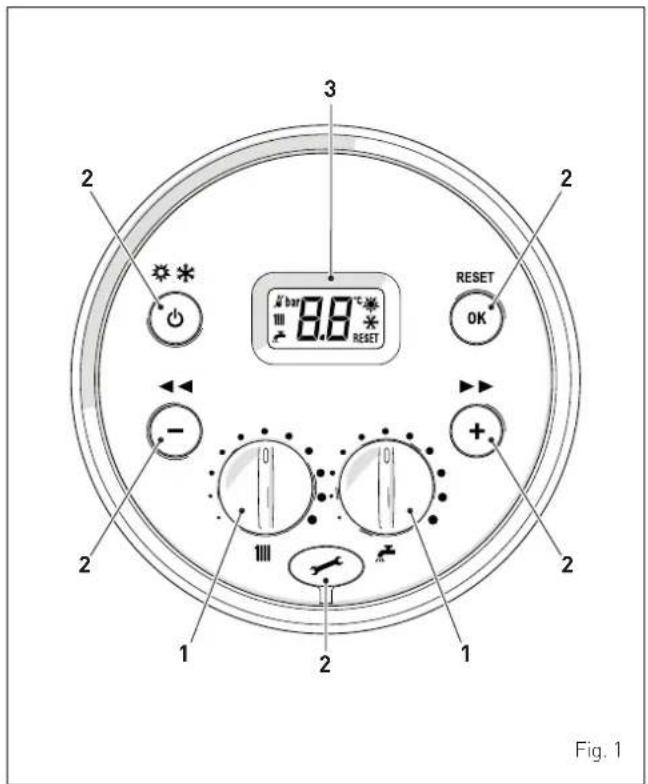
1.1 Control panel
1 KNOBS
The heating knob allows the user to set the heating temperature to between 20 and 80°C during normal operation.
The domestic hot water knob allows the user to set the domestic hot water temperature to between 10 and 60°C during normal operation.
2 FUNCTIONAL BUTTONS
If pressed once or more than once for at least 1 second during normal operation, this button allows the user to change the boiler operating mode in a cyclical sequence (Stand-by - Summer - Winter).
This allows the user to scroll through the parameters or decrease the values.
+ This allows the user to scroll through the parameters or increase the values.
OK This allows the user to confirm the selected parameter or to modify the value or to "unblock" the appliance when the alarm for a "block" malfunction is present.
Programming connector cover plug.
NOTE: pressing any one of these buttons for more than 30 seconds generates a fault on the display without preventing boiler operation. The warning disappears when normal conditions are restored.
3 DISPLAY

"SUMMER". This symbol appears when the boiler is operating in Summer mode or if only the domestic hot water mode is enabled via the remote control. If the symbols and are flashing, this indicates that the chimney sweep function is active.

"WINTER". This symbol appears when the boiler is operating in Winter mode or if both the domestic hot water and heating modes are enabled via the remote control. With the remote control, if no operating modes have been enabled both symbols and will be off.
RESET "RESET REQUIRED". This message only appears if there is a malfunction which must be or may be restored manually.

"DOMESTIC HOT WATER". This symbol is present during a request for DHW or when the chimney sweep function is operating; it flashes during the domestic hot water set point selection.

"HEATING". This symbol is present during heating operation or when the chimney sweep function is operating; it flashes during the heating set point selection.

"BLOCK" DUE TO NO FLAME.

"FLAME PRESENCE".

"ALARM". This indicates that a fault has occurred. The number specifies the cause which generated the alarm (see paragraph "Fault / malfunction codes".

"MAINTENANCE REQUEST". If active, it shows it is time to perform maintenance on the boiler.
1.2 Preliminary checks

WARNING
- Should it be necessary to access the areas in the bottom part of the appliance, make sure that the system components and pipes are not hot (risk of burning).
- Before replenishing the heating system, put on protective gloves.
Commissioning of the Brava One OF boiler must be carried out by professionally qualified Personnel after which the boiler can operate automatically. It may however be necessary for the User to start the appliance autonomously without involving a technician: for example, after a holiday. In these cases certain checks and the following operations must be carried:
- check that the gas isolation and water system valves are open
- using a pressure gauge (1), check that the heating system pressure when cold is 1-1.2 bar. If this is not the case, open the filling valve (2) and restore the heating system pressure until the pressure gauge (1) shows a reading of 1-1.2 bar
- close the filling valve (2).
- open one or more than one hot water tap. The boiler will work at maximum power until the taps are closed.
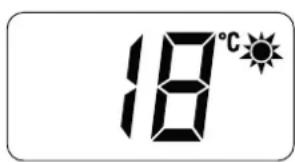
Once the boiler has been commissioned in "SUMMER mode" "WINTER mode" can be selected by pressing and holding the button for at least 1 second. the value of the heating water temperature detected at that moment will appear on the display. In this case it is necessary to adjust the air thermostat/s to the required temperature or if the system has a chrono-thermostat, check that this is "active" and adjusted.
1.4 Adjusting the delivery temperature
If the boiler delivery temperature is to be increased or decreased it is possible to act on the knob on the control panel rather than having to modify the specific parameters. The temperature can be set to between 20 and 80°C.
2 1
Fig. 2
Fig. 4
1.3 Ignition
After having carried out the preliminary checks, perform the following to start the boiler:
- set the main system switch to "ON"
ON
Fig. 3
- on the display, check that the operating mode on the display is "SUMMER" and if necessary select it by pressing and holding the button for at least 1 second. the value of the delivery sensor detected at that moment will appear on the display
1.5 Adjusting the domestic hot water temperature
If the domestic hot water temperature is to be increased or decreased, act on the A+ knob on the control panel. The temperature can be set to between 10 and 60°C.
Fig. 5
1.6 Fault / malfunction codes
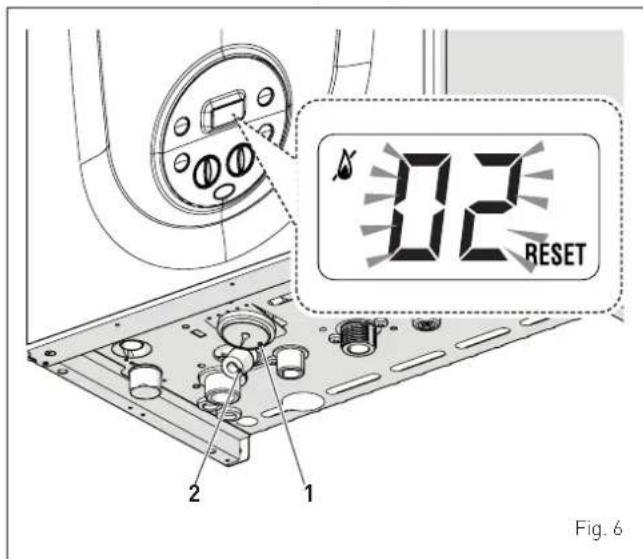
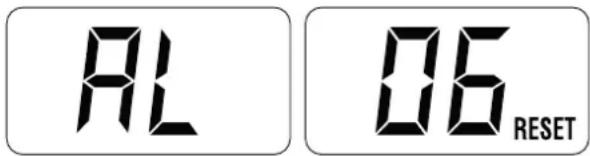
If a fault/malfunction is detected during boiler operation, the message "AL" will appear on the display followed by the fault code.
If you see alarm "02" (low water pressure in the system):
- using a pressure gauge (1), check that the heating system pressure when cold is 1-1.2 bar. If this is not the case, open the filling valve (2) and restore the heating system pressure until the pressure gauge (1) shows a reading of 1-1.2 bar
- close the filling valve (2)
- press and hold the OK RESET button for more than 3 seconds and check whether normal operating conditions are restored.
If you see alarm "06" (no flame detected) and "07" (safety thermostat intervention):
- press and hold the OK RESET button for more than 3 seconds and check whether normal operating conditions are restored.
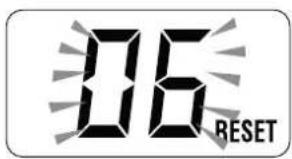
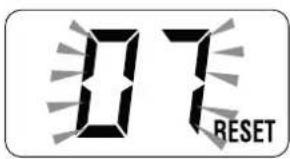
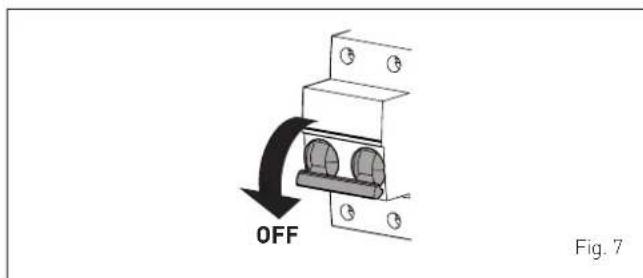
If this operation is not successful, ONLY ONE MORE ATTEMPT can be made, therefore:
- close the gas isolation valve
- set the main system switch to "OFF"
- contact the Qualified Technical Personnel.

CAUTION
Should you see an alarm not described here, contact a qualified technical professional.
1.6.1 Maintenance request
When it is time to perform maintenance on the boiler, "SE" shows on the display.
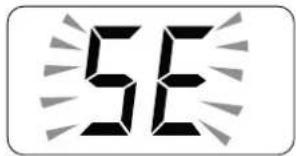
Contact the technical assistance service to organise the necessary work.
2 SHUTDOWN
2.1 Temporary shutdown
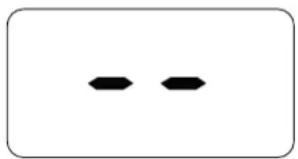
If the user wishes to interrupt boiler operation, press and hold the button ⏻ for at least one second, once if in "WINTER mode" or twice if in "SUMMER mode" 🔍. "-" will appear on the display.
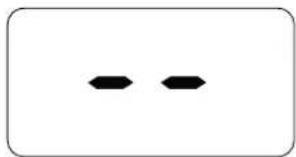

ELECTRICAL HAZARD
The boiler will still be powered.
If the user is away temporarily, for a weekend, short trip etc and if the outside temperature is at ZERO:
- press and hold the button once if in "WINTER mode" or twice if in "SUMMER mode" to put the boiler into stand-by
- set the main system switch to "OFF"
- close the gas valve.
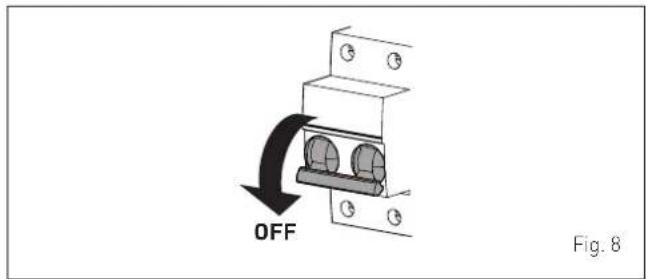

CAUTION
If the outside temperature might fall below ZERO, since the appliance is equipped with an "antifreeze function"
- ONLY PUT THE BOILER INTO STAND-BY
- leave the main system switch set to "ON" (boiler is powered)
- leave the gas valve open.
2.2 Shutting down for long periods
If the boiler is to be left unused for a long period, the following operations need to be carried out:
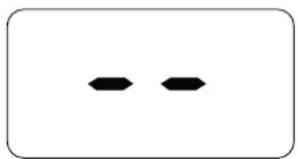
- press and hold the button ⏻ for at least 1 second, once if in "WINTER mode" 🔊 or twice if in "SUMMER mode" 🔊 to put the boiler into stand-by "-" will appear on the display
- set the main system switch to "OFF"
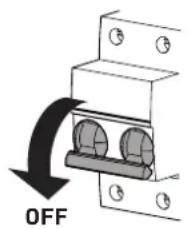
Fig. 9
- close the gas valve
- close the heating and domestic hot water isolation valves
- drain the heating and domestic hot water system if there is the risk of freezing.

CAUTION
Contact the Qualified Technical Personnel if the procedure described above cannot be easily carried out.
3 MAINTENANCE
3.1 Adjustments
For the appliance to operate correctly and efficiently it is recommended that the User calls upon the services of a Professionally Qualified Technician to carry out ANNUAL maintenance.

CAUTION
Maintenance interventions must ONLY be carried out by professionally qualified personnel who will follow the indications provided in the INSTALLATION AND MAINTENANCE MANUAL.
3.2 External cleaning

WARNING
- Should it be necessary to access the areas in the bottom part of the appliance, make sure that the system components and pipes are not hot (risk of burning).
- Before performing any maintenance, put on protective gloves.
3.2.1 Cleaning the cladding
When cleaning the cladding, use a cloth dampened with soap and water or alcohol for stubborn marks.

IT IS FORBIDDEN
to use abrasive products.
4 DISPOSAL
4.1 Disposal of the equipment
At the end of their life span, the appliance and electrical and electronic devices coming from households or classifiable as household waste must be delivered to appropriate waste collection systems, in accordance with the law and with Directive 2012/19/EU. This product was designed and manufactured for minimising its impact on the environment and on human health, but it contains components that could be detrimental if managed improperly. The symbol (crossed-out wheelie bin) depicted here and also appearing on your appliance means that the appliance at the end of its life must be managed in accordance with the law and treated as electrical and electronic waste. Before delivering the appliance for its disposal, consult the applicable provisions of the laws in force in the country where the appliance is used and get information on the authorised waste disposal facilities by contacting the relevant local offices.

IT IS FORBIDDEN
dispose of the product with urban waste.
DESCRIPTION OF THE APPLIANCE
TABLE OF CONTENTS
5 DESCRIPTION OF THE APPLIANCE 50
5.1 Characteristics 50
5.2 Check and safety devices 50
5.3 Identification 50
5.4 Structure 51
5.5 Technical features....52
5.6 Main water circuit 53
5.7 Sensors....53
5.8 Expansion vessel 53
5.9 Circulation pump 54
5.10 Control panel 54
5.11 Wiring diagram 55
5 DESCRIPTION OF THE APPLIANCE
5.1 Characteristics
Brava One OF are last generation low temperature wall mounted boilers which Sime has produced for heating and domestic hot water production. The main design choices made by Sime for the Brava One OF boilers are:
- the atmospheric burner combined with a copper heat exchanger for heating and a rapid heat exchanger for DHW
- the open combustion chamber which classifies the "Type B" boiler in relation to the room where it is installed
- the command and control microprocessor electronic board not only allows a better management of the heating system and the system for domestic hot water production but it can also be connected to air thermostats or a remote control (with an Open Therm protocol), an auxiliary sensor for the connection of any possible solar kits or to an external sensor. If this is the case, the boiler temperature varies on the basis of the external temperature according to the selected optimal climatic curve allowing for significant energy and economic savings.
Other special features of the Brava One OF boilers are: - the anti-freeze function which activates automatically if the temperature of the water inside the boiler falls below the threshold of the value set at parameter "tS 1.0" and, if there is an external sensor, if the external temperature falls below the threshold of the value set at parameter "tS 1.1".
- the anti-blocking function of the pump and diverter valve, this activates automatically every 24 hours if no request for heat has been made
- the chimney sweep function lasts 15 minutes and makes the job of the qualified technician easier when measuring the parameters and combustion efficiency and when checking gas pressure at the nozzles
- screen display of the operating and self-diagnostic parameters with error code display when the fault occurs. This makes repair interventions easier and allows appliance operation to be restored correctly.
5.2 Check and safety devices
The Brava One OF boilers are equipped with the following check and safety devices:
- thermal safety sensor 100°C
- smoke thermostat
- 3 bar relief valve
- heating water pressure switch
- delivery sensor
- DHW sensor.

IT IS FORBIDDEN
To commission the appliance with safety devices which do not work or which have been tampered with.

WARNING
Safety device may only be replaced by professional qualified personnel using Sime original spare parts.
5.3 Identification
The Brava One OF boilers can be identified by means of:
1 Packaging label: this is located on the outside of the packaging and provides a code, the serial number of the boiler and the bar code
2 Technical Data Plate: this is located inside the front panel of the boiler and provides the technical specification, appliance performance and any other information required by law.
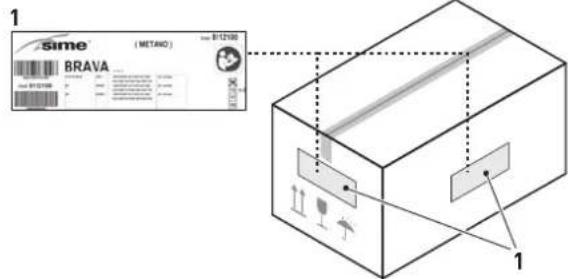
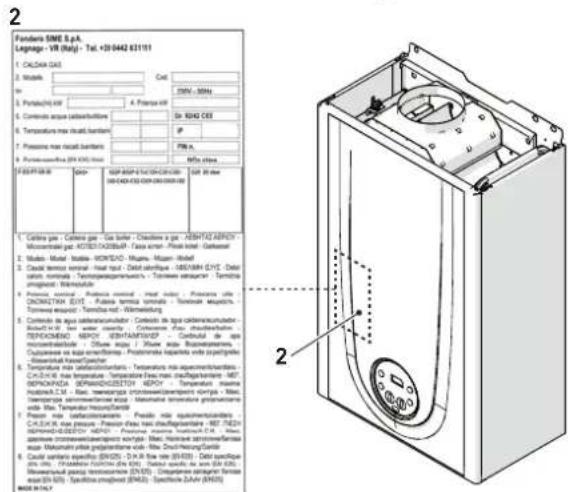
Fig. 10

CAUTION
Tampering with, removing or failing to display the identification plate or carrying out any other operation which does not allow safe identification of the product or which may hinder installation and maintenance operations.
5.4 Structure
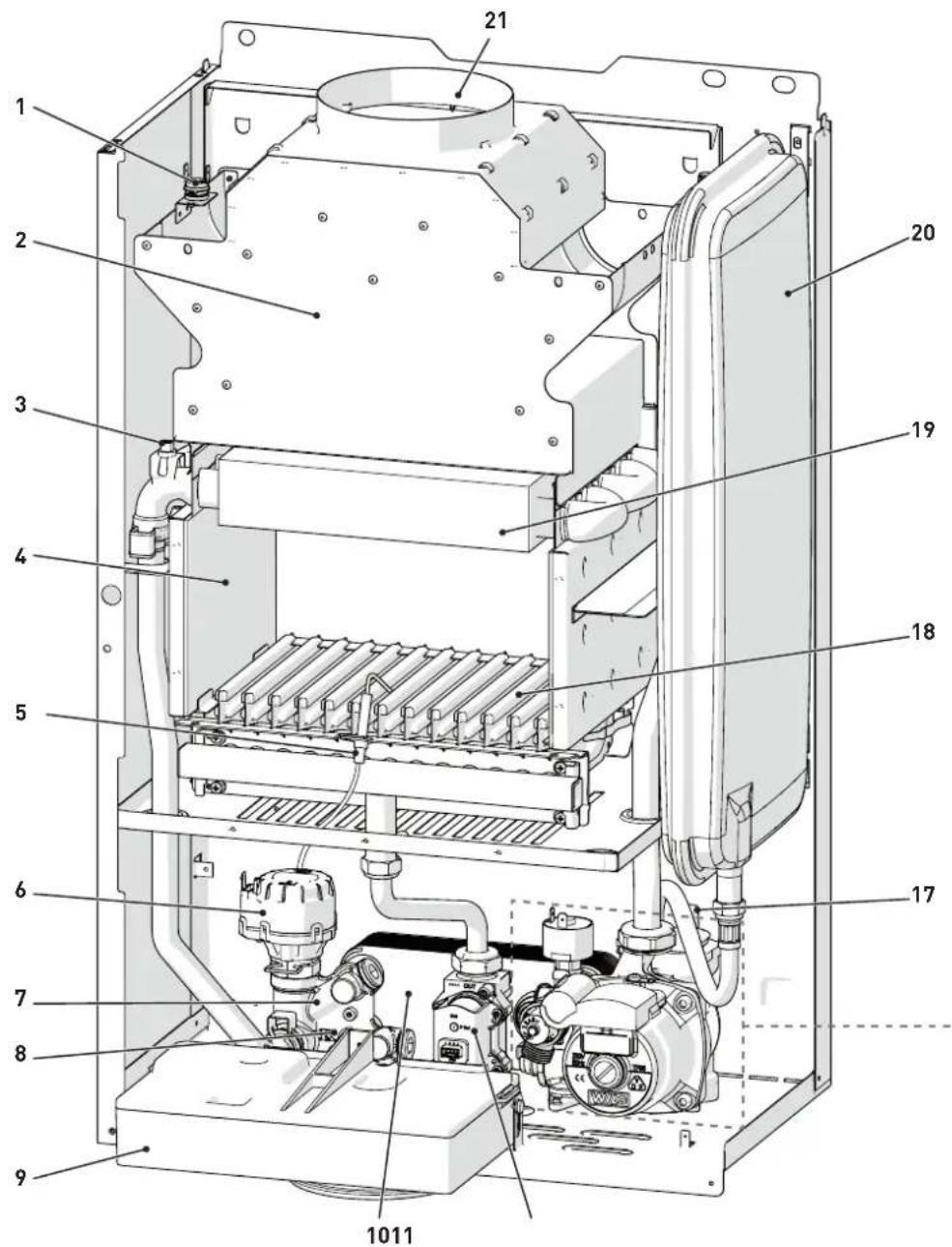
1 Smoke thermostat
2 Smoke chamber
3 Dual sensor (thermal safety/delivery)
4 Combustion chamber
5 Ignition/detection electrode
6 Diverter valve
7 System filling unit
8 Domestic hot water sensor
9 Control panel
10 Secondary heat exchanger
11 Gas valve
12 Domestic water filter and flow regulator
13 System relief valve
14 Boiler drain
15 System pump
16 Water pressure switch
17 Automatic bleed valve
18 Burner
19 Primary heat exchanger
20 Expansion vessel
21 Smoke outlet
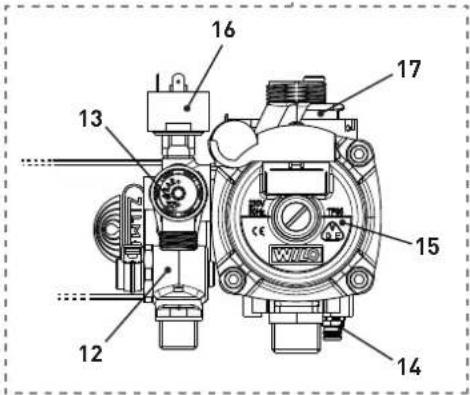
Fig. 11
5.5 Technical features
| DESCRIPTION | Brava One 25 OF | |
| CERTIFICATIONS | ||
| Country of intended installation DZ - TN | ||
| Fuel G20 - G30/G31 | ||
| PIN number 1312CP5940 | ||
| Category II2H3+ | ||
| Type B11BS | ||
| Class NOx | 3 (< 150 mg/kWh) | |
| DHW rated useful heat output kW 23,1 | ||
| HEATING PERFORMANCE | ||
| HEAT INPUT | ||
| Nominal | kW | 25,0 |
| Minimum | kW | 10,0 |
| HEAT OUTPUT | ||
| Nominal (80-60°C) | kW | 23,0 |
| Minimum (80-60°C) | kW | 8,7 |
| EFFICIENCY | ||
| Max useful efficiency (80-60°C) | % | 92,2 |
| Min useful efficiency (80-60°C) | % | 87,0 |
| Useful efficiency at 30% of load (50-30°C) | % | 91,5 |
| Thermal efficiency (EEC 92/42) | ★★ | |
| Losses after shutdown at 50°C | W | 168 |
| DOMESTIC HOT WATER PERFORMANCE | ||
| Nominal heat input | kW | 25,0 |
| Minimum heat input | kW | 10,0 |
| D.H.W. flow rate ΔT 30°C l/min 10,9 | ||
| Continuous D.H.W. flow rate (ΔT 25°C / ΔT 35°C) | l/min | 13,3 / 9,5 |
| Minimum D.H.W. flow rate | l/min | 2,2 |
| Max / Min Pressure | bar | 7 / 0,4 |
| kPa | 700 / 40 | |
| ELECTRICAL SPECIFICATIONS | ||
| Power supply voltage | V | 230 |
| Frequency | Hz | 50 |
| Absorbed electrical power | W | 79 |
| Electrical protection degree | IP | X4D |
| COMBUSTION DATA | ||
| Smoke temperature at Max/Min flow (80-60°C) | °C | 107,7 / 81,0 |
| Maximum smoke flow Min/Max | g/s | 18 / 16 |
| CO2 at Max / Min flow rate (G20) | % | 5,3 / 2,3 |
| CO2 at Max / Min flow rate (G31) | % | 5,8 / 2,6 |
| NOZZLES - GAS | ||
| Number of nozzles | No. | 13 |
| Nozzle diameter (G20) | mm | 1,30 |
| Nozzle diameter (G30/G31) | mm | 0,72 |
| Gas consumption at Max/Min flow rate (G20) | m3/h | 2,65 / 1,05 |
| Gas consumption at Max/Min flow rate (G30) | kg/h | 1,97 / 0,79 |
| Gas consumption at Max/Min flow rate (G31) | kg/h | 1,94 / 0,78 |
| Gas supply pressure (G20/G30/G31) | mbar | 20 / 28-30 / 37 |
| kPa | 2 / 2,8-3 / 3,7 | |
| TEMPERATURE - PRESSURE | ||
| Max operating temperature | °C | 85 |
| Heating adjustment range | °C | 20 ÷ 80 |
| Domestic hot water adjustment range | °C | 10 - 60 |
| Max operating pressure | bar | 3 |
| kPa | 300 | |
| Water content in boiler | L3,15 | |
Lower Heat Output (Hi)
G20 Hi. 9.45 kW/m³ (15°C, 1013 mbar) - G30 Hi. 12.68 kW/kg (15°C, 1013 mbar) - G31 Hi. 12.87 kW/kg (15°C, 1013 mbar)
5.6 Main water circuit
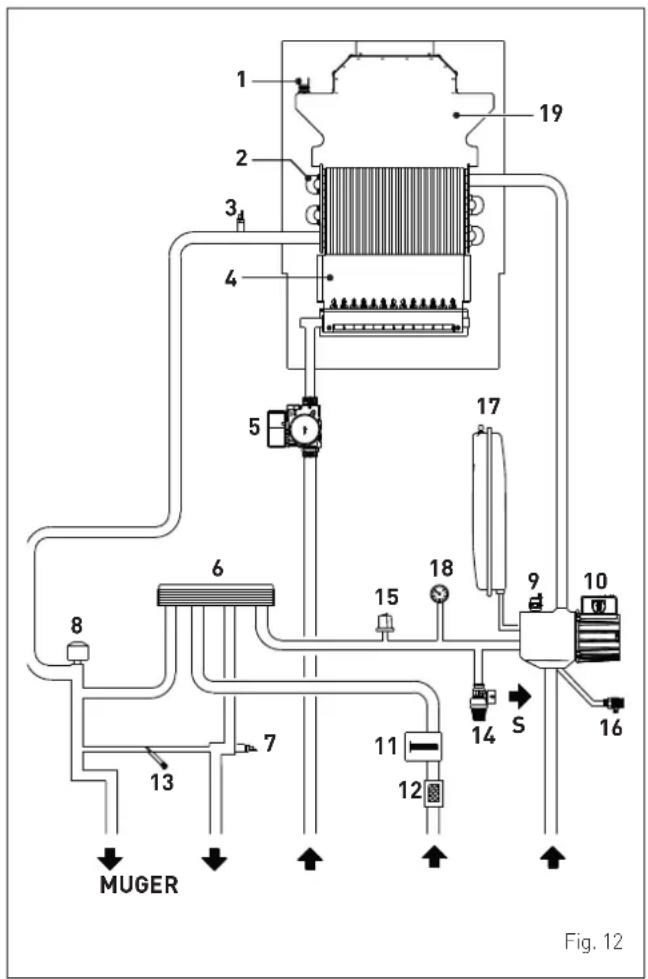
KEY:
M System delivery
R System return
U Domestic hot water outlet
E Domesti hot water inlet
S Safety valve outlet
G Gas supply
1 Smoke thermostat
2 Heat exchanger (mono-thermal)
3 Dual sensor (thermal safety/delivery)
4 Combustion chamber
5 Gas valve
6 Domestic hot water heat exchanger
7 Domestic hot water sensor
8 Diverter valve
9 Automatic bleed valve
10 Pump
11 Domestic hot water flow meter
12 Domestic hot water filter
13 System filling
14 System relief valve
15 Water pressure switch
16 Boiler drain
17 System expansion vessel
18 Water pressure gauge
19 Smoke chamber
5.7 Sensors
The sensors installed have the following characteristics:
- Dual sensor (thermal safety/output) NTC R25°C; 10kΩ B25°-85°C: 3435
- domestic hot water sensor NTC R25°C; 10kΩ B25°-85°C: 3435
- External temperature sensor NTC R25°C; 10kΩ B25°-85°C: 3435
Correspondence of Temperature Detected/Resistance
Examples of reading:
TR = 75°C → R = 1925Ω
TR = 80°C → R = 1669Ω.
| TR | 0°C | 1°C | 2°C | 3°C | 4°C | 5°C | 6°C | 7°C | 8°C | 9°C | ||||
| 0°C | 27279 | 26135 | 25044 | 24004 | 23014 | 22069 | 21168 | 20309 | 19489 | 18706 | Resistance R [Ω] | |||
| 10°C | 17959 | 17245 | 16563 | 15912 | 15289 | 14694 | 14126 | 13582 | 13062 | 12565 | ||||
| 20°C | 12090 | 11634 | 11199 | 10781 | 10382 | 9999 | 9633 | 9281 | 8945 | 8622 | ||||
| 30°C | 8313 | 8016 | 7731 | 7458 | 7196 | 6944 | 6702 | 6470 | 6247 | 6033 | ||||
| 40°C | 5828 | 5630 | 5440 | 5258 | 5082 | 4913 | 4751 | 4595 | 4444 | 4300 | ||||
| 50°C | 4161 | 4026 | 3897 | 3773 | 3653 | 3538 | 3426 | 3319 | 3216 | 3116 | ||||
| 60°C | 3021 | 2928 | 2839 | 2753 | 2669 | 2589 | 2512 | 2437 | 2365 | 2296 | ||||
| 70°C | 2229 | 2164 | 2101 | 2040 | 1982 | 1925 | 1870 | 1817 | 1766 | 1717 | ||||
| 80°C | 1669 | 1622 | 1577 | 1534 | 1491 | 1451 | 1411 | 1373 | 1336 | 1300 | ||||
| 90°C | 1266 | 1232 | 1199 | 1168 | 1137 | 1108 | 1079 | 1051 | 1024 | 998 | ||||
| 100°C | 973 |
5.8 Expansion vessel
The expansion vessel installed on the boilers has the following characteristics:
| Description U/M | Brava One OF | |
| 25 | ||
| Total capacity l 8,0 | ||
| Prefilling pressure | kPa | 100 |
| bar | 1,0 | |
| Useful capacity | l 4,0 | |
| Maximum system content (*) | l | 109 |
(*) Conditions of:
Average operating temperature 70°C (with high temperature system 80/60°C)
Start temperature at system filling 10°C.

CAUTION
- For systems with water content exceeding the maximum system content (as indicated in the table) an additional expansion vessel must be prearranged.
- The difference in height between the relief valve and the highest point of the system cannot exceed 6 metres. If the difference is greater than 6 metres, increase the prefilling pressure of the expansion vessel and the system when cold by 0.1 bar for each meter increase.
5.9 Circulation pump
The flow-head performance curve available for the heating system is shown in the graph below.
RESIDUAL HEAD (mbar)
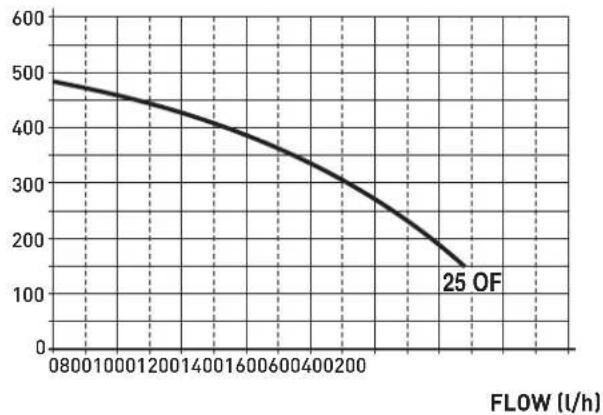
Fig. 13
5.10 Control panel
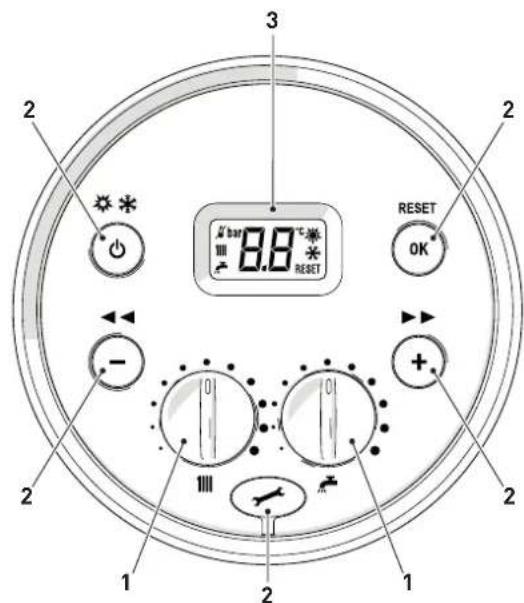
Fig. 14
1 KNOBS
The heating knob allows the user to set the heating temperature to between 20 and 80°C during normal operation.

The domestic hot water knob allows the user to set the domestic hot water temperature to between 10 and 60°C during normal operation.
2 FUNCTIONAL BUTTONS
If pressed once or more than once for at least 1 second during normal operation, this button allows the user to change the boiler operating mode in a cyclical sequence (Stand-by - Summer - Winter).
This allows the user to scroll through the parameters or decrease the values.
+ This allows the user to scroll through the parameters or increase the values.
OK This allows the user to confirm the selected parameter or to modify the value or to "unblock" the appliance when the alarm for a "block" malfunction is present.
Programming connector cover plug.
NOTE: pressing any one of these buttons for more than 30 seconds generates a fault on the display without preventing boiler operation. The warning disappears when normal conditions are restored.
3 DISPLAY
"SUMMER". This symbol appears when the boiler is operating in Summer mode or if only the domestic hot water mode is enabled via the remote control. If the symbols and are flashing, this indicates that the chimney sweep function is active.
"WINTER". This symbol appears when the boiler is operating in Winter mode or if both the domestic hot water and heating modes are enabled via the remote control. With the remote control, if no operating modes have been enabled both symbols and will be off.
RESET "RESET REQUIRED". This message only appears if there is a malfunction which must be or may be restored manually.
"DOMESTIC HOT WATER". This symbol is present during a request for DHW or when the chimney sweep function is operating; it flashes during the domestic hot water set point selection.
“HEATING”. This symbol is present during heating operation or when the chimney sweep function is operating; it flashes during the heating set point selection.
"BLOCK" DUE TO NO FLAME. "FLAME PRESENCE".
AL "ALARM". This indicates that a fault has occurred. The number specifies the cause which generated the alarm (see paragraph "Malfunction codes and possible solutions".
5E "MAINTENANCE REQUEST". If active, it shows it is time to perform maintenance on the boiler.
5.11 Wiring diagram
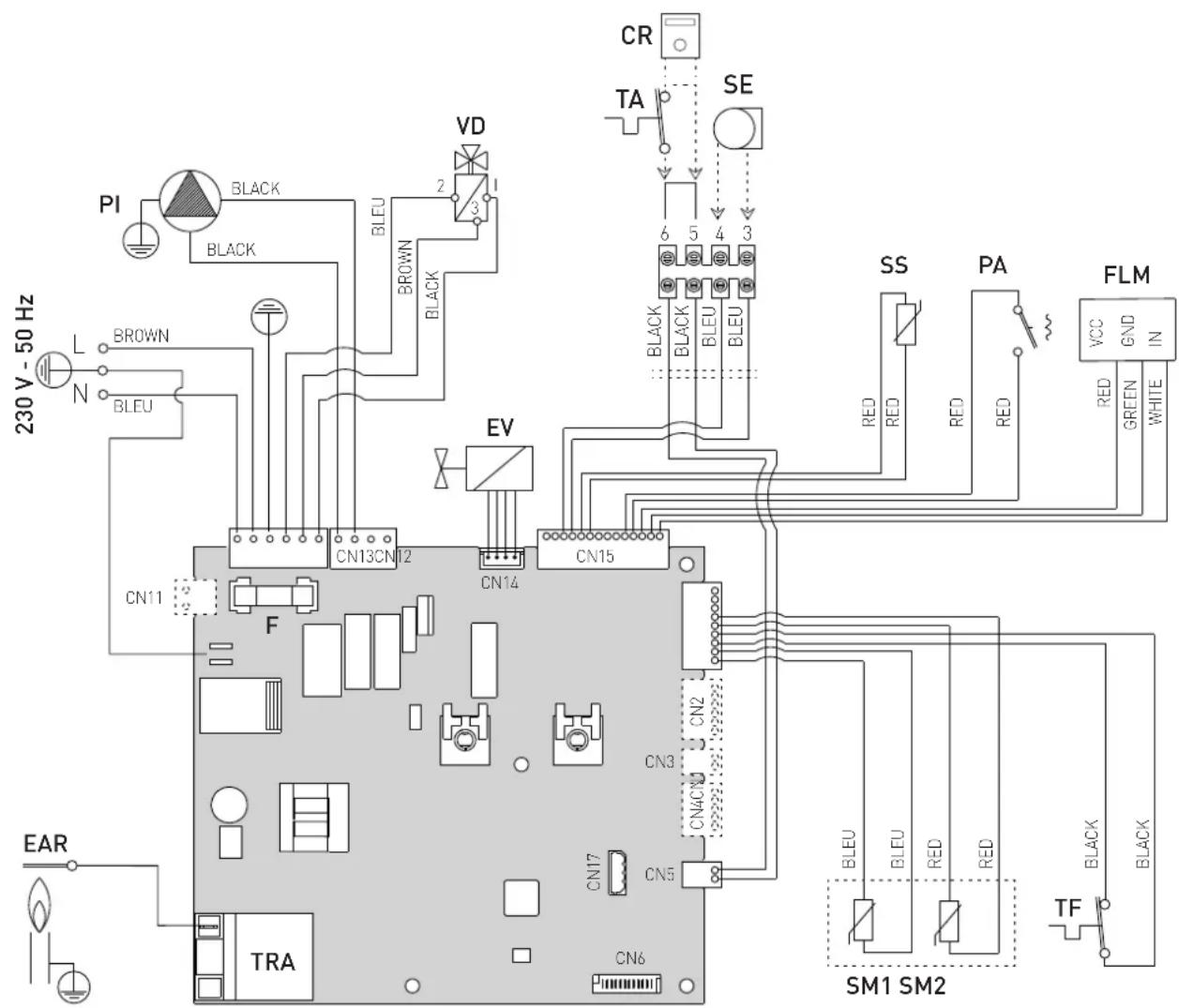
L Line
N Neutral
F Fuse (3.15AT - 250V)
TRA Ignition transformer
PI System pump
TF Smoke thermostat
EAR Ignition / Detection electrode
EV Gas solenoid valve
SS Domestic hot water sensor
SM1-2 Dual sensor (thermal safety/delivery)
FLM Flow meter
VD Diverter valve
PA Water pressure switch
TA Air thermostat
SE External sensor
CR Remote control (instead of air thermostat)
To connect the "Air Thermostat" or, alternatively the "Remote Control", remove the bridge between terminals 5-6.
Fig. 15
m CAUTION Users must:
- Use an omnipolar cut-off switch, disconnect switch in compliance with EN Standards which ensures complete cut-off in overvoltage category III conditions (i.e. where there is at least 3 mm between the open contacts)
- Respect the connections L (Live) - N (Neutral).
- Ensure that the special power cable is only replaced with a cable ordered as a spare part and connected by professionally qualified personnel.
m CAUTION Users must:
- Connect the earth wire to an effective earthing system. The manufacturer is not responsible for any damage caused by failure to earth the appliance or failure to observe the information provided in the wiring diagrams.
d IT IS FORBIDDEN To use water pipes
INSTALLATION AND SERVICING INSTRUCTIONS
TABLE OF CONTENTS
6 INSTALLATION 58
6.1 Receiving the product 58
6.2 Dimensions and weight.....58
6.3 Handling....58
6.4 Installation room 58
6.5 New installation or installation of a replacement appliance 59
6.6 Cleaning the system 59
6.7 Water system treatment 59
6.8 Boiler installation 59
6.9 Plumbing connections....60 6.9.1 Plumbing accessories (optional)....60
6.10 Gas supply 60
6.11 Smoke outlet and combustion air inlet 60
6.12 Electrical connections....61
6.12.1 External temperature sensor.... 62
6.12.2 Chrono-thermostat or Air Thermostat .... 62
6.12.3 EXAMPLE of use of the command/control device on some types of heating systems. . 62
6.13 Refilling or emptying....63
6.13.1 REFILL operations 63
6.13.2 EMPTYING operations 64
7 COMMISSIONING 65
7.1 Preliminary operations....65
7.2 Before commissioning 65
7.3 Parameter setting and display....65
7.4 List of parameters....66
7.5 Display of operating data and counters....67
7.6 Checks and adjustments 68
7.6.1 Chimney sweeper function.... 68
7.6.2 Adjusting gas pressure at the nozzles.....69
7.7 Gas conversion....70
7.7.1 Preliminary operations.... 70
7.8 Automatic calibration procedure ..... 71
8 MAINTENANCE 74
8.1 Adjustments....74
8.2 External cleaning....74 8.2.1 Cleaning the cladding....74
8.3 Cleaning the inside of the appliance 74
8.3.1 Cleaning the heat exchanger 74
8.3.2 Cleaning the burner 74
8.3.3 Checking the ignition/detection electrode . 74
8.3.4 Final operations 75
8.4 Checks 75
8.4.1 Checking the smoke duct.... 75
8.4.2 Checking the expansion vessel pressure . . 75
8.5 Unscheduled maintenance....75
8.6 Malfunction codes and possible solutions ..... 75
8.6.1 Maintenance request 76

CAUTION
The appliance must only be installed by the Sime Technical Service or by qualified professionals who MUST wear suitable protective safety equipment.
6.1 Receiving the product
Brava One OF appliances are delivered in a single unit protected by cardboard packaging.
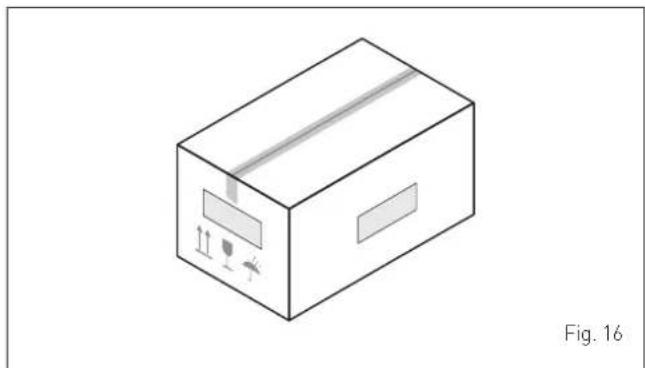
The plastic bag found inside the packaging contains the following:
- Installation, use and maintenance manual
– Paper template for boiler installation - Certificate of warranty
- Hydrostatic test certificate
- System booklet
- Bag with expansion plugs

IT IS FORBIDDEN
To leave packaging material around or near children since it could be dangerous. Dispose of it as prescribed by legislation in force.
6.2 Dimensions and weight
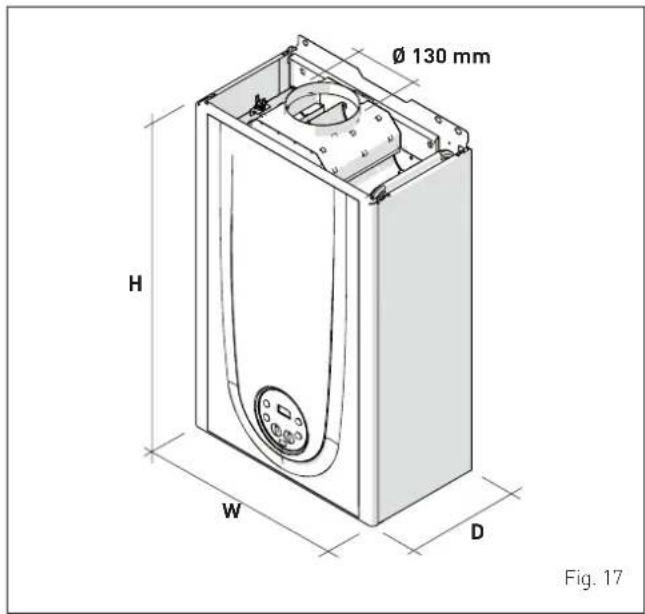
| Description | Brava One OF |
| 25 | |
| W (mm) 450 | |
| D (mm) 250 | |
| H (mm) 700 | |
| Weight (kg) 26 |
6.3 Handling
Once the packaging has been removed, the appliance is to be handled manually, tilting it slightly, lifting it and applying pressure in the points indicated in the figure.
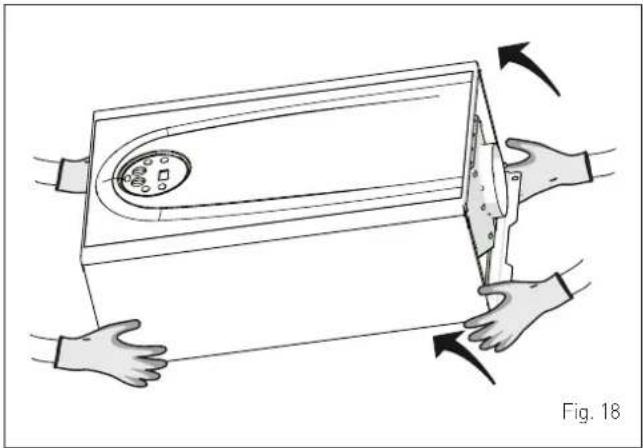

IT IS FORBIDDEN
To grip the appliance casing. Hold the "solid" parts of the appliance such as the base and structural frame.

WARNING
Use suitable tools and accident protection when removing the packaging and when handling the appliance. Observe the maximum weight that can be lifted per person.
6.4 Installation room
The room where the appliance is to be installed must comply with the Technical Regulations and Legislation in force. It must be equipped with sufficiently sized ventilation openings.
The minimum temperature of the installation room must NOT be lower than -5 °C.

CAUTION
- Before assembling the appliance, the installerMUST make sure that the wall supports the weight.
- Remember to consider the space needed in order to access the safety/adjustment devices and to carry out maintenance interventions (see Fig. 19).
APPROXIMATE MINIMUM DISTANCES
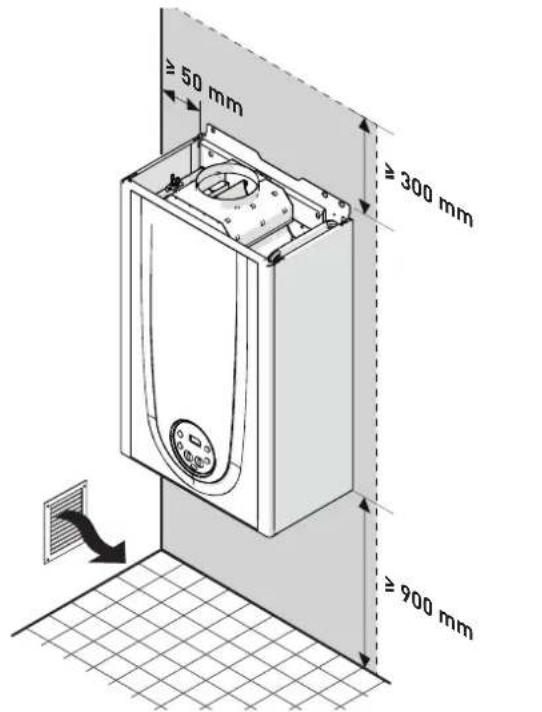
Fig. 19
6.5 New installation or installation of a replacement appliance
When Brava One OF boilers are installed on old systems or systems requiring updating, it is recommended the installer checks that:
- the connecting flue pipe is suitable for the combustion temperature of the appliance, calculated and manufactured in compliance with Standards, that it is as straight as possible, air tight, isolated, with no obstructions or restriction and that it has appropriate condensate collection and evacuation systems
- the electrical system has been manufactured in compliance with specific Standards and by professionally qualified personnel
- the fuel delivery line and the tank (LPG) comply fully with specific Standards
- the expansion vessel ensures total absorption of the fluid dilation in the system
- the pump flow-head performance is sufficient for the system characteristics
- the system is clean, free of any sludge, deposits, de aerated and air tight. For system cleaning, please refer to the relevant paragraph.

CAUTION
The manufacturer declines all liability for any damage caused by an incorrect implementation of the smoke outlet or for an excessive use of additives.
6.6 Cleaning the system
Before installing the appliance on a newly constructed system or replacing a heat generator on an existing system, it is important that the system is thoroughly cleaned to remove sludge, slag, dirt, residue etc.
Before removing an old heat generator from an existing system, it is recommended that the user:
- puts a descaling additive into the water system
- allows the system to work with the generator active for a few days
- drains the dirty water from the system and flushes the system with clean water once or more than once.
If the old generator has already been removed or is not available, replace it with a pump to circulate water in the system and then proceed as described above.
Once cleaning operations have been carried out and before installing the new appliance, it is recommended that a fluid is added to the water system to protect it from corrosion and deposits.

CAUTION
- For further information on the type of additive and usage, please contact the appliance manufacturer.
- Please remember that you MUST install a Y filter (not supplied with the appliance) on the heating system return (R).
6.7 Water system treatment
When filling and restoring the system it is good practice to use water with:
- aspect: clear if possible
- pH: 6÷8
- hardness: < 25°f.
If the water characteristics are different from those indicated, it is recommended that a safety filter is used on the water delivery pipe to retain impurities, and a chemical treatment system to protect against possible deposits and corrosion which could affect boiler operation.
If the systems are only low temperature systems, it is recommended that a product is used to prevent the development of bacteria.
In any case, please refer to and comply with the legislation and specific technical standards in force in the country where the appliance will be used.
6.8 Boiler installation
Brava One OF boilers leave the factory with a paper template for installation onto a solid wall.
For installation:
- position the paper template (1) on the wall (2) where the boiler is to be mounted
- make the holes and insert the expansion plugs (3)
- hook the boiler onto the plugs.
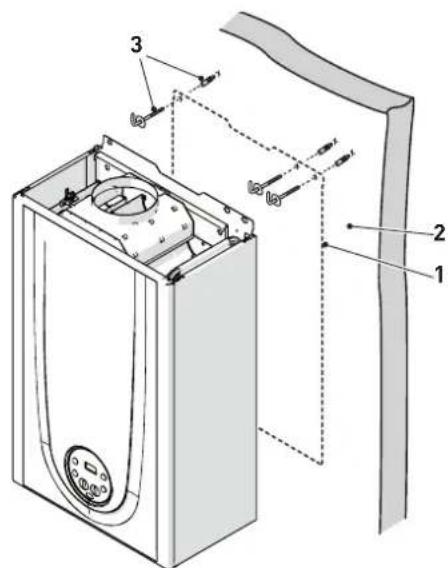
Fig. 20

CAUTION
The height of the boiler is to be such that disassembly and maintenance interventions are facilitated.
6.9 Plumbing connections
The plumbing connections have the following characteristics and dimensions.
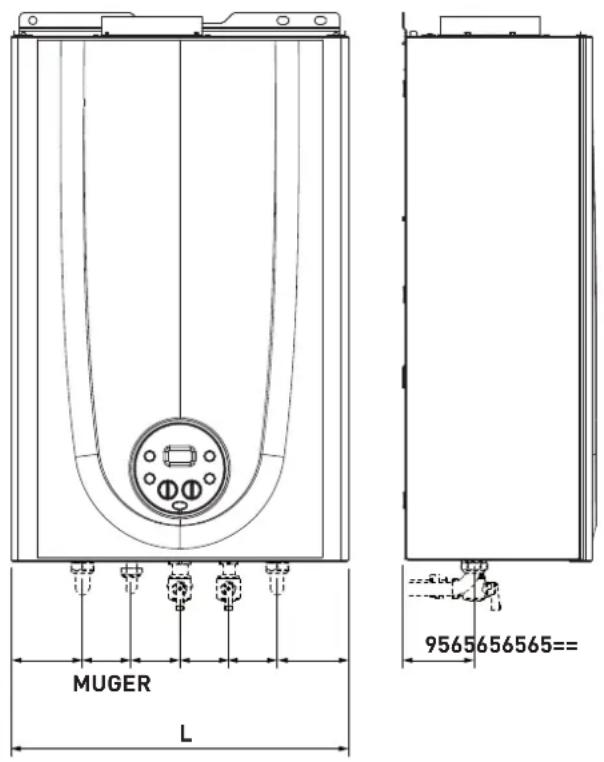
Fig. 21
| Description | Brava One OF |
| 25 | |
| M - System delivery ∅ 3/4" G | |
| R - System return ∅ 3/4" G | |
| U - Domestic hot water output ∅ 1/2" G | |
| E - Domestic hot water inlet ∅ 1/2" G | |
| G - Gas supply ∅ 3/4" G | |
| W (mm) | 450 |
6.9.1 Plumbing accessories (optional)
To facilitate plumbing and gas connections to the systems, the accessories as shown in the table below are available and are to be ordered separately from the boiler.
| DESCRIPTION | CODE |
| Installation plate | 8075441 |
| Curve kit | 8075418 |
| Curve and valve kit with connections from DIN to SIME | 8075443 |
| Cocks kit | 8091806 |
| Valve kit with connections from DIN to SIME | 8075442 |
| Wall mount replacement kit for other makers | 8093900 |
| Fitting protection Kit | 8094531 |
| Polyphosphate dosing kit | 8101700 |
| Dosing recharge kit | 8101710 |
NOTE: kit instructions are supplied with the accessory itself or are to be found on the packaging.
6.10 Gas supply
Brava One OF boilers leave the factory specifically prearranged for G20 gas or G30/G31. The G20 models can be converted to function with G30/G31 using the "specific nozzle kit" (optional) provided by Sime on request separately from the boiler.
If changing the type of gas to be used, carry out the entire "GAS CONVERSION" phase of the appliance.
The boiler must be connected to the gas mains in full compliance with the installation standards in force in the country where the appliance will be used.
Before connecting the boiler to the gas mains, the user must ensure that:
– the type of gas is correct for the appliance
- the pipes are clean
- the gas supply pipe is the same dimension as or greater than that of the boiler fitting [G3/4") and with a load loss less than or equal to that contemplated between the gas mains and the boiler.

WARNING
Once installation has been completed, check that the joints are air tight as indicated in the installation Standards.

CAUTION
It is recommended that the gas line has a suitable filter.
6.11 Smoke outlet and combustion air inlet
Brava One OF boilers take in combustion air from the room where the boiler is installed through the ventilation openings which must fully comply with Technical Standards.
Permitted outlets
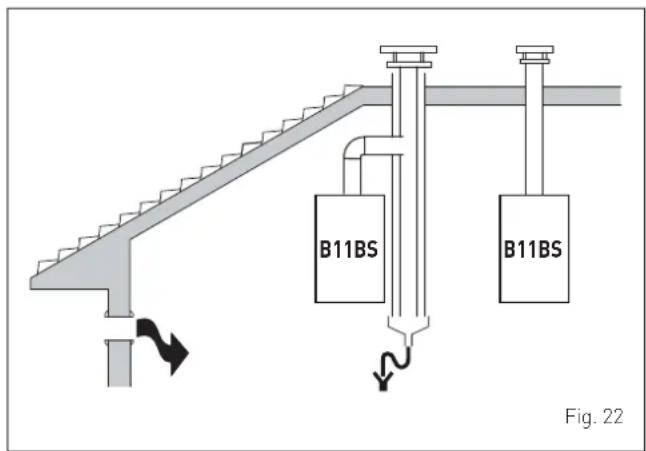
B11BS
Combustion air inlet into the atmosphere and smoke outlet to open air.
NOTE: opening for combustion air (6 cm² x kW).

WARNINGS
- The smoke flue and the connection to the flue pipe must be in compliance with the national and local standards and legislation in force in the country where the appliance will be used.
- The use of rigid ducts which are resistant to temperature, condensate, mechanical stress and are air-tight is compulsory.
- Outlet ducts which are not isolated are a risk of danger.
6.12 Electrical connections
The power cable must be connected to a 230V (±10%) \~ 50 Hz network, observing L-N polarity and the earth connection. The network must have an omnipolar switch with category III over-voltage, in compliance with the installation rules.
If this cable needs to be replaced, an original spare must be requested from Sime.
Therefore only the connections of the original components as shown in the table are needed. These are to be ordered separately from the boiler.
| DESCRIPTION CODE | |
| External sensor kit (β=3435, NTC 10KOhm at 25°C) 8094 | 101 |
| Power cable (dedicated) 6323875 | |
| Remote control HOME (open therm) 8092280 | |
| Remote control HOME PLUS (open therm) 8092281 |

CAUTION
The maintenance interventions described must ONLY be carried out the professionally qualified personnel.

WARNING
Before carrying out any interventions described:
- set the main system switch to "OFF"
- close the gas valve
- make sure that no hot parts inside the appliance are touched.
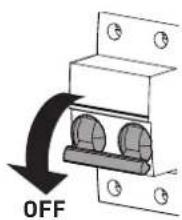
Fig. 23
To facilitate introduction of the connection wires of the optional components into the boiler:
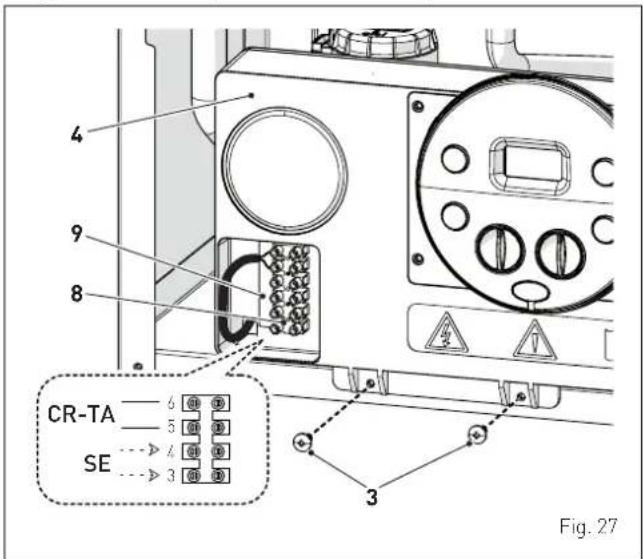
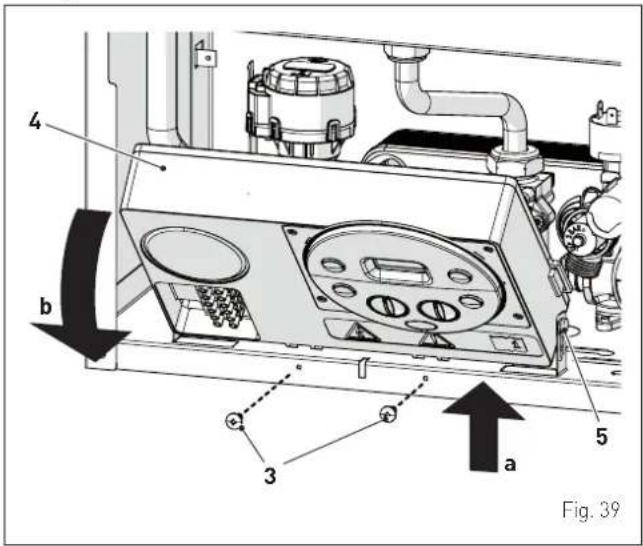
- remove the screws (1), pull the front panel (2) forwards and release it from the top by lifting it
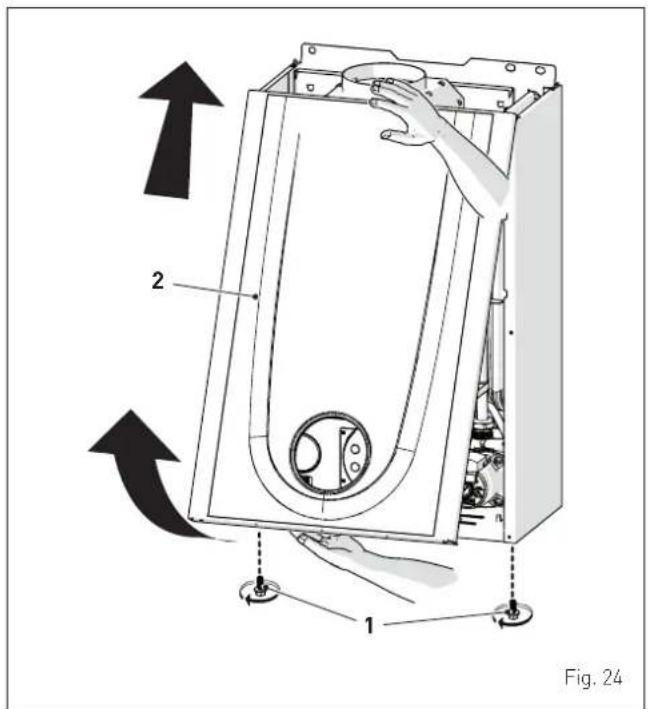
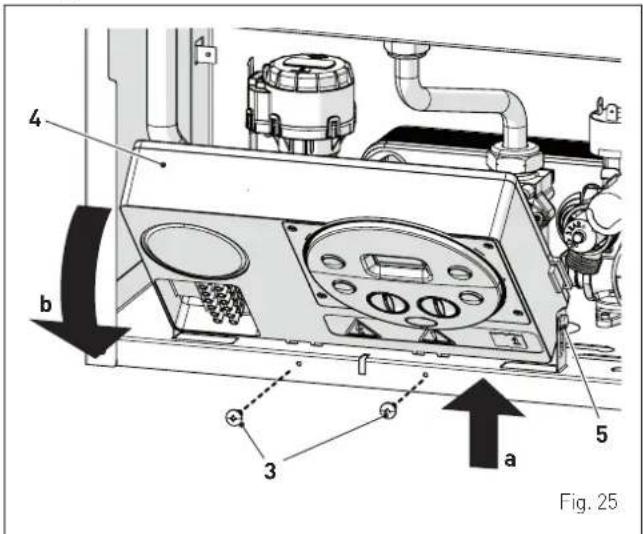
- remove the screws (3) securing the control panel (4)
- move the panel (4) upwards (a) but keeping it in the side guides (5) to the end of travel
- bring it forwards and down (b) until it is horizontal
- insert the connection wires into the cable gland (6) and the opening (7) on the control panel
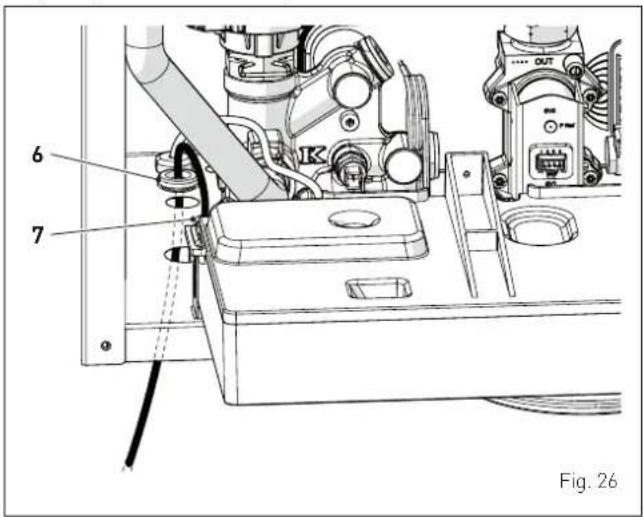
- bring the control panel (4) to the original position and secure it with the screws (3) which were removed previously
- connect the component wires to the terminal board (8) following the indications provided on the data plate (9).

CAUTION
It is compulsory:
- to use an omnipolar cut-off switch, disconnect switch, in compliance with EN standards (contact opening of at least 3 mm)
- if the power cable is to be replaced, that ONLY a special cable is used with a factory produced re-wired connector, ordered as a spare part and connected by a professionally qualified person
- to connect the earth wire to an effective earthing system (*)
- that before any intervention on the boiler, the mains power is disconnected by setting the main system switch to "OFF".
(*) The manufacturer is not responsible for any damage caused by failure to earth the appliance or failure to observe the information provided in the wiring diagrams.

IT IS FORBIDDEN
To use water pipes for earthing the appliance.
6.12.1 External temperature sensor
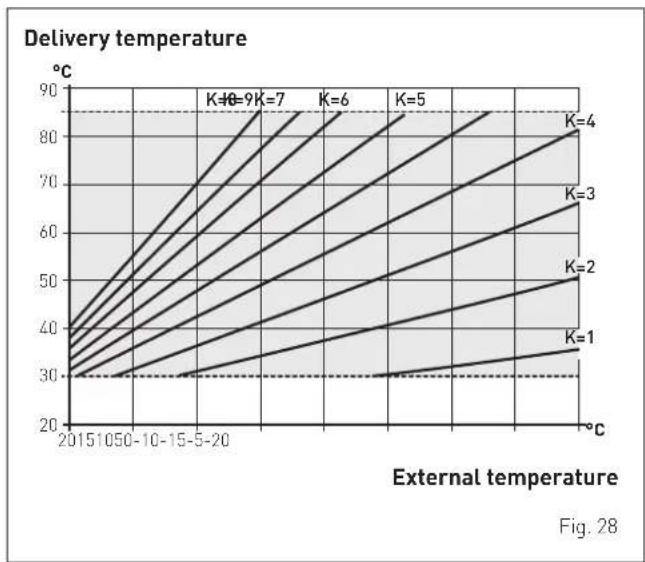
The boiler is prearranged for connection to an external air temperature sensor and can operate with a sliding temperature. This means that the delivery temperature sent to the boiler can vary on the basis of the external temperature depending on the climatic curve selected from those shown in the diagram (Fig. 28).
When fitting the sensor on the outside of the building, follow the instructions provided on the packaging of the product itself.
Climatic curve

CAUTION
If there is an external sensor, turn the heating knob until the required curve K has been selected within the range K=0.0 - K=9.0 in order to select the optimal climatic curve for the system and therefore the delivery temperature based on the external temperature.
6.12.2 Chrono-thermostat or Air Thermostat
The electrical connection of the chrono-thermostat or air thermostat has already been described. When fitting the component in the room where the readings are to be taken, follow the instructions provided on the packaging of the product itself.
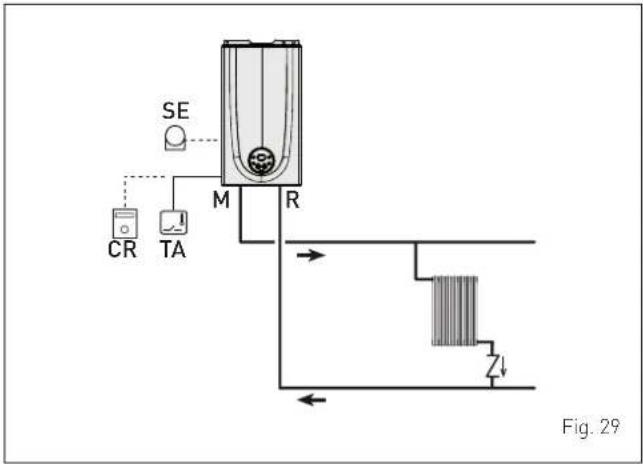
6.12.3 EXAMPLE of use of the command/control device on some types of heating systems
KEY
M System delivery
CR Remote control
EXP Expansion card
SE External temperature sensor
TA Air thermostat for boiler activation
TZ1÷TZ3 Air thermostat for the zone
VZ1-VZ3 Zone valves
RL1-RL3 Zone relays
P1-P3 Zone pump
TSB Low temperature safety thermostat
ONE DIRECT ZONE system, external sensor and air thermostat.
MULTI ZONE system - with zone valve, air thermostat and external sensor.
![graph TD TA["TA"] -->|M| R["R"] SE["SE"] -->|M| R R --> VZ1["VZ1"] R --> VZ2["VZ2"] R --> VZ3["VZ3"] VZ1 --> Z1["Z1"] VZ2 --> Z2["Z2"] VZ3 --> Z3["Z3"] TZ1 --> TZ1["TZ1"] TZ2 --> TZ2["TZ2"] TZ3 --> TZ3["TZ3"] style TA fill:#f9f,stroke:#333 style SE fill:#ccf,stroke:#333 style R fill:#cfc,stroke:#333…](/content/2026/04/713106/images/d30c09516b95dba1c5601e122102d25ae1c386e361ab6a49c91dad0225b9b295.jpg)

CAUTION
Set the parameter "tS 1.7 = DELAY SYSTEM PUMP AC- TIVATION to allow the opening of zone valve VZ.
MULTI ZONE system - with pump, air thermostat and external sensor.
![graph TD TA["TA"] --> M["M"] M --> R["R"] R --> SP["SP"] SP --> P1["P1"] SP --> P2["P2"] SP --> P3["P3"] TZ1["TZ1"] --> RL1["RL1"] TZ2["TZ2"] --> RL2["RL2"] TZ3["TZ3"] --> RL3["RL3"] RL1 --> P1 RL2 --> P2 RL3 --> P3 style TA fill:#f9f,stroke:#333 style M fill:#ccf,stroke:#333 style R fill:#cfc,strok…](/content/2026/04/713106/images/5d73bda5fa476463cfe2f4cbaff55235c63d35c4e59d8b0438d2c90ccd28ae23.jpg)
6.13 Refilling or emptying
Before carrying out the operation described below, make sure that the main system switch is set to "OFF".
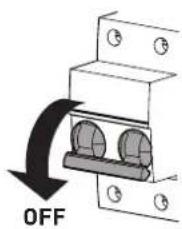
Fig. 32
6.13.1 REFILL operations
Remove the front panel:
- remove the two screws (1), pull the front panel (2) forwards and release it from the top by lifting it.
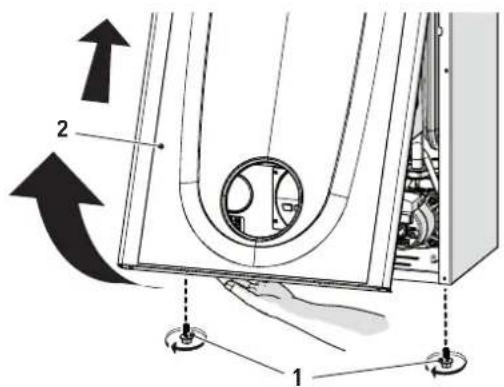
Fig. 33
Domestic hot water circuit:
- open the isolation valves of the domestic hot water circuit (if present)
- open one or more than one hot water valve to fill and bleed the domestic hot water circuit
- once bleeding has been completed, close the hot water valves.
Heating circuit:
- open the isolation and air bleeding valves in the highest points of the system
- loosen the automatic bleed valve (3)
- open the isolation valves of the heating circuit (if present)
- open the filling valve (4) and fill the heating system until a pressure of 1-1.2 bar is shown on the pressure gauge (5)
- close the filling valve (4)
- check that there is no air in the system by bleeding all the radiators and the circuit on the high points of the system
- remove the front plug (6) of the pump and use a screwdriver to check that the impeller is not blocked
- replace the plug (6)
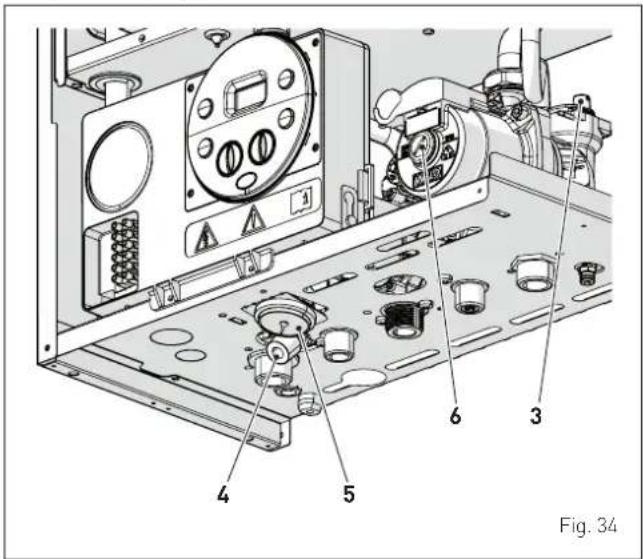
NOTE: to completely remove all air from the system, it is recommended that this operation is repeated a number of times.
- check the pressure on the pressure gauge (5) and if necessary top up until the correct pressure reading appears
- close the automatic bleed valve (3).
Refit the front panel of the boiler hooking it on at the top, pushing it forwards and securing it with the screw (1) which was removed previously.
6.13.2 EMPTYING operations
Domestic hot water circuit:
- close the domestic hot water circuit isolation valve (prearranged in installation)
- open one or more than one hot water valve to fill and bleed the domestic hot water circuit.
Boiler:
- loosen the automatic bleed valve (3)
- close the heating circuit isolation valves (prearranged in installation)
- check that the filling valve (4) is shut-off
- connect a rubber hose to the boiler drain valve (7) and open it
- when it has fully emptied, close the drain valve (7)
- close the automatic bleed valve (3).
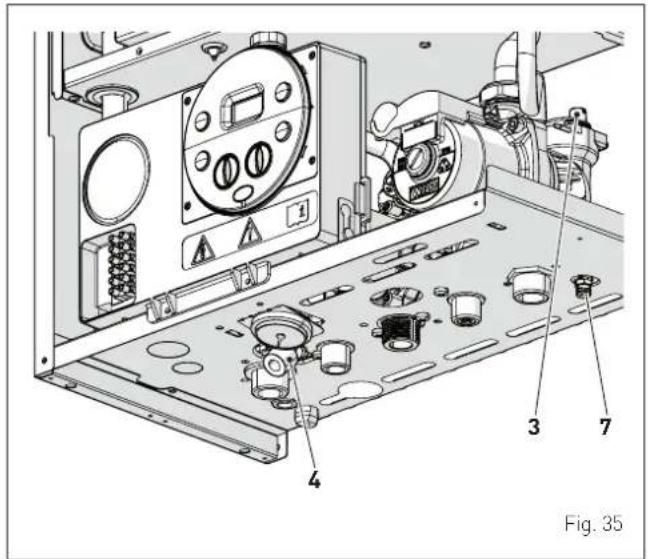
7 COMMISSIONING
7.1 Preliminary operations

WARNING
- Should it be necessary to access the areas in the bottom part of the appliance, make sure that the system components and pipes are not hot (risk of burning).
- Before replenishing the heating system, put on protective gloves.
Before commissioning the appliance, check that:
– the type of gas is correct for the appliance
- the gas isolation valves for the heating system and the water system are open
- the system pressure as shown on the pressure gauge when the system is cold, is between 1 and 1.2 bar
- the pump impeller rotates freely.
7.2 Before commissioning
After having carried out the preliminary operations, perform the following to start the boiler:
- set the main system switch to "ON"
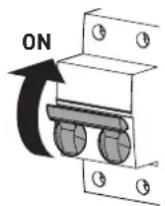
Fig. 36
- the type of gas for which the boiler has been calibrated, "nG" (methane) or "LG" (LPG,) will appear followed by the power. After this the correct representation of the symbols will be checked and finally "-"will appear on the display
- press the button once for at least 1 second to select "SUMMER mode". The value of the delivery sensor detected at that moment will appear on the display
- open one or more than one hot water tap. The boiler will work at maximum power until the taps are closed.
- if there is a fault, the message "AL" will appear on the display followed by the fault code (eg. "06" - no flame detected).

CAUTION
If the boiler has blocked, restore the start conditions by pressing and holding the button OK (RESET) for more than 3 seconds. This operation can be carried out no more than 6 times.
- close the taps opened previously and check that the appliance shuts down
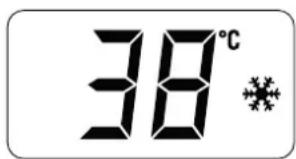
- press the button ⏻ once to select "WINTER mode" ⚙. The value of the heating water temperature detected at that moment will appear on the display
- adjust the air thermostat and check that the boiler starts and operates correctly
- to check that the pressure in the network and the nozzles are correct, the procedure described in section must be carried out "Chimney sweeper function".
7.3 Parameter setting and display
To go into the parameter menu:
- from the selected mode (eg. WINTER)
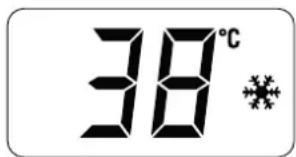
- press the buttons—and OK (approximately 5 seconds) at the same time until "tS" (installer) appears on the 2 digits of the display which alternate with "0.1" (parameter number) and a "2" (set value)

- press the button + to scroll up the list of parameters and then - to scroll down the list
NOTE: holding the buttons + or - increases the speed of the scrolling movement.
- once the required parameter has been reached, press the button OK for approximately 3 seconds to confirm and access the set value which will then flash and can then be modified

- to modify the value in the permitted range, press the buttons
- to increase it or - to decrease it
- once the required value has been reached, press the button OK to confirm.
When all the parameter modifications have been made, exit the parameter menu by pressing and holding down the buttons — and OK at the same time for approximately 5 seconds until the initial screen is displayed.
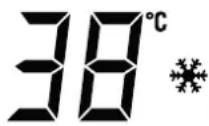
7.4 List of parameters
| Type No. Description Range U/M Step Default | ||||||
| CONFIGURATION | ||||||
| tS 0.1 | Index showing boiler power in kW 0 = 24 - - 0 | |||||
| tS 0.2 | Hydraulic configuration | 0 = rapid1 = storage tank with thermostat or heating only2 = hot water tank with sensor3 = bithermic4 = instant with solar power input | - 10 | |||
| tS 0.3 | Gas Type Configuration | 0 = G201 = G31 | - 10 or 1 | |||
| tS 0.4 | Combustion configuration | 0 = sealed chamber with combustion control1 = open chamber with smoke thermo-stat2 = low NOx | - | 1 | 1 | |
| tS | 0.8 | External sensor value correction | -5 .. +5 | °C | 1 | 0 |
| DOMESTIC HOT WATER - HEATING | ||||||
| tS | 1.0 | Boiler Antifreeze Threshold | 0 .. +10 | °C | 1 | 3 |
| tS 1.1 | External Sensor Antifreeze Threshold--- = Disabled | -9 .. +5 | °C | 1 | -2 | |
| tS | 1.2 | Heating Curve Incline | 0 .. 80 | - | 1 | 20 |
| tS | 1.3 | Minimum Heating Temperature Adjustment | 20 .. Par tS 1.4 | °C | 1 | 20 |
| tS | 1.4 | Maximum Heating Temperature Adjustment | Par tS 1.3 .. 80 | °C | 1 | 80 |
| tS | 1.5 | Maximum power heating | 0 .. 100 | % | 1 | 100 |
| tS | 1.6 | Heating Post-Circulation Time | 0 .. 99 | seconds x 10 | 1 | 3 |
| tS 1.7 | Heating | Pump Activation Delay | 0 .. 60 | seconds x 10 | 1 | 0 |
| tS | 1.8 | Re-ignition Delay | 0 .. 60 | Min | 1 | 3 |
| tS 1.9 | Domestic Hot Water Modulation with Flow meter | 0 = Disabled1 = Enabled | - 1 1 | |||
| tS | 2.0 | Maximum power domestic hot water | 0 .. 100 | % | 1 | 100 |
| tS 2.1 | Minimum power heating/domestic hot water (premixed) | 0 .. 100 | % | 1 0 | ||
| tS 2.2 | Domestic hot water preheating enabling | 0 = OFF1 = ON | - 1 0 | |||
| tS | 2.5 | Internal parameter (no change) | - | - | - | 0 |
| tS | 2.6 | Zone Valve / Pump Relaunch Delay | 0 .. 99 | Min | 1 | 1 |
| tS 2.9 | Anti-legionella Function (Only hot water tank)--- = Disabled | 50 .. 80 | - 1 | -- | ||
| tS | 3.0 | Maximum domestic hot water temperature | 35 .. 67 | °C | 1 | 60 |
| tS 3.5 | Digital / analogue Pressure switch | 0 = water pressure switch1 = water pressure transducer2 = water pressure transducer (only pressure displayed) | -10 | |||
| tS 4.0 | Modulating Pump Speed | -- = No modulationAU = Automatic 30 .. 100 | % 10 AU | |||
| tS | 4.1 | ΔT Modulating pump delivery/Return | 10 .. 40 | % | 1 | 20 |
| tS 4.7 | System | pump forcing (only in winter mode) | 0 = Disabled1 = Enabled | -10 | ||
| RESET | ||||||
| tS | 4.8 | INST Parameter set to default | 0 .. 1 | - | - | 0 |
In the event of a fault/malfunction the message "AL" will appear on the display alternating with the alarm number eg. "AL 04" (Domestic Hot Water Sensor Fault).
Before repairing the fault:
- disconnect the appliance from the mains power by setting the main switch to "OFF"
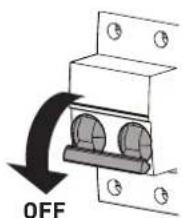
Fig. 37
- as a precautionary measure, close the gas isolation valve.
Repair the fault and start-up the boiler again.
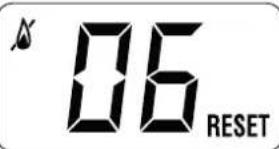
NOTE: after having repaired the fault, when the alarm number appears on the display together with the message RESET (see figure), press the button OK (RESET) for approximately 3 seconds to start the appliance up again.
7.5 Display of operating data and counters
Once the boiler is operating a qualified technician can view the operating data "In" and the counters "CO" as follows:
- from the operating screen in the mode enabled at that moment (WINTER or SUMMER)
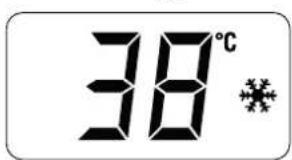
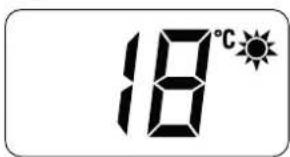
- go into "INFO" by pressing the buttons + and - at the same time for more than 3 seconds until "In" appears alternating with "0.0" (information number) and "25" (eg. value)

From this point, the technician has 2 options:
- scroll through the list of "info" and "counters" by pressing the button +. This way, scrolling will be in sequence
- display the "activated alarms" (no more than 10) by pressing the button —. Once in this section, proceed with button+ or —
When all the values have been displayed, exit the menu by pressing and holding down the buttons — and OK at the same time for approximately 5 seconds until the initial screen is displayed.
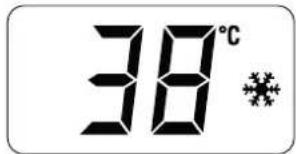
TABLE OF INFORMATION DISPLAYED
| Type | No. | Description | Range | U/M | Step |
| In | 0.0 | SW version | |||
| In 0.1 | External sensor | -9..99 | °C | 1 | |
| In 0.2 | Delivery sensor 1 temperature | -9..99 | °C | 1 | |
| In 0.3 | Delivery sensor 2 temperature | -9..99 | °C | 1 | |
| In 0.4 | Domestic hot water sensor temperature | -9..99 | °C | 1 | |
| In 0.5 | AUX auxiliary sensor | -9..99 | °C | 1 | |
| In 0.6 | Actual heating SET temperature | Par. 13... Par. 14 | °C | 1 | |
| In | 0.7 | Power level | 0..99 | % | 1 |
| In | 0.8 | Flow meter rate | 0..99 | l/min | 0.1 |
| In 0.9 | Water pressure transducer reading (if resent) | 0...99 bar | 0.1 | ||
TABLE OF COUNTER DISPLAYED
| Type | No. | Description | Range | U/M Step | |
| CO 0 | 0 | total no. of boiler operating hours | 0 .. 99 h | x 1000 | 0.1; from 0.0 to 9.9; 1; from 10 to 99 |
| CO 0 | 1 | total no. of burner operating hours | 0 .. 99 h | x 1000 | 0.1; from 0.0 to 9.9; 1; from 10 to 99 |
| CO 0 | 2 | total no. of burner ignitions | 0 .. 99 h | x 1000 | 0.1; from 0.0 to 9.9; 1; from 10 to 99 |
| CO 0 | 3 | no. faults 0 .. 99 x 1 1 | |||
| CO 0 | 4 | total no. of times installer parameters "tS" accessed | 0 .. 99 x | 1 1 | |
| CO 0 | 5 | total no. of times OEM parameters accessed | 0 .. 99 x | 1 1 | |
| CO 0 | 6 | time unitl next maintenance inter-vention | 1 .. 199 | months 1 | |
TABLE OF ACTIVATED ALARMS/FAULTS
| Type | No. | Description |
| AL 00 | Last | activated alarm/fault |
| AL 01 | Last | but one activated alarm/fault |
| AL 02 | Third | from last activated alarm/fault |
| AL 03 | Previous | activated alarm/fault |
| AL 04 | Previous | activated alarm/fault |
| AL 05 | Previous | activated alarm/fault |
| AL 06 | Previous | activated alarm/fault |
| AL 07 | Previous | activated alarm/fault |
| AL 08 | Previous | activated alarm/fault |
| AL 09 | Previous | activated alarm/fault |
7.6 Checks and adjustments
7.6.1 Chimney sweeper function
The chimney sweeper function is used by the qualified maintenance technician to check the gas pressure at the nozzles, detect the combustion parameters and to measure the combustion efficiency required by legislation in force.
This function lasts 15 minutes and is activated by proceeding as follows:
- if the panel (2) has not already been removed, remove the two screws (1), pull the front panel (2) forwards and release it from the top by lifting it
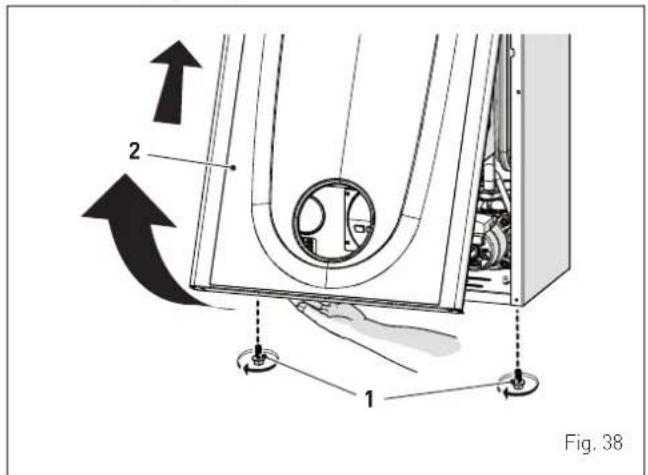
- remove the screws (3) securing the control panel (4)
- move the panel (4) upwards (a) but keeping it in the side guides (5) to the end of travel
- bring it forwards and down (b) until it is horizontal
- close the gas valve
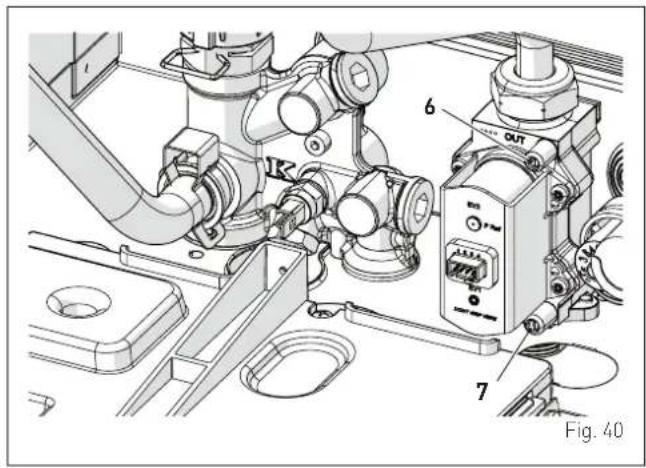
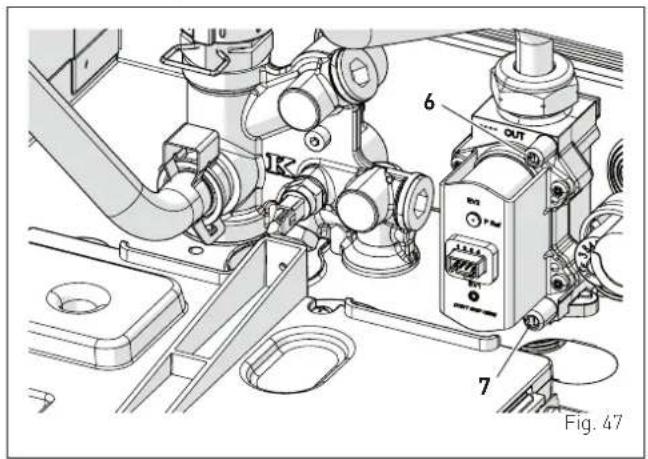
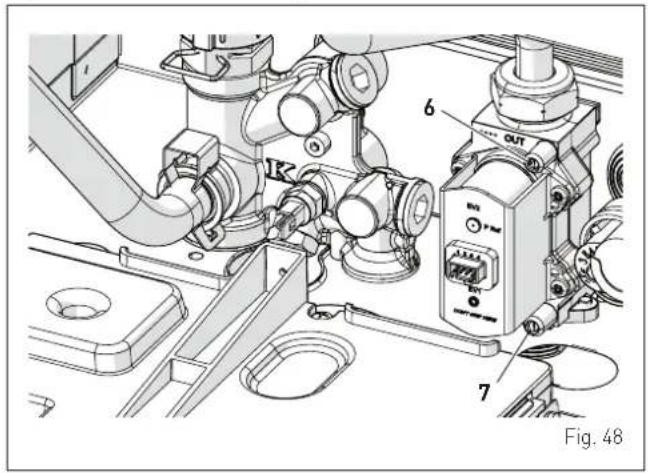
- loosen the "nozzle pressure" point (6) and the screw of the "supply pressure" point (7) and connect each one to a pressure gauge
- open the gas valve
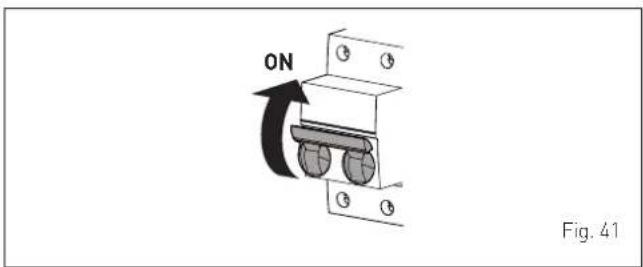
- power the boiler by setting the main switch to "ON"
- press the button ⏻ until "SUMMER" mode ⚙ has been selected
- press the buttons OK and + at the same time for approximately 10 seconds until the message flashes on the display alternating with the temperature of the delivery sensor and the flashing symbols OK and +
EN
- open one or more than one hot water tap
- press the button + to make the boiler operate at maximum power "Hi" and check that the gas pressure values on the pressure gauges correspond to those indicated in the table below
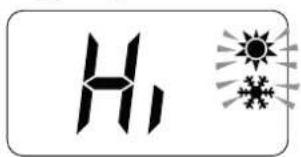
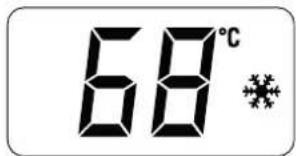
- press the button_ to make the boiler operate at minimum power "Lo" and check that the gas pressure values on the pressure gauges correspond to those indicated in the table below. The message "Lo" will appear on the display together with the flashing symbols (sun) and (snow)
- press the button + once again to make the boiler operate at maximum power. If the gas pressure values are correct it is possible to determine the combustion data and take a reading of the combustion efficiency as provided for by legislation in force
- press the button ⏻ to exit the "Chimney sweep Procedure". The boiler water delivery temperature will appear on the display
- close the taps opened previously and check that the appliance shuts down
- disconnect the pressure gauges, carefully close the pressure points (6) and (7), put the control panel back to the original position and refit the front panel (2).
Gas supply pressure
Type of gas G20 G30 G31
Pressure [mbar] 20 28-30 37
Pressure at nozzles
Type of gas G20 G30 G31
| Pressureat nozzles[mbar] | at Max heat output 9,8 - 10,2 | 27,8 - 28,2 | 35,8 - 36,2 |
| at min heat output 1,9 - 2,2 | 4,9 - 5,2 | 6,3 - 6,6 |
If the gas pressure values are different from the values indicated in the table, adjust the gas nozzle pressure as described in the section below.
7.6.2 Adjusting gas pressure at the nozzles

CAUTION
Considering that:
- the front panel (2) has already been removed and the point (6) is connected to the pressure gauge
- the main system switch must be set to "ON"
- the gas supply must be open
- there must be no current requests for heat ("Summer" mode with hot water valve closed or "Winter" with air thermostats open)
- the adjustments described below must be carried out in sequence.
Adjusting maximum gas pressure:
- turn the domestic hot water knob as far as it will go
- press and hold down the buttons OK and ⏻ at the same time for approximately 6 seconds until the message "MA" appears on the display alternating with "nu"
- open one or more than one hot water tap
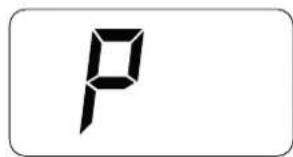
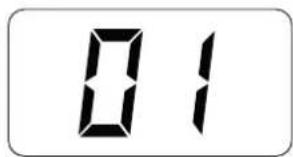
- the boiler will start up and the message "P01" will appear on the display (Adjusting maximum gas pressure)
- press the buttons+ or - until the pressure value indicated in the table appears on the pressure gauge
- once the value indicated in the table has been reached, press the button ⏻ for approximately 2 seconds to confirm the value which will then flash once.
Adjusting minimum gas pressure:
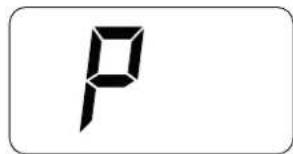
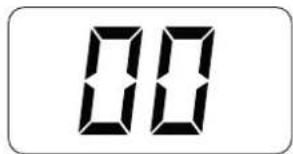
- press the button OK twice, the message "P00" will appear on the display
- press the buttons+ or - until the pressure value indicated in the table appears on the pressure gauge
- once the value indicated in the table has been reached, press the button ⏻ for approximately 2 seconds to confirm the value which will then flash once.
- press and hold down the buttons OK and ⏻ at the same time for approximately 6 seconds until the water delivery temperature appears on the display and the boiler shuts down/starts up.
- close the valves which were opened previously.
7.7 Gas conversion
Brava One OF models can be converted from operation with G20 to operation with G30/G31 by installing the "Nozzle kit for G30/G31 - code 5144722 to be ordered separately from the boiler.

CAUTION
The maintenance interventions described must ONLY be carried out the professionally qualified personnel.

WARNING
Before carrying out any interventions described:
- set the main system switch to "OFF"
- close the gas valve
- make sure that no hot parts inside the appliance are touched.
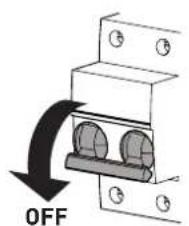
Fig. 42
7.7.1 Preliminary operations
To carry out the conversion:
- remove the screws (1), pull the front panel (2) forwards and release it from the top by lifting it
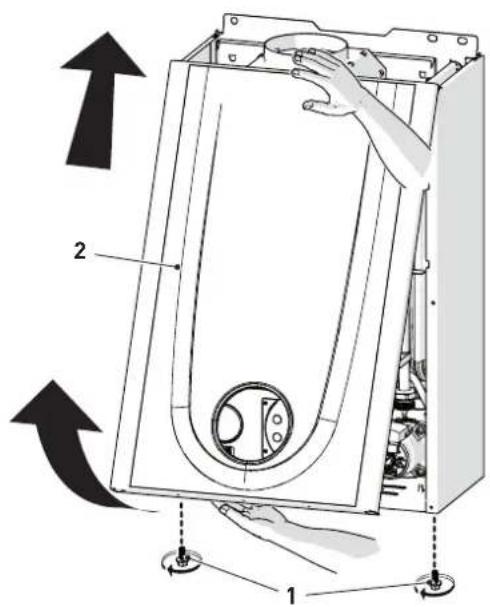
Fig. 43
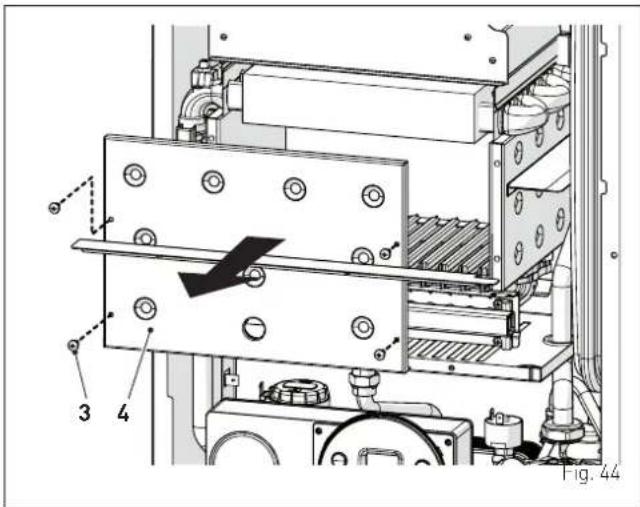
- remove the four screws (3) and remove the front panel (4) from the combustion chamber working carefully so as not to damage the gasket or the panel insulation
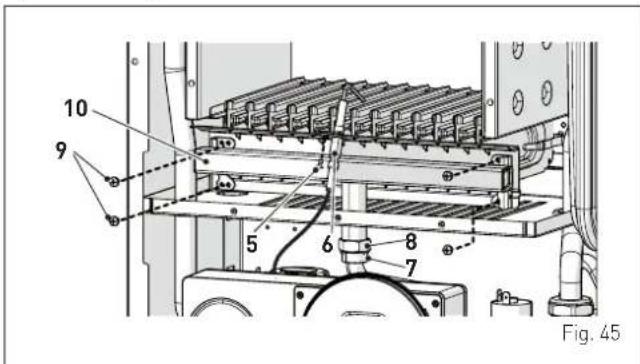
- remove the screw (5) and extract the electrode (6)
- remove the swivel joint (7) and the counter-nut (8)
- remove the screws (9)
- remove the gas manifold (10), replace the nozzles fitted in the factory with the nozzles supplied with the accessory kit and position the gaskets
- refit the gas manifold (10) securing it with the screws (9)
- tighten the counter-nut (8) and the swivel joint (7) and position the gasket
- refit the electrode (6) putting its end IN THE MIDDLE of the burner element (*)
- check that the gasket and the insulation of the front panel (4) of the combustion chamber are integral. If this is not the case then replace it
- refit the panel (4) secure it with fastening screws

CAUTION (*)
The position of the electrode is essential for the correct detection of current ionization.
- apply the label indicating the new gas configuration on the technical data plate (11) on the inside of the front panel
- carry out the "Automatic calibration procedure" and then refit the front panel (2) securing it with the two screws (1).
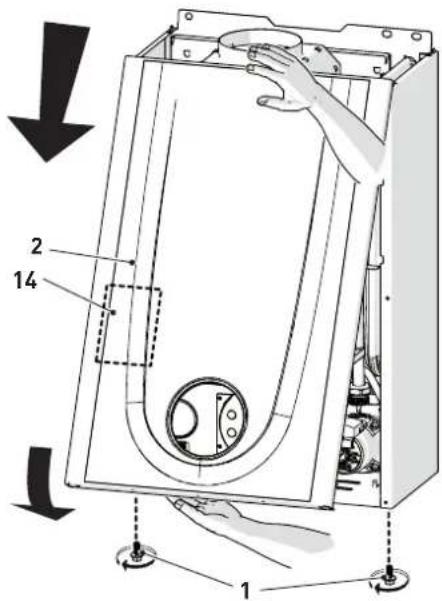
Fig. 46
7.8 Automatic calibration procedure
This procedure MUST ALWAYS be performed when the appliance is first turned on, when the gas is changed and after replacing:
- the nozzles for gas conversion
- the gas valve following a fault
- the electronic board following a fault
- electrode
- fan
- burner
and is necessary so that the new components can be identified and can communicate with those already fitted on the boiler.

CAUTION
Considering that:
- the front panel has been removed, the control panel has been brought forward and down and that the points (6) and (7) of the gas valve have been connected to the pressure gauges
- the main system switch must be set to "ON"
- the gas supply must be open
- there must be no current requests for heat ("Summer" mode with hot water valve closed or "Winter" with air thermostats open)
- the adjustments described below must be carried out in sequence.
Procedure valid for GAS CONVERSION
- go into the parameter section by pressing the buttons - and OK (approximately 5 seconds) at the same time until "tS" (installer) appears on the 2 digits of the display which alternate with "0.1" (parameter number) and a "2" (set value)

NOTE: holding the buttons + or - increases the speed of the scrolling movement. Pressing the button - allows the user to scroll through the previous parameters.
- keep the button + pressed and scroll through the parameters until reaching parameter "0.3"

- press the buttonOK to confirm (approximately 3 seconds) and access the default value which is flashing

- press the button+ and select "1" (LPG)
- press the button OK for at least 3 seconds to confirm the modification. the value will stop flashing.

Procedure which MUST be carried out after:
- the nozzles for gas conversion
- changing the gas valve following a fault
- changing the the electronic board following a fault
- electrode
- fan
- burner
- go into the parameter section (if not already there) by pressing the buttons - and OK (approximately 5 seconds) at the same time until "tS" (installer) appears on the 2 digits of the display which alternate with "0.1" (parameter number) and a "2" (set value)
- keep the button + pressed and scroll through the parameters until reaching parameter "tS 4.9"

- press the buttonOK to confirm (approximately 3 seconds) and access the default value which is flashing

- press the button+ or - to set the valueat "49"
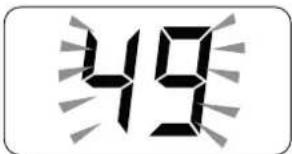
- press the buttonOK to confirm the modification The value will stop flashing
- keep the button+ pressed and scroll through the parameters until reaching parameter "tS 7.0"
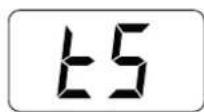
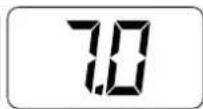
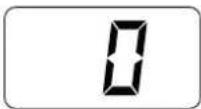
- press the buttonOK to confirm (approximately 3 seconds) and access the default value which is flashing

- press the button+ or - to set the value "5"
- press the buttonOK to confirm the modification The value will stop flashing
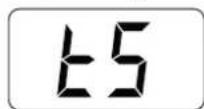
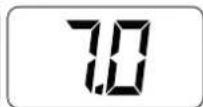
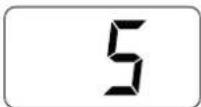
- exit the parameter section by pressing and holding down the buttons — and OK at the same time (approximately 5 seconds) until the delivery temperature is displayed.
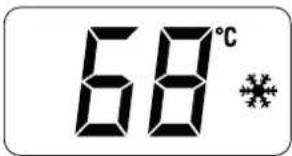

IMPORTANT
To complete this task the user MUST carry out the following procedure.
Adjusting maximum gas pressure:
- press the button ⏻ until "SUMMER" mode ⚙has been selected
- turn the domestic hot water knob as far as it will go
- press and hold down the buttons OK and ⏻ at the same time for approximately 6 seconds until the message "Au" appears on the display alternating with "to"
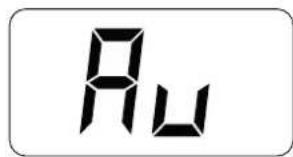
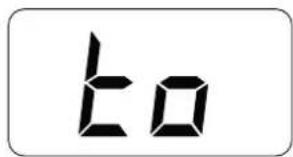
- open one or more than one hot water tap
- the boiler will start up and the message "P01" will appear on the display (Adjusting maximum gas pressure)
- press the buttons+ or - until the pressure value indicated in the table appears on the pressure gauge
- once the value indicated in the table has been reached, press the button ⏻ for approximately 2 seconds to confirm the value which will then flash once.
Adjusting minimum gas pressure:
- press the button OK twice, the message "P00" will appear on the display
- press the buttons+ or - until the pressure value indicated in the table appears on the pressure gauge
- once the value indicated in the table has been reached, press the button ⏻ for approximately 2 seconds to confirm the value which will then flash once
- press and hold down the buttons OK and ⏻ at the same time for approximately 6 seconds until the water delivery temperature appears on the display and the boiler shuts down
EN
- close the valves which were opened previously
- disconnect the pressure gauges, carefully close the pressure points (6) and (7), put the control panel back to the original position and refit the front panel (2).
Gas supply pressure
| Type of gas G20 G30 G31 | ||
| Pressure (mbar) 20 28-30 37 |
Pressure at nozzles
| Type of gas G20 G30 G31 | ||||
| Pressureat nozzles[mbar] | at Max heat output 9 | ,8 - 10,2 27,8 | - 28,2 35,8 | - 36,2 |
| at min heat output 1 | ,9 - 2,2 4,9 - | 5,2 6,3 - 6,6 | ||
8.1 Adjustments
For the appliance to operate correctly and efficiently it is recommended that the User calls upon the services of a Professionally Qualified Technician to carry out ANNUAL maintenance.

CAUTION
- The maintenance interventions described must ONLY be carried out the professionally qualified personnel who MUST wear suitable protective safety equipment.
- Make sure that the system components and pipes are not hot (risk of burning).

WARNING
Before carrying out any interventions described:
- set the main system switch to "OFF"
- close the gas valve
- make sure that no hot parts inside the appliance are touched.
Fig. 49
8.2 External cleaning
8.2.1 Cleaning the cladding
When cleaning the cladding, use a cloth dampened with soap and water or alcohol for stubborn marks.

IT IS FORBIDDEN
to use abrasive products.
8.3 Cleaning the inside of the appliance
8.3.1 Cleaning the heat exchanger
To clean the heat exchanger:
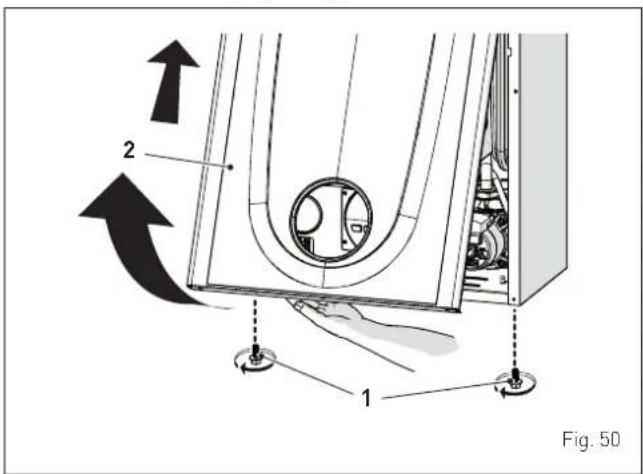
- remove the screws (1), pull the front panel (2) forwards and release it from the top by lifting it
- remove the four screws (3) and remove the front panel (4) from the combustion chamber working carefully so as not to damage the gasket or the panel insulation
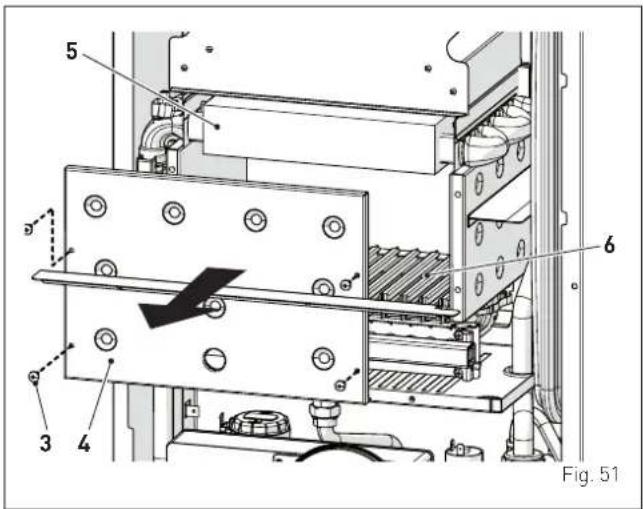
- if there is any dirt on the heat exchanger (5) fins, protect the burner elements (6) covering them with a sheet of newspaper or a cloth and brush the heat exchanger (5) clean.
8.3.2 Cleaning the burner
The burner does not require any particular maintenance simply dust it with a soft brush.
8.3.3 Checking the ignition/detection electrode
Check the state of the ignition/detection electrode and replace if necessary. Check the measurements as per the drawing whether the ignition/detection electrode is replaced or not.
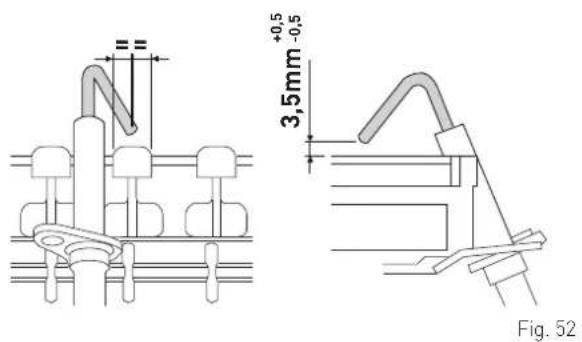

CAUTION
The position of the electrode is essential for the correct detection of current ionization.
8.3.4 Final operations
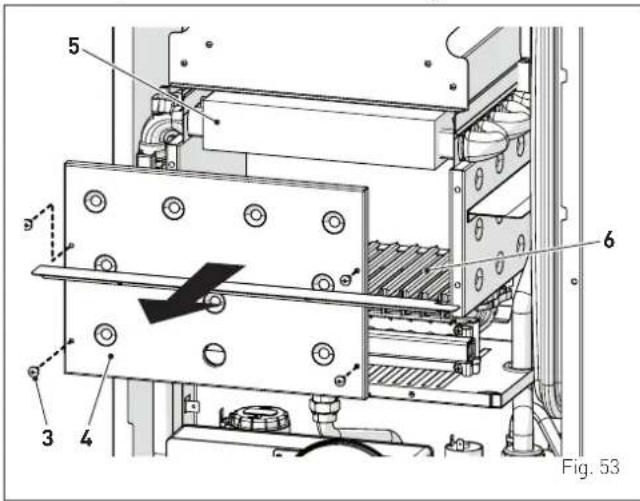
After having cleaned the heat exchanger and the burner:
- remove any carbon residue using a vacuum cleaner
- check that the gasket and the insulation of the front panel (4) of the combustion chamber are integral. If this is not the case then replace it
- refit the panel (4) secure it with fastening screws.
8.4 Checks
8.4.1 Checking the smoke duct
It is recommended that the user checks that the smoke outlet duct is integral and airtight.
8.4.2 Checking the expansion vessel pressure
It is recommended that the expansion vessel on the water side is drained and that the prefilling pressure is not less than 1 bar. If this is not the case, pressurize it to the correct value (see section "Expansion vessel").
Once the checks described above have been completed:
- refill the boiler as described in section "REFILL operations"
- start the boiler up and carry out a smoke analysis and/or measure the combustion efficiency
- refit the front panel securing it with the two screws which were removed previously
8.5 Unscheduled maintenance
If replacing the electronic board, the user MUST set the parameters as indicated in the table and in the sequence shown.
| Type No. | Description Setting | |
| tS 0.1 | Index showing boiler power in kW0 = 24 | |
| tS 0.2 | Hydraulic configuration0 = rapid1 = storage tank with thermostat or heating only2 = hot water tank with sensor3 = bithermic4=instant with solar power input | |
| tS 0.3 | Gas Type Configuration0 = G20; 1 = G31 | |
| tS 0.4 | Combustion configuration0 = sealed chamber with combustion control1 = open chamber with smoke thermostat2 = low NOx |
To enter "Parameter setting and display" refer to the indications provided in the specific section.
Once the parameters in the table have been set, you must carry out the "Automatic calibration procedure".
If the gas valve and/or the ignition/detection electrode , are replaced, the user must still carry out the entire phase of "Automatic calibration procedure" described in the specific section.
8.6 Malfunction codes and possible solutions
LIST OF MALFUNCTION/FAULT ALARMS
| Type No. Fault Solution | |||
| AL 01 | Smoke thermostat | - Contact the Technical Assistance Centre | |
| AL 02 | Low water pressure in system | - Restore pressure- Check for any leaks in the system | |
| AL 04 | Domestic hot water sensor fault (return sensor fault for T models) | - Check connections- Check the sensor is working | |
| AL 05 | Delivery sensor fault | - Check connections- Check the sensor is working | |
| AL 06 | No flame detection | - Check the integrity of the electrode and check that it is not grounded- Check gas availability and pressure- Check the integrity of the gas valve and the card | |
| AL 07 | Sensor or safety thermostat intervenes | - Check the sensor or thermo-stat connections- Deaerate the system- Check the bleed valve- Replace the sensor or the thermostat- Check that the pump impeller is not blocked | |
| AL 08 | Fault in the flame detection circuit | - Check the integrity of the electrode and check that it is not grounded- Check the integrity of the gas valve and the card | |
| AL 09 | No water circulating in the system | - Check the rotation of the pump rotor- Check the electrical connections- Replace the pump | |
| AL 10 | Auxiliary sensor fault | - Check the hydraulic configura-tion using "tS 0.2"- Check the electrical connec-tion | |
| AL 11 | Gas valve modulator disconnected | - Check the electrical connec-tion | |
| AL 12 | Domestic hot water sensor fault in tank mode | - Set the parameter tS 0.4 (Combustion configuration) to 0 | |
| AL 13 | Smoke probe inter-vention | - Check the sensor is working- Replace the smoke probe | |
| AL 14 | Smoke probe fault | - Replace the smoke probe- Check the electrical connec-tion of the smoke probe- Contact the Technical Assist- tance Centre | |
| AL 15 | Fan check cable disconnected | - Check the connection cable between the fan and the board | |
| AL 18 | Condensate level fault | - Check for any clogging in the pipe which takes the conden-sate to the siphon- Check that the siphon is not clogged | |
| AL 28 | Maximum number of consecutive resets reached | - Wait 1 hour and try unblocking the board again- Contact the Technical Assist- tance Centre | |
| AL 30 | Return sensor fault (boiler sensor fault for T models) | - Replace the return probe- Check parameters- Contact the Technical Assist- tance Centre | |
| AL 37 | Fault due to low network voltage | - Check the voltage- Contact your network provider | |
| AL 40 | Incorrect network frequency detected | - Contact your network provider | |
| AL 41 | Flame loss more than 6 consecutive times | - Check the ignition/detection electrode- Check the gas supply (open valve)- Check mains gas pressure | |
| AL 42 | Button fault | - Check that buttons are working | |
| AL 43 | Open Therm com-munication fault | - Check the OT electric con- nection | |
| AL 44 | No flame valve opening time sum anomaly | - Check for the presence of wa- ter hammer on the hot water system and, if present, mount a water hammer arrestor- Check for any abnormal requests on the room ther-mostat- Contact the Technical Assist- tance Centre | |
| AL 56 | Lock for ΔT delivery/return over max limit (open vent) | - Contact the Technical Assist- tance Centre | |
| AL 57 | Lock for flow tem-perature (FT) check (open vent) | - Contact the Technical Assist- tance Centre | |
| AL 62 | Self-calibrating pro-cedure is required | - Carry out the self-calibrating procedure (see the specific section) | |
| AL 72 | Incorrect position-ing of the delivery sensor | - Check delivery sensor opera-tion and position | |
| AL 74 | Second delivery sensor fault | - Check second delivery sensor operation and position | |
| AL 77 | EV2 SGV current max/min absolute limits error | - Check gas valve and board | |
| AL 78 | EV2 SGV current upper limit error | - Check gas valve and board | |
| AL 79 | EV2 SGV current lower limit error | - Check gas valve and board | |
| AL 80 | Fault on the valve control logic line/ valve cable damaged | - Check gas valve and board | |
| AL 81 | Block due combusti-tion during start-up | - Check for blockage in chimney- Check air diaphragm (for BF models)- Check gas calibration- Bleed the air from the gas circuit | |
| Type No. Fault Solution | |||
| AL 82 | Block due to numerous combustion control failures | - Check electrode- Check outlets- Check air diaphragm (for BF models)- Check gas calibration | |
| AL 83 | Irregular combustion (temporary error) | - Check for blockage in chimney- Check air diaphragm (for BF models)- Check gas calibration | |
| AL 84 | Flow rate reduced for (presumed) low pressure on mains gas | - Check gas flow rate | |
| AL 88 | Internal error (board component protection) | - Check the board is working- Replace board | |
| AL 89 | Unstable combustion feedback signal error | - Check electrode- Check outlets- Check air diaphragm (for BF models)- Check gas calibration | |
| AL 90 | Combustion set cannot be reached error | - Check electrode- Check outlets- Check air diaphragm (for BF models)- Check gas calibration | |
| AL 92 | System has reached maximum air correction error (at the minimum flow rate) | - Check electrode- Check outlets- Check air diaphragm (for BF models)- Check gas calibration | |
| AL 93 | Combustion set cannot be reached error | - Check electrode- Check outlets- Check air diaphragm (for BF models)- Check gas calibration | |
| AL 95 | Flame signal micro interruptions error | - Check electrode- Check board- Check electric power supply- Check gas calibration | |
| AL 96 | Block due to clogging in smoke outlet | - Check for blockage in chimney- Check the smoke outlet and electrode position (not touching the burner) | |
| AL 98 | SW error, board start-up | - Contact the Technical Assistance Centre | |
| AL 99 | General board err or | - Contact the Technical Assistance Centre | |
| - | - | Frequent relief valve intervention | - Check circuit pressure- Check expansion vessel |
| - | - | Limited production of domestic hot water | - Check the diverter valve- Check that plate heat exchanger is clean- Check domestic hot water circuit valve |
8.6.1 Maintenance request
When it is time to perform maintenance on the boiler, "SE" shows on the display.
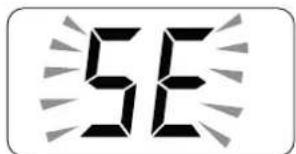
Contact the technical assistance service to organise the necessary work.
sime®
Fonderie Sime S.p.A - Via Garbo, 27 - 37045 Legnago (Vr)
Tel. +39 0442 631111 - Fax +39 0442 631292 - www.sime.it
sime®
Fonderie Sime S.p.A - Via Garbo, 27 - 37045 Legnago (Vr)
Tel. +39 0442 631111 - Fax +39 0442 631292 - www.sime.it
مستوى ضغط الغاز
| G31 G30 G20 | الغازة | نوعية | |
| 37 | 28-30 20 (mbar) | مستوى控股集团 |
46 alشكل
43 alشكل
38 alشكل
الملء والتفريع
6.13
20 alشكل
تحذير
ممنوع
16 الشكل
1011
للكريف
الapproحة الخارجية
انتبه
4 الشكل
الشكل 5
فحوصات تحضري
1.2 à
انته

2 الشكل
التشغيل
العربيّة
- BRAVA ONE OF
- AVERTISSEMENTS ET RÈGLES DE SÉCURITÉ
- AVERTISSEMENTS
- 1.6 CODES ANOMALIES / PANNES
- 5.6 CIRCUIT HYDRAULIQUE PRINCIPAL
- LÉGENDE
- 6.3 DÉPLACEMENT
- IL EST INTERDIT
- 6.9 RACCORDEMENTS HYDRAULIQUES
- SAFETY WARNINGS AND REGULATIONS
- WARNINGS
- RESTRICTIONS
- IT IS FORBIDDEN
- COMPLIANCE
- SYMBOLS
- WARNING
- ELECTRICAL HAZARD
- CAUTION
- USER INSTRUCTIONS
- DESCRIPTION OF THE APPLIANCE
- INSTALLATION AND SERVICING INSTRUCTIONS
- TABLE OF CONTENTS
- 1 USING THE BOILER BRAVA ONE OF 44
- 2 SHUTDOWN 46
- 3 MAINTENANCE 47
- 4 DISPOSAL 47
- 1 USING THE BOILER BRAVA ONE OF
- 1.1 CONTROL PANEL
- 1 KNOBS
- 2 FUNCTIONAL BUTTONS
- 3 DISPLAY
- 1.2 PRELIMINARY CHECKS
- 1.4 ADJUSTING THE DELIVERY TEMPERATURE
- 1.3 IGNITION
- 1.5 ADJUSTING THE DOMESTIC HOT WATER TEMPERATURE
- 1.6 FAULT / MALFUNCTION CODES
- 1.6.1 MAINTENANCE REQUEST
- 2 SHUTDOWN
- 2.1 TEMPORARY SHUTDOWN
- 2.2 SHUTTING DOWN FOR LONG PERIODS
- 3 MAINTENANCE
- 3.1 ADJUSTMENTS
- 3.2 EXTERNAL CLEANING
- 3.2.1 CLEANING THE CLADDING
- 4 DISPOSAL
- 4.1 DISPOSAL OF THE EQUIPMENT
- 5 DESCRIPTION OF THE APPLIANCE 50
- 5 DESCRIPTION OF THE APPLIANCE
- 5.1 CHARACTERISTICS
- 5.2 CHECK AND SAFETY DEVICES
- 5.3 IDENTIFICATION
- 5.4 STRUCTURE
- 5.6 MAIN WATER CIRCUIT
- KEY
- 5.7 SENSORS
- CORRESPONDENCE OF TEMPERATURE DETECTED/RESISTANCE
- 5.8 EXPANSION VESSEL
- 5.9 CIRCULATION PUMP
- 5.10 CONTROL PANEL
- 5.11 WIRING DIAGRAM
- M CAUTION USERS MUST
- D IT IS FORBIDDEN TO USE WATER PIPES
- 6 INSTALLATION 58
- 7 COMMISSIONING 65
- 8 MAINTENANCE 74
- 6.1 RECEIVING THE PRODUCT
- 6.2 DIMENSIONS AND WEIGHT
- 6.3 HANDLING
- 6.4 INSTALLATION ROOM
- 6.5 NEW INSTALLATION OR INSTALLATION OF A REPLACEMENT APPLIANCE
- 6.6 CLEANING THE SYSTEM
- 6.7 WATER SYSTEM TREATMENT
- 6.8 BOILER INSTALLATION
- 6.9 PLUMBING CONNECTIONS
- 6.9.1 PLUMBING ACCESSORIES (OPTIONAL)
- 6.10 GAS SUPPLY
- 6.11 SMOKE OUTLET AND COMBUSTION AIR INLET
- B11BS
- 6.12 ELECTRICAL CONNECTIONS
- 6.12.1 EXTERNAL TEMPERATURE SENSOR
- 6.12.2 CHRONO-THERMOSTAT OR AIR THERMOSTAT
- 6.12.3 EXAMPLE OF USE OF THE COMMAND/CONTROL DEVICE ON SOME TYPES OF HEATING SYSTEMS
- 6.13 REFILLING OR EMPTYING
- 6.13.1 REFILL OPERATIONS
- REMOVE THE FRONT PANEL
- DOMESTIC HOT WATER CIRCUIT
- HEATING CIRCUIT
- 6.13.2 EMPTYING OPERATIONS
- BOILER
- 7 COMMISSIONING
- 7.1 PRELIMINARY OPERATIONS
- 7.2 BEFORE COMMISSIONING
- 7.3 PARAMETER SETTING AND DISPLAY
- 7.5 DISPLAY OF OPERATING DATA AND COUNTERS
- 7.6 CHECKS AND ADJUSTMENTS
- 7.6.1 CHIMNEY SWEEPER FUNCTION
- EN
- GAS SUPPLY PRESSURE
- PRESSURE AT NOZZLES
- 7.6.2 ADJUSTING GAS PRESSURE AT THE NOZZLES
- ADJUSTING MAXIMUM GAS PRESSURE
- ADJUSTING MINIMUM GAS PRESSURE
- 7.7 GAS CONVERSION
- 7.7.1 PRELIMINARY OPERATIONS
- CAUTION (*)
- 7.8 AUTOMATIC CALIBRATION PROCEDURE
- PROCEDURE VALID FOR GAS CONVERSION
- PROCEDURE WHICH MUST BE CARRIED OUT AFTER
- IMPORTANT
- OPEN ONE OR MORE THAN ONE HOT WATER TAP
- 8.1 ADJUSTMENTS
- 8.2 EXTERNAL CLEANING
- 8.2.1 CLEANING THE CLADDING
- 8.3 CLEANING THE INSIDE OF THE APPLIANCE
- 8.3.1 CLEANING THE HEAT EXCHANGER
- 8.3.2 CLEANING THE BURNER
- 8.3.3 CHECKING THE IGNITION/DETECTION ELECTRODE
- 8.3.4 FINAL OPERATIONS
- 8.4 CHECKS
- 8.4.1 CHECKING THE SMOKE DUCT
- 8.4.2 CHECKING THE EXPANSION VESSEL PRESSURE
- 8.5 UNSCHEDULED MAINTENANCE
- 8.6 MALFUNCTION CODES AND POSSIBLE SOLUTIONS
- 8.6.1 MAINTENANCE REQUEST
- تحذير
- ممنوع
- للكريف
- الAPPROحة الخارجية
Brand : SIME
Model : BRAVA ONE OF
Category : Boiler