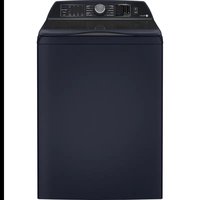
PTW800BPWRS - Washing machine GE - Free user manual and instructions
Find the device manual for free PTW800BPWRS GE in PDF.


| Brand | GE (General Electric) |
| Model | PTW800BPWRS |
| Product type | Top-load washing machine |
| Power supply | 120 V, 60 Hz, 15/20 A, individual circuit with ground |
| Required water pressure | 20 to 120 psi (1.4 to 8.4 kgf/cm²) |
| Detergent reservoir capacity (SmartDispense) | Approximately 75 oz (2.2 L) - enough for ~50 loads |
| Wash cycles | Normal, Colors, Delicates, Quick Wash, Drain & Spin, Sanitize with Oxi, Jeans, Bulky Items, Towels/Sheets, Whites, Downloaded (via SmartHQ) |
| Wash options | Deep Fill, Power Pre-wash, Tangle Control, Auto Soak, Deep Rinse, Delay Wash, Extra Rinse, Smart Wash, Smart Rinse, My Cycle Settings, Control Lock |
| SmartDispense (intelligent dispensing) | Yes, bulk detergent reservoir with Auto, Less, More or Off selection |
| Built-in Alexa voice assistant | No (available on models PTW905/PTW900) |
| WiFi connectivity | Yes (SmartHQ app) |
| Detergent dispenser | Flex Dispense drawer with compartments for fabric softener, prewash, detergent packs, and main detergent; liquid bleach dispenser (1 cup max) |
| Safety | Lid lock, automatic stop if lid open >15 min, automatic drain after 24h pause, control lock |
| Maintenance | Monthly Bulky cycle with 250 ml of bleach; detergent reservoir cleaning via key combination; removable drawer for cleaning |
| Warranty | 1 year parts and labor, 10 years motor (labor owner's responsibility after 1 year) |
| Required drain height | 76.2 cm (30 in) minimum, 2.44 m (8 ft) maximum |
| Parts and accessories | Water supply hoses (PM14X10002 or PM14X10005), drain hose extension (WH49X301), floor pan (PM7X2) |
| Country of origin | Not specified (manufactured for GE Appliances) |
Frequently Asked Questions - PTW800BPWRS GE
User questions about PTW800BPWRS GE
0 question about this device. Answer the ones you know or ask your own.
Ask a new question about this device
Download the instructions for your Washing machine in PDF format for free! Find your manual PTW800BPWRS - GE and take your electronic device back in hand. On this page are published all the documents necessary for the use of your device. PTW800BPWRS by GE.
USER MANUAL PTW800BPWRS GE
SAFETY INSTRUCTIONS....3
USING THE WASHER
Getting Started 5
Loading 13
Appliance Communication ..... 14
CARE AND CLEANING ....15
INSTALLATION
INSTRUCTIONS....17
TROUBLESHOOTING TIPS ..... 2 2
LIMITED WARRANTY 25
CONSUMER SUPPORT .... 26
OWNER'S MANUAL & INSTALLATION INSTRUCTIONS
PTW905
PTW900
PTW805
PTW800
PTW705
PTW700
PTW605
PTW600
ENGLISH/FRANÇAIS/ ESPAÑOL
Write the model and serial numbers here:
Model # ____
Serial # ____
You can find them under the lid of the washer.
G035
THANK YOU FOR MAKING GE APPLIANCES A PART OF YOUR HOME.
Whether you grew up with GE Appliances, or this is your first, we're happy to have you in the family.
We take pride in the craftsmanship, innovation and design that goes into every GE Appliances product, and we think you will too. Among other things, registration of your appliance ensures that we can deliver important product information and warranty details when you need them.
Register your GE appliance now online. Helpful websites and phone numbers are available in the Consumer Support section of this Owner's Manual. You may also mail in the pre-printed registration card included in the packing material.
IMPORTANT SAFETY INFORMATION READ ALL INSTRUCTIONS BEFORE USING THE APPLIANCE
WARNING
To reduce the risk of death, fire, explosion, electric shock, or injury to persons when using your appliance, follow basic precautions, including the following:
- Read all instructions before using the appliance.
■ Follow all fabric care instructions and warnings to prevent melting of garments or damage to the appliance.
■ DO NOT wash or dry articles that have been previously cleaned in, washed in, soaked in or spotted with gasoline, dry-cleaning solvents, or other flammable or explosive substances, as they give off vapors that could ignite or explode.
■ DO NOT add gasoline, dry-cleaning solvents, or other flammable or explosive substances to the wash water. These substances give off vapors that could ignite or explode.
■ Under certain conditions, hydrogen gas may be produced in a hot-water system that has not been used for 2 weeks or more. HYDROGEN GAS IS EXPLOSIVE. If the hot water system has not been used for such a period, before using a washing machine, turn on all hot-water faucets and let the water flow from each for several minutes. This will release any accumulated hydrogen gas. As the gas is flammable, DO NOT smoke or use an open flame during this time.
■ Risk of suffocation and injury from entrapment: DO NOT allow children to play on or in this appliance. Close supervision of children is necessary when this appliance is used near children. Before the washer is removed from service or discarded, remove the door or lid. Failure to follow these instructions may result in death or injury to persons.
■ DO NOT reach into the appliance if the tub or agitator is moving to prevent accidental entanglement.
■ For waterproof, water-resistant and bulky items, only use the Bulky (or Delicates) cycle. DO NOT use other cycles for these items. Using other cycles can cause excessive vibration and may result in injury or damage to the washer, walls, or floor. DO NOT mix waterproof and non-waterproof items.
■ DO NOT install or store this appliance where it will be exposed to the weather.
■ DO NOT tamper with controls, repair or replace any part of this appliance or attempt any servicing unless specifically recommended in the user maintenance instructions or in published user repair instructions that you understand and have the skills to carry out.
■ DO NOT operate this appliance if it is damaged, malfunctioning, partially disassembled, or has missing or broken parts including a damaged cord or plug.
■ DO NOT use replacement parts that have not been recommended by the manufacturer. (e.g. parts made at home using a 3D printer).
■ Unplug the appliance or turn off the circuit breaker before servicing. Pressing the Power button DOES NOT disconnect power.
■ See “ELECTRICAL REQUIREMENTS” located in the Installation Instructions for grounding instructions.
Proper Disposal of your Appliance
■ Dispose of or recycle your appliance in accordance with Federal and Local Regulations. Contact your local authorities for the environmentally safe disposal or recycling of your appliance.
READ AND SAVE THESE INSTRUCTIONS
IMPORTANT SAFETY INFORMATION READ ALL INSTRUCTIONS BEFORE USING THE APPLIANCE
PROPER INSTALLATION
This washer must be properly installed and located in accordance with the Installation Instructions before it is used.
- Ensure that the hot water hose is connected to the “H” valve and the cold water hose is connected to the “C” valve.
■ Install or store where it will not be exposed to temperatures below freezing or exposed to the weather, which could cause permanent damage and invalidate the warranty.
■ Properly ground washer to conform with all governing codes and ordinances. Follow details in the Installation Instructions.
■ Ensure washer is properly leveled and washer legs are adjusted such that unit is stable.
■ Optional drain hose extension recommended for discharging heights from 60" - 96".
■ GE Appliances strongly recommends the use of factory specified parts. A list of factory hoses available for purchase are listed. These hoses are manufactured and tested to meet GE Appliances specifications.
■ GE Appliances strongly recommends the use of new water supply hoses. Hoses degrade over time and need to be replaced every 5 years to reduce the risk of hose failures and water damage.
■ Consider recycling options for your appliance packaging material.
START-UP SEQUENCE
■ Any time the washer is being started or restarts after the washer lid has been opened and closed, the washer will turn on the cold water valve or drain pump for two short periods followed by a 10 second pause before continuing. If the lid is opened during this period, the washer will pause. You will have to push the Start button again to restart the cycle.
■ Machine will automatically drain any time the lid is left open for more than 15 minutes and water is present.
■ Machine will automatically drain if left in a paused state with the lid closed for more than 24 hours and water is present.
■ While in WATER STATION mode, machine will automatically drain after changing the cycle knob to another cycle. On some models, this feature may only be available through the GE Appliances SmartHQ App.
WHEN NOT IN USE
■ Turn off water faucets to minimize leakage if a break or rupture should occur. Check the condition of the fill hoses; GE Appliances recommends changing the hoses every 5 years.
PARTS AND ACCESSORIES
Order on-line at GEApplianceparts.com today, 24 hours a day or by phone at 800.626.2002 during normal business hours. In Canada, visit your local GE Appliances parts distributor or call 800.661.1616.
Part Number Accessory
PM14X10002 4 ft rubber water supply hoses Or
PM14X10005 4 ft braided water supply hoses
WH49X301 Drain hose extension
PM7X2 Washer Floor Tray
READ AND SAVE THESE INSTRUCTIONS
WARNING
To reduce the risk of fire, electric shock, or injury to persons, read the IMPORTANT SAFETY INSTRUCTIONS before operating this appliance.
Throughout this manual, features and appearance may vary from your model.
Step 1
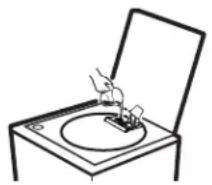
- Add fabric softener to the fabric softener dispenser.
IMPORTANT: For detergent use, see the specific dispenser section in this manual for your model.
- If using detergent packets, add to the Laundry Pack Dispenser compartment or add to the bottom of the wash basket before adding clothes. We recommend the use of High Efficiency laundry packs such as Tide PODS™ or Gain Flings™.
Step 2
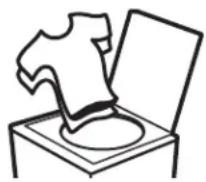
- Loosely add items around agitator or Infusor. Overloading may negatively impact wash performance. See page 13 for suggested loading examples.
- If not using a dispenser, add the manufacturer's recommended amount of detergent to the top of the load after adding clothes. We recommend the use of High Efficiency detergents such as Tide in your energy efficient washer.
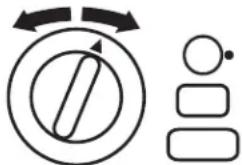
Step 3
flowchart
graph TD
    A["Start"] --> B{Decision}
    B -->|Yes| C["Process Step 1"]
    B -->|No| D["Process Step 2"]
    C --> E["End"]
    D --> E
- Close lid.
NOTE: Unit will not start with lid open except on Bulky cycle.
- Select wash cycle.
- Select wash options, including Deep Rinse option when using fabric softener.
- Select options.
Step 4
- Press Start.
Getting started
Features and appearance will vary.
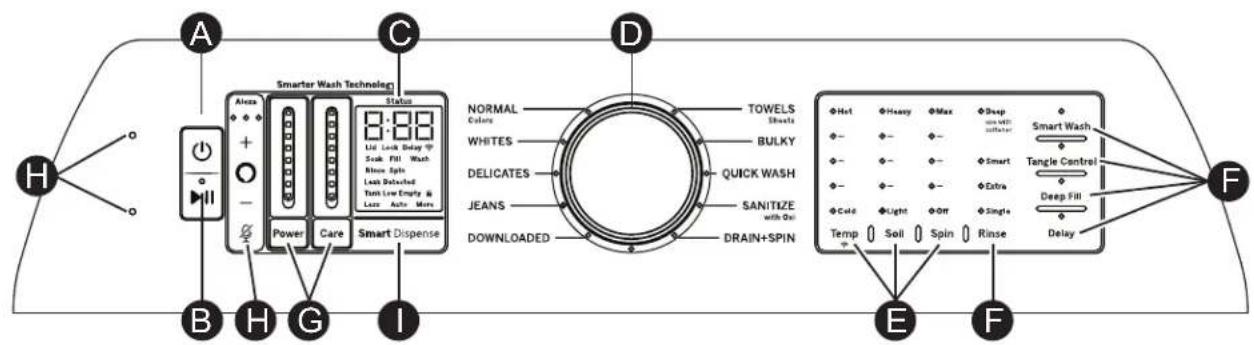
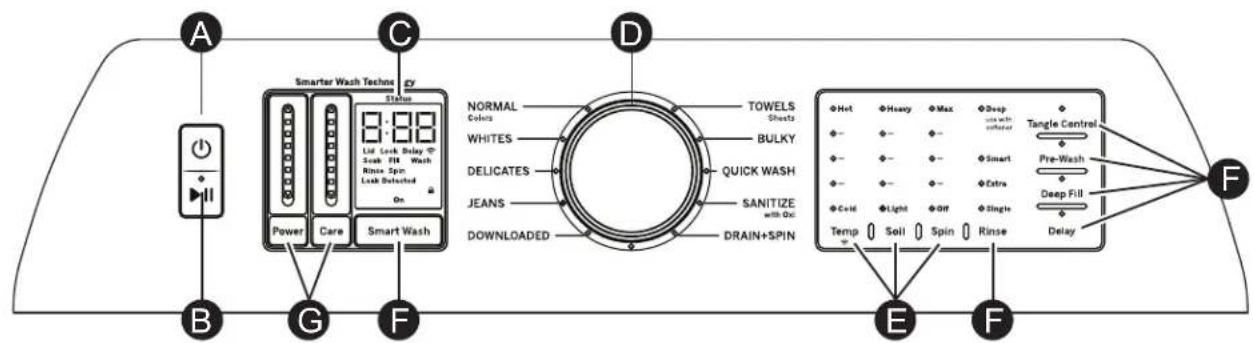
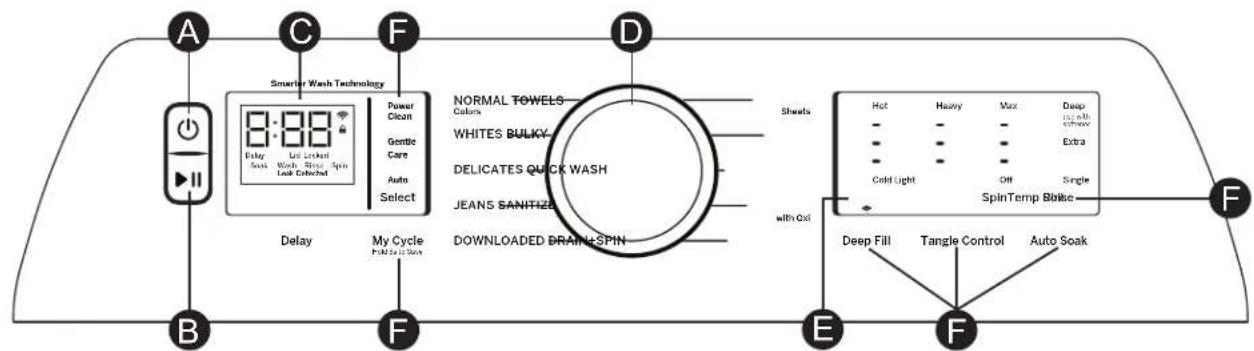
flowchart
graph LR
    A["ACDC"] --> B["Display"]
    B --> C["Smelter Wash Technology"]
    C --> D["Power Clean"]
    D --> E["Gentic Care"]
    E --> F["Auto Select"]
    F --> G["Delay"]
    G --> H["My Cycle Full to 100000"]
    H --> I["NEWLOADED DRAIN+SPIN"]
    I --> J["Normal Towels Colors"]
    I --> K["Whites Bulky"]
    I --> L["Delicates Quick Wash"]
    I --> M["Jeans Sanitize"]
    I --> N["Sheals with Out"]
    N --> O["Hot"]
    N --> P["Heavy"]
    N --> Q["Max"]
    N --> R["Deep with all brush"]
    N --> S["Extra"]
    N --> T["Cold Light"]
    N --> U["Off"]
    N --> V["Single SpinTemp Ripple"]
    O --> W["Deep Fill"]
    P --> X["Tangle Control"]
    Q --> Y["Auto Soak"]
    R --> Z["F"]
    S --> AA["F"]
Power
Press to "wake up" the display. If the display is active, press to put the washer into idle mode. NOTE: Pressing Power does not disconnect the appliance from the power supply.
B Start/Pause
Press Start to begin the cycle. NOTE: Unless Bulky cycle is selected, the lid must be closed for the washer to start cycle. If the lid is open, "Lid" will scroll across the display. During the load sensing portion of the cycle, the lid will lock and "SEnSing" will scroll across the display. When load sensing is complete, the lid will unlock.
Pressing Pause will unlock the lid (if locked at that time), pause the cycle and the Start indicator light will blink. To continue the cycle, press Start again. If water remains in the machine, select the Drain & Spin cycle to drain basket and spin water out of the washer basket. NOTE: Machine will automatically cancel and drain when water is present and the lid is left open for 15 minutes or the unit is left in a paused state for 24 hours with the lid closed. Select cycle and press Start to begin new cycle.
Getting started
Display and Status Lights
Display: The display shows the approximate time remaining until the end of the cycle. NOTE: The cycle time is affected by how long it takes the washer to fill. This depends on the water pressure in your home. The size of the load being washed also significantly impacts cycle time, with larger loads taking longer.
In addition, this display will, "scroll" the washer status:
- bALAnCING Start of rebalancing cycle to redistribute clothes. Stops after rebalancing is complete.
- dELAY When Delay Wash is initiated. Replaced with estimated time when cycle starts.
• End End of current cycle. - FILL "FILL" will scroll across the display during fill. Afterwards the estimated end of cycle time is displayed.
• H2O SUPPLY Can not sense water level (water supply possibly turned off). - Lld Cycle stopped because lid is open. Close the lid and press the Start button if needed.
- SEnSIng Sensing out-of-balance condition, waterproof items, or load size and type before and during fill (normal).
- PAUSE Cycle paused because the lid was opened during start up sequence or the Start/Pause button was pressed. Press Start button again to restart the cycle.
Cycle status lights: Shows whether the washer is in the Pre-wash, Delay, Fill, Soak, Wash, Rinse or Spin portion of the cycle. NOTE: Cycle status lights vary by model.
If an out-of-balance condition is detected by the washer, the Spin light will blink during the remaining portion of the cycle and will stay illuminated for a short time after cycle completion. When this occurs, the washer is taking actions to correct the out-of-balance condition and complete the cycle normally. In some cases, the washer may not be able to balance the load and spin up to full speed. If you notice the load is more wet than normal at the end of the cycle, redistribute the load evenly in the wash basket and run a Drain & Spin cycle.
Feature status lights indicate (see sections F and G for more details):
Pause - Will display when washer is paused between cycles.
Controls - The washer is locked - will blink once if you press any button or turn the cycle knob.
Lid Lock - The lid is locked. See the Control Lock description.
WiFi (on some models) - Will display when washer is connected via WiFi. Will blink when you are attempting to connect your device to your home WiFi.
Spin Stop - Indicates wash basket is coasting to a stop following spin. Lid will not unlock until basket has fully come to a stop.
Consumer Help Indicator
Your washer is equipped with Consumer Help Indicator (CHI). CHI is our way to communicate a simple remedy for some situations that you can perform without the need to call for service. The chart below describes the helpful messages you may notice scrolling on your display when you return to start another load. These messages will provide simple remedies you can quickly perform.
Spin light blinking
If an out-of-balance condition is detected by the washer, the Spin light will blink during the remaining portion of the cycle and will stay illuminated for a short time after cycle completion. When this occurs, the washer is taking actions to correct the out-of-balance condition and complete the cycle normally. In some cases, the washer may not be able to balance the load and spin up to full speed. If you notice the load is more wet than normal at the end of the cycle, redistribute the load evenly in the wash basket and run a Drain & Spin cycle.
"H2O SUPPLY" (Water not entering washer)
Check your house water supply. Did you forget to turn on one or both supply valves after installation or coming back from vacation? As soon as the message starts to scroll, the washer will initiate a 4 minute lock-out period. The washer controls won't respond/change during this time. After the 4 minutes, you can begin your cycle again. If you try to bypass the lock-out period by unplugging the washer, the 4 minute timer will start over again.
"CAnCELEd"
“CAnCELED” may scroll on the display if the machine was paused for longer than 24 hours or if the machine has stopped itself before the cycle completed due to certain errors. As soon as the message starts to scroll, the washer will initiate a 4 minute lock-out period. The washer controls won’t respond/change during this time. After the 4 minute period, you can begin your cycle again. If you try to bypass the lock-out period by unplugging the washer, the 4 minute timer will start over again. If the problem persists, call GE Appliances at 800.GE.CARES (800.432.2737) for service.
"Lid"
"Lid" will be shown on display if 3 cycles have been started without opening the lid. The washer will not start another cycle until the lid is opened. Try opening, then closing the lid and starting a new cycle. If the problem persists, call GE Appliances at 800.GE.CARES (800.432.2737) for service.
Getting started
D Wash Cycles-Cycle Selector Knob
The wash cycle controls the type of washing process. The cycle selector knob can be turned in either direction. Turning the knob after starting a cycle will stop the washer and change the cycle/options to the new selection. Press Start to begin the new cycle selection.
The chart below will help you match the items to be washed with the best wash cycle settings. For optimal performance, select the cycle that most closely matches the items being washed.
Selections and options shown in bold are the recommended settings for that cycle.
Some cycles and options may not be available on some models.
Downloaded
Use with the SmartHQ App to download additional cycles to your washer. Defaults to Active Wear cycle (see cycle table below).
| Items to Wash Cycle Wash | Cycle Wash Temp Soil Level Spin | Selection (Duration) | Options Disabled Cycle Details | |||
| Cycle for normal, regular, or typical use for washing up to a full load of normally soiled cotton clothing. | Colors Normal | HotWarmColorsCoolColdTap Cold | HeavyHeavy (-)NormalLight (+)Light | Max+++NormalOff | Deep Fill | Cycle for normal, regular, or typical use for washing up to a full load of normally soiled cotton clothing.Choose the Heavy or Extra Heavy soil level selection and Warm or Hot water temperature selection as appropriate for your clothes load for a higher degree of cleaning. Incorporates multi-stage fills and wash periods to provide optimal fabric care. |
| Lingerie and special care fabrics with light soil. | Delicates | HotWarmColorsCoolColdTap Cold | HeavyHeavy (-)NormalLight (+)Light | Max+++NormalOff | Tangle Control Utilizes an extra gentle agitate profile and a low spin speed to provide special care to delicate fabrics. It is recommended to place small or ultra delicate items in mesh bags before washing. | |
| Small loads of lightly soiled items that are needed in a hurry. Examples include one casual wear outfit or 3 soccer uniforms. | QuickWash | HotWarmColorsCoolCold | HeavyHeavy (-)NormalLight (+)Light | Max+++NormalOff | None Utilizes more intense agitation profile and expedited wash period to clean small lightly soiled loads in the fastest time possible. | |
| Wet load of items. For items that need only to be rinsed, use this cycle with Deep Rinse option. | Drain & Spin | Max+++NormalOff | Power Clean Gentle Care Tangle Control Auto Soak Smart Wash Smart Rinse Pre-Wash Smart Dispense | Utilizes a high speed spin to extract water from wet items. For items that need to be rinsed, select the Deep Rinse option when using this cycle. | ||
| Heavily soiled colorfast items. | Sanitize with Oxi* | Hot Heavy Max | +++ | Power Clean Gentle Care Tangle Control Auto Soak Smart Wash Smart Rinse Pre-Wash Smart Dispense | Cycle uses an initial lower water fill for super concentrated, high temperature sanitization followed by a heavy wash step. A pump purge and deep rinse is incorporated to remove contaminants. See additional details below. Smart Dispense not available on this cycle. | |
| Jeans with medium to light soil. | Jeans Hot | WarmColorsCoolColdTap Cold | HeavyHeavy (-)NormalLight (+)Light | Max+++NormalOff | None Combires higher water levels, a specially designed agitation profile, and multi-step wash to care for jeans with medium to light soil. | |
| Water-resistant, bedding and bulky items, such as large coats, mattress pads, and bath mats. | Bulky Hot | WarmColorsCoolColdTap Cold | HeavyHeavy (-)NormalLight (+)Light | Max+++NormalOff | Tangle Control Provides a Deep Fill/max fill wash water level to wash bulky and waterproof items. Also incorporates a Deep Fill rinse to effectively rinse bulky items and a low spin speed appropriate for these items. Only use this cycle for water-resistant, bedding or bulky items. | |

Wash Cycles-Cycle Selector Knob
| Items to Wash Cycle Wash Temp Soil Level Spin | Selection (Duration) | Options Disabled Cycle Details | |||
| Towels Sheets | Towels / Sheets | HotWarmColorsCoolColdTap Cold | HeavyHeavy (-)NormalLight (+)Light | Max+++NormalOff | None Cycle designed washing towels or sheets, using a higher water level to effectively clean these items. It is recommended that towels and sheets be washed separately for best care and washing performance. For waterproof bed covers use Bulky cycle. |
| Whites and household linens | Whites HotWarmColorsCoolColdTap Cold | HeavyHeavy (-)NormalLight (+)Light | Max+++NormalOff | None Cycle tailored to clean and brighten your whites. | |
| Various specialty fabrics | Down-loaded Refer to SmartHQ App | ||||
| Medium to lightly soiled athletic wear items of technical or synthetic fabrics. | Active Wear (Downloaded)Default | HotWarmColorsCoolColdTap Cold | HeavyHeavy (-)NormalLight (+)Light | Max+++NormalOff | None Defaultcycle for the Downloaded cycle position. Cycle designed for care of medium to lightly soiled active wear, athletic wear, and technical fabrics. Incorporates a dual stage wash period to effectively treat body soils and odors. |
WARNING
Failure to closely follow these instructions may result in an abnormal vibrating and out-of-balance condition that could result in physical injury, property damage, and/or appliance damage.
For Waterproof, Water-Resistant, or Bulky:
- Only use the Bulky (or Delicates) cycle.
- Using other cycles can cause excessive vibration and may result in injury or damage to the washer, walls, or floor.
- Do not mix waterproof and non-waterproof items
- Read the Owner's Manual for wash cycle details.
\*Sanitize with Oxi
The Sanitize With Oxi cycle, when using an Oxi additive along with your detergent, is designed to remove 99.9% of bacteria found in home laundry. Measure the detergent and the Oxi products carefully. Using the amounts appropriate for a large heavily soiled load in a top load washer, follow the detergent and the Oxi product label instructions. For the Sanitize With Oxi cycle only, add the clothes first and then place the detergent and Oxi product directly on top of the load. The washer hot water supply connection must provide a minimum of 120°F to ensure the effectiveness of this cycle.
NOTE: The default Sanitize With Oxi cycle water temperature can NOT be changed.

Settings
Individual settings for water temperature (Temp), agitation (Soil), and spin (Spin) can be set from the minimum (lowest in column) to maximum (highest in column).
NOTE: Longer Spin times typically reduce dryer time/energy usage (i.e. reduces total energy when using both a washer and a dryer).
| Temperature Selection | ||||||
| Tap Cold | Cold | Cool | Colors | Warm | Hot | |
| Hot | Hot Warm | Hot Warm | Hot Warm | Hot Warm | Hot Warm | Hot Warm |
| ○ | ○ Colors | ○ Colors | ○ Colors | ○ Colors | ○ Colors | ○ Colors |
| ○ | ○ Cool | ○ Cool | ● Cool | ○ Cool | ○ Cool | ○ Cool |
| ○ | ○ Cold | ● Cold | ○ Cold | ○ Cold | ○ Cold | ○ Cold |
| ○ Cold | ● Tap Cold | ○ Tap Cold | ○ Tap Cold | ○ Tap Cold | ○ Tap Cold | ○ Tap Cold |
| Soil Selection | |||||
| Light | Light + | Normal | Heavy - | Heavy | |
| ○ Heavy | ○Heavy | ○ Heavy | ○Heavy | ○Heavy | ●Heavy |
| ○ | ○Heavy - | ○Heavy - | ○Heavy - | ●Heavy - | ○Heavy - |
| ○ | ○Normal | ○Normal | ●Normal | ○Normal | ○Normal |
| ○ | ○ Light + | ●Light + | ○Light + | ○Light + | ○Light + |
| ○ Light | ●Light | ○Light | ○ light | ●light | ○light |
Select the Deep Fill feature for loads where extra water is desired. The Deep Fill feature is recommended for special case loads only, not for typical use.
Press and release the Deep Fill button once before starting the cycle to add 3 addition gallons of water to the wash load. Holding the Deep Fill button for 3 seconds will provide the deepest fill level possible; this will increase cycle time due to the additional time it takes to fill the washer.
To cancel the option if desired, press the Deep Fill button again.
NOTE: The Deep Fill button can also be pressed after the washer has completed filling and is in the wash phase if additional water is desired. To stop the extra fill, press the Deep Fill button again and the water will stop.
Power Pre-wash (on some models)
Ideal for heavily soiled loads, this cycle option works with SmartDispense™ to add a brief wash, soak and drain cycle to loosen and remove heavy soil before starting the cycle selected.
Tangle Control™ (on some models)
Setting this option will adjust your wash cycle to aid in the prevention of tangling. Your cycle time may increase when this option is selected. NOTE: This option is not allowed for some cycles.
Auto Soak
This option begins with a brief agitation, soaks for a specified period of time, then moves through the rest of the cycle automatically. Repeated pressing of the Soak button will scroll through 15 minute, 30 minute, 1 hour and 2 hour selections and then return back to 0 soak minutes.
Deep Rinse
Set this option to provide a deep rinse or when using fabric softener. It may change other settings (e.g. Spin may go to a higher setting) to maximize performance. Option available on all wash cycles.
Delay Wash
When the Delay Wash button is repeatedly pressed, the delay time is set from 1 (01H) to 9 (09H) hours and back to clear (00H) hours. If you press and hold the Delay Wash button for 3 seconds, it will immediately reset.
Extra Rinse
When you use extra detergent or bleach to clean heavily soiled clothes, use the Extra Rinse option to better remove additional residues. NOTE: This option is not allowed for some cycles.
Smart Wash (on some models)
When enabled, the Smart Wash option will automatically sense the soil level of the load and adjust the wash cycle accordingly (adding or removing agitation and soaking times) to achieve excellent wash performance while minimizing wear.
Smart Rinse (on some models)
The Smart Rinse feature senses the amount of soil and detergent in the current laundry cycle and determines whether additional water is needed to ensure a thorough rinse keeping fabrics performing like new for longer.
My Cycle Settings (on some models)
As the cycle selector knob is turned, the Temp, Soil and Spin settings change to automatic pre-set default settings for each cycle. If you desire different default settings, select the desired options or changes to the cycle settings, then press and hold the My Cycle button for 3 seconds to store them. The My Cycle button will light when active. In the future, when you turn the selector knob to that cycle, your settings will be automatically recalled. To restore the factory defaults temporarily (i.e. for this load), press the My Cycle button for 1/2 second. The My Cycle light will turn off and the factory defaults will load. However, the next time you select this cycle, your My Cycle settings will load. If you wish to permanently restore the factory default settings for the cycle; when the My Cycle is active (button light on) press and hold the My Cycle button for 3 seconds. The factory defaults will load for the selected cycle and the My Cycle light will turn off. The default settings will load when this cycle is selected in the future and the My Cycle light will remain off. NOTE: My Cycle saves the following options:
Temp, Soil, Spin, Extra Rinse, Deep Fill, Auto Soak, Deep Rinse, Tangle Control, Auto, Power Clean and Gentle Care.
Sound (on some models)
Use the Volume button to change the volume of the end of cycle signal and other system tones. Press the button until you reach the desired volume (high, medium, low) or off. On some models, this feature may only be available through the GE Appliances SmartHQ App.
Control Lock
Use the control lock before or during a cycle to prevent any selections from being made.
To lock/unlock the washer controls, press and hold the Rinse and Spin buttons for 3 seconds. The control lock icon will light up when it is on.
NOTE: The Power button can still be used when the machine is locked.

Power Clean and Gentle Care (on some models)
The Auto setting balances wash performance, fabric care, and cycle time for normally-soiled or lightly-soiled loads.
Gentle Care reduces agitation time and adds a series of soaks to reduce fabric wear/fading while still providing great wash performance on garments needing special care.
Use Power Clean to add heavy agitation and soaking to boost wash performance for loads needing a deep clean.

Alexa Voice Assistant (PTW905 and PTW900 models only)
Your washer is embedded with Alexa voice assistant. When connected to your SmartHQ App, you can use your voice to automatically set your washer to handle tough stains or to set the appropriate cycle to wash specific fabrics. When paired with compatible dryer, you can also set your dryer to optimally handle a specific fabric. Refer to the label on the inside of your washer lid to utilize your laundry voice assistant. Download your SmartHQ App and connect your washer to set up your built in Alexa.
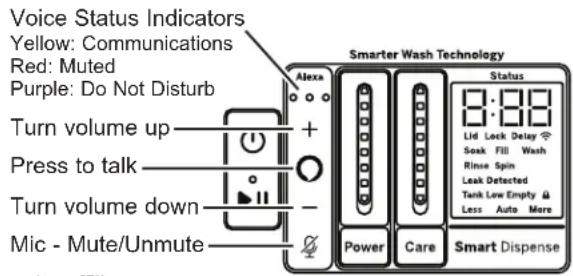
Alexa and all related marks are trademarks of Amazon.com, Inc. or its affiliates.

SmartDispense™ (PTW905, PTW900, PTW805 and PTW800 models only)
When selected, this feature will automatically add detergent to the wash, eliminating the need to add detergent for each load.
The detergent amount selection on the control panel will default to AUTO when first powering up the washing machine. When AUTO is selected, the amount of detergent needed for each laundry load will automatically be determined based on the size of the load the machine senses.
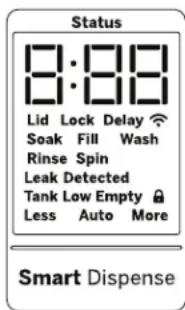
If it is desired to manually select the amount of detergent for a given load, this can be done by pressing the Select button on the Smart Dispense control panel to choose between Less or More detergent. Less will provide less detergent than the Auto selection and More will provide more detergent than the Auto selection.
The smart dispense feature can be disabled by pressing the Select button on the Smart Dispense control panel until Off is selected.
NOTE: Not all cycles will allow the use of the SmartDispense feature. If the Off LED is illuminated and pressing the Select button results in a beeping tone, then SmartDispense is not allowed for the cycle that has been selected. Detergent will need to be added directly to the wash basket for these cycles.
Adding Detergent to SmartDispenser™ (PTW905, PTW900, PTW805 and PTW800 models only)
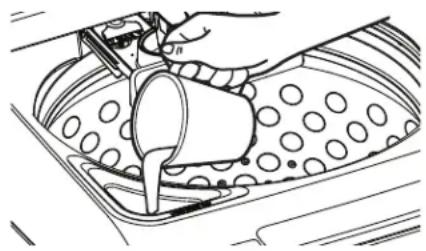
This machine is equipped with a bulk detergent reservoir that can hold approximately 75 ounces of liquid detergent for your convenience. This is enough detergent for about 50 average laundry loads, depending on what dispense amount is selected.

When the Tank Low or Tank Empty LED is illuminated, more detergent should be added to the reservoir to ensure detergent will be available for the next cycle.
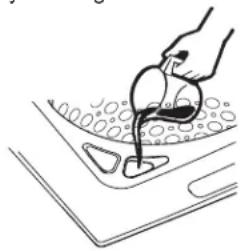
The filling port of the detergent reservoir is located on the front left of the washing machine. To fill the reservoir with liquid detergent, first open the tank lid by rotating the small lid clockwise. Then pour LIQUID detergent into the opening until the level reaches the MAX indicator located inside the filling port, also indicated with the horizontal line next to the MAX lettering. Filling to this MAX level will provide detergent for about 50 average laundry loads.
NOTE: If it is desired to change detergent type in the detergent tank, it is not required to flush the smart dispense system. The new detergent type can be added to a partially-filled tank, however it will not be immediately dispensed until the original detergent is completely dispensed from the system.
NOTE: In the event that excessive chlorine bleach is accidentally spilled or otherwise gets into the detergent tank, please follow the Detergent Tank Clean-Out instructions in the Care and Cleaning section in order to minimize the possibility for clothing damage. If only a few drops of bleach are spilled into the detergent tank, there is no need to flush the tank.
Getting started
Liquid Bleach (PTW905, PTW900, PTW805 and PTW800 models only)
Use a measuring cup to pour the bleach into the bleach dispenser. Measure liquid bleach carefully and DO NOT pour directly from the bleach bottle into the bleach dispenser.
NOTE: The bleach dispenser is a single use dispenser and is NOT a bulk dispense system. The maximum amount of bleach that should be poured into this dispenser for any load should never exceed 1 cup.
NOTE: In the event that excessive chlorine bleach is accidentally spilled or otherwise gets into the detergent tank, please follow the Detergent Tank Clean-Out instructions in the Care and Cleaning section in order to minimize the possibility for clothing damage. If only a few drops of bleach are spilled into the detergent tank, there is no need to flush the tank.
NOTE: In the event that detergent is accidentally spilled or otherwise gets into the bleach opening, that detergent will simply be used for the next wash cycle. In this case there is no need to perform any flushing routine.
natural_image
Line drawing of a hand pouring liquid into a container with bubbles (no text or symbols)Flex Dispense Drawer
Use this Flex Dispense Drawer for softener/conditioner, pre-wash detergent, detergent packets (laundry packs) and main detergent.
Liquid fabric softener/conditioner should be added to the far left washer drawer compartment. Follow the liquid fabric softener/conditioner manufacturer's recommendations for the correct amount of softener/conditioner, based on the load size. Do not overfill or dilute softener/conditioner as this can result in additive being dispensed prematurely in the wash cycle. Your option selections will determine when liquid fabric softener/conditioner is automatically dispensed at its optimal time in the rinse cycle.
NOTE: Fabric softener crystals should NOT be added to the dispenser drawer, as they will not dispense properly.
Pre-wash detergent should be added to the middle left (second from left) Custom Add compartment. Use with SmartHQ App. Fill for heavily soiled loads to loosen and remove heavy soil before starting the main cycle selected. Refer to the SmartHQ App for Flex Dispense capabilities.
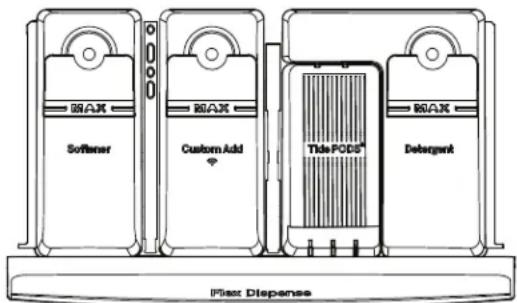
HE detergent should be added to the far right compartment. Follow the detergent manufacturer's recommendations for the correct amount of detergent, based on load size, taking care to add detergent to the right compartment. Do not overfill or dilute detergent as this can result in additive being dispensed prematurely in the wash cycle. Your option selections will determine when detergent is automatically dispensed at its optimal time in the wash cycle.
For optimal performance, especially when selecting cooler temperature and in cold weather climates, place powdered HE detergent directly on top of the load.
NOTE: Single-dose laundry packets should not be added to the detergent dispenser, as they will not dispense properly. Put packets in the Laundry Pack Dispenser Cup.
Detergent packets (Laundry Packs) should be added to the middle right (third from left) compartment. For best performance, pods should be placed in the center (left to right) of the compartment and towards the front of the compartment. Avoid pushing the pod to the rear of the compartment unless using two or more pods. Do not lean pods against the side walls of the pod compartment. Follow the detergent manufacturer's recommendations for the correct number of detergent packets for your wash load. Do not add more detergent packets than recommended as this can result in residual detergent being leftover at the end of the cycle. Your option selections will determine when detergent is automatically dispensed at its optimal time in the wash cycle.
NOTE: We recommend the use of High Efficiency laundry packs such as Tide PODS™ or Gain Flings™. Some detergent packs may not dispense completely at very cold temperatures or in the delicate cycle. In these cases, you may use a warmer temperature setting to dispense harder to dissolve detergent packs.
Liquid Bleach Dispenser (PTW705, PTW700, PTW605 and PTW600 models only)
Liquid chlorine bleach should be added through the bleach dispenser in the front left corner. Follow bleach manufacturer's recommendations for the correct amount of liquid chlorine bleach based on load size, taking care to not apply or spill it directly on clothing.
NOTE: Do not use liquid chlorine bleach and laundry pretreatments such as an Oxi product in the same wash load.
natural_image
Line drawing of a hand pouring liquid into a container with circular patterns (no text or symbols)Loading
Always follow fabric manufacturer's care label when laundering.
Automatic Load Sensing
This determines the appropriate amount of water suited to the size and type of load placed in the washer. The washer will not start the wash cycle or fill with water if the lid is open. When the lid is closed the machine is able to begin filling with water in order to sense the load size.
NOTE: Automatic Load Sensing initiates a spin at the beginning of the cycle; this is normal operation.
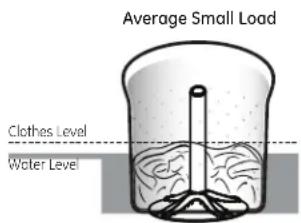
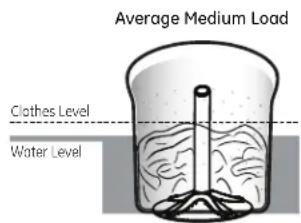
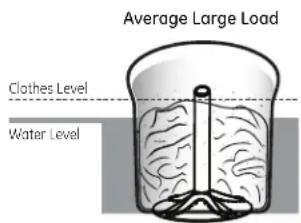
NOTE: This is a high efficiency washing machine. This system requires less water while providing effective cleaning action. You may notice that the water level is lower than on your previous washer. This is normal for a high efficiency washer.
Pretreatment
Place laundry pretreatments, such as an Oxi product, directly on top of the load of clothes.
NOTE: Do not use liquid chlorine bleach and laundry pretreatments such as an Oxi product in the same wash load.
Proper Use of Detergent
Using too little or too much detergent is a common cause of laundry problems.
Use less detergent if you have soft water, a smaller load or a lightly soiled load.
For spots, apply pre-treatment to items as recommended on the product label. Application should be made in the basket to prevent overspray which may cause the coloring on the lid or graphics to fade.
Place detergent packets in the Laundry Pack Dispenser (on some models) or the bottom of the wash basket before adding clothes.
GE Appliances recommends the use of High Efficiency detergents such as Tide PODS ^™ and liquid detergents in your energy efficient washer. HE detergents are formulated to work with low water wash and rinse systems. HE detergents reduce the oversuding problems commonly associated with regular detergents.
When using high efficiency or concentrated detergents, consult the product label to determine amount required for optimum performance. Excessive detergent will negatively impact wash performance.
Sorting Wash Loads
Sort by color (whites, lights, colors), soil level, fabric type (sturdy cottons, easy care, delicates) and whether the fabric produces lint (terry cloth, chenille) or collects lint (velveteen, corduroy). Wash lint producers such as cotton towels and socks separate from lint collectors including synthetic garments and dress pants.
WARNING

- Fire Hazard
DO NOT wash fabrics soiled with flammable liquids or cleaning solvents.
No washer can completely remove oil.
DO NOT dry anything that has been soaked in or spotted with any type of oil.
DO NOT reach into the washer until all moving parts have stopped.
Doing so can result in death, explosion, fire or amputation.
Loading the Washer
Load dry items loosely in the washer basket. For best results, load items evenly and loosely around the outside of the basket, filling in towards the center on larger loads. To add items after washer has started, press Start/Pause if the lid is locked; wait until the Lid Lock indicator on the display is no longer illuminated before attempting to open the lid. Lift the lid and submerge additional items around the outside of the basket. Close the lid and press Start to resume. Adjust load size selection and/or use Deep Fill option if necessary.
NOTE: Some cycles use a two stage wash fill. The first stage will have a lower water level than the second stage; this is normal operation.
■ Do not place large items such as sheets, blankets and towels across the Infusor. Load them around the outside of the basket.
■ Do not put lawn or sofa cushions into the washer as they are too big to move. Remove outer covers and ONLY wash them.
Appliance communication
WiFi Connect (For customers in the United States only - on some models)
Your washer is GE Appliances WiFi Connect enabled.
Visit www.GEAppliances.com/connect and enter your model number to show you the proper steps to connect your appliance.
WiFi Connectivity: For assistance with the appliance or the GE Appliances U+ Connect network connectivity, please call GE Appliances Connected Home Support at 800.220.6899.
Please visit www.GEAppliances.com/connect to learn more about connected appliance features, to learn what connected appliance apps will work with your smartphone and to learn where you can purchase a U+ Connect module.
The U+ Connect module has the FCC/IC ID located on the back of the module.
Part Number Accessory
PBX23W00Y0 WiFi U+ Connect module
WARNING

Electrical Shock Hazard
Certain internal parts are intentionally not grounded and may present a risk of electric shock only during servicing. Service personnel – DO NOT contact the following parts while the appliance is energized: Drive Motor, Lid Lock, Water Valves, Drain Pump and Recirculation Pump.
Exterior of the Washer
Immediately wipe off any spills with a damp cloth.
Interior of the Washer
To clean the interior of the washer, select the Bulky cycle on the control panel. This Bulky cycle should be performed, at a minimum, once per month. This cycle will use more water, in addition to bleach, to control the rate at which soils and detergents may accumulate in your washer.
NOTE: Read the instructions below completely before starting the Bulky cycle.
- Remove any garments or objects from the washer and ensure the washer basket is empty.
- Open the washer lid and pour one cup or 250 ml of liquid bleach or other washing machine cleaner into the basket.
-
Close the lid and select the Bulky cycle. Push the Start button.
-
When the Bulky cycle is working, the display will show the estimated cycle time remaining. Do not interrupt the cycle.
IMPORTANT:
■ Run Bulky with 1 Cup (250 ml) of bleach once a month.
■ After the completion of a Bulky cycle, the interior of your washer may have a bleach smell.
For basket cleaning option, download and refer to the SmartHQ App.
Microphones (PTW905 and PTW900 models only)
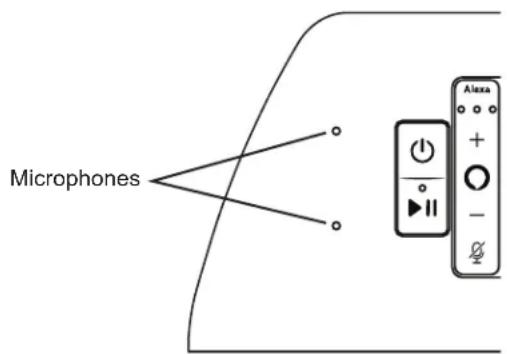
NOTE: The washer control panel contains 2 sensitive microphones. If the microphones become exposed to liquid contaminates or if the audio ports become clogged, feature performance could be degraded.
To clean the audio ports/microphones, immediately wipe off any spills on or near the microphone audio ports. Next, gently wet a small cotton swab with water. Be sure to wring out excess water from swab so that it is only damp. Gently insert the damp cotton swap into the audio port holes and wipe out with a gentle spinning motion. Repeat process until all contaminants are clear. Allow unit to dry. Drying times may vary and can exceed 24 hours in some cases.
Detergent Tank Clean-Out (PTW905, PTW900, PTW805 and PTW800 models only)
NOTE: All clothes should be removed from the washer prior to cleaning out the detergent tank.
To empty out the tank and remove any remaining detergent from the reservoir:
- Press and hold both the Smart Dispense and Smart Wash buttons for three seconds.
-
The empty out routine will begin with the contents of tank, mixed with water, being dispensed into the basket and consequently drained from the machine at the same time.
-
The empty out routine will continue for approximately 15 minutes unless it is paused by the pressing of the Start button. If tank is initially full, routine may need to be run a second time to empty detergent tank.
NOTE: Optionally, hot water can be added to the tank to aid in flushing out the system of any residual detergent prior to starting or during the cleanout routine.
Care and Cleaning
Flex Dispense Drawer
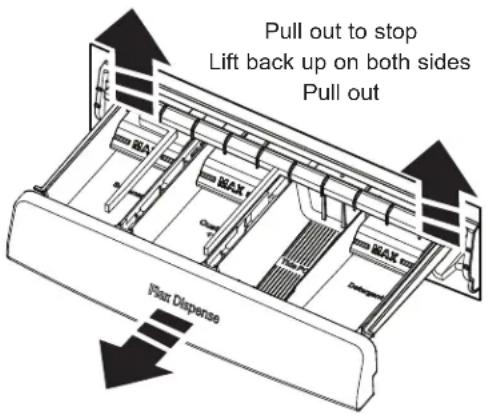
After some period of use, a small amount of detergent or softener residue may be present in the Flex Dispenser Drawer. The drawer can easily be removed for cleaning. To remove the drawer, pull it out until the drawer stops, lift up the back of the drawer on both sides and pull it out. The drawer can then be removed from the dispenser box. Wash the drawer in warm, soapy water using a mild detergent. Rinse drawer with warm water. If siphon caps are removed for cleaning, be sure to push siphon caps fully back into place after cleaning.
The dispenser drawer and siphon caps are not dishwasher safe. The dispenser box is not removable, but it can be wiped clean using a damp cloth if necessary. Do not attempt to remove the dispenser box for cleaning.
Water Supply Hoses
Periodically inspect all water inlet hoses for water leaks, wear, cuts, corrosion, and bulges. Replace all hoses immediately if any sign of these failures appear. All hoses should be replaced every 5 years of use to reduce risk of hose failures and possible water damage. When replacing hoses, refer to the Installation Instructions for proper installation. DO NOT overtighten or cross thread fittings. DO NOT allow the hose to rub against sharp objects, become kinked, or become over stretched. Always ensure hose rubber gaskets are installed and free from leaks when pressurized.
Long Vacations
Be sure water supply is shut off at faucets. Drain all water from hoses and water filter pump area if weather will be below freezing.
Moving and Storage
Ask the service technician to remove water from drain pump and hoses. Do not store the washer where it will be exposed to the weather.
PTW905, PTW900, PTW805 and PTW800 models only: Do not move the washer with a full tank of detergent. If moving the washer with a partially filled tank of detergent, do not tilt washer forward as detergent could spill from tank. If moving the washer will result in tipping the washer forward in any way, it is best to flush out your detergent tank. See Detergent Tank Clean-Out in this Care and Cleaning section.
Installation Instructions
Washer
If you have any questions, call GE Appliances at 800.GE.CARES
(800.432.2737) or visit our Website at: GEAppliances.com
In Canada, call 800.561.3344 or visit GEAppliances.ca
BEFORE YOU BEGIN
Read these instructions completely and carefully.
- IMPORTANT — Save these instructions for local inspector's use.
- IMPORTANT — Observe all governing codes and ordinances.
- Note to Installer – Be sure to leave these instructions with the Consumer.
- Note to Consumer – Keep these instructions for future reference.
- Skill level – Installation of this appliance requires basic mechanical and electrical skills.
• Completion time – 1-3 hours
- Proper installation is the responsibility of the installer.
- Product failure due to improper installation is not covered under the Warranty.
TOOLS REQUIRED FOR WASHER INSTALLATION
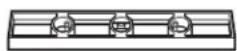
Pliers
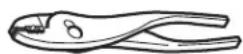
□ Level
PARTS REQUIRED (Sold separately)
Water Hoses (2)
☐ Rubber Washers (2) and Strainer Screens (2)
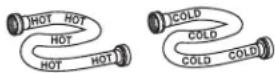
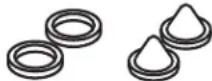
Drain Hose Extension (For discharge heights from 60" - 96"
GE Appliances Parts and Accessories
Order on-line at GEApplianceparts.com today, 24 hours a day or by phone at 800.626.2002 during normal business hours.
Part Number Accessory
PM14X10002 4 ft Rubber Water Supply Hoses Or
PM14X10005 4 ft Braided Metal Water Supply Hoses WH1X2267 Rubber Washer (1) and Screen (1)
WH49X301 Drain Hose Extension (For discharge heights from 60" - 96")
NOTE: We strongly recommend the use of new water supply hoses. Hoses degrade over time and need to be replaced every 5 years to reduce the risk of hose failures and water damage.
PARTS SUPPLIED
□ Drain Hose
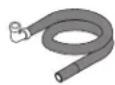
□ Owner's Reference Guide

□ Cable Tie
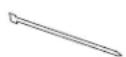
□ Drain Hose Clip
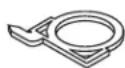
Clamp
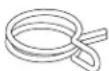
LOCATION OF YOUR WASHER DO NOT Install the Washer:
- In an area exposed to dripping water or outside weather conditions. The ambient temperature should never be freezing or near freezing for proper washer operation.
- In an area where it will come in contact with curtains or drapes.
- On carpet. The floor MUST be a hard surface with a maximum slope of 1/2" per foot (1.27 cm per 30 cm). To make sure the washer does not vibrate or move, you may have to reinforce the floor.
NOTE: If floor is in poor condition, use 3/4" impregnated plywood sheet solidly attached to existing floor covering.
IMPORTANT: Minimum Installation Clearances - Alcove or Closet
- If your washer is approved for installation in an alcove or closet, there will be a label on the back of the machine describing requirements.
- Minimum clearance between washer and adjacent walls or other surfaces: 0" either side, 2" front, 3" rear. Vertical space from floor to overhead shelving, cabinets, ceiling, etc. = 60".
- Closet doors must be louvered or otherwise ventilated and have at least 60 square inches of open area. If the closet contains both a washer and a dryer, doors must contain a minimum of 120 square inches of open area.
NOTE: The clearances stated on this label are minimums. Consideration must be given to providing adequate clearances for installing and servicing.
WATER SUPPLY REQUIREMENTS
WATER SUPPLY LINES - Purge Hot and Cold water supply lines for 30 seconds prior to installation of hoses and washing machine. Ensure inlet hose screens are also clean and free of debris.
WATER PRESSURE - Must be 20 psi minimum to 120 psi maximum. NOTE: The 20 psi minimum pressure is the "dynamic" pressure, that is the actual pressure at the water valve inlet while the washer is actively filling with water.
WATER TEMPERATURE - Household water heater should be set to deliver water at 120^ to 150^ F ( 50^ to 66^ C) TO THE WASHER when hot wash is selected.
SHUTOFF VALVES - Both hot and cold shutoff valves (faucets) should be supplied.
DRAIN - Water should be drained into standpipe. Discharge height MUST NOT BE LESS THAN 30 INCHES, and no more than 8 feet above the base of the washer. Standpipe must be 1-1/2 inches minimum inside diameter and must be open to atmosphere.
① UNPACKING THE WASHER
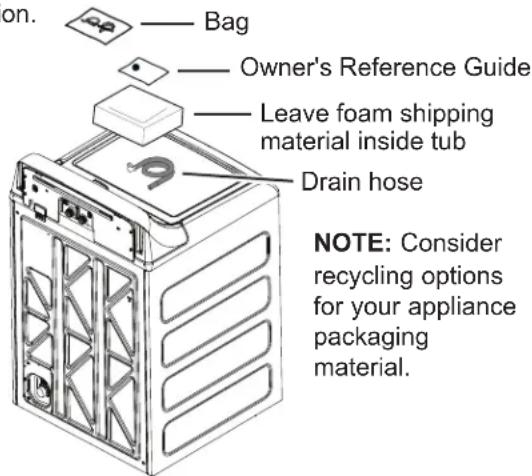
After the machine is in the home, remove outside packing material/carton from washer.
Remove bag (containing clamp, cable tie and drain hose clip), drain hose and Owner's Reference Guide from tub.
NOTE: Leave foam shipping material inside tub opening to hold tub in place during the rest of installation. — Bag
② REMOVE THE BASE
Remove base from unit by placing foot on side of base and tipping unit back on corner post. Remove base by pulling it straight off. Bring the washer back upright.
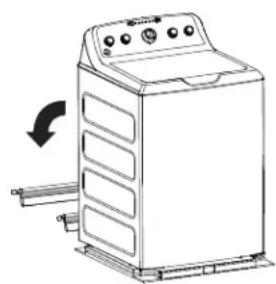
natural_image
Line drawing of a washing machine with a scroll wheel and control panel (no text or symbols)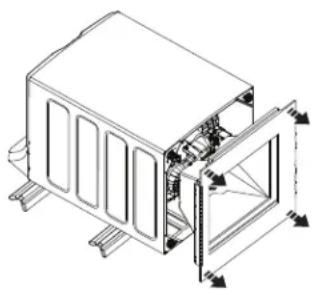
natural_image
Technical line drawing of a mechanical housing or enclosure with internal components and mounting brackets (no text or symbols)WARNING

- Electrical Shock Hazard
Certain internal parts are intentionally not grounded and may present a risk of electric shock only during servicing.
Service personnel – DO NOT contact the following parts while the appliance is energized: Drive Motor, Lid Lock, Water Valves, Drain Pump and Recirculation Pump.
Installation Instructions
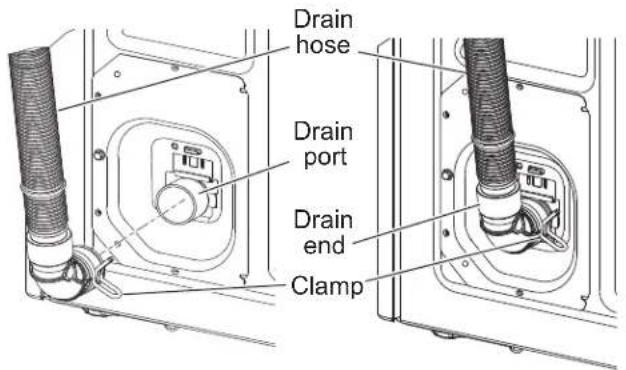
③ CONNECT DRAIN HOSE TO WASHER
Remove the cap from the drain port, if present, before installing the drain hose. It is normal for a small amount of residual water from the factory quality test process to drain out of the port when removing the cap.
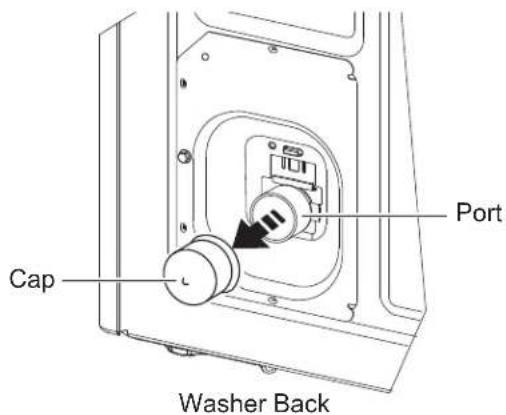
Connect drain hose to drain port on back of washer. Open clamp with pliers and slide onto hose end. Holding clamp open, push hose end onto drain port until fully seated. Release clamp between locating ribs on hose end. Outlet of hose end should be oriented vertically.
4 CONNECT WATER HOSES TO WASHER
Unplug electrical cord before installing water hoses. If not installed, install rubber washer in one end of hot water hose. Thread hot water hose onto connection labeled H at top rear of washer. Hand tighten and use pliers to tighten hoses between 1/8 and 1/4 turn beyond hand-tight.
If not installed, install rubber washer in one end of cold water hose C. Thread cold water hose onto connection labeled C at top rear of washer. Hand tighten and use pliers to tighten hoses between 1/8 and 1/4 turn beyond hand-tight.
Move washer as close to final location as possible, leaving room for you to make water, drain, and electrical connections to your home.
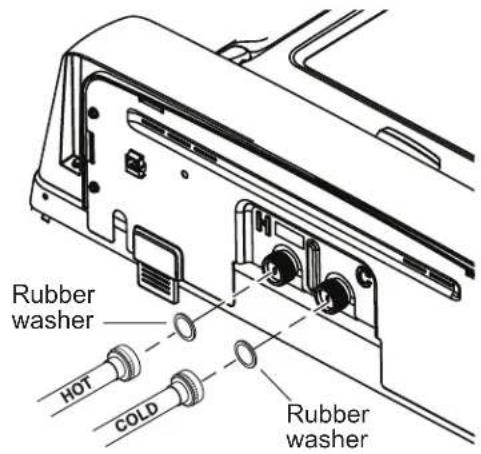
5 CONNECT WATER HOSES TO OUTLET VALVES
Determine which is HOT water line before attaching water hoses to faucets. Traditionally, HOT faucet is on left.
(If screen washers are not installed) With protruding part of screen toward you, install strainer screen/rubber washer into each of the free ends of two water hoses.
Connect hot water hose to hot water outlet valve of your home. Hand tighten and use pliers to tighten hoses between 1/4 and 1/2 turn beyond hand-tight. Open hot water valve.
Connect cold water hose to cold water outlet valve of your home. Hand tighten and use pliers to tighten hoses between 1/4 and 1/2 turn beyond hand-tight. Open cold water valve.
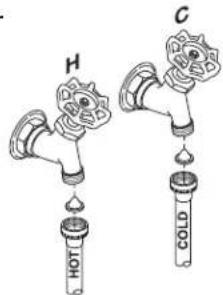
Check for leaks and drips at the hose couplings. Tighten as necessary.
6 CONNECT TO DRAIN
Install drain hose clip on rear panel of washer. Route drain hose through clip and insert free end into drain opening of your home.
NOTE: If longer drain hose is required, order drain hose extension kit, GE Appliances part number WH49X301. Connect additional drain hose (contained in kit) to original hose with hose clamp (contained in kit).
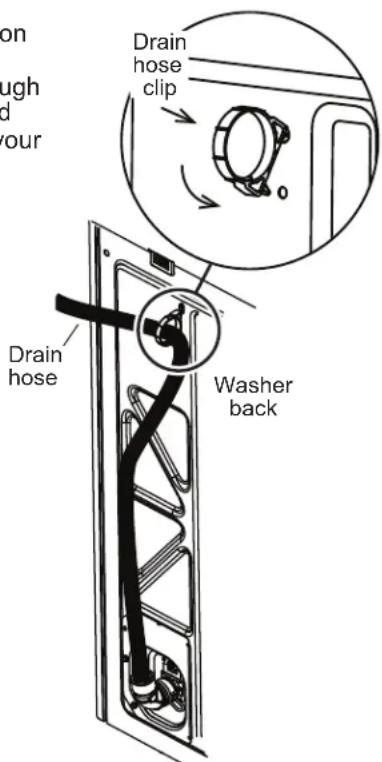
If water valves and drain are built into wall, fasten drain hose to one of the water hoses with cable tie provided.
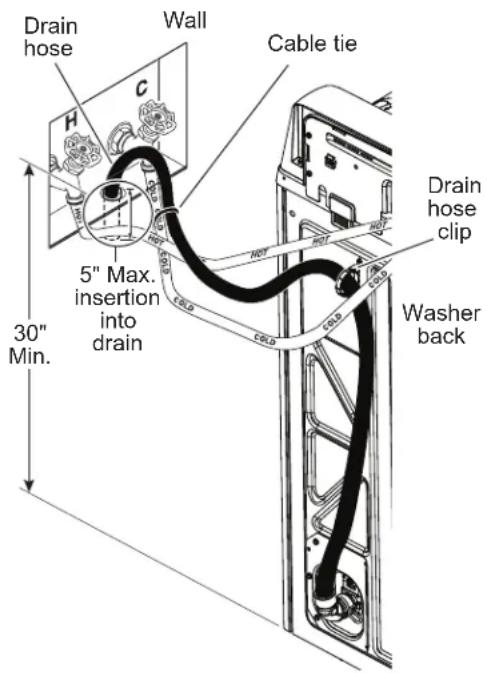
NOTE: Placing the drain hose too far down the drain pipe can cause a siphoning action. No more than 5" of hose should be in the drain pipe. There must be an air gap around the drain hose. A snug fit can also cause a siphoning action.
6 CONNECT TO DRAIN (Continued)
If your drain is a standpipe, fasten drain hose to standpipe with cable tie provided.

NOTE: Placing the drain hose too far down the drain pipe can cause a siphoning action. No more than 5" of hose should be in the drain pipe. There must be an air gap around the drain hose. A snug fit can also cause a siphoning action.
If drain discharge height does not meet 30" minimum height requirement, end of drain hose must be secured in drain opening of home by installer and have an air gap around hose to prevent siphoning.
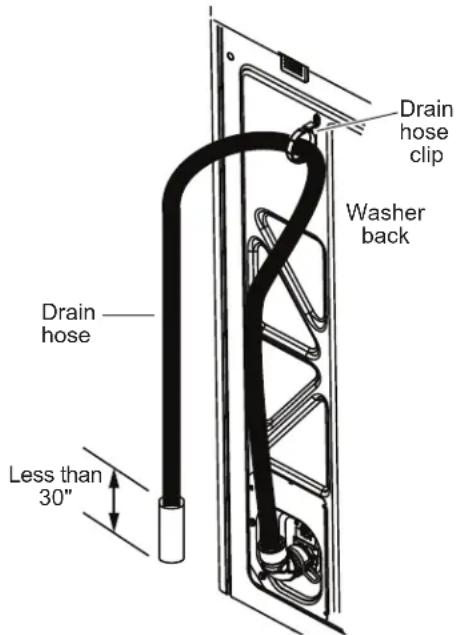
NOTE: Placing the drain hose too far down the drain pipe can cause a siphoning action. No more than 5" of hose should be in the drain pipe. There must be an air gap around the drain hose. A snug fit can also cause a siphoning action.
ELECTRICAL REQUIREMENTS
WARNING

- Electrical Shock Hazard
Plug into a grounded 3-prong outlet.
DO NOT remove ground prong.
DO NOT use an adapter.
DO NOT use an extension cord.
Failure to follow these instructions can result in death, fire or electrical shock.
CIRCUIT – Individual, properly polarized and grounded 15 or 20 amp circuit breaker or time-delay fuse.
POWER SUPPLY - 2 wire plus ground, 120 Volt, single phase, 60 Hz, alternating current.
Outlet Receptacle – Properly grounded 3-prong
receptacle to be located so the power cord is accessible when the washer is in an installed position. If a 2-prong receptacle is present, it is the owner's responsibility to have a licensed electrician replace it with a properly grounded 3-prong grounding type receptacle.
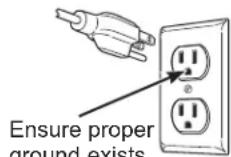
Ensure proper ground exists before use.
Washer must be electrically grounded in accordance with local codes and ordinances, or in the absence of local codes, with latest edition of the NATIONAL ELECTRICAL CODE, ANSI/NFPA NO. 70 or CANADIAN ELECTRICAL CODE, CSA C22.1. Check with a licensed electrician if you are not sure that the washer is properly grounded.

CONNECT POWER AND INSTALL
Insert plug of electrical cord into a 120V, 15- or 20-amp wall receptacle. Move washer into final position. Ensure nothing extends upward into the washer cabinet from underneath the washer. Place level on flat top side edges of washer. Adjust all four leveling legs until washer is level left-to-right and front-to-back. Remove level.
Open tub lid. Remove and discard tub shipping material (see Step 1).
Remove plastic protector sheet from control panel face.
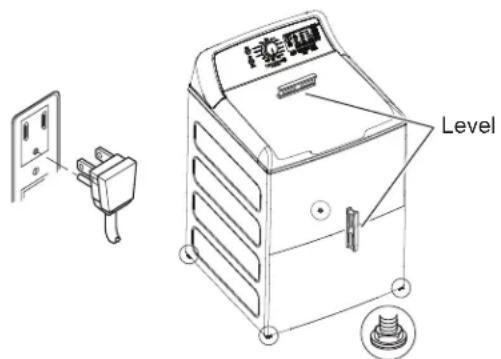
GROUNDING INSTRUCTIONS
This appliance must be grounded. In the event of malfunction or breakdown, grounding will reduce the risk of electric shock by providing a path of least resistance for electric current. This appliance is equipped with a cord having an equipment-grounding conductor and a grounding plug. The plug must be plugged into an appropriate outlet that is properly installed and grounded in accordance with all local codes and ordinances.
WARNING
Improper connection of the equipment-grounding conductor can result in a
risk of electrical shock. Check with a qualified electrician, or service representative or personnel, if you are in doubt as to whether the appliance is properly grounded.
DO NOT modify the plug on the power supply cord. If it will not fit the outlet, have a proper outlet installed by a qualified electrician.
If required by local codes, an external 18 gauge or larger copper ground wire (not provided) may be added. Attach to washer cabinet with a #10-16 x1/2" sheet metal screw (available at any hardware store) to rear of washer as illustrated.
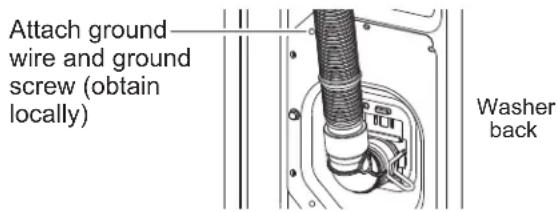
Mobile Home Installation:
Installation must conform to Standard for Mobile Homes, ANSI A119.1 and National Mobile Home Construction and Safety Standards Act of 1974 (PL93-383).
FINAL CHECKLIST
Before starting the washer, check to make sure:
□ Main power is turned on.
☐ The washer is plugged in.
☐ The water faucets are turned on.
☐ The unit is level and all four leveling legs are firmly on the floor.
☐ The shipping foam and cardboard are removed.
☐ The drain hose is properly tied up.
☐ There are no leaks at the faucet, drain line or washer.
☐ Remove the cap from the drain port, if present, before installing the drain hose.
Run the washer through a complete cycle.
☐ Check for water leaks and proper operation.
Place these instructions in a location near the washer for future reference.
Troubleshooting Tips... Before you call for service
| Problem Possible Causes What To Do | ||
| Small amount of water remaining in dispenser (on some models) at end of cycle | Normal dispenser operation | It is normal for a small amount of water to remain in dispenser after the cycle. |
| Short spray or turn on of drain pump and delay after pushing the Start button | Lid was opened and closed between cycle selection and start | This is normal. See START-UP SEQUENCE in the Safety Instructions section. |
| Water level seems low | This is normal Water may not cover the top level of the clothes. This is normal for this high efficiency washer. | |
| Low water flow Water valve screens are stopped up | Turn off the water source and remove the water connection hoses from the upper back of the washer and the water faucets. Clean both the hose screens (if so equipped) and the screens in the machine using a brush or a toothpick. Reconnect the hoses and turn the water back on. Check to ensure there are no leaks at the connections. | |
| Low water supply pressure | If water pressure at the washer inlets is less than 20 psi while the washer is actively filling, call a plumber to assess your water supply and make corrections needed to increase the water pressure. | |
| Water siphoning out of washer | Drain standpipe is too low or hose too far into standpipe | The drain hose must exceed 30" height at some point between the washer back and the drain pipe. Use anti-siphon clip. See the Installation Instructions. |
| Too many suds Soft water Try less detergent. | ||
| Too much detergent Measure your detergent carefully. Use less soap if you have soft water, a smaller load or a lightly soiled load. | ||
| Type of detergent Switch to High Efficiency detergent such as Tide PODSTM and liquid detergents. | ||
| Water leaks | Type of detergent | Switch to High Efficiency detergent such as Tide PODSTM and liquid detergents. |
| Using too much detergent in washer | Use less detergent. Use less soap if you have soft water, a smaller load or a lightly soiled load. | |
| Fill hoses or drain hose is improperly connected | Make sure hose connections are tight at faucets and rubber washers are installed. Make sure end of drain hose is correctly inserted in and secured to drain facility. | |
| Household drain clogged | Check household plumbing. You may need to call a plumber. | |
| Drain hose rubs on wall Make sure drain hose does not make contact with the wall. May cause excessive wear on the hose. | ||
| Constant water pressure to fill hoses at water source | Tighten hoses at the faucets. Check condition of fill hoses; they should be replaced every 5 years. | |
| Water temperature seems incorrect | Cooler water temperatures provide improved energy efficiency | New laundry detergents have been formulated to work with cooler water temperatures without affecting wash performance. |
| Water supply is turned off or improperly connected | Turn both hot and cold faucets fully on and make sure hoses are connected to correct faucets. NOTE: Water valves are marked "H" and "C". | |
| Water valve screens are stopped up | Turn off the water source and remove the water connection hoses from the upper back of the washer and the water faucets. Clean both the hose screens (if so equipped) and the screens in the machine using a brush or a toothpick. Reconnect the hoses and turn the water back on. Check to ensure there are no leaks at the connections. | |
| Cool/Cold Water when selecting Hot | This is normal. The washer senses water temperature (on some models) and optimizes for best results. Cold water is added periodically when hot is selected. | |
| House water heater is not set properly | Make sure house water heater is delivering water at 120°F–140°F (48°C–60°C). | |
| Water pumped out before cycle is complete | Water was left in unit for 24 hours with lid closed or 15 minutes with lid open | Previous cycle has been cancelled. Close lid, select new cycle, and start machine. |
| Water won't drain | Drain hose is kinked or improperly connected | Straighten drain hose and make sure washer is not sitting on it. Top of drain outlet should be less than 8 ft (2.44 m) above floor. |
| Washer spins and pauses at the beginning of cycles | This is normal | The washer is sensing the load. |
Troubleshooting Tips... Before you call for service
| Problem Possible Causes What To Do | ||
| Speed changes before during and after spin | Washer adjusts speeds over several minutes | This is normal. The washer will automatically adjust speeds before, during and after the spin cycle to most effectively distribute and spin the wash load. |
| Washer pauses during wash cycle | The Soak Option was chosen | This is normal. The washer alternates between agitate and soak during these cycles to get your clothes cleaner with less wear. |
| This is normal Many cycles | incorporate as series of soaks within the agitation period to get your clothes clean with less wear. | |
| Residual powder in dispenser or clogging of dispensers | Wash water too cold or low home water pressure | Select a warmer wash temperature if possible to improve dissolving of detergent or use liquid detergent. Make sure siphon caps are free of debris and fully pressed into position. Remove and clean tray if clogging occurs. |
| Laundry additives dispensing too soon | Overfilling of dispensers | Do not overfill or add water to dispenser. Select Deep Rinse option when using fabric softener. |
| Washer pauses during spin cycle | This is normal The washer | may pause during the spin cycle to remove soapy water more efficiently. |
| Washer won't operate | Washer is unplugged | Make sure cord is plugged securely into a working outlet. |
| Water supply is turned off | Turn both hot and cold faucets fully on. | |
| Lid is open—safety feature prevents agitation and spinning when lid is up | Close lid and press Start. | |
| Circuit breaker/fuse is tripped/blown | Check house circuit breakers/fuses. Replace fuses or reset breaker. Washer should have a separate outlet. | |
| Electronics need to be reset | Unplug washer, wait 2 minutes, plug back in and press Start. | |
| Start was not pressed Press Start. | ||
| Detergent packet not dissolving in Laundry Pack Dispenser chamber | Wash water too cold or detergent packet type/quantity | We recommend the use of High Efficiency laundry packs such as Tide PODSTM or Gain FlingsTM.When using delicates cycle, place detergent pack in the bottom of the basket as this will help break down the pack with the gentler agitation.Select a warmer wash temperature. if possible, to improve dissolving of detergent packets.Do not exceed manufacturer's recommended dosing quantity. |
| Unexplained time and/or settings changes | Changing options (on some models) | This is normal. Several options will change other options to maximize washer performance. |
| Basket seems loose Basket moves or rotates freely | Washer basket does not have a traditional brake. Washer basket will move freely. This is normal. | |
| Colored spots on garments | Incorrect use of fabric softener | Check fabric softener package for instructions and follow directions for using dispenser.Make sure you have selected the Deep Rinse option.Pretreat stain and rewash using Speed Wash cycle before drying. |
| Dye transfer Sort whites on lightly colored items from dark colors. | ||
| Grayed or yellowed clothes | Detergent amount Be sure to follow detergent manufacturer's directions. | |
| Hard water Use a water conditioner or install a water softener. | ||
| Water is not hot enough Make sure water heater is delivering water at 120°F-140°F (48°C-60°C). | ||
| Washer is overloaded | Loosely load clothes no higher than the top row of holes in the washer basket.For best results, load items around the outside of the basket. | |
| Dye transfer Sort clothes by color. If fabric label states wash separately, unstable dyes may be indicated. | ||
| Lint or residue on clothes | Clothes are air or line dried | If you do not dry your clothes with a clothes dryer, your clothes may retain more lint. |
| Incorrect sorting | Separate lint producers from lint collectors. | |
| Washing too long | Wash small loads for a shorter time using Light Soil setting. | |
| Detergent not dissolving | Rewash, next time: Try a liquid detergent; Use warmer water temperature. | |
| Overloading | Loosely load clothes in the washer basket. For best results, load items around the outside of the basket. | |
| Incorrect use of fabric softener | Check fabric softener package for instructions and follow directions for using dispenser.Make sure you have selected the Deep Rinse option. | |
Troubleshooting Tips... Before you call for service
| Problem Possible Causes What To Do | ||
| Clothes too wet No spin selected Select a spin option. | ||
| Incorrect cycle selected Make sure the cycle selected matches the load you are washing. Some fabrics will feel wetter when rinsed with cold water. | ||
| Wash load out of balance Redistribute load in washer and run through Drain & Spin cycle. | ||
| Blinking Spin light or Spin light on at end of cycle | Out of balance condition has been detected Allow cycle to continue and finish. If load is wet at the end of the cycle, even out load and run a Drain & Spin cycle. | |
| Pilling Result of normal wear on poly-cotton blends and fuzzy fabrics | While this is not caused by the washer, you can slow the pilling process by washing garments inside out. | |
| Snags, holes, tears, rips or excessive wear | Pins, snaps, hooks, sharp buttons, belt buckles, zippers and sharp objects left in pockets | Fasten snaps, hooks, buttons and zippers. Remove loose items like pins, objects in pockets and sharp buttons. Turn knits (which snag easily) inside out. |
| Undiluted chlorine bleach Check bleach package instructions for proper amount. Never add undiluted bleach to wash or allow clothes to come in contact with undiluted bleach. | ||
| Chemicals like hair bleach or dye, permanent wave solution | Rinse items that may have chemicals on them before washing. Use Speed Wash cycle with Extra Rinse option. | |
| Wrinkling Incorrect wash and dry cycles | Match Cycle selection to the type of fabric you are washing (especially for easy care loads). | |
| Improper sorting Avoid mixing heavy items (like jeans) with light items (like blouses). Try a fabric softener. | ||
| Overloading Loosely load clothes in the washer basket. | ||
| Repeated washing in water that is too hot Wash in warm or cold water. | ||
| Sounds Possible Causes Reason | ||
| “Clicking” | Shifter mechanism is engaging or disengaging | The drive system will engage at the start of agitate and disengage when agitate is complete. This occurs multiple times during the wash. |
| Back and forth “swoosh” | Electric motor reversing direction | This sound is the motor rotating back and forth to clean your laundry. |
| “Clicking” behind Control during fill | Automatic Temperature Control Valve | Two valves mix cold and hot water. The “clicking” is when either valve turns on or off to raise or lower the fill water temperature. |
| Water flow changes during fill | Automatic Temperature Control Valve | Two valves mix cold and hot water. The “clicking” is when either valve turns on or off to raise or lower the fill water temperature. |
| Motor sounds during spin | Motor ramping up/down during spin cycle | The motor will speed up incrementally during the spin cycle. When spin is complete, it will coast until it stops. |
| “Humming” | Water drain pump | The drain pump will make a humming sound when pumping out water after agitation stops and continue until spin is complete. |
| Drive motor | The drive motor will make a “humming” sound during the wash and spin phases of the cycle. | |
| “Gurgling” | Water drain pump | When the pump starts drawing in air, It starts to gurgle. The washer should then begin spinning and the sound will continue until it is done spinning. |
| Water “swishing” | Washing process | Water swishing while the unit is agitating is normal, especially with smaller loads. |
| Washer rocking/moving | Washer leveling legs uneven | To level the washer, adjust the leveling legs by rotating the individual leg in the proper direction for up or down. |
| “Squeaking” sound | Washer not level and rubbing on cabinet | To level the washer, adjust the leveling legs by rotating the individual leg in the proper direction for up or down. |
Washer sounds that may be different from your prior washer:
Clicks, water flowing, gear sounds followed by pauses, and electric hum sounds are all part of the normal wash cycle.
To listen and watch videos of normal washer operation, please go to http://products.geappliances.com/appliance/gea-support-search-content?contentid=23061 or scan the QR code.

GE Appliances Washer Limited Warranty
GEAppliances.com
All warranty service is provided by our Factory Service Centers, or an authorized Customer Care® technician. To schedule service online, visit us at geappliances.com/service, or call GE Appliances at 800.GE.CARES (800.432.2737). Please have your serial number and your model number available when calling for service.
Servicing your appliance may require the use of the onboard data port for diagnostics. This gives a GE Appliances factory service technician the ability to quickly diagnose any issues with your appliance and helps GE Appliances improve its products by providing GE Appliances with information on your appliance. If you do not want your appliance data to be sent to GE Appliances, please advise your technician not to submit the data to GE Appliances at the time of service.
| For the period of We will replace | |
| One yearFrom the dateof the originalpurchase | Any factory specified part of the washer which fails due to a defect in materials or workmanship. During this limited one-year warranty, we will also provide, free of charge, all labor and related service to replace the defective part. |
| Ten yearsFrom the dateof the originalpurchase | The motor, if it should fail due to a defect in materials or workmanship. During this additional nine-year limited warranty, you will be responsible for any labor and related service costs. |
What is not covered:
■ Service trips to your home to teach you how to use the product.
■ Improper installation, delivery or maintenance.
■ Failure of the product if it is abused, misused, or used for other than the intended purpose or used commercially.
■ Replacement of house fuses or resetting of circuit breakers.
■ Products which are not defective or broken, or which are working as described in the Owner's Manual.
■ Damage to the product caused by accident, fire, floods or acts of God.
■ Incidental or consequential damage caused by possible defects with this appliance.
■ Defects or damage due to operation in freezing temperatures.
■ Damage caused after delivery.
■ Product not accessible to provide required service.
EXCLUSION OF IMPLIED WARRANTIES
Your sole and exclusive remedy is product repair as provided in this Limited Warranty. Any implied warranties, including the implied warranties of merchantability or fitness for a particular purpose, are limited to one year or the shortest period allowed by law.
In the United States:
This limited warranty is extended to the original purchaser and any succeeding owner for products purchased for home use within the USA. If the product is located in an area where service by a GE Appliances Authorized Servicer is not available, you may be responsible for a trip charge or you may be required to bring the product to an Authorized GE Appliances Service location for service. In Alaska, the limited warranty excludes the cost of shipping or service calls to your home.
Some states do not allow the exclusion or limitation of incidental or consequential damages. This limited warranty gives you specific legal rights, and you may also have other rights which vary from state to state. To know what your legal rights are, consult your local or state consumer affairs office or your state's Attorney General.
Warrantor: GE Appliances, a Haier company, Louisville, KY 40225
In Canada:
This limited warranty is extended to the original purchaser and any succeeding owner for products purchased in Canada for home use within Canada. If the product is located in an area where service by a GE Appliances Authorized Servicer is not available, you may be responsible for a trip charge or you may be required to bring the product to an Authorized GE Appliances Service location.
Some provinces do not allow the exclusion or limitation of incidental or consequential damages. This limited warranty gives you specific legal rights, and you may also have other rights which vary from province to province. To know what your legal rights are, consult your local or provincial consumer affairs office.
Warrantor: MC Commercial Inc., Burlington, ON, L7R 5B6
Extended Warranties: Purchase a GE Appliances extended warranty and learn about special discounts that are available while your warranty is still in effect. You can purchase it online anytime at
geappliances.com/extended-warranty
or call 800.626.2224 during normal business hours. GE Appliances Service will still be there after your warranty expires.
Consumer Support
GE Appliances Website
Have a question or need assistance with your appliance? Try the GE Appliances Website 24 hours a day, any day of the year! You can also shop for more great GE Appliances products and take advantage of all our on-line support services designed for your convenience. In the US: GEAppliances.com.
In Canada: GEAppliances.ca.
Register Your Appliance
Register your new appliance on-line at your convenience! Timely product registration will allow for enhanced communication and prompt service under the terms of your warranty, should the need arise. You may also mail in the pre-printed registration card included in the packing material. In the US: GEAppliances.com/register.
In Canada: Prodsupport.mabe.ca/crm/Products/ProductRegistration.aspx.
Schedule Service
Expert GE Appliances repair service is only one step away from your door. Get on-line and schedule your service at your convenience any day of the year. In the US: GEAppliances.com/service or call 800.432.2737 during normal business hours.
In Canada: GEAppliances.ca/en/support/service-request or call 800.561.3344.
Extended Warranties
Purchase a GE Appliances extended warranty and learn about special discounts that are available while your warranty is still in effect. You can purchase it on-line anytime. GE Appliances Services will still be there after your warranty expires. In the US: GEAppliances.com/extended-warranty or call 800.626.2224 during normal business hours.
In Canada: GEAppliances.ca/en/support/purchase-extended-warranty or call 866.277.9842.
Remote Connectivity
For assistance with wireless network connectivity, in the US visit our website at GEAppliances.com/connect or call 800.220.6899.
In Canada: GEAppliances.ca/connect or call 800.220.6899.
Parts and Accessories
Individuals qualified to service their own appliances can have parts or accessories sent directly to their homes (VISA, MasterCard and Discover cards are accepted). Order on-line today 24 hours every day.
In the US: GEApplianceparts.com or by phone at 877.959.8688 during normal business hours.
In Canada: GEAppliances.ca/en/products/parts-filters-accessories or call 800.661.1616.
Instructions contained in this manual cover procedures to be performed by any user. Other servicing generally should be referred to qualified service personnel. Caution must be exercised, since improper servicing may cause unsafe operation.
Contact Us
If you are not satisfied with the service you receive from GE Appliances, contact us on our Website with all the details including your phone number, or write to:
In the US: General Manager, Customer Relations | GE Appliances, Appliance Park | Louisville, KY 40225 GEAppliances.com/contact or call 800.626.2000
In Canada: Director, Consumer Relations, MC COMMERCIAL INC. | Suite 310, 1 Factory Lane | Moncton, N.B. E1C 9M3 GEAppliances.ca/en/contact-us or call 877.994.5366
LASES
MESURES DE SÉCURITÉ....3
UTILISATION DE LA LAVEUSE
Comment démarrer .... 5 Chargement .... 13
ENTRETIEN ET
NETTOYAGE 14
INSTALLATION
D'INSTALLATION....17
CONSEILS DE
DÉPANNAGE....22
GARANTIE LIMITÉE 27
SOUTIEN AU
CONSOMMATEUR 28
INSTALLATION APPROPRIÉE
Power (alimentation)
natural_image
Line drawing of a hand pouring liquid into a container with bubbles (no text or symbols)Flex Dispense Drawer
natural_image
Line drawing of a hand pouring liquid into a container with a side panel (no text or symbols)Chargement
flowchart
graph TD
    A["Microphones"] --> B["Alexa"]
    A --> C["Power Control Icon"]
    A --> D["Wireless Device Icon"]
Flex Dispense Drawer
natural_image
Line drawing of a washing machine with control panel and side-mounted base (no text or symbols)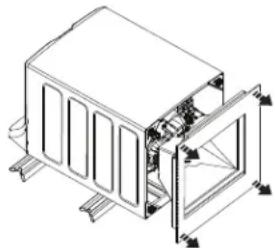
natural_image
Technical line drawing of a mechanical assembly with no visible text or symbols6 RACCORDEMENT AU DRAIN
6 RACCORDEMENT AU DRAIN (suite)
Garant : MC Commercial Inc., Burlington, ON, L7R 5B6
Au Canada : Prodsupport.mabe.ca/crm/Products/ProductRegistration.aspx
natural_image
Simple line drawing of a stopwatch with directional arrows and three stacked blocks (no text or symbols)natural_image
Line drawing of a hand pouring liquid into a container with bubbles (no text or symbols)Flex Dispense Drawer
natural_image
Line drawing of a hand pouring liquid into a container with a side panel (no text or symbols)Carga
natural_image
Simple line drawing of a beaker with liquid and a central rod, no text or symbols presentnatural_image
Diagram of a container with liquid and a central rod, showing internal patterns (no text or symbols)Flex Dispense Drawer
natural_image
Line drawing of a washing machine with a scroll wheel and side-mounted base (no text or symbols)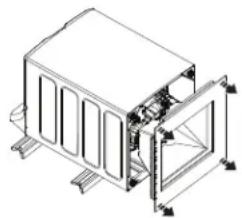
natural_image
Technical line drawing of a mechanical housing or enclosure with internal components and mounting brackets (no text or symbols)ADVERTENCIA
Garante: GE Appliances, a Haier company, Louisville, KY 40225
geappliances.com/extended-warranty
General Manager, Customer Relations | GE Appliances, Appliance Park | Louisville, KY 40225 GEAppliances.com/contact o comuníquese al 800.626.2000

Printed in the United States


- SAFETY INSTRUCTIONS....3
- USING THE WASHER
- CARE AND CLEANING ....15
- INSTALLATION
- TROUBLESHOOTING TIPS ..... 2 2
- CONSUMER SUPPORT .... 26
- OWNER'S MANUAL & INSTALLATION INSTRUCTIONS
- ENGLISH/FRANÇAIS/ ESPAÑOL
- G035
- THANK YOU FOR MAKING GE APPLIANCES A PART OF YOUR HOME.
- IMPORTANT SAFETY INFORMATION READ ALL INSTRUCTIONS BEFORE USING THE APPLIANCE
- WARNING
- Proper Disposal of your Appliance
- READ AND SAVE THESE INSTRUCTIONS
- PROPER INSTALLATION
- START-UP SEQUENCE
- WHEN NOT IN USE
- PARTS AND ACCESSORIES
- Getting started
- Power
- B Start/Pause
- Display and Status Lights
- Consumer Help Indicator
- D Wash Cycles-Cycle Selector Knob
- Downloaded
- \*Sanitize with Oxi
- Settings
- Power Pre-wash (on some models)
- Tangle Control™ (on some models)
- Auto Soak
- Deep Rinse
- Delay Wash
- Extra Rinse
- Smart Wash (on some models)
- Smart Rinse (on some models)
- My Cycle Settings (on some models)
- Sound (on some models)
- Control Lock
- Power Clean and Gentle Care (on some models)
- Alexa Voice Assistant (PTW905 and PTW900 models only)
- SmartDispense™ (PTW905, PTW900, PTW805 and PTW800 models only)
- Adding Detergent to SmartDispenser™ (PTW905, PTW900, PTW805 and PTW800 models only)
- Liquid Bleach (PTW905, PTW900, PTW805 and PTW800 models only)
- Flex Dispense Drawer
- Liquid Bleach Dispenser (PTW705, PTW700, PTW605 and PTW600 models only)
- Loading
- Automatic Load Sensing
- Pretreatment
- Proper Use of Detergent
- Sorting Wash Loads
- - Fire Hazard
- Loading the Washer
- Appliance communication
- WiFi Connect (For customers in the United States only - on some models)
- Electrical Shock Hazard
- Exterior of the Washer
- Interior of the Washer
- IMPORTANT:
- Microphones (PTW905 and PTW900 models only)
- Detergent Tank Clean-Out (PTW905, PTW900, PTW805 and PTW800 models only)
- Care and Cleaning
- Water Supply Hoses
- Long Vacations
- Moving and Storage
- Installation Instructions
- Washer
- BEFORE YOU BEGIN
- TOOLS REQUIRED FOR WASHER INSTALLATION
- PARTS REQUIRED (Sold separately)
- GE Appliances Parts and Accessories
- Part Number Accessory
- PARTS SUPPLIED
- LOCATION OF YOUR WASHER DO NOT Install the Washer:
- IMPORTANT: Minimum Installation Clearances - Alcove or Closet
- WATER SUPPLY REQUIREMENTS
- ① UNPACKING THE WASHER
- ② REMOVE THE BASE
- - Electrical Shock Hazard
- ③ CONNECT DRAIN HOSE TO WASHER
- CONNECT WATER HOSES TO WASHER
- CONNECT WATER HOSES TO OUTLET VALVES
- CONNECT TO DRAIN
- CONNECT TO DRAIN (Continued)
- ELECTRICAL REQUIREMENTS
- CONNECT POWER AND INSTALL
- GROUNDING INSTRUCTIONS
- Mobile Home Installation:
- FINAL CHECKLIST
- Before starting the washer, check to make sure:
- Run the washer through a complete cycle.
- Troubleshooting Tips... Before you call for service
- GE Appliances Washer Limited Warranty
- GEAppliances.com
- What is not covered:
- EXCLUSION OF IMPLIED WARRANTIES
- In the United States:
- In Canada:
- Consumer Support
- GE Appliances Website
- Register Your Appliance
- Schedule Service
- Extended Warranties
- Remote Connectivity
- Contact Us
- LASES
- UTILISATION DE LA LAVEUSE
- ENTRETIEN ET
- CONSEILS DE
- SOUTIEN AU
- INSTALLATION APPROPRIÉE
- Power (alimentation)
- Chargement
- RACCORDEMENT AU DRAIN
- RACCORDEMENT AU DRAIN (suite)
- Carga
- ADVERTENCIA
- geappliances.com/extended-warranty
Brand : GE
Model : PTW800BPWRS
Category : Washing machine