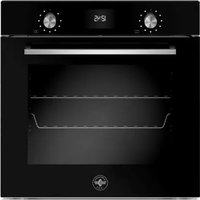
F6011LAGPSNE - Oven LA GERMANIA - Free user manual and instructions
Find the device manual for free F6011LAGPSNE LA GERMANIA in PDF.


| Brand | La Germania |
| Model | F6011LAGPSNE |
| Product type | Built-in oven |
| Power supply | 220-240 V ~ 50/60 Hz, 2800 W, 13 A |
| Power cable section | 3 × 1,5 mm² (H05VV-F) |
| Approximate dimensions (H × W × D) | 595 × 595 × 550 mm |
| Approximate weight | 35 kg |
| Number of functions | 11 cooking functions + 5 specific functions |
| Cooking functions | Convection, Fan, Static, Rapid preheating, Turbo, Bottom heat, Grill, Convection grill, Assistant, Specific functions (Dehydration, Defrosting, Heating, Proving, Sabbath, Eco, Settings) |
| Cleaning functions | Pyrolysis, Eco pyro, Hydroclean |
| Screen type | Touch screen |
| Timer | Yes, with timer and timed cooking |
| Temperature probe | Yes, for core temperature measurement |
| Rotisserie | Yes, integrated |
| Telescopic guides | Yes, removable |
| Number of cooking levels | 5 |
| Interior lighting | Halogen bulb G9 40 W |
| Rating plate | On the side of the oven, near the front |
| Use | Domestic only |
| Safety | Automatic door locking during pyrolysis, automatic shut-off, cooling system |
| Maintenance | Manual cleaning of enamel, stainless steel and glass parts; pyrolysis and hydroclean |
| Available spare parts | Halogen bulb, power cable, side guides, door gasket |
| Warranty | According to manufacturer's conditions (see manual) |
Frequently Asked Questions - F6011LAGPSNE LA GERMANIA
User questions about F6011LAGPSNE LA GERMANIA
0 question about this device. Answer the ones you know or ask your own.
Ask a new question about this device
Download the instructions for your Oven in PDF format for free! Find your manual F6011LAGPSNE - LA GERMANIA and take your electronic device back in hand. On this page are published all the documents necessary for the use of your device. F6011LAGPSNE by LA GERMANIA.
USER MANUAL F6011LAGPSNE LA GERMANIA
INSTALLATION AND USER MANUAL
BUILT-IN ELECTRONIC OVENS
INSTRUCTIONS D'INSTALLATION ET D'UTILISATION
FOURS ENCASTRABLES ÉLECTRONIQUES


INDICE
AVVERTENZE 4
RESPONSABILITÀ DEL PRODUTTORE 4
TUTELA DELL'AMBIENTE 4
IMBALLI IN PLASTICA 4
natural_image
Technical line drawing of a mechanical component with dimension annotations (60 and an unlabeled vertical line), no readable text or symbols present.natural_image
Technical line drawing of a screwdriver inserted into a mechanical component (no text or symbols)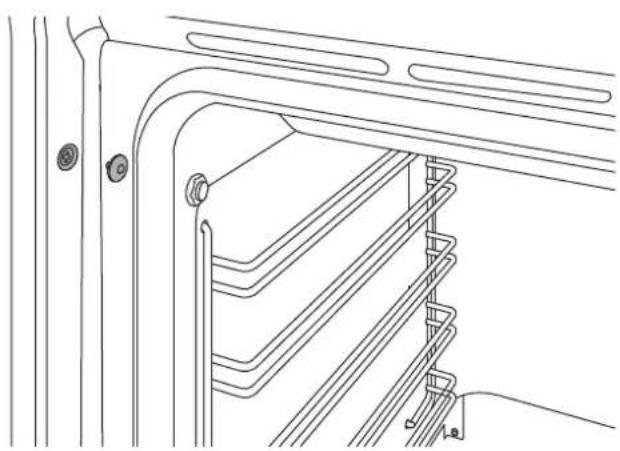
natural_image
Technical line drawing of a mechanical assembly with multiple spring-loaded components (no text or symbols)natural_image
Simple line drawing of a cable with labeled points L and N, no text or symbols presentnatural_image
Simple geometric diagram with a rectangle inside a rectangle and the number 1 below (no text or symbols within the shapes)natural_image
Technical line drawing of a door frame with a horizontal panel and two arrows indicating assembly or movement (no text or symbols present)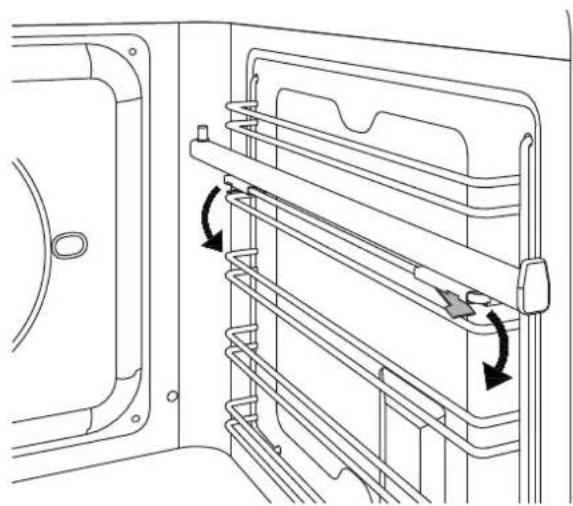
natural_image
Technical line drawing of a door frame with horizontal metal racks and directional arrows indicating movement (no text or symbols)natural_image
Technical diagram of a mechanical assembly with arrows indicating force or movement (no text or symbols present)natural_image
Line drawing of an oven interior showing internal components and tray layout (no text or symbols)PULIZIA DELL'APPARECCHIO

natural_image
Technical line drawing of a multi-panel rack or storage unit with directional arrows indicating movement (no text or symbols)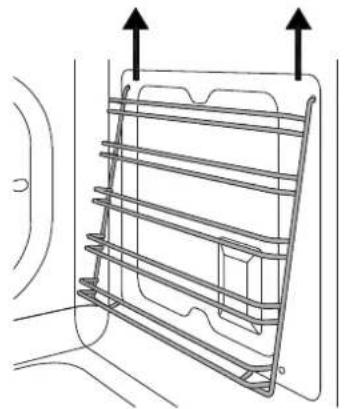
natural_image
Technical line drawing of a mechanical component with two upward arrows indicating top and bottom directions (no text or symbols)natural_image
Technical line drawing showing two views of a wall-mounted device with a central connector (no text or symbols)natural_image
Line drawing of an oven with ventilation grilles and a tray (no text or symbols)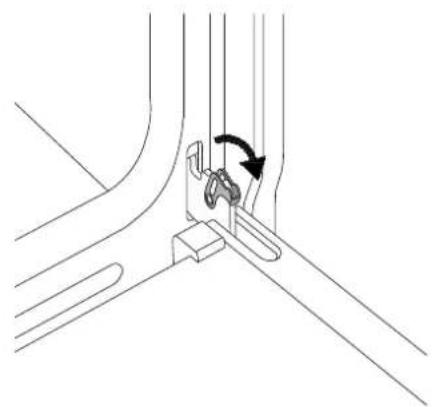
natural_image
Technical line drawing of a mechanical assembly with a curved component and directional arrow (no text or symbols)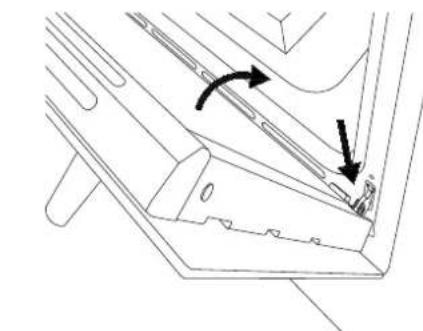
natural_image
Technical line drawing of a mechanical component with arrows indicating motion or force direction (no text or symbols)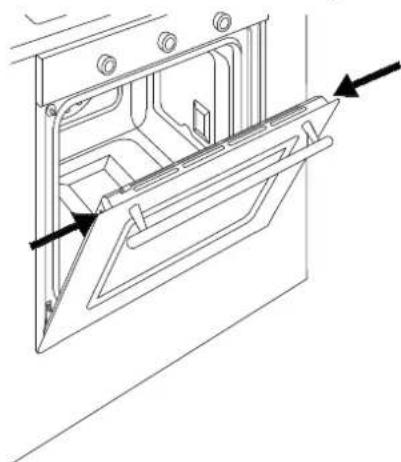
natural_image
Technical line drawing of a door frame with arrows indicating direction (no text or symbols)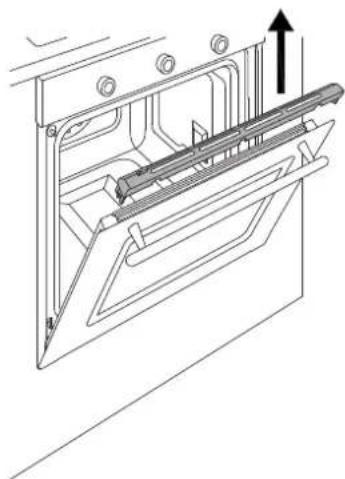
natural_image
Technical line drawing of a mechanical assembly with an upward arrow indicating motion (no text or symbols present)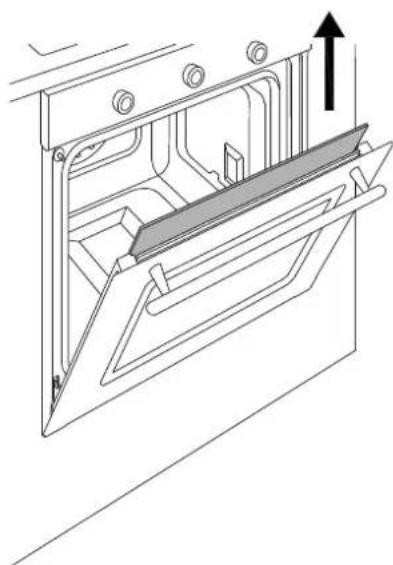
natural_image
Technical line drawing of a mechanical assembly with an upward arrow indicating motion (no text or symbols present)

MALFUNZIONAMENTO
INSTALLATION AND USER MANUAL BUILT-IN ELECTRONIC OVENS

CONTENTS
INTRODUCTION AND WARNINGS 4
MANUFACTURER LIABILITY 4
ENVIRONMENTAL PROTECTION 4
PLASTIC PACKAGING 4
APPLIANCE DATA PLATE 4

GENERAL SAFETY INSTRUCTIONS 5
USAGE INSTRUCTIONS 6
APPLIANCE WARNINGS 6
TECHNICAL INSTALLATION INSTRUCTIONS 7
INSTALLING THE OVEN IN THE UNIT 7
IMPORTANT INFORMATION 7
INSTALLING THE OVEN BELOW A HOB 8
INSTALLING THE OVEN IN A TALL APPLIANCE HOUSING 8
OVEN FASTENING 9
ELECTRICAL CONNECTION 9
MAINTENANCE 10
REPLACING COMPONENTS 10
USING THE APPLIANCE 11
CONTROL PANEL 11
TWO-KNOB OVEN CONTROLS 11
FULL-TOUCH OVEN CONTROLS 11
OVEN FUNCTIONS 11
FIRST USE 12
BEFORE FIRST USE 12
RACK POSITIONING 12
COOLING 12
PRE-HEATING 12
OVEN LIGHT 12
USING TWO-KNOB OVENS 13
CLEANING THE APPLIANCE 21
BASIC MAINTENANCE 22
REMOVING THE SIDE GUIDES 22
REPLACING THE OVEN LIGHT BULB 22
CLEANING THE INTERNAL DOOR GLASS 23
TROUBLESHOOTING 24
WARRANTY 24

INTRODUCTION
READ THESE INSTRUCTIONS CAREFULLY BEFORE INSTALLING AND USING THE APPLIANCE.

These instructions are valid only for the countries whose identifying symbols are included on the cover of this manual and on the appliance label.
The manufacturer shall not be held liable for property damage or personal injury resulting from incorrect installation or improper use of the appliance.
The manufacturer shall also not be held liable for any imprecisions due to printing or transcription errors in this booklet.
The appearance of the figures included herein is only for guidance.
The manufacturer reserves the right to make modifications to its products when it considers this necessary or beneficial, however the essential safety and performance characteristics shall not be affected.
THIS APPLIANCE IS DESIGNED FOR NON-PROFESSIONAL, DOMESTIC USE.
This user manual is an integral part of the appliance and must therefore be kept in its entirety in a place accessible to the user for the entire lifetime of the appliance.
Read this manual before using the appliance.
MANUFACTURER LIABILITY
The manufacturer shall bear no liability for property damage or personal injury due to:
- Use of the appliance other than that specified.
- Failure to comply with the instructions in the user manual.
- Tampering with/unauthorised modifications to any part of the appliance.
- The use of non-original spare parts.
- This appliance is intended for cooking food in the home environment. Any other use shall be considered improper.
- The appliance is not designed to operate with external timers or with remote-control systems.
WARNING: The € marking on this product is a declaration, under the manufacturer's full responsibility, that the product complies with all European health, safety and environmental requirements laid out in the legislation covering this product type.
ENVIRONMENTAL PROTECTION
Please think of the environment when disposing of the packaging.
This appliance is marked in accordance with European Community Directive 2012/19/EU on waste electrical and electronic equipment (WEEE).
This directive defines the standards for the collection and recycling of waste electrical and electronic equipment applicable throughout the European Union.
The packaging of this appliance is composed of the elements strictly necessary to ensure sufficient protection during transport. The packaging materials are completely recyclable, thus reducing their environmental impact. Please help to protect the environment by taking the following tips into consideration:
- Sort the packaging materials for recycling.
- Render the old appliance unusable before taking it to the collection facility. Ask the competent local authorities for details of the nearest recycling centre you can take the old appliance to.
- Do not dispose of used oil down the drain. Keep it in a closed container and take it to a recycling centre; if this is not possible, dispose of it in mixed waste (in this manner it will be disposed of at a monitored facility – although this is not the best solution, it at least prevents contamination of the sewage/water systems).
PLASTIC PACKAGING
Danger of suff ocation
- Do not leave the packaging or any part thereof unattended.
• Do not let children play with the plastic bags.
APPLIANCE DATA PLATE
The data plate bears the technical data, serial number and brand name of the appliance. The appliance data plate is located on the side of the front of the oven, and must not be removed at any time. A copy is provided in this manual for reference.
INTRODUCTION
GENERAL SAFETY INSTRUCTIONS
- During use the appliance becomes hot. Care should be taken to avoid touching heating elements inside the oven.
- WARNING: Accessible parts may become very hot during use. Young children should be kept away
- Never touch the heating elements during use.
- Keep children at a safe distance unless they are constantly supervised.
- Children must not play with the appliance.
- This appliance is not intended for use by persons (including children) with reduced physical, sensory or mental capabilities, or lack of experience and knowledge, unless they have been given supervision or instruction concerning use of the appliance by a person responsible for their safety.
• Children should be supervised to ensure that they do not play with the appliance. - Keep children and animals away from the appliance while it is running or cooling down. Accessible parts become red hot during use.
- Switch off the appliance after use.
- Cleaning and maintenance must not be carried out by children.
- Ensure that hot surfaces are allowed to cool before proceeding to clean the appliance.
- Have installation and servicing carried out by qualified personnel in compliance with applicable standards and legislation. Do not try to repair the appliance yourself or without the assistance of a qualified technician.
- Do not modify this appliance.
- Do not insert anything in the slots.
- Do not obstruct ventilation openings and heat dispersal slots.
- If the supply cord is damaged, it must be replaced by the manufacturer, its service agent or similarly qualified persons in order to avoid a hazard.
- If the power supply cable is damaged, contact technical support immediately and they will arrange for it to be replaced.
- Do not use abrasive or corrosive detergents (e.g. scouring powders, stain removers and metallic sponges) on glass parts.
- Do not sit or put any weight on the oven door.
- Do not use steam jets to clean the appliance.
- Do not use the appliance as a space heater for any reason.
-
In the event of breakage or cracking in the glass, shut off the oven immediately and disconnect it from the power supply. Contact technical support.
-
Sudden and extreme changes in temperature can cause the glass to break – never pour cold liquids onto the oven door.
- Using the oven generates heat and moisture – keep the area well ventilated during operation.
- Never place fl ammable objects in the ove
- Do not open the door if smoke is coming out of the oven. Shut the appliance off and disconnect its power supply.
- The oven contains electronic components which could interact with electronic medical equipment such as pacemakers or insulin pumps. Equipment of this type must be kept at least 10 cm from the oven.
- Ensure that there are no trapped objects which could prevent the oven door from shutting.
- The oven is not designed to operate with timers or remote control systems.
- Plastic containers not designed for high temperatures could melt, damaging the oven or even catching fire.
- Closed tins and jars could burst or even explode if heated: never use the oven for preparing or heating tins or jars.
- Always use specific oven gloves for removing or inserting heat-resistant cookware or accessories.
- Isolate the appliance's power supply before performing any maintenance.
- Use only the recommended temperature probe for this appliance.
- Do not use harsh abrasive cleaners or sharp metal scrapers to clean the oven door glass/ the glass of hinged lids of the hob (as appropriate), since they can scratch the surface, which may result in shattering of the glass.
- Excess spillage must be removed before cleaning and shall specify which utensil can be left in the oven during cleaning.
- Appliance must not be installed behind a decorative door in order to avoid overheating.

INTRODUCTION
INSTRUCTIONS FOR USE
• Take great care when cooking food with a high alcohol content, as this could cause a fi re.
- Remove any food residue from inside the oven before using the appliance in order to prevent fires and smoking.
- Do not place any objects or baking paper on the bottom of the oven.
• After cooking, keep the door closed while the oven is cooling down to prevent damaging adjacent kitchen units.
- Fruit juice can cause indelible staining; use deep dishes to prevent leakage.
- Damaged containers, or those which are unsuitably small, can lead to serious injuries.
- When opening the oven door, be very careful of escaping steam: burn hazard!
- Do not pour water into a hot oven: this would create steam, and thus a burn hazard!
- Keep the door seal clean to prevent heat escaping and damaging adjacent units.
- Insert oven racks and trays all the way into their guides to prevent damage to the door when closing.
- Do not operate the appliance with wet hands or when it is in contact with water.
- Do not apply pressure to the open door.
- Do not use the appliance as a work surface or shelf.
- Open the door with care. The use of ingredients containing alcohol can create a mixture of air and alcohol.
- Avoid creating sparks or naked flames near the oven when opening the door.
- Do not place or store flammable objects or those which could ignite easily on the appliance, inside it or in its immediate vicinity.
APPLIANCE WARNINGS
- Do not place heat-resistant cookware or other objects directly onto the oven's interior surface.
- Do not place sheets of aluminium foil directly onto the oven's interior surface.
• Do not place water directly inside the hot oven. - Do not store moist dishes and food inside the oven after completing cooking.
• Take care when removing or inserting accessories. - Any discolouration of the enamel will not affect the oven's performance.
- For very wet cake batters, use a dripping pan. Fruit juice can cause permanent stains.
- The oven is designed only for cooking. It must not be used for other purposes, such as space heating.
TECHNICAL INSTALLATION INSTRUCTIONS
The installation, adjustments, transformations and maintenance listed in this section must only be performed by qualified technicians (in accordance with applicable legislation). Incorrect installation can cause property damage and injury to people or pets; the manufacturer shall not be held liable in this event. The appliance's automatic regulation or safety devices may only be modified by the manufacturer or a duly authorised supplier during the appliance's lifetime.
Ensure all necessary PPE is used when carrying out the installation
INSTALLING THE OVEN IN THE UNIT
Ensure that the oven is fully present and undamaged after removing all loose parts from their inner and outer packaging. In the event of any uncertainty, do not use the appliance and contact technical support.
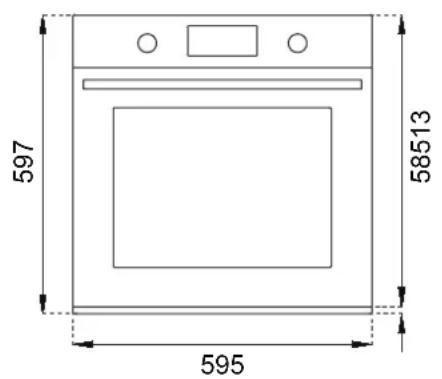
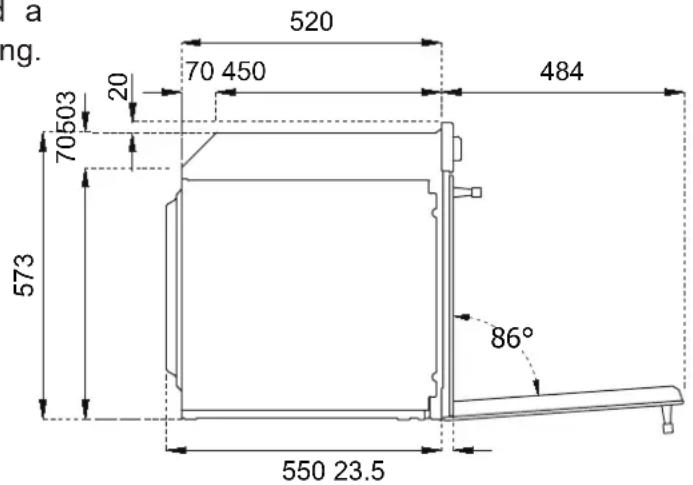
Check that the kitchen unit is suitable for installation of the oven, referring to the dimensions given in this guide.
The oven must not be installed behind a decorative door in order to avoid overheating.
IMPORTANT INFORMATION
The oven is only suitable for installation inside a fitted kitchen unit or carcase. The sides and surrounding surfaces must be able to withstand temperatures of up to 90°C.
Installation of the appliance must be performed in accordance with the provisions of applicable legislation.
Provide for an opening in the rear of the carcase to allow for oven ventilation, as shown in the figure. Lack of sufficient ventilation could compromise oven performance.

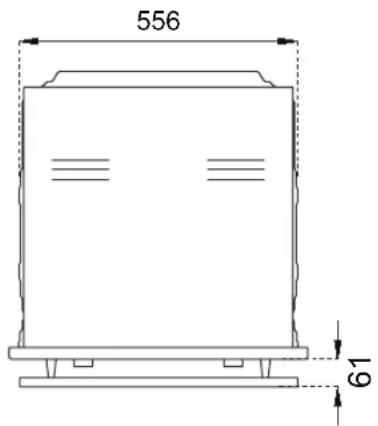
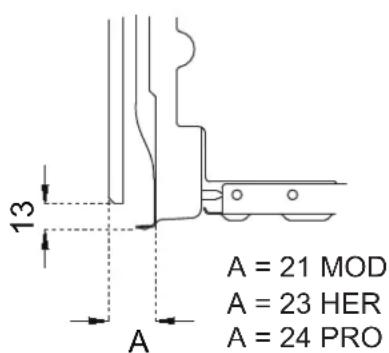
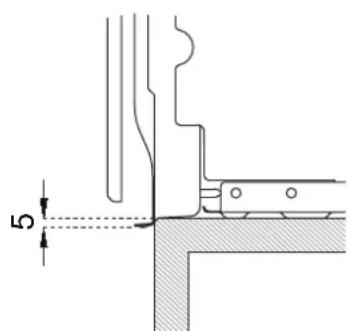
TECHNICAL INSTALLATION INSTRUCTIONS
INSTALLATION UNDERNEATH A BUILT-IN HOB
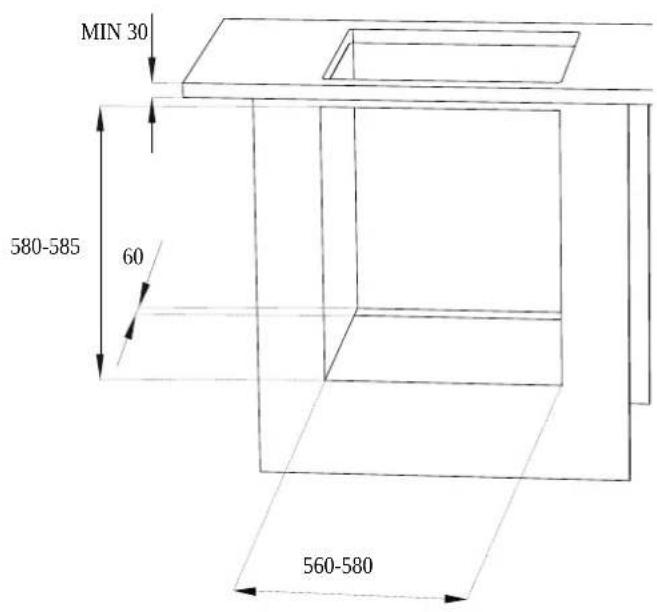
The clearance between the oven and the kitchen units or other installed appliances must be enough to ensure sufficient ventilation and air discharge. If installed under a hob, space must be left between the bottom of the hob and the top of the oven to allow for ventilation of the entire compartment (see figure).
Any ventilation openings required for the hob are to be added to those required by the oven.
The manufacturer shall bear no liability in the event of the oven being installed in combination with a hob from another manufacturer.
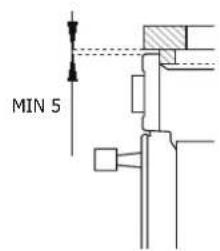
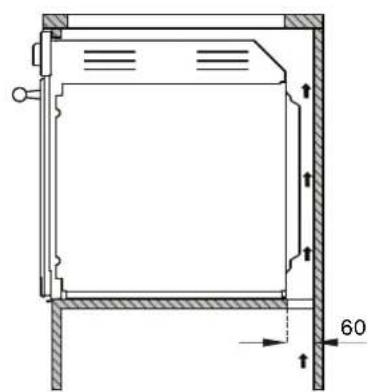
natural_image
Technical drawing of a rectangular frame with hatched walls and dimension lines (no text or symbols)INSTALLING THE OVEN IN A TALL APPLIANCE HOUSING
The clearance between the oven and the kitchen units must be enough to ensure sufficient ventilation and air discharge. Ensure there is an opening in the top or rear of the carcase as shown in the figure.
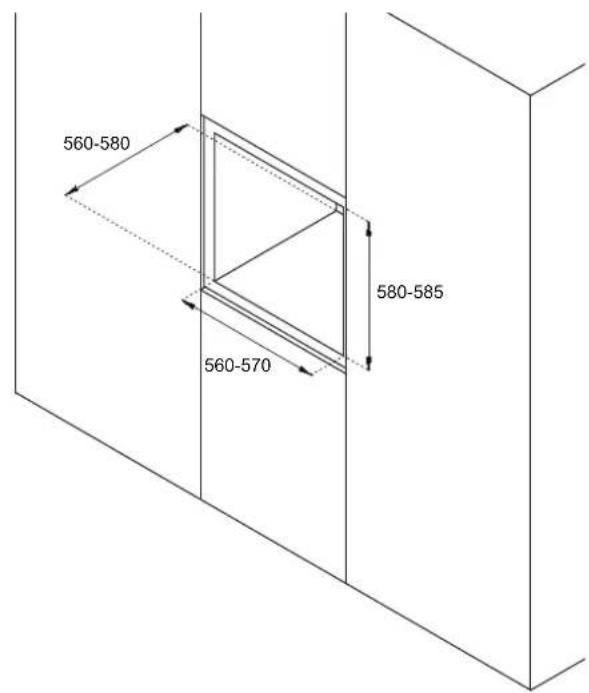
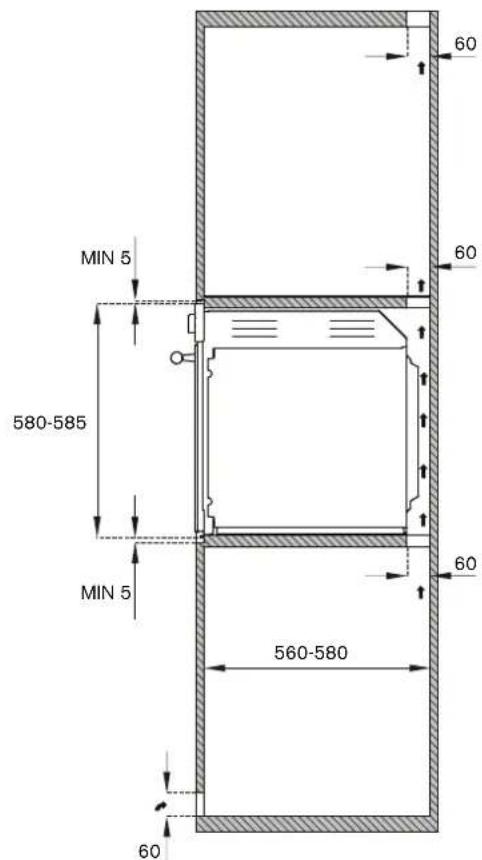

OVEN FASTENING
- Position the appliance into the carcase with the help of a second person.
- Do not use the door or handle to position the oven.
- Check that the oven is correctly aligned with the units.
• Check that the door opens correctly. - Fasten the oven to the carcase with the supplied screws, ensuring that the oven remains centred.
- Cover the screws with the caps.
ELECTRICAL CONNECTION
The electrical connection must be made in accordance with applicable standards and legislation.
Before connecting up the appliance, check that:
- The mains electricity supply matches the characteristics indicated on the appliance data plate (positioned on the front of the oven).
- The circuit wiring and outlet are equipped with a compliant earth connection.
Connection to the mains power supply via a socket:
- Wire a plug onto the power cable which must comply with applicable standards in the country of use; the plug (and its fuse, where applicable) must be suitable for the rated load specified on the appliance data plate. Connect the cores of the cable in accordance with the fi gure, ensuring you follow the harmonised wiring colour scheme:
L (live/hot/phase) = brown wire
N (neutral) = blue wire
earth “ ” symbol = yellow/green wire
L
N
Voltage 220-240 V
Frequency 50/60 Hz
Max. power 2800 W
Max current draw 13 A
Cable type 3x1.5mm²
ELECTRICAL CONNECTION
- Position the power supply cable in such a way that it is not resting against the rear of the oven, that it is not in contact with sharp edges and will not reach a temperature of 90^ at any point.
- Do not use adapters, extension leads, gang sockets etc. as these could cause loose contacts and overheat.
Hard-wired to the mains circuit:
- The circuit must be fitted with a omnipolar circuit breaker of suitable capacity for the appliance's rated load.
- The earth conductor must not be switched by the breaker and must be connected to the earthing system.
- As an alternative, an RCBO may also be used, or RCD protection in addition to or instead of a fuse or MCB, depending on the applicable electrical code.
MAINTENANCE
REPLACING COMPONENTS
Isolate the appliance's power supply before performing any maintenance.
Contact an authorised service centre if functional components require replacement.
WARNING: If the power cable requires replacement, the installer/maintenance technician must use H05VV-F cable and leave the earth conductor around 2 cm longer than the live and neutral wires. They must also comply with the instructions given for the initial electrical connection.
CONTROL PANEL
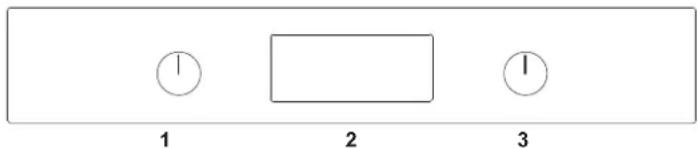
TWO-KNOB OVEN CONTROLS
1 Function selector
2 Touchscreen displays
3 Temperature selector
| TIME FUNCTIONS time menu | ||
| RETURN TO PREVIOUS MENU return to the previous menu and scroll | ||
| OK | CONFIRM confi rm or continue | |
| MOVING AROUND THE MENU modifi es the quantities or scrolls the menu | ||
FULL-TOUCH OVEN CONTROLS
1 Touchscreen displays
N.B.: for temperature settings and functions, touch the icon on the display.

natural_image
Simple geometric shape: a rectangle inside a rectangle (no text or symbols)1
 | ON/OFF turns the oven on or off | ||
| MOVING AROUND THE MENU reduces the quantities or scrolls the menu | |||
 | TIME FUNCTIONS time menu | ||
| RETURN TO PREVIOUS MENU returns to the previous menu | |||
 | MOVING AROUND THE MENU increases the quantities or scrolls the menu | ||
| CONFIRM confi rm or continue | |||
OVEN FUNCTIONS
| SYMBOL DESCRIPTION | 11 FUNCTIONS | 11 PYROLYTICFUNCTION | ||
| Convection | • | |||
| Fan | • | |||
| Static | • | |||
| Fast Preheat | • | |||
| Turbo | • | |||
| Bottom Bake | • | |||
| Grill | • | |||
| Fan with grill | • | |||
| Assistant | • | |||
| Specials | • | |||
| Hydroclean | • | |||
| Clean | ||||

USE
To select the functions, touch the icons at the sides of the display and hold for at least two seconds. The chosen function will be selected as soon as you remove your finger.
The symbols for the available commands light up on each screen
FIRST USE
Once the oven has been connected to the power supply, enter the settings menu (see settings chapter) and set the following:
- Language
- Clock
- Clock Format
• Measurement Units
BEFORE FIRST USE
- Remove any film and other packaging residue from the inside and outside of the oven.
- Remove and wash all accessories.
- Run the oven for 30 min. at 250^ without placing any food inside (during this operation it is normal for manufacturing residue to produce some smoke and odours).
- Let the oven cool down.
- Open the door and air the oven out for 15 minutes.
- Clean the inside of the oven with a moist cloth and neutral detergent (do not use scouring powders).
RACK POSITIONING
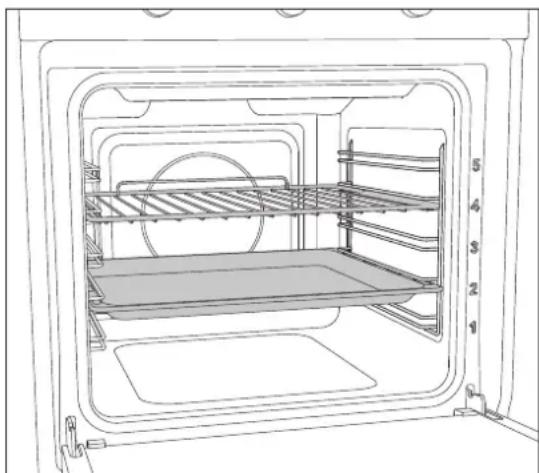
Insert racks and trays into the side guides until they come to a complete stop in order to prevent contact with the oven door.
When removing accessories beyond halfway they are blocked to facilitate removing dishes.
The oven has five cooking levels indicated on the right-hand side of the front of the oven.
natural_image
Line drawing of an oven interior showing shelves, a rack, and a tray (no text or symbols)COOLING
The oven is equipped with a cooling system which operates during cooking.
Air flow between the control panel and door allows the controls to be kept at a usable temperature.
The cooling system turns on and off automatically (it is normal for this to continue running after the oven is switched off).
PRE-HEATING
Most recipes will require the dish to be placed in the oven when it has already reached the specified cooking temperature.
The pre-heating time will depend on the temperature set and the number of accessories present in the oven.
OVEN LIGHT
The oven light comes on automatically when the door is opened and remains on during standard cooking functions.
USE
USING TWO-KNOB OVENS
- Insert the rack at the required level
- Select the oven function by rotating the knob
- Set the temperature by turning the knob clockwise
- If required, set timed cooking by touching the clock button.
An audible warning and visual message indicate when the set temperature is reached.
Return at least one knob to the zero position at any time to stop cooking
To select the functions, touch the icons at the sides of the display and hold for at least two seconds. The chosen function will be selected as soon as you remove your finger.
The symbols for the available commands light up on each screen
- Insert the rack at the required level
- Select the required function using the + and - buttons and confirm by pressing the OK button
- Select the required temperature using the + and - buttons and confirm by pressing the OK button
- If required, set timed cooking by touching the Clock button.
- Touch the OK button to start cooking, or wait (5 seconds) for it to start automatically.
An audible warning and visual message indicate when the set temperature is reached.
Touch the power button at any time to stop cooking.
COOKING MODES
The oven is equipped with various heating elements which create the various cooking modes when activated individually or in combination.
Warning: all cooking operations must take place with the door closed.

Convection
Heat from the rear element with fan assist.
Cooking on multiple levels, ideal for any type of food which requires even heat.
- Level 2 or 3 for cooking single items.
• Levels 2 and 4 for cooking multiple items.
Fan
Heat from above and below with fan assist.
Cooking on multiple levels: ideal for biscuits and cakes.
- Level 2 or 3 for cooking single items.
• Levels 2 and 4 for cooking multiple items.
Static
Heat from above and below.
Cooking on a single level: ideal for roasts, bread and cakes.
- Roasts: level 2 or 3.
- Cakes: level 2 or 3 to ensure correct cooking of the bottom without burning the top.
Fast Preheat
Use this function to bring the oven to the required temperature in a short period of time.
This function is designed only for heating the oven, and not for cooking food.
Turbo
Combination function: convection and bottom element.
Cooking on a single level, ideal for pizza, flatbreads and other foods requiring high temperatures and heat from below.
- Level 1 or 2.
Bottom Bake
Heat from below.
Cooking on a single level, ideal for slow cooking and for heating plates.
At high temperatures, use this function for baked goods which you do not wish to brown.
- Level 2 or 3.
USE
Grill
Heat from the grill (broiler) element.Max recommended temperature: 200°C.
Cooking on a single level, ideal for grilling sausages, chops, bacon, fi sh or toast.
Browning or gratinating food at the end of cooking.
- Level 4 or 5.
Fan with grill
Heat from the grill (broiler) element with fan assist. Max recommended temperature 175°C.
Cooking on a single level, ideal for grilling thick foods.
The circulation of the heat aids optimum cooking of the food while grilling from above.
- Level 4 or 5.
Assistant
see specific chapter
Specials
Dehydrate
Function with forced air circulation and a temperature of 37^ C for drying foods, flowers and vegetables.
Defrost
Function with forced air circulation to speed up defrosting of foodstuff s.
Warming
Function for warming up food; three temperature levels: 60^ C - 76^ C - 93^ C.
Proofing
Function for leavening dough. It is recommended to insert the foodstuff s with the oven still cold.
Do not open the oven unless strictly necessary.
Sabbath
Heating method for use during periods of religious observance.
Eco
Fan-assisted cooking function with low power consumption (light deactivated during cooking).
Settings
See specific chapter
Cleaning (only eleven-function pyrolytic oven) Pyro
In the self-cleaning cycle, the oven's interior is heated to very high temperatures – over 400^ C – to burn off any food residue.
Before starting a pyrolysis cycle, remove all accessories and side racks from the oven, then manually remove any pieces of food and larger residues with a damp sponge.
During pyrolysis, the door locks automatically and will only reopen when the oven cools back down at the end of the cycle.
It is normal to see some flaming and smoke develop inside the oven.
After the cleaning cycle, the burned off residue is reduced to ash and can be easily brushed off with a damp sponge.
The complete cycle duration is 120 minutes.
Eco Pyro
Ninety-minute self-cleaning cycle which can be used when there are lower levels of encrusted dirt.
Hydroclean
Twenty-minute low-temperature oven cleaning cycle.
-
Manually remove any pieces of food and larger residues with a damp sponge.
-
Pour 400 ml of water onto the base inside the cavity.
-
Spray a solution of water and washing-up liquid (using a spray bottle) onto the side walls.
-
Activate the function (duration approx. 20min).
-
Once it has cooled back down, dry with a soft cloth.
Hydroclean (eleven-function oven only)
Twenty-minute low-temperature oven cleaning cycle.
-
Manually remove any pieces of food and larger residues with a damp sponge.
-
Pour 400 ml of water onto the base inside the cavity.
-
Spray a solution of water and washing-up liquid (using a spray bottle) onto the side walls.
-
Activate the function (duration approx. 20min).
-
Once it has cooled back down, dry with a soft cloth.
USE
CONDENSATION
When cooking foods with a high water content, it is normal for condensation to form on the inside of the oven door and on the control panel. This condensation will evaporate by itself during cooking.
COOKING TIPS
- The set temperature and cooking time may vary slightly from one oven to another. Slight adjustments to recipes may be necessary.
- Increasing the temperature does not decrease cooking times.
- Cooking times depend on the weight, thickness and quality of the food.
- We recommend placing the food at the centre of the rack.
- Choose the level of cooking in accordance with the recipe and personal experience.
- Leave at least 3 cm between oven dishes and the sides of the oven to allow heat to circulate.
- Use light-coloured aluminium trays when cooking pastries.
- Use dark metal tins for cooking sweets and biscuits, as they help absorb heat.
- Turn and mix dishes so that they heat through evenly.
- For new recipes, choose the lowest temperature from those given along with the shortest time; then assess how well cooked the dish is, prolonging the cooking if necessary.
SAVING ENERGY
- Open the oven door only when necessary to avoid wasting heat.
- Keep the inside of the oven clean.
- Remove any accessories not currently being used.
- Shut off the oven a few minutes before the time normally used, allowing the residual heat of the oven to finish cooking.

SCOOKING GUIDELINE
The times given in the table do not include preheating times and are provided only as a guide.

| Food Weight (kg) Function Temperature (°C) Time (minutes) | ||||
| Lasagne 3-4 | Static 2 | 20-230 | 45-50 | |
| Baked pasta 3-4 Static 2 | 20-230 45-50 | |||
| Roast veal 2 Fan 180-190 | 90-100 | |||
| Pork loin 2 Fan 180-190 | 70-80 | |||
| Sausages | 1.5 | Fan with grill | 175 | 15 |
| Roast beef | 1 Fan | 200 | 40-45 | |
| Roast rabbit | 1.5 | Convection | 180-190 | 70-80 |
| Turkey breast | 3 Fan 180-190 | 1 | 10-120 | |
| Roast pork neck | 2-3 | Fan 180-190 | 170-180 | |
| Roast chicken | 1.2 | Fan 180-190 | 65-70 | |
| 1st side 2nd side | ||||
| Pork chops | 1.5 | Fan with grill | 175 | 15 5 |
| Spare ribs | 1.5 | Fan with grill | 175 | 10 10 |
| Bacon | 0.7 | grill | 200 | 7 8 |
| Pork fillet | 1.5 | Fan with grill | 175 | 10 5 |
| Beef fillet | 1 | grill | 200 | 10 7 |
| Rainbow trout | 1.2 | Fan 150-160 | 35-40 | |
| Monkfish | 1.5 | Fan | 160 | 60-65 |
| Turbot | 1.5 | Fan | 160 | 45-50 |
| Pizza | 1 | Turbo | MAX | 8-9 |
| Bread | 1 | Convection | 190-200 25-30 | |
| Focaccia | 1 Fan 180-190 20-25 | |||
| Bundt cake | 1 | Convection | 160 | 55-60 |
| Jam tart | 1 | Convection | 160 | 35-40 |
| Ricotta cake | 1 | Convection | 160-170 55-60 | |
| Stuffed tortellini | 1 | Fan | 160 | 20-25 |
| Sponge cake | 1.2 | Convection 160 | 55-60 | |
| Profiteroles | 1.2 | Fan | 180 | 80-90 |
| Victoria sponge | 1 | Convection | 150-160 | 55-60 |
| Rice cake | 1 Fan | 160 | 55-60 | |
| Pastries | 0.6 | Convection | 160 | 30-35 |
USING THE TOUCHSCREEN DISPLAY
SETTINGS MENU
Select Settings in the Specials menu.
Scroll through the functions using the + and - buttons
Brightness
To set or change the display brightness.
Audio
To set or change the volume of the sounds.
Language
To select the preferred appliance language (the default is English).
Clock
To set or change the time.
Showroom Mode
Deactivates the heating elements for showrooms use.
Weight Unit
To set or change the unit of measurement used for weight.
Temp Unit
To set or change the unit of measurement used for temperature.
ECO Mode
To reduce energy consumption.

USING THE TOUCHSCREEN DISPLAY
MANAGING THE TIME FUNCTIONS
The time function allows you to manage cooking times.

After setting the function and temperature, press the clock icon repeatedly ( Ⓧ and choose a time function.
Timer
To set a countdown timer, at the end of which an audible warning will sound and a message will be displayed. The timer does not stop the cooking operation.
Scroll to set; the timer starts automatically.
Function available even with the oven not operational
Cooking Time

To set a countdown timer, at the end of which cooking will be stopped, an audible warning will sound and a message will be displayed.
Scroll to set; the cooking time timer starts automatically.
Start at

To set the start time and duration of cooking.
When the set time arrives, an audible warning will sound indicating the start of cooking. When the set duration has elapsed, cooking will stop, an audible warning will sound and a message will be displayed.
Scroll to set first the start time and then the cooking time.
Touch the Power button to stop cooking at any point.
Touch the clock icon to modify the duration of the current cooking program.
Important: if the time functions are not managed, the duration of the cooking must be managed manually.
TEMPERATURE PROBE (where available)
The temperature probe allows you to choose the level of cooking by measuring the internal temperature of the food.
Programming the temperature probe
-
Insert the sharp end of the probe into the food. For the best results, the tip must be as close as possible to the centre point of the food, and not in contact with fat, bone or hollow areas.
-
Choosing the cooking function and temperature
- Plug in the probe inside the oven (on the top left-hand side).
- Set the temperature you wish to obtain at the centre of the food.
When the set temperature is measured by the probe, cooking will stop, an audible warning will sound and a message will be displayed.
Important: when using the temperature probe, only the Timer function is available.
USING THE TOUCHSCREEN DISPLAY
ASSISTANT
The assistant function helps you manage a range of cooking, temperature and time functions for each type of food.
The system does not provide recipes, but helps the oven get the best out of yours.
- Choose the required food category.
meat, chicken, fi sh, cake, bread, pizza, pasta, vegetables
-
Select the required recipe.
-
Press OK.
At the end of cooking, an audible warning will sound and a message will be displayed.
To stop cooking, press the power button.
| Food Category Recipe Programme Minimum | Weight | Level of Cooking | Recommended Shelf Level | ||
| MEAT ROAST BEEF M1 1.8 KG | Medium 2 | ||||
| BEEF STEW | M2 1.8 KG | Well Done | 2 | ||
| ROAST VEAL | M3 1.8 KG Medium 2 | ||||
| ROAST PORK | M4 1.8 KG Medium 2 | ||||
| HAM HOCK | M5 | 1 KG | Well Done | 2 | |
| LEG OF LAMB | M6 1.8 KG | Well Done | 2 | ||
| LAMB CHOPS | M7 | 30/40 G EACH | Well Done | 2 | |
| POULTRY | ROAST CHICKEN | C1 | 1.5 KG | Well Done | 2 |
| CHICKEN THIGHS | C2 | 100 G EACH | Well Done | 2 | |
| DUCK | C3 | 2.3 KG | Well Done | 2 | |
| ROAST TURKEY BREAST | C4 | 600 G | Well Done | 2 | |
| ROAST TURKEY THIGHS | C5 | 1.5 KG | Well Done | 2 | |
| FISH | BAKED TUNA STEAK | F1 | 1 KG | Well Done | 2 |
| BAKED SALMON | F2 | 1 KG | Well Done | 2 | |
| BAKED BREAM | F3 | 800 G | Well Done | 2 | |
| ROAST BASS | F4 | 1.5 KG | Well Done | 2 | |
| COD FILLET | F5 | 400 G | Well Done | 2 | |
| DESSERTS | VICTORIA SPONGE | D1 | 400 G | Well Done | 2 |
| SHORTCRUST TARTS | D2 | 20 G Well Done | 2 | ||
| PASTRIES | D3 | 20 G Well Done | 2 | ||
| SHORTBREAD BISCUITS | D4 | 20 G | Well Done | 2 | |
| BREAD | BREAD | B1 | 1.2 KG | Well Done | 2 |
| BREAD ROLLS | B2 50/60 G | Well Done | 2 | ||
| FOCACCIA | B3 | 1 TRAY | Well Done | 2 | |
| BREADSTICKS | B4 | - | Well Done | 2 | |
| PIZZA | PIZZA LEV1 | PIZZA1 | 250 | Well Done | 2 |
| PIZZA LEV2 | PIZZA2 | 250 Well Done | 2 | ||
| PIZZA LEV1 (FROZEN) | PIZZA3 | 250 | Well Done | 2 | |
| PIZZA LEV2 (FROZEN) | PIZZA4 | 250 | Well Done | 2 | |
| PASTA | GRATINATED (FROZEN) | P1 | - | Well Done | 2 |
| GRATINATED (FRESH) P2 | - | Well Done | 2 | ||
| VEGETABLES | STEWED POTATOES | V1 | 500 | Well Done | 2 |
| BAKED POTATOES | V2 | 500 Well Done | 2 | ||
| ROAST POTATOES | V3 | 500 Well Done | 2 | ||
| STEWED ROOT VEGETABLES | V4 | 250 | Well Done | 2 | |
| STEWED PEPPERS | V5 | 250 Well Done | 2 | ||
| ROAST PEPPERS | V6 | 250 Well Done | 2 | ||
| GRILLED AUBERGINE | V7 | 250 | Well Done | 2 | |
| STEWED CAULIFLOWER | V8 | 250 Well Done | 2 | ||
| GRILLED CAULIFLOWER | V9 | 250 Well Done | 2 | ||
| STEWED BEANS | V10 | 250 Well Done | 2 | ||
| STEWED PEAS | V11 | 250 Well Done | 2 | ||

ACCESSORIES / OPTIONAL EXTRASACCESSORIES / OPTIONAL EXTRA
TELESCOPIC RAILS
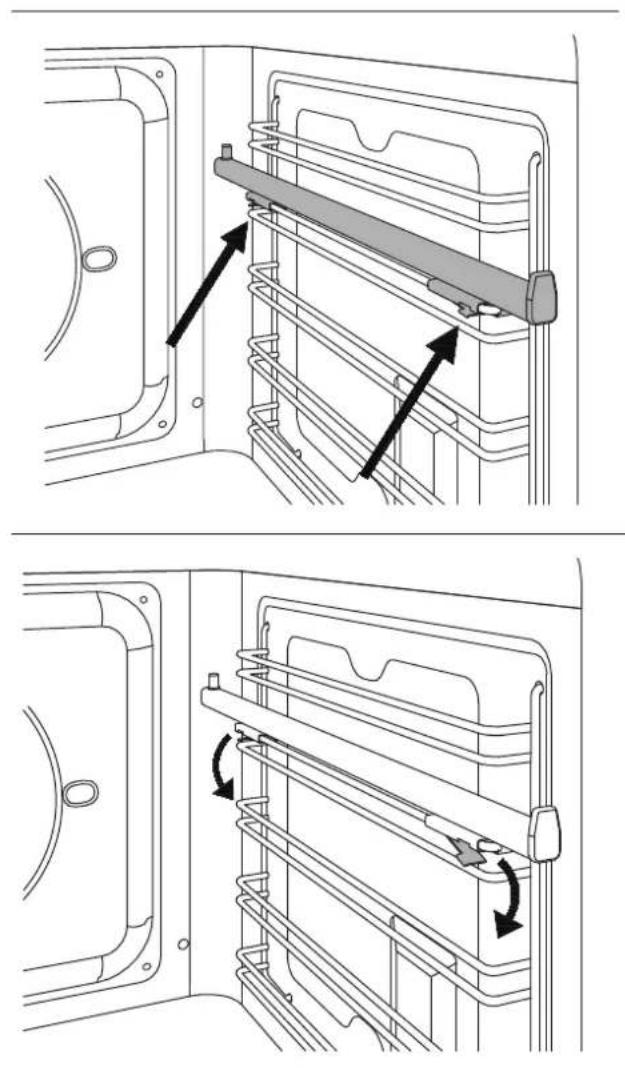
The telescopic rails can be installed on any level of the oven guides
- Locate the two spring clips (front and rear) on the telescopic rail.
- Locate the pin indicating the rear part of the rail.
- Position the telescopic rail flush with the upper edge of the selected level.
- Insert the front clip, pushing it towards the side guide.
- Insert the rear clip, pushing it towards the side guide.
- Repeat the insertion operation for the other side.
- Pull both rails out and position the oven rack or tray between the rear pin and the front stop.

natural_image
Technical line drawing showing two views of a mechanical device with internal components and directional arrows indicating assembly or movement (no text or symbols present)Removing the Telescopic Rails
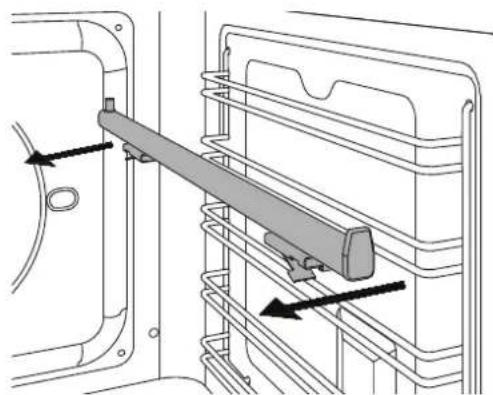
- Locate the two spring clips (front and rear) on the telescopic rail.
- Keeping the front clip pushed down, pull the rail towards the interior of the oven.
- Repeat for the rear clip.
natural_image
Technical line drawing of a mechanical assembly with a lever and guide mechanism (no text or symbols)ROTISSERIE FUNCTION (where available)
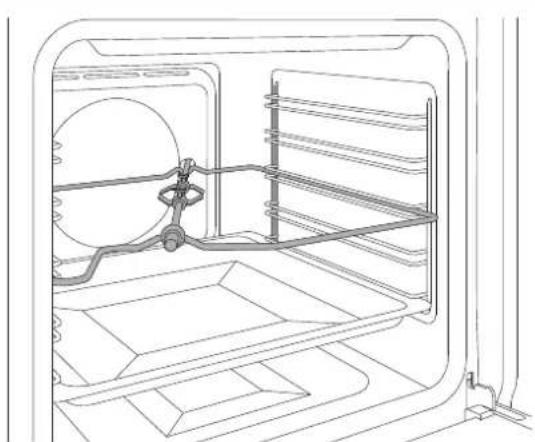
Used to cook joints of meat, chickens and fish evenly on all sides using the grill element.
When the grill function is selected, the rotisserie motor will start up.
- Position the skewer support in level 3 of the side guides.
- Place a tray on one of the lower levels of the side guides to collect cooking grease.
- Insert the meat or fish on the rotisserie skewer using the fork.
- Insert the skewer in the rotisserie motor housing, located in the rear of the oven, and rest it on the skewer support.
- Remove the plastic handle from the skewer.
- Select the grill function at maximum temperature.
- When cooking is complete, refi t the plastic handle and remove the food from the oven.
Important: rotisserie cooking must always be performed with the oven door closed.
natural_image
Line drawing of an open refrigerator interior showing internal components and seating areas (no text or symbols)CLEANING THE APPLIANCE
Before performing any manual cleaning operation, wait for all parts to cool down and isolate the oven from the electrical supply.
Scrupulous care of your oven will help keep it in excellent condition for many years to come.
Cleaning enamelled or painted parts:
To maintain the characteristics of the enamelled components, they should be cleaned frequently with soapy water. Never use scouring powders. Do not leave acidic or basic substances (vinegar, lemon juice, salt, tomato juice etc.) sitting on enamelled parts, and do not wash enamelled parts when they are still hot.
Cleaning Stainless-Steel Parts:
Clean the components with soapy water and then dry them with a soft cloth, following the direction of the brushed fi nish. The shine can be maintained by periodic use of commonly available products. Do not use harsh/aggressive detergents such as:
• Limescale removers
- Bleach
• Hydrochloric acid
- Ammonia
- Scouring pads or powders
Immediately remove limescale, grease, starch or egg-white stains.
Cleaning the Door Glazing:
To degrease, use washing-up liquid and vinegar, then rinse; otherwise, clean with washing-up liquid, rinse, then pass over with a moist cloth before drying.
To remove encrusted food, soak with soapy water or washing-up liquid for a few minutes. After a few minutes, rinse off then dry with a soft cloth.
Avoid anti-limescale, abrasive and multi-purpose products, as they will affect the look of the glass after a while.
Cleaning the Oven Racks:
Do not wash the racks in the dishwasher.
Immerse them in hot soapy water, then wipe with a non-abrasive sponge before rinsing and drying with a tea towel.
Cleaning Handles:
Clean the components with soapy water and then dry them with a soft cloth, following the direction of the brushed finish. Never use scouring powders or pads.
Seal:
Wipe with a damp cloth.

BASIC MAINTENANCE
REMOVING THE SIDE GUIDES
- Identify the two hooks at the bottom of the guide assembly and pull them gently downwards.
- Pull the guide assembly away from the side of the oven and remove by pulling the upper hooks of the assembly upwards from the side of the oven.
- Remove the side guide assembly from the oven.
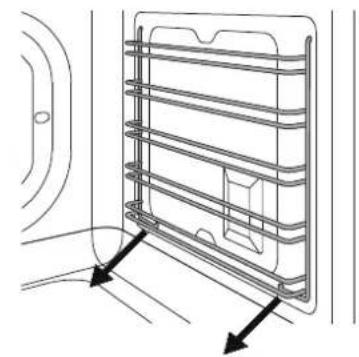
natural_image
Technical line drawing of a metal rack structure with directional arrows indicating movement or force (no text or symbols)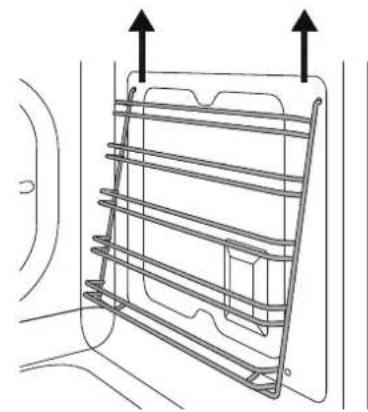
natural_image
Diagram of a metal rack with two upward arrows indicating top-down directions (no text or symbols)REPLACING THE OVEN LIGHT
Warning!
Isolate the oven's power supply before changing the light bulb. DO NOT touch the bulb with your bare hands.
Oven side light (where fi tted)
Bulb type: G9 halogen, 220 V, 40 W
- Ensure that the oven is off and cool.
- If necessary, remove the side guides from the oven.
- Slide the tip of a flat-head screwdriver between the glass cover and the bulb housing.
• Gently turn the tip of the screwdriver to loosen the glass while keeping it in position with your fingers to prevent it falling and breaking. - Remove the glass and take out the old halogen bulb.
- Insert a new halogen bulb in the holder. DO NOT touch the bulb with your bare hands.
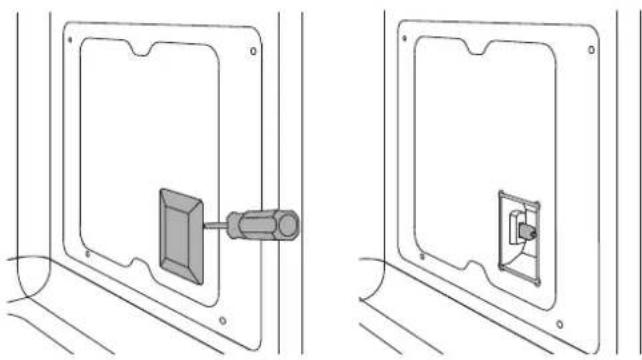
natural_image
Technical line drawing showing two views of a wall-mounted device with a central connector (no text or symbols)- Press the glass cover back on and reposition the side guide assembly.
• Refi t the side guide. - Reinstate the power supply.
CLEANING THE INTERNAL DOOR GLASS
The internal door glass can be easily removed for cleaning. It is not necessary to remove the door in order to clean the glass.
The glass can be cleaned in place, or removed for cleaning.
• Fully open the oven door.
• Fully open the blocking levers for both hinges.
- Slowly close the door until it blocks, checking that the levers have blocked the door.
- Remove the top cover of the door by pressing the round buttons on the left and right.
- Lift the top cover and remove. Paying close attention to the sides of the glass:
- Slide the panes of glass out.
- Clean the glass.
- Repeat the operations above in reverse to reassemble the door.
N.B.: the markings on the glass must face outwards
If the hinges are not correctly blocked and the internal glass is removed, the door can close by itself.
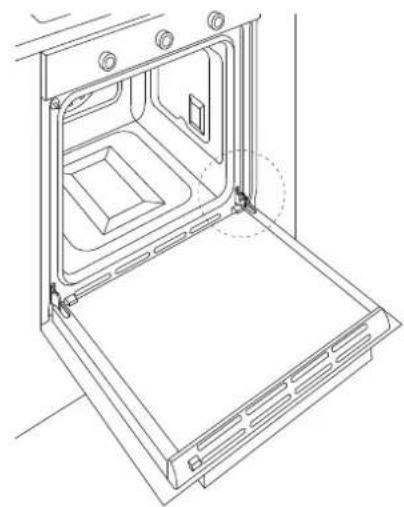
natural_image
Line drawing of an open oven with internal compartments and ventilation grilles (no text or symbols)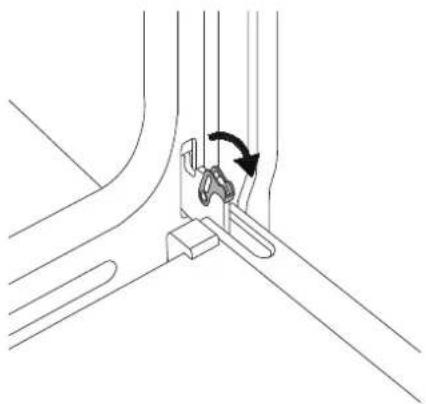
natural_image
Technical line drawing of a mechanical assembly with a curved component and directional arrow (no text or symbols)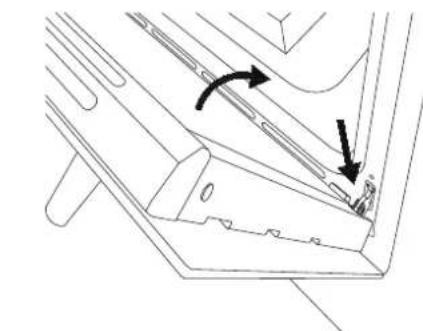
natural_image
Technical line drawing of a mechanical component with arrows indicating motion or force direction (no text or symbols)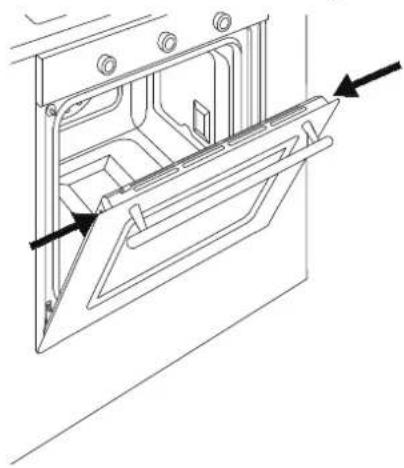
natural_image
Technical line drawing of a door frame with arrows indicating direction (no text or symbols)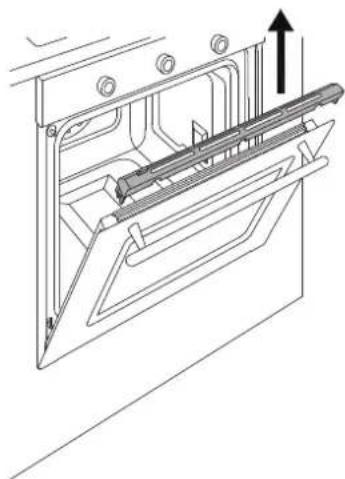
natural_image
Technical line drawing of a mechanical assembly with an upward arrow indicating motion (no text or symbols present)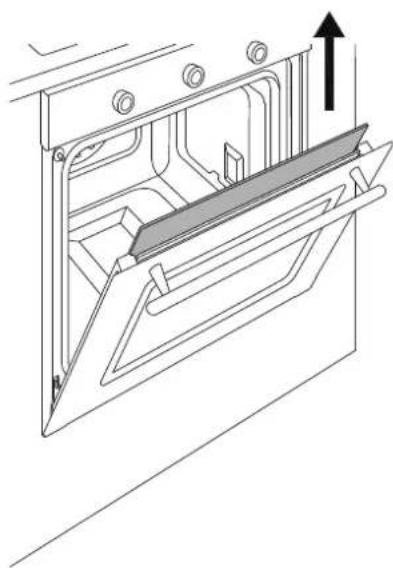
natural_image
Technical line drawing of a mechanical assembly with an upward arrow indicating motion (no text or symbols present)
TROUBLESHOOTING
The oven is not working
Is the oven power supply active? Check the circuit breaker, switch or fuse. Disconnect the oven from the power supply for around one minute by unplugging it or turning it off at the circuit breaker.
The oven does not heat up
Check that showroom mode is not enabled. Check that a time function is not active. Disconnect the oven from the power supply for around one minute by unplugging it or turning it off at the circuit breaker.
The knob will not stay in place.
The knob clip is broken: call customer service for a replacement.
The controls are very hot.
This is normal if the door is left open for a prolonged period of time with the oven running.
Check that the door closes correctly and that the cooking system is operational.
Food is overcooked
When using a fan-assisted function, remember to lower the cooking temperature by 20^ C
Food is undercooked
When cooking large quantities of food, the cooking time must be increased proportionally.
Check that there is sufficient space around the oven dish to allow heat to circulate correctly.
Check that the door closes correctly.
Have a technician check the actual mains voltage.
Condensation forms on the oven door glass.
When cooking foods with a high water content, it is normal for condensation to form on the inside of the oven door and on the control panel. This condensation will evaporate by itself during cooking.
Pre-heat the oven to reduce condensation build-up.
Smoke forms during cooking.
It is normal for smoke to form inside the oven when cooking particularly fatty foods. When cooking with the grill, a certain quantity of smoke is normal.
The cleaning procedure is interrupted before it finishes.
A power failure has occurred.
Check that the ventilation openings in the carcase are correctly sized and located and are not blocked.
WARRANTY
Cleaning results are not satisfactory.
Check that all accessories and side racks have been removed.
Larger accumulations and residue should be removed manually before running the pyrolysis cycle.


INSTRUCTIONS D'INSTALLATION ET D'UTILISATION FOURS ENCASTRABLES ÉLECTRONIQUES

TABLE DES MATIÈRES
AVERTISSEMENTS 4
RESPONSABILITÉ DU FABRICANT 4
PROTECTION DE L'ENVIRONNEMENT 4
EMBALLAGES EN PLASTIQUE 4
PLAQUE D'IDENTIFICATION 4
CONSIGNES GÉNÉRALES DE ÉCURITÉ 5
AVERTISSEMENTS D'UTILISATION 6
AVERTISSEMENTS POUR L'APPAREIL 6
MANUEL TECHNIQUE POUR L'INSTALLATEUR 7
INTRODUCTION DU FOUR 7
AVERTISSEMENTS IMPORTANTS 7
INSTALLATION SOUS PLAN DE CUISSON 8
INSTALLATION SUR COLONNE 8

FIXATION DU FOUR 9
BRANCHEMENT ÉLECTRIQUE 9
ENTRETIEN 10
REMPLACEMENT DES COMPOSANTS 10
UTILISATION 11
PANNEAU DE COMMANDE 11
COMMANDES DU FOUR À 2 BOUTONS 11
COMMANDES DU FOUR FULL TOUCH 11
FONCTIONS DU FOUR 11
PREMIER ALLUMAGE 12
AVANT LA PREMIÈRE UTILISATION 12
POSITIONNEMENT DES GRILLES 12
REFROIDISSEMENT 12
PRÉCHAUFFAGE 12
LUMIÈRE FOUR 12
INTRODUCTION DU FOUR
natural_image
Technical line drawing of a mechanical component with dimension annotations (60 and an unlabeled vertical line), no readable text or symbols present.INSTALLATION SUR COLONNE
REPLACEMENT DES COMPOSANTS
natural_image
Simple geometric shape: a rectangle inside a rectangle (no text or symbols)1

ACACHESSORHESOPONDIONS S
GUIDES TÉLESCOPIQUES
natural_image
Technical line drawing of a mechanical assembly with two black arrows indicating directional components (no text or symbols present)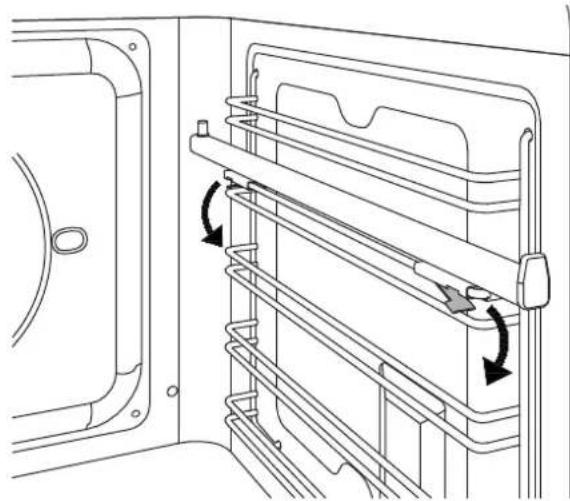
natural_image
Technical line drawing of a door frame with horizontal shelves and directional arrows indicating movement (no text or symbols)natural_image
Technical diagram of a door handle assembly with arrows indicating movement or force (no text or symbols present)natural_image
Technical line drawing of an oven interior showing internal components and wiring (no text or symbols)NETTOYAGE DE L'APPAREIL
natural_image
Technical line drawing of a mechanical component with directional arrows indicating movement or force (no text or symbols)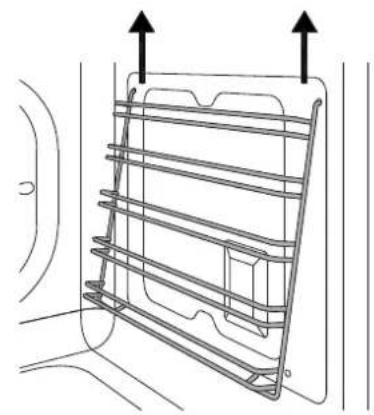
natural_image
Technical line drawing of a metal rack with two upward arrows indicating top and bottom directions (no text or symbols)natural_image
Technical line drawing of two mechanical components mounted on a panel (no text or symbols)REEMPLACEMENT DE L'AMPOULE DU FOUR
Attention!
natural_image
Line drawing of an open oven or rack unit with mounting holes and ventilation grilles (no text or symbols)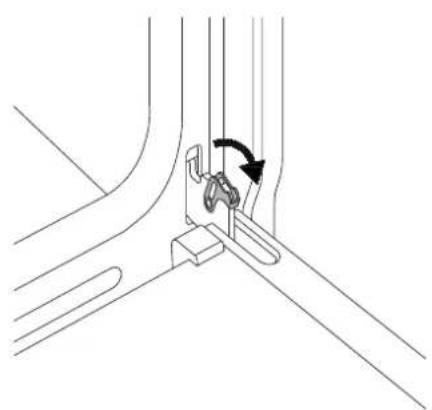
natural_image
Technical line drawing of a mechanical assembly with a curved component and directional arrow (no text or symbols)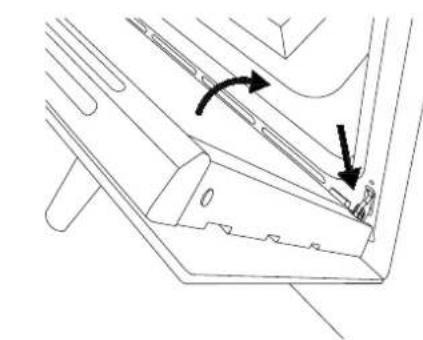
natural_image
Technical line drawing of a mechanical component with arrows indicating motion or force direction (no text or symbols)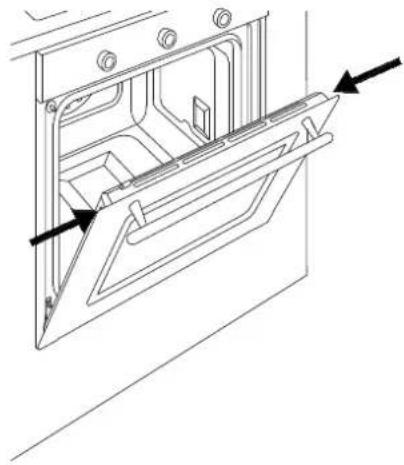
natural_image
Technical line drawing of a door frame with arrows indicating direction (no text or symbols)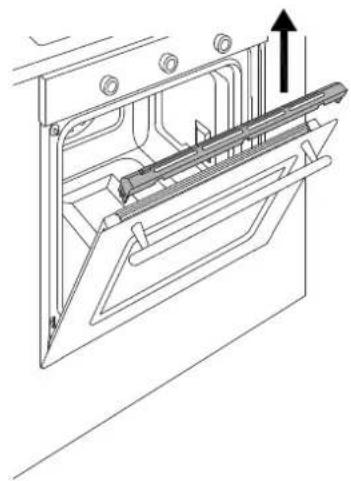
natural_image
Technical line drawing of a mechanical assembly with an upward arrow indicating motion (no text or symbols present)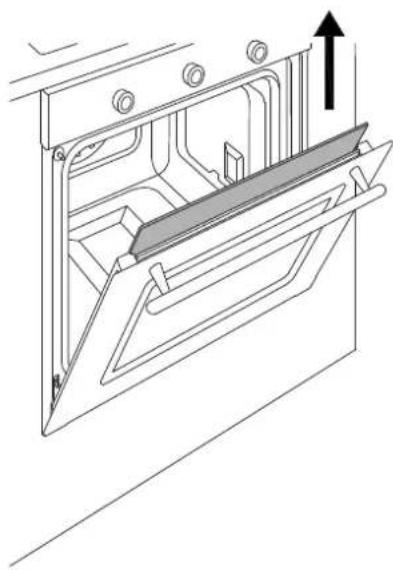
natural_image
Technical line drawing of a door frame with an arrow indicating upward motion (no text or symbols)
DYSFONCTIONNEMENTS



- INDICE
- PULIZIA DELL'APPARECCHIO
- MALFUNZIONAMENTO
- INSTALLATION AND USER MANUAL BUILT-IN ELECTRONIC OVENS
- CONTENTS
- INTRODUCTION
- MANUFACTURER LIABILITY
- ENVIRONMENTAL PROTECTION
- PLASTIC PACKAGING
- APPLIANCE DATA PLATE
- GENERAL SAFETY INSTRUCTIONS
- INSTRUCTIONS FOR USE
- APPLIANCE WARNINGS
- TECHNICAL INSTALLATION INSTRUCTIONS
- INSTALLING THE OVEN IN THE UNIT
- IMPORTANT INFORMATION
- INSTALLATION UNDERNEATH A BUILT-IN HOB
- INSTALLING THE OVEN IN A TALL APPLIANCE HOUSING
- OVEN FASTENING
- ELECTRICAL CONNECTION
- Hard-wired to the mains circuit:
- MAINTENANCE
- REPLACING COMPONENTS
- CONTROL PANEL
- TWO-KNOB OVEN CONTROLS
- FULL-TOUCH OVEN CONTROLS
- USE
- FIRST USE
- BEFORE FIRST USE
- RACK POSITIONING
- COOLING
- PRE-HEATING
- OVEN LIGHT
- USING TWO-KNOB OVENS
- COOKING MODES
- Convection
- Fan
- Static
- Fast Preheat
- Turbo
- Bottom Bake
- Grill
- Fan with grill
- Assistant
- Specials
- Defrost
- Warming
- Proofing
- Sabbath
- Eco
- Settings
- Cleaning (only eleven-function pyrolytic oven) Pyro
- Eco Pyro
- Hydroclean
- Hydroclean (eleven-function oven only)
- CONDENSATION
- COOKING TIPS
- SAVING ENERGY
- SCOOKING GUIDELINE
- USING THE TOUCHSCREEN DISPLAY
- SETTINGS MENU
- MANAGING THE TIME FUNCTIONS
- Timer
- Cooking Time
- Start at
- TEMPERATURE PROBE (where available)
- Programming the temperature probe
- ACCESSORIES / OPTIONAL EXTRASACCESSORIES / OPTIONAL EXTRA
- TELESCOPIC RAILS
- Removing the Telescopic Rails
- ROTISSERIE FUNCTION (where available)
- CLEANING THE APPLIANCE
- Cleaning enamelled or painted parts:
- Cleaning Stainless-Steel Parts:
- Cleaning the Door Glazing:
- Cleaning the Oven Racks:
- Cleaning Handles:
- Seal:
- BASIC MAINTENANCE
- REMOVING THE SIDE GUIDES
- REPLACING THE OVEN LIGHT
- Warning!
- Oven side light (where fi tted)
- CLEANING THE INTERNAL DOOR GLASS
- TROUBLESHOOTING
- The oven is not working
- The oven does not heat up
- The knob will not stay in place.
- The controls are very hot.
- Food is overcooked
- Food is undercooked
- Condensation forms on the oven door glass.
- Smoke forms during cooking.
- The cleaning procedure is interrupted before it finishes.
- WARRANTY
- Cleaning results are not satisfactory.
- INSTRUCTIONS D'INSTALLATION ET D'UTILISATION FOURS ENCASTRABLES ÉLECTRONIQUES
- TABLE DES MATIÈRES
- INTRODUCTION DU FOUR
- INSTALLATION SUR COLONNE
- REPLACEMENT DES COMPOSANTS
- ACACHESSORHESOPONDIONS S
- GUIDES TÉLESCOPIQUES
- NETTOYAGE DE L'APPAREIL
- REEMPLACEMENT DE L'AMPOULE DU FOUR
- Attention!
- DYSFONCTIONNEMENTS
Brand : LA GERMANIA
Model : F6011LAGPSNE
Category : Oven