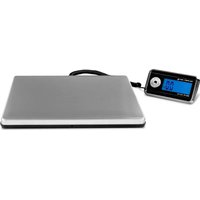
SBS-PT-200/100 - Scale STEINBERG - Free user manual and instructions
Find the device manual for free SBS-PT-200/100 STEINBERG in PDF.


User questions about SBS-PT-200/100 STEINBERG
0 question about this device. Answer the ones you know or ask your own.
Ask a new question about this device
Download the instructions for your Scale in PDF format for free! Find your manual SBS-PT-200/100 - STEINBERG and take your electronic device back in hand. On this page are published all the documents necessary for the use of your device. SBS-PT-200/100 by STEINBERG.
USER MANUAL SBS-PT-200/100 STEINBERG
text_image
DISPLAY 4 3 2 1 0 LB 8:00 OZ LB Kg 5natural_image
Abstract geometric line drawing with interlocking shapes (no text or symbols)
INTRODUCTION
Before you use the scale, please read this manual carefully, and keep it stored properly for future use.
SAFETY GUIDE
For good performance and precise measurement, be careful during daily operation and maintenance. Regard the following instructions:
- Do NOT overload the scale. This will damage the load cell and void the warranty.
- Do NOT leave load on the scale for long. This will decrease the scale's accuracy and shorten the load cell's life.
- When the scale runs out of power, replace the batteries.
- Do NOT use the scale in thunder or rain.
- Do NOT attempt to repair the scale yourself. Contact your local representative.
- Avoid extreme temperatures. Do not place the unit in direct sunlight or near the air conditioning.
• Make sure the scale is placed on a stable table and is not subject to vibrations. - Do not use place the scale close to large electrical appliances such as welding machines or large motors. Do not leave batteries in the device if you do not use it for a long time.
- Avoid vibrations. Do not place your scale near vibrating heavy machinery.
- Avoid places where moisture can lead to condensation. Avoid direct contact with water.
- Do not place the unit close to windows, doors or fans that may cause unstable results due to air currents.
- Keep your machine clean. Do not store products on the scale when it is not used.
SPECIFICATIONS
| Model SBS-PT-200/50 SBS-PT-200/100 | ||
| Max weight / Accuracy 200 kg / 50 g 200 kg / 100 g | ||
| Min. weight 200 g 300 g | ||
| Display LCD | ||
| Units kg / lb / lb-oz | ||
| Power 4 x AA batteries or AC/DC adapter 9V 200 mA | ||
| Functions Zero, tare, calibration, clock | ||
| Max operation time with batteries | 77 hours | |
| Auto off | After 1 minute of inactivity | |
DISPLAY
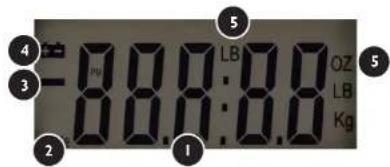
text_image
4 3 2 1 5 LB OZ LB Kg 5- main display
- STABLE – when the load is stable, STABLE message is displayed
- negative load indication
- low battery level indicator – replace the batteries when this indicator is on
- units – during normal operation the display will show one unit

FUNCTIONS OF THE KEYS
"ON/TIME" button:
The scale is turned on and off with the ON/TIME button. The scale will switch off if upon switching it on the display shows the message "UnST". This message means that the scale is placed on an unstable base – place the scale on a stable base which is not exposed to vibrations and shock.
Upon turning the scale on the display shows the time.
"UNIT/SET" button: setting units in weighing mode / setting time in standby mode. The unit change is possible by pressing the "M" button. Then press up to reach the desired unit. Units can be selected from the following: kg / lb / lb-oz.
Setting time: press and hold the UNIT/SET button in the standby mode until the display shows 24H / 12H. Press the UNIT/SET button to choose between 24 h or 12 h mode. Then press and hold the UNIT/SET button until the display shows the time currently set – the hour value will flash, set the hour value using the TARE button then press the UNIT/SET button to set the minutes. When the time is set, press the ON/TIME button to complete setting.
TARE key: Press this button to subtract the weight of a container or any weight on the scale. This key is also used for zeroing the scale.
FUNCTION OF TARE
- Place an empty container on the weighing platform until the balance indicates a stable value. Then press „TARE“. Your balance now displays „0“. To exit the tare function, remove the container and repress the „TARE“ button. Your scale is back to normal.
2 The range of tare: entire load range.
EN
Press „TARE“ if the scale does not show „0“ when nothing is placed on it.
The scale must not be overloaded.
CALIBRATION
Turn the scale off (the scale must remain in time indication mode). Press and hold the TARE and ON/TIME buttons at the same time for about 3 seconds. The display will show the load value and the scale – use the TARE button to select:
2005 in case of the SBS-PT-200/50 | 20010 in case of the SBS-PT-200/100
Then press the ON/TIME button – the display will show a code. Press the TARE button, the display will show CAL and a flashing value of 50.00 kg. Put 50 kg on the scale dish and press the TARE button. Then the display will show a flashing value of 150.00 kg – put 150 kg on the scale dish and press the TARE button. The display will show the PASS message moments later. Calibration is completed.
TRANSPORTATION AND STORAGE
Shaking, crashing and turning upside down of the device should be prevented when transported. Store it in a properly ventilated surrounding with dry air and without any corrosive gas.
REGULAR CONTROL OF THE DEVICE
Regularly control that the device doesn't present any damage. If there is any damage, please stop using the device. Please contact your customer service to solve the problem.
What to do in case of a problem?
Please contact your customer service and prepare following information:
- Invoice number and serial number (the latter is to be found on the technical plate on the device).
• If relevant, a picture of the damaged, broken or defective part.
• The more detailed your information, the better the customer service will be able to solve your problem rapidly and efficiently!
CAUTION: Never open the device without the authorization of your customer service. This can lead to a loss of warranty!

MODE D'EMPLOI
BALANCE POSTALE
FR
INTRODUCTION
FONCTIONS DESTOUCHES
Touche « ON/TIME »
natural_image
Abstract geometric line drawing with interlocking shapes (no text or symbols)
INTRODUZIONE
natural_image
Abstract geometric line drawing with interlocking shapes (no text or symbols)
ÚVOD
For the disposal of the device please consider and act according to the national and local rules and regulations.
CONTACT
expondo Polska sp. z o.o. sp. k.