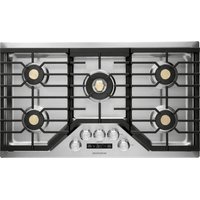
ZGU36ESLSS - Cooker Monogram - Free user manual and instructions
Find the device manual for free ZGU36ESLSS Monogram in PDF.


| Brand | Monogram |
| Model | ZGU36ESLSS |
| Product Type | Built-in gas cooktop |
| Width | 36 inches (91.4 cm) |
| Depth | Approximately 53 cm |
| Height | Approximately 7 cm |
| Weight | Approximately 30 kg |
| Gas Supply | Natural gas (NG) or propane (LP) – convertible |
| Electrical Supply | 120 V ~ 60 Hz, 15 A |
| Number of Burners | 6 |
| Burner Type | Dual stacked flame burners and multi-ring burner |
| Ignition | Electronic with automatic reignition |
| Timer | Integrated, digital display, setting via +/- keys |
| Gas Lock | Yes (Lock Control) |
| Connectivity | Built-in Bluetooth and Wi-Fi |
| Included Accessory | Cast iron griddle (depending on models) |
| Surface Material | Stainless steel |
| Burner Grates | Removable cast iron, dishwasher safe |
| Burner Cleaning | Removable components, hand wash |
| Warranty | 2 years limited (parts and labor) |
Frequently Asked Questions - ZGU36ESLSS Monogram
User questions about ZGU36ESLSS Monogram
0 question about this device. Answer the ones you know or ask your own.
Ask a new question about this device
Download the instructions for your Cooker in PDF format for free! Find your manual ZGU36ESLSS - Monogram and take your electronic device back in hand. On this page are published all the documents necessary for the use of your device. ZGU36ESLSS by Monogram.
USER MANUAL ZGU36ESLSS Monogram
Stainless Steel Gas Cooktops
ENGLISH/FRANÇAIS/ESPAÑOL
ELEVATE EVERYTHING
MONOGRAM
Contents
Consumer Information 3
Safety Information 5
Features of Your Cooktop 8
Cooktop Controls
Electronic Ignition & Automatic Reignition ..9
To Light a Surface Burner ..... 9
Dual-flame Stacked Burners ..... 9
Multi-Ring Burner 9
Timer 1
Gas Lockout Feature ....
Turning on Bluetooth ^® ..... 1 1
Selecting Wi-Fi 11
Surface Cooking
How to Select Flame Size ..... 1 2
Stove Top Grills 12
Griddle Accessory 13
Care and Cleaning
Cooktop Surface 14
Stainless Steel Surfaces 14
Timer Surface 14
Dual-flame Stacked Burners and Multi-Ring Burner 15
Spark Igniter and Electrodes....15
Burner Grates 16
Grate Support Bumpers 16 Griddles 16
Troubleshooting Tips 17
Warranty....19
Consumer Support 20
WARNING
If the information in this manual is not followed exactly, a fire or by result, causing property damage, personal injury or death.
- Do not store or use gasoline or other flammable vapors and liquids in the vicinity of this or any other appliance.
- WHAT TO DO IF YOU SMELL GAS
'RQRW\WU\WR\OLJKW\DQ\DSSOLDQFH
『 Ŷ』 'R□QRW□WRXFK□DQ□HOHFWULFDO□VZLWFK□GR□QRW□XVH□DQ□SKRQH□LQ□RXU□EXLOGLQJ
, PPHGLDWHO\FDOO\RXU\JDV\VXSSOLHU\IURP\D\QHLJKERU\V\SKRQH )ROORZ\WKH\JD instructions.
,I\RXFDQQRWUHDFK\RXUJDVVXSSOLHUFDOOWKHILUHGHS DUWPHQW
- Installation and service must be performed by a qualified installer, service agency or the gas supplier.
Consumer Information
| Stainless Steel Gas Cooktops | ||
| Remove Packaging Tape | Carefully grasp a corner of the protective shipping film with your fingers and slowly peel it from the appliance surface. Do not use any sharp items to remove the film. Remove all of the film before using the appliance for the first time. | To assure no damage is done to the finish of the product, the safest way to remove the adhesive from packaging tape on new appliances is an application of a household liquid dishwashing detergent. Apply with a soft cloth and allow to soak.NOTE: The adhesive must be removed from all parts. It cannot be removed if it is baked on. |
| Write Down the Model & Serial Numbers | You'll find them on a label located on the bottom of the cooktop. | Before sending in the registration card, please write these numbers here:Model NumberSerial NumberUse these numbers in any correspondence or service calls concerning your cooktop. |
| If you Received a Damaged Cooktop | Immediately contact the dealer (or builder) that sold you the cooktop | |
| Trouble-Shooting Tips | Before you request service, check the Problem Solver in the back of this manual. | It lists causes of minor operating problems that you can correct yourself. |
| If you Need Service | To obtain service, see the Consumer Services page in the back of this manual.We're proud of our service and want you to be pleased. If for some reason you are not happy with the service you receive, here are steps to follow for further help. | FIRST, contact the people who serviced your appliance. Explain why you are not pleased.In most cases, this will solve the problem.NEXT, if you are still not pleased, write all the details—including your phone number—to:Manager, Customer RelationsMonogramAppliance ParkLouisville, KY 40225 |
IMPORTANT SAFETY INFORMATION READ ALL INSTRUCTIONS BEFORE USING THE APPLIANCE
WARNING
Read all safety instructions before using the product. Failure to follow these instructions may result in shock, serious injury or death.
WARNING
GENERAL SAFETY INSTRUCTIONS
WARNING
NEVER use this appliance as a space heater to heat or warm the room. Doing so may result in carbon monoxide poisoning.
■ Use this appliance for its intended purpose as described in this owner's manual.
■ Have your cooktop installed and properly grounded by a qualified installer in accordance with the provided installation instructions.
■ Any adjustment and service should be performed only by a qualified gas cooktop installer or service technician. Do not attempt to repair or replace any part of your cooktop unless it is specifically recommended in this manual.
- Your cooktop is shipped from the factory set for use with natural gas but can be converted to propane (LP) gas. If required, these adjustments must be made by a qualified technician in accordance with the installation instructions and local codes. The agency performing this work assumes responsibility for the conversion.
■ Have the installer show you the location of the cooktop gas shut-off valve and how to turn it off if necessary.
- Plug your cooktop into a 120-volt grounded outlet only. Do not remove the round grounding prong from the plug. If in doubt about the grounding of the home electrical system, it is your responsibility and obligation to have an ungrounded outlet replaced with a properly grounded, three prong outlet in accordance with the National Electrical Code. Do not use an extension cord with this appliance.
■ Before performing any service, unplug the cooktop or disconnect the power supply at the household distribution panel by removing the fuse or switching off the circuit breaker.
■ Be sure all packing materials are removed from the cooktop before operating to prevent ignition of these materials.
■ Avoid scratching or impacting glass displays. Doing so may lead to glass breakage. Do not cook on a product with broken glass. Shock, fire, or cuts may occur.
■ Do not leave children alone or unattended in an area where an appliance is in use. They should never be allowed to climb, sit or stand on any part of the appliance.
■ Never block the vents (air openings) of the cooktop. They provide the air inlets and outlets that are necessary for the cooktop to operate properly with correct combustion. Air openings are located around the cooktop knobs.
■ Use only dry pot holders—moist or damp pot holders on hot surfaces may result in burns from steam. Do not let pot holders touch surface burners and burner grates. Do not use a towel or other bulky cloth in place of pot holders.
■ Surfaces of the appliance may become hot enough to cause burns. Potentially hot surfaces include the burners, grates, any backguard, or high shelf surface.
■ Do not heat unopened food containers. Pressure could build up and the container could burst, causing an injury.
■ Cook food thoroughly to help protect against foodborne illness. Minimum safe food temperature recommendations can be found at www.lsItDoneYet.gov and www.fsis.usda.gov. Use a food thermometer to take food temperatures and check several locations.
■ Do not allow anyone to climb, stand or hang on the cooktop. They could damage the cooktop causing severe injury or death.
- Keep the ventilator hood and grease filters clean to maintain good venting and to avoid grease fires. Turn the ventilator OFF in case of a fire or when intentionally "flaming" liquor or other spirits on the cooktop. The blower if in operation, could spread the flames.
READ AND SAVE THESE INSTRUCTIONS
IMPORTANT SAFETY INFORMATION READ ALL INSTRUCTIONS BEFORE USING THE APPLIANCE
WARNING
KEEP FLAMMABLE MATERIALS AWAY FROM THE COOKTOP
Failure to do so may result in fire or personal injury.
- Do not store or use flammable materials near the cooktop, including paper, plastic, pot holders, linens, wall coverings, curtains, drapes and gasoline or other flammable vapors and liquids.
■ Never wear loose-fitting or hanging garments while using the appliance. These garments may ignite if they contact hot surfaces causing severe burns.
■ Do not let cooking grease or other flammable materials accumulate in or near the cooktop. Grease on the cooktop may ignite.
WARNING
IN THE EVENT OF A FIRE, TAKE THE FOLLOWING STEPS TO PREVENT INJURY AND FIRE SPREADING
- Do not use water on grease fires. Never pick up a flaming pan. Turn the controls off. Smother a flaming pan on a surface unit by covering the pan completely with a well-fitting lid, cookie sheet or flat tray. Use a multi-purpose dry chemical or foam-type fire extinguisher.
WARNING
COOKTOP SAFETY INSTRUCTIONS
■ Never leave the surface burners unattended at medium or high heat settings. Foods, especially oily foods, may ignite resulting in fire that could spread to surrounding cabinets.
■ Never leave oil unattended while frying. If allowed to heat beyond its smoking point, oil may ignite resulting in fire that may spread to surrounding cabinets. Use a deep fat thermometer whenever possible to monitor oil temperature.
■ To avoid oil spillover and fire, use the minimum amount of oil when using a shallow pan-frying and avoid cooking frozen foods with excessive amounts of ice.
■ Use proper pan size and avoid pans that are unstable or easily tipped. Select cookware that is matched to the size of the burner. Burner flames should be adjusted so that they do not extend beyond the bottom of the pan. Excessive flame may be hazardous.
■ Always use the LITE position when igniting the top burners and make sure the burners have ignited.
■ When using glass/ceramic cookware, make sure it is suitable for cooktop service; others may break because of sudden change in temperature.
■ To minimize the possibility of burns, ignition of flammable materials and spillage, the handle of a container should be turned toward the center of the cooktop without extending over nearby burners.
- Do not use a wok with a round metal support ring. The ring may trap heat and block air to the burner resulting in a carbon monoxide hazard.
■ Do not attempt to lift the cooktop. Doing so may damage the gas tubing to the surface burners resulting in a gas leak and risk of fire.
■ When disabling Lock Control (on some models), make sure the surface controls are set to the OFF position. This will prevent unintended gas flow from the burners.
■ Do not use aluminum foil to cover the grates or line any part of the cooktop. Doing so may result in carbon monoxide poisoning, overheating of the cooktop surfaces, or a potential fire hazard.
STATE OF CALIFORNIA PROPOSITION 65 WARNINGS
WARNING
This product contains one or more chemicals known to the State of California to cause cancer, and
birth defects or other reproductive harm.
READ AND SAVE THESE INSTRUCTIONS
IMPORTANT SAFETY INFORMATION READ ALL INSTRUCTIONS BEFORE USING THE APPLIANCE
Remote Enable Equipment
This device complies with part 15 of the FCC Rules. Operation is subject to the following two conditions: (1) This device may not cause harmful interference, and (2) this device must accept any interference received, including interference that may cause undesired operation.
The wireless communication equipment installed on this range has been tested and found to comply with the limits for a Class B digital device, pursuant to part 15 of the FCC Rules. These limits are designed to:
(a) provide reasonable protection against harmful interference in a residential installation. This equipment generates, uses, and can radiate radio frequency energy and, if not installed and used in accordance with the instructions, may cause harmful interference to radio communications. However, there is no guarantee that interference will not occur in a particular installation. If this equipment does cause harmful interference to radio or television reception, which can be determined by turning the equipment off and on, the user is encouraged to try to correct the interference by one or more of the following measures:
■ Reorient or relocate the receiving antenna.
■ Increase the separation between the equipment and receiver.
■ Connect the equipment into an outlet on a circuit different from that to which the receiver is connected.
■ Consult the dealer or an experienced radio/TV technician for help.
(b) accept any interference received, including interference that may cause undesired operation of the device.
Note that any changes or modifications to the wireless communication device installed on this oven that are not expressly approved by the manufacturer could void the user's authority to operate the equipment.
Radio Frequency Interference
This unit has been tested and found to comply with the limits for a class B digital device, pursuant to Part 18 of the FCC rules. These limits are designed to provide reasonable protection against harmful interference in a residential installation. This unit generates, uses and can radiate radio frequency energy and, if not installed and used in accordance with the instructions, may cause harmful interference to radio communications. However, there is no guarantee that interference will not occur in a particular installation. If this unit does cause harmful interference to radio or television reception, which can be determined by turning the unit off and on, the user is encouraged to try to correct the interference by one or more of the following measures:
■ Reorient or relocate the receiving antennae.
■ Increase the distance between the unit and receiver.
■ Connect the unit into an outlet or a circuit different from that to which the receiver is connected.
CAUTION
Persons with a pacemaker or similar
medical device should exercise caution when using or standing near an induction unit while it is in operation. The electromagnetic field may affect the working of the pacemaker or similar medical device. It is advisable to consult your doctor or the pacemaker manufacturer about your particular situation.
■ Use this appliance only for its intended purpose as described in this Owner's Manual.
■ Be sure your appliance is properly installed and grounded by a qualified installer in accordance with the provided installation instructions.
■ Do not attempt to repair or replace any part of your range unless it is specifically recommended in this manual. All other servicing should be transferred to a qualified technician.
READ AND SAVE THESE INSTRUCTIONS
Design Information
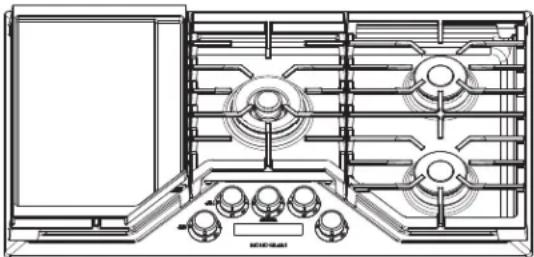
(Not all features are on all models. Appearance may vary.)
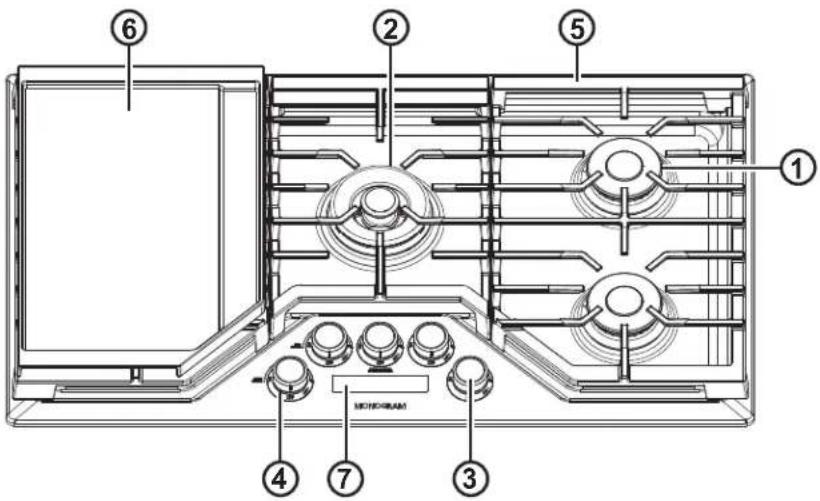
| Feature Index Page | ||
| 1 | Dual-Flame Spill-proof Burners-High Output 8 | |
| 2 | Multi-Ring Burners 8 | |
| 3 | Control Knobs (One For Each Surface Burner) 11 | |
| 4 | Burner "ON" Indicator Lights (One on each Control knob) — | |
| 5 | Burner Grates 13 | |
| 6 | Griddle 10 | |
| 7 | Timer (on some models) 10 |
Electronic Ignition & Automatic Reignition
The cooktop is equipped with electronic ignition which eliminates the need for a standing pilot light.
The burners on this cooktop will automatically relight if the flame goes out.
All surface burner igniters will spark and make clicking sounds when any burner is turned on. Do not touch any of the burners when igniters are clicking.
Occasionally the burners may spark if excess wind or a draft blows the flame away from the burner's flame sensor.
In case of a power outage, you can light the surface burners on your cooktop with a match. Hold a lighted match to the burner, then turn the knob to the LITE position. Use extreme caution when lighting burners this way.
To Light a Surface Burner
Push the control knob down and turn it counterclockwise to the LITE position.
⚠ WARNING
Burners should be
operated only when covered by cookware. Burner flames not covered by cookware present a risk of fire or clothing ignition. Never let flames extend beyond the sides of the cookware. Failure to comply may result in serious injury.
After the burner ignites, turn the knob to adjust the flame size.
To turn a burner off, turn the knob clockwise, as far as it will go, to the OFF position.
■ Do not operate a burner for an extended period of time without cookware on the grate. The finish on the grate may chip without cookware to absorb the heat.
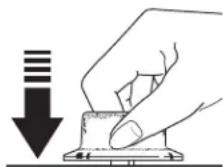
Push the control knob in and turn it to the LITE position.
Dual-flame Stacked Burners
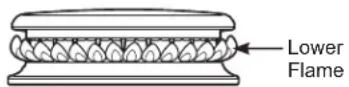
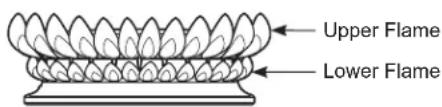
Some surface burners on your cooktop have two sets of flames stacked one on top of the other; the dual-flame burners have a lower (simmer) flame and a upper (main) flame.
When a burner is turned on, the lower flame will always light and stay on.
Simmering:
The stacked burner design provides a wide cooktop of heat settings with which to simmer. Depending on the type and quantity of food, and pan size, the flame can be adjusted to suit your specific need. The lowest setting uses only the lower flame and can maintain delicate foods at a safe 140^ F.
Cooking:
Settings from LO to HI will use both upper and lower flames. Use LO to HI for all purpose cooking. Use HI with larger diameter cookware.
HI is a very high heat setting and is intended to sear foods quickly and boil large quantities of water.
Multi-Ring Burner
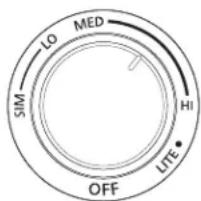
For large cookware, activate all rings by setting the burner between Hi and Med.
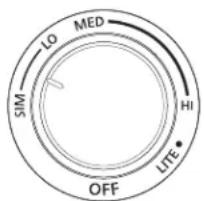
For small cookware or low heating applications, only activate the inner rings by setting the burner between Lo and Sim.
Timer
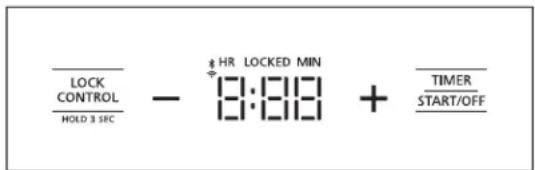
As a part of the power up sequence, the control lights up all the display elements. To start the timer, tap the Timer Start/Off pad once which prompts the use to start adding time.
■ To add time, tap the + pad.
■ To remove time, tap the – pad.
A single tap on the +/- pads results in a 1 minute change in time. Pressing and holding the +/- pads will automatically add/remove more time. Time can be added or removed from a running timer as long as the control is not locked by tapping the +/- pads. After adding time, wait for 3 sec until the timer starts count down automatically or to start the timer immediately, tap the Timer Start/Off pad once.
To cancel a running timer and turn it off, tap the Timer Start/Off pad once at any time. Once the timer finishes count down, it expires. It then starts flashing the display and starts producing a notification tone of five beeps until the user either adds more time to the timer or taps the Timer Start/Off pad to cancel it and turn it off.
Gas Lockout Feature
This feature can only be used after all the knobs on the cooktop have been turned off. If a knob is on, attempting to activate this feature produces a chime and this feature is not activated.
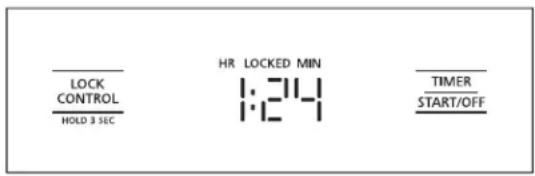
To lockout the flow of gas to the cooktop and to lock the control, press and hold the Lock Control pad for 3 seconds until a beep is heard. After the beep the pad must be released within 5 sec to activated this feature. Upon activation of this feature, the "LOCKED" icon on the display will start blinking and depending on the state will stay lit (locked) or turn off (unlocked).
It is possible to use the lockout feature while the timer is running. Once the control is locked, the timer can't be turned on again until the control is unlocked.
The control and the flow of gas can be unlocked at any time by repeating the procedure used to lock.
Turning on Bluetooth®
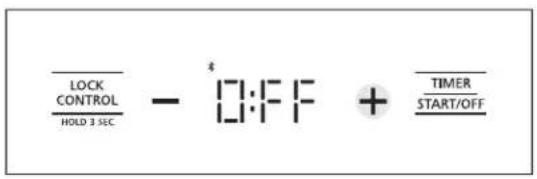
Press and hold the Lock Control and Timer Start/Off pads at the same time until a beep is heard.
Release both pads after the beep to enter the pairing mode for Bluetooth®.
The current state of the Bluetooth ^® is displayed, tap on the + pad to toggle the state.
If no selection is made on this screen within 5 seconds, this screen times out and exits the pairing mode. Repeat pairing mode sequence to return to this screen.
Selecting Wi-Fi
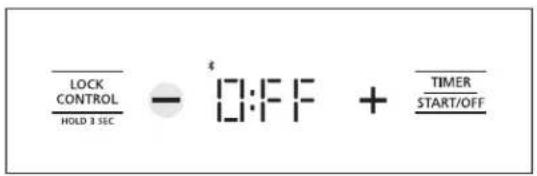
Upon entry into pairing mode, the display shows the current state of the Bluetooth ^® signal.
Tap the - pad to see the current state of the Wi-Fi signal. Tap the + pad to toggle the state of the Wi-Fi signal.
If no selection is made on this screen within 5 seconds, this screen times out and exits the pairing mode. Repeat pairing mode sequence to return to this screen.
How to Select Flame Size
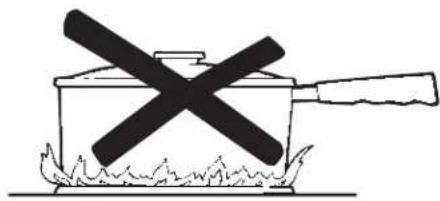
Watch the flame, not the knob, as you increase or reduce heat.
The flame size on a gas burner should match the cookware you are using.
FOR SAFE HANDLING OF COOKWARE, NEVER LET THE FLAME EXTEND UP THE SIDES OF THE COOKWARE. Any flame larger than the bottom of the cookware will not result in faster heating and could be hazardous.
natural_image
Simple line drawing of a cooking pot with a crossed-out black cross symbol, placed on a flame (no text or symbols)For surface stability, 6" minimum diameter cookware is recommended. Use larger diameter cookware for heat setting.
Stove Top Grills
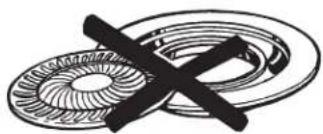
Do not use an after-market stove top grill on your gas surface burners. A stove top grill will cause incomplete combustion resulting in carbon monoxide levels above allowable standards. This could be hazardous to your health.
natural_image
Pure mechanical cross-section diagram without any text, numbers, or symbolsDo not use stove top grills
Griddle Accessory (available on some models)
CAUTION
Fire Hazard
■ Use care when cooking greasy foods. Spilled grease may result in fire.
■ Never place any items on the griddle when it is not in use. Heat from surrounding burners can heat the griddle and may result in fire.
■ Place and remove the griddle only when griddle is cool and all surface burners are turned Off.
Using Your Cast-Iron Griddle (on some models)
Your griddle provides an extra-large cooking surface for meats, pancakes and other foods usually prepared in a skillet. Before first use, rinse with hot water and dry thoroughly. Prepare the surface with cooking spray or vegetable oil.
Griddle Precautions:
■ Do not place the griddle in a microwave oven.
■ Do not clean your griddle in the dishwasher.
If something has spilled under the griddle, it should be cleaned up as soon as possible to prevent "baked on" food soil.
- Do not allow grease to accumulate under the griddle as it can be a fire hazard. Clean under the griddle with hot, soapy water as soon as it is cool.
Positioning Your Griddle
The cast-iron griddle (on some models) can only be used over the left burners of the cooktop. To position the griddle, place the griddle on top of the left grate. Adjust the griddle until it is fully seated and sitting flat on the grate below. Do not turn on the left burners until you are certain the griddle has been positioned correctly.
Preheating Your Griddle
Preheat your griddle by setting both left burners to Hi for 5 minutes before placing food on the griddle. Once the griddle is preheated, turn the knob on each left burner to the griddle zone and use the cook setting outlined in the table below.
Preseasoned Cast-Iron Griddle
| Type of Food Cook Setting | |
| Bacon Med | |
| Breakfast Sausage Links Med | |
| Eggs Lo | |
| Grilled Cheese Med-Lo | |
| Hamburgers Med-Lo | |
| Pancakes Med-Lo | |
| Warming Tortillas Lo |
Cook settings may need to be reduced if the griddle is used for an extended time.
natural_image
Technical line drawing of a gas stove interior with fans and control knobs (no text or symbols)Cooktop Surface
Do not use oven cleaners, abrasive cleansers, strong liquid cleansers, steel wool, plastic scouring pads, or cleaning powders on the cooktop surface. Clean with a mild soap and water or a 50/50 solution of vinegar and water. Rinse with clean water and dry with a soft cloth. When cleaning surfaces, make sure that they are at room temperature and not in direct sunlight.
Spillage of marinades, fruit juices, tomato sauces and basting liquids containing acids may cause discoloration and should be wiped up as soon as hot surfaces cool, then clean and rinse.
Cleaning Knobs
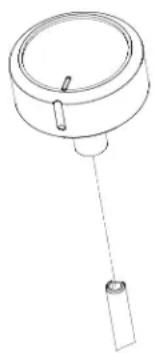
For easier cleaning, the control knobs may be removed by pulling them directly upwards once the knobs are in the OFF position. The knobs can be washed by hand with soap and water.
Do not submerge the knobs under water. If water collects under the glass from underneath the knob, it will drain out within 24 hours.
To replace knobs after cleaning, align the hole on the knob backside with the gas valve shaft and push downward until the knob is securely fastened. All knobs are interchangeable.
natural_image
Line drawing of a mechanical component with a cylindrical top and attached rod (no text or symbols)Stainless Steel Surfaces
Do not use a steel-wool pad; it will permanently scratch the surface.
To clean the stainless steel surface, use warm sudsy water or a stainless steel cleaner. Always wipe the surface in the direction of the grain. Follow the cleaner instructions for cleaning the stainless steel surface.
Spillage of marinades, fruit juices, tomato sauces and basting liquids containing acids may cause discoloration and should be wiped up as soon as hot surfaces cool, then clean and rinse.
To inquire about purchasing stainless steel appliance cleaner, please call our toll-free number, 800.626.2002 or visit monogram.com.
Timer Surface (on some models)
Use a damp cloth to clean the glass.
Dual-flame Stacked Burners and Multi-Ring Burner
The burner consists of three parts: the burner base, burner head, and burner cap. The burner head and burner cap can be lifted off, making them easy to clean.
CAUTION
DO NOT OPERATE THE BURNER WITHOUT ALL BURNER PARTS IN PLACE.
Surface burners should be cleaned routinely, especially after bad spillovers, which could clog the slots and holes in the burner heads.
The electrode is located at the rear of each burner. Do not attempt to disassemble or clean around any burner while another burner is on. An electric shock may result.
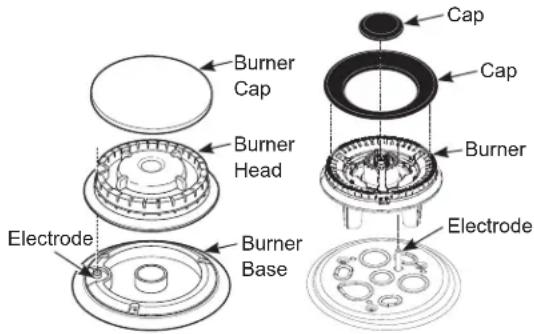
To remove burned-on food, soak the burner heads in a solution of mild liquid detergent and hot water for 20–30 minutes. For more stubborn stains, use a plastic scouring pad or toothbrush.
NOTE: Do not use steel wool or scouring pads to clean the burner parts as these may clog the openings. Never wash burner heads in your dishwasher. Doing so may cause them to discolor.
The ports in the burner heads must be kept clean at all times for an even, unhampered flame.
Clogged or dirty burner ports or electrodes will not allow the burner to operate properly.
After Cleaning
Before replacing the burner parts, shake out excess water and then dry them thoroughly.
To replace the burner parts:
Make sure that the burner parts are replaced in the correct location.
- Replace the burner head on top of the burner base, making sure that the hole in the burner head is properly aligned with the electrode in the burner base. A small gap between the base and head is normal.
- Place the burner cap on top of the burner head. Make sure that the burner cap is properly seated on the burner head.
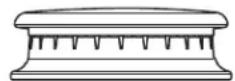
Burner cap properly seated
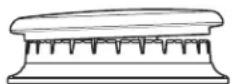
Burner cap not properly seated
To remove the burner parts:
- Turn all controls OFF before removing any burner parts.
- When cool, you may lift off the burner grates, burner caps and burner heads for easier cleaning. Do not remove the burner bases.
Cleaning
Lift off burner parts only when cool. Wash in hot, soapy water. You may use a plastic scouring pad to remove burned-on food particles.
Spark Igniter and Electrodes
The electrode of the electronic ignition system is positioned at the rear of the burner base. When cleaning the cooktop, be careful not to snag the igniter with your cleaning cloth. Damage to the igniter could occur.
Be careful not to push in a control knob while cleaning. It could cause the igniter to spark. Make sure that the white ceramic igniters on the cooktop are dry and clean. Clean the metal portion of the electrode with a soft cloth or emery board.
Do not attempt to remove the electrode from the cooktop.
Clean this metal part with an emery board.
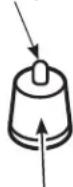
Do not clean this white ceramic part with an emery board.
Burner Grates
Manual Cleaning
Grates should be washed in hot, soapy water and rinsed with clean water. To soften burned-on food, place grates in a solution containing 14 -cup of household ammonia for several hours. Afterward, scrub grates with a plastic scouring pad soaked in hot, soapy water. Rinse well and dry.
Oven Cleaning
Some models have grates that can be cleaned in a self-cleaning oven. If grates do NOT have rubber bumpers (pads) attached to the bottom of the grates, they may be cleaned in the oven using the self-clean cycle. See your oven's Owner's Manual for specific instructions. If self-cleaning instructions are not mentioned in Owner's Manual, the grates should not be cleaned in a self-cleaning oven.
Dishwasher Cleaning
The grates may be cleaned in the dishwasher. Remove any burnt-on food particles prior to placing the grates in the dishwasher. Place them on the lowest rack of the dishwasher and run on a "heavy duty" cycle.
Do not operate a burner for an extended period of time without cookware on the grate. The finish on the grate may chip without cookware to absorb the heat.
Although the grates are durable, they will gradually lose their shine, regardless of the best care you can give them. This is due to their continual exposure to high temperatures and abrasion by the cookware.
NOTE: Use caution when removing the grates from the oven after the self-clean cycle has ended. The grates may still be hot.
Once the self-clean cycle is complete, the grates may carefully be removed. You may notice a white residue on the grates. Wipe it off with a damp sponge. If white spots persist, wet the sponge with a 50/50 solution of vinegar and water and wipe the grates again.
When replacing the grates on the cooktop, be sure to locate them correctly. Grates should fit securely into the cooktop.
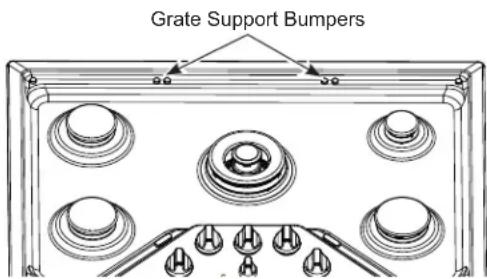
Grate Support Bumpers
If any of the rubber grate support bumpers in the cooktop are missing or damaged, replacement parts can be obtained.
Visit Monogram.com or call Monogram Preferred Service (800.444.1845) during normal business hours.
To insert the new bumpers, simply place the cone-shaped end of the bumper into the hole in the cooktop and push down while gently twisting the bumper.
Griddles
Cast-Iron: Clean your cast-iron griddle with a stiff brush and hot water. Using soap is not recommended, and harsh detergents should never be used as they will remove the seasoning. Rinse with hot water and dry thoroughly. After a rinsing, preseason the griddle by applying a light coat of cooking oil to the griddle surface. Wipe off excess oil with a paper towel.
Store in a cool, dry place.
Griddle Precautions:
If something has spilled under the griddle, it should be cleaned up as soon as possible to prevent the spill from getting baked onto the cooktop.
■ Do not allow grease to accumulate under the griddle as it can be a fire hazard. Clean under the griddle with hot, soapy water as soon as it is cool.
■ Do not wash your griddle in the dishwasher.
■ Do not clean the griddle in the self-cleaning oven.
Before you call for service
Save time and money! Review the charts on the following pages first and you may not need to call for service.
| Problem Possible Causes What To Do | ||
| Burners have yellow or yellow-tipped flames | The combustion quality of burner flames needs to be determined visually. | Determine the quality of flames visually. Normal burner flames should look like (A) or (B).Long, bright yellow flames are not normal.Normal flames may show signs of an orange tint when well heated or signs of flickering orange due to particles in the gas or air.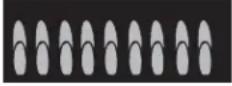 (A) Soft blue flames—Normal for natural gas (A) Soft blue flames—Normal for natural gas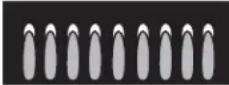 (B) Yellow tips on outer cones—Normal for propane gas (B) Yellow tips on outer cones—Normal for propane gas |
| Control knobs will not turn | Knob isn't pushed down. To turn from the OFF position, push the knob down and then turn. | |
| Burners do not light | Plug on cooktop is not completely inserted in the electrical outlet. | Make sure electrical plug is plugged into a live, properly grounded outlet. |
| Gas supply not connected or turned on. | See the Installation Instructions that came with your cooktop. | |
| A fuse in your home may be blown or the circuit breaker tripped. | Replace the fuse or reset the circuit breaker. | |
| Burner parts not replaced correctly. See the Cleaning the Cooktop section. | ||
| The electrodes under the burners are soiled. | See the Cleaning the Cooktop section. | |
| Cooktop is locked. Unlock the cooktop. See the Using the Cooktop section. | ||
| The igniter hole (on some models) is plugged. | See the Cleaning the Cooktop section. | |
| Ticking sound of igniter persists after burner lights | Control knob is still in the LITE position. | Turn the knob out of the LITE position to the desired setting. |
| Turn the burner off and relight. If ticking is still present, call for service. | ||
| Auto-reignition feature is attempting to re-ignite flame. | While in its lowest setting, the flame can be shifted away from the burner's flame sensor by drafts around the cooktop. Turn down or redirect any fans or ventilation equipment operating around the cooktop until sparking ceases. | |
| Top burners do not burn evenly | Improper burner assembly. Make sure the burner caps are seated correctly.See the Care and Cleaning of the range section. | |
| Burner slots on the side of the burner may be clogged. | Remove the burners for cleaning. See the Care and Cleaning of the range section. | |
| Unresponsive keypad | Keypad is dirty Clean the keypad. | |
| A fuse in your home may be blown or the circuit breaker tripped. | Replace the fuse or reset the circuit breaker. | |
| Timer control panel glass is wet around its edges. | Dry the edges as best as possible and wait several minutes for the timer buttons to become responsive again. | |
Notes
YOUR MONOGRAM COOKTOP WARRANTY
Staple your receipt here. Proof of the original purchase date is needed to obtain service under the warranty.
WHAT IS COVERED
From the Date of the Original Purchase
LIMITED TWO-YEAR WARRANTY
For two years from date of original purchase, we will provide, free of charge, parts and service labor in your home to repair or replace any part of the cooktop that fails because of a manufacturing defect.
This warranty is extended to the original purchaser and any succeeding owner for products purchased for ordinary home use in the 48 mainland states, Hawaii and Washington, D.C. In Alaska the warranty is the same except that it is LIMITED because you must pay to ship the product to the service shop or for the service technician's travel costs to your home.
All warranty service will be provided by our Factory Service Centers or by our authorized Customer Care ^® servicers during normal working hours.
Should your appliance need service, during warranty period or beyond, in the U.S.A. call 800.444.1845. In Canada: 888.880.3030
WHAT IS NOT COVERED
■ Service trips to your home to teach you how to use the product.
■ Discoloration of the griddle plate or oven racks.
■ Chipping of porcelain enamel grates or oven racks.
■ Replacement of house fuses or resetting of circuit breakers.
■ Incidental or consequential damage caused by possible defects with this appliance.
■ Damage after delivery.
■ Damage to the product caused by accident, fire, floods or acts of God.
■ Product damage or failure of the product if it is abused, misused, used for other than the intended purpose, or used commercially.
- Improper installation, delivery or maintenance. If you have an installation problem, contact your dealer or installer. You are responsible for providing adequate electrical, gas, exhausting and other connecting facilities as described in the Installation Instructions provided with the product.
■ Product not accessible to provide required service.
EXCLUSION OF IMPLIED WARRANTIES
Your sole and exclusive remedy is product repair as provided in this Limited Warranty. Any implied warranties, including the implied warranties of merchantability or fitness for a particular purpose, are limited to one year or the shortest period allowed by law.
Some states do not allow the exclusion or limitation of incidental or consequential damages, so the above limitation or exclusion may not apply to you. This warranty gives you specific legal rights, and you may also have other rights which vary from state to state.
To know what your legal rights are in your state, consult your local or state consumer affairs office or your state's Attorney General.
Warrantor: GE Appliances, a Haier company
Warrantor in Canada: MC Commercial, Burlington, ON, L7R 5B6
| With the purchase of your new Monogram appliance, receive the assurance that if you ever need information or assistance from Monogram, we will be there. All you have to do is call! | |
| Register Your Appliance | Register your new appliance on-line at your convenience! Timely product registration will allow for enhanced communication and prompt service under the terms of your warranty, should the need arise. You may also mail in the pre-printed registration card included in the packing material.In the US: Monogram.comIn Canada: Prodsupport.mabe.ca/crm/Products/ProductRegistration.aspx |
| Schedule Service | Expert Monogram repair service is only one step away from your door. Get on-line and schedule your service at your convenience any day of the year.In the US: Monogram.comor call 800.444.1845 during normal business hours.In Canada: GEAppliances.ca/en/support/service-request or call 888.880.3030 |
| Extended Warranties | Purchase a Monogram extended warranty and learn about special discounts that are available while your warranty is still in effect.In the US: Monogram.comor call 800.444.1845 during normal business hours.In Canada: GEAppliances.ca/en/support/purchase-extended-warranty or call 888.880.3030 |
| Remote Connectivity | For assistance with wireless network connectivity (for models with remote enable), visit our website at Monogram.com or call 800.444.1845 in the US only. |
| Parts and Accessories | Individuals qualified to service their own appliances can have parts or accessories sent directly to their homes (VISA, MasterCard and Discover cards are accepted). Order on-line today 24 hours every day.In the US: Monogram.com or by phone at 800.444.1845 during normal business hours.Instructions contained in this manual cover procedures to be performed by any user. Other servicing generally should be referred to qualified service personnel. Caution must be exercised, since improper servicing may cause unsafe operation.Customers in Canada should consult the yellow pages for the nearest MC Commercial service center, visit our website at GEAppliances.ca/en/products/parts-filters-accessories or call 888.880.3030. |
MANUEL DU PROPRIÉTAIRE
Minuterie
natural_image
Simple line drawing of a cooking pot with a crossed-out black X mark and flames on the base (no text or symbols)natural_image
Pure mechanical diagram showing a crossed ring and concentric rings without any text, numbers, or symbols.natural_image
Technical line drawing of a gas stove interior with fans and control panel (no text or symbols)Surface de la Table de Cuisson
natural_image
Simple line drawing of a mechanical component with a cylindrical top and attached rod (no text or symbols)Garant : GE Appliances, a Haier company
Garant au Canada : MC Commercial, Burlington, ON, L7R 5B6
natural_image
Illustration of a hand pressing down on a button with a downward arrow (no text or symbols)Temporizador
natural_image
Simple line drawing of a cooking pot with a crossed X mark and flames at the base (no text or symbols)natural_image
Pure mechanical diagram showing a gear and cam mechanism without any text or symbolsnatural_image
Technical line drawing of a gas stove with fan and control panel (no text or symbols)natural_image
Simple line drawing of a mechanical component with a cylindrical top and attached rod (no text or symbols)natural_image
Technical line drawing of a portable air conditioner unit with multiple circular components and a handle (no text or symbols)Plancha
- Contents
- Cooktop Controls
- Surface Cooking
- Care and Cleaning
- WARNING
- IMPORTANT SAFETY INFORMATION READ ALL INSTRUCTIONS BEFORE USING THE APPLIANCE
- GENERAL SAFETY INSTRUCTIONS
- READ AND SAVE THESE INSTRUCTIONS
- KEEP FLAMMABLE MATERIALS AWAY FROM THE COOKTOP
- IN THE EVENT OF A FIRE, TAKE THE FOLLOWING STEPS TO PREVENT INJURY AND FIRE SPREADING
- COOKTOP SAFETY INSTRUCTIONS
- STATE OF CALIFORNIA PROPOSITION 65 WARNINGS
- Remote Enable Equipment
- Radio Frequency Interference
- CAUTION
- Design Information
- Electronic Ignition & Automatic Reignition
- To Light a Surface Burner
- ⚠ WARNING
- Dual-flame Stacked Burners
- Simmering:
- Cooking:
- Multi-Ring Burner
- Timer
- Gas Lockout Feature
- Turning on Bluetooth®
- Selecting Wi-Fi
- How to Select Flame Size
- Stove Top Grills
- Fire Hazard
- Using Your Cast-Iron Griddle (on some models)
- Griddle Precautions:
- Positioning Your Griddle
- Preheating Your Griddle
- Cooktop Surface
- Cleaning Knobs
- Stainless Steel Surfaces
- Timer Surface (on some models)
- After Cleaning
- To replace the burner parts:
- To remove the burner parts:
- Cleaning
- Burner Grates
- Manual Cleaning
- Oven Cleaning
- Dishwasher Cleaning
- Grate Support Bumpers
- Griddles
- Before you call for service
- YOUR MONOGRAM COOKTOP WARRANTY
- Staple your receipt here. Proof of the original purchase date is needed to obtain service under the warranty.
- WHAT IS COVERED
- LIMITED TWO-YEAR WARRANTY
- WHAT IS NOT COVERED
- EXCLUSION OF IMPLIED WARRANTIES
- MANUEL DU PROPRIÉTAIRE
- Minuterie
- Surface de la Table de Cuisson
- Temporizador
- Plancha
Brand : Monogram
Model : ZGU36ESLSS
Category : Cooker