RCIC-50BI - Ice Maker Royal Catering - Free user manual and instructions
Find the device manual for free RCIC-50BI Royal Catering in PDF.
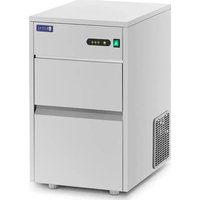


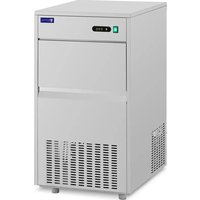
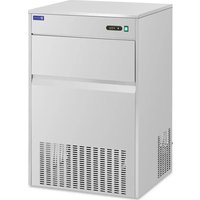
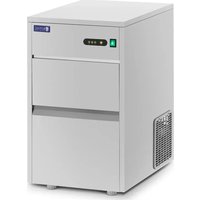
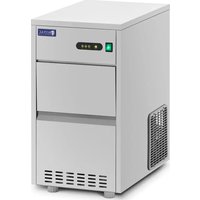
| Brand | Royal Catering |
| Model | RCIC-50BI |
| Product type | Ice machine |
| Use | Domestic |
| Power supply | 230 V / 50 Hz |
| Rated power | 380 W |
| Rated current | 2.5 A |
| Protection class | I |
| IP rating | IPX0 |
| Dimensions (W × D × H) | 543 × 398 × 682 mm |
| Weight | 29 kg |
| Refrigerant / quantity | R290 / 68 g |
| Insulating gas type | Polystyrene |
| Climate class | ST/4 |
| Ambient operating temperature | 7 °C to 38 °C |
| Output (ice production) | 50 kg / 24 h |
| Ice bin capacity | 7 kg |
| Dimensions of an ice cube | ∅28 × 41 mm |
| Noise level | < 58 dB |
| Water connection | Running drinking water (pressure 1 – 7.8 bar) |
| Drainage | Drain (drainage hose) |
| Adjustable feet | 4 feet |
| Cleaning | Mild products for food surfaces, do not immerse |
| Repairability | Only by a qualified professional, original parts |
| Safety | Flammable refrigerant R290, wait 5 min before restarting, free space 20 cm |
Frequently Asked Questions - RCIC-50BI Royal Catering
User questions about RCIC-50BI Royal Catering
0 question about this device. Answer the ones you know or ask your own.
Ask a new question about this device
Download the instructions for your Ice Maker in PDF format for free! Find your manual RCIC-50BI - Royal Catering and take your electronic device back in hand. On this page are published all the documents necessary for the use of your device. RCIC-50BI by Royal Catering.
USER MANUAL RCIC-50BI Royal Catering
| DE | Produktname: | EISWÜRFELMASCHINE | |||
| EN | Product name: | ICE CUBE MAKER | |||
| PL | Nazwa produktu: | KOSTKARKA DO LODU | |||
| CZ | Název výrobku | VÝROBNÍK KOSTKOVÉHO LEDU | |||
| FR | Nom du produit: | APPAREIL À GLAÇONS | |||
| IT | Nome del prodotto: | MACCHINA CUBETTI DI GHIACCIO | |||
| ES | Nombre del producto: | MÁQUINA DE HIELO | |||
| HU | Termék neve | JÉGKOCKA GÉP | |||
| DA | Produktnavn | ISTERNINGMASKINE | |||
| DE | Modell: | RCIC-50BI | RCIC-50BIB | RCIC-25BI | RCIC-20BI |
| EN | Product model: | ||||
| PL | Model produktu: | ||||
| CZ | Model výrobku | ||||
| FR | Modèle: | ||||
| IT | Modello: | ||||
| ES | Modelo: | ||||
| HU | Modell | ||||
| DA | Model | ||||
| DE | Hersteller | expondo Polska sp. z o.o. sp. k. | |||
| EN | Manufacturer | ||||
| PL | Producent | ||||
| CZ | Výrobce | ||||
| FR | Fabricant | ||||
| IT | Produttore | ||||
| ES | Fabricante | ||||
| HU | Termelő | ||||
| DA | Producent | ||||
| DE | Anschrift des Herstellers | ul. Nowy Kisielin – Innowacyjna 7, 66-002 Zielona Góra | Poland, EU | |||
| EN | Manufacturer Address | ||||
| PL | Adres producenta | ||||
| CZ | Adresa výrobce | ||||
| FR | Adresse du fabricant | ||||
| IT | Indirizzo del produttore | ||||
| ES | Dirección del fabricante | ||||
| HU | A gyártó címe | ||||
| DA | Producentens adresse | ||||
This User Manual has been translated for your convenience using machine translation. Reasonable efforts have been made to provide an accurate translation; however, no automated translation is perfect nor is it intended to replace human translators. The official User Manual is the English version. Any discrepancies or differences created in the translation are not binding and have no legal effect for compliance or enforcement purposes. If any questions arise related to the accuracy of the information contained in the User Manual, please refer to the English version of those contents which is the official version.
Technical data
| Description of the parameter | Value of the parameter | |||
| Product name | ICE CUBE MAKER | |||
| Model | RCIC-50BI | RCIC-50BIB | RCIC-25BI | RCIC-20BI |
| Supply voltage [V~] / Frequency [Hz] | 230 / 50 | |||
| Rated power [W]. | 380 | 380 | 240 | 220 |
| Protection class | I | |||
| IP protection rating | IPX0 | |||
| Dimensions [Width x Depth x Height; mm] | 543 x 398 x 682 | 612 x 548 x 822 | 542 x 398 x 682 | 503 x 330 x 606 |
| Weight [kg] | 29 | 40 | 27 | 21 |
| Refrigerant type / amount [g] | R290 / 68 | R290 / 68 | R290 / 40 | R290 / 35 |
| Ready ice container capacity [kg] | 7 13 7 5 | |||
| Insulation gas type | Polystyrene | |||
| Climate class | ST/4 | |||
| Rated current [A] | 2.5 | 2.5 | 1.9 | 1.9 |
| Efficiency [kg/24h]* - average value measured at 10°C for water temperature and 15°C for ambient | 50 | 50 | 25 | 20 |
| temperature at the repeated cycle | ||||
| Noise [dB] | < 58 | < 58 | < 55 | < 55 |
| Ambient temperature for use [°C] | ≥7 - ≤38 | |||
| Dimensions of a single ice cube [mm] | ~∅28 x 41 | ~ ∅26 x 43 | ~ ∅25 x 40 | ~ ∅25 x 38 |
1. General overview
This manual is intended to assist you in safe and reliable use. The product is designed and manufactured strictly according to technical specifications using the latest technology and components and maintaining the highest quality standards.
PLEASE CAREFULLY READ AND UNDERSTAND THIS INSTRUCTION MANUAL BEFORE OPERATION.
To ensure long and reliable operation of the device, make sure to operate and maintain it properly in accordance with the guidelines in this instruction manual. The technical data and specifications in this manual are up-to-date. The manufacturer reserves the right to make changes in order to improve the quality. Taking the technical progress and the possibility of reducing noise into account, the unit is designed and built in such a way so that risks resulting from noise emissions are reduced to the lowest possible level.
Explanation of symbols
| CE | The product complies with applicable safety standards. |
 | Read the manual before use. |
 | Recyclable product. |
 | CAUTION! or WARNING! or REMEMBER! describing a given situation (general warning sign). |
 | CAUTION! Risk of electric shock! |
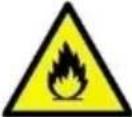 | CAUTION! Danger of fire - flammable material! |
 | Caution! Hot surface can cause burns! |
 | For indoor use only. |

CAUTION! The figures in this manual are illustrative only and may vary in some details from the actual appearance of the product.
2. Safety of use
CAUTION! Read all safety warnings and all instructions. Failure to follow the warnings and instructions may result in electric shock, fire and/or serious injury or death.
The term "device" or "product" in the warnings and in the description of the manual refers to ICE CUBE MAKER.
2.1. Electrical safety
a) The plug of this device must fit into the outlet. Do not modify the plug in any way. Original plugs and matching outlets reduce the risk of electric shock. b) Avoid touching grounded parts, such as pipes, heaters, ovens, and refrigerators. There is an increased risk of electric shock if your body is grounded and touches the device exposed to direct rain, wet pavement, and operation in a humid environment. If water enters the device, there is an increased risk of damage to the unit and electric shock. c) Do not touch the device with wet or damp hands.
d) Do not use the cord in an unintended manner. Never use it to carry the device or to pull the plug out of the socket. Keep the cord away from heat sources, oil, sharp edges or moving parts. Damaged or tangled cords increase the risk of electric shock. e) If you cannot avoid using the product in a wet environment, use a residual current device (RCD) to connect it to electrical mains. Using an RCD reduces the risk of electric shock. f) Do not use the device if the power cord is damaged or shows signs of wear. A damaged power cord should be replaced by a qualified electrician or the manufacturer's service department. g) To avoid electric shock, do not immerse the cable, plug, or the device itself in water or other liquid. Do not use the appliance on wet surfaces. h) CAUTION – DANGER TO LIFE! When cleaning or using the appliance, never immerse it in water or other liquids. i) Do not use the appliance in rooms with very high humidity / in the immediate vicinity of water tanks!
2.2. Safety in the workplace
a) Keep the work area tidy and well lit. Disorder or poor lighting can lead to accidents. Be foresighted, watch what you are doing and use common sense when using the unit. b) Do not use the unit in an explosive area, for example in the presence of flammable liquids, gases or dust. The unit produces sparks that can ignite dust or fumes. c) If in doubt as to whether the device is working, contact the manufacturer's technical service. d) Repairs to the device may only be carried out by the manufacturer's service. Do not attempt to repair the product on your own! e) In case of open flames or fire, use only dry powder or snow (CO2) fire extinguishers to extinguish the live equipment. f) Check the condition of the safety stickers regularly. Replace them if they are illegible. g) Keep these instructions for use for future reference. If the product is to be handed over to a third party, hand it over with this user manual. h) Keep packaging components and small installation parts out of the reach of children. i) When using this product together with other devices, also follow the other instructions for use.
2.3. Personal safety
a) Do not operate this device if you are tired, ill or under the influence of alcohol, drugs or medication that could impair your ability to operate the device. b) The device is not intended to be used by persons (including children) with reduced mental, sensory or intellectual functions or persons who lack experience and/or knowledge unless they are supervised or have been instructed by a person responsible for their safety on how to operate the device. c) Use caution and common sense when operating this device. A moment's inattention during operation may result in serious personal injury. d) To prevent accidental start-up, make sure the switch is in the off position before connecting to a power source. e) The product is not a toy. Children should be watched to ensure that they do not play with the appliance.
2.4. Safe use of the device
a) Do not overload the device. Use tools that are suitable for the application. A correctly selected product will do a better and safer job for which it was designed. b) Do not use the device if the ON/OFF switch does not function properly (does not turn on and off). Units that cannot be controlled by the switch are unsafe, cannot operate, and must be repaired. c) Unplug the unit before making adjustments, changing accessories, or putting it away. This precaution reduces the risk of accidental start-up. d) Disconnect the pressure hose before making adjustments, changing accessories, and after working with the equipment. This precaution reduces the risk of accidents. e) Keep unused product out of the reach of children and anyone unfamiliar with the device or this manual. Products are dangerous when used by inexperienced users. f) Keep the product in good working order. Check before each use for general damage or damage to moving parts (cracks in parts and components or any other condition that may affect the safe operation of the device). If damaged, have the device repaired before use. g) Keep the product out of the reach of children. h) Repairs and maintenance should be carried out by qualified personnel using only original spare parts. This will ensure the safety of use. i) To ensure the designed operational integrity of the device, do not remove factory-installed covers or loosen screws.
j) When transporting or moving the unit from storage to the place of use, observe the health and safety rules for manual handling applicable in the country where the unit is used. k) Do not touch any moving parts or accessories unless the device is unplugged. l) Do not move, shift, or rotate the device while in operation. m) Do not leave the device switched on unattended. n) Clean the device regularly to prevent permanent dirt build-up. o) If you notice any leakage from the unit or hoses, immediately disconnect the compressed air supply and correct the fault. p) The product is not a toy. Cleaning and maintenance must not be performed by children without adult supervision. q) Do not start up an empty unit. r) Do not tamper with the device to alter its performance or design. s) Keep the unit away from sources of fire and heat. t) Do not overload the device. u) Do not block the ventilation openings of the unit! v) To avoid damaging the compressor, maintain a break of at least 5 minutes between pressing the power button. w) Use only drinking water to create ice cubes. x) To avoid fire and short circuit, do not put metal parts or electrical appliances inside the container. y) Store, use and transport the device in an upright position only. z) Do not tilt the device more than 45 degrees. aa) For indoor use only. bb) Do not store explosive substances, such as cans containing compressed flammable gas, inside the unit. cc) CAUTION! The unit in its construction contains flammable substances. For this reason, the device dd) should be taken to a specialist for disposal at the end of its service life. ee) Be careful not to damage any parts of the unit, especially those that contain the refrigerant. If the refrigerant comes in contact with eyes, it can cause serious eye damage. ff) During operation, the vicinity of the compressor and the condenser may reach a temperature of 70-90°C, do not touch these elements and do not place them near flammable materials. gg) Keep a free space around the unit (minimum 20 cm on each side).

CAUTION! Although the product has been designed to be safe, with adequate safeguards, and despite the additional safety features provided to the user, there is still a slight risk of accident or injury when handling the product. Caution and common sense are advised when using the product.
3. Instructions for use
The device is designed for the production of ice cubes commonly used, among others, for alcoholic and non-alcoholic beverages.
The device is dedicated to home use. It is not intended for long-term storage of ice.
The user is responsible for any damage resulting from misuse.
3.1. Product overview
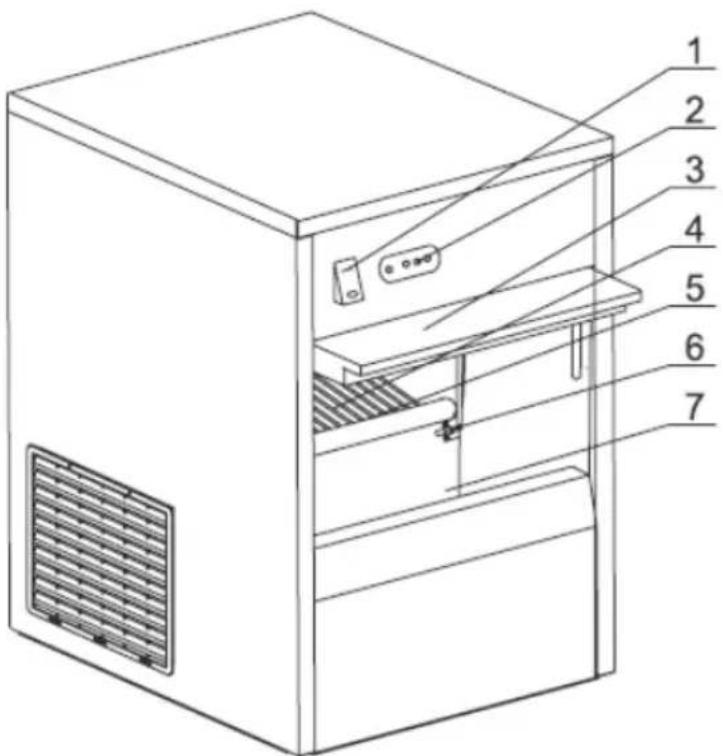
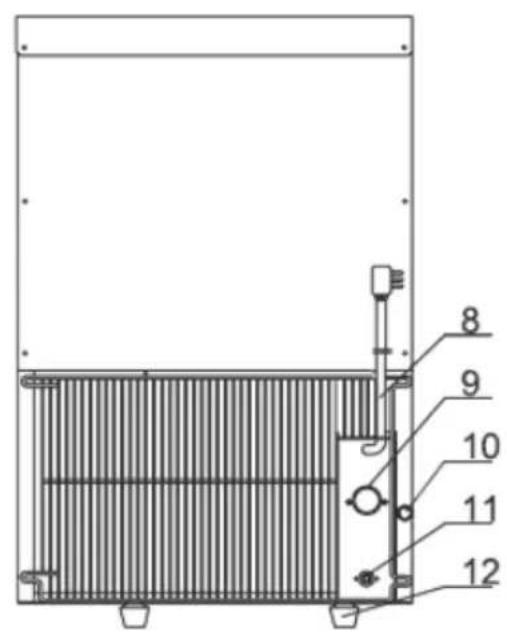
- Power switch
- Control panel
- Sliding doors
- Shelf
- Water storage container
- Ice level sensor
- Ice container
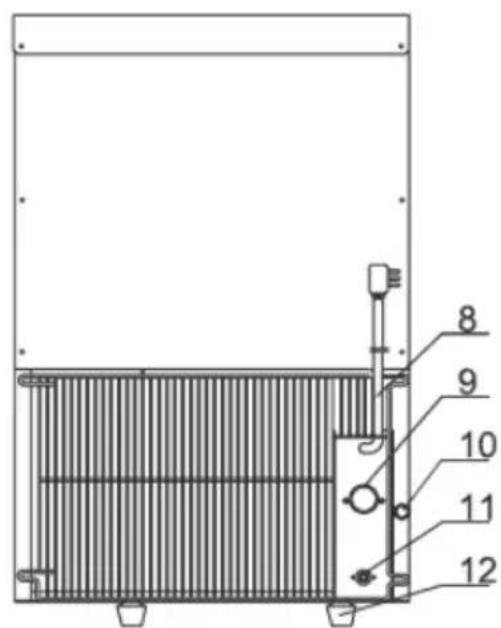
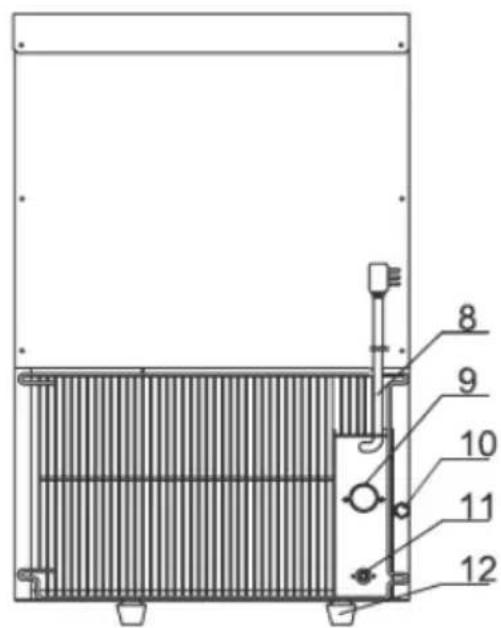
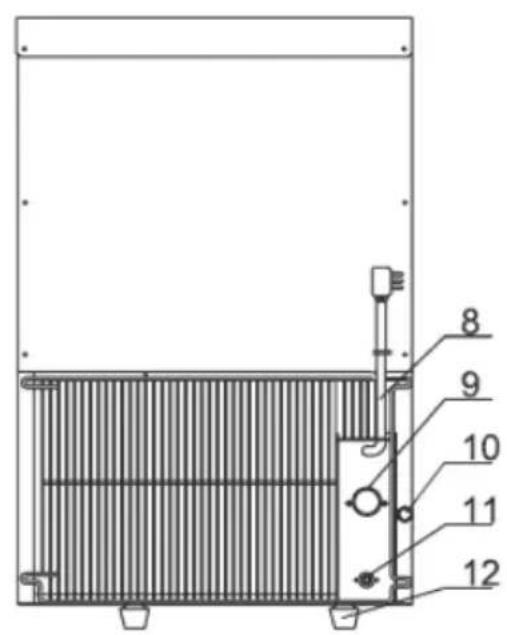
- Power cord
- Connection to the water supply hose
- Drain plug (drainage)
- Connection to the drain hose
- Adjustable foot (x4)
3.2. Preparation for operation
POSITIONING OF THE UNIT
The ambient temperature should not exceed 7-38°C and the relative humidity should not exceed 85%. Place the unit in a way that ensures good air circulation. Maintain a minimum clearance of 20 cm from any wall of the unit. Keep the unit away from any hot surfaces. Always operate the unit on a level, stable, clean, fireproof and dry surface and out of the reach of children and persons of impaired mental, sensory and intellectual functions. Place the unit in such a way that the mains plug can be reached at any time. Ensure that the power supply to the unit corresponds to that specified on the identification plate!
Before using the unit for the first time, disassemble all parts and wash them as well as the entire unit. Remove the protective films.
IMPORTANT: after installing and leveling the unit in its final location, wait 12 hours before using it for the first time! The same applies to changing the location of the device.
ASSEMBLY OF THE UNIT
Place the unit in its final location and connect it to a running drinking water supply (water pressure should be between 1 \~ 7.8 bar) and a sewage drain or a suitable waste water tank.
NOTE: the drainage hose and its end should be placed below the drainage hole of the device - this will ensure trouble-free water drainage.
When connecting to the running water supply, be sure to install gaskets on the connecting parts. The source of the running water should have a valve shutting off its supply. Then connect the power cord to the power source.
NOTE: the unit can also work with a running water connection equipped with an external filtering system, but in this case, remember to change the water filter regularly according to the recommendations of the manufacturer of the installed water purification system.
3.3. Working with the unit
NOTE: when starting the machine for the first time or after a long idle time, unscrew the drain plug and drain the water. During the first 2 cycles of ice production, the device is being cleaned from the inside, so the produced ice is NOT SUITABLE for consumption!
- Turn on the power by setting its switch to the "I" position (it will light up) and the unit will start working - the "RUN" indicator will light up. For the
first few minutes, the device will run a self-diagnostics and if the device is fine, it will start making ice. The "RUN" light is on whenever the unit is producing ice.
- The entire ice production process is automatic and is automatically regulated by the device, i.e. water delivery -> ice production -> serving -> storage (the storage container for the ice cubes is sealed to extend the shelf life of the ice)
- If any problem is encountered during the production of ice, the machine will indicate the problem with the appropriate indicator (see the picture below):
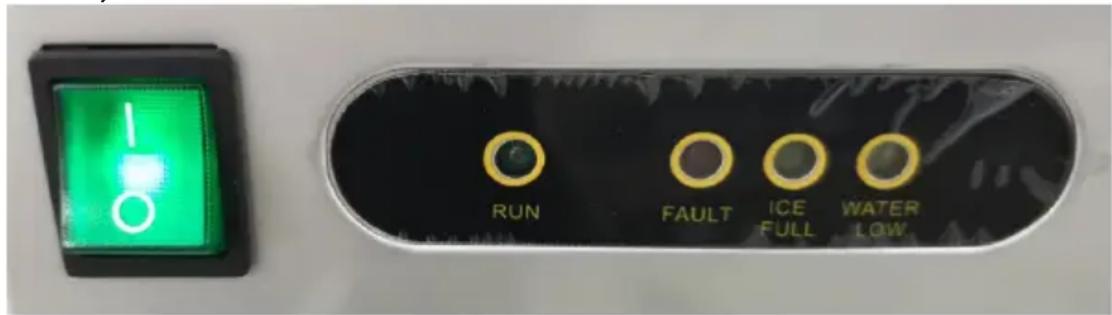
"FAULT" - device error (the device stops producing ice).
"ICE FULL" - the ice cube container is full (the appliance stops any further ice making). Ice production will automatically resume when the compartment is empty).
"WATER LOW" (permanently on) - lack of water or error in the drinking water supply system (the unit stops any further ice making - as soon as water is supplied, restart the unit).
"WATER LOW" (blinks) - no water in the running water supply (the unit stops making ice, but as soon as the water in the system returns, the ice production will restart automatically).
IMPORTANT: if the compressor stops for any reason (no water, too much ice, etc.), wait at least 5 minutes before restarting the unit!
- Regularly drain excess water from the device to prevent spontaneous leakage.
3.4. Cleaning and maintenance
a) Pull the mains plug and let the unit cool down completely before cleaning, adjusting or replacing accessories and when the unit is not in use. - Wait until the rotating parts stop. b) Use only non-corrosive cleaning agents for cleaning the surfaces. c) Only mild detergents designed for cleaning food contact surfaces may be used to clean the unit. d) After each cleaning, all the parts should be dried well before the unit is used again.
e) Do not spray the unit with a stream of water or immerse it in water. f) Make sure that no water enters through the ventilation openings in the casing. g) Clean the ventilation openings with a brush and compressed air. h) Perform regular inspections of the unit checking technical fitness and any damages. i) Use a soft, damp cloth for cleaning. j) Do not use sharp and/or metal objects (e.g. wire brush or metal spatula) for cleaning as they may damage the surface of the appliance material. k) Do not clean the device with acidic substances, medical products, thinners, fuel, oil or other chemicals as this may damage the device. l) If the device is not used for a long time, disconnect it from the power supply, drain the accumulated water, and thoroughly wipe the ice container with a clean cloth.
DISPOSAL OF WASTE APPLIANCES
At the end of its useful life, this product should not be disposed of with normal household waste but should be taken to a collection point for the recycling of electrical and electronic equipment. This is indicated by the symbol on the product, operating instructions or packaging. The materials used in this appliance are recyclable according to their marking. By reuse, recycling or applying other forms of use of waste machines, you make a significant contribution to the protection of our environment.
Your local administration will provide you with information about the appropriate disposal point for used appliances.
TROUBLESHOOTING
| Problem | Possible cause | Recommendation |
| The device does not work (none of the lights come on) | a) No power supplyb) Insufficient voltage. | a) Check the power supply.b) Disconnect the power supply. |
| The device does not work (only the power switch is on) | a) Incorrect power supply.b) Defective control panel. | a) Disconnect the power supply.b) Replace the defective control panel. |
| The device does not work (the "ICE FULL" indicator is on) | a) The ice container is full.b) The ambient temperature of the environment in whichthe device is located is below 7 °C. | a) Empty the ice from the container.b) Wait until the ambient temperature rises or change the place ofoperation of the device to one with a higher temperature. |
| The device does not work ("ICE FULL" and "FAULT" lights are on) | a) Broken or not connected sensor (or broken circuit) for the ice container being full. | a) Check the connection and the sensor - if damaged, replace it. |
| The device does not work (the "FAULT" light blinks) | a) Condenser sensor defective or not connected (or broken circuit). | a) Check the connection and the sensor - if damaged, replace it. |
| The "WATER LOW" and "ICE FULL" indicators blink together or the "FAULT" lamp flashes quickly. | a) Refrigerant leakage.b) Compressor is not working.c) The ambient temperature of the environment is below 7 °C. | a) Locate the leak and seal the system and fill it up with the refrigerant.b) Damaged compressor or ambient temperature exceeds 38 °C.c) Wait until the ambient temperature rises or change the place of operation of the device to one with a higher temperature. |
| The "FAULT", "WATER LOW" and "ICE FULL" lights flash slowly. | a) The Hall sensor is not attached properly or is damaged.b) Fan motor damaged. | a) Check its installation and, if necessary, correct it or replace it with a new one.b) Replace the fan motor. |
| After some time of operation, the "FAULT" light flashes quickly | a) Ice agitator motor damaged.b) Defective microswitches.c) Damaged water container.d) Water container blocked by ice lumps. | a) Replace with a new one.b) Check installation or replace.c) Replace with a new one.d) Remove the ice cubes from the container. |
| The unit stops working after 2 or more minutes | a) No water in the running water supply. | a) Check the running water supply. |
| (the "WATER LOW" indicator blinks) | b) Water inlet valve broken or not connected.c) The water level sensor is at the wrong height. | b) Check the valve connection or replace it.c) Reattach the sensor or replace it with a new one. |
| The "WATER LOW" light is on continuously | a) No water supply for more than 24 hours. | a) Stop the unit and restart only when the water supply is replenished. |
| Ice cubes (lumps) get stuck in the water container | a) The solenoid does not work.b) Ice residue in the water container. | a) Check the solenoid connection or replace it.b) Stop the unit and remove the ice. |
| Ice is not being produced and no lights are on | a) The solenoid is leaking.b) Compressor is defective. | a) Replace the solenoid.b) Contact service centre |
| Ice cubes (lumps) are uneven. | a) Refrigerant leakage. | a) Fill the system with the refrigerant and check for leakage. |
WIRING DIAGRAM
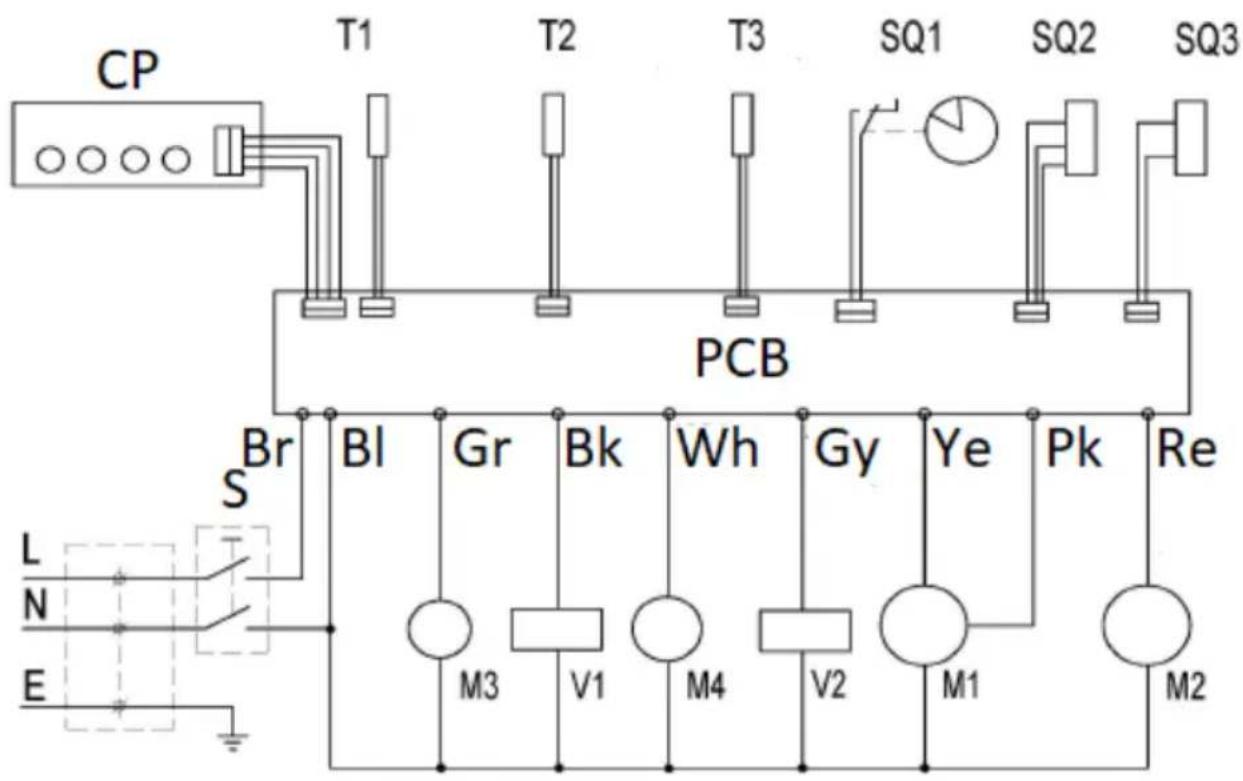
CP - Control panel
T1, T2, T3 - Temperature sensor
SQ1 - Switch
SQ2 - Agitator control
SQ3 - Water level sensor
PCB - Main control board
S - Switch
Br - Brown wire
BI - Blue wire
Gr - Green wire
Wh - White wire
Gy - Gray wire
Ye - Yellow wire
Pk - Pink wire
Re - Red wire
M1 - Tilt motor
M2 - Compressor
M3 - Fan
M4 - Water pump
V1 - Water valve
V2 - Splenoid
APPARATUS PLACEMENT
For the disposal of the device, please consider and act according to the national and local rules and regulations.
CONTACT
expondo Polska sp. z o.o. sp. k.
- GENERAL OVERVIEW
- PLEASE CAREFULLY READ AND UNDERSTAND THIS INSTRUCTION MANUAL BEFORE OPERATION
- SAFETY OF USE
- ELECTRICAL SAFETY
- SAFETY IN THE WORKPLACE
- PERSONAL SAFETY
- SAFE USE OF THE DEVICE
- INSTRUCTIONS FOR USE
- PRODUCT OVERVIEW
- PREPARATION FOR OPERATION
- POSITIONING OF THE UNIT
- ASSEMBLY OF THE UNIT
- WORKING WITH THE UNIT
- CLEANING AND MAINTENANCE
- DISPOSAL OF WASTE APPLIANCES
- APPARATUS PLACEMENT
- CONTACT
Brand : Royal Catering
Model : RCIC-50BI
Category : Ice Maker