
Moto G85 5G - Smartphone MOTOROLA - Free user manual and instructions
Find the device manual for free Moto G85 5G MOTOROLA in PDF.
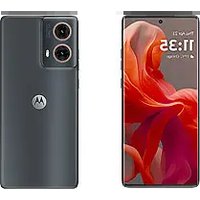


| Product Type | Smartphone |
| Brand | Motorola |
| Model | Moto G85 5G (XT2427-2) |
| Dimensions | Approx. 163.9 x 74.0 x 7.6 mm |
| Weight | Approx. 178 g |
| Power | Lithium-ion battery, PD/QC fast charging up to 30 W (recommended Motorola 30 W or 38 W charger) |
| Touchscreen | Capacitive touchscreen, do not use screen protector thicker than 0.5 mm |
| Network | 5G (compatible with 5G plans and coverage) |
| SIM Cards | Physical Nano SIM + eSIM (optional) |
| Expandable Storage | microSD card (sold separately) |
| Cameras | Main, ultra-wide/macro, front |
| Security | Integrated fingerprint reader |
| Connectivity | Bluetooth, Wi-Fi, NFC, USB-C, headphone jack via adapter |
| Key Features | 5G, dual SIM, multiple cameras, fast charging, NFC, fingerprint reader |
| Care and Cleaning | Avoid water exposure, clean with a soft, dry cloth |
| Safety | Do not expose to temperatures below -20°C or above 45°C; do not listen at high volume for long periods |
| Spare Parts and Repairability | Battery should only be removed by an authorized Motorola service center |
| General Information | Manual available in multiple languages; SAR information via *#07# |
Frequently Asked Questions - Moto G85 5G MOTOROLA
User questions about Moto G85 5G MOTOROLA
0 question about this device. Answer the ones you know or ask your own.
Ask a new question about this device
Download the instructions for your Smartphone in PDF format for free! Find your manual Moto G85 5G - MOTOROLA and take your electronic device back in hand. On this page are published all the documents necessary for the use of your device. Moto G85 5G by MOTOROLA.
USER MANUAL Moto G85 5G MOTOROLA
moto g85 5G
English 3
Deutsch....7
Français....12
Español....16
Português....20
Italiano 24
Nederlands 28
suomi....32
Polski 36
Let's get started
Before using your phone, please read the legal, safety and regulatory information provided with your product.
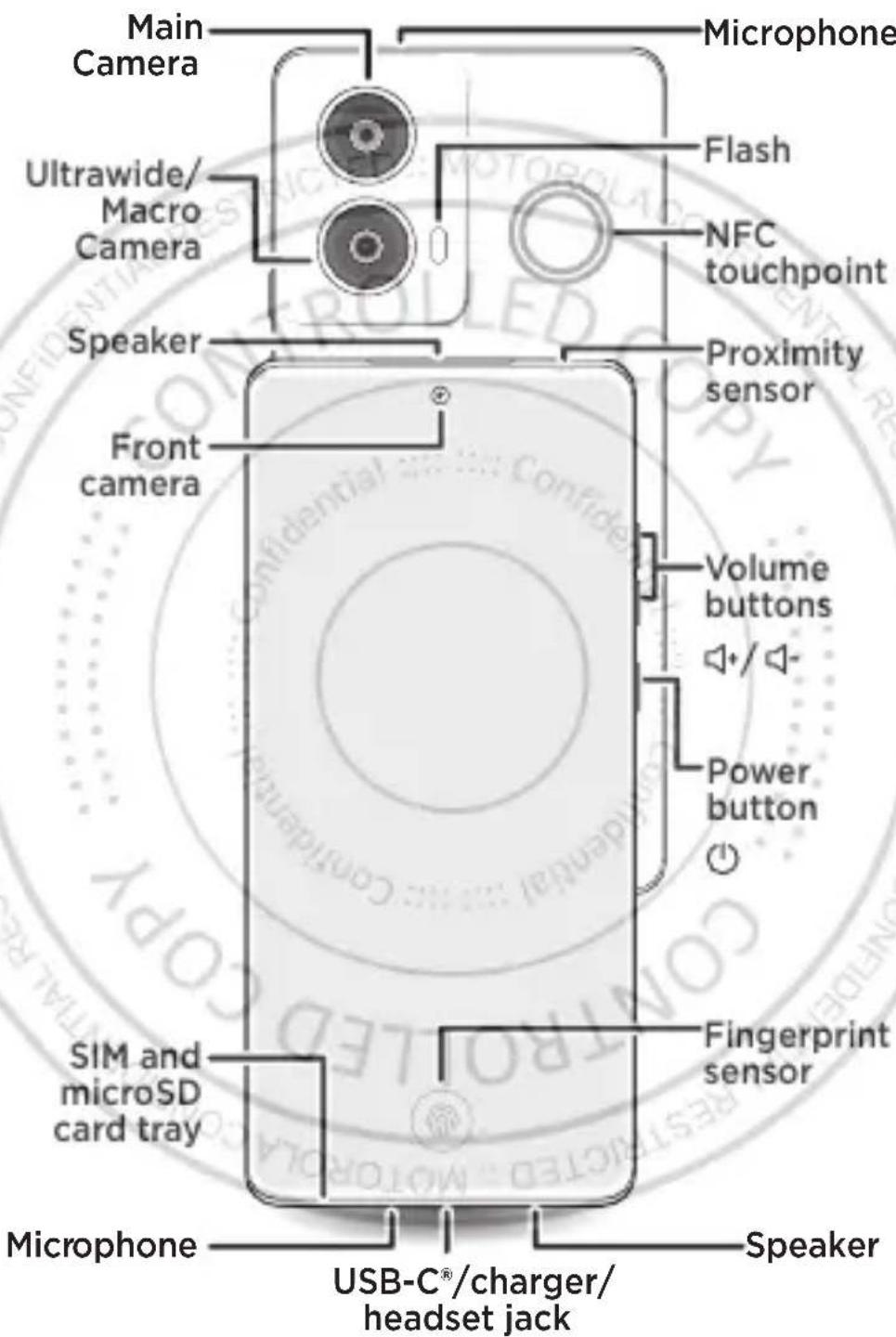
Note: To use a headset, you'll need one with a USB-C connector. If you're using a 3.5mm headset, you'll need an adapter to connect a 3.5mm connector to USB-C. Headset and adapter may be sold separately.
Put in the card(s) and power on
1 Insert the SIM tool into the hole next to the tray to pop out the tray.
Make sure that you use the correct size of SIM card and don't cut the SIM card.
2 Insert the SIM card with the gold contacts up, then gently push the tray into the slot.
Add a microSD card (optional, sold separately) for additional storage.
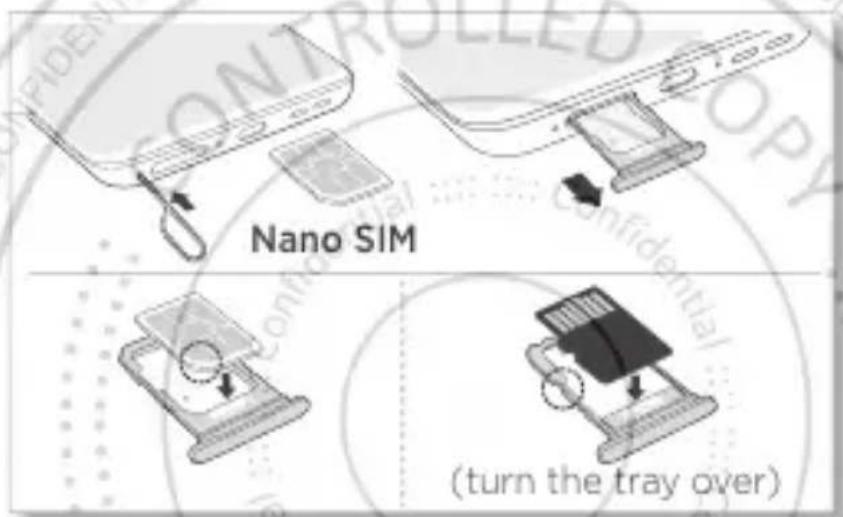
eSIM option: your phone may have an eSIM (embedded SIM card) in addition to the physical SIM card. Contact your service provider for details if you want to activate and use it.
3 Press and hold the power button ⏻ to turn on your phone, then follow the prompts to get started.
To turn off your phone, press the power and volume up buttons ⏻ + ⏻ at the same time.
Scan with your Camera app for how-to videos.
Help and more
Get answers, updates and info:
- Help is here: from the Home screen, swipe up and tap Settings > Help to learn how to use your phone and get support. • Get more: get software, user guides and more at www.motorola.com/mymotog. • Get apps: tap Play Store to browse and download apps.
- Connect with 5G: 5G service plan and 5G network coverage required; available only in selected areas; device not compatible with all 5G networks. Contact your service provider for details.
Caution: screen protectors may reduce your phone's touchscreen sensitivity. Do not use screen protectors thicker than 0.5mm.
Legal information. This guide provides important legal, safety and regulatory information that you should read before using your product. For the complete legal information, from the Home screen swipe up and tap Settings > Q, then type Legal information or visit www.motorola.com/device-legal.
Water repellent. Your phone is not waterproof. For more about your phone's water-repellent design and care, swipe up and tap Settings > Help.
Charging and battery safety. To prevent possible burning and injury, the battery in your phone should only be removed by a Motorola-approved service centre or similar skilled personnel. If your phone becomes unresponsive, press and hold the power button until the screen goes dark and your phone restarts. The device is "PD" (Power Delivery) and "QC" (Quick Charge) capable. For the fastest charging speeds, choose a Motorola 33W USB-A QC charger (may be sold separately) with the included QC cable, or a Motorola 30W or higher USB-C PD charger and compatible PD cable (both sold separately). Use of other chargers is not recommended and may impair the charging performance. The power delivered by the charger must be between the min 5 Watts required by the radio equipment and max 30 Watts to achieve the fastest charging speed. Chargers that do not comply with applicable national standards may be unsafe, with risk of death or injury, and may cause slow charging or product damage. Don't charge your phone in temperatures below -20°C or above 45°C. To view applicable standards and to learn more, see the "Legal information" section of this guide or visit www.motorola.com/device-legal.
Warning about high volume usage. To prevent hearing damage, do not listen at high volume levels for long periods.
When your headset volume reaches the high volume threshold, a warning will be shown. Tap OK to dismiss it, or wait one to five seconds, then press the Volume Up button to dismiss the alert and enable the volume to continue to be adjusted.
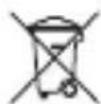
Disposal and recycling. For help recycling products and packaging responsibly, visit www.motorola.com/recycling.

Extreme heat or cold. Don't use your phone in temperatures below -20°C or above 45°C. Don't store/transport your phone in temperatures below -20°C or above 60°C.
Legal disclaimers. Features, services and applications are network dependent and may not be available in all areas; additional terms/charges may apply. Product specifications and other information contained in this guide are believed to be accurate at the time of printing or release. Motorola reserves the right to correct or change any information without notice.
Arbitration. Your purchase is governed by a binding arbitration clause. For more information and how to opt out, see the legal guide that came with your phone.
SAR information (on e-label). To view specific absorption rate (SAR) values for this phone, from the Home screen swipe up and tap Settings > Q, then type Regulatory labels, from your phone's dial pad type *#07#, or visit www.motorola.com/sar.
Supported frequencies and power (Model XT2427-2). This phone is capable of operation on the following frequencies, subject to location and network availability.
| Operating mode | Frequency range MHz/Band | Maximum nominal transmit power dBm |
| Bluetooth | 2400 - 2483.5 | 20 dBm EIRP |
| Wi-Fi | 2400 - 2483.5 | 20 dBm EIRP |
| Wi-Fi | 5150 - 5250 | 23 dBm EIRP |
| Wi-Fi | 5250 - 5350/5470 - 5725 | 20 dBm EIRP |
| Wi-Fi | 5725 - 5850 | 14 dBm EIRP |
| GNSS | 1559 - 1610 | N/A |
| NFC | 13.56 | -16.88 dBuA/m @ 10m |
| GSM | 2/3/5/8 | 33/30 |
| UMTS | 1/2/5/8 | 24 |
| LTE | 1/2/3/5/7/8/18/19/20/26/28/32/38/40/41/42 | 23 |
| 5G | n1/3/5/7/8/20/26/28/38/40/41/71/77*/78" | 23(26") |
Copyright and trademarks. MOTOROLA, the stylised M logo, MOTO and MOTOROLA, the stylised M logo, MOTO and the MOTO family of marks are trademarks or registered trademarks of Motorola Trademark Holdings, LLC. Google, Android, Google Play and other related marks and logos are trademarks of Google LLC. microSD Logo is a trademark of SD-3C, LLC. USB Type-C® and USB-C® are registered trademarks of USB Implementers Forum. All other product or service names are the property of their respective owners.
© 2024 Motorola Mobility LLC. All rights reserved.
Product ID: moto g85 5G (Model XT2427-2)
Manual Number: HQ622010067B0-A
Getting Started
Help and more
Help and more
Protect your phone with
moto care. Visit:
motorola.com/motocare
With moto care, extend your warranty coverage up to three years, and take advantage of features like accidental damage protection.
Brand : MOTOROLA
Model : Moto G85 5G
Category : Smartphone