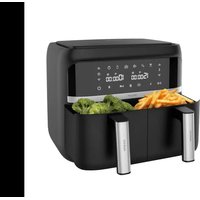
USER MANUAL Cecofry Advance Double CECOTEC
natural_image
Exterior view of a modern black air fryer with digital display and control buttons (no visible text or symbols on device body)
Safety instructions 8
-
Parts and components 51
-
Before use 51
-
Operation 52
-
Cleaning and Maintenance 56
-
Troubleshooting 57
-
Technical specifications 58
-
Disposal of old electrical appliances 58
-
Technical support and warranty 59
SOMMAIRE
Please, keep this instruction manual in a safe place for future reference or new users.
- Read these instructions carefully before assembling or using the product, as they contain important information that will help you get the best out of your equipment. It is your responsibility to make sure every user is informed about the warnings and precautions stated in this instruction manual.
- The appliance is not intended to be used by children under the age of 8. It can be used by children over the age of 8, as long as they are given continuous supervision. This appliance can be used by persons with reduced physical, sensory or mental capabilities or lack of experience and knowledge, as long as they have been given supervision or instruction concerning the use of the appliance in a safe way and understand the hazards involved. Keep this appliance and its power cord out of reach of children under the age of 8. Cleaning and maintenance tasks should not be carried out by children.
- This device must be placed in a stable surface/position with the handles placed to avoid any hot liquid spill.
- WARNING: check if the device and package are not damaged. Never use the device if it is damaged, immediately contact the Cecotec Technical Support Service.
- Packaging material may be dangerous to children. Remove it and place it out of their reach.
- Always use the socket provided with the device. Do not
modify the socket provided with the device if it does not match the power socket.
- In case of malfunctioning, repair must be carried out by the Cecotec Technical Support Service; otherwise the warranty will be void.
- To unplug the device, pull from the socket, never from the cord.
- This device is intended for household use only. Do not operate it outdoors.
- When using electrical appliances, basic precautions must always be followed to reduce the risk of fire, electrical shock, and injury.
- Make sure the voltage of your mains supply matches the voltage requirements specified in the rating label of the appliance (220 V – 240 V).
- We recommend that the room where you intend to use the appliance is equipped with a working extractor fan or it is well ventilated.
- Use the device only for the purposes described in this instruction manual, any other use is not recommended by the manufacturer and could have a detrimental effect on the lifespan of the appliance and/or the safety of the user.
- Unplug the appliance from the mains supply before moving it, carrying out any cleaning or maintenance task, or when not in use.
- Check the power cord regularly for visible damage. If the cord is damaged, it must be replaced by the official Technical Support Service of Cecotec in order to avoid any type of danger.
- Do not twist, bend, pull or damage the power cord. Protect it from sharp edges and heat sources. Do not let it touch hot surfaces. Do not let the cord hang over the edge of the
working surface or worktop.
- Do not use extension cords, unless advised by a qualified electrician. Using the wrong type could cause damages or injuries to the user.
- Do not use the appliance if its cord, plug or housing are damaged, nor after it malfunctions or has been dropped or damaged in any way.
- The appliance must not be used in potentially dangerous locations, such as flammable, explosive, chemical-laden, or wet atmospheres, nor near flammable materials.
- Place the fryer on an even, heat-resistant surface. Do not place the device near heat sources, places with high humidity levels, or combustible materials.
- There are no internal serviceable parts. Do not attempt to disassemble the appliance.
- This appliance is not intended to be operated by means of an external timer or separate remote-control system.
- Do not insert or allow fingers or foreign objects to enter any ventilation opening, as it could cause an electrical shock or fire.
- Do not fill the container with oil as this may cause a fire hazard.
- Do not touch the inside of the appliance while it is operating.
This symbol means: warning, hot surface. The temperature of accessible surfaces may be high when the appliance is operating. Be careful not to burn yourself.
- Do not immerse the cord, plug, or any non-removable part of the product in water or any other liquid. Do not expose the electrical connections to water.
-
Always put the ingredients to be fried inside the basket, to prevent them from coming into contact with the resistors.
-
Make sure your hands are completely dry before handling the plug or switching on the appliance.
- Unplug the device from the outlet when it is not in use or being cleaned. Allow it to cool down completely before attaching or removing parts, and before cleaning the appliance.
- Do not leave the fryer unattended while connected to the mains supply.
- Do not lean over the fryer while in use.
- Be careful not to touch the surfaces of the fryer as they will become hot when in use.
- Cleaning and maintenance must be carried out according to this instruction manual to make sure the appliance functions properly. Turn off and unplug the appliance before moving and cleaning it. Allow it to completely cool down before cleaning or storing it.
- Make sure the device is correctly plugged into a socket.
- Do not place the appliance against a wall. Leave at least 10 cm of free space on the back and sides and 10 cm of free space above the appliance. Do not place anything on top of the appliance.
- During operation, hot steam is released through the air outlet openings. Keep your hands and face at a safety distance from the steam and from the air outlet openings. Hot air may also come out when removing the basket from inside the device.
- Unplug the device immediately if you see black smoke coming out the device. Wait until the smoke disappears to remove the basket from the device.
- We recommend the use of heatproof gloves when touching the rack or the basket.
- Do not try to repair the device by yourself.
- After using the device, always unplug it.
INSTRUCTIONS DE SÉCURITÉ
The graphics in this manual are schematic representations and may not exactly match the product.
2. BEFORE USE
- This product includes a safety package to protect it during transport. Unpack the appliance and keep the original packaging and materials in a safe place. It will help prevent any damage if the product needs to be transported in the future. In case the original packaging is disposed of, make sure all packaging materials are recycled accordingly.
- Make sure all parts and components are included and in good conditions. If there is any piece missing or not in good condition, immediately contact the Technical Support Service
ENGLISH
of Cecotec.
- Clean the inside and the outside of the device with a damp cloth. Do not wet the heating elements.
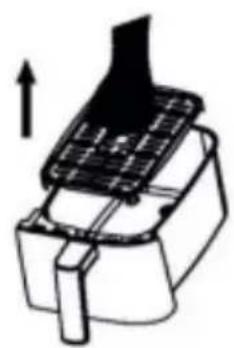
- Clean the baskets and racks thoroughly with hot water, detergent and a non-abrasive sponge. (Fig. 3)
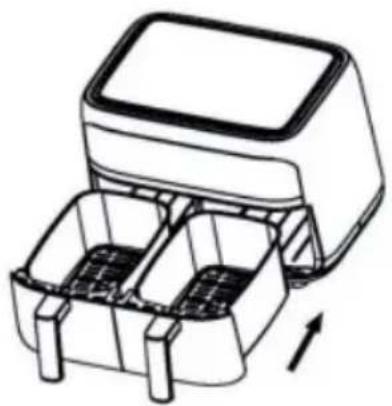
- Place the racks properly in the baskets and place the baskets again in the device to be able to use it. (Fig.4)
- Do not fill the device with oil or any other liquid.
3. OPERATION
With this device you can cook at once with both baskets with a different temperature and time, which will save time to prepare your favourite recipes. This device includes a recipe book with several recipes which you will be able to cook easily.
- Place the device on a flat, even and waterproof surface. Never place it on a glass-ceramic hob.
- Plug the power cord to the electric circuit.
- Press the power icon (8) to turn the device on.
- Remove the baskets and place the food on the racks.
- Carefully match the basket guides and the body of the air fryer to place them again in their initial position.
- Select the basket (13/17) or baskets (16) you wish to programme and then select a programme or set the time and temperature manually.
- Press the Start/Pause icon (12) for the device to start cooking.
- When the device finished the cooking, it will warn you with a sound signal.
- Check if the ingredients are cooked as desired. Otherwise, put the basket back inside the device and set the timer for a few more minutes.
- When the food is cooked as desired, remove the baskets and place them on a heatproof surface. Depending on the type of ingredients, steam may be released, so be careful when removing the baskets.
- Empty the baskets in a bowl or plate. Use tongs to remove the ingredients. Be careful not to burn yourself. Do not place the basket upside down to remove the food.
- You can use the device again just after having used it.
Note
- The device features a safety system, with which if the baskets are not correctly placed into position, the device will not start working.
- Do not fill the basket over the 'Max' mark (screen-printed in the inside of the basket).
- The fan may continue working after cooking, even if the device is off. This is normal, as the fan is cooling down the device.
- Do not touch the baskets nor the inferior of the air fryer during or after its use, as it reaches high temperatures. Hold the baskets by their handle.
Control panel
Fig. 2
8. Power icon
- When the baskets and racks are correctly placed in the device, the power icon (8) will light up. If you press this icon (8), the left basket icon (13), the same configuration on both baskets icon (16) and the right basket icon (17) will all light up at once.
- To turn off the device, hold down this icon (8) for approximately 3 seconds.
- To cancel the cooking, press this icon (8) once and the word 'Cool' will automatically appear on the display, which means the programme is being cancelled, when it is completely cancelled the display will show 'End'. To start cooking again, press the icon (8), the previous icons will light up.
9. Time icons
- With both icons (9), placed over and below the watch icon, you can increase or decrease the cooking time as desired.
- However, to set the time, first you need to select a basket (13 or 17) or both baskets (16).
10. Pre-set programmes
This air fryer features 6 programmes with pre-set temperature and time (10), you can check them in this table:
| Icon Programme Temperature Time Quantity Stir |
 | Chips 200 °C 20 | | min | 400-500 grams approx. | Yes |
 | Chicken wings | 200 °C 25 | min | Basket surface Not necessary |
| [TOTC] | Fish 180 °C 10 min 250 grams | | approx. | Not necessary |
 | Dessert | 170 °C | 13 min | - | Not necessary |
ENGLISH
 | Vegetables 160 °C 16 min - Depends on the type | of vegetable |
 | Dehydrate 60°C 6 h Basket surface Not necessary | |
Note
This information is indicative, as ingredients differ in origin, size, shape and brand, we cannot guarantee the best setting for the ingredients that you are using.
Tips
- Smaller ingredients require shorter preparation time than the larger ones.
- A larger quantity of ingredients only requires a slightly longer preparation time, and a smaller quantity of ingredients only requires a slightly shorter preparation time.
- Stirring small ingredients during the frying process optimises the result and can help prevent unevenly cooked ingredients. To do so, remove the basket and shake it.
- Add some oil to raw chips for a crispier result.
- The optimal amount for preparing crispy fries is 400 grams.
- Do not use the device to fry greasy food (such as sausages).
- Food that can be cooked in an oven can also be cooked with the device.
- Pre-made dough requires a shorter preparation time than home-made dough.
- You can also use the device to reheat ingredients. To do so, set the temperature at 150^ C for 5-10 minutes.
11. Temperature icons
- With both icons (11), placed over and below the thermometer, you can increase or decrease the cooking temperature as desired.
- However, to set the time, first you need to select a basket (13 or 17) or both baskets (16).
12. Start/Pause
This icon (12) will allow you to start or pause the selected cooking.
- If you press this icon (12) after selecting the programme (10) or temperature (11) and time (9), the device will start cooking.
- If you press this icon (12) when there is a cooking in process, you will pause it. To restart it, press it again (12).
13. Left basket
Use this icon (13) to set only the left basket. Press the icon (13), select the desired time (9) and temperature (11) or programme (10). Next, press the Start/Pause icon (12) to start cooking.
14. Synchronisation
- This function is useful when you have set different cooking times on the baskets and you wish them to finish at once. With this function, if in the left basket you have selected 20 min and in the right basket you have selected 10 min, it will start the cooking process in the right basket 10 minutes after so both cooking processes finish at once.
- To programme this function, select first the left basket (13) or right (17), then the desired programme (10) or the desired time (9) and temperature (11). Press the 'Sync' icon (14) and it will stop flashing. Next, press the Start/Pause icon (12).
Note
- When this function starts the basket with less time programmed will enter standby mode and the display will show 'Hold' until there is no time difference between them.
- If you remove any basket when the device is operating: the display will show 'Pot' if you remove the left basket and 'Out' if you remove the right basket, if you remove both baskets it will show 'Pot Out'. If it takes you more than 90 seconds, but less than 5 minutes on placing the removed basket, the basket you have removed will resume the cooking process. When you place the basket back in place, the device will resume the cooking, but the synchronisation function will be deactivated.
15. Preheating
- With this function, you will start preheating the selected basket, that is, either the right or left basket or both baskets.
- To select this function, select first the basket (13, 16 or 17) you wish to use, then select the preheating function (15) and set the desired preheating temperature (11). The preheating time is 5 minutes by default, but if you wish to cancel it at any time, press the power button (8).
- Once the preheating has finished, press the icons 13 or 17, depending on the preheated basket, and press the programme (10) or set the desired time (9) and temperature (11) manually and next, press the Start/Pause icon (12).
16. Same configuration on both baskets L=R
- This function is used to use the same cooking process on both baskets, that is, if you press this icon and then the chips programme, this setting will be activated on both baskets.
- To use it, first select one of the baskets (13 or 17) and set the desired time (9) and temperature (11) or programme (10) and then press this function (16). Next, press the Start/Pause icon (12) to start cooking.
17. Right basket
Use this icon to set only the right basket. Press the icon (17), select the desired time (9) and temperature (11) or programme (10). Then, press the Start/Pause icon (12) to start cooking.
ENGLISH
4. CLEANING AND MAINTENANCE
Cleaning
- Always clean the appliance after each use.
- Disconnect the appliance from the power supply and allow it to cool down before cleaning it.
- Do not use metallic tools or abrasive products to clean the baskets and racks.
- Use a soft, damp cloth to clean the product exterior surface.
- Never immerse the appliance in water or other liquid.
- Do not use abrasive cleaners or scouring pads to clean the product.
- Clean the baskets thoroughly with hot water, detergent and a non-abrasive sponge. Rinse them well and dry it before introducing them again in the device.
- Do not introduce wet baskets in the main body.
- We recommend the use of a degreasing liquid to remove any remaining dirt.
- If there is dirt stuck in the basket and rack, we recommend filling the basket with hot water and detergent and then clean it with a non-abrasive sponge.
- Clean the heating element with a soft cleaning brush to remove any food residue. Be careful not to damage the heating element.
Tip
Remove the basket to let the device to cool down more quickly.
Warning
The baskets and racks are not dishwasher safe.
Storage
- Unplug the device and allow it to cool down.
- Make sure all its parts are clean and dry when you store it.
-
Wring the power cord.
-
TROUBLESHOOTING
| Problem Possible cause Solution | | |
| The device does not work. The product is not plugged in. Plug the device in. |
|
|
| The ingredients inside the device are not fried. | There are too many ingredients inside the basket. | Place smaller pieces inside the basket so they are cooked more evenly. |
| The temperature used is too low. | Increase temperature. |
| The preparation time is not enough. | Increase the time. |
| The ingredients are cooked unevenly in the air fryer. | Some types of food need to be sautéed during the cooking process. | Ingredients that lie on top of or across each other (e.g. chips or nuggets) need to be stirred during the preparation time. |
| Fried food is not crispy when they come out the device. | You used a type of food that is meant to be prepared in a traditional deep fryer. | Oil the food a little bit to get a crispier result. |
| The container cannot fit in the gap in the device. | There are too many ingredients inside the basket. | Do not fill the device with food over the 'Max' mark. |
| The basket is not placed in the container correctly. | Place the basket inside the container until it clicks. |
| White smoke comes out of the appliance. | You are preparing greasy ingredients. | When greasy food is cooked, a large amount of oil will leak into the container. Cooking oil produces white smoke, and the container may heat up more than usual. This does not affect the appliance or the result. |
| The container is still greasy from previous uses. | White smoke is caused by heating up oil in the container. Make sure you clean the container properly after each use. |
ENGLISH
| Chips are cooked unevenly in the device. | The right kind of potato is not being used. | Use fresh potatoes and make sure they stay consistent while being cooked. |
| If you use frozen chips, use chips that are special for oven cooking. |
| You did not rinse the chips properly before you cooked them. | Rinse the potato sticks properly to remove the starch. |
| Fried food is not crispy when they come out the device. | Make sure you dry the potato sticks properly before adding the oil. | Make sure you dry the potato sticks properly before adding the oil. |
| Cut the potato sticks on smaller pieces for crispier results. |
| Add a little bit more of oil for a crispier result. |
6. TECHNICAL SPECIFICATIONS
Product reference: 04338
Product: Cecofry Advance Double air fryer
Power: 2950 W
Voltage: 220-240 V\~
Frequency: 50/60 Hz
Maximum operating capacity: 4 litres per basket
Temperature setting: 80°C—200°C
Timer: 0-60 min.
Manufactured in China | Designed in Spain
Technical specifications may change without prior notification to improve product quality.
7. DISPOSAL OF OLD ELECTRICAL APPLIANCES
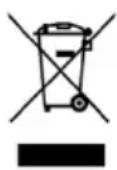
This symbol indicates that, according to the applicable regulations, the product and/or battery must be disposed of separately from household waste. When this product reaches the end of its shelf life, you should
dispose of the batteries/accumulators and take them to a collection point designated by the local authorities.
Consumers must contact their local authorities or retailer for information concerning the correct disposal of old appliances and/or their batteries.
Compliance with the above guidelines will help to protect the environment.
8. TECHNICAL SUPPORT AND WARRANTY
Cecotec shall be liable to the end user or consumer for any lack of conformity that exists at the time of delivery of the product under the terms, conditions and deadlines established by the applicable regulations.
It is recommended that repairs be carried out by qualified personnel.
If at any moment you detect any problem with your product or have any doubt, do not hesitate to contact Cecotec official Technical Support Service at +34 963 210 728.
9. Copyright
The intellectual property rights over the texts in this manual belong to CECOTEC INNOVACIONES, S.L. All rights reserved. The contents of this publication may not, in whole or in part, be reproduced, stored in a retrieval system, transmitted or distributed by any means (electronic, mechanical, photocopying, recording or similar) without the prior authorization of CECOTEC INNOVACIONES, S.L.
1. PIÈCES ET COMPOSANTS
Appareil
Img. 1
Fig./Img./Abb./Afb./Rys./Obr.1
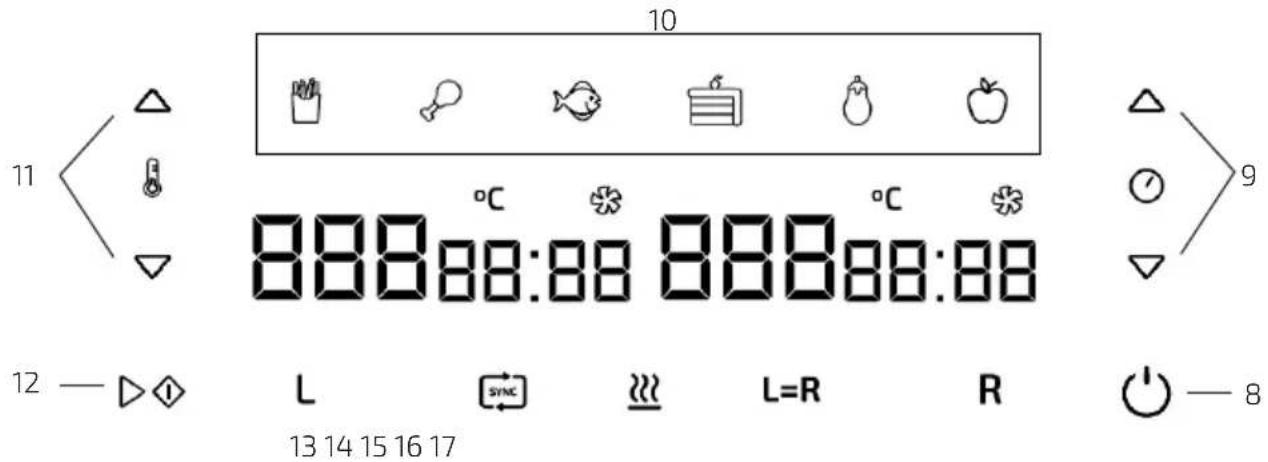
Fig./Img./Abb./Afb./Rys./Obr.2
natural_image
Diagram of a printer or printer with a paper filter and upward arrow, no text or symbols present
natural_image
Line drawing of a multi-compartment kitchen appliance with a handle and side compartments (no text or symbols)
Fig./Img./Abb./Afb./Rys./Obr. 3 Fig./Img./Abb./Afb./Rys./Obr. 4
www.cecotec.es