
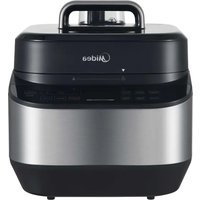
MPC6018AASS - Multi-cooker MIDEA - Free user manual and instructions
Find the device manual for free MPC6018AASS MIDEA in PDF.
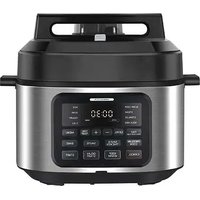


| Product Type | Multi-cooker (electric pressure cooker) |
| Brand | Midea |
| Model | MPC6018AASS |
| Capacity | 6.5 Qt (≈6.15 L) |
| Power Supply | 120 V ~ 60 Hz |
| Rated Power | 1500 W |
| Working Pressure | 80 kPa |
| Keep Warm Temperature | 60 °C – 80 °C |
| Main Functions | Pressure Cook, Slow Cook, Steam, Rice, Beans, Chili, Sterilize, Yogurt, Sous Vide, Cook, Sauté, Thick Sauce |
| Inner Pot Material | Stainless steel with non-stick coating (information deduced from maintenance) |
| Included Accessories | Spatula, ladle, measuring cup, steam basket, water tank |
| Care and Cleaning | Unplug before cleaning. Clean the inner pot with mild soap or detergent. Clean the sealing ring, release valve, and float valve regularly. Do not immerse the housing. |
| Safety | Safety lock, float valve, release valve, anti-blocking cover. Do not open under pressure. Do not deep fry under pressure. |
| Spare Parts Available | Sealing ring, release valve, float valve, anti-blocking cover, water tank |
| Repairability | Repair by authorized service center. User modification prohibited. |
| Warranty | 1 year limited |
| Approximate Dimensions (W×D×H) | 35 cm × 30 cm × 30 cm (estimation) |
Frequently Asked Questions - MPC6018AASS MIDEA
User questions about MPC6018AASS MIDEA
0 question about this device. Answer the ones you know or ask your own.
Ask a new question about this device
Download the instructions for your Multi-cooker in PDF format for free! Find your manual MPC6018AASS - MIDEA and take your electronic device back in hand. On this page are published all the documents necessary for the use of your device. MPC6018AASS by MIDEA.
USER MANUAL MPC6018AASS MIDEA
ELECTRIC PRESSURE COOKER
USER MANUAL
MPC6018AASS
THANK YOU LETTER
Thank you for choosing Midea! Before using your new Midea product, please read this manual thoroughly to ensure that you know how to operate the features and functions that your new appliance offers in a safe way.
EN
CONTENTS
THANK YOU LETTER 01
SAFETY INSTRUCTIONS 02
SPECIFICATIONS 06
PRODUCT OVERVIEW 07
QUICK START GUIDE 08
OPERATION INSTRUCTIONS 13
CLEANING AND MAINTENANCE 20
TROUBLESHOOTING 26
TRADEMARKS, COPYRIGHTS AND LEGAL STATEMENT
DATA PROTECTION NOTICE
1 YEAR LIMITED WARRANTY
SAFETY INSTRUCTIONS
Intended Use
The following safety guidelines are intended to prevent unforeseen risks or damage from unsafe or incorrect operation of the appliance. Please check the packaging and appliance on arrival to make sure everything is intact to ensure safe operation. If you find any damage, please contact the retailer or dealer. Please note modifications or alterations to the appliance are not allowed for your safety concern. Unintended use may cause hazards and loss of warranty claims.
EN
Explanation of Symbols

Danger
This symbol indicates that there are dangers to the life and health of persons due to extremely flammable gas.

Warning of electrical voltage
This symbol indicates that there is a danger to life and health of persons due to voltage.

Warning
The signal word indicates a hazard with a medium level of risk which, if not avoided, may result in death or serious injury.

Caution
The signal word indicates a hazard with a low degree of risk which, if not avoided, may result in minor or moderate injury.

Attention
The signal word indicates important information (e.g. damage to property), but not danger.

Observe instructions
This symbol indicates that a service technician should only operate and maintain this appliance in accordance with the operating instructions.
Read these operating instructions carefully and attentively before using/commissioning the unit and keep them in the immediate vicinity of the installation site or unit for later use!
IMPORTANT SAFEGUARDS
CAUTION
READ ALL INSTRUCTIONS.
EN
- Do not touch hot surfaces. Only use side handles or knobs for carrying or moving. • To protect against electrical shock, do not immerse the power cord, plugs, or appliance in water or other liquid.
- Close supervision is necessary when the appliance is used by or near children.
- Unplug from outlet when not in use and before cleaning.
- Allow to cool before putting on or taking off parts.
- Do not operate any appliance with a damaged cord or plug, or after the appliance malfunctions or has been damaged in any manner. Return appliance to the nearest authorized service facility for examination, repair, or adjustment.
- The use of accessory attachments not recommended by the appliance manufacturer may cause injuries.
- For household use only. Do not use outdoors.
- Do not let the power cord hang over the edge of a table or counter, or touch hot surfaces.
- Do not place the appliance on or near a hot gas or electric burner, or in a heated oven.
- Extreme caution must be used when moving the appliance containing hot liquids.
- Always attach the plug to the appliance first, then plug the cord into the wall outlet. To disconnect, turn the appliance "off", then remove the plug from the wall outlet.
- Do not use the appliance for anything other than its intended use.
- This appliance cooks under pressure. Improper use may
result in scalding injury. Make sure the unit is properly closed before operating. Please see the "Getting Started" section.
- Do not fill the appliance more than 2/3 full. When cooking foods that expand during cooking, such as rice or dried vegetables, do not fill the appliance more than 1/2 full. Overfilling may cause a risk of clogging the vent pipe and developing excess pressure. See the "Food Preparation/
- Pressure Cooking" section.
- Do not open the appliance until it has cooled and all internal pressure has been released. If the float valve is still up and/or the lid is difficult to open, this indicates that the appliance is still pressurized – do not force it open. Any pressure in the appliance can be hazardous. Please see the "Getting Started" section for instructions on safely removing the lid.
• Always check the pressure release devices for clogging before use.
- Do not use this appliance for pressure frying with oil.
• To prevent risk of explosion and injury, replace only the dynamic seal ring as recommended by the manufacturer.
• See Operating Instructions.
- Intended for countertop use only.
- WARNING: Spilled food can cause serious burns. Keep appliance and cord away from children. Never drape cord over edge of counter, never use outlet below counter, and never use with an extension cord.
- CAUTION: Risk of Electric Shock. Cook only in removable container.
- This appliance is not intended for deep frying foods.
- Be aware that certain foods, such as applesauce, cranberries, pearl barley, oatmeal or other cereals, split peas, noodles, macaroni, rhubarb, or spaghetti can foam, froth, and sputter, and clog the pressure release device (steam vent). These foods should not be cooked in a
pressure cooker.
- When the normal operating pressure is reached, turn the heat down so all the liquid, which creates the steam, does not evaporate.
- A short power-supply cord is used to reduce the risk resulting from it being grabbed by children, becoming entangled in, or tripping over a longer cord.
- Prohibiting the use of a longer detachable power cord or extension cord.
PLEASE SAVE THESE INSTRUCTIONS
SPECIFICATIONS
| MPC6018AASSProduct Model | |
| Capacity | 6.5Qt |
| Power Supply | 120V~ 60Hz |
| Rated Power | 1500W |
| Working Pressure 80kPa | |
| Keep Warm Temperature | 60°C~80°C |
PRODUCT OVERVIEW
Component Name
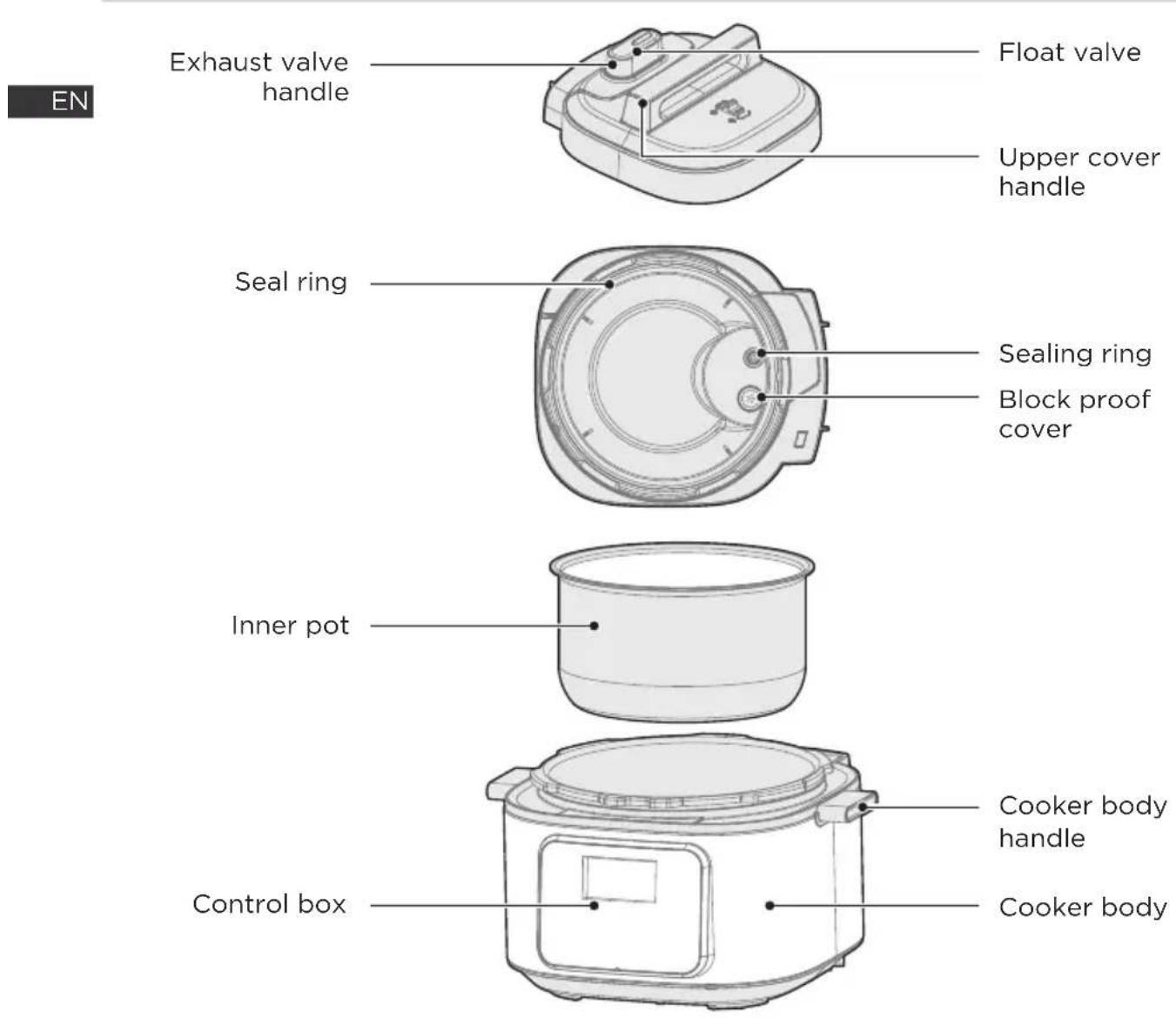
Parts List


NOTE
All the pictures in this manual are for explanation purpose only. Any discrepancy between the real object and the illustration in the drawing shall be subject to the real subject.
QUICK START GUIDE
Tips:
- Please move the product with the handle of the cooker body;
- Please remove the water from the housing cover with cloth.

NOTE
- Exhaust valve: Pull out the exhaust valve from the lid. Clean the internal side of the exhaust valve and the exhaust valve and float valve of the lid with brush and cloth at least once a month.
- Sealing ring: Please remove oil and dirt from the sealing ring with detergent and brush.
- Water box: After cooking, the steam may stay in the water box of the external pot as water. Water in the box should be removed for avoiding bad odor, please clean it with clean cloth.
EN
Disassemble and Install the Block Proof Cover, Seal Ring, Sealing ring and Water box
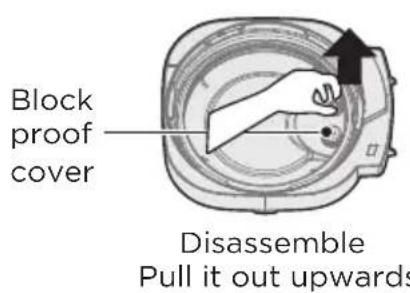
Disassemble and install the block proof cover
- Check if the seal ring and block proof cover are correctly installed in the upper cover before use each time.
- After use, please clean the seal ring and around of block proof cover for avoiding jamming the cover, keep it clean to avoid bad odor.
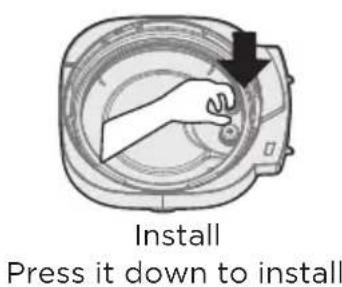
Disassemble and install the seal ring
- Please do not pull the seal ring, otherwise, the distorted seal ring may influence the seal and pressure effect.
- Do not use the damaged seal ring, please replace it at the authorized repair office.
- Place the seal ring over the seal ring rack and press it into place. Press down firmly to prevent puckering. When installed properly, the seal ring is snug behind seal ring rack and should not fall out when the lid is turned over.
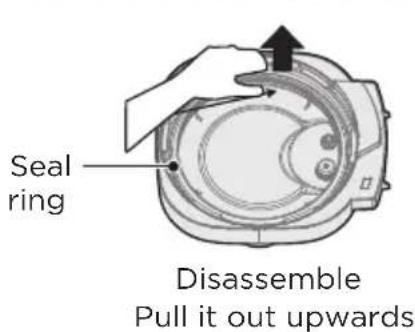
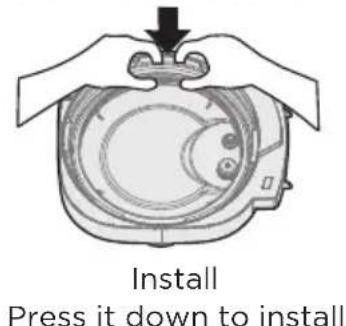
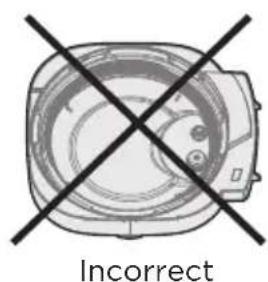
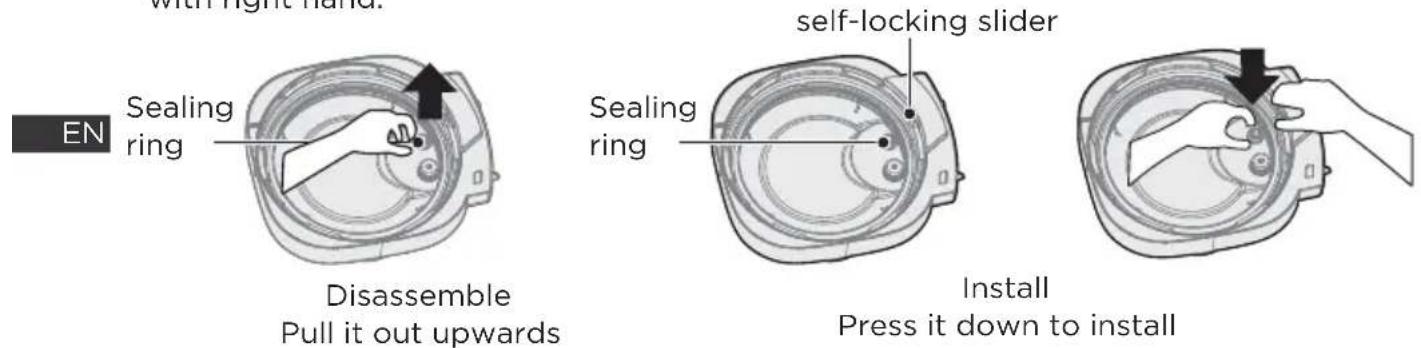
Disassemble and install the sealing ring
- Please do not pull the sealing ring, otherwise, the distorted sealing ring may influence the seal and pressure effect.
- Install the sealing ring, when the float valve is in a falling state, press the self-locking slider with the left hand, then rotate the lid with left hand and press the sealing ring with right hand.
Disassemble and install the water box
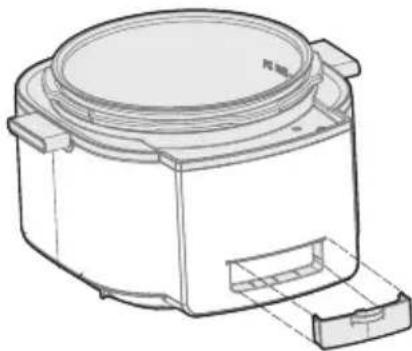
- The water box sits at the back of the appliance base and catches any overflow from the condensation rim. It should be installed before cooking, then emptied and rinsed out after each use.
- Pull the water box away from the appliance base; do not pull down. Note the tabs on the appliance base and the grooves on the water box.
- Align the grooves on the water box over the tabs on the back of the appliance base and slide the water box into place.
Use and Maintain the Inner Pot
1. Do not empty
It may cause yellowish and spotted inner pot or distorted bottom if it is empty for a long time.
2. Do not use it to store the acid, alkali and preserved foods for a long period
Although the inner pot has excellent anti-corrosion performance, it may cause corrosion of certain degree, the suggested time of keep warm shall not exceed 2h.
3. Keep it clean to prolong the service life
Do not immerse it in water for a long period.
Clean the inner pot with soap, mild detergent or warm water to remove dust, oil and dirt.
- Do not use a metal shovel or other hard tool, otherwise it will damage the inner surface of pot.
Prepare for Cooking
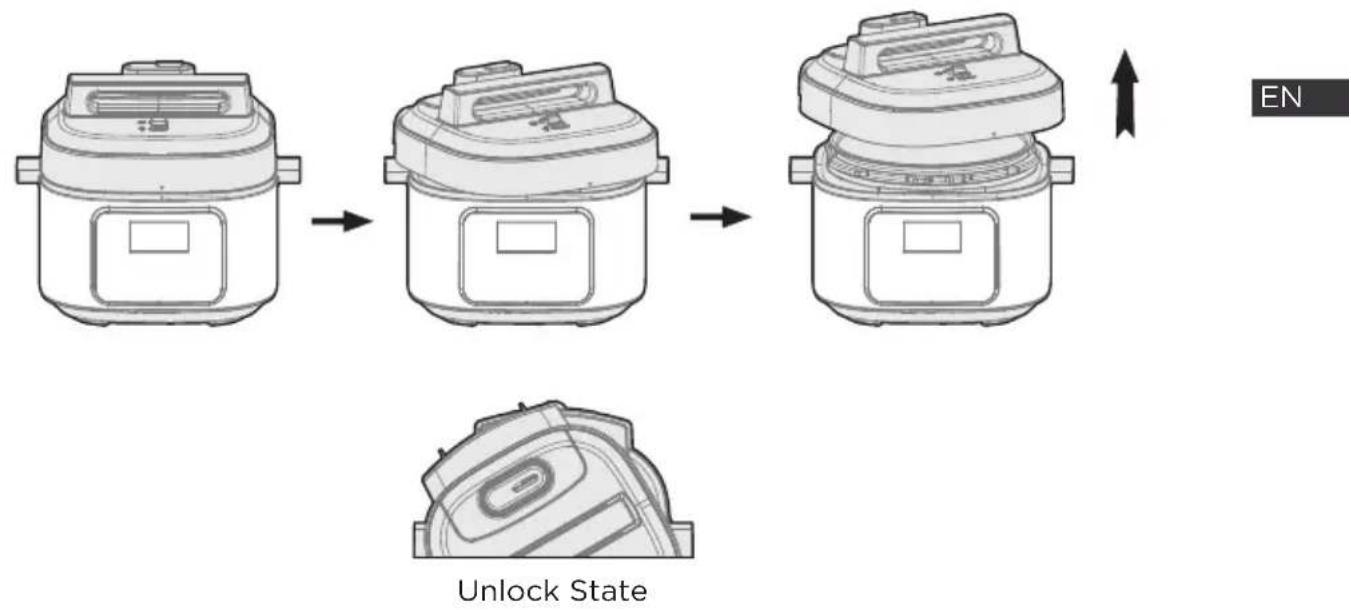
1 Opening the lid correctly
- Hold the handle of upper cover, turn it anticlockwise for about 30° till the lid at unlock state, and then lift the upper cover.
2 Check if the parts and accessories of lid are well installed
- Check if the floater valve and exhaust valve are jammed, confirm if the sealing ring and block proof cover are well installed.
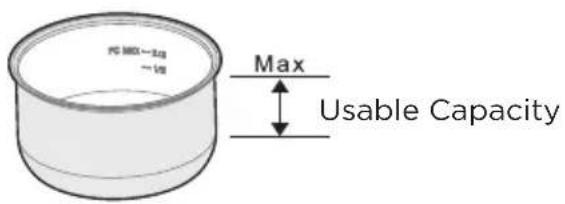
3 Take out the inner pot, put the foods and water into the inner pot
- The total amount of foods and water shall not exceed the Max marked on the inner pot.
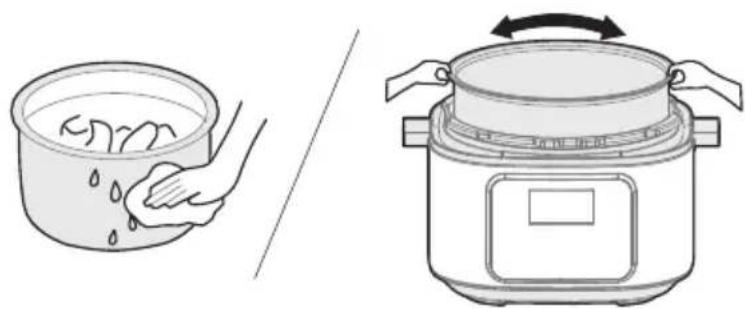
4 Put the inner pot into the cooker
- Wipe to clean the external surface of inner pot, foreign object and water are not allowed on the inner surface of electric pressure cooker;
- Turn the inner pot to left and right to ensure good contact with the heating plate.
5 Safely close the lid
- Before closing the lid, check if the sealing ring is well installed.
- Hold the handle of upper cover, aim the lid as “unlock state”, put the top cover horizontally on the cooker body, turn the upper cover clockwise for about 30° to the lock place as “Lock State”.
![graph TD A["EN"] --> B["Raw Material"] B --> C["Prepared Product"] C --> D["Final Product"]](/content/2026/04/707332/images/884d7546587de9c998f42963d829b907b467039512869e5d029eba94fd5b577a.jpg)
lock State
6 Put the exhaust valve well
- When working, please turn the exhaust valve to the sealing place, which means the electric pressure cooker keeps at sealing state:
- For manual exhaust, please turn the exhaust valve handle to the exhaust place, the electric pressure cooker keeps at the exhaust state; when exhausting, do not keep the hands or face above the exhaust opening;
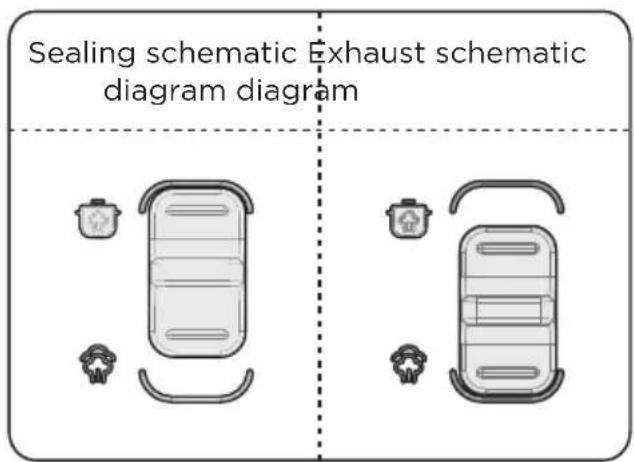
- Check if the floater valve drops down before working (before heating, the floater valve is down).

NOTE
• (Pictures are for reference only, actual product may differ from picture shown)
General Function
- When you switch on, if the buttons are inactive, please confirm that the lid is closed in the right place.
- After cooking, the cooker may automatically enter into the keep warm state (PRESSURE COOK, CHILI, STEAM, BEAN, RICE, SLOW COOK), and the indicator displays "00:00 (0 min), 00:01 (1 min)..."
Tips:
- When the cooker is working, it is normal to hear a "click" sound, please feel relaxed when using.
- To cook a small amount of food, the inner pot may possibly be lifted when opening the lid. Please shake the lid to drop the inner pot into the cooker body and then remove the lid.
Safely Open the Lid
- Cut off power supply or remove the power plug.
- Exhaust method
A. Quickly open the lid (For non-fluid foods)
Turn the exhaust valve to the exhaust icon for exhausting. Press the steam release button "💡" until the float valve drops down.
B. Open the lid
Keep the electric pressure cooker cool until the float valve drops down.
- Open the lid
A. Turn the upper cover anticlockwise, turn it to the cover open limit place, lift the upper cover to open the lid. B. Do not open the lid before the pressure in the pot has been completely released, do not open the lid fiercely if it is difficult to open. C. Do not pull out the exhaust valve when turning the exhaust valve. D. After cooking fluid foods (porridge and soup), do not turn the exhaust valve or press the steam release button please cut off power supply to make it cool naturally till the float drops before opening the lid.
OPERATION INSTRUCTIONS
Operation Part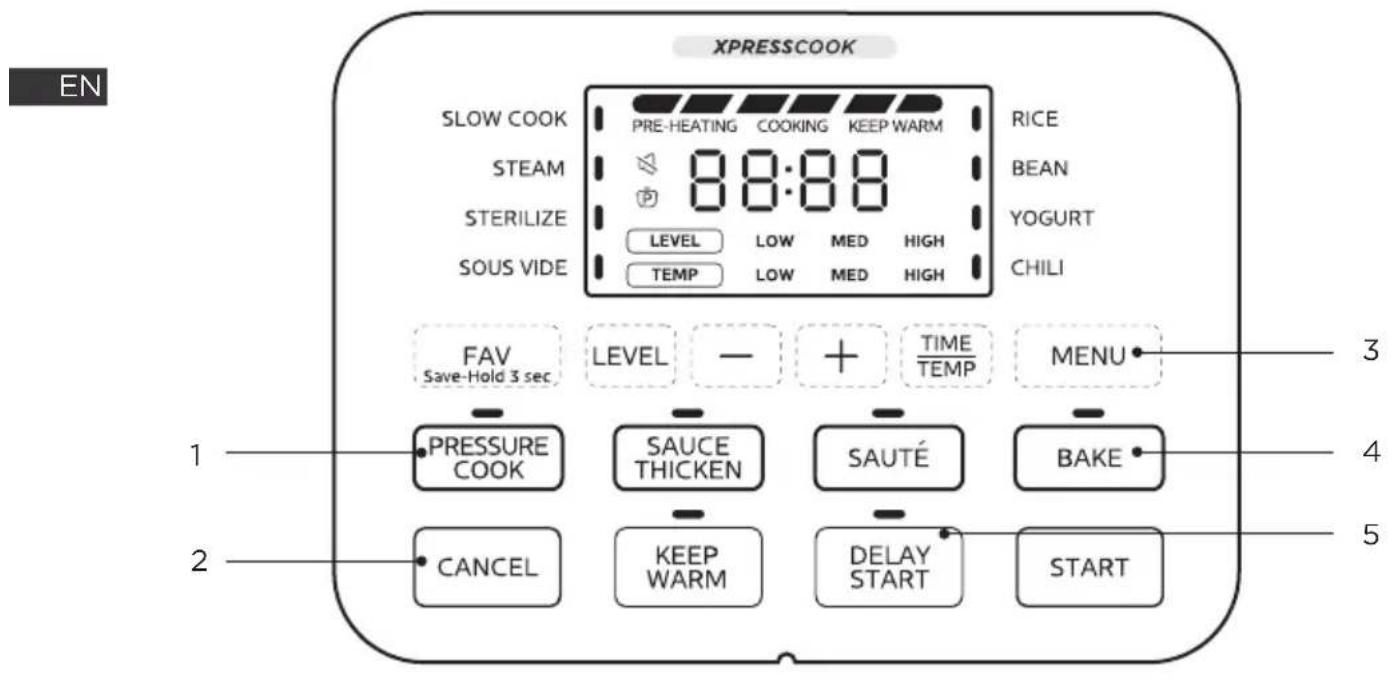
| Function description | ||
| 1 | PRESSURE COOK | • Pressure Cook Button |
| 2 | CANCEL | • Cancel Button |
| 3 | MENU | • Menu Button |
| 4 | BAKE | • Bake Button |
| 5 | DELAY START | • Deploy Start Button |
Function selection:
- Functions such as SLOW COOK, STEAM, STERILIZE, SOUS VIDE, RICE, BEAN, YOGURT and CHILI may be selected through the "MENU" key;
- The PRESSURE COOK function can be selected by pressing the "PRESSURE COOK" key;
- The SAUCE THICKEN function can be selected by pressing the "SAUCE THICKEN" key;
- The SAUTÉ function can be selected by pressing the "SAUTÉ" key;
- The BAKE function can be selected by pressing the "BAKE" key; After the function setting is completed, press the "START" key to start cooking.
Setting of cooking time:
After selecting the function to enter the cooking time setting state, the cooking time can be adjusted by pressing “-” and “+” keys. If it is in the cooking temperature setting state, you can switch to the cooking time setting state by pressing the “TIME/TEMP” key, and then adjust the cooking time by pressing “-” and “+” keys;
Setting of cooking level:
After selecting the function to enter the setting state of cooking time, you can adjust the cooking level by pressing the “LEVEL” key (except for SOUS VIDE, YOGURT and BAKE functions);
Setting of cooking temperature:
After selecting the function, press the “TIME/TEMP” key to switch to the cooking temperature setting state, and adjust the temperature value or temperature level using the “-” and “+” keys.
NOTE
Only SOUS VIDE, YOGURT, and BAKE functions support setting the cooking temperature.
Setting DELAY START:
After setting the function parameters, press the “DELAY START” key to enter the DELAY START setting state. In this state, the screen displays the preset start time, which can be adjusted using the “-” and “+” keys. After setting, press the “START” key to begin the countdown of the delay time. When it counts down to 0, the product starts cooking.
NOTE
DELAY START cannot be set for SOUS VIDE, BAKE, SAUTÉ, SAUCE THICKEN, and YOGURT.
Setting heat preservation:
- In standby mode, press the “KEEP WARM” key to start heat preservation. The display screen will show the heat preservation time. The heat preservation time uses forward timing, and the maximum duration is 10 hours.
- After the product is powered on and a function is selected, press the “KEEP WARM” key to enable or disable the automatic heat preservation stage after cooking for that function.
NOTE
Automatic heat preservation cannot be selected for SOUS VIDE, YOGURT, SAUCE THICKEN, SAUTÉ, and BAKE. After cooking, these functions enter standby mode without automatic heat preservation.
CANCEL key:
During function setting or delay setting, press the “CANCEL” key to return to standby mode. During heating or delay waiting, press the “CANCEL” key to cancel heating or delay and return to standby mode.
Functional Operation Logic
EN
SLOW COOK:
- Power on the product, put food ingredients in the inner pot and close the lid;
- In standby mode, press the "MENU" key to select the "SLOW COOK" function. The "SLOW COOK" indicator will be on and the display screen will show the cooking time and level.
- Press "+" or "-" key to set the cooking time;
- Press the "LEVEL" key to set the cooking level;
- Press the "START" key to start heating;
- After cooking, the product automatically starts to keep warm.
YOGURT:
- Power on the product, put food ingredients in the inner pot and close the lid;
- In standby mode, press the "MENU" key to select the YOGURT function. The "YOGURT" indicator will be on and the display screen will show the cooking time and temperature level;
- Press "+" or "-" key to set the cooking time;
- Press the "TIME/TEMP" key to switch to the temperature level setting state, and press the "+" or "-" key to select the corresponding temperature level;
- Then press the "START" key to start heating;
- After cooking, the product returns to the standby mode.
SOUS VIDE:
- Power on the product, put food ingredients in the inner pot and close the lid;
- In standby mode, press the "MENU" key to select the SOUS VIDE function. The "SOUS VIDE" indicator will be on and the display screen will show the cooking time;
- Press "+" or "-" key to set the cooking time;
- Press the "TIME/TEMP" key to switch to the cooking temperature setting state, and the display screen shows the cooking temperature. Press the "+" or "-" key to adjust the cooking temperature;
- Then press the "START" key to start heating;
- After cooking, the product returns to the standby mode.
STEAM, STERILIZE, RICE, BEAN and CHILI:
- Power on the product, put food ingredients in the inner pot, close the lid, and turn the exhaust valve to the sealing position;
- In standby mode, the corresponding menu can be selected by pressing the "MENU" key. The corresponding menu indicator will be on, and the display screen will show the cooking time and cooking pressure level;
- Press "+" or "-" key to set the cooking time;
- Press the "LEVEL" key to set the cooking pressure level;
- Press the "START" key to start cooking;
- After cooking, the product automatically starts to keep warm.
* Special descriptions of RICE function: The volume ratio of rice to water for RICE function is recommended to be 1:1.2, and users can adjust the time and volume ratio of rice to water according to their tastes;
PRESSURE COOK:
- Power on the product, put food ingredients in the inner pot, close the lid, and turn the exhaust valve to the sealing position;
- In standby mode, press the "PRESSURE COOK" key. The "PRESSURE COOK" indicator will be on, and the display screen will show the cooking time and cooking pressure level;
- Press "+" or "-" key to adjust the time;
- Press the "LEVEL" key to set the cooking pressure level;
- Press the "START" key to start cooking;
- After cooking, the product automatically starts to keep warm.
SAUCE THICKEN:
- Power on the product, put food ingredients in the inner pot and keep the lid open;
- In standby mode, press the "SAUCE THICKEN" key. The "SAUCE THICKEN" indicator will be on, and the display screen will show the cooking time and the cooking power level;
- Press "+" or "-" key to adjust the time;
- Press the "LEVEL" key to adjust the cooking power level;
- Press the "START" key to start heating;
- After cooking, the product returns to the standby mode.
SAUTÉ:
- Power on the product, put food ingredients in the inner pot and keep the lid open;
- In standby mode, press the "SAUTÉ" key. The "SAUTÉ" indicator will be on, and the display screen will show the cooking time and temperature level;
- Set the cooking time by pressing the "-" and "+" keys;
- Press the "LEVEL" key to adjust the cooking temperature level;
- Then press the "START" key to start cooking;
- After cooking, the product returns to the standby mode;
BAKE:
- Power on the product and put food ingredients in the inner pot;
- In standby mode, press the "BAKE" key. The "BAKE" indicator will be on and the display screen will show the cooking time;
- Press the "+" or "-" key to adjust the cooking time;
- Press the "TIME/TEMP" key to switch to the cooking temperature setting state, and press the "+" or "-" key to adjust the cooking temperature;
- Press the "START" key to start cooking;
- After cooking, the product returns to the standby mode.
Other Product Settings
Modify parameters midway:
- After starting cooking, if it is necessary to modify the cooking parameters (cooking time, pressure level, power level, temperature level or temperature value) midway, press the "LEVEL", "-", "+", or "TIME/TEMP" to enter the midway parameter modification state and modify the corresponding cooking parameters;
- After completing the parameter modification, press the "START" key to confirm the parameters and start cooking with new parameters.
FAV Save-Hold 3 sec:
- In the process of function setting, if the function setting has been completed, press and hold the "FAV Save-Hold 3 sec" key for 3s to add the current function and parameters to favorites. After successful adding, the display screen will show "SEt" for 3s;
- In the standby mode or function selection state, if the function has been added to favorites, short press the "FAV Save-Hold 3 sec" key to jump to the corresponding favorite function and parameters selection state immediately. Then press the "START" key to start the favorite function.
- If you need to cancel the favorite function, press and hold the "FAV Save-Hold 3 sec" key for 3s in the standby mode. After successful cancellation, the display screen will alternately display "No" and "SEt" for 3s;
Setting of temperature unit:
In the standby mode, press and hold both “-” and “+” keys for 3s to switch the current system temperature unit, and the display screen will show the switched temperature unit. The system temperature unit can be switched between “°C” and “°F” by the above operation. After the setting is completed, the product will always remember this setting even in the event of power-off.
Setting of product sound:
In the standby mode, press and hold both the “DELAY START” and the “KEEP WARM” keys for 3s to set the mute function of the current system. When the mute function is on, the mute icon on the display screen will light up. After the setting is completed, the product will always remember this setting even in the event of power-off.
Menu parameter memory function and default factory settings:
- The parameters of all functions will be memorized after cooking is started. When the corresponding function is selected next time, the function parameters will be initialized to the last memorized parameters for quick use by users.
- If it is necessary to restore the product functions to the default factory settings, press and hold the "CANCEL" key for 3s in standby mode. After successful operation, all indicators will flash 3 times.
Program Setting
| Smart Program | Pressure | Keep-pressure Time range | Cooking Time range | Default Cooking Time |
| PRESSURE COOK | Low: 40kpa High: 80kpa | 00:01-04:00 | - | 0:35 |
| CHILI | 00:01-04:00 | - | 0:25 | |
| STEAM | 00:01-04:00 | - | 0:10 | |
| BEAN | 00:01-04:00 | - | 0:30 | |
| RICE | 00:01-01:00 | - | 0:12 | |
| STERILIZE | 00:01-01:00 | - | 0:15 | |
| SOUS VIDE | No Pressure | - | 00:01-99:30 | 3:00 |
| BAKE | No Pressure | - | 00:01-01:00 | 0:30 |
| SAUCE THICKEN | No Pressure | - | 00:01-01:00 | 0:30 |
| SLOW COOK | No Pressure | - | 00:01-24:00 | 6:00 |
| SAUTÉ | No Pressure | - | 00:01-01:00 | 0:30 |
| YOGURT | No Pressure | - | 00:01-99:30 | 8:00 |
EN
| Smart Program | Cooking Time Increment/ Decrement | Level range | Default Level | Temp range | Default Temp |
| PRESSURE COOK | 1min (Hold 10min) | Low、High - | High | - | |
| CHILI | 1min (Hold 10min) | High | |||
| STEAM | 1min (Hold 10min) | High | |||
| BEAN | 1min (Hold 10min) | High | |||
| RICE | 1min (Hold 10min) | Low | |||
| STERILIZE | 1min (Hold 10min) | High | |||
| SOUS VIDE | 1min (Hold 10min) | - | - | - | - |
| BAKE | 1min (Hold 10min) | - | - | - | - |
| SAUCE THICKEN | 1min (Hold 10min) | Low、Med、 High | High | - | - |
| SLOW COOK | 1min (Hold 10min) | Low、Med、 High | Med | - | - |
| SAUTÉ | 1min (Hold 10min) | Low、Med、 High | High | - | - |
| YOGURT | 1min (Hold 10min) | - | - | Low、Med、 High | Med |
| Smart Program | Temperature range | Default Temperature | Temperature Increment/ Decrement | Auto Keep Warm | Delay Start |
| PRESSURE COOK | - | - | - | ON | Y |
| CHILI | ON | Y | |||
| STEAM | ON | Y | |||
| BEAN | ON | Y | |||
| RICE | ON | Y | |||
| STERILIZE | OFF | Y | |||
| SOUS VIDE | 77-194°F (25-90°C) | 133°F (56°C) | 1°F (1°C) [ Hold 5°F/5°C] | N/A | N |
| BAKE | 220-284°F (104-140°C) | 284°F (140°C) | 5°F (1°C) [ Hold 10°F/5°C] | N/A | N |
| SAUCE THICKEN | - | - | - | N/A | N |
| SLOW COOK | - | - | - | ON | Y |
| SAUTÉ | - | - | - | N/A | N |
| YOGURT | - | - | - N/A | N |

NOTE
- The default time for delay is 6:00, the adjustable range is 0:10-24:00, and the adjustable step is 0:10 (1:00 for continuous press);
- Description of Level: For the pressure function, it is the Pressure Level; for the non-pressure function (except Sous vide and Bake), it is the Power Level;
- Description of Temp: For Yogurt, Low: 33°C; Med: 40°C; High: 83°C (the digital tube displays boil);
- Description of Yogurt: For the level of High, the time cannot be set, and the digital tube displays Boil;
- Keep Warm adopts forward timing, with an increment of every minute; when the product is in standby mode, press the Keep Warm key to start. The maximum duration for heat preservation is 10 hours.
- Saute, Low: 120°C; Med: 150°C; High: 179°C;
- SAUCE THICKEN is a full-course countdown function, and cooking ends when the countdown ends.
CLEANING AND MAINTENANCE
For use the product safely with a longer service life, please carefully check and maintain it.
| SolutionsIf followings | |
| Power cord and plug is expanded, deformation, damaged and it color is changed.One part of the power cord and plug are hotter.Power cord is flexible with discontinuous power supply.The electric pressure cooker has abnormal heating and generates bad odor.There's abnormal noise or vibration when supply power. | Stop using, and repair it by the authorized repair center. |
| There's dust or dirt on the plug or socket. | Remove the dust or dirt. |
Safety Precautions
To avoid personal injury and property loss, be sure to observe the following safety precautions.
• Meanings of the marks:
 | Means“Forbidden” items |  | GeneralForbid |  | DisassembleForbidden |  | Wet handsForbidden |
 | ContactForbidden |  | Spray WaterForbidden | ||||
 | Means“Mandatory” items |  | Must beexecuted |  | Remove thepower plug |
- The danger caused by mistaken use if following warnings are neglected includes to two grades.

WARNING
It may possibly cause death or serious injury if the warming items are disobeyed.

CAUTION
It may cause physical injury or property damage if the caution items are disobeyed.

WARNING
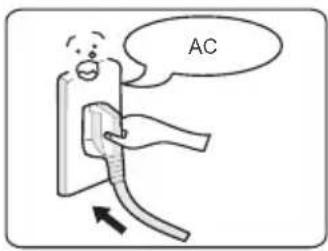
Use correct power outlet (Refer to the label)
- Failure to use correct electricity can cause fire or electric shock.
- Danger of fire if the bad socket is adopted.

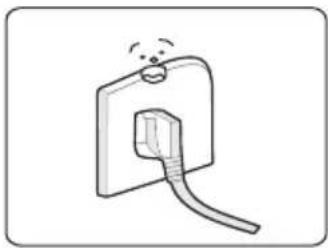
A socket shall be used alone
- A socket of more than 10A rated current with grounding wire shall be used alone;
- If shared with other electrical appliances, the socket may cause abnormal heat and result in fire.

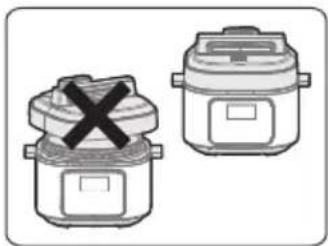
It is strictly prohibited to use other lid
- It is strictly prohibited to use other lid for heating, and in the (switching on) process, the use of non-original lid is not allowed.
- As this may cause electric shock or safety hazards.

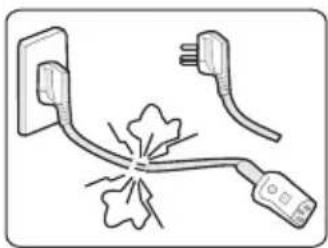
Stop using if the power cord is damaged
- Replace the damaged power cord with a special soft cord or replace it with a special assembly purchased from the manufacturer or an authorized repair center.

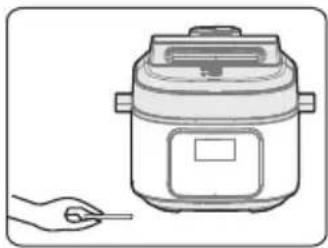
Do not put foreign objects
- It is prohibited to insert metal shavings, needles, and other foreign matter into the gap.
- This may cause electric shock or movement anomalies.


Place the appliance in a location out of reach of infants
- Place the appliance in a location out of reach of infants. • To avoid electric shock and scalding.

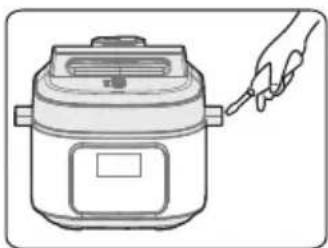
Modification is prohibited
- Modification or repair by non-professionals is prohibited. • Violation may cause a fire or electric shock.
- Repair or replacement of parts shall be made at a designated service center.

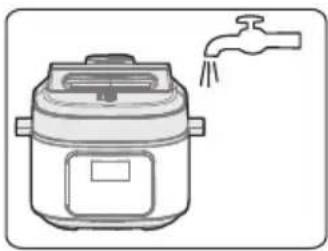
Products may not be immersed or sprinkled with water
- Doing so could cause electric shock and electrical short circuits.


WARNING
Warning on Opening the Lid
- When the electric pressure cooker is not working, there is no pressure in the pot, and the float valve is down;
- When the electric pressure cooker is working, pressure in the cooker rises, and the float valve ascends; do not forcefully open the lid before the pressure has been completely released;
- If it is difficult to open the lid, please do not open it forcefully, otherwise, it may cause scalding or physical injury.
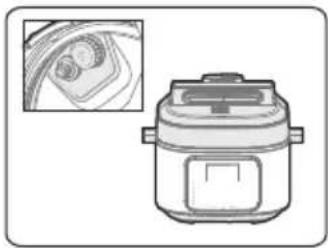
Check periodically
- Be sure to check periodically the block proof cover and exhaust valve core to make sure that they are not blocked;
- Do not cover the exhaust valve with heavy objects or replace it with other objects.


CAUTION
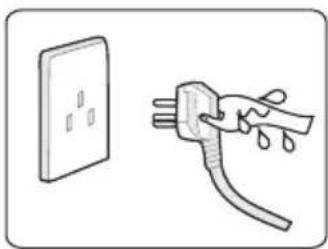
Never pull the plug with a wet hand
• To avoid electric shock.

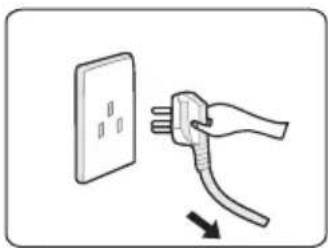
When pulling the plug, you must pinch the plug
- When pulling the plug, you must pinch the plug;
- Do not pull the power cord, otherwise it will damage the cord, causing electric shock and short circuit.

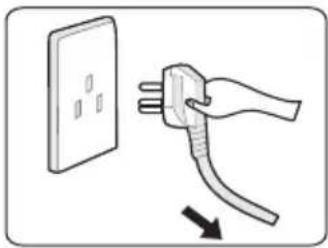
Unplugging when not in use
- Otherwise, it may produce leakage, fire or failure.

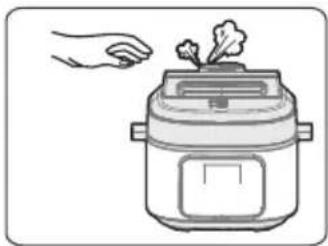
In working, never move your hands to close to the exhaust port.
- In cooking process, never move your hands to close to the exhaust port to avoid burns.
- During cooking, do not cover the vent with a cloth and other items.

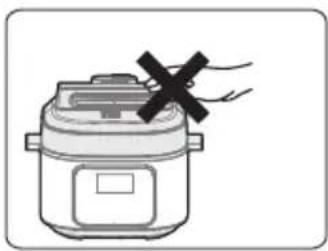
When the cooker is working, please do not touch the lid.
- When the cooker is working, the lid has high temperature; do not touch it.
- Otherwise, it may possibly cause scalding.

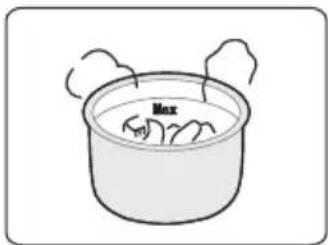
The total amount of food and water cannot exceed the Max scale.
The total amount of food and water cannot exceed the Max scale; otherwise, food may be undercooked or cause malfunction.

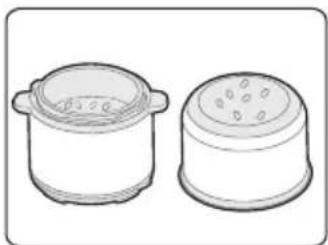
Do not use a pot other than the dedicated pot.
- When there is a foreign object on the bottom of the pot and the heating plate surface, remove the foreign object before use.
- Otherwise, it may cause overheating and work abnormalities, etc.

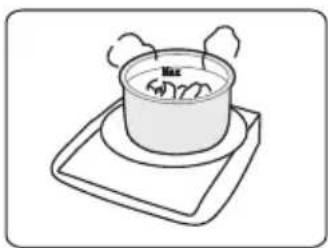
Do not put the inner pot on other appliances for heating.
• In order to avoid deformation or fault, please use the special inner pot.

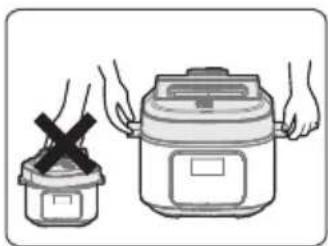
When moving the product, please hold the handle of the cooker body.
When moving the product, do not directly hold the handle of the lid to avoid the lid dropping.

Do not use in the following locations:
- Do not use in unstable locations.
- Do not use in locations near water and fire.
- Do not use near walls and furniture;
- Do not use in locations exposed to direct sunlight and oil splatter.
- Do not use on the stove to avoid a fire.

EN
Environment for Storing the Product
- Periodically clean the cooker and remove oil and dirt if it is stored on the table.
- Put the electric pressure cooker 11.81in away from other kitchen appliances.
Clean after Use
- Clean after each use.
- Before cleaning and maintenance, please unplug the power cord until the product cools.
- Remove the lid and inner pot, clean with detergent first, then rinse well with water, and wipe dry with a soft cloth.
- Clean the internal side of the lid with water, the seal ring, block proof cover, exhaust valve core and float valve can be removed for washing, timely and correctly install them after washing, and then dry the internal side of lid with cloth.
- Wipe clean the cooker body with a rag, and it is prohibited to soak the cooker body in water or spray water to it.
TROUBLESHOOTING
Operation of your appliance can lead to errors and malfunctions. The following tables contain possible causes and notes for resolving an error message or malfunction. It is recommended to read the tables carefully below in order to save your time and money that may cost for calling to the service center.
— If the fault is not removed after the above check, please contact our authorized service center for repair.
| Reason SolutionProblem | EN | ||
| Difficult to close the lid | Sealing ring not installed properly. | Position the sealing ring well. | |
| The floater valve clamps the push rod. | Lightly push the push rod. | ||
| Difficult to open the lid | Float valve in the popped-up position. | Press the float valve lightly with a soup spoon. | |
| Pressure exists inside the cooker. | Open the lid after the pressure is completely released. | ||
| Steam leaks from the lid | Sealing ring installed improperly. | Install the sealing ring as required. | |
| Food debris attached to the sealing ring. | Clean the sealing ring. | ||
| Replace the sealing ring. Sealing | |||
| The lid is not closed correctly. | Close the lid correctly. | ||
| Steam leaks from float valve. | Food debris on the float valve gasket. | Clean the float valve gasket. | |
| Float valve gasket worn-out. | Replace the float valve gasket. | ||
| Float valve unable to rise | Too little food and water in inner pot. | Add water and food according to the recipe. | |
| Steam leaks from the lid or exhaust valve. | Send to the service center for repair. | ||
| Reason Sol | |||
| Steam comes out from exhaust valve non-stop | · Exhaust valve not in sealing position. | · Turn the exhaust valve to the sealing position. | |
| · Pressure control fails | · Send to the service center for repair. | ||
| Power indicator doesn't light on | · Power socket bad contact. | · Please check the power socket. | |
| All indicators flas | Display screen displays E1 | · Bottom sensor fault. | · Send to the service center for repair. |
| Display screen displays E2 | |||
| Display screen displays E8 | · Pressure switch fault. | · Send to the service center for repair. | |
| Display screen displays EU | · An exception in receiving or sending information during product | · Send to the service center for repair | |
| Self-diagnosed Warning Displays | Display screen displays noPr | · There is not enough pressure. | · Add a minimum 1.5 cups (375 mL) of a thin liquid to the inner pot. |
| Display screen displays PrSE | · excess pressure. | · If pressure has not fully released after 60 minutes contact the Customer Care Team. | |
| Rice half cooked or too hard | · Too little water. | · Add water accordingly. | |
| · Lid opened prematurely. | · After cooking cycle completes, leave the lid on for 5 more minutes. | ||
| · Too much water.Rice too soft | · Reduce water accordingly. | ||
TRADEMARKS, COPYRIGHTS AND LEGAL STATEMENT
The Midea logo, word marks, trade name, trade dress, and all versions thereof are valuable assets of Midea Group and/or its affiliates (“Midea”), to which Midea owns trademarks, copyrights, and other intellectual property rights, and all goodwill derived from using any part of a Midea trademark. Use of Midea trademark for commercial purposes without the prior written consent of Midea may constitute trademark infringement or unfair competition in violation of relevant laws.
This manual is created by Midea, and Midea reserves all copyrights thereof. No entity or individual may use, duplicate, modify, distribute in whole or in part this manual, or bundle or sell with other products without the prior written consent of Midea.
All the described functions and instructions were up to date at the time of printing this manual. However, the actual product may vary due to improved functions and designs.
DATA PROTECTION NOTICE
For the provision of the services agreed with the customer,
we agree to comply without restriction with all stipulations of applicable data protection law, in line with agreed countries within which services to the customer will be delivered,
as well as, where applicable, the EU General Data Protection Regulation (GDPR).
Generally, our data processing is to fulfil our obligation under contract with you and for product safety reasons, to safeguard your rights in connection with warranty and product registration questions. In some cases, but only if appropriate data protection is ensured, personal data might be transferred to recipients located outside of the European Economic Area.
Further information is provided on request. You can contact our Data Protection Officer via MideaDPO@midea.com. To exercise your rights such as the right to object to your personal data being processed for direct marketing purposes, please contact us via MideaDPO@midea.com. To find further information, please follow the QR code.
1 YEAR LIMITED WARRANTY
This is the only express warranty for this product and is in lieu of any other warranty or condition. This product is warranted to be (1) year from the date of original purchase. During this period, your exclusive remedy is repair or replacement of this product or any component found to be defective, at our option; however, you are responsible for all costs associated with returning the product to us and our returning the product or component under this warranty to you. If the product or component is no longer available, we will replace with a similar one of equal or greater value. This warranty does not cover wear from normal use, and damages to the product resulting from accident, alteration, abuse, or misuse. This warranty extends only to the original consumer purchaser or gift recipient. Keep the original sales receipt. This warranty is void if the product is used for other than single family household use or subjected to any voltage and waveform. We exclude all claims for special, incidental, and consequential damages by breach of express or implied warranty. All liability is limited to amount of the purchase price. Every implied warranty, including any statutory warranty or condition of merchantability, is limited to the duration of this written warranty, except where prohibited by law, in which case such warranty or condition is limited to the duration of this written warranty. Legal rights vary depending on where you live. Some states or provinces do not allow limitations on implied warranties or special, incidental, or consequential damages, so the foregoing limitations may not apply to you. Please note that failure to complete and submit this form does not diminish your warranty.
In the event of a warranty period claim, question, comments or if service is required for this product, please contact us at the following:
customerserviceusa@midea.com
1-866-646-4332
LETTER OF THANKS
Periodic inspection
CanadaSupport@midea.com
1-866-646-4332

make yourself at home


- ELECTRIC PRESSURE COOKER
- USER MANUAL
- THANK YOU LETTER
- CONTENTS
- SAFETY INSTRUCTIONS
- INTENDED USE
- EXPLANATION OF SYMBOLS
- DANGER
- WARNING OF ELECTRICAL VOLTAGE
- WARNING
- CAUTION
- ATTENTION
- OBSERVE INSTRUCTIONS
- IMPORTANT SAFEGUARDS
- READ ALL INSTRUCTIONS
- EN
- PLEASE SAVE THESE INSTRUCTIONS
- SPECIFICATIONS
- PRODUCT OVERVIEW
- COMPONENT NAME
- PARTS LIST
- NOTE
- QUICK START GUIDE
- TIPS
- DISASSEMBLE AND INSTALL THE BLOCK PROOF COVER, SEAL RING, SEALING RING AND WATER BOX
- DISASSEMBLE AND INSTALL THE BLOCK PROOF COVER
- DISASSEMBLE AND INSTALL THE SEAL RING
- DISASSEMBLE AND INSTALL THE SEALING RING
- DISASSEMBLE AND INSTALL THE WATER BOX
- USE AND MAINTAIN THE INNER POT
- DO NOT EMPTY
- DO NOT USE IT TO STORE THE ACID, ALKALI AND PRESERVED FOODS FOR A LONG PERIOD
- KEEP IT CLEAN TO PROLONG THE SERVICE LIFE
- PREPARE FOR COOKING
- OPENING THE LID CORRECTLY
- CHECK IF THE PARTS AND ACCESSORIES OF LID ARE WELL INSTALLED
- TAKE OUT THE INNER POT, PUT THE FOODS AND WATER INTO THE INNER POT
- PUT THE INNER POT INTO THE COOKER
- SAFELY CLOSE THE LID
- PUT THE EXHAUST VALVE WELL
- GENERAL FUNCTION
- SAFELY OPEN THE LID
- OPERATION INSTRUCTIONS
- FUNCTION SELECTION
- SETTING OF COOKING TIME
- SETTING OF COOKING LEVEL
- SETTING OF COOKING TEMPERATURE
- SETTING DELAY START
- SETTING HEAT PRESERVATION
- CANCEL KEY
- FUNCTIONAL OPERATION LOGIC
- SLOW COOK
- YOGURT
- SOUS VIDE
- STEAM, STERILIZE, RICE, BEAN AND CHILI
- PRESSURE COOK
- SAUCE THICKEN
- SAUTÉ
- BAKE
- OTHER PRODUCT SETTINGS
- MODIFY PARAMETERS MIDWAY
- FAV SAVE-HOLD 3 SEC
- SETTING OF TEMPERATURE UNIT
- SETTING OF PRODUCT SOUND
- MENU PARAMETER MEMORY FUNCTION AND DEFAULT FACTORY SETTINGS
- CLEANING AND MAINTENANCE
- SAFETY PRECAUTIONS
- USE CORRECT POWER OUTLET (REFER TO THE LABEL)
- A SOCKET SHALL BE USED ALONE
- IT IS STRICTLY PROHIBITED TO USE OTHER LID
- STOP USING IF THE POWER CORD IS DAMAGED
- DO NOT PUT FOREIGN OBJECTS
- PLACE THE APPLIANCE IN A LOCATION OUT OF REACH OF INFANTS
- MODIFICATION IS PROHIBITED
- PRODUCTS MAY NOT BE IMMERSED OR SPRINKLED WITH WATER
- WARNING ON OPENING THE LID
- CHECK PERIODICALLY
- NEVER PULL THE PLUG WITH A WET HAND
- WHEN PULLING THE PLUG, YOU MUST PINCH THE PLUG
- UNPLUGGING WHEN NOT IN USE
- DO NOT USE IN THE FOLLOWING LOCATIONS
- ENVIRONMENT FOR STORING THE PRODUCT
- CLEAN AFTER USE
- TROUBLESHOOTING
- TRADEMARKS, COPYRIGHTS AND LEGAL STATEMENT
- DATA PROTECTION NOTICE
- YEAR LIMITED WARRANTY
- LETTER OF THANKS
- PERIODIC INSPECTION
Brand : MIDEA
Model : MPC6018AASS
Category : Multi-cooker