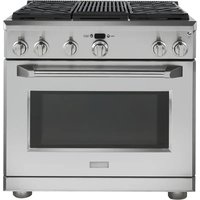
ZDP364NRPSS - Cooker Monogram - Free user manual and instructions
Find the device manual for free ZDP364NRPSS Monogram in PDF.


| Product Type | Professional gas range |
| Brand | Monogram |
| Model | ZDP364NRPSS |
| Width | 91 cm (36 in) |
| Power supply | Natural gas or propane (convertible) |
| Surface burners | 4 dual-flame burners with electronic ignition and automatic reignition |
| Grill | Infrared grill with Glo-Bar igniter and reversible grid |
| Oven | Single oven with convection, temperature probe, and self-cleaning |
| Oven capacity | 5 extendable rack positions |
| Oven functions | Baking, roasting, broiling, proofing, self-cleaning |
| Safety | Anti-tilt device, door lock in cleaning, gas shut-off if power failure (grill and cooktop) |
| Cooktop material | Stainless steel with porcelain-coated cast iron grates |
| Cleaning | Self-cleaning oven, dishwasher-safe grates, sealed burners |
| Included accessories | Roasting rack, baking pan, temperature probe, bamboo cutting board |
| Warranty | 2 years parts and labor, 5 years burners, lifetime oven racks (domestic use) |
| Customer service | GE Answer Center: 800.561.3344 |
Frequently Asked Questions - ZDP364NRPSS Monogram
User questions about ZDP364NRPSS Monogram
0 question about this device. Answer the ones you know or ask your own.
Ask a new question about this device
Download the instructions for your Cooker in PDF format for free! Find your manual ZDP364NRPSS - Monogram and take your electronic device back in hand. On this page are published all the documents necessary for the use of your device. ZDP364NRPSS by Monogram.
USER MANUAL ZDP364NRPSS Monogram
Professional Dual Fuel Ranges
Aluminum Foil 7,17,21
Baking/Roasting 1
Broiling/Broiling Guide
Controls 9, 16, 19, 2
....23, 25, 26
Convection Cooking ..... 20, 22–24
Features 9,15
Proofing 25
Self-Cleaning Instructions ..... 26, 27
Care and Cleaning
Burner Caps 34,35
Burner Grates 3\$
Broiler Pan, Grid and Roasting Rack.... 29
Control Panel and Knobs 29
Cutting Board 36
Grease Troughs 36
Griddle 36
Grill 37
Lift-Off Oven Door 31, 33
Oven Heating Elements 29
Oven Lights 32
Probe 31
Sealed Burner Assemblies ..... 34, 35
Self-Cleaning Oven Racks.... 30
Stainless Steel....33
Consumer Services
Important Phone Numbers ..... 4 2
Model and Serial Number 3
Problem Solver 38-40
Safety Instructions 2,4-8
Warranty 44
⚠ WARNING: If the information in this manual is not followed exactly, a fire or explosion may result, causing property damage, personal injury or death.
— Do not store or use gasoline or other flammable vapors and liquids in the vicinity of this or any other appliance.
— WHAT TO DO IF YOU SMELL GAS
- Do not try to light any appliance.
0, 2 Do not touch any electrical switch; do not use any phone in your building.
- Immediately call your gas supplier from a neighbor's phone. Follow the gas supplier's instructions.
- If you cannot reach your gas supplier, call the fire department.
— Installation and service must be performed by a qualified installer, service agency or the gas supplier.
This is the safety alert symbol. This symbol alerts you to potential hazards that can kill or hurt you and others. All safety messages will follow the safety alert symbol and the word "DANGER", "WARNING", or "CAUTION". These words are defined as:
A DANGER Indicates a hazardous situation which, if not avoided, will result in death or serious injury.
A WARNING Indicates a hazardous situation which, if not avoided, could result in death or serious injury.
A CAUTION Indicates a hazardous situation which, if not avoided, could result in minor or moderate injury.
Consumer Information
| Professional Dual Fuel Range | ||
| Remove packaging tape | Carefully remove all packaging, foam pads and tape.To assure no damage is done to the finish of the product, the safest way to remove the adhesive from packaging tape on new appliances is an application of a household liquid dishwashing detergent. Apply with a soft cloth and allow to soak. | NOTE: The adhesive must be removed from all parts. It cannot be removed if it is baked on. |
| Write down the model & serial numbers | You'll find them on a label located behind the left burner knob or below the control panel which is visible when the oven door is opened. | Before sending in the registration card, please write these numbers here: |
| Model Number | ||
| Serial NumberUse these numbers in any correspondence or service calls concerning your range. | ||
| If you received a damaged range | Immediately contact the dealer (or builder) that sold you the range. | |
| Trouble-shooting tips | Before you request service, check the Problem Solver in the back of this manual. | It lists causes of minor operating problems that you can correct yourself. |
| If you need service | To obtain service, see the Consumer Services page in the back of this manual.We're proud of our service and want you to be pleased. If for some reason you are not happy with the service you receive, here are the steps to follow for further help.FIRST, contact the people who serviced your appliance. Explain why you are not pleased.In most cases, this will solve the problem. | NEXT, if you are still not pleased, write all the details—including your phone number—to:Manager, Customer RelationsGE AppliancesAppliance ParkLouisville, KY 40225 |
IMPORTANT SAFETY NOTICE
- The California Safe Drinking Water and Toxic Enforcement Act requires the Governor of California to publish a list of substances known to the state to cause cancer, birth defects or other reproductive harm, and requires businesses to warn customers of potential exposure to such substances.
- The fiberglass insulation in self-clean ovens gives off a very small amount of carbon monoxide during the cleaning cycle. Exposure can be minimized by venting with an open window or using a ventilation fan or hood.
- Gas appliances can cause minor exposure to four of these substances, namely benzene, carbon monoxide, formaldehyde and soot, caused primarily by the incomplete combustion of natural gas or LP fuels.
Properly adjusted burners, indicated by a bluish rather than a yellow flame, will minimize incomplete combustion. Exposure to these substances can be minimized by venting with an open window or using a ventilation fan or hood.
IMPORTANT: The health of some birds is extremely sensitive to the fumes given off during the self-cleaning cycle of any oven. Move birds to another well-ventilated room.
⚠ WARNING: SAFETY PRECAUTIONS
When using your appliance, follow basic safety precautions, including the following:
- Have the installer show you the location of the range gas shut-off valve and how to turn it off if necessary.
- Be sure all packing materials are removed from the range before operating it to prevent fire or smoke damage should the packing material ignite.
- After prolonged use of a range, high floor temperatures may result and many floor coverings will not withstand this kind of use. Never install the range over vinyl tile or linoleum that cannot withstand such use. Never install it directly over interior kitchen carpeting.
- Locate the range out of kitchen traffic path and out of drafty locations and areas with poor air circulation.
- Do not install this product with an air curtain hood or other range hood that operates by blowing air down on the cooktop. This airflow may interfere with operation of the gas burners resulting in fire or explosion hazard.
▲ WARNING:
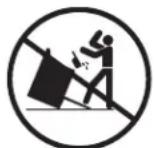
- All ranges can tip.
• BURNS or other SERIOUS INJURIES can result. - INSTALL and CHECK the anti-tip bracket following the instructions supplied with the bracket.
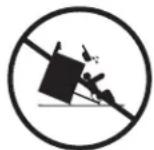
To reduce the risk of tipping the range, the range must be secured by a properly installed anti-tip bracket. See installation instructions shipped with the bracket for complete details before attempting to install.
To check if the bracket is installed and engaged properly, carefully tip the range forward. The bracket should stop the range within 4 inches. If it does not, the bracket must be reinstalled.
If the range is pulled from the wall for any reason, always repeat this procedure to verify the range is properly secured by the anti-tip bracket.
If your range has no anti-tip bracket, call 1.800.626.8774 to receive one at no cost.
▲ WARNING: SAFETY PRECAUTIONS
- Use this appliance only for its intended use as described in this manual.
- Be sure your appliance is properly installed and grounded by a qualified technician in accordance with the provided installation instructions.
- Do not attempt to repair or replace any part of your range unless it is specifically recommended in this manual. All other servicing should be referred to a qualified technician.
- Before performing any service, DISCONNECT THE RANGE POWER SUPPLY AT THE HOUSEHOLD DISTRIBUTION PANEL BY REMOVING THE FUSE OR SWITCHING OFF THE CIRCUIT BREAKER.
- Do not leave children alone—children should not be left alone or unattended in an area where an appliance is in use. They should never be allowed to sit or stand on any part of the appliance.
- Children in walkers, or children crawling, can be attracted to the oven door handle and may grab and open the oven door. This can result in injury from the door being pulled open on a child, or severe burns if the oven is in use and hot.
- Do not allow anyone to climb, stand or hang on the door, control panel or cooktop. They could damage the range and even tip it over, causing severe personal injury.
- Do not store flammable materials in the oven or near the cooktop.
- Do not store plastic, flammable liquids or combustible materials on top of the optional high shelf.
- CAUTION: ITEMS OF INTEREST TO CHILDREN SHOULD NOT BE STORED IN CABINETS ABOVE A RANGE OR ON THE BACKSPLASH OF A RANGE—CHILDREN CLIMBING ON THE RANGE TO REACH ITEMS COULD BE SERIOUSLY INJURED.
-
Never use this appliance as a space heater to heat or warm the room. Doing so may result in carbon monoxide poisoning or overheating of the appliance.
-
Never wear loose-fitting or hanging garments while using the appliance. Be careful when reaching for items stored over the range. Flammable material could be ignited if brought in contact with surface burners, burner grates or oven heating elements and may cause severe burns.
- Use only dry pot holders—moist or damp pot holders on hot surfaces may result in burns from steam. Do not let pot holders touch surface burners, burner grates or oven heating elements. Do not use a towel or other bulky cloth.
- When surface cooking, do not touch surface burners, burner grates, grill or griddle (on some models) or the surrounding areas.
When using the oven, do not touch the oven heating elements, the interior surface of the oven or the exterior area immediately surrounding the door or back trim.
These surfaces may be hot enough to burn.
During and after use, do not touch, or let clothing or other flammable materials contact, the surface burners, grill or griddle (on some models), areas near the surface burners or any interior area of the oven; allow sufficient time for cooling first.
Potentially hot surfaces include the cooktop, areas facing the cooktop, oven vent opening, surfaces near the opening, crevices around the oven door, metal trim parts above the door or any backguard or high shelf surface.
⚠️ CAUTION: The inside surface of the oven may be hot when the door is opened.
- Keep the ventilator hood and grease filters clean to maintain good venting and to avoid grease fires. Turn the ventilator OFF in case of fire or when intentionally “flaming” liquor or other spirits on the cooktop. The blower, if in operation, could spread the flames.
- Cook meat and poultry thoroughly—meat to at least an INTERNAL temperature of 160°F and poultry to at least an INTERNAL temperature of 180°F. Cooking to these temperatures usually protects against foodborne illness.
▲ WARNING: SAFETY PRECAUTIONS
- Do not use water on grease fires. Never pick up a flaming pan. Turn the controls off. Smother a flaming pan on a surface unit by covering the pan completely with a well-fitting lid, cookie sheet or flat tray. Use a multi-purpose dry chemical or foam-type fire extinguisher.
Flaming grease outside a pan can be put out by covering it with baking soda or, if available, by using a multi-purpose dry chemical or foam-type fire extinguisher.
Flame in the oven can be smothered completely by closing the oven door and turning the oven off or by using a multi-purpose dry chemical or foam-type fire extinguisher.
- DO NOT STORE OR USE COMBUSTIBLE MATERIALS, GASOLINE OR OTHER FLAMMABLE VAPORS AND LIQUIDS IN THE VICINITY OF THIS OR ANY OTHER APPLIANCE.
- Do not let cooking grease or other flammable materials accumulate in or near the range. Clean grease troughs (some models) and burner pans after every use.
- If you smell gas, the installer has not done a proper job of checking for leaks. You can have a small leak, and therefore a faint gas smell, if the connections are not completely tight.
Finding a gas leak is NOT a do-it-yourself procedure. Some leaks can only be found with the burner control in the ON position. For your protection, it must be done by a qualified service technician. Never use an open flame to locate a leak.
- If by some chance a burner goes out and gas escapes, open a window or a door to let the room air out. Do not attempt to use the appliance until the gas has had time to dissipate. Follow the instructions in "What to do if You Smell Gas" on page 2.
- Never block the vents (air openings) of the range. They provide the air inlet and outlet that are necessary for the range to operate properly with correct combustion. Air openings are located at the top and bottom of the oven door, in the front portion of the control panel, at the rear of the cooktop and along the bottom of the range.
- Be sure all the range and/or cooktop controls are turned off and the appliance is cool before using any type of aerosol cleaner or cooking spray on or around the appliance. The chemical that produces the spraying action could, in the presence of heat, ignite or cause metal parts to corrode.
- Do not use any type of foil or liner to cover the oven bottom, drip pans or anywhere in the oven, except as described in this manual. Oven liners can trap heat or melt, resulting in damage to the product and risk of shock, smoke or fire.
▲ WARNING: SURFACE COOKING SAFETY PRECAUTIONS
- Do not heat unopened food containers; a buildup of pressure may cause the container to burst.
-
Set the burner control so that the flame heats only the bottom of the pan and does not extend beyond the bottom of the pan. Excessive flame is hazardous. The high BTU burners can easily melt cookware handles.
-
Hold the handle of the pan, using a dry pot holder, to prevent movement of the utensil when stirring or turning food.
• Always use the LITE position when igniting the surface burners and make sure the burners have ignited.
▲WARNING: SURFACE COOKING SAFETY PRECAUTIONS
- Never leave the surface burners unattended at high flame settings. Boilovers cause smoking and greasy spillovers that may catch on fire. If the burner flames are smothered by a severe boilover which affects the igniter, unburned gas will escape into the room.
- To minimize the possibility of burns, ignition of flammable materials and spillage, turn cookware handles toward the side or back of the range without extending over adjacent burners.
• Always turn the surface burners to OFF before removing cookware. - Carefully watch foods being fried at a high flame setting.
- Foods for frying should be as dry as possible. Frost on frozen foods or moisture on fresh foods can cause hot fat to bubble up and over the sides of the pan.
- Use the least possible amount of fat for effective shallow or deep fat frying. Filling the pan too full of fat can cause spillovers when food is added.
- Use a deep fat thermometer whenever possible to prevent overheating fat beyond the smoking point.
• Always heat fat slowly, and watch as it heats. - Never try to move a pan of hot fat, especially a deep fat fryer. Wait until the fat is cool.
- If a combination of oils or fats will be used in frying, stir together before heating or as fats melt slowly.
- When using glass cookware, make sure it is designed for top-of-range cooking.
- Do not leave any items on the cooktop. The hot air from the vent may ignite flammable items and will increase pressure in closed containers, which may cause them to burst.
-
Do not use aluminum foil to cover the grates or line any part of the cooktop. Doing so may result in carbon monoxide poisoning, overheating of the cooktop surfaces, or a potential fire hazard.
-
Use proper pan size—avoid pans that are unstable or easily tipped. Select cookware having flat bottoms large enough to properly contain food and avoid boilovers and spillovers and large enough to cover burner grate. This will save cleaning time and prevent hazardous accumulations of food, since heavy spattering or spillovers left on the range can ignite. Use pans with handles that can be easily grasped and remain cool.
- Do not leave plastic items on the cooktop—they may melt if left too close to the vent or burner.
- To avoid the possibility of a burn, always be certain that the controls for all burners are at the OFF position and all grates are cool before attempting to remove them.
- Grease is flammable. Let hot grease cool before attempting to handle it. Avoid letting grease deposits collect in the grill or the griddle grease troughs (some models). Clean these areas after each use.
- For proper lighting and performance of the cooktop burners, keep the burner ports clean. It may be necessary to clean these when there is a boilover or when the burner does not light, even though the electronic igniters click.
- After cleaning, it is important to make sure the cap and burner port are properly aligned with the burner base. Incorrect alignment will produce poor burner performance. Never operate the burner without all burner parts in place.
- Clean the cooktop with caution. Avoid steam burns; do not use a wet sponge or cloth to clean the cooktop while it is hot. Some cleaners produce noxious fumes if applied to a hot surface. Follow manufacturer's directions.
- Do not use the grill for cooking excessively fatty meats or products that can flare-up.
- If range is located near a window, do not hang long curtains that could blow over the surface burners and create a fire hazard.
⚠ WARNING: OVEN SAFETY PRECAUTIONS
- Place the oven rack in the desired position while the oven is cool. If racks must be handled when hot, do not let pot holder contact the heating elements.
- Stand away from the range when opening the oven door. Hot air or steam which escapes can cause burns to hands, face and/or eyes.
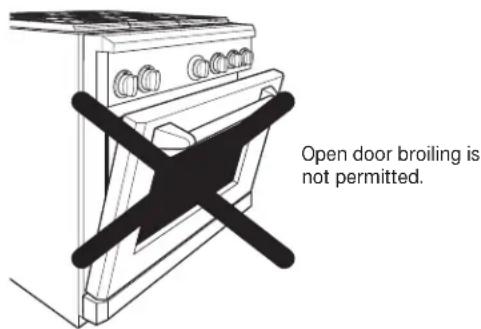
- Never broil with door open. Open door broiling is not permitted due to overheating of control knobs.
-
Extending the rack to its fully open position is a convenience in lifting heavy foods. It is also a precaution against burns from touching hot surfaces of the door or oven walls.
-
When using cooking or roasting bags in the oven, follow the manufacturer's directions.
- Do not use your oven to dry newspapers. If overheated, they can catch on fire.
- Do not use oven for a storage area. Items stored in an oven can ignite.
- Do not leave paper products, cooking utensils or food in the oven when not in use.
- Do not allow anyone to climb, stand or hang on the door. They could damage the oven or cause severe personal injury.
- Never place cooking utensils, pizza or baking stones, or any type of foil or liner on the oven floor. These items can trap heat or melt, resulting in damage to the product and risk of shock, smoke or fire.
▲ WARNING: SELF-CLEANING OVEN
- Be sure to wipe up excess spillage before starting the self-cleaning operation.
- Before self-cleaning the oven, remove the broiler pan, grid and other cookware or aluminum foil.
- Do not clean the oven frame seal or the door seal. These seals are essential for a snug fit. Care should be taken not to rub, damage or remove the seals.
-
If the self-cleaning mode malfunctions, turn the oven off and disconnect the power supply. Have it serviced by a qualified technician.
-
Do not use oven cleaners. No commercial oven cleaner or oven liner protective coating of any kind should be used in or around any part of the oven. Residue from oven cleaners will damage the inside of the oven when the self-clean cycle is used.
- Clean only the appliance parts specified in this manual during the self-cleaning cycle.
SAVE THESE INSTRUCTIONS
Design information
(Not all features are on all models. Appearance may vary.)
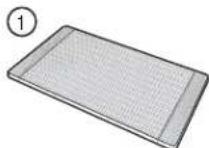
Bamboo Cutting Board
natural_image
Simple line drawing of a rectangular container with slots and two protruding ports, no text or symbols present.Toekick
Grill and Griddle Covers
natural_image
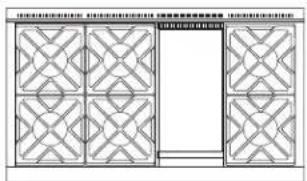
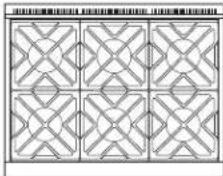
Pure architectural grid layout with symmetrical patterns and a central blank space (no text or symbols)ZDP486NR, ZDP486LR-6 burners and grill ZDP486ND, ZDP486LD-6 burners and griddle
natural_image
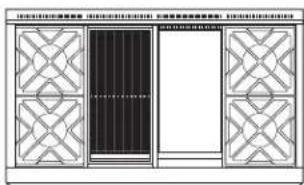
Pure architectural or mechanical diagram with symmetrical lattice patterns and a central rectangular block (no text or symbols)ZDP364NR, ZDP364LR-4 burners and grill ZDP364ND, ZDP364LD-4 burners and griddle
natural_image
Pure geometric pattern with interlocking diamond shapes (no text or symbols)ZDP366N, ZDP366L 6 gas burners
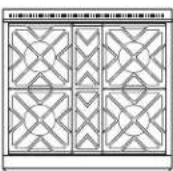
ZDP304N, ZDP304L
Double oven model shown includes a small oven.
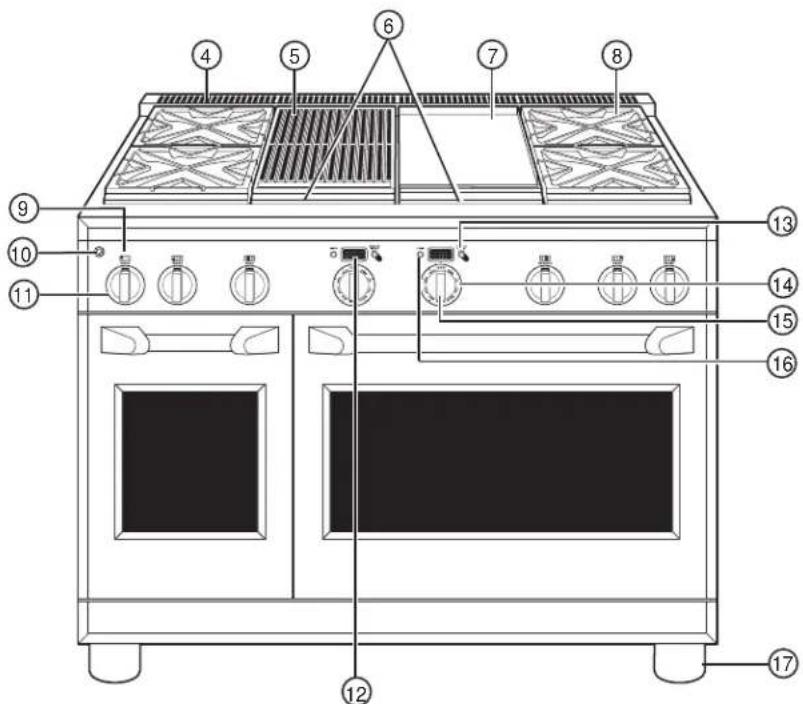
| Feature Index Page | |
| 1 Bamboo Cutting Board 36 | |
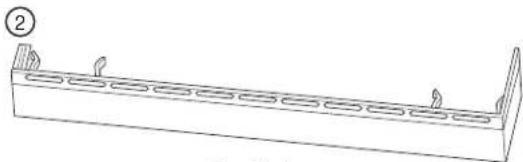
| 2 Toekick | -- |
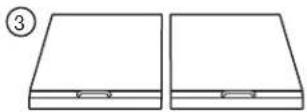
| 3 Grill and Griddle Covers | |
| 4 Oven Vents 17 | |
| 5 IR (Infrared) Grill 12, 13 | |
| 6 Grill and Griddle Grease Troughs 36 | |
| 7 Griddle 14 | |
| 8 Cooktop Burner Grates 11, 35 | |
| 9 Burner Location Indicator | |
| 10 LED Bullnose Task Lighting Control | -- |
| 11 Burner Control Knob with Lighted Bezel | 10, 29 |
| 12 Oven Display | 16 |
| 13 Mini-Knob(to select PROBE, TIMER or Special Features) | 16, 29 |
| 14 Oven Mode Selector | 16 |
| 15 Oven Temperature Knob | 16 |
| 16 Kitchen Timer 16, 27 | |
| 17 Leveling System (4) | -- |
Professional Dual Fuel Range
Electronic ignition & automatic reignition
The range is equipped with electronic ignition which eliminates the need for a standing pilot light.
The burners on this range will automatically relight if the flame goes out.
All surface burner igniters will spark and make clicking sounds when any burner is turned on. Do not touch any of the burners when igniters are clicking.
Occasionally the burners may spark if excess wind or a draft blows the flame away from the burner's flame sensor.
The griddle and IR (infrared) grill are equipped with Glo-Bar igniters. The Glo-Bar remains energized whenever the griddle or IR grill is in use to ensure the burner always stays lit.
In case of a power outage, you can light the surface burners on your cooktop with a match. Hold a lighted match to the burner, then turn the knob to the LOW position. Use extreme caution when lighting burners this way.
Do not attempt to light the grill or griddle during a power outage. The gas to these burners will automatically shut off during a power outage.
To light a surface burner
Push the control knob in and turn it counterclockwise to the LITE position.
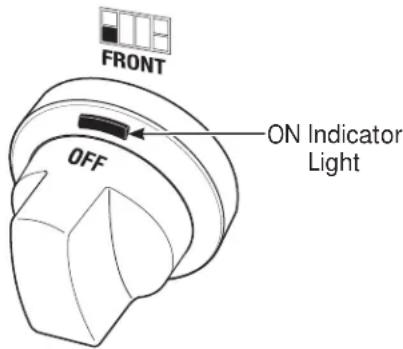
After the burner ignites, turn the knob to adjust the flame size.
To turn a burner off, turn the knob clockwise, as far as it will go, to the OFF position.
- Do not operate a burner for an extended period of time without cookware on the grate. The finish on the grate may chip without cookware to absorb the heat.
- The indicator light on each bezel verifies the burner is on. However, it should not be a substitute for visually checking the flame at the burner.
Dual-flame stacked burners
All surface burners on your range have two sets of flames stacked one on top of the other; the dual-flame burners have a lower (simmer) flame and a upper (main) flame.
When a burner is turned on, the lower flame will always light and stay on.
Simmering:
The stacked burner design provides a wide range of heat settings with which to simmer. Depending on the type and quantity of food, and pan size, the flame can be adjusted to suit your specific need. The lowest setting uses only the lower flame and can maintain delicate foods at a safe 140°F.
Cooking:
Settings from LO to X-HI will use both upper and lower flames. Use LO to HI for all purpose cooking. Use HI or X-HI (highest setting) with larger diameter cookware.
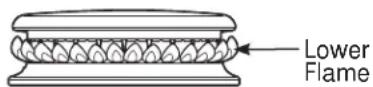
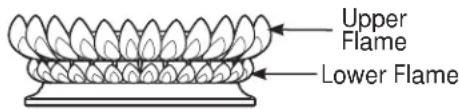
X-HI and HI are very high heat settings and are intended to sear foods quickly and boil large quantities of water.
How to select flame size
Watch the flame, not the knob, as you increase or reduce heat.
The flame size on a gas burner should match the cookware you are using.
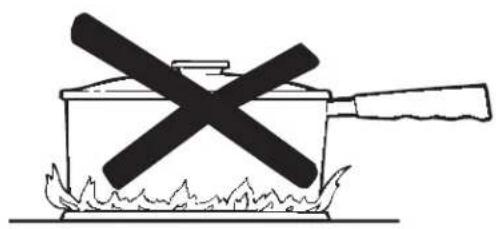
FOR SAFE HANDLING OF COOKWARE, NEVER LET THE FLAME EXTEND UP THE SIDES OF THE COOKWARE. Any flame larger than the bottom of the cookware will not result in faster heating and could be hazardous.
natural_image
Simple line drawing of a cooking pot with a crossed X mark and flames (no text or symbols)For surface stability, 6" minimum diameter cookware is recommended. Use larger diameter cookware for heat settings between HI and X-HI.
Wok cooking
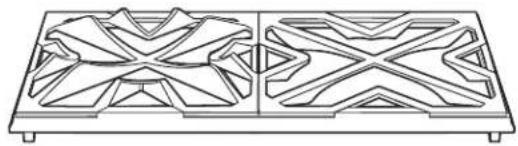
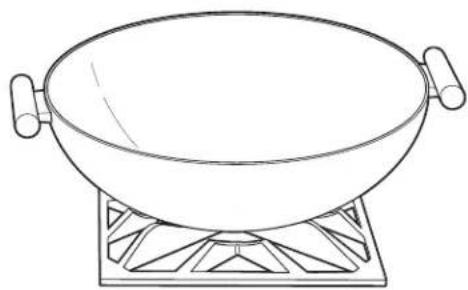
The burner grates are uniquely designed to cook on either side. The flat side accommodates flat bottom cookware (stockpots, sauce pans, frying pans and flat bottom woks), while the wok side is designed to hold a wide variety of round bottom woks without the need for a separate ring.
For easy access, a front burner location is recommended for wok cooking.
The front center burner is recommended for wok cooking on 6-burner 36" and 48" ranges.
⚠️CAUTION: To properly fit the grate and match the flame size, the wok must be between 12" and 14" in diameter.
natural_image
Technical line drawing of a symmetrical geometric pattern with interlocking shapes (no text or symbols)Wok Side
Flat Side
natural_image
Line drawing of a wok on a heating table (no text or symbols)Grill safety precautions
(on some models)
⚠ WARNING: Do not leave the IR grill unattended at any time.
Grease Flare-ups:
Occasionally, during grilling, grease drippings can ignite creating minor bursts of flame for a second or two. This is normal when grilling.
The grill radiant baffle is designed to catch excess grease, limiting flare-ups.
If a flare-up becomes excessive, remove the food from the grill and lower the heat setting until the flare-up subsides.
To further reduce flare-ups, trim excess fat around the edges of steaks and chops, use hamburger that is lean, remove the skin from poultry, etc.
Use a long spatula and a non-flammable mitt when turning food on the grill.
Grill Cover:
Remove the cover before lighting the burner. For your safety, the cover must be removed when using the grill. If the cover is left in place it will become extremely hot.
Cookware:
Do not use any cookware on the grill.
Using the IR grill
Remove the cover before lighting the burner. The cover must be removed when using the IR grill.
Set the control knob to PREHEAT. The longer the grill is preheated, the darker the grill marks will be on the food.
Allow 5 to 15 minutes to fully preheat the grill.
After preheat, the control knob may be set to any position between HI and LO.
Do not leave the grill unattended at any time.
The intense heat caramelizes fats and juices creating authentic barbecued flavor. The IR grill will achieve the same results as an outdoor grill.
All gas grills cook differently. Adjust cooking times and methods when using the IR grill.
Clean the grill grate, grease trough and grease basin after each use. Remove the parts for cleaning after they are cool to the touch.
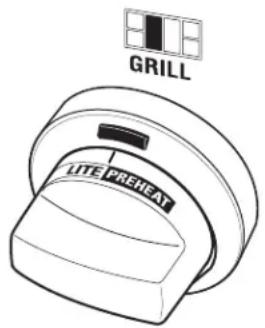
NOTE: The grill will take approximately 45 seconds to ignite. Unlike the surface burners, which use electric igniters, the grill uses a Glo-Bar for ignition. It takes approximately 45 seconds for the Glo-Bar to reach temperature. Gas is only supplied to the grill once the Glo-Bar reaches temperature.
Grill grates (on some models)
Remove the cover before lighting the IR grill.
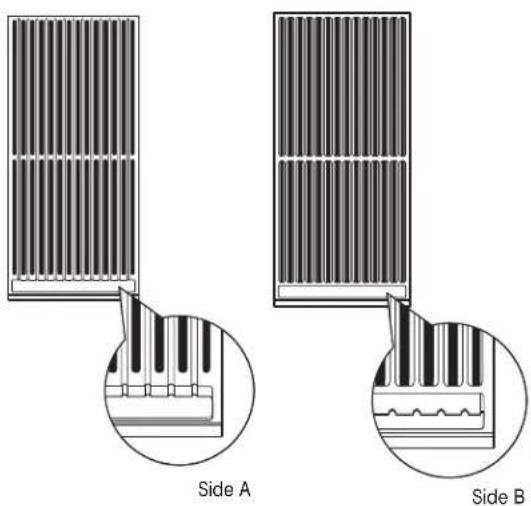
The grill grate is reversible. Place the handle end toward the front of the cooktop.
The grate will change color when subjected to the heat, and as oils cook onto the surface. This is normal and does not affect the cooking performance.
The porcelainized cast-iron grill grate does not need to be seasoned.
One side of the grate (Side A) is grooved and should be used for foods such as steak or hamburger patties. The grooves are sloped so the excess liquids and oils run toward the front of the grill and into the grease trough.
The other side of the grate (Side B) is designed for delicate foods such as fish.
Turn and move foods as needed.
| Food Setting | Preheat | |
| Hamburger Patties (8) | HI or LO 5 Minutes | |
| Chicken Breast (6)(Bone side down) LO 5 Minutes | ||
| T-Bone Steak(1-1/2" thick) LO 5 Minutes | ||
| Salmon LO 5 Minutes |
Grill radiant baffle
Models equipped with an IR grill have a radiant baffle which distributes the heat from the burners evenly across the grill area. The grill baffle also helps to limit grease flare-ups.
The grill baffle rests on tabs in the grill opening. Be sure the baffle is secured in place by fully engaging the tabs.
IMPORTANT: Avoid contact with the igniter. It is fragile and can chip or break.

Griddle safety precautions, leveling
(on some models)
⚠ WARNING: Do not allow the airflow from the griddle flue cover to be obstructed by cookware or towels.
Remove the metal cover and the cutting board before turning the griddle on.
The griddle assembly should not be removed for cleaning.
Once the unit is in position, the griddle can be leveled. Remove the flue cover by lifting it straight up. Be careful not to scratch the surrounding stainless steel surfaces during removal of the flue cover.
The two inner screws are clamping screws for securing the griddle in place. Loosen these two screws before leveling. Do not remove these two screws.
The two outer screws are leveling screws. Do not remove these two screws. They can be turned to level the griddle or to provide a forward slope to help grease and oils to drain away from the food being cooked. After the first few uses, you will be able to judge the slope best suited for the foods you are cooking and personal preference.
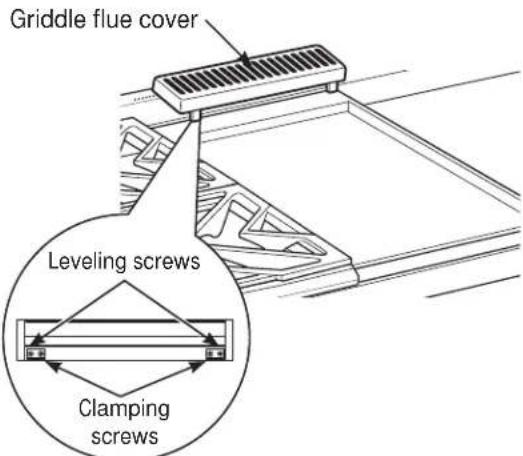
After leveling the griddle, tighten the clamping screws to secure griddle in place. Hand tighten screws; do not over-tighten.
Season the griddle
Before using the griddle for the first time, it must be seasoned.
If the griddle has not been used for a period of time, it should be reseasoned.
- Clean the griddle thoroughly with hot, soapy water to remove any protective coating.
- Wipe the surface using a solution of 1 quart water and 1 cup white vinegar. Dry thoroughly.
-
Use a paper towel and wipe 1 tablespoon vegetable oil evenly across the griddle. Do not use corn oil as it can get sticky.
-
Turn the control knob to 400^ F for approximately 30 minutes. Turn the heat off when the oil starts to shimmer.
- Repeat Step 3. Be sure to cover the entire surface with the oil.
- Allow the griddle to cool. Wipe the entire surface of the griddle using a heavy cloth to remove the oil. The griddle is now ready to use.
Using the griddle
The griddle surface is a combination of highly polished Type 304 stainless steel and an aluminum thermal plate for even heat distribution. It is normal for it to darken with use as oils cook onto the surface to provide a stick-resistant base or "seasoning."
The griddle is thermostatically controlled and can be set to maintain any temperature from 200^ F to 450^ F.
NOTE: Unlike the surface burners, which use electric igniters, the griddle uses a Glo-Bar for ignition. It takes approximately 45 seconds for the Glo-Bar to reach temperature. Gas is only supplied to the griddle once the Glo-Bar reaches temperature.
To heat the griddle, push in the control knob and turn to the desired temperature setting. The light on the bezel will glow to indicate the thermostat control is working.
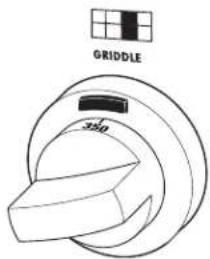
| Food Item Temperature Setting | |
| Pancakes 375°F | |
| Hamburgers 400°F | |
| Bacon* 400°F | |
| Grilled Cheese 350°F | |
| Eggs 275°F | |
* NOTE: Place bacon on a cold griddle. Do not preheat.
Design information
Note: Not all features are on all models.
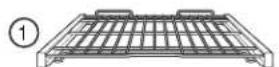
Full Extension Oven Rack
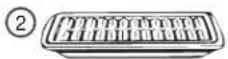
Broiler Pan and Grid
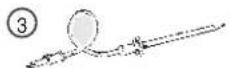
Temperature Probe
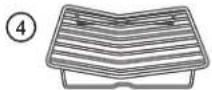
Roasting Rack
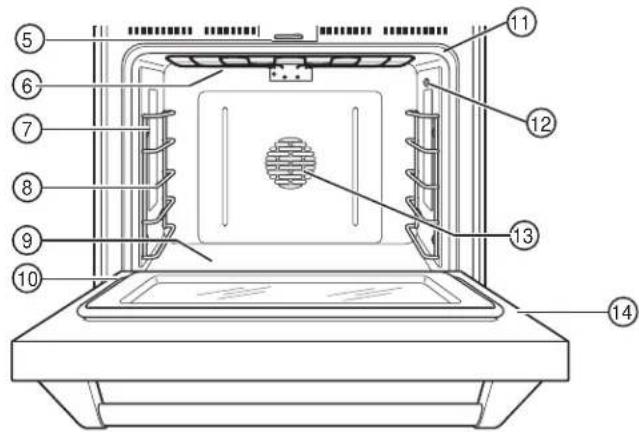
| Feature Index Page | |
| 1 Full Extension Oven Rack(s) 18, 19, 23, 30— 3 in large oven— 2 in small oven | |
| 2 Broiler Pan and Grid 22, 29 | |
| 3 Temperature Probe 24, 31 | |
| 4 Roasting Rack 22, 29 | |
| 5 Automatic Oven Door Latch 26 | |
| 6 Broil Elements (2) 29 | |
| 7 Halogen Oven Lights 32 | |
| 8 Oven Rack Supports 19, 23— 5 positions in large oven— 4 positions in small oven | |
| 9 Bake Elements (2) (under oven floor) 29 | |
| 10 Oven Door Seal 33 | |
| 11 Oven Frame Seal | 33 |
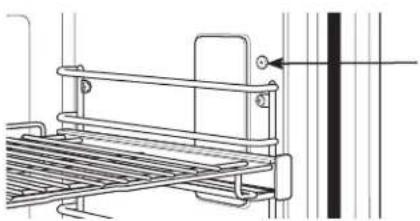
| 12 Temperature Probe Outlet— right side in large oven— left side in small oven | 24 |
| 13 Convection Fan and Convection Elements (2)(operate during preheating and convection cooking) | 22, 23 |
| 14 Oven Door | 31, 33 |
NOTE: On models equipped with 2 ovens, both ovens have same features.
Features of your oven control and timer
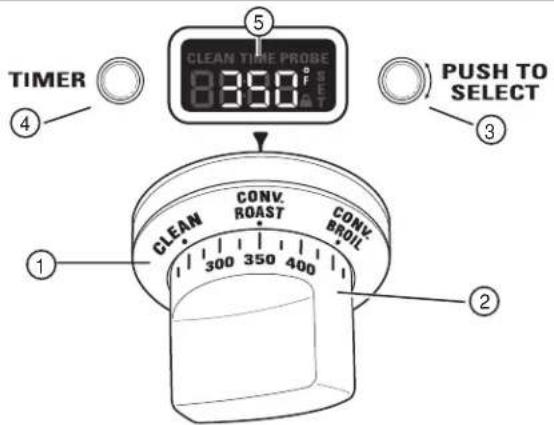
1 Oven Mode Selector – Turn outer ring to select:
PROOF – Maintains a warm environment useful for rising yeast-leavened products.
BAKE – Select for traditional baking.
CONV BAKE – Use for convection baking.
CONV ROAST – Use for convection roasting.
CONV BROIL – Use for convection broiling.
BROIL – Select for broiling.
CLEAN- Select for the self-cleaning
function. See the Self-Cleaning Oven section.
2 Temperature Knob - Turn to select:
Temperatures from 175°F to 550°F.
LOW BROIL – A lower broiling temperature is automatically set.
HIGH BROIL – A higher broiling temperature is automatically set.
CLEAN – The self-clean temperature is automatically set.
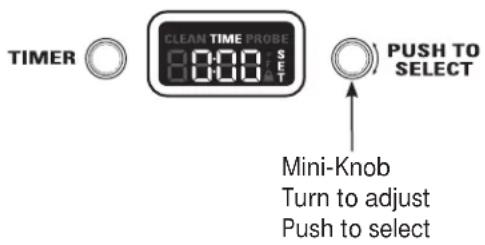
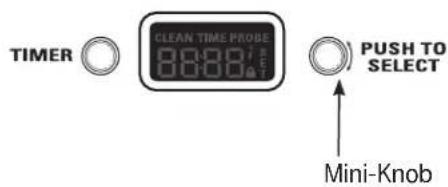
3 Mini-Knob – Turn to select and push to enter PROBE or TIMER settings. Also to adjust CLEAN cycle time.
4 Timer Button – Push to select the kitchen timer function. The timer does not control oven operations.
5 Oven Display – Displays oven functions such as oven and probe temperatures and kitchen timer.
The Oven Mode Selector (1) AND the Temperature Knob (2) must be set together in one of the following valid pairings:
| Oven Mode Selector Temperature Knob | |
| BAKE 175° to 550°F | |
| CONV BAKE 175° to 550°F | |
| CONVECTION/ROAST 175° to 550°F | |
| CONVECTION/BROIL HIGH or LOW BROIL | |
| BROIL HIGH or LOW BROIL | |
| CLEAN CLEAN | |
| PROOF --- |
To cancel a feature, turn either the Oven Mode Selector or the Temperature knob to OFF.
To cancel PROOF, turn the Oven Mode Selector to OFF.
Baking Tips
| Professional Dual Fuel Range | ||
| Rear oven vents | An internal cooling fan operates during all oven modes. The warm air from the oven is exhausted through vents located at the rear of the cooktop.Do not allow the airflow from the rear vents to be obstructed by cookware or towels. | Do n rear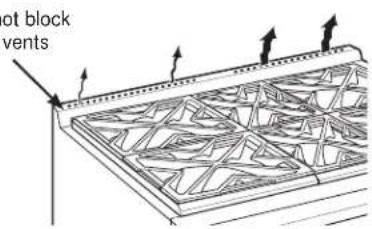 |
| Aluminum Foil and Oven Liners | ⚠CAUTION: Do not use any type of foil or oven liner to cover the oven bottom. These items can block airflow or melt, resulting in damage to the product and risk of carbon monoxide poisoning, smoke or fire. Damage from improper use of these items is not covered by the product warranty.Foil may be used to catch spills by placing a sheet on a lower rack, several inches below the food. Do not use more foil than necessary and never entirely cover an oven rack with aluminum foil. Keep foil at least 1-1/2" from oven walls to prevent poor heat circulation. | 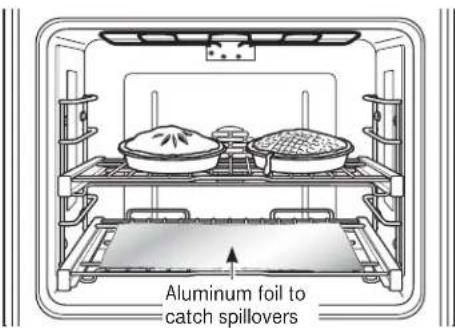 |
| Pan placement | For even cooking and proper browning, there must be enough room for air circulation in the oven.Baking results will be better if baking pans are centered as much as possible rather than being placed to the front or to the back of the oven. | |
| Baking pans/sheets | Use the proper baking pan. The type of finish on the pan effects the amount of browning that will occur. Dark, rough or dull pans absorb heat resulting in a browner, crisper crust. Use this type for pies. | Shiny, bright and smooth pans reflect heat, resulting in a lighter, more delicate browning.Cakes and cookies require this type of pan or sheet.Glass baking dishes also absorb heat. When baking in glass baking dishes, the temperature may need to be reduced by 25°F. |
| Preheating | Allow the oven to preheat before placing food in the oven. Preheating is necessary for good results when baking cakes, cookies, pastry and breads. | |
Full extension oven racks
CAUTION: To avoid possible
burns, place the racks in the correct position before turning on the oven.
The correct rack position depends on the kind of food and the browning desired.
The racks have a frame that locks into the rack supports on both sides. Once the frame is locked into place, always pull the rack out, by its upper front rail, to its full extension stop position, when placing or removing cookware.
Remove and replace oven racks
To remove a rack:
- Make sure the rack is pushed all the way into the oven.
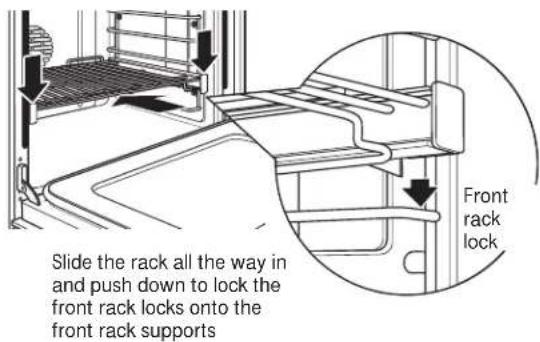
- Grasp the rack by both its upper front rail and its lower front rail and lift straight up to unlock the front rack locks from the rack supports.
Lift to unlock front rack locks from the rack support
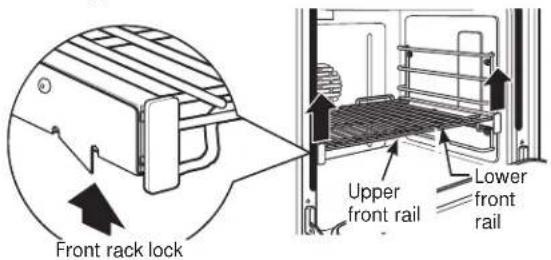
- Firmly holding onto both the upper and lower front rack rails, pull the rack forward and remove it from the oven.
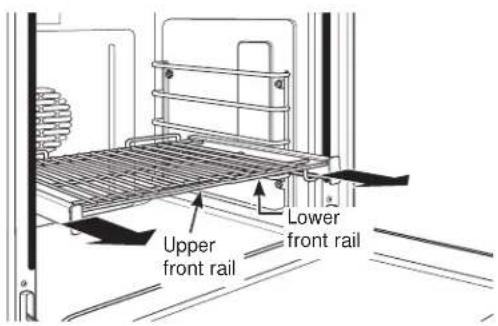
To replace a rack:
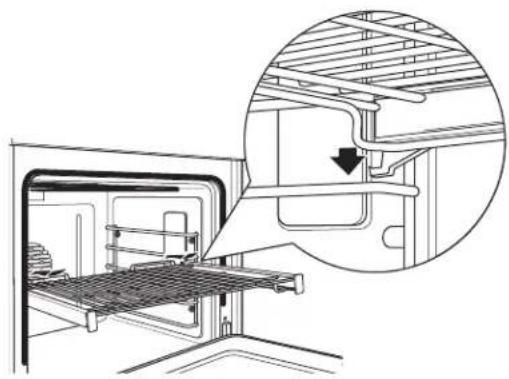
- Place the rear rack locks over and onto the rack supports (five rack positions are available including the top position).
natural_image
Technical diagram of a mechanical assembly with an inset showing a detailed cross-section of internal components (no text or labels present)- Slide the rack all the way in until the rear rack locks are secure on the rear rack supports and press the front rack locks onto the front rack supports.
- Pull the rack all the way out to check that it is properly engaged.
How to set the oven for baking
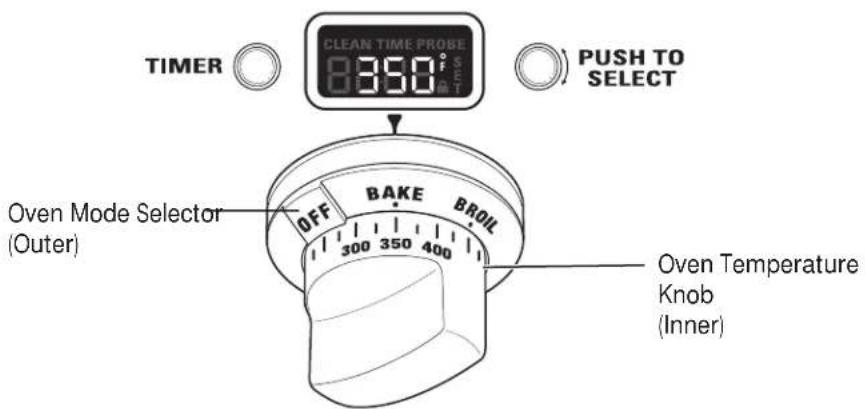
- Turn the Oven Mode Selector to BAKE.
- Using the Temperature knob, set the desired temperature, in 25°F increments, from 175°F to 550°F.
The oven will now begin to preheat. The temperature display will begin at 100^ F and remain there until the oven exceeds that temperature. From that point, the display will show the actual temperature.
The interior lights will turn on and stay on until the oven is turned off. The convection oven fan will turn on temporarily during preheat. The control will beep when the oven is preheated and food can now be placed inside the oven.
- Turn the Oven Mode Selector and the Temperature knob to OFF when baking is finished.
NOTE: A cooling fan will turn on to cool internal parts. This is normal, and the fan may continue to run even after the oven is turned off.
Use the temperature probe when a precise internal temperature is important. See Using the probe.
natural_image
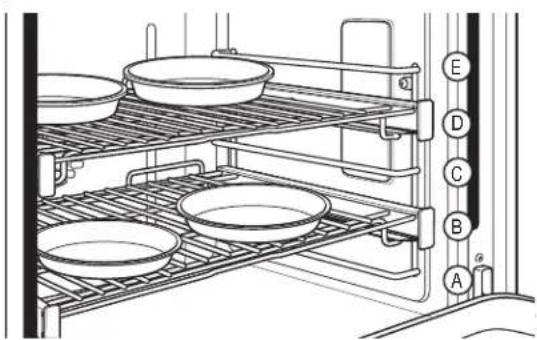
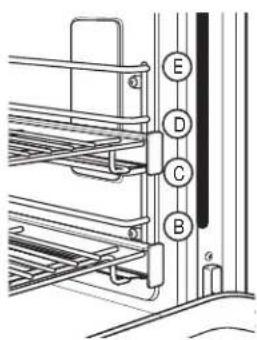
Line drawing of a rack with multiple bowls and a vertical panel, no text or symbols presentWhen baking four cake layers at the same time, use racks B and D. Stagger the pans so that one pan is not directly above another.
natural_image
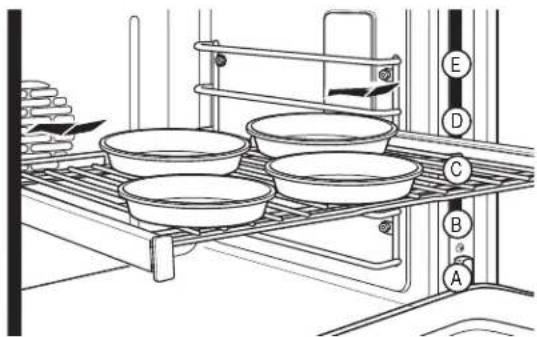
Line drawing of a kitchen appliance with multiple bowls and a rack, no text or symbols presentOr, place four pans on one shelf using the center position C. Place the pans so each has at least 1-1/2" air space around it.
The oven has 5 rack positions. See the Full extension oven racks section for how to use, remove and replace the racks.
The double oven range has a small oven with 4 rack positions. Rack position C is not in the small oven.
| Large Oven Type of Food | Small Oven Rack Position | Rack Position |
| Angel food cake A | A | |
| Biscuits or muffins C | A or B | |
| Cookies | C | |
| Brownies | B | B |
| 2 Layer cakes | B | B |
| 4 Layer cakes | C | — |
| Sheet cakes or 9 x 13 cakes | B or C | B |
| Quick breads | C | B |
| Bundt or pound cakes | C | B |
| Scratch Pies or pie shells | B | A |
| Frozen pies | B or C | — |
| Casseroles | B or C | B |
| Pizza | C | B |
Suggested shelf positions are intended as general guidelines. Experiment with these positions for specific foods and personal preference.
Introduction to broiling
There are 2 different broil modes: Broil and Convection Broil. Choose HI or LO setting in either mode.
- The HI setting can be used to seal in juices or provide intense browning or charring when needed for foods such as hamburgers, roasted vegetables, whole peppers, eggplant, corn, assorted cut vegetables, kabobs and very thin meats such as smoked pork chops, London broil and chicken.
- The LO setting can be used for foods that need adequate browning and also need to be thoroughly cooked, like fish fillets, pork tenderloin and beef roast.
Convection Broil:
Uses the convection fan for added evenness.
How to set the oven for broiling and convection broiling
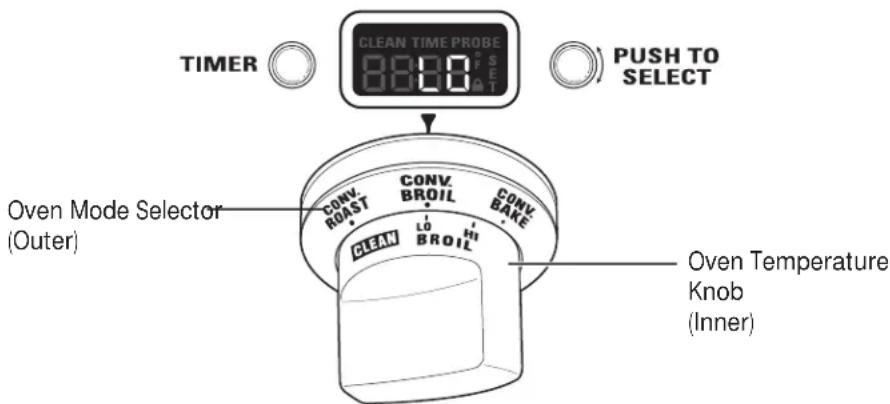
- Turn the Oven Mode Selector to BROIL or CONV BROIL.
- Turn the Oven Temperature Knob to LO BROIL or HI BROIL. LO or HI will appear in the display.
NOTE: Always broil with the door closed. If the door is left open, the display will scroll "CLOSE door" and the elements will not turn on until the door is shut.
The oven interior lights will turn on and stay on until the oven is turned off.
The convection fan will turn on when CONV BROIL is selected.
- When broiling is finished, turn the Oven Mode Selector and the Temperature knob to OFF.
NOTE: A cooling fan will turn on to cool internal parts. This is normal, and the fan may continue to run even after the oven is turned off.
The broiler does not need to be preheated for most broiling. However, foods that cook quickly, such as thin strips of meat or fish may require a short preheating period of approximately 5 minutes to allow the food to brown. Turn the food only once during broiling.
NOTE: Broil will not work if the temperature probe is plugged in. Never leave your probe inside the oven during a broil cycle.
Broiling guide
Suggested shelf positions are intended as general guidelines. Experiment with these positions for specific foods and personal preference.
The size, weight, thickness, starting temperature and your preference of doneness will affect broiling times. This guide is based on meats at refrigerator temperature.
| Food Rack | Position Heat Setting | Preheat |
| Broil | ||
| Ground Beef D | HI — | |
| Chicken B HI or (Bone-in Breasts) | LO — | |
| Bakery Products D Bread (toast) | HI or LO — | |
| CONVECTION BROILING | ||
| Fish D LO 5 Minutes1-lb. fillets1/4 to 1/2" thick | ||
| Kabobs(5 skewers) | D LO 5 Minutes | |
| Sliced Vegetables | D LO | 5 Minutes |
The U.S. Department of Agriculture says "Rare beef is popular, but you should know that cooking it to only 140°F means some food poisoning organisms may survive." (Source: Safe Food Book. Your Kitchen Guide. USDA Rev. June 1985.)
Aluminum foil
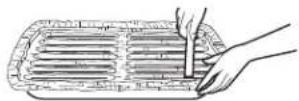
You can use aluminum foil to line the broiler pan and broiler grid. However, you must mold the foil tightly to the grid and cut slits in it just like the grid.
Introduction to convection cooking
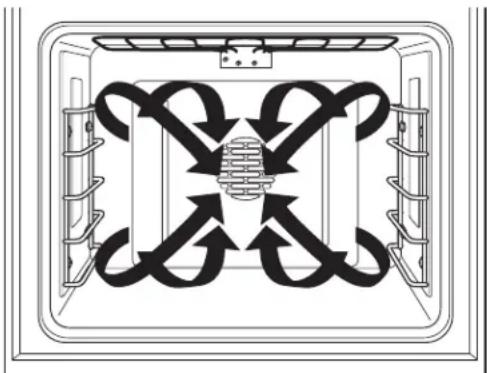
The Monogram reverse-air convection system consists of two dedicated heating elements wrapped around the convection fan. After preheating to the set temperature, all heat in CONV BAKE mode comes from these two dedicated elements. The convection fan periodically pauses, then changes direction to best distribute hot air throughout the oven. As a result, foods are evenly cooked and browned—often in less time with convection heat.
NOTE: The convection fan shuts off when the oven door is opened.
natural_image
Diagram of a double-bus air vent system with directional arrows indicating airflow or flow (no text or labels)Cookware for convection cooking
Before using your convection oven, check to see if your cookware leaves room for air circulation in the oven. If you are baking with several pans, leave space between them. Also, be sure the pans do not touch each other or the walls of the oven.
Cookware used in standard BAKE will also work in CONV BAKE. See Baking Tips section.
It is recommended that when baking cookies, the best results are attained with a flat cookie sheet instead of a pan with sides. For recipes like oven-baked chicken, use a pan with low sides. Hot air cannot circulate well around food in a pan with high sides.
Adapting recipes
You can use your favorite recipes in the convection oven.
When convection baking, it may be necessary to reduce the baking temperature by 25^ F or to adjust the cooking time. No temperature adjustment is necessary when using CONV ROAST.
Some package instructions for frozen casseroles or main dishes have been developed using commercial convection ovens. For best results in this oven, preheat the oven and use the temperature on the package.
Convection roasting tips
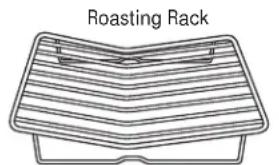
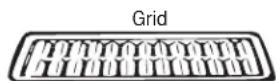
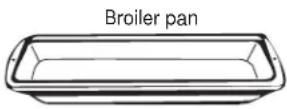
Use the broiler pan, grid and the roasting rack for best results. Use of the rack will result in improved browning on the underside of meat or poultry.
- Place the oven rack on a low rack position (A).
- Place the grid on the broiler pan and put the roasting rack over them.
- Place meat on the roasting rack.
How to set the oven for convection baking or roasting
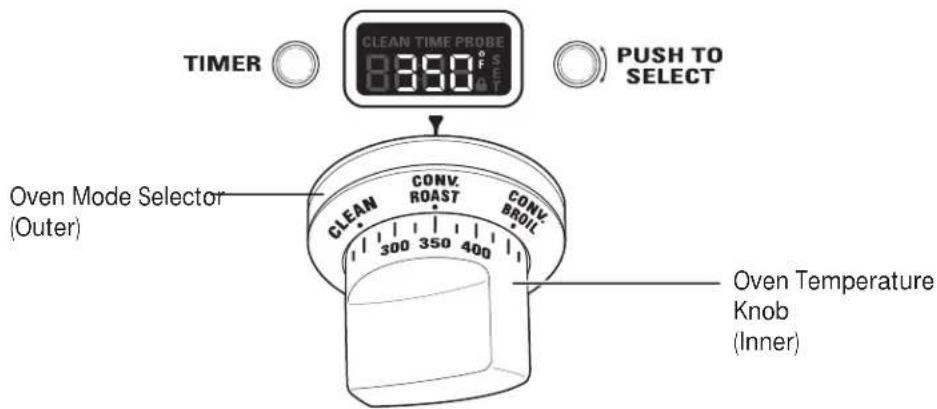
Convection Baking is ideal for evenly browned baked foods cooked on single or multiple racks. Select Convection Roast to roast large, tender cuts of meat uncovered.
When set on CONV BAKE or CONV ROAST, the rear convection elements and the fan operate when the oven is heating.
- Turn the Oven Mode Selector to CONV BAKE or CONV ROAST.
- Using the Temperature knob, set the desired temperature, in 25°F increments, from 175°F to 550°F.
The oven will now begin to preheat. The temperature display will begin at 100^ F and remain there until the oven exceeds that temperature. From that point, the display will show the actual temperature.
| Large Oven Type of Food | Small Oven Rack Position | Rack Position |
| Muffins and Cupcakes (multiple racks) B & D | B & D | |
| Cookies (multiple racks) A, C & E | B & D | |
| Frozen Appetizer | C | — |
| Frozen Appetizer (multiple racks)— | A, C , E | |
| Roasting (large cuts of meat) B | A | |
| Turkey or Whole Chicken | A | B |
Suggested shelf positions are intended as general guidelines. Experiment with these positions for specific foods and personal preference.
The interior lights will turn on and stay on until the oven is turned off. The convection oven fan will turn on during preheat. The control will beep when the oven is preheated and food can be placed inside the oven.
- Turn the Oven Mode Selector and the Temperature knob to OFF when convection cooking is finished.
NOTE: A cooling fan will turn on to cool internal parts. This is normal, and the fan may continue to run even after the oven is turned off. Use the temperature probe when a precise internal temperature is important. See Using the probe.
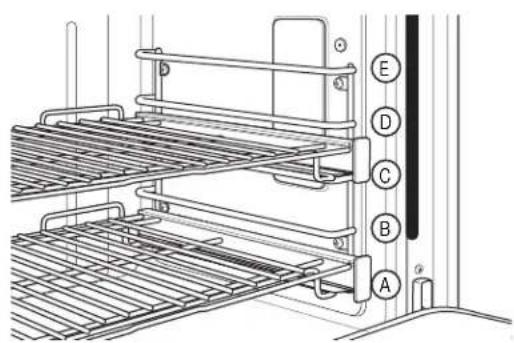
The oven has 5 rack positions. See the Full extension oven racks section for how to use, remove and replace the racks.
The double-oven range has a small oven with 4 rack positions. Rack position C is not in the small oven.
How to use the probe with bake, convection bake and convection roast
▲CAUTION: Use oven mitts when inserting or removing the probe from the hot oven. Areas around the probe inlet can be very hot.
For many foods, especially roasts and poultry, internal food temperature is the best test for doneness. The temperature probe takes the guesswork out of cooking foods to the exact doneness you want.
The probe can be used with the BAKE, CONV BAKE and CONV ROAST.
- Push the tip of the probe into the thickest part of the meat.
- Place the rack in the desired rack position.
- Set the oven controls. Turn the Oven Mode Selector to CONV BAKE, CONV ROAST or BAKE. Turn the Temperature Knob to desired oven temperature in 25°F increments, from 175°F to 550°F. Allow the oven to preheat if necessary.
The oven and oven lights will turn on immediately and stay on until the oven is turned off. - Use oven mitts to place the food in the hot oven. Insert the plug into the outlet. Make sure it is pushed all the way in. Close the oven door.
- Turn the Mini-Knob to find the desired internal food temperature. Push the Mini-Knob to select that temperature.
TIMER


PUSH TO SELECT
natural_image
Technical line drawing of a mechanical device with no visible text or symbolsProbe Outlet
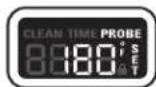
The word PROBE and SET, will flash in the display until a temperature is selected. If no temperature is set, the probe will default to 100^ F. If the oven was not preheated, the display will show LO.
The internal food temperature can be set from a minimum of 100^ F and up to 200^ F maximum.
When food reaches the set internal temperature, the display will beep. To stop the reminder beep, turn the Oven Mode Selector and the Temperature Knob to OFF. Use oven mitts to remove the probe from the oven outlet.
To change the set internal temperature anytime in the cooking process, push the Mini-Knob and turn to adjust the temperature. Press the Mini-Knob to select.
Using the probe
Use only the blue probe provided with the range.
Use the handles of the probe and plug when inserting and removing them from the meat and oven outlet.
- To avoid damaging the probe, do not use tongs to pull on the cable when removing it.
• To avoid breaking the probe, make sure food is completely defrosted before inserting. - To prevent possible burns, always wear an oven mitt when removing the plug; internal oven surfaces may be hot.
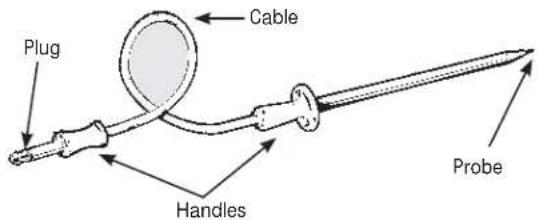
The temperature probe has a skewer-like probe at one end and a plug at the other end that goes into the outlet in the oven.
- Never leave the probe inside the oven during a broil or self-cleaning cycle.
- Do not store the probe in the oven.
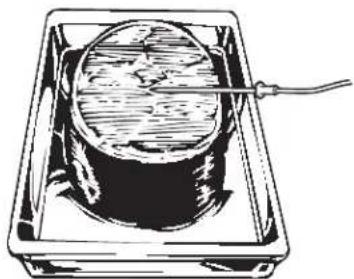
Proper placement of the probe
- Measure the distance to the center of a roast by laying the temperature probe on top of the meat. Use your thumb and forefinger to mark where the edge of the meat will come on the probe.
- Insert the probe up to the point marked with your finger. The tip of the probe should be in the center of the meat.
natural_image
Illustration of a cylindrical object inside a rectangular frame with a cable inserted, no text or symbols present.How to set the oven for proofing
The proofing feature maintains a warm environment which is useful for rising yeast-leavened dough.
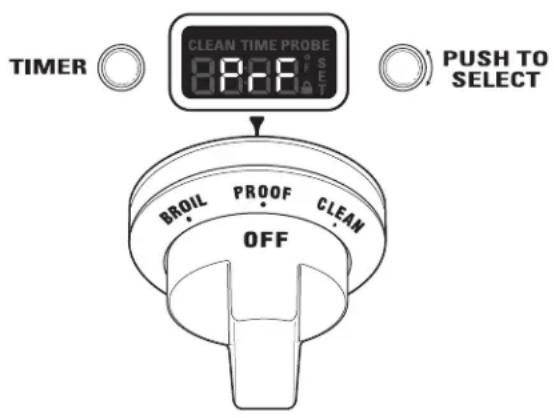
- Turn the Oven Mode Selector to PROOF. The display will show "PrF". PROOF mode will not operate when oven is above 125°F. The display will scroll "too hot". Allow the oven time to cool.
For best results, cover the dough with a cloth or with greased plastic wrap.
Use rack position B or C in the large oven. Use rack position B in the small oven.
The proofing feature automatically provides the optimum temperature for the proofing process; therefore the Temperature knob does not affect the proof temperature.
The oven interior lights cycle on and off as necessary to maintain optimum proof temperature until the Oven Mode Selector has been turned to OFF.
- To avoid lowering the oven temperature and lengthening proofing time, do not open the oven door unnecessarily.
- Check bread products early to avoid overproofing.
- When proofing is finished, turn the Oven Mode Selector to OFF.
⚠️ CAUTION: Do not use the proofing mode for warming food or keeping food hot. The proofing oven temperature is not hot enough to hold foods at safe temperatures.
Self-cleaning safety precautions
The self-clean oven feature is designed to make cleaning the inside of the oven easy by using very high temperatures to burn away food spills.
⚠ WARNING: Wipe up excess grease and other food spills with a damp cloth. Excessive food soils can ignite leading to smoke and heat damage.
- Do not clean the oven seals, damage can occur.
- Remove cookware, broiler pan, grid, probe and any aluminum foil from the oven.
- Make sure the oven light lens and lens frame are in place.
- Do not use commercial oven cleaners, abrasives or oven protectors in or near the self-cleaning oven.
-
We recommend venting your kitchen with an open window or using a ventilation fan/hood during the self-clean cycle.
-
Clean soil from around the frame and from around the oven door, outside the oven seals. These areas must be cleaned by hand.
- The oven racks may be left in the oven during the self-clean cycle.
IMPORTANT: The health of some birds is extremely sensitive to the fumes given off during the self-cleaning cycle of any oven. Move birds to another well-ventilated room.
NOTE: Self-Clean will not work if the temperature probe is plugged in or if the Sabbath mode is set. On double oven models, you can set a clean cycle in both ovens at the same time. The last oven set will automatically delay its start until the end of the first oven's clean cycle.
On double oven models, you can bake in one oven and self-clean in the other at the same time. However, you cannot use the PROOF mode setting in one oven while the other oven is self-cleaning.
How to set the oven for cleaning
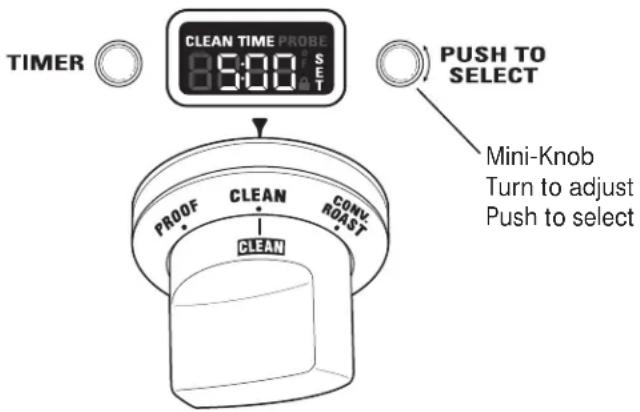
- Turn the Oven Mode Selector to CLEAN.
- Turn the Temperature knob to CLEAN.
The control automatically defaults to the recommended clean cycle time of 5 hours. The clean time may be adjusted to any time between 3 and 5 hours using the Mini-Knob. The display will show the actual time remaining. -
Push the Mini-Knob to start the CLEAN cycle. If "CLOSE door" scrolls in the display, the self-clean cycle has been selected but the door is not closed. Close the oven door.
The 🔒 symbol will flash as the oven door is locked. It will not be possible to open the oven door during the clean cycle. -
After the clean cycle is complete and the oven has cooled, "End" will show in the display and the will turn off. Turn the Oven Mode Selector and the Temperature knob to OFF.
To interrupt a clean cycle, turn the Oven Mode Selector and the Temperature knob to OFF. When the oven has cooled to a safe temperature, the symbol will turn off indicating the door may be opened.
An interrupted clean cycle cannot be restarted until after the oven is cool enough for the door to unlock.
After a clean cycle
You may notice some white ash in the oven. Wipe it up with a damp cloth after the oven cools.
If white spots remain, remove them with warm sudsy water and rinse thoroughly with a vinegar and water mixture. These deposits are usually a salt residue that cannot be removed by the clean cycle.
If the oven is not clean after one clean cycle, repeat the cycle.
Timer
NOTE: The timer is independent of all the other functions and does not control the oven.
To set the timer:
- Push the TIMER button.
- TurntheMini-Knob to adjust any length of time up to 12 hours and push to select it.
On double oven models, each oven control has its own timer function. Each timer can be set independently.
The control will beep with 1 minute remaining and the display will show seconds until the timer counts down to :00. When the timer reaches :00, the control will beep 3 times followed by one beep every 6 seconds until the Mini-Knob is pushed.
To cancel the timer:
- Push the TIMER button.
2.TurntheMini-Knob to :00 and push to select.
To adjust the timer after start:
- Push the TIMER button.
- TurntheMini-Knob to a new desired time and push to select.
NOTE: The timer cannot be used while the oven is self-cleaning. (On double oven models, the timer for the oven that is not in the self-cleaning mode may be used.)
Professional Dual Fuel Range
Oven thermostat adjustment
You may find that your new oven cooks differently than the one it replaced. Use your new oven for a few weeks to become more familiar with it. If you still think your new oven is too hot or too cold, you can adjust the thermostat yourself.
On double oven models, use the large oven controls to enter the mode and to select the adjustment.
To adjust the oven thermostat:
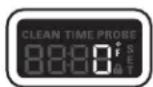
- Push and hold the TIMER button and Mini-Knob at the same time for 4 seconds until the display shows "SF" (Special Features).
- Turn the Mini-Knob counterclockwise until the display scrolls "OFFSEt". Push the Mini-Knob to select the offset mode.
- Turn the Mini-Knob to adjust the oven thermostat up to 35^ F hotter or (-) 35^ F cooler in 1^ F increments.
3A. On double oven models, you can adjust the thermostat of the small oven by turning the Mini-Knob above the small oven. Use the large oven Mini-Knob to select that adjustment.
TIMER

PUSH TO SELECT
Mini-Knob Turn to adjus Push to selec
- Push the Mini-Knob to select your choice and exit the mode. If you do not wish to save changes, push the TIMER button to exit at any time.
NOTE: This adjustment will only affect Bake, Convection Bake and Convection Roast temperatures; it does not affect broiling or self-cleaning temperatures. The adjustment will be retained in memory after a power failure.
Do not use thermometers, such as those found in grocery stores, to check the temperature setting of your oven. These thermometers may vary 20–40 degrees.
Sabbath mode
To set the Sabbath mode:
The Sabbath mode is designed for use on the Jewish Sabbath and other Jewish holidays.
It can be used for baking only. It cannot be used for any other cooking mode.
When the Sabbath feature is set, the oven light and all audible beeps will be disabled. The feature will also provide a random delay period, of approximately 30 seconds to 1 minute, before the oven will turn on once it is set to BAKE.
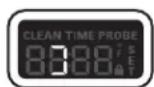
- Push and hold the TIMER button and Mini-Knob at the same time for 4 seconds until the display shows "SF" (Special Features).
- Turn the Mini-Knob clockwise until the display scrolls "SAbbAtH." Push the Mini-Knob to select the Sabbath mode.
- Once "SAbbAtH" is selected, the display will scroll "SAbbAtH ON".
The Sabbath setting will control both ovens. The symbol will appear in both oven display windows.
For double oven models, use the large oven control to set the Sabbath feature for both ovens.
TIMER


PUSH TO SELECT
Mini-Knob Turn to adjust Push to select
To Cancel the Sabbath Mode:
Repeat steps 1, 2 and 3. The display will scroll "SAbbAtH OFF".
The oven temperature may be adjusted at any time by turning the temperature knob. There is a random delay before the oven elements respond.

Certified Sabbath Mode
Control panel and knobs
Clean up spatters with a damp cloth. Remove heavier soil with warm, soapy water.
Do not use abrasives of any kind on the control panel or knobs.
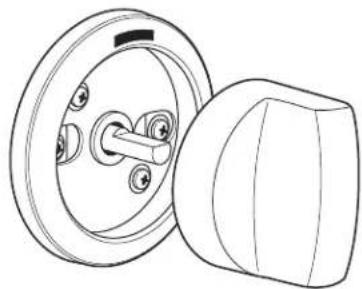
The control knobs may be removed for easier cleaning. To remove a knob, pull it straight off the control panel. Wash the knobs in hot soapy water, but do not soak.
An optional set of black control knobs is available for purchase at additional cost. Order the knob set for your model.
| Models | Order Numbers |
| ZDP304NPSS, ZDP304LPSS WB03K10268 | |
| ZDP366NPSS, ZDP366LPSS WB03K10269 | |
| ZDP364NRPSS, ZD364LRPSS WB03K10270 | |
| ZDP364NDPSS, ZDP364LDPSS WB03K10271 | |
| ZDP484NGPSS, ZDP484LGPSS WB03K10272 | |
| ZDP486NRPSS, ZDP486LRPSS WB03K10273 | |
| ZDP486NDPSS, ZDP486LDPSS WB03K10274 |
To order, call GE National Parts Center at 800.626.2002.
natural_image
Technical line drawing of a mechanical switch component (no text or symbols)NOTE: The Mini-Knob is not removable.
NOTE: For 30" ranges, ZDP304NPSS and ZDP304LPSS, place the knob with X-HI setting on the right-front side.
Oven heating elements
Do not attempt to clean the broil elements. Any soil will burn off when the element is heated.
The bake and convection elements are not exposed.
Broiler pan, grid and roasting rack
The broiler pan, grid and roasting rack are all dishwasher safe. However, baked on foods may require washing by hand with a commercial oven cleaner or abrasive detergent.
Do not store a soiled broiler pan or grid anywhere in the oven. Always properly dispose of excess grease.
⚠️ CAUTION: Do not clean the broiler pan, grid or roasting rack in a self-cleaning oven.

Oven racks
The racks may remain in the oven during the self-cleaning cycle without being damaged.
Periodically, after several self-clean cycles, the oven racks may need to be lubricated using the Graphite Lubrication shipped with your range. To order additional Graphite Lubrication, call our National Parts Center at 800.626.2002 and reference WB02T10303.
-
Remove rack from the oven. See the Full extension oven racks section.
-
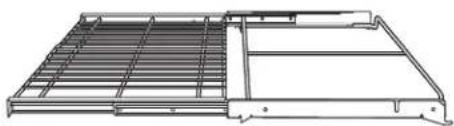
Fully extend the rack on a table or countertop. Newspaper may be placed underneath the rack for easy cleanup.
natural_image
Technical line drawing of a mechanical assembly with no visible text or symbols- If there is debris in the slide tracks, wipe it away using a paper towel. NOTE: Any graphite lubricant wiped away must be replaced.
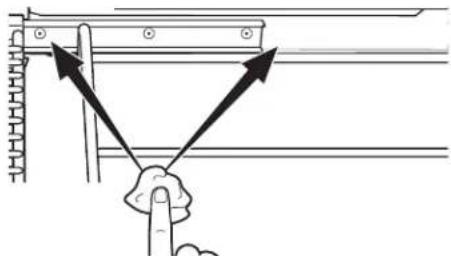
- Shake the graphite lubricant before opening it. Starting with left slide mechanism of the rack, place four (4) small drops of lubricant on the two (2) bottom tracks of the slide close to the bearing carriers.
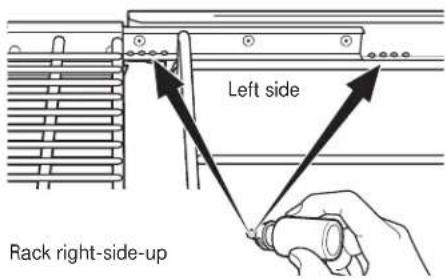
- Repeat for the right slide mechanism of the rack.
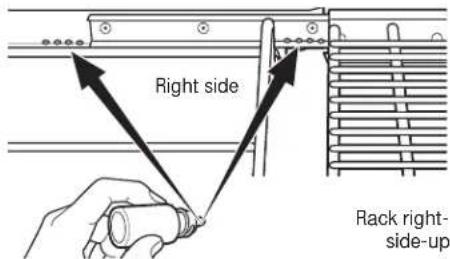
-
Open and close the rack several times to distribute the lubricant.
-
Replace the cap on the lubricant and shake it again. Turn the rack over and repeat steps 3, 4, 5 and 6.
-
Close the rack, turn rack right-side-up and place in the oven. See the Full extension oven racks section.
-
Repeat above steps for each rack.
NOTE: Do not use a cooking spray or other lubricant sprays on the slides.
Lift-off oven door
The door is very heavy. Be careful when removing and lifting the door.
Do not lift the door by the handle.
To remove the door:
- Fully open the door.
- Pull the hinge locks down toward the door frame, to the unlocked position. A tool, such as a small flat-blade screwdriver, may be required.
- Firmly grasp both sides of the door at the top.
- Close door to the door removal position, (approximately 15 degrees from closed) and lift it up and out until the hinge arm is clear of the slot.
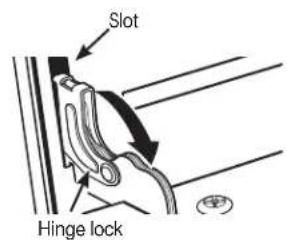
Pull hinge locks down to unlock
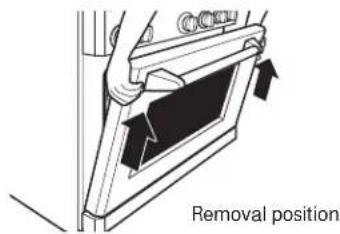
To replace the door:
- Firmly grasp both sides of the door at the top.
- With the door at the same angle as the removal position, seat the indentation of the hinge arm into the bottom edge of the hinge slot. The notch in the hinge arm must be fully seated into the bottom of the slot.
- Fully open the door. If the door will not fully open, the indentation is not seated correctly in the bottom edge of the slot.
- Push the hinge locks up against the front frame of the oven cavity, to the locked position.
- Close the oven door.
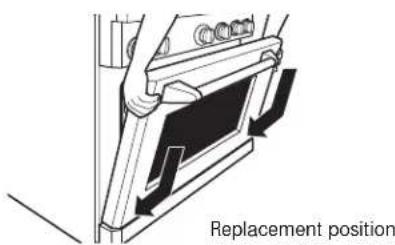
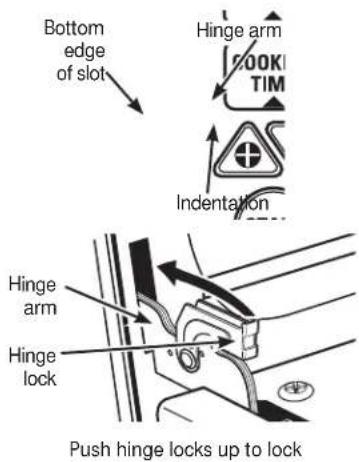
Probe
Allow the temperature probe to cool before cleaning.
The probe should be cleaned with soap and water by hand.
Do not immerse the temperature probe in water.
Do not store the temperature probe in the oven.
Do not clean the temperature probe in the self-cleaning oven.
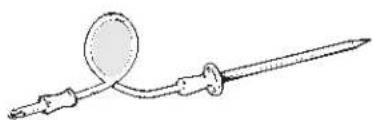
natural_image
Line drawing of a medical or laboratory instrument with a circular component and a long rod (no text or symbols)Oven lights
⚠️ CAUTION: Before replacing a bulb, disconnect electrical power to the oven at the main fuse or circuit breaker panel.
Each oven is equipped with halogen light columns located on the side walls of the oven. The lights come on when the door is opened or when the oven is in a cooking cycle.
Each light assembly consists of a removable light cover with two locking clips and a light compartment with three halogen bulbs.
Be sure to let the light cover and bulb cool completely. For your safety, do not touch a hot bulb with bare hands or a damp cloth.
To remove:
-
Remove the racks from the oven. See the Full extension oven racks section.
-
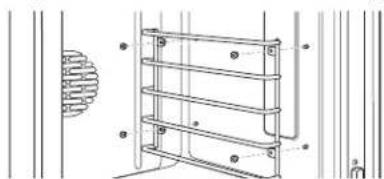
Using a 7/16" nutdriver, remove the four nuts holding the rack supports to the oven wall.
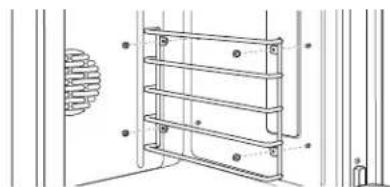
natural_image
Technical line drawing of a multi-tiered metal shelf mounted on a wall, with no visible text or symbols.- Remove the glass light cover by pulling its back edge out and rolling it toward you. Do not remove any screws.
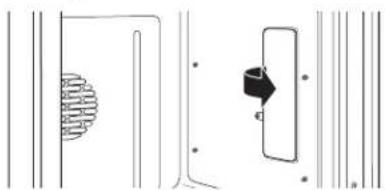
natural_image
Pure electrical circuit lines without any symbols- Using gloves or a dry cloth, remove the burned-out light bulb by pulling it straight out.
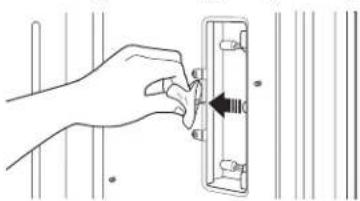
natural_image
Hand placing a component into a rectangular panel with a black arrow indicating direction (no text or symbols)To replace:
Use a new 120-volt Halogen bulb, with G8 pins, not to exceed 25 watts.
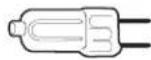
Replacement bulbs may be purchased by calling 800.626.2002. Order Part Number WB25T10064.
NOTE: Higher wattage bulbs will damage your oven.
Using gloves or a dry cloth, remove the bulb from its packaging. Do not touch the bulb with bare fingers. Oil from bare fingers may cause hot spots on the glass surface and lead to premature failure of the bulb. If you do touch the glass, clean it with alcohol prior to installation.
- Push the bulb straight into the receptacle all the way.
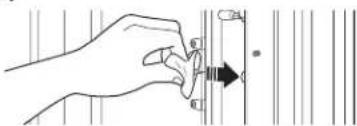
natural_image
Hand holding a tool with an arrow pointing to a vertical bar (no text or symbols visible)- Replace the light cover, by placing its front edge under the front two tabs in the light compartment. Roll the back edge into place, making sure that it is firmly seated.
NOTE: If the locking clips fell from the glass lens cover, hold them on the cover, in the correct position, while replacing the cover on the light compartment.
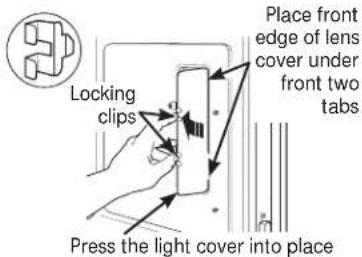
The light cover must be in place when using the oven.
- Reinstall the rack support. Be sure to orient the support so that the top tabs for the nuts are closest to the top of the oven. Lightly secure with the four nuts removed earlier, but do not over-tighten or the enamel could be chipped.
natural_image
Technical line drawing of a three-tiered metal shelf or rack structure with mounting holes, shown without any text or symbols.-
Replace the racks. See the Full extension oven racks section.
-
Reconnect electrical power to the oven.
Care and Cleaning
| Professional Dual Fuel Range | ||
| To clean the door | The oven frame and door, outside the oven seals, should be cleaned by hand. Enameled surfaces should be cleaned with hot soapy water. See Stainless Steel Surfaces section for all Stainless Steel areas. | Do not rub or clean the door seal—the fiberglass material of the seal has an extremely low resistance to abrasion. An intact and well-fitting oven seal is essential for energy-efficient operation and good baking results. If the seal becomes worn, frayed, damaged or displaced it must be replaced by a qualified technician. |
| Stainless steel surfaces | Do not use a steel-wool pad; it will permanently scratch the surface.To clean the stainless steel surface, use warm sudsy water or a stainless steel cleaner. Always wipe the surface in the direction of the grain. Follow the cleaner instructions for cleaning the stainless steel surface. | To inquire about purchasing stainless steel appliance cleaner, please call our toll-free number, 800.626.2002 or visit monogram.com. |
Dual-flame stacked burners
The burner consists of three parts: the burner base, burner head and burner cap. The burner head and burner cap can be lifted off, making them easy to clean.
⚠ CAUTION: DO NOT OPERATE THE BURNER WITHOUT ALL BURNER PARTS IN PLACE.
Surface burners should be cleaned routinely, especially after bad spillovers, which could clog the slots and holes in the burner heads.
The electrode is located at the rear of each burner. Do not attempt to disassemble or clean around any burner while another burner is on. An electric shock may result.
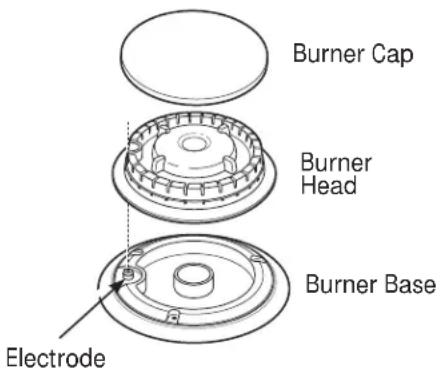
To remove the burner parts:
- Turn all controls OFF before removing any burner parts.
- When cool, you may lift off the burner grates, burner caps and burner heads for easier cleaning. Do not remove the burner bases.
NOTE: The ZDP304 model has 2 different size burners. Be sure to replace the burners in the same location.
Cleaning
Lift off burner parts only when cool. Wash in hot, soapy water. You may use a plastic scouring pad to remove burned-on food particles.
To remove burned-on food, soak the burner heads in a solution of mild liquid detergent and hot water for 20–30 minutes. For more stubborn stains, use a plastic scouring pad or toothbrush.
If the spill goes inside the burner head assembly, wash it under running water and shake to remove excess water.
After Cleaning
Before replacing the burner parts, shake out excess water and then dry them thoroughly.
To replace the burner parts:
Make sure that the burner parts are replaced in the correct location.
- Replace the burner head on top of the burner base, making sure that the hole in the burner head is properly aligned with the electrode in the burner base. A small gap between the base and head is normal.
- Place the burner cap on top of the burner head. Make sure that the burner cap is properly seated on the burner head.
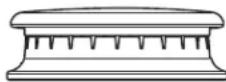
Burner cap properly seated
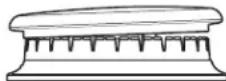
Burner cap not properly seated
Spark igniter and electrodes
The electrode of the electronic ignition system is positioned at the rear of the burner base. When cleaning the cooktop, be careful not to snag the igniter with your cleaning cloth. Damage to the igniter could occur.
Be careful not to push in a control knob while cleaning. It could cause the igniter to spark.
Make sure that the white ceramic igniters on the cooktop are dry and clean. Clean the metal portion of the electrode with a soft cloth or emery board.
Clean this metal part with an emery board.
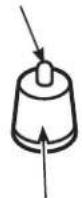
Do not clean this white ceramic part with an emery board.
'RQRW□DWWHPSW□WR□UHPRYH□WKH□HOHFWURGH□IURPI□WKH□FRRNWRS□
Burner grates
The enameled cast-iron burner grates should be cleaned regularly.
The grates can be cleaned inside the oven during a self-clean cycle, or in the dishwasher. The frames may be cleaned by hand or in the dishwasher.
Wash them in hot soapy water, rinse, and dry thoroughly.
Although they are durable, the grates will gradually lose their shine, regardless of the best care you can give them. This is due to their continual exposure to high temperatures.
Do not operate a burner for an extended period of time without cookware on the grate. The finish on the grate may chip without cookware to absorb the heat.
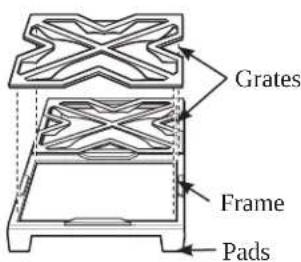
For stability, the frames have rubber pads on each corner. During cleaning and use, be careful not to damage or snag rubber pads.
Care and Cleaning
Professional Dual Fuel Range
Grease troughs
(on some models)
Grease from the griddle and the grill will drain into the enameled cast-iron grease troughs at the front of the range. Once the troughs have cooled, they may be lifted out for easier cleaning.
To remove the cool grease trough from the griddle, slide it toward the front and lift up.
To remove the cool grease trough from the grill, lift the grill frame and lift out the trough.
Do not allow grease to accumulate in the grease troughs as it can be a fire hazard. Clean the grease troughs as soon as they are cool. The grease troughs can be cleaned by hand with hot soapy water or in the dishwasher. Wipe any spillage in the trough basin with a soft cloth.
For stability, the troughs have rubber pads at the front. Be careful not to damage the pads when removing for cleaning.
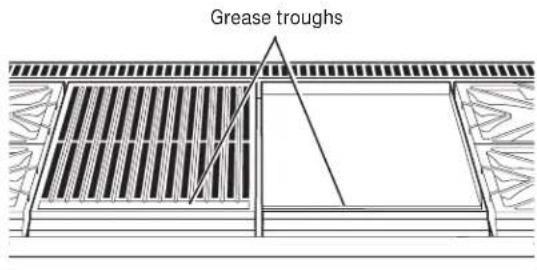
Griddle
(on some models)
Thoroughly clean the griddle of grease and food particles, using a square-edged metal spatula, while it is still hot.
Wipe the griddle with a dry, heavy, coarse cloth to remove any remaining residue and food particles. If the griddle is cleaned with anything other than a dry, heavy, coarse cloth, it will need to be reseasoned.
Never flood the hot griddle with cold water. This could cause the griddle to crack or warp.
Cutting board
(on some models)
Wash the bamboo cutting board with warm water and a mild soap. Occasionally, wipe it with mineral oil.
Do not clean the cutting board in the dishwasher.
natural_image
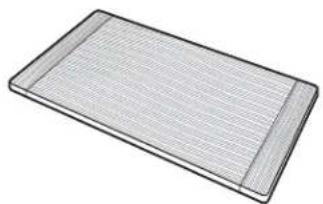
3D rendering of a rectangular metal grate or filter with horizontal ridges (no text or symbols)Grill grate, frame and baffle (on some models)
The IR Grill should be cleaned immediately after each use.
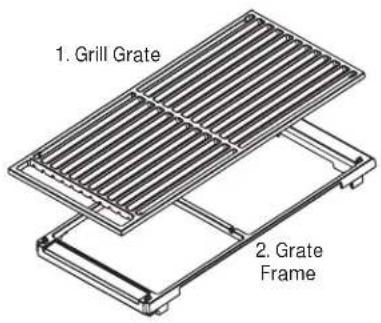
1. Clean the Grill Grate:
Turn the burner to OFF. Use a barbecue mitt to remove the hot grill grate. Place the grill grate in a basin or sink and scrub with a brass bristle brush. Rinse frequently.
The grill grate may also be cleaned in the oven during the self-cleaning cycle, or, it can be cleaned in the dishwasher.
2. Clean the Grill Grate Frame:
The grill grate frame can be cleaned by hand or in the dishwasher. Do not clean the grill grate frame in a self-cleaning oven. The grill grate frame has rubber pads on each bottom corner. Be careful not to damage the pads during the cleaning process.
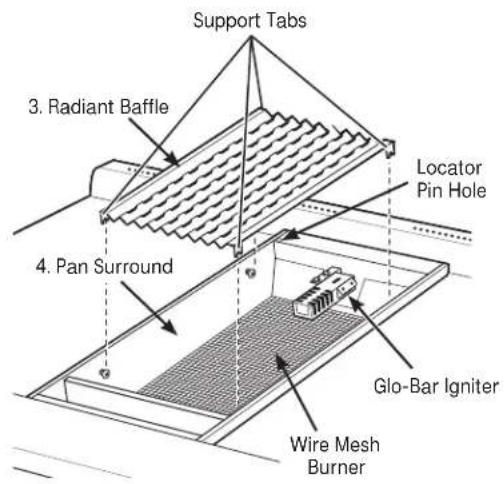
3. Clean the Radiant baffle:
Lift the baffle out of the pan. Clean the baffle with hot soapy water or in the dishwasher.
4. Clean the Pan Surround, Wire Mesh:
The pan surround and wire mesh cannot be removed. Clean them in place. Use a soft damp cloth to clean the pan surround. Gently brush food particles into the grease trough or use a vacuum cleaner for excess debris.
IMPORTANT: Keep the grill burner and ceramic igniter dry. Do not spray water or cleaner directly onto the wire mesh or igniter. Avoid contact with the igniter, it is fragile and can chip or break.
Reassemble the Grill:
Reverse the steps above to reassemble the grill. The radiant baffle support tabs should engage the pins on the side of the pan surround. Replace the grate frame. Be sure to engage the bottom locator pin with the pin hole at the left rear side of the pan. Replace the grill grate with the handle end towards the front of the range.
Review the troubleshooting tips on the following pages first and you may not need to call for service.
| PROBLEM POSSIBLE CAUSE | |
| OVEN WILL NOT • A fuse in your home may be blown or the circuit breaker tripped.WORK • The oven controls are not properly set.• The oven controls are set for cleaning. If necessary, allow the oven to cool; then open the door.• Make sure the Oven Mode Selector is set to BAKE and the Temperature knob is set to a temperature. | |
| OVEN LIGHT(S) • The light bulb is defective. Replace the bulb.DO NOT WORK • The oven is self-cleaning or the Sabbath feature is set. The oven lights do not come on during self-cleaning or if the Sabbath feature is set.• The oven is set for Proof mode. The lights cycle on and off as necessary to maintain Proof temperature. | |
| FOOD DOES NOT • The oven controls are improperly set. See the Baking or Roasting section.BAKE OR ROAST • Oven not preheated for a long enough time; wait for the oven to signal preheat.PROPERLY • Incorrect cookware or cookware of improper size being used. See Baking Tips.• Racks in the wrong position. See the Baking or Roasting section.• Use a foil tent to slow down browning during roasting.• Oven thermostat needs adjustment. See the Oven thermostat adjustment section. | |
| FOOD DOES NOT • This model is designed for closed door broiling only. Close the door. Always BROIL PROPERLY broil with the door closed.• The oven controls are not set at BROIL. See the Broiling section.• The probe is plugged into the outlet in the oven. Remove the probe from the oven.• Improper rack position being used.• Cookware is not suited for broiling. Use the broiling pan and grid that came with your oven.• Aluminum foil used on the broiling pan and grid has not been fitted properly and slit as recommended. | |
| OVEN WILL NOT • The oven temperature is too high to set a self-clean operation.SELF CLEAN• Allow the oven to cool below the locking temperature and reset the controls.• The controls are not properly set. See the Self-Cleaning Oven section. | |
| CRACKING OR • This is normal. This is the sound of the metal heating and coolingPOPPING SOUND during both the cooking and cleaning functions.DURING CLEANING | |
| EXCESSIVE SMOKING OCCURS DURING CLEANING | • The oven is heavily soiled. Turn the Oven Mode Selector and the Temperature knobs to OFF. Open the windows to rid the room of smoke. Wait until the locked door indicator light goes off. Wipe up excess soil and reset the clean cycle. |
| OVEN NOT CLEAN AFTER A CLEAN CYCLE• The oven controls are not properly set. See the Self-Cleaning Oven section. | • The oven was heavily soiled. Clean up heavy spillovers before starting the clean cycle. Heavily soiled ovens may need to self-clean again.• Oven is connected to a 208V electrical supply. Set your cleaning time for 5 hours.• The oven controls are not properly set. See the Self-Cleaning Oven section. |
| OVEN RACKS ARE DIFFICULT TO SLIDE | • The racks were cleaned in the self-clean cycle and now need periodic lubrication. Do not spray with a cooking spray or other lubricant sprays. See Full extension oven racks in the Care and Cleaning section. |
PROBLEM POSSIBLE CAUSE
| TIMER DOES NOT WORK | The timer cannot be used while the oven is self-cleaning. |
| OVEN • Oven thermostatTEMPERATURETOO HOT ORTOO COLD | needs adjustment. See the Oven thermostatadjustment section. |
| OVEN DOOR WILLNOT OPEN AFTERA CLEAN CYCLE | • The oven is too hot. Allow the oven to cool below locking temperature. |
| "CLOSE door" • The self-clean cycle has been selected but the door is not closed.Scrolls IN Close the oven door. The symbol will appear in the display.THE DISPLAY | |
| IS ON WHEN YOU WANT TO COOKand the Temperature knobs to OFF. Allow the oven to cool. | • The oven door is locked because the temperature inside the oven hasnot dropped below the locking temperature. Turn the Oven Mode Selector |
| F- AND A NUMBERFLASH IN THE DISPLAYoven back into operation.• Disconnect all power to the oven for 30 seconds and then reconnectpower. If the function error code repeats, call for service. | • The oven has a function error code. Turn the Oven Mode Selector and theTemperature knobs to OFF. Allow the oven to cool for one hour. Put the |
| DISPLAY GOES BLANK• A fuse in your home maybe blown or the circuit breaker tripped.Replace the fuse or reset the circuit breaker. | • The display is blank when the oven or timer is not in use. |
| UNABLE TO GETTHE DISPLAY TOSHOW "SF" | • The TIMER and the MINI-KNOB buttons must be pushed at thesame time and held for 4 seconds. |
| "PROBE" APPEARSIN THE DISPLAY | • This is reminding you to enter a probe temperature after plugging inthe probe. Enter a probe temperature. |
| SHOWS IN DISPLAY | • The Sabbath mode has been selected. |
| POWER OUTAGEReset. Turn the Temperature knob and the Oven Mode Selector to OFF.Reset the controls to begin again. | • If the oven was in use during a power outage or surge, the oven must bereset. |
| STEAM FROMTHE VENTcooked increases, the amount of visible steam will increase. | • When using the convection mode, it is normal to see steam comingout of the oven vent. As the number of racks or amount of food being |
| BURNING OROILY ODOREMITTING FROMTHE VENT | • This is normal in a new oven and will disappear in time. |
| STRONG ODORoven is normal for the first few times the oven is used. | • This is temporary. An odor from the insulation around the inside of the |
| FAN NOISE | • A cooling fan or a convection fan (depending on the function you are using)may turn on. This is normal. The cooling fan will turn on to cool internalparts. It may run after the oven is turned off. The convection fan may cycleon and off until the function is over or the door is opened. |
PROBLEM POSSIBLE CAUSE
| BURNERS DO NOT • Electrical plug is not plugged into a live power outlet.LIGHT OR SPARK • Gas not turned on.RANDOMLY • Burner parts not replaced correctly.• Holes in the simmer rings or slits in the burner rings are clogged.• Clogged orifice, or wet burners or electrodes. | |||
| BURNERS HAVE • Burner parts not replaced correctly.YELLOW ORYELLOW-TIPPEDFLAMES | 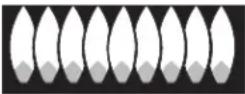 |  |  |
| A. Yellow flames: Call for service. | B. Yellow tips on outer cones: Normal for LP gas. | C. Soft blue flames: Normal for natural gas. | |
| • If burner flames look like (A), call for service. Normal burner flames should look like (B) or (C), depending on the type of gas. | |||
| BURNER FLAMES • The range may be connected to the wrong fuel type. Contact theVERY LARGE person who installed your range or made the conversion.OR YELLOW | range may be connected to the wrong fuel type. Contact theVERY LARGE person who installed your range or made the conversion. | ||
| BURNER CONTROLKNOB WILL NOTTURN direction. When the knob is at any other position, it can be turned in a counterclockwisein either direction without being pushed inwards. | • When the knob is at the OFF position, it must be pushed in before it can be turned, and it can only be turned in a counterclockwise | ||
With the purchase of your new Monogram appliance, receive the assurance that if you ever need information or assistance from GE, we'll be there. All you have to do is call—toll-free!
GE Answer Center®
In the USA: 800.626.2000
Whatever your question about any Monogram major appliance, GE Answer Center® information service is available to help. Your call—and your question—will be answered promptly and courteously. Call the GE Answer Center® Monday to Friday, 8 a.m. to 10 p.m. EST, and Saturday, 8 a.m. to 7 p.m. EST.
OR
Visit our Website at: monogram.com
In Canada, call 800.561.3344.
In-Home Repair Service
In the USA: 800.444.1845
In Canada: 800.561.3344
A GE consumer service professional will provide expert repair service, scheduled at a time that's convenient for you. To schedule service, call Monday to Friday, 7 a.m. to 10 p.m. EST, or Saturday and Sunday, 8 a.m. to 6 p.m. EST. Many GE Consumer Service company-operated locations offer you service today or tomorrow, or at your con venience. Our factory-trained technicians know your appliance inside and out—so most repairs can be handled in just one visit.
In Canada: Monday to Friday, 7 a.m. to 8 p.m. and Saturday, 8 a.m. to 5 p.m. EDST.
For Customers With Special Needs...
In the USA: 800.626.2000
GE offers, free of charge, a brochure to assist in planning a barrier-free kitchen for persons with limited mobility.
Consumers with impaired hearing or speech who have access to a TDD or a conventional teletypewriter may call 800.TDD.GEAC (800.833.4322) to request information or service.
Service Contracts
In the USA: 800.626.2224
In Canada: 800.561.3344
You can have the secure feeling that GE Consumer Service will still be there after your warranty expires. Purchase a GE contract while your warranty is still in effect and you'll receive a substantial discount. With a multiple -year contract, you're assured of future service at today's prices.
Parts and Accessories
In the USA: 800.626.2002
In Canada: 800.561.3344
Individuals qualified to service their own appliances can have parts or accessories sent directly to their home. The GE parts system provides access to over 47,000 parts...and all GE Genuine Renewal Parts are fully warranted. VISA, MasterCard and Discover cards are accepted.
User maintenance instructions contained in this manual cover procedures intended to be performed by any user. Other servicing generally should be referred to qualified service personnel. Caution must be exercised, since improper servicing may cause unsafe operation.
YOUR MONOGRAM RANGE WARRANTY
Staple sales slip or cancelled check here. Proof of original purchase date is needed to obtain service under warranty. Please have serial number and model number available when calling for service.
WHAT IS COVERED
LIMITED TWO-YEAR WARRANTY
For two years from date of original purchase, we will provide, free of charge, parts and service labor in your home to repair or replace any part of the range that fails because of a manufacturing defect.
LIMITED FIVE-YEAR WARRANTY
For five years from the date of original purchase, we will provide, free of charge, replacement gas surface burners if they fail in normal household use. (The grill, griddle and oven burners are not included.) You pay for the service trip to your home and all service labor charges.
LIMITED LIFETIME WARRANTY
For the lifetime of the gray porcelain enamel oven racks, we will provide, free of charge, replacement racks if they fail in normal household use. You pay for the service trip to your home and all service labor charges.
This warranty is extended to the original purchaser and any succeeding owner for products purchased for ordinary home use in the 48 mainland states, Hawaii and Washington, D.C. In Alaska the warranty is the same except that it is LIMITED because you must pay to ship the product to the service shop or for the service technician's travel costs to your home.
All warranty service will be provided by our Factory Service Centers or by our authorized Customer Care® servicers during normal working hours.
Should your appliance need service, during warranty period or beyond, in the U.S.A. call 800.444.1845. In Canada: 800.561.3344
WHAT IS NOT COVERED
- Service trips to your home to teach you how to use the product.
• Discoloration of the griddle plate or oven racks. - Chipping of porcelain enamel grates or oven racks.
- Replacement of house fuses or resetting of circuit breakers.
- Incidental or consequential damage caused by possible defects with this appliance.
- Damage after delivery.
-
Damage to the product caused by accident, fire, floods or acts of God.
-
Failure of the product if it is used for other than its intended purpose or used commercially.
- Improper installation, delivery or maintenance.
If you have an installation problem, contact your dealer or installer. You are responsible for providing adequate electrical, gas, exhausting and other connecting facilities as described in the Installation Instructions provided with the product.
- Product not accessible to provide required service.
EXCLUSION OF IMPLIED WARRANTIES—Your sole and exclusive remedy is product repair as provided in this Limited Warranty. Any implied warranties, including the implied warranties of merchantability or fitness for a particular purpose, are limited to one year or the shortest period allowed by law.
Some states do not allow the exclusion or limitation of incidental or consequential damages, so the above limitation or exclusion may not apply to you. This warranty gives you specific legal rights, and you may also have other rights which vary from state to state.
To know what your legal rights are in your state, consult your local or state consumer affairs office or your state's Attorney General.
Warrantor: General Electric Company, Louisville, KY 40225
Table des matières
Cuisson en surface
Brûleurs 53
Plaque chauffante 57
Ustensiles 54
Four
Commandes....52,59,62,63, ....66,68,69
Instructions relatives
Plaque chauffante 79
Porte du four
natural_image
Line drawing of a rectangular metal frame with slots and two protruding clips, no text or symbols present.Plinthe
natural_image
Pure architectural diagram of a symmetrical window with four lattice panels, no text or symbols presentnatural_image
Pure geometric pattern with interlocking diamond shapes (no text or symbols)natural_image
Simple line drawing of a cooking pan with a crossed-out black X mark, placed on a flame (no text or symbols)natural_image
Technical line drawing of a symmetrical geometric pattern with interlocking shapes (no text or symbols)Face du wok
Face plate
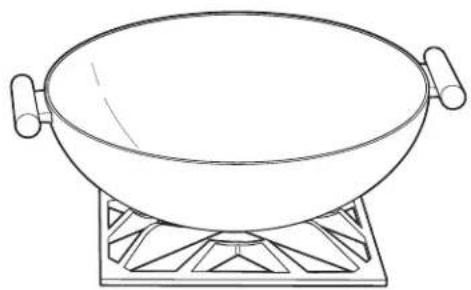
natural_image
Line drawing of a wok on a heating element (no text or symbols)natural_image
Technical diagram of a kitchen or oven structure showing internal components and a magnified view of the interior (no text or symbols present)natural_image
Technical line drawing of a rack with multiple bowls and labeled components (A, B, C, D, E), no readable text or symbols beyond labels.natural_image
Line drawing of a kitchen appliance with multiple bowls and a rack, no text or symbols presentnatural_image
Line drawing of a kitchen appliance with a black X symbol indicating a crossed-out or anti-summer condition (no text or symbols present)natural_image
Diagram of a double-bus air vent system with directional arrows indicating airflow or flow (no text or labels)natural_image
Technical line drawing of a mechanical device with no visible text or symbolsPrise de la sonde
natural_image
Illustration of a cylindrical object inside a rectangular frame with a coiled cable extending from it (no text or symbols)natural_image
Technical line drawing of a mechanical switch component (no text or symbols)natural_image
Technical line drawing of a mechanical assembly with no visible text or symbolsnatural_image
Line drawing of a medical instrument with a circular component and a long rod (no text or symbols)Lampes du four
▲MISE EN GARDE:
natural_image
Technical line drawing of a multi-tiered metal shelf assembly with mounting holes and a circular component on the left (no text or symbols)natural_image
Pure technical line drawing of mechanical components without any text, numbers, or symbolsnatural_image
Hand inserting a small object into a wall-mounted device (no text or symbols visible)natural_image
Hand holding a small object with arrows indicating direction, no text or symbols presentnatural_image
Technical line drawing of a coiled metal frame structure with mounting holes (no text or symbols)natural_image
3D rendering of a rectangular grid-patterned object with no visible text or symbolsPROBLÈME CAUSE POSSIBLE
PROBLÈME CAUSE POSSIBLE
PROBLÈME CAUSE POSSIBLE
natural_image
Technical line drawing of a rectangular metal frame with slots and two protruding ports (no text or symbols)Placa de protección
natural_image
Pure architectural window diagram with four lattice panels and a central door (no text or symbols)ZDP364NR, ZDP364LR-4 quemadores y parrilla ZDP364ND, ZDP364LD-4 quemadores y plancha
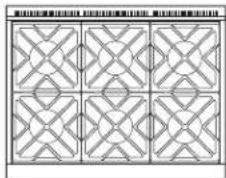
natural_image
Pure geometric pattern with interlocking diamond shapes (no text or symbols)ZDP366N, ZDP366L 6 quemadores a gas
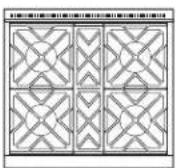
ZDP304N, ZDP304L
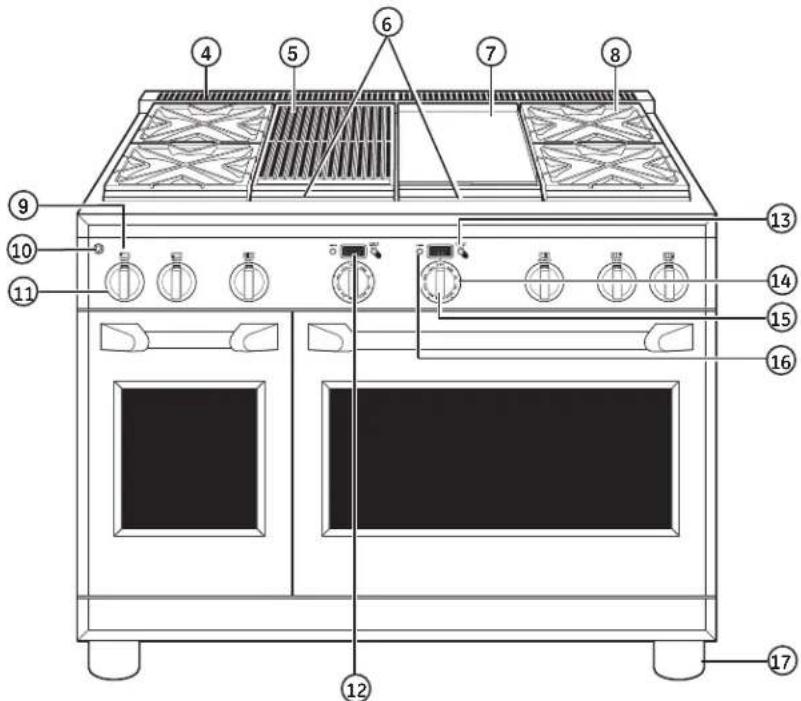
natural_image
Simple line drawing of a cooking pot with a crossed X mark on its side, placed on a flame (no text or symbols)natural_image
Technical line drawing of a symmetrical geometric pattern with interlocking shapes (no text or symbols)natural_image
Line drawing of a wok on a heating pot (no text or symbols)natural_image
Technical line drawing of a mechanical assembly with an inset showing a magnified detail of internal components (no text or symbols)natural_image
Line drawing of a kitchen appliance with multiple bowls and a rack, no text or symbols presentnatural_image
Diagram of a double-lane ventilation system with airflow paths and ventilation ducts (no text or labels)natural_image
Technical line drawing of a mechanical device with no visible text or symbolsSalida de la sonda
natural_image
Illustration of a cylindrical object inside a rectangular frame with a cable inserted, no text or symbols present.natural_image
Five-pointed star symbol with a central letter 'K' (no additional text or symbols)natural_image
Technical line drawing of a mechanical switch component (no text or symbols)natural_image
Technical line drawing of a mechanical assembly with grid-like components (no text or symbols)natural_image
Line drawing of a medical or laboratory instrument with a circular component and a long handle (no text or symbols)Luces del horno
natural_image
Technical line drawing of a multi-tiered metal shelf assembly with mounting holes (no text or symbols)natural_image
Pure technical line drawing of mechanical components without any text, numbers, or symbolsnatural_image
Hand inserting a small object into a wall-mounted device (no text or symbols visible)Para reemplazar:
natural_image
Hand holding a tool with an arrow pointing to a vertical bar (no text or symbols)natural_image
Technical line drawing of a multi-tiered metal shelf assembly with mounting holes and structural details (no text or symbols)natural_image
Architectural cross-section diagram showing structural elements and roof panels (no text or labels)Plancha
natural_image
3D rendering of a rectangular grid-patterned object with no visible text or symbolsPROBLEMA CAUSA POSIBLE
PROBLEMA CAUSA POSIBLE
PROBLEMA CAUSA POSIBLE
Garante: General Electric Company, Louisville, KY 40225
- Care and Cleaning
- Consumer Services
- IMPORTANT SAFETY NOTICE
- ⚠ WARNING: SAFETY PRECAUTIONS
- ▲ WARNING:
- ▲ WARNING: SAFETY PRECAUTIONS
- ⚠️ CAUTION: The inside surface of the oven may be hot when the door is opened.
- ▲ WARNING: SURFACE COOKING SAFETY PRECAUTIONS
- ▲WARNING: SURFACE COOKING SAFETY PRECAUTIONS
- ⚠ WARNING: OVEN SAFETY PRECAUTIONS
- ▲ WARNING: SELF-CLEANING OVEN
- Design information
- Electronic ignition & automatic reignition
- To light a surface burner
- Dual-flame stacked burners
- Simmering:
- Cooking:
- How to select flame size
- Wok cooking
- Grill safety precautions
- ⚠ WARNING: Do not leave the IR grill unattended at any time.
- Grease Flare-ups:
- Grill Cover:
- Cookware:
- Using the IR grill
- Grill grates (on some models)
- Grill radiant baffle
- Griddle safety precautions, leveling
- ⚠ WARNING: Do not allow the airflow from the griddle flue cover to be obstructed by cookware or towels.
- Season the griddle
- Before using the griddle for the first time, it must be seasoned.
- Using the griddle
- CAUTION: To avoid possible
- To remove a rack:
- To replace a rack:
- Introduction to broiling
- Convection Broil:
- Broiling guide
- Aluminum foil
- Introduction to convection cooking
- Cookware for convection cooking
- Adapting recipes
- Convection roasting tips
- How to set the oven for proofing
- Self-cleaning safety precautions
- How to set the oven for cleaning
- After a clean cycle
- Timer
- To set the timer:
- To cancel the timer:
- To adjust the timer after start:
- Oven thermostat adjustment
- To adjust the oven thermostat:
- Sabbath mode
- To set the Sabbath mode:
- To Cancel the Sabbath Mode:
- Control panel and knobs
- Oven heating elements
- Broiler pan, grid and roasting rack
- Oven racks
- Lift-off oven door
- To remove the door:
- To replace the door:
- Probe
- Oven lights
- To remove:
- To replace:
- NOTE: Higher wattage bulbs will damage your oven.
- ⚠ CAUTION: DO NOT OPERATE THE BURNER WITHOUT ALL BURNER PARTS IN PLACE.
- To remove the burner parts:
- Cleaning
- After Cleaning
- To replace the burner parts:
- Spark igniter and electrodes
- Burner grates
- Grease troughs
- Griddle
- Cutting board
- Clean the Grill Grate:
- Clean the Grill Grate Frame:
- Clean the Radiant baffle:
- Clean the Pan Surround, Wire Mesh:
- Reassemble the Grill:
- With the purchase of your new Monogram appliance, receive the assurance that if you ever need information or assistance from GE, we'll be there. All you have to do is call—toll-free!
- SHALLOW WIDTH 4mm IN 1 WITH DRAIN DRAW.
- SHOLDS AND BE UNREGATED
- YOUR MONOGRAM RANGE WARRANTY
- Staple sales slip or cancelled check here. Proof of original purchase date is needed to obtain service under warranty. Please have serial number and model number available when calling for service.
- WHAT IS COVERED
- LIMITED TWO-YEAR WARRANTY
- LIMITED FIVE-YEAR WARRANTY
- LIMITED LIFETIME WARRANTY
- WHAT IS NOT COVERED
- Table des matières
- Cuisson en surface
- Four
- Lampes du four
- ▲MISE EN GARDE:
- Luces del horno
- Plancha
Brand : Monogram
Model : ZDP364NRPSS
Category : Cooker